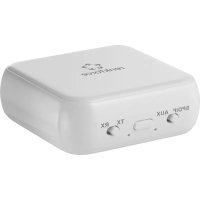
RFBTR200 - Receiver Renkforce - Free user manual and instructions
Find the device manual for free RFBTR200 Renkforce in PDF.



| Product type | 2-in-1 Bluetooth audio adapter (transmitter/receiver) |
| Model | RFBTR200 (Bluetooth name: RF-BTR-150) |
| Brand | Renkforce |
| Bluetooth version | 5.0 |
| Transmission frequency | 2402 - 2480 MHz |
| Transmission power | 4 dBm |
| Bluetooth range | Approximately 8 meters (without obstruction) |
| Audio connector | 3.5 mm jack socket (AUX input in TX mode, AUX output in RX mode) |
| Power supply | Built-in rechargeable Li-Ion polymer battery, 3.7 V, 450 mAh, 1.665 Wh |
| Charging voltage/current | 5 V/DC, 300 mA (micro USB) |
| Charging time | Approximately 2 hours |
| Operating time in transmission (TX) | Up to 12 hours |
| Operating time in reception (RX) | Up to 12 hours |
| Standby time | Approximately 6 months |
| Dimensions (L x W x H) | 71 x 51 x 14.7 mm |
| Weight | 37 g |
| Housing material | Black ABS |
| Operating conditions | -10 to +45 °C, 10 to 85 % RH (non-condensing) |
| Storage conditions | -20 to +65 °C, 10 to 85 % RH (non-condensing) |
| Package contents | Adapter, micro USB cable, 3.5 mm AUX cable, instruction manual |
| Main functions | Wireless audio transmission and reception, Bluetooth pairing, hands-free kit, built-in microphone, volume and track controls |
| Maintenance and cleaning | Wipe with a soft, dry cloth. Do not use harsh chemicals or alcohol. Disconnect before cleaning. |
| Safety | Indoor use only. Do not expose to moisture. Built-in battery is not replaceable. Do not open or repair yourself. |
| Spare parts and repairability | No detachable parts available. Repair by a qualified technician only. |
Frequently Asked Questions - RFBTR200 Renkforce
User questions about RFBTR200 Renkforce
0 question about this device. Answer the ones you know or ask your own.
Ask a new question about this device
Download the instructions for your Receiver in PDF format for free! Find your manual RFBTR200 - Renkforce and take your electronic device back in hand. On this page are published all the documents necessary for the use of your device. RFBTR200 by Renkforce.
USER MANUAL RFBTR200 Renkforce
2-in-1 Bluetooth Audioadapter
Best.-Nr. 2543966
CE
GB Operating Instructions
Bluetooth Music Transmitter and Receiver 2-in-1 Bluetooth Audio Adapter
Item No. 2543966
CE
1 Intended use
This 2-in-1 Bluetooth audio adapter connects your traditional wired headphones, speakers. TV or audio system with your smartphone or Bluetooth audio devices so you can stream audio and music wirelessly. Switch the device between Bluetooth Transmitting Mode (TX) or Receiving Mode (RX) with the slide of a switch. This product features advanced Bluetooth 5.0 technology, a built-in rechargeable battery, and a compact design for easy portability.
The product is intended for indoor use only. Do not use it outdoors. Contact with moisture must be avoided under all circumstances.
If you use the product for purposes other than those described, the product may be damaged. Improper use can result in short circuits, fires, or other hazards.
The product complies with the statutory national and European requirements. For safety and approval purposes, you must not rebuild and/or modify the product.
Read the operating instructions carefully and store them in a safe place. Make this product available to third parties only together with the operating instructions.
All company names and product names are trademarks of their respective owners. All rights reserved.
2 Delivery content
x Bluetooth music transmitter & receiver
x Micro-USB charging cable
x Male to male 3.5 mm AUX cable
x Operating instructions
3 Latest product information
Download the latest product information at www.conrad.com/downloads or scan the QR code shown. Follow the instructions on the website.
4 Description of symbols
The following symbols are on the product/appliance or are used in the text:

The symbol wams of hazards that can lead to personal injury.

This product must only be used in dry, enclosed indoor areas. It must not become damp or wet.
5 Safety instructions

Read the operating instructions carefully and especially observe the safety information. If you do not follow the safety instructions and information on proper handling in this manual, we assume no liability for any resulting personal injury or damage to property. Such cases will invalidate the warranty/guarantee.
5.1 General information
The device is not a toy. Keep it out of the reach of children and pets.
Do not leave packaging material lying around carelessly. This may become dangerous playing material for children.
If you have questions which remain unanswered by these operating instructions, contact our technical support service or other technical personnel.
Maintenance, modifications and repairs must only be completed by a technician or an authorised repair centre.
5.2 Handling
Please handle the product carefully. Jolts, impacts or a fall even from a low height can damage the product.
5.3 Operation
Improper use of this product can result in damage to the product or connected devices.
Consult an expert when in doubt about the operation, safety or connection of the appliance.
it is no longer possible to operate the product safely, take it out of operation and protect it from any accidental use. DO NOT attempt to repair the product yourself. Safe operation can no longer be guaranteed if the product:
- is visibly damaged,
- is no longer working properly,
– has been stored for extended periods in poor ambient conditions or
– has been subjected to any serious transport-related stresses.
5.4 Operating environment
Do not place the product under any mechanical stress.
Protect the product from extreme temperatures, strong jolts, flammable gases, steam and solvents.
Protect the product from high humidity and moisture.
Protect the product from direct sunlight.
5.5 Li-ion battery
The rechargeable battery is permanently built into the product and cannot be replaced.
Never damage the rechargeable battery. Damaging the casing of the rechargeable battery might cause an explosion or a fire!
Never short-circuit the contacts of the rechargeable battery. Do not throw the battery or the product into fire. There is a danger of fire and explosion!
Charge the rechargeable battery regularly, even if you do are not using the product. Due to the rechargeable battery technology being used, you do not need to discharge the rechargeable battery first.
Never charge the rechargeable battery of the product unattended.
When charging, place the product on a surface that is not heat-sensitive. It is normal that a certain amount of heat is generated during charging.
5.6 Connected devices
Also observe the safety and operating instructions of any other devices which are connected to the product.
6 Product overview
6.1 Product
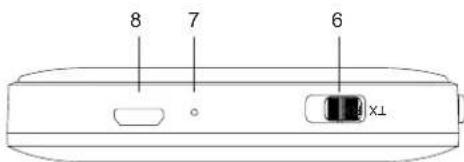
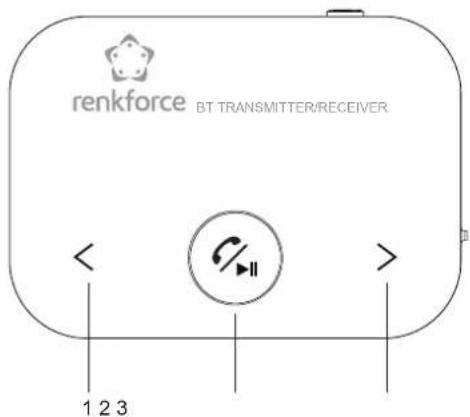
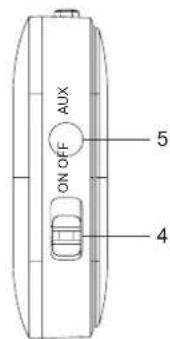
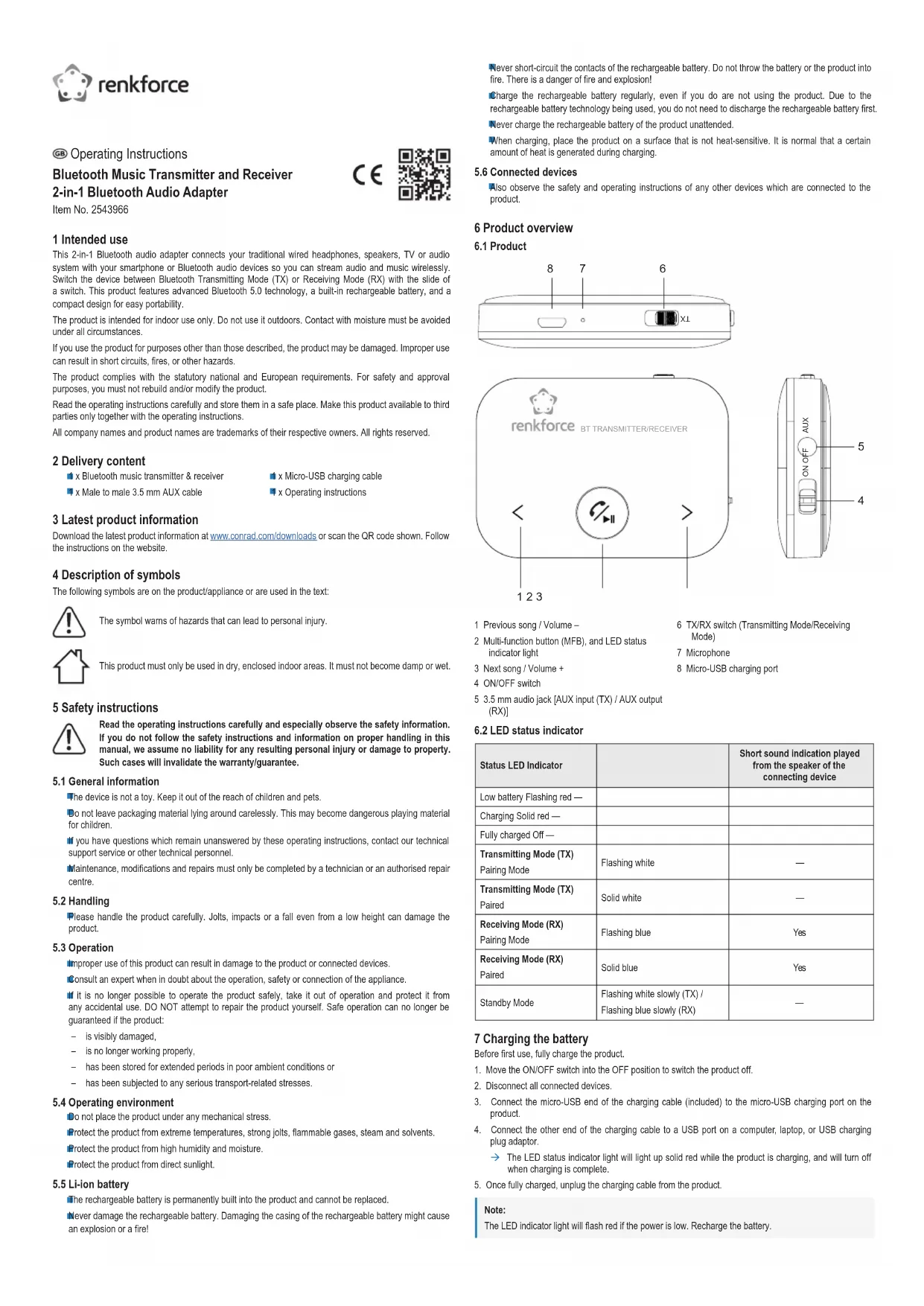
1 Previous song / Volume –
2 Multi-function button (MFB), and LED status indicator light
3 Next song / Volume +
4 ON/OFF switch
5 3.5 mm audio jack [AUX input (TX) / AUX output (RX)]
6 TX/RX switch (Transmitting Mode/Receiving Mode)
7 Microphone
8 Micro-USB charging port
6.2 LED status indicator
| Status LED Indicator | Short sound indication played from the speaker of the connecting device | |
| Low battery Flashing red — | ||
| Charging Solid red — | ||
| Fully charged Off — | ||
| Transmitting Mode (TX) Pairing Mode | Flashing while | — |
| Transmitting Mode (TX) Paired | Solid white | — |
| Receiving Mode (RX) Pairing Mode | Flashing blue | Yes |
| Receiving Mode (RX) Paired | Solid blue | Yes |
| Standby Mode | Flashing white slowly (TX) / Flashing blue slowly (RX) | — |
7 Charging the battery
Before first use, fully charge the product.
- Move the ON/OFF switch into the OFF position to switch the product off.
- Disconnect all connected devices.
- Connect the micro-USB end of the charging cable (included) to the micro-USB charging port on the product.
- Connect the other end of the charging cable to a USB port on a computer, laptop, or USB charging plug adaptor.
→ The LED status indicator light will light up solid red while the product is charging, and will turn off when charging is complete.
- Once fully charged, unplug the charging cable from the product.
Note:
The LED indicator light will flash red if the power is low. Recharge the battery.
8 Bluetooth Transmitting Mode (TX)
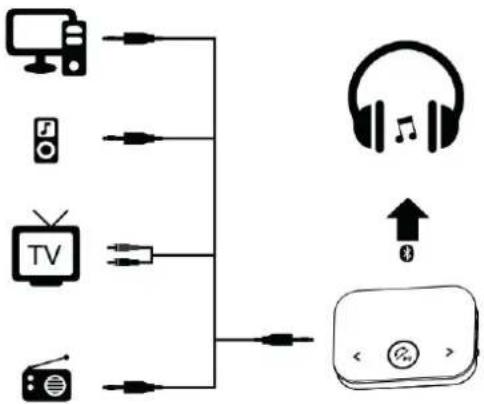
Select this mode to transmit audio wirelessly from a traditional wired audio device (such as an older TV, MP3/MP4 player, CD/DVD player, or computer) to your Bluetooth headphones or speakers.
flowchart
graph TD
    A["TV"] -->|USB| B["Radio"]
    C["Mac"] -->|USB| D["Radio"]
    E["Television"] -->|USB| F["Radio"]
    G["Headphones"] -->|USB| H["Remote Control"]
    I["Switch"] -->|USB| J["Remote Control"]
Note:
The 3.5 mm AUX to 2-male RCA adapter cable for TV shown is for illustrative purposes and not included with this product. It depends on the connection supported by your TV.
8.1 Connecting the playback device
- Move the ON/OFF switch into the OFF position to switch the product off.
- Plug the 3.5 mm AUX cable (included) into the 3.5 mm audio jack on the product.
- Plug the other end of the AUX cable into the headphone jack on your TV, CD player, or computer.
8.2 Pairing with your Bluetooth headphones or speakers
The product connects to one Bluetooth device at a time.
The product will automatically turn off after 10 minutes if there is no Bluetooth connection with a device.
Pairing a new device
- Set your Bluetooth headphones or speakers into Pairing Mode, and place it next to the product.
- Slide the TX/RX switch to the TX (Transmitting Mode) position.
- Then slide the ON/OFF switch to the ON position to turn the product on.
→ The product will automatically enter Pairing Mode and search for Bluetooth devices available for pairing. The devices will pair automatically.
→ The LED indicator light will flash white during pairing and turn solid white when pairing is successful.
→ If pairing is not established, restart the process to try again.
→ If successfully paired, the connection will be automatic the next time the paired devices are turned on within range and Bluetooth is enabled.
Reconnecting with the paired device or resetting the pairing
The product automatically connects to the last paired device.
If the product and a paired device cannot reconnect automatically, long press the MFB button once to search and reconnect with the paired device.
If you are still experiencing connection issues, or you need to pair a new Bluetooth device, turn off your Bluetooth headphones or speakers. Long press the MFB button on the product to reset the connection, and start the pairing process again.
8.3 Playing back audio
After you have paired the product with the Bluetooth receiving device and connected the playback device, you can play back audio.
- To play back audio, refer to the Quick Guide section.
- Once finished using the product, slide the ON/OFF switch to the OFF position and unplug the product from the audio device.
9 Bluetooth Receiving Mode (RX)
Use this mode to receive audio wirelessly in your wired headphones, speakers, car audio system, or home stereo, from your smartphone or Bluetooth audio device.
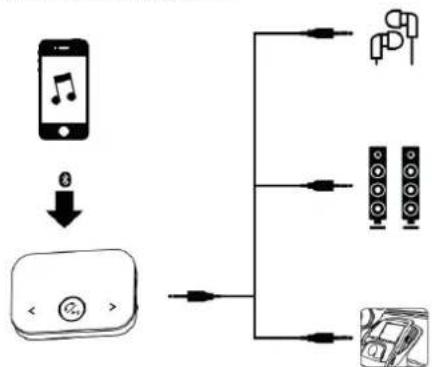
flowchart
graph TD
    A["Smartphone"] -->|Signal| B["App Icon"]
    B --> C["Output"]
    D["Speaker"] --> E["Device 1"]
    D --> F["Device 2"]
    D --> G["Device 3"]
9.1 Connecting the receiving device
- Move the ON/OFF switch into the OFF position to switch the product off.
- Plug the cable of your wired headphones into the 3.5 mm audio jack on the product. Alternatively, plug the 3.5 mm AUX cable (included) into the audio jack on the product.
- Plug the other end of the cable to your wired speaker, car stereo, or home stereo system.
9.2 Pairing with your smartphone or Bluetooth audio device
The product connects to one Bluetooth device at a time.
The product can be paired as a hands-free kit with most compatible Bluetooth enabled devices.
The product will automatically turn off after 10 minutes if there is no Bluetooth connection with a device.
Pairing a new device
- Slide the TX/RX switch to the RX (Receiving Mode) position.
- Then slide the ON/OFF switch to the ON position to turn the product on.
→ The product will automatically enter Pairing Mode if this is the first pairing.
- Turn on Bluetooth on your smartphone or audio device, and place it next to the product.
- On your smartphone or Bluetooth audio device, find RF-BTR-150 in the list of discoverable Bluetooth devices and tap it to connect.
→ The LED indicator light will flash blue during pairing and turn solid blue when pairing is successful.
→ If pairing is not established, restart the process to try again.
→ If successfully paired, the connection will be automatic the next time the paired devices are turned on within range and Bluetooth is enabled.
Pairing a second device
- On your currently paired smartphone or Bluetooth audio device, tap RF-BTR-150 in the Bluetooth list and forget the connection, then turn off Bluetooth.
- Long press the MFB button on the product to enter Pairing Mode.
→ The LED indicator light will flash blue.
- Tum on Bluetooth on your second smartphone or Bluetooth audio device, select RF-BTR-150 in the Bluetooth list to connect with the product.
→ The LED indicator light will turn solid blue when pairing is successful.
9.3 Playing back audio
After you have paired the product with the Bluetooth playback device and connected the receiving device, you can play back music.
- Start playing music from your smartphone or Bluetooth audio device.
- Refer to the Quick Guide section.
- Once finished using the product, slide the ON/OFF switch to the OFF position and unplug the product from the audio device.
10 Quick Guide
| Function Method | |
| Basic operation: | |
| Power on Slide the ON/OFF switch to "ON". | |
| Power off Slide the ON/OFF switch to "OFF". | |
| Bluetooth Transmitting Mode (TX) | Slide the TX/RX switch to "TX". |
| Bluetooth Receiving Mode (RX) | Slide the TX/RX switch to "RX". |
| TRANSMITTING MODE (TX) | |
| Volume - / Volume + Tap and hold "<" or "> " to adjust the volume. | |
| Mute / unmute TV Press the MFB button once. | |
| RECEIVING MODE (RX) | |
| Playing music: | |
| Play / Pause music Press the MFB button once to play, press again to pause. | |
| Skip to Previous / Next song Tap "<" or "> " once. | |
| Volume - / Volume + Tap and hold "<" or "> " to adjust the volume. | |
| Managing calls: | |
| Answer an incoming call Press the MFB button once. | |
| End the call Press the MFB button once during the call. | |
| Switch to private conversation | During the call conversation, press and hold the MFB button for 2 seconds to switch the conversation to your smartphone to continue privately. |
| Reject an incoming call Press and hold the MFB button for 2 seconds. | |
| Last number redial | Press the MFB button twice to automatically call the last number dialled. |
11 Cleaning and care
Important:
- Do not use aggressive cleaning agents, rubbing alcohol or other chemical solutions. They damage the housing and can cause the product to malfunction.
- Do not immerse the product in water. Do not rinse the product under the tap or expose to moisture.
Before cleaning, disconnect the product from the power supply and connected devices.
Wipe the product with a soft, dry cloth.
Store unplugged in a cool and dry place, away from direct sunlight.
12 Disposal
12.1 Product

This symbol must appear on any electrical and electronic equipment placed on the EU market. This symbol indicates that this device should not be disposed of as unsorted municipal waste at the end of its service life.
Owners of WEEE (Waste from Electrical and Electronic Equipment) shall dispose of it separately from unsorted municipal waste. Spent batteries and accumulators, which are not enclosed by the WEEE, as well as lamps that can be removed from the WEEE in a non-destructive manner, must be removed by end users from the WEEE in a non-destructive manner before it is handed over to a collection point.
Distributors of electrical and electronic equipment are legally obliged to provide free take-back of waste. Conrad provides the following return options free of charge (more details on our website):
In our Conrad offices
at the Conrad collection points
at the collection points of public waste management authorities or the collection points set up by manufacturers or distributors within the meaning of the ElektroG
End users are responsible for deleting personal data from the WEEE to be disposed of.
It should be noted that different obligations about the return or recycling of WEEE may apply in countries outside of Germany.
12.2 (Rechargeable) batteries
Remove batteries/rechargeable batteries, if any, and dispose of them separately from the product. According to the Battery Directive, end users are legally obliged to return all spent batteries/rechargeable batteries; they must not be disposed of in the normal household waste.

Batteries/rechargeable batteries containing hazardous substances are labelled with this symbol to indicate that disposal in household waste is forbidden. The abbreviations for heavy metals in batteries are: Cd = Cadmium, Hg = Mercury, Pb = Lead (name on (rechargeable) batteries, e.g. below the trash icon on the left).
Used (rechargeable) batteries can be returned to collection points in your municipality, our stores or wherever (rechargeable) batteries are sold. You thus fulfil your statutory obligations and contribute to environmental protection.
Batteries/rechargeable batteries that are disposed of should be protected against short circuit and their exposed terminals should be covered completely with insulating tape before disposal. Even empty batteries/rechargeable batteries can contain residual energy that may cause them to swell, burst, catch fire or explode in the event of a short circuit.
13 Declaration of Conformity (DOC)
Conrad Electronic SE, Klaus-Conrad-Straße 1, D-92240 Hirschau hereby declares that this product conforms to the 2014/53/EU directive.
Click on the following link to read the full text of the EU declaration of conformity: www.conrad.com/downloads
Enter the product item number in the search box. You can then download the EU declaration of conformity in the available languages.
14 Technical data
14.1 Power supply
Charging voltage/current 5 V/DC, 300 mA (Micro-USB)
Battery 1 x Built-in rechargeable Li-ion polymer battery 3.7 V, 450 mAh, 1.665 Wh
Charging time .... approx. 2 hours
14.2 Operating time
Transmitting Mode (TX).....Up to 12 hours
Receiving Mode (RX) ...... Up to 12 hours
Standby time....Approx. 6 months
14.3 Bluetooth
Bluetooth name of device....RF-BTR-150
Bluetooth version....5.0
Transmission frequency.... 2402 - 2480 MHz
Transmission power.... 4 dBm
Bluetooth range ....Approx. 8 metres (unobstructed)
14.4 Audio
Microphone....4.0 x 1.5 mm / -43 db
Audio jack....3.5 mm AUX input/output
14.5 Environment
Operating conditions....-10 to +45 °C, 10 - 85 % RH (non-condensing)
Storage conditions....-20 to +65 °C, 10 - 85 % RH (non-condensing)
14.6 Others
Material......Black ABS shell
Product dimensions (L x W x H)....71 x 51 x 14.7 mm
Weight 37 g
F Mode d'emploi
8 Mode transmission Bluetooth (TX)
www.conrad.com/downloads
Microphone....4,0 x 1,5 mm / -43 db


- 2-in-1 Bluetooth Audioadapter
- GB Operating Instructions
- Bluetooth Music Transmitter and Receiver 2-in-1 Bluetooth Audio Adapter
- Intended use
- Delivery content
- Latest product information
- Description of symbols
- Safety instructions
- General information
- Handling
- Operation
- Operating environment
- Li-ion battery
- Connected devices
- Product overview
- Product
- Charging the battery
- Bluetooth Transmitting Mode (TX)
- Note:
- Connecting the playback device
- Pairing with your Bluetooth headphones or speakers
- Pairing a new device
- Reconnecting with the paired device or resetting the pairing
- Playing back audio
- Bluetooth Receiving Mode (RX)
- Connecting the receiving device
- Pairing with your smartphone or Bluetooth audio device
- Pairing a second device
- Playing back audio
- Cleaning and care
- Important:
- Disposal
- Product
- (Rechargeable) batteries
- Declaration of Conformity (DOC)
- Technical data
- Power supply
- Operating time
- Bluetooth
- Audio
- Environment
- Others
- F Mode d'emploi
- Mode transmission Bluetooth (TX)
Brand : Renkforce
Model : RFBTR200
Category : Receiver