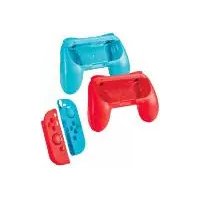
SANS A1 - Video game accessory SILVERCREST - Free user manual and instructions
Find the device manual for free SANS A1 SILVERCREST in PDF.


| Brand | SilverCrest |
| Model | SANS A1 |
| Product type | Accessories set for Nintendo Switch steering wheel |
| Intended use | Accessory for Nintendo Joy-Con controllers, enabling a pro gaming style with a larger and more comfortable grip |
| Steering wheel dimensions (l x h) | 132 × 32.9 mm |
| Dimensions of silicone case (l x h x w) | 102 × 33.8 × 25.6 mm |
| Dimensions of thumb cap (l x h x w) | 17.5 × 17.5 × 5.4 mm |
| Weight of steering wheel | 62 g |
| Weight of silicone case with cap | 12 g |
| Delivery contents | 2 steering wheels, 2 silicone cases with thumb caps, 1 instruction manual |
| Materials | Plastic, silicone |
| Power supply | None (passive mechanical accessory) |
| Compatibility | Nintendo Switch Joy-Con controllers (not included) |
| Main functions | Transform Joy-Con into a steering wheel, reduce hand fatigue during extended sessions |
| Care and cleaning | Clean with a slightly damp soft cloth and a mild cleaner; avoid abrasive products |
| Safety | Risk of suffocation (small parts); do not use near flames; supervision of children under 8 years required |
| Spare parts | Not available individually; no internal parts requiring maintenance |
| Warranty | 3 years from purchase date, covers material and manufacturing defects |
| Availability of parts | Essential spare parts available during the warranty period |
| After-sales service (France) | Tel.: 0800904879, Email: owim@lidl.fr |
| After-sales service (Belgium/Luxembourg) | Tel.: 080071011 (BE), 80023970 (LU), Email: owim@lidl.be |
Frequently Asked Questions - SANS A1 SILVERCREST
User questions about SANS A1 SILVERCREST
0 question about this device. Answer the ones you know or ask your own.
Ask a new question about this device
Download the instructions for your Video game accessory in PDF format for free! Find your manual SANS A1 - SILVERCREST and take your electronic device back in hand. On this page are published all the documents necessary for the use of your device. SANS A1 by SILVERCREST.
USER MANUAL SANS A1 SILVERCREST
NINTENDO SWITCH™ RACING WHEEL & ACCESSORY SET/ LENKRAD-ZUBEHÖRSET FÜR NINTENDO SWITCH™ / SET D'ACCESSIONS POUR VOLANT NINTENDO SWITCH™ SANS A1
DE AT CH
LENKRAD-ZUBEHÖRSET FÜR NINTENDO SWITCHTM
Operation and Safety Notes
FR BE
SET D'ACCESSIONS POUR VOLANT NINTENDO SWITCHTM
GB/IE Operation and Safety Notes Page 21
Warnings and symbols used ..... Page 22
Introduction Page 24
Intended use.. Page 24
Trademark notices.. Page 25
Technical data.. 26
Scope of delivery Page 26
Safety notices.. Page 26
Product setup.. Page 28
Troubleshooting Page 29
Storage when not in use.. Page 30
Cleaning Page 30
Disposal.. Page 31
Warranty and service Page 32
Warranty.. Page 32
Warranty claim procedure...... Page 33
Service.. Page 34
Warnings and symbols used
The symbols shown are used in these instructions for use, on the packaging and on the unit:

DANGER! This symbol with the signal word "DANGER" indicates a hazard with a high level of risk which, if not avoided, will result in serious injury or death.

WARNING! This symbol with the signal word "WARNING" indicates a hazard with a medium level of risk which, if not avoided, could result in serious injury or death.
| CAUTION! This symbol with the signal word "CAUTION" indicates a hazard with a low level of risk which, if not avoided, could result in minor or moderate injury. | |
| ATTENTION! This symbol with the signal word" ATTENTION" indicates a potential property damage, if not avoided, could result in property damage. | |
| NOTE: This symbol with the signal word "NOTE" provides additional useful information. |
NINTENDO SWITCH™ RACING WHEEL & ACCESSORY SET
Introduction
We congratulate you on the purchase of your new product. You have chosen a high quality product. The safety instructions for use are part of the product. They contain important information concerning safety, use and disposal. Before using the product, please familiarise yourself with all of the safety information and instructions for use. Only use the product as described and for the specified applications. If you pass the product on to anyone else, please ensure that you also pass on all the documentation with it.
Intended use
This NINTENDO SWITCH™ RACING WHEEL & ACCESSORY SET (hereinafter called "product") is as
accessory to be used with Nintendo Joy-Con™ controllers. They combine with your Joy-Con™ controllers for a pro-style, larger, easy-to-hold use that you will feel comfortable in your hands. These products reduce hand fatigue during those extended gaming sessions. Nintendo™ Joy-Con™ controllers are not included.
Trademark notices
- The Silvercrest trademark and trade name is the property of their respective owners.
- Nintendo Switch™ and The Nintendo Switch logo and Joy-Con™ are trademarks of Nintendo. This product is not designed, manufactured or endorsed by Nintendo.
- Any other names and products may be trademarks or registered trademarks of their respective owners.
-Technical data
Dimensions (W x H x D):
Steering wheel approx.:
132× 32.9mm
Silicone housing approx.:
102 × 33.8 × 25.6 mm
Thumb cap approx.:
17.5 × 17.5 × 5.4 mm
Weight:
Steering wheel:
62g
Silicone housing with thumb cap:
12g
Scope of delivery
2 Steering wheels
2 Silicone housings with thumb caps
1 Instruction for use

Safetynotices
DANGER! Risk of suffocation! Never leave children unattended with
the packaging material. The packaging material represents a danger of suffocation. Children frequently underestimate the dangers. The packaging material is not a toy.
This product can be used by children aged from 8 years and above and persons with reduced physical, sensory or mental capabilities or lack of experience and knowledge if they have been given supervision or instruction concerning use of the appliance in a safe way and understand the hazards involved. Children shall not play with the appliance. Cleaning and user maintenance shall not be made by children without supervision.
The product must be checked before it i put into operation. A defective or damaged product must not be use.
DANGER! Risk of suffocation! In the content of delivery, there are small parts
that can be swallowed, choking hazard and NOT for children.
The product must not be brought near fire or naked flames, e.g. candles.
Product setup
For Joy-Con (R):
- Place the right Joy-Con controller into the steering wheel slot. (see fig.1)
- Align the "+" sign of the Joy-Con controller with the "+" sign of the steering wheel. (see fig.2)
- Press the Joy-Con controller into the steering wheel slot with two thumbs. (see fig.2)
- Pull out the Joy-Con controller to disassembly.
For Joy-Con (L):
-
Place the left Joy-Con controller into the steering wheel slot. (see fig.4)
-
Align the " - " sign of the Joy-Con controller with the " - " sign of the steering wheel. (see fig.5)
- Press the Joy-Con controller into the steering wheel slot with two thumbs. (see fig.5)
- Pull out the Joy-Con controller to disassembly.
i NOTE: The silicone housing and thumb cap can be used to protect the joy-con when it was taken out from the console or from the steering wheel.
i NOTE: The operating instructions for the Joy-Con controller must be observed.
Troubleshooting
If the Joy-Con controllers do not work properly, make sure that they are inserted correctly.
Storage when not in use
Store the product in a dry interior, away from direct sunlight, preferably in its original packaging.
Cleaning
This product has no internal parts requiring maintenance.
Moisture entering the product may result in damage.
Ensure no moisture enters the product during cleaning to prevent damaging the product beyond repair.
- Do not use abrasive, solvent-based or aggressive cleaners. These can damage the surface of the product.
Only clean the product with a slightly damp cloth and mild washing-up liquid.
Disposal
Packaging:
The packaging is made of environmentally friendly materials, which may be disposed of through your local recycling facilities.
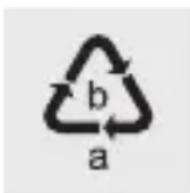
Observe the marking of the packaging materials for waste separation, which
are marked with abbreviations (a) and numbers (b) with following meaning: 1-7: plastics / 20-22: paper and fibreboard / 80-98: composite materials.
Product:

Contact your municipality for information on how to dispose of your worn-out product.
This disposal is free of charge to you.
Protect the environment and dispose of properly.

The product is recyclable, subject to extended manufacturer responsibility,
and collected separately.
Warranty and service
Warranty
The product has been manufactured to strict quality guidelines and meticulously examined before delivery. In the event of product defects you have legal rights against the retailer of this product. Your legal rights are not limited in any way by our warranty detailed below.
The warranty for this product is 3 years from the date of purchase. The warranty period begins on the date of purchase. Please keep the original sales receipt in a safe location. This document is required as your proof of purchase.
Should this product show any fault in materials or manufacture within 3- years from the date of purchase, we will repair or replace it - at our choice - free of charge to you. This warranty becomes void if the product has been damaged, or used or maintained improperly.
The warranty applies to defects in material or manufacture. This warranty does not cover product parts subject to normal wear, thus possibly considered consumables (e.g. batteries) or for damage to fragile parts, e.g. switches, rechargeable batteries or glass parts.
Warrantyclaim procedure
To ensure quick processing of your case, please observe the following instructions:
Please have the till receipt and the item number (IAN 386497_2110) available as proof of purchase.
You will find the item number on the rating plate, an engraving, on the front page of the instructions for use (bottom left), or as a sticker on the rear or bottom of the product.
If functional or other defects occur, please contact the service department listed either by telephone or by e-mail.
You can return a defective product to us free of charge to the service address that will be provided to you. Ensure that you enclose the proof of purchase (till receipt) and information about what the defect is and when it occurred.
Service
GB Service Great Britain
Tel.: 08000569216
E-Mail: owim@lidl.co.uk
IE Service Ireland
Tel.: 1800 200736
E-Mail: owim@lidl.ie
= 0 = 0 = 0 = 0 = 0 = 0 = 0 = 0 = 0 = 0 = 0 = 0 = 0 = 0 = 0 = 0 = 0 = 0 = 0 = 0 = 0 = 0 = 0 = 0 = 0 = 0
Dimensioni (L x A x P)
Volante circa:
132× 32,9mm
Pooblaščeni serviser:
- NINTENDO SWITCH™ RACING WHEEL & ACCESSORY SET/ LENKRAD-ZUBEHÖRSET FÜR NINTENDO SWITCH™ / SET D'ACCESSIONS POUR VOLANT NINTENDO SWITCH™ SANS A1
- LENKRAD-ZUBEHÖRSET FÜR NINTENDO SWITCHTM
- SET D'ACCESSIONS POUR VOLANT NINTENDO SWITCHTM
- WARNINGS AND SYMBOLS USED
- NINTENDO SWITCH™ RACING WHEEL & ACCESSORY SET
- INTRODUCTION
- INTENDED USE
- TRADEMARK NOTICES
- TECHNICAL DATA
- DIMENSIONS (W X H X D)
- WEIGHT
- SCOPE OF DELIVERY
- SAFETYNOTICES
- PRODUCT SETUP
- FOR JOY-CON (R)
- FOR JOY-CON (L)
- TROUBLESHOOTING
- STORAGE WHEN NOT IN USE
- CLEANING
- DISPOSAL
- PACKAGING
- PRODUCT
- THIS DISPOSAL IS FREE OF CHARGE TO YOU
- WARRANTY AND SERVICE
- WARRANTY
- WARRANTYCLAIM PROCEDURE
- SERVICE
- GB SERVICE GREAT BRITAIN
- IE SERVICE IRELAND
- DIMENSIONI (L X A X P)
- POOBLAŠČENI SERVISER
Brand : SILVERCREST
Model : SANS A1
Category : Video game accessory