Prontobar Touch - Coffee machine NUOVA SIMONELLI - Free user manual and instructions
Find the device manual for free Prontobar Touch NUOVA SIMONELLI in PDF.


User questions about Prontobar Touch NUOVA SIMONELLI
0 question about this device. Answer the ones you know or ask your own.
Ask a new question about this device
Download the instructions for your Coffee machine in PDF format for free! Find your manual Prontobar Touch - NUOVA SIMONELLI and take your electronic device back in hand. On this page are published all the documents necessary for the use of your device. Prontobar Touch by NUOVA SIMONELLI.
USER MANUAL Prontobar Touch NUOVA SIMONELLI
EN USER HANDBOOK (Translation of the Original Instructions)
FR MANUEL D'INSTRUCTIONS (Traduction des Instructions Originales)
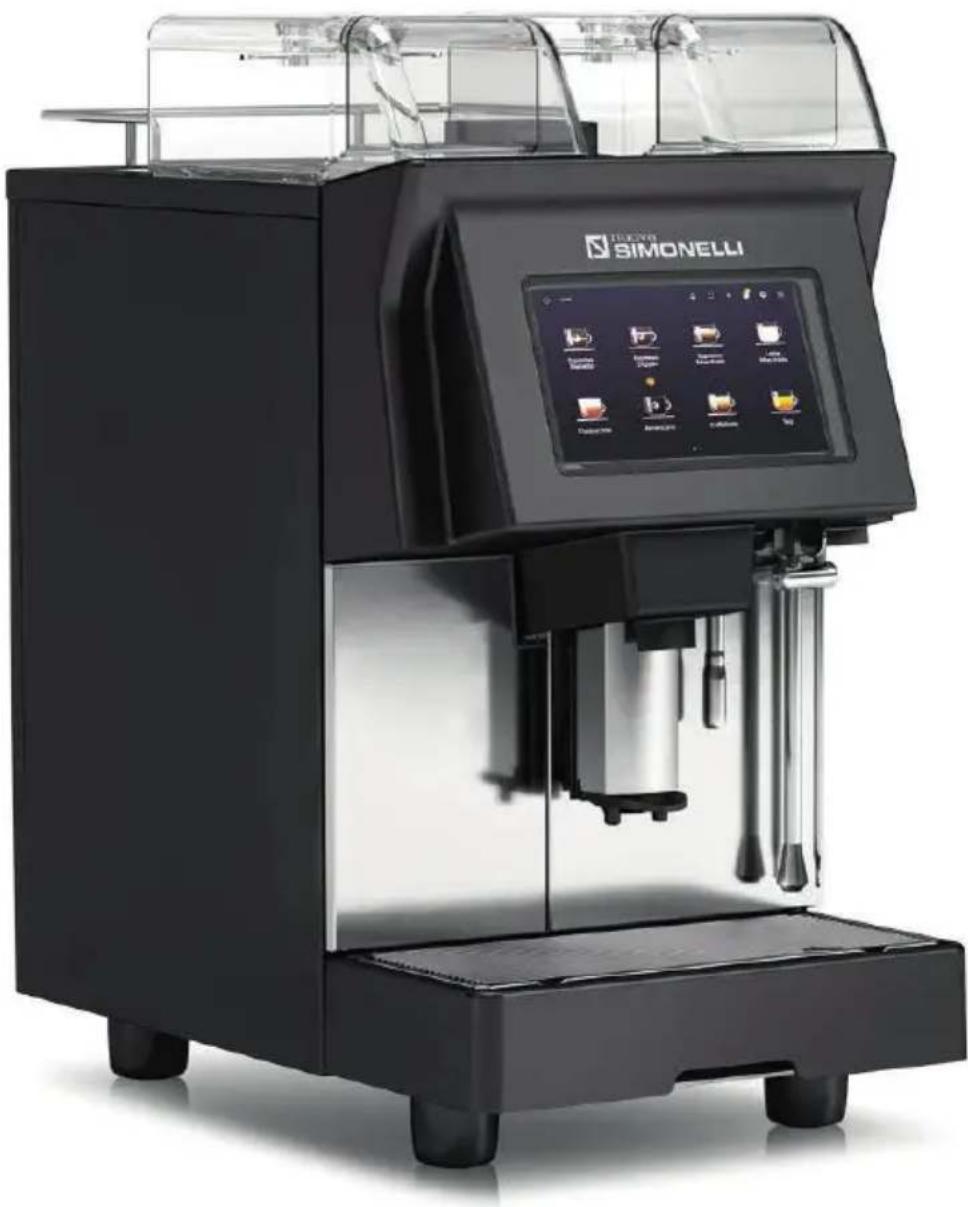
natural_image
Exterior view of a modern black semi-robot coffee machine (SIMONELLI) with control panel and side-mounted buttons (no visible text or symbols on the device itself)3 | PRESCRIZIONI DI SICUREZZA
11 SAFETY INDICATIONS
19 PRESCRIPTIONS DE SÉCURITÉ
27 INFORMAZIONI GENERALI / GENERAL INFORMATIONS
INFORMATIONS GÉNÉRALES
28 DATI TECNICI /TECHNICAL DATA / DONNÉES TECHNIQUES
30 DESCRIZIONE MACCHINA /MACHINE DESCRIPTION
DESCRIPTION DE L'APPAREIL
34 INSTALLAZIONE / INSTALLATION / INSTALLATION
38 REGOLAZIONI DEL TECNICO QUALIFICATO / QUALIFIED TECHNICIAN
ADJUSTMENTS / RÉGLAGES DU TECHNICIEN QUALIFIE
41 UTILIZZO / USE / UTILISATION
48 DISPLAY TOUCH SCREEN / TOUCH SCREEN DISPLAY / ÉCRAN TACTILE
68 PULIZIA / CLEANING / NETTOYAGE
76 RISOLUZIONE PROBLEMI / TROUBLESHOOTING / RÉSOLUTION
PROBLÈMES
78 MANUTENZIONE / MAINTENANCE / MAINTENANCE
81 SCHEMA ELETTRICO / ELECTRICAL DIAGRAM / SCHÉMA ÉLECTRIQUE
natural_image
Symbolic icon of a lightning bolt inside a black circle (no text or numbers present)text_image
Safety warning illustration showing a wrench, warning triangle, and cross symbol over a mountainous landscape with trees.text_image
Diagram of a waste sorting symbol with crossed and unexposed lines and a blank rectangular basetext_image
Safety warning illustration showing a wrench, warning triangle, and cross symbol on a mountainous landscape with trees.natural_image
Technical line drawing of a mechanical device with internal components and mounting base (no text or symbols)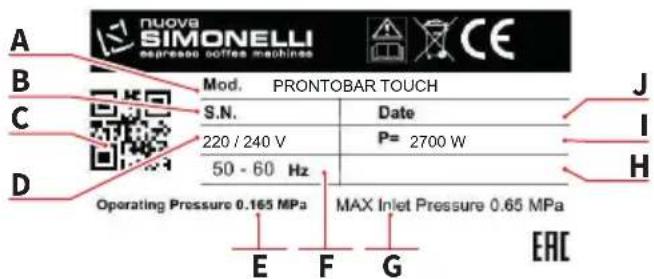
text_image
nuova SIMONELLI expresso coffee machines CE Mod. PRONTOBAR TOUCH S.N. Date 220 / 240 V P= 2700 W 50 - 60 Hz Operating Pressure 0.165 MPa MAX Inlet Pressure 0.65 MPa E F G EAC
text_image
SIMONELLI SIMONELLI- The present manual is an integral and essential part of the product and is to be delivered to the user. Carefully read all warnings in the manual as they provide important information required to install, use and maintain the unit safely. Keep this manual in a safe place for further consultation.
- The images shown in this manual are for information only.
- This unit must only be used for the purposes described in the present manual. The manufacturer cannot be held responsible for any damages caused by improper, mistaken and unreasonable use.
- Before using the machine, read this manual in its entirety or, at the very least, read the safety and set up instructions.
- This appliance can be used by children aged from 8 years and above and persons with reduced physical, sensory or mental capabilities or lack of experience and knowledge if they have been given supervision or instruction concerning use of the appliance in a safe way and understand the hazards involved. Children shall not play with the appliance. Cleaning and user maintenance shall not be made by children without supervision.
- After having removed the packaging, make certain that the unit is not damaged in any way. If you have any doubts, do not use the unit and contact a professionally qualified person. Always keep all packaging (plastic bags, polystyrene foam, nails, etc..) out of the reach of children as they are a potential source of danger and never loiter the environment with such materials.
- The maintenance of the appliance is limited to qualified personnel only.
- The appliance must not be installed where it may be used water jets.
- The noise level of the machine is less than 70 dB (A).
- To facilitate aeration of the unit, position the aeration portion of the machine 10 cm from walls or other machinery.
- Remember that to install, maintain, unload and regulate the unit, the qualified operator must always wear work gloves and safety shoes.
- Before turning on the unit make certain that the rating indicated on the label matches the available power supply. The plate is located on the back of the machine. The machine must be installed according to the applicable federal, state and local standards (codes) in force (for more information see paragraph 4.2 of this manual). For this reason, the plumbing connections must be carried out by a qualified technician. The warranty expires if the characteristics of the power supply do not correspond to the nameplate data.
- When installing the device, it is necessary to use the parts and materials supplied with the device itself. Should it be necessary to use other parts, the installation engineer needs to check their suitability for use in contact with water for human consumption. The installer must Make the hydraulic connections respecting the rules of hygiene and water safety to environmental protection
in force in the place of installation. So for the hydraulic plant contact an authorized technician. Always utilise the new hose supplied for connection to the water supply. Old hoses must not be utilised.

natural_image
Symbolic icon of a lightning bolt inside a black circle (no text or numbers)- The manufacturer cannot be held responsible for any damages incurred if the system is not grounded.
For electrical safety, this machine requires a ground system. Contact a technically certified electrician who must check that the line electrical capacity is adequate for the maximum capacity indicated on the unit label.
- There are some basic rules for the use of any electrical appliance. In particular:
- Never touch the unit with wet hands or feet;
- Never use the unit with bare feet;
- Never use extension cords in areas equipped with baths or showers;
- Never pull on the power supply cord to unplug the unit;
- Never leave the unit exposed to atmospheric agents (rain, direct sunlight, etc..).
- The qualified electrician must also check that the section of the installation's cables is large enough for the absorbed power of the appliance.
- Never use adapters, multiple jacks or extension cords. When such items prove absolutely necessary, call in a qualified electrician.
- To prevent dangerous overheating, it is advisable to fully extend the power supply cord. Never block the intake and/or heat dissipation grills, in particular those for the cup warmer.
- The machine can be used with the following food substances: coffee beans, decaffeinated coffee powder and milk (not powder).
- The user must never replace the unit's power supply cord. If this cord is damaged, turn off the unit and have it replaced by a professionally qualified technician.
- Should it be necessary to replace the power cord, this replacement operation must only be performed by an authorized service centre or by the manufacturer.
- The device needs to be supplied with water that is suitable for human consumption and compliant with the regulations in force in the place of installation. The installation engineer needs confirmation from the owner/manager of the system that the water complies with the requirements and standards stated above.
- For machines connected to the mains water supply, the minimum pressure must be 2 bar and the maximum pressure for correct machine operation must not exceed 4 bar.
- The operating temperature must be within the range of [+5, +30]^ .
- At the end of installation, the device is switched on and taken to rated operating conditions, leaving it in a state in which it is “ready for operation”.
- After reaching the “ready for operation” condition, the following dispensing operations are carried out:
• 100% of the coffee circuit through the coffee dispenser;
- Open the steam outlet for 1 minute.
At the end of installation, it is good practice to draw up a report of the operations.
- It is forbidden to leave the machine switched on without the presence and surveillance of a qualified operator. Simonelli Group is not responsible for damages caused by failure to comply with this prohibition.
- When adding the coffee, the operator must never put his hands into the container.
- Be extremely careful when using the steam nozzle. Never place your hands under the nozzle and never touch it right after use.
- For cleaning operations, including frequency, only follow the instructions in this manual in chapter 8.
- Once started the washing machine, do not interrupt, the detergent residue may remain inside the delivery unit.
- In case of breakdown or poor function, turn off the unit. Never tamper with the unit. Contact only professionally qualified personnel. Only the manufacturer or an authorized service center can make repairs and only using original spare parts. Non compliance with the above can compromise machine safety.
- In case of fire, disconnect power to the machine by turning off the main switch. Its absolutely avoid to extinguish the fire with water while power to the machine is on.
- Before performing any sort of maintenance, the authorized technician must turn off the unit and unplug it from the mains.
- When the machine is left unattended for a long period, close the water inlet tap.
- The access to the service area is restricted to persons having knowledge and practical experience of the appliance, in particular as far as safety and hygiene are concerned.
text_image
Safety warning illustration showing a wrench, warning triangle, and cross symbol over a mountainous landscape with trees.- Should you decide to stop using this type of unit, we suggest you render it inoperable by unplugging it and cutting the power supply cord.
- Never dispose of the machine in the environment: to dispose of the machine, contact an authorized center or contact the manufacturer for pertinent indications.
INFORMATION TO THE USERS
text_image
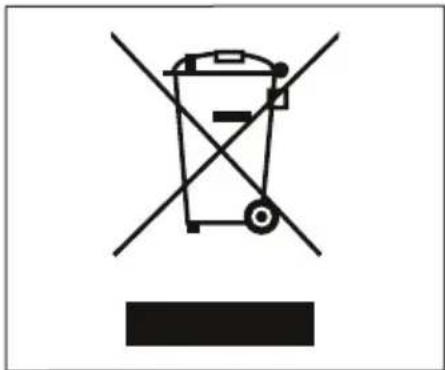
Prohibition sign with crossed-out trash bin and black rectangle symbolUnder the senses of the Directives/ Guidelines 2011/65/EU concerning the reduction of the use of dangerous substances in electric and electronic equipment, as well as the disposal of wastes".
The symbol of the crossed large rubbish container that is present on the machine points out that the product at the end of its life cycle must be collected separately from the other wastes. The user for this reason will have to give the equipment that got to
its life cycle to the suitable separate waste collection centres of electronic and electro-technical wastes, or to give it back to the seller or dealer when buying a new equipment of equivalent type, in terms of one to one.
The suitable separate waste collection for the following sending of the disused equipment to recycling, the dealing or handling and compatible environment disposal contributes to avoid possible negative effects on the environment and on the people's health and helps the recycling of the materials the machine is composed of. The user's illegal disposal of the product implies the application of administrative fines as stated in Law Decree n.22/1997" (article 50 and followings of the Law Decree n.22/1997).
• Preparation of the installation site.
The purchaser must prepare the surface on which the machine will stand suitable to support the machine weight (see the installation chapter).
• Electrical requirements.
The mains power installation must comply with the safely regulations and standards in force in the country of installation and must include an efficient earth system. An omnipolar cut-off device must be installed on the power line upstream of the machine.


The power wires must be sized according to the maximum current required by the machine to ensure a total voltage loss under full load of less than 2%.
- Plumbing requirements.
Prepare a suitable drain and a mains that supply water a maximum hardness of 3/5 French degrees (60/85 ppm).
SYMBOLS

A

B

C

D

E
A General hazard
B Electrical shock hazard
C Burns hazard
D Hazard of damage to the machine
E Operation reserved for the qualified technician, in compliance with current standards
RESIDUAL RISKS
Although the manufacturer has provided mechanical and electrical safety systems, dangerous areas persist during the use of the machine:

- Dispensing group.
- Steam wand / Easycream (optional).
- Hot water wand.
- Cup warmer.
TRANSPORT
text_image
SIMONELL SIMONELL +
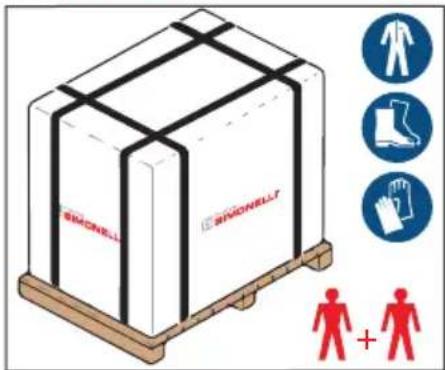
The machine is transported on pallets containing several machines inside cartons strapped to the pallet.
Operators performing any shipping or handling operations must wear gloves, safety shoes and overalls with elasticized cuffs.
The machine must be moved by 2 or more operators.
Failure to respect current safety regulations and standards on lifting and handling materials absolves the Manufacturer from all liability for possible damage to person or things.
MOVEMENTS
text_image
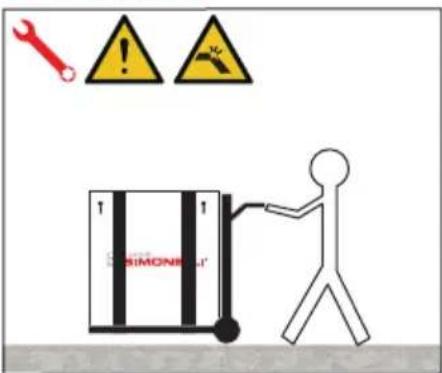
SIMONE- Slowly lift the pallet about 30 ~cm from the ground and reach the loading area.
• After checking that there are no obstacles, things or people, proceed with the loading. - Once you arrive at your destination, always with a suitable lifting device (e.g. forklift), after making sure that there are no things or people in the unloading area, take the pallet to the ground and move it about 30 cm from the ground, until to the storage area.
STORED
text_image
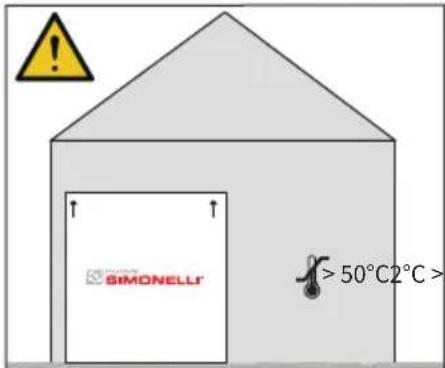
SIMONELL® > 50°C2°C >The package containing the machine must be stored away from atmospheric agents.
Before performing the following operations, make certain that the load is in stable and will not fall when the straps are cut.
Wearing gloves and safety shoes, the operator must cut the straps and store the product.
During this operation, see the product technical features for the weight of the machine being stored and proceed as necessary.
UNPACKING
text_image
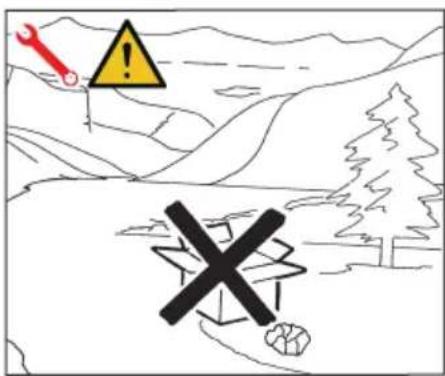
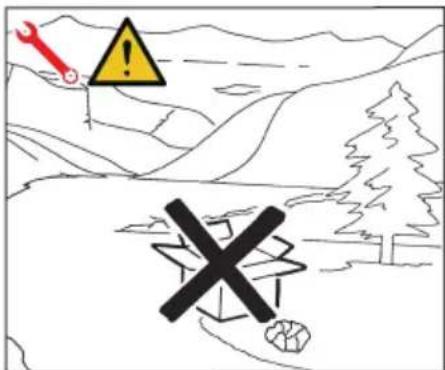
Safety warning illustration showing a wrench and warning triangle with a cross symbol, set against a mountainous landscape background.Once the machine has been released from the pallet or container, do not pollute the environment with these items.
CONTENTS CHECK
Upon receipt of the box, check that the packaging is intact and visually undamaged. Inside the packaging must be the instruction manual and the relative kit. In case of damage or faults, contact your local dealer.
For any communication, always communicate the serial number.
The communication must be carried out within 8 days from the receipt of the machine.
natural_image
Technical line drawing of a mechanical device with internal components and mounting base (no text or symbols)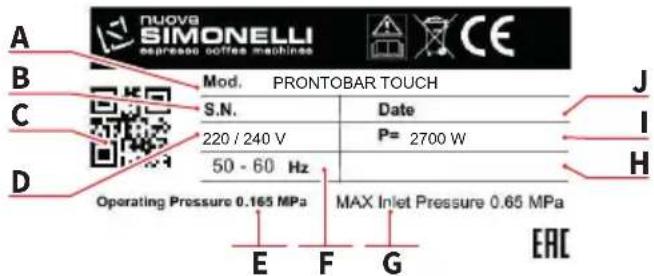
text_image
A B C D Mod. PRONTOBAR TOUCH S.N. Date 220 / 240 V P= 2700 W 50 - 60 Hz Operating Pressure 0.165 MPa MAX Inlet Pressure 0.65 MPa E F G EAC J I H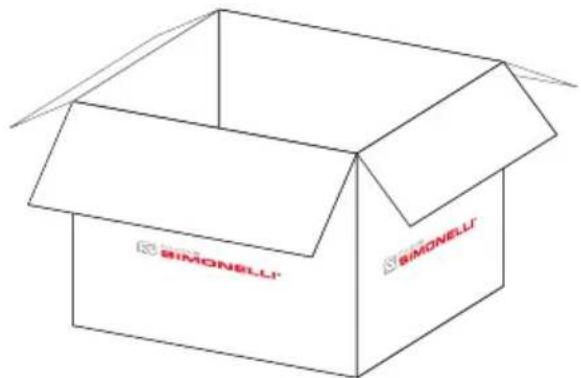
text_image
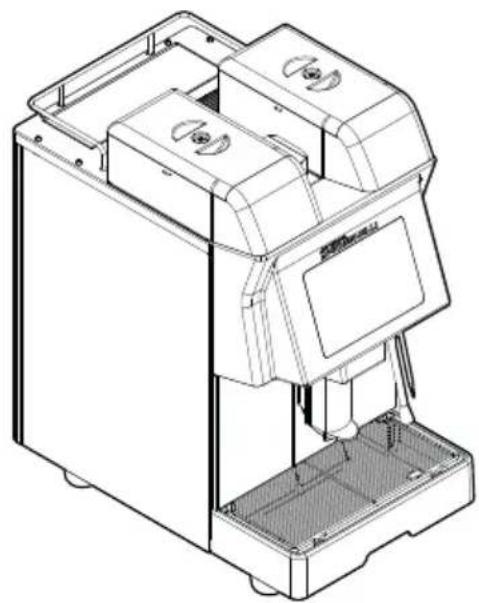
SIMONELLI SIMONELLI• Machine (example image)
- Main connection pipe 3/4" - 3/8"
- Milk pipe ring
- Milk pipe knob
• Grinded coffee doser
- Milk pipe screw
- Shower brush
- Cleanser tablet sampler
- Milk cleanser sample
• Grinder setting Allen screw
A Model and version
B Serial number
C QR code
D Power supply
E Operating pressure
F Frequency
G Max inlet pressure
H Optional
Power
J Production date
natural_image
Symbolic icon of a lightning bolt inside a black circle (no text or numbers present)text_image
Safety warning illustration showing a wrench, warning triangle, and cross symbol over a mountainous landscape with trees.natural_image
Symbol of a trash bin crossed with two crossed lines and a black rectangle below (no text or labels)text_image
Safety warning illustration showing a wrench, warning triangle, and cross symbol on a mountainous landscape with trees.natural_image
Technical line drawing of a mechanical device with internal components and mounting base (no text or symbols)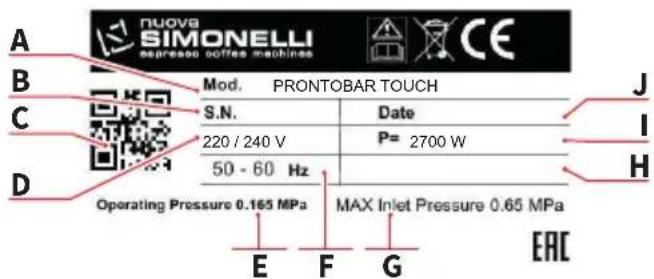
text_image
nuova SIMONELLI expresso coffee machines CE Mod. PRONTOBAR TOUCH S.N. Date 220 / 240 V P= 2700 W 50 - 60 Hz Operating Pressure 0.165 MPa MAX Inlet Pressure 0.65 MPa E F G EAC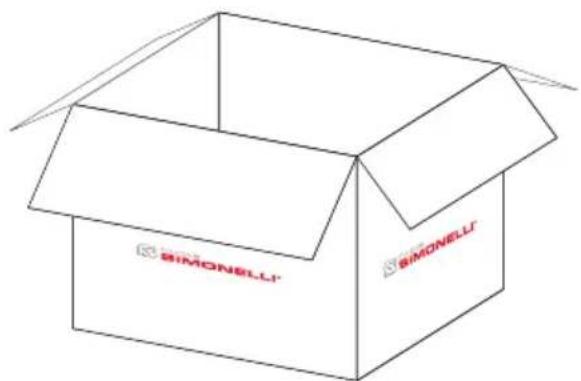
text_image
SIMONELLI SIMONELLInatural_image
Technical line drawing of a mechanical device with labeled Z component (no text or symbols beyond label)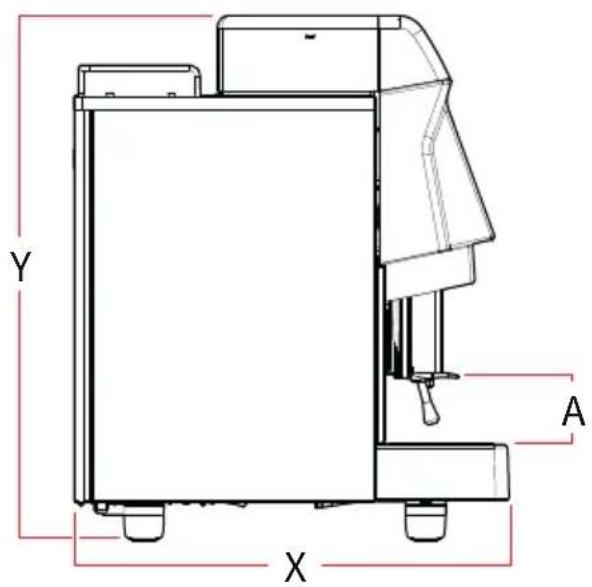
text_image
Y A X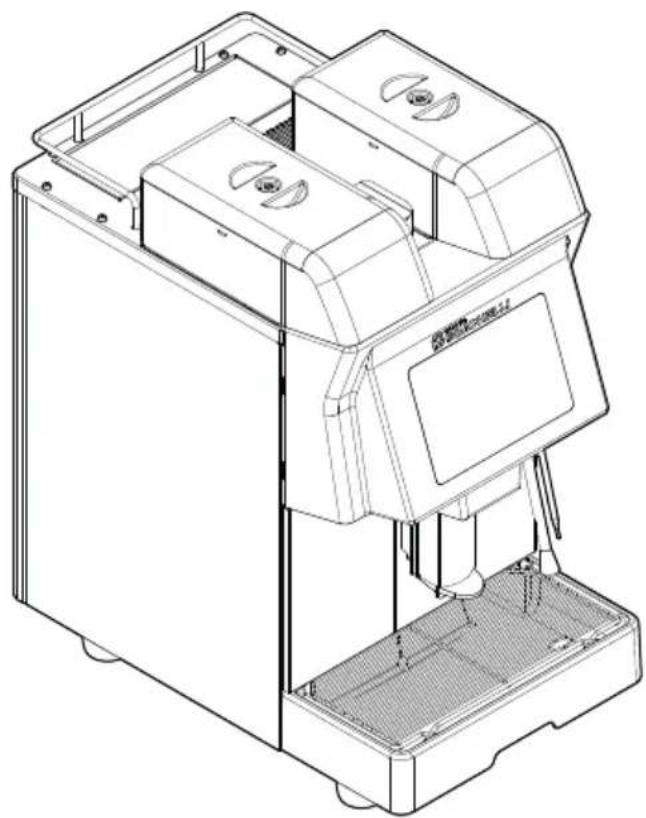
natural_image
Technical line drawing of a mechanical device with internal components and mounting base (no text or symbols)| MacininiGrindersMoulin | 2 | ||
| VoltaggioVoltage Voltage | V 220 | ||
| PotenzaPowerPuissance | W 2700 | ||
| CaldaieBoilersChaudières | 2 | ||
| Capacità caldaieBoiler capacityCapacité de la chaudière | L1,5 | 0,8 | |
| Capacità fondiGrounds capacityCapacité du fonds | 30÷40 | ||
| Capacità contenitoriHopper capacityCapacité du conteneur | Kg/lb 0,8/2 | ||
| Peso nettoNet weightPoids net | kg/lb 40/88 | ||
| Peso lordoGross weightPoids brut | kg 45/99 | ||
| Livello sonoroNoise levelNiveau sonore | dB <70 | ||
| Dimensioni / Dimensions / Dimensions | |||
| X | mminch | 52020 7/16” | |
| Y | mminch | 62224 1/2” | |
| Z | mminch | 32612 13/16” | |
| A | mminch | 70 ÷1402 3/4” ÷ 5 1/2” | |
3
1 Touch screen display
2 Hopper 2 cap
3 Coffee hopper 2
4 Ground coffee conveyor hatch
5 Water tank hatch
6 Hopper 1 cap
7 Coffee hopper 1
8 Milk foamer air regulator
9 Milk tube inlet
10 Hot water wand
11 Machine feet
12 Steam / Easycream wand (opt)
13 Water collecting tray
14 Grid
15 Dispensing group
FR
• Machine designed and built respecting what is expressed in the declaration of conformity.
- The machine can be used with the following food substances:
- coffee beans
- decaffeinated coffe powder
- milk (not powder)
3.1
EMPLOI PRÉVU
This chapter lists a number of reasonably foreseeable improper uses. The machine must, however, always be used in respect of the instructions given in this manual.
- Use of food substances not described in this manual.
- Introduction of liquids other than softened drinking water with a maximum hardness of 3/5 French degrees (60/85 ppm).
- Touching the delivery areas with the hands.
- Introduction, into the filter holder, ground different than coffee.
- Placing objects other than cups on the cup warmer.
- Resting containers of liquid on the cup warmer.
• Heating drinks or other non-food substances.
• Covering the cup warmer with cloths. - Obstructing the vents with cloths or other items.
• Using the machine if wet.
3.2
UTILISATION INCORRECTE
To lift the machine are necessary 2 or more operators.
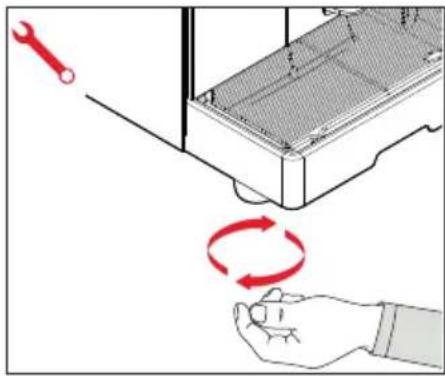
4.1 POSITIONING
Before installing the machine, make sure the area where it will be installed is compatible for the size and weight of the machine.
- Position the machine on a horizontal plane at least 900 mm high from the ground.
- Keep at least 100 mm or 15 cm as indicated on page 3 around the machine for proper ventilation.
- Adjust the machine by acting on the feet.
text_image
Diagram illustrating a mechanical or electrical process with a wrench and red circular arrows indicating rotation or cycle.FR
natural_image
Technical line drawing of a mechanical device with a red arrow indicating direction (no text or symbols)IT
4.2 ALLACCIAMENTO IDRICO
4.2.1 VERSIONE CON SERBATOIO
natural_image
Technical line drawing of a mechanical device with a red arrow indicating downward motion (no text or symbols)EN
4.2 WATER CONNECTION
4.2.1 TANK VERSION
The machine is preset with this option.


Switch off the machine before re-
moving or filling the tank.
Once the machine has been positioned:
- Open the hatch and withdraw the tank upwards.
• Particularly the first time, wash the tank with soapy water and then carefully, rinse off all soap.
• Fill the tank with fresh water.
• Make sure that the outside of the water tank is dry, insert the water tank and close the hatch.
FR
4.2 BRANCHEMENT HYDRIQUE
4.2.1 VERSION AVEC RÉSERVOIR
natural_image
Technical line drawing of a mechanical assembly with a magnified inset showing a component detail (no text or symbols)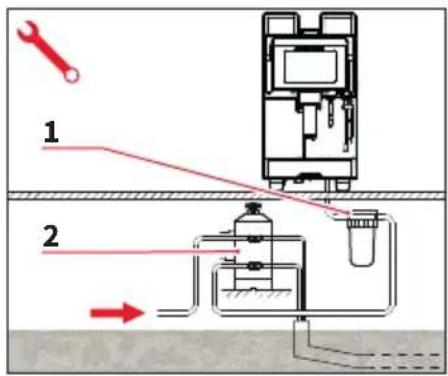
text_image
Technical diagram showing a mechanical device with labeled components and directional arrows indicating flow or movement.IT
4.2.1 VERSIONE CON RETE IDRICA
The machine is designed to work even with a water connection. Contact the supplier to prepare properly the machine.
Once the machine has been positioned:
- Connect the end of the pipe to the 3/4" inlet on the bottom of the machine.
- Connect the other end of the pipe to the water mains.
Avoid throttling in the connecting tubes. It is forbidden to use connecting pipes already used in the past. Filter maintenance is the responsibility of the purchaser.
1 Mesh filter
2 Softener
Failing to maintain water into the correct levels will void the warranty.
WATER SPECIFICATIONS
• Total hardness 50-60 ppm (parts per million).
• Water line pressure between 2 – 4bar and water to be cold.
• Min flow rate: 200 l/hr.
- Filtration level below 1.0 micron.
- tds (total dissolved solids) level between 50 – 250 ppm.
- Alkalinity level between 10 – 150 ppm.
- Chlorine level less than 0.50 mg/l.
• ph level between 6.5 and 8.5.
FR
4.2.1 VERSION AVEC RÉSEAU HYDRIQUE
natural_image
Hand holding a plug inserted into a wall socket, with red arrows indicating direction (no text or symbols)IT
4.3 ALLACCIAMENTO ELETTRICO
Plug the machine into the main socket.
4.4 PRELIMINARY OPERATIONS
At the end of installation, the device is switched on and taken to rated operating conditions, leaving it in a state in which it is "ready for operation".
After reaching the “ready for operation” condition, the following dispensing operations are carried out:
• 100% of the coffee circuit through the coffee dispenser;
- Open the steam outlet for 1 minute;
- Repeat this operation at least 3 times.
At the end of installation, it is good practice to draw up a report of the operations.
FR
4.3 BRANCHEMENT ÉLECTRIQUE
text_image
OPEN APERTO CLOSE CHIUSOIT

The operations described below must be carried out only by spe-d technicians.
The Manufacturer is not responsible for any damage to things or persons deriving from a failure to comply with the above.
5.1
GRINDING ADJUSTMENT


Carry out this procedure with the machine ON and
the grinder in function.
- Put the key into its lock.
- Turn the control panel hatch door key counter-clockwise.
- Open the control door to access the grinding adjustment screw with a 3 mm (0.12 in) socket wrench.
LEFT MILLER: - clockwise: thicker
- counterclockwise: finer RIGHT GRINDER:
- clockwise: finer
- counterclockwise: larger
- Lock the hatch door.
FR

text_image
Diagram illustrating a process with labeled components and directional arrows, including a magnified circular pattern and a tool.IT
5.2
REGOLAZIONE ARIA CAPPUCCINATORE

The procedure is possible also with the appliance on.
To change the amount of air to the milk foamer and therefore, to change the amount of foam, use the adjustment screw on the right side of the machine so as to increase / reduce the air to the milk foamer.
FR
5.2
RÉGLAGE DE L'AIR DU GROUPE À CAPPUCCINO

text_image
Technical diagram showing mechanical assembly with labeled components and directional arrows indicating motion or forceIT
5.3
The procedure is possible also with the appli- on.
To adjust the milk flow (temperature of the milk delivery), turn the adjusting tap as follows:
- Turn the milk suction tap CLOCKWISE/COUNTER-CLOCKWISE to INCREASE/DECREASE the milk suction and then DECREASE/INCREASE the temperature.
- Turn the tap until the milk reaches the desired temperature.
- The optimum starting value is to close everything and open three laps.
5.4
EASYCREAM ADJUSTMENT (OPTIONAL)

The procedure is possible also with the appliance on.
Adjust the intensity of the Easy-cream wand (optional) by using the screw on the front of the machine with a screwdriver.
FR
5.3
RÉGLAGE DU FLUX DE LAIT

text_image
The application is loading, please waitEN

Before starting to use the appliance, the operator must be sure to have read and understood the safety prescriptions contained in this booklet.
6.1
SWITCHING
THE MACHINE
ON/OFF
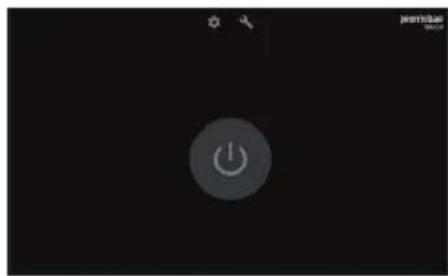
- Press "I" to switch ON the machine.
- Press "0" to switch OFF the machine.

If the self-diagnostics report anomalies or failures, the operator MUST NOT intervene. Please contact the Assistance Centre.
When the power is turned on, the machine logo is displayed and the display and CPU firmware are loaded. Then the machine shows the power button.
From here you can access:
• Info
• Service
- Machine switch on
natural_image
Black background with a circular button labeled 'Power' and a small icon at the top (no readable text or symbols)FR

- Info
- Service
- Allumage machine
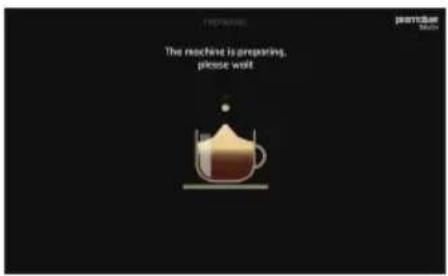
text_image
The machine is preparing, please wait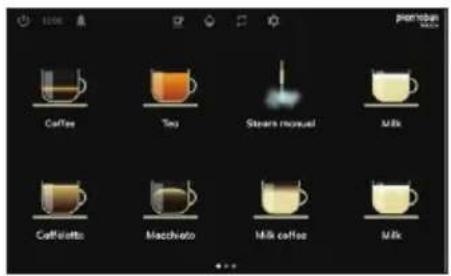
text_image
Coffee Tea Steam manual Milk Coffalotto Macchivato Milk coffee MilkIT
Continuing with the machine switch on, water is loaded into the boiler and heating begins.
When the machine is ready, the main page is displayed.
FR
natural_image
Line drawing of a hand pouring black granular material into a multi-compartment container (no text or symbols)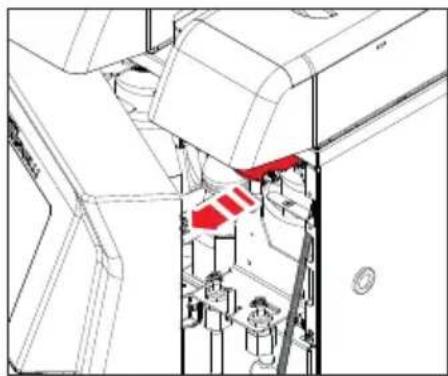
natural_image
Technical line drawing of a mechanical assembly with no visible text or symbolsIT
6.2 RIEMPIMENTO CONTENITORE CAFFÈ

Pour ONLY toasted coffee beans into the coffee bean holder. any other kind of coffee, for example ground coffee, will damage the coffee grinder.
Don't insert caramelized, sugar coated, or similarly coated coffee beans, or instant coffee or other sugary beverages because they will harm the appliance.
- Remove the cap to access the granulated coffee bean container.
- Don't fill to the brim but pour just enough toasted coffee beans into the coffee bean holder to ensure correct closure of the unit.
- Open the door to slide the opening / closing tab of the container so as to pass the coffee beans into the mill.
FR
6.2 REMLISSAGE RÉCIPIENT CAFÉ

text_image
premator Coffee Tea Steam manual Milk Cuffiche Macchote Milk coffee Milk A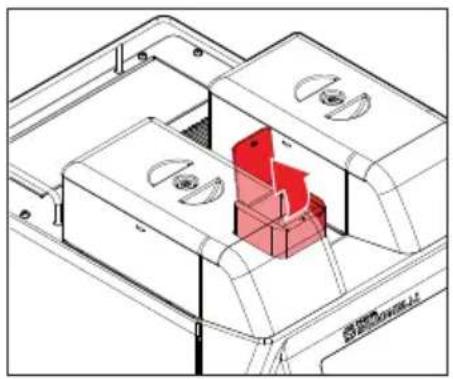
natural_image
Technical line drawing of a mechanical housing or enclosure with internal components and a red highlighted component (no text or symbols)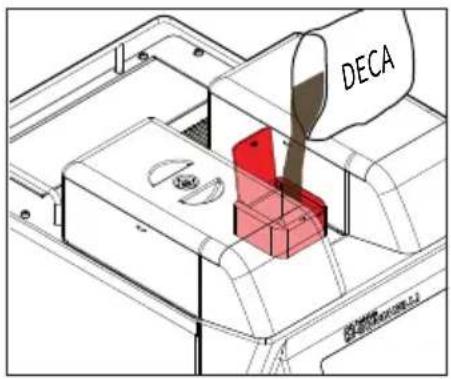
text_image
DECAIT
6.3
EROGAZIONE BEVANDE
Select on the display the beverage to be dispenser from those set.
Depending on the needs, for the dispensing of coffee-based beverages, it is possible to select the grinder opposite to the one set by pressing (A).
6.3.1
DECAFFEINATED
BEVERAGES DISPENSING
- Open the ground coffee.
- Insert the decaffeinated coffee into the conveyor and close the hatch.
FR
6.3
DISTRIBUTION BOISSONS
text_image
Coffee Tea Stawn manual Milk Caffelette Macchiato Milk coffee Milk
B
text_image
Safety warning illustration showing a hand holding a tool with a warning symbol and red X sign, indicating failure or hazard.IT
- Select on the display the icon (B) of the beverage to be dispensed.
At the end of delivery the display shows the beverage selection page.
6.4
STEAM DISPENSING
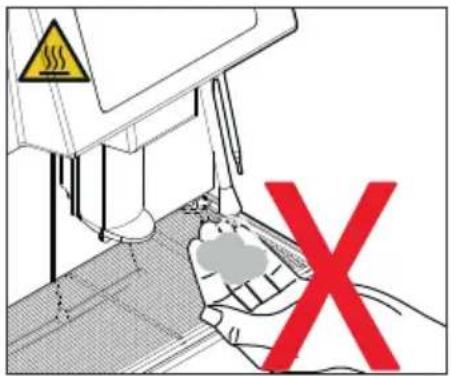
While using the steam nozzle, you must pay attention to not place your hands beneath it or touch just after it has been used.
Before use the steam wand, cleaning out of the condensation for at least 2 seconds.
FR
text_image
Diagram showing a hand operating a machine with warning symbols and a red X symbol indicating failure or rejection.IT
6.5
PREPARAZIONE
DEL CAPPUCCINO
Immerse the nozzle all the way into a container 1/3 full of milk.
Turn on the steam.
Before the milk has reached the desired temperature, pull the nozzle slightly up and lightly move it vertically across the surface of the milk.
When you have completed the procedure, clean the nozzle carefully with a soft cloth.
6.6
HOT WATER DISPENSING
While using the hot water nozzle, pay careful attention not to place your hands beneath it or touch it just after it has been used.
- Place a suitable container under the hot water nozzle.
- Select the hot water dispensing on the display.
The hot water wand will deliver water for the amount of time equivalent to the set value or press the button again to stop pouring.
FR
6.5
PRÉPARATION
DU GROUPE À CAPPUCCINO
When using Easycream, take great care not to place your hands underneath it and never touch it immediately afterwards.
- This serves to deliver steam mixed with air. The temperature and the quantity of air are programmable, controlled by a temperature probe and are set during the programming phase.
- Press the steam button, the light will switch on.
Always purge before dispensing. The steam can be delivered at the same time as coffee and the delivery will stop as soon as the set temperature for the liquid is reached.
FR
6.7
EASYCREAM (en option)
Access reserved for qualified technicians only.

It is possible to interact with the touch screen display with two movements:
1 Horizontal scrolling
2 Vertical scrolling
FR
UTILISATION DE L'AFFICHEUR À ÉCRAN TACTILE
The software allows the insertion of values and letters through the two special keyboards.
1 Alphabetical
2 Numerica
FR
7.1
CLAVIERS ET PAGES GÉNÉRALES
text_image
UPDATE DISPLAY FIRMWARE Insert the USB stick where you want to update the firmware NEXTIT
Software update, file import and export procedures, doses and / or settings require connection with a USB support.
- Insert the USB holder into the slot behind the door.
- Follow the procedure described on the display.
The USB storage medium must be empty or contain only the files to be uploaded.
The recognition of the file is automatic only if the files on the USB support have the correct name and / or format.
FR
Access the beverage modification page (max 24) using PIN 1936 and select one to modify the parameters. For more details, see the following parameter table.
1 Test the drink.
2 Save the parameters.
3 Delete the drink.
4 Set the name of the beverage.
5 Set the order of the beverage.
Exemplifying Images
FR
7.2
MODIFICATION DES BOISSONS
6 Select the beverage icon.
7 Import an icon from the USB support.
8 Select the type of beverage.
9 Dose setting area.
FR
The icons to be uploaded, via USB support, must have a square format.
To select the beverage icon, scroll through the list.
When settings are complete, save and exit.
The following table recommends values for optimizing beverages.
Beverage type: coffee
Type de boisson: café
| Tempo macininoGrind timeTemps moulin | Quantità caffèCoffee volumeQuantité de café | PreinfusionePre brewingPré-infusion | PressaturaTampingPressage | Quantità acquaWater volumeQuantité d'eau | |
| Ristretto | 6,5÷7,5 s | 30÷35 cl | SiYes | SiYes | 0cl |
| 2 Ristretto | 8,5÷9,5 s | 60÷65 cl | SiYes | SiYes | 0cl |
| Espresso | 6,5÷7,5 s | 45cl | SiYes | SiYes | 0cl |
| 2 Espresso | 8,5÷9,5 s | 90cl | SiYes | SiYes | 0cl |
| Regular coffee | 6÷7 s | 130cl | No | SiYes | 0cl |
| 2 Regular coffee | 10÷11 s | 250cl | NO | SiYes | 0cl |
| Americano | 6,5÷7,5 s | 50cl | SiYes | SiYes | 90cl |
Beverage type: milk + coffee
* Milk coffee = Bianco in alto
* Coffee milk = Marrone in alto
EN
* Milk coffee = White on top
* Coffee milk = Brown on top
FR
* Milk coffee = Blanc en haut
* Coffee milk = Marron en haut
text_image
info localization counters technical settings energy saving display cleaning temperature files 1 2 NUOVA SIMONELLI PRONTOBAR TO update the software of your machine, please press the UPDATE button UPDATE DSP ¥ 0.5.518 UPDATE CPU ¥ 0.4 SETTINGS EXPORT IMPORT RESTORE TO DEFAULT CHANGE PASSWORD USER 3 4 5 6IT
7.3
INFO
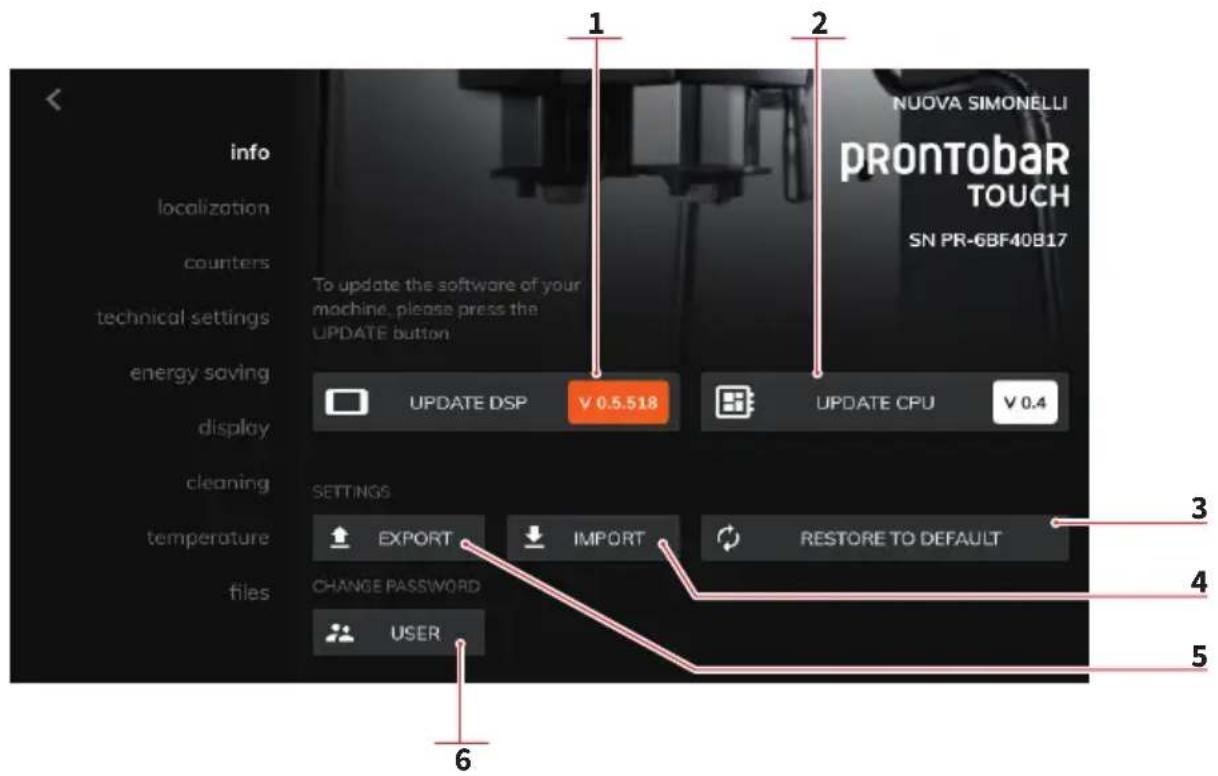
View general information and software updates.
1 Display firmware version. Press to update
2 CPU firmware version. Press to update.
3 Press to reset the settings to the factory data.
4 Press to import the settings.
5 Press to export.
6 Press to change the password.
FR
7.3
INFO
Setting page of the place and date of the machine. Allows to set:
1 Display language.
2 Unit of measurement format.
3 Date and time.
Press (3) to access the date and time setting using the + and - buttons.
FR
7.4
LOCALISATION
1 Frost time / s of the milk frother. Partial / total counter display
2 Data backup on USB
3 Data reset
Select the partial counters to view the details for each drink (drink detail).
The counters are:
- Machine cycles
- Left grinder
- Right grinder
- Sum of the mills
- Tea (hot water)
- Vapor
- Liters
- Cleaning cycles
FR
7.5
COMPTEURS
The visible counters change according to the selected beverage.
1 Beverage selection.
2 Data backup on USB.
3 Data reset.
FR
7.5.1
DÉTAILS BOISSONS
Technical settings page of the machine.
Allows to set:
1 Exhaust type (direct / drawer).
2 Maximum discharge limit.
3 Presence launches steam and type (Manual / Easycream).
4 Hot water spout (enabled / disabled).
5 Water filter duration (liters).
6 Enable and interval maintenance cycles.
7 Scheduled maintenance date.
FR
7.6
PROGRAMMATIONS TECHNIQUES
Energy saving setting page. Allows to set:
1 Sequential boiler heating (YES / NO).
2 Energy saving (YES / NO).
3 Day of the week (automatic ON / OFF).
4 Enable / disable automatic ON / OFF.
5 Auto-start time.
6 Automatic switch-off time.
Exemplifying Images
FR
7.7
ÉCONOMIE D'ÉNERGIE
1 Multiple dispensing (YES / NO)
2 Self-service mode (YES NO)
3 Bell (YES NO)
4 The brightness of the display
5 Brightness of the LEDs
6 Screen saver
7 Press to test the screen saver
8 Click to import the screen saver from USB support
9 Activation time of the screen saver
10 Time to deactivate the screen saver
You can import a screen saver only if it is in "mp4" format.
FR
7.8
ÉCRAN
1 Distribution multiple (OUI/NON)
2 Mode libre-service (OUI/NON)
Washing cycle setting page. Allows to set:
1 Washing cycle (total / only delivery group)
2 If the wash cycle can be stopped (YES / NO).
3 Number of supplies after which the need for the wash cycle is signaled.
4 Washing signal of the milk circuit.
5 Times of the washing cylinders 1,2,3 and 4.
6 Rinse after washing (YES / NO).
7 Blocking the machine when the need for the wash cycle is signaled.
If the times are set to 00:00, they are disabled.
FR
7.9
NETTOYAGE
1 Temperature measurement unit (Celsius / Fahrenheit).
2 Coffee dispensing temperature.
3 Delivery group temperature.
4 Steam supply temperature.
5 Minimum coffee temperature.
If the coffee temperature reaches the minimum set value, it is necessary to re-heat the boiler.
FR
7.10
TEMPÉRATURES
Management page of the files loaded on the machine. It allows you to view:
1 The type of file (image / screen saver).
2 The space available in the machine's memory.
3 The list of uploaded files:
- Preview
- File name
- Dimension
- Actions (Play / Delete)
FR
7.11
FICHIER
text_image
110% FRONTEDAR COFFEE Steam manual Milk Caffélotte Macchiato Milk coffee Milk
text_image
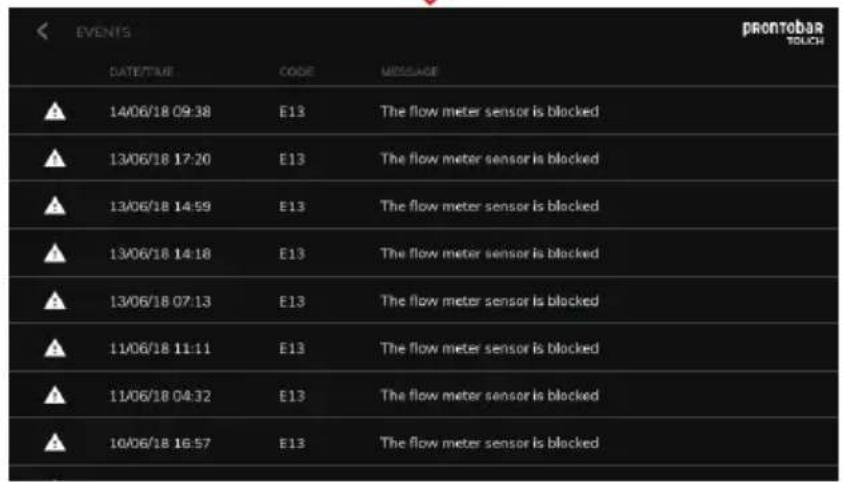
EVENTS DATE/TIME CODE MESSAGE 14/06/18 09:38 E13 The flow meter sensor is blocked 13/06/18 17:20 E13 The flow meter sensor is blocked 13/06/18 14:59 E13 The flow meter sensor is blocked 13/06/18 14:18 E13 The flow meter sensor is blocked 13/06/18 07:13 E13 The flow meter sensor is blocked 11/06/18 11:11 E13 The flow meter sensor is blocked 11/06/18 04:32 E13 The flow meter sensor is blocked 10/06/18 16:57 E13 The flow meter sensor is blockedIT
7.12
ALLARMI
This page displays the alarms that have occurred and their details:
- Date and time
Code - Message
For more details, see "TROUBLESHOOTING".
FR
7.12
ALARMES
• The machine must be power before any erations are per-
- Avoid to clean the machine using water jets or standing it in water.
- Do not use solvents, chlorine-based products or abrasives.
8.1
DAILY WASHINGS
Work area cleaning
- Remove the worktop, lifting it up from the front and sliding it out.
- Remove the water collection dish underneath.
- Clean everything with hot water and cleansers.
External plates cleaning
To clean all the chromium-plated areas, use a soft, damp cloth.
FR


natural_image
3D wireframe model of a mechanical part with orange highlighted section, displayed against black background (no text or symbols)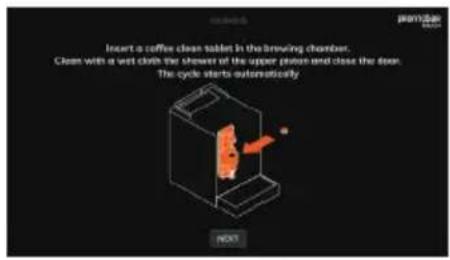
text_image
Insert a coffee clean toilet in the brewing chamber. Clean with a wet cloth the shower of the upper oven and close the door. The cycle starts automatically NEXT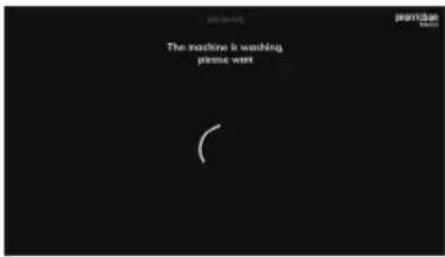
text_image
The machine is washing please waitIT
8.2 LAVAGGIO AUTOMATICO
When requested, or when deemed necessary, perform an automatic washing cycle of the dispensing group.

Operation to be carried out with the machine switched on.
Follow the procedure shown on the display.
Open the front door.
Place a sanitizing tablet in the infusion chamber. Wipe the shower head and the upper piston with a damp cloth. Close the door. The washing cycle starts automatically.
Wait a few minutes for the wash cycle.
FR
8.2 LAVAGE AUTOMATIQUE
text_image
Press confirm to start closing CONFIRM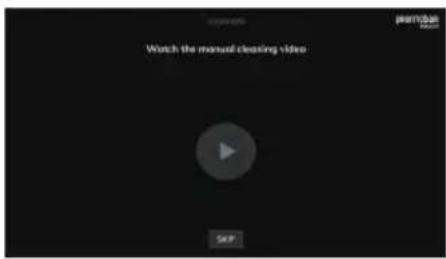
text_image
Watch the manual cleaning video SKIP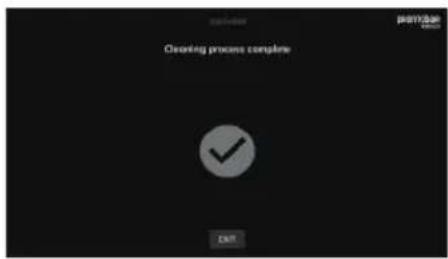
text_image
Cleaning process complete EXITIT
You can view a video explaining the manual washings to be performed.
Press "SKIP" to go forward without watching the video.
Washing cycle completed.
Clean the hand shower and upper piston again with a damp cloth.
Press "EXIT" to return to normal machine operation.
FR
natural_image
Technical line drawing of a room interior with a red panel and a grid of surveillance camera images (no text or symbols)IT
8.3
PULIZIA GRUPPO
EROGATORE E
CAPPUCCINATORE
natural_image
Illustration of a hand pouring liquid into a container with a tool, next to an industrial machine (no text or symbols visible)EN
8.3
DELIVERY GROUP AND CAPPUCCINO MAKER CLEANING
Follow the instructions in the explanation video on the display.


We recommend that you carry out a WASHING CYCLE at least once a day using special cleansers. The cycle last approximately 4 minutes.
We remind you not to interrupt a washing cycle using detergent tablets once started, otherwise detergent residues may remain inside the machine.
During the washing and rinsing cycles keeping a container under the delivery unit is advisable or empty the water collector once the wash and rinse cycles have been completed.
- Place a container with 1 litre of water alongside the machine.
- Put the suction tube inside it.
- Add the specific cleaning product (20 ml [0.005 Gal] of Puly Milk).
• The display shows the relative message.
FR
8.3
NETTOYAGE GROUPE DE DISTRIBUTION ET GROUPE À CAPPUCCINO
natural_image
Hand placing a red cube into a mechanical component (no text or symbols visible)IT
- Open the ground coffee conveyor hatch.
- Insert the cleanser tablet (Puly Caff) and close the hatch.
• The display shows the relative message.
After approximately 30 seconds, the machine will automatically start a washing cycle.
• After the washing cycle, the display slows the rinse procedure.
- At the end of the cycle, the machine return at the beverages selection page.

Should the washing cycle be interrupted (electricity failure), when the appliance is next turned ON, the group will positioned in rest position and on the display is shows the procedure to end the washing cycle.
FR
natural_image
Technical diagram of a mechanical device with internal components and a red arrow indicating a specific part (no text or symbols present)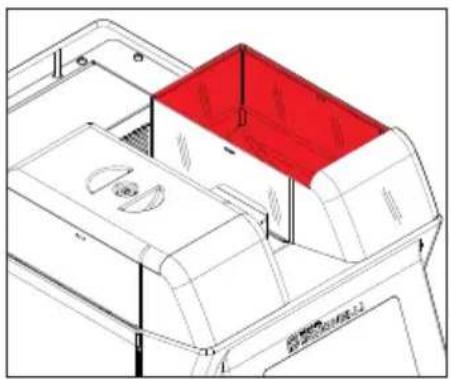
natural_image
Technical line drawing of a mechanical device with a red lid and internal components (no text or symbols)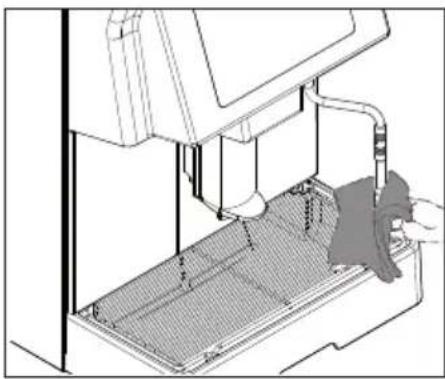
natural_image
Technical line drawing of a mechanical device with internal components and a hand operating the base (no text or symbols)IT
8.4 PULIZIA CONTENITORE E CONVOGLIATORE CAFFÈ
- Open the front door with the relative key.
- Remove any coffee residues on the sides of the conveyor.
- Use a damp cloth and/or a little mild detergent to clean the coffee bean bells.
8.5 CLEANING THE STEAM NOZZLE
Clean the steam nozzle each time it is used to warm up drinks.

CAUTION RISK OF BURNS OR SCALDING
If cleaned when the nozzle is still hot, avoid touching it with bare hands.
Use a cloth dipped in hot water and/or a neutral cleanser.
FR
8.4 NETTOYAGE RÉCIPIENT ET CONVOYEUR CAFÉ
natural_image
Line drawing of a hand holding a rectangular object with hatched fill, no text or symbols present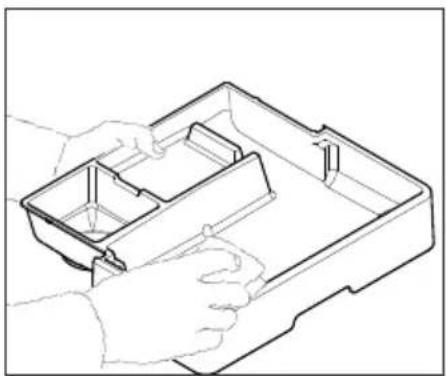
natural_image
Line drawing of a hand holding an open plastic tray with internal compartments (no text or symbols)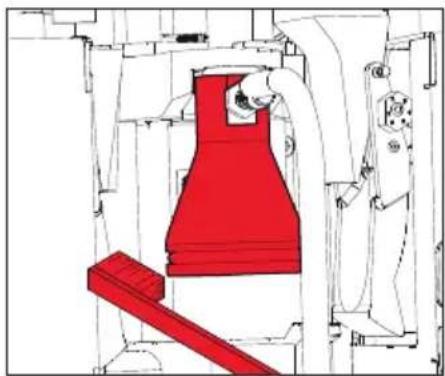
natural_image
Technical line drawing of a mechanical assembly with red component and white housing (no text or symbols)IT
8.6
PULIZIA DELLA GRIGLIA
Wash the grid clean with a brush and hot water and soap.
8.7
CLEANING THE WATER COLLECTING TRAY
Clean the drip container with hot, soapy water.
Can be washed in the dishwasher.

Never use any sort of solvent.
8.8
CLEANING THE GASKET
Use a small brush to clean any deposits or coffee residues off the piston and the delivery unit site or any other areas soiled with coffee.
FR
8.6
NETTOYAGE DE LA GRILLE
natural_image
Technical line drawing of a mechanical device with internal components and a red arrow indicating a specific part (no text or symbols present)IT
8.9
PULIZIA
CAPPUCCINATORE


Procedere con cautela.
Follow the instructions applied on the label on the inside of the front door too.
Open the front door with the relative key.
• Take out the pouring nozzle by pulling it upwards.
- Remove the cappuccino maker from the nozzle by sliding it upwards.
- Disconnect all of the connected pipes.
- Remove the cappuccino maker and wash it with care.
For intervals of more than three hours between one cappuccino and the next, it is advisable to wash the cappuccino maker by taking in water through the milk suction pipe instead of milk.
• To reassemble proceed inversely, attaching the milk foamer tubes properly.
FR
8.9
NETTOYAGE
GROUPE À CAPPUCCINO


text_image
E7 Switch off and then on the machine and call the instruction.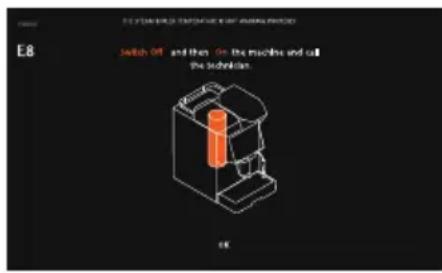
text_image
E8 Switch Off and then On the machine and call the technician. E6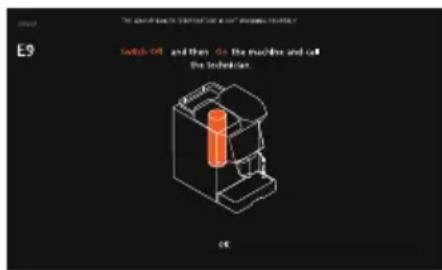
text_image
E9 Switch Off and then do the machine and call the technical. OK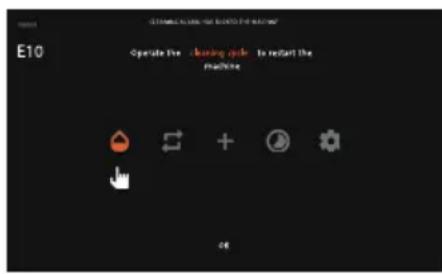
text_image
E10 Operate the cleaning cycle to restart the machine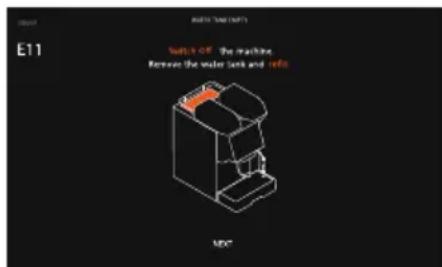
text_image
E11 Switch-off the machine Remove the water tank and info MDC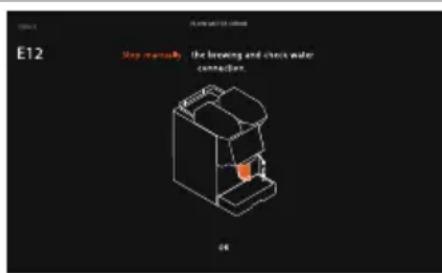
text_image
E12 Step manually: the cleaning and check water connection. 06| La caldaia caffè non raggiunge la temperatura impostata. | Spegnere e riaccendere la macchina e chiamare il Servizio di Assistenza. |
| The coffee boiler does not reach the set temperature. | Switch the machine off and on again and call the Customer Service. |
| La chaudière à café n’atteint pas la température configurée. | Éteindre et réallumer la machine et appeler le Service d’assistance. |
| La caldaia vapore non raggiunge la temperatura impostata. | Spegnere e riaccendere la macchina e chiamare il Servizio di Assistenza. |
| The steam boiler does not reach the set temperature. | Switch the machine off and on again and call the Customer Service. |
| La chaudière à vapeur n’atteint pas la température configurée. | Éteindre et réallumer la machine et appeler le Service d’assistance. |
| La caldaia del gruppo non raggiunge la temperatura impostata. | Spegnere e riaccendere la macchina e chiamare il Servizio di Assistenza. |
| The group boiler does not reach the set temperature. | Switch the machine off and on again and call the Customer Service. |
| La chaudière du groupe n’atteint pas la température configurée. | Éteindre et réallumer la machine et appeler le Service d’assistance. |
| Necessario un ciclo di lavaggio automatico. | Premere sull’icona per eseguire un ciclo di lavaggio automatico (vedere il relativo paragrafo). |
| An automatic washing cycle is required. | Press the icon to perform an automatic washing cycle (see the relative paragraph). |
| Nécessaire un cycle de lavage automatique. | Appuyer sur l’icône pour mener un cycle de lavage automatique (voir le paragraphe pertinent). |
| Serbatoio acqua vuoto. | Spegnere la macchina, rimuovere il serbatoio e riempirlo con acqua fresca. |
| Water tank empty. | Turn off the machine, remove the tank and fill it with fresh water. |
| Réservoir de l’eau vide. | Éteindre la machine, enlever le réservoir et le remplir par de l’eau fraîche. |
| Errore del contatore volumétrico. Controllare la connessione alla rete idrica. | |
| Flowmeter error. Check the water main connection. | |
| Erreur du compteur volumétrique. Contrôler le branchement au réseau hydrique. | |
10 MANUTENZIONE MAINTENANCE MAINTENANCE
IT
During maintenance/repairs, the parts used must be able to guarantee compliance with the safety and hygiene requirements envisaged for the device. Original replacement parts can offer this guarantee.
After the repair or replacement of any components of parts that come into contact with food or water, it is necessary to carry out the washing procedure as described in this manual or according to the manufacturer's instructions.
FR
text_image
Technical diagram of an electronic control panel with numbered components and wiring connections11
SCHEMA ELETTRICO
7 Steam boiler probe
8 Tank probe
9 Compressor
10 Air solenoid valve
11 Fase
12 Clock back up battery
13 Air solenoid valve ON/OFF
14 Autowashing solenoid valve
15 Extra water solenoid valve
16 Left grinder
17 Pump
18 Steam wand solenoid valve
19 Coffee solenoid valve
20 Hot water solenoid valve
21 Autolevel solenoid valve
22 Milk foamer solenoid valve
23 Right grinder
24 Encoder
25 Levels
26 AUX
27 Drawer
28 Front door
29 Auto steamer
30 Display
11
SCHÉMA ÉLECTRIQUE
The technical file has been deposited at the company headquarters, at the address on the back. The person in charge of collating and managing the technical file is Mr. Lauro Fioretti.
Model and production: See label on machine
Applied regulations: Collections M,S, VSR editions '78 and '95 and available in the registered office.
Drawing No.: (See the end of the Instruction Booklet)
ATTENTION: This declaration is to be kept with the equipment at all times and must always go together with the equipment. Any use of the equipment than for the purposes for which it was designed is prohibited. The integrity and efficiency of the equipment of the safety devices are the responsibility of the user. The declaration is null and void if the machine is modified without the express authorization of the manufacturer or if improperly installed and used in such a way that does not comply with indications in the user's manual and the instructions.
Nuova Distribution France
Hexapole - Actipole - Bat 5
Rue Maurice Herzog
73420 Viviers Du Lac
T +33 (0) 9 67894852
F +33 (0) 4 79544852
info@nuovadistribution.fr