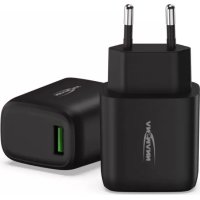
130Q - Battery charger ANSMANN - Free user manual and instructions
Find the device manual for free 130Q ANSMANN in PDF.



| Brand | ANSMANN |
| Model | 130Q |
| Product type | USB mains charger with Quick Charge 3.0 support |
| Input power supply | AC 110-240V, 50/60Hz, max. 800mA |
| Output port | 1 USB-A port (QC3.0) |
| QC3.0 output voltages | 5V/3A, 9V/2A, 12V/1.5A |
| Maximum output power | 18 W |
| Standard output voltage (5V) | 5V / 3A (15W) |
| Operating ambient temperature | -10°C to 35°C |
| Compatibility | Devices supporting QC3.0 (smartphones, tablets, etc.) |
| Simultaneous charging | Single device at a time (single port) |
| Protection | Automatic shut-off at end of charge |
| Safety | Overcharge, short-circuit, overheat protection |
| Care and cleaning | Unplug before cleaning; use a soft, dry cloth |
| Protection rating | Indoor use only, avoid moisture |
| Weight | Approximately 60 g (estimated) |
| Dimensions | Approximately 65 x 45 x 30 mm (estimated) |
| Warranty | 3 years |
| Included accessories | Charger only; USB cable not included |
| Certifications | CE, RoHS |
Frequently Asked Questions - 130Q ANSMANN
User questions about 130Q ANSMANN
0 question about this device. Answer the ones you know or ask your own.
Ask a new question about this device
Download the instructions for your Battery charger in PDF format for free! Find your manual 130Q - ANSMANN and take your electronic device back in hand. On this page are published all the documents necessary for the use of your device. 130Q by ANSMANN.
USER MANUAL 130Q ANSMANN
Many thanks for choosing an ANSMANN USB QC3.0 charger. The operating instructions will help you to get the best from the functions of your new USB QC3.0 charger. We hope you enjoy your new product. Your ANSMANN Team
SAFETY INSTRUCTIONS
- Read the operating instructions carefully before first use and observe the safety instructions.
■ The product can be damaged by impacts, shocks or being dropped, even from low heights. Handle the product carefully! - Do not use the device if there is damage to the housing, plug or cable. Contact the authorised dealer!
■ The device must only be operated in closed, dry rooms!
In order to prevent any risk of fire or electric shock, the device must be protected from moisture and rain! - Only carry out cleaning and maintenance tasks with the mains plug disconnected!
■ Do not open the device! - Keep away from children! Children should be supervised in order to ensure that they do not play with the device!
This device is not to be used by persons (including children) who have restricted physical, sensory or mental capabilities or who do not have adequate experience and knowledge in handling this device. Such persons must be instructed beforehand by a supervisory person who is responsible for their safety or must be supervised during the use of the device! - Failure to observe the safety instructions can result in dangerous injuries to persons or damage to the device!
- If you have questions please contact your local dealer or our service department.
- The product must not be used permanently in conjunction with a travel adapter.
USE
CHARGING DEVICES
In order to charge a device, such as a smartphone for example, please use a suitable USB QC3.0 cable or the original charge cable for your device. The USB QC3.0 charger has a USB-A output. Please use a suitable cable for this. Insert the USB plug of the cable into the USB QC3.0 charger and the other end into your device. The charging process starts automatically.
The USB QC3.0 charger has both USB and Qualcomm QC3.0 protocols. In order to be able to use this technology, please check that your end-device is compatible.
Simultaneous charging of multiple end-devices is possible with restrictions. This is dependent on the total required charge current and charge voltage.
The USB QC3.0 charger switches off automatically once the charging is complete. Please disconnect your device from the USB QC3.0 charger once the charging process is complete.
The USB QC3.0 charger may heat up a little depending on the output power required.
USE
NOTE: MAINS VOLTAGE 110-240V
The USB QC3.0 charger is suitable for a mains voltage of 100-240V and so can be used throughout the world. Please note that a suitable country-specific adapter may be required for this.
NOTE
■ Automatic detection: No manual adjustments or changes required - only the correct components are required (cable and end-device must be QC3.0-compatible).
- With the huge number of different QC3.0 end-devices and their software/ firmware versions, it is possible that the function is not detected or that it is not fully or flawlessly supported.
- End-devices whose original chargers require more than 18W of rated output power will charge slower with this charger.
WARNING
It is important that all end-devices to be charged with the USB QC3.0 charger are suitable for the QC3.0 protocol.
- Ensure that your end-device (smartphone, tablet, notebook, console or other applications) is suitable for one of the output voltages 5V/9V/12V.
CARE
Disconnect the device from the mains before cleaning or before storing for an extended period of time.
Clean the charger only with a dry, soft cloth.
TECHNICAL DATA
- Input: AC110-240V | 50-60Hz | max. 800mA
- Output: USB (QC3.0): 5V/3A
9V/2A
12V/1.5A - Max. output power: 18W (QC3.0)
- Max. outside temperature: -10°C...35°C
ENVIRONMENTAL INFORMATION
The device should not be discarded in the normal household waste under any circumstances. Dispose of the device via an authorised disposal centre or your communal waste disposal facility. Observe the current applicable regulations. Contact your waste disposal facility in the event of any doubt. Dispose of all packaging materials via an environmentally friendly disposal facility.
LIMITATION OF LIABILITY
The information contained within these operating instructions can be changed without prior notification. ANSMANN accepts no liability for direct, indirect, incidental or other damage or consequential damage arising through improper handling or through disregard of the information contained within these operating instructions.
GUARANTEE
The device has a three-year guarantee. The guarantee does not apply to damage to the device arising through a failure to comply with the operating instructions. You can find our warranty terms online at www.ansmann.de
Subject to technical changes. We assume no liability for printing errors. 08/2019
FR - AVANT-PROPOS
Chère cliente, cher client,
OPLADNING AF APPARATER


Brand : ANSMANN
Model : 130Q
Category : Battery charger