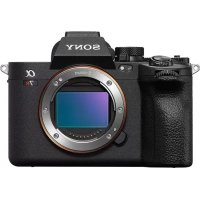
Alpha A7R V - Camera SONY - Free user manual and instructions
Find the device manual for free Alpha A7R V SONY in PDF.



| Product type | Digital interchangeable-lens camera, Sony E mount |
| Image sensor | Full-frame CMOS 35.7 x 23.8 mm, 61 MP effective, 62.5 MP total |
| Viewfinder | Electronic 1.6 cm (0.64 type) |
| Screen | TFT touch screen 8.0 cm (3.2 type) |
| Dimensions (W x H x D) | 131.3 x 96.9 x 82.4 mm (with protrusions) / 131.3 x 96.9 x 72.3 mm (hand grip to screen) |
| Weight | 723 g (with battery and SD card) |
| Power supply | NP-FZ100 battery 7.2 V ---; BC-QZ1 charger, input 100-240 V~, 50/60 Hz |
| Operating temperature | 0 °C to 40 °C |
| Storage media | 2 slots: CFexpress Type A and SD (UHS-I/II compatible) |
| Connectivity | Wi-Fi 802.11 a/b/g/n/ac (2.4/5 GHz), Bluetooth, USB Type-C |
| Main functions | Photo and video shooting (4K/8K), hybrid autofocus, built-in stabilization, burst up to 10 fps |
| Maintenance and cleaning | Clean with a blower brush or a cloth. Avoid exposure to intense light. |
| Safety | Do not expose to laser beams or focused sunlight. Internal magnets: keep away from medical implants. |
| Repairability | Spare parts available through Sony after-sales service. Repair by authorized centers. |
| General information | Online instruction manual (Help Guide) available in multiple languages. Free download. |
Frequently Asked Questions - Alpha A7R V SONY
User questions about Alpha A7R V SONY
0 question about this device. Answer the ones you know or ask your own.
Ask a new question about this device
Download the instructions for your Camera in PDF format for free! Find your manual Alpha A7R V - SONY and take your electronic device back in hand. On this page are published all the documents necessary for the use of your device. Alpha A7R V by SONY.
USER MANUAL Alpha A7R V SONY
https://www.sony.net/SonyInfo/Support/
SONY®
5-043-817-42(1)
α7 _RV
7_RV
E-mount
"Help Guide" (Web manual)
Refer to "Help Guide" for in-depth instructions on the many functions of the camera.
https://rd1.sony.net/help/ilc/2230/h_zz/
| Interchangeable Lens Digital Camera/Startup Guide EN |
| Appareil photo à objectif interchangeable/Guide de démarrage FR |
| Digitalkamera mit Wechselobjektiv/Einführungsanleitung DE |
| Cámara Digital de Lentes Intercambiables/Guía de inicio ES |
| Fotocamera digitale con obiettivo intercambiabile/Guída di avvio IT |
| Câmara Digital de Objetivas intercambiáveis/Guia de inicio PT |
| Digitale camera met verwisselbare lens/Beknopte gids NL |
| Aparat cyfrowy z wymiennymi obiektywami/Przewodnik uruchamiania PL |
| Цифровой фотоаппарат со сменным объективом/Руководство по началу работы RU |
| Цифрова камера зі змінним об'єктивом/Посібник із початку роботи UA |
| Digitalkamera med utbytbart objektiv/Startguide SE |
| Digitaalinen kamera vaihdettavalla objektiivilla/Aloitusopas FI |
| Digitalkamera med utskiftbart objektiv/Startveiledning NO |
| Digitalkamera med udskifteligt objektiv/Startvejledning DK |
5043817420
©2022 Sony Corporation Printed in Thailand
ILCE-7RM5
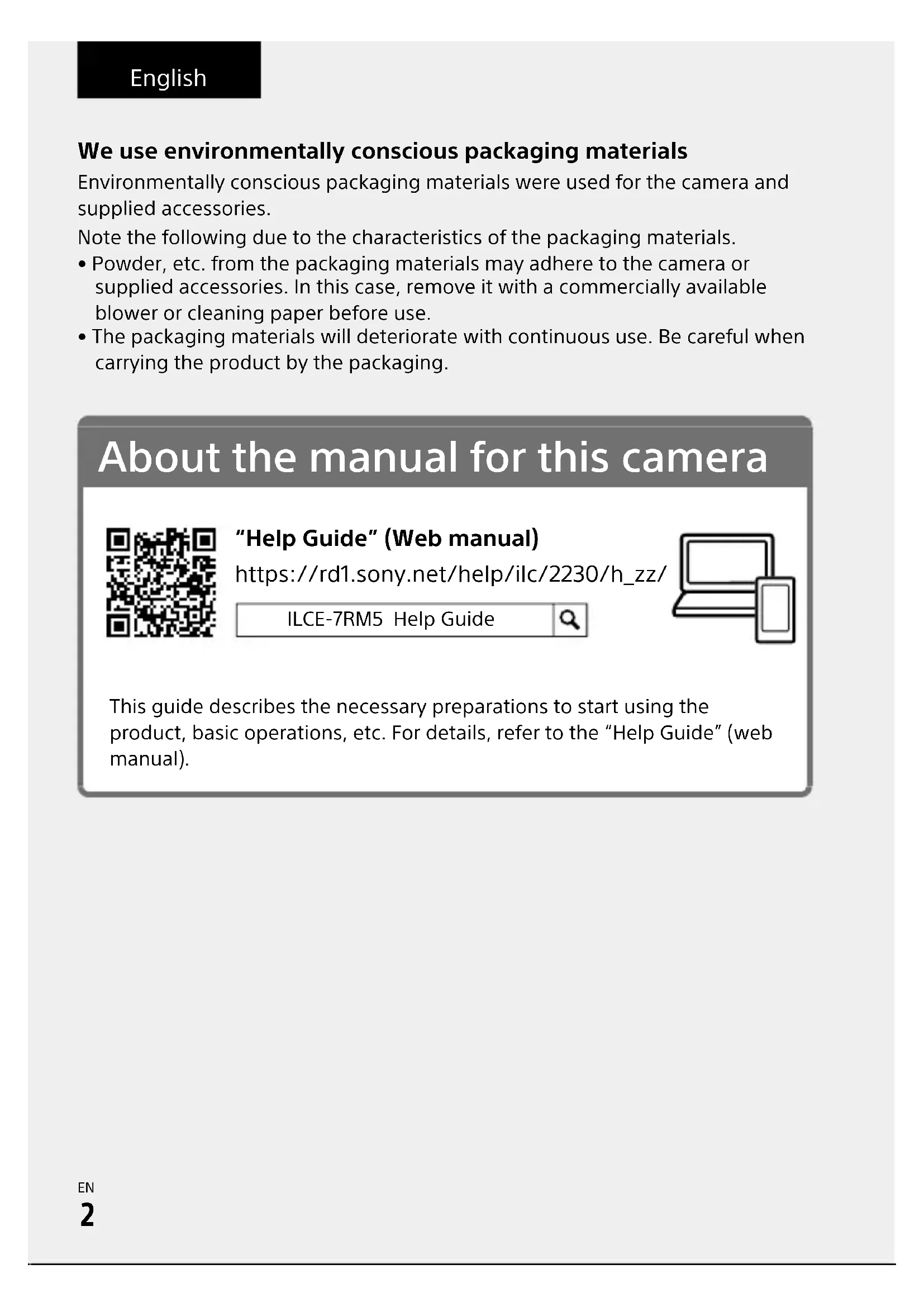
We use environmentally conscious packaging materials
Environmentally conscious packaging materials were used for the camera and supplied accessories.
Note the following due to the characteristics of the packaging materials.
- Powder, etc. from the packaging materials may adhere to the camera or supplied accessories. In this case, remove it with a commercially available blower or cleaning paper before use.
- The packaging materials will deteriorate with continuous use. Be careful when carrying the product by the packaging.
About the manual for this camera
"Help Guide" (Web manual)
https://rd1.sony.net/help/ilc/2230/h_zz/
ILCE-7RM5 Help Guide
natural_image
Simple line drawing of a laptop and smartphone (no text or symbols)This guide describes the necessary preparations to start using the product, basic operations, etc. For details, refer to the "Help Guide" (web manual).
Preparations
Checking the supplied items
The number in parentheses indicates the number of pieces.
- Camera (1)
- Battery charger (1)
• Power cord (mains lead) (1)* (supplied in some countries/regions)
* Multiple power cords may be supplied with this equipment. Use the appropriate one that matches your country/region. See "Notes on use."
- Rechargeable battery pack NP-FZ100 (1)
- USB Type-C® cable (1)
- Shoulder strap (1)
• Body cap (1) (attached to the camera) - Cable protector (1)
- Shoe cap (1) (attached to the camera)
- Eyepiece cup (1) (attached to the camera)
- Startup Guide (this manual) (1)
• Reference Guide (1)
Preparing the battery pack
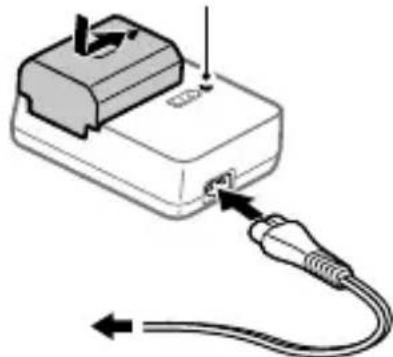
1 Insert the battery pack into the battery charger, and connect it to a wall outlet (wall socket) using the power cord (supplied).
- Place the battery pack on the battery charger in the direction of ▲. Slide the battery pack in the direction of the arrow as far as it will go.
- When charging starts, the CHARGE lamp on the battery charger will light up. When charging is finished, the CHARGE lamp and all indicators turn off.
2 Insert the battery pack into the camera.
- Open the battery cover, and then insert the battery pack while pressing the lock lever.
CHARGE lamp
natural_image
Diagram of a device with a cable and connector, showing internal wiring and a switch (no text or symbols)Inserting a memory card into the camera
You can use CFexpress Type A memory cards and SD memory cards with this camera.
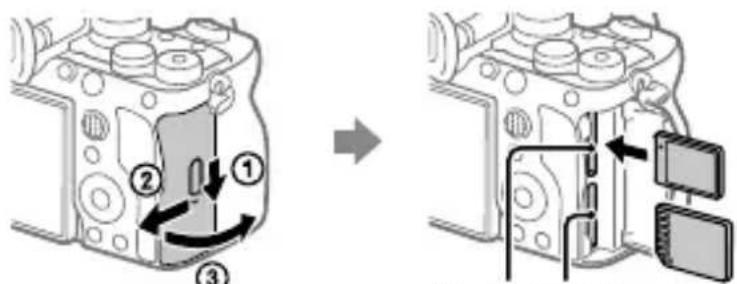
Slot 1 Slot 2
Open the memory card cover and insert the memory card into Slot 1.
- Both Slot 1 and Slot 2 support CFexpress Type A memory cards and SD memory cards.
- Insert a CFexpress Type A memory card with the label facing the monitor, and an SD memory card with the terminal facing the monitor. Insert the card until it clicks into place.
- You can change which memory card slot to use by selecting MENU → (Shooting) → [Media] → [Rec. Media Settings] → [Recording Media] or [Recording Media].
The Slot 1 is used in the default settings.
Hint
- When you use a memory card with the camera for the first time, it is recommended that you format the card on the camera for more stable performance of the memory card.
Attaching a lens
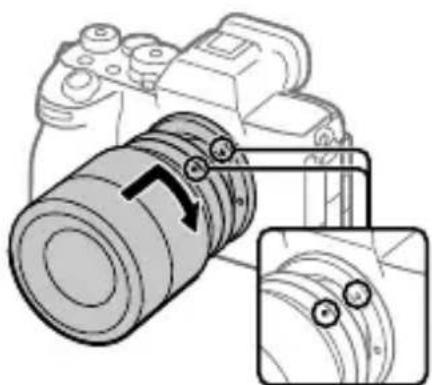
1 Remove the body cap from the camera and the rear lens cap from the rear of the lens.
2 Mount the lens by aligning the two white index marks (mounting indexes) on the lens and camera.
3 While pushing the lens lightly toward the camera, turn the lens slowly in the direction of the arrow until it clicks into the locked position.
natural_image
Diagram of a DSLR camera with an inset showing the lens assembly (no text or symbols present)Mounting indexes
EN
Performing initial setup for the camera
By establishing a Bluetooth connection (pairing) between the camera and a smartphone, you can perform initial camera setup such as date and time settings from the smartphone. Install the dedicated application on your smartphone in advance, and then follow steps 1 to 4 under "Procedures for initial camera setup."
Installing the dedicated smartphone application
Install the application from the following website. Also, update to the latest version of the dedicated application. The specifications of the dedicated application may change without notice.
https://www.sony.net/ca/
Procedures for initial camera setup
ON/OFF (Power) switch
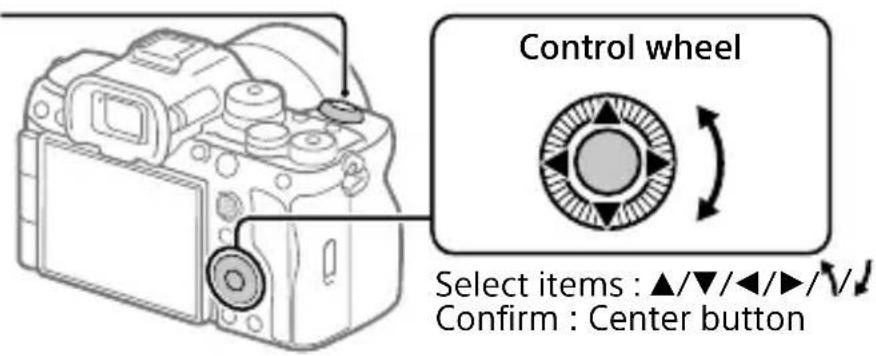
1 Set the ON/OFF (Power) switch to "ON" to turn on the camera.
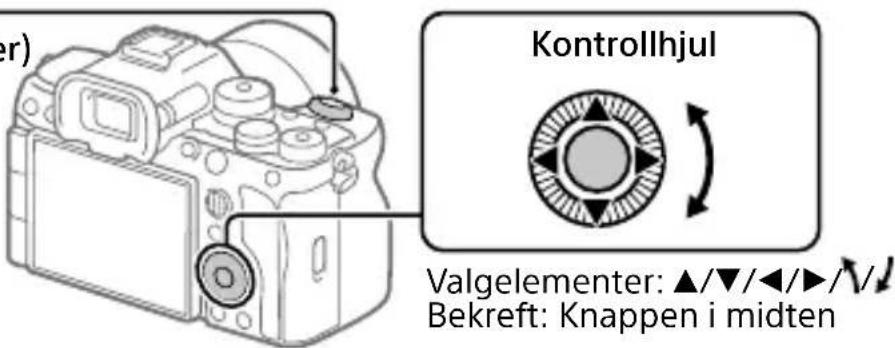
2 Select the desired language and then press the center of the control wheel.
- The privacy notice screen will appear. Read the privacy notice regarding biometrics by opening the link using your smartphone, etc.
3 Press the center of the control wheel.
4 Follow the instructions on the camera screen to connect the camera with your smartphone and perform the initial setup.
- You can also configure or change the initial settings later from the MENU of the camera.
Connecting (pairing) the camera with your smartphone later
For details on the connection method, refer to the following Help Guide URL:
https://rd1.sony.net/help/ilc/2230_pairing/h_zz/
I Shooting
Shooting still images
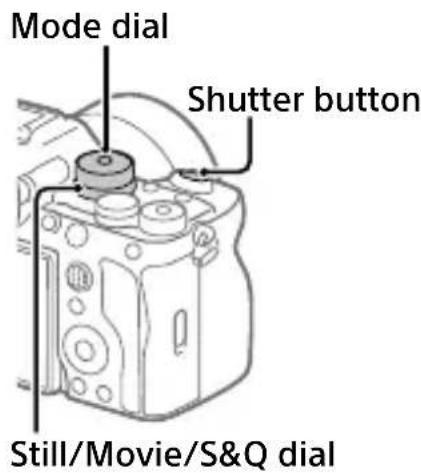
1 Turn and set the Still/Movie/S&Q dial to 📷 (Still) while pressing the lock release button on the front of the Still/Movie/S&Q dial.
2 Turn the mode dial while pressing the mode dial lock release button in the center of the mode dial, and then select the desired shooting mode.
3 Press the shutter button halfway down to focus.
4 Press the shutter button all the way down.
Shooting movies
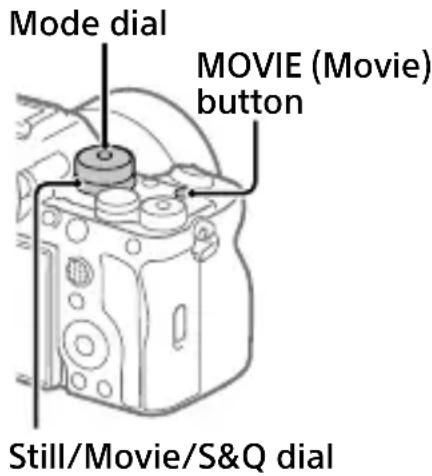
1 Turn and set the Still/Movie/S&Q dial to ▶(Movie) while pressing the lock release button on the front of the Still/Movie/S&Q dial.
2 Turn the mode dial while pressing the mode dial lock release button in the center of the mode dial, and then select the desired shooting mode.
3 Press the MOVIE (Movie) button to start recording.
4 Press the MOVIE (Movie) button again to stop recording.
Hint
- The start/stop movie recording function is assigned to the MOVIE (Movie) button in the default settings. Even without switching shooting modes in Step 1, you can start movie recording from still image shooting mode by pressing the MOVIE (Movie) button.
Notes on use
Refer to "Precautions" in the "Help Guide" as well.
Notes on handling the product
- This camera is designed to be dust-and moisture-resistant, but is not waterproof or dust-proof.
- Do not leave the lens or the viewfinder exposed to a strong light source such as sunlight. Because of the lens's condensing function, doing so may cause smoke, fire, or a malfunction inside the camera body or the lens. If you have to leave the camera exposed to a light source such as sunlight, attach the lens cap to the lens.
- If sunlight or other strong light enters the camera through the lens, it may focus inside the camera and cause smoke or fire. Attach the lens cap when storing the camera. When shooting with backlighting, keep the sun sufficiently far away from the angle of view. Even if it is slightly away from the angle of view, smoke or fire may still occur.
- Do not directly expose the lens or the viewfinder to beams such as laser beams. This may damage the image sensor or the inside of the viewfinder and cause the camera to malfunction.
- Do not look at sunlight or a strong light source through the lens when it is detached. This may result in unrecoverable damage to the eyes or cause a malfunction.
- This camera (including accessories) has magnet(s) which may interfere with pacemakers, programmable shunt valves for hydrocephalus treatment, or other medical devices. Do not place this camera close to persons who use such medical devices. Consult your doctor before using this camera if you use any such medical device.
- Increase the volume gradually. Sudden loud noises can damage your ears. Be especially careful when listening to headphones.
- Do not leave the camera, the supplied accessories, or memory cards within the reach of infants. They may be accidentally swallowed. If this occurs, consult a doctor immediately.
Notes on the monitor and electronic viewfinder
- The monitor and electronic viewfinder are manufactured using extremely high-precision technology, and over 99.99% of the pixels are operational for effective use. However, there may be some small black dots and/or bright dots (white, red, blue or green in color) that constantly appear on the monitor and electronic viewfinder. These are imperfections due to the manufacturing process and do not affect the recorded images in any way.
- When shooting with the viewfinder, you may experience symptoms such as eyestrain, fatigue, motion sickness, or nausea. We recommend that you take a break at regular intervals when you are shooting with the viewfinder.
- If the monitor or electronic viewfinder is damaged, stop using the camera immediately. The damaged parts may harm your hands, face, etc.
Notes on continuous shooting
When shooting still images continuously, the monitor or viewfinder may flash between the shooting screen and a black screen. If you keep watching the screen in this situation, you may experience uncomfortable symptoms such as feeling of unwellness. If you experience uncomfortable symptoms, stop using the camera, and consult your doctor as necessary.
Notes on recording for long periods of time or recording 4K/8K movies
- The camera body and battery may become warm with use – this is normal.
- If the same part of your skin touches the camera for a long period of time while using the camera, even if the camera does not feel hot to you, it may cause symptoms of a low-temperature burn such as redness or blistering. Pay special attention in the following situations and use a tripod, etc.
- When using the camera in a high temperature environment
- When someone with poor circulation or impaired skin sensation uses the camera
- When using the camera with [Auto Power OFF Temp.] set to [High]
Notes on using memory cards
- When recording is finished, the memory card may become hot. This is not a malfunction.
- If (overheating warning icon) is displayed on the monitor, do not remove the memory card from the camera right away. Instead, wait for a while after turning off the camera, and then remove the memory card. If you touch the memory card while it is hot, you may drop it and the memory card may be damaged. Be careful when removing the memory card.
Notes on using a tripod
Use a tripod with a screw less than 5.5 mm (7/32 inches) long. Otherwise, you cannot firmly secure the camera, and damage to the camera may occur.
Sony lenses/accessories
Using this unit with products from other manufacturers may affect its performance, leading to accidents or malfunction.
Warning on copyrights
Television programs, films, videotapes, and other materials may be copyrighted. Unauthorized recording of such materials may be contrary to the provisions of the copyright laws.
Notes on location information
If you upload and share still images or movies taken with this camera on the Internet while the location information is linked with the dedicated smartphone application, you may accidentally reveal the location information to a third party. To prevent third parties from obtaining your location information, deactivate the [Location Information Linkage] function of the dedicated application.
Notes on discarding or transferring this product to others
Before discarding or transferring this product to others, be sure to perform the following operation to protect private information.
- Select [Setting Reset] [Initialize].
Notes on discarding or transferring a memory card to others
Executing [Format] or [Delete] on the camera or a computer may not completely delete the data on the memory card. Before transferring a memory card to others, we recommend that you delete the data completely using data deletion software. When discarding a memory card, we recommend that you physically destroy it.
Note on network functions
When you use network functions, unintended third parties on the network may access the camera, depending on the usage environment. For example, unauthorized access to the camera may occur in network environments to which another network device is connected or can connect without permission. Sony bears no responsibility for any loss or damage caused by connecting to such network environments.
Note on the 5 GHz band for wireless LAN
When using the wireless LAN function outdoors, set the band to 2.4 GHz by following the procedure below. (WW282174 only)
- MENU → (Network) → [Wi-Fi] → [Wi-Fi Frequency Band]
How to turn off wireless network functions (Wi-Fi, etc.) temporarily
When you board an airplane, etc., you can turn off all wireless network functions temporarily using [Airplane Mode].
Power Cord
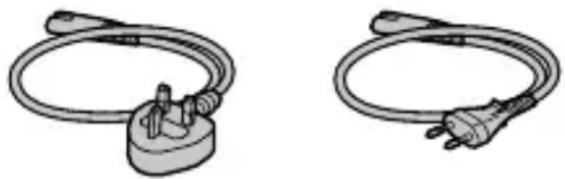
Multiple power cords may be supplied with this equipment. Use the appropriate one that matches your country/region.
For the customers in the UK, Ireland, Malta, Cyprus and Saudi Arabia
Use the power cord (A).
For safety reasons, the power cord (B) is not intended for above countries/regions and shall therefore not be used there.
For the customers in other EU countries/regions
Use the power cord (B).
(A) (B)
natural_image
Two types of electrical plug connectors shown in line drawings (no text or symbols)For Customers in the U.S.A. and Canada
The available scientific evidence does not show that any health problems are associated with using low power wireless devices. There is no proof, however, that these low power wireless devices are absolutely safe. Low power Wireless devices emit low levels of radio frequency energy (RF) in the microwave range while being used. Whereas high levels of RF can produce health effects (by heating tissue), exposure of low-level RF that does not produce heating effects causes no known adverse health effects. Many studies of low-level RF exposures have not found any biological effects. Some studies have suggested that some biological effects might occur, but such findings have not been confirmed by additional research. This equipment has been tested and found to comply with FCC/ISED radiation exposure limits set forth for an uncontrolled environment and meets the FCC radio frequency (RF) Exposure Guidelines and RSS-102 of the ISED radio frequency (RF) Exposure rules.
For Customers in the U.S.A.
For question regarding your product or for the Sony Service Center nearest you, call 1-800-222-SONY (7669).
Supplier's Declaration of Conformity
Trade Name : SONY
Model : WW282174
Responsible Party : Sony Electronics Inc.
Address : 16535 Via Esprillo, San Diego, CA 92127 U.S.A.
Telephone Number: 858-942-2230
Important note on use of 5 GHz wireless LAN
Compliance with FCC requirement 15.407(c)
Data transmission is always initiated by software, which is the passed down through the MAC, through the digital and analog baseband, and finally to the RF chip. Several special packets are initiated by the MAC. These are the only ways the digital baseband portion will turn on the RF transmitter, which it then turns off at the end of the packet. Therefore, the transmitter will be on only while one of the aforementioned packets is being transmitted. In other words, this device automatically discontinue transmission in case of either absence of information to transmit or operational failure.
Frequency Tolerance: ±20 ppm
For Customers in Canada
5 150-5 350 MHz band is restricted to indoor operation only.
High-power radars are allocated as primary users (i.e. priority users) of the bands 5 250-5 350 MHz and 5 650-5 850 MHz and that these radars could cause interference and/or damage to LE-LAN devices.
For Customers in Europe
| IEEE802.11b/g/n | 2 400 MHz < 60 mWe.i.r.p. |
| IEEE802.11a/n/ac | 5 150-5 350 MHz< 35 mWe.i.r.p. |
| 5 470-5 725 MHz | |
| IEEE802.11a/n/ac | 5 725-5 850 MHz< 25 mWe.i.r.p. |
| Bluetooth 2 | 400 MHz < 10 mWe.i.r.p. |
Hereby, Sony Corporation declares that this equipment is in compliance with Directive 2014/53/EU.
The full text of the EU declaration of conformity is available at the following internet address:
https://www.compliance.sony.eu
Hereby, Sony Corporation declares that this equipment is in compliance with the UK relevant statutory requirements.
The full text of the declaration of conformity is available at the following internet address:
https://compliance.sony.co.uk
For this radio equipment the following restrictions on putting into service or of requirements for authorization of use apply in AT/BE/BG/CY/CZ/DK/EE/FI/FR/DE/EL/HU/IE/IT/LV/LT/LU/MT/NL/PL/PT/RO/SK/SI/ES/SE/UK/UK(NI)/HR/IS/LI/NO/CH/AL/BA/MK/MD/RS/ME/XK/TR: 5 150 - 5 350 MHz band is restricted to indoor operations only.
For Customers in Indonesia
| IEEE802.11b/g/n 2 | 400 MHz |
| Bluetooth 2 400 MHz | |
For customers who purchased their camera from a store in Japan that caters to tourists
Note
Some certification marks for standards supported by the camera can be confirmed on the screen of the camera.
Select MENU → (Setup) →
[Setup Option] → [Certification Logo].
Specifications
Camera
[System]
Camera Type: Interchangeable Lens Digital Camera
Lens: Sony E-mount lens
[Image sensor]
Image format: 35 mm full frame
(35.7 mm × 23.8 mm), CMOS image sensor
Effective pixel number of camera:
Approx. 61 000 000 pixels
Total pixel number of camera:
Approx. 62 500 000 pixels
[Electronic Viewfinder]
Type: 1.6 cm (0.64 type)
Electronic Viewfinder
[Monitor]
8.0 cm (3.2 type) TFT drive, touch panel
[General]
Rated input: 7.2 V—, 4.5 W
Operating temperature: 0 °C to 40 °C (32 °F to 104 °F)
Storage temperature: -20 °C to 55 °C (-4 °F to 131 °F)
Dimensions (W/H/D) (Approx.):
131.3 × 96.9 × 82.4 mm
131.3 × 96.9 × 72.3 mm
(from grip to monitor)
5 1/4 × 3 7/8 × 3 1/4 in.
5 1/4 × 3 7/8 × 2 7/8 in.
(from grip to monitor)
Mass (Approx.): 723 g (1 lb 9.6 oz) (including battery pack, SD Card)
[Wireless LAN]
WW282174 (see name plate on the bottom of camera)
Supported format: IEEE 802.11 a/b/g/n/ac
Frequency band: 2.4 GHz/5 GHz
Security: WEP/WPA-PSK/WPA2-PSK
Connection method: Wi-Fi Protected Setup™ (WPS)/ Manual
Access method: Infrastructure mode
WW529928 (see name plate on the bottom of camera)
Supported format: IEEE 802.11 b/g/n
Frequency band: 2.4 GHz
Security: WEP/WPA-PSK/WPA2-PSK
Connection method: Wi-Fi Protected Setup™ (WPS)/ Manual
Access method: Infrastructure mode
Battery charger BC-QZ1/BC-QZ1 T
Rated input: 100 - 240 V ∼, 50/60 Hz, 0.38 A
Rated output: 8.4 V = -1.6 A
Rechargeable battery pack NP-FZ100
Rated voltage: 7.2 V---
Design and specifications are subject to change without notice.
Trademarks
• is a trademark of Sony Group Corporation.
- USB Type-C® and USB-C® are registered trademarks of USB Implementers Forum.
- Wi-Fi, the Wi-Fi logo and Wi-Fi Protected Setup are registered trademarks or trademarks of the Wi-Fi Alliance.
- The Bluetooth® word mark and logos are registered trademarks owned by Bluetooth SIG, Inc. and any use of such marks by Sony Group Corporation and its subsidiaries is under license.
• QR Code is a trademark of Denso Wave Inc.
- In addition, system and product names used in this manual are, in general, trademarks or registered trademarks of their respective developers or manufacturers. However, the ™ or ® marks may not be used in all cases in this manual.
Additional information on this product and answers to frequently asked questions can be found at our Customer Support Website.
https://www.sony.net/
https://rd1.sony.net/help/ilc/2230/h_zz/
ILCE-7RM5 Guide d'aide
natural_image
Simple line drawing of a laptop and smartphone (no text or symbols)natural_image
Diagram of a device with a cable and connector, showing signal flow direction (no text or symbols)Fente 1 Fente 2
natural_image
Diagram of a DSLR camera with an inset showing the lens assembly (no text or symbols present)Repères de montage
FR
https://www.sony.net/ca/
natural_image
Line drawing of a DSLR camera with no visible text or symbolsMolette de commande
natural_image
Two types of electrical plug connectors shown in line drawings (no text or symbols)Batterie rechargeable NP-FZ100
https://rd1.sony.net/help/ilc/2230/h_zz/
ILCE-7RM5 Hilfe

natural_image
Simple line drawing of a laptop and smartphone (no text or symbols)natural_image
Diagram of a DSLR camera with an inset showing the lens assembly (no text or symbols present)Ansetzindexe
DE
https://www.sony.net/ca/
natural_image
Simple line drawing of a cable with a plug and connector (no text or symbols)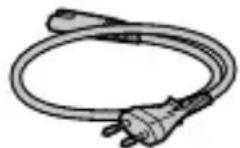
Wi-Fi Protected Setup™ (WPS)/
Manuell
https://rd1.sony.net/help/ilc/2230/h_zz/
natural_image
Simple line drawing of a laptop and smartphone (no text or symbols)Ranura 1 Ranura 2
natural_image
Diagram of a DSLR camera with an inset showing the lens assembly (no text or symbols present)Índices de montura
https://www.sony.net/ca/
- MENU → (Red) → [Wi-Fi] → [Banda de frec. Wi-Fi]
natural_image
Simple line drawing of a plug with a bulb (no text or symbols)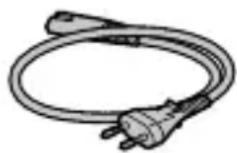
https://rd1.sony.net/help/ilc/2230/h_zz/
ILCE-7RM5 Guida

natural_image
Simple line drawing of a laptop and smartphone (no text or symbols)Slot 1 Slot 2
natural_image
Diagram of a DSLR camera with an inset showing the lens assembly process (no text or symbols present)Indici di montaggio
https://www.sony.net/ca/
- MENU → (Rete) → [Wi-Fi] → [Banda freq. Wi-Fi]
natural_image
Simple line drawing of a coiled cable or plug with a handle (no text or symbols)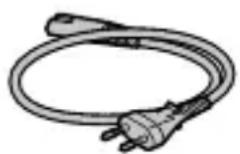
Drive TFT da 8,0 cm (tipo 3,2), touch panel
[Generali]
https://rd1.sony.net/help/ilc/2230/h_zz/
natural_image
Simple line drawing of a laptop and smartphone (no text or symbols)Ranhura 1 Ranhura 2
natural_image
Diagram of a DSLR camera with an inset showing the lens assembly (no text or symbols present)Índices de montagem
https://www.sony.net/ca/
PT
natural_image
Simple line drawing of a cable with a plug and socket (no text or symbols)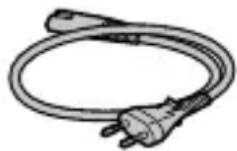
https://rd1.sony.net/help/ilc/2230/h_zz/
ILCE-7RM5 Helpgids
![SONY Alpha A7R V - [Generali] - 2](/content/2026/04/599322/images/38220851bef61c34fc0a1737aa8f0a9bffc771d60ff1b6f861a4ec27a19e6805.jpg)
![SONY Alpha A7R V - [Generali] - 3](/content/2026/04/599322/images/0fc9eb04b68218269c52d60c1d5fe9de7ba818c2c66ed0c67d730c1d20365f3a.jpg)
natural_image
Simple line drawing of a laptop and smartphone (no text or symbols)Gleuf 1 Gleuf 2
natural_image
Diagram of a DSLR camera with an inset showing the lens assembly (no text or symbols present)Vattingmarkeringen
NL
https://www.sony.net/ca/
- MENU → (Network) → [Wi-Fi] → [Wi-Fi-frequent.band]
natural_image
Two types of electrical plug connectors shown in line drawings (no text or symbols)https://rd1.sony.net/help/ilc/2230/h_zz/
natural_image
Simple line drawing of a laptop and smartphone (no text or symbols)natural_image
Diagram of a device with a cable and connector, showing connection arrows (no text or symbols)Gniazdo 1 Gniazdo 2
natural_image
Diagram of a DSLR camera with an inset showing the lens assembly (no text or symbols present)Wskaźniki mocowania
PL
https://www.sony.net/ca/
natural_image
Illustration of a coiled electrical plug with two connectors (no text or symbols)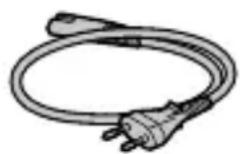
https://rd1.sony.net/help/ilc/2230/h_zz/
natural_image
Simple line drawing of a laptop and smartphone (no text or symbols)natural_image
Diagram of a device with a cable and connector, showing internal wiring and a switch (no text or symbols)К сетевой розетке
natural_image
Diagram of a DSLR camera with an inset showing the lens assembly process (no text or symbols present)Метка крепления
https://www.sony.net/ca/
natural_image
Line drawing of a DSLR camera with a screen and lens (no text or symbols)Колесико управления

https://rd1.sony.net/help/ilc/2230/h_zz/
ILCE-7RM5 Довідка
![SONY Alpha A7R V - [Generali] - 6](/content/2026/04/599322/images/2c836bc00b4062f6e5ce9f220f018faf93359ea48e321bcaf6444bfdf88c4e34.jpg)
![SONY Alpha A7R V - [Generali] - 7](/content/2026/04/599322/images/3d6b81bc6b99dbb2020c731661d771ffed534a18169145ad09e4fec05098b938.jpg)
natural_image
Simple line drawing of a laptop and smartphone (no text or symbols)Гніздо 1 Гніздо 2
natural_image
Diagram of a DSLR camera with an arrow indicating direction, showing lens and cable assembly (no text or symbols)https://www.sony.net/ca/
https://rd1.sony.net/help/ilc/2230/h_zz/
natural_image
Simple line drawing of a laptop and smartphone (no text or symbols)Fack 1 Fack 2
natural_image
Diagram of a DSLR camera with an inset showing the lens adjustment (no text or symbols present)Monteringsmärken
https://www.sony.net/ca/
SE
natural_image
Simple line drawing of a coiled cable with a plug and connector (no text or symbols)![SONY Alpha A7R V - [Generali] - 8](/content/2026/04/599322/images/f15753c013062131b2be8edaa3e51eb64443932c23ee22ba04779c9bba500a67.jpg)
För kunder i Europa
| IEEE802.11b/g/n | 2 400 MHz < 60 mWe.i.r.p. |
| IEEE802.11a/n/ac | 5 150-5 350 MHz< 35 mWe.i.r.p. |
| 5 470-5 725 MHz | |
| IEEE802.11a/n/ac | 5 725-5 850 MHz < 25 mWe.i.r.p. |
| Bluetooth 2 | 400 MHz < 10 mWe.i.r.p. |
https://rd1.sony.net/help/ilc/2230/h_zz/
natural_image
Simple line drawing of a laptop and smartphone (no text or symbols)Paikka 1 Paikka 2
natural_image
Diagram of a DSLR camera with an inset showing the lens adjustment mechanism (no text or symbols present)Kiinnitinindeksit
https://www.sony.net/ca/
FI
natural_image
Illustration of a coiled electrical plug with two connectors (no text or symbols)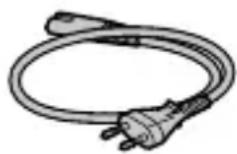
"Hjelpeveiledning" (Internett-håndbok)
https://rd1.sony.net/help/ilc/2230/h_zz/
ILCE-7RM5 Hjelpeveiledning
![SONY Alpha A7R V - [Generali] - 10](/content/2026/04/599322/images/b7a7e79c98aaa0d5230dc31cda5cf178247cc66f2cd10b5d53ccc14e0e1807f1.jpg)
natural_image
Simple line drawing of a laptop and smartphone (no text or symbols)natural_image
Diagram of a device with a cable and connector, showing an open port connected to a plug (no text or symbols present)Til en stikkontakt
2 Sett inn batteriet i kameraet.
NO
NO
Sette inn et minnekort i kameraet
Spor 1 Spor 2
natural_image
Diagram of a DSLR camera with an inset showing the lens adjustment mechanism (no text or symbols present)Fatningsindekser
https://www.sony.net/ca/
NO
NO
ON/OFF — (Strømbryter)
natural_image
Simple line drawing of a coiled tube with two connectors (no text or symbols)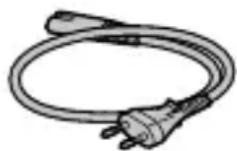
For kunder i Europa
| IEEE802.11b/g/n | 2 400 MHz < 60 mWe.i.r.p. |
| IEEE802.11a/n/ac | 5 150-5 350 MHz< 35 mWe.i.r.p. |
| 5 470-5 725 MHz | |
| IEEE802.11a/n/ac | 5 725-5 850 MHz < 25 mWe.i.r.p. |
| Bluetooth 2 | 400 MHz < 10 mWe.i.r.p. |
Herved erklærer Sony Corporation at utstyrstypen er i samsvar med direktiv 2014/53/EU.
EU-erklæring fulltekst finner du på Internett under:
https://www.compliance.sony.eu
https://rd1.sony.net/help/ilc/2230/h_zz/
natural_image
Simple line drawing of a laptop and smartphone (no text or symbols)DK
Åbning 1 Åbning 2
natural_image
Diagram of a DSLR camera with an inset showing the lens assembly process (no text or symbols present)Monteringsindeks
https://www.sony.net/ca/
DK
natural_image
Simple line drawing of a cable with a plug and socket (no text or symbols)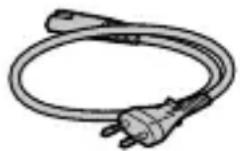
Til kunder i Europa
| IEEE802.11b/g/n | 2 400 MHz < 60 m | We.i.r.p. |
| IEEE802.11a/n/ac | 5 150-5 350 MHz5 470-5 725 MHz | < 35 mWe.i.r.p. |
| IEEE802.11a/n/ac | 5 725-5 850 MHz | < 25 mWe.i.r.p. |
| Bluetooth 2 | 400 MHz < 10 m | We.i.r.p. |
- SONY®
- We use environmentally conscious packaging materials
- About the manual for this camera
- Preparations
- Checking the supplied items
- Preparing the battery pack
- Insert the battery pack into the battery charger, and connect it to a wall outlet (wall socket) using the power cord (supplied).
- Insert the battery pack into the camera.
- Inserting a memory card into the camera
- Open the memory card cover and insert the memory card into Slot 1.
- Hint
- Attaching a lens
- Performing initial setup for the camera
- Installing the dedicated smartphone application
- Procedures for initial camera setup
- I Shooting
- Shooting still images
- Shooting movies
- Notes on use
- Refer to "Precautions" in the "Help Guide" as well.
- Notes on handling the product
- Notes on the monitor and electronic viewfinder
- Notes on continuous shooting
- Notes on recording for long periods of time or recording 4K/8K movies
- Notes on using memory cards
- Notes on using a tripod
- Sony lenses/accessories
- Warning on copyrights
- Notes on location information
- Notes on discarding or transferring this product to others
- Notes on discarding or transferring a memory card to others
- Note on network functions
- Note on the 5 GHz band for wireless LAN
- How to turn off wireless network functions (Wi-Fi, etc.) temporarily
- Power Cord
- For the customers in the UK, Ireland, Malta, Cyprus and Saudi Arabia
- For the customers in other EU countries/regions
- For Customers in the U.S.A. and Canada
- For Customers in the U.S.A.
- Supplier's Declaration of Conformity
- Important note on use of 5 GHz wireless LAN
- For Customers in Canada
- 150-5 350 MHz band is restricted to indoor operation only.
- For Customers in Europe
- For Customers in Indonesia
- For customers who purchased their camera from a store in Japan that caters to tourists
- Note
- Specifications
- Camera
- [System]
- [Image sensor]
- [Electronic Viewfinder]
- [Monitor]
- [General]
- [Wireless LAN]
- Battery charger BC-QZ1/BC-QZ1 T
- Rechargeable battery pack NP-FZ100
- Trademarks
- Batterie rechargeable NP-FZ100
- [Generali]
- Sett inn batteriet i kameraet.
- Sette inn et minnekort i kameraet
Brand : SONY
Model : Alpha A7R V
Category : Camera