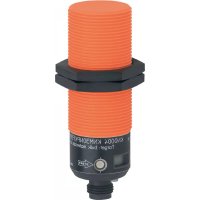
KN0006 - Level sensor IFM - Free user manual and instructions
Find the device manual for free KN0006 IFM in PDF.



| Product Type | Capacitive level sensor |
| Brand | IFM |
| Model | KN0006 |
| Series | efectoriso® KNM |
| Application | Level control of liquids and dry bulk materials, especially plastic granules |
| Power supply | 20-250 V AC/DC |
| Output | Switch (normally open or normally closed depending on version) |
| Active face temperature | Up to 110 °C |
| LED indication | Green (setting), yellow (switching), red (fault or threshold reached) |
| Setting | Automatic via programming push-button (empty and full settings) |
| Locking | Yes, to prevent unauthorized manipulation |
| Mounting | In contact with fluid or contactless (non-metallic tanks) |
| Electrical connection | 2 wires (L1, N) - disconnect installation before connecting |
| Maintenance | No maintenance required; keep the active face free of deposits |
| Error messages | Red LED flashes at 8 Hz: incorrect setting or internal fault |
| Repairability | Not repairable, replace the device in case of fault |
| Spare parts | Not available |
| Standards | Technical data sheet available at www.ifm.com |
Frequently Asked Questions - KN0006 IFM
User questions about KN0006 IFM
0 question about this device. Answer the ones you know or ask your own.
Ask a new question about this device
Download the instructions for your Level sensor in PDF format for free! Find your manual KN0006 - IFM and take your electronic device back in hand. On this page are published all the documents necessary for the use of your device. KN0006 by IFM.
USER MANUAL KN0006 IFM
natural_image
Technical line drawing of a mechanical component with no visible text or symbolsInhalt Seite
natural_image
Diagram of a micrometer measuring a granular liquid in a container (no text or symbols)natural_image
Diagram of a micrometer measuring a granular material in a container (no text or symbols)Medienberührend
natural_image
Technical line drawing of a mechanical device with a screwdriver inserted (no text or symbols)Programmieren
natural_image
Line drawing of a mechanical device with a screwdriver and control panel (no text or symbols)Function and features 8
Mounting 9
Electrical connection 9
Operation 9
Programming 9
Set-up/Operation 13
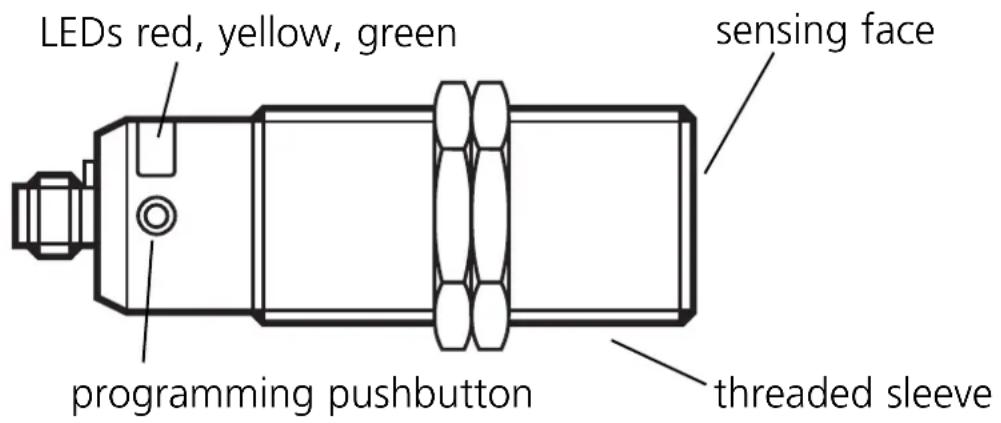
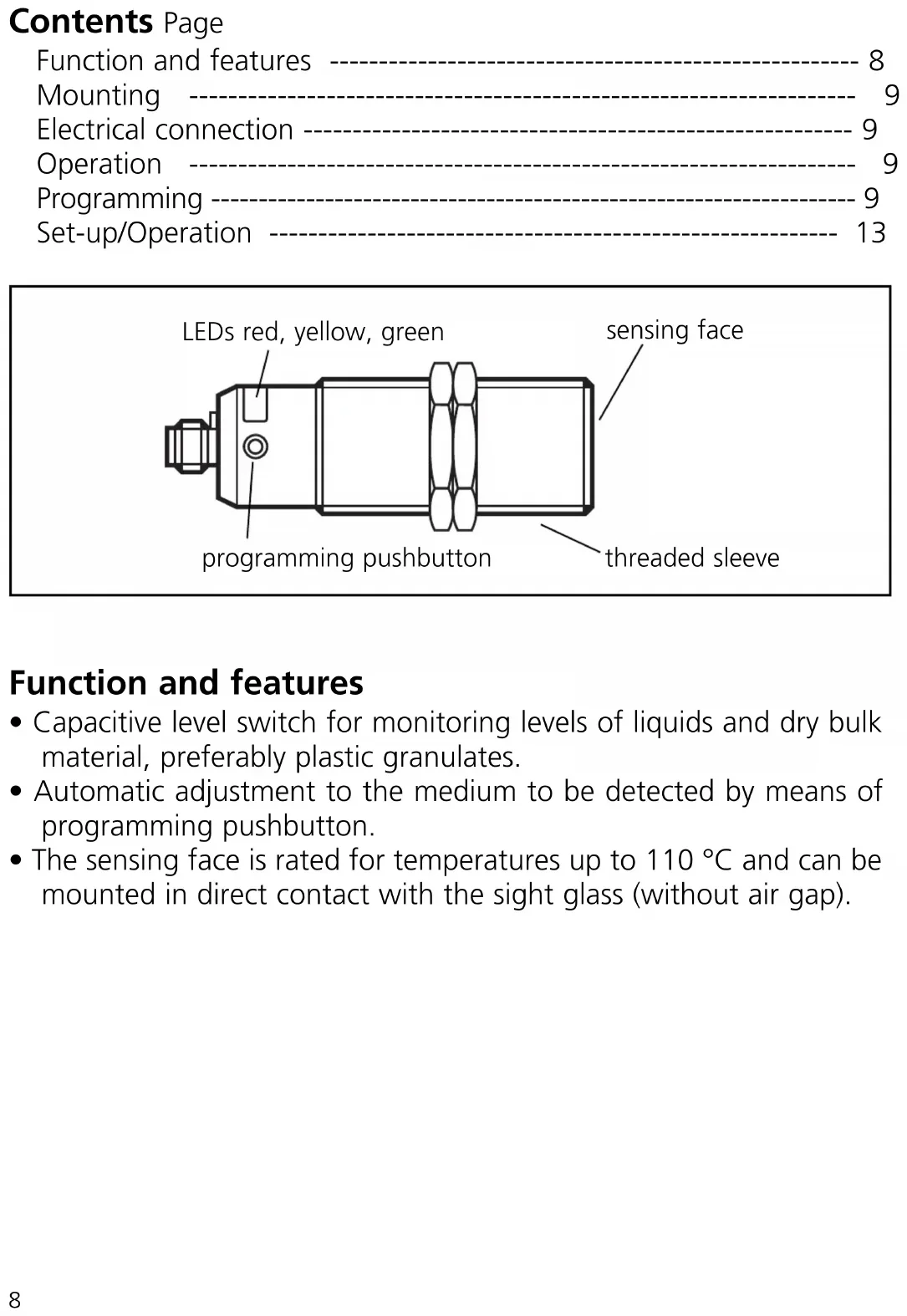
Function and features
- Capacitive level switch for monitoring levels of liquids and dry bulk material, preferably plastic granulates.
- Automatic adjustment to the medium to be detected by means of programming pushbutton.
- The sensing face is rated for temperatures up to 110 °C and can be mounted in direct contact with the sight glass (without air gap).
Mounting
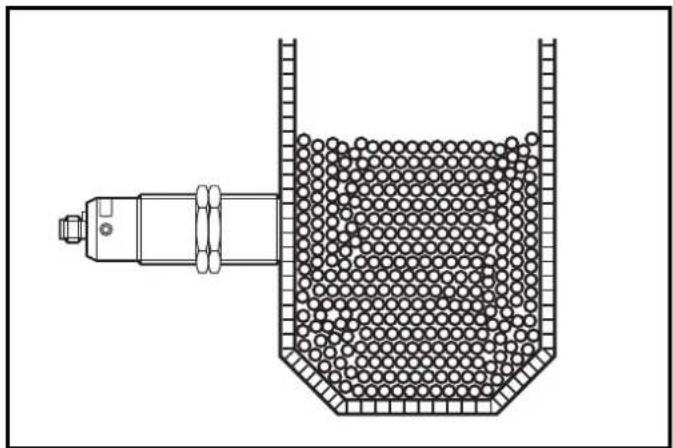
Mount the level switch as shown:
natural_image
Diagram of a mechanical device with a granular internal structure and a cylindrical shaft inserted into a container (no text or symbols)Not in contact with the medium (only for non-metallic tanks)
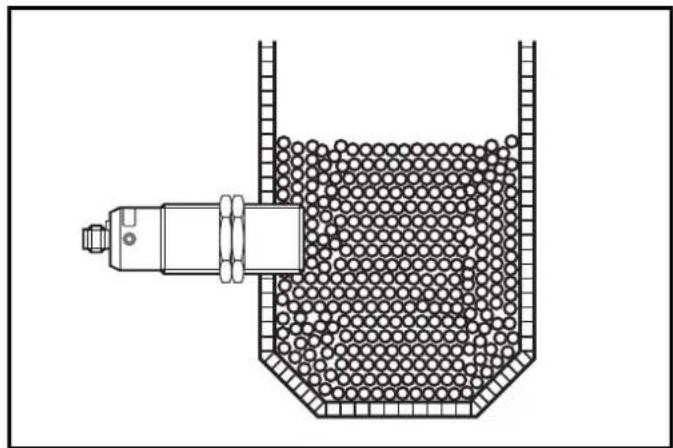
natural_image
Technical line drawing of a mechanical device inside a container filled with spherical particles (no text or symbols)In contact with the medium
Electrical connection

Disconnect the installation from power. Connect the unit (see type label).
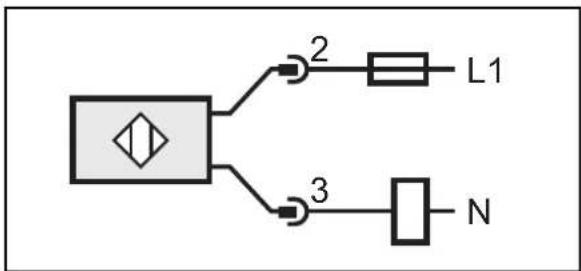
flowchart
graph TD
    A["Symbol"] --> B["2"]
    A --> C["3"]
    B --> D["L1"]
    C --> E["N"]
Operation
Adjust the sensor. To do so, press the programming pushbutton with a blunt object.
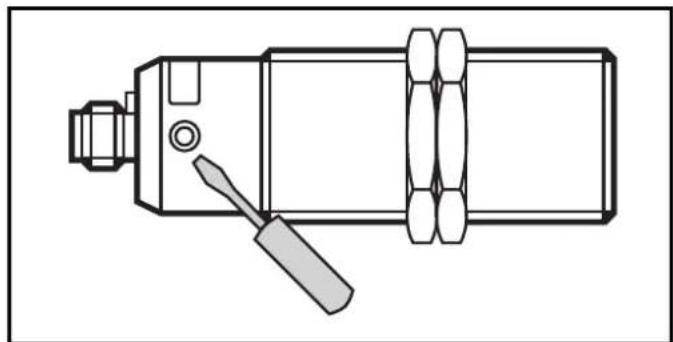
natural_image
Technical line drawing of a mechanical device with a screwdriver inserted (no text or symbols)Programming
Overview of the modes and their basic functions:
- Operating mode: Normal operating mode. In this mode all normal sensor functions are active.
- Adjustment mode: Setting of the switching threshold by empty and full adjustment.
- Locking mode: Locking and unlocking of the unit possible to avoid tampering.
Empty adjustment
The unit must be adjusted after installation in the empty tank (empty adjustment). The tank can be considered to be "empty" when the medium to be detected is min. 20 mm away from the active zone. If the sensor detects a medium after adjustment, its switching status changes.
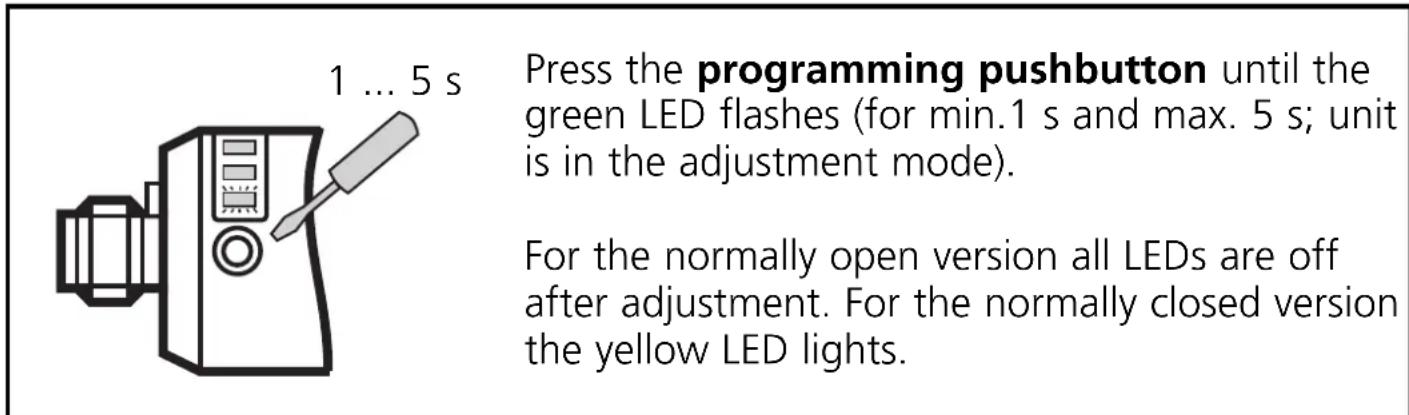
Note:
The sensor is operational just with empty adjustment. However, it is recommended to carry out a "full adjustment" with the active zone being completely covered after empty adjustment. On the basis of the values for the empty state/full state the internal microprocessor determines the optimum position of the switching thresholds between the two states. Using both adjustment criteria (empty and full adjustment) results in the maximum operational reliability for the application. For empty adjustment the internal microprocessor generates 2 values.
The first value corresponds to the sensor signal measured in the empty state. The second value is an assumed measured value for the full state. It is calculated from the just measured empty state and a factory signal preset. For full adjustment this second value is replaced by a real measured value.
Full adjustment
After empty adjustment the full state is to be achieved, if possible, so that the unit switches.
| 5 ... 10 s | Press the programming pushbutton until the green LED flashes quickly(= the unit is in the adjustment mode). |
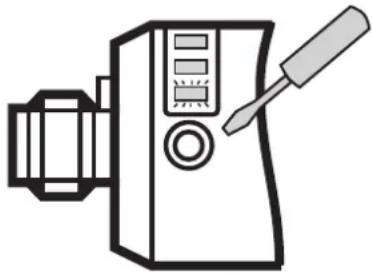 | The LED first flashes slowly (about 1 Hz),after 5 s it flashes double as quickly (about 2 Hz).After adjustment only the yellow LED lights - for the normally open version. For the normally closed version all LEDs are off. |
The full adjustment can be repeated as often as you like. The stored value for the empty state is not overwritten by the full adjustment. After a new empty adjustment both values are automatically set again, the values last defined are overwritten.

Therefore always carry out the empty adjustment first, then, if necessary, the full adjustment!
Locking
The stored adjustment values can be protected against unauthorised programming as follows (factory setting: not locked):
| min. 10 s | |
| Press the programming pushbutton for min. 10 s. | |
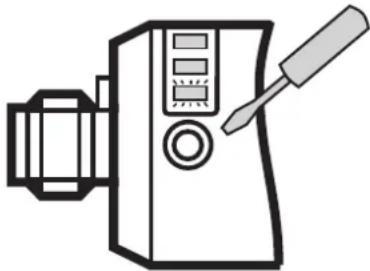 | The green LED first flashes slowly (about 1 Hz), after 5 s more quickly (about 2 Hz), after 10 s it goes out, the unit is locked. |
When the programming pushbutton is released the unit is locked and all programming functions are inactive. The unit returns to the operating mode.
If this operation starts from the locked state, the green LED does not react for 10 s. After 10 s the unit is unlocked (see "Unlocking").
Unlocking
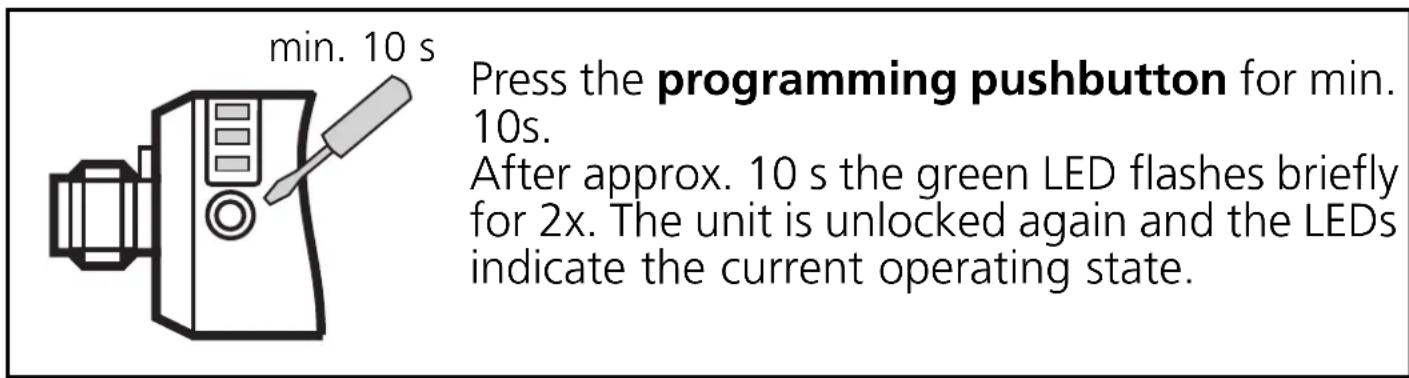
When the programming pushbutton is released the unit is unlocked and all programming functions are active again.
Error messages
If empty or full adjustment cannot be made, the red LED flashes quickly at about 8 Hz after the adjustment attempt (adjustment error).
To delete this error message press the programming pushbutton once or power off and then power on again. The measured values successfully read so far remain unchanged.
Possible reasons for an error message:
- The signal difference between the empty and full state is too small (e.g. empty and full adjustment without sufficient change of the level).
- The signal change between the empty and full state is in the wrong order (e.g. empty adjustment in the full state and then full adjustment in the empty state).
- Empty adjustment outside the operating range (e.g. empty adjustment in case of direct contact with an electrically grounded medium, e.g. if the active zone is immersed in water).
Help: Avoid the above-mentioned errors and repeat the adjustment for error correction.
Further faults:
• Electronic fault or sensing zone of the unit damaged
- Internal fault (can only be deleted by power off and then power on again, hardware reset).
Set-up / Operation
Check the safe functioning of the unit. To do so, bring about a sensor response by taking suitable measures.
Display by LEDs:
| LED gren | flashes slowly (1 Hz): adjustment mode empty adjustmentflashes quickly (2 Hz): adjustment mode full adjustmentOFF: unit is in the operating mode |
| LED yellow | OFF: switching output disabledON: switching output enabled |
| LED red | flashes quickly (8 Hz): adjustment error, internal faultflashes slowly (1 Hz): close to reaching the switching threshold |
The red LED becomes active for a short time during the change between "medium not present" and "medium present" (flashes at 1 Hz) if the medium is close to reaching the switching threshold. This can occur in particular if the level changes very slowly and is no error message meaning a fault in the unit.
The operation of the level switch is maintenance-free. For a correct function ensure:
- The sensing face and the open space should be kept free of deposits and foreign bodies, particularly for mounting with the sensing face showing upwards.
Technical data
Technical data and further information at www.ifm.com --> Select your country --> Data sheet search
Contenu Page
natural_image
Diagram of a mechanical device with a granular material inside a container (no text or symbols)natural_image
Technical line drawing of a mechanical device inside a container filled with spherical particles (no text or symbols)natural_image
Technical line drawing of a mechanical device with a screwdriver inserted (no text or symbols)Programmation
natural_image
Line drawing of a mechanical device with a screwdriver inserted (no text or symbols)natural_image
Line drawing of a mechanical device with a screwdriver and control panel (no text or symbols)natural_image
Line drawing of a mechanical device with a screwdriver and control panel (no text or symbols)min. 10 s

Brand : IFM
Model : KN0006
Category : Level sensor