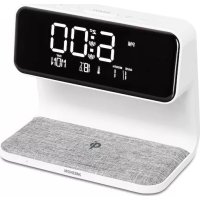
LIFE P66075 (MD 80082) - Alarm Clock MEDION - Free user manual and instructions
Find the device manual for free LIFE P66075 (MD 80082) MEDION in PDF.


| Product type | Radio alarm clock |
| Brand | Medion |
| Model | LIFE P66075 (MD 80082) |
| Dimensions (W x H x D) | Approximately 180 x 105 x 151 cm |
| Weight | Approximately 0.45 kg |
| Power supply | 12 V ⎓ 1 A (power adapter included) |
| Backup battery | 1 CR2032 button cell battery (3 V) |
| Display type | Digital LED display |
| Main functions | Time and date display, two independent alarms, snooze function, night light, temperature display, Qi wireless charging |
| Brightness adjustment | 3 brightness levels + off |
| Wireless charging | Qi, 5 V / 1 A max |
| Operating temperature range | 10 °C to 35 °C |
| Operating humidity | Less than 80% (non-condensing) |
| Housing material | Plastic and electronic components |
| Protection class | II (double insulation) |
| Certifications | CE, compliant with EU directives (2014/53, 2009/125, 2011/65) |
| Maintenance and cleaning | Unplug before cleaning; use a soft dry cloth; avoid solvents |
| Repairability | Repairs only by authorized service |
Frequently Asked Questions - LIFE P66075 (MD 80082) MEDION
User questions about LIFE P66075 (MD 80082) MEDION
0 question about this device. Answer the ones you know or ask your own.
Ask a new question about this device
Download the instructions for your Alarm Clock in PDF format for free! Find your manual LIFE P66075 (MD 80082) - MEDION and take your electronic device back in hand. On this page are published all the documents necessary for the use of your device. LIFE P66075 (MD 80082) by MEDION.
USER MANUAL LIFE P66075 (MD 80082) MEDION
Weckstation mit Qi Ladefunktion Alarm clock with Qi charging function Station de réveil avec fonction de charge Qi Despertador con función de carga Qi Sveglia con funzione di ricarica wireless Qi Wekkerstation met Qi oplaadfunctie
MEDION® LIFE® P66075 (MD 80082)
Inhaltsverzeichnis
DE
1. Information about this user manual .... 39
1.1. Explanation of symbols.... 39
EN
2. Proper use ......FR 4
3. EU Declaration of Conformity 42
4. Trademark information ......ES 4
5. Safety instructions 4
5.1. Operating safety 4
5.2. Installation location 44 NL
5.3. Repairs 45
5.4. Environmental conditions 4
5.5. Power supply 4
5.6. Mains adapter.... 47
5.7. Batteries 48
5.8. Qi charging pad 50
6. Package contents 5
7. Device overview 5
7.1. View from front 52
7.2. View from above 53
8. Setting up the device 54
8.1. Backup battery 5
8.2. Mains connection 5.
9. Dimmer 55
10. Night light 55
11. Temperature display 55
12. Charging smartphones 56
13. Setting the time/date....56
13.1. Setting the time format 57
14. Setting the alarm 57
14.1. Activating/deactivating the alarm....58
14.2. Stopping the alarm / activating the snooze function 58
- Troubleshooting.... 59
- Cleaning 60
- Disposal 60
- Technical specifications 62
- Service information 64
- Legal Notice 66
1. Information about this user manual

Thank you for choosing our product. We hope you enjoy using this device.
Please read the safety instructions and the user manual carefully before using the device for the first time. Note the warnings on the device and in the user manual.
Always keep the user manual close to hand. If you sell the device or give it away, please ensure that you also pass on this user manual. It is an essential component of the product.
1.1. Explanation of symbols
If a block of text is marked with one of the warning symbols listed below, the hazard described in that text must be avoided to prevent the potential consequences described there from occurring.

DANGER!
Warning: risk of fatal injury!

WARNING!
Warning: risk of possible fatal injury and/or serious irreversible injuries!

CAUTION!
Warning: risk of minor and/or moderate injuries!

More detailed information about using the device!
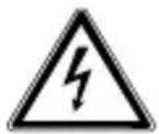
WARNING!
Warning: risk of electric shock!
Bullet point/information on steps during operation
▶ Instruction to be carried out
Protection class II

Electrical devices in protection class II are devices that have double and/or reinforced insulation throughout, and do not have an option for connecting a protective earth. The housing of an electrical device in protection class II, with surrounding insulating material, might either form all of the additional or reinforced insulation, or part of it.

Indoor use
Devices with this symbol are intended solely for indoor use.
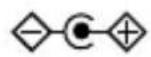
Polarity markings
Symbol denoting the polarity of the DC connector (according to IEC 60417).
On devices carrying this marking, positive is on the inside and negative on the outside.

CE labelling
Products that feature this symbol meet the requirements of the EU directives (see chapter entitled “Declaration of conformity”).

Tested safety
Products that feature this symbol meet the requirements of the German Product Safety Act.
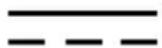
Symbol for direct current (DC)

Symbol for alternating current (AC)

Energy efficiency level VI
Energy efficiency levels are used to describe the efficiency levels of internal and external power supply units. Energy efficiency is sub-divided into a number of categories, where Level VI is the most efficient.
Transformer – short circuit-proof
A transformer in which the temperature does not exceed specified limits if the transformer is overloaded or short-circuited and which continues to meet all the requirements specified in the standard once the overload or short circuit has been rectified.

Independent lighting accessories
Independent operating device, for use outside of lights without additional cover
2. Proper use
The device is designed for displaying the time, sounding an alarm as a wake-up call and charging a Qi-chargeable end device.
The device is only intended for private use and not for industrial/commercial use.
Please note that we shall not be liable in cases of improper use:
- Do not modify the device without our consent and do not use any auxiliary equipment that we have not approved or supplied.
- Only use replacement parts or accessories that we have supplied or approved.
- Comply with all the information in this user manual, especially the safety instructions. Any other use is considered improper and can cause personal injury or property damage.
- Do not use the device in extreme environmental conditions.
3. EU Declaration of Conformity
MEDION AG hereby declares that the radio equipment type MD 80082 complies with the directive 2014/53/EU (RE directive), as well as the directive 2009/125/EC (ecodesign directive) and the directive 2011/65/EU (RoHS directive). The complete EU declaration of conformity is available at: www.medion.com/conformity.
4. Trademark information
"Qi" and the QI logo are trademarks of Wireless Power Consortium (WPC).
5. Safety instructions
5.1. Operating safety
- This device may be used by children over the age of 8 and by persons with limited physical, sensory or mental abilities or by those without experience and knowledge, if they are supervised or have been instructed in the safe use of the device and have understood the dangers that result from it.
- Children must not be allowed to play with the device. Cleaning and user maintenance may not be carried out by children unless they are supervised.
- The LED lamp is an integral component of the device. The light source in this lamp may only be replaced by the manufacturer, a service technician commissioned by the manufacturer or a similarly qualified person.

DANGER!
Risk of choking and suffocation!
Packaging film can be swallowed or used improperly, creating a risk of choking and suffocation.
- Keep packaging material such as plastic film or plastic bags away from children.
5.2.Installationlocation
- Keep your device and all connected components away from moisture and avoid dust, heat and direct sunlight. Non-compliance with these instructions can lead to faults or damage to the device.
- Do not place naked flames, such as lit candles, on or near the device, as this poses a fire hazard.
- Do not use the device outdoors as it could be damaged by weather such as rain, snow etc.
-
Avoid exposing the device and the power pack to water droplets or spray and do not place any liquid-filled containers (vases or similar) on or next to the device or the power pack. Liquids penetrating the device may impair the electrical safety of the product.
-
The slots and openings on the device are for ventilation purposes. Do not cover these openings (risk of overheating, fire hazard)!
- Position the cables so that no-one can tread on them or trip over them.
- Make sure that there is enough clearance between the device and any surrounding furniture or walls. Ensure a minimum clearance of 10 cm around the device for sufficient ventilation.
- Place and operate all the components on a stable, level and vibration-free surface in order to prevent the device from falling.
5.3. Repairs
- Contact customer services if:
– the mains adapter cable is burnt or damaged
– liquid has penetrated the device
– the device is not operating correctly
– the device has fallen or the housing is damaged.
- Repairs to your device should only be carried out by qualified specialists.
- If a repair must be carried out, please contact only our authorised service partners.
5.4. Environmental conditions
- Only use the device in accordance with the environmental conditions specified in the technical specifications.
DANGER!
Risk of electric shock!
Major changes in temperature or fluctuations in humidity can cause moisture to build up within the device due to condensation – this can cause an electrical short circuit.
▶ After transporting the device, wait until it has reached ambient temperature before switching it on.
5.5. Power supply
DANGER!
Risk of electric shock!
Even when the device is switched off, some components are live.
In order to disconnect the power supply to your device or to completely isolate the device from voltage sources unplug the mains adapter from the socket.
- Operate the device only from an earthed power socket that is close by and easy to access.
DANGER! Risk of electric shock!
The device contains live parts. They pose a risk of electric shock or fire if an unintentional short circuit occurs.
▶ Never open the housing and never insert any objects through the slots and openings into the device!
- Do not place any objects on the cables as otherwise they may be damaged.
- Keep the device at a distance of at least one metre from sources of high-frequency or magnetic interference (televisions, speakers, mobile telephones etc.) to avoid malfunctions and data loss.
5.6. Mains adapter
- Only use the mains adapter supplied.
- If the housing of the mains adapter or the connection cable is damaged, the mains adapter must be disposed of and replaced with a new mains adapter of the same type.
- The mains adapter may only be used in dry rooms.
5.7. Batteries
This device is operated with a button cell bat- tery to save the time in the event of power failure. Please note the following:
- Keep new and used batteries out of the reach of children. Do not swallow batteries as they can cause chemical burns.

WARNING! Risk of chemical burns!
If a button cell battery is swallowed, it can lead to serious internal burns within 2 hours that can lead to death.
▶ Seek medical help immediately if you think that batteries may have been swallowed or secreted in any part of the body.
- Stop using the device if the battery compartment does not close properly, and keep it out of reach of children.
- Before inserting the battery, check that the contacts in the device and on the battery are clean and, if necessary, clean them.
-
Pay attention to the polarity (+/−) when inserting the battery.
-
There is a risk of explosion if the battery is replaced incorrectly! Only replace the battery with batteries of the same or an equivalent type.
- Never try to recharge non-rechargeable batteries. Risk of explosion!
- Never expose the batteries to excessive heat (such as direct sunlight, fire or similar).
- Store batteries in a cool, dry place. Intense direct heat can damage batteries. Do not expose the device to sources of intense heat.
- Never short-circuit batteries.
- Never throw batteries into a fire and never dismantle batteries.
- Remove flat batteries from the device immediately. There is an increased risk of leakage.
- Do not allow battery acid to come into contact with the skin, eyes or mucous membranes. In the event of contact, rinse the affected areas immediately with plenty of clean water and consult a doctor immediately.
- If the device is not going to be used for longer periods, remove the battery.
5.8. Qi charging pad

NOTICE!
Risk of damage!
Cards with magnetic strips as well as credit cards, telephone cards, passbooks or boarding passes can be damaged by the magnetic field of the charging pad.
Do not place any extraneous materials such as metal parts, magnets, cards with magnetic strips or similar near to the charging pad.

NOTICE!
Risk of overheating!
There is a risk of the mobile device overheating if extraneous materials are placed between the device and the charging pad.
Do not place any extraneous materials such as metal parts, magnets, cards with magnetic strips or similar between the mobile device and the charging pad.
- Use only suitable devices for charging that support the Qi standard (5 V, 5 W max.).
6. Package contents
Please check your purchase to ensure that all items are included. If anything is missing, please contact us within 14 days of purchase. The following items are supplied with your device:
- Alarm clock
- 1 CR2032 battery
- Mains adapter
- User manual and warranty card

DANGER!
Risk of choking and suffocation!
Packaging film can be swallowed or used improperly, creating a risk of choking and suffocation.
- Keep packaging material such as plastic film or plastic bags away from children.
7. Device overview
7.1. View from front
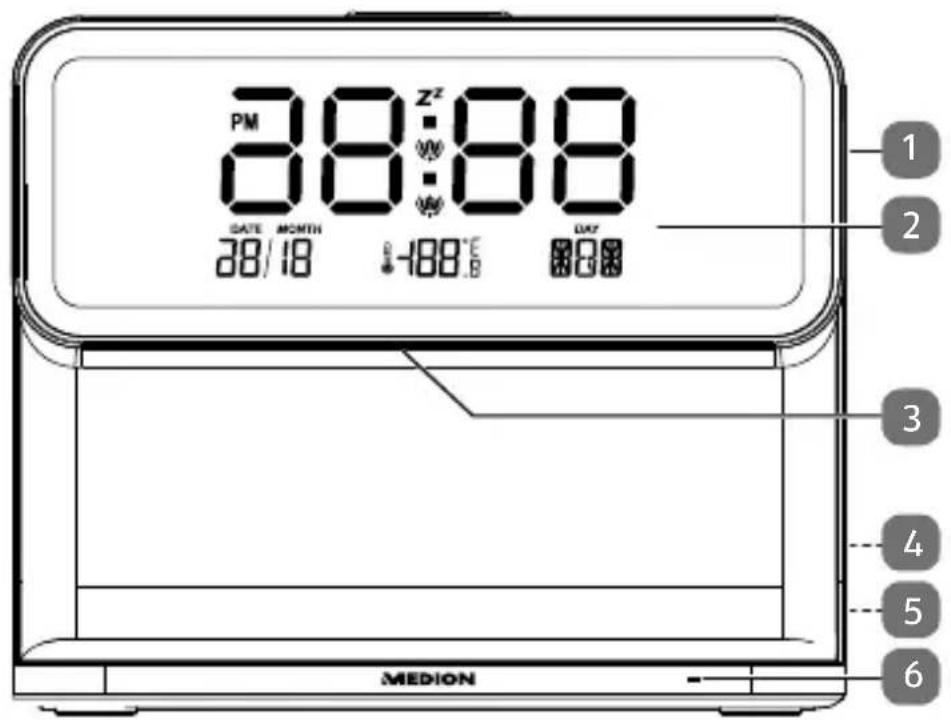
1) Dim night light, switch off night light
2) Display
3) Night light
4) DC12V/1A - connection for mains adapter (on the back)
5) Type plate (on the back)
6) Status LED for the charging pad
7.2. View from above
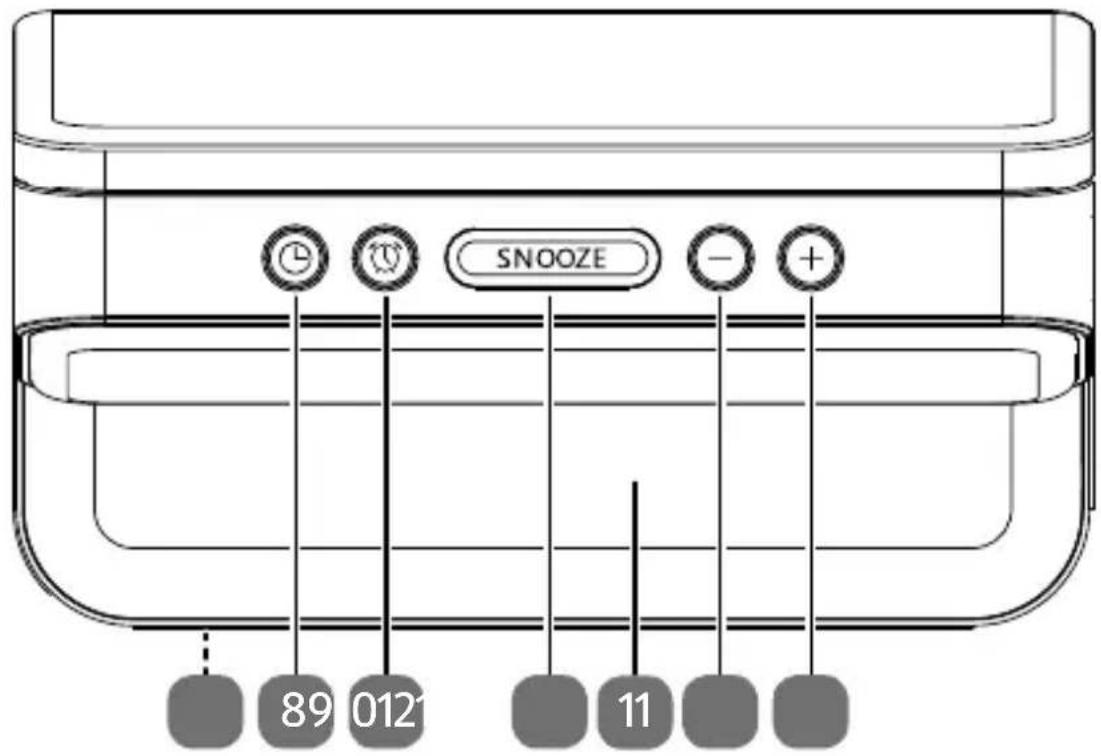
7) Battery compartment to save the time in the event of power failure (on the underside)
8) Ⓛ – set the time/alarm
9) – display alarm 1, 2 and the time
10) SNOOZE – dim/switch off the display; snooze function
11) Charging pad for wireless charging of a smartphone
12) - - decrease setting value; switch between temperature units Celsius and Fahrenheit
13) + – increase setting value; switch between 12/24-hour display
8. Setting up the device
- Place the device on a sturdy, level surface. Some aggressive varnishes can corrode the rubber feet on the device. If necessary, place the device on a suitable underlay.
8.1. Backup battery
If you disconnect the device from the mains, you can insert a type CR 2032 battery to enable the time to continue to run in the background and to retain all settings. The battery compartment is located on the bottom of the device.
▶ Use a screwdriver to turn the screw on the battery compartment cover anticlockwise and remove the cover.
Place the battery in the battery compartment, ensuring that the positive pole (+) is visible. Refer to the embossing in the battery compartment.
Now replace the battery compartment cover with the tabs in the fixtures.
▶ Turn the screw of the battery compartment cover clockwise using a suitable screwdriver.

Remove the batteries from the device if you do not intend to use it for a longer period of time.
8.2. Mains connection
Connect the mains adapter.
To do this, place the connection cable plug in the socket DC12V/1A ◇-●-⊕ and the supplied mains adapter into a properly installed earthed power socket which is accessible at all times.
9. Dimmer
The dimmer has three brightness levels and one level that switches off the display lighting.
When the radio is switched off, press the SNOOZE button once or several times to run through the dimming phases.
10. Night light

This light is intended as an orientation light, not as room lighting.
▶ Press the sensor button on the right-hand side of the device several times to switch on, dim and switch back off the night light.
11. Temperature display
The current room temperature is shown on the right of the display.
▶ You can toggle between Celsius (°C) and Fahrenheit (°F) by pressing the - button.
12. Charging smartphones
There is a charging pad on the device that enables wireless/inductive charging for smartphones and compatible devices.
Place the device to be charged on the charging pad. Charging begins immediately. Take care to ensure that the device is positioned correctly, to ensure that reliable charging is guaranteed.

The maximum charging output is 5 V/1 A.
The charging function can, where applicable, be impaired by protective cases for the smartphone.
13. Setting the time/date
▶ Press the button to access time setting mode. The hours flash.
▶ Use + or - to select the required hours.
▶ Press L to confirm. The minutes flash.
▶ Use + or - to select the required minutes.
Press L to confirm. The year flashes.
▶ Use + or - to select the required year.
▶ Press ① to confirm. The month flashes.
▶ Use + or - to select the required month.
▶ Press L to confirm. The day flashes.
▶ Use + or - to select the required day.
▶ Then press ⏻ or ⏻ to confirm.
The time and date have been set.
13.1. Setting the time format
You can set the 12-hour or 24-hour time display and the alarm.
In time mode, press the + button several times to switch between the 12-hour and 24-hour format.
14. Setting the alarm
You can set two alarm times.
▶ Press the button once or twice to select alarm 1 or 2 on the display. This is represented by a bell symbol 🔊 or 🔒.
Press to access alarm setting mode. The hours flash.
▶ Use + or - to select the required hours.
▶ Press ① to confirm. The minutes flash.
▶ Use + or - to select the required minutes.
▶ Press to confirm. The minutes display for the length of the snooze function flashes.
▶ Use + or – to select the required snooze duration (5, 10, 15, 20, 25, 30 minutes).
▶ Then press or to confirm.
The alarm has been set.
14.1. Activating/deactivating the alarm
In time mode, press the button once or twice to select alarm 1 or 2 on the display. This is represented by the bell symbol.
▶ Press + several times to activate or deactivate the alarm. The following symbol is shown on the display:
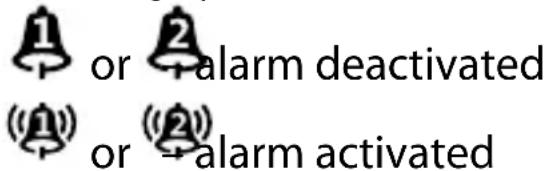
▶ After confirming the setting, press to return to time mode.
14.2. Stopping the alarm / activating the snooze function
When the alarm sounds, activate the snooze function by pressing the SNOOZE button. Zz is shown on the display.
▶ To stop the snooze function, press the SNOOZE button again.

You can set the snooze duration yourself, see "14. Setting the alarm" on page 57.
15. Troubleshooting
If a fault occurs, first see whether you can resolve the problem yourself. You might find this overview useful.

CAUTION!
Risk of chemical burns!
Opening the device can cause injuries.
▶ Never attempt to repair the device yourself. If a repair is necessary, please contact our Service Centre or a suitable authorised repair workshop.
Fault Possible cause/action
No function
If the device has been disrupted by a thunderstorm, a static charge or another external factor, follow this procedure to resolve the problem: Disconnect the mains adapter and then plug it in again.
The alarm does not sound at the time set
- Check the alarm time set - Check whether the alarm has been activated. The ⏻ and/or symbol must be shown on the display.
16. Cleaning
Always pull the mains adapter out from the socket before cleaning the device.
Only use a dry, soft cloth to clean the device. Do not use chemical solutions or cleaning products because these may damage the device's surface and/or markings.
17. Disposal

natural_image
Recycling symbol composed of three chasing arrows forming a triangle (no text or labels)PACKAGING
The product has been packaged to protect it from damage in transit. The packaging is made of materials that can be recycled in an environmentally friendly manner.
natural_image
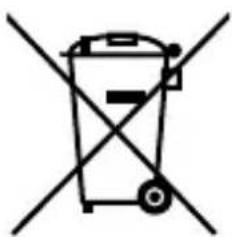
Symbol of a trash bin crossed with two crossed lines, no text or numbers presentDEVICE (WITH & WITHOUT BATTERIES)
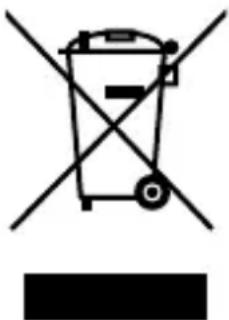
All old appliances marked with the symbol illustrated must not be disposed of in normal household rubbish.
In accordance with Directive 2012/19/EU, the device must be properly disposed of at the end of its service life.
This involves separating the materials in the device for the purpose of recycling and minimising the environmental impact.
Take old devices to a collection point for electrical scrap or a recycling centre. Before doing so, remove the batteries from the device and take them to a separate collection point for used batteries.
Contact your local waste disposal company or your local authority for more information on this subject.
natural_image
Simple line drawing of a trash bin with no text or symbolsBATTERIES
Do not dispose of used batteries with household rubbish. Batteries must be disposed of correctly. Retailers that sell batteries and local collection points provide containers in which you can dispose of them. Contact your local waste disposal company or your local authority for more information.
In connection with the sale of batteries or the supply of equipment containing batteries, we are obliged to draw your attention to the following:
As the end user, you are legally required to return used batteries.
The crossed-out wheelie bin symbol means that the battery must not be disposed of with household rubbish.
18. Technical specifications
| Device | |
| Power supply 12 V 1 A | --- |
| Connection: Mains connection | |
| Frequency range 110 - 173.4 kHz | |
| Maximum field strength 0.4158 A/m @0cm | |
| Backup battery | 1x 3 V CR 2032 button cell battery |
| Dimensions(W x H x D) | Approx. 180 x 105 x 151 cm |
| Weight Approx. 0.45 kg | |
| Mains adapter | |
| Manufacturer | DongGuan Toye Electronics Technology Co. Ltd.Importer:MEDION AGAm Zehnthof 7745307 EssenGermanyHR number: HRB 13274 |
| Model name TY12W12001 | 00E |
| Input voltage/current/input AC frequency | 180–240 V ~ 50/60 Hz,0.4 A max. |
| Output voltage/current | 12.0 V —— 1 A ◇●◆ |
| Output power 12.0 W | |
| Average efficiency during operation | 83.60% |
| Efficiency with low load (10%) | 80.04% |
| Power consumption with zero load | 0.1 W |
| Relevant load conditions: | |
| Percentage of output current according to type plate | |
| Load condition 1 100% ± 2% | |
| Load condition 2 75% ± 2% | |
| Load condition 3 50% ± 2% | |
| Load condition 4 25% ± 2% | |
| Load condition 5 10% ± 1% | |
| Load condition 6 0% (zero load) | |
 | |
| Environmental conditions | |
| Temperatures | In operation: 10 °C to +35 °CNot in operation: 0 °C to +40 °C |
| Humidity (non-condensing) | In operation: < 80%Not in operation: < 90% |
CE
19. Service information
Please contact our Customer Service team if your device ever stops working the way you want or expect it to. There are several ways for you to contact us:
- In our Service-Community, you can meet other users, as well as our staff, and you can exchange your experiences and pass on your knowledge there.
You will find our Service-Community at community.medion.com.
• Alternatively, use our contact form at www.medion.com/contact. - You can also contact our Service team via our hotline or by post.
| Opening times Hotline number UK | ||
| Mon – Fri: 08.00 – 20.00Sat – Sun: 10.00 – 16.00 | ➊ 0333 | 3213106 |
Service address
MEDION Electronics Ltd.
120 Faraday Park, Faraday Road, Dorcan Swindon SN3 5JF, Wiltshire United Kingdom

You can download this and many other sets of operating instructions from our service portal at www.medionservice.com.
You can also scan the QR code on the side of the screen, to download the operating instructions onto your mobile device from the service portal.
20. Legal Notice
Copyright © 2022
Date: 11.07.2022
All rights reserved.
These operating instructions are protected by copyright.
Mechanical, electronic and any other forms of reproduction are prohibited without the written permission of the manufacturer.
Copyright is owned by the company:
MEDION AG
Am Zehnthof 77
45307 Essen
Germany
Please note that you cannot use the address above for returns. Please always contact our Customer Service team first.
Sommaire
DE
APPAREIL (AVEC OU SANS PILES)

- Inhaltsverzeichnis
- Information about this user manual .... 39
- Proper use ......FR 4
- EU Declaration of Conformity 42
- Trademark information ......ES 4
- Safety instructions 4
- Package contents 5
- Device overview 5
- Setting up the device 54
- Dimmer 55
- Night light 55
- Temperature display 55
- Charging smartphones 56
- Setting the time/date....56
- Setting the alarm 57
- Information about this user manual
- Explanation of symbols
- DANGER!
- WARNING!
- CAUTION!
- Protection class II
- Indoor use
- Polarity markings
- CE labelling
- Tested safety
- Energy efficiency level VI
- Transformer – short circuit-proof
- Independent lighting accessories
- Proper use
- EU Declaration of Conformity
- Trademark information
- Safety instructions
- Operating safety
- Risk of choking and suffocation!
- 5.2.Installationlocation
- Repairs
- Environmental conditions
- Risk of electric shock!
- Power supply
- DANGER! Risk of electric shock!
- Mains adapter
- Batteries
- WARNING! Risk of chemical burns!
- Qi charging pad
- NOTICE!
- Risk of damage!
- Risk of overheating!
- Package contents
- Device overview
- View from front
- View from above
- Setting up the device
- Backup battery
- Mains connection
- Dimmer
- Night light
- Temperature display
- Charging smartphones
- Setting the time/date
- Setting the time format
- Setting the alarm
- Activating/deactivating the alarm
- Stopping the alarm / activating the snooze function
- Troubleshooting
- Risk of chemical burns!
- Fault Possible cause/action
- Cleaning
- Disposal
- PACKAGING
- DEVICE (WITH & WITHOUT BATTERIES)
- BATTERIES
- Technical specifications
- CE
- Service information
- Service address
- MEDION Electronics Ltd.
- Faraday Park, Faraday Road, Dorcan Swindon SN3 5JF, Wiltshire United Kingdom
- Legal Notice
- MEDION AG
- Am Zehnthof 77
- Essen
- Germany
- Sommaire
- APPAREIL (AVEC OU SANS PILES)
Brand : MEDION
Model : LIFE P66075 (MD 80082)
Category : Alarm Clock