416 - Anemometer Testo - Free user manual and instructions
Find the device manual for free 416 Testo in PDF.



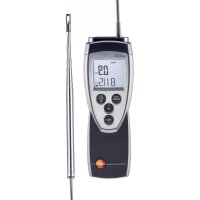
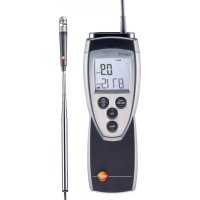
| Product type | Compact anemometer with fixed telescopic propeller |
| Measured quantities | Air velocity (m/s, fpm), flow rate (m³/h, l/s, cfm) |
| Measuring range - velocity | 0.6 to +40 m/s |
| Resolution | 0.1 m/s |
| Accuracy | ±0.2 m/s +1.5% of measured value (±1 digit) |
| Probe type | 16 mm telescopic propeller (fixed) |
| Measurement frequency | 2 measurements per second |
| Operating temperature | -20 to +50°C |
| Storage temperature | -40 to +70°C |
| Power supply | 1 x 9V battery or rechargeable battery |
| Battery life | Approx. 80 hours |
| Protection class (with TopSafe) | IP65 |
| Display | Digital display with backlight |
| Main functions | Velocity and flow measurement, Hold/Min/Max functions, spot and temporal averaging, configurable auto-off |
| Maintenance and cleaning | Clean the housing with a damp cloth (soapy water). Do not use solvents. |
| Safety | Do not use in explosive atmospheres or for medical diagnostics. Observe maximum handle temperatures (70°C). |
| Spare parts and accessories | 9V battery, TopSafe (ref. 0516 0221), replacement propeller (contact after-sales service) |
| Electromagnetic compatibility | Complies with EU Directive 2014/30/EC |
Frequently Asked Questions - 416 Testo
User questions about 416 Testo
0 question about this device. Answer the ones you know or ask your own.
Ask a new question about this device
Download the instructions for your Anemometer in PDF format for free! Find your manual 416 - Testo and take your electronic device back in hand. On this page are published all the documents necessary for the use of your device. 416 by Testo.
USER MANUAL 416 Testo
natural_image
Diagram of a medical device with two arrows pointing outward, no text or symbols present- Safety advice ....19
- Intended purpose....20
- Product description .....21
3.1 Display and control elements....21
3.2 Voltage supply.... 22
- Commissioning 23
- Operation....24
5.1 Connecting a probe 24
5.2 Switching the instrument on / off.... 24
5.3 Switching the display light on / off.... 24
5.4 Performing settings....25
-
Measuring 27
-
Care and maintenance....30
- Questions and answers ....31
- Technical data 32
- Accessories/spare parts 32
General notes
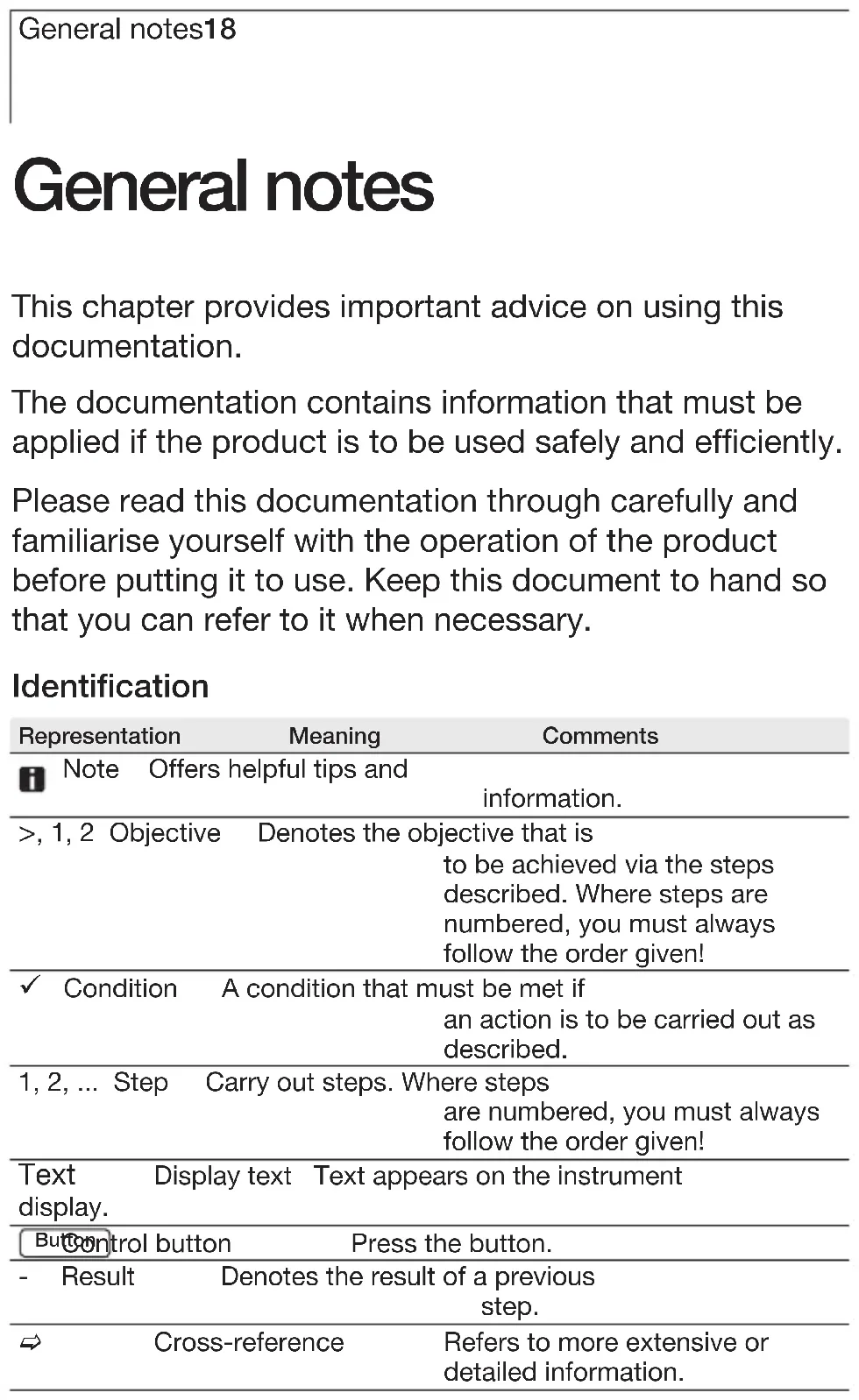
This chapter provides important advice on using this documentation.
The documentation contains information that must be applied if the product is to be used safely and efficiently.
Please read this documentation through carefully and familiarise yourself with the operation of the product before putting it to use. Keep this document to hand so that you can refer to it when necessary.
Identification
| Representation | Meaning | Comments | |
| i | Note | Offers helpful tips and information. | |
| >, 1, 2 Objective | Denotes the objective that is to be achieved via the steps described. Where steps are numbered, you must always follow the order given! | ||
| ✓ | Condition | A condition that must be met if an action is to be carried out as described. | |
| 1, 2, ... Step | Carry out steps. Where steps are numbered, you must always follow the order given! | ||
| Text display. | Display text Text appears on the instrument | ||
| Button control button | Press the button. | ||
| - Result | Denotes the result of a previous step. | ||
| → | Cross-reference | Refers to more extensive or detailed information. | |
1. Safety advice
This chapter gives general rules which must be followed and observed if the product is to be handled safely.
Avoid personal injury/damage to equipment
Do not use the measuring instrument and probes to measure on or near live parts.
Never store the measuring instrument/probes together with solvents and do not use any desiccants.
Product safety/preserving warranty claims
Operate the measuring instrument only within the parameters specified in the Technical data.
Always use the measuring instrument properly and for its intended purpose. Do not use force.
Do not expose handles and feed lines to temperatures in excess of 70 °C unless they are expressly permitted for higher temperatures.
Temperatures given on probes / sensors relate only to the measuring range of the sensors.
Open the instrument only when this is expressly described in the documentation for maintenance and repair purposes.
Carry out only the maintenance and repair work that is described in the documentation. Follow the prescribed steps when doing so. For safety reasons, use only original spare parts from Testo.
Ensure correct disposal
Take faulty rechargeable batteries/spent batteries to the collection points provided for them.
Send the product back to Testo at the end of its useful life. We will ensure that it is disposed of in an environmentally friendly manner.
2. Intended purpose
This chapter gives the areas of application for which the product is intended.
Use the product only for those applications for which it was designed. Ask Testo if you are in any doubt.
testo 416 is a compact measuring instrument for measuring flow velocities by means of a permanently connected telescopic vane.
The product was designed for the following tasks/applications:
- Measuring volumetric flow rates in ducts
The product should not be used in the following areas:
- Areas at risk of explosion.
- Diagnostic measurements for medical purposes
3. Product description
This chapter provides an overview of the components of the product and their functions.
en
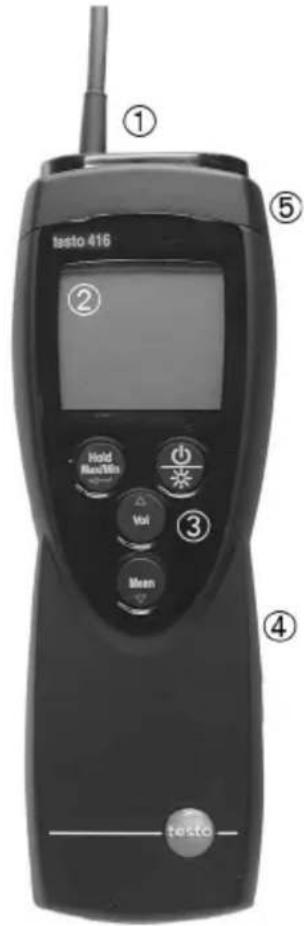
3.1 Display and control elements
Overview
text_image
testo 416 ① ② Hold Max/Min Vol ③ Mean ④ testo1Probe
2Display
3 Control buttons
4 Battery compartment (rear)
5 Service compartment (rear)
Button functions
| Button | Functions |
| Switch instrument on;switch instrument off (press and hold) | |
| Switch display light on / off | |
| Keep reading, display maximum/minimum value | |
| Open/leave configuration mode(press and hold);In configuration mode:Confirm input | |
| In configuration mode:Increase value, select option | |
| In configuration mode:Reduce value, select option | |
| Multi-point and timed mean calculation | |
| Volumetric flow |
3. Production description22
Important displays
| Display | Meaning |
| Battery capacity (bottom right in display): · 4 segments in the battery symbol are lit: Instrument battery is fully charged · No segments in the battery symbol are lit: Battery is almost spent | |
3.2 Voltage supply
Voltage is supplied by means of a 9V monobloc battery (included in delivery) or rechargeable battery. It is not possible to run the instrument from the mains supply or charge a rechargeable battery in the instrument.
4. Commissioning
This chapter describes the steps required to commission the product.
en
Inserting a battery/rechargeable battery:
1 To open the battery compartment on the rear of the instrument, push the lid of the battery compartment in the direction of the arrow and remove it.
2 Insert a battery/rechargeable battery (9V monobloc). Observe the polarity!
3 To close the battery compartment, replace the lid of the battery compartment in position and push it against the direction of the arrow.
5. Operation
This chapter describes the steps that have to be executed frequently when using the product.
5.1 Connecting a probe
The necessary probes are permanently connected or integrated. It is not possible to connect any additional probes.
5.2 Switching the instrument on / off
Switching the instrument on:
Press ☑.
- Measurement view is opened: The current reading is displayed, or ---- lights up if no reading is available.
Switching the instrument off:
Press and hold (for approx. 2s) until the display goes out.
5.3 Switching the display light on / off
Switching the display light on/off:
√ The instrument is switched on.
Press
5.4 Performing settings
1 To open configuration mode:
√ The instrument is switched on and is in measurement view. Hold, Max or Min are not activated.
Press and hold (for approx. 2s) until the display changes.
- The instrument is now in configuration mode.
You can change to the next function with ← You can leave configuration mode at any time. To do so, press and hold (for approx. 2s) until the instrument has changed to measurement view. Any changes that have already been made in configuration mode will be saved.
2 To set the area:
√ Configuration mode is opened, AREA is lit.
Set the cross-sectional area with /△ and ▼ confirm with ↙
3 To set Auto Off:
√ Configuration mode is opened, AutoOff is flashing.
Select the desired option with √ and √ confirm with □
- on: The measuring instrument switches off automatically if no button is pressed for 10min (Hold or Auto Hold is lit).
- oFF: The measuring instrument does not switch itself off automatically.
4 To set the unit of measurement:
√ Configuration mode is opened, UNIT is lit.
1 With △ set the required unit for the top line (m/s, fpm) and confirm with
2 With △ set the required unit for the bottom line (m³/h, l/s, cfm) and confirm with
5. Operation26
5 To reset:
√ Configuration mode is opened, RESET is lit.
Select the desired option with △ and ▽ confirm with ▶
- no: Instrument is not reset.
- Yes: Instrument is reset. The instrument is reset to the factory settings.
- The instrument returns to measurement view.
6. Measuring
This chapter describes the steps that are required to perform measurements with the product.
entry
Taking a measurement:
√ The instrument is switched on and is in measurement view.
natural_image
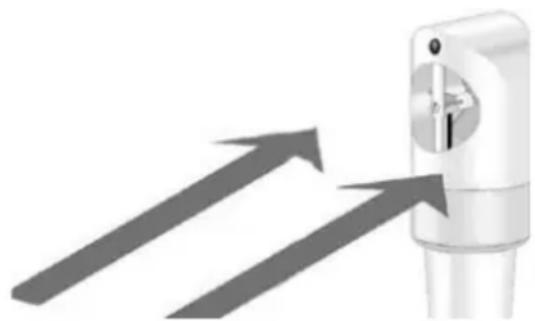
Illustration of a medical device with two arrows pointing to it, no text or symbols present- Put the probe in position.
The arrow mark on the probe head must point in the direction of flow. The correct measurement value is determined by rotating the probe slightly in both directions until the maximum value is displayed
- Read off the readings
Changing the measurement channel display:
To switch the display of the calculated volumetric flow rate ( m^3/h , l/s, cfm) on / off: Press Vol
6. Measuring28
Holding the reading, displaying the maximum/minimum value:
The current reading can be recorded. The maximum and minimum values (since the instrument was last switched on) can be displayed.
Press several times until the desired value is displayed.
- The following are displayed in turn:
· Hold: the recorded reading
· Max: Maximum value
- Min: Minimum value
· The current reading
Resetting the maximum/minimum values:
The maximum/minimum values of all channels can be reset to the current reading.
1 Press Hold / Several times until Max or Min lights up.
2 Press and hold (approx. 2s).
- All maximum or minimum values are reset to the current reading.
Performing a multi-point mean calculation:
√ Hold, Max or Min are not activated.
1 Press Mean
- Mean is lit.
- The number of readings recorded is displayed in the upper line, while the current reading is displayed in the lower line.
Option:
To change between displaying the flow velocity (m/s, fpm) and the calculated volumetric flow rate ( m^3/h , l/s, cfm): Press Vol
2 To include readings (in the desired quantity):
Press (several times).
3 To end measurement and calculate the mean value:
Press Mean
- Mean flashes. The calculated spot mean value is displayed.
4 To return to measurement view: Press Mean
Performing a mean calculation in time:
√ Hold, Max or Min are not activated.
1 Press Meath twice.
- Mean is lit.
- The elapsed measuring time (mm:ss) is displayed in the upper line, while the current reading is displayed in the lower line.
Option:
To change between displaying the flow velocity (m/s, fpm) and the calculated volumetric flow rate ( m^3/h , l/s, cfm): Press Vol
2 To start measurement: Press
3 To interrupt/continue measurement: Press each time.
4 To end measurement and calculate the mean value: Press Mean
- Mean flashes. The calculated mean value in time is displayed.
5 To return to measurement view: Press Mean
7. Care and maintenance
This chapter describes the steps that help to maintain the functionality of the product and extend its service life.
Cleaning the housing:
Clean the housing with a moist cloth (soap suds) if it is dirty. Do not use aggressive cleaning agents or solvents!
Changing the battery/rechargeable battery:
√ The instrument is switched off.
1 To open the battery compartment on the rear of the instrument, push the lid of the battery compartment in the direction of the arrow and remove it.
2 Remove the spent battery/rechargeable battery and insert a new battery/rechargeable battery (9 V monobloc). Observe the polarity!
3 To close the battery compartment, replace the lid of the battery compartment in position and push it against the direction of the arrow.
8. Questions and answers
This chapter gives answers to frequently asked questions.
en
| Question Possible causes Possible solution | ||
| is lit (bottom right · Instrument battery is · Replace instrument in display). almost spent. battery. | ||
| Instrument switches · Auto Off function · Switch function off. itself off automatically. is switched on. · Residual capacity · Replace battery. of battery is too low. | ||
| Display: ---- | Probe break.dealer or Testo | · Please contact your Customer Service. |
| Display reacts slowly is very low. | · Ambient temperature temperature. | · Raise ambient |
| Display: uuuuu | · Permitted measuring range was undershot. | · Keep to permitted measuring range. |
| Display: ooooo | · Permitted measuring range was exceeded. | · Keep to permitted measuring range. |
If we are unable to answer your question, please contact your dealer or Testo Customer Service. For contact data, see back of this document or web page www.testo.com/service-contact.
9. Technical data
| Characteristic | Value |
| Parameters | Flow velocity (m/s, fpm) |
| Calculated variables | Volumetric flow rate (m ^3 /h, l/s, cfm) |
| Measuring range | +0.6...+40 m/s (-10...+70°C / +14...+158 °F) |
| Resolution | 0.1 m/s |
| Accuracy | ±0.2 m/s+1.5 % of reading(± 1 Digit) |
| Probe | Telescopic vane probe 16mm (permanently connected) |
| Measuring rate | 2/s |
| Operating temperature range | |
| -20...+50 °C / -4...+122 °F | |
| Storage temperature | -40...+70 °C / -40...+158 °F |
| Voltage supply | 1x 9 V monobloc battery/rech. battery |
| Battery life | approx. 80 h |
| Protection class | with TopSafe (accessory part): IP 65 |
| EC Directive | 2014/30/EC |
10. Accessories/spare parts
| Name | Part no. |
| TopSafe 416, protects from impact and dirt particles | 0516 0221 |
For a complete list of all accessories and spare parts, please refer to the product catalogues and brochures or look up our website: www.testo.com
Bedienungsanleitung
Instruction manual en
Mode d'emploi fr
de