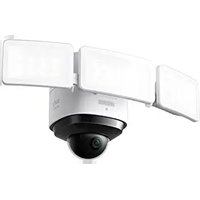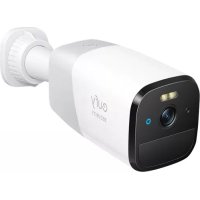
4G Starlight Camera - Surveillance Camera eufy - Free user manual and instructions
Find the device manual for free 4G Starlight Camera eufy in PDF.


| Product Type | 4G Outdoor Surveillance Camera |
| Brand | Eufy |
| Model | T8151 |
| Power Supply | Rechargeable battery via wall charger (not included) or eufy solar panel (not included) |
| Mobile Connectivity | 4G LTE and 3G |
| 4G Bands | B1/B3/B7/B8/B20/B28A/B38/B40 |
| 3G Bands | I, VIII |
| Night Vision | Starlight technology for low-light vision |
| Audio | Built-in microphone and speaker |
| Motion Detection | Yes |
| Spotlight | Built-in |
| LED Indicators | Blue (charging, ready), red (alarm, recording), flashing blue/red (update) |
| Installation | Wall or ceiling |
| Recommended Mounting Height | 1 to 3 m (3.5 to 10 ft) |
| Operating Temperature | -20 °C to 50 °C |
| Charging Temperature | 0 °C to 40 °C |
| Certifications | CE, UKCA |
| Required App | eufy Security |
| Care and Cleaning | Clean with a soft, dry cloth. Do not use solvents. |
| Safety | Do not expose to extreme temperatures or very low air pressure. Replace battery only with the same type. |
Frequently Asked Questions - 4G Starlight Camera eufy
User questions about 4G Starlight Camera eufy
0 question about this device. Answer the ones you know or ask your own.
Ask a new question about this device
Download the instructions for your Surveillance Camera in PDF format for free! Find your manual 4G Starlight Camera - eufy and take your electronic device back in hand. On this page are published all the documents necessary for the use of your device. 4G Starlight Camera by eufy.
USER MANUAL 4G Starlight Camera eufy
Anker Innovations Limited. All rights reserved, eufy Security and eufy Security Logo are trademarks of Anker Innovations Limited, registered in the United States and other countries. All other trademarks are the property of their respective owners.
51005003281 V01
English 01
Deutsch 09
Español 18
Français 27
Italiano 36
Nederlands 44
Portuguese 53
لعربية 62
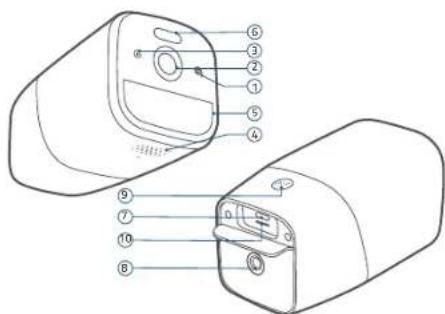
1/ OVERVIEW
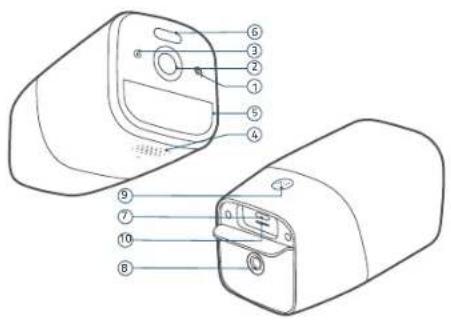
Model: T8151
1 LED Indicator
2 Camera Lens
3 Microphone
4 Speaker
5 Motion Sensor
6 Spotlight
7 Charging Port
B Mounting Hale
9 SYNC Button
- Press and hold for 2 seconds to enter
setup mode
- Press and hold for 8 seconds to reset
10 Nano SIM Card Tray Slot
2/CHARGING
| LED Indicator Description | |
| Blue Charging | |
| OFF Fully charged | |
Option 1. Wall Charger
Connect the camera to a wall charger (not provided).
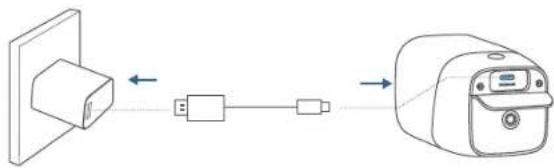
natural_image
Diagram showing a device connected via a cable to a device with an attached panel (no text or symbols)Option 2. eufy Solar Panel Charger
Follow the eufy Solar Panel Charger's user manual to install the solar panel (not provided).
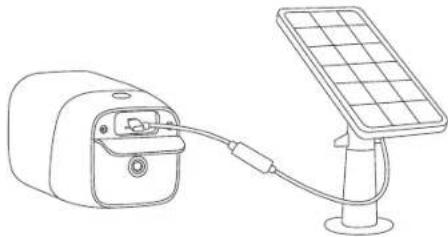
natural_image
Line drawing of a solar panel connected to a device (no text or symbols)01 EN EN 02
3/ SETTING UP
- Insert your Nano SIM card into the camera.
4G Band: B1/B3/B7/B8/B20/B28A/B38/B40 3G Band: I,VIII.
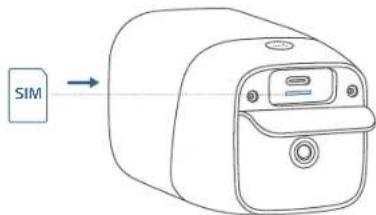
- Download and install the eufy Security app, then sign up for an account.


- Follow on-screen instructions to complete the setup.
LED Indicator Description
| Flashing blue Ready for setup | |
| OFF Successfully added to the eufy Security app | |
| Red Live streaming or recording | |
| Flashing red Alarm triggered | |
| Flashing blue and red | Updating firmware |
03 EN EN 04
4 / MOUNTING
Select a location
You can mount the camera in the areas without power supply or Wi-Fi, such as outdoors, holiday homes, small construction sites, small farms, and small warehouses. For best results, hang it 3.5-10 ft (1-3 m) above the ground.
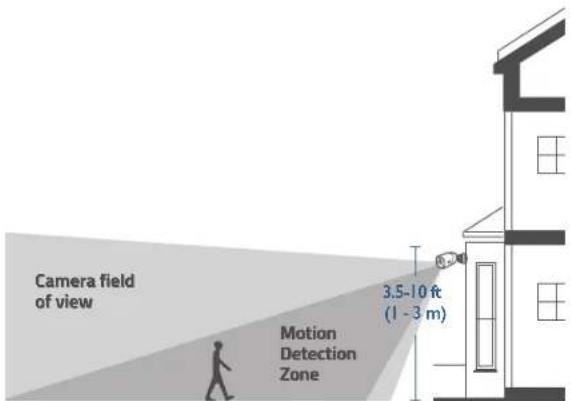
Up to 26 ft (8 m)
Mount the camera
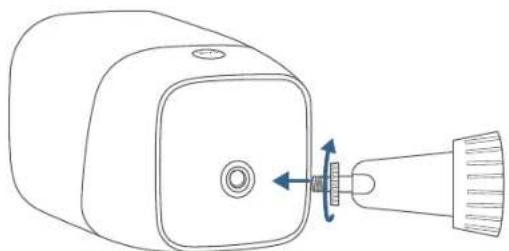
- Turn the knob of the mounting bracket counterclockwise to loosen and disassemble it.
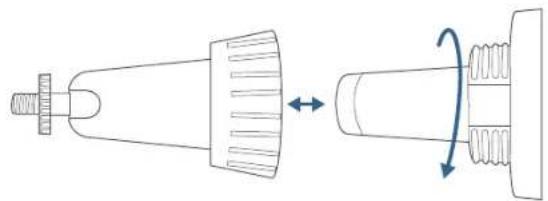
natural_image
Diagram of a mechanical component with a threaded shaft and spring, showing a rotation arrow (no text or symbols)- Place the mounting bracket against the wall. Drill holes with a 15/64" (6 mm) drill bit, then insert the anchors into the holes; anchors are necessary for walls that are made out of hard materials such as concrete, brick, or stucco.
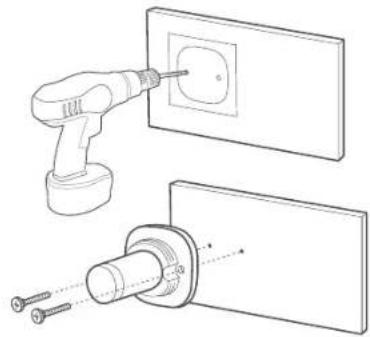
natural_image
Technical line drawing showing a tool inserting into an electrical socket, with no text or symbols present.- Firmly screw the knob of the mounting bracket into the mounting hole.
natural_image
Line drawing of a device with a connector and directional arrow indicating motion (no text or symbols)- Hold and screw the camera to the mounting bracket. Rotate the camera to adjust the view and check it using the live stream, which you can access in the eufy Security app.
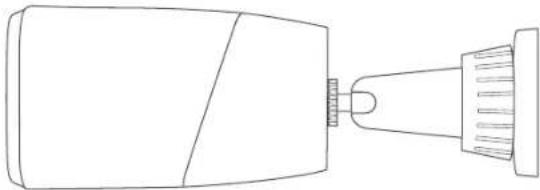
natural_image
Line drawing of a mechanical component with a pointed tip and threaded end (no text or symbols)The camera can be also installed on the ceiling. Follow the steps above to install it.
05 EN EN 06
5 / NOTICE
CE This product complies with the radio interference requirements of the European Community.
Declaration of Conformity
Hereby, Anker Innovations Limited declares that this device is in compliance with the essential requirements and other relevant provisions of Directive 2014/53/EU. For the declaration of conformity, visit the Web site: https://uk.eufylife.com
UK CA This product complies with the radio interference requirements of the United Kingdom
Declaration of Conformity
Hereby, Anker Innovations Limited declares that this device is in compliance with Radio Equipment Regulations 2017(SI 2017/1206). The full text of the UK declaration of conformity is available at the following internet address: https://uk.eufylife.com
The adapter shall be installed near the equipment and shall be easily accessible. Do not use the Device in the environment at too high or too low temperature, never expose the Device under strong sunshine or too wet environment. The suitable temperature for the device and accessories is -20°C to 50°C (Charging temperature is 0°C to 40°C).
When supplying, please place the device in an environment that has a normal room temperature and good ventilation.
It is recommended to supply the device in an environment with a temperature that ranges from 5°C\~25°C.
Warning:
- replacement of a battery with an incorrect type that can defeat a safeguard;
- disposal of a battery into fire or a hot oven, or mechanically crushing or cutting of a battery, that can result in an explosion;
– leaving a battery in an extremely high temperature surrounding environment that can result in an explosion or the leakage of flammable liquid or gas; and
- a battery subjected to extremely low air pressure that may result in an explosion or the leakage of flammable liquid or gas.
CAUTION RISK OF EXPLOSION IF BATTERY IS REPLACED BY AN INCORRECT TYPE. DISPOSE OF USED BATTERIES ACCORDING TO THE INSTRUCTIONS
RF exposure information:
The Maximum Permissible Exposure (MPE) level has been calculated based on a distance of d=20 cm between the device and the human body. To maintain compliance with RF exposure requirement, use product that maintain a 20cm distance between the device and human body.
LTE Frequency bands and power as below:
| Function Bands | Operation Frequency | Max.Power | |
| WCDMA | I | 1920-1980MHz 25 | 7 dBm |
| VIII | 880-915MHz 25.7 | dBm | |
| LTE | 1 1920-1980MHz 25.7 dBm | ||
| 3 1710-1785MHz 25.7 dBm | |||
| 7 2500-2570MHz 25.7 dBm | |||
| 8 880-915MHz 25.7 dBm | |||
| 20 832-862MHz 25.7 dBm | |||
| 28A 703-733MHz 25.7 dBm | |||
| 38 2570-2620MHz 25.7 dBm | |||
| 40 2300-2400MHz 25.7 dBm | |||
The following importer is the responsible party (contract for EU matters)
The following importer is the responsible party (contract for UK matters)
Anker Technology (UK) Limited I GNRB, 49 Clarendon Road, Watford, Hertfordshire, WD171HP, United Kingdom
Your product is designed and manufactured with high quality materials and components, which can be recycled and reused.
This symbol means the product must not be discarded as household waste, and should be delivered to an appropriate collection facility for recycling. Proper disposal and recycling helps protect natural resources, human health and the environment. For more information on disposal and recycling of this product, contact your local municipality, disposal service, or the shop where you bought this product.
1/ ÜBERSICHT
natural_image
Diagram showing a device connected via a cable, with no visible text or symbolsnatural_image
Line drawing of a solar-powered device connected to a mounted sensor (no text or symbols)3 / EINRICHTEN
Kamera montieren
natural_image
Diagram of a mechanical component with a threaded shaft and spring, showing a rotation arrow (no text or symbols)natural_image
Technical line drawing showing a tool inserting into an electrical socket, with no text or symbols present.natural_image
Line drawing of a device with a connector and directional arrow indicating motion (no text or symbols)natural_image
Line drawing of a mechanical component with a pointed tip and threaded end (no text or symbols)Declaration of Conformity
Declaration of Conformity
Anker Technology (UK) Limited I GNR8, 49 Clarendon Road, Watford, Hertfordshire, WD171HP, United Kingdom
Modelo: T8151
natural_image
Line drawing of a solar power station connected to a device (no text or symbols)19 ES ES 20
3 / CONFIGURACIÓN
natural_image
Diagram of a mechanical component with a conical top and threaded base, showing a rotation arrow (no text or symbols)natural_image
Technical line drawing of a tool inserting into an electrical socket, showing assembly and mounting details (no text or symbols)21 ES ES 22
natural_image
Line drawing of a device with a screw and shaft, showing mechanical assembly (no text or symbols)natural_image
Line drawing of a mechanical component with a pointed tip and threaded end (no text or symbols)Declaration of Conformity
Declaration of Conformity
Anker Technology (UK) Limited I GNR8, 49 Clarendon Road, Watford, Hertfordshire, WD171HP, Reino Unido

natural_image
Diagram showing a device connected via a cable to a device with an attached cable (no text or symbols present)natural_image
Line drawing of a solar panel connected to a device (no text or symbols)27 FR FR 28
3 / CONFIGURATION
natural_image
Diagram of a mechanical component with a conical tip and threaded end, showing a rotation arrow (no text or symbols)natural_image
Technical line drawing of a screwdriver inserting into a socket, with no text or symbols presentnatural_image
Line drawing of a device with a connector and directional arrow indicating motion (no text or symbols)natural_image
Line drawing of a mechanical component with a pointed tip and threaded end (no text or symbols)Declaration of Conformity
Declaration of Conformity
Modello: T8151
natural_image
Line drawing of a solar-powered device connected to a mounted sensor (no text or symbols)37 IT IT 38
3 / CONFIGURAZIONE
natural_image
Diagram showing a mechanical component before and after rotation, with no text or symbols present.natural_image
Technical line drawing of a tool inserting into an electrical socket, with no visible text or symbols39 ITIT 40
natural_image
Line drawing of a device with a screw and shaft, showing mechanical assembly (no text or symbols)natural_image
Line drawing of a mechanical component with a protruding shaft and housing (no text or symbols)Declaration of Conformity
Declaration of Conformity
Anker Technology (UK) Limited I GNR8, 49 Clarendon Road, Watford, Hertfordshire, WD171HP, Regno Unito

Model: T8151
natural_image
Diagram showing a device connected via a cable to a camera (no text or symbols present)natural_image
Line drawing of a solar-powered device connected to a mounted sensor (no text or symbols)45 NL NL 46
3/ INSTELLEN
De camera monteren
natural_image
Diagram of a mechanical component with a conical top and threaded base, showing a rotation arrow (no text or symbols)natural_image
Technical line drawing of a tool inserting into an electrical socket, showing assembly and mounting details (no text or symbols)47 NL NL 48
natural_image
Line drawing of a device with a screw and shaft, showing mechanical assembly (no text or symbols)natural_image
Line drawing of a mechanical component with a protruding shaft and housing (no text or symbols)Declaration of Conformity
Declaration of Conformity
Modelo: T8151
natural_image
Diagram showing a device connected via a cable to a device with an attached cable (no text or symbols present)natural_image
Line drawing of a solar power station connected to a device (no text or symbols)53 PT PT 54
3 / CONFIGURAÇÃO
Up to 26 ft (8 m)
55 PT PT 56
Instalar a câmara
natural_image
Diagram of a mechanical component with a threaded shaft and spring, showing a rotation arrow (no text or symbols)natural_image
Technical line drawing showing a tool inserting into an electrical socket, with no text or symbols present.natural_image
Line drawing of a device with a connector and directional arrow indicating motion (no text or symbols)natural_image
Line drawing of a mechanical component with a pointed tip and threaded end (no text or symbols)Declaration of Conformity
Declaration of Conformity
Anker Technology (UK) Limited I GNRB, 49 Clarendon Road, Watford, Hertfordshire, WD171HP, Reino Unido

T8151: الطراز
LED موزش 1
عدسة الكاميرا ②
المي centralized
السماعة 4
من engr الحركة 5
صفر ع كانق 6
متقد التحن ⑦
عَنْحَة التُرْكِب
المرaine
natural_image
Diagram of a mechanical component with a conical tip and spring-like base, showing a rotation arrow (no text or symbols)natural_image
Technical line drawing showing a power tool inserting into an electrical outlet, with screw fasteners inserted (no text or symbols)التركيب
/4
تحديد موقع
Up to 26 ft (8 m)
66 AR
AR 65

5
natural_image
Line drawing of a device with a central connector and directional arrows indicating motion (no text or symbols)natural_image
Line drawing of a mechanical component with a pointed tip and flanged end (no text or symbols),Anker Technology (UK) Limited | GNR8, 49 Clarendon Road, Watford
12-month limited warranty
12 Monate eingeschränkte Garantie | Garantía limitada de 12 meses
Garantie limitée de 12 mois | Garanzia limitata di 12 mesi | 12 maanden
beperkte garantie | 12 meses de garantia limitada | ضمان محدود لمندة 12ominزا
Call Us
Rufen Sie uns an | Contacto por teléfono | Par téléphone | Telefono | Bel ons Ligue para nós | اصل بنا
United States
+1 (800) 988 7973 Mon-Fri 6:15-17:00(PT) Sat-Sun 6:30-16:30(PT)
United Kingdom
+44 (0) 1604 936 200 Mon-Fri 6:00-17:00 Sat-Sun 6:00-14:00
Germany
+49 (0) 69 9579 7960 Mo-Fr 8:00-16:00
Email Us
support@eufylife.com
Anker Innovations Limited
Room 1318-19, Hollywood Plaza, 610 Nathan Road, Mongkok, Kowloon, Hong Kong

@EufyOfficial

@EufyOfficial

@EufyOfficial