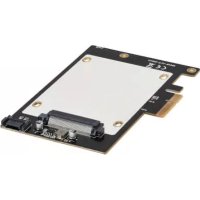
PCEU2PX4 - Expansion card Tripp Lite - Free user manual and instructions
Find the device manual for free PCEU2PX4 Tripp Lite in PDF.

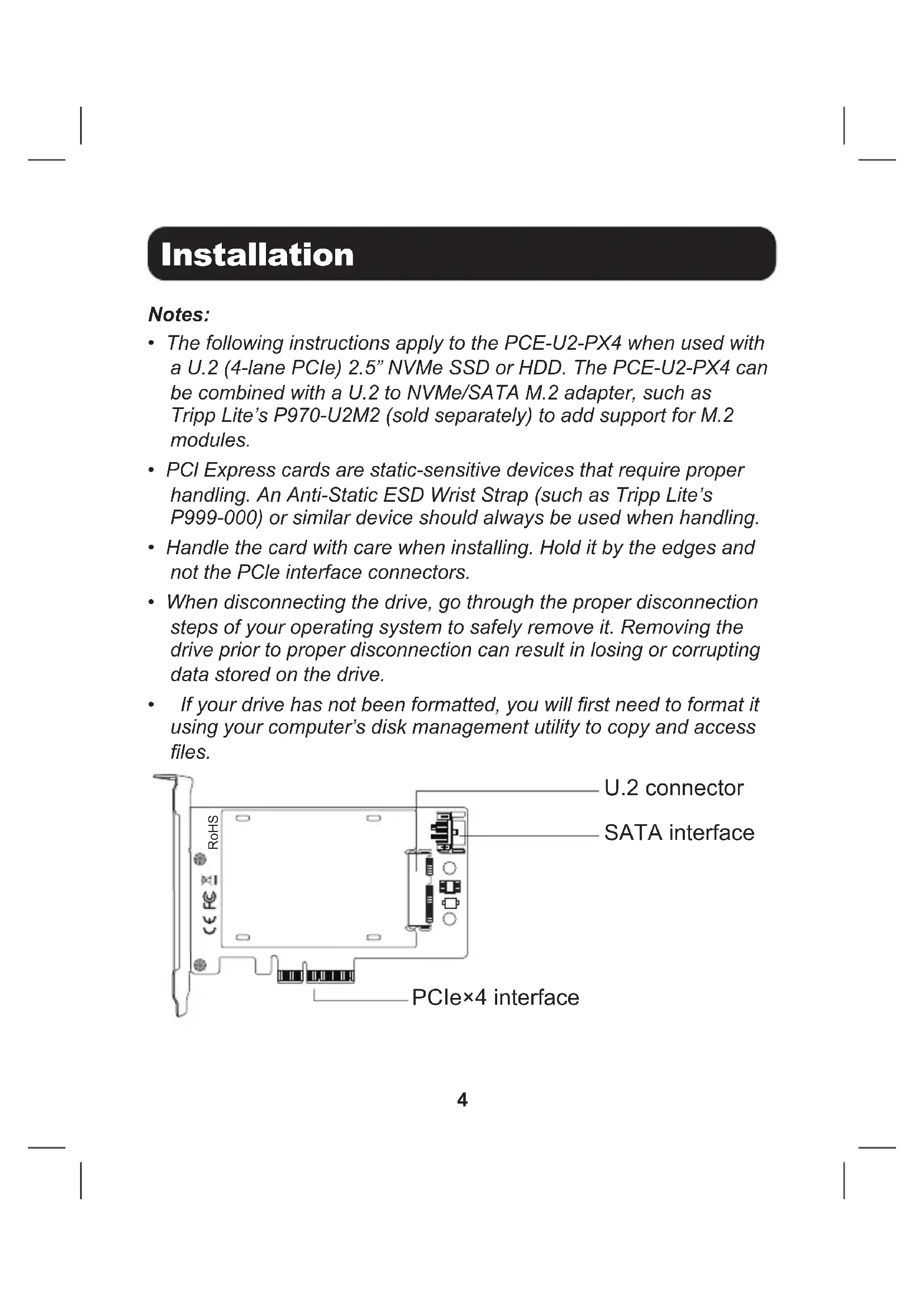


| Product Type | U.2 to PCIe Adapter |
| Brand | Tripp Lite |
| Model | PCEU2PX4 (PCE-U2-PX4) |
| Dimensions (L x W x H) | 140 x 121 x 93 mm |
| Power Supply | Powered by PCIe bus, no external power required |
| Main Features | Adds a 2.5" U.2 PCIe NVMe or SATA SSD to a PC, backward compatible PCIe 3.0/2.0/1.0, M.2 support via optional P970-U2M2 adapter |
| Maintenance and Cleaning | Handle with care, use an antistatic wrist strap, clean with a dry non-abrasive cloth |
| Safety Precautions | Unplug the computer before installation, avoid electrostatic discharge (ESD), do not touch the connectors |
| Spare Parts and Repairability | 1-year limited warranty, no spare parts specified, return under RMA |
| Drive Connector | U.2 SFF-8639 |
| PCIe Interface | PCIe x4 |
| Supported SSD Types | 2.5" U.2 NVMe or SATA SSD, 2.5" SATA SSD/HDD |
| Supported Operating Systems | Windows (7, 8.1, 10, 11), Mac OS High Sierra and later |
| Operating Temperature | 10 to 70 °C |
| Storage Temperature | 0 to 65 °C |
| Relative Humidity | 10 to 80% non-condensing |
| Certifications | FCC, CE, RoHS |
| Package Contents | Adapter card, 2 bracket screws, 4 SSD screws, screwdriver, 7-pin SATA cable, quick start guide |
| Warranty | 1-year limited |
Frequently Asked Questions - PCEU2PX4 Tripp Lite
User questions about PCEU2PX4 Tripp Lite
0 question about this device. Answer the ones you know or ask your own.
Ask a new question about this device
Download the instructions for your Expansion card in PDF format for free! Find your manual PCEU2PX4 - Tripp Lite and take your electronic device back in hand. On this page are published all the documents necessary for the use of your device. PCEU2PX4 by Tripp Lite.
USER MANUAL PCEU2PX4 Tripp Lite
U.2 to PCIe Adapter for 2.5" U.2 NVMe SSD, SFF-8639, PCI Express (x4) Card
Model: PCE-U2-PX4
Español 13 • Français 25 • Русский 37 • Deutsch 49
WARRANTY REGISTRATION
Register your product today and be automatically entered to win an ISOBAR® surge protector in our monthly drawing!
tripplite.com/warranty

1111 W. 35th Street, Chicago, IL 60609 USA • tripplite.com/support
Copyright © 2022 Tripp Lite. All rights reserved.
Features
- Enhance your PC's speed and increase internal storage by adding a U.2 PCIe SSD
• Supports U.2 SSD and 2.5" SATA I/II/III SSD/HDD - Compatible with Tripp Lite's P970-U2M2 (sold separately) U.2 to NVMe/SATA M.2 adapter for installing an M.2 module
- PCIe U.2 SSD speeds provide ultra-fast data access to your computer
- Compatible with PCIe 3.0 motherboards; backward compatible with PCIe 2.0 and PCIe 1.0
- Plug-and-play, no software or drivers required
• No external power required
Package Contents
- PCE-U2-PX4 U.2 to PCIe Adapter
• (x2) Bracket Screws - (x4) SSD Screws
- Screwdriver
- 7-Pin SATA Cable
- Quick Start Guide
Optional Hardware
- P970-U2M2 M.2 to U.2 PCIe NVMe SSD Adapter (Sold Separately)
Installation
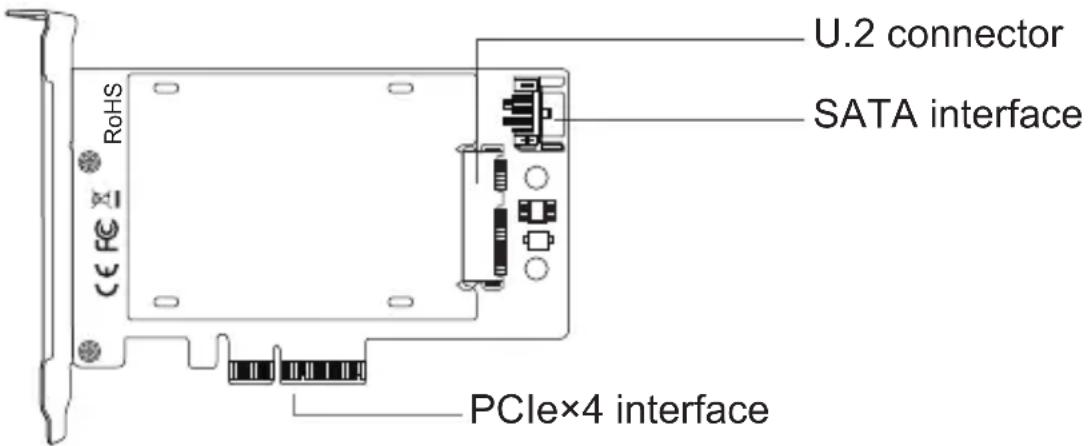
Notes:
- The following instructions apply to the PCE-U2-PX4 when used with a U.2 (4-lane PCIe) 2.5" NVMe SSD or HDD. The PCE-U2-PX4 can be combined with a U.2 to NVMe/SATA M.2 adapter, such as Tripp Lite's P970-U2M2 (sold separately) to add support for M.2 modules.
- PCI Express cards are static-sensitive devices that require proper handling. An Anti-Static ESD Wrist Strap (such as Tripp Lite's P999-000) or similar device should always be used when handling.
- Handle the card with care when installing. Hold it by the edges and not the PCIe interface connectors.
- When disconnecting the drive, go through the proper disconnection steps of your operating system to safely remove it. Removing the drive prior to proper disconnection can result in losing or corrupting data stored on the drive.
- If your drive has not been formatted, you will first need to format it using your computer's disk management utility to copy and access files.
Installation
Installing an HDD/SSD Drive
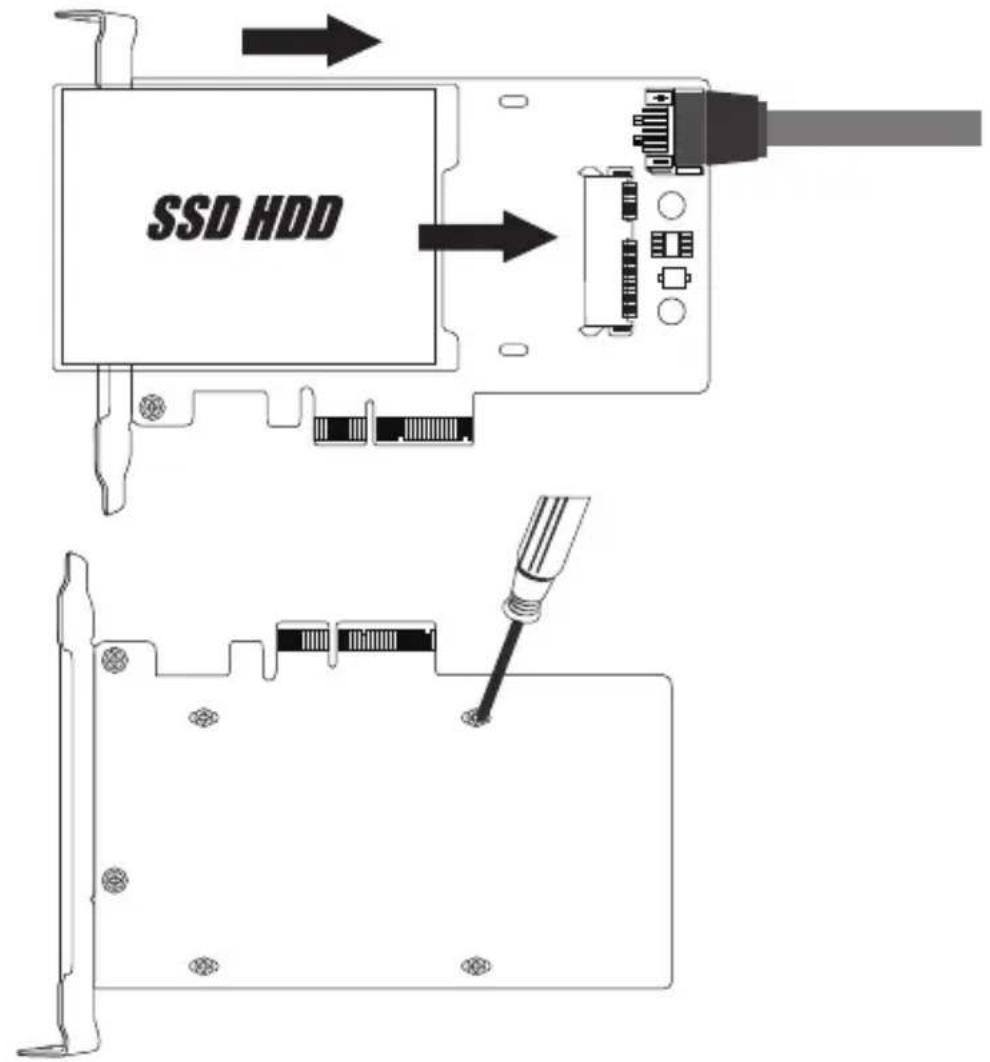
- Insert a 2.5" HDD/SSD drive (sold separately) into the 2.5" SATA HDD/SSD adapter. Secure the drive into place using the provided SSD screws.
Note: The connector on the U.2 SSD is keyed so the drive will fit only one way.
Installation
- Turn off the computer you are installing the PCIe card in. Unplug its power cord and disconnect all peripheral devices (monitor, keyboard, mouse, etc.) from it.
- Remove the cover from your PC to locate the motherboard and available PCI Express slots.
- Locate an available PCI Express slot (if necessary, remove the metal bracket from the back of the PC to allow for insertion of the card).
- Gently connect the 7-pin SATA cable from PCI Express Card to the motherboard on your PC.
- Connect the PCI Express Card adapter to the PCIe x4 slot on the motherboard.
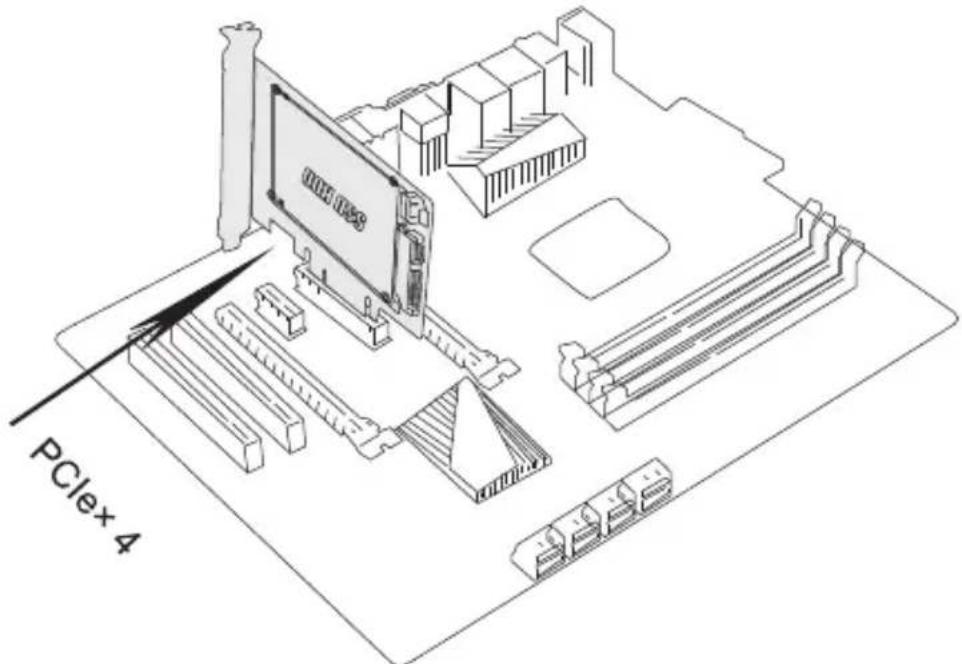
Installation
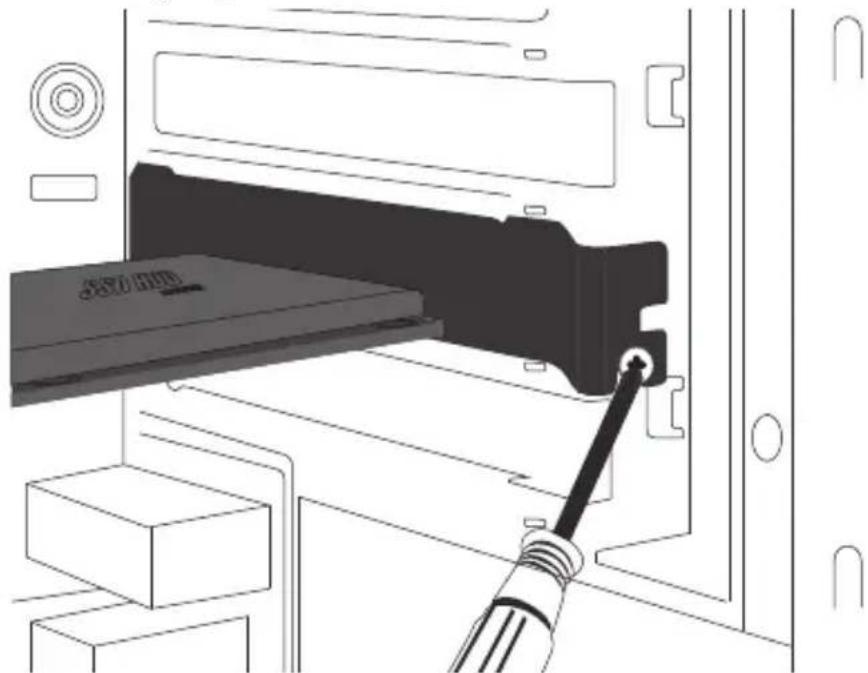
- Fix the full profile bracket to the tower rear panel of the PC and screw tightly to secure connection.
natural_image
Diagram of a computer monitor with a screwdriver inserted, showing internal components and no text or symbols.-
If necessary, fasten the metal bracket to the back of the computer using the included screws.
-
Place the cover back onto the computer and reconnect its power cords and peripheral devices.
-
Your adapter is now ready for use.
Installation
Installing an M.2 M-Key or B-Key NVMe SSD Using a Tripp Lite P970-U2M2 U.2 to PCIe Adapter (Sold Separately)
Refer to the instructions and diagrams in the P970-U2M2 Quick Start Guide to install an M.2 module in a computer's PCIe port.
Operation
- After turning your computer back on, locate the "Computer Management" system tool and go to the "Disk Management" dropdown menu to find the new disk.
- Before formatting the new disk, make sure to delete the volume.
- Right click on the external disk you want to format. Click on "New Simple Volume".
- Follow the instructions on the screen, choosing the size of partition, and click "Next" to finish.
- The new hard disk will be found in the list of drive locations on your computer.
- Once found, it is ready to be used.
Specifications
| Drive Connection U.2 SFF-8639 | |
| PCIe Card Connection PCIe X4 | |
| Supported SSD 2.5” SATA or 2.5” U.2 | |
| Operating Temperature Range | 50°F to 158°F(10°C to 70°C) |
| Storage Temperature Range | 32°F to 149°F(0°C to 65°C) |
| Relative Humidity 10 to 80% RH, Non-Condensing | |
| Unit Dimensions[L x W x H] | 5.5 x 4.76 x 3.66 inches(140 x 121 x 93 mm) |
| Certifications FCC, CE | |
| Supported Operating Systems | Windows (7, 8.1, 10, 11),Mac OS (High Sierra and above;older Mac OS versions do not support NVMe) |
Warranty and Product Registration
1-YEAR LIMITED WARRANTY
Tripp Lite warrants its products to be free from defects in materials and workmanship for a period of one (1) year from the date of initial purchase. Tripp Lite's obligation under this warranty is limited to repairing or replacing (at its sole option) any such defective products. To obtain service under this warranty, you must obtain a Returned Material Authorization (RMA) number from Tripp Lite or an authorized Tripp Lite service center. Products must be returned to Tripp Lite or an authorized Tripp Lite service center with transportation charges prepaid and must be accompanied by a brief description of the problem encountered and proof of date and place of purchase. This warranty does not apply to equipment, which has been damaged by accident, negligence or misapplication or has been altered or modified in any way.
EXCEPT AS PROVIDED HEREIN, TRIPP LITE MAKES NO WARRANTIES, EXPRESS OR IMPLIED, INCLUDING WARRANTIES OF MERCHANTABILITY AND FITNESS FOR A PARTICULAR PURPOSE.
Some states do not permit limitation or exclusion of implied warranties; therefore, the aforesaid limitation(s) or exclusion(s) may not apply to the purchaser.
EXCEPT AS PROVIDED ABOVE, IN NO EVENT WILL TRIPP LITE BE LIABLE FOR DIRECT, INDIRECT, SPECIAL, INCIDENTAL OR CONSEQUENTIAL DAMAGES ARISING OUT OF THE USE OF THIS PRODUCT, EVEN IF ADVISED OF THE POSSIBILITY OF SUCH DAMAGE. Specifically, Tripp Lite is not liable for any costs, such as lost profits or revenue, loss of equipment, loss of use of equipment, loss of software, loss of data, costs of substitutes, claims by third parties, or otherwise.
PRODUCT REGISTRATION
Visit tripplite.com/warranty today to register your new Tripp Lite product. You'll be automatically entered into a drawing for a chance to win a FREE Tripp Lite product!*
* No purchase necessary. Void where prohibited. Some restrictions apply. See website for details.
Use of this equipment in life support applications where failure of this equipment can reasonably be expected to cause the failure of the life support equipment or to significantly affect its safety or effectiveness is not recommended.
Tripp Lite has a policy of continuous improvement. Specifications are subject to change without notice. Photos and illustrations may differ slightly from actual products.

1111 W. 35th Street, Chicago, IL 60609 USA • tripplite.com/support
natural_image
Technical line drawing of a device with a screwdriver inserted, showing internal components and mounting brackets (no text or symbols)1111 W. 35th Street, Chicago, IL 60609 USA • tripplite.com/support
natural_image
Technical line drawing of a device with a screwdriver inserted, showing internal components and mounting brackets (no text or symbols)1111 W. 35th Street, Chicago, IL 60609 USA • tripplite.com/support
1111 W. 35th Street, Chicago, IL 60609 USA • tripplite.com/support
natural_image
Technical line drawing of a mechanical assembly with a screwdriver inserted, showing no text or symbols1111 W. 35th Street, Chicago, IL 60609 USA • tripplite.com/support
Kurzanleitung
U.2-zu-PCIe-Adapter für 2,5 Zoll U.2 NVMe SSD, SFF-8639, PCI Express-Karte (x4)
Modell: PCE-U2-PX4
English 1 • Español 13 • Français 25 • Русский 37

1111 W. 35th Street, Chicago, IL 60609 USA • tripplite.com/support
natural_image
Technical line drawing of a device with a screwdriver inserted, showing internal components and mounting brackets (no text or symbols)1111 W. 35th Street, Chicago, IL 60609 USA • tripplite.com/support
- U.2 to PCIe Adapter for 2.5" U.2 NVMe SSD, SFF-8639, PCI Express (x4) Card
- WARRANTY REGISTRATION
- Features
- Package Contents
- Optional Hardware
- Installation
- Notes:
- Installing an HDD/SSD Drive
- Installing an M.2 M-Key or B-Key NVMe SSD Using a Tripp Lite P970-U2M2 U.2 to PCIe Adapter (Sold Separately)
- Operation
- Warranty and Product Registration
- 1-YEAR LIMITED WARRANTY
- PRODUCT REGISTRATION
- Kurzanleitung
- U.2-zu-PCIe-Adapter für 2,5 Zoll U.2 NVMe SSD, SFF-8639, PCI Express-Karte (x4)
Brand : Tripp Lite
Model : PCEU2PX4
Category : Expansion card