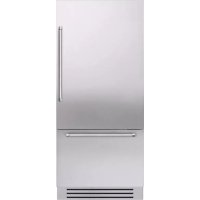
KCZCX 20901L - Refrigerator KITCHENAID - Free user manual and instructions
Find the device manual for free KCZCX 20901L KITCHENAID in PDF.



| Product type | Combined refrigerator with convertible freezer compartment (TriMode) |
| Brand | KitchenAid |
| Model | KCZCX 20901L |
| Width | 90 cm (90 cm model) |
| Climate class | SN (10-32°C), N (16-32°C), ST (16-32°C), T (16-43°C) |
| Power supply | 220-240 V, 16 A, Schuko plug with grounding |
| Refrigerant | R600a (isobutane) |
| Compartments | Refrigerator (2-8°C), Fresco (-2 to 2°C), TriMode (-15 to -22°C) |
| Main functions | Shopping fridge, Holidays, Shopping TriMode, Bottle cooler, Ice maker, Water filter, Manual circuit cleaning |
| Ice maker | Automatic, 10 ice cubes per cycle, size adjustment (Medium/Large), SuperIce mode (1.5 kg/day) |
| Water filter | Up to 3000 liters or 12 months, with replacement reminder |
| Lighting | LED, class G |
| Maintenance | Condenser cleaning every 6 months with visual and audible reminder |
| Safety | Temperature lock, Sabbath mode, automatic shutdown on anomaly |
| Spare parts and repairability | Original parts available for 10 years after last production |
Frequently Asked Questions - KCZCX 20901L KITCHENAID
User questions about KCZCX 20901L KITCHENAID
0 question about this device. Answer the ones you know or ask your own.
Ask a new question about this device
Download the instructions for your Refrigerator in PDF format for free! Find your manual KCZCX 20901L - KITCHENAID and take your electronic device back in hand. On this page are published all the documents necessary for the use of your device. KCZCX 20901L by KITCHENAID.
USER MANUAL KCZCX 20901L KITCHENAID
“This story begins with a cool glimpse of light which easily burns into a creative mind. A story of timeless moments of a serious passion prepared to become a delicious art creation.”
Thanks for choosing
KitchenAid Vertigo
Fridge
User manual
Kühlraum
Bedienungsanleitung
Réfrigérateur
1.1 For your safety.... 6
1.2 Important information when using the appliance 7
1.3 Caring for the environment.... 8
1.4 Cleaning, sanitization and maintenance of the ice and/or water dispenser (if present).... 8
2 INSTALLATION 10
2.1 Installation.... 10
2.2 Connection to the water system.... 10
2.3 Connection to the electrical power supply.... 11
2.4 Refrigerant.... 11
3 BEFORE STARTING 12
3.1 Know your appliance.... 12
3.2 Manufacturer's liability 12
3.3 Technical support.... 12
3.4- Technical data.... 12
4 APPLIANCE SWITCHING ON 16
4.1 Switching on and off 16
4.2 How to adjust the temperature for different requirements.... 18
4.3 Information signals of anomaly on the display.... 19
5 CUSTOMIZE FUNCTIONS AND SETTINGS 20
5.1 Functions.... 20
5.2 Settings.... 26
6 INTERNAL LAYOUT 32
6.1 Internal layout (positioning, adjustment, removal) 32
7 ACTIVATION AND USE OF THE ICE MAKER 33
7.1 Activation and use of the Ice Maker 33
7.2 Water Filter 34
7.3 Water filter for freezer column Ice Maker 34
8 LIGHTING 35
8.1 Lighting 35
9 FOOD STORAGE 35
9.1 General directions.... 35
9.2 How to maintain good food quality.... 36
0 CARE AND CLEANING 40
10.1 Care and Cleaning 40
10.2 Internal cleaning 40
10.3 Cleaning of the ventilation grille, filter and condenser.... 41
1 TROUBLESHOOTING GUIDE 42
11.1 Troubleshooting Guide.... 42
11.2 Malfunction messages appearing on the display.... 44
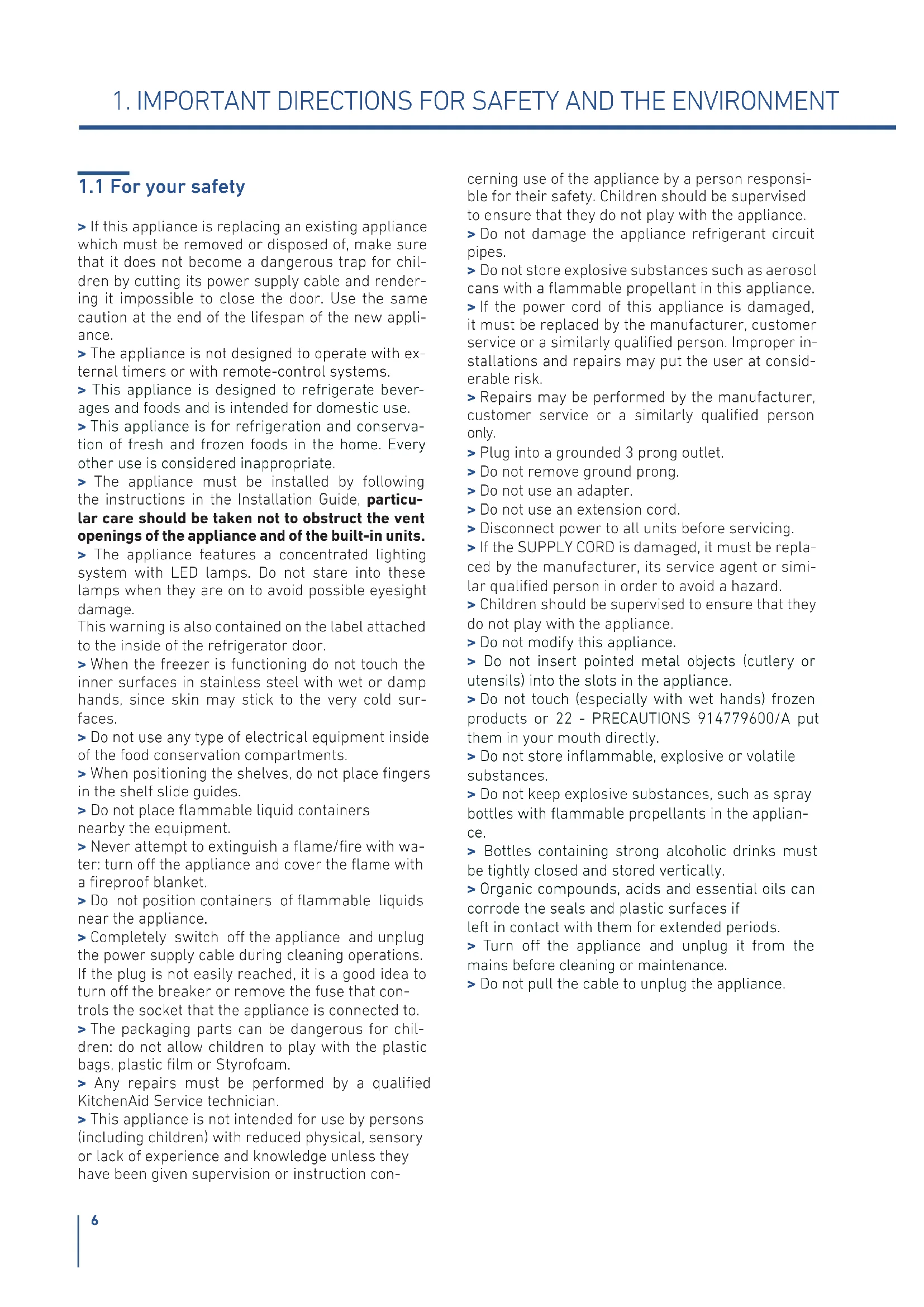
1.1 For your safety
If this appliance is replacing an existing appliance which must be removed or disposed of, make sure that it does not become a dangerous trap for children by cutting its power supply cable and rendering it impossible to close the door. Use the same caution at the end of the lifespan of the new appliance.
The appliance is not designed to operate with external timers or with remote-control systems.
This appliance is designed to refrigerate beverages and foods and is intended for domestic use.
This appliance is for refrigeration and conservation of fresh and frozen foods in the home. Every other use is considered inappropriate.
The appliance must be installed by following the instructions in the Installation Guide, particular care should be taken not to obstruct the vent openings of the appliance and of the built-in units.
The appliance features a concentrated lighting system with LED lamps. Do not stare into these lamps when they are on to avoid possible eyesight damage.
This warning is also contained on the label attached to the inside of the refrigerator door.
When the freezer is functioning do not touch the inner surfaces in stainless steel with wet or damp hands, since skin may stick to the very cold surfaces.
Do not use any type of electrical equipment inside of the food conservation compartments.
When positioning the shelves, do not place fingers in the shelf slide guides.
Do not place flammable liquid containers nearby the equipment.
Never attempt to extinguish a flame/fire with water: turn off the appliance and cover the flame with a fireproof blanket.
Do not position containers of flammable liquids near the appliance.
Completely switch off the appliance and unplug the power supply cable during cleaning operations. If the plug is not easily reached, it is a good idea to turn off the breaker or remove the fuse that controls the socket that the appliance is connected to.
The packaging parts can be dangerous for children: do not allow children to play with the plastic bags, plastic film or Styrofoam.
Any repairs must be performed by a qualified KitchenAid Service technician.
This appliance is not intended for use by persons (including children) with reduced physical, sensory or lack of experience and knowledge unless they have been given supervision or instruction con-
cerning use of the appliance by a person responsible for their safety. Children should be supervised to ensure that they do not play with the appliance.
Do not damage the appliance refrigerant circuit pipes.
Do not store explosive substances such as aerosol cans with a flammable propellant in this appliance.
If the power cord of this appliance is damaged, it must be replaced by the manufacturer, customer service or a similarly qualified person. Improper installations and repairs may put the user at considerable risk.
Repairs may be performed by the manufacturer, customer service or a similarly qualified person only.
Plug into a grounded 3 prong outlet.
Do not remove ground prong.
Do not use an adapter.
Do not use an extension cord.
Disconnect power to all units before servicing.
If the SUPPLY CORD is damaged, it must be replaced by the manufacturer, its service agent or similar qualified person in order to avoid a hazard.
Children should be supervised to ensure that they do not play with the appliance.
Do not modify this appliance.
Do not insert pointed metal objects (cutlery or utensils) into the slots in the appliance.
Do not touch (especially with wet hands) frozen products or 22 - PRECAUTIONS 914779600/A put them in your mouth directly.
Do not store inflammable, explosive or volatile substances.
Do not keep explosive substances, such as spray bottles with flammable propellants in the appliance.
Bottles containing strong alcoholic drinks must be tightly closed and stored vertically.
Organic compounds, acids and essential oils can corrode the seals and plastic surfaces if left in contact with them for extended periods.
Turn off the appliance and unplug it from the mains before cleaning or maintenance.
Do not pull the cable to unplug the appliance.
1.2 Important information when using the appliance
Cleaning and maintenance that should be performed by the user must not be carried out by unsupervised children.
Never use electrical appliances inside the appliance (e.g. heater, electric ice maker, etc.). Explosion hazard!
Never defrost or clean the appliance with a steam cleaner! The steam may penetrate electrical parts and cause a short-circuit. Risk of electric shock!
Do not use pointed and sharp-edged implements to remove frost or layers of ice. You could damage the refrigerant tubes. Leaking refrigerant may cause eye injuries or ignite.
Take care that no objects are stuck in the doors.
Do not store products which contain flammable propellants (e.g. spray cans) or explosive substances in the appliance.
Explosion hazard!
Do not stand on or lean heavily against base of appliance, drawers or doors, etc.
Before cleaning the appliance, pull out the power cord plug or switch off the fuse. Do not pull out the power cord plug by tugging on the power cord.
Store high-percentage alcohol tightly closed and standing up.
Keep plastic parts and the door seal free of oil and grease. Otherwise, parts and door seal will become porous.
Never cover or block the ventilation openings for the appliance. injury
According to current regulations, children between 3 and 8 years of age can take or load food from the appliance, but it is highly discouraged to allow children under 8 years of age to perform these operations and in general to use the appliance.
Keep children under the age of eight at a safe distance unless they are constantly supervised and make sure that they do not play with the appliance.
Do not use mechanical, electrical, chemical devices other than those recommended by the manufacturer to speed up the defrosting process.
Do not damage the cooling circuit (if it can be accessed).
Do not use electrical appliances inside food storage compartments unless these are of the type recommended by the manufacturer.In the event of damage to the cooling circuit, avoid the use of naked flames and ventilate the area properly.
Do not use the appliance or parts of it in ways other than those specified in this manual.
Opening the door for long periods can cause the temperature in the appliance compartments to rise considerably.
Clean surfaces that may come into contact with food and accessible drainage systems regularly.
Store raw meat and fish in suitable containers in the refrigerator, so that it does not come into contact with other food or drip on it.
If the appliance is left empty for long periods of time, switch it off, thaw it, clean it, dry it and leave the door open to prevent the development of mould inside.
Never rest sharp metal objects such as knives, forks, spoons and lids on the appliance during use.
Do not use abrasive or corrosive detergents (e.g. scouring powders, stain removers and metallic sponges) on glass parts.
Do not sit on the appliance.
Do not sit or lean on the door or any open drawers.
Do not prize on the door or handle to move the appliance.
Do not use electrical appliances (e.g. hair dryers) or sprays for defrosting, the plastic parts could be damaged.
Do not use the appliance to cool rooms for any reason.
Always unplug the appliance in the event of a fault or when performing cleaning or maintenance.
Do not keep liquids in tins or glass containers in the freezer.
Do not place heavy objects on the top of the appliance.
This appliance is intended to be used in household and similar applications such as: staff kitchen areas in shops, offices and other working environments; farm houses; by clients in hotels, motels, bed & breakfast and other residential environments.
Symbols used in the Guide:

Note
Recommendations for correct use of the appliance

Important
Directions for avoiding appliance damage

Warning
Indications for avoiding injury to people
1.3 Caring for the environment

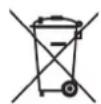

This appliance conforms to the WEEE European directive (2012/19/EU) and must be disposed of separately from other waste at the end of its service life.
The appliance does not contain substances in quantities sufficient to be considered hazardous to health and the environment, in accordance with current European directives.
Pay special attention to correct disposal procedure for all the packaging materials.

Power voltage
Danger of electrocution
Disconnect the mains power supply. Unplug the appliance.
The appliance must not be disposed of with urban waste. Contact local waste disposal centres for on how to dispose of recyclable waste.
To dispose of the appliance: Cut the power cable and remove it.
Prior to disposal, cut the power supply cord and make it impossible to close the door.
During disposal, avoid damage to the refrigeration circuit.
The appliance does not contain hazardous substances for the atmospheric ozone layer, neither in the refrigeration circuit nor in the insulation.
Our appliances are packaged in non-polluting and recyclable materials.
Deliver the packing materials to the appropriate recycling centre.

Plastic packaging
Danger of suffocation
Do not leave the packaging or any part of it unattended.
Do not let children play with the plastic bags.
1.4 Cleaning, sanitization and maintenance of the ice and/or water dispenser (if present)
Failure to follow the instructions regarding sanitizing can compromise the hygienic safety of the water dispensed.
When using the appliance for the first time and every time the filter is changed, it is recommended to let the water flow in the circuit using the "Manual Cleaning" and discard the ice produced in the first 24 hours.
If the water dispenser has not been used for more than 4/5 days, it is advisable to clean the circuit and run off the first litre of water.
Reposition the removable water dispenser (if present), ensuring your hands are hygienically clean.
Clean the ice bucket or drawer regularly but using only drinking water.
The filter must be changed when indicated on the control panel or when the ice/water dispenser has not been used for more than 30 days.
With each filter replacement, sanitise the ice and/or water distribution system using a food grade disinfectant (with sodium hypochlorite), which does not alter the characteristics of the materials. Rinse with at least 2 litres of water before use.
Only original spare parts supplied by the manufacturer should be used when replacing components in the ice and water dispenser.
Any work on the appliance must be carried out by a qualified technician or the After-sales Service.

Warning
To avoid contamination of food, please respect the following instructions:
Opening the door for long periods can cause a significant increase of the temperature in the compartments of the appliance.
Clean regularly surfaces that can come in contact with food and accessible drainage systems.
Clean water tanks if they have not been used for 48 h; flush the water system connected to a water supply if water has not been drawn for 5 days.
Store raw meat and fish in suitable containers in the refrigerator, so that it is not in contact with or drip onto other food.
Two-star frozen-food compartments are suitable for storing pre-frozen food, storing or making icecream and making ice cubes.
One-, two- and three-star compartments are not suitable for the freezing of fresh food.
If the refrigerating appliance is left empty for long periods, switch off, defrost, clean, dry, and leave the door open to prevent mould developing within the appliance.
1.5 Informations for control bodies
For EcoDesign checks, the installation and preparation of the appliance must comply with EN 62552-1/-2/3 standard.
Ventilation requirements, dimensions and minimum space from the rear wall are indicated in the "Installation" chapter of this manual.
Contact the manufacturer for more information.
1.6 Informations for control bodies
Correct use of the appliance, correct packaging of foodstuffs, a constant temperature and food hygiene have effects on the quality of storage.
Reduce the number of times that the doors are opened and the length of time they remain open to prevent the compartments from heating up excessively.
Clean the condenser (if it can be accessed) at the rear of the appliance periodically to prevent the appliance from losing efficiency.
Defrost frozen food in the refrigerator compartment in order to make use of the cold stored in the frozen foods.
This product contains a light source of energy efficiency class G.
2.1 Installation
Make sure that installation is performed correctly, adhering to all directions in the specific installation manual provided with the appliance.

Warning
Always connect the water before the power.
The appliance must be connected to ground in compliance with electrical system safety standards.
Position the appliance with the aid of a second person.
Never use the open door tolever the appliance into place when fitting.
Avoid exerting too much pressure on the door when open.
The appliance must not be installed near heat sources. If this is not possible, suitable insulation must be used.
The appliance must not be exposed to direct sunlight.
Do not use the appliance outdoors.
Installation and servicing should be carried out by qualified personnel in accordance with current standards.
Have the electrical connection performed by authorised technical personnel.
For avoiding dangers, if the power supply cable is damaged, contact technical support immediately and they will replace it, so as to prevent any risk.
Always use any necessary/ required personal protective equipment (PPE) before performing any work on the appliance (installation, maintenance, positioning or movement).
Before performing any operation on the appliance, switch off the power supply.
This appliance can be used up to a maximum altitude of 4,000 metres above sea level.
If installed near another refrigerator or freezer, keep it at a minimum distance of 2 cm.
Do not try to repair the appliance yourself or without the assistance of a qualified technician.
Do not install/use the appliance outdoors.
CAUTION: while positioning the appliance, make sure that the power supply cable is not caught or damaged.
To prevent instability of the appliance, install and secure it correctly as indicated in the instructions provided in this manual.
2.2 Connection to the water system
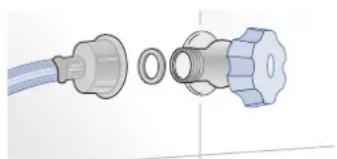
natural_image
Diagram of a medical or laboratory device showing a connector with a blue cable and a metallic fitting (no text or symbols)The models provided with Ice Maker require a connection to the domestic water supply system. This can be executed only through the provided new water hose with 3/4" threading.
The system pressure must be between 0.05 MPa and 0.5 MPa (between 0.5 bar and 5 bar).
Differences pressures can cause malfunctions or leaks in the water system. The appliance should be supplied only with drinkable water.

Warning
The appliance should be supplied only with drinkable water.

Warning
Make sure that installation is performed correctly, according to all of the directions in the specific installation manual provided with the appliance.

Warning
Do not attempt to use a locally sourced garden hose threaded adapter or braided supply line. It will strip the threads on the appliance water connection solenoid.
2.3 Connection to the electrical power supply
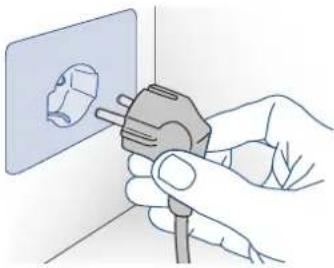
The appliance is equipped with a Schuko type 16A plug and must be connected to the electrical power supply through a corresponding Schuko socket.
Do not use extension cords and/or multiple adapters for the power supply connection.
natural_image
Illustration of hands using a power plug to install a wall socket (no text or symbols visible)
Important
Do not use extension cords and/or multiple adapters for the power supply connection.

Warning
If energy is supplied through an alternative energy power source (solar, geothermal, etc..) or if home automation systems are installed, it is necessary to install the Alternative Energy Kit to integrate the unit into the power grid.
2.4 Refrigerant
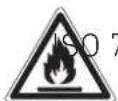
The refrigerant isobutane (R600a) is contained within the refrigerant circuit of the appliance, a natural gas with a high level of environmental compatibility, which is nevertheless flammable.
During transportation and installation of the appliance, be certain that none of the components of the refrigerant circuit become damaged.
If the refrigerant circuit should become damaged:
- avoid open flames and sources of ignition;
– thoroughly ventilate the room in which the appliance is situated.
7010 W021

Caution: risk of fire / flammable materials.

Important
Carry out transportation, installation and/or clearing with extra care so that no damage occurs to the refrigeration circuit.
3.1 Know your appliance
Congratulations for having purchased your new appliance: from now on you can use our innovative conservation system, which will allow you to keep all of your food in the best way possible.
In order to receive a more complete assistance, please register your product on www.kitchenaid.eu/register.
Before using the appliance carefully read the Safety Instruction.
3.2 Manufacturer's liability
The manufacturer declines all liability for damage to persons or property caused by:
use of the appliance other than that specified;
failure to comply with the instructions in the user manual;
tampering with any part of the appliance;
use of non-original spare parts.
3.3 Technical support
In the event of failure of the appliance, contact the technical support and have the repair carried out by qualified personnel only.
make sure you have the model and serial number available on the identification plate.
Use original spare parts only.
Do not try to repair the appliance yourself or without the assistance of a qualified technician: this affects safety and may void the warranty.
Original spare parts remain available for 10 years after the last production of the model.
The following spare parts are available only for authorized repair technicians: electronic boards, thermostats, temperature sensors, hinges, lamps, door handles.
Important Before ca
Before calling take note of the serial number of the appliance, shown on the warranty certificate and on the serial number plate located inside the refrigerator compartment on the side opposite the door opening.
3.4 Technical data
Refrigerant type, storage volume and other technical data can to be found on the product plate.
The model information can be retrieved using the QR-Code indicated on the energy label. The label also includes the model identifier that can be used to consult the https://eprel.ec.europa.eu database portal.
3.5 Product plate
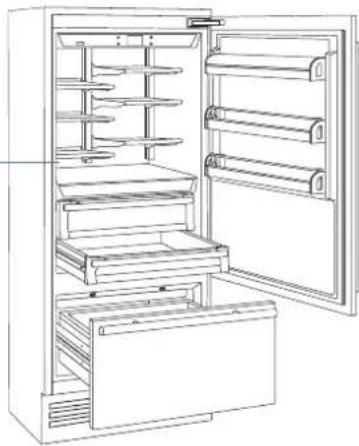
The product plate shows the technical data, the serial number and the model. The product plate must never be removed.
The product plate is positioned on the side opposite door opening.
natural_image
Line drawing of an open refrigerator with shelves and doors (no text or symbols)Climatic class of operation
SN (Subnormal) from +10°C to +32°C
N (Normal) from +16°C to +32°C
ST (Subtropical) from +16°C to +32°C
T (Tropical) from +16°C to +43°C
3. BEFORE STARTING
3.6 Main components
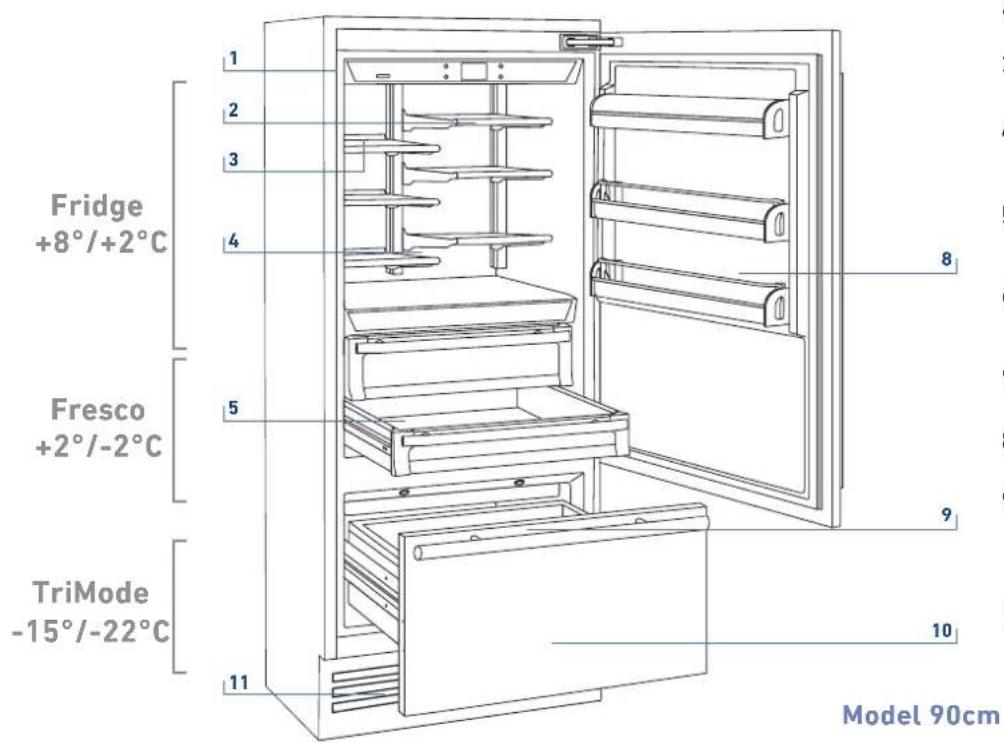
1) Stainless steel body.
2) Interactive control panel.
3) Water filter (*).
4) Patented shelf positioning system (Even Lift).
5) Drawers fresco compartment.
6) Drawers fridge compartment.
7) Ice maker countainer (*).
8) Door shelves.
9) LED illuminations for the freezer compartment bottom drawer.
10) Freezer bottom drawer compartment convertible into Fridge compartment or Fresco compartment (TriMode functionality).
11) Removable Grill (capacitor).
(*) on models with Ice Maker.
3.7 Eletronic Control
The innovative electronic control system designed by KitchenAid maintains constant temperature on the three compartments and visualizes it on the control panel display. It also allows user interaction making it possible to personalize settings of the various functions and to receive sound and/or visual messages should any malfunction occur in the appliance.
3.8 Main control panel (model 90cm).

natural_image
Gray rectangular button with white control buttons and a central blank square (no text or symbols)
Turning On/ Turning Off:
Touch the icon for turning on or off the unit.
Home
Touch the icon home for going back to the main display screen.
Allarm
Touch the icon to view the allarm tone functions and to deactivate them.
Back
Touch the arrow icon for going back to the previous display screen.
4.1 Switching on and off
First time starting the unit
Touch the button Ⓤ. The display shows the following launch screens:

natural_image
Solid gray image with no visible content, text, or symbols.1) Logo.
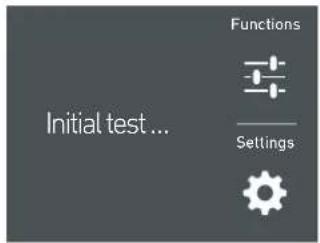
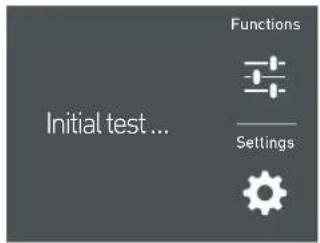
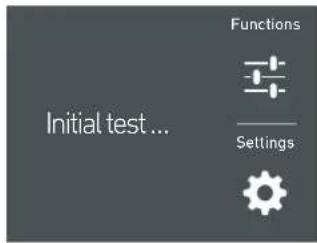
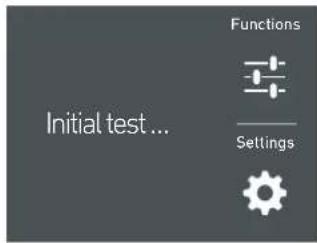
2) Initial test (lasts 3 minutes).
3) The display shows the main screen with the environment temperature measured from the fridge inside the compartments. Automatically the unit start to cool down until reaching the set temperatures.

4) Home screen (*).
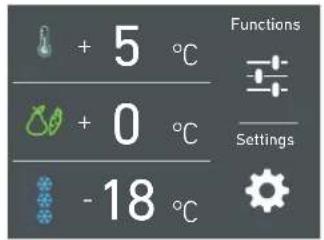
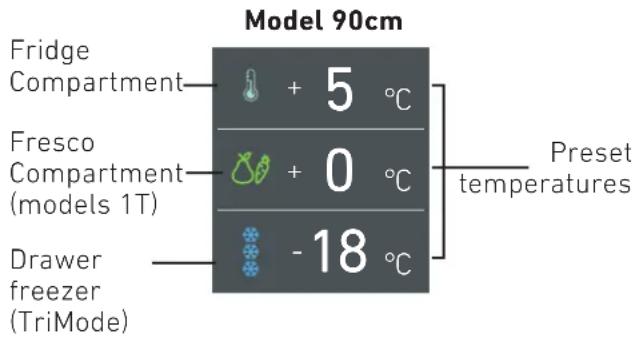
- fridge compartment +5°C
- fresco compartment +0°C
- TriMode compartment -18°C
(*) The home screen varies depending on the models; (see paragraph 4.2 page 13).
The TriMode compartment is set in the freezer mode [-18° (0°F)]. For changing this setting look up the function 5 page 21.
When the appliance is first switched on is recommended to wait at least 12 hours without opening the doors and before placing any food inside the unit. During such period deactivated any error message by pressing the Alarm button.
Shutdown.
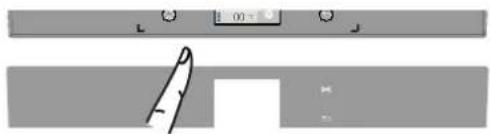
natural_image
Simple line drawing of a door with a handle, no text or symbols present1) touch the bottom ⏻ off.
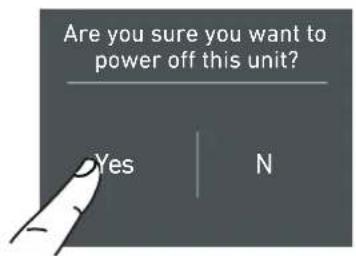
2) Touch the icon Yes to switch on
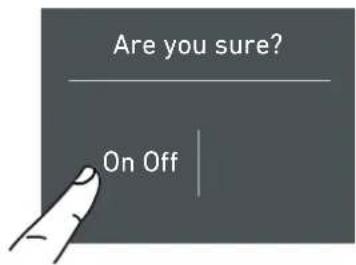
3) Conferm shutdown by touching the On icon.

When the fridge is off there are no warning signs that prove that the fridge is plugged to a socket.
Switching off Fridge and fresco compartment. (Model 90cm)
The fridge compartment and the fresco compartment, can be shutdown individually whereas the TriMode drawer can't be turned off unless through the complete shutdown of the unit
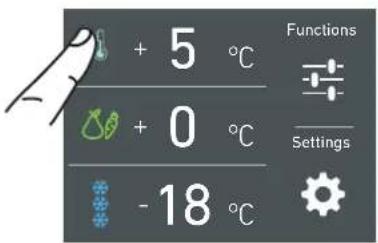
1) Home screen.
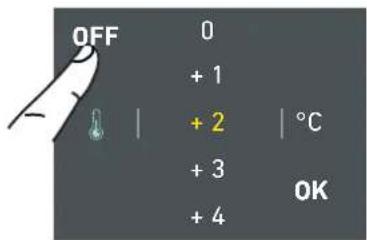
2) Touch the icon off.
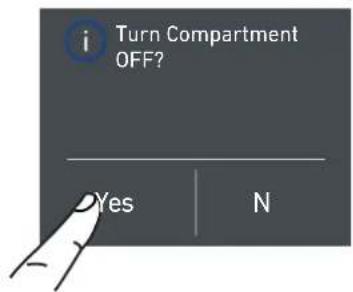
3) Touch the icon Yes to turn compartment off.
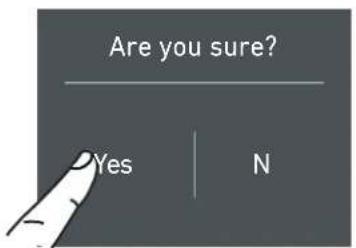
4) Touch the icon Yes for confirming the disactivation.
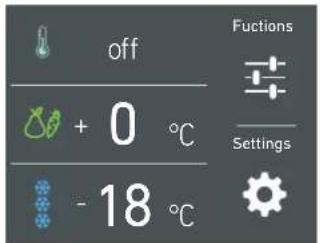
5) On the screen home appears the icon ☐ off, which indicates that the fridge compartment is off.
For turning off the fresco compartment follow the same sequence.
Turning on the fridge and fresco compartment again.
For turning on the unit again press the button, the display will turn on; the starting screen and the home screen, with the temperature measured from the fridge inside the compartments, will appear again. The fridge will start cooling off until reaching the set temperatures.
Turn back on the compartments.
In the case you wish to turn on again the fridge and fresco compartments.
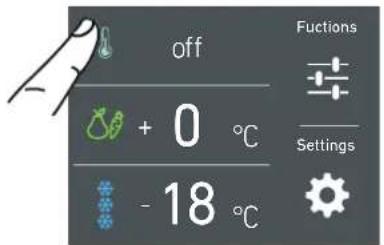
1) Home screen. For example, for turning back on the fridge compartment, touch the icon off.
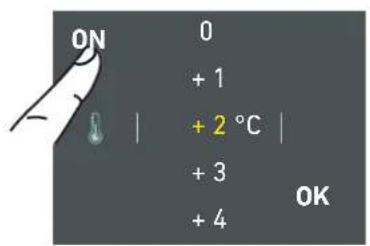
2) Touch the icon on.
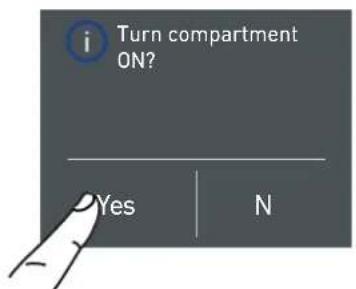
3) Touch the icon yes.
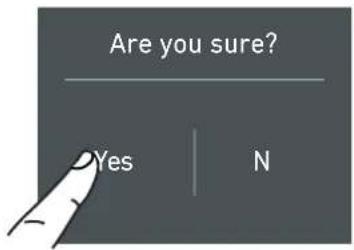
4) Touch the yes icon to confirm activation.
5) Now the fridge compartment will turn back on. The home screen will appear again.
Follow the same procedure for turning back on the fresco compartment.
Switching off for long periods
During long absence periods it is recommended to switch off the refrigerator by pressing the Unit button ⏻ for three seconds and disconnecting the electrical plug or the breaker controlling the socket.
Completely empty the refrigerator, clean and dry it and leave the doors and drawers partially open to prevent unpleasant odors.

If at the first startup the Standby message does not appear, but another message appears, it means that the appliance has already started the cooling process.
During the first startup, it will not be possible to use the Menu to modify the factory settings until the preset temperature has been reached. During the first startup, it will not be possible to use the Menu to modify the factory settings until the preset temperature has been reached.

Each time the appliance is switched on it goes through a self-diagnosis procedure lasting three minutes before completely starting up. If only the refrigerator compartment or the Fresco compartment is switched off, the specific fan will continue to operate to prevent the formation of unpleasant odours and mould.
4.2 How to adjust the temperature for different requirements.
Each model has been carefully tested before leaving the factory and is adjusted in such a way to ensure high performance and low consumption.
Usually, it is not necessary to modify the settings.
How it looks to the home screen in the various models:
Modify the temperatures compartment
Example: How to modify the Fridge compartment temperature.
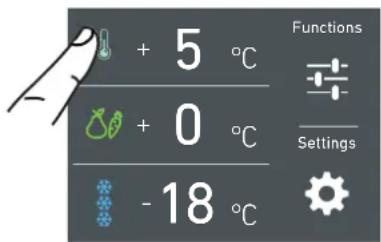
1) Home screen. Touch the icon of fridge compartment.
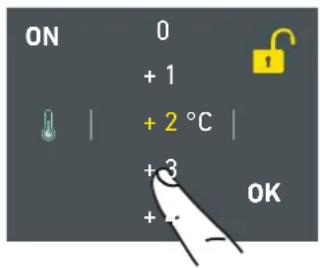
2) Scoll up/down to select the desided temperature
fridge from +2°C to +8°C
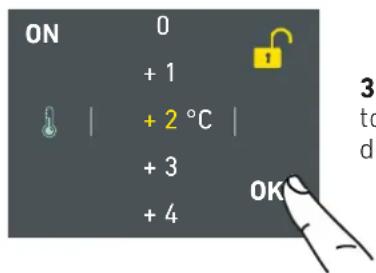
3) Touch the icon ok to confirm the desi-der temperature.
The same procedure is required to set the temperature in the Fresco compartment from -2°C to +2°C and in the Trimode bottom drawer from -15°C to -22°C.

The temperature shown can vary slightly in respect to the set temperature following frequent openings of the doors or insertion of room temperature foods or large quantities of foods.
6 to 12 hours are necessary to reach the selected temperature.
Padlock icon.
The padlock icon shows up when the temperatures are set up.
The padlock open/close shows that is or isn't possible to modify the compartment's temperatures anymore.


Usually an open yellow padlock can be seen open; in that case you can scroll up or down with a finger on the display, select the desired temperature and press OK for confirming.
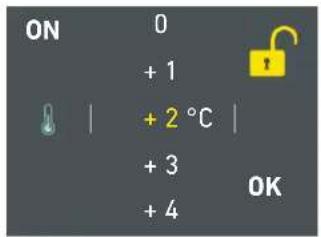
Whereas a closed padlock can be seen if the user has activated some functions (described in the paragraph 5.1 page 15) that modify the settings of the Frigo Compartment, Fresco Compartment and Freezer Compartment therefore the user in that situation will not be able anymore to change the temperature of the compartments.
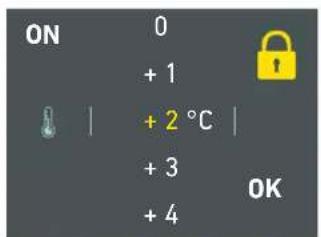
If the icon function is touched and a specific function is set (for example holiday, shopping trimode, ect...), the yellow padlock will be seen closed and it won't be possible to change the temperature of the compartments as long as the function won't be completed or if it is manually deactivated.
4.3 Information signals of anomaly on the display.
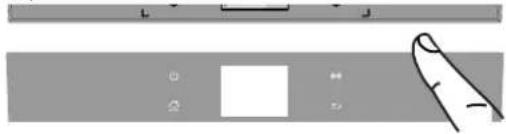
An integrated control system will give information through bright textual signals messages you can see on the display.
The voiced signal that goes along with some of the anomalies signals and can be turned off by touching the button allarm ⏻ on the main control panel.
You can find the list of the anomalies signals at the end of this manual. (see paragraph 12.2 page 36).
natural_image
Pure diagram of a finger pointing at a rectangular object with control buttons (no text or symbols)INFORMATION FOR THE USE OF THE DISPLAY.
It is possible to personalize the operation of your KitchenAid unit in order to adapt it to the different ways you might want to use it.
5.1 Functions.
After touching the icon Function 📋 on the home screen will be shown the icon of the following available functions.
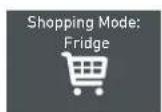
1) Shopping frigo
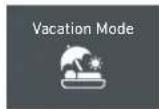
2) Vacation.

3) Shopping Trimode.
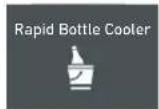
4) Bottle Cooler.

5) Ice Maker.
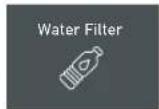
6) Water filter
7) Circuit cleaning
1) Shopping Fridge
The function lowers the refrigerator temperature to +2°C (36°F) for 12 hours, permitting more rapid cooling of food that has just been placed in. Once the 12 hours have expired, the function deactivates automatically, returning to the previously set temperature. It is possible to program a timed activation of the function.
After a prolonged interruption of electrical current, it is necessary to reactivate the function.
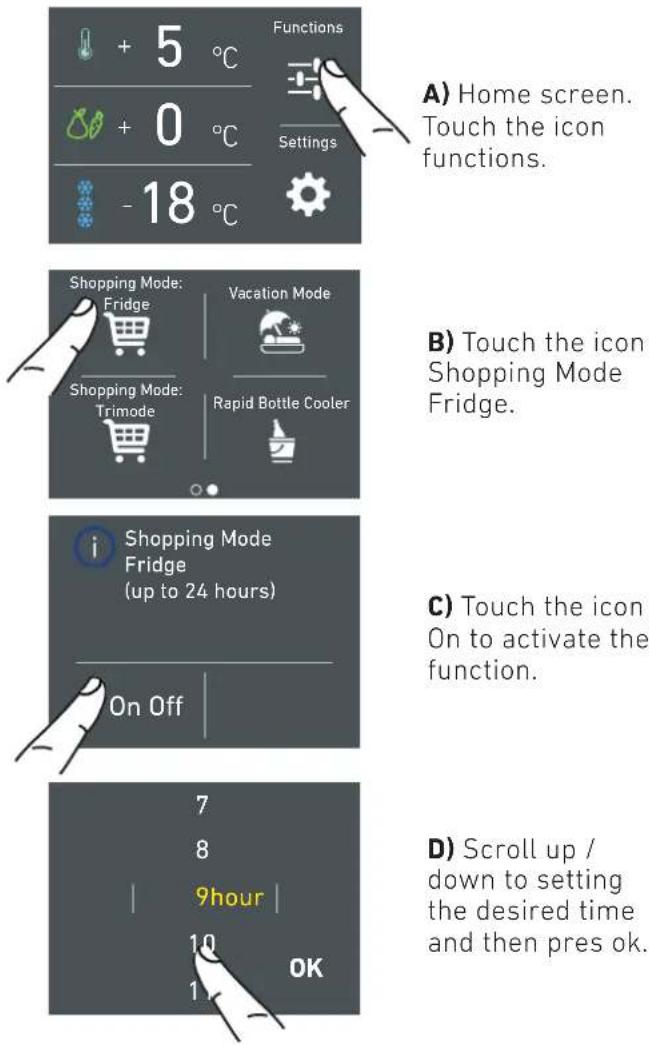
A) Home screen. Touch the icon functions.
B) Touch the icon Shopping Mode Fridge.
c) Touch the icon On to activate the function.
D) Scroll up / down to setting the desired time and then pres ok.
It is possible to program in advance between 1 and 24 hours.
2) Vacation
This function (recommended in case of prolonged absences since it allows considerable energy savings) brings the refrigerator compartment temperature to +14°C (57.2°F)
It is possible to program the duration, or it can be manually deactivated upon re-entry after a period of absence. This function remains active even if during the period of absence there is a prolonged interruption of electrical power.
It is possible to program a period from 1 to 90 days.
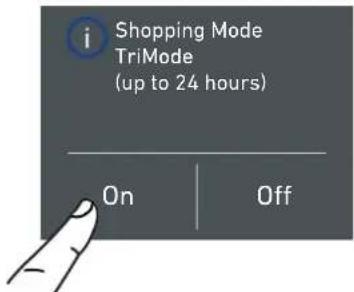
3) Shopping TriMode
This function must be activated at least 24 hours before inserting room temperature items into the freezer, or several hours before placing into the freezer previously frozen items which have been subject to a slight temperature rise.
This function is automatically deactivated when the programmed time period expires. It is possible of program timed activation of the function.
If interrupted by a prolonged interruption of the electrical power, it is necessary to reactivate the function.
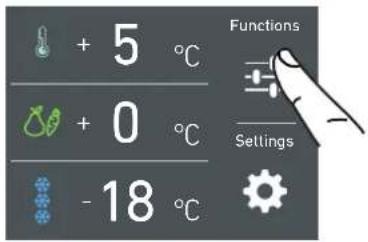
A) Home screen. Touch the icon functions.
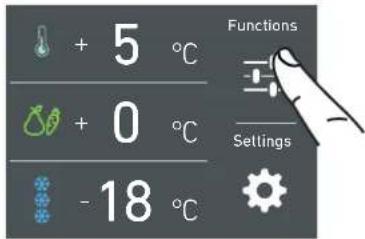
A) Home screen. Touch the icon functions.
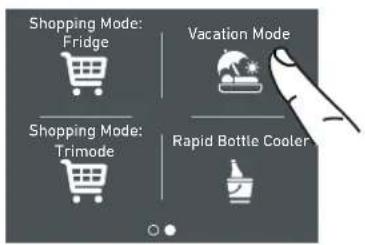
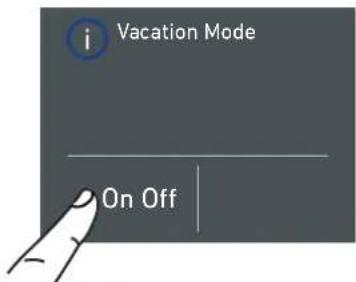
B) Touch the icon Vacation Mode.
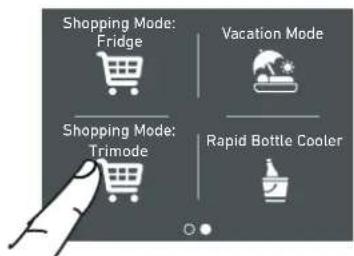
B) Touch the icon Shopping Mode TriMode.
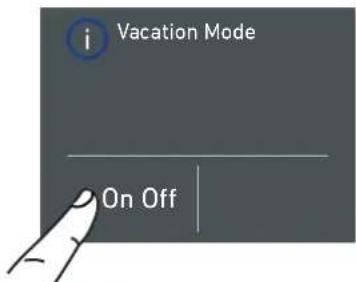
c) Touch the button On to activate the function.
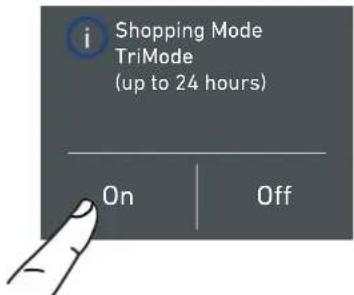
c) Touch the button On to activate the function.
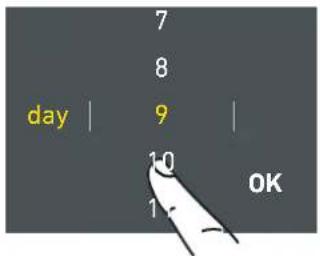
D) Scroll up / down to set the desired time (in days) and then pres ok.
It is possible to program a period from 1 to 90 days.
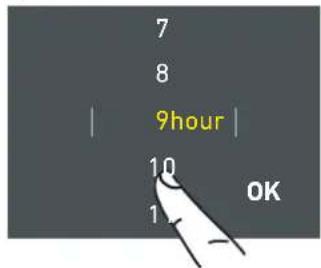
D) Scroll up / down to set the desired time (in hours) and then pres ok.
It is possible to pro-
gram a period from
1 to 24 hours.
4) Rapid Bottle Cooler
This function can be activated when it is necessary to cool off beverages quickly, by placing them inside the freezer compartment.
It is possible to select a duration of 1 to 45 minutes. A sound signal will indicate when the optimal temperature has been reached.
After removing the beverages, deactivate the sound signal by pressing the Alarm button (8-9).
5) Ice Maker activation
A prewash of the water circuit should be performed before activating the Ice Maker for the first time. After a few minutes the Ice Maker can be activated. (See section 5.2 page 18). After a few minutes the Ice Maker can be activated.

Important
Do not activate the Ice Maker unless the appliance is connected to the water mains.
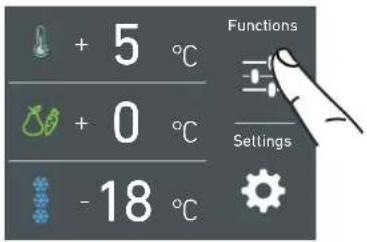
A) Home screen. Touch the icon functions.
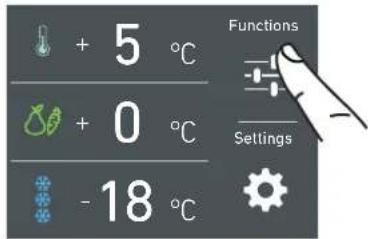
A) Home screen. Touch the icon functions.
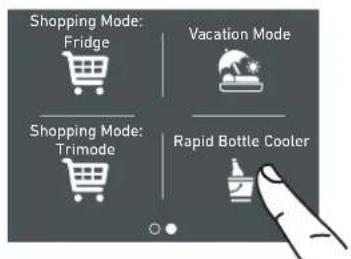
B) Touch the icon Rapid Bottle Cooler.
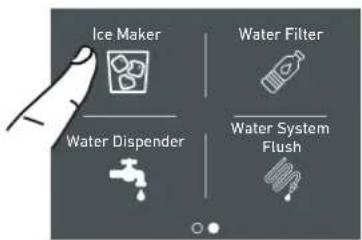
B) Scroll twice right and then touch the icon ice maker.
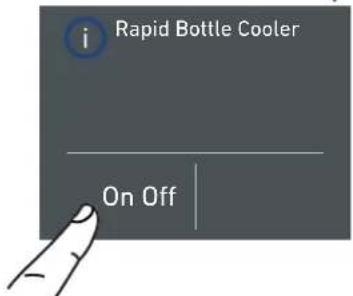
C) Touch the button On to activate the function.
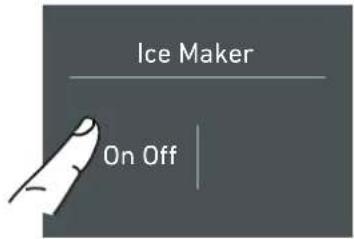
C) Touch the button On to activate the ice maker.
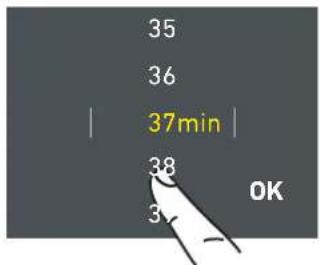
D) Scroll up / down to set the desired time (in minutes) and then pres ok.
5a) Set Ice cube Size - SuperIce
The IceMaker function permits selecting the size of the ice cubes, by choosing between Large (base setting) or Medium, and activation of the SuperIce function, which increases the quantity of produced ice.
The SuperIce function deactivates automatically after 24 hours.
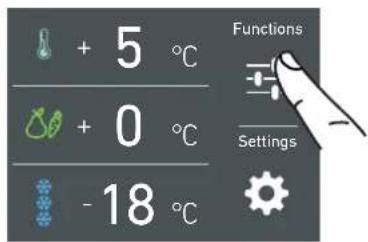
A) Home screen. Touch the icon functions.
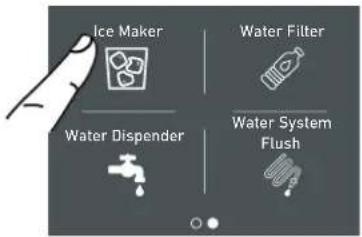
B) Scroll twice right and then touch the icon ice maker.
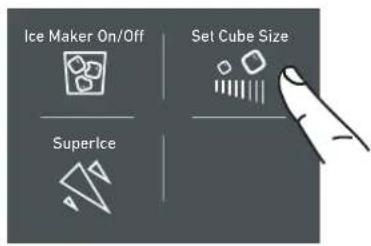
C) Toch the icon Set Cube Size. The default cube size is "medium".
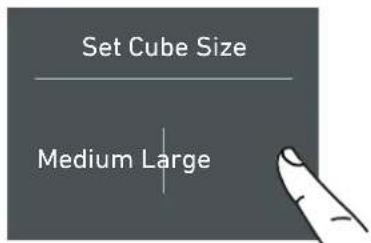
D) Touch the icon medium/large to choose the desired Set Cube Size.
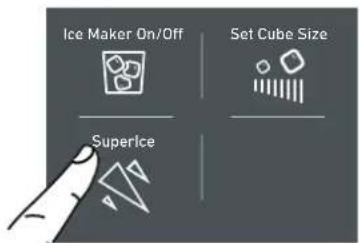
E) If you would like to increase the production of ice, touch the Superice icon, this will enable the freezer to produce more ice, up to 1,5kg a day.
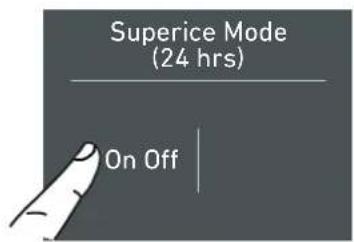
F) Confirm the function or not by touching the On or Off button.
6) Water Filter Activation
The water filter is essential for the purification of the water used for making ice, for cleaning the circuit or for supplying water for the fridge compartment. The display permits visualizing the time left before the filter needs to be replaced. The water filter Remider have to be activated by the user.
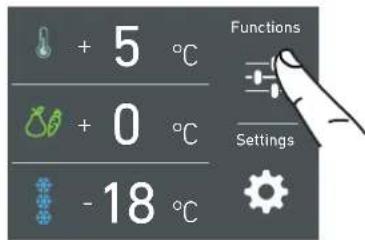
A) Home screen. Touch the icon functions.
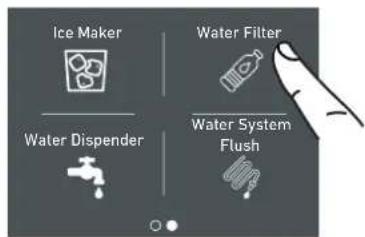
B) Scroll ones right and then touch the icon water filter.
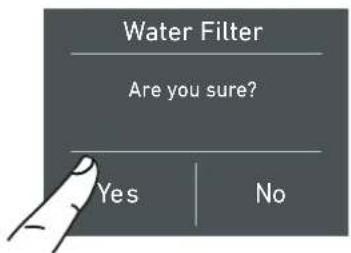
C) Confirm the function by touching the on button.
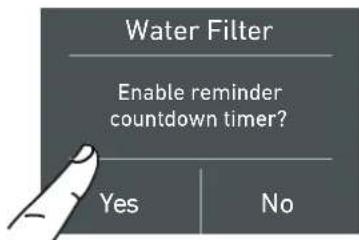
D) Confirm the function by touching the button Yes.
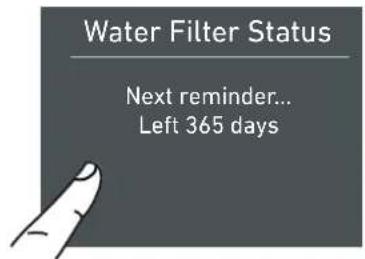
E) Here are indicated the remaining days before the due date for the substitution of the filter.
Touch the home button.
6a) Water Filter Deactivation
To deactivate an active filter reminder countdown follow these steps:
6b) Reset Filter
The Reset Filter function sets to zero the time left before the filter needs to be replaced. It is necessary to set the meter to zero each time the cartridge is replaced.

A) Home screen. Touch the icon functions.
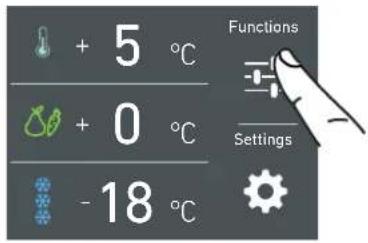
A) Home screen. Touch the icon functions.
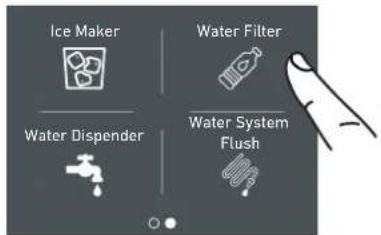
B) Scroll ones right and then touch the icon water filter.
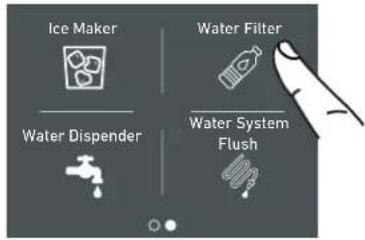
B) Scroll once right and then touch the icon Water filter.
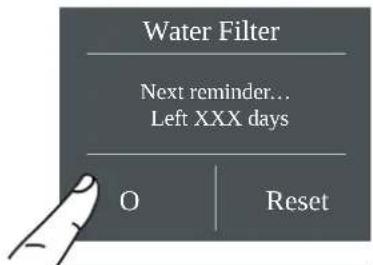
C) Push off to the activate Water Filter Reminder.
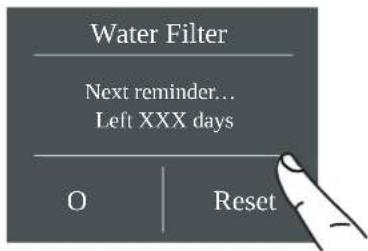
c) Touch the button reset.
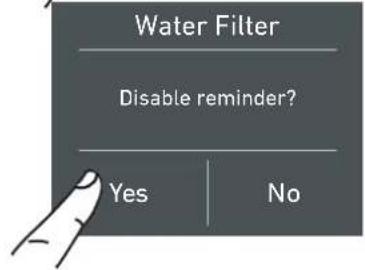
D) Confirm the function by touching the Yes button.
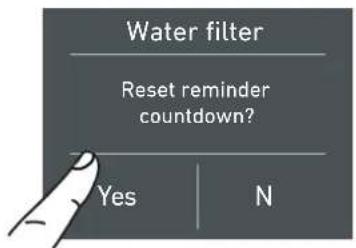
D) Touch the Yes button to proceed.
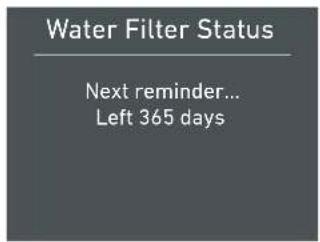
E) You will be shown the full duration of the Water Filter Cartridge.

Push Home button to go back to the main screen or push "Yes" to deactivate filter reminder.
7) Manual Clean, Water Filter
If ice production has been disabled or unused for a long period it is recommended to perform a Manual Clean function.
Before proceeding it is important to turn off the ice maker.
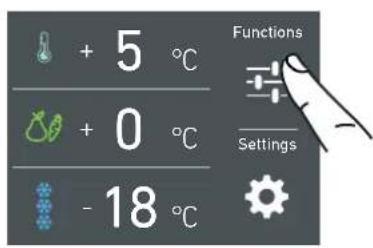
A) Home screen. Touch the icon functions.
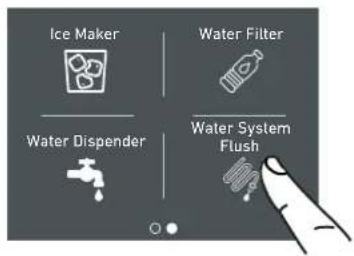
B) Touch the icon Water System Purge.
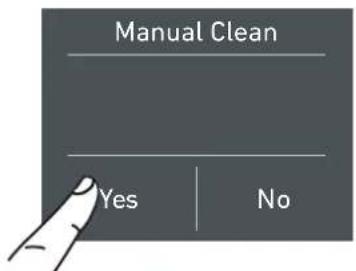
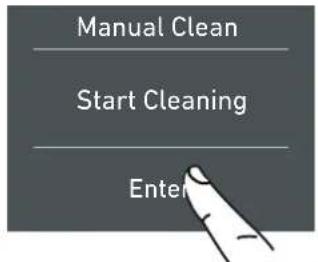
c) Touch the icon yes to activate the manual cleaning.
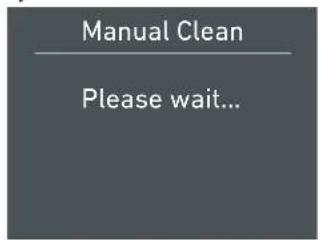
D) Please wait...
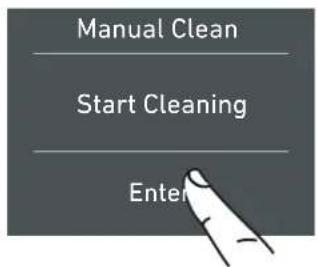
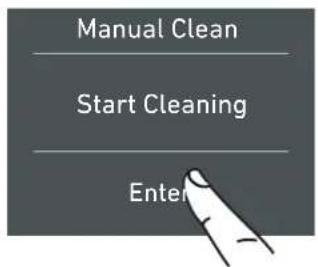
E) Touch the icon ok to start the cleaning.
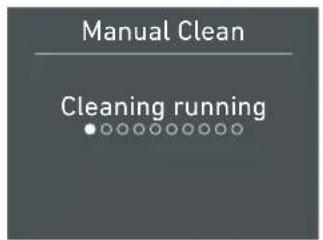
F) Cleaning running...
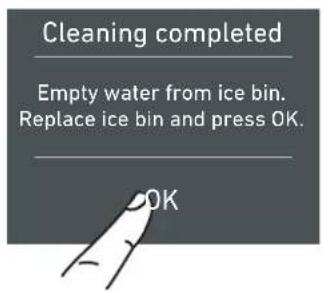
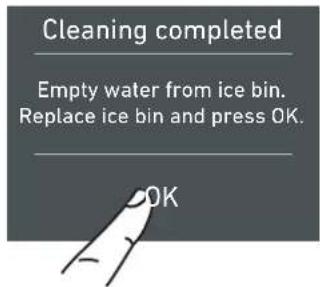
G) At the end of the cleaning, press ok and empty water from ice bin.
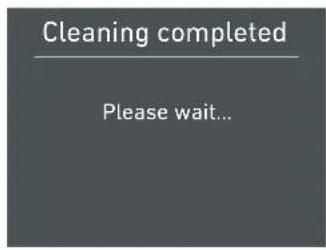
H) Wait a few seconds the main menu screen will appear.
Repeat the cleaning until the water on the freezer tray won't be clean.

Put correctly under the ice maker the ice tray or a suitable bowl for gathering the water, and then close the drawer. At the end, clean the ice tray.
Bypass filter
The included filtration system can be bypassed when excellent water quality is available from the home water system. You can simply remove the water filter from the adapter and the system will automatically bypass the cartridge.
5.2 Settings.
It is possible to personalize the settings of your KitchenAid fridge for adapting it to the different ways you might want to use it.
1) Date
The display will show the date in the format (day:month:year).
By touching the display you can modify the settings.

1) Date.
2) Time.
3) Celsius e fahrenheit degrees
4) Language.
5) Trimode.
6) Sabbath.
7) Reset.
8) Demo Mode.
9) Maintenance.
10) Service.
11) Info System.
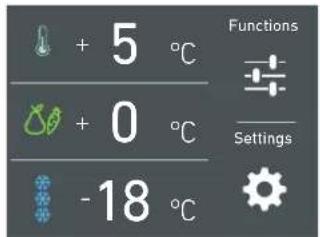
A) Home screen. Touch the icon settings.
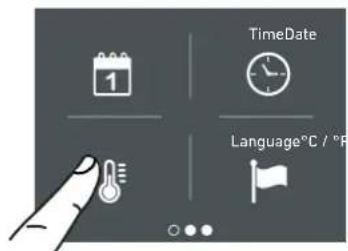
B) Touch the icon date.
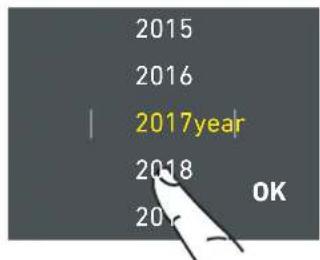
C) Scroll up or down until selecting the desire day and press ok.
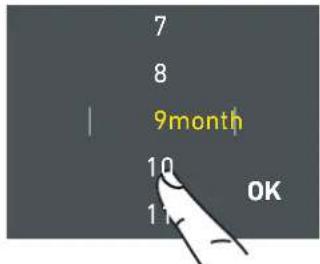
D) Scroll up or down until selecting the desired month and press ok.
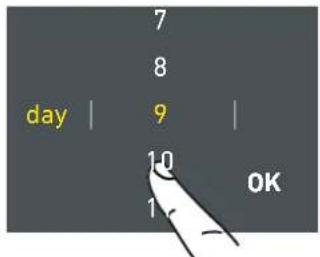
E) Scroll up or down until selecting the desired year and them press ok.
2) Time
The display shows the hours and minutes in the format hh:mm.
This function selects the display at 12 or 24 h.
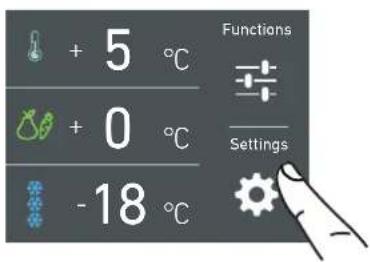
A) Home screen. Touch the icon settings.
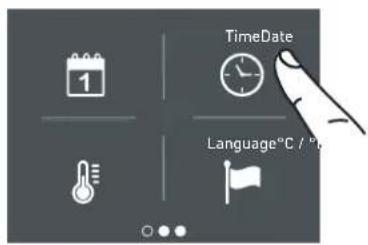
B) Touch the icon time.
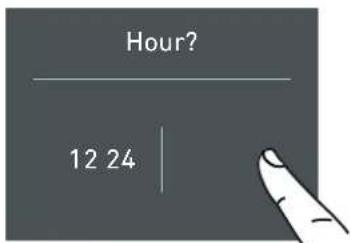
c) Touch in which way you want to see the time: 12 or 24 hours.
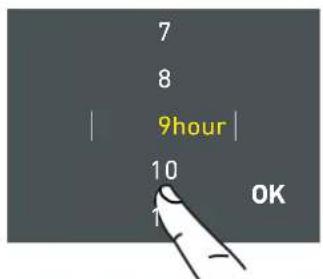
D) Scroll up / down to set the hours and then press ok.
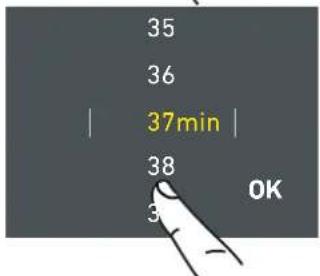
E) Scroll up / down to set the minutes and then press ok.
3) SET °C/°F
This function permits visualizing the temperature in Centigrade or Fahrenheit degrees. Normally, the appliance is set for visualization in centigrade degrees.
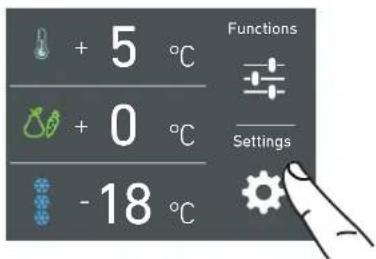
A) Home screen. Touch the icon settings.
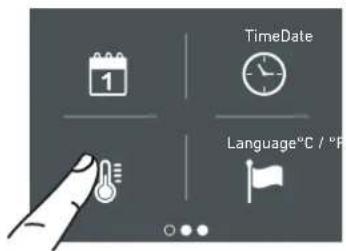
B) Touch the icon °C/°F.
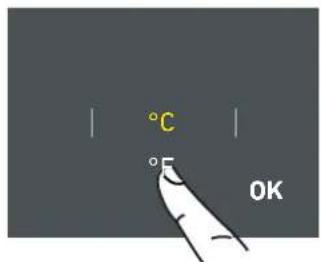
C) Scroll up / down to select either centigrade or fahrenhe it degrees and press ok.
4) Language
To set the language of the fridge, simply touch the settings button on the display.
5) TriMode
The freezer compartment can, if required, be converted to the refrigeration o Fresco operating mode.
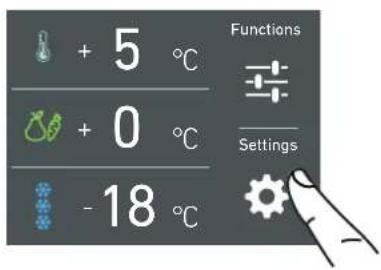
A) Home screen. Touch the icon settings.
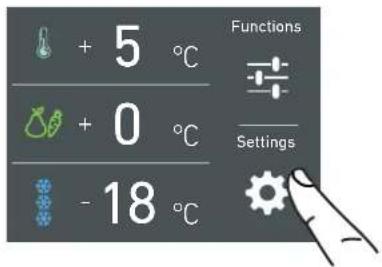
A) Home screen. Touch the icon settings.
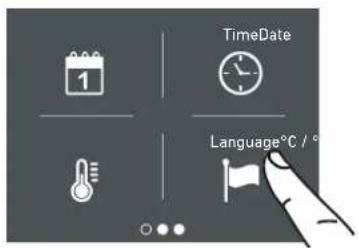
B) Touch the icon language.
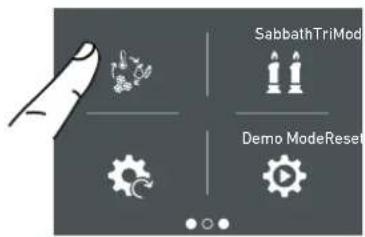
B) Scroll twice right and touch the trimode button.
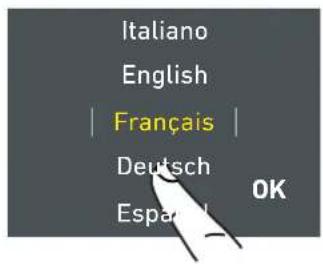
C) Scroll up / down to select the desired language and press ok.
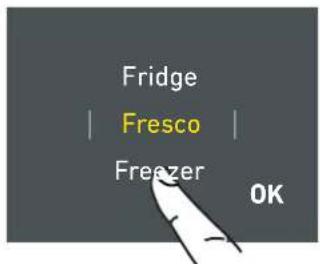
C) Scroll up / down and select one of the three functions.
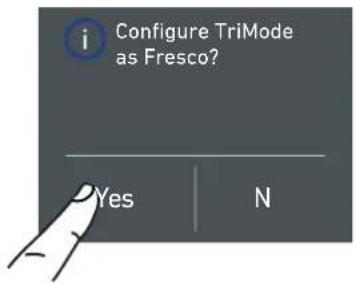
D) Touch yes to confirm the function.
6) Sabbath Mode (Optional)
The function makes it possible to comply to certain religious observances requiring that the operation of the appliance, is not affected by the opening or closing of the doors (the thermostatic control, the inner lighting and the ice maker are deactivated).
7) Reset
It gives the possibility to restore the base settings that were set in the factory, cancelling all the changes that has been made from there onward.
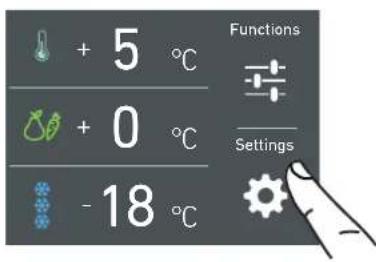
A) Home screen. Touch the icon settings.
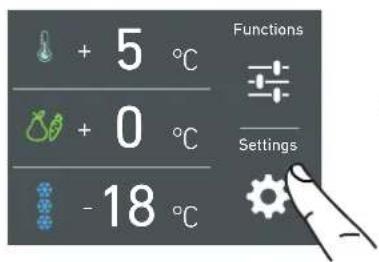
A) Home screen. Touch the icon settings.
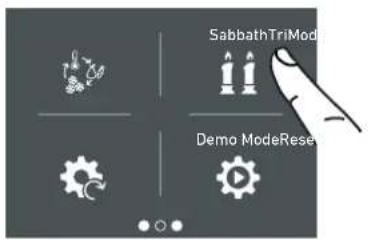
B) Scroll right twice and touch the icon sabbath.
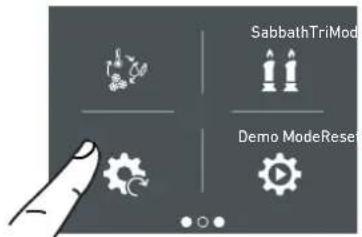
B) Scroll right twice and toch icon reset.
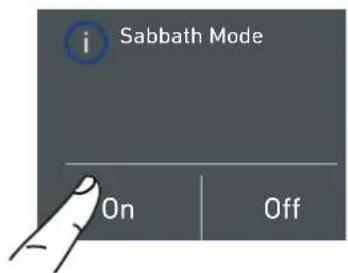
C) Touch the Yes button to activate the function.
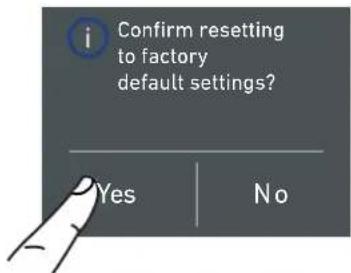
c) Touch the yes button.
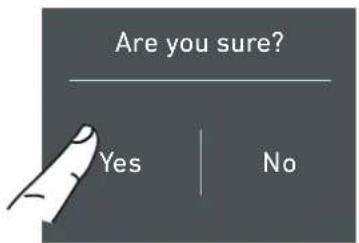
D) Touch the yes button to activate the function.
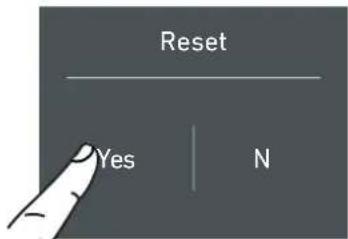
E) The fridge will work accordingly to this configuration.
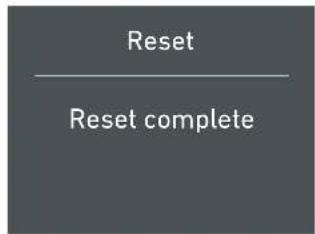
E) The reset has been performed. The fridge's factory settings have been restored.

Important
If you restore the base settings ("reset"), it is necessary to set again the choice of the functioning of the trimode drawer that has been made, in case they were set before as fridge or fresco.
8) Demo Mode
It is possible to simulate the functioning of the fridge, for showroom display or for fairs.
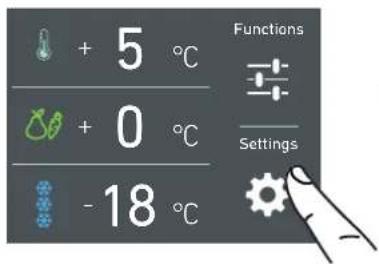
A) Home screen. Touch the icon settings.
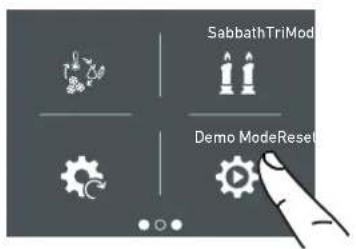
B) Scroll right twice and toch demo mode.
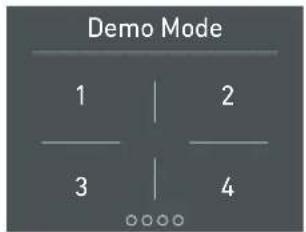
c) Insert the password for the activation.
Default password 1-2-3-4
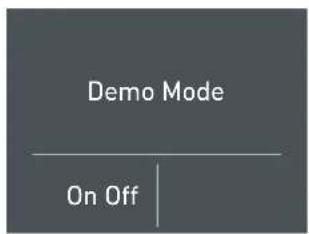
9) Maintenance (through allarm sign).
Te units requires, for a correct operation, the cleaning of the ventilation grille, of the filter and the condenser.
The default setting of the unit is "Warning disabled".
See instruction 11.2
The recurring cleaning every 12 months is reminded by an acoustic and optical signal on the display. It is possible to disable the warning signal and see the time left before the next cleaning that has to be done. For details see pages 30 e 31.
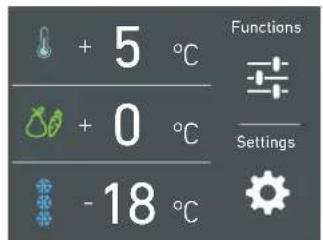
A) Home screen. Touch the icon settings.
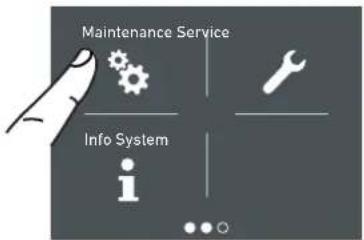
B) Scroll to the right three times and touch the icon maintenance.
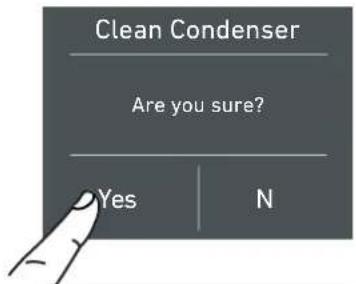
C) To enable it, touch the Yes icon.
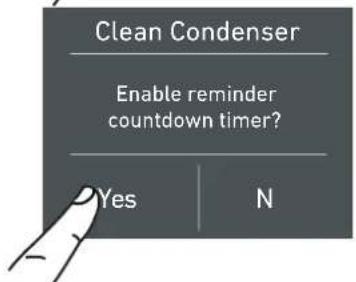
D) To enable it, touch the Yes icon.
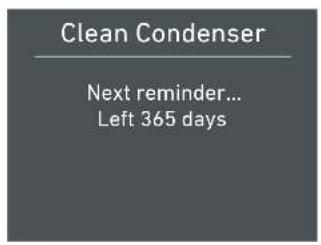
E) The display shows the remaining time before the next cleaning.
11) Info System
The function Info System shows the data of the products for example the software's code, serial number and the factory's codes of the fridge.
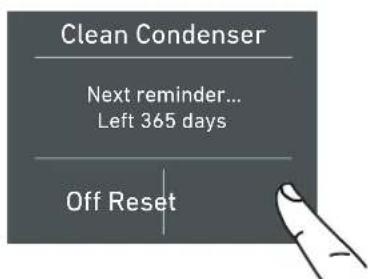
F) Instead, if you want to disable the warning previously set, touch the icon reset.
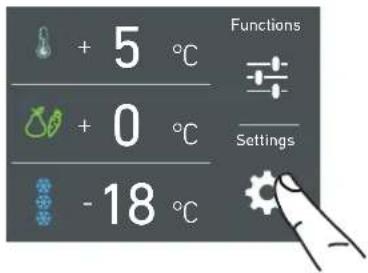
A) Home screen. Touch the icon settings
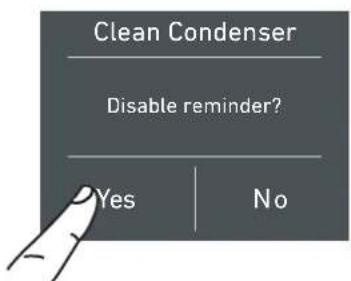
G) To disable the warning, touch the yes button.
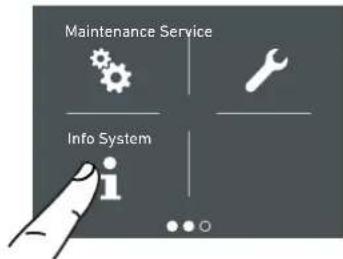
B) Touch the icon Info System.
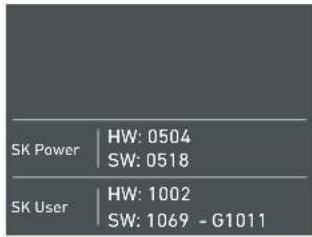
C) Here are shown the data of the KitchenAid unit.
10) Service
The service function stance.

is reserved for the assi-
6.1 Internal Layout (positioning, adjustment, removal).
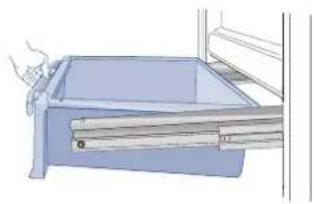
Fresco Drawer
90cm models
Fixed to the slide guides with two thumbscrews.
to remove the drawer, unscrew the thumbscrews and remove the drawer.
natural_image
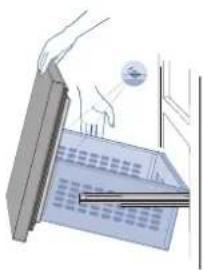
Illustration of a blue drawer with drawers, no text or symbols presentTriMode Drawer
90cm models
The upper TriMode can be removed using the same method used for the Fresco drawer. To remove the inner TriMode drawer unscrew the thumbscrews
When replacing the drawers, make certain the back of the drawers engage under the clips on the slide guides.
natural_image
Illustration of a hand holding a computer monitor with a magnifying glass (no text or symbols visible)Ice Tray
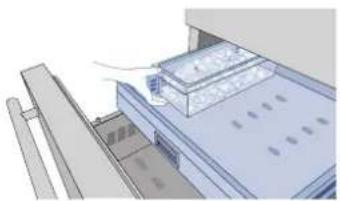
Located in the upper drawer of the freezer compartment on some models it is fixed with locking panels.
after removal, make sure to reposition it correctly.
natural_image
Architectural rendering of a modern building facade with structural elements (no visible text or symbols)
Warning
Do not place hands or fingers near the Ice-maker when in function.
Shelves
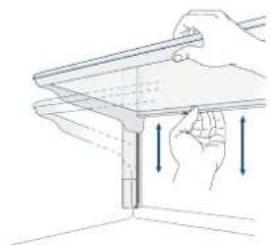
The shelves are sliding and can be easily re-positioned by the user as follows:
release the locking knob by turning i anti-clockwise
lift or lower the shelf to the desired position

natural_image
Hand holding a tool interacting with a mechanical component (no text or symbols visible)re-tighten the locking knob. To remove a shelf it is necessary to slide it up to the top
natural_image
Illustration of a hand holding a tool above a wall-mounted device with directional arrows indicating motion (no text or symbols)Door Shelves
90cm models
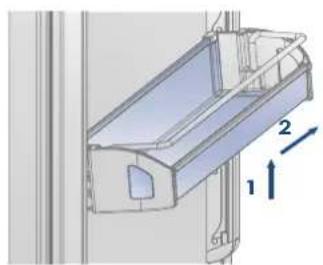
The door shelves can be easily removed for cleaning
Hold the door shelf at the sides and push it upwards to release it from its seat, then pull it outwards.
Reverse the procedure to reinstall.
models 90cm
natural_image
Technical diagram of a mechanical component with numbered directional arrows (1, 2) indicating assembly or motion (no text or symbols present)7.1 Activation and use of the Ice Maker

Note
If the ice is not used frequently is advisable to empty the ice bin once every 8-10 days. It is normal that some ice cubes stick to one another. If the ice is not frequently used, the older cubes can become opaque, and will have a strange flavour and become smaller.
The Icemaker automatically deactivates if the Vacation function is activated.
When the Icemaker is started for the first time, it is recommended to dispose of the first full bin of ice.
If the equipment has been switched off for a month or more, it is recommended to perform a water and filter cleaning cycle.
L'IceMaker produce ghiaccio se il vano Tri-Mode è impostato in modalità Freezer.

Warning
The ice maker will continue to operate even when the ice bin is not in position
To activate the Ice Maker after installation of the appliance touch the function icon and then and then the ice maker icon from the functions.
Please note that 12 to 24 hours are necessary before ice production may begin.
The production is of 10 cubes per cycle in approximately 10 cycles in 24 hours.
The yield depends on the temperature set in the freezer, the room temperature and the frequency of door opening.
If the appliance is operating without being connected to the water system, make sure that the Icemaker is deactivated by toch the icon.
The Ice Maker produces ice until the ice tray is full and will automatically stop once the maximum level is reached.
With the SuperIce function, it is possible to increase the quantity of ice produced a 24 hours, while the Set Cube Size function permits selection of the size of the produced ice cubes.
Do the ice cubes have an unusual odour?
Ice is a porous material which can absorb odours from the environment. Ice cubes which have been in the ice cube container for a long time may absorb odours, stick together and slowly become smaller. We recommend that old ice cubes not be used. Other means of preventing odors:
The ice cube container should be cleaned occasionally with warm water. Make sure that you switch off the ice maker before clearing the container. Rinse out and wipe dry.
Check the contents of the freezer for spoiled or out-of-date food. All odorous foods should be wrapped thoroughly or stored in airtight containers to prevent the build-up of odors.
The water filter may have to be replaced in some models.
In some cases the quality of the water connection in the house should be checked.
Operating noises
Quite normal noises
Grumbling: refrigerating unit is running. Fan in the recirculating air system is running.
Bubbling, humming or gurgling noises: refrigerant is flowing through the tubes.
Clicking: motor is switching on or off. Solenoid valve on the water connection is opening/closing.
Rumbling: ice cubes are falling into the ice cube container.

the appliance is powered by two independent compressors. It is therefore normal to always have one of two compressors in operation.

Warning
Do not place any bottles or food for rapid cooling in the ice cube container. The ice maker may become blocked and be damaged.
7.2 Water Filter
natural_image
Illustration of a person lying in bed, head tilted upward (no text or symbols)The Water Filter makes available high-quality water for the production of ice cubes. It provides up to 3000 liters of water for a maximum time of 12 months.
Filter Replacement
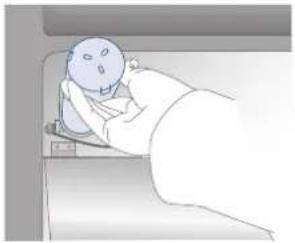
The filter is located inside the refrigerator compartment, above the top glass panel. Prior to changing the filter, switch off the Ice Maker by toch the icon ice maker.
Open the top glass panel and carefully rotate the filter cartridge for a quarter rotation in a counter clockwise direction until it detaches from its housing. It is normal for a small quantity of water to come out. Remove the cap of the new cartridge and insert it into the housing by gently rotating it for a quarter rotation in a clockwise direction until it locks into place.
Then enter the Menu and set la funzione "manual Clean" through the icon . At the end of the cleaning cycle remove the water from the ice tray and wipe it dry.
7.3 Water filter for freezer column Ice Maker
Freezer columns equipped with automatic ice-makers include an externally mounted water filter kit.
The water filter manifold and waterline connections must be installed in conjunction with the fridge as the waterline connecting the back of the appliance to the filter kit must be in place before installing the unit.
The filter kit should be installed in an accessible location (such as an adjacent cabinet) to allow for the water filter cartridge to be changed annually.
If you choose not to use the water filter (such as connecting the appliance to an already filtered water source) then it is suggested to also set the function Water Filter through the icon 📄, touch the icon reset e disable the warning to avoid receiving reminders to change the filter (that you are not using).
For more details and how to access this function setting, follow instructions on page 17 of the included instruction manual: "Reset Filter".
8.1 Lighting
natural_image
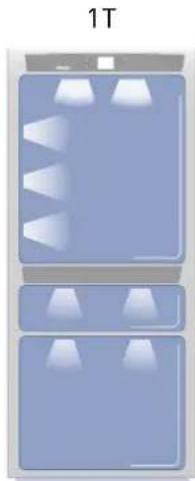
Two identical blue rectangular panels with white triangular cutouts, labeled '1T' at top (no other text or symbols)To provide optimum interior lighting, LED strips illuminate the refrigerator compartment from the top and sets of LED lights directly illuminate different areas of the refrigerator compartment, of the Crisper-Fresco drawers and the freezer drawer.
In case of malfunction and/or wearing out of the lighting system, the repair should be carried out by a qualified Service technician.
9.1 General directions
Your fridge is designed to ensure precise, constant temperatures and appropriate humidity levels in all compartments.
In addition, the double refrigeration ensures that frozen foods and ice do not absorb the odor of fresh foods and that the humidity in the refrigerator does not freeze and build up frost.
Nevertheless, to properly preserve all of your foods, it is not enough to have an excellent refrigerator. It is also necessary to know the rules for correct food preservation.
Do bear in mind that all foods will inevitably change their characteristics over the passage of time. This change begins long before the food is consumed, since foods contain micro organisms which multiply and can cause deterioration. This process occurs more rapidly due to improper handling, preservation temperatures and humidity levels.
It is therefore recommended to follow the directions presented below which will permit using your refrigerator/freezer in the most effective and safe manner to keep your foods in the best way for as long as possible.
Bear in mind that the Crisper-Fresco area is the area for preserving the most delicate fresh foods, since it ensures constant average temperature near freezing.
Periodically check that all foods are in a perfect state of preservation. It is usually quite clear when a food item is deteriorated, due to mold, unpleasant odor and unpleasant aspect. Nevertheless, there are cases in which these conditions are not so evident. If you believe that a food item was kept for an excessive period of time and may be deteriorated, do not consume this item or even taste it, even if it seems to still be healthy, since the bacteria that cause deterioration of food can also cause poisoning and illness. When in doubt, throw the food away.
9.2 How to maintain good food quality
When buying groceries
Always take the following precautions:
Place any packages of raw meat, fish or poultry in plastic bags so that they do not drip on other foods.
Purchase meat, poultry and fish last. Do not leave your groceries in a warm car after shopping. Keep a freezer bag in your car and use it in case of very high temperatures or long trips.
Check the production dates and "best before" times on foods to be sure that they are fresh.
Be very careful when buying fresh foods, and only buy a quantity that can be consumed during your planned preservation period.
When possible, let warm foods adjust to room temperature for at least two hours before placing them in the refrigerator, unless you have activated the Shopping function before.
When placing foods in
Check the refrigeration temperature of the various compartments on the control panel:
The refrigerator temperature must be 8^ C ( 45^ F) or lower and the freezer temperature must be -18^ C ( 0^ F)
Follow the recommendations regarding the preservation times and temperatures indicated in the tables to follow.
Keep raw meat, fish and poultry separate from other foods and avoid any possible drippings.
When placing foods in
When placing in the refrigerator your meat, fish or poultry, leave these in their original packaging, unless the packaging is ripped or punctured. Repeated handling could introduce bacteria into these foods.
To keep food in the freezer is a good idea to use freezer containers.
Label and date the packages
Be careful to correctly position the food items on the shelves in a way that does not obstruct the air circulation vents inside the compartment.

Notes
When a high level of humidity is present either in the environment or in the foods placed in the Fresco drawers, the bottom of the Fresco compartment might be covered
with some water or ice (if the temperature is set between 0^ C and -2^ C).
Such condition is normal and it is due to the high humidity levels of the Fresco compartment; high humidity together with low temperatures is what guarantees a longer preservation of foods.
Water or ice can disappear on its own if the air humidity level should lower; it is also possible to remove the water with a towel. If a thin layer of ice has formed, set the temperature of the Fresco compartment to +2°C and after one day remove the water with a towel.
If the layer of ice is thicker, it might be necessary to shut off the Fresco compartment for one day in order to melt it.

Warning
After a prolonged interruption of electrical power, once the electrical power is reactivated, an audible signal will indicate if the temperature has raised above normal levels. In addition to this the display will show for one minute the highest temperature detected inside the compartments, to allow the user to decide how to better use the food items.
After one minute the display will resume normal operation, while the Alarm button ⏻ will continue to blink.
Press the Alarm button ⏻ to display the highest recorded temperatures.
The appliance working temperatures are set at the recommended degrees of +5°C for the refrigerator, 0°C for Fresco drawers and -18°C for the freezer.
FOOD ARRANGEMENT
Refrigerator door
Refrigerator compartment door
Keep eggs, butter, cheese etc. in the upper and central parts.
Keep drinks, bottles, cans etc. in the lower part.
Refrigerator compartment
Keep conserves, wine, biscuits etc. in the upper part.
Keep dairy products, ready meals, pastries, fruit juices, beer etc. in the central part.
Keep meats, cold cuts etc. in the lower part.
Keep fresh and tropical fruit, vegetables, carrots, potatoes, onions, etc. in the fruit and vegetable drawer.
Freezer compartment
The type of food, quantity and date of freezing should be marked on the container/packaging.
Use small containers, if possible already cold.
The quantity of fresh foods which can be frozen at the same time is listed on the nameplate inside the refrigerator compartment.
Use suitable freezer bags, tinfoil, cling-film for use with food, and freezer containers.
Do not use paper bags, cellophane for nonfood use, shopping bags or pre-used freezer bags.
Avoid frozen food coming into contact with fresh food to be frozen.
Keep bagged frozen vegetables, ice, ice cream etc.
| FRESH FOODS PRESERVATION AREA | TIME | |
| Raw meats | ||
| Large cuts | Fresco Compartment | 4 days |
| Beef steaks, poultry and wild game | Fresco Compartment | 3 days |
| Ground meat | Fresco Compartment | 1-2 days |
| Carpaccio | Fresco Compartment | Immediately |
| Cooked meat | ||
| Boiled meat and roasted meat | Refrigerator Compartment | 2 days |
| Meat sauce | Refrigerator Compartment | 6 days |
| Fish | ||
| Raw and cooked fish | Fresco Compartment | 2 days |
| Other | ||
| Soups and broths | Refrigerator Compartment | 2 days |
| Pasta | Refrigerator Compartment | 2 days |
| Opened cold cuts | Fresco Compartment | 3 days |
| Fresh cheeses | Fresco Compartment | 2-3 days |
| Well sealed aged cheeses | Refrigerator Compartment | Several months |
| Eggs (fresh and unwashed) | Refrigerator Compartment | 2 weeks |
| Opened cans | Refrigerator Compartment | 2-3 days |
| Raw vegetables (in perforated bags) | Fresco Compartment | 1 week |
FROZEN FOODS PRESERVATION AREA TIME
Beef, veal, lamb and goat meat Freezer Compartment (steaks) 6-12 months
Beef, veal, lamb and goat meat Freezer Compartment (Meat with bone) 4-6 months
Ground beef Freezer Compartment 1-2 months
Pork Freezer Compartment (Without bones) 4-6 months
Pork Freezer Compartment (With bones) 2-3 months
Ground pork Freezer Compartment 1-2 months
Meat leftovers Freezer Compartment 2-3 months
FROZEN FOODS PRESERVATION AREA TIME
Whole chicken and turkey Freezer Compartment 8-12 months
Goose, duck and pheasant Freezer Compartment 4-8 months
Fish Freezer Compartment 1-2 months
Shellfish Freezer Compartment 2-3 months
Cooked food Freezer Compartment 1-2 months
Vegetables Freezer Compartment 8-12 months
Fruit Freezer Compartment 6-12 months
Desserts and cakes Freezer Compartment 2-3 months
10.1 Care and Cleaning
To clean the parts made of steel use a microfiber cloth and the sponge provided in the kit with the appliance. Always use the cloth and sponge in the direction of the steel's satin finish.
Every now and then, to polish the steel, wipe with a slightly damp microfiber cloth.
Do not use the sponge on aluminium parts, such as the handles and the profiles of the glass shelves. You should use special care to keep the ventilation openings in the appliance or in the cabinet that houses it free of obstructions.

Scrupulously follow the detailed directions that can be found in the provided kit and never use abrasive or metallic products which could scratch and damage the satin finishing on the appliance permanently.
Before performing any sort of cleaning, disconnect the appliance from the electrical power supply.
Make sure you do not damage the refrigerant circuit in any way.

Warning
The use of chlorine-based detergents or similar that contains it should be avoided (bleach, hypochlorite, etc).
10.2 Internal cleaning
Clean the internal and removable parts by washing them with a solution of lukewarm water, a small amount of dishwashing detergent.
Rinse and dry right away.
Do not use mechanical devices or other methods to speed up defrosting.

Warning
Do not use water on the electrical parts, lights and control panel.

Warning
The use of chlorine-based detergents or similar that contains it should be avoided (bleach, hypochlorite, etc).

Do not bring cold glass parts into contact with boiling water.
Do not wash any parts of the refrigerator in a dishwashing machine since this could damage or irreparably deform the parts.
10.3 Cleaning of the ventilation grille, filter and condenser.
The unit requires, for a correct operation, the cleaning of the ventilation grille, filter and condenser.
The recurring cleaning every 6 months is reminded by an acoustic and optical signal on the dispaly. It is possible to disable the warning signal and see the time left before the next cleaning has to be done.
Behind the frontal ventilation grille (situated in the upper part of the units in the series StandPlus, Country e X-Pro, in the lower part of the units in the series Integrated, Brilliance e Classic) there is the condenser. See page 7 paragraph 3.2.
To clean it use a vacuum cleaner with a soft brush attachment at maximum power, sweeping it along the vent slits. In case of a significant dust build up, the ventilation grille can be removed to allow a more accurate cleaning of the filter.
On the maintenance settings, after the installation of the unit and after it has been turned on, you can set the condenser cleaning warning.
In the case the warning sign will be enable, there will be an acoustic signal every 6 months, that informs that is time to clean the condenser.
After cleaning it, touch the reset icon in order to reactivate the warning signal in 6 months.
In the case you do not want the warning cleaning signal of the condenser anymore, touch the off icon.
For knowing how to use the maintenance display, see page 23.
See instruction point 11.2
Lower condenser.
For cleaning the condenser in the models Classic, Integrated or Brilliance follow the instructions:
Switch off the appliance by pressing the Unit button ⏻ on the main control panel for approx 3 seconds.
Wait approx 30 minutes, until the finned condenser cools down to room temperature.
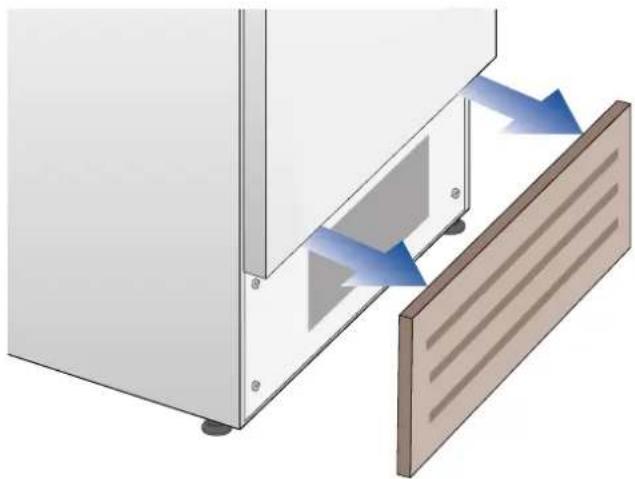
Remove the removable grille under the door.
natural_image
Diagram showing airflow or heat transfer between a wall-mounted device and a wooden panel (no text or symbols)Clean it thoroughly from any dust build up as shown in the picture, taking care not to damage it.

natural_image
Illustration of a hand inserting a cylindrical tube into a blue-patterned panel inside a cabinet (no text or symbols)Restart the unit again, pressing on the unit bottom ⓐ. for three second.

Warning
The edges of the condenser are sharp, therefore use adequate protection for the hands and arms when cleaning the condenser.
11.1 Troubleshooting Guide
If you notice malfunctions in your appliance, use this guide before calling for service: this guide can help you personally resolve the problem or could provide important information to be conveyed to the service technician to ensure rapid and effective repair.
Display message and audible alarms.
A malfunction is usually indicated by the display. Problems that cannot be solved by the user are reported through a fault code. Keep in mind, however, that in messages or alarms they may appear for particular conditions of use or during start-up. In these cases, deactivate the audible alarm by pressing the Alarm button and leave the appliance running and limit the opening of the doors to the maximum for about 10-12 hours.
The refrigerator or the freezer does not work.
Is the appliance connected to the electrical power supply?
Is electrical power available at the electricity socket?
Is the Unit button ⏻ activated?
Is the unit in 'Demo' Mode?
The refrigerator or the freezer is warmer than usual.
Does the display show a malfunction code?
Is the temperature adjusted correctly?
Were the doors or drawers open for a long period of time?
Were large quantities of food recently inserted?
Is the unit in 'Demo' Mode?
The appliance remains in function for a long time period.
Bear in mind that during very hot weather and with very high temperatures in the room it is normal that the compressor remains on for prolonged periods of time.
Were the doors or drawers open for a long period of time?
Were large quantities of food recently inserted?
Check that the doors are closed and that the food or containers do not obstruct the perfect closure of the door.
Is one or more compartments in Shopping Mode?
If you hear unusual noises.
It is normal to hear noises from the ventilators or compressors during operation or during the defrost phase.
Noise could be more marked depending on the position of the appliance and the surrounding environment.
Condensation inside and outside of the refrigerator.
If the climate is very humid, the formation of condensation is normal. Opening the door or drawers for prolonged periods of time can contribute to the formation of condensation.
In any case, make sure that the doors are always perfectly closed.
Ice or frost build up inside the refrigerator or freezer.
Did you leave the doors open for a long period of time?
Do the doors close perfectly?
If the doors do not close perfectly, contact your installer.
In case of frost or ice build up in the Fresco compartment, due to frequent and prolonged opening of the doors, deactivate the Crisper-Fresco function via the button on the control panel. Wait until the frost or ice melt, then remove the drawer and dry the sides and bottom of the compartment.
Unpleasant odors inside the refrigerator.
Clean the appliance completely according to the instructions.
Hermetically cover all the food. Do not conserve food for prolonged periods of time.
The doors are difficult to open.
The appliance is designed to ensure a fully hermetic closure. When the door is closed, a vacuum condition can occur: in this case it is necessary to wait a few seconds until the pressure balances before opening the door.
Appliance is cooling but lights and display are not working.
Check to see if the appliance was accidentally placed into Sabbath Mode
The Ice Maker does not work.
Make sure that the Ice Maker is on (icon 📄).
To switch on the Ice Maker press the button.
Make sure that the appliance is connected to the water supply.
The Ice Maker does not produce sufficient amounts of ice.
On average, the Ice Maker produces approximately 10 cubes of ice every two and half hours.
The ice cubes freeze into one block.
If the ice is not used frequently, it is possible that blocks of ice may form. It is recommended to remove the block of ice cubes and then let the Ice Maker fill the ice tray again.
The ice has an unusual flavour or colour.
When the Ice Maker is started for the first time, it is recommended to empty the first full tray of ice cubes.
If the refrigerator was switched off for more than one month or if the cartridge was not changed for more than six months, it could be necessary to replace the filter cartridge.
Contact a plumber or a water treatment expert to make sure that the problem is not due to the water supply.

If the unit you purchased was used as a showroom model it may be in a special energy-saving mode called Demo Mode where the appliance appears to be operating (lights work and false temperatures are displayed) but no cooling actually takes place. If you suspect your appliance is in Demo Mode please contact your point of purchase for assistance with disabling this feature.
11.2 Malfunction messages appearing on the display
| Display message Malfunction description | |
| Power Failure!! | Prolonged interruption of electrical powerthe appliance resumes work automatically, the display shows the warmest temperatures achieved |
| Upper unit open | Fridge door openthe message appears after few minutes from the door opening |
| Lower unit open | Freezer door openthe message appears after few minutes from the door opening |
| Replace filter | Replace filter cartridgemessage appears when only 30% of filter capacity is left |
| Upper unit too warm | Fridge too warmsee Troubleshooting Guide |
| Upper unit too cold | Fridge too coldwait for 12 hours: if malfunction persists call Customer Care for advice |
| Fresco too warm | Fresco Compartment too warmsee Troubleshooting Guide |
| Fresco too cold | Fresco Compartment too coldwait for 12 hours: if malfunction persists call Customer Care for advice |
| Lower unit too warm | Freezer too warmsee Troubleshooting Guide |
| Lower unit too cold | Freezer too coldwait for 12 hours: if malfunction persists call Customer Care for advice |
| Error Code... | Functional problemscall Customer Care who may help you to salve the problem or put you in contact with the nearest Service Agent |
| Check condenser | Check CondenserEvery 6 months the display shows the message "Check Cond", clean the condenser and press for 5 seconds the Enter button to reset. |
In case of anomalies, touch the button Alarm Ⓜ and the display will show the anomaly message with its error number code.
The message will be shown for 3 seconds, then it will go back to the home screen.
For blocking the message on the screen, press on the display, the button info (i). The message will be on the screen for 30 seconds, then it will go back to the home screen.
In the case there is more than one error message, the display will show in time sequence the different anomalies messages.
natural_image
Diagram of a mechanical connector assembly showing a blue cable, a metallic fitting with a hexagonal end cap, and a separate cylindrical component (no text or symbols present)natural_image
Illustration of hands using a power plug to install a socket on an electrical outlet (no text or symbols visible)
Wichtig
natural_image
Line drawing of an open refrigerator with shelves and drawer (no text or symbols)natural_image
Gray rectangular button with white control buttons and a central blank square (no text or symbols)
natural_image
Solid dark gray image with no visible content, text, or symbols.1) Logo.
natural_image
Pure diagram of two rectangular blocks with a diagonal line and a small arrow, no text or symbols present.natural_image
Pure diagram of a toolbar with icons and a hand pointing to it (no text or symbols)1) Shopping Fridge (Shopping-Kühlschrank)
D) Please wait... (Bitte warten)
natural_image
Illustration of a hand opening a blue drawer with drawers, no text or symbols presentTriMode-Schubfach
90 cm Modelle
natural_image
Illustration of a hand placing a small object into a grid-like structure (no text or symbols visible)Eiswürfelbehälter
natural_image
Architectural rendering of a modern building facade with structural elements and windows (no visible text or symbols)
Warnung
natural_image
Illustration of a hand holding a tool interacting with a vertical rod (no text or symbols visible)natural_image
Illustration of a hand holding a small object above a vertical structure with arrows indicating motion (no text or symbols)natural_image
Technical illustration of a mechanical assembly with labeled components (1, 2), no readable text or symbols present.natural_image
Illustration of a person lying in bed, head tilted upward (no text or symbols)natural_image
Two identical blue rectangular panels with white triangular cutouts and recessed lighting, labeled '1T' at top (no text or symbols on panels)natural_image
Diagram showing airflow or heat transfer between a wall-mounted device and a slatted panel (no text or symbols)natural_image
Illustration of a hand inserting a pipe into a blue-patterned panel inside a cabinet (no text or symbols)natural_image
Diagram of a mechanical assembly showing a pipe fitting and a connector (no text or symbols present)natural_image
Illustration of hands using a power plug to install a wall socket (no text or symbols visible)
Important
3.3 Support technique
natural_image
Line drawing of an open refrigerator with shelves and doors (no text or symbols)natural_image
Gray rectangular button with white control buttons and a central blank square (no text or symbols)
Allumage/extinction :
natural_image
Solid dark gray image with no visible content, text, or symbols.1) Logo.
2) Test initial (dure 3 minutes).
natural_image
Simple line drawing of a pen writing on paper with no text or symbolsnatural_image
Illustration of a finger pressing down on a rectangular object with a square and circular holes (no text or symbols)INFORMATIONS POUR L'UTILISATION DE L'ÉCRAN.
B) Touchez l'icône Mode Vacances.
B) Touchez l'icône Mode Shopping TriMode.
D) Veuillez at-tendre...
natural_image
Illustration of a blue drawer with metal bands, no text or symbols presentBac TriMode
Modèles 90cm
natural_image
Illustration of a hand placing a small object into a window frame (no text or symbols visible)Bac à glaçons
natural_image
Architectural rendering of a building facade with structural elements and window grilles (no text or symbols visible)
Avertissement
natural_image
Hand holding a tool interacting with a vertical pipe or tube (no text or symbols visible)natural_image
Illustration of a hand holding a tool above a mechanical component with directional arrows (no text or symbols)natural_image
Technical diagram of a mechanical assembly with labeled components (1, 2), no readable text or symbols present.natural_image
Illustration of a person lying in bed, no text or symbols presentnatural_image
Diagram of three blue rectangular chambers with recessed lighting, labeled '1T' at top (no text or symbols within chambers)natural_image
Diagram of a cabinet or enclosure with a door and window, showing airflow direction arrows (no text or symbols)natural_image
Illustration of a hand inserting a cylindrical tube into a blue-patterned panel inside a cabinet (no text or symbols)11 HANDLEIDING VOOR PROBLEEMOPLOSSING 168
natural_image
Illustration of a mechanical connector with a blue hexagonal nut and plastic housing (no text or symbols)natural_image
Illustration of hands using a power plug to install an electrical socket (no text or symbols visible)
Belangrijk
natural_image
Line drawing of an open refrigerator with shelves and drawer (no text or symbols)natural_image
Gray rectangular button with white control buttons and a central blank square (no text or symbols)
natural_image
Solid gray image with no visible content, text, or symbols.1) Logo.
natural_image
Simple line drawing of a pen and ruler on two horizontal surfaces (no text or symbols)natural_image
Illustration of a finger pressing a button on a gray rectangular panel (no text or symbols visible)1) Shopping Koelkast
INFORMATIE VOOR HET GEBRUIK VAN HET DISPLAY.
F) Reiniging be- zig...
natural_image
Illustration of a blue drawer with a hand holding a tool, no text or symbols presentTriModus-lade
90cm modellen
natural_image
Illustration of a hand holding a paper airplane with a circular object on the side (no text or symbols)Ijsbakje
natural_image
Architectural rendering of a building interior with storage tanks and structural beams (no text or symbols visible)
Waarschuwing
natural_image
Line drawing of a hand holding a tool interacting with a vertical rod (no text or symbols)natural_image
Illustration of a hand holding a tool above a mechanical component, with arrows indicating motion direction (no text or symbols)Deurvakken
90cm modellen
natural_image
Technical diagram of a mechanical assembly with labeled components (1, 2), no readable text or symbols present.natural_image
Illustration of a person in bed with a face on their head, no text or symbols presentnatural_image
Diagram of a device with three blue panels and white triangular light fixtures, labeled '1T' at top (no text or symbols on panels)natural_image
Diagram showing airflow or heat transfer between a wall-mounted device and a slatted panel (no text or symbols)natural_image
Illustration of a hand inserting a pipe into a blue-patterned wall inside a cabinet (no text or symbols)natural_image
Illustration of a medical connector with a blue cable and a metallic fitting (no text or symbols)natural_image
Illustration of hands using a power plug to install an electrical socket (no text or symbols visible)
Importante
natural_image
Line drawing of an open refrigerator with shelves and drawer (no text or symbols)natural_image
Solid gray image with no visible content, text, or symbols.1) Logo.
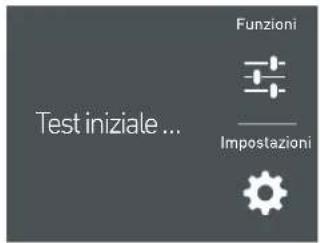
natural_image
Pure diagram of two horizontal panels with a diagonal line and a central rectangular cutout, no text or symbols present.natural_image
Illustration of a finger pressing down on a rectangular object (no text or symbols visible)1) Shopping Frigo
INFORMAZIONI PER L'UTILIZZO DEL DISPLAY.
B) Toccare l'icona Shopping frigo.
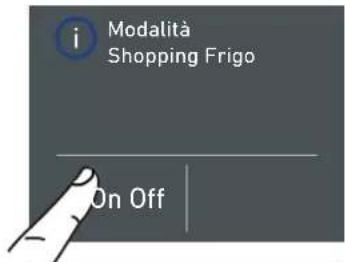
natural_image
Illustration of a blue drawer with metal bands and a handle, no text or symbols presentCassetto TriMode modello 90cm
natural_image
Illustration of hands installing or adjusting a window frame (no text or symbols visible)Vaschetta Ghiaccio
natural_image
Architectural rendering of a building interior with structural elements and windows (no visible text or symbols)
Attenzione
natural_image
Illustration of a hand holding a tool interacting with a mechanical component (no text or symbols visible)natural_image
Line drawing of a hand holding a flatboard with arrows indicating motion or force (no text or symbols)Balconcini Porta modello 90cm
natural_image
3D diagram of a mechanical assembly with labeled components (no text or symbols)natural_image
Illustration of a person lying in bed, wearing a white outfit with a round head (no text or symbols visible)natural_image
Illustration of two identical blue rectangular objects with white triangular cutouts and recessed lighting (no text or symbols)natural_image
Diagram showing airflow or heat transfer between a wall-mounted device and a wooden panel (no text or symbols)natural_image
Illustration of a hand inserting a cylindrical tube into a blue-patterned panel inside a cabinet (no text or symbols)natural_image
Diagram of a mechanical connector with a blue cable and two metallic parts (no text or symbols)natural_image
Illustration of hands using a power plug to install a socket into a wall socket (no text or symbols visible)
Vigtigt
3.3 Teknisk assistance
natural_image
Line drawing of an open refrigerator with shelves and doors (no text or symbols)Klimaklasse
natural_image
Gray rectangular button with white control buttons and a central blank square (no text or symbols)
Tænd / Sluk:
natural_image
Solid gray image with no visible content, text, or symbols.1) Logo.
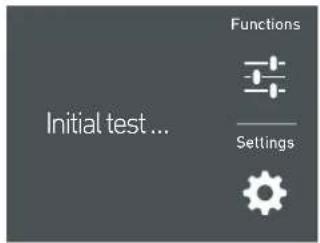
2) Indledende test (varer 3 minutter).
natural_image
Simple diagram showing two horizontal bars with a hand pointing to a vertical line and a small rectangular cutout (no text or symbols)3) Tryk på ikonet Yes for at slukke for afdeling.
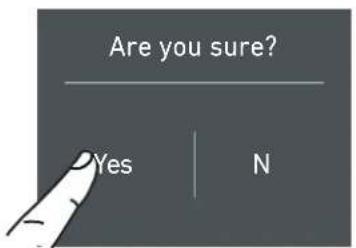
natural_image
Illustration of a finger pressing a button on a rectangular device (no text or symbols visible)D) Rul op / ned for at indstille den ønskede tid og tryk herefter på OK.
B) Tryk på ikonet Ferietilstand.
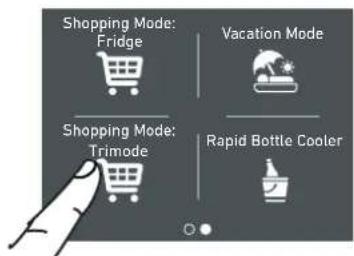
B) Tryk på ikonet Shopping Mode TriMode.
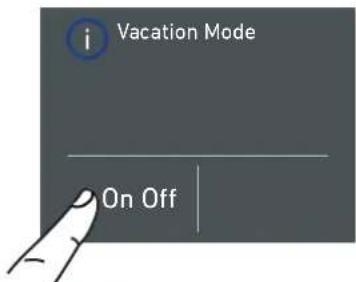
c) Tryk på knappen ON, for at aktiver funktionen.
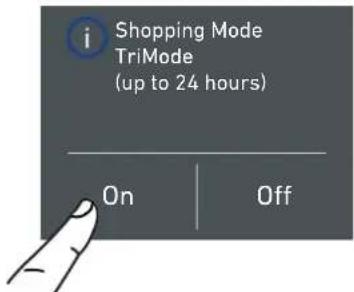
c) Tryk på knappen ON, for at aktiver funktionen.
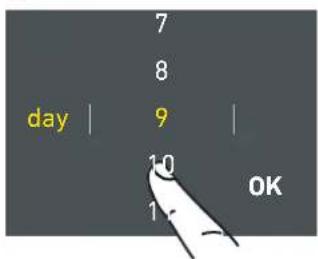
D) Rul op / ned for at indstille den ønskede tid (i dage) og tryk herefter på OK.
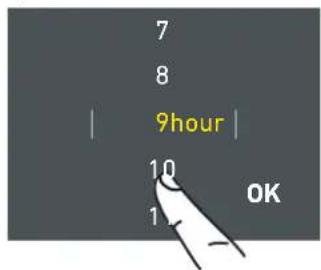
D) Rul op / ned for at indstille den ønskede tid (i timer) og tryk herefter på OK.
C) Tryk på knappen ON, for at aktiver funktionen.
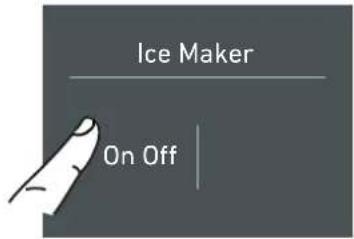
C) Tryk på knappen ON, for at aktiver ismaskinen.
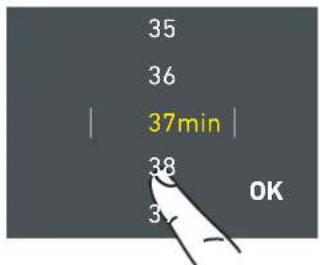
D) Rul op / ned for at indstille den ønskede tid (i minutter) og tryk herefter på OK.
C) Tryk på ikonet Set Cube Size. Terningens standardstørrelse er "medium".
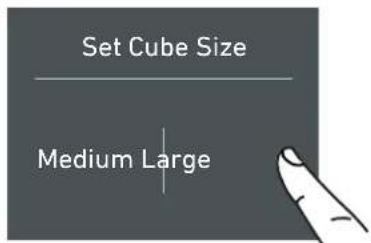
D) Vent venligst...
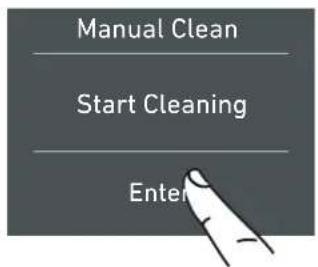
F) Rengøring af-vikles...
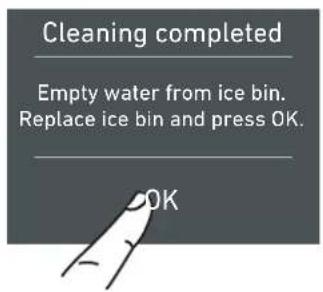
D) Rul op / ned for at indstille timerne og tryk så på OK.
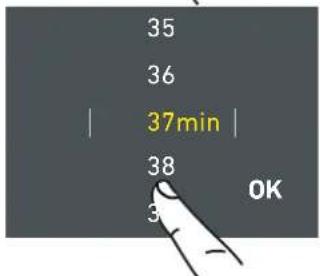
E) Rul op / ned for at indstille minutterne og tryk så på OK.
3) INDSTIL °C/°F
D) Tryk på knappen Yes, for at aktiver funktionen.
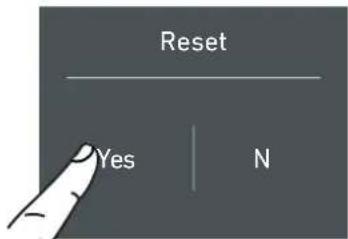
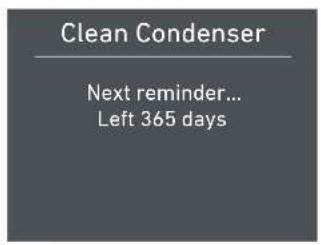
natural_image
Illustration of a blue drawer with a handle and a stack of papers or documents on the side (no text or symbols)TriMode-skuffe
90cm modeller
natural_image
Illustration of a hand installing or adjusting a window frame on a building (no text or symbols visible)Isterningbakke
natural_image
Architectural rendering of a building facade with structural elements and window grilles (no text or symbols visible)
Advarsel
natural_image
Illustration of a hand holding a tool interacting with a vertical panel (no text or symbols visible)natural_image
Illustration of a hand pressing down on a mechanical component with directional arrows (no text or symbols)Dørhylder
90cm modeller
natural_image
Technical diagram of a mechanical assembly with labeled components (1, 2), no readable text or symbols present.natural_image
Illustration of a person lying in bed, wearing a white shirt with a blue headband (no text or symbols visible)natural_image
Three identical blue rectangular panels with white triangular cutouts, arranged vertically (no text or symbols)natural_image
Diagram showing airflow or heat transfer between a wall-mounted device and a wooden panel (no text or symbols)natural_image
Illustration of a hand inserting a pipe into a blue-patterned panel inside a cabinet (no text or symbols)natural_image
Diagram of a mechanical connector with a blue plastic housing and a separate close-up view (no text or symbols)natural_image
Illustration of hands inserting a plug into an electrical outlet (no text or symbols)
Tärkeää
natural_image
Line drawing of an open refrigerator with shelves and doors (no text or symbols)Ilmastoluokat
SN (subnormaali) 10 °C - +32 °C
>N (normaali) +16^-+32^
ST (subtrooppinen) +16 °C - +32 °C
T (trooppinen) +16 °C - +43 °C
3. ENNEN KÄYNNISTÄMISTÄ
natural_image
Gray rectangular button with white control buttons and a central blank square (no text or symbols)
natural_image
Solid dark gray image with no visible content, text, or symbols.1) Logo.
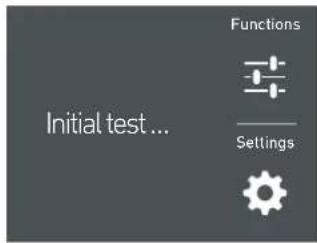
2) Alkutesti
natural_image
Simple line drawing of a door with a handle and control panel (no text or symbols)1) kosketa ⏻ Off-painiketta.
3) Kosketa Yes-ku-vaketta.
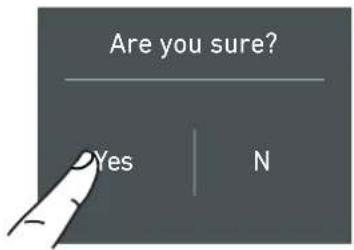
natural_image
Illustration of a finger pointing at a rectangular button with a square and control buttons (no text or symbols)NÄYTÖN KÄYTTÖÄ KOSKEVIA TIETOJA.
D) Jatka kosket-tamalla Yes-painiketta.
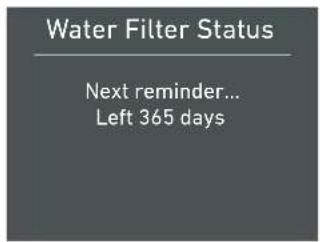
D) Odota...
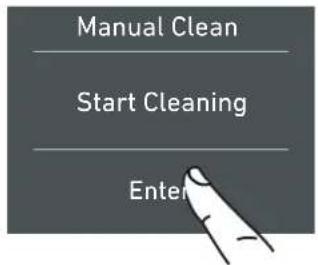
c) Kosketa Yes-painiketta.
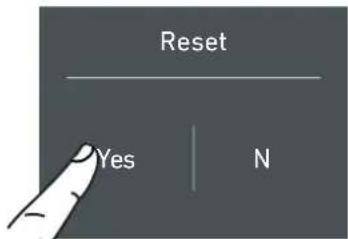
D) Kosketa Yes-painiketta.
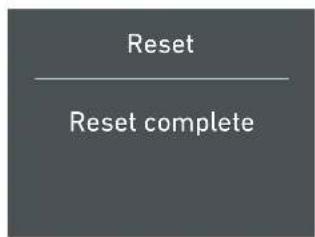
natural_image
Illustration of a blue drawer with drawers, no text or symbols presentTriMode-laatikko
90 cm:n mallit
natural_image
Illustration of a hand holding a plastic container with a circular inset showing a magnified view (no text or symbols)Jääpala-astia
natural_image
Architectural rendering of a modern building facade with structural elements (no visible text or symbols)
Varoitus
natural_image
Illustration of a hand holding a tool interacting with a mechanical component (no text or symbols visible)natural_image
Illustration of a hand holding a tool above a wall-mounted device, with arrows indicating motion direction (no text or symbols)Ovihyllyt
90 cm:n mallit
natural_image
Technical diagram of a mechanical component with labeled parts (1, 2), no readable text or symbols present.natural_image
Illustration of a person lying in bed with a face on their head (no text or symbols visible)natural_image
Three identical blue rectangular panels with white triangular cutouts, arranged vertically (no text or symbols)natural_image
Diagram showing airflow or heat transfer between a wall-mounted device and a wooden panel (no text or symbols)natural_image
Illustration of a hand inserting a pipe into a blue-patterned liquid container (no text or symbols)0 VEDLIKEHOLD OG RENHOLD 334
natural_image
Diagram of a pipe fitting with a blue cable and two metallic fittings (no text or symbols)natural_image
Illustration of hands using a power plug to install a wall socket (no text or symbols visible)
Viktig
natural_image
Line drawing of an open refrigerator with shelves and doors (no text or symbols)natural_image
Gray rectangular button with white control buttons and a central blank square (no text or symbols)
natural_image
Solid dark gray image with no visible content, text, or symbols.1) Logo.
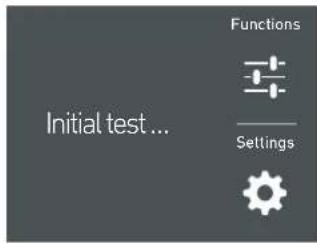
2) Innledende test (varer 3 minutter).
natural_image
Simple line drawing of a pen tip and ruler on a surface, no text or symbols present1) ta på knappen ⏻ off (av).
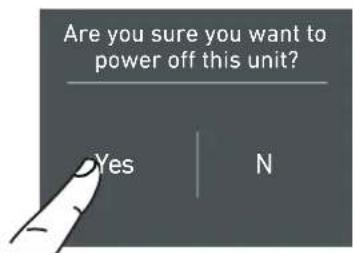
3) Ta på ikonet yes (ja).
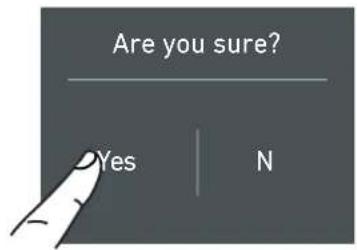
natural_image
Pure diagram of a finger pointing at a rectangular button with control buttons (no text or symbols)B) Ta på ikonet Shopping Mode Fridge (kjøleska-pets handlemodus).
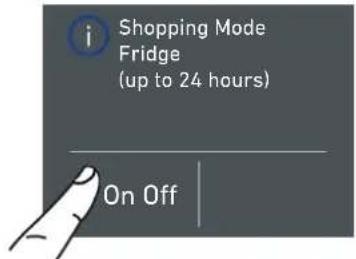
B) Ta på ikonet for Vacation Mode (Feriemodus).
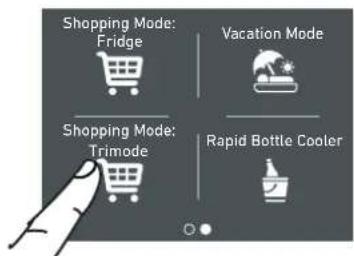
B) Ta på ikonet Shopping Mode TriMode (Trippelmodus handle).
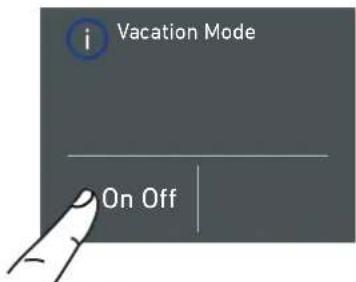
B) Ta på ikonet Water System (vannsystem).
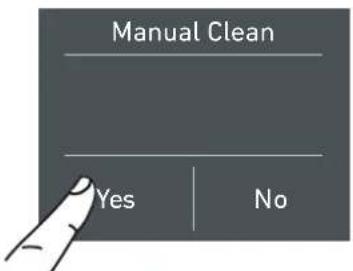
C) Ta på ikonet yes (ja) for å aktivere den manuelle ren-singen.
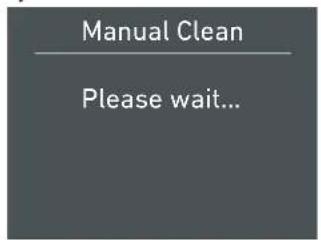
D) vennligst vent...
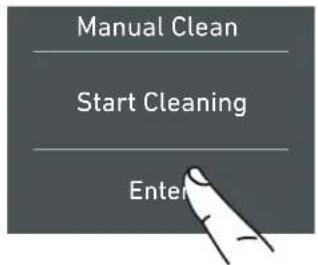
F) Renhold pågår...
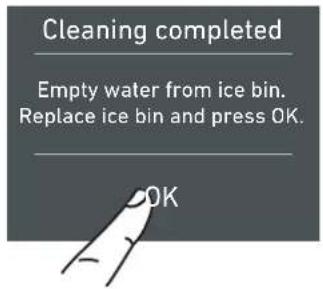
Bypass filter (bypassfilter)
Det inkluderte filtreringssystemet kan omgås når kvaliteten på vannet fra husholdningens vannanlegg er høy. Du kan ganske enkelt fjerne vannfilteret fra adapteren og systemet vil automatisk omgå patronen.
5.2 Innstillinger.
B) Ta på ikonet Info System.
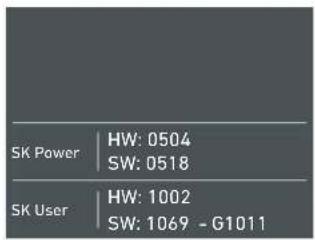
natural_image
Illustration of a blue drawer with metal bands, no text or symbols presentTrippelmodus-skuff
90cm modeller
natural_image
Illustration of a hand cleaning a building facade with a magnified inset showing a circular detail (no text or symbols)Isbrett
natural_image
Architectural rendering of a modern building facade with tiered structure and structural elements (no visible text or symbols)
Advarsel
natural_image
Hand holding a tool interacting with a vertical panel or bracket (no text or symbols visible)natural_image
Illustration of a hand holding a metal object above a vertical structure with directional arrows indicating motion (no text or symbols)Dørhyller
90cm modeller
natural_image
Technical diagram of a mechanical assembly with numbered components (1, 2), no visible text or symbolsnatural_image
Illustration of a person lying in bed, head tilted upward (no text or symbols)natural_image
Two identical blue rectangular panels with white triangular cutouts, labeled '1T' at top (no text or symbols on panels)natural_image
Diagram showing airflow or heat transfer between a wall-mounted device and a wooden panel (no text or symbols)natural_image
Illustration of a hand inserting a pipe into a blue-patterned panel inside a cabinet (no text or symbols)natural_image
Diagram of a pipe fitting with two components, one showing internal structure and the other showing a blue cap (no text or symbols)natural_image
Illustration of hands using a power plug to install a socket into a wall socket (no text or symbols visible)
Viktigt
natural_image
Gray rectangular button with white control buttons and a central blank square (no text or symbols)
Sätta på/stänga av:
natural_image
Solid dark gray image with no visible content, text, or symbols.1) Logo.
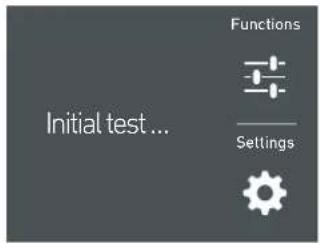
natural_image
Simple diagram showing two horizontal bars with a hand pointing to a vertical line and a small rectangular cutout (no text or symbols)3)
B) Tryck på ikonen Shopping Mode kylskåp.
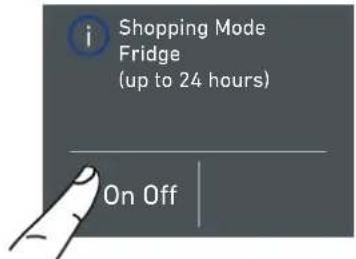
B) Tryck på ikonen Shopping Mode TriMode.
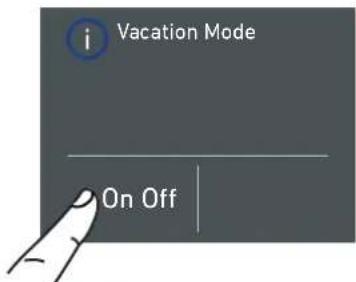
B) Bläddra åt
B) Bläddra åt
D) Tryck på
E) Du får se hela
F) Rengöring på- går...
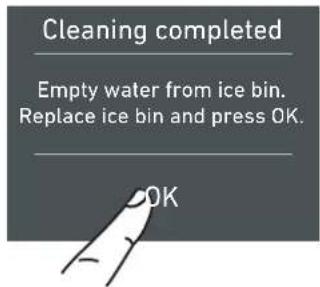
c) Tryck på yes-knappen.
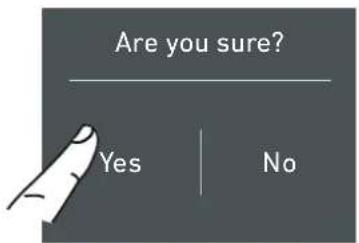
natural_image
Illustration of a blue drawer with drawers, no text or symbols presentTriMode-låda
90cm modeller
natural_image
Illustration of a hand holding a window with a magnifying glass above, next to a building interior (no text or symbols)Iskubslåda
natural_image
Architectural rendering of a building facade with structural elements and window grilles (no text or symbols visible)
Varning
natural_image
Line drawing of a hand holding a tool over a surface, with no visible text or symbolsnatural_image
Illustration of a hand holding a tool above a vertical panel, with arrows indicating motion or force direction (no text or symbols)Dörrfack
90cm modeller
natural_image
Technical diagram of a mechanical assembly with labeled components (1, 2), no readable text or symbols present.natural_image
Illustration of a person lying in bed, wearing a white shirt with a blue headband (no text or symbols visible)natural_image
Two identical blue rectangular panels with white triangular cutouts, no text or symbols visiblenatural_image
Diagram showing airflow or heat transfer between a wall-mounted device and a wooden panel (no text or symbols)natural_image
Illustration of a hand inserting a pipe into a blue-patterned container (no text or symbols)

- KitchenAid Vertigo
- Fridge
- Kühlraum
- Réfrigérateur
- INSTALLATION 10
- BEFORE STARTING 12
- APPLIANCE SWITCHING ON 16
- CUSTOMIZE FUNCTIONS AND SETTINGS 20
- INTERNAL LAYOUT 32
- ACTIVATION AND USE OF THE ICE MAKER 33
- LIGHTING 35
- FOOD STORAGE 35
- CARE AND CLEANING 40
- TROUBLESHOOTING GUIDE 42
- For your safety
- Important information when using the appliance
- Note
- Important
- Warning
- Caring for the environment
- Power voltage
- Danger of electrocution
- Plastic packaging
- Danger of suffocation
- Cleaning, sanitization and maintenance of the ice and/or water dispenser (if present)
- Informations for control bodies
- Informations for control bodies
- Installation
- Connection to the water system
- Connection to the electrical power supply
- Refrigerant
- Know your appliance
- Manufacturer's liability
- Technical support
- Important Before ca
- Technical data
- Product plate
- Climatic class of operation
- BEFORE STARTING
- Main components
- Eletronic Control
- Main control panel (model 90cm).
- Turning On/ Turning Off:
- Home
- Allarm
- Back
- Switching on and off
- First time starting the unit
- Shutdown.
- Switching off Fridge and fresco compartment. (Model 90cm)
- Turning on the fridge and fresco compartment again.
- Turn back on the compartments.
- Switching off for long periods
- How to adjust the temperature for different requirements.
- Modify the temperatures compartment
- Padlock icon.
- Information signals of anomaly on the display.
- INFORMATION FOR THE USE OF THE DISPLAY.
- Functions.
- 1) Shopping Fridge
- 2) Vacation
- 3) Shopping TriMode
- 4) Rapid Bottle Cooler
- 5) Ice Maker activation
- 5a) Set Ice cube Size - SuperIce
- 6) Water Filter Activation
- 6a) Water Filter Deactivation
- 6b) Reset Filter
- 7) Manual Clean, Water Filter
- Bypass filter
- Settings.
- 1) Date
- 2) Time
- 3) SET °C/°F
- 4) Language
- 5) TriMode
- 6) Sabbath Mode (Optional)
- 7) Reset
- 8) Demo Mode
- 9) Maintenance (through allarm sign).
- 11) Info System
- 10) Service
- Internal Layout (positioning, adjustment, removal).
- Fresco Drawer
- 90cm models
- TriMode Drawer
- Ice Tray
- Shelves
- Door Shelves
- models 90cm
- Activation and use of the Ice Maker
- The ice maker will continue to operate even when the ice bin is not in position
- The production is of 10 cubes per cycle in approximately 10 cycles in 24 hours.
- Do the ice cubes have an unusual odour?
- Operating noises
- Quite normal noises
- Water Filter
- Filter Replacement
- Water filter for freezer column Ice Maker
- Lighting
- General directions
- How to maintain good food quality
- When buying groceries
- When placing foods in
- Notes
- Refrigerator compartment door
- Refrigerator compartment
- Freezer compartment
- FROZEN FOODS PRESERVATION AREA TIME
- Care and Cleaning
- Internal cleaning
- Cleaning of the ventilation grille, filter and condenser.
- On the maintenance settings, after the installation of the unit and after it has been turned on, you can set the condenser cleaning warning.
- Lower condenser.
- For cleaning the condenser in the models Classic, Integrated or Brilliance follow the instructions:
- Troubleshooting Guide
- Display message and audible alarms.
- The refrigerator or the freezer does not work.
- The refrigerator or the freezer is warmer than usual.
- The appliance remains in function for a long time period.
- If you hear unusual noises.
- Condensation inside and outside of the refrigerator.
- Ice or frost build up inside the refrigerator or freezer.
- Unpleasant odors inside the refrigerator.
- The doors are difficult to open.
- Appliance is cooling but lights and display are not working.
- The Ice Maker does not work.
- The Ice Maker does not produce sufficient amounts of ice.
- The ice cubes freeze into one block.
- The ice has an unusual flavour or colour.
- Wichtig
- 1) Shopping Fridge (Shopping-Kühlschrank)
- TriMode-Schubfach
- cm Modelle
- Eiswürfelbehälter
- Warnung
- Support technique
- Allumage/extinction :
- INFORMATIONS POUR L'UTILISATION DE L'ÉCRAN.
- Bac TriMode
- Modèles 90cm
- Bac à glaçons
- Avertissement
- HANDLEIDING VOOR PROBLEEMOPLOSSING 168
- Belangrijk
- INFORMATIE VOOR HET GEBRUIK VAN HET DISPLAY.
- TriModus-lade
- 90cm modellen
- Ijsbakje
- Waarschuwing
- Deurvakken
- Importante
- INFORMAZIONI PER L'UTILIZZO DEL DISPLAY.
- Cassetto TriMode modello 90cm
- Vaschetta Ghiaccio
- Attenzione
- Balconcini Porta modello 90cm
- Vigtigt
- Teknisk assistance
- Klimaklasse
- Tænd / Sluk:
- 3) INDSTIL °C/°F
- TriMode-skuffe
- 90cm modeller
- Isterningbakke
- Advarsel
- Dørhylder
- Tärkeää
- Ilmastoluokat
- ENNEN KÄYNNISTÄMISTÄ
- NÄYTÖN KÄYTTÖÄ KOSKEVIA TIETOJA.
- TriMode-laatikko
- cm:n mallit
- Jääpala-astia
- Varoitus
- Ovihyllyt
- VEDLIKEHOLD OG RENHOLD 334
- Viktig
- Bypass filter (bypassfilter)
- Innstillinger.
- Trippelmodus-skuff
- Isbrett
- Dørhyller
- Viktigt
- Sätta på/stänga av:
- 3)
- TriMode-låda
- Iskubslåda
- Varning
- Dörrfack
Brand : KITCHENAID
Model : KCZCX 20901L
Category : Refrigerator