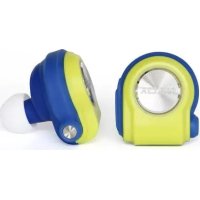
Drops - Earphones NILOX - Free user manual and instructions
Find the device manual for free Drops NILOX in PDF.



| Product type | Wireless Bluetooth earphones |
| Brand | Nilox |
| Model | Drops |
| Power supply | Rechargeable lithium-ion polymer battery |
| Connectivity | Bluetooth 2,400 - 2,483 GHz |
| Main functions | Music playback, phone call, automatic pairing |
| Included accessories | Ear hook, caps for microUSB connectors |
| Maintenance and cleaning | Clean with a soft, dry cloth |
| Safety | Do not open, avoid contact with water, fire and metallic objects |
| Spare parts and repairability | Ear hook and caps available; contact the retailer for repair |
| Warranty | 1 year (professional) / 2 years (consumer) |
| Environmental information | Do not discard with household waste; recycle according to local regulations |
Frequently Asked Questions - Drops NILOX
User questions about Drops NILOX
0 question about this device. Answer the ones you know or ask your own.
Ask a new question about this device
Download the instructions for your Earphones in PDF format for free! Find your manual Drops - NILOX and take your electronic device back in hand. On this page are published all the documents necessary for the use of your device. Drops by NILOX.
USER MANUAL Drops NILOX
Thank you for choosing drops®, the only wearable earphones that allow you to listen to music and talk on the phone without annoying wires.
This guide will help you make the most of your drops®, quickly and easily.
USER'S GUIDE
- The earphones are associated with one another during production.
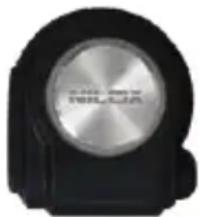
- Put both L&R headphones together and activate the earphones at the same time by pressing the two on buttons (central button with Nilox on it) for about 2 seconds.
• Within about 20 seconds they will be associated; the led on the left earphone will start flashing red, while the right earphone will flash blue.
• Use your Bluetooth transmission device (smartphone, mp3 reader, tablet, etc.) to search for available Bluetooth devices. - It will find "Nilox drops"; select it and, if required, enter the password (0000). You will be notified that the device has been associated with your drops®.
- You can now listen to all your favourite music.
natural_image
Close-up of a black and silver electronic device with a circular metallic dial (no visible text or symbols)ATTENTION: Once each earphones have been activated, the first thing they do is attempt to associate with each other; wait for this operation to be completed before you search for drops® from your transmission device.
WEARING YOUR EARPHONES
Your drops® can also be worn with the practical earloop provided.
EN
USE WITH EARBAND
- Insert the microUSB connector at the end of the earloop into the corresponding earphone; the microUSB connector permits insertion in only one way; check that the plastic part of the ear band entirely covers the earphone.
- Shape the earloop as required, however seems most comfortable to you (it is completely "foldable" and adjustable).
- Hook the earloop over your ear and insert the drop.
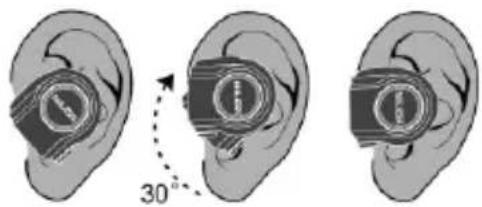
USE WITHOUT EARLOOP
- Cover the microUSB connectors on the drop with the caps provided.
- Insert the drop in your ear as shown in the figure.
- Gently turn the drops®, about 30 degrees.
Do this symmetrically on both ears.
USE WITH TELEPHONE
You can also use your drops® to talk on the phone.
Answer your phone and chat, pressing just one button.
• Make sure your drops® have been associated with each other and with your telephone.
• To accept an incoming call, press the on button on the right drop.
• To reject an incoming call, hold the same button down for 2 seconds. You can only activate your phone with the right drop.
RESETTING DROPS
You can reset your drops® if you need to.
- Turn them both off.
• Turn them on again at the same time and hold the on button down for about 15 seconds.
• The drops® will flash red and blue intermittently for about 3 seconds. - The drops® will then associate with one another.
- Associate them with your smartphone or tablet again.
TECHNICAL SPECIFICATIONS
RECEIVER (BT MODE)
FREQUENCY RANGE = 2,400 < 2,483 GHz
OPERATING VOLTAGE = 3.7 V
QUIESCENT CURRENT = 5 mA
CURRENT DRAIN MAX. VOL. = 25 mA
AX OUTPUT POWER = 3.5 mW (WITHOUT FILTER)
THD = 0.25 < 1 % (MAX VOL W/400Hz, 30KHz FILTER)
S/N RATIO = 65,70 dB (MAX VOL W/400Hz 30KHz FILTER)
FREQ. RESPONSE (MAX VOL) (LO-END) = 20 < 60 Hz (@-6dB WITHOUT FILTER) (HI-END) = 16 < 20 KHz
MAX. VOLUME HUM AND NOISE MAX. = 0,2 < 0,5 mV (W/400Hz 30KHz FILTER)
CHANNEL DIFFERENCE (VOL MAX) = 10 < 20 mV
CHANNEL SEPARATION (VOL MAX) = 65 < 70 dB (W/400Hz 30KHz FILTER)
STANDARD CHARGE CURRENT = 45 < 100 mA (BATTERY @ 3.5\~3.8V, POWER 5.0V)
DISTANCE = 10 Meter
BT LED = BLUE
CHARGING LED = RED
LOW BATTERY POWER OFF = 3.1 < 3.35 V
CHARGE BOX
CHARGE INPUT CURRENT = 550 < 1000 mA (BATTERY@3.5\~3.8V, POWER 5.0V)
CHARGE INPUT VOLTAGE = 4,25 < 6 V
CHARGE OUTPUT CURRENT = 45 < 100 mA (BATTERY@3.5\~3.8V, POWER 5.0V)
CHARGE OUTPUT VOLTAGE = 4.45 < 5-25 V
WARRANTY AND LEGAL NOTES
Drops® have a rechargeable lithium ion polymer battery. To reduce the risk of fire, please avoid tampering, falls, contact with water or fire.
PERSONAL SAFETY
Do not disassemble, repair, alter or modify any part of the O-ring of the product. Do not touch the product with metallic objects or chemicals.
Any failure to comply with what above can cause risks to the person and other people.
In case of malfunctioning of the product, please contact the technical service or a qualified supplier.
TECHNICAL SUPPORT
This product is warranted in accordance with current legislation and therefore please contact your dealer in case of need of technical assistance and / or warranty service.
EN
INSTRUCTIONS FOR THE ENVIRONMENT
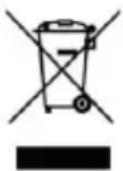
This product may contain substances that can be harmful to the environment and to the human health, if not disposed of properly. We therefore provide you the following information in order to prevent the release of such substances and to improve the use of natural resources. The electrical and electronic products should not be disposed of in the normal household waste, but should be properly collected in order to be correctly treated. The symbol of the crossed bin shown on the product and in this page reminds the need to properly dispose of the product at the end of its life. In this way you can avoid that a non-specific treatment of the substances contained in these products, or an improper use of parts of them can lead to harmful consequences for the environment and human health. Moreover, you can contribute to the recovery, recycling and reuse of many of the materials composing these products. That is why the manufacturers and distributors of electrical and electronic systems organize the proper collection and disposal of the equipment themselves. At the end of the product life please contact your dealer for instructions regarding the collection. When purchasing this product your distributor will inform you of the possibility to replace your old device with a new one, on condition that the type of product and its functions are the same or, if the dimensions do not exceed 25 cm, AEE can be returned without any equivalent product purchase obligation. Any disposal of the product different from what described above will be liable to the penalties foreseen by the laws in force in the country where the product is disposed of. Moreover we suggest to adopt additional measures favourable to the environment: recycling the inner and outer packaging and properly dispose of used batteries (if any). With your help we can reduce the amount of natural resources used for the realization of electrical and electronic equipment, minimizing the use of landfills for the disposal of products and improving the quality of life by preventing to release into the environment potentially dangerous substances.
INSTALLING AND REPLACING BATTERIES
The product contains a battery that could be replaced during the lifetime of the product itself. At the end of life of the batteries contained in the product, they must be disposed of separately. Throw them in the appropriate containers for the disposal of batteries.
The collection and recycling of batteries contribute to the protection of the environment and to the preservation of material resources, allowing the recovery of valuable materials too.
EN
WARRANTY INFORMATION
• One year, if invoiced to a company or professional (with VAT number).
- Two years, if fiscally described as sold to a private citizen.
• This warranty is referred to in the event a conformity defect occurs, referred to product features.
- Product support and warranty. Visit www.nilox.com to learn more.
Warranty restrictions: this warranty does not apply in the following cases:
- No proof of purchase (invoice or receipt).
• tampering, forcing and damages on the hardware and screen, created for any reason.
- Other defects to to: inappropriate use, unauthorised hardware/software changes, operations or storage beyond technical product specifications; incorrect maintenance; defects due to the use of software other than that supplied and all those elements (hardware and software) not designed to be used with the product.
The above refers to legislative decree dated February 2, 2002. Implementing the 1999/44/CE Directive.
BRIEF DECLARATION OF CONFORMITY
This device was tested and meets European Parliament and European Commission Directive 2011/65/EC and 1999/5/EC concerning radio equipment and peripheral devices for telecommunications and their mutual recognition.
The declaration of conformity is available in our offices and on-line at: ftp:\ftp.hellatron.it (username: declaration@hellatron-pwd:hellatron).
This device can thus be used in all EEC countries and in all countries where Directive 1999/5/EC applies, without restrictions, except for:
Norway (NO): device not to be used within 20 km of Ny Alesund.
Italy (IT): This peripheral complies with the National Radio Interface and meets requirements on Frequency Assignment. The use of this device beyond the areas where the owner works requires general authorisation. For further information please visit: www.comunicazioni.it.
EN


The CE mark ( ) and/or WEEE logo ( ) on the product label may not be the minimum size required by the regulations or not be present due to the small size of the product. Keep the packaging for future references.
BLUETOOTH DISCLOSURE
The RF for the Bluetooth is 2.4GHz band which is sharing among Bluetooth and non-Bluetooth devices. There are potential sources of Bluetooth (wireless) interference such as WiFi, 2.4G wireless Camera, radar, microwave oven.
Effects of interference
• A decrease in the wireless range between devices
- A decrease in data throughput over Bluetooth,
- Intermittent or complete loss of the wireless connection
• Difficulty pairing during a Bluetooth device's discovery phase
Sources of interference
• Microwave ovens: Using your microwave oven near your computer, or Bluetooth device may cause interference.
- Direct Satellite Service (DSS): The coax cable and connectors used with certain types of satellite dishes may cause interference. Check the cable for damage and obtain newer cables if you suspect RF leakage issues.
• Certain external electrical sources such as power lines, electrical railroad tracks, and power stations.
• 2.4 GHz phones: A cordless telephone that operates in this range may cause interference with wireless devices or networks when used.
EN
• Video senders (transmitters/receivers) that operate in the 2.4 GHz bandwidth.
- Wireless speakers that operate in the 2.4 GHz band.
- Certain external monitors and LCD displays: Certain displays may emit harmonic interference, especially in the 2.4GHz band. This interference may be at its worst if you have a portable computer with the lid closed and an external monitor connected to it.
- Any other wireless devices that operate in the 2.4 GHz bandwidth (microwaves, cameras, baby monitors, neighbour's wireless devices, and so on).
Home and office environment
If possible, avoid wireless barriers, or change the placement of the Bluetooth devices for a clearer signal path. The device's location within building and construction materials used can affect Bluetooth.
Outdoor and public area
Shopping mall, Airport or other highly populated with WiFi environment which are worst environments for the Bluetooth communication. The BH1550 may not functioning as good as in office or at home. In the worst occasion, the streaming audio may become choppy or even stop working.
IT
natural_image
Close-up of a black and silver electronic device with a circular lens (no visible text or symbols)OPERATING VOLTAGE = 3.7 V
QUIESCENT CURRENT = 5 mA
CURRENT DRAIN MAX. VOL. = 25 mA
AX OUTPUT POWER = 3,5 Mw (WITHOUT FILTER)
THD = 0,25 < 1 % (MAX VOL W/400Hz, 30KHz FILTER)
S/N RATIO = 65,70 dB (MAX VOL W/400Hz, 30KHz FILTER)
FREQ. RESPONSE (MAX VOL) (LO-END) = 20 < 60 Hz (@-6dB WITHOUT FILTER) (HI-END) = 16 < 20 KHz
MAX. VOLUME HUM AND NOISE MAX = 0,2 < 0,5 mV (W/400Hz, 30KHz FILTER)
CHANNEL DIFFERENCE (VOL MAX) = 10 < 20 mV
CHANNEL SEPARATION (VOL MAX) = 65 < 70 dB (W/400Hz, 30KHz FILTER)
STANDARD CHARGE CURRENT = 45 < 100 mA (BATTERY @ 3.5\~3.8V, POWER 5.0V)
DISTANCE = 10 Meter
BT LED = BLUE
CHARGING LED = RED
LOW BATTERY POWER OFF = 3,1 < 3,35 V
CHARGE BOX
CHARGE INPUT CURRENT = 550 < 1000 mA (BATTERY@3.5\~3.8V, POWER 5.0V)
CHARGE INPUT VOLTAGE = 4.25 < 6 V
CHARGE OUTPUT CURRENT = 45 < 100 mA (BATTERY@3.5\~3.8V, POWER 5.0V)
CHARGE OUTPUT VOLTAGE = 4.45 < 5-25 V
GARANZIA E NOTE LEGALI
natural_image
Close-up of a black and silver electronic device with a circular metallic component (no visible text or symbols)OPERATING VOLTAGE = 3.7 V
QUIESCENT CURRENT = 5 mA
CURRENT DRAIN MAX. VOL. = 25 mA
AX OUTPUT POWER = 3.5 mW (WITHOUT FILTER)
THD = 0.25 < 1 % (MAX VOL W/400Hz, 30KHz FILTER)
S/N RATIO = 65,70 dB (MAX VOL W/400Hz 30KHz FILTER)
FREQ. RESPONSE (MAX VOL) (LO-END) = 20 < 60 Hz (@-6dB WITHOUT FILTER) (HI-END) = 16 < 20 KHz
MAX. VOLUME HUM AND NOISE MAX. = 0,2 < 0,5 mV (W/400Hz 30KHz FILTER)
CHANNEL DIFFERENCE (VOL MAX) = 10 < 20 mV
CHANNEL SEPARATION (VOL MAX) = 65 < 70 dB (W/400Hz 30KHz FILTER)
STANDARD CHARGE CURRENT = 45 < 100 mA (BATTERY @ 3.5\~3.8V, POWER 5.0V)
DISTANCE = 10 Meter
BT LED = BLUE
CHARGING LED = RED
LOW BATTERY POWER OFF = 3.1 < 3.35 V
CHARGE BOX
CHARGE INPUT CURRENT = 550 < 1000 mA (BATTERY@3.5\~3.8V, POWER 5.0V)
CHARGE INPUT VOLTAGE = 4.25 < 6 V
CHARGE OUTPUT CURRENT = 45 < 100 mA (BATTERY@3.5\~3.8V, POWER 5.0V)
CHARGE OUTPUT VOLTAGE = 4.45 < 5-25 V
GARANTÍA Y NOTAS LEGALES
natural_image
Close-up of a black and silver electronic device with a circular metallic dial (no visible text or symbols)OPERATING VOLTAGE = 3.7 V
QUIESCENT CURRENT = 5 mA
CURRENT DRAIN MAX. VOL. = 25 mA
AX OUTPUT POWER = 3.5 mW (WITHOUT FILTER)
THD = 0.25 < 1 % (MAX VOL W/400Hz, 30KHz FILTER)
S/N RATIO = 65,70 dB (MAX VOL W/400Hz 30KHz FILTER)
FREQ. RESPONSE (MAX VOL) (LO-END) = 20 < 60 Hz (@-6dB WITHOUT FILTER) (HI-END) = 16 < 20 KHz
MAX. VOLUME HUM AND NOISE MAX. = 0,2 < 0,5 mV (W/400Hz 30KHz FILTER)
CHANNEL DIFFERENCE (VOL MAX) = 10 < 20 mV
CHANNEL SEPARATION (VOL MAX) = 65 < 70 dB (W/400Hz 30KHz FILTER)
STANDARD CHARGE CURRENT = 45 < 100 mA (BATTERY @ 3.5\~3.8V, POWER 5.0V)
DISTANCE = 10 Meter
BT LED = BLUE
CHARGING LED = RED
LOW BATTERY POWER OFF = 3.1 < 3.35 V
CHARGE BOX
CHARGE INPUT CURRENT = 550 < 1000 mA (BATTERY@3.5\~3.8V, POWER 5.0V)
CHARGE INPUT VOLTAGE = 4,25 < 6 V
CHARGE OUTPUT CURRENT = 45 < 100 mA (BATTERY@3.5\~3.8V, POWER 5.0V)
CHARGE OUTPUT VOLTAGE = 4.45 < 5-25 V
GARANTIA E ASPECTOS LEGAIS
natural_image
Close-up of a black and silver mechanical component with a circular metallic top (no visible text or symbols)OPERATING VOLTAGE = 3.7 V
QUIESCENT CURRENT = 5 mA
CURRENT DRAIN MAX. VOL. = 25 mA
AX OUTPUT POWER = 3.5 mW (WITHOUT FILTER)
THD = 0.25 < 1 % (MAX VOL W/400Hz, 30KHz FILTER)
S/N RATIO = 65,70 dB (MAX VOL W/400Hz 30KHz FILTER)
FREQ. RESPONSE (MAX VOL) (LO-END) = 20 < 60 Hz (@-6dB WITHOUT FILTER) (HI-END) = 16 < 20 KHz
MAX. VOLUME HUM AND NOISE MAX. = 0,2 < 0,5 mV (W/400Hz 30KHz FILTER)
CHANNEL DIFFERENCE (VOL MAX) = 10 < 20 mV
CHANNEL SEPARATION (VOL MAX) = 65 < 70 dB (W/400Hz 30KHz FILTER)
STANDARD CHARGE CURRENT = 45 < 100 mA (BATTERY @ 3.5\~3.8V, POWER 5.0V)
DISTANCE = 10 Meter
BT LED = BLUE
CHARGING LED = RED
LOW BATTERY POWER OFF = 3.1 < 3.35 V
FR
CHARGE BOX
CHARGE INPUT CURRENT = 550 < 1000 mA (BATTERY@3.5\~3.8V, POWER 5.0V)
CHARGE INPUT VOLTAGE = 4,25 < 6 V
CHARGE OUTPUT CURRENT = 45 < 100 mA (BATTERY@3.5\~3.8V, POWER 5.0V)
CHARGE OUTPUT VOLTAGE = 4.45 < 5-25 V
GARANTIE ET REMARQUES LÉGALES
INFORMATIONS SUR LA GARANTIE
natural_image
Close-up of a black mechanical component with a metallic circular top (no visible text or symbols)OPERATING VOLTAGE = 3.7 V
QUIESCENT CURRENT = 5 mA
CURRENT DRAIN MAX. VOL. = 25 mA
AX OUTPUT POWER = 3.5 mW (WITHOUT FILTER)
THD = 0.25 < 1 % (MAX VOL W/400Hz, 30KHz FILTER)
S/N RATIO = 65,70 dB (MAX VOL W/400Hz 30KHz FILTER)
FREQ. RESPONSE (MAX VOL) (LO-END) = 20 < 60 Hz (@-6dB WITHOUT FILTER) (HI-END) = 16 < 20 KHz
MAX. VOLUME HUM AND NOISE MAX. = 0,2 < 0,5 mV (W/400Hz 30KHz FILTER)
CHANNEL DIFFERENCE (VOL MAX) = 10 < 20 mV
CHANNEL SEPARATION (VOL MAX) = 65 < 70 dB (W/400Hz 30KHz FILTER)
STANDARD CHARGE CURRENT = 45 < 100 mA (BATTERY @ 3.5\~3.8V, POWER 5.0V)
DISTANCE = 10 Meter
BT LED = BLUE
CHARGING LED = RED
LOW BATTERY POWER OFF = 3.1 < 3.35 V
DE
CHARGE BOX
CHARGE INPUT CURRENT = 550 < 1000 mA (BATTERY@3.5\~3.8V, POWER 5.0V)
CHARGE INPUT VOLTAGE = 4,25 < 6 V
CHARGE OUTPUT CURRENT = 45 < 100 mA (BATTERY@3.5\~3.8V, POWER 5.0V)
CHARGE OUTPUT VOLTAGE = 4.45 < 5-25 V
natural_image
Close-up of a black and silver electronic device with a metallic circular lens (no visible text or symbols)OPERATING VOLTAGE = 3.7 V
QUIESCENT CURRENT = 5 mA
CURRENT DRAIN MAX. VOL. = 25 mA
AX OUTPUT POWER = 3.5 mW (WITHOUT FILTER)
THD = 0.25 < 1 % (MAX VOL W/400Hz, 30KHz FILTER)
S/N RATIO = 65,70 dB (MAX VOL W/400Hz 30KHz FILTER)
FREQ. RESPONSE (MAX VOL) (LO-END) = 20 < 60 Hz (@-6dB WITHOUT FILTER) (HI-END) = 16 < 20 KHz
MAX. VOLUME HUM AND NOISE MAX. = 0,2 < 0,5 mV (W/400Hz 30KHz FILTER)
CHANNEL DIFFERENCE (VOL MAX) = 10 < 20 mV
CHANNEL SEPARATION (VOL MAX) = 65 < 70 dB (W/400Hz 30KHz FILTER)
STANDARD CHARGE CURRENT = 45 < 100 mA (BATTERY @ 3.5\~3.8V, POWER 5.0V)
DISTANCE = 10 Meter
BT LED = BLUE
CHARGING LED = RED
LOW BATTERY POWER OFF = 3.1 < 3.35 V
GR
CHARGE BOX
CHARGE INPUT CURRENT = 550 < 1000 mA (BATTERY@3.5\~3.8V, POWER 5.0V)
CHARGE INPUT VOLTAGE = 4,25 < 6 V
CHARGE OUTPUT CURRENT = 45 < 100 mA (BATTERY@3.5\~3.8V, POWER 5.0V)
CHARGE OUTPUT VOLTAGE = 4.45 < 5-25 V