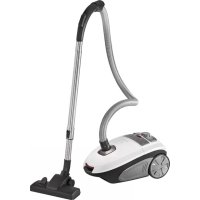
PCBS 3041 - Vacuum Cleaner ProfiCare - Free user manual and instructions
Find the device manual for free PCBS 3041 ProfiCare in PDF.



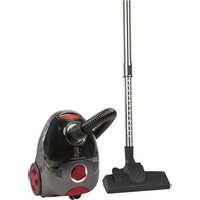
| Product type | Canister vacuum cleaner |
| Brand | ProfiCare |
| Model | PCBS 3041 |
| Input power | 600 W |
| Supply voltage | 220-240 V~, 50/60 Hz |
| Protection class | II |
| Net weight | Approx. 5.0 kg |
| Dust bag type | Dust bag (ref. SSB 101 / Swirl® Y 101®) |
| Motor protection filter | Washable, clean after approx. 10 bag changes |
| Exhaust filter | Washable, located under the top cover |
| Power cord length | Approx. 5 m (with yellow and red markings) |
| Included accessories | Flexible hose, telescopic tube, floor nozzle with adjustable brush, parquet brush, crevice/brush 2-in-1 nozzle |
| Suction power control | Yes, rotary on the appliance body |
| Dust bag full indicator | Yes, visual indicator (red) |
| Parking function | Yes, parking position on the back of the appliance |
| Suction control | Yes, gradual adjustment |
| Automatic shut-off | No |
| Use | Domestic, dry vacuum cleaner (do not vacuum liquids) |
| Maintenance | Regular filter cleaning, dust bag replacement |
| Energy consumption | 600 W |
Frequently Asked Questions - PCBS 3041 ProfiCare
User questions about PCBS 3041 ProfiCare
0 question about this device. Answer the ones you know or ask your own.
Ask a new question about this device
Download the instructions for your Vacuum Cleaner in PDF format for free! Find your manual PCBS 3041 - ProfiCare and take your electronic device back in hand. On this page are published all the documents necessary for the use of your device. PCBS 3041 by ProfiCare.
USER MANUAL PCBS 3041 ProfiCare
natural_image
White and black vacuum cleaner with coiled hose, no visible text or symbolsOverview of the Components ...... Page 3
Instruction Manual......Page 30
Technical Data......Page 33
natural_image
Two black industrial vacuum cleaner components labeled 18 and 19, shown from different angles (no text or symbols on the parts themselves)Bedienungsanleitung
natural_image
Diagram of a mechanical or electrical component with textured surface and tool (no visible text or symbols)natural_image
Illustration of a hand using a tool to clean or repair a grid-patterned surface (no text or symbols)natural_image
Close-up of a mechanical component with textured surface and tool, no visible text or symbolsnatural_image
Illustration of a hand using a brush to clean or store floor tiles on a tiled wall (no text or symbols)natural_image
Diagram of a mechanical or electrical component with no visible text or symbolsnatural_image
Illustration of a hand using a tool to clean or store floor tiles on a grid-patterned surface (no text or symbols)natural_image
Illustration of a mechanical component with a tool inserted into a textured surface (no text or symbols)natural_image
Illustration of a hand using a tool to clean or store floor tiles on a grid-patterned surface (no text or symbols)- Uso con cepillos:
natural_image
Cross-sectional diagram of a mechanical or structural component with layered texture and a tool inserted (no visible text or symbols)natural_image
Illustration of a hand using a tool to clean or store floor tiles on a grid-patterned surface (no text or symbols)Thank you for selecting our product. We hope that you will enjoy use of the appliance.
Symbols in these Instruction Manual
Important information for your safety is specially marked. It is essential to comply with these instructions in order to avoid accidents and prevent damage to the appliance:

WARNING:
This warns you of dangers to your health and indicates possible injury risks.

CAUTION:
This refers to possible hazards to the appliance or other objects.

NOTE: This highlights tips and information.
General Notes
Read the operating instructions carefully before putting the appliance into operation and keep the instructions including the warranty, the receipt and, if possible, the box with the internal packing. If you give this appliance to other people, please also pass on the operating instructions.
- The appliance is designed exclusively for private use and for the envisaged purpose. This appliance is not fit for commercial use.
- Do not use the appliance outdoors. Keep it away from sources of heat, direct sunlight, humidity (never dip it into any liquid) and sharp edges. Do not use the appliance with wet hands. If the appliance is humid or wet, unplug it immediately.
- When cleaning or putting it away, switch off the appliance and always pull out the plug from the socket (pull the plug itself, not the lead) if the appliance is not being used and remove the attached accessories.
- Do not operate the appliance without supervision. If you leave the room you should always turn the appliance off. Remove the plug from the socket.
- The appliance and the mains lead have to be checked regularly for signs of damage. If damage is found the appliance must not be used.
- Use only original spare parts.
- In order to ensure your children's safety, please keep all packaging (plastic bags, boxes, polystyrene etc.) out of their reach.

WARNING:
Do not allow small children to play with the foil. There is a danger of suffocation!
Special Safety Instructions for this Appliance
- Do not repair the appliance by yourself. Always contact an authorized technician. If the supply cord is damaged, it must be replaced by the manufacturer, its service agent or similarly qualified persons in order to avoid a hazard.
- This appliance can be used by children aged from 8 years and above and persons with reduced physical, sensory or mental capabilities or lack of experience and knowledge if they have been given supervision or instruction concerning use of the appliance in a safe way and understand the hazards involved.
• Children shall not play with the appliance. - Cleaning and user maintenance shall not be made by children without supervision.
- Do not suck up liquids!
-
Do not suck up hot ashes or pointed or sharp objects!
-
Do not use the appliance in damp rooms!
- Never use without the filter. Check that the filter is inserted correctly!
- Keep hair, clothing and body parts away from the vacuum nozzle during use!
- Keep the vacuum cleaner away from sources of heat like radiators, ovens, etc.!
Overview of the Components / Scope of Delivery
1 Suction hose
2 Telescopic suction pipe
3 Slide for telescopic suction pipe
4 Floor nozzle
5 Lever for extending and retracting the brushes
6 Hook
7 Handle
8 Opener dust bag compartment
9 Connection head of the vacuum hose
10 Hose connection
11 Dust bag filling display
12 Cover for outlet filter
13 Lock for outlet filter cover
14 On / off switch
15 Stowage clip
16 Suction control
17 Cable-winding button
Accessories:
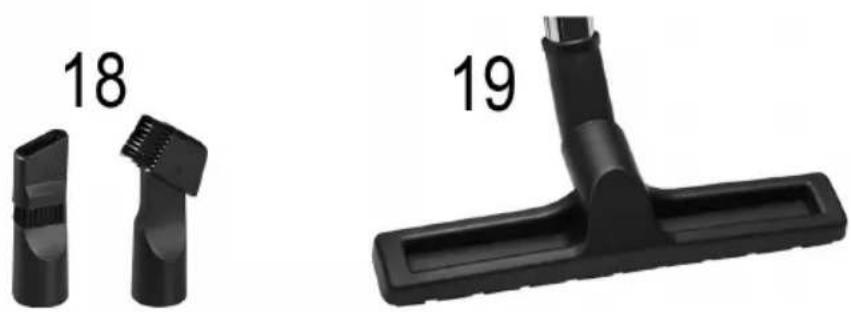
18 Combined crevice and brush nozzle
19 Hard floor brush
Start-up
- Insert the connection head of the suction hose into the hose connector until it locks in place. To do so, please press the buttons simultaneously. In order to release the hose again, please press the buttons once more on the connection head.
- Keep the buttons pressed down and then pull out the hose.
- Insert the vacuum tube into the handle if required.
- Then assemble the floor nozzle and/or the accessories. To detach the nozzle attachments from the suction pipe, pull them off by turning them slightly.
Nozzle Attachments
Floor Nozzle (4)
The floor nozzle features castors for easier movement. You can clean smooth surfaces and carpets with the floor nozzle.
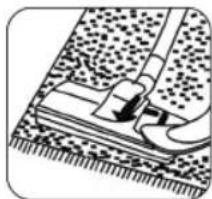
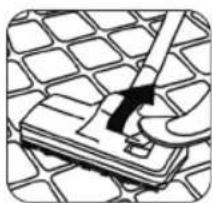
- Adjust the brushes outwards or inwards using the lever (5).
Best use of the appliance depends on the texture of the floor covering. We recommend the following use:
natural_image
Diagram of a mechanical assembly with a tool inserted into a textured surface (no text or symbols visible)- Use without brushes: For vacuuming floor coverings with a deep pile
natural_image
Illustration of a hand using a tool to clean or repair a grid-patterned surface (no text or symbols visible)• Use with brushes: For vacuuming smooth floors and carpets with a shallow pile
Hard Floor Brush (19)
For gentle cleaning of hard surfaces such as parquet, laminate, tiles, etc.
Crevice and Brush Nozzle (18)
NOTE: Folding "2 in 1" nozzle
When this is folded together it can be used as a groove nozzle. If you would like to use the brush nozzle, pull the brush section in the direction of the arrow until it locks in place.
- Crevice nozzle:
For vacuuming dirt from corners, joints and small gaps.
- Brush nozzle:
For removing dirt gently from slits in upholstery and mattresses. Also suitable for removing dust from sensitive surfaces such as furniture or curtains.
Telescopic Suction Pipe (2)
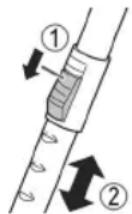
The length of the telescopic suction pipe can be adjusted individually:
- Loosen the locking mechanism by sliding and holding the button (3) in the direction of the arrow marking.
- Extract one tube from the other to the desired length.
- Release the button in order to lock the connection.
Mains Cable
Pull the mains cable from the cable compartment. The cable compartment is located at the back of the appliance below.

CAUTION:
- Pull out the cable up to the maximum length indicated with the yellow mark.
- Never pull the cable out up to the red mark as the cable winding can be damaged.

NOTE:
If the red mark is visible, pull in the cable with the help of the cable winding button back to the yellow mark.
Electrical Connection
- Before connecting the plug to the wall socket, check whether the mains voltage is correct. Refer to the information on the rating plate of the appliance.
- Connect the appliance to a certified wall socket only.
Switching the Appliance On/Off
Press the button (14) to switch the appliance on or off.
Suction Control (16)
Turn the suction power control clockwise if you want to increase the suction power.
- Low suction power: For curtains, sensitive material.
- Moderate suction power: For deep pile velour carpets and textile floor covering.
• High suction power: For robust carpets and floors.
Using the Appliance
- Insert the mains plug into a correctly installed power socket.
- Turn the appliance on by the on / off switch by pressing down the button.
- Set the "carpet / hard floor" switch, depending on the floor covering.
- Adjust the suction power with the suction power control.
- Vacuum at a steady speed. There is no need to exert pressure.

NOTE:
Pay attention to the range that can be covered with the cable length!
Air Slide
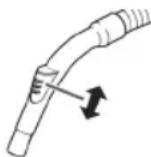
Open the air slide on the hose handle in order to regulate the airflow or to clear any particles sticking to the nozzle.
Switching Off and Winding Up the Mains Cable
- Turn the vacuum cleaner off by the on / off switch and remove the plug from the socket.
- Keep the plug in your hand.
- Press the cable winding button and guide the cable. Hold the cable to avoid wrapping.
Maintenance
Dust Bag Replacement Display (11)
Hold the hose up into air. If the display for the vacuum bag change shows "red", the dust bag is full. Please change it.
Changing the Dust Bag
- Pull the plug out of the socket.
- Use the opener (8) to open the lid of the dust bag compartment.

NOTE:
The lid can be locked in upright position. Do not push the lid beyond the locking mechanism! Otherwise the mounting could break away.
- Pull out the dust bag holder.
- Then pull the dust bag from the holder.
- Insert a new bag. Please ensure that the bag is located correctly in the guide mechanism.
- Refit the holder including the dust bag into the dust bag compartment. Use the guide rails to do so.
- Press down the fastener with the bag. The bag must be located completely in the dust bag compartment. Close the cover so that it snaps into place.
Filter
Your appliance has two filters.
Motor Protection Filter (Inlet Filter)
The inlet filter is located in the dust bag compartment. The filter is located vertically in the rear section of the dust housing. Remove the filter by pulling upwards.
Cleaning the Filter Element:
Clean the engine protection filter after 10 dust bag changes. If necessary, the filter can also be washed in warm water without any additives. Place it back into place only once it is completely dry!
Outlet Filter (12)
The appliance is also equipped with an outlet filter. It is located on the top of the appliance underneath a cover.
- Push the lock of the cover to the side in order to open it.
-
Remove the cover.
-
Remove the filter insert and clean it as described above.
- Once dried completely, reinstall the filter insert.
- Closing the cover: Position the cover with the 3 snap tabs first. Then push the fastener to the side to snap the cover.
Cleaning

WARNING:
- Before cleaning remove the mains lead from the socket.
- Under no circumstances should you immerse the appliance in water for cleaning purposes. Otherwise this might result in an electric shock or fire.

CAUTION:
- Do not use a wire brush or any abrasive items.
- Do not use any acidic or abrasive detergents.
Clean the housing with a soft, dry cloth without additives.
Storage
- Let the appliance cool down completely.
• Wind the cable completely. - Please insert the hook of the floor nozzle into the parking assistant on the rear of the appliance.
- If you want to stand the appliance vertically: Attach the hook of the floor nozzle to the parking aid on the bottom of the appliance.
Troubleshooting
| Problem Possible Cause Remedy | ||
| The appliance does not work. | The appliance is not connected to mains power. | Check the connection to the mains. |
| Weak suction power. | The suction power is set too low. | Check the position of the control. |
| The dust bag is full. | Renew the dust bag. | |
| The filters are dirty. | Clean the filters as described under “Maintenance”. | |
| CAUTION: Restart operation only with dry filters. | ||
| Problem | Possible Cause Remedy | |
| Weak suction power. | There is a foreign body in the suction tube or the nozzle. | Check the accessories for foreign bodies. |
Technical Data
Model: PC-BS 3041
Power supply: 220-240 V\~, 50/60 Hz
Power consumption: 600 W
Protection class:....II
Net weight: .... approx. 5.0 kg
Dust filter bag: .....SSB 101 / Swirl® Y 101®
Swirl®, Y 101® is a registered trademark of a company of the Melitta Group which is not associated with the company Clatronic International GmbH.
The right to make technical and design modifications in the course of continuous product development remains reserved.
Notice of Directive Conformity
The appliance meets the European standards and directives in the current version at delivery:
• Low Voltage Directive (LVD) 2014 / 35 / EU
• Electromagnetic Compatibility (EMC) Legislation Directive 2014 / 30 / EU
• RoHS-Directive 2011 / 65 / EU
• Ecodesign-Directive (ErP) 2009 / 125 / EG
- Ecodesign Requirements for Vacuum Cleaners COMMISSION REGULATION (EU) No. 666 / 2013
Disposal
Meaning of the "Dustbin" Symbol
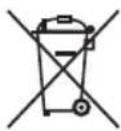
Protect our environment: do not dispose of electrical equipment in the domestic waste.
Please return any electrical equipment that you will no longer use to the collection points provided for their disposal.
This helps avoid the potential effects of incorrect disposal on the environment and human health.
This will contribute to the recycling and other forms of re-utilisation of electrical and electronic equipment.
Information concerning where the equipment can be disposed of can be obtained from your local authority.
Instrukcje obsługi
natural_image
Diagram of a mechanical component with a foot and lever, no visible text or symbolsnatural_image
Illustration of a hand using a tool to clean or store floor tiles on a grid-patterned surface (no text or symbols)Masa netto: ....ok. 5,0 kg
Worek filtra pyłu:....SSB 101 / Swirl® Y 101®
CTC Clatronic Sp. z o.o
Ul. Brzeska 1
45-960 Opole
Usuwanie
natural_image
Illustration of a mechanical joint or clamp on a textured surface (no text or symbols)natural_image
Illustration of a hand using a tool to clean or repair a grid-patterned surface (no text or symbols)natural_image
Illustration of a shoe being inserted into a textured surface (no text or symbols)natural_image
Illustration of a hand using a tool to clean or repair a grid-patterned surface (no text or symbols visible)natural_image
Illustration of a hand using a tool to clean or repair a grid-patterned surface (no text or symbols visible)natural_image
Illustration of a mechanical component with textured surface and tool (no text or symbols)

- Bedienungsanleitung
- Symbols in these Instruction Manual
- WARNING:
- CAUTION:
- General Notes
- Special Safety Instructions for this Appliance
- Overview of the Components / Scope of Delivery
- Accessories:
- Start-up
- Nozzle Attachments
- Floor Nozzle (4)
- Hard Floor Brush (19)
- Crevice and Brush Nozzle (18)
- NOTE: Folding "2 in 1" nozzle
- Telescopic Suction Pipe (2)
- Mains Cable
- NOTE:
- Electrical Connection
- Switching the Appliance On/Off
- Suction Control (16)
- Using the Appliance
- Air Slide
- Switching Off and Winding Up the Mains Cable
- Maintenance
- Dust Bag Replacement Display (11)
- Changing the Dust Bag
- Filter
- Motor Protection Filter (Inlet Filter)
- Cleaning the Filter Element:
- Outlet Filter (12)
- Cleaning
- Storage
- Technical Data
- Notice of Directive Conformity
- Disposal
- Meaning of the "Dustbin" Symbol
- Instrukcje obsługi
- Usuwanie
Brand : ProfiCare
Model : PCBS 3041
Category : Vacuum Cleaner