Apex Pro Mini Wireless - Keyboard STEELSERIES - Free user manual and instructions
Find the device manual for free Apex Pro Mini Wireless STEELSERIES in PDF.



| Product Type | Compact 60% Wireless Mechanical Keyboard |
| Brand | SteelSeries |
| Model | Apex Pro Mini Wireless |
| Connectivity | Wireless 2.4 GHz (USB-C dongle) and Bluetooth 5.0 |
| Switches | OmniPoint adjustable (per-key actuation) |
| Backlighting | Per-key RGB, software controllable |
| Power | Rechargeable lithium-ion battery, USB-C charging |
| Battery Life | About 40 hours (RGB lighting on) |
| Weight | About 600 g |
| Dimensions (L x W x H) | 293 x 103 x 40 mm |
| System Compatibility | PC, Mac, Xbox, PlayStation |
| Software | SteelSeries GG (Engine, Moments) |
| Included Accessories | Detachable braided USB-C cable, USB-C dongle, extension adapter |
| Special Features | Adjustable actuation, on-the-fly macros, 3 Bluetooth profiles, 5 game profiles |
| Battery Indicator | Blinking red LED (<5%), solid green LED (charged), blinking green (charging) |
| Care and Cleaning | Use a soft, dry cloth; avoid liquids |
| Safety | Do not expose to water or heat sources; respect battery polarity |
| Spare Parts and Repairability | Accessories available at steelseries.com/gaming-accessories |
Frequently Asked Questions - Apex Pro Mini Wireless STEELSERIES
User questions about Apex Pro Mini Wireless STEELSERIES
0 question about this device. Answer the ones you know or ask your own.
Ask a new question about this device
Download the instructions for your Keyboard in PDF format for free! Find your manual Apex Pro Mini Wireless - STEELSERIES and take your electronic device back in hand. On this page are published all the documents necessary for the use of your device. Apex Pro Mini Wireless by STEELSERIES.
USER MANUAL Apex Pro Mini Wireless STEELSERIES
APEX PRO MINI WIRELESS
PRODUCT INFORMATION GUIDE
TABLE OF CONTENTS
Table of Contents 2
General 3
Product Overview 4
Setup 6
Functions 7
Battery Indicator 9
Translations 10
Espanol 11
13
Italiano 15
Polski 16
Portugues 18
Pycckn 20
日本語 21
简体中文 23
繁體中文 24
26
Regulatory 28
PACKAGE CONTENTS
Apex Pro Mini Wireless
Detachable Braided USB-C to USB-A Cable
USB-C Wireless Dongle
Extension Adapter
SYSTEMCOMPATIBILITY
PC
Mac
Xbox
PlayStation
SOFTWARE
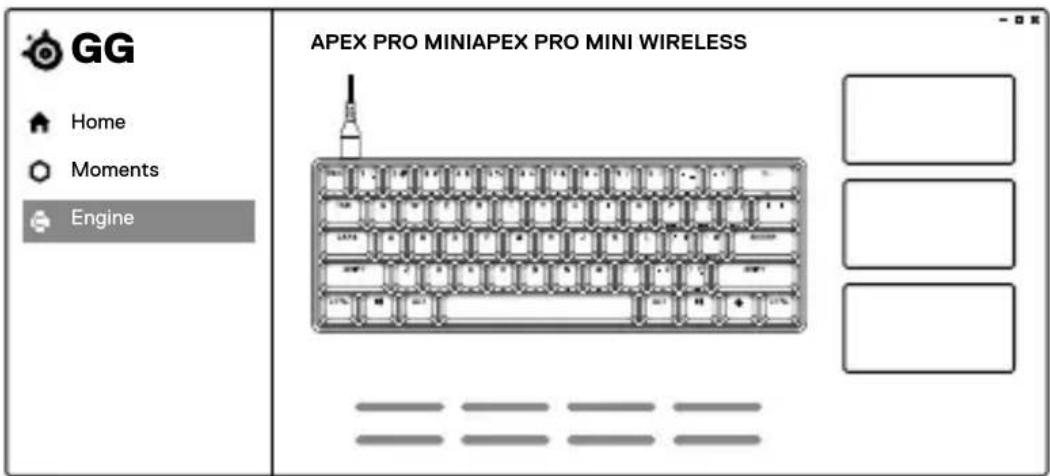
Use Engine inside SteelSeries GG to customize
your lighting, macros and more.
GG also has other amazing apps like Moments, which makes it easier and faster to clip and share highlights with friends.

DOWNLOAD NOW
steelseri.es/gg
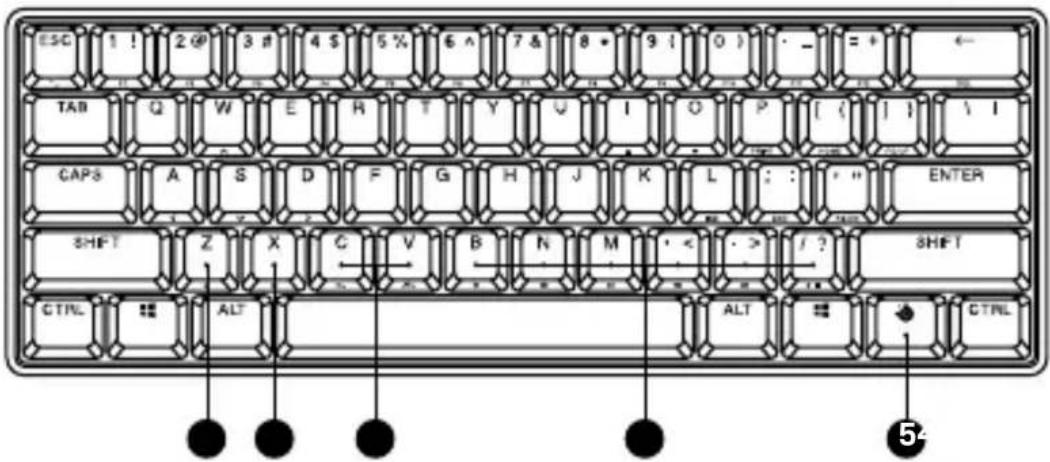
KEYBOARD
1 Profile Switching Key
2 Macro Recording Key
3 Illumination Brightness Keys
4 Multimedia Keys
5 SteelSeries Function Key
6 Wireless Mode Switch
7 USB-C Jack
8 Tri-Level Feet

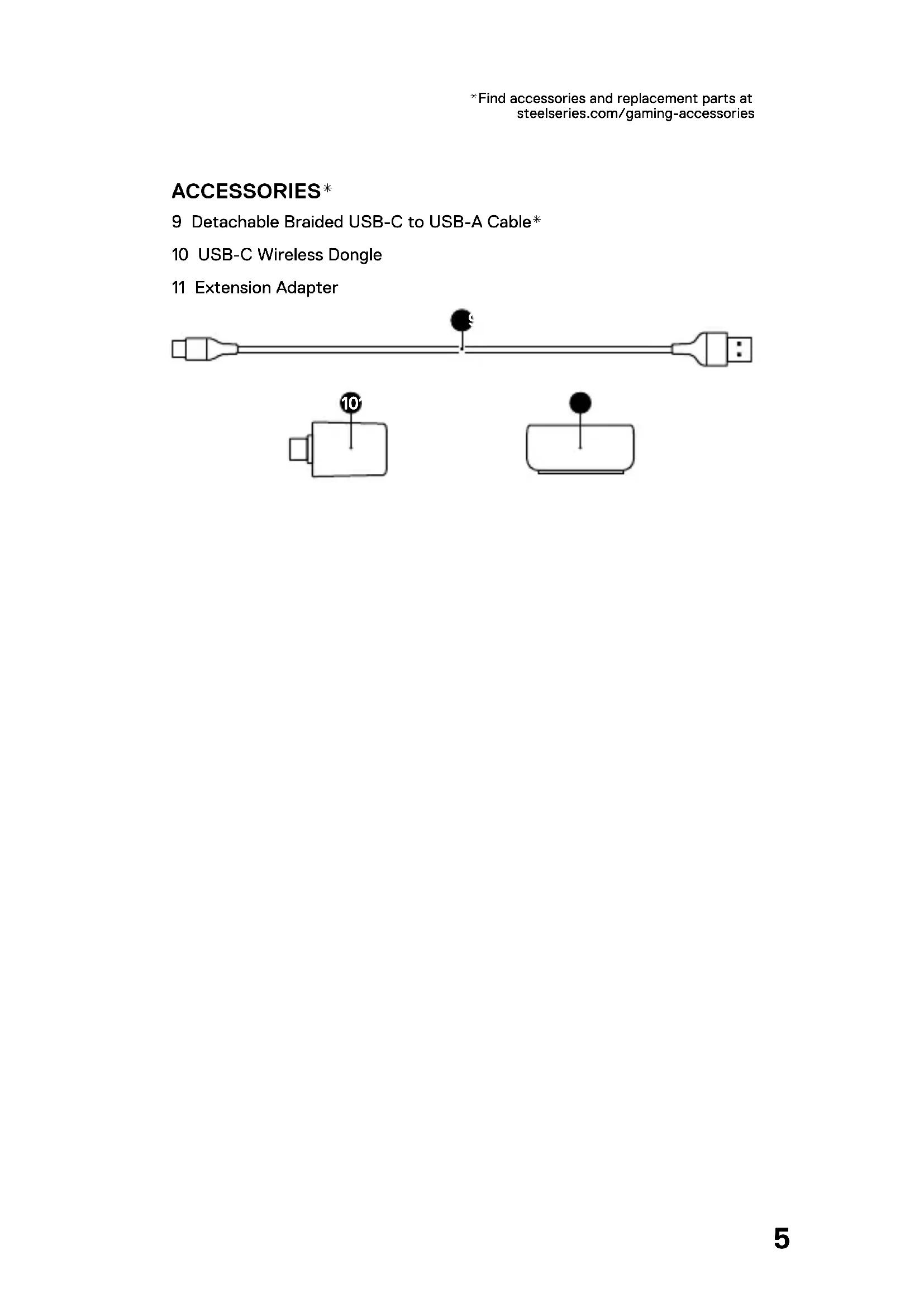
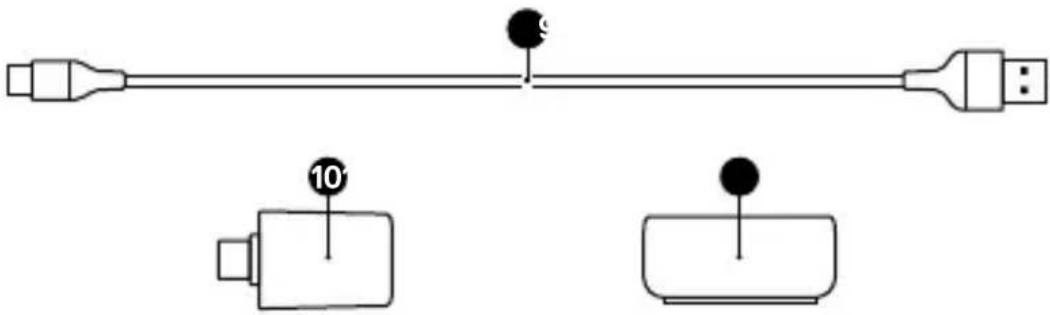
ACCESSIONS*
9 Detachable Braided USB-C to USB-A Cable*
10 USB-C Wireless Dongle
11 Extension Adapter
CONNECTING VIA 2.4 GHZ WIRELESS
1 Connect the USB-C Wireless Dongle (10) to an available USB port on your device.
2 Toggle the Wireless Mode Switch (6) to the "2.4 GHz" position.
3 The Keyboard and USB-C Wireless Dongle (10) will automatically pair.
4 Use Engine to further customize your Keyboard or re-pair a Wireless Dongle by downloading SteelSeries GG software from steelseri.es/gg.
BASIC PAIRING VIA BLUETOOTH
1 Initiate Bluetooth pairing mode on your Bluetooth 5.0 or higher enabled device.
2 Toggle the Wireless Mode Switch (6) to the Bluetooth position to turn on your Keyboard.
3 The Keyboard lighting will start blinking blue when searching for a connection.
4 Select "Apex Pro Mini Wireless" on your Bluetooth-enabled device.
ADVANCED PAIRING VIA BLUETOOTH
The Keyboard can pair with and store three Bluetooth device profiles (defined using the 1, 2, or 3 keys).

To initiate pairing mode, press SteelSeries Function Key (5) + CTRL + Enter + 1, 2, or 3.
The chosen device key will pulse blue until successfully paired with a Bluetooth device. If no device is found, Bluetooth pairing will time out.
BLUETOOTH DEVICE SWITCHING

To cycle through the three paired devices, press the SteelSeries Function Key (5) + Enter + 1, 2, or 3. Your keyboard will then automatically connect to the previously paired device.
OMNIPOINT ADJUSTABLE ACTUATION

SteelSeries Function Key (5) + "l" lifts the actuation point (lighter keypress).
SteelSeries Function Key (5) + "O" lowers the actuation point (deeper keypress).
Use Engine inside SteelSeries GG to configure the adjustable actuation on a per-key basis.
PROFILE SWITCHING
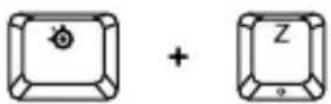
Press the SteelSeries Function Key (5) + Profile Switching Key (1) repeatedly to cycle through the profiles.
1 Press and hold the SteelSeries Function Key (5) + Macro Recording Key (2) for 3 seconds to start recording.
2 Type your desired key combinations.
3 Press the SteelSeries Function Key (5) + Macro Recording Key (2) to end Macro Recording.
4 The Macro Recording Key (2) will now be flashing, press the key to which you want to assign the macro.
Press the SteelSeries Function Key (5) + Illumination Brightness Keys (3) to reduce Illumination Brightness.
Press the SteelSeries Function Key (5) + Illumination Brightness Keys (3) to increase Illumination Brightness.
LOW BATTERY INDICATOR
When battery is below 5% the keyboard will pulse red.
CHARGING INDICATOR
When charging, the ESC key will flash green. When fully charged, the ESC key will turn solid green.
DEUTSCH
ALLGEMEIN
PAKETINHALT
Apex Pro Mini Wireless
USB-C-Wireless-Dongle
Erweiterungsadapter
KOMPATIBILITÄT
PC, Mac, Xbox, PlayStation
SOFTWARE
BLUETOOTH GERATEWECHSEL
Apex Pro Mini Wireless
Apex Pro Mini Wireless
Cable tresse detachable USB-C vers USB-A
DonglesansfilUSB-C
Apex Pro Mini Wireless
Dongle wireless USB-C
Prolunga
COMPATIBILITA DEL SISTEMA
PC, Mac, Xbox, PlayStation
SOFTWARE
10 Dongle wireless USB-C
da USB-C a USB-A*
11 Prolunga
Apex Pro Mini Wireless
Odázczany kabel USB-C do USB-A w oplocie
Apex Pro Mini Wireless
Apex Pro Mini Wireless
CbeMHbI IneTeHbIKa6eJb USB-C-USB-A
PpneMHnK USB-C dIa 6ecnpoBOJHO coeHHeHnA
YdHnHTeNbHbI aanTep
COBMECTUMOCTb CNTTEMbl
PIK, Mac, Xbox, PlayStation
ПОТРAMMHOE OБЕСпЕΗΝΕ
IcnoJIb3yIe Engine B SteelSeries GG, yTo6bl HaCTpOHTbOCBeueHHe, MaKPOCbI MHOrOe dpyrOe.
GG TAKKe OChaSeHa DpyrIMN NOTPcAIOUIMN PpNIOXeHnMn, HApnpMeP Moments, 6laOpaR KOTOpbIM MOxHO 6bICTpee n IpooSe CHMaTb N DeNTbCRA DOCTNXeHnMn C dpy3bMn.
CKAATb CEHAC - steeleri.es/gg
OB3OP PPOdykTA
KJABNATYPA
1 KhoNka nepeKluOeHnI npoΦnIa
2 Khonka 3a\Pncu MaKpocOB
3 Khonkn ynpablenna npKOCTbIO NOCDBETKN
4 KhoNkMynbTmMeDna
5ФункционаьньеКнОПКи SteelSeries
6 BeçnpoBODHOn nepeKlIouaTeNb peKIma
7 Pa3bem USB-C Jack
8 TpexypoBHeBa Hoxka
AKCECCYAPbI*
9 CbemhbI Ka6eJIb USB-C -USB-A B ONJIeTKe*
6ecnpoBODHOro coeHHeHn
10 PnpemHnK USB-Cdla
11 YdInHnTeBHy aanTep
- Akceccyapbyи заразные частMuЖHo NaHTN NO aDpecy steelseries.com/gaming-accessories
YCTAHOBKA
BECNPOBOHOE NOKJIIOUeyHNE YEPE3 CETb 2,4 Tt
1 POnKlnHcyIe PnemHmK USB-C IaIg 6ecnpoBogHorO coeHHeHn (10) KIOCTyINHomy USB-nOpTy Ha BaWem ycTpoNCTBe.
2 NepekeIIOUHTe BeCnpoBOHOn nepeKIOuHaTeJIb peXmua (6) B nOIOKeHne 2,4
3 KnaBnAtya n PnpemHnK USB-C nla 6ecnpoBodHoro coeHHeHn (10) aBTOMaTnueckN BbINOnHr T cOpJxKeHne.
4 IcnoIb3yIe Engine dIaIaJIbHeIWe HAcTpoKn KlaBnaTypbl IIN NOBTOpHOcoPjaKeHnC npIeMHNKOM dIg 6ecnpoBOdHoro CoeIHHeHn CkaayTe nporpaMMHoe oBecepeHne SteelSeries GG c caIta steelseri.es/gg
CTAHAPTHOE COPPXKHENE YEPE3 BLUETOOTH
1 BkIouHtepeKIMcOpJxKeHnBa Bluetooth Ha yctpoiCTBe c noDepKko Bluetooth 5.0 nnn6oJee no3dHeBercn.
2 NepeKJIIOUHTe BeCnpoBODHOJ nepeKlIOuataIb peXIMa (6) B noLoXHeHne Bluetooth*, YTO6bl BKJIIOUHTb KIAJBuaTypy.
3ПОДСВЕТКАКLABNAtypbI NaЧET MИralcINHIM CBETOM BO BpeMЯ ПОИСКА ПОДКЛIOUeHIN.
4 BbI6epnTe «Apex Pro Mini Wireless» Ha yCTpoiCTBe C BKJIHcENHOyHKUeN Bluetooth.
ФУнкци
PACUINPEHHOE COINPRXHEHNE YEPE3 BLUETOOTH
KlabnaTypa moKet BbIIOJIHЯtB cOpJKeHne C TpeM npOΦnJIaMn Bluetooth (OnpeJeJIeMbIMN C NOMOuBIO KlaBn1 1,2 nII 3) uCOxpaHrTB IN B nAmrTn.
YTo6bI nepeTn B peKm CompJKeHna,HaKMITEyHKUHOHaJIbHbIe KhoNk SteelSeries (5) ^+ Ctrl ^+ Enter +1 2 nnn 3.
KhoNka BbIbpaHoro yCTpoiCTBa 6yDet MuraTb CnHm, Noka cOpjKeHne C Bluetooth-ycTroPcTBOM He 6yDet BbINOJIHeNo. EcIn Bluetooth-ycTroPcTBo He NaJdeHo, cOpjKeHne 6yDet OCTaHOBNeHNo NO ICTeUeHN BpeMeHn OxKnDaHnA.
NEPEKJIIOUeyHE MEXy BLUETOOTH-UCTPOICTBAMN
Apex Pro Mini Wireless
Apex Pro Mini Wireless
*在steelseries.com/gaming-accessories查找配件和替换件
设置
2.4 GHZ 无线连接
Apex Pro Mini Wireless
Apex Pro Mini Wireless
SteelSeries gieng (5) ^+ "I" is 900000000000000000000000000000000000000000000000000000
SteelSeriesきにリ(5)+“0”は定義か的工量を奨奇に状(DiFK).
Europe - EU Declaration of Conformity
Hereby, SteelSeries ApS. declares that the equipment which is compliance with directive RoHS 2.0 (2015/863/EU), R.E.D (2014/53/EU), EMC Directive (2014/30/EU), and LVD (2014/35/EU) which are issued by the Commission of the European Community.
The full text of the EU declaration of conformity is available at the following internet address: https://steelseries.com/
Operating Temperature: 0 to +40C.
SteelSeries ApS. hereby confirms, to date, based on the feedback from our suppliers indicates that our products shipping to the EU territory comply with REACH (Registration, Evaluation, Authorization, and Restriction of Chemicals - (EC) 1907/2006) compliance program. We are fully committed to offering REACH compliance on the products and posting accurate REACH compliance status for the all of products.
Frequency bands and Powers (Keyboard and Transceiver)
a. Frequency band(s) in which the radio equipment operates: 2.400 - 2.4835 GHz
b. Maximum radio-frequency power transmitted in the frequency band(s) in which the radio equipment operates:
EIRP: GFSK: 8.62 dBm (Keyboard/ BLE)
EIRP: n/4-DQPSK: 8.66 dBm (Keyboard/2.4G)
EIRP: n/4-DQPSK: 9.09 dBm (Transceiver)
c. Firmware Version: V2.6.4

UK Declaration of Conformity
Hereby, SteelSeries ApS. declares that the following equipment which is compliance with Electromagnetic Compatibility Regulations 2016, Electrical Equipment (Safety) Regulations 2016 and The Restriction of the Use of Certain Hazardous Substances in Electrical and Electronic Equipment Regulations 2012 issued by the Department for Business, Energy& Industrial Strategy. The full text of the UK declaration of conformity is available at the following internet address: www.steelseries.com
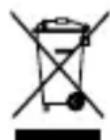
WEEE
This product must not be disposed of with your other household waste or treat them in compliance with the local regulations or contact your local city office, your household waste disposal service or the shop where you purchased the product.
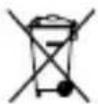
Safety Guideline for Lithium Battery
This battery must not be disposed of with your other household waste or treat them in compliance with the local regulations or contact your local city office, your household waste disposal service or the shop where you purchased the product.
Turkey RoHS Compliance
Republic of Turkey: In conformity with the EEE Regulation
Federal Communication Commission Interference Statement
This device complies with Part 15 of the FCC Rules. Operation is subject to the following two conditions:
- This device may not cause harmful interference, and
- this device must accept any interference received, including interference that may cause undesired operation.
This equipment has been tested and found to comply with the limits for a Class B digital device, pursuant to Part 15 of the FCC Rules. These limits are designed to provide reasonable protection against harmful interference in a residential installation. This equipment generates, uses and can radiate radio frequency energy and, if not installed and used in accordance with the instructions, may cause harmful interference to radio communications. However, there is no guarantee that interference will not occur in a particular installation. If this equipment does cause harmful interference to radio or television reception, which can be determined by turning the equipment off and on, the user is encouraged to try to correct the interference by one of the following measures:
- Reorient or relocate the receiving antenna.
- Increase the separation between the equipment and receiver.
- Connect the equipment into an outlet on a circuit different from that to which the receiver is connected.
- Consult the dealer or an experienced radio/TV technician for help.
FCC Caution:
Any changes or modifications not expressly approved by the party responsible for compliance could void the user's authority to operate this equipment.
This transmitter must not be co-located or operating in conjunction with any other antenna or transmitter.
Radiation Exposure Statement:
The device has been evaluated to meet general RF exposure requirement, the device can be used in portable exposure condition without restriction.
FCC ID: ZHK-KB00016 (Keyboard)
FCC ID: ZHK-KB00016TX(Transceiver)
| Region Address Telephone | |
| USA SteelSeries ApS., 656 W Randolph St., Suite 3E, Chicago, IL 60661, USA | +1 312 258 9467 |
Industry Canada Statement
This device complies with RSS standards of the Industry Canada Rules. Operation is subject to the following two conditions:
- This device may not cause harmful interference, and
- This device must accept any interference received, including interference that may cause undesired operation.
This Class B digital apparatus complies with Canadian ICES-003.
This device and its antenna(s) must not be co-located or operating in conjunction with any other antenna or transmitter, except tested built-in radios.
The County Code Selection feature is disabled for products marketed in the US/ Canada.
The appliance must not be exposed to splashes or drops of water and it should not be used as a support for any object filled with liquid, such as a vase.
Radiation Exposure Statement
The device has been evaluated to meet general RF exposure requirement, The device can be used in portable exposure condition without restriction.
RISK OF EXPLOSION IF BATTERY PACK IS NOT REPLACE BY SAME TYPE AS SPECIFIED BY THE MANUFACTURER.
Please keep follow all listed important warnings and cautions below while using this battery pack to avoid any damage or hazard.
- The battery polarity (+) and (-) shall not be connected and charged reversely. Risk of explosion if the battery polarity (+) and (-) is reversed.
- Please keep this battery pack away from fire and high heat sources due to the explosion that might happen. Do not place your battery pack close to any heater or hot location.
- This battery pack shall not be hit or impacted. This battery pack shall not be dealt with any sharp or keen objects either.
- This battery pack shall not be exposed to moisture, dripping or splashing.
- If any electrolyte flows out of this battery pack when touching the user's eyes and skin, please seek medical advice immediately.
"MISE EN GARDE!"
RISQUE D'EXPLOSION SI LE BLOC-PILES N'EST PAS REMPLACÉ PAR LE MÉME TYPE QUE SPECIFIÉ PAR LE FABRICANT.
IC: 9638A-KB00016TX (Transceiver)
Restriction on Hazardous Substances statement (India)
This product complies with the "India E-waste Rule 2011" and prohibits use of lead, mercury, hexavalent chromium, polybrominated biphenyls or polybrominated diphenyl ethers in concentrations exceeding 0.1 weight % and 0.01 weight % for cadmium, except for the exemptions set in Schedule 2 of the Rule.
The RoHS test method is based on the standards JIS C 0950 and CNS 15663.
| 設備名稱:無線鍵盤 型號(型式):KB-00016 Equipment name: Wireless Keyboard Type designation: KB-00016 | ||||||
| 單位 Unit | 限用物質及其化學符號 Restricted substances and its chemical symbols | |||||
| 鉛 Lead (Pb) | 汞 Mercury (Hg) | 鎘 Cadmium (Cd) | 六價鉻 Hexavalent chromium (Cr⁺⁶) | 多溴聯苯 Polybromo- minated biphenyls (PBB) | 多溴二苯醚 Polybromo- minated diphenyl ethers (PBDE) | |
| 塑膠部件 Plastic | ○ | ○ | ○ | ○ | ○ | ○ |
| 電路板及元件 PCBA | - | ○ | ○ | ○ | ○ | ○ |
| 線材 Cables | - | ○ | ○ | ○ | ○ | ○ |
| 金屬部件 (接收器及通 用序列匯流排 轉接頭) Metal | - | ○ | ○ | ○ | ○ | ○ |
| 備考1. “超出0.1wt%”及“超出0.01wt%”係指限用物質之百分比含量超出百分比含量基準值。 Note 1: “Exceeding 0.1 wt %” and “exceeding 0.01 wt %” indicate that the percentage content of the restricted substance exceeds the reference percentage value of presence condition. 備考2. ○係指該項限用物質之百分比含量未超出百分比含量基準值。 Note 2: ○ indicates that the percentage content of the restricted substance does not exceed the percentage of reference value of presence. 備考3. -係指該項限用物質為排除項目。 Note 3: - indicates that the restricted substance corresponds to the exemption | ||||||
| Region Address Telephone | ||
| Asia 亞洲 | 4F.-4, No. 186, Jian 1st Rd., Zhonghe Dist., New Taipei City 235603, Taiwan 新北市中和區建一路186號4樓及4樓之4 | +886 2 8227 1999 |
| Europe Havneholmen 8, 1 £'Floor, 2450 Copenhagen SV, Denmark | +45 702 500 75 | |
| USA 656 W Randolph St., Suite 3E, Chicago, IL 60661, USA | +1 312 258 9467 | |
More information and support from steelseries.com

ACMA Compliance
(Australia/ New Zealand)

Direct Current
Complies with
IMDA Standards
DA 106032
Singapore approval (IMDA)
Product Name (產品名稱/产品名称): Wireless Keyboard (無線鍵盤/无线鍵盘)
Model No. (型號/型号): KB-00016
Operating Temperature: 0 to +40 °C
產品使用環境溫度:0-40度