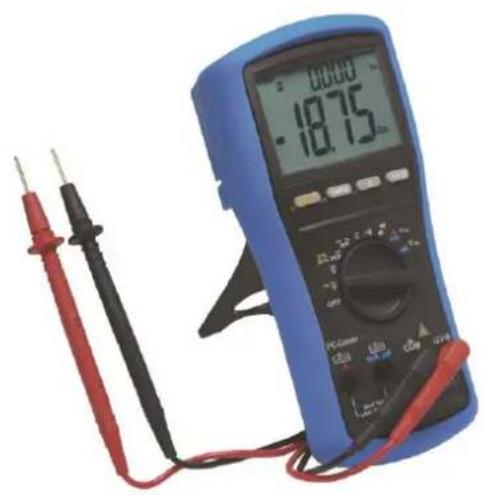
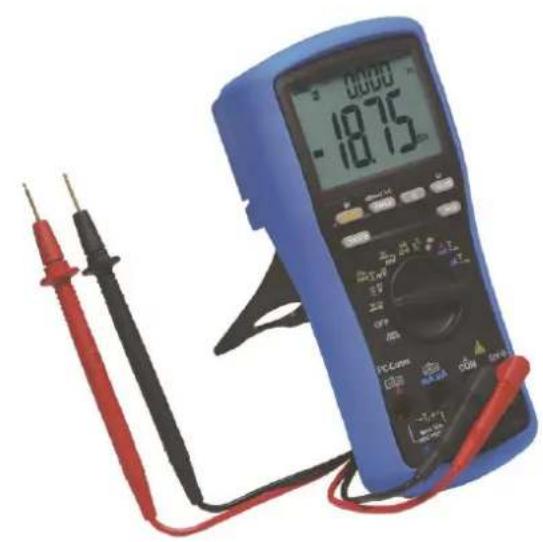
MD 9050 - Multimeter Metrel - Free user manual and instructions
Find the device manual for free MD 9050 Metrel in PDF.


| Product Type | Digital Multimeter |
| Brand | Metrel |
| Model | MD 9050 |
| Measurement Category | CAT IV 1000V AC/DC |
| Display | LCD 9999 counts (ACV, DCV, Hz, nS) / 6000 counts (mV, µA, mA, A, Ω, capacitance) |
| True RMS | Yes, True RMS AC+DC |
| AutoCheck™ | Automatic selection DCV, ACV, resistance with low impedance |
| Main Measurements | AC/DC voltage (up to 1000V), AC/DC current (up to 10A, 20A for 30s), resistance (60MΩ), capacitance (25mF), frequency (1MHz), temperature (type K, -50°C to 1000°C), diode test, continuity, conductance, dBm, logic level, duty cycle |
| Special Functions | 1ms peak mode, MAX/MIN/AVG recording, electric field detection (EF), backlight, HOLD, relative mode, auto power off (APO) |
| PC Interface | Optical port (AMD9050 kit optional) |
| Power Supply | 9V battery (NEDA1604G, JIS006P, IEC6F22 or equivalent) |
| Battery Life | Approximately 30 minutes before auto power off; consumption 5 mA, 50 µA standby |
| Dimensions | L208 x W103 x H64.5 mm (with case) |
| Weight | 635 g (with case) |
| Operating Temperature | 0°C to 45°C, max relative humidity 80% (linearly decreasing to 50% at 45°C) |
| Maximum Altitude | 2000 m |
| Protections | Double insulation, fuses 0.44A/1000V (mA) and 11A/1000V (A), overvoltage protection 1050Vrms |
| Maintenance | Clean with damp cloth and mild detergent; remove battery for storage >60 days |
| Spare Parts | 9V battery, fuses (FS1: 0.44A/1000V 10x38mm, FS2: 11A/1000V 10x38mm), test leads, type K temperature probe (AMD9023), PC interface kit (AMD9050) |
| Repairability | User replaceable battery and fuses; internal fuse resistors requiring a qualified technician |
| Standards | CE, CENELEC, IEC/EN 61010-1, 61010-2-030, 61010-2-033, 61010-031 |
Frequently Asked Questions - MD 9050 Metrel
User questions about MD 9050 Metrel
0 question about this device. Answer the ones you know or ask your own.
Ask a new question about this device
Download the instructions for your Multimeter in PDF format for free! Find your manual MD 9050 - Metrel and take your electronic device back in hand. On this page are published all the documents necessary for the use of your device. MD 9050 by Metrel.
USER MANUAL MD 9050 Metrel
METREL MD 9040 & MD 9050
MD 9040 TRMS Industrial Digital Multimeter MD 9050 TRMS Heavy Duty Industrial Digital Multimeter
MD 9040 & MD 9050
User Manual
Bedienungsanleitung
Navodilo za uprabo
Unit 16, 1st Qtr Business Park
Blenheim Road
Epsom
Surrey
KT19 9QN,
Great Britain
E-mail: info@metrel.co.uk
Internet: http://www.metrel.co.uk

Mark on your equipment certifies that it meets requirements of all subjected EU regulations.
Hereby, Metrel d.d. declares that the MD 9040, MD 9050 is in compliance with subjected EU directive. The full text of the EU declaration of conformity is available at the following internet address http://www.metrel.si/DoC
The trade names Metrel®, Smartec®, Eurotest®, Auto Sequence® are trademarks registered in Europe and other countries.
No part of this publication may be reproduced or utilized in any form or by any means without permission in writing from METREL.
Table of contents/Inhalt/Vsebina/Table des matieres
English
1 Safety 5
2 Cenelec directives 6
3 Product Description 7
4 Operation 9
5 Maintenance 18
6 Specification 20
Deutsch
Terms in this manual
WARNING identifies conditions and actions that could result in serious injury or even death to the user.
CAUTION identifies conditions and actions that could cause damage or malfunction in the instrument.
This manual contains information and warnings that must be followed for operating the instrument safely and maintaining the instrument in a safe operating condition. If the instrument is used in a manner not specified by the manufacturer, the protection provided by the instrument may be impaired. The meter is intended only for indoor use.
The meter protection rating, against the users, is double insulation per IEC/UL/EN61010-1 Ed. 3.0, IEC/EN61010-2-030 Ed. 1.0, IEC/EN61010-2-033 Ed. 1.0, IEC/UL/EN61010-031 Ed. 1.1 and CAN/CSA-C22.2 No. 61010-1-12 Ed. 3.0 to Category IV 1000V AC & DC.
MD 9040 & MD 9050 Terminals (to COM) measurement category:
V/mAμA/A:Category IV 1000 Volts AC & DC
Per IEC61010-1 2nd Ed. (2001) Measurement Category
Measurement Category IV (CAT IV) is for measurements performed at the source of the low-voltage installation. Examples are electricity meters and measurements on primary overcurrent protection devices and ripple control units.
Measurement Category III (CAT III) is for measurements performed in the building installation. Examples are measurements on distribution boards, circuit- breakers, wiring, including cables, bus-bars, junction boxes, switches, socket-outlets in the fixed installation, and equipment for industrial use and some other equipment, for example, stationary motors with permanent connection to the fixed installation.
Measurement Category II (CAT II) is for measurements performed on circuits directly connected to the low voltage installation. Examples are measurements on household appliances, portable tools and similar equipment.
WARNING
To reduce the risk of fire or electric shock, do not expose this product to rain or moisture. To avoid electrical shock hazard, observe the proper safety precautions when working with voltages above 60 VDC or 30 VAC rms. These voltage levels pose a potential shock hazard to the user. Do not touch test lead tips or the circuit being tested while power is applied to the circuit being measured. Keep your fingers behind the finger guards of the test leads during measurement. Inspect test leads, connectors, and probes for damaged insulation or exposed metal before using the instrument. If any defects are found, replace them immediately. Do not measure any current that exceeds the current rating of the protection fuse. Do not attempt a current measurement to any circuit where the open circuit voltage is above the protection fuse voltage rating. Suspected open circuit voltage should be checked with voltage functions. Never attempt a voltage measurement with the test lead inserted into the A / mA or A input jack. Only replace the blown fuse with the proper rating as specified in this manual.
CAUTION
Disconnect the test leads from the test points before changing functions. Always set the instrument to the highest range and work downward for an unknown value when using manual ranging mode.
INTERNATIONAL ELECTRICAL SYMBOLS
Caution! Refer to the explanation in this Manual
Caution! Risk of electric shock
Earth (Ground)
Double Insulation or Reinforced insulation
日
AC--Alternating Current
DC--Direct Current
3 Product Description
Note: Top of the line model is used as representative for illustration purposes. Please refer to your respective model for function availability.
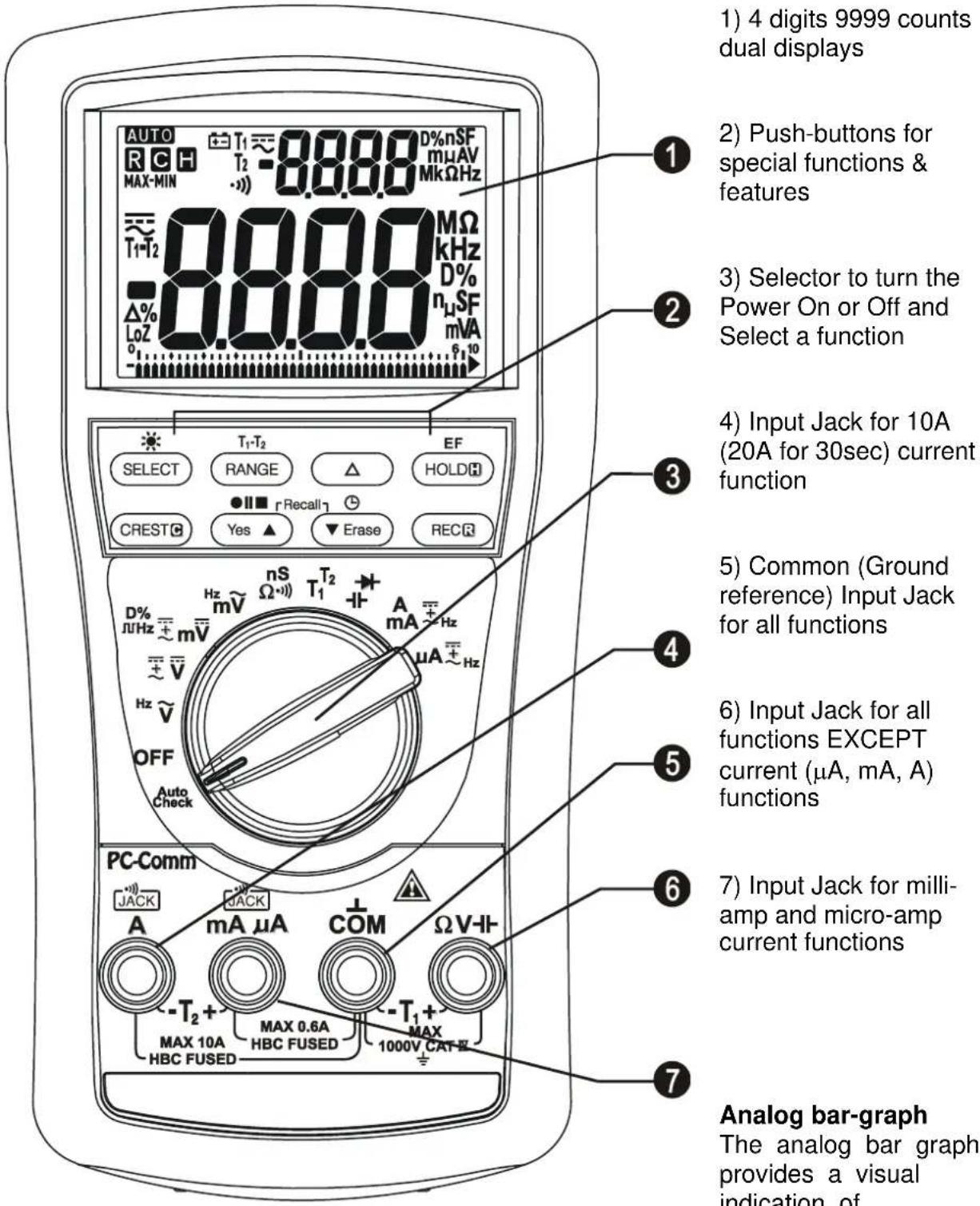
measurement like a traditional analog meter needle. It is excellent in detecting faulty contacts, identifying potentiometer clicks, and indicating signal spikes during adjustments.
Average sensing RMS calibrated
RMS (Root-Mean-Square) is the term used to describe the effective or equivalent DC value of an AC signal. Most digital multimeters use average sensing RMS calibrated technique to measure RMS values of AC signals. This technique is to obtain the average value by rectifying and filtering the AC signal. The average value is then scaled upward (calibrated) to read the RMS value of a sine wave. In measuring pure sinusoidal waveform, this technique is fast, accurate and cost effective. In measuring non-sinusoidal waveforms, however, significant errors can be introduced because of different scaling factors relating average to RMS values.
True RMS
True RMS is a term which identifies a DMM that responds accurately to the effective RMS value regardless of the waveforms such as: square, sawtooth, triangle, pulse trains, spikes, as well as distorted waveforms with the presence of harmonics. Harmonics may cause :
1) Overheated transformers, generators and motors to burn out faster than normal
2) Circuit breakers to trip prematurely
3) Fuses to blow
4) Neutrals to overheat due to the triplen harmonics present on the neutral
5) Bus bars and electrical panels to vibrate
Crest Factor
Crest Factor is the ratio of the Crest (instantaneous peak) value to the True RMS value, and is commonly used to define the dynamic range of a True RMS DMM. A pure sinusoidal waveform has a Crest Factor of 1.4. A badly distorted sinusoidal waveform normally has a much higher Crest Factor.
NMRR (Normal Mode Rejection Ratio)
NMRR is the DMM's ability to reject unwanted AC noise effect that can cause inaccurate DC measurements. NMRR is typically specified in terms of dB (decibel). This series has a NMRR specification of >60dB at 50 and 60Hz , which means a good ability to reject the effect of AC noise in DC measurements.
CMRR (Common Mode Rejection Ratio)
Common mode voltage is voltage present on both the COM and VOLTAGE input terminals of a DMM, with respect to ground. CMRR is the DMM's ability to reject common mode voltage effect that can cause digit rolling or offset in voltage measurements. This series has a CMRR specifications of >60dB at DC to 60Hz in ACV function; and >120dB at DC, 50 and 60Hz in DCV function. If neither NMRR nor CMRR specification is specified, a DMM's performance will be uncertain.
4 Operation
CAUTION
Before and after hazardous voltage measurements, test the voltage function on a known source such as line voltage to determine proper meter functioning.
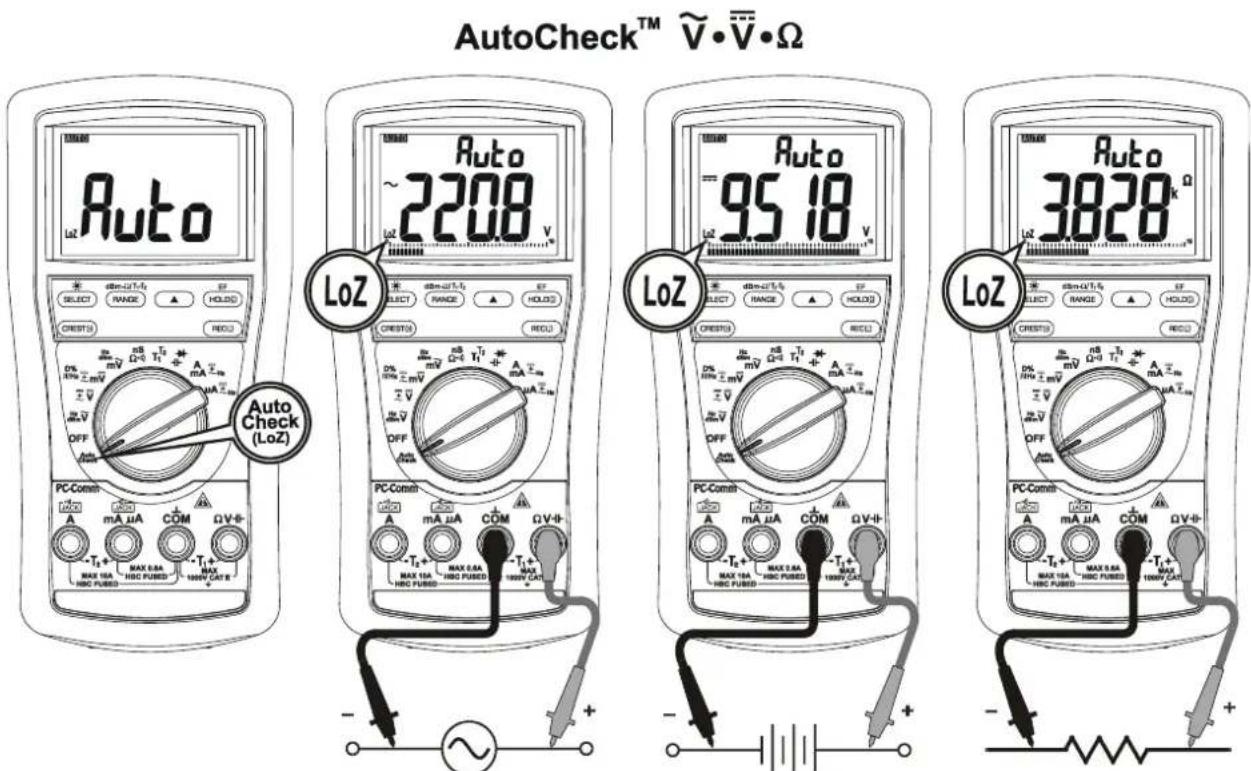
AutoCheckTM (for MD9050 only)
This innovative AutoCheck™ feature automatically selects measurement function of DCV, ACV or Resistance () based on the input via the test leads.
-
With no input, the meter displays "Auto" when it is ready.
-
With no voltage signal but a resistance below 60M is present, the meter displays the resistance value. When below "Audible Threshold" is present, the meter further gives a continuity beep tone.
-
When a signal above the threshold of 1.5V DC or 3V AC up to the rated 1000V is present, the meter displays the voltage value in appropriate DC or AC, whichever larger in peak magnitude.
Note:
*Range-Lock and Function-Lock Feature: When a measurement reading is being displayed in AutoCheck™ mode, press the RANGE or SELECT button momentarily 1 time can lock the range or function it was in. Press the button momentarily repeatedly to step through the ranges or functions.
*As Hazardous-A Alert: When making resistance measurements in AutoCheck™ mode, an unexpected display of voltage readings alerts you that the object under test is being energized.
*Ghost-voltage Buster: Ghost-voltages are unwanted stray signals coupled from adjacent hard signals, which confuse common multimeter voltage measurements. Our AutoCheck™ mode provides low (ramp-up) input impedance (approx. 3k at low voltage) to drain ghost voltages leaving mainly hard signal values on meter readings. It is an invaluable feature for precise indication of hard signals, such as distinguishing between hot and open wires (to ground) in electrical installation applications.
WARNING:
AutoCheckTM mode input impedance increases abruptly from initial 3k to a few hundred kΩ's on high voltage hard signals. "LoZ" displays on the LCD to remind the users of being in such low impedance mode. Peak initial load current, while probing 1000VAC for example, can be up to 471mA (1000V x 1.414 / 3kΩ), decreasing abruptly to approx. 3.1mA (1000V x 1.414 / 460kΩ) within a fraction of a second. Do not use AutoCheckTM mode on circuits that could be damaged by such low input impedance. Instead, use rotary selector high input impedance voltage modes to minimize loading for such circuits.
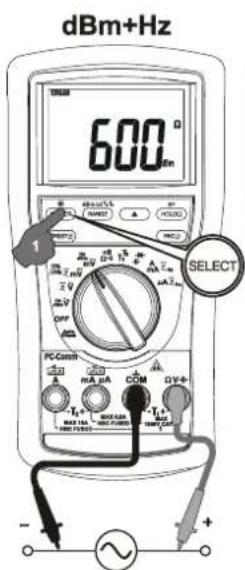
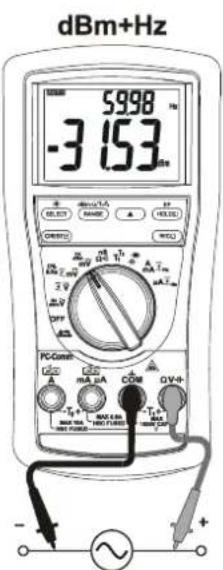
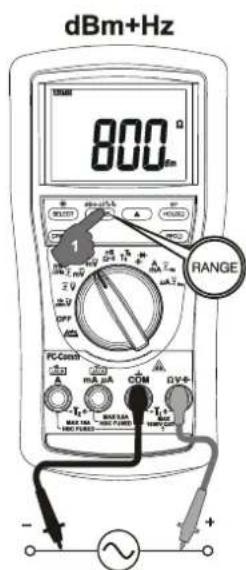
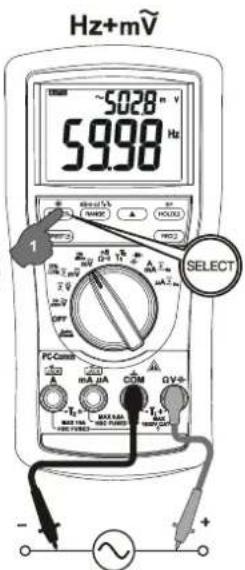
dBm ^+Hz (for MD9050 only), Hz ^+ACV , ACV ^+Hz functions
Press the SELECT button momentarily to select the subject functions in sequence. Last selection will be saved as power up default for repeat measurement convenience.
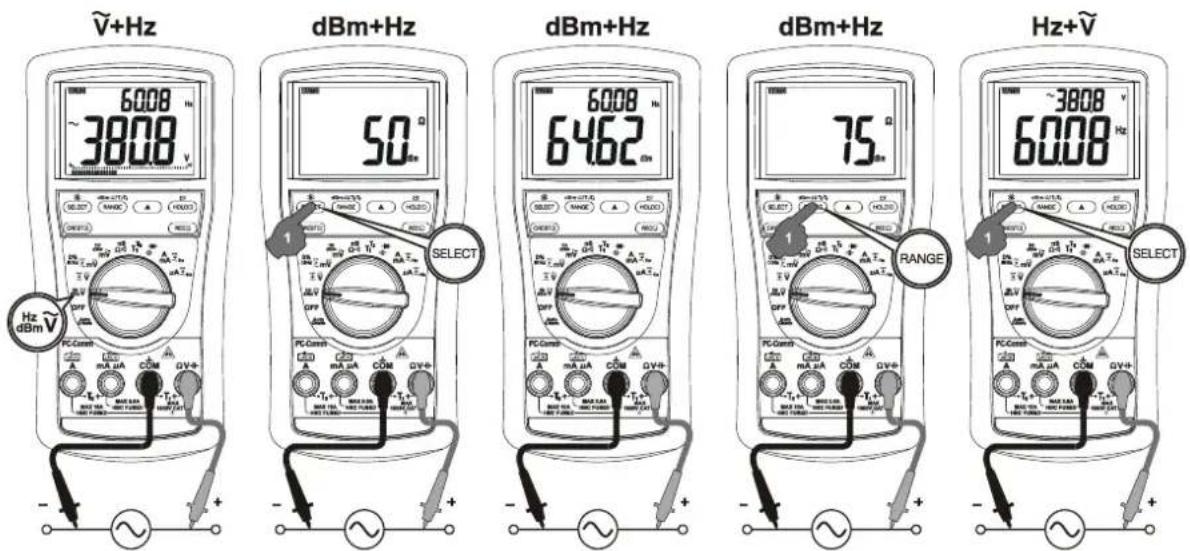
Note: Hz Input sensitivity varies automatically with voltage (current function alike) range selected. 1V range has the highest and the 1000V range has the lowest. Auto-ranging measurements normally set the most appropriate trigger level. You can also press the RANGE button momentarily to select another trigger level (voltage range) manually. If the Hz reading becomes unstable, select higher voltage range to avoid electrical noise. If the reading shows zero, select lower voltage range.
Note: In dBm ^+Hz function, power up default reference impedance will be displayed for 1 second before displaying the dBm readings. Press dBm-Ω (RANGE) button momentary to select different reference impedance of 4, 8, 16, 32, 50, 75, 93, 110, 125, 135, 150, 200, 250, 300, 500, 600, 800, 900, 1000, up to 1200 . Last selection will be saved as power up default for repeat measurement convenience. Manual trigger level selection on Hz reading is not available.
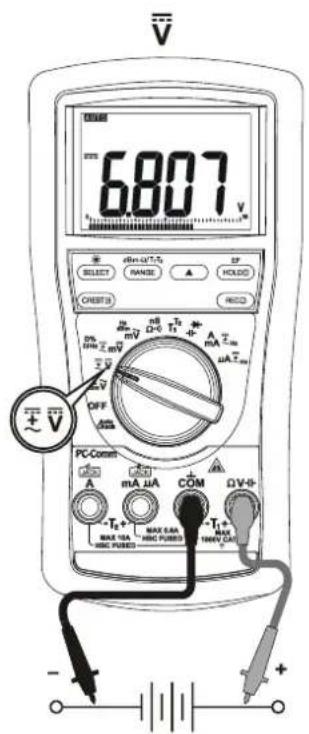
DC+ACV +ACV(MD9050 only), DCV, DCV +ACV functions
Press the SELECT button momentarily to select the subject functions in sequence. Last selection will be saved as power up default for repeat measurement convenience.
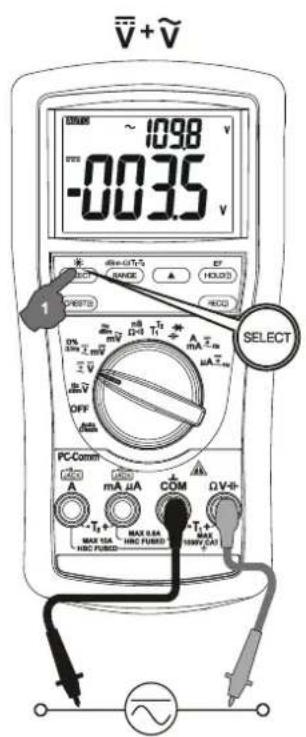
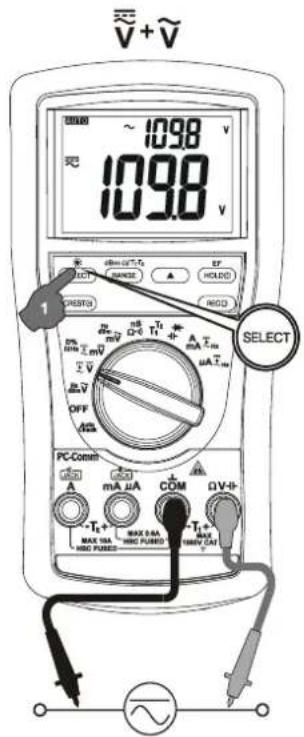
MD9050
DCmV, DcmV +ACmV, DC+ACmV +ACmV, Logic-Level & Duty%
Press the SELECT button momentarily to select the subject functions in sequence. Last selection will be saved as power up default for repeat measurement convenience.
MD9040
DCmV, DCmV +ACmV, Logic-Level & Duty%
Press the SELECT button momentarily to select the subject functions in sequence. Last selection will be saved as power up default for repeat measurement convenience.
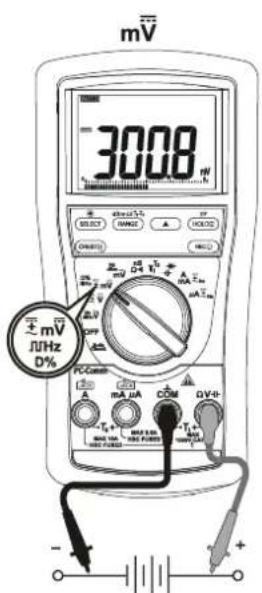
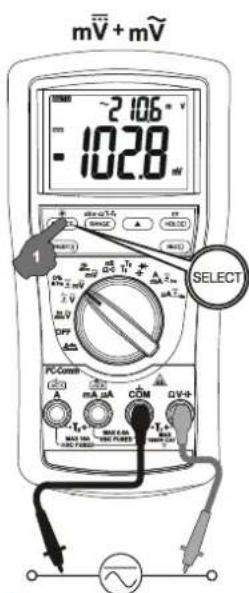
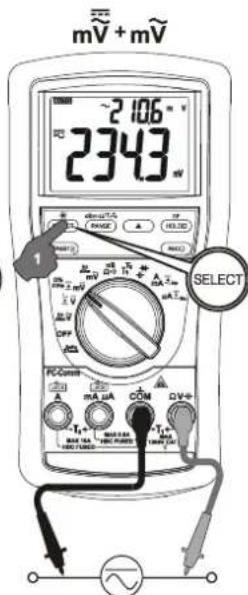
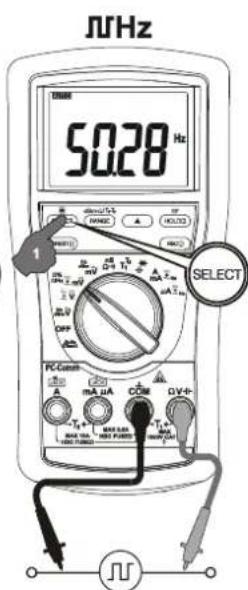
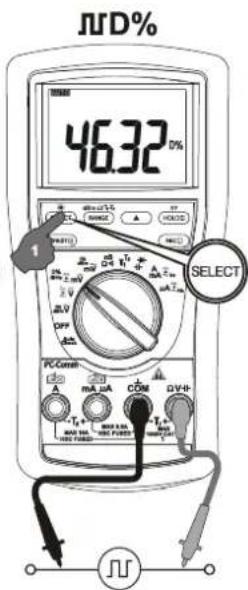
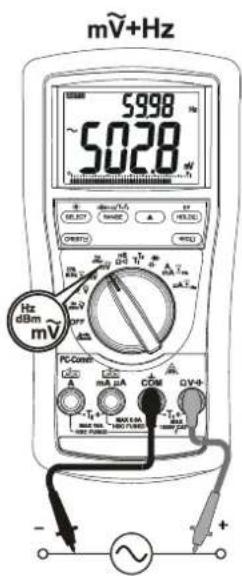
ACmV^+Hz , dBm ^+Hz (MD9050 only), Hz ^+ACmV functions
Press the SELECT button momentarily to select the subject functions in sequence. Last selection will be saved as power up default for repeat measurement convenience.
nS Conductance (MD9050 only), Resistance, Continuity functions
Press the SELECT button momentarily to select the subject functions in sequence for MD9050. Last selection will be saved as power up default for repeat measurement convenience. Direct rotary switch selection on Resistance and Continuous functions for the MD9040
Note: Conductance is the inverse of Resistance, that is S = 1 / or nS = 1 / G . It virtually extends the Resistance measurements to the order of Giga-Ohms for leakage measurements.
- Continuity function is convenient for checking wiring connections and operation of switches. A continuous beep tone indicates a complete wire.
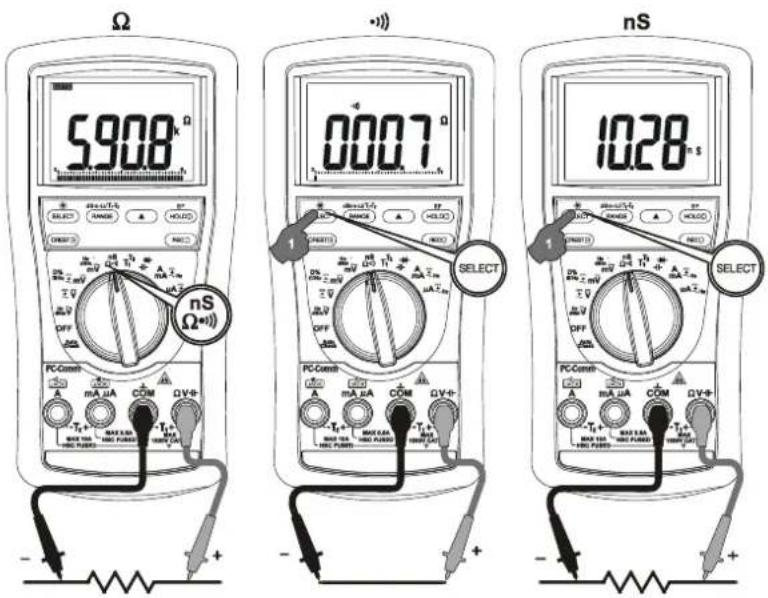
CAUTION
Using resistance and continuity function in a live circuit will produce false results and may damage the instrument. In many cases the suspected component must be disconnected from the circuit to obtain an accurate reading
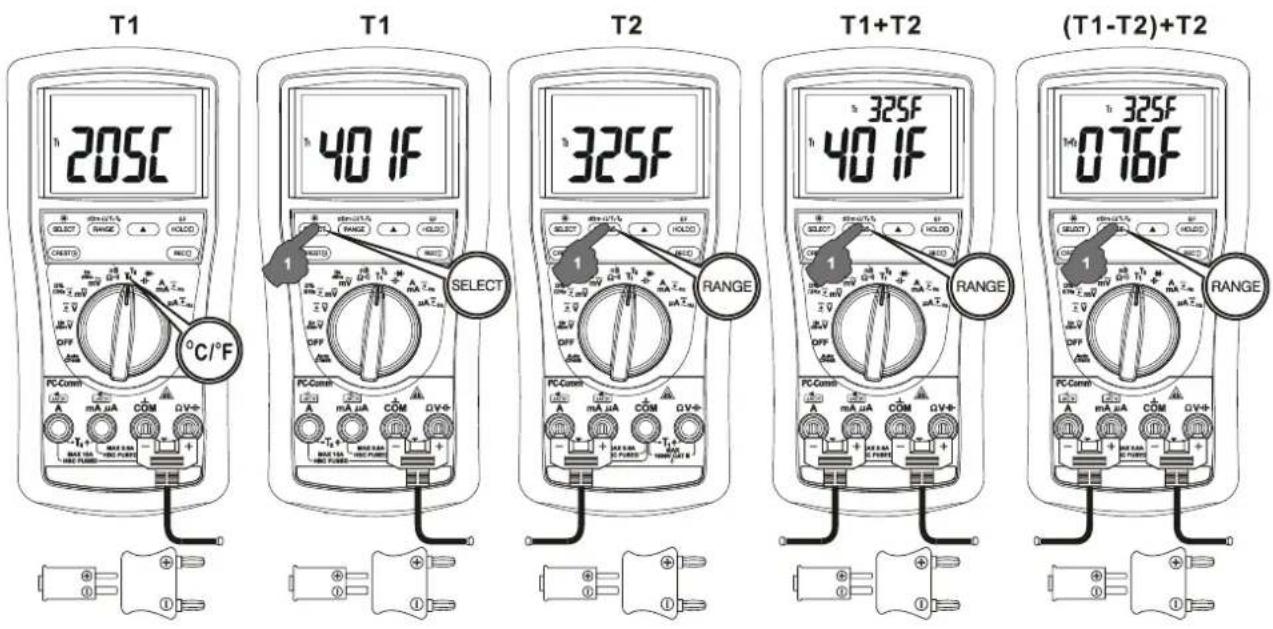
Temperature functions (for MD9050 only)
Press SELECT button momentarily to toggle between ^ C and ^ F readings. For Dual Channel Temperature function on the MD9050, press T1-T2 (RANGE) button momentarily can select T1, T2, T1 ^+T2 or T1-T2 ^+T2 readings. Last selection will be saved as power up default for repeat measurement convenience.
Note: Be sure to insert the banana plug type-K temperature bead probe AMD 9023 with correct polities. You can also use a plug adapter AMD 9024 (Optional purchase) with banana pins to type-K socket to adapt other standard type-K mini plug temperature probes.
Capacitance, biode test functions
Press the SELECT button momentarily to select the subject functions in sequence. Last selection will be saved as power up default for repeat measurement convenience.
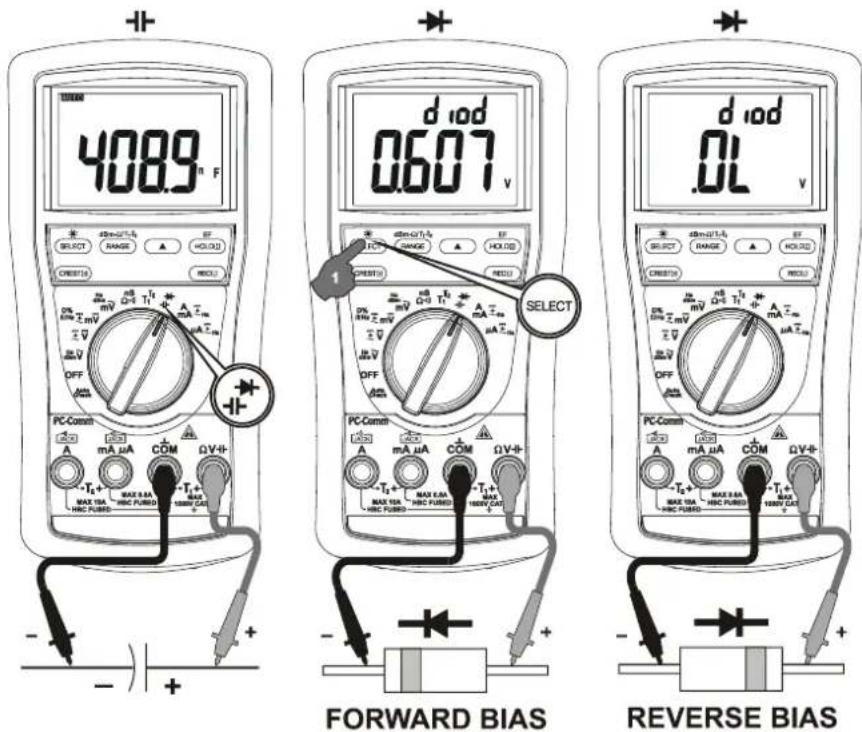
CAUTION
Discharge capacitors before making any measurement. Large value capacitors should be discharged through an appropriate resistance load.
Normal forward voltage drop (forward biased) for a good silicon diode is between 0.400V to 0.900V. A reading higher than that indicates a leaky diode (defective). A zero reading indicates a shorted diode (defective). An OL indicates an open diode (defective). Reverse the test leads connections (reverse biased) across the diode. The digital display shows OL if the diode is good. Any other readings indicate the diode is resistive or shorted (defective).
A , mA, and A Current functions
Press SELECT button momentarily to select DC, DC +AC, DC+AC +AC and AC +Hz. Last selection will be saved as power up default for repeat measurement convenience.
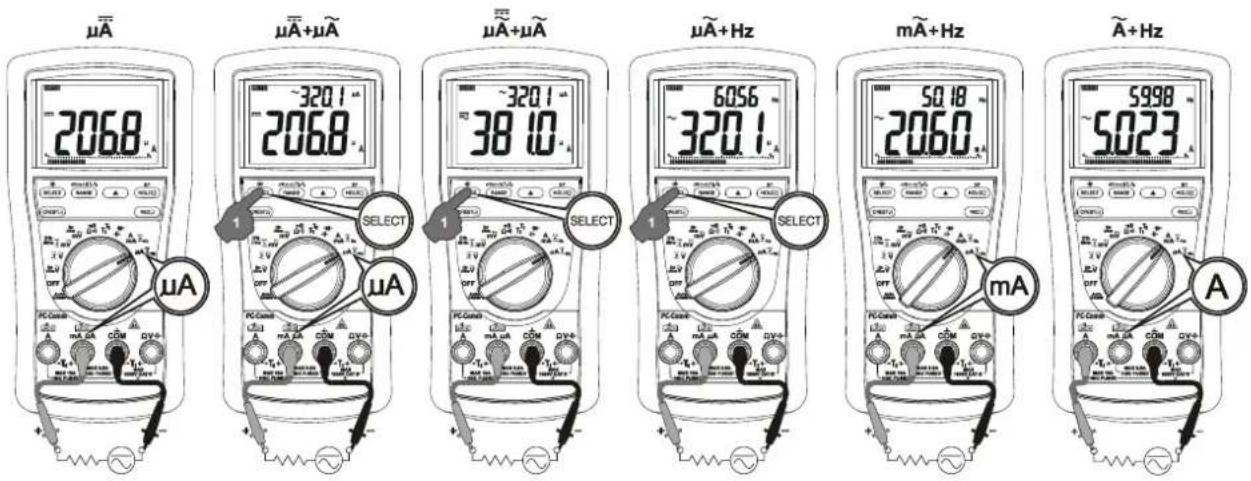
*Note: When measuring a 3-phase system, special attention should be taken to the phase-to-phase voltage which is significantly higher than the phase-to-earth voltage. To avoid exceeding the voltage rating of the protection fuse(s) accidentally, always consider the phase-to-phase voltage as the working voltage for the protection fuse(s).
Electric Field EF-Detection (MD9050 only)
At any function, press the EF button for one second or more to toggle to EF-Detection feature. The meter displays "E.F." when it is ready. Signal strength is indicated as a series of bar-graph segments on the display plus variable beep tones.
- Non-Contact EF-Detection: An antenna is located along the top of the meter, which detects electric field surrounds current-carrying conductors. It is ideal for tracing live wiring connections, locating wiring breakage and to distinguish between live or earth connections.
- Probe-Contact EF-Detection: For more precise indication of live wires, such as distinguishing between live and ground connections, use the Red (+) test probe for direct contact measurements.
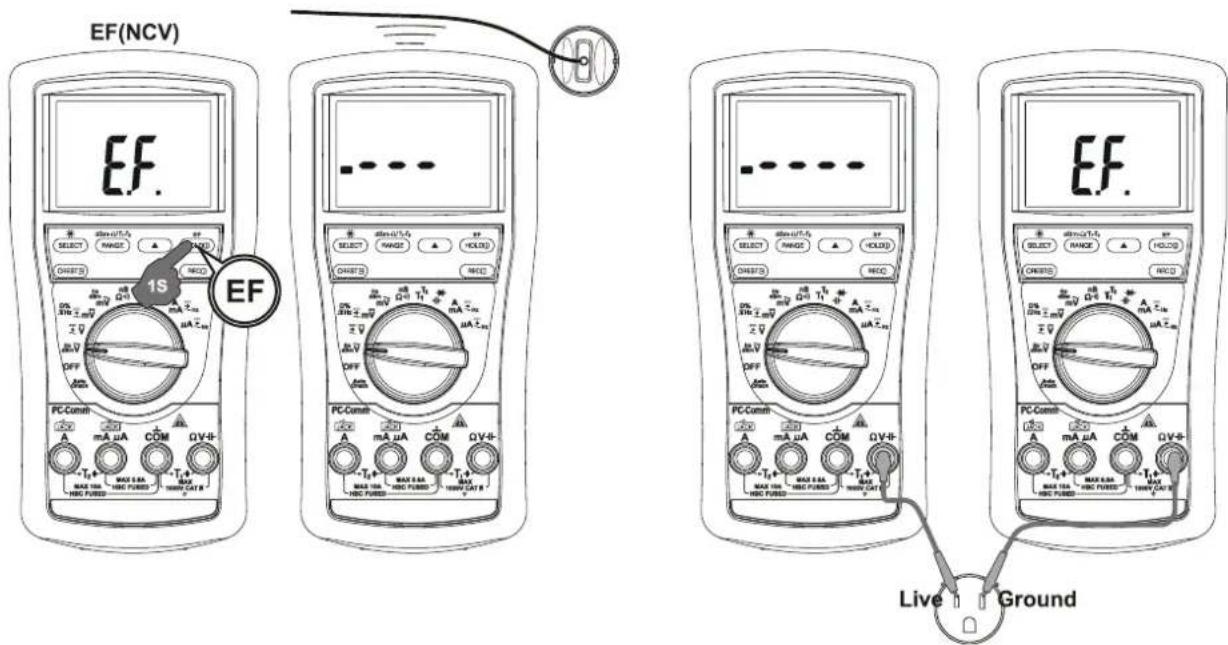
PC computer interface capabilities
The instrument equips with an optical isolated interface port at the meter back for data communication. Optional purchase PC USB interface kit AMD9050 is required to connect the meter to the PC computer.
MAX/MIN/AVG (REC) at fast 20/s measurement mode (MD9050 only)
Press REC button momentarily to activate MAX/MIN/AVG recording mode. The LCD "R" & "MAX MIN AVG" turn on, and the reading update rate will be increased to 20/second. The meter beeps when new MAX (maximum) or MIN (minimum) reading is updated. AVG^* (Average) reading is calculated over time. Press the button momentarily to read the MAX, MIN, MAX-MIN and AVG readings in sequence. Press the button for 1 second or more to exit MAX/MIN/AVG recording mode. Auto-ranging remains, and Auto-Power-Off is disabled automatically in this mode.
1ms CREST capture mode (MD9050 only)
Press CREST button momentarily to activate CREST (Instantaneous Peak-Hold) mode to capture voltage or current signal duration as short as 1ms. The LCD "C" & "MAX" turn on. The meter beeps when new MAX (maximum) or MIN (minimum) reading is updated. Press the button momentarily to read the MAX, MIN, and MAX-MIN (Vp-p) readings in sequence. Press the button for 1 second or more to exit CREST mode. Auto-ranging (up range) remains, and Auto-Power-Off is disabled automatically in this mode.
Backlighted display (MD9050 only)
Press the SELECT button for 1 second or more to toggle the LCD backlight. The backlight will also be turned off automatically after 32 seconds to extend battery life.
Beep-Jack™ Input Warning
The meter beeps as well as displays "InEr" to warn the user against possible damage to the meter due to improper connections to the A , mA, or A input jacks when other function (like voltage function) is selected.
Hold
The hold feature freezes the display for later view. Press the HOLD button momentarily to toggle the hold feature.
Relative Zero mode
Relative zero allows the user to offset the meter consecutive measurements with the displaying reading as the reference value. Practically all displaying readings can be set as relative reference value including MAX/MIN/AVG readings. Press the button momentarily to toggle relative zero mode.
Manual or Auto-ranging
Press the RANGE button momentarily to select manual-ranging, and the meter will remain in the range it was in, the LCD tALTOff. Press the button momentarily again to step through the ranges. Press and hold the button for 1 second or more to resume auto-ranging.
Note: Manual ranging feature is not available in Hz function.
Set Beeper Off
Press the RANGE button while turning the meter on to temporarily disable the Beeper feature. Turn the rotary switch OFF and then back on to resume.
Auto-Power-off (APO)
The Auto-Power-off (APO) mode turns the meter off automatically to extend battery life after approximately 30 minutes of no activities. Activities are specified as: 1) Rotary switch or push button operations, and 2) Significant measuring readings of above 512 counts or non-OL readings. In other words, the meter will intelligently avoid entering the APO mode when it is under normal measurements.. To wake up the meter from APO, press the SELECT, RANGE, RELATIVE or HOLD button momentarily or turn the rotary switch OFF and then back on. Always turn the rotary switch to the OFF position when the meter is not in use
Disabling Auto-Power-off
Press the SELECT button while turning the meter on to temporarily disable the AutoPower-Off feature. Turn the rotary switch OFF and then back on to resume.
5 Maintenance
WARNING
To avoid electrical shock, disconnect the meter from any circuit, remove the test leads from the input jacks and turn OFF the meter before opening the case. Do not operate with open case. Install only the same type of fuse or equivalent
Cleaning and Storage
Periodically wipe the case with a damp cloth and mild detergent; do not use abrasives or solvents. If the meter is not to be used for periods of longer than 60 days, remove the battery and store it separately
Trouble Shooting
If the instrument fails to operate, check battery, fuses, leads, etc., and replace as necessary. Double check operating procedure as described in this user's manual
If the instrument voltage-resistance input terminal has subjected to high voltage transient (caused by lightning or switching surge to the system) by accident or abnormal conditions of operation, the series fusible resistors will be blown off (become high impedance) like fuses to protect the user and the instrument. Most measuring functions through this terminal will then be open circuit. The series fusible resistors and the spark gaps should then be replaced by qualified technician. Refer to the LIMITED WARRANTY section for obtaining warranty or repairing service.
Battery and Fuse replacement
Battery use: Single 9V battery; NEDA1604G, JIS006P IEC6F22, NEDA1604A, JIS6AM6 or IEC6LF22
Fuses use:
MD 9040 and 9050:
Fuse (FS1) for AmA current input:
0.44A/1000Vac & Vdc, IR 10kA or better, F fuse; Dimension: 10 × 38 mm
Fuse (FS2) for A current input:
11A/1000Vac & Vdc, IR 20kA or better, F fuse; Dimension: 10 × 38 mm
Battery replacement:
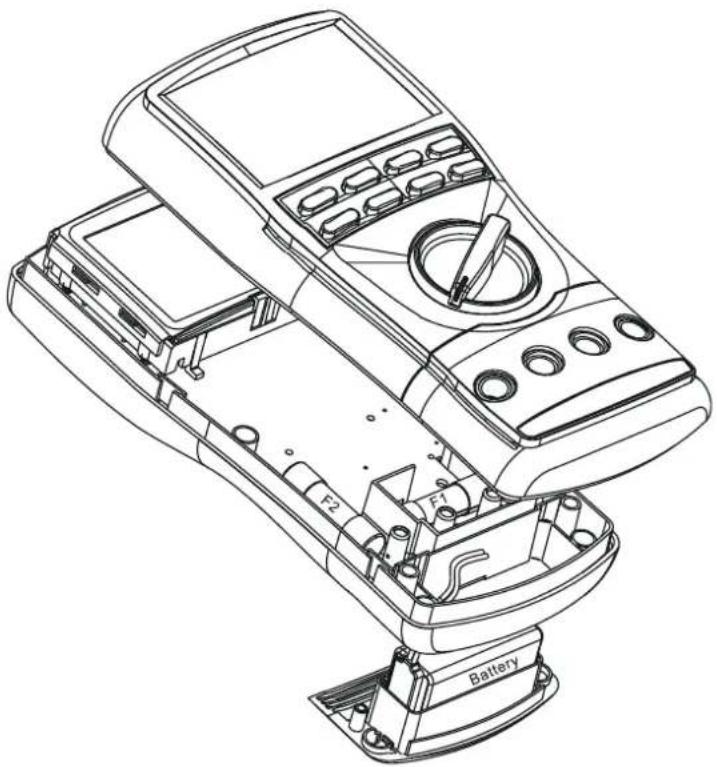
Loosen the 2 screws from the battery access door of the case bottom. Lift the battery access door and thus the battery compartment up. Replace the battery. Re-fasten the screws.
Fuse replacement:
Loosen the 4 screws from the case bottom. Lift the end of the case bottom nearest the input jacks until it unsnaps from the case top. Replace the blown fuse(s). Replace the case bottom, and ensure that all the gaskets are properly seated and the two snaps on the case top (near the LCD side) are engaged. Re-fasten the screws.
6 Specification
General Specifications
Display: 9999 counts: ACV, DCV, Hz & nS
6000 counts: mV, A, mA, A, Ohm & Capacitance
Polarity: Automatic
Update Rate: Digital Display: 5 per second nominal;
41 Segments Bar-graph: 60 per second max
Low Battery: Below approx. 7V
Operating Temperature: 0 ^ C to 45^ C
Relative Humidity: Maximum relative humidity 80% for temperature up to 31 °C decreasing linearly to 50% relative humidity at 45^
Pollution degree: 2
Storage Temperature: -20 ^ C to 60^ < 80% R.H. (with battery removed)
Altitude: Operating below 2000m
Temperature Coefficient: nominal 0.15 × (specified accuracy)/ ^ C @ (0^ C 18^ C or 28^ C 45^ C) , or otherwise specified
Sensing: MD 9050: AC+DC True RMS
MD 9040: AC True RMS
Safety: Double insulation IEC/UL/EN61010-1 Ed. 3.0, IEC/EN61010-2-030 Ed. 1.0, IEC/EN61010-2-033 Ed. 1.0, IEC/UL/EN61010-031 Ed. 1.1 and CAN/CSA-C22.2 No. 61010-1-12 Ed. 3.0 to Category IV 1000Vac & Vdc.
Transient protection: 12kV (1.2/50μs surge)
MD 9040 & MD 9050 Terminals (to COM) Measurement Category:
V/A/mAμA: Category IV 1000Vac & Vdc
Overload Protections:
MD 9050, MD 9040:
A\& mA .. 0.44A/1000Vac & Vdc, IR 10kA or better, F fuse
A: 11A/1000Vac & Vdc, IR 20kA or better, F fuse
V, mV, Ω, & Others: 1050Vrms, 1450Vpeak
E.M.C.: Meets EN61326-1:2006 (EN55022, EN61000-3-2, EN61000-
3-3, EN61000-4-2, EN61000-4-3, EN61000-4-4, , EN61000-
4-5, EN61000-4-6, EN61000-4-8, EN61000-4-11)
In an RF field of 3V / m
Capacitance function is not specified
Other function ranges:
Total Accuracy = Specified Accuracy + 100 digits
Performance above 3V / m is not specified
Power Supply: Single 9V battery; NEDA1604G, JIS006P IEC6F22, NEDA1604A, JIS6AM6 or IEC6LF22
Power Consumption: 5 mA typical
APO Timing: Idle for 30 minutes
APO Consumption: 50 A typical
Dimension: L208mm X W103mm X H64.5mm with holster
Weight: 635 gm with holster
Accessories:
Test lead pair; battery installed; user's manual; AMD9023 banana plug type-K thermocouple (MD 9050)
Optional purchase accessories: USB interface kit AMD9050; AMD9024 banana plug to type-K socket plug adaptor
Electrical Specifications
Accuracy is ± (% reading digits ^+ number of digits) or otherwise specified, at 23^± 5^ & less than 75% relative humidity.
True RMS voltage & current accuracies are specified from 10% to 100% of range or otherwise specified. Maximum Crest Factor < 3:1 at full scale \& < 6:1 at half scale, and with frequency components within the specified frequency bandwidth for non-sinusoidal waveforms.
AC & AC+DC Voltage
| Function | RANGE | Accuracy |
| 50Hz ~ 60Hz | ||
| mV | 60.00mV,600.0mV | 0.5% + 3d |
| V | 9.999V, 99.99V,999.9V | |
| 40Hz ~ 500Hz | ||
| mV | 60.00mV,600.0mV | 0.8% + 4d |
| V | 9.999V, 99.99V | 1.0%+4d |
| 999.9V | 2.0%+4d | |
| 500Hz ~ 1kHz | ||
| mV | 60.00mV,600.0mV | 2.0% + 3d |
| V | 9.999V, 99.99V | 1.0%+4d |
| 999.9V | 2.0%+4d | |
| 1kHz ~ 3kHz | ||
| mV | 60.00mV,600.0mV | 2%+3d |
| V | 9.999V, 99.99V,999.9V | 3.0%+4d |
| 3kHz ~ 20kHz | ||
| mV | 60.00mV1),600.0mV1) | 2%+3d |
| V | 9.999V, 99.99V | 3dB |
| 999.9V | Unspec'd | |
1)Specficied from 30% to 100% of range.
CMRR: >60dB @ DC to 60Hz,
Rs=1kΩ
Input Impedance: 10M 50pF nominal
(80pF nominal for 600mV range)
Residual reading less than 5 digits with test leads shorted.
Audible Continuity Tester
Audible threshold: between 20 and
300Ω; Response time < 100 s
AutoCheck™ (ACV)
| RANGE 1) | Accuracy |
| 50Hz ~ 60Hz | |
| 9.999V, 99.99V, 999.9V | 1.0%+4d |
Lo-Z ACV Threshold:
3VAC (50/60Hz) nominal
Lo-Z ACV Input Impedance:
Initially approx. 3.0k 150pF nominal;
Impedance increases abruptly within a
fraction of a second as display voltage
is above 50V (typical). Ended up
impedances vs display voltages
typically are:
18kΩ @100V
125kΩ @ 300V
320kΩ @ 600V
460kΩ @ 1000V
DC Voltage
| Function | RANGE | Accuracy |
| mV | 60.00mV | 0.12%+2d |
| 600.0mV | 0.06%+2d | |
| V | 9.999V, 99.99V, 999.9V | 0.08%+2d |
NMRR: >60dB @ 50/60Hz
CMRR: >110dB @ DC, 50/60Hz,
Rs=1kΩ
Input Impedance: 10M 50pF nominal
(80pF nominal for 600mV range)
dBm
At 600 -11.76dBm to 54.25dBm,
Accuracy: ± 0.25dB + 2d (@40Hz --
20kHz)
Input Impedance: 10M 50pF nominal
Selectable reference impedance of 4, 8,
16,32,50,75,93,110,125,135,150
200, 250, 300, 500, 600, 800, 900, 1000,
1200Ω
AutoCheck™ (DCV)
| RANGE | Accuracy |
| 9.999V, 99.99V, 999.9V | 0.5%+3d |
Lo-Z DCV Threshold:
+1.5VDC or < -1.0VDC nominal
Lo-Z DCV Input Impedance:
Initially approx. 3.0k 165pF nominal;
Impedance increases abruptly within
fraction of a second as display voltage
is above 50V (typical). Ended up
impedances vs display voltages
typically are:
18kΩ @100V
125kΩ @ 300V
320kΩ @ 600V
500kΩ @ 1000V
Ohms
| RANGE | Accuracy |
| 600.0Ω, 6.000kΩ, 60.00kΩ, 600.0kΩ | 0.1%+3d |
| 6.000MΩ | 0.4%+3d |
| 60.00MΩ | 1.5%+5d |
| 99.99nS | 0.8%+10d |
Open Circuit Voltage: < 1.2VDC (< 1.0VDC for 60MΩ range)
AutoCheck™ (Ohms)
| RANGE | Accuracy |
| 600.0Ω, 6.000kΩ, 60.00kΩ, 600.0kΩ | 0.5%+4d |
| 6.000MΩ | 0.8%+3d |
| 60.00MΩ | 2.0%+5d |
Open Circuit Voltage: < 1.2VDC (< 1.0VDC for 60MΩ range)
Crest mode (Instantaneous Peak Hold)
Accuracy: Specified accuracy adds 250 digits for changes >1.0 ms in duration
Diode Tester
| RANGE | Accuracy |
| 2.000V | 1.0%+1d |
Test Current (Typically): 0.4mA Open Circuit Voltage: < 3.5 VDC
Temperature
| RANGE | Accuracy |
| -50°C to 1000°C | 0.3%+2°C |
| -58°F to 1832°F | 0.3%+5°F |
Type-K thermocouple range & accuracy not included
Capacitance
| RANGE | Accuracy1) |
| 60.00nF, 600.0nF | 0.8% + 3d |
| 6.000μF | 1.0% + 3d |
| 60.00μF | 2.0% + 3d |
| 600.0μF2) | 3.5% + 5d |
| 6.000mF2) | 5.0% + 5d |
| 25.00mF2) | 6.5% + 5d |
1)Accuracies with film capacitor or better 2)In manual-ranging mode, measurements not specified below
50.0μF, 0.54mF and 5.4mF for 600.0μF, 6.000mF and 25.00mF ranges respectively
DC Current
| RANGE | Accuracy | Burden voltage |
| 600.0μA, 6000μA | 0.2%+4d | 0.08mV/μA |
| 60.00mA, 600.0mA | 2.1mV/mA | |
| 6.000A, 10.00A1) | 0.02V/A |
1)10A continuous, >10A to 20A for 30 second max with 5 minutes cool down interval
AC & AC+DC Current
| RANGE | Accuracy | Burden voltage |
| 50Hz ~ 60Hz | ||
| 600.0μA,6000μA | 0.6%+3d | 0.08mV/μA |
| 60.00mA | 2.1mV/mA | |
| 600.0mA | 1.0%+3d | |
| 6.000A,10.00A 1) | 0.8%+6d | 0.02V/A |
| 40Hz ~ 1kHz | ||
| 600.0μA,6000μA | 0.8%+4d | 0.08mV/μA |
| 60.00mA | 2.1mV/mA | |
| 600.0mA | 1.0%+4d | |
| 6.000A,10.00A 1) | 0.8%+6d | 0.02V/A |
1)10A continuous, >10A to 20A for 30 second max with 5 minutes cool down interval
Line Level Frequency (Hz)
| Function Range | Frequency | Sensitivity (Sine RMS) |
| AC 60.00mV | 15.00 ~ 50.00kHz | 40mV |
| AC 600.0mV | 60mV | |
| AC 9.999V | 15.00 ~ 10.00kHz | 2.5V |
| AC 99.99V | 25V | |
| AC 999.9V | 100V | |
| AC 600.0μA | 45uA | |
| AC 6000μA | 600uA | |
| AC 60.00mA | 15.00 ~ 3.000kHz | 40mA |
| AC 600.0mA | 60mA | |
| AC 6.000A | 4A | |
| AC 10.00A | 6A |
Accuracy: 0.04% + 4d
Logic Level Frequency (J&z) & Duty Cycle (D%)
| @ DCmV Function | Range | Accuracy 1) |
| Frequency | 5.00Hz ~ 1.000MHz | 0.004%+4d |
| Duty Cycle | 0.00% ~ 100.0% | 3d/kHz+2d 2) |
Sensitivity: 2.5Vp (Square wave) for 3V
& 5V Logic Family
2) Specified Frequency: 5Hz ~ 10kHz
Non-Contact EF-Detection
| Typical Voltage | Bar Graph Indication |
| 20V (tolerance:10V~36V) | - |
| 55V (tolerance: 23V ~ 83V) | -- |
| 100V (tolerance: 59V ~ 165V) | --- |
| 220V (tolerance: 124V ~ 330V) | ---- |
| 440V (tolerance: > 250V) | ----- |
Indication: Bar graph segments & audible beep tones proportional to the field strength
Detection Frequency: 50/60Hz
Detection Antenna: Top end of the meter
Probe-Contact EF-Detection:
For more precise indication of live wires, such as distinguishing between live and ground connections, use the Red (+) test probe for direct contact measurements.
Record mode
Accuracy: Specified accuracy adds 10 digits for changes >100 ms in duration
LIMITED WARRANTY
This equipment is warranted against any defects of manufacture or materials.
During the warranty period (2 years), defective parts will be replaced, the manufacturer reserving the right to repair or replace the product. In the event of the equipment being returned to the after sale department or to a local agency, the outward transport is payable by the consignor. For delivery indicate, by means of an enclosed note, as clear as possible, the reasons for returning it. Any damage caused by shipment using not original packing will be charged in any case to the consignor.
The manufacturer will not be responsible for any damage to persons or things.
The warranty is not valid in the following cases:
- Accessories and battery are not included in warranty.
- Repairs following unsuitable use of the equipment.
- Repairs necessitated by attempts to repair by a person not approved by the manufacturer.
- Modification of the equipment without the explicit authorisation of the manufacturer.
- Adaptation to a specific application not provided for in the specifications of the equipment or the user manual.
- Damage after a drop, a shock or flooding.
The contents of this manual must not be reproduced in any form whatsoever without the consent of the manufacturer.
Service
The life span of the equipment is 7 years. If the equipment should not work properly, before the service, test the battery conditions, the test leads, etc., and change them if necessary.
If the equipment still does not work check if your operating procedure agrees with the latter described in this manual.
In the event of returning the equipment it must be re-sent to the after-sales service of the local Metrel distributor, the outward transport is payable by customer. The delivery must be agreed in advance with consignee. For delivery indicate, by means of an enclosed note, as clear as possible, the reasons for returning it. Use only the original packing. Any damage caused by delivery with NO original packing will be charged in any case to the consignor.
THIS WARRANTY IS EXCLUSIVE AND IS IN LIEU OF ALL OTHER WARRANTYES, EXPRESSED OR IMPLIED, INCLUDING BUT NOT LIMITED TO ANY IMPLIED WARRANTY OR MERCHANTABILITY OR FITNESS FOR A PARTICULAR PURPOSE OR USE. METREL WILL NOT BE LIABLE FOR ANY SPECIAL, INDIRECT, INCIDENTAL OR CONSEQUENTIAL DAMAGES.

PRINTED ON RECYCLABLE PAPER, PLEASE RECYCLE
1 Sicherheit
AC in AC+DC Napetost
| Funkcija | Območje | NDP |
| 50 Hz ~ 60 Hz | ||
| mV | 60.00 mV, 600.0 mV | 0.5 % + 3 digiti |
| V | 9.999 V, 99.99 V, 999.9 V | |
| 40 Hz ~ 500 Hz | ||
| mV | 60.00 mV, 600.0 mV | 0.8 % + 4 digiti |
| V | 9.999 V, 99.99 V | 1.0 % + 4 digiti |
| 999.9 V | 2.0 % + 4 digiti | |
| 500 Hz ~ 1 kHz | ||
| mV | 60.00 mV, 600.0 mV | 2.0 % + 3 digiti |
| V | 9.999 V, 99.99 V | 1.0 % + 4 digiti |
| 999.9 V | 2.0 % + 4 digiti | |
| 1 kHz ~ 3 kHz | ||
| mV | 60.00 mV, 600.0 mV | 2 % + 3 digiti |
| V | 9.999 V, 99.99 V, 999.9 V | 3.0 % + 4 digiti |
| 3 kHz ~ 20 kHz | ||
| mV | 60.00 mV1), 600.0 mV1) | 2 % + 3 digiti |
| V | 9.999 V, 99.99 V | 3 dB |
| 999.9 V | Nepodan | |
NMRR: >60 dB @ 50/60 Hz
CMRR: >110 dB @ DC, 50 / 60 Hz, Rs = 1 kΩ
At 600 Ω, -11.76 dBm to 54.25 dBm,
NDP: ±0.25 dB + 2 d (@40 Hz - 20 kHz)
Vhodna impedanca: 10 MΩ, 50 pF nazivno
Referenčno impedanco se izbere izmed 4, 8, 16, 32, 50, 75, 93, 110, 125, 135, 150, 200, 250, 300, 500, 600, 800, 900, 1000, 1200 Ω
NDP: 0.04% + 4 digiti
Frekvenca logicneganivoja (Ez) & Razmerje sirin (D%)
| @ funkciji DCmV | Območje | NDP 1) |
| Frekvenca | 5.00 Hz ~ 1.000 MHz | 0.004 % + 4 digiti |
| Razmerje širin | 0.00 % ~ 100.0 % | 3 d/kHz + 2 digita 2) |
1)Obcutljivost: 2.5 Vp (pravokotna oblika) za 3 V & 5 V logiko
2Frekvencno obmoce: 5Hz 10kHz
2 Directives Cenelec
Perception: MD 9050: AC+DC True RMS MD 9040: AC True RMS
Sécurité: Double isolation pour IEC/UL/EN61010-1 Ed. 3.0, IEC/EN61010-2-030 Ed. 1.0, IEC/EN61010-2-033 Ed. 1.0, IEC/UL/EN61010-031 Ed. 1.1 & CAN/CSA-C22.2 No. 61010-1-12 Ed. 3.0 to to Catégorie IV 1000Vac & Vdc.
Protection transitoire: 12kV (1.2/50μs de survoltage)
a 600 -11.76dBm to 54.25dBm,
Precislon: ± 0.25dB + 2d (@40Hz -- 20kHz)
Impedance d'entree: 10MΩ, 50pF nominal
| RANGE | Accuracy |
| 9.999V, 99.99V, 999.9V | 0.5%+3d |
Seuil Lo-Z DCV:
+1.5VDC or < -1.0VDC nominal
Non-Contact EF-Detection
| Tension | Indication du bargraph |
| 20V (tolerance:10V~36V) | - |
| 55V (tolerance: 23V ~ 83V) | -- |
| 100V (tolerance: 59V ~ 165V) | --- |
| 220V (tolerance: 124V ~ 330V) | ---- |
| 440V (tolerance: > 250V) | -------- |