EasyManual
HOCE7620DX - Fridge HOOVER - Free user manual and instructions
Find the device manual for free HOCE7620DX HOOVER in PDF.


User questions about HOCE7620DX HOOVER
0 question about this device. Answer the ones you know or ask your own.
Ask a new question about this device
Download the instructions for your Fridge in PDF format for free! Find your manual HOCE7620DX - HOOVER and take your electronic device back in hand. On this page are published all the documents necessary for the use of your device. HOCE7620DX by HOOVER.
USER MANUAL HOCE7620DX HOOVER
Discover extra contents and
create your inventory list


EN 1
BG. 11
CS 22
DA 33
DE 43
EL 54
ES. 66
FI. 75
FR 86
HR 96
HU 106
IT 116
NL 126
NO 136
PL 146
PT. 156
RO. 166
RU 177
SK 188
SL 198
SR 208
SV 218
UK 228
AR 238
Summary
PRODUCT DESCRIPTION 2
Space requirements 2
USE. 3
Use 3
Customized temperature 4
Super Cool function 4
Super Freeze function 5
Eco mode 5
Holiday function 5
Defrosting 5
Demo mode 6
Error Codes 6
WI-FIUSE 7
Step 1 7
Step 2 7
Step 3 7
Wi-Fi Use 8
DOOR REVERSIBILITY 9
TROUBLESHOOTING
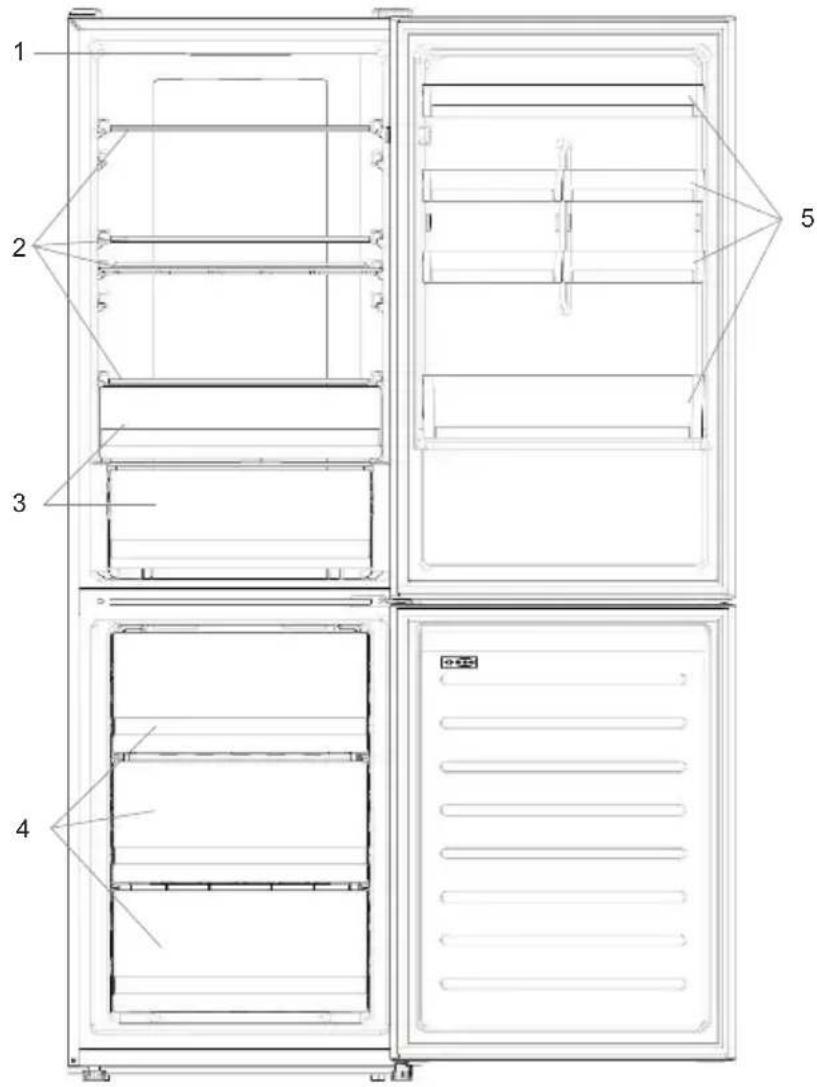
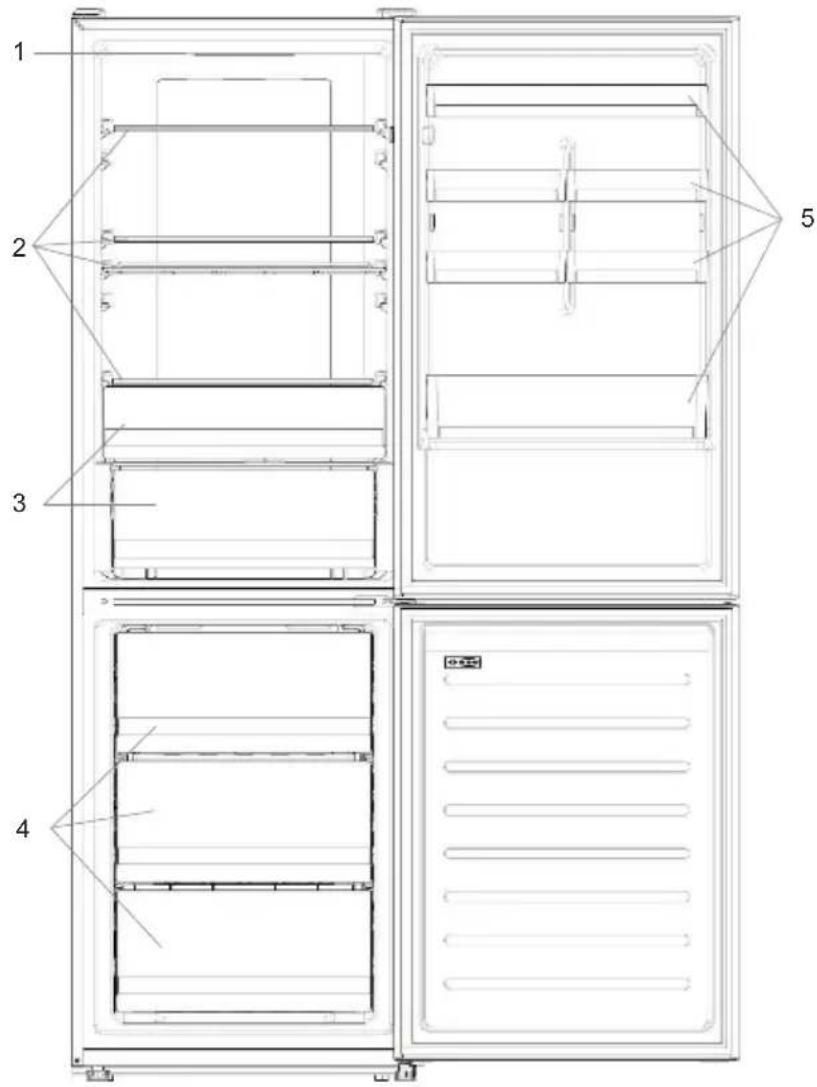
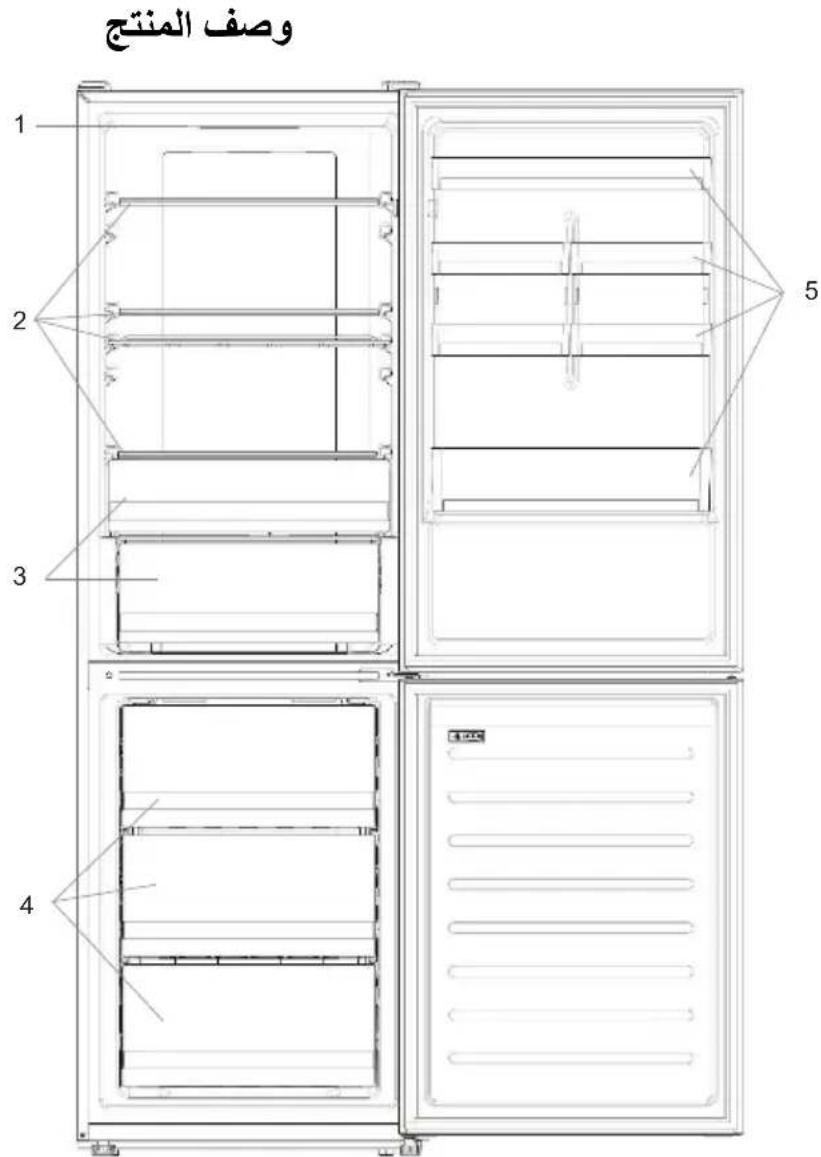
PRODUCT DESCRIPTION
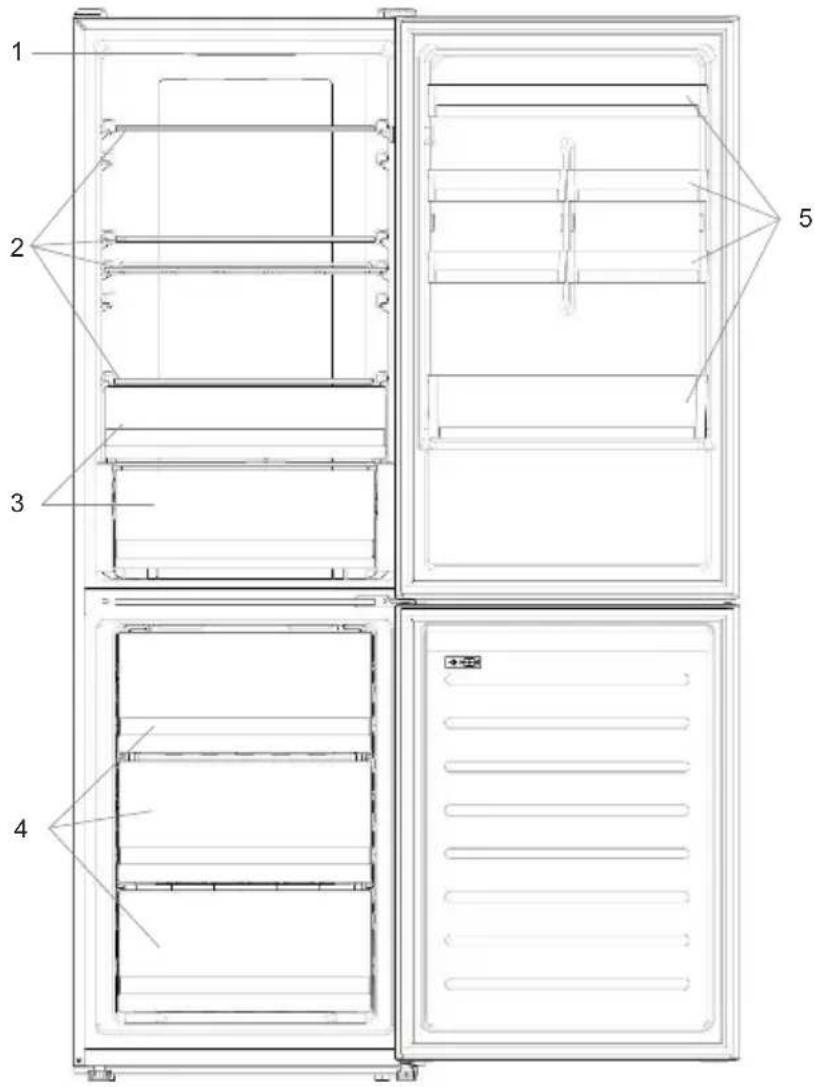
- Control Panel
- Shelves
- Crispers
- Freezer Boxes
-
Door rack
-
The most energy-saving configuration requires drawers, food box and shelves to be positioned in the product, please refer to the above pictures.
** The pictures above are only for reference. The actual configuration will depend on the physical product or statement by the distributor.
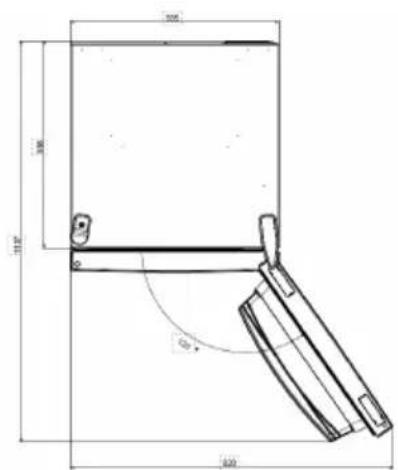
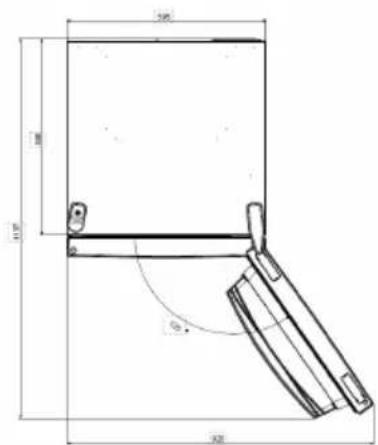
Space requirements
The unit's door must be able to fully open as shown. Spare enough space for convenient opening of the doors and drawers.
Keep a distance of at least 50mm between the side walls of the product and adjacent parts.
Width: min. 920~mm
Depth: min. 1137mm
USE
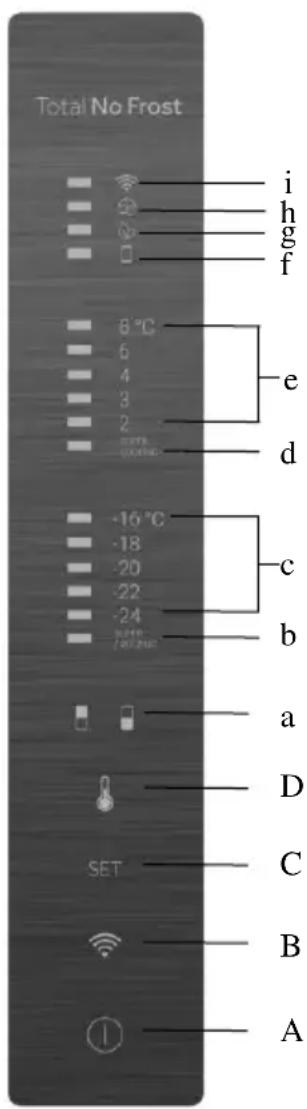
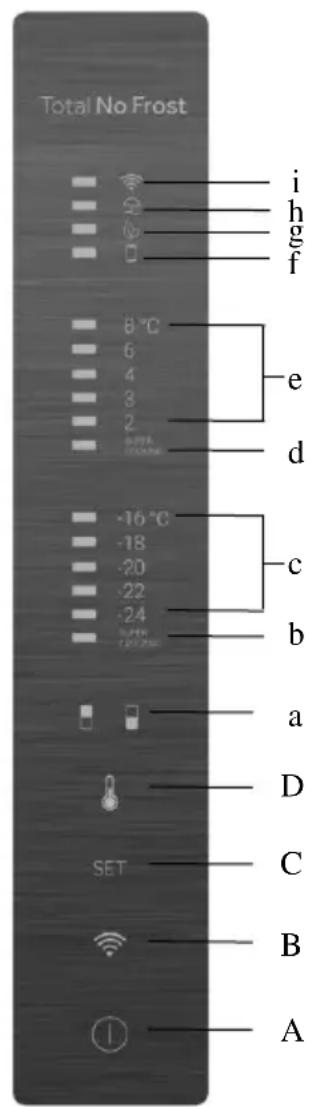
A. ON/OFF key, used to switch on/off the appliance
B. Wi-Fi key, used to switch on/off the Wi-Fi
C. Mode key, used to selected the desired function
D. TEMP key, used to selected the fridge and freezer temperature
a. Fridge /freezer area icon, shows which compartment of the appliance is selected
b. Super Freeze icon, shows if the Super Freeze function is activated
c. Freezer temperature levels, show which is the selected temperature in the freezer
d. Super Cool icon, shows if the Super Cool function is activated
e. Fridge temperature levels, show which is the selected temperature
f. Customized temperature icon, show if the temperature has been selected by app
g. Eco mode icon, shows whether the eco mode is activated
h. Holiday function icon, show whether the holiday function is activated
i. Wi-Fi Icon, shows whether the Wi-Fi is working and the appliance is connected
Use
- Plug on the appliance, it automatically turns on. The temperature will automatically set at 4^ in the fridge and -18^ in the freezer.
- To change the temperature, press the TEMP key for 5 seconds, an acoustic signal is made and the icon of the selected compartment (fridge or freezer) as well as all the temperature LEDs of the corresponding compartment turn on for 2s, after 2s the selection of the compartment is confirmed. With the selected compartment icon on, quick press the TEMP key to change the temperature. When the setting increases, the corresponding LED light will turn on. An acoustic signal is made every time the TEMP key is pressed and the temperature is changed, after 5 seconds the selection is confirmed. After 30s without operation the fridge/freezer icon area turns off, while the LEDs of the selected temperatures stay on. When the TEMP key is touched again, the icon of the last are selected (Fridge or freezer) turns on.
-
In case of power loss, the last cooling level set will be restored
-
To restore the default setting, long press the Temp key button and click the ON/OFF key button 5 times (in 5 seconds)
- Under the normal operating condition (in spring and autumn), it is recommended to set the temperature at 4^ . In summer when the ambient temperature is high, it is recommended to set temperature at 6 8^ , so as to guarantee the fridge and freezer temperatures and reduce the refrigerator continuous running time; and in winter when the ambient temperature is low, it is recommended to set temperature at 3 4^ to avoid frequent start/stop of the refrigerator.
Customized temperature
From the app it is possible to customize the temperature for both fridge and freezer. The temperature can be set with 1^ sensitivity. It is possible to select a temperature from 2^ to 8^ in the fridge, and from -16^ to -24^ in the freezer.
When the temperature is selected by the app, the customized temperature icon turns on, while all the temperature LED lights of the affected compartment are turned off (i.e. if the refrigerator temperature is selected from the app, LEDs from 2^ to 8^ are turned off. If the freezer temperature is selected from the app, LEDs from -16^ to -24^ are turned off). If only a single area (freezer or fridge) has the customized temperature, the temperature selection of the other area is not changed and the LED light of the selected temperature of that area remains on. An acoustic signal is made every time the temperature is changed.
Super Cool function
It is suggested to switch on the Super Cool function if a large quantity of food should be stored (for example after the purchase). The Super-Cool function accelerates the cooling of fresh food and protects the goods already stored from undesirable warming. When the function is activated, the temperature of the fridge is automatically set at 2^ . How to use the Super Cool function:
- The function can be activated by long pressing TEMP key to select the fridge compartment, and then quick pressing the TEMP key until the Super Cool icon led is turned on, or it can be turned on from the app. When the function is activated, the Super Cool LED is always ON.
- To exit the Super Cool function, press the TEMP key or turn it off from the app.
- The Super Cool function automatically ends when the function has lasted for more than 30 hours.
- When the Super Cool ends, the icon of the control panel is switched off and the previously set cooling level is restored.
Note: Super Cool and Super Freeze function cannot be activated simultaneously
Super Freeze function
The super freezing function accelerates the freezing of fresh food and protects the goods already stored from undesirable warming. If a large amount of food has to be freeze, it is recommended to set the Super-Freeze function on 24h before the usage. When the function is activated, the temperature is automatically set at -24^ .
How to use the Super Freeze function:
- The function can be launched by long pressing TEMP key to select the freezer compartment, and then quick pressing TEMP key until the Super Freeze icon led is turned on, or it can be turned on from the app. When the function is activated, the Super Freeze LED is always ON.
- To exit the Super Freeze function, press the TEMP key or turn it off from the app.
- The Super Freeze function automatically ends when the function has lasted for more than 50 hours.
- When the Super Freeze ends, the icon of the control panel is switched off and the previously set freezing level is restored.
Note: Super Cool and Super Freeze function cannot be activated simultaneously
Eco mode
The Eco mode can be activated to optimize the performance of the appliance, whereas obtaining the best food storage. The Eco mode will automatically set the temperature at 5^ in fridge and at -18^ in the freezer
How to use the Eco mode:
- The function can be activated from control panel by pressing the "mode" key until the Eco mode icon turns on (an acoustic signal confirms the selection), or by selecting the function from the app. When the function is activated, the Eco mode icon is always ON.
- To exit the Eco turn it off from the app or chose another function from the control panel.
- When the Eco Mode ends, the icon of the control panel is switched off and the previously set cooling levels are restored.
Holiday function
The Holiday function can be used to reduce the energy consumption of the appliance, when it is not used regularly. When the function is on, the LED lights are off (even if the door is open) and the fridge is turned off, whereas the freezer will keep working normally.
How to use the Holiday function:
- The function can be activated from control panel by pressing the "mode" key until the Holiday icon turns on (an acoustic signal confirms the selection), or by selecting the function from the app. When the function is activated, the Holiday icon is always ON.
- To exit the Holiday function, turn it off from the app or chose another function from the control panel.
- When the Holiday function ends, the icon of the control panel is switched off and the previously set cooling levels are restored.
Defrosting
The defrosting of the refrigerator and freezer compartment are done automatically: no manual operation is needed.
Slider
Near the vegetable basket there is a slider that allows you to adjust the humidity inside it: moving it to the right decreases the humidity, moving it to the left increases the humidity.
Demo mode
To enter the demo mode, with the display unlocked, keep pressed the SET key and press the WiFi key 5 times within 5 seconds. To exit the demo mode, perform the same operation or power off the refrigerator.
Error Codes
- Communication error
[-16^; - 18^; - 20^; - 22^; - 24^] lights in the freezer turn on sequentially, it means there has been a communication error between the main control board and the display board. Please, contact the technical assistance to help solve the problem
Fan
[-16^; -20^; -22^; -24^] lights in the freezer flashing simultaneously if the fan is not working properly. Please, contact the technical assistance to help solve the problem
WI-FI USE
Step 1
Download the hOn app on the stores


Step 2
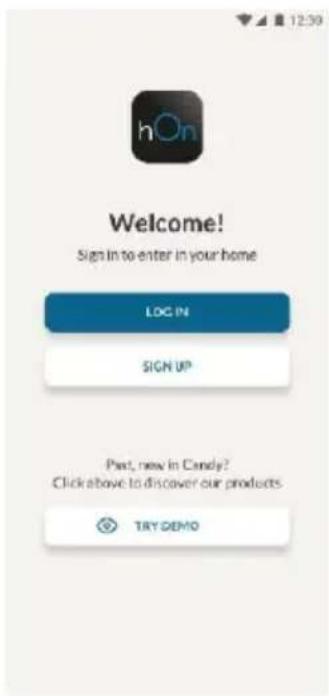
- Create your account on the hOn App or log in if you already have an account
Step 3
- Follow pairing instructions in the hOn App
Wi-Fi Use
If the Wi-Fi has not been configured yet, when the refrigerator turns on, it will automatically enter the configuration mode and keep this status for 30 minutes. The Wi-Fi icon blinks and product enrollment can start.
- Follow in app instructions to configure the Wi-Fi (see above)
- Once the Wi-Fi is configured and the connection established, the Wi-Fi icon is on and fixed.
After 30 minutes without performing any operation, the Wi-Fi will automatically exit the configuration mode - If the Wi-Fi has already been configured, it will automatically reconnect according to the configuration information.
To reset the Wi-Fi, press Wi-Fi key and SET key for 2s.
To turn off the Wi-Fi, press Wi-Fi key for 3s.
Radio-module - Technical data
| Frequency rate (OFR) | 2400 MHz-2843.5 MHz |
| Channel frequencies | 2412...2472 MHz(step size 5 MHz) |
| Maximum power(EIRP) | 100 mW |
Radio equipment type is in compliance with Directive 2014/53/EU.
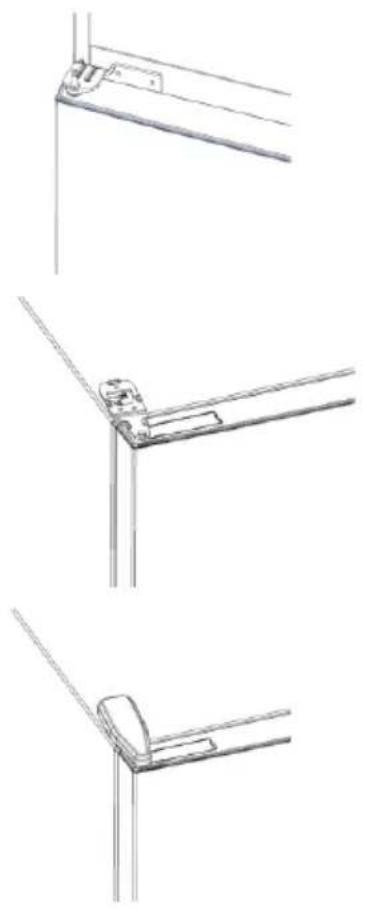
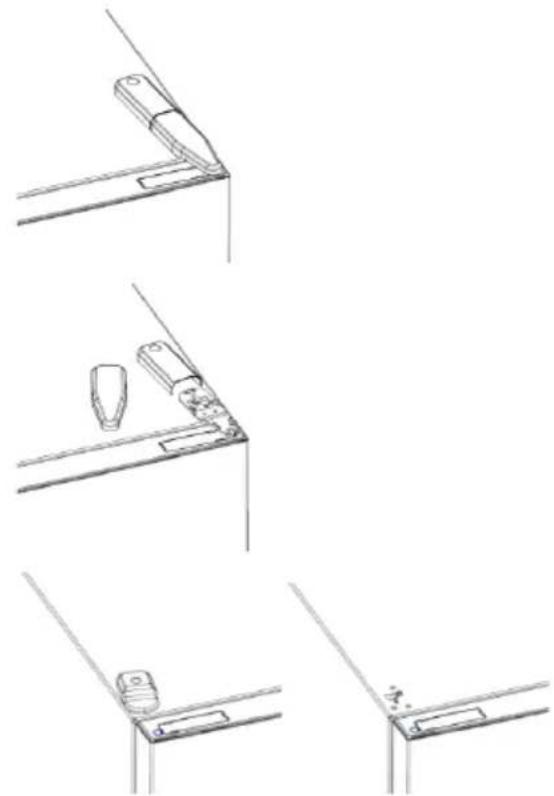
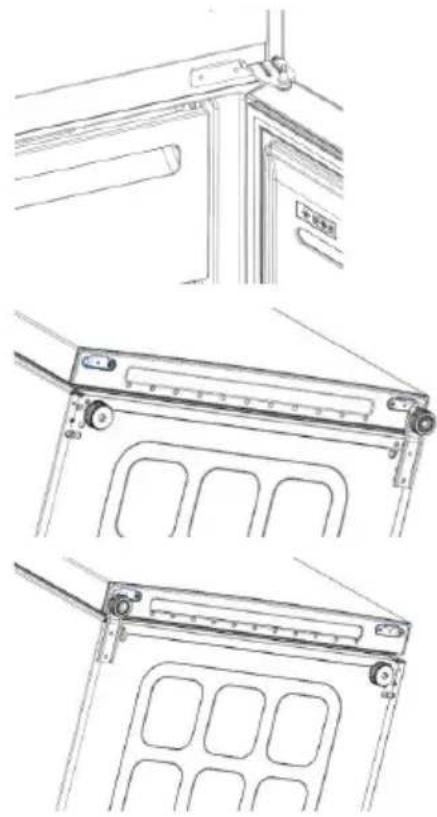
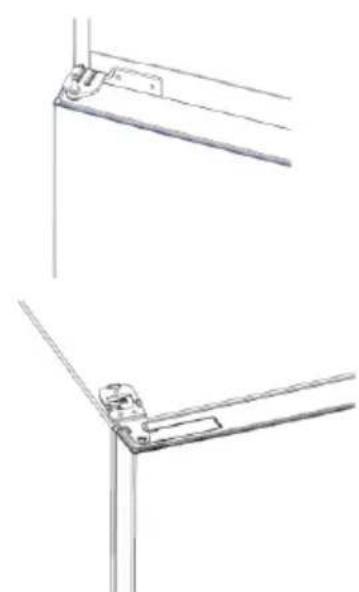
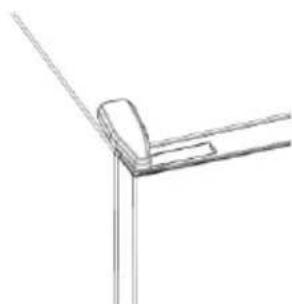
DOOR REVERSIBILITY
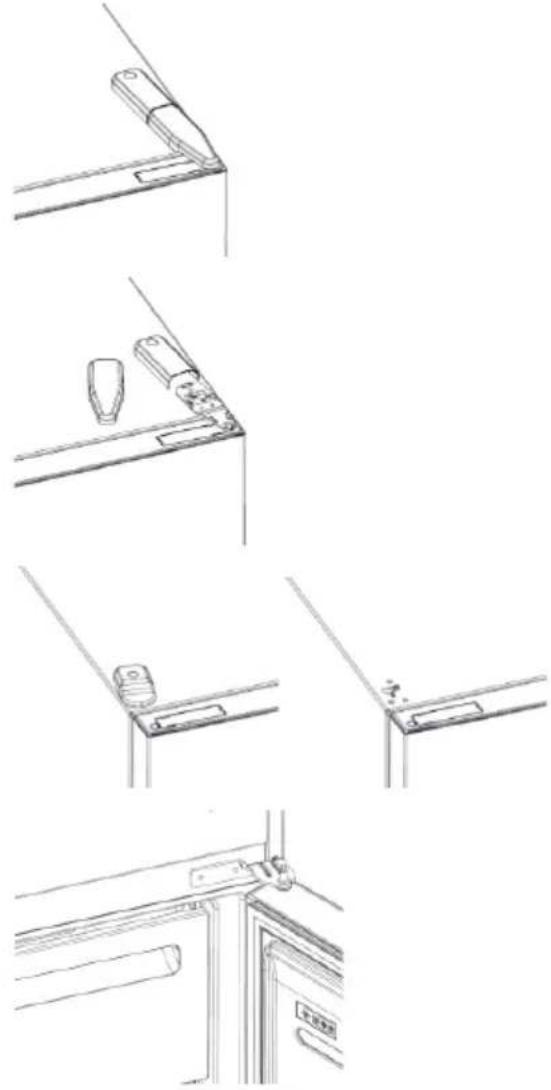
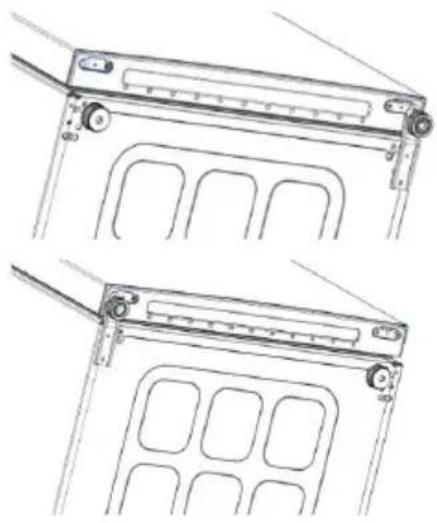
Tools needed: Electric screwdriver
- Remove the top hinge cover
- Unscrew the top hinge
- Remove the top hinge cover (left)
- Remove middle hinge
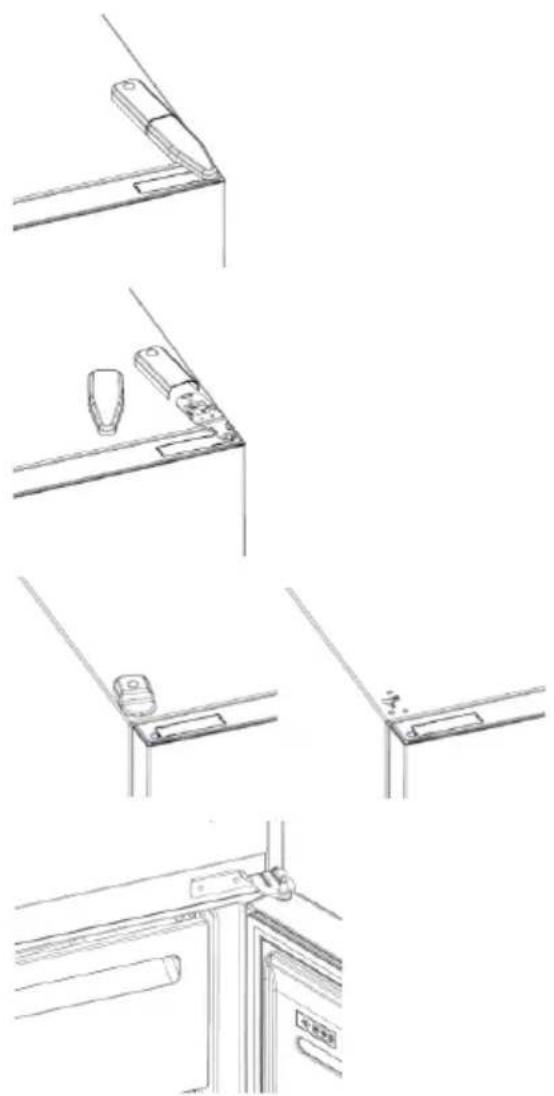
- Remove lower hinge
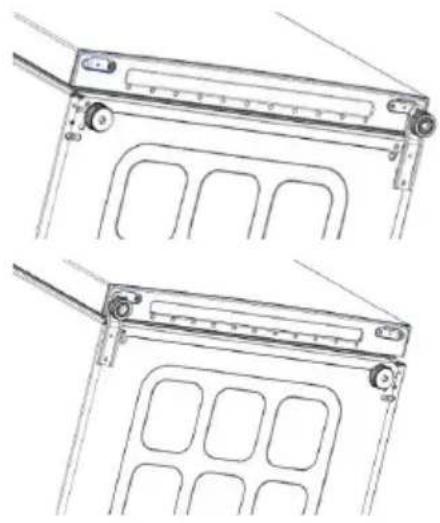
- Mount hinge foot
- Mount middle hinge
- Mount the upper hinge plate
- Mount the upper hinge cover
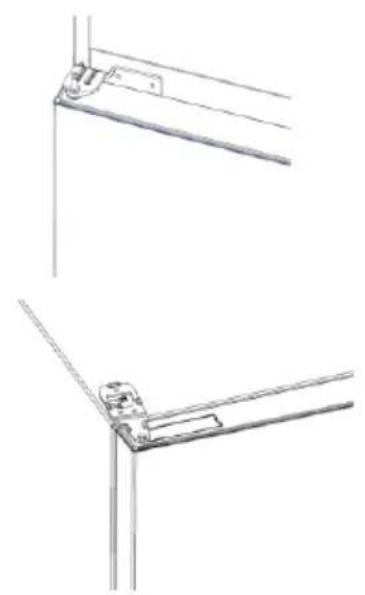
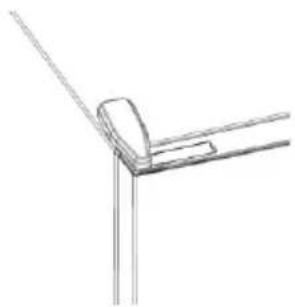
TROUBLESHOOTING
| The inside light bulb does not turn on. | ·No electricity. | ·The power cable is not properly plugged in. ·Check if the appliance is switched off (see Temperature Adjustment). ·Check the power socket is working correctly (e.g. with another electric device). |
| ·Holiday Mode is activated. | ·Deactivate Holiday mode. | |
| The internal temperature of the refrigerator and/or freezer is not cold enough. | ·The doors are not closed. | ·Check that the door and gaskets close properly. |
| ·The doors are frequently opened. | ·Avoid opening the doors unnecessarily for some time. | |
| ·Incorrect temperature setting. | ·Check the temperature setting and, if possible, set a lower temperature (see Temperature Adjustment). | |
| ·The refrigerator and/or freezer are too full. | ·Wait for the temperature of the refrigerator/ freezer to stabilise. ·Avoid filling the refrigerator and freezer excessively. | |
| ·The surrounding temperature is too low. | ·Move the unit to a warmer place or heat the current room. | |
| ·Warm items have been stored. | ·Always allow items to cool before storing them. | |
| The food in the refrigerator freezes. | ·Incorrect temperature setting. | ·Check the temperature setting and, if possible, increase the temperature. |
| ·Food in contact with the back wall. | ·Keep the food away from the refrigerator's back wall. | |
| The bottom of the refrigerator compartment is wet or water droplets are present. | ·The drain hose could be clogged. | ·Clean the drain hose with a stick or similar item to allow the water to drain. |
| Presence of drops of water or frost on the rear wall of the refrigerator. | ·Depending on the function, drops of water or frost form on the rear wall of the refrigerator during operation. | ·It is not a defect. |
| ·Warm items have been stored. | ·Always allow items to cool before storing them. | |
| ·There are open food containers or liquids. | ·Always cover food and liquids. | |
| ·The doors are not closed. | ·Check that the door and gaskets close properly. | |
| ·The doors are frequently opened. | ·Avoid opening the doors unnecessarily for some time. | |
| Presence of water in the vegetable drawer. | ·Lack of air circulation. | ·Verify that your appliance is not too full. |
| ·Vegetables and fruit with too much moisture. | ·Wrap the fruit and vegetables in plastic materials, e.g. cling film, bags or containers. | |
| The motor runs continuously. | ·The doors are not closed. | ·Make sure the doors are closed and check the seals close properly. |
| ·The doors are opened frequently. | ·Avoid opening the doors unnecessarily for some time. | |
| ·Ambient temperature is very high. | ·Verify that the ambient temperature is in the range set out in the specifications on the appliance tag. ·Set the display screen/thermostat to a warmer temperature. | |
| ·The appliance has been off (no power) for some time. | ·It normally takes the appliance 8-12h to cool completely. | |
| The frozen food is thawing. | ·Surrounding temperature is too low. | ·Move the unit to a warmer place or heat the current room. |
| ·The freezer door is not closed. | ·Make sure the door is closed and that the gasket is sealing properly. | |
| Fridge door alarm. | ·Fridge door alarm (acoustic beep) activates whenever the door is left open for more than 3 minutes. | ·Avoid leaving the door open when not needed. The beep ceases when the door is closed. |
| The appliance makes noises such as gurgling, buzzing, clicking, creaking. | ·No breakdowns. An engine is running, e.g. refrigeration unit, fan. The refrigerant flows into the pipes. Motor, switches and solenoid valves are switched on or off. | ·No action needed. |
| ·The appliance is not located on level ground. | ·Adjust the feel to level the appliance. | |
| ·The appliance touches an object around it. | ·Remove objects around the appliance. | |
| The appliance does not cool, the temperature and lighting indicators are on. | ·Demo mode is activated. | ·Deactivate DEMO mode. |
| Strong ice and frost in the freezer compartment. | ·The items were not adequately packaged. | ·Always pack the items well. |
| ·A door/drawer of the appliance is not tightly closed. | ·Close the door/drawer. | |
| ·The door/drawer has been opened too frequently or for too long. | ·Do not open the door/drawer too frequently. | |
| ·The door/drawer gasket is dirty, worn, cracked or mismatched. | ·Clean the door/drawer gasket or replace it with a new one. | |
| ·Something on the inside prevents the door/drawer from closing properly. | ·Reposition the shelves, door racks or internal containers to allow the door/drawer to close. | |
| The sides of the appliance are warm. | ·This is normal. |
Pe3HMe
Описане на порожда 12
I3nckBaHna 3a npoctpaHCTBO 13
YIOTPEBA 14
YnoTe6a 14
IepcoHaJIIN3npaHa TeMpePaTpya 15
Download on the App Store

EXPLORE IT ON AppGallery
CTbnka 2
Cb3daIte cBoi npoBn B npInOxHneTo hOn nnn BnE3Te, aKO BeYe mATE TaKbB
CTbnka 3
CneDbaiTe nHCTpyKcunTe 3a cDboBaHe B npInnoKeHHeTo hOn
N3noJ3BaHe Ha Wi-Fi
Ako Wi-Fi BCE OSe He e KOHcHypnpaHo, KOraTO XnaJINHKbT Ce BkIouN, Toa ABToMaTuHNo Ie BNe3e BpeKIM Ha KOHcHypnpaHe N Ie 3aNa3n TOBa CbCTOraHne 3a 30 MNHTN. IKoHaTa "Wi-Fi" Mura n MoKe da 3anOue PerncTpnpaHeto Ha npoDyKTA.
CneBbAitte HnctpykunTe B npuOKeHneTo, 3a da KOHpIpypapTe Wi-Fi (Bx. no-rope)
Cnei KaTo Wi-Fi e KOHcHpypnpaHO n Bpb3KaTa e yCTaHOBeHa, IKoHaTa 3a Wi-Fi e BKJIIOUeHa n cKcnpaHa.
Cnei 30 MNHytn, 6e3 da ce n3BbPwBa HnkaKBO DeiCTBne, Wi-Fi mpekata aBTOMaTHUHO ige n3Ie3e OT peKIMa Ha KOHcHypnpaHe
Ako Wi-Fi Beue e KOHcHpynpaHo, To aBtOMaTnUHO ue ce cBbpxe, n3noJ3BaIKN HOpMaIyraTa 3a KOHcHpypaIyra.
3a da hynpate Wi-Fi Bpb3kata, haTnchete 6yToHa „Wi-Fi" n 6yToHa „SET" 3a 2 cekyHdN.
3a da n3knioHTe Wi-Fi Bpb3kata, HATNCHeTe 6yToHa ,Wi-Fi"i 3a 3 cekyHdN.
Papnoomodyn - TexHnueckn daHHN
Download on the App Store

EXPLORE IT ON AppGallery
Krok 2
Kwokoi opaalatoos 60
XPHSHWI-FI 62
Brna 1 62
Brna 2 62
Bnua 3 62
Xpnoa WI-Fl 63
ANAETPEPSIMOTHTAIOPTA64
ANTIMETΩΠΙΣH ΠΡΟΒΑΗΜΑΝ
NEPIIgPAΦHIpOIONTO
1.Πινακας ελέγχου
2. Páφíα
3. Uptapi KAI a x a v i k v
4. Koutia aTioθnkeuongs kataψuktn
5. Páφi πóptaç
- H TIO O WOTN TAKTIK N YIA TNY ESOIKOVOpON EVEpyEiaC attaTei TNY TOIOθEtnon Ouprapiwv, Doxewv YIA Ta TPOpIpaKai pApiwv OTo TPOiov, TapaKaALoupe avatpeTE OTIC TAPATAVW EIKOVEc.
** OI napatavw eikovc ivai mvo yia avapopa. H npaymuikn puthetaion napaetpwv th eapntnei aTo quaiko Tpoiov n aTOn dhnawon Tou diavopea.
Anaiinoeis xwpou
H TnO TnC Movadac TpEe va mTopei va avoiyi TAnPwCs OITWc PaivTei. Na UtnApxEi apketo cLeuthetaoc Xwpoc yia aveto aoiymu Tuv
Uupwv kai Tuv ouptapiwv.
DiatnpnoTe anoToaon ToulambdaioTov 50 mm
MuTaTuV TAAUPIKW ToixwMatWv Tou
TTpoiovTOc KAI Tcw PapakeEvwv EaptnmuTowv.
Download on the App Store

EXPLORE IT ON AppGallery
Bnμα 2
UPORABA MREZE WI-FI. 102
1.korak 102
2korak 102
3korak 102
Uporaba mreze Wi-Fi 103
REVERZIBILNOSTVRATA. 104
RJESAVANJE PROBLEMA
OPIS PROIZVODA
- Upravljacka ploča
- Police
- Ladica za você i pourée
- Spremnici za zamrzivač
- Police na vratima
Za konfiguraciju s najvecom ustedom energije treba smjestiti ladice, kutiju za hranu i police unutar proizvoda, pogledajte gore navedene slike.
* Gore navedene slike služe samo za referentnu uporabu. Stvarna konfiguracija ovisi o fizičkom proizvodu ili izjavi distributera.
Prostorni zahtjevi
Download on the App Store

EXPLORE IT ON AppGallery
Fase 2
HnBuaJbHa HaCtpoKa TempeaTypbI
B npnIOxHnn MOxHO HAcTpoNTb Tempeatpy KaK dIy XOJOnJIbHoro OTCeKa, TaK n DnMop03NbHO KamepbI. Temepatpy MoXHO 3aDaBaTb C warom 1 ^ C . DnXOJOnJIbHOrO OTCeKa MOxHO Bbl6paTb Tempeatpy ot 2 ^ C do 8 ^ C , a DnMop03NbHO KamepbI - ot -16 ^ C do -24 ^ C
Ecn TeMnepaTypy BbIbpaOT B npNIOXeHN, 3aRopaETc3HaOKNHINBnDyaJIbHOH HAcTPOIK N TeMnpaTypbl, a BCE CBeTOIDNOHbIe INHdNKaTOpblTeMnpaTypbl COOTBeTCTByUoIero OTcKa BbIKIOuAOTcra (T.e. ecn B npNIOXeHNBBbIbpaHa TeMnpaTypa XoJOnJIbHOrO OTcKa, CBeTOIDNOHbIe INHdNKaTOpbl OT 2^ Do 8^ BBIKIOUaOTcra). Ecn B npNIOXeHN BbIBpaHa TeMnpaTypaMOpOzINbHOH KAmepbl, CBeTOIDNOHbIe INHdNKaTOpbl ot -16°C do -24°C BBIKIOUaOTcra).
Ecn TeMnepaTpa HndNBduyalbHo HactpoeHa TOnbKO DnOHO nobactn (Mop03nIbHaj Kamepa nn XoNoDnBnK), BblpaHHaTeMnpaTpa dnyroo 6nactn He n3MeHareTc, n CBeToNDnHbN INnHKaTOP BblpaHHoTempeatpyb ITOI oBnactn OCTaetc BkInoueHHbIM. Akyctueckn cnHan noaetc KaKdbip pa3 npu N3MeHeHH TeMnpaTypbl.
Функця Super Cool
PekomeHyetyTcB KJIIOHTb FyHKUIO Super Cool, ecNI Tpe6yeTcN NOMeCTNTb Ha xpaHHe 60IbWoE KOINueCTBO npOdyKTOB (HaNPIMep, nocne NOKyKN). FyHKUra Super Cool yckopraet OxnaJdeHnE CBExHX npOdyKTOB IN 3aunuaeT yke XpaHnIeCToBapbl OT HexeNaTeNbHOro HArpeBa. Korda 3Ta FyHKUra AKTNBupOBaHa, TeMnpaTypa XOJOINbHOrO OTceKa ABTomATNuCeKN YCTaHaBnIBaETcH Na 3HaueHnE 2 ^
Kak nOJIb3OBaTb cyHKUIO Super Cool:
3TyФyHKIIO MOXHO aKTbBnPoBaTbДЛNTeJIbHbIM HaxaTneM KHOKN TEMP 1nBbOpa XoJIoNJIbHO OTeCeKa C NocJeDyIOUm 6bICTpbIM HaxaTneM KHOKN TEMP Do Tex nop, noka He 3arOpNTcra BcEtOIOuHbIM INdNKaTOP Super Cool; Jn6o 3TyФyHKIIO MOxHO BkIIOuHTb B npInIOxeHH. Korda 4yHKIa aKTHBnPoBaHa, cBeToIOuHbIM INdNKaTOP Super Cool 6ydet NOCTOARHNO BKJIIOueH.
- YTo6bI BbIKJIIOHTb ΦyHKUHO Super Cool, HaxMnte KhoNky TEMP; Jn6o BBIKJIIOHTe 3Ty ΦyHKUHO n3 npNJIOKeHnR.
-Функця Super Cool abTomatueckn Bbiknoaetcno ncteehnn 6oJee 30 yacob noCne ee aKTnBaun.
KordaФункцura Super Cool BbIKHouaETcra, 3NaOKeHa NaHeN ynpaBHeHn OTKIIOUaETcra, n BOCCTaHaBJIINBaETcra paHee yCTaHOBJIeHHbI ypOBeHb OXJaXdEHNr.
PpHMeaHne. FyHKcN Super Cool n Super Freeze HeJIb3ra AKTNBnPoBaTb OndHOBpeMeHHO.
Функци Super Freeze
Функцу сунерзаморозуckоргет замороживане CBexнх npodykTOB n 3aцицаet ужхраняшесь в морозиьно камpe npodyktb ot Heжелального harpeba.Еслн Heobxodmo 3amopozntb 6oIbwoe kOJIueCTBO npodykTOB, pekomehdyetcra aktubnpoBaTb Функцю Super-Freeze 3a 24 yaca nepeДиспONSЗOBAHHem. Korda Функця aktubnpobHaHa, abTomatuYeCKu yctahablnBaetcTemnepaTypa-24°C.
Kak nCnoJb3ObaTb cyHKcHIO Super Freeze:
-Функию мохно akTNBupOBaTb Дпnteьнblm HaxaTneM KHONKI TEMPдя BblOpa Mopo3nIbHOJ kAmepbIC NOcNeDyUoNIM 6bICTpbIM HaxaTneM KHONKI TEMPdoTexnop, noka He 3arOpNTcR CBToOnOdHbI INHdkaTop Super Freeze;ПИбОЗТу Функию мохно BKIOuHTbВ npINOxEHN. KordaФункия akTNBupOBaHa,CBeTOdNoIDhI INHdkaTop Super Freeze 6ydet noctOraHHO BKIOUChE.H.
- UTo6bI BbIKHIOHTb cyHKUHO Super Freeze, HaxMMTe KhoNky TEMP; IIn6o BbIKHIOHTe 3Ty cyHKUHO B npINIOKeHN.
-Функи Super Freeze abTomatueckn BbIKIouaetcno nCTeueHn 60Jee 50 yacob noCne ee akTnBaCnn.
Korda Super Freeze BbIKIOVAETc, 3aOH KaHeN ynpabJIeHn OTKIOVAETc, IN BOCCTaHaBJIbAeTc paHee yCTaHOBJeHHbI ypOBeHb 3aMOPaXIBaHn.
PpHMeaHne. FyHKcN Super Cool n Super Freeze HeJIb3raakTNBnPoBaTb oDHOBpeMeHHO.
Pekm Eco
Pekim Eco MoXHO aKTHBnPoBaTb dIa ONTMM3aun npOn3BOoNTeJbHocTn np6opa c obecneueHem lyuux ycNoBn xpaHeHna pOdyKTob nTaHn. PeKIM Eco aBTOMaTnueckn ycTaHOBt Tempeatpy Ha ypOBHe 5°C B xOJIoNlbHom otCeke n-18°C B MOp03NlbHo Kamepe.
Kak nCnoJb3ObaTb peXkM Eco:
-
Φункцию можноakensынвировать с панелупраьлени,нанмая Кногку «mode»do tex nop,пoka He 3aportcra 3haoyok peximaa Eco (3bykoobcnrhannoTbepxdaet b6op),ил bblbpajФункциюВпрложен.КordaФункцияaktnвирована,зачokpeхimaaEcoBcerdaBKJIIOUCH.
-
UTo6bI BbInTu n3 peXnMa ECo, BbIKNoUHTe erO B npuIOKeHNn nn BbI6epnte DpyryIO cyHKUIO Ha naHeJn ynpaBJeHn.
Korda pexnM ECO BbIKIOHTcra, 3NaOc HA NaHeJIy npaBJeHna OTKIOUaETcra, IN BOCCTaHaBNIBAIOTcpaHee yCTaHOBJIeHHbIe yPOBHN OXJaXDeHn.
Функця Holiday
Функцию Holiday можно Incnoь3OBaTb Дя снжehня 3HeproNoTppe6nneHnycTpoiCTBa, ecn OHO He IncnoB3yEtca peryIpyHo. KOrda 3Ta ФункцЯakTNBnPoBAHa, CBeToNDnHbIe INDnKaTOpbl NorachYr (daxe ecnДВepuaOTKpbIta), a XOJIoNtBbIb OTceK 6yDet BbIKnOueH, B TO BpemKaK MOpO3nIbHaKaMepa 6yDet pa60TaTb obbUHbIM o6pa3OM.
Kak nCnoJIb3ObaTb cyHKcHIO Holiday:
- Φункцию можно akтubироваьс панели упраьеня, , Нжимая Кногку «mode»do tex nop, noka He 3aropuntc 3naчok Holiday (akyctueckn cnHajn noDTBepxdaet Bb6op), lno60 Bb6npa rФункциюВ npnloxeHH. Korda Функция akтubирobаha, 3naчok Holiday BCerda BKlIOUeH.
- UTo6bI BbIKIIOHTb 4yHKUHO Holiday, BbIKIOHTe erO B npINOKeHNn IINBbIEpNTe dpyrYIO 4yHKUHO Ha naHeN ynpABNeHn.
Korda cyHKunra Holiday BbIKIOHTcra, 3NaOkaHa naHeN ynpaBneHn OTKIOUaETcra, n BOCCTaHaBnBaIOTcra paHee 3aDaHHbIe ypOBHn OxJaXdEHNr.
Pa3MopaxnBaHne
Pa3MopaxnBaHne xOJOnIbHOrO OTeKa n MOpO3NJIbHOJ KaMepbl BblONHReTcA aBTOMaTnueckn: pyHoe ynpabJeHne He Tpe6yeTcra.
Slider
PraOM C OBOUHbIM Mara3INHom eCTb NOJ3yHOK, KOtOpbI N03BOJAreT peryInpOBA Tb BnaxHOCTb BHyTpN Hero: nepemeueHne ero BnpaBO yMeHbShaet BlaxHOCTb, nepemeueHne BJIeBO yBeINuHBaET BlaxHOCTb.
DEmOHCTpaauHbI peXIM
UTo6bI nepeiTN B DeMOHCTpaUNHOHbI peKIM C pa36IOKInPOBaHHbIM DnCnJIeEM, yDePKNBaIte HaxaToN KhoNky SET n HaxMnte KhoNky Wi-Fi 5 pa3 B TeueHne 5 ceKyND. UTo6bI BbIITn N3 DeMOHCTpaUNHOHOrO peKIma, BblONHNTe TY Jx e OnpaunIO IIN BBIKJHOHTe XoLODINBHK.
KoDbI owH6ok
Own6ka o6MeHa daHHbIMN
CBeTOBbIe INHdNkAToPbI (-16°C; -18°C; -20°C; -22°C; -24°C) B MOpO3nJbHOM OTcKe BKNIOUaOTcI NocJeIOBaTeJIbHO; 3TO O3HauaeT, UTO IpnO3oUla OUn6Ka O6MeHa DAHHbIMM MEJxIy rnaBHO nIpaTOY npaBHeHn I nPaTOI dncnpe. ObpaTITecb B CnyKbV TexHnueCKo NODepKKn DJI NOLyueHn NOMOuIN B peSeHn IpO6JIeMbI
- BeHTnJIaTOp
CBeToBbI INHnKaTOpbl (-16°C; -20°C; -22°C; -24°C) B MOpO3nJbHOM OTCEKe
MnraHOT OJHOBpeMeHHO, ecN BeHTnJIaTOp He pa6oTaET DOJXHbIM o6pa3OM. O6paTntecb B cnyK6y TexHnuecko NODepxKn dIg NOlyeHn IOMoU n B peWeHn np6JIembl
ИСПОЛьЗOBAHNE WI-FI
War 1
- CkaayTe npinloKeHne hOn


GETITON
Google Play

Download on the
App Store

EXPLORE IT ON
AppGallery
War 2
Co3daIte yyeTHyIO 3aINcB B npInOxKeHn hOn nnn BOiDITe BCNTeMy, ecN y Bac yXke ectb yTeHa 3aINCb
War 3
CneIyTe HNcTpkyKzmaM NO cOpJxKeHnIO B npJIoXKeHn hOn
IcnoJb3ObaHne Wi-Fi
Ecn Ni Wi-Fi eue He hactpoeh, npn BkIoueHnn XOJOnIbHnka OH aBTOMaTnueckn nepeiTeB pexIM KOHpNpynpOBaHn I OCTaHETcB 3Tom cTaTyce eue Ha 30 MNHyT. 3NaOK Wi-Fi 6ydt MrrA Tb, n HauHetcpeRnctpaunr npnbopa.
CneDyIte HNCTpyKcIaM B npInIOxKeHn Ipa HacTpoI K Ni Wi-Fi (cm. Bblie).
- Iocne Hactpoyn Wi-Fi n yctaHOBHeHn coeHNHeHn 3Haoyk Wi-Fi BKNIOyAETcN IOCTOARHH CBeTNTcR.
- Upe3 30 MmHyT 6e3 KaKx-Ni6o DeiCTBn FyHKzna Wi-Fi aBTOMaTnueckN BbIDeT n3 peXIMa KOHfNpynpoBaHna.
Ecni Wi-Fi yke HactpoeH, OH aBtOMaTnueckn NOdklHuNTcB COOTBETCTBm C daHHbIM KOHfNpyaun.
UTo6bI c6pocntb HacTpoNky Wi-Fi, HaxnMaTe KhoNky Wi-Fi n KhoNky SET B TeueHne 2 cekyHd.
YTo6bI OTKnIOuHTb cyHKUIO Wi-Fi, HaxKImaTe KhoNky Wi-Fi B TeueHne 3 cekyHd.
PapHOMOyJIb-TexHHueckHe xapaKTepehCTHK
| Частota (OFR) | 2400 MHz-2843.5 MHz |
| ЧастOTы Каналa | 2412...2472 MHz(размершага5 MHz) |
| Мakсимальnavа моцносты(EIRP) | 100 mW |
TnIpaHNOOBOpUOBAHHaCOOTBeTCTByeT INpeKTHBe 2014/53/EU.
NEPEBEUBAHNE DBEPEN Heo6xoIbIe HnctpyMeNTbl: 3JIeKtpuYecka8 OTBepTka
- CHIMITE 3aIyuky BepxHei DBepHOI neTNI
- OTKpyTnte BepxHIOI DBephHyIO neTIO
- Chmnte 3aInyuKy BepxHei DBepHO nETn (CneBa)
- CHIMITE cpeHIO IO DBepHyIO neTIO
- CHIMITE HIXHIOI DBepHyIO neTIO
- YctaHOBnTe onopy neTnn
7.YcTaHOBnTe CpeHIO DBePHyI neTNI - YctaHOBNTe pIaCTnHy BepXHei DBepHOI neTIN
- YctaHOBnTe 3arnyuKv BepxHei DBepHoN NeTnn
Download on the App Store

EXPLORE IT ON AppGallery
Krok 2
UPORABA OMREŽJA WI-FI
1. korak
Download on the App Store

EXPLORE IT ON AppGallery
2. korak
- Ustvarite svoj racun v aplikaciji hOn ali se prijavite, ce racun ze imate
3. korak
JrBnKOpncToByBaTuФyHkuio Holiday:
- Φункцию можна akтувати 3 панелі керваимь, натуckанчи Кногку "mode", пон He BBIMKHeTbcя пiktorpama Функцii Holiday (Звковий сизалпдеверджус ВИбip); a60 можна вьбрази Функцio BdoDAТКу. Колл Функцию akтувовано, пiktorpama Holiday 6уde 3abЖДn BBIMKHeHa.
- Κόb BιμκHγτη φυΗκιίο Holiday, BιμκHγιTb ii B ἀσαΤκγ aδοΒιδεριΤb iΗψγ φυΗκιίο Ḥα παHEπi KepyBaHHγ.
- PicnB BmKHeHHa yHKuH Holiday niktorpama Ha naHeni KepyBaHH BIMKaEcBcA, i BiHOBIOHTbcpaHlwe BCTaHOBJeHi pBiHIOXoJOnKeHH.
Po3MopoKyBaHHa
Po3MopoxyBaHHxOIOuINbHOro Ta MOp03NbHOro BiDcIKiB 3dIChIOeTbcra ABTomaTHUHO:pyHe KepyBaHH He notpi6He.
DEmOHCTpaizHn peKIM
Uo6 ybiuB DeMOHCTpauiHn peXm i3 He3a6IOKOBAHm dncnpeem, yTpmyTe HaTNCHYTOO KhoNky SET i HATNCHTb KhoNky Wi-Fi 5 pa3iB npotrarom 5 cekyHd. Uo6 BInTu 3 DeMOHCTpauiHoro peXmMy, BNUKHaIte Ti cami di a6o BUMKHITb XOIOIDINbHNK.
KoI n oMnloK
- Помилka obMiHy daHIMN
Cbitnoi iHdkatopn (-16°C;-18°C;-20°C;-22°C;-24°C) y mopo3nblhni kamepi BMKAIObCSIocNIIOBHO; ue 03NaHaac, IIO MIX rOJOBHOIO pnaTOU ynpaBNIHHa Ta PnatoIO dncnpey BHNKna NOMNka o6mHy daHMM. 3BepHiTbcra Do cnyx6n TexhiHoI DOnOMOrn, 0o6 OTPMaTHI DOnOMORY y BnpiWeHHI npoblemn - BeHTnJIaTOp
CbitnoBi iHdkaTopn (-16°C; -20°C; -22°C; -24°C) y Mopo3nIbHi Kamepi 6nMaIOb OndOucho, kUo BeHTnIaTOp He npaioe HaneXHM YHOM. 3BepHITbcr Do cnJx6n TexHIOI DonomOrn, o6 OTpIMaTn Donomory y BnpiuehHi npo6nemn
BNIKOPNUCTAHHRIWI-FI
Kpok 1
3aBaHTaxTe DoaToK hOn


GETITON GooglePlay

Download on the App Store

EXPLORE IT ON AppGallery
Kpok 2
CTBOpITb 06NIKOBn 3aNNc ydoataky hOn a6o BBiINiTb y cNCTeMy, kUO y BAC BKe e 06NIKOBn 3aNNc
Kpok 3
Padiomodyb -TexhiHiaHi
| Частota (OFR) | 2400 MHz-2843.5 MHz |
| Частоти каналу | 2412...2472 MHz(pondулиху 5 MHz) |
| Мakсималha потужнист(b(EIRP) | 100 mW |
TnIpaioo6JaHaHnBbIIOBiaac InpekTnBi 2014/53/EU.
NEPEBIUBAHNA BEPaT
Heo6xidiHInCtpymEnTn: EJIeKTpnuHa BnKpyTkA
- 3Himitb KpnuKy BepXhboi netnI
- BnKpyTiB BepxHIO neTIO
- 3himiTb KpUkky BepXHboi netni (3niBa)
- 3HIMITb cepeHIO neTJIHO
- 3HimiTb HxKHO nTeTIO
- BctaHOBiB onopy netni
- BctaHOBiBt bcepeHIO neTIO
- BctaHOBIb PnactnHy BepXHboi netni
- BcTaHOBItb KpUShky BepXHboi netnI
NOWYK TA YCYHEHHA HECNPABHOCTEN
| BvHTPIHnHa IaMnOuKa He BmKNaeTbC# | Hemac enektpkxmbenHn. | Kobetb XbIeHNHHe HIEIIOHOHcHcHcHcHcHcHcHcHcHcHcHcHcHcHcHcHcHcHcHcHcHcHcHcHcHcHcHcHcHcHcHcHcHcHcHcHcHcHcHcHcHcHcHcHcHcHcHcHcHcH |
| Pexim Holiday akTmboHa. | BIMkhHbpeKIM Holiday. | |
| BvHTPIHnHa Tempepatyra XoNoDInbHnka Ta/a6o Mop03NbHoi Kamepi HEDocTtMbO HmBbKa. | DBepratra He ZaunHEni. | PepoknainTe, Zo DaepurTa YauilbKnOBa 3aunHnHn HauKnHn |
| DBepratra Tacto BldinHiaotb. | Deamn HaeNe BldinHaeTbeDaprta Be3nntpeb. | |
| HepanBnblne HanaaTbBnHn Tempepatyru. | Pepoeipte HanaaTbBnHn Tempepatyr Ta, RkoU MOcknbo, BCTe NkXy TEmpeptuyr (DVB. PerylouBnHn Tempepatyr). | |
| XoNoDInbHnk Ta/a6o Mop03NbHa Kamepa 3aonBnHeli. | Doyeknai Tece Stabii3aui Tempepatry Xo1oDInbHnka/ Mop03Hn Kamepy. | |
| YMMaRte HauMiHOro HauOBuHn KaOp03Hn KaMepri. | ||
| Tempepatyra HauKoINbHnOre cpeedobuHn 3aau HnBbKa. | Pepemictb prnilad y tenpiliue micse abo o6brpirtye ntoohne prinmuhen. | |
| Ha 36epirAHn PoknadeHn tenPi prOuyktn xapUbAHn. | Peru HxK klactn prOuyktn do prnilad yob6'xkoDBaayte im oxolohyn. | |
| HepanBnblne HanaaTbBnHn Tempepatyru. | Pepoeipte HanaaTbBnHn Tempepatyr Ta, RkoU MOcknbo, 3aunHnOuBn O | |
| IpodukTu B XoNoDInbHnkuZamaepzaoTb | PrOduKTI KOHTAkyoTb I3 zaidbIo 3cIKOO. | Trpmaire prOduKTI noanai ibdzaidbIo CTnHn XoNoDInbHnka. |
| Dho XoNoDInbHnQ Kamepi BONore abo npiscTyh I KpansHy I BoDn. | 3ZnivBn ShlaHm Moke 6byu 3a6bHtt. | Ochmtb ZaunHn shlaHn naunikko 6a6o ndoibHMn pmedetom, 6o6Ba Dua stkana. |
| 3aJeKHXo BId fynKuII nd cuc poStn Ha 3aundn CT xoNoDInbHnka YTBPOJOTbc KpanslBo DnD 60 | Lle He depekt. | |
| Ha 36epirAHn PoknadeHn tenPi prOuyktn xapUbAHn. | Porpiu HxN knactn prOuyktn do prnilad yob6'axkoDa aasai te Im oxolohyn. | |
| € BIDkrPtI KOnTeHnerpn dI py XapOBuX prOuykTb a piDnHn. | 3aakdni noopribaiye ixy ta piDnHn. | |
| DBepratra He 3aunHn. | PepoknainTece, zuo Daepratra Y uozlbNkoBaNCHa 3aunHn HauKnHn | |
| DBepratra Tacto BldinHn O | Deynn Hacn HauDn E BldinHn O | |
| HaBnHcTb Kpanel BovDa abo HAMOPo Hn 3aundn CT tInCu XoNoDInbHnka. | DBepratra Tacto BldinHn O | PepoknainTece, zuo Daepratra Y uozlbNkoBaNCHa 3aunHn HauKnHn |
| OSoCnHn 3aunHn. | 3aunHn O | |
| OSoCnHn 3aunHn. | 3aunHn O | |
| OSoCnHn 3aunHn. | 3aunHn O | |
| HaBnHcTb BovDa abo HAMOPo Hn 3aundn CT tInCu XoNoDInbHnka. | DBepratra Tacto BldinHn O | 3aunHn O |
| DBepratra Tacto BldinHn O | 3aunHn O | |
| DBepratra Tacto BldinHn O | 3aunHn O | |
| 3aunHn PralcoE 63nepebpHn. | DBepratra Tacto BldinHn O | 3aunHn O |
| DBepratra Tacto BldinHn O | 3aunHn O | |
| DBepratra Tacto BldinHn O | 3aunHn O | |
| 3aunHn PralcoE 63nepebpHn. | DBepratRA Tacto BldinHn O | 3aunHn O |
| DBepratra Tacto BldinHn O | 3aunHn O | |
| 3aunHn PralcoE 63nepebpHn. | DBepratra Tacto BldinHn O | 3aunHn O |
| DBepratra Tacto BldinHo O | 3aunHn O | |
| 3aunHn PralcoE 63nepebpHn. | DBepratra Tacto BldinHo O | 3aunHn O |
| 3aunHn PralcoE 63nepebpHn. | DBepratra Tacto BldinHo O | 3aunHn O |
| 3aunHn PralcoE 63nepebpHn. | DBepratra Tacto BldinHo O | Dill ne pio6Hn |
| 3aunHn PralcoE 63nepebpHn. | DBepratra Tacto BldinHo O | Dill ne pio6Hn |
| 3aunHn PralcoE 63nepebpHn. | DBepratra Tacto BldinHo O | Dill ne pio6Hn |
| 3aunHn PralcoF 63nepebpHn. | DBepratra Tacto BldinHo O | Dill ne pio6Hn |
| 3aunHn PralcoF 63nepebpHn. | DBepratra Tacto BldinHo O | Dill ne pio6Hn |
| 3aunHn PralcoF 63nepebpHn. | DSeOeDuHn TcTb BLDinHn O | Dill ne pio6Hn |
| 3aunHn PralcoF 63nepebpHn. | DSeOeDuHn TcTb BLDinHn O | Dill ne pio6Hn |
| 3aunHn PralcoF 63nepebpHn. | DSeOeDuHn TcTb BLDinHn O | Dll ne pio6Hn |
| 3aunHn PralcoF 63nepebpHn. | DSeOeDuHn TcTb BLDinHn O | Dill ne pio6Hn |
| 3aunHn PralcoF 63nepebpHn. | DSeOeDuHn TcTb BLDinHn O | Dill ne pioGn |
| 3aunHn PralcoF 63nepebpHn. | DSeOeDuHn TcTb BLDinHn O | Dill ne pioGn |
| 3aunHn PralcoF 63nepebpHn. | DSeOeDuHn TcTb BLDinHn O | Dill ne pioGn |
| 3amOroXeHn Poadytu PoadmopoxuToBc | DMeOHCTpauiHn peKm AOKIBoBaHO. | BIMMHb DEMOHCTPAUIHn peKm. |
| 3aunHn KInbKcTb Ibody I HAMOp03b U mOp03Nb Kamepi. | DPeOyTKn He 6byo HaneXHm CImHom UyaboHn. | 3aakzdn da6be pakyote prOuyktn. |
| DBepratra/YaunKn prAadny He 3aunHn Do DOCTaBbU 5uNbHo. | 3aunHt b Deaeprata/YaunK. | |
| DBepratra/YaunKn BldinHn CImHom 3aunHt Do DOCTaBbO. | He BldinHn Tepeprata/YaunK 3aunHt Do DOCTaB. | |
| UyunlbNouBa DaepratYaunKn 3aazpDyHenn, 3aunHn, Trichytnc ABDinTbc ABDinTbc BMDmOram. | OcHtB yUnlOauB DaepratYaunK 3aunHt Do DOCTaB. | |
| UyunlbNouBa DaepratYaunKn 3aazpDyHenn, 3aunHn, Trichytnc ABDinTbc BMDmOram. | OcHtB yUnlOauB DaepratYaunK 3aunHt Do DOCTaB. | |
| UyunlbNouBa DaepratYaunKn 3aazpDyHenn, 3aunHn, Trichytnc ABDinTbc BMDmOram. | OcHeTb yUnlOauB DaepratYaunK 3aunHt Do DOCTaB. | |
| UyunlbNouBa DaepratYaunKn 3aazpDyHenn, 3aunHn, Trichytnc ABDinTbc BMDmOram. | OcHeTb yUnlOauB DaepratYaunKn 3aunHt Do DOCTaB. | |
| Buchni CTINu Prailadu Tengni. | Lc HopMaJIbNo. |
233
233
234
234
235
235 "Super Cool
236. "Super Freeze
236. "g" ECO
237
237
238
238
238. bill ja
239 WI-FI
236 1 a 小小
239 2. = 小
239 3
240. Wi-Fi
241
1
5aill 1
2
3
4
.5
1 1
aalwaii ciibio
Super Freeze aagjg jy Jn Super Freeze aagj
Super Freeze aagj g Jn Super Freeze aagj
Super all jy Jn Jn Jn Jn Jn Jn Jn Jn Jn Jn Jn Jn Jn Jn Jn Jn Jn Jn Jn Jn Jn Jn Jn Jn Jn Jn Jn Jn Jn Jn Jn Jn Jn Jn Jn Jn Jn Jn Jn Jn Jn Jn Jn Jn Jn Jn Jn Jn Jn Jn J n Jn J n J n J n J n J n J n J n J n J n J n J n J n J n J n J n J n J n J n J n J n J n J n J n J n J n J n J n
.A
.B
.C
.D
J 24 C-22 C-20 C-16 C]
WI-FI
- hOn


0g212
Jbbl bI Jg 1hOn
3
-