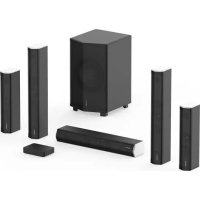
CineHome PRO - Home Theater System Enclave - Free user manual and instructions
Find the device manual for free CineHome PRO Enclave in PDF.


| Product Type | 5.1 Wireless Home Cinema System |
| Model | CineHome PRO |
| Brand | Enclave |
| Speaker Configuration | 5.1 (1 center, 2 front, 2 surround, 1 subwoofer) |
| Connectivity | HDMI eARC/ARC, optical, 3.5 mm analog, Bluetooth |
| Supported Audio Formats | Dolby Digital Plus, Dolby Digital, Dolby Pro Logic II, DTS 5.1, LPCM |
| Power Supply | Mains (100-240V AC) via power cords supplied for each speaker and the CineHub |
| Control | Enclave Audio mobile app (iOS/Android), IR remote |
| Auto Pairing | Yes, upon first power-on |
| Noise Sequence Test | Yes, via the app to verify each speaker |
| Speaker Warranty | 2-year limited transferable |
| Electronics Warranty | 1-year limited transferable |
| Radio Frequency Band | 2402-2480 MHz, 5150-5725 MHz |
| Package Contents | 1 center, 2 front, 2 surround, 1 subwoofer, 6 power cords, CineHub, HDMI cable, power supply |
| Technical Support | Phone: 1-844-436-2528, Email: support@enclaveaudio.com |
Frequently Asked Questions - CineHome PRO Enclave
User questions about CineHome PRO Enclave
0 question about this device. Answer the ones you know or ask your own.
Ask a new question about this device
Download the instructions for your Home Theater System in PDF format for free! Find your manual CineHome PRO - Enclave and take your electronic device back in hand. On this page are published all the documents necessary for the use of your device. CineHome PRO by Enclave.
USER MANUAL CineHome PRO Enclave
- What's in the Box
- Enclave and Audio CineHub Overview
- Enclave Audio CineHub Indicators and Connections
- Installation and Setup
- General Speaker Placement
- Basic System Features Continue On App
- Troubleshooting
- Regulatory Statement Enclave Audio CineHome II 5.1 Wireless
Audio Home Theater System
- Regulatory Statement Enclave Audio CineHome Pro 5.1 Wireless
Audio Home Theater System - Regulatory Statement Enclave Audio CineHub
- Important Safety Information
- Warranty
EN1
ENCLAVE
CONGRATULATIONS!
Thank you for purchasing an Enclave Audio Wireless Home Theater System. Welcome to a wire-free HD quality home theater experience!
This guide will walk you through the simple setup steps to get your favorite movie, video game, sporting event, TV show or music wirelessly delivered to the powered speakers placed throughout your room. The Enclave Audio CineHome systems are simple to setup, and this guide will help answer questions and assist with speaker placement, settings, and various options made available to you to ensure the optimum quality experience your Enclave Audio system can provide. The Enclave Audio CineHome systems are designed specifically to deliver high quality multi-channel audio from Smart TVs, Blu-ray players, cable or satellite TV boxes, game consoles, streaming appliances, and other input compliant devices through an uncompressed, uninterrupted digital signal, straight to your powered speakers.
Setup is simple, whether you're using the Enclave CineHub transmitter. Just download the Enclave Audio app available for iOS and Android and follow the step-by-step instructions to complete your setup.
We hope you enjoy the new and wonderful world of wire-free HD audio home theater! If you have any questions at all, don't hesitate to give us a call at 1-844-436-2528 or email support@enclaveaudio.com and an Enclave Audio support representative will be happy to assist.
Watch the setup videos: www.enclaveaudio.com/setup
Scan the QR code to the right with your smartphone, or go to www.enclaveaudio.com/setup

REGISTER YOUR PRODUCT
REGISTER YOUR PRODUCT AT WWW.ENCLAVEAUDIO.COM
- Protect your new investment
o The details of your purchase will be on file for reference in the event of an insurance claim such as loss or theft.
-
Receive free tips, updates and service bulletins on your new product
-
Improve product development
To Your input helps us continue to design products that meet your needs.
- Receive a free Enclave Audio newsletter
o Registered customers can opt-in to receive a monthly newsletter.

Bluetooth
HDMI
HIGH-DEFINITION MULTIMEDIA INTERPACE

dtts
Digital Surround

DOLBY
AUDIO

CERTIFIED
EN3
ENCLAVE
ENCLAVE AUDIO CINEHOME II 5.1
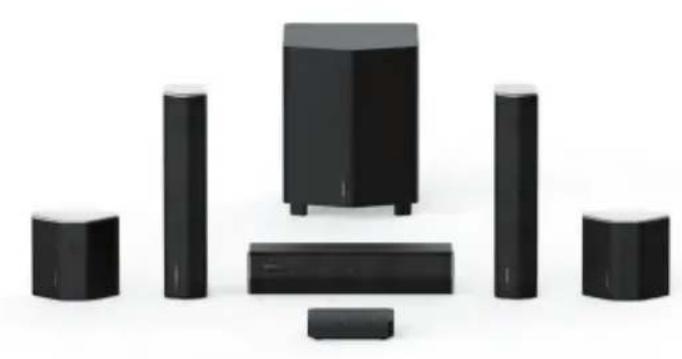
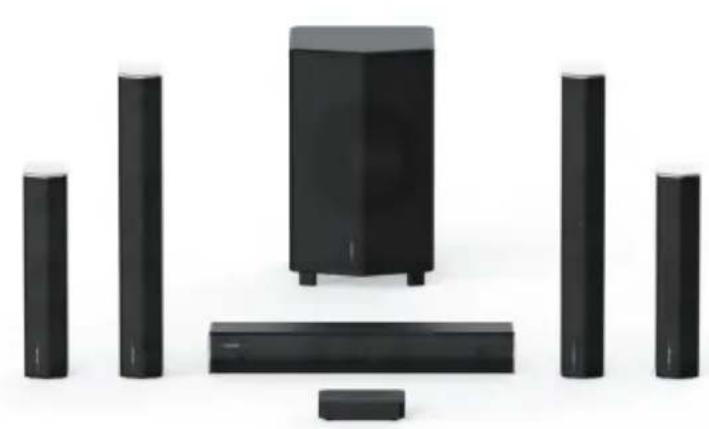
ENCLAVE AUDIO CINEHOME PRO 5.1
1. WHAT'S IN THE BOX
Make sure you have all the items listed below based on the system or bundle you have purchased. Inspect each piece to make sure nothing was damaged during shipping. If you think any item is damaged or missing, please call Enclave Audio Home Support at 1-844-436-2528 so that we may provide assistance.
ENCLAVE AUDIO CINEHOME II 5.1
(1) Center Channel Speaker
(1) Right Front Channel Speaker
(1) Left Front Channel Speaker
(1) Right Rear Surround Speaker
(1) Left Rear Surround Speaker
(1) Subwoofer
(6) AC power cords (for all system speakers)
ENCLAVE AUDIO CINEHOME PRO 5.1
(1) Center Channel Speaker
(1) Right Front Channel Speaker
(1) Left Front Channel Speaker
(1) Right Rear Surround Speaker
(1) Left Rear Surround Speaker
(1) Subwoofer
(6) AC power cords (for all system speakers)
ENCLAVE AUDIO CINEHUB
(1) CineHub eARC
(1) HDMI Cable
(1) AC power supply
2. ENCLAVE AUDIO CINEHUB OVERVIEW CONNECTIONS:
(1) HDMI Output
(1) Optical Digital
(1) 3.5mm AUX Analog Audio
App Based Controls:
- Configure and control your system directly on our Enclave Audio iOS or Android App via Bluetooth.
IR Remote Controls:
- Works with most IR based universal remotes as well as Enclave's previous generation IR remote.
- Core functions available via IR: power on/off, volume up/down, input switching, mute.
Supported Audio Connection Types:
eARC,ARC (HDMI)
- Optical
- Analog 3.5mm
- Bluetooth
Supported Audio Formats:
- Dolby Audio - Dolby Digital Plus, Dolby Digital, Dolby Pro Logic II
- DTS: DTS 5.1 Digital Surround
LPCM: Uncompressed Audio - Bluetooth: SBC
EN7
ENCLAVE
3. ENCLAVE AUDIO CINEHUB INDICATORS AND CONNECTIONS
These sections can help you identify the connections and indicators for the Enclave Audio CineHome Systems.
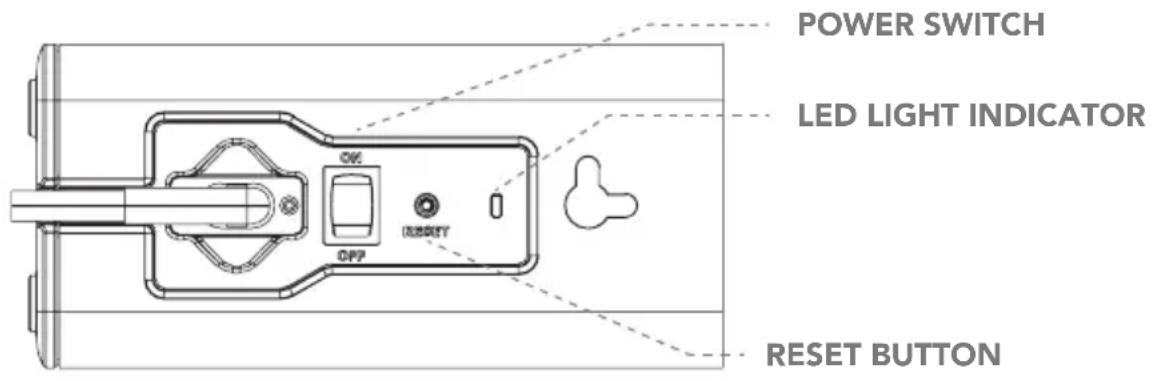
3A. SPEAKER AND SUBWOOFER REAR LED/ILLUMINATED INDICATOR
If speaker LEDs are flashing, it is NOT connected to the network. When the LEDs are illuminated in a constant state, they are successfully connected and paired to the network. When the Enclave Audio CineHub is powered off all speakers will enter a sleep mode
and automatically awake when the speakers detect the CineHub resuming audio transmission.
If you find a speaker that remains flashing after pairing then please refer to the troubleshooting section for possible solutions or online at our helpdesk and knowledge base www.enclaveaudio.com/support.
ENCLAVE
EN8
3B. ENCLAVE AUDIO CINEHUB REAR PANEL CONNECTIONS
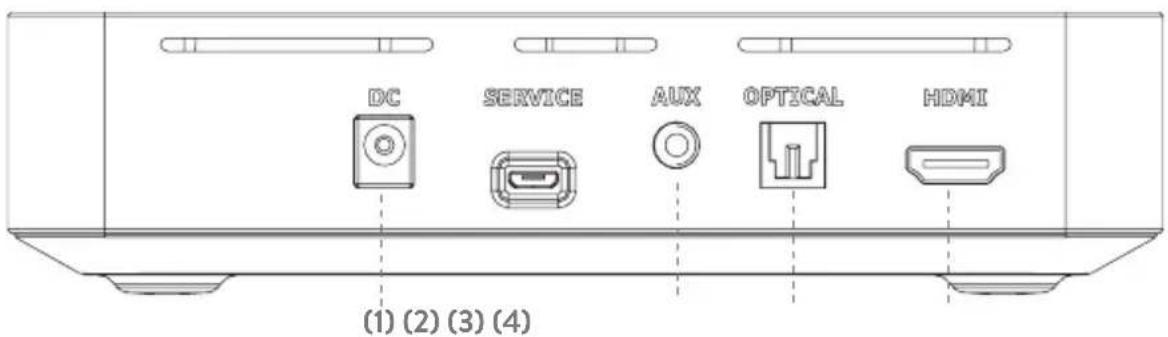
- DC Power
- 3.5mm AUX Stereo Analog Audio
- Optical Digital
- HDMI for eARC/ARC use only
4. INSTALLATION AND SETUP
Follow these instructions to initially setup and use the Enclave CineHome System II/ Pro, CineHub.
Check out our videos to see the setup in action at www.enclaveaudio.com/setup
4A. PLACE YOUR SPEAKERS
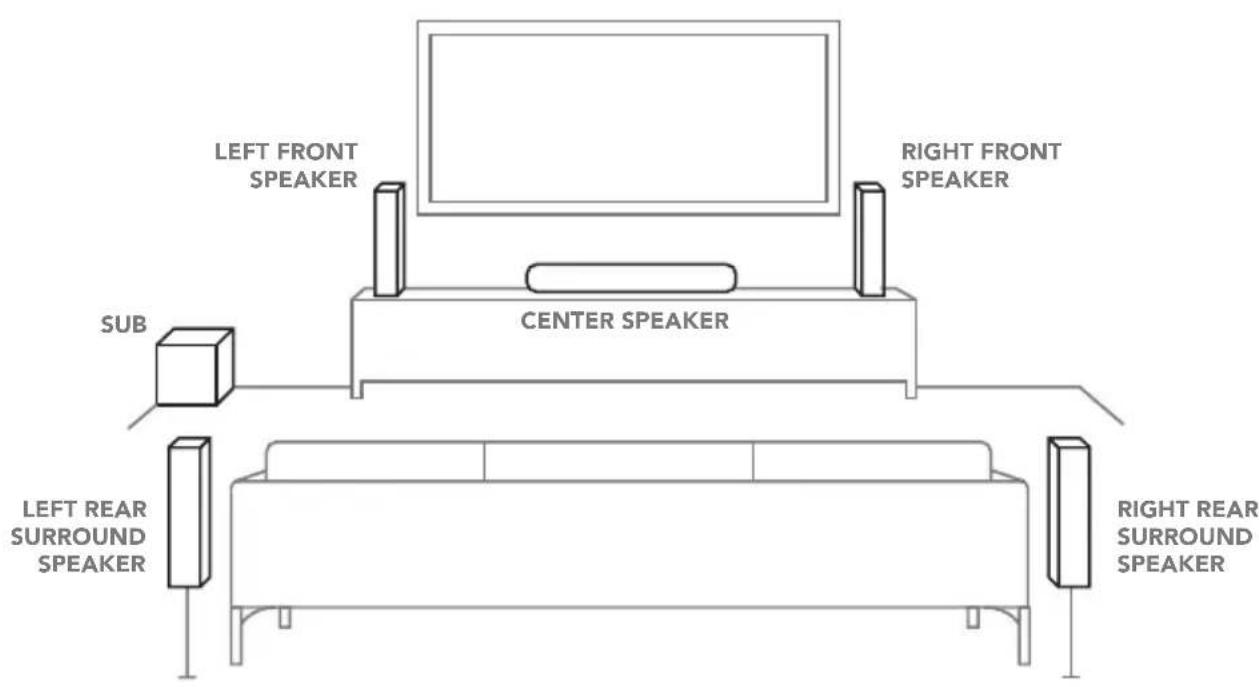
- Arrange your speakers as shown in the "General Speaker Placement" on the next page.
- Make sure the center speaker is centered above or below the television screen
- The speakers must all point relatively toward the center of the room. Avoid placing them behind furniture, plants, or other objects for best results.
- Add power to your speakers using the enclosed power cables included with your Enclave speakers. The blue LED will begin to flash and remain flashing until paired to the CineHub.
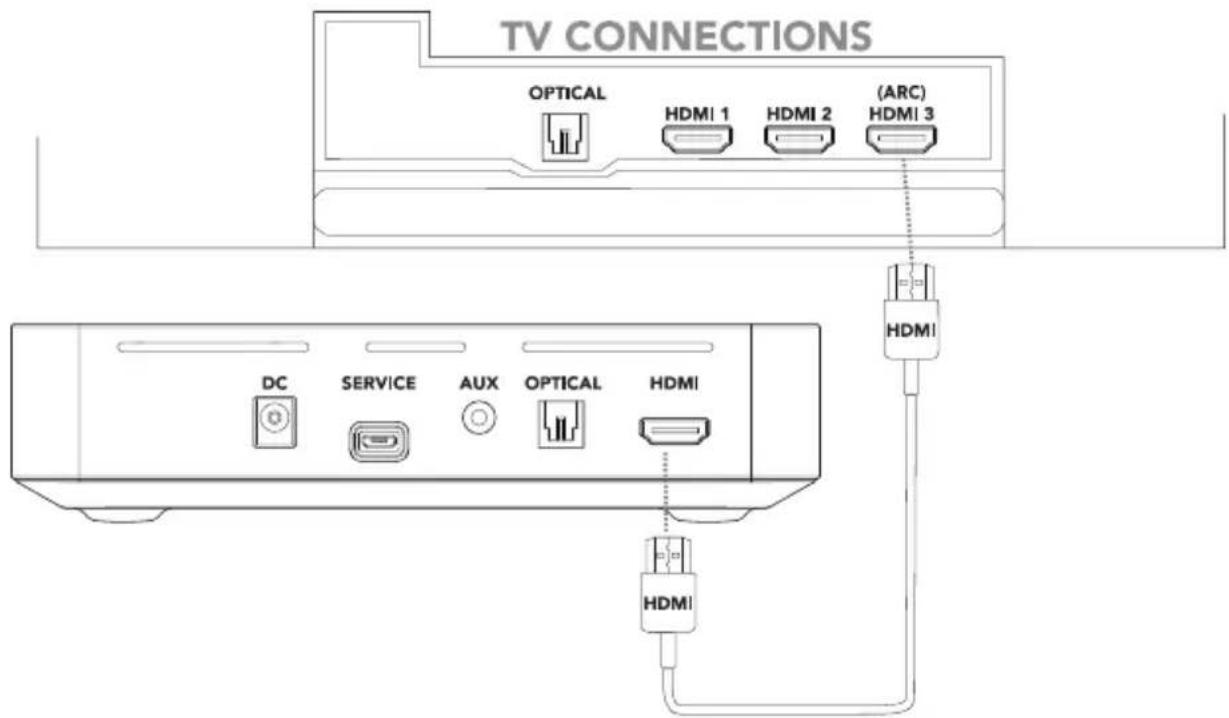
4B. CONNECT POWER AND CABLING TO THE ENCLAVE CINEHUB
ENCLAVE
EN10
- Download and install the Enclave Audio mobile app and follow the on-screen instructions on your phone.
- Plug in all power cables to the rear power connector on each speaker and power the speakers at a convenient wall outlet.
- Connect the HDMI cable provided from the CineHub HDMI port to the HDMI port marked (eARC or ARC) on your television or;
- If you have elected to use an Optical connection, connect the Optical cable to the Optical connector on your TV and the CineHub.
- Plug in the Enclave CineHub and the CineHub will start the auto-pairing process.
- The speakers will automatically pair when power is connected to the CineHub for the very first time. It may take up to 30 seconds for the system network to be established. The Enclave Audio app will display the status of the speaker pairing process.
NOTE: While the system is pairing to the speakers you will not be able to turn on or off the power until the pairing process is completed.
NOTE: SATELLITE SPEAKERS & SUBWOOFER BACK PANEL When the Enclave CineHub is powered off, all the speakers go into a low-power standby state and should remain plugged in at all times. The LED indicators on the rear of the speakers will turn off. The speakers will "power up" again when you turn on the Enclave CineHub.
5. GENERAL SPEAKER PLACEMENT
To get the best audio reproduction from surround-sound encoded material, Dolby and DTS recommend you place the speakers in a configuration most similar to the following diagram.
ENCLAVE
EN12
GENERAL SPEAKER PLACEMENT TIPS AND HINTS
1. Where should I place the front speakers?
Ideally, your front speakers should form a slight arc with your center channel speaker and point toward the center of your main seating area.
2. Where should I place the rear speakers?
Surround speakers are best placed to the left and right of your listening position—either in line with it, or just behind it.
3. Where should I place the subwoofer?
You can usually place your subwoofer just about anywhere in your home theater room with good results. Most people place their subwoofer in the front of the room. Placing your subwoofer near a wall will generally result in more bass, and placement near a corner—where three room boundaries come together—will generally bring even more. To adjust the volume of the subwoofer, please use the Enclave mobile app's remote function.
4. I set everything up, but the locations aren't working correctly.
Please be certain that your speakers are placed properly in accordance with the included placement diagram.
NOTE: The system works best with the left and right speakers either even with or in front of the center channel speaker.
6. BASIC SYSTEM FEATURES CONTINUE ON APP
The Enclave Audio app is essential to completing your setup and to ensure you have the best experience with your CineHome theater system. Download the Enclave app today from the Apple App Store or the Google Play Store.
7. TROUBLESHOOTING
We recommend viewing our installation videos located at www.enclaveaudio.com/setup for step-by-step instructions for your particular setup configuration.
If you have any trouble setting up your system, please try the following or give us a call at 1-844-436-2528 and our support team will be happy to talk you through resolving any issues. Also refer to the FAQs section on our website at www.enclaveaudio.com.
1. After powering up the Enclave CineHub, the system is failing to produce any audio.
All speakers must be powered on when the Enclave CineHub is started. If they are not powered on, they will not produce sound. The system shows only the speakers it can find. Check and make sure all speakers are powered on and the rear LEDs are illuminated and not flashing. Conduct a noise sequence test using the Enclave Audio app. This process will cause each speaker to produce a static white noise, individually confirming the speakers are actively connected to the network. A message will appear on the Enclave App if the system cannot locate any or all speakers. To fix, follow these steps:
- Check to make sure all of your speakers are plugged in to a power outlet and have power.
- Once you have confirmed all speakers have power, check the LED on the rear of the speaker. A speaker with a solid LED is properly paired.
- A speaker that has a flashing LED has not properly paired and we recommend performing a manual reset of that speaker using the RESET button located on the rear of the speaker.
- Press the reset button in using a fine point object and hold pressure until you hear an audible tone.
- Lastly, after the speaker reset has been completed, perform a wireless reset of the system using the Enclave Audio app, and your speaker should join the network.
ENCLAVE
EN14
NOISE SEQUENCE TEST
You can also test each speaker for audio individually with the Noise Sequence Test feature in the Enclave Audio App.
The Noise Sequence generator can be used to confirm successful placement and pairing of the Enclave Audio speakers.
A static white noise will be produced by each speaker individually in the system in a rotating fashion.
THE NOISE SEQUENCE USES THE FOLLOWING ROTATION:
Left Front, Right Front, Left Surround, Right Surround, Center, Subwoofer.
NOTE: A successful noise sequence indicates the Enclave system is performing correctly. If your audio remains silent from your source, please check that your source is set to correctly output audio via your chosen connection type. Also, check to make sure your INPUT setting is on the correct source in the Enclave App. As an example, we see customers who listen to music through Bluetooth and subsequently forget to switch their source back to the TV audio input.
- I am playing a DVD or Blu-ray disc that has surround sound, but I am only hearing audio out the left front and right front speakers.
Make sure your TV is properly setup to send surround information out of the HDMI or digital ports. For systems using HDMI ARC or Optical, the best performance will be achieved when using "Bitstream" mode from your player and/or your TV. If your source output is set to PCM and you're using ARC or Optical, you will only hear stereo audio due to limitations of ARC and Optical. However, TVs that support eARC can enjoy full uncompressed multi-channel PCM audio with the CineHub. Please refer to your TV manufacturer manual for detailed instructions.
- When the app shows a speaker is missing, that means it is not connected to the Enclave Audio CineHub.
Check the following:
- That all of your speakers are connected to the proper respective power cable and the tips securely plugged into the rear speaker power port. Be sure to check that the opposite end is firmly connected to your primary power source (wall, power strip, etc.).
- Is the rear panel LED flashing? If so, refer to section 1 in this troubleshooting segment of the manual. If the issue persists, please call Enclave Audio support at 1-844-436-2528.
- If the LED is constant, and the rest of the system is working, please call Enclave Audio Support at 1-844-436-2528 for further assistance.
4. I'm only hearing audio out of my Front Left and Front Right speakers.
There may be occasions where you only hear audio from the Front Left and Front Right speakers. Below are the possible scenarios:
- Your source input is only transmitting a stereo audio signal and Dolby Pro Logic II is disabled in the menus. The Default setting for the Enclave will upmix a stereo feed to 5.1 using Dolby Pro Logic II. You can disable this function in the menus of the app.
Dolby Pro Logic II is different than Dolby Digital. If Dolby Pro Logic II (DPL II) is displayed in the app, the Enclave is receiving a stereo signal and upmixing it to 5.1.
- The content is only in stereo and not a 5.1 mix, yet confusingly, is sent in Dolby Digital format. This signifies the content is not available in a 5.1 mix, however it is Dolby Digital encoded. Dolby Pro Logic II will not upmix this stream type to 5.1.
- Your content source (i.e. Cable Box, Dish, etc.) is only outputting stereo and is not set to bitstream. Check the audio settings of your content source to insure you are sending a bitstream signal through your TV to the Enclave CineHub.
REGULATORY STATEMENT ENCLAVE AUDIO CINEHOME II 5.1 WIRELESS AUDIO HOME THEATER SYSTEM
The United States Federal Communication Commission has established certain rules governing the use of electronic equipment.
FEDERAL COMMUNICATIONS COMMISSION DECLARATION OF CONFORMITY
This device complies with Part 15 of the FCC Rules. Operation is subject to the following two conditions: (1) This device may not cause harmful interference, and (2) This device must accept any interference received, including interference that may cause undesired operation.
PRODUCT NAME: ENCLAVE AUDIO CINEHOME II 5.1 WIRELESS AUDIO HOME THEATER SYSTEM
Model Number: EA-200-HTIB-US
Responsible Party Name: Enclave Audio Technologies, LLC.
Address: 21550 Oxnard St., 3rd Floor, Woodland Hills, CA 91367, USA
Phone: 1.844.436.2528
URL: http://www.enclaveaudio.com
NOTE: This device has been tested and found to comply with the limits for a Class B digital device, pursuant to Part 15 of the FCC rules. These limits are designed to provide reasonable protection against harmful interference when the equipment is operated in a residential installation. This equipment generates, uses, and radiates radio frequency energy and if not installed and used in accordance with the instruction guide, may cause harmful interference to radio communications.
CAUTION: Any changes or modifications not expressly approved by the party responsible for compliance could void the user's authority to operate the equipment. This radio is compliant with FCC RF Exposure requirements for mobile devices. Users are cautioned to maintain 20~cm from the transmitter to ensure compliance.
REGULATORY STATEMENT ENCLAVE AUDIO CINEHOME PRO 5.1 WIRELESS AUDIO HOME THEATER SYSTEM
The United States Federal Communication Commission has established certain rules governing the use of electronic equipment.
FEDERAL COMMUNICATIONS COMMISSION DECLARATION OF CONFORMITY
This device complies with Part 15 of the FCC Rules. Operation is subject to the following two conditions: (1) This device may not cause harmful interference, and (2) This device must accept any interference received, including interference that may cause undesired operation.
PRODUCT NAME: ENCLAVE AUDIO CINEHOME PRO 5.1 WIRELESS AUDIO HOME THEATER SYSTEM
Model Number: EA-100-HTIB-US
Responsible Party Name: Enclave Audio Technologies, LLC.
Address: 21550 Oxnard St., 3rd Floor, Woodland Hills, CA 91367, USA
Phone: 1.844.436.2528
URL: http://www.enclaveaudio.com
ENCLAVE
EN18
NOTE: This device has been tested and found to comply with the limits for a Class B digital device, pursuant to Part 15 of the FCC rules. These limits are designed to provide reasonable protection against harmful interference when the equipment is operated in a residential installation. This equipment generates, uses, and radiates radio frequency energy and if not installed and used in accordance with the instruction guide, may cause harmful interference to radio communications.
CAUTION: Any changes or modifications not expressly approved by the party responsible for compliance could void the user's authority to operate the equipment. This radio is compliant with FCC RF Exposure requirements for mobile devices. Users are cautioned to maintain 20~cm from the transmitter to ensure compliance.
REGULATORY STATEMENT ENCLAVE AUDIO CINEHUB
The United States Federal Communication Commission has established certain rules governing the use of electronic equipment.
FEDERAL COMMUNICATIONS COMMISSION DECLARATION OF CONFORMITY
This device complies with Part 15 of the FCC Rules. Operation is subject to the following two conditions: (1) This device may not cause harmful interference, and (2) This device must accept any interference received, including interference that may cause undesired operation.
PRODUCT NAME: ENCLAVE AUDIO CINEHUB
Model Number: EA-500-HUB-US
Responsible Party Name: Enclave Audio Technologies, LLC.
Address: 21550 Oxnard St., 3rd Floor, Woodland Hills, CA 91367, USA
Phone: 1.844.436.2528
URL: http://www.enclaveaudio.com
NOTE: This device has been tested and found to comply with the limits for a Class B digital device, pursuant to Part 15 of the FCC rules. These limits are designed to provide reasonable protection against harmful interference when the equipment is operated in a residential installation. This equipment generates, uses, and radiates radio frequency energy and if not installed and used in accordance with the instruction guide, may cause harmful interference to radio communications.
CAUTION: Any changes or modifications not expressly approved by the party responsible for compliance could void the user's authority to operate the equipment.
This radio is compliant with FCC RF Exposure requirements for mobile devices.
Users are cautioned to maintain 20~cm from the transmitter to ensure compliance.
8. IMPORTANT SAFETY INFORMATION
- Read and follow all instructions, warnings and cautions when connecting the Enclave CineHub and associated Enclave CineHome speakers.
- Keep these instructions for future reference.
- Do not install near any heat sources such as radiators, heat registers, stoves, or other equipment that produce heat.
- Protect all cords from being walked on, pulled excessively, or pinched, particularly at plugs and the point where they exit from the home, Enclave Audio CineHub and associated Enclave CineHome speakers.
- Only use attachments/accessories specified by Enclave Audio.
- Refer all servicing to qualified service personnel. Servicing is required when the Enclave Audio CineHub or associated Enclave Audio CineHome speakers have been damaged in any way, such as the power supply cord or plug is damaged, liquid has been spilled, objects have fallen into them, they have been exposed to rain or moisture, do not operate normally, or have been dropped.
9. WARRANTY
For Enclave Audio products purchased from Enclave Audio Authorized Dealers Only. Enclave Audio provides a transferable (2) year limited warranty on our speaker cabinets and drivers; a transferable one (1) year limited warranty on our electronics in subwoofer, powered speakers; and a non-transferable lifetime limited warranty on our cables.
No other warranty, implied or otherwise, is created or honored by Enclave. These warranties cover only defects in material and workmanship with the following specific exceptions:
- Damage which has been caused by tampering with the product housing
- Damage from Third Party Parts, Components, or Accessories
- Any damage caused by any reason from usage that is not in accord with Enclave product instructions.
This warranty covers only the actual defects within the products themselves. IT DOES NOT cover costs of installation in (or removal from) a fixed installation, or normal setup, claims based on any misrepresentation by the seller, or performance variations resulting from installation related circumstances such as signal quality, AC power or incompatibilities with other system components.
WARNING RISK OF ELECTRIC SHOCK. DO NOT OPEN.
WARNING: Do Not Open! Risk of Electrical Shock. Voltages in this equipment are hazardous to life. No user-serviceable parts inside. Refer all servicing to qualified service personnel.
- This product is intended to be operated only from the AC voltages listed on the back panel of the Enclave Audio CineHome Speaker Systems and CineHub. Operation from voltages other than those indicated might cause irreversible damage to the product and void the product's warranty. The use of AC plug adapters is cautioned because it can allow the product to be plugged into voltages in which the product was not designed to operate. If the product is equipped with a detachable power cord, use only the type provided with your product or by your local distributor and/or retailer. If you are unsure of the correct operational voltage, please contact your local distributor and/or retailer.
- Only use attachments/accessories specified by the manufacturer.
During the warranty period, Enclave Audio will, at its option, either repair the defect, or replace the defective product, or the defective parts, or components thereof with the then current product/component in use by Enclave Audio, at no charge to the owner for parts and labor covered by this warranty. If necessary, repairs are not covered by this warranty, or if a unit is examined which is not in need of repair, you will be charged for the repairs and/or the examination.
If non-warranted repairs are needed, we will notify you of the estimated cost and ask for your authorization to perform said repairs. You must pay shipping charges incurred in getting your product to Enclave Audio. We will pay the return shipping charges if the repairs are covered by the warranty. Please save the original shipping cartons as the unit MUST be returned in the original carton and packing. (Replacement cartons are available at a modest charge).
Declaration for EU Compliance Operation Frequency Band/Max. RF power transmitted: 2402-2480MHz, 0dBm
Frequency bands; 2402-2480 MHz, 5150-5250 MHz, 5250-5350 MHz, (ch 36 to ch 64) 5470-5725 MHz. (ch 100, 104, 108, 112, 116, 132, 136, 140)
Transmit power / power range: 2402-2480 MHz: <9dBm, 5150-5250 MHz: 16.8dBm, 5250-5350 MHz: 15.7dBm, 5470-5725 MHz: 17.0dBm
Hereby, Enclave Audio Inc. declares that the radio equipment is in compliance with Directive 2014/53/EU.
The full text of the EU DoC can be downloaded at http://www.enclaveaudio.com/safety
RF EXPOSURE COMPLIANCE STATEMENT
This equipment complies with IC RSS-102 radiation exposure limits set forth for an uncontrolled environment. This transmitter must not be co-located or operating in conjunction with any other antenna or transmitter.
This device contains license-exempt transmitter(s)/receiver(s) that comply with Innovation, Science and Economic Development Canada's license-exempt RSS(s). Operation is subject to the following two conditions:
- This device may not cause interference.
- This device must accept any interference, including interference that may cause undesired operation of the device.
ENCLAVE
EN24
CORRECT DISPOSAL OF THIS PRODUCT
Waste Electrical & Electronic Equipment (WEEE)
The crossed out wheelie bin is intended to show that this appliance must not be placed with ordinary household waste at the end of its useful life. To prevent possible harm to the environment or human health from uncontrolled waste disposal, please keep separate from other household waste and recycle it responsibly to promote the sustainable reuse of material resources.
Household users should contact either the retailer where they purchased the product, or their local government office for details of where and how you can take this item for environmentally safe recycling. Business users should contact their supplier and check the terms and conditions of the purchase contract. This product must not be mixed with other commercial wastes for disposal.

DOLBY
AUDIO

dt
Digital Surround
HDMI
HNNONMMLNNTN

Bluetooth
Enclave Audio CineHub Manufactured under license from Dolby Laboratories. Dolby, Pro Logic, and the double-D symbol are trademarks of Dolby Laboratories.
For DTS patents, see http://patents.dts.com. Manufactured under license from DTS Licensing Limited. DTS, the Symbol, & DTS and the Symbol together are registered trademarks, and DTS Digital Surround is a trademark of DTS, Inc. © DTS, Inc. All Rights Reserved.
The terms HDMI and HDMI High-Definition Multimedia Interface, and the HDMI Logo are trademarks or registered trademarks of HDMI Licensing LLC in the United States and other countries.
The BLUETOOTH® word mark and logos are registered trademarks owned by Bluetooth Sig, Inc. and any use of such marks by Enclave Audio Technologies, LLC. is under license.
LEGALNOTICES
Every effort has been made to ensure that the information in this document is complete and accurate at the time of printing; however, the information contained in this document is subject to change. Please visit http://www.enclaveaudio.com/guide for the latest document.
Enclave Audio Technologies, LLC. cannot be responsible for unauthorized use of equipment and will not make allowance or credit for unauthorized use of access.
Enclave Audio Technologies, LLC.
21550 Oxnard St., 3rd Floor, Woodland Hills, CA 91367 USA
Toll-free (USA): 844.436.2528
email: customerservice@enclaveaudio.com www.enclaveaudio.com
Copyright 2019 Enclave Audio, Inc. All Rights Reserved.
TABLE DES MATIÈRES
FR5. CONTENU DE L'EMBALLAGE
FR7. APERCU SUR LES CONNXIONS DE CINEHUB ENCLAVE AUDIO
FR8. CONNXIONS ET INDICATEURS DE CINEHUB ENCLAVE AUDIO
FR9. INSTALLATION ET CONFIGURATION
FR12. POSITIONNEMENT GENÉRAL DES ENCEINTES
FR13. FONCTIONS DU SYSTEME DE BASE CONTINUER SUR L'APPLICATION
FR14. DÉPANNAGE
FR17. CONSIGNES DE SECURITE IMPORTANTES
FR17. GARANTIE
FR1
ENCLAVE
FÉLICITATIONS!
ATTENTION, RISQUE D'ÉLECTROCUTION. NE PAS OUVRIR.
MISE AU REBUT APPROPRIÉE DE CET APPAREIL
21550 Oxnard St., 3rd Floor, Woodland Hills, CA 91367 USA
support@enclaveaudio.com,
www.enclaveaudio.com/setup
使用智能手机扫描右侧二维码,
或登录 www.enclaveaudio.com/setup

ENCLAVE
注册产品
21550 Oxnard St., 3rd Floor, Woodland Hills, CA 91367 USA