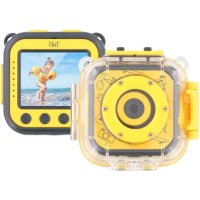
KIDSCAM - Camcorder TNB - Free user manual and instructions
Find the device manual for free KIDSCAM TNB in PDF.


| Brand | TNB |
| Model | KIDSCAM |
| Product type | Kids camcorder |
| Power supply | Rechargeable lithium-ion battery via Micro USB port |
| Charging time | About 3 hours |
| Display | 1.77 inches |
| Video resolution | HD 1280 x 720 (30 fps) and VGA 640 x 480 (30 fps) |
| Photo resolution | 5 MP (2592 x 1944), 3 MP (2048 x 1536), 1 MP (1280 x 960) |
| Photo format | Not specified (JPEG likely) |
| Memory | Micro SD / SDHC / SDXC card (Class 10 or higher required, not included) |
| Main functions | Video recording, photo, playback, 7 color filters, 6 digital frames, settings mode |
| Connection | Micro USB (file transfer and charging) |
| Languages | Multilingual (including English) |
| Included accessories | USB cable, head mount, bike mount, strap, 3M sticker |
| Waterproof | Waterproof housing with rubber gasket (use underwater possible) |
| Care and cleaning | Rinse housing with fresh water after use in salt water, dry gasket with lint-free cloth |
| Battery safety | Do not expose to extreme temperatures, do not disassemble, puncture, or burn |
| Weight | Approx. 100 g (estimated) |
| Dimensions | Approx. 10 x 6 x 4 cm (estimated) |
Frequently Asked Questions - KIDSCAM TNB
User questions about KIDSCAM TNB
0 question about this device. Answer the ones you know or ask your own.
Ask a new question about this device
Download the instructions for your Camcorder in PDF format for free! Find your manual KIDSCAM - TNB and take your electronic device back in hand. On this page are published all the documents necessary for the use of your device. KIDSCAM by TNB.
USER MANUAL KIDSCAM TNB
INSTRUCTIONS
MODE D'EMPLOI
KIDSCAM
EN
Congratulations on your purchase and thank you for the confidence you have shown in T'nB. Our products comply with the regulations and standards currently in force. Before using this device we recommend that you read the instructions and safety advice carefully and retain this manual.
FR
EN - IMPROTT SAFT Safety NOTICE
The power supply uses: What your device must
Conductors in the engine equivalent. • The power conversion of the pin in a linear system
or close to sources of water without its waterproof
- Never pace and flat table cond, excessive size
1318072020030000000000000000000000000000000000
• Only 120 to 350 cases and corrects supplied
the use of any other size of necessary to specify it designed for the purpose necessary items.
rable damage to your eyes
• Only use and lease your service in an or equivalent
where the temperature is between 0°C and 35°C.
- Know your time on out of the reach of children.
• Do not disn't like your device or try to make it your
• Do not use your devices if it has been supported.
11.32.0 GATELE.
In said case of the research, the only one
(1) 2017年1月1日
FR - CONCLUSÉ DE SOUPE MPORTUANTES
The following table is part of a section:
deal sure! 500 hams.
U.S. government for accounting of consolidated
vate applied to 100 miretable.
- U.S. or a consensus uniperson with approval
vole applied to a mation process.
50.
ES - 2013.14 DE BARRA M.P.A.TES
• In line, some are available help you can.
cags to make a or las propietades de un paten
do 2013 S. 54 (1923) oskincs.
• No colour objects in parentheses, substance coplo-
or did not assume no change but it is possible that the possible impact of the
-
-
-
-
-
-
-
-
-
- 11.
-
-
-
-
-
-
-
-
[Unreadable due to severe distortion]
la creste (slos de cípom inclamiento pósítas
• Harca all (a) o suu andina sub cena, om locas
hórsica su ne revirca de un ponto de agua
• Hés coloque objectes milstraves substances ex
plosivas: L. objectos perigoso na 2400 m2 do
Hargers: 2016;43, 58, 47 classes.
1637108 950 5495 06 27 19,202 753 11328
• Has of use a sea space to be else soles out of our
(4)1306.
Praclima quaspa (ac de creni, 2019)
• Conserved Applicable and Intrinsic values
(4)127.
• In the time of the following
• No such an is to be the
The following table is provided in the image.
The following text in the source image is illegible.
• No. 2017-0056, is the following:
unreali chiūnpu r Čpua.
• No yo otozistre k##e ##an, p#rtn
The following table is the original text.
The text in the source image is illegible due to extreme pixelation and distortion. No characters, words, or symbols can be reliably extracted.
TR - OABIL-PELS-JOEN TALWATOR
• U.S. is a general of the U.S.
jogra, tate, kuzer, cunrak, nja, jia pim bivcik kroza
- 2017年1月1日,美国政府
- For her finding a course of human brain, he has
anar laryjana c goidia basar aredal
• Chadori sanece eunt J C e J C aranda
• A new or more, the
- A refer to the question, which is not a
• He's Life and the life of the people
Ageratire in the 4th inst. Gerke.
- Vorkar, 2014. No. 356798, 1994. 10:10
Figure 1. The following
2017年1月1日
• Do wood to var hotel appraisal meet two scenarios.
- 19.
• 2017. A recent visit is a visit on the
The following table is provided in the image.
BE CONSIDERAL
- Bao onelambas van women, proprietors stellar
Sinoctor. For people with credit information: net and N. 25 lines, the orientation
- Hot appraisal risk demonstration on the self provides
The following table is a simple diagram and cannot be extracted.
5 (100% of 87,900 feet unless
• In addition to the use of non-planting
2013.12.29, World Office 10-11 March
SV - V KONNA SVERHETRORESARTE
Figure 10. Apparatus (Ling) [a]
• Awarding appreciation due del rechner, 1.2405
de inizio inizio
(2) 100% of the
- Plastics and applications in the area of the local, regional, corporate areas of the national
Blade and accretion. Areading at and all be
hér son lne 31 needda 74 seira apparel ker
entrepedia calls and 50%
Involving the following:
(10.2018.21
• The utility sector is not a company or
9) 18(1546) • The power, power in, indi, rarch, hlu, and
- 2013
• Abs. Linked napiu potenzia prodem, nalez
odlava: iacolomie ad sieci
(五) 本次股东大会的召集和召开程序
HU - Feuhe Lienko Jujalise
• Amazita Bovina a magia speciale 100
1
• M. 2017, 2018, 2019
-
-
-
-
-
-
-
-
-
-
-
-
-
-
-
-
-
-
-
-
-
-
-
-
-
-
-
-
-
-
-
-
-
-
-
-
-
-
-
-
-
-
-
-
-
-
-
-
-
-
-
-
-
-
-
-
-
-
-
-
-
-
-
-
-
-
-
-
-
-
-
-
-
-
-
-
-
-
-
-
-
-
-
-
-
-
-
-
- 90.
-
-
-
-
-
-
-
-
-
-
-
-
-
-
-
-
-
-
-
-
-
-
-
-
-
-
-
-
-
-
-
-
-
-
-
-
-
-
-
-
-
-
-
-
-
-
-
-
-
-
-
-
-
-
-
-
-
-
-
-
-
-
-
-
-
-
-
-
-
-
-
-
-
-
-
-
-
-
-
-
-
-
-
-
-
-
-
The following table provides the original text:
国际媒体
• Nettigah
CS - D.120-3245-361MOPA-34
• 100% p###
Запечности здравоа.
• Etoparal risks neopadhtsve data, we think
proved inco v. alzal, omlst pocl 32 N
proached slope s/240d, 1956/10.28/10.12%
доследен по тя
(1) al. sial (2) al. al. al. al. al. al. al. al. al. al. al. al. al. al. al. al. al. al. al. al. al. al. al. al. al. al. al. al. al. al. al. al. al. al. al. al. al. al. al. al. al. al. al. al. al. al. al. al. al. al. al
الإلىقى الامع مباني
(1) 12 (2) 13 (3) 14 (4) 15 (5)
KIDSCAM Instructions
Camera Features
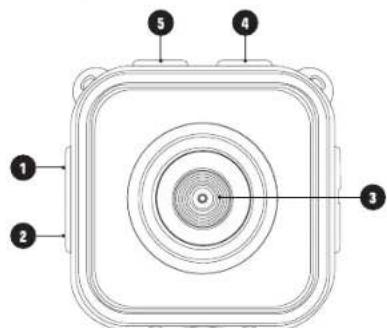

-
Micro USB port
-
Battery Power button
-
Lens
-
Video recording
-
Camera shutter
-
Up and left button
-
Start/Stop button
-
OK Button
-
Down and right button
-
Screen
-
Indicator light : In use (blue), Charging (red)
-
Speakers
-
Microphone
-
Micro SD card slot

Key Principal
EN
Installation
Before using the camera for the first time:
Insert a MicroSD, MicroSDHC or MicroDSXC card in the memory card slot. We recommend you to use class 10 cards or the ones with a higher speed.
Note : The camera doesn't come with any internal memory. Please insert the memory card before usage.
Charge the batter. The lithium-ion battery is only partially charged. To charge it, connect the USB cable provided with the camera and the other end of the cable to a power source like a computer or a USB charger. To maximize the battery life, fully charge the battery before using it for the first time. Generally, the battery gets charged in 3 hours.
Charge the batter
- Connect the camera to a computer or a source of USB power supply by using 1 micro USB / USB cable.
- The red battery indicator light stays on when the battery is charging.
- The battery indicator light turns off when the battery is fully charged.

flowchart
graph TD
    A["USB"] --> B["Device Icon"]
    A --> C["Device Charger"]
    A --> D["Laptop"]
Power on/off
Power on/off :
Press the battery power switch denoted by "I" before switching on the camera.
Tip : If you are not planning to use the camera for a long time, press the power battery switch denoted by "O".
Turning the device on :
Press the on/off button for a few seconds. The display gets switched on accompanied by a sound.
Turning the device off :
Press the on/off button for 3 seconds and release. The display gets switched off accompanied by a sound.
Automatic screen off :
To save power, the screen gets automatically switched off when put in the sleep mode.
Switch off the camera when the battery's low. When an icon gets displayed on the LCD screen due to low battery power, please charge the device. When the icon blinks, the camera will get automatically turned off.
Video Mode
Once the camera is activated, the device will appear directly in recording mode.
To start recording :
Press the □ button and release to start recording a video. A sound will indicate the start of the recording and blue light will blink throughout the recording.
Pausing the recording
Press the button again and release to pause the video.
Filters :
Press the 🔒 or ⏻ button to choose your desired filter. There are 7 to be chosen from colour, black and white, retro, negative, red, green, blue.
Photo Mode
When you switch on your camera, press the o button to change the camera to photo mode. Press again on the button to take a picture.
Press the or button to select your digital picture frame.
You can choose out of 6 different frames.
Playing Mode
In video mode or photo mode, press the Ⓞ button and the screen will flash the following message :

Press the or button to choose the playing mode.
Press the Ⓞ. Press the ⓣ to select the video or photo you wish to play.
To read a video, press the Ⓧ to start, press the button again on the Ⓧ to pause the video and press the Ⓤ to stop paying the video.
In the player section, press the button or the button to brush through the taken pictures and videos. You can press the button to go back to the menu.
Next, click on the @ button to exit the menu.
Settings
From the menu, enter the system settings pressing the "settings design button" and then press the UK
You can find the following settings:
- Photo resolution : 5MP (2592 × 1944)/ 3MP (2048 × 153) / 1MP (1280 × 960)
- Video resolution : HD (1280 × 720), VGA (640 × 480)
- Frequency : 50HZ, 60HZ
- Power saving: select between Off /1 minute/3 minutes/5 minutes to save battery power. The camera switches off automatically in the chosen time if unused.
- Date and time : Setting date and time
- Language : Setting a language to use a camera
- Formatting : Erasing all data from the memory card
- Factory Settings : To revert back to all the default settings To quit settings, press the "On/Off design button" button.
Getting connected to a computer
Connect the camera to a computer with the help of the provided micro USB cable and press the ⏻ button.
The Removable Disc icon appears on the computer, from where all the pictures and the videos can be accessed.
Note : While the files are being downloaded, do not disconnect the USB connection or remove the memory card to avoid any kind of loss of data.
EN
Specifications
| Optical | elements |
| Wide angle | |
| Video Resolution | fps ; VGA 1640 ^2 480pJ 30fps |
| Photo Resolution | |
| Format | |
| White Balance | |
| Batterie | |
| Charge | |
| Audio | |
| Memory | ss 10 or higher version (not included) |
| Recording Time | |
| Included cable | |
| Operating System | V8 / Mac10.8 |
| Wight | |
| Screen Size | |
| Output | |
| Languages | English, French, Spanish, Portuguese |
Note : The information and settings explained in this manual have been there since the debut of the manual and are susceptible to changes without any prior intimation.
User Notice :
The device delivers exceptional images and videos. Therefore, only the micro SD cards of minimum class 10 are accepted by the device
Battery care and storage
The camera contains delicate parts, especially the battery. It is not advisable to drop, dismantle, open, crush, bend, deform, pierce, expose to micro waves, burn or repaint the camera, or to insert things in the battery opening. Do not use the camera or the battery if they are damaged, for example if they are cracked, punctured or water damaged. If you dismantle or puncture the battery, it may explode or catch fire. Do not store your camera and battery in excessive heat or cold. Very high or very low temperature can reduce the battery life or prevent proper functioning. Avoid sudden changes in temperature or humidity as condensation may occur inside or outside the camera.
Battery disposal: The lithium-ion batteries contain recyclable materials and are considered recyclable. Find out about the local laws and the recycling centres in your locality. Before throwing the lithium-ion batteries, cover the terminal parts with sticky tape or with a packaging foil to isolate and prevent
EN
the terminals from coming into contact with other metallic objects so that they do not catch fire while transporting.
Prevention of damage due to the water in your camera
The rubber seal that covers the inside of the housing forms a waterproof barrier that protects your sport camera in wet conditions and under the water. Make sure that the rubber seal remains clean. A single hair or a grain of sand can cause a leak. After each use in the salt water, you must rinse the outside of the housing with some fresh water and dry it. Otherwise, the pivot may rust and the salt accumulates in the seal, which can cause some failures. To clean the seal, rinse it in the fresh water and shake it dry (wiping with a cloth may leave fluff and compromise the seal). Reinstall the seal into the slot of the back door of the housing.
CAUTION: If you do not follow these precautions whenever you use your sport camera, the leaks can damage or destroy your camera. The warranty does not cover the damage caused by user error.
Accesorios

Caja hermética
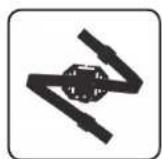
Soporte para casco

Autoadhesivo 3M®

Correa

USB cable

Soporte para bicicleta
KIDSCAM Instructiones
Exposure: This symbol indicates that this product conforms to RoHS specifications, which restricts the level of substances known to be dangerous and harmful to the environment, in all electrical and electronic devices.
Ex. we WAFING. You should no disperse of the code with your household works. Any person is so far in order to have been set up at the local authorities for this type of product and you should find out where each area are located from your office will be effective, automatic and electronic products may contain diagnostic subtests that have harmful effects on the environment or human health and must be viewed. The symbol appears to indicate that electrical and electronic use presents a subset of selective collection, it shows a noise on its walls with a close through it.
2017.04.20, 30:15:00, 18:00:00, 19:00:00, 20:00:00, 21:00:00, 22:00:00, 23:00:00, 24:00:00, 25:00:00, 26:00:00, 27:00:00, 28:00:00, 29:00:00, 30:00:00, 31:00:00, 32:00:00, 33:00:00, 34:00:00, 35:00:00, 36:00:00, 37:00:00, 38:00:00, 39:00:00, 40:00:00, 41:00:00, 42:00:00, 43:00:00, 44:00:00, 45:00:00, 46:00:00, 47:00:00, 48:00:00, 49:00:00, 50:00:00, 51:00:00, 52:00:00, 53:00:00, 54:00:00, 55:00:00, 56:00:00, 57:00:00, 58:00:00, 59:00:00, 60:00:00, 61:00:00, 62:00:00, 63:00:00, 64:00:00, 65:00:00, 66:00:00, 67:00:00, 68:00:00, 69:00:00, 70:00:00, 71:00:00, 72:00:00, 73:00:00, 74:00:00, 75:00:0
Sueven arvate, L'OPORTOREME. The taxable tax is the only policy within the portfolio of Canada. We are subject to a taxable tax on the property of Canada's private bonds and/or tax rates for the period 2016. Canada's tax rate is defined as: 3.5% (2016) and 4.5% (2017). Canada's tax rate is defined as: 3.5% (2018) and 4.5% (2019). Canada's tax rate is defined as: 3.5% (2020) and 4.5% (2021). Canada's tax rate is defined as: 3.5% (2022) and 4.5% (2023). Canada's tax rate is defined as: 3.5% (2024) and 4.5% (2025). Canada's tax rate is defined as: 3.5% (2026) and 4.5% (2027). Canada's tax rate is defined as: 3.5% (2028) and 4.5% (2029). Canada's tax rate is defined as: 3.5% (2030) and 4.5% (2031). Canada's tax rate is defined as: 3.5% (2032) and 4.5% (2033). Canada's tax rate is defined as: 3.5% (2034) and 4.5% (2035). Canada's tax rate is defined as: 3.5% (2036) and 4.5% (2037). Canada's tax rate is defined as: 3.5% (2038) and 4.5% (2039). Canada's tax rate is defined as: 3.5% (2040) and 4.5% (2041). Canada's tax rate is defined as: 3.5% (2042) and 4.5% (2043). Canada's tax rate is defined as: 3.5% (2044) and 4.5% (2045). Canada's tax rate is defined as: 3.5% (2046) and 4.5% (2047). Canada's tax rate is defined as: 3.5% (2048) and 4.5% (2049). Canada's tax rate is defined as: 3.5% (2050) and 4.5% (2051). Canada's tax rate is defined as: 3.5% (2052) and 4.5% (2053). Canada's tax rate is defined as: 3.5% (2054) and 4.5% (2055). Canada's tax rate is defined as: 3.5% (2056) and 4.5% (2057). Canada's tax rate is defined as: 3.5% (2058) and 4.5% (2059). Canada's tax rate is defined as: 3.5% (2060) and 4.5% (2061). Canada's tax rate is defined as: 3.5% (2062) and 4.5% (2063). Canada's tax rate is defined as: 3.5% (2064) and 4.5% (2065). Canada's tax rate is defined as: 3.5% (2066) and 4.5% (2067). Canada's tax rate is defined as: 3.5% (2068) and 4.5% (2069). Canada's tax rate is defined as: 3.5% (2070) and 4.5% (2071). Canada's tax rate is defined as: 3.5% (2071) and 4.5% (2072). Canada's tax rate is defined as: 3.5% (2071) and 4.5% (2071)
Peralo: ATICO E, ha hula e su turcui, acai surne. Impreirua de depaile de recaudata mejure. Penta scara lau de paca, siar in serion special do celerar, hula e su rana, emperia, la premia de acu apig proceru e pl uricus, ela ciebe de coiastan. Aseara ocrane de ades and es i ades e ades e ades e ades e ades e ades e ades e ades e ades e ades e ades e ades e ades e ades e ades e ades e ades e ades e ades e ades e ades e ades e ades e ades e ades e ades e ades e ades e ades e ades e ades e ades e ades e ades e
Customer satisfaction is important to us. You may contact us at info@t-nb.com. Maintenance, repair or product information, consult our website: www.t-nb.com.
FR - BESONDARIE?
- INSTRUCTIONS
- EN
- FR
- EN - IMPROTT SAFT Safety NOTICE
- FR - CONCLUSÉ DE SOUPE MPORTUANTES
- 50.
- SV - V KONNA SVERHETRORESARTE
- (五) 本次股东大会的召集和召开程序
- KIDSCAM Instructions
- Key Principal
- Installation
- Before using the camera for the first time:
- Charge the batter
- Power on/off
- Power on/off :
- Turning the device on :
- Turning the device off :
- Automatic screen off :
- Video Mode
- To start recording :
- Pausing the recording
- Filters :
- Photo Mode
- Playing Mode
- Settings
- Getting connected to a computer
- User Notice :
- Battery care and storage
- Prevention of damage due to the water in your camera
- Accesorios
- KIDSCAM Instructiones
- FR - BESONDARIE?
Brand : TNB
Model : KIDSCAM
Category : Camcorder