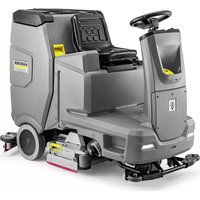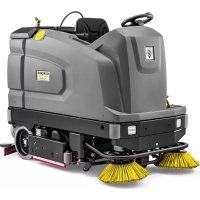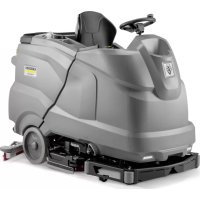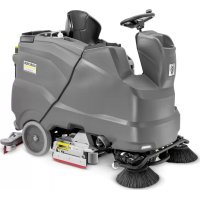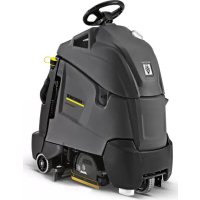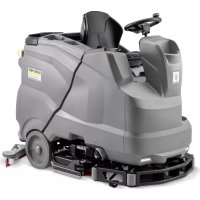
B 150 R Bp Pack - Industrial floor scrubber Kärcher - Free user manual and instructions
Find the device manual for free B 150 R Bp Pack Kärcher in PDF.



| Product type | Ride-on industrial floor scrubber |
| Brand | Kärcher |
| Model | B 150 R Bp Pack |
| Use | Professional and industrial (hotels, schools, hospitals, factories, offices) |
| Dimensions (L x W x H) | 1690 mm x 810 mm x 1390 mm (without roof); 2060 mm with protective roof |
| Unladen weight | 727 kg (B 150) |
| Maximum permissible weight | 957 kg (B 150) |
| Power supply | 36 V battery, available capacities: 170, 180, 240, 285 Ah |
| Charger | Internal or external, 230 V, 50-60 Hz, charging current 8 A |
| Working width | 750 mm (with R brush); up to 1080 mm with side brush |
| Theoretical area performance | Up to 4500 m²/h (7500 m²/h in Adv mode) |
| Tank volumes | Clean water: 150 l; dirty water: 150 l; large debris: 7 l |
| Cleaning functions | Water cleaning, polishing, suction, detergent dosing (0-3%), self-cleaning |
| Max. travel speed | 6 km/h (10 km/h in Adv mode) |
| Brush ground pressure | Max. 765 N (78 kg) for the R version |
| Operating temperature | +5 °C to +40 °C |
| Maximum permissible gradient | 10% (15% in Adv mode) |
| Sound level (LpA) | 67 dB(A) in normal operation |
| Routine maintenance | Cleaning filters, suction lips, brushes, emptying tanks, charging battery |
| Safety | Safety switch, seat contact switch, parking brake, thermal protection |
| Accessories and spare parts | Available at www.kaercher.com; use only original parts |
| Warranty | According to country conditions; contact dealer or authorized service center |
Frequently Asked Questions - B 150 R Bp Pack Kärcher
User questions about B 150 R Bp Pack Kärcher
0 question about this device. Answer the ones you know or ask your own.
Ask a new question about this device
Download the instructions for your Industrial floor scrubber in PDF format for free! Find your manual B 150 R Bp Pack - Kärcher and take your electronic device back in hand. On this page are published all the documents necessary for the use of your device. B 150 R Bp Pack by Kärcher.
USER MANUAL B 150 R Bp Pack Kärcher
natural_image
Line drawing of a cleaning or cleaning machine with visible components and no text or symbolsDeutsch 8
English 17
Français 26
Italiano 35
Nederlands 44
Español 53
Português 62
Dansk 71
Norsk 80
Svenska 88
Suomi 96
Ελληνικά 105
Türkçe 114
Русский 123
Magyar 132
Čeština 141
Slovenščina 150
Polski 159
Românește 168
Slovenčina 177
Hrvatski 185
Srpski 194
Български 203
Eesti 213
Latviešu 221
Lietuviškai 230
Українська 238
العربيya 249
B 150 R Bc
B 150 R Bc Adv.
B 150 R Bc Adv. Dose
B 150 R Bc Adv. Dose SB
B 150 R Bc Adv. SB
B 150 R Bc Dose
B 150 R Bc Dose low wheel pressure
B 150 R Bc Dose SB
B 150 R Bc SB
B 150 R Bp
B 150 R Bp D90 *RU
B 150 R Bp Pack+170AhAGM+D90
B 150 R Bp Pack+170AhAGM+R85
B 150 R Bp Pack Dose+240AhGel+D90
B 150 R Bp Pack Dose+240AhGel+R85
B 150 R Bp Pack Dose+240AhWet+D90
B 150 R Bp Pack Dose+240AhWet+R85
B 150 R Bp Pack Dose Fleet+240AhGel+D90
B 150 R Bp Pack Dose Fleet+240AhGel+R85
B 150 R Bp Pack Dose Fleet+240AhWet+D90
B 150 R Bp Pack Dose Fleet+240AhWet+R85
B 150 R Bp Pack Dose SB+240AhWet+R85
B 150 R Bp Pack Fleet+170AhAGM+D90
B 150 R Bp Pack Fleet+170AhAGM+R85
B 150 RBpPackAdvDoseFleet+240AhWet+D90
B 150 RBpPackAdvDoseFleetSB+240AhWet+R85
B 150 R Bp R85 *RU
B 150 R Bp SB
B 200 R Bc
B 200 R Bc Dose
B 200 R Bc Dose *D110
B 200 R Bc Dose SB
B 200 R Bc Dose+D110
B 200 R Bc SB
B 200 R Bp
B 200 R Bp Pack Dose+240AhWet+D90
B 200 R Bp Pack Dose+285AhAGM+D110
B 200 RBpPackDoseFleet+240AhWet+D90
B 200 RBpPackDoseFleetSB+240AhWet+R85
B 200 R Bp Pack Dose SB+240AhWet+R85
B 200 R Bp SB
A
text_image
Technical diagram of a cleaning or cleaning machine with numbered parts and internal components, likely for industrial inspection or maintenance.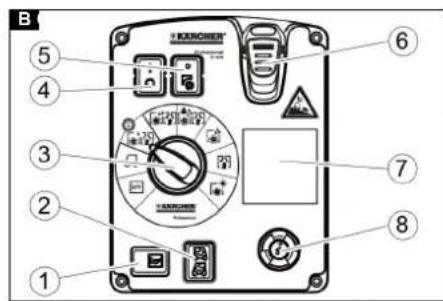
text_image
B 1 2 3 4 5 6 7 8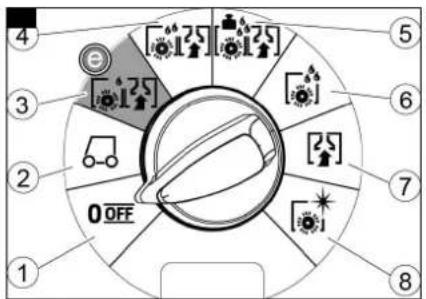
text_image
1 2 3 4 5 6 7 8 0 OFF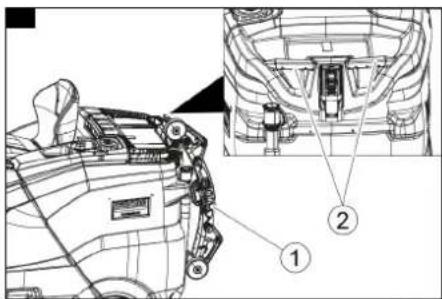
text_image
Technical diagram of a vehicle's internal components with numbered parts labeled ① and ②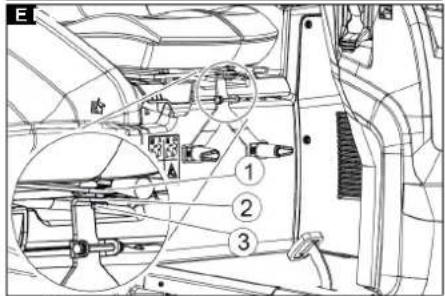
text_image
E 胎 ① ② ③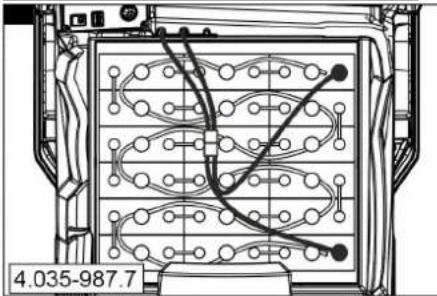
natural_image
Technical diagram of a mechanical or electrical component with internal wiring and mounting points (no readable text or symbols)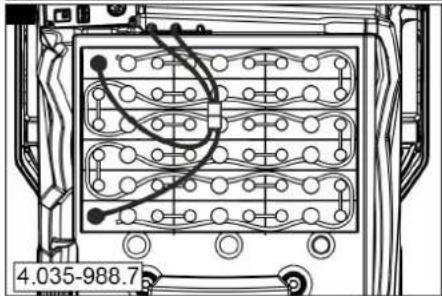
natural_image
Technical diagram of an electronic device rear panel with wiring and connectors (no readable text or symbols)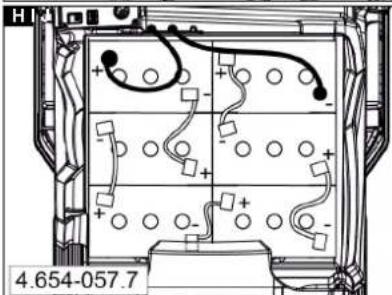
text_image
HI 4.654-057.7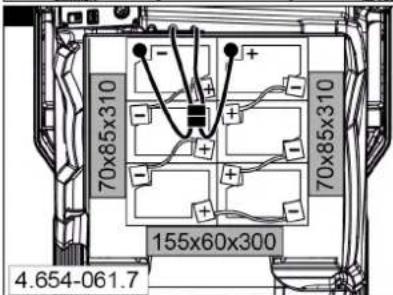
text_image
70x85x310 70x85x310 155x60x300 4.654-061.7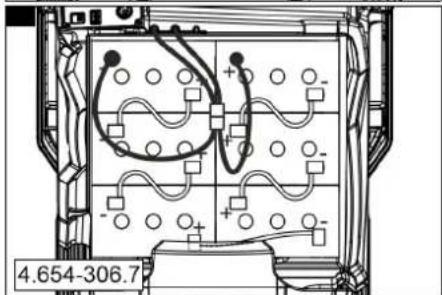
natural_image
Technical diagram of an electronic device interior with wiring and components (no readable text or symbols)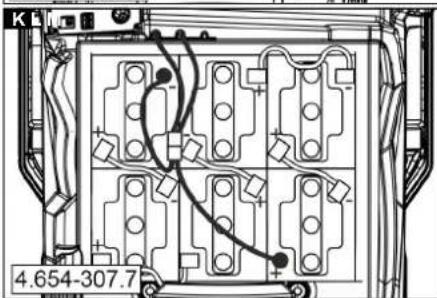
natural_image
Technical diagram of a mechanical or electrical component with internal channels and mounting holes (no readable text or symbols)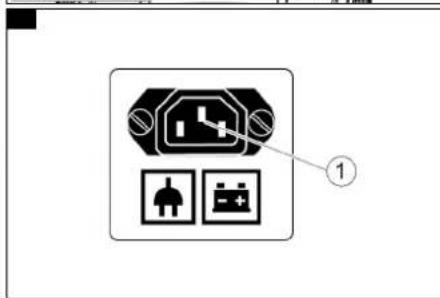
text_image
Electrical socket diagram with labeled components and connection points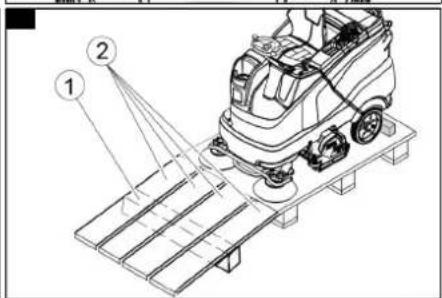
text_image
Technical diagram of a cleaning or dust removal machine with labeled components 1 and 2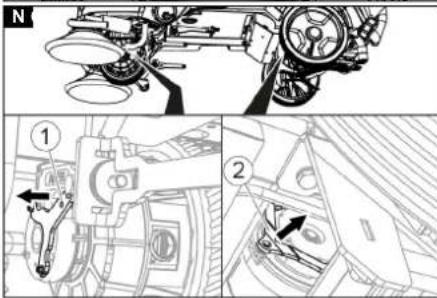
text_image
Technical diagram showing mechanical assembly with labeled parts and directional arrows, likely illustrating a vehicle or engine system.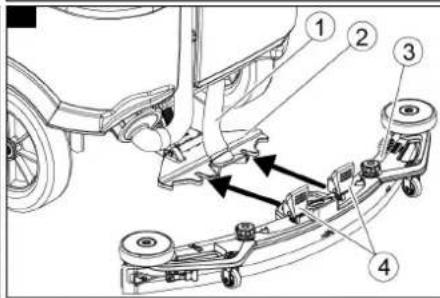
text_image
Technical diagram of a vehicle chassis with numbered components and directional arrows indicating assembly or movement.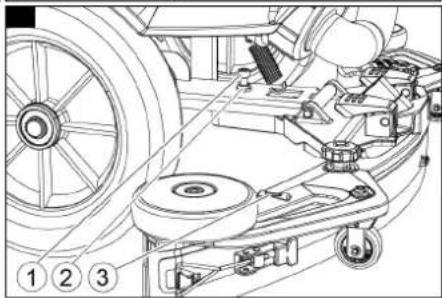
natural_image
Technical line drawing of a mechanical assembly with pulleys and wheels (no text or symbols)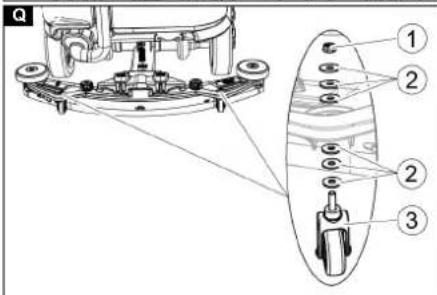
text_image
Technical diagram showing mechanical assembly with numbered components and alignment lines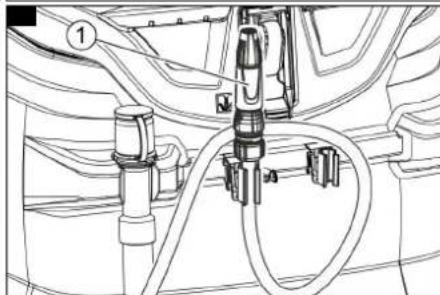
natural_image
Technical line drawing of a mechanical assembly with hoses and components (no text or symbols)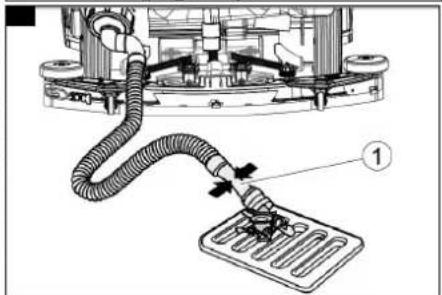
text_image
Technical diagram showing a mechanical assembly with labeled component 1, likely illustrating a fluid or piping system.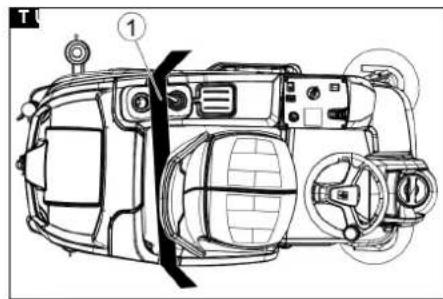
text_image
Technical diagram of a car interior with labeled components and numbered parts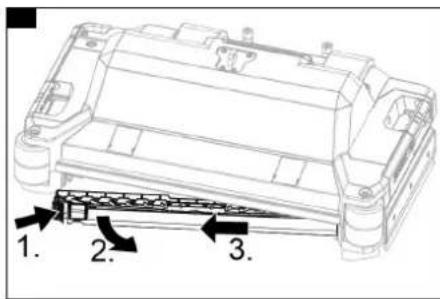
text_image
1. 2. 3.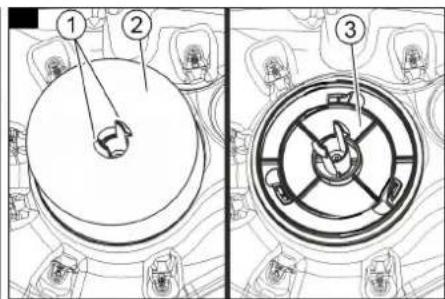
text_image
Technical diagram showing three labeled components of a mechanical assembly, with numbered annotations for each component.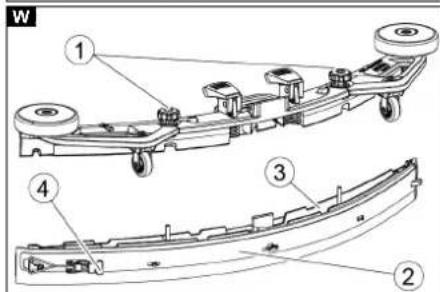
text_image
W ① ② ③ ④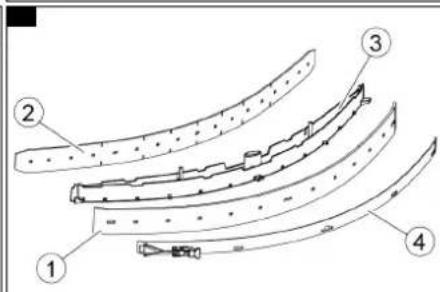
text_image
Technical diagram showing four labeled curved mechanical or structural components with numbered annotations.
text_image
Technical diagram of a vehicle engine compartment with numbered parts labeled ① and ②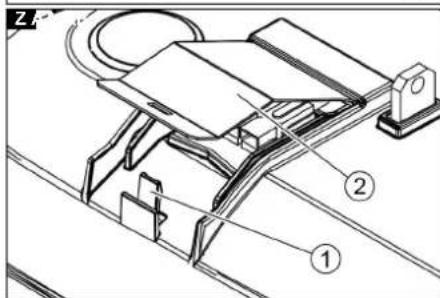
text_image
Technical diagram of a mechanical device with labeled parts 1 and 2, showing components like a circular component and a base.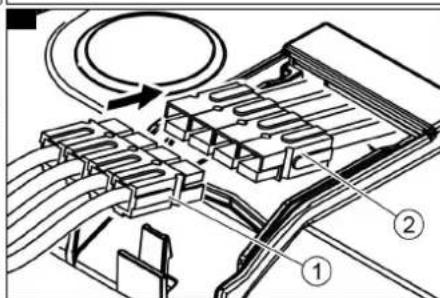
text_image
Technical diagram showing a mechanical assembly with labeled parts and directional arrows indicating motion or flow.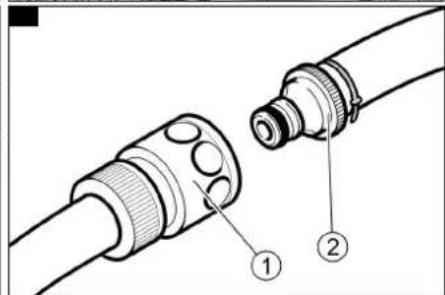
text_image
Technical diagram showing two labeled components of a mechanical connector or fitting, with numbered annotations.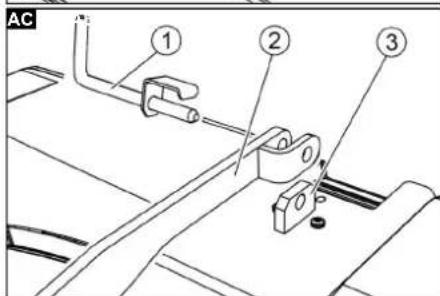
text_image
AC ① ② ③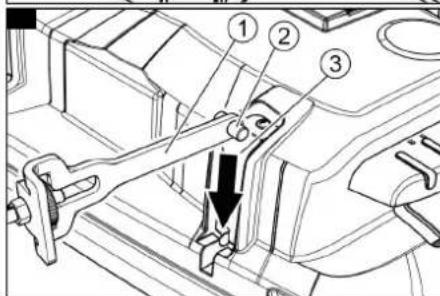
text_image
Technical diagram of a mechanical assembly with numbered components and a downward arrow indicating motion or force direction.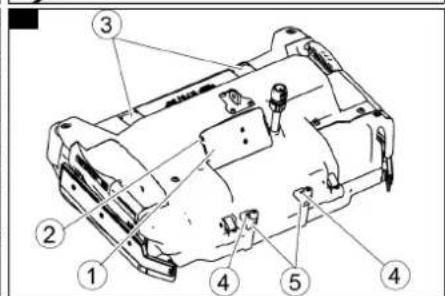
text_image
Technical diagram of a vehicle chassis with numbered components for identification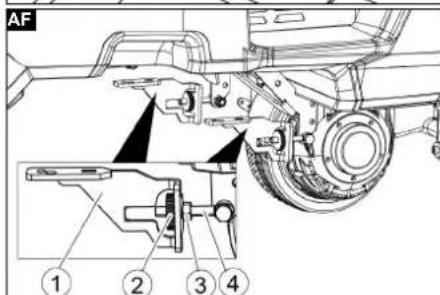
text_image
AF ① ② ③ ④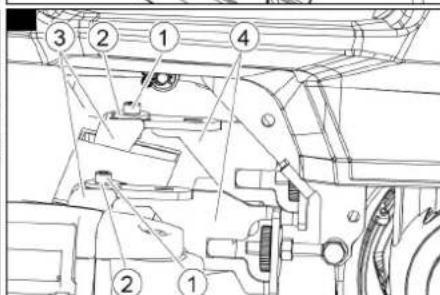
text_image
Technical diagram of a mechanical assembly with numbered components for identification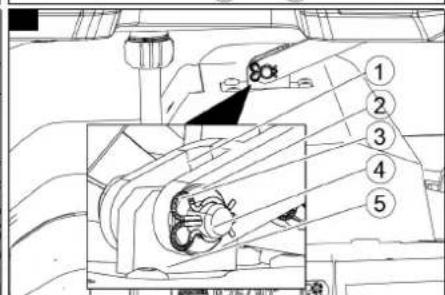
text_image
Technical diagram of a mechanical assembly with numbered components, likely for engineering or manufacturing documentation.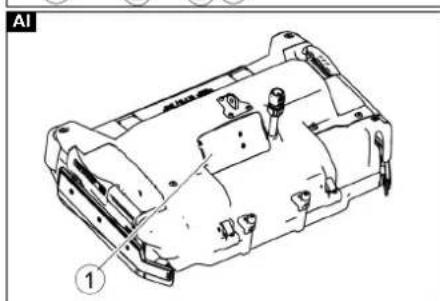
natural_image
Technical line drawing of a mechanical housing component with labeled parts (no text or symbols beyond label)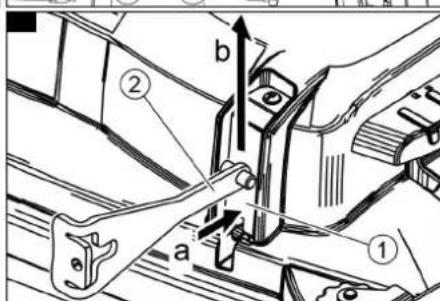
text_image
Technical diagram showing mechanical assembly with labeled parts and directional arrows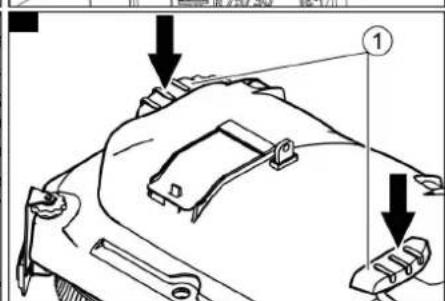
text_image
Technical diagram of a mechanical component with labeled parts and directional arrows indicating assembly or assembly steps.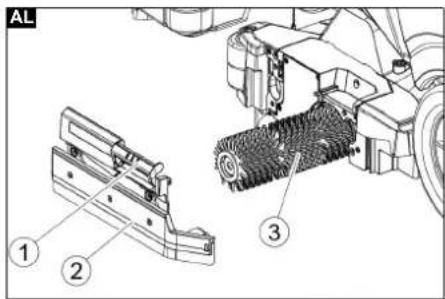
text_image
AL ① ② ③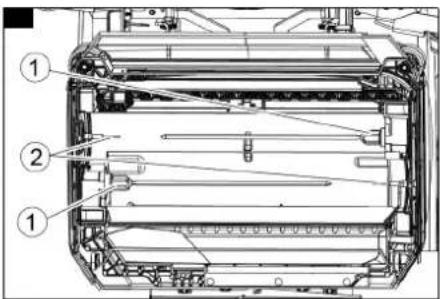
text_image
Technical diagram of a mechanical assembly with numbered components, likely for assembly or maintenance instructions.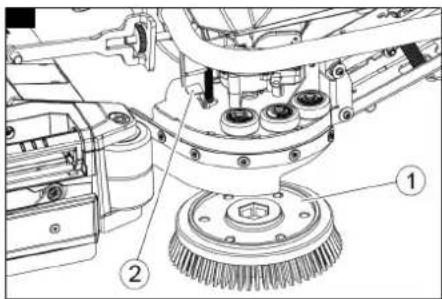
text_image
Technical diagram of a mechanical device with numbered components, likely for assembly or maintenance instructions.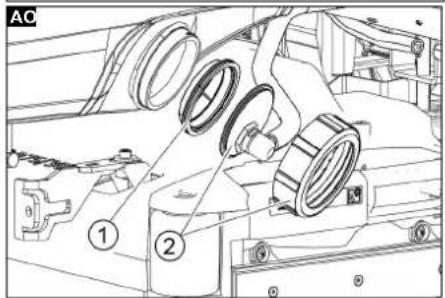
text_image
AC ① ②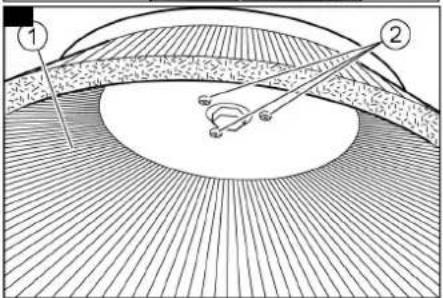
text_image
Diagram illustrating eye anatomy with labeled parts 1 and 2, showing structural layers and light paths.Inhalt
H. Jenner
Chairman of the Board of Management
S. Reiser
Director Regulatory Affairs & Certification
71364 Winnenden (Germany)
Tel.: +49 7195 14-0
Fax: +49 7195 14-2212
Winnenden, 2021/03/01
Contents
General notes 17
Function 17
Intended use 17
Environmental protection 17
Accessories and spare parts.... 17
Scope of delivery 17
Safety instructions.... 17
Device description.... 17
Installation.... 18
Operation 19
Finishing operation.... 20
Grey Intelligent Key 21
Transport....21
Storage 21
Care and maintenance.... 21
Troubleshooting guide....23
Warranty....24
Technical data 24
Declaration of Conformity 25
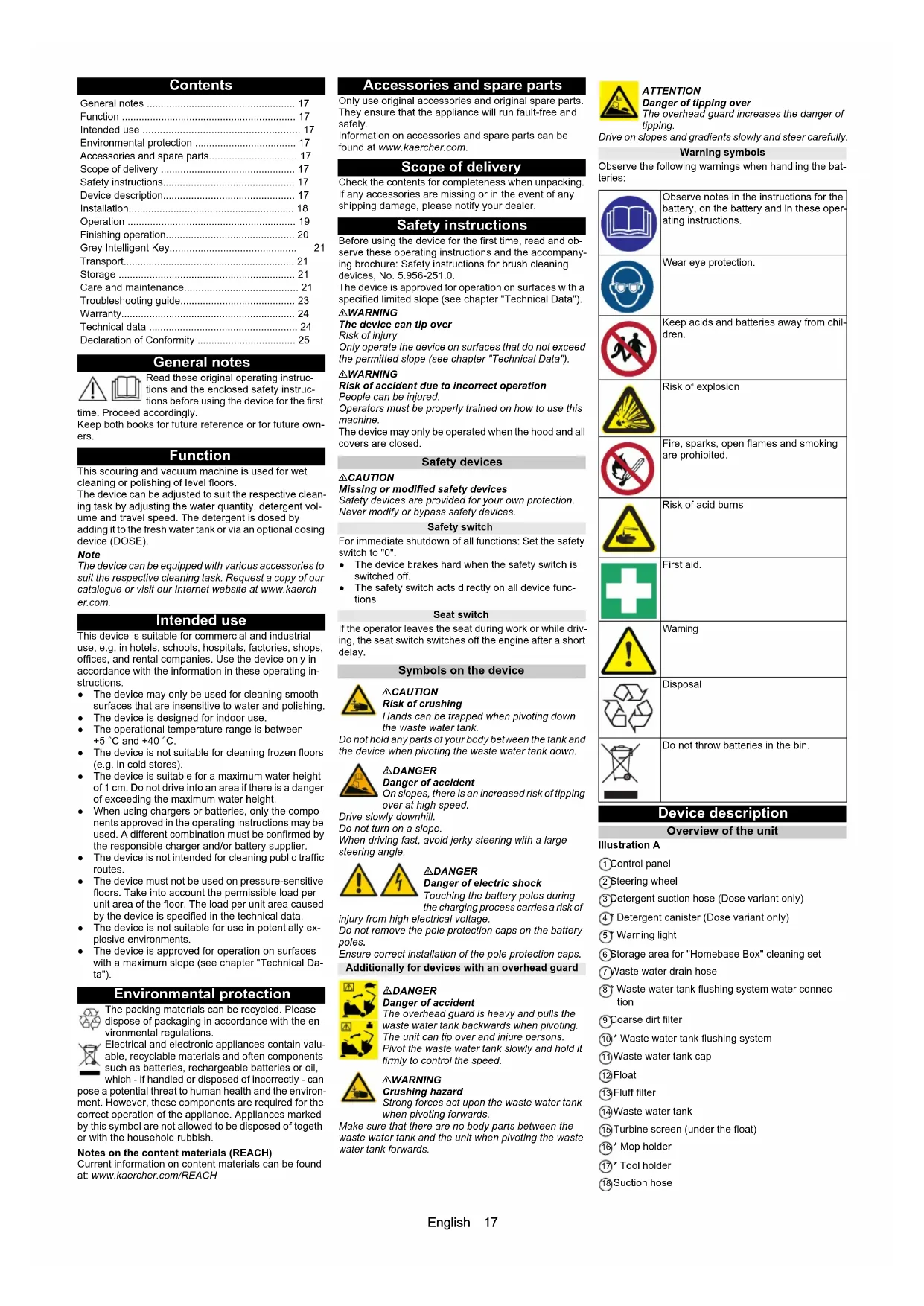
General notes

Read these original operating instructions and the enclosed safety instructions before using the device for the first
time. Proceed accordingly.
Keep both books for future reference or for future owners.
Function
This scouring and vacuum machine is used for wet cleaning or polishing of level floors.
The device can be adjusted to suit the respective cleaning task by adjusting the water quantity, detergent volume and travel speed. The detergent is dosed by adding it to the fresh water tank or via an optional dosing device (DOSE).
Note
The device can be equipped with various accessories to suit the respective cleaning task. Request a copy of our catalogue or visit our Internet website at www.kaercher.com.
Intended use
This device is suitable for commercial and industrial use, e.g. in hotels, schools, hospitals, factories, shops, offices, and rental companies. Use the device only in accordance with the information in these operating instructions.
- The device may only be used for cleaning smooth surfaces that are insensitive to water and polishing. - The device is designed for indoor use.
- The operational temperature range is between +5 °C and +40 °C.
- The device is not suitable for cleaning frozen floors (e.g. in cold stores).
- The device is suitable for a maximum water height of 1 cm. Do not drive into an area if there is a danger of exceeding the maximum water height.
- When using chargers or batteries, only the components approved in the operating instructions may be used. A different combination must be confirmed by the responsible charger and/or battery supplier.
- The device is not intended for cleaning public traffic routes.
- The device must not be used on pressure-sensitive floors. Take into account the permissible load per unit area of the floor. The load per unit area caused by the device is specified in the technical data.
- The device is not suitable for use in potentially explosive environments.
- The device is approved for operation on surfaces with a maximum slope (see chapter "Technical Data").
Environmental protection

The packing materials can be recycled. Please dispose of packaging in accordance with the environmental regulations.

Electrical and electronic appliances contain valuable, recyclable materials and often components such as batteries, rechargeable batteries or oil,
which - if handled or disposed of incorrectly - can pose a potential threat to human health and the environment. However, these components are required for the correct operation of the appliance. Appliances marked by this symbol are not allowed to be disposed of together with the household rubbish.
Notes on the content materials (REACH)
Current information on content materials can be found at: www.kaercher.com/REACH
Accessories and spare parts
Only use original accessories and original spare parts.
They ensure that the appliance will run fault-free and safely.
Information on accessories and spare parts can be found at www.kaercher.com.
Scope of delivery
Check the contents for completeness when unpacking.
If any accessories are missing or in the event of any shipping damage, please notify your dealer.
Safety instructions
Before using the device for the first time, read and observe these operating instructions and the accompanying brochure: Safety instructions for brush cleaning devices, No. 5.956-251.0.
The device is approved for operation on surfaces with a specified limited slope (see chapter "Technical Data").
△WARNING
The device can tip over
Risk of injury
Only operate the device on surfaces that do not exceed the permitted slope (see chapter "Technical Data").
△WARNING
Risk of accident due to incorrect operation
People can be injured.
Operators must be properly trained on how to use this machine.
The device may only be operated when the hood and all covers are closed.
Safety devices
△CAUTION
Missing or modified safety devices
Safety devices are provided for your own protection.
Never modify or bypass safety devices.
Safety switch
For immediate shutdown of all functions: Set the safety switch to "0".
- The device brakes hard when the safety switch is switched off.
- The safety switch acts directly on all device functions
Seat switch
If the operator leaves the seat during work or while driving, the seat switch switches off the engine after a short delay.
Symbols on the device

△CAUTION
Risk of crushing
Hands can be trapped when pivoting down the waste water tank.
Do not hold any parts of your body between the tank and the device when pivoting the waste water tank down.

△DANGER
Danger of accident
On slopes, there is an increased risk of tipping over at high speed.
Drive slowly downhill.
Do not turn on a slope.
When driving fast, avoid jerky steering with a large steering angle.

△DANGER
Danger of electric shock
Touching the battery poles during
the charging process carries a risk of
injury from high electrical voltage.
Do not remove the pole protection caps on the battery poles.
Ensure correct installation of the pole protection caps.
Additionally for devices with an overhead guard

△DANGER
Danger of accident
The overhead guard is heavy and pulls the
waste water tank backwards when pivoting.
The unit can tip over and injure persons. Pivot the waste water tank slowly and hold it firmly to control the speed.

△WARNING
Crushing hazard
Strong forces act upon the waste water tank when pivoting forwards.
Make sure that there are no body parts between the waste water tank and the unit when pivoting the waste water tank forwards.

ATTENTION
Danger of tipping over
The overhead guard increases the danger of tipping.
Drive on slopes and gradients slowly and steer carefully.
Warning symbols
Observe the following warnings when handling the batteries:

Observe notes in the instructions for the battery, on the battery and in these operating instructions.

Wear eye protection.

Keep acids and batteries away from children.

Risk of explosion

Fire, sparks, open flames and smoking are prohibited.

Risk of acid burns

First aid.

Warning

Disposal
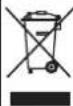
Do not throw batteries in the bin.
Device description
Overview of the unit
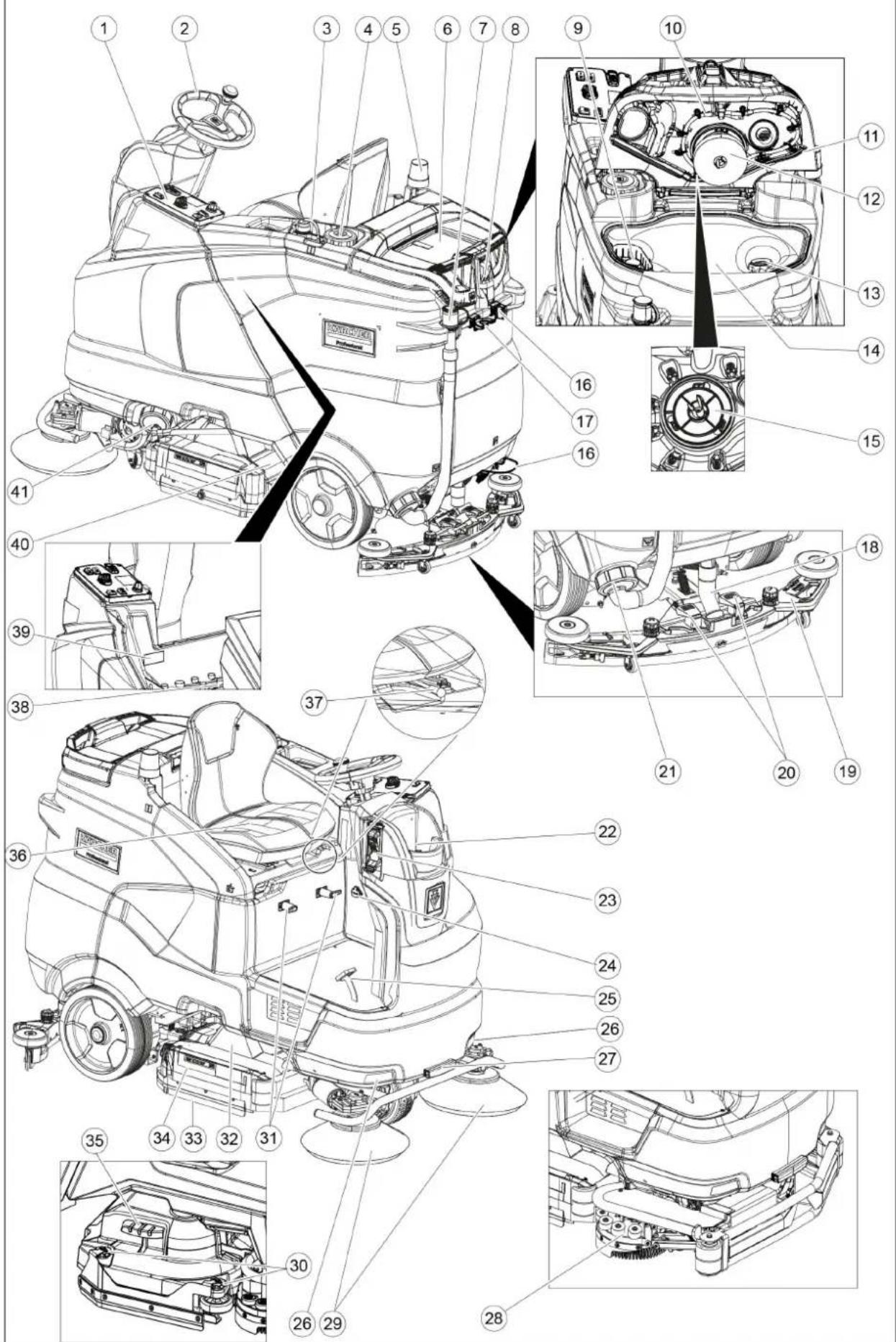
Illustration A
① Control panel
② Steering wheel
③ Detergent suction hose (Dose variant only)
④ Detergent canister (Dose variant only)
⑤ Warning light
⑥ Storage area for "Homebase Box" cleaning set
⑦ Waste water drain hose
⑧ Waste water tank flushing system water connection
⑨ Coarse dirt filter
⑩ Waste water tank flushing system
⑪ Waste water tank cap
⑫Float
⑬Fluff filter
⑭ Waste water tank
⑮ Turbine screen (under the float)
16° Mop holder
⑰* Tool holder
⑱ Suction hose
⑲Suction bar
20 Suction bar clamping lever
②1 Waste water tank cap
②Fresh water tank filling hole
23 Filling system
⑳Battery connector (with external charger)
Charger mains cable (with internal charger)
25 Accelerator pedal
26 Daytime running light
27* Work light
28° Side scrubbing deck
⑲Side brush (SB variant only)
③0 Squeegee blade adjustment wheel (D cleaning head only)
31 Cable hooks
③2Cleaning head
33 Squeegee blade
34 Bearing cover (for brush replacement)
③5 Brush replacement pedal (D cleaning head only)
36 Seat (with seat switch)
③7 Seat adjustment lever
38Battery
39Type plate
④0 Coarse dirt container (only with R cleaning head)
④1 Fresh water tank cap with fresh water filter
* optional
Colour coding
- Control elements for the cleaning process are yellow.
- Control elements for maintenance and servicing are light grey.
Control panel
Illustration B
① Horn
② Driving direction switch
③Program switch
④ Safety switch
⑤ Side scrubbing deck/side brush switch
⑥ Intelligent Key
⑦ Display
⑧ Info button
* optional
Program switch
Illustration C
① OFF
Device is switched off.
② Transport journey Drive to the operating location
③Eco program Clean the floor wet (with a reduced amount of water and a reduced brush speed) and vacuum up waste water (with reduced suction power).
④Scour and vacuum Clean the floor wet and vacuum up waste water.
⑤ Increased brush contact pressure Clean the floor wet (with increased brush contact pressure) and vacuum up waste water.
⑥ Scouring / pre-cleaning without vacuuming Clean the floor wet and let the detergent act.
⑦Vacuuming Vacuum up the dirty waste.
⑧Polishing Polish the floor at a high brush speed without applying liquid.
Suction bar holder
- When driving through narrow spaces, the suction bar can be removed and hung in one of the openings on the lid of the waste water tank.
Illustration D
①Suction bar
②Mounting point
Symbols on the device
Handle for pivoting up the waste water tank


Lashing point

* Mop holder

* Filling system water connection

* Waste water tank flushing system water connection

Fresh water tank drain opening

Waste water tank drain opening
* optional
Overhead guard (option)
The overhead guard protects the driver of the device from falling objects.
On devices with a overhead guard, the waste water tank is equipped with a safety lock. This safety lock prevents the waste water tank from pivoting back unintentionally through forces acting on the overhead guard.
Illustration E
①Overhead guard
②Retaining plate
③Locking screw M8x16, washer
Pivoting the waste water tank backwards
-
Empty the waste water tank.
-
Unscrew the locking screw.
-
Hold the waste water tank firmly and slowly pivot it backwards.
Pivoting the waste water tank forwards
△WARNING
Risk of crushing
Body parts can become trapped between the device and the waste water tank.
Make sure that there are no body parts between the device and the waste water tank when pivoting forward.
-
Hold the waste water tank firmly and slowly pivot it forward.
-
Screw in and tighten the locking screw.
Installation
Batteries
Recommended battery sets
| Description Order | no. Volume | (m^3)^* | Airflow (m^3/h)^** |
| Battery set 240 Ah, trough, low maintenance | 4.035-987.7 | 27 10.8 | |
| Battery set 180Ah, trough, low maintenance | 4.035-988.7 | 20.25 8.1 | |
| Battery set 240Ah, 6 blocks, maintenance-free | 4.654-306.7 | 6.975 2.79 | |
| Battery set 180Ah, 6 blocks, maintenance-free | 4.654-307.7 | 5.175 2.07 | |
| Battery set 285 Ah AGM | 4.654-057.7 | 8.91 3.56 | |
| Battery set 170 Ah AGM | 4.654-061.7 | 24.75 9.9 |
* Minimum volume of the battery charging room ** Minimum airflow between battery charging room and environment
Maximum battery dimensions
| Layout A* B** | ||
| Length | 244 mm | 312 mm |
| Width | 190 mm | 182 mm |
| Height | 275 mm | 365 mm |
* as with 4.654-306.7
** as with 4.654-307.7
Installing and connecting batteries
With the "Pack" variant, the batteries are already installed.
△CAUTION
Removing and installing the batteries
Unstable machine position
Ensure that the machine is positioned stably when removing and installing the batteries.
ATTENTION
Incorrect connection polarity
Destruction of the control electronics
Take care to ensure the correct polarity when connecting the batteries.
ATTENTION
Deep discharge
Risk of damage
Charge the batteries before starting the device.
- Drain the waste water.
Note
For devices with a overhead guard, always observe the notes in the "Overhead guard" chapter.
-
Pivot the waste water tank to the rear.
-
Fit the batteries in the device.
Illustration F
Illustration G
Illustration H
Illustration
Illustration J
Illustration K
-
Connect the battery terminals using the connection cables provided.
-
Clamp the supplied connecting cable to the (+) and (-) battery terminals that are still free.
-
Check for correct installation of the pole protection caps.
-
Connect the device-side battery connector to the battery-side battery connector.
-
Pivot the waste water tank forwards and close it
-
Set the battery type (see chapter "Gray Intelligent Key").
ATTENTION
Risk of damage
The battery can be damaged by deep discharge.
Charge the battery before initial startup of the device.
Charging the battery
Note
The device has deep discharge protection, i.e. the device can only be driven when the permitted minimum capacity level is reached. "Charge Battery" and "Charge Battery" appear in the display.
When using other batteries (e.g. from other manufacturers), the deep discharge protection for the respective battery must be reset by Kärcher Customer Service.
△DANGER
Inappropriate use of the charger
Electric shock
Adhere to the mains voltage and fuse values specified on the device type plate.
Only use the charger in dry rooms with sufficient ventilation.
Flammable gases are generated when the battery is charged
Risk of explosion
Only charge the batteries in a suitable room. The room must have a minimum volume depending on the battery type and an adequate air exchange rate with a minimum air flow (see "Recommended batteries").
ATTENTION
Accumulation of dangerous gases under the tank during the charging process
Risk of explosion
Pivot the waste water tank upwards before charging low-maintenance batteries.
Note
The average charging time is approx. 10-12 hours.
The recommended chargers (for the respective batteries) are electronically controlled and stop the charging process automatically.
The device cannot be used during the charging process.
- Drive the device directly to the charger and do not drive on slopes.
Internal charger
- Connect the mains cable to the IEC connector on the device. Illustration L
①EC connector for charging cable
- Plug the mains plug of the internal charger into the mains socket. A battery symbol and the charging state of the batteries are shown in the display. The display lighting goes out.
Note
All cleaning and driving functions are blocked during the charging process.
When the battery is fully charged, the display shows "Battery Full!".
-
Unplug the charger mains plug from the mains socket after charging.
-
Wind the mains cable onto the cable holders.
External charger
ATTENTION
Using an unsuitable charger
Risk of damage
Do not connect the charger to the device-side battery connector.
Use only a charger suitable for the type of battery installed.
Read the operating instructions of the charger manufacturer and observe the safety instructions in particular.
Note
For devices with a overhead guard, always observe the notes in the "Overhead guard" chapter.
-
Empty the waste water tank
-
Set the safety switch to "0".
-
Pivot the waste water tank to the rear.
-
Pull out the device-side battery connector.
-
Connect the battery-side battery connector to the charger.
-
Plug the mains plug of the charger into the socket.
-
Carry out the charging process in accordance with the operating instructions for the charger.
-
Connect the device-side battery connector to the battery-side battery connector.
-
Pivot the waste water tank forwards.
Low-maintenance batteries (wet batteries)
△DANGER
Refilling discharged batteries with water
Danger of acid burns from escaping acid, destruction of clothing
Wear safety goggles, protective clothing and protective gloves when handling the battery acid.
Observe the applicable regulations.
Immediately rinse off any splashed acid from the skin or clothing using copious amounts of water.
ATTENTION
Using water with additives
Defective batteries, loss of warranty eligibility
Top up the batteries using only distilled or desalinated water (EN 50272-T3).
Do not use any foreign additives, so-called enhancing agents, because this will invalidate the warranty.
-
Add distilled water one hour before the charging process comes to an end. Observe the correct acid level according to the battery label. All cells must produce gas at the end of the charging process.
-
Clean up any spilled water. To do this, proceed as described in the Care and maintenance chapter in the "Cleaning the batteries" section.
Notes on initial charging
Note
The controller does not yet recognize the battery type installed when initially charging the battery. The battery indicator then still works imprecisely.
A "V" to the right of the bar on the battery display indicates that initial charging has not yet been carried out.
-
Charge the batteries until the display shows the maximum charging state.
-
After initially charging the batteries, use the device until the deep discharge protection switches off the brush drive and suction.
-
Then fully and correctly charge the batteries. The "V" to the right of the battery indicator disappears after initial charging.
Note
If a battery type is selected in the battery menu, the procedure described above must be carried out again. This is also the case if the battery type that has already been set is selected again.
Battery indicator
The charging state of the batteries is shown on the control panel display.
- The length of the bar shows the charging state of the battery.
- During the last 30 minutes, the remaining operating time is displayed in minutes.
Removing the battery
△CAUTION
Removing and installing the batteries Unstable machine position
Ensure that the machine is positioned stably when removing and installing the batteries.
Note
For devices with a overhead guard, always observe the notes in the "Overhead guard" chapter.
-
Set the safety switch to "0".
-
Drain the waste water.
-
Pivot the waste water tank to the rear.
-
Pull out the battery plug.
-
Disconnect the cable from the minus terminal at the battery.
-
Disconnect the remaining cables from the batteries.
-
Remove the batteries.
-
Dispose of the used batteries in accordance with statutory provisions.
Unpacking
-
Remove the packaging film.
-
Remove the strap.
-
4 bottom boards of the pallet are fastened with screws. Unscrew these boards.
-
Position the boards on the edge of the pallet and align them in front of the wheels on the device. Illustration M
① Board
②Bar
-
Secure the boards with the screws.
-
Slide the support bars provided in the packaging under the ramp.
-
Remove the wooden strips in front of the wheels.
Push the device off the pallet
- With all device variants except "low wheel pressure", pull the brake lever on the front wheel and insert a coin between the lever and the brake. Illustration N
①Front brake lever (all device variants except B 150 low wheel pressure)
②Rear brake lever (device variants Adv and B 150 low wheel pressure only)
-
With the device variant "Adv" and "low wheel pressure" repeat the procedure on the rear axle.
-
Push the device slowly off the ramp.
△DANGER
Danger of accident
The device has no braking effect when the brakes are deactivated.
Remove the coins immediately after the device is pushed off the pallet.
- Remove the coins between the lever and the housing.
Driving off the pallet
The batteries must be installed and charged in order to drive off the pallet.
-
Insert the Intelligent Key into the control panel.
-
Set the safety switch to position "1"
-
Set the program switch to transport travel.
-
Set the travel direction switch to "Forward".
-
Depress the accelerator pedal
-
Drive the device slowly off the pallet.
-
Set the safety switch to "0".
Installing the cleaning head
Installation of the cleaning head is described in the chapter "Maintenance tasks".
Note
The cleaning head is already installed on some models.
Installing he brushes
- The installation of the brushes is described in the chapter "Maintenance work".
Installing the suction bar
- Pivot both clamping levers upwards Illustration O
① Suction hose
② Suction bar suspension
③ Suction bar
④Clamping lever
-
Insert the suction bar in the suction bar mount.
-
Pivot both clamping levers downwards.
Operation
△DANGER
Falling objects
Risk of injury
Do not used the device without an overhead guard to protect against falling objects in areas in which there is a possibility of operators being hit by falling objects.
ATTENTION
Risks during operation
Risk of injury
In the event of danger, set the safety switch to "0".
Setting the driver's seat
-
Operate the seat adjustment lever and move the seat to the desired position.
-
Release the seat adjustment lever and latch the seat into position.
Switching the device on
-
Sit in the driver's seat.
-
Insert the Intelligent Key.
-
Set the safety switch to "1"
-
Turn the program switch to the desired function.
-
If one of the displays below appears on the display, take your foot off the accelerator pedal, set the safety switch to "0" and carry out the necessary maintenance work.
| Display Activity | |
| Maintenance Suction Bar | Clean the suction bar. |
| Maintenance Brush Head | Check the brushes for wear and clean them. |
| Maintenance Suction Slice | Check the suction lips for wear and correct adjustment. |
| Maintenance Suction Filter | Clean the turbine screen. |
| Maintenance Water Filter | Clean the fresh water filter. |
-
Press the Info button.
-
Reset the counter for the corresponding maintenance (see "Grey Intelligent Key / Reset maintenance counter").
Note
If the counter is not reset, the maintenance display appears again each time the device is switched on.
Switching on the light
Daytime running light
The daytime running light is in operation when the device is switched on.
Work light (option)
-
Set the program switch to transport travel.
-
Press the Info button.
-
Turn the Info button until "Switch Menu" is displayed.
-
Press the Info button.
-
Turn the Info button until "Work Light" is highlighted.
-
Press the Info button.
Checking the parking brake
△DANGER
Defective parking brake
Danger of accident
Before each operation, check the function of the parking brake on level ground.
-
Switch the device on.
-
Set the travel direction switch to "Forward"
-
Set the program switch to transport travel.
-
Press the accelerator pedal lightly.
The brake must audibly unlock. The appliance must roll easily on a plane surface.
- Release the accelerator pedal
The brake must audibly lock
If this is not the case, take the device out of operation and call Customer Service.
Driving
△DANGER
Lack of braking
Danger of accident
Before using the device, it is essential to check the function of the parking brake. Never use the device if the parking brake does not work.
△DANGER
No braking effect during operation
If the device no longer has any braking effect during operation, proceed as follows:
If the device does not come to a standstill on a ramp with a gradient of more than 2% when you release the accelerator pedal, for safety reasons you may only set the safety switch to position "0" if you have checked the cor-
rect mechanical function of the parking brake before starting up the device.
After reaching a standstill, put the device out of operation and call Customer Service.
Observe the maintenance instructions for brakes.
△DANGER
Careless driving
Danger of tipping over
Only drive up and up gradients in the travel direction and across the travel direction up to maximum gradients of 10% (Adv 15%).
Do not turn up or down gradients.
Drive slowly in corners and on wet ground.
Only drive the device on stable ground.
Increased risk of tipping over for devices with an overhead guard
A risk of tipping over exists if the overhead guard collides with obstacles.
Drive more carefully when using a device with an over-head guard.
Note the maximum headroom at the operating location. The height of the device is specified in the "Technical data" chapter.
△WARNING
Risk of injury
Move carefully so that your head does not hit the over-head guard when climbing on board the device.
Note
The travel direction can be changed while driving. This means that very dull spots can be polished by moving back and forth several times.
-
Assume a seated position.
-
Insert the Intelligent Key.
-
Turn the safety switch to "1".
-
Set the program selector switch to "Transport travel".
-
Set the direction of travel using the drive direction button on the control panel.
-
Specify the travel speed by pressing the accelerator pedal.
-
Release the accelerator pedal. The device stops.
The driving motor is switched off in the event of an overload. A fault message appears on the display. If the controller overheats, the affected power unit is switched off. 8. Allow the device to cool down for at least 15 minutes.
- Set the program switch to "OFF", wait briefly and set to the desired program.
Filling with fresh water
Filling with fresh water via the filling system
-
Connect the water hose to the connection nozzle of the filling system (maximum water temperature 50 °C).
-
Open the water inlet.
-
Monitor the device, the automatic filling system interrupts the water supply when the fresh water tank is full.
-
Close the water inlet.
-
Remove the water hose.
Filling fresh water
-
Open the fresh water tank cap.
-
Fill with fresh water (max. 50 °C) to 15 mm below the upper edge of the tank.
Note
Adding detergent to the detergent tank followed by water can lead to excessive foaming.
Fill the fresh water tank completely before initial startup in order to vent the water pipe system.
- 'Remove the fresh water tank cap.
Filling with detergent
Notes on detergents
△WARNING
Unsuitable detergents
Health risk, damage to the device
Use only recommended detergents. The operator carries all increased risks relating to operational safety and increased risk of accidents if using other detergents.
Use only detergents free of chlorine, solvents, salt and hydrofluoric acid.
Adhere to the safety instructions stated on the detergent packaging.
Note
Do not use heavily foaming detergent.
Recommended detergents
| Application Detergent | |
| Maintenance cleaning of all water-resistant floors | RM 746RM 756RM 780 |
| Maintenance cleaning of polished hard surfaces (e.g. granite) | RM 755 es |
| Application Detergent | |
| Maintenance cleaning, intermediate cleaning and basic cleaning of industrial floors | RM 69 Industrial cleaner |
| Maintenance cleaning and basic cleaning of fine stone tiles | RM 753 |
| Maintenance cleaning of tiles in sanitary areas | RM 751 |
| Coating removal on all alkaline-resistant floors (e.g. PVC) | RM 752 |
| Coating removal on linoleum floors | RM 754 |
Filling detergent via the dosing device
Only with DOSE variant:
Detergent is added to the fresh water on the way to the cleaning head by a dosing device.
- Fill the detergent into the detergent canister.
Note
A maximum of 3% detergent can be added with the dosing device. If the dosage is higher, the detergent must be added to the fresh water tank.
ATTENTION
Danger of clogging
When adding detergent to the fresh water tank, the detergent can dry out and disrupt the function of the dosing device.
Rinse the device with clear water after adding the detergent to the fresh water tank: Select a cleaning program with water application, set the water quantity to the highest value, set the detergent dosage to 0.
Note
The device has a fresh water level indicator on the display. Detergent dosing is also stopped when the fresh water tank is empty. The cleaning head continues to work without supply of liquid.
Filling the detergent into the fresh water tank
- Fill the detergent into the fresh water tank.
Note: The lid for the filling hole of the fresh water tank can be used to measure the detergent. It has a measuring scale marked on the inner side.
Adjusting parameters (yellow Intelligent key)
The parameters for the various cleaning programs are preset in the device.
Individual parameters can be changed depending on the authorization of the yellow Intelligent Key.
The modified parameters only remain in effect until a different cleaning program is selected with the program switch.
A grey Intelligent Key must be used for making adjustments if parameters are to be changed permanently. This setting procedure is described in the section "Grey Intelligent Key".
Note
Almost all displayed texts regarding parameter settings are self-explanatory. The only exception is the FACT parameter:
- Fine Clean: Low brush speed for removing grey film from fine stone.
- Whisper Clean: Medium brush speed for maintenance cleaning with reduced noise level.
- Power Clean: High brush speed for polishing, crystallizing and sweeping.
-
Set the program switch to the desired cleaning program.
-
Turn the Info button until the desired parameter is displayed.
-
Press the Info button.
The adjusted value flashes.
-
Set the desired value by turning the Info button.
-
Confirm the changed setting by pressing the Info button or wait until the set value is automatically accepted after 10 seconds.
Adjusting the suction bar
The suction bar only needs to be readjusted in special cases. The factory setting is suitable for most applications.
Adjusting the inclination
The inclination must be adjusted so that the suction lips of the suction bar make even contact with the floor over the entire length of the suction bar.
-
Park the device on a surface without a slope.
-
Turn the program switch to the "Vacuum" position.
-
Drive the device a small distance forwards.
-
Read the spirit level.
Illustration P
① Screw
②Nut
③ Spirit level
-
Unscrew the nut.
-
Adjust the screw so that the spirit level indicator is between the two lines.
-
Tighten the nut.
-
To check the new setting, move the device forward again a short distance. Repeat the adjustment process if necessary.
-
Turn the key-operated switch to "OFF".
Adjusting the height
The height adjustment affects the bending of the suction lips on contact with the floor.
Note
Standard setting: 3 washers above, 3 washers below the suction bar.
Uneven floor: 5 washers above, 1 washer below the suction bar.
Very smooth floor: 1 washer above, 5 washers below the suction bar.
- Unscrew the nuts.
Illustration Q
① Nut
② Washer
③ Spacer roller with holder
-
Place the desired number of washers between the suction bar and the spacer roller.
-
Fit the remaining unused washers above the spacer roller.
-
Screw on the nut and tighten.
-
Repeat the entire procedure at the second spacer roller.
Note
Set both spacer rollers to the same height.
Adjusting the squeegee blades
The squeegee blades only need to be adjusted on the D cleaning head.
-
Adjust the squeegee blades by turning the setting wheel so that the squeegee blade touches the ground.
-
Turn the adjustment wheel an additional 1 rotation down.
Spray nozzle
The hose with the spray nozzle is attached to the rear of the device. It is used for rinsing away dirt and manually cleaning the waste water tank.
Illustration R
① Spray nozzle
-
Close the spray nozzle by turning it.
-
Set the program selector switch to "Transport travel".
-
Press the Info button.
-
Turn the info button until "Tank Rinsing" is shown on the display.
-
Press the Info button.
-
Turn the Info button until "ON" is displayed.
-
Press the Info button.
The water pump delivers fresh water through the spray nozzle.
- Point the spray nozzle at the target and turn it to open it.
Cleaning
-
Sit on the seat.
-
Insert the Intelligent Key.
-
Set the safety switch to "1".
-
Set the travel direction switch to forward travel.
-
Set the program switch to the desired cleaning program.
-
Determine the speed with the accelerator pedal.
-
Determine the travel direction with the steering wheel.
-
Drive over the surface to be cleaned.
Side scrubbing deck (option)
The side scrubbing deck makes working close to the edge easier.
Note
The side scrubbing deck is not active in the polish and vacuum cleaning programmes.
- Operate the side scrubbing deck switch.
The side scrubbing deck is activated.
- To finish working with the side scrubbing deck, set the side scrubbing deck switch to "0".
Finishing operation
Finishing cleaning
-
Set the programme switch to Drive.
-
Continue moving a short distance.
The residual water is vacuumed up.
-
Turn the key-operated switch to "OFF".
-
Remove the Intelligent Key.
-
Charge the battery if necessary.
Draining the waste water
△WARNING
Improper disposal of waste water
Environmental pollution
Observe the local waste water treatment regulations.
Note
The suction turbine switches off and the display shows "" when the waste water tank is full.
- Remove the waste water drain hose from the support and open the drain hose cover. Illustration S
① Waste water drain hose
- Squeeze the end of the hose and lower it over the disposal facility.
- Adjust the strength of the waste water jet by squeezing the end of the hose.
- Rinse the waste water tank with clear water.
- Close the drain hose cover.
- Press the waste water hose into the support on the device.
Waste water tank rinsing system (option)
- Remove the waste water drain hose from the support and open the drain hose cover.
- Close the cover of the waste water tank.
- Connect a water supply hose to the water connection of the waste water tank flushing system.
- Open the water inlet and rinse the waste water tank for about 30 seconds.
- Repeat the rinsing process 2 to 3 times if necessary.
- Close the water inlet.
- Disconnect the water supply hose from the device.
- Close the waste water drain hose and press it into the support.
Empty the coarse dirt container
A coarse dirt container is only present on R cleaning heads.
- Lift the coarse dirt container and pull it out.
- Empty the coarse dirt container.
- Reinstall the coarse dirt container.
Draining fresh water
- Open the fresh water tank cap.
- Drain the fresh water.
- Clean the filter.
- Fit the fresh water tank cap.
Shutting down the unit
- Turn the key-operated switch to "OFF".
- Remove the Intelligent Key.
- Secure the device against rolling away.
- Charge the battery if necessary.
Grey Intelligent Key
The grey Intelligent Key grants the supervisory staff extended authorizations and setting options.
- Insert the Intelligent Key
- Select the desired function by turning the info button.
Transport journey
- Set the program selector switch to "Transport travel".
- Press the Info button.
The following settings can be made in the Transport travel menu:
- Resetting the maintenance counter
• Key management - Choosing the brush shape
• After-running time - Setting the battery type
- Standard setting
- Setting the language
- Switch menu
- Factory setting
Resetting the maintenance counter
If maintenance work shown in the display has been carried out, the corresponding maintenance counter must then be reset.
- Turn the Info button until "Maintenance Cntr" is displayed.
- Press the Info button.
The counter readings are displayed.
- Turn the info button until the counter to be cleared is highlighted.
- Press the Info button.
- Select "Yes" by turning the Info button.
- Press the Info button.
The counter is cleared.
Note
The service counter can only be reset by Customer Service staff.
The service counter shows the time until the next service due by Customer Service.
Key management
The authorizations are assigned for each yellow Intelligent Key used and the language of the display is set for this Intelligent Key in the "Key Manager" menu item.
- Insert the grey Intelligent Key.
- Turn the info button until the "Key Manager" menu item appears on the display.
- Press the Info button.
- Remove the grey Intelligent Key and insert the yellow Intelligent Key to be personalized.
- Select the menu item to be changed by turning the info button.
- Press the Info button.
- Select the setting of the menu item by turning the info button.
- Confirm the setting by pressing the menu item.
- Select the next menu item to be changed by turning the info button.
- After all settings have been made, call up the "Save?" menu by turning the info button.
- Press the Info button.
The authorizations are saved.
The "Key Manager continue?" display appears.
• Yes: Program another Intelligent Key
• No: Exit the key menu
12. Press the Info button.
Choosing the brush shape
This function is required when changing the cleaning head.
- Turn the info button until the "Brush Head" menu item appears on the display.
- Press the Info button.
- Turn the info button until the desired brush shape is highlighted.
- Press the Info button.
- To change the cleaning head, move the lifting drive by turning the info button:
- "up": Lifting
● "down": Lowering
- "OFF": Stopping
-
Turn the info button until the "OFF" menu item is displayed.
-
Press the Info button.
The menu is exited.
The controller performs a restart.
After-running time
- Turn the info button until the "After-Run Time" menu item appears on the display.
- Press the Info button.
- Turn the info button until the desired function is high lighted.
- Press the Info button.
- Turn the info button until the desired after-running time is displayed.
- Press the Info button.
Setting the battery type
- Turn the info button until the "Battery Menu" menu item appears on the display.
- Press the Info button.
- Turn the info button until the desired battery type is highlighted.
- Press the Info button.
Standard setting
Parameter changes made in the individual cleaning programs during operation are reset to the standard setting when the device is switched off.
- Turn the info button until the "Basic Settings" menu item appears on the display.
- Press the Info button.
- Turn the info button until the desired cleaning program is highlighted.
- Press the Info button.
- Turn the Info button until the desired parameter is highlighted.
- Press the Info button.
The adjusted value flashes.
- Set the desired value by turning the Info button.
- Press the Info button.
Setting the language
- Turn the info button until the "Language" menu item appears on the display.
- Press the Info button.
- Turn the info button until the desired language is highlighted.
- Press the Info button.
Switch menu
The work light can be enabled or disabled in this menu.
- Turn the Info button until "Switch Menu" is displayed.
- Press the Info button.
- Turn the Info button until "Work Light" is highlighted.
- Press the Info button.
Factory setting
The factory settings for all cleaning parameters are restored.
- Turn the info button until the "Factory Settings" menu item is displayed.
- Press the Info button.
- Turn the Info button until "Yes" is highlighted.
- Press the Info button.
Adjusting parameters for cleaning programs
All parameters for cleaning programs are retained until another setting is selected.
- Set the program switch to the desired cleaning program.
- Press the Info button.
The first adjustable parameter is displayed.
- Press the Info button
The adjusted value flashes. - Set the desired value by turning the Info button.
- Confirm the changed setting by pressing the Info button or wait until the set value is automatically accepted after 10 seconds.
- Select the next parameter by turning the Info button
- After changing all desired parameters, turn the Info button until the "Quit Menu?" menu item is displayed.
- Press the Info button.
The menu is exited.
Transport
△DANGER
Driving on slopes
Risk of injury
Observe the maximum permissible gradient when driving the device on slopes for loading and unloading purposes (see chapter "Technical data").
Drive slowly.
△CAUTION
Failure to observe the weight
Risk of injury and damage
Be aware of the weight of the device during transportation.
-
With the D cleaning head installed, remove the disc brushes from the brush head.
-
When transporting in vehicles, secure the device against slipping and tipping over according to the applicable guidelines.
Illustration T
① Lashing strap
Storage
△CAUTION
Failure to observe the weight
Risk of injury and damage
Be aware of the weight of the device during storage.
ATTENTION
Frost
Destruction of the device through freezing water
Drain all water from the device.
Store the device in a frost-free location.
When choosing the parking space, take into account the total weight of the device in order not to impair its stability.
• This device may only be stored indoors.
- Fully charge the batteries before storing them for a long period.
- Fully charge the batteries at least every month during storage.
Care and maintenance
△DANGER
Inadvertently starting up device
Risk of injury, electric shock
Turn the program switch to the "OFF" position.
Remove the Intelligent Key prior to all work on the device.
Pull out the charger mains plug
Unplug the battery connector.
△CAUTION
Risk of injury
The suction turbine continues to run after the device has been switched off.
Do not work on the device until the suction turbine is no longer running.
- Drain and dispose of the waste water and fresh water.
Maintenance intervals
Each time after use
ATTENTION
Improper cleaning
Risk of damage.
Do not spray the device with water.
Do not use aggressive cleaning agents.
A detailed description of the individual maintenance work is provided in the chapter "Maintenance Work".
- Drain the waste water.
- Rinse the waste water tank.
- Clean the coarse dirt filter.
- Clean the turbine screen.
- Only with R cleaning head: Remove the coarse dirt container and empty it.
- Clean the exterior of the device using a damp cloth, wetted with a mild washing lye.
- Check the suction lips, check for wear and replace if necessary.
- Clean the squeegee blades, check for wear and replace if necessary.
- Clean the brushes, check for wear and replace if necessary.
- Charge the battery.
- If the charging state of the battery is below 50%, charge the battery fully and without interruption.
- If the charging state of the battery is above 50%, only recharge the battery if the entire operating duration will be required when next used.
Weekly
- When used regularly, charge the battery fully and without interruption at least once a week.
Monthly
- If the device is temporarily shut down (storage): Perform equalization charging of the battery.
- Check battery poles for oxidation, brush off if necessary. Make sure the connection cables are firmly in place.
- Clean the seals between the waste water tank and the cover, check for leaks and replace if necessary.
- Check the acid density of the cells if the batteries are not maintenance-free.
- Only with R cleaning head: Clean the brush tunnel. - Only with R cleaning head: Pull the water distribution strip off the cleaning head and clean the water channel.
Illustration U
- For longer periods of disuse, shut down the device when the batteries are fully charged. Fully charge the battery at least once a month.
Annually
● Have the prescribed inspection performed by Customer Service.
Safety inspection/maintenance contract
You can agree on regular safety inspections or close a maintenance contract with your dealer. Please seek advice on this.
Maintenance work
Cleaning the turbine screen
-
Open the waste water tank cover
-
Press the locking hooks together.
Illustration V
① Latching hooks
②Float
③ Turbine screen
-
Pull off the float.
-
Turn the turbine screen anticlockwise.
-
Remove the turbine screen.
-
Clean the turbine screen under running water.
-
Reinstall the turbine screen.
-
Attach the float.
Turn over or replace the worn suction lips
The suction lips must be turned over or replaced when worn out.
The suction lips can be turned 3 times until all 4 edges are worn.
-
Remove the suction bar.
-
Unscrew the star handles.
Illustration W
① Star grip
②Strap
③ Inner part of the suction bar
④Tension lock
-
Pull out the inner part of the suction bar.
-
Open the tension lock.
-
Remove the strap.
-
Release the suction lips from the inner part. Illustration X
① Squeegee blade
② Support lip
③Inner part of the suction bar
④ Strap
-
Press the turned or new suction lips onto the knobs of the inner part of the suction bar.
-
Attach the strap.
-
Push the inner part of the suction bar into the upper part.
-
Screw in and tighten the star handles.
Cleaning the coarse dirt filter
- Open the waste water tank cover. Illustration Y
①Coarse dirt filter
②Fluff filter
-
Pull the coarse dirt filter upwards and off.
-
Rinse off the coarse dirt filter under running water.
-
Reinsert the coarse dirt filter into the waste water tank.
Installing the D cleaning head
-
Lift the holder of the cleaning head (see chapter "Gray Intelligent Key/... / Selecting the brush shape").
-
Push the cleaning head under the device so that the hose points to the rear.
-
Push the cleaning head halfway under the device.
-
Press the latching lug to the left and remove the cover from the cleaning head. Illustration Z
①Latch
②Cover
- Connect the power supply cable of the cleaning head to the cable of the device (the same colours must line up). Illustration AA
①Device cable
②Power supply cable
-
Fit the cover and latch into place.
-
Push the cleaning head centrally under the device.
-
Connect the hose coupling on the cleaning head to the hose on the device. Illustration AB
①Hose coupling
②Hose
- Insert the tab in the middle of the cleaning head into the fork in the lever. Illustration AC
①Retaining pins
② Lever
③Tab
-
Align the holder of the cleaning head so that the holes in the lever and the cleaning head line up.
-
Insert the retaining pin through the holes and pivot the locking plate down.
-
Push the straight pin into the hole in the pull rod. Illustration AD
① Pull rod
② Straight pin
③ Guide channel
-
Push the pull rod in the guide channel on the cleaning head all the way to the bottom.
-
Insert the locking plate in the guide channel and click into place.
-
Repeat the procedure with the pull rod on the opposite side.
-
Insert the grey Intelligent Key.
-
Set the "Disk" brush type.
Removing the D cleaning head
- Press in the locking plate and pivot the pull rod upwards. Illustration AJ
①Retaining plate
② Pull rod
- Further removal is performed in the reverse order to installation.
Installing the R cleaning head
- Remove both covers. Illustration AE
① Cover
② Screw, cover
③ Bar cover
4 Screw, holder
⑤Holder
-
Unscrew the screws for the holders.
-
Remove both holders.
-
Unscrew the screw on the cover.
-
Attach both tie rods to the eye bolts. Illustration AF
① Pull rod
② Knurled nut
③Nut
④Eyebolt
-
Push the cleaning head centrally under the device.
-
Fasten both tie rods to the holders (tightening torque: 25 Nm). Illustration AG
① Screw M8x20
② Washer
③Holder
④ Pull rod
- Insert the tab in the middle of the cleaning head into the fork in the lever. Illustration AH
① Lever
② Washer
③ Spring pin
④Bolt
⑤Tab
-
Align the holder of the cleaning head so that the holes in the lever and the cleaning head line up.
-
Insert the bolt through the fork and tab.
-
Thread a washer onto the bolt.
-
Secure the bolt with a spring pin.
-
Connect the hose coupling on the cleaning head to the hose on the device. Illustration AB
① Hose coupling
②Hose
- Open the cover. Illustration AI
① Cover
-
Connect the power supply cable of the cleaning head to the cable of the device (the same colours must line up).
-
Fit the cover and secure it with the screw.
-
Place a spirit level on the side of the cleaning head parallel to the travel direction.
-
Align the cleaning head horizontally by adjusting the knurled screw and the nut on the eyebolt.
-
Repeat the adjustment on the other side of the device.
-
Insert the grey Intelligent Key.
-
Set the "Brush" brush type.
Replacing the roller brushes
Note
Replace the roller brushes when the bristle length has reached 10 mm.
-
Raise the cleaning head.
-
Pull out the brush replacement handle.
Illustration AL
① Brush replacement handle
② Bearing cover with squeegee blade
③ Roller brush
-
Remove the bearing cover including the squeegee blade.
-
Pull out the roller brush
-
Fit the new roller brush and centre it on the driver. Illustration AM
①Driver
②Mounting mandrel
- Install the bearing cover with the squeegee blade.
Note
Make sure the roller brush sits on the mounting mandrel and not underneath.
-
Pivot the brush replacement handle upwards and latch it into place.
-
Repeat the entire procedure at the other side.
Replacing the disc brushes
-
Raise the cleaning head.
-
Press the brush replacement pedal down, beyond the zone of resistance. Illustration AK
① Brush replacement pedal
3. Pull the 1st disc brush sideways and out from underneath the cleaning head.
4. Hold the new disc brush under the cleaning head, then press upwards and latch it into position.
5. Repeat the procedure for the 2nd disc brush.
Replacing the side scrubbing deck brush (option)
- Press the brush replacement lever downwards. Illustration AN
① Side scrubbing deck brush
②Brush replacement lever
The brush falls out of the support.
- Hold the new brush under the side scrubbing deck, then press upwards and latch it into position
Replacing the side brush (SB variant only)
- Unscrew the 3 screws. Illustration AP
① Side brush
② Screw
- Remove the side brush.
- Slide on the new side brush.
- Screw in and tighten the 3 screws.
Cleaning the fresh water filter
- Drain the fresh water (see chapter "Draining fresh water").
- Unscrew the fresh water tank cap. Illustration AO
① Fresh water filter
② Fresh water tank lock
- Pull out the fresh water filter and rinse with clean water.
- Insert the fresh water filter.
- Fit the fresh water tank lock.
Note: Take care to ensure that the hose connection in the fresh water tank cap is positioned at the lowest point in the tank after screwing the cap in place.
Troubleshooting guide
△DANGER
The device can start unintentionally
People working on the device can be injured. Remove the Intelligent Key prior to all work on the device.
Before carrying out any work, pull the mains plug of the internal charger out of the socket.
Disconnect the battery connector before performing any work.
- Drain the waste water.
- Drain the remaining fresh water.
Note
If the malfunction cannot be remedied with the following instructions, contact Customer Service.
Malfunctions with information shown on the display
If faults are shown on the display, proceed as follows:
- Fault display as a numerical code In the event of a fault display with a numerical code, first reset the fault (the device):
a Set the programme switch to "OFF".
b Wait until the numeric code has gone out on the display.
c Set the program switch to the previous program. Carry out the appropriate remedial measures in the order given only if the error occurs again. The key-operated switch must be set to "0" and the emergency stop button must be pressed.
d If the error cannot be rectified, call Customer Service and state the error message.
● Fault display as text
a Follow the instructions on the display.
b Acknowledge the fault by pressing the info button.
Note
Error messages that are not listed in the following table indicate errors that cannot be rectified by the operator. In this case, please call Customer Service.
| Malfunction Rectification | |
| Seat Switch opened! 1. Release the accelerator pedal.2. Relieve the driver's seat briefly so that the controller can check the function of the seat contact switch. | |
| Throttle Pedal Release! 1. Release the accelerator pedal. | |
| No Travel Direction 1. Call Customer Service. | |
| Battery Discharged! 1. Charge the battery. | |
| Supply Voltage Incorrect! 1. Call Customer Service. | |
| Charging Module Damaged! | 1. Check the charger. |
| Fresh Water Tank empty! | 1. Refill the fresh water tank. |
| Brush Pressure Not Reached! | 1. Check the brushes for wear and replace if necessary.2. Check the cleaning head functions: lower, raise. |
| Wastewater Full! | 1. Empty the waste water tank. |
| Brake Damaged! | 1. Stop driving the device.2. Call Customer Service. |
| Engine Too Hot! Cool-down period | 1. Set the safety switch to "0".2. Allow the device to cool down for at least 15 minutes.3. Contact Customer Service if this occurs repeatedly. |
| Horn Damaged! | 1. Call Customer Service. |
| Master Module Too Hot! Cool-down period | 1. Set the safety switch to "0".2. Allow the controller to cool down for at least 5 minutes.3. Significantly reduce the brush pressure on rough ground.4. Contact Customer Service if this occurs repeatedly. |
| Brush Drive Overload! | 1. Have the brush pattern adjusted. |
Malfunctions without information shown on the display
| Malfunction Rectification | |
| The device cannot be started | 1. Sit in the driver's seat.2. Take your foot off the accelerator before switching on the safety switch.3. Turn the safety switch to "1".4. Check the battery and charge if necessary.5. Set the programme switch to "OFF".6. Wait 10 seconds.7. Set the program switch to the desired program.8. If possible, only drive the device on level ground.9. Check the parking brake if necessary.If the fault still occurs, call Customer Service. |
| The water volume is insufficient | 1. Check the fresh water filling level, if necessary fill the tank completely so that the air is pressed out.2. Remove and clean the fresh water filter.3. Insert the filter and screw on the cap.4. Only with R cleaning head: Pull off the water distribution strip on the cleaning head.5. Only with R cleaning head: Clean the water channel.6. Check the hoses for clogging and clean if necessary. |
| The suction performance is too low | 1. Clean the seals between the waste water tank and the cover, check for leaks and replace if necessary.2. Check the turbine screen for soiling and clean if necessary.3. Clean the suction lips at the suction bar, turn over or replace if necessary.4. Close the lid on the waste water drain hose.5. Close the cover of the waste water tank rinsing system.6. Check the suction hose for clogging and clean if necessary.7. Check the suction hose for leaks and replace if necessary.8. Check the adjustment of the suction bar. |
| Malfunction Rectification | |
| The cleaning results are unsatisfactory | 1. Set the appropriate cleaning program for the cleaning task.2. Use suitable brushes for the cleaning task.3. Use a suitable detergent for the cleaning task.4. Reduce the driving speed.5. Adjust the contact pressure.6. Adjust the squeegee blades.7. Check the brushes for wear and replace if necessary.8. Check the water output. |
| The brushes do not rotate 1. Reduce the contact pressure.2. Check if the brushes are blocked by a foreign body and remove the foreign body if necessary.3. If the motor is overloaded, let the motor cool down.4. Set the programme switch to "OFF".5. Wait 10 seconds.6. Set the program switch to the desired program.7. Check that the plug of the device is plugged into the cleaning head. | |
| The device does not brake | 1. Remove the brake disabling measures (see "Assembly/Unpacking/Pushing the device off the pallet"). |
| The waste water drain hose is clogged | 1. Open the dosing unit cover at the drain hose.2. Pull the suction hose off the suction bar and close it by hand.3. Set the programme switch to "Vacuum".The blockage is sucked out of the drain hose into the waste water tank. |
| The "Dose" detergent dosing unit does not work | 1. "Dose" version only: Call Customer Service. |
Warranty
The warranty conditions issued by our relevant sales company apply in all countries. We shall remedy possi-
ble malfunctions on your appliance within the warranty period free of cost, provided that a material or manufacturing defect is the cause. In a warranty case, please
contact your dealer (with the purchase receipt) or the next authorised customer service site. (See overleaf for the address)
Subject to technical modifications
Technical data
| R 75 D 75 R 85 D 90 D 110 | ||||||
| General | ||||||
| Travel speed, max. (Adv) km/h 6 (10) 6 (10) 6 (10) 6 (10) | ||||||
| Theoretical surface performance (Adv) m | ^2 /h 4500 (7500) 4500 (7500) 5100 (8500) 5400 (9000) 6600 | |||||
| Theoretical surface performance with side scrubbing deck m | ^2 /h - - 5700 (9500) 6000 (10000) | |||||
| Practical surface performance | m^2 /h 3200 (5300) 3200 (5300) 3600 (6000) 3800 (6300) 4600 | |||||
| Volume of fresh water/waste water tank B 150 (B 200) | I | 150 (200) | 150 (200) | 150 (200) | 150 (200) | 150 (200) |
| Coarse dirt container capacity | I | 7 | - | 9 | - | - |
| Volume of detergent tank ("Dose" option) | I | 5 | 5 | 5 | 5 | 5 |
| Detergent dosing | % | 0...3 | 0...3 | 0...3 | 0...3 | 0...3 |
| Water dosage | l/min | 0...7 | 0...7 | 0...7 | 0...7 | 0...7 |
| Load per unit area (with driver and full fresh water tank) | ||||||
| Front wheel surface pressure B 150 (B 200) | N/mm2 | 0,94 (0,98) | 0,94 (0,98) | 0,94 (0,98) | 0,94 (0,98) | 0,94 (0,98) |
| Rear wheel surface pressure B 150 (B 200) | N/mm2 | 0,51 (0,67) | 0,51 (0,67) | 0,51 (0,67) | 0,51 (0,67) | 0,51 (0,67) |
| Load per unit area (weight/parking area) (Adv) B 150 / B 200 | kg/m2 | 599 (612) / 567 /--) | 599 (612) / 567 /--) | 599 (612) / 567 /--) | 599 (612) / 567 /--) | 599 (612) / 567 /--) |
| Front wheel surface pressure B 150 low wheel pressure | N/mm2 | 0,172 | 0,172 | 0,172 | 0,172 | 0,172 |
| Rear wheel surface pressure B 150 low wheel pressure left/ right | N/mm2 | 0,221 / 0,228 | 0,221 / 0,228 | 0,221 / 0,228 | 0,221 / 0,228 | 0,221 / 0,228 |
| Dimensions | ||||||
| Length B 150 (B 200) | mm | 1690 (1940) | 1690 (1940) | 1690 (1940) | 1690 (1940) | 1690 (1940) |
| Width without suction bar B 150 (B 200) | mm | 810 (850) | 810 (850) | 910 (910) | 980 (980) | 1110 |
| Height | mm | 1390 | 1390 | 1390 | 1390 | 1390 |
| Height with overhead guard (option) | mm | 2060 | 2060 | 2060 | 2060 | 2060 |
| Working width | mm | 750 | 750 | 850 | 900 | 1100 |
| Working width with side scrubbing deck | mm | - | - | 950 | 1000 | - |
| Working width with side brushes | mm | 1080 | 1080 | 1080 | 1080 | 1080 |
| Packaging dimensions lxwxh B 150 (B 200) | mm | 1870x1120x1700(2040x1120x1800) | 1870x1120x1700(2040x1120x1800) | 1870x1120x1700(2040x1120x1800) | 1870x1120x1700(2040x1120x1800) | 1870x 1120x 1700(2040x1120x1800) |
| Tyres | ||||||
| Front wheel, width (low wheel pressure) | mm | 90 (235) | 90 (235) | 90 (235) | 90 (235) | 90 (235) |
| Front wheel, diameter (low wheel pressure) | mm | 265 (290) | 265 (290) | 265 (290) | 265 (290) | 265 (290) |
| Rear wheel, width (low wheel pressure) | mm | 75 (125) | 75 (125) | 75 (125) | 75 (125) | 75 (125) |
| Rear wheel, diameter (low wheel pressure) | mm | 350 (350) | 350 (350) | 350 (350) | 350 (350) | 350 (350) |
| Weight | ||||||
| Permissible overall weight B 150 (B 200) | kg | 957 (994) | 957 (994) | 957 (994) | 957 (994) | 957 (994) |
| Net weight (transport weight) B 150 (B 200) | kg | 727 (699) | 727 (699) | 727 (699) | 727 (699) | 727 (699) |
| Brush contact force, max. | N (kg) | 765 (78) | 641 (65) | 844 (86) | 778 (79) | 925 (94) |
| Brush contact pressure, max. | N / m^2 (g / cm^2 ) | 27300 (280) 3700 (40) | 26400 (270) 2800 (30) | 2400 (25) | ||
| Device performance data | ||||||
| Nominal voltage | V | 36 | 36 | 36 | 36 | 36 |
| Battery capacity | Ah (5 h) | 170 / 180 / 240 /285 | 170 / 180 / 240 /285 | 170 / 180 / 240 /285 | 170 / 180 / 240 /285 | 170 / 180 / 240 /285 |
| Mean power input (Adv) | W | 2300 (3200) | 2200 (3100) | 2600 (3500) | 2400 (3300) | 2500 |
| Average power consumption with side scrubbing deck (Adv) | W | 2400 (3300) 2300 (3200) 2700 (3600) | 2500 (3400) 2600 | |||
| Driving motor power (Adv) | W | 600 (1400) | 600 (1400) | 600 (1400) | 600 (1400) | 600 |
| R 75 | D 75 | R 85 | D 90 | D 110 | ||
| Suction turbine power W 750 750 750 750 750 | ||||||
| Brush drive power W 2 x 600 2 x 600 2 x 750 2 x 600 2 x 600 | ||||||
| Degree of protection IPX3 IPX3 IPX3 IPX3 IPX3 IPX3 | ||||||
| Vacuuming | ||||||
| Suction performance, air quantity l/s 27,3 27,3 27,3 27,3 27,3 27,3 | ||||||
| Vacuum (max.) | kPa (mbar) | 21,1 (211) | 21,1 (211) | 21,1 (211) | 21,1 (211) | 21,1 (211) |
| Cleaning brushes | ||||||
| Brush diameter | mm | 105 410 105 450 550 | ||||
| Brush length | mm | 700 | - | 800 | - | - |
| Brush speed | 1/min | 1200 | 180 | 1200 | 180 | 180 |
| Side scrubbing deck brush diameter | mm | - | - | 220 | 220 | - |
| Side scrubbing deck brush speed | 1/min | - | - | 210 | 210 | - |
| Internal charger | ||||||
| Nominal voltage | V | 230 230 230 230 230 | ||||
| Frequency | Hz | 50-60 | 50-60 | 50-60 | 50-60 | 50-60 |
| Current consumption | A | 8 | 8 | 8 | 8 | 8 |
| Ambient conditions | ||||||
| Permissible temperature range | °C | 5...40 | 5...40 | 5...40 | 5...40 | 5...40 |
| Water temperature max. | °C | 50 | 50 | 50 | 50 | 50 |
| Filling system water pressure (Option) | MPa (bar) | 1 (10) | 1 (10) | 1 (10) | 1 (10) | 1 (10) |
| Waste water tank flushing system water pressure (option) | MPa (bar) | 1 (10) | 1 (10) | 1 (10) | 1 (10) | 1 (10) |
| Relative humidity | % | 20...90 | 20...90 | 20...90 | 20...90 | 20...90 |
| Incline | ||||||
| Max. working area slope (Adv) | % | 10 (15) | 10 (15) | 10 (15) | 10 (15) | 10 (15) |
| Determined values in acc. with EN 60335-2-72 | ||||||
| Hand-arm vibration value | m/s^2 | <2,5 <2,5 <2,5 | <2,5 | <2,5 | ||
| Seat vibration value | m/s^2 | <2,5 | <2,5 <2,5 <2,5 | <2,5 | ||
| Uncertainty K | dB(A) | 0,1 | 0,1 | 0,1 | 0,1 | 0,1 |
| Sound level L_PA normal operation | dB(A) | 67 | 67 | 67 | 67 | 67 |
| Uncertainty K_PA | dB(A) | 2 | 2 | 2 | 2 | 2 |
| Sound power level L_WA + Uncertainty K_WA normal operation | dB(A) | 85 | 85 | 85 | 85 | 85 |
| Side scrubbing deck | ||||||
| Power | W | - | - | 140 | 140 | - |
| Brush contact force, max. | N (kg) | - | - | 88 (9) | 88 (9) | - |
| Brush contact pressure, max. | N/m^2(g/cm^2) | - | - | 2943 (30) | 2943 (30) | - |
Declaration of Conformity
EU Declaration of Conformity
We hereby declare that the machine described below complies with the relevant basic safety and health requirements in the EU Directives, both in its basic design and construction as well as in the version placed in circulation by us. This declaration is invalidated by any changes made to the machine that are not approved by us.
Product: Floor cleaning ride-on machine Type: 1.246-xxx
Currently applicable EU Directives
2006/42/EC (+2009/127/EC)
2014/30/EU
2014/53/EU (TCU)
Harmonised standards used
EN 60335-1
EN 60335-2-29
EN 60335-2-72
EN 62233: 2008
EN 55012: 2007 + A1: 2009
EN 55014-1: 2006+A1: 2009+A2: 2011
EN 55014-2: 1997+A1: 2001+A2: 2008
EN 61000-3-2: 2014
EN 61000-3-3: 2013
EN 61000-6-2: 2005
TCU
EN 301 511 V12.5.1
EN 300 440 V2.1.1
EN 300 328 V2.2.2
EN 300 330 V2.1.1
National standards used
The signatories act on behalf of and with the authority of the company management.
H. Jenner
Chairman of the Board of Management
S. Reiser
Director Regulatory Affairs & Certification
Documentation supervisor:
S. Reiser
Alfred Kärcher SE & Co. KG
Alfred-Kärcher-Str. 28 - 40
71364 Winnenden (Germany)
Ph.: +49 7195 14-0
Fax: +49 7195 14-2212
Winnenden, 2021/03/01
Declaration of Conformity (UK)
We hereby declare that the product described below complies with the relevant provisions of the following UK Regulations, both in its basic design and construction as well as in the version put into circulation by us. This declaration shall cease to be valid if the product is modified without our prior approval.
Product: Floor cleaning ride-on machine Type: 1.246-xxx
Currently applicable UK Regulations
S.I. 2008/1597 (as amended)
S.I. 2016/1091 (as amended)
S.I. 2017/1206 (as amended) (TCU)
Designated standards used
EN 60335-1
EN 60335-2-29
EN 60335-2-72
EN 62233: 2008
EN 55012: 2007 + A1: 2009
EN 55014-1: 2006+A1: 2009+A2: 2011
EN 55014-2: 1997+A1: 2001+A2: 2008
EN 61000-3-2: 2014
EN 61000-3-3: 2013
EN 61000-6-2: 2005
TCU
EN 301 511 V12.5.1
EN 300 440 V2.1.1
EN 300 328 V2.2.2
EN 300 330 V2.1.1
National standards used
The signatories act on behalf of and with the authority of the company management.
H. Jenner
Chairman of the Board of Management
S. Reiser
Director Regulatory Affairs & Certification
Documentation supervisor:
S. Reiser
Alfred Kärcher SE & Co. KG
Alfred-Kärcher-Str. 28 - 40
71364 Winnenden (Germany)
Ph.: +49 7195 14-0
Fax: +49 7195 14-2212
Winnenden, 2021/03/01
Contenu
Chairman of the Board of Management
S. Reiser
Director Regulatory Affairs & Certification
71364 Winnenden (Germany)
H. Jenner
Chairman of the Board of Management
S. Reiser
Director Regulatory Affairs & Certification
71364 Winnenden (Germany)
Tel.: +49 7195 14-0
Fax: +49 7195 14-2212
Winnenden, 01/03/2021
Inhoud
⑳Vulopening verswaterreservoir
23Vulsysteem
Aftapopening verswaterreservoir

Aftapopening vuilwaterreservoir
* optioneel
Beschermdak (optie)
H. Jenner
Chairman of the Board of Management
S. Reiser
Director Regulatory Affairs & Certification
71364 Winnenden (Germany)
Tel.: +49 7195 14-0
Fax: +49 7195 14-2212
Winnenden, 2021/03/01
2006/42/CE (+2009/127/CE)
2014/30/UE
2014/53/UE (TCU)
H. Jenner
Chairman of the Board of Management
S. Reiser
Director Regulatory Affairs & Certification
71364 Winnenden (Germany)
Tel.: +49 7195 14-0
Fax: +49 7195 14-2212
Winnenden, 01/03/2021
Índice
2006/42/CE (+2009/127/CE)
2014/30/UE
2014/53/UE (TCU)
H. Jenner
Chairman of the Board of Management
S. Reiser
Director Regulatory Affairs & Certification
Winnenden, 01/03/2021
Indhold
www.kaercher.com/REACH
Faresituation under driften
2006/42/EF (+2009/127/EF)
2014/30/EU
2014/53/EU (TCU)
Anvendte harmoniserte standarder
EN 60335-1
EN 60335-2-29
EN 60335-2-72
EN 62233: 2008
EN 55012: 2007 + A1: 2009
EN 55014-1: 2006+A1: 2009+A2: 2011
EN 55014-2: 1997+A1: 2001+A2: 2008
EN 61000-3-2: 2014
EN 61000-3-3: 2013
EN 61000-6-2: 2005
TCU
EN 301 511 V12.5.1
EN 300 440 V2.1.1
EN 300 328 V2.2.2
EN 300 330 V2.1.1
H. Jenner
Chairman of the Board of Management
S. Reiser
Director Regulatory Affairs & Certification
71364 Winnenden (Germany)
Tlf.: +49 7195 14-0
Winnenden, 2021/03/01
Innehåll
Allmän information 88
Funktion 88
Chairman of the Board of Management
S. Reiser
Director Regulatory Affairs & Certification
D-71364 Winnenden (Germany)
Tfn: +49 7195 14-0
Fax: +49 7195 14-2212
Winnenden, 01.03.2021
Sisältö
Yleisiä ohjeita 96
Toiminta.... 96
H. Jenner
Chairman of the Board of Management
S. Reiser
Director Regulatory Affairs & Certification
71364 Winnenden (Germany)
Puh.: +49 7195 14-0
H. Jenner
Chairman of the Board of Management
S. Reiser
Director Regulatory Affairs & Certification
71364 Winnenden (Germany)
Tηλ.: +49 7195 14-0
Φαξ: +49 7195 14-2212
Winnenden, 2021/03/01
İçindekiler
Genel uyarılar 114
Fonksiyon.... 114
H. Jenner
Chairman of the Board of Management
S. Reiser
Director Regulatory Affairs & Certification
Winnenden, 2021/03/01
Содержание
Общие указания 123

H. Jenner
Chairman of the Board of Management
S. Reiser
Director Regulatory Affairs & Certification
71364 Winnenden (Germany)
Тел.: +49 7195 14-0
Факс: +49 7195 14-2212
Chairman of the Board of Management
S. Reiser
Director Regulatory Affairs & Certification
Winnenden, 2021/03/01
Obsah
Obecné pokyny 141
Funkce 141
2006/42/ES (+2009/127/ES)
2014/30/EU
2014/53/EU (TCU)
Chairman of the Board of Management
S. Reiser
Director Regulatory Affairs & Certification
Winnenden, 2021/03/01
Kazalo
Splošna navodila.... 150
Delovanje 150
Namenska uporaba.... 150
Varovanje okolja.... 150
Pribor in nadomestni deli 150
Obseg dobave.... 15
Varnostna navodila 1
Opis naprave.... 151
Montaža 151
Obratovanje 153
Prenehanje obratovanja.... 154
Sivi ključ Intelligent Key 1
Transport.... 155
Skladiščenje 1
www.kaercher.com/REACH
Pribor in nadomestni deli
Uporabljajte samo originalni pribor in originalne nadomestne dele, ki zagotavljajo varno in nemoteno delovanje naprave.
Informacije o priboru in nadomestnih delih najdete na spletnem naslovu www.kaercher.com.
Obseg dobave
2006/42/ES (+2009/127/ES)
2014/30/EU
2014/53/EU (TCU)
H. Jenner
Chairman of the Board of Management
S. Reiser
Director Regulatory Affairs & Certification
Winnenden, 1. 3. 2021
Spis treści
H. Jenner
Chairman of the Board of Management
S. Reiser
Director Regulatory Affairs & Certification
71364 Winnenden (Germany)
Tel.: +49 7195 14-0
Directive UE relevante
2006/42/UE (+2009/127/UE)
2014/30/UE
2014/53/UE (TCU)
Norme armonizate aplicate
EN 60335-1
EN 60335-2-29
EN 60335-2-72
EN 62233: 2008
EN 55012: 2007 + A1: 2009
EN 55014-1: 2006+A1: 2009+A2: 2011
EN 55014-2: 1997+A1: 2001+A2: 2008
EN 61000-3-2: 2014
EN 61000-3-3: 2013
EN 61000-6-2: 2005
TCU
EN 301 511 V12.5.1
EN 300 440 V2.1.1
EN 300 328 V2.2.2
EN 300 330 V2.1.1
H. Jenner
Chairman of the Board of Management
S. Reiser
Director Regulatory Affairs & Certification
71364 Winnenden (Germania)
Tel.: +49 7195 14-0
Fax: +49 7195 14-2212
Winnenden, 2021/03/01
Obsah
Všeobecné upozornenia 177
Funkcia 177
2006/42/ES (+2009/127/ES)
2014/30/EU
2014/53/EU (TCU)
Chairman of the Board of Management
S. Reiser
Director Regulatory Affairs & Certification
71364 Winnenden (Germany)
Tel.: +49 7195 14-0
Fax: +49 7195 14-2212
Winnenden, 01.03.2021
Sadržaj
Opće napomene 185
Funkcija.... 185
2006/42/EZ (+2009/127/EZ)
2014/30/EU
2014/53/EU (TCU)
Primijenjene uskladene norme
EN 60335-1
EN 60335-2-29
EN 60335-2-72
EN 62233: 2008
EN 55012: 2007 + A1: 2009
EN 55014-1: 2006+A1: 2009+A2: 2011
EN 55014-2: 1997+A1: 2001+A2: 2008
EN 61000-3-2: 2014
EN 61000-3-3: 2013
EN 61000-6-2: 2005
TCU
EN 301 511 V12.5.1
EN 300 440 V2.1.1
EN 300 328 V2.2.2
EN 300 330 V2.1.1
Primijenjene nacionalne norme
H. Jenner
Chairman of the Board of Management
S. Reiser
Director Regulatory Affairs & Certification
Opunomoćenik za dokumentaciju:
S. Reiser
Alfred Kärcher SE & Co. KG
Alfred-Kärcher-Str. 28 - 40
71364 Winnenden (Njemačka)
Tel.: +49 7195 14-0
Telefaks: +49 7195 14-2212
Winnenden, 01.03.2021
Sadržaj
Opšte napomene 194
Funkcija.... 194
Namenska upotreba.... 194
Zaštita životne sredine 194
Pribor i rezervni delovi 194
Obim isporuke 194
Sigurnosne napomene.... 194
2006/42/EZ (+2009/127/EZ)
2014/30/EU
2014/53/EU (TCU)
Primenjene harmonizovane norme
EN 60335-1
EN 60335-2-29
EN 60335-2-72
EN 62233: 2008
EN 55012: 2007 + A1: 2009
EN 55014-1: 2006+A1: 2009+A2: 2011
EN 55014-2: 1997+A1: 2001+A2: 2008
EN 61000-3-2: 2014
EN 61000-3-3: 2013
EN 61000-6-2: 2005
TCU
EN 301 511 V12.5.1
EN 300 440 V2.1.1
EN 300 328 V2.2.2
EN 300 330 V2.1.1
Primenjene nacionalne norme
Potpisnici deluju po nalogu i uz punomoć upravnog odbora.
Jenner
Chairman of the Board of Management
S. Reiser
Director Regulatory Affairs & Certification
Lice ovlašćeno za dokumentaciju:
S. Reiser
Alfred Kärcher SE & Co. KG
Alfred-Kärcher-Str. 28 - 40
71364 Winnenden (Germany)
Tel.: +49 7195 14-0
Winnenden, 2021/03/01
Съдържание
Общи указания 203
Функция 203
Употреба по предназначение 203
H. Jenner
Chairman of the Board of Management
S. Reiser
Director Regulatory Affairs & Certification
71364 Winnenden (Germany)
Тел.: +49 7195 14-0
Факс: +49 7195 14-2212
Виненден, 2021/03/01
Sisukord
Üldised juhised.... 213
Funktsioon 213
Imitala monteerimine
2006/42/EÜ (+2009/127/EÜ)
2014/30/EL
2014/53/EL (TCU)
Chairman of the Board of Management

S. Reiser
Director Regulatory Affairs & Certification
71364 Winnenden (Germany)
Tel: +49 7195 14-0
Winnenden, 2021/03/01
Saturs
H. Jenner
Chairman of the Board of Management
S. Reiser
Director Regulatory Affairs & Certification
Chairman of the Board of Management
S. Reiser
Director Regulatory Affairs & Certification
H. Jenner
Chairman of the Board of Management

S. Reiser
Director Regulatory Affairs & Certification
71364 Winnenden (Germany)
Тел.: +49 7195 14-0
Факс: +49 7195 14-2212
5 Bhitt Alloag by the map.
•Should the purpose.
www.kaercher.com/REACH
natural_image
Black and white line drawing of a hand giving a thumbs-up gesture (no text or symbols)THANK YOU!
MERCI! DANKE! iGRACIAS!

Register your product and benefit from many advantages.
www.kaercher.com/welcome


Rate your product and tell us your opinion.
natural_image
Icon showing a gear and wrench inside a square frame (no text or symbols)www.kaercher.com/dealersearch
Alfred Kärcher SE & Co. KG
Alfred-Kärcher-Str. 28-40
71364 Winnenden (Germany)
Tel.: +49 7195 14-0
Fax: +49 7195 14-2212