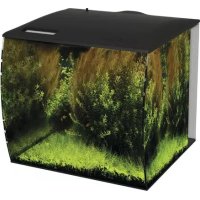
Flex - Aquarium Fluval - Free user manual and instructions
Find the device manual for free Flex Fluval in PDF.

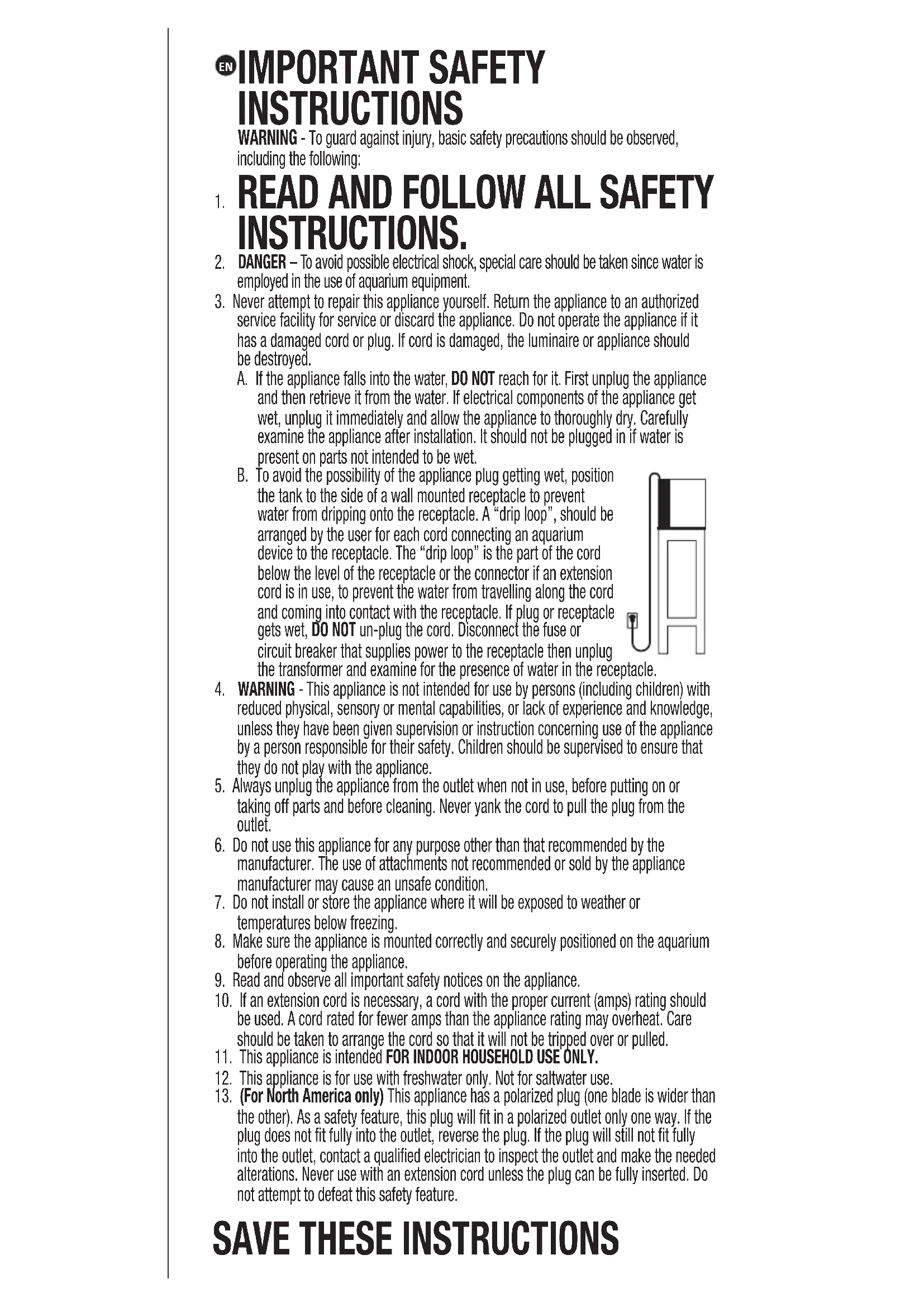


| Brand | Fluval |
| Model | Flex |
| Product type | Freshwater aquarium |
| Capacity | 123 L (32.5 gal US) |
| Weight (estimated empty) | Approximately 35 kg (without water or decor) |
| Weight (filled) | Over 135 kg (300 lb) |
| Lighting | LED Aquasky Bluetooth light strip, 21 W, 1450 lumens, 3000-25000 K, 63 LEDs |
| Filtration | Circulation pump with filter foam, activated carbon and Biomax |
| Pump flow rate (120 V) | 810 L/h (214 gal US/h) |
| Pump flow rate (220 V) | 770 L/h (203 gal US/h) |
| Power supply | Low voltage transformer, 120 V/60 Hz or 220 V/50 Hz depending on region |
| Materials | Glass tank, molded cover, plastic parts |
| Recommended maintenance | 20% weekly water change; rinse filter foam every 4-6 weeks; replace carbon every 2-4 weeks; replace Biomax every 2-3 months |
| Safety | Drip loop, polarized plug (North America), low voltage transformer, auto shut-off if dropped in water |
| Warranty | 2 years limited (excluding glass breakage, commercial use, modification) |
| Replacement parts available | Filter foam (A1375), Biomax (A1378), carbon (A1379), LED light strip (14549), pump (A14780), cover (A14784/A14785), impeller (A14782), non-slip mat (A14800), glass tank (A14796/A14797) |
| Intended use | Indoor, domestic, freshwater only |
| Water temperature | Not specified in manual, standard recommendation: 24-28 °C |
Frequently Asked Questions - Flex Fluval
User questions about Flex Fluval
0 question about this device. Answer the ones you know or ask your own.
Ask a new question about this device
Download the instructions for your Aquarium in PDF format for free! Find your manual Flex - Fluval and take your electronic device back in hand. On this page are published all the documents necessary for the use of your device. Flex by Fluval.
USER MANUAL Flex Fluval
EN IMPORTANT SAFETY INSTRUCTIONS
WARNING - To guard against injury, basic safety precautions should be observed, including the following:
-
READ AND FOLLOW ALL SAFETY INSTRUCTIONS.
-
DANGER – To avoid possible electrical shock, special care should be taken since water is employed in the use of aquarium equipment.
-
Never attempt to repair this appliance yourself. Return the appliance to an authorized service facility for service or discard the appliance. Do not operate the appliance if it has a damaged cord or plug. If cord is damaged, the luminaire or appliance should be destroyed.
A. If the appliance falls into the water, DO NOT reach for it. First unplug the appliance and then retrieve it from the water. If electrical components of the appliance get wet, unplug it immediately and allow the appliance to thoroughly dry. Carefully examine the appliance after installation. It should not be plugged in if water is present on parts not intended to be wet.
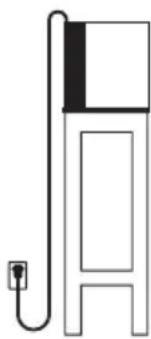
B. To avoid the possibility of the appliance plug getting wet, position the tank to the side of a wall mounted receptacle to prevent water from dripping onto the receptacle. A "drip loop", should be arranged by the user for each cord connecting an aquarium device to the receptacle. The "drip loop" is the part of the cord below the level of the receptacle or the connector if an extension cord is in use, to prevent the water from travelling along the cord and coming into contact with the receptacle. If plug or receptacle gets wet, DO NOT un-plug the cord. Disconnect the fuse or circuit breaker that supplies power to the receptacle then unplug the transformer and examine for the presence of water in the rec
-
WARNING - This appliance is not intended for use by persons (including children) with reduced physical, sensory or mental capabilities, or lack of experience and knowledge, unless they have been given supervision or instruction concerning use of the appliance by a person responsible for their safety. Children should be supervised to ensure that they do not play with the appliance.
-
Always unplug the appliance from the outlet when not in use, before putting on or taking off parts and before cleaning. Never yank the cord to pull the plug from the outlet.
-
Do not use this appliance for any purpose other than that recommended by the manufacturer. The use of attachments not recommended or sold by the appliance manufacturer may cause an unsafe condition.
-
Do not install or store the appliance where it will be exposed to weather or temperatures below freezing.
-
Make sure the appliance is mounted correctly and securely positioned on the aquarium before operating the appliance.
-
Read and observe all important safety notices on the appliance.
-
If an extension cord is necessary, a cord with the proper current (amps) rating should be used. A cord rated for fewer amps than the appliance rating may overheat. Care should be taken to arrange the cord so that it will not be tripped over or pulled.
-
This appliance is intended FOR INDOOR HOUSEHOLD USE ONLY.
-
This appliance is for use with freshwater only. Not for saltwater use.
-
(For North America only) This appliance has a polarized plug (one blade is wider than the other). As a safety feature, this plug will fit in a polarized outlet only one way. If the plug does not fit fully into the outlet, reverse the plug. If the plug will still not fit fully into the outlet, contact a qualified electrician to inspect the outlet and make the needed alterations. Never use with an extension cord unless the plug can be fully inserted. Do not attempt to defeat this safety feature.
SAVE THESE INSTRUCTIONS
Component List
- Glass Aquarium
- Anti-slip Pad
- Molded Cover
-
LED Light Unit
-
Circulation Pump with Output Nozzle
- 2 x Foam Filter Block
- 2 x Activated Carbon insert
-
2 x BIOMAX insert
-
Safe, Low Voltage Transformer (for the lighting unit)
- 4 x LED Brackets and 8 x bracket screws
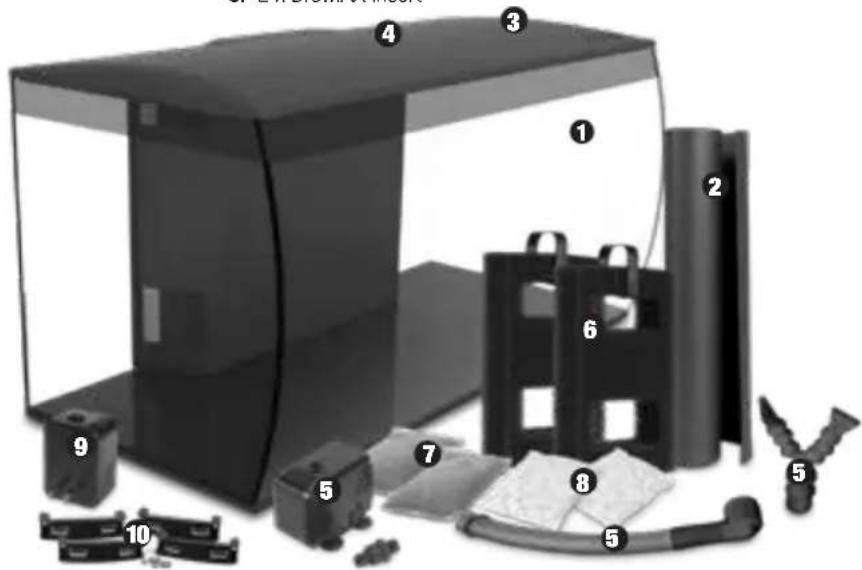
Installing your Aquarium
- Carefully remove all components from packaging, verifying that every piece is accounted for and undamaged. Refer to components list.
- Thoroughly clean the interior and exterior of the aquarium using a cloth dampened with fresh water. IMPORTANT: NEVER USE SOAP OR DETERGENTS to clean items placed inside the aquarium as they can be harmful to fish and their environment.
3.AQUARIUM PLACEMENT
IMPORTANT: The Flex aquarium can weigh in excess of 135 kg (300 lbs) once decorated and filled, therefore, please ensure the aquarium is placed on a specifically designed aquarium cabinet or stand. Carefully position the anti-slip pad underneath the aquarium. Locate the aquarium and stand on a level, sturdy surface and away from any electrical equipment, direct sunlight, drafts, heat sources or high traffic areas. Do not place the aquarium where water spills will cause damage.
- Please ensure the cabinet or stand is sized to that of the aquarium and that it is designed to handle the weight of a completely filled aquarium. Using a cabinet or stand not sized to that of the aquarium, or articles of furniture and self-assembly furniture not designed for aquarium use will cause an unsafe condition.
- Please do not place anything other than the anti-slip pad underneath the aquarium. There should be no additional support or damper in between the aquarium and the cabinet. Use a level to ensure that the aquarium is perfectly level on the cabinet.
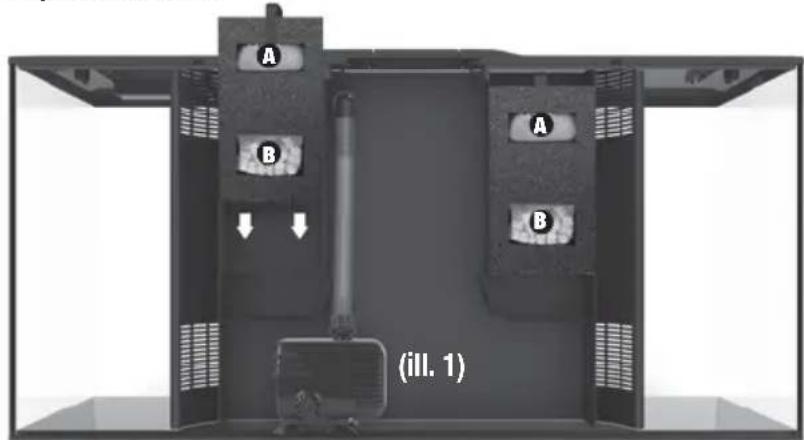
4.PREPARING FILTER MEDIA
- Remove Carbon and Biomax media from plastic covering and rinse thoroughly.
- Insert Carbon in the top compartment of Foam filter block A and Biomax in bottom compartment B
- Lower entire foam filter block into rear of the aquarium filter compartment.
5. PUMP CONNECTION
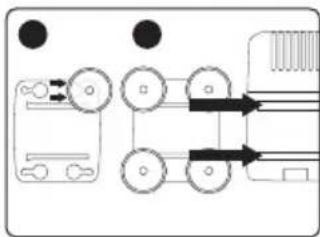
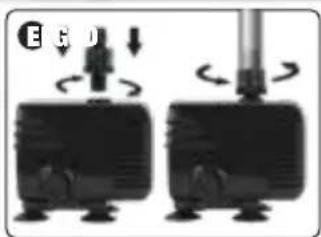
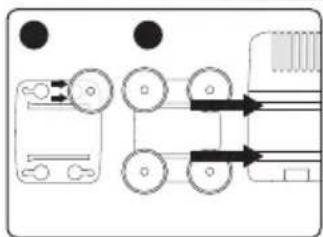
C Push suction feet onto base and slide over to lock into place.
D Slide base onto underside of pump.
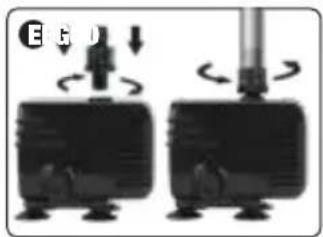
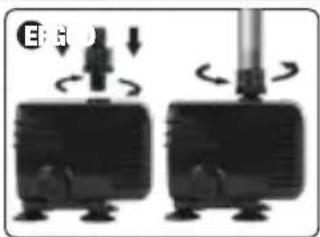
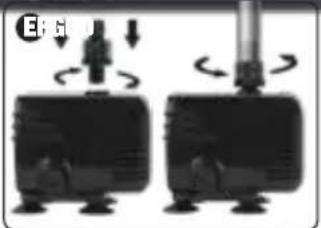
E Screw hose connector into pump; attach hose onto hose connector; screw locking thread onto hose.
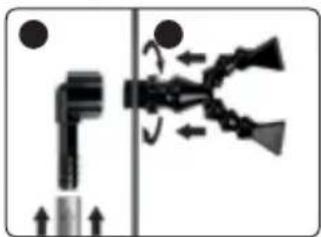
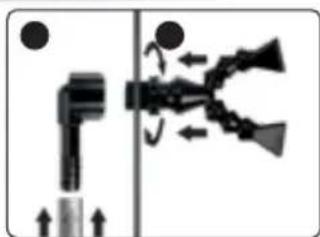
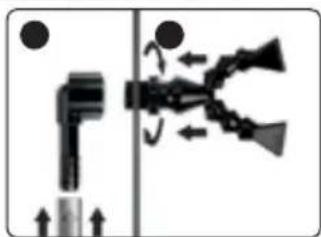
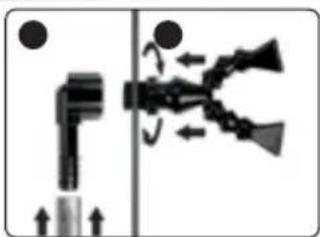
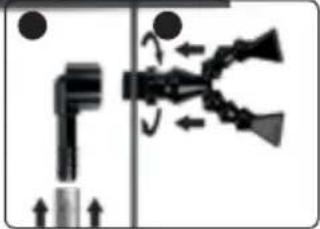
F Affix hose onto elbow. Then lower pump into rear corner of aquarium filter compartment. See (ill. 1)
Place elbow against the hole of aquarium filter wall and screw output nozzle into elbow.
Aquasky LED with Bluetooth
- Refer to your AQUASKY MANUAL for details on your new Bluetooth LED.
- Ensure LED light fixture is securely installed. Wipe lens with a damp cloth.
- Position lid on aquarium.
- Plug in to electrical outlet.
ADDING A SECOND LIGHT (optional, sold separately)
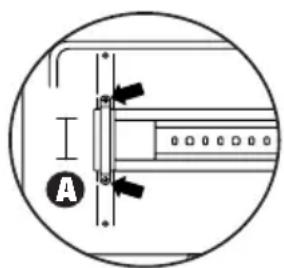
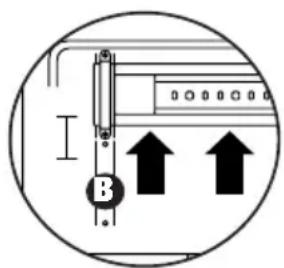
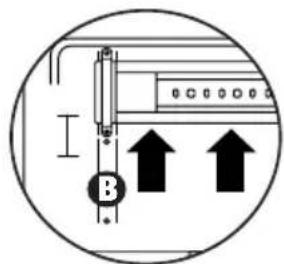
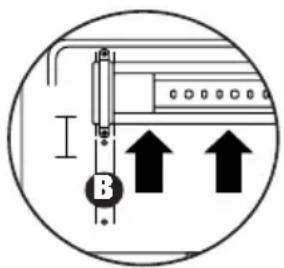
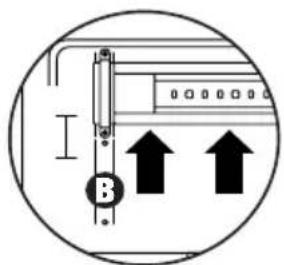
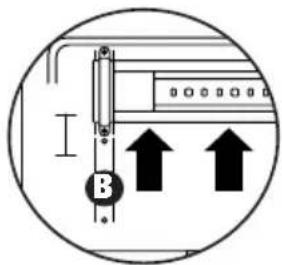
- Remove LED light A by unscrewing it from the brackets and moving it over to the end slot B.
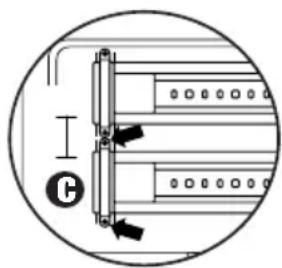
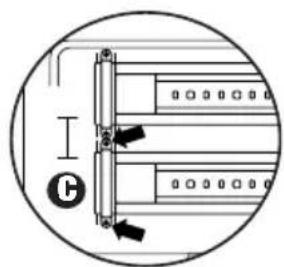
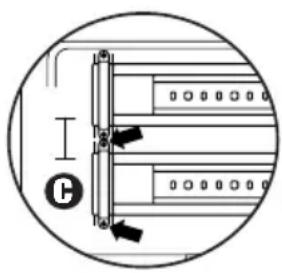
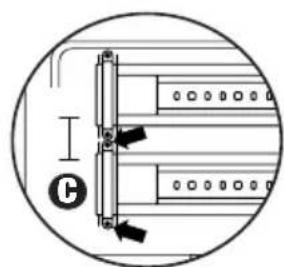
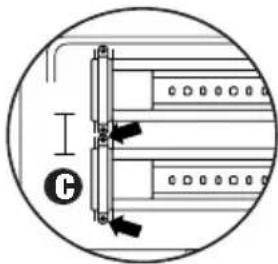
- Add second LED light beside the newly moved light fixture and screw in the brackets C.
Maintaining your Aquarium
NOTE: To ensure the well-being of aquarium inhabitants, it is essential to maintain your aquarium. At the very minimum, remove 20% of the water once a week and replace with tap water that is of similar temperature to your tank and treated with the correct dose of Fluval Water Conditioner. (Sold separately)
NOTE: Regular replacement of Fluval filter media is essential to ensure optimum performance. The filter media should be
changed alternately in order to maintain continuous biological activity. To enhance bacterial action, pour a dose of Fluval Biological Enhancer onto your filter inserts each time you change or clean the media. (Sold separately)
Motor Cleaning
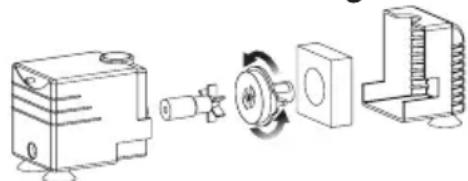
For optimum performance, clean impeller and impeller well, every three (3) to six (6) months
MEDIA PURPOSE MAINTENANCE REPLACEMENT
| Foam Filter Block | Mechanical Filtration: Traps particles and debris | Rinse every 4-6 weeks in aquarium water only | 12 months |
| Activated Carbon insert | Chemical Filtration: Eliminates toxic impurities, odors and discoloration | N/A 2 to 4 Weeks | |
| BIOMAX insert | Biological Filtration: Provides Optimum Biological Balance | Rinse every 6-8 weeks in aquarium water only | 2-3 months |
2 YEAR LIMITED WARRANTY
Your Fluval FLEX aquarium and filter are guaranteed for defective parts and workmanship for a period of 2 years from the date of purchase. This guarantee is valid with proof of purchase only. The guarantee is limited to repair or replacement only and does not cover consequential loss or damage to animate or inanimate objects. This guarantee is valid provided the aquarium is placed on a specifically designed aquarium cabinet or stand that is flat and level and has been installed in accordance with the installation instructions and care guide. This guarantee excludes aquarium breakage due to misuse, chips, stress cracks caused by improper support or other breakage. This guarantee is valid only under normal operating conditions for which the unit is intended. It excludes any damage caused by unreasonable use, negligence, improper installation, tampering, abuse or commercial use. The warranty does not cover wear and tear or parts which have not been adequately or correctly maintained. THIS DOES NOT AFFECT YOUR STATUTORY RIGHTS.
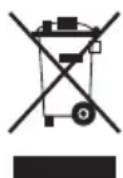
RECYCLING
This product bears the selective sorting symbol for waste electrical and electronic equipment (WEEE). This means that this product must be handled pursuant to European Directive 2012/19/EU in order to be recycled or dismantled to minimize its impact on the environment. Check with your local Environmental Agency for possible disposal instructions or take to an official council registered refuse collection point. Electronic products not included in the selective sorting process are potentially dangerous for the environment and human health due to the presence of hazardous substances.
REPLACEMENT PARTS
| FOR FLEX 32.5 US Gal (123 L) | |
| ART. DESCRIPTION | |
| A1375 Foam Filter Sponge | |
| A1378 BIOMAX | |
| A1379 Carbon | |
| 14549 Led-Lamp | |
| A14780 Water Pump | |
| A14784 Black Cover | |
| A14785 White Cover | |
| A14782 Impeller for PH-2000 Circulation Pump | |
| A14800 Aquarium Foam Pad | |
| A14796 Black - Glass Aquarium | |
| A14797 White - Glass Aquarium |
TECHNICAL
| FOR FLEX 32.5 US Gal (123 L) | |
| LED LAMP | |
| WATTS | 21 W |
| LUMENS | 1450 lm |
| COLOR TEMP. | 3000 - 25000 K |
| LEDs | 63 |
| FILTER | |
| PUMP OUTPUT | 120 V / 60 HZ 220 V / 50 HZ810 L/h(214 US Gal/h)770 L/h(203 US Gal/h) |
*Fluval only uses high quality LEDs with an expected lifespan of 50 000 hours. Failure of less than 5% of the total number of LEDs within the fixture shall not be considered a defect under the terms of the 2 year warranty. Please see warranty section for more details.
To register your warranty online or for more information on this and other products go to www.hagen.com. If at sometime in the future you have cause to claim under this guarantee, you will need to provide proof and date of purchase. We recommend that you retain your receipt for this purpose. Rolf C. Hagen Inc. wishes you many hours of enjoyment with your Fluval FLEX aquarium.
FOR AUTHORIZED GUARANTEE REPAIR SERVICE
For Authorized Warranty Service please return (well packaged and by registered post) to the address below enclosing dated receipt and reason for return. If you have any queries or comments about the operation of this product, please let us try to help you before you return the product to your retailer. Most queries can be handled promptly with a phone call. When you call (or write), please have all relevant information such as model number, age of product, details of aquarium set-up, as well as the nature of the problem.
If you have any queries or comments about the operation of this product, please contact your Specialist Aquatic Retailer in the first instance. Most queries can be handled easily at store level. In the unlikely event that it cannot, please return the item to the retailer, with your valid proof of purchase, for repair or replacement under the two year warranty terms.
CANADA: Rolf C. Hagen Inc., Consumer Repair
20500 Trans Canada Hwy, Baie-D'Urfé (Québec) H9X 0A2
Canada only: 1-800-554-2436 between 9:00 a.m. and 4:30 p.m.
Eastern Standard Time. Ask for Customer Service.
USA: Rolf C. Hagen (USA) Corp.
305 Forbes, Blvd, Mansfield, MA 02048
USA only: 1-800-724-2436 between 9:00 a.m. and 4:00 p.m.
Eastern Standard Time. Ask for Customer Service.
UK: Rolf C. Hagen (UK) Ltd, Customer Service Department
California Drive, Whitwood Ind Est., Castleford West, Yorkshire WF10 5QH
U.K. only: 01977 521015 between 9:00 a.m. and 5:00 p.m.,
Monday to Thursday, and between 9:00 a.m. and 4:00 p.m. on Friday
(excluding Bank Holidays).
FR MESURES DE SÉCURITÉ IMPORTANTES
![graph TD A["●"] --> B["○"] C["●"] --> D["○"] E["○"] --> F["○"] G["○"] --> H["○"] I["○"] --> J["○"] K["○"] --> L["○"] M["○"] --> N["○"] O["○"] --> P["○"] Q["○"] --> R["○"] S["○"] --> T["○"] U["○"] --> V["○"] W["○"] --> X["○"] Y["○"] --> Z["○"] AA["○"] --> AB["○"] AC["○"] --> AD["○"] AE["○"] --> AF["○…](/content/2026/04/585956/images/69c7a7a6ef6e76a9a98c7f03ab486986b8f018dd3679eab8b68fe96f71985146.jpg)
4.PRÉPARATION DES MASSES FILTRANTES
Uw aquarium installeren
![graph TD A["Left Wheel"] --> B["Pulley"] B --> C["Right Belt Drive"] C --> D["Bottom Belt Drive"] style A fill:#f9f,stroke:#333 style D fill:#bbf,stroke:#333](/content/2026/04/585956/images/fca7812a4f8cb0c27064d6b76e83dab3ec057eb28f48dbb3529b7717ccf3675a.jpg)
4. KLAARMAKEN VAN FILTERMEDIA
VK: Rolf C. Hagen (UK) Ltd, Customer Service Department
California Drive, Whitwood Ind Est., Castleford West, Yorkshire WF10 5QH http://faq..hagencrm.com?/uk


- EN IMPORTANT SAFETY INSTRUCTIONS
- SAVE THESE INSTRUCTIONS
- COMPONENT LIST
- INSTALLING YOUR AQUARIUM
- 3.AQUARIUM PLACEMENT
- 4.PREPARING FILTER MEDIA
- PUMP CONNECTION
- AQUASKY LED WITH BLUETOOTH
- ADDING A SECOND LIGHT (OPTIONAL, SOLD SEPARATELY)
- MAINTAINING YOUR AQUARIUM
- 2 YEAR LIMITED WARRANTY
- RECYCLING
- FOR AUTHORIZED GUARANTEE REPAIR SERVICE
- CANADA: ROLF C. HAGEN INC., CONSUMER REPAIR
- USA: ROLF C. HAGEN (USA) CORP
- UK: ROLF C. HAGEN (UK) LTD, CUSTOMER SERVICE DEPARTMENT
- FR MESURES DE SÉCURITÉ IMPORTANTES
- 4.PRÉPARATION DES MASSES FILTRANTES
- UW AQUARIUM INSTALLEREN
- KLAARMAKEN VAN FILTERMEDIA
- VK: ROLF C. HAGEN (UK) LTD, CUSTOMER SERVICE DEPARTMENT
Brand : Fluval
Model : Flex
Category : Aquarium