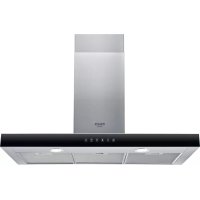
HHBS 9.8F LT X - Range hood HOTPOINT - Free user manual and instructions
Find the device manual for free HHBS 9.8F LT X HOTPOINT in PDF.




| Brand | Hotpoint |
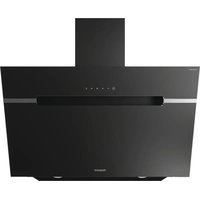
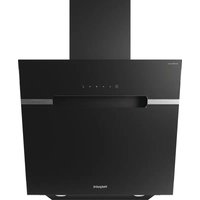
| Model | HHBS 9.8F LT X |
| Product Type | Cooker hood |
| Category | Extracting or filtering hood (charcoal kit optional) |
| Dimensions (H x W x D) | 62-114 x 71-114 x 12.5 cm (adjustable) |
| Exhaust diameter | 12.5 cm |
| Power supply | 220-240 V, 50/60 Hz |
| Number of speeds | 3 + intensive |
| Lighting | LED (replacement by after-sales service) |
| Grease filter | Metal, dishwasher-safe (quick cycle, low temperature) |
| Charcoal filter | Active, replacement every 4 months maximum |
| Control | Touch |
| Automatic shut-off | Yes (timer 10-20 min depending on speed) |
| Temperature sensor | Yes (automatic activation of medium speed) |
| Minimum height above cooktop | 50 cm (electric) / 65 cm (gas or mixed) |
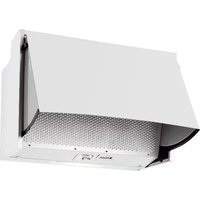
| Installation | Extracting (exhaust duct not supplied) or filtering (separate charcoal kit) |
| Maintenance | Monthly cleaning of exterior and grease filters |
| Safety | Automatic shut-off, overheat protection, power cut, use by children not recommended without supervision |
| Spare parts | Grease filters, charcoal filters, LED lamps (via after-sales service) |
| General information | Hotpoint hood HHBS 9.8F LT X – manual downloadable at docs.hotpoint.eu |
Frequently Asked Questions - HHBS 9.8F LT X HOTPOINT
User questions about HHBS 9.8F LT X HOTPOINT
0 question about this device. Answer the ones you know or ask your own.
Ask a new question about this device
Download the instructions for your Range hood in PDF format for free! Find your manual HHBS 9.8F LT X - HOTPOINT and take your electronic device back in hand. On this page are published all the documents necessary for the use of your device. HHBS 9.8F LT X by HOTPOINT.
USER MANUAL HHBS 9.8F LT X HOTPOINT
EN Instructions for use
FR Mode d'emploi
natural_image
Diagram of two building interior layouts with directional arrows indicating movement or flow (no text or symbols)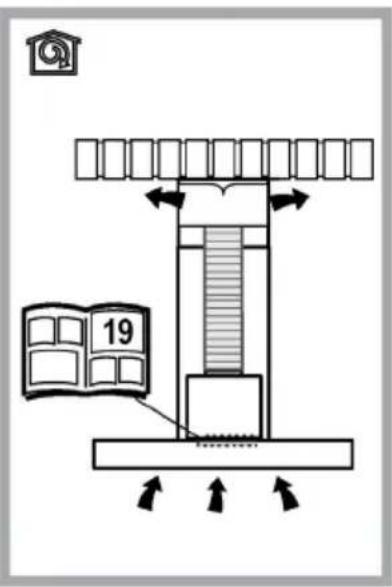
natural_image
Illustration of a hand holding an object, no text or symbols present
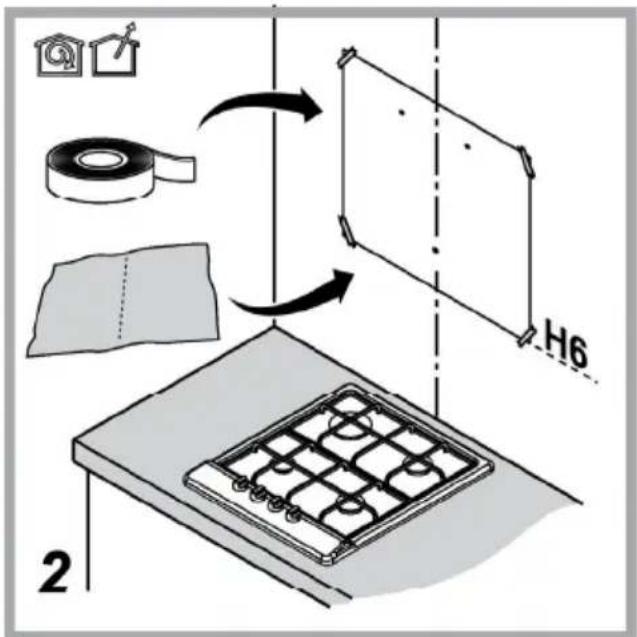
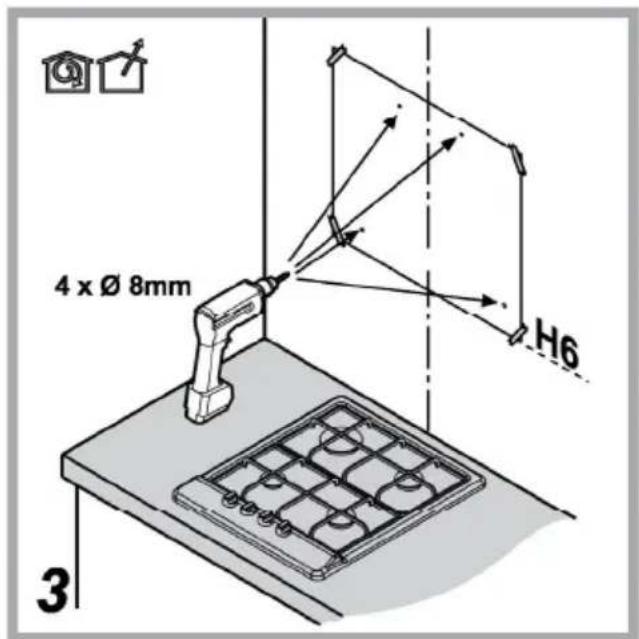
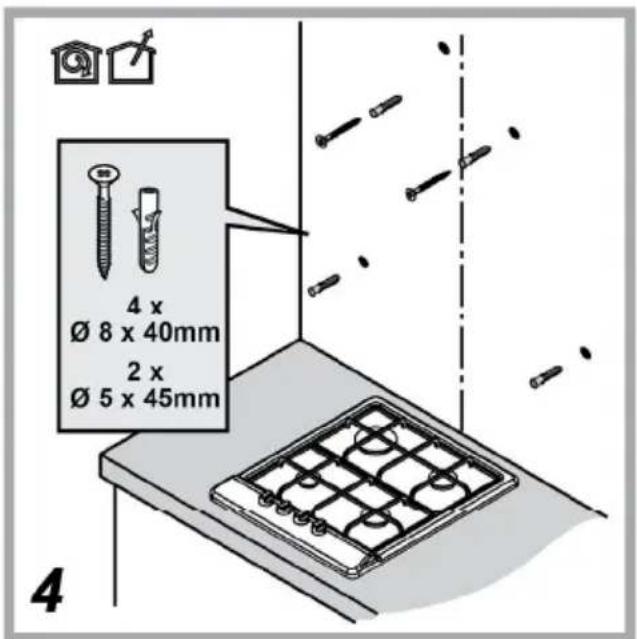
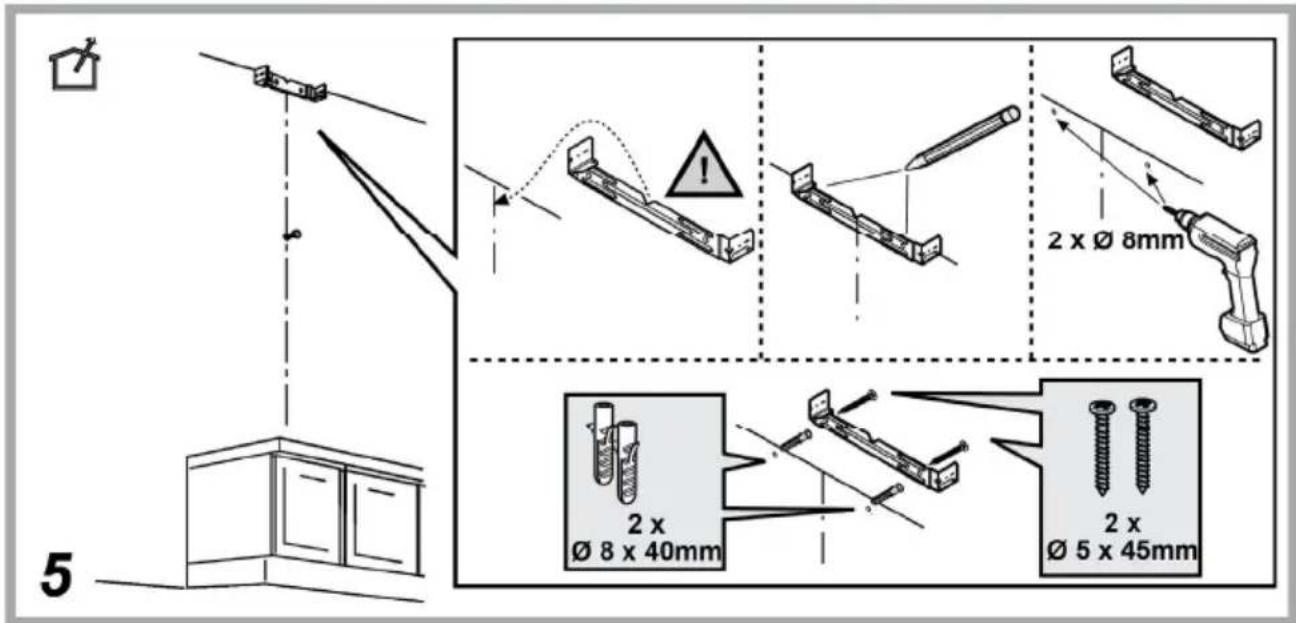

natural_image
Illustration of a hand holding a device with a curved band, no text or symbols present
natural_image
Technical illustration of a mechanical device with a rotating lever and base mount (no text or symbols)
natural_image
Diagram of a mechanical setup with a cable, switch, and component (no text or symbols)
Q
natural_image
Diagram of a device with cable and connector, showing internal wiring and connection (no text or symbols)
14b
natural_image
Isometric diagram of a mechanical device with a coiled spring mounted on a base, showing internal components and directional arrows (no text or symbols)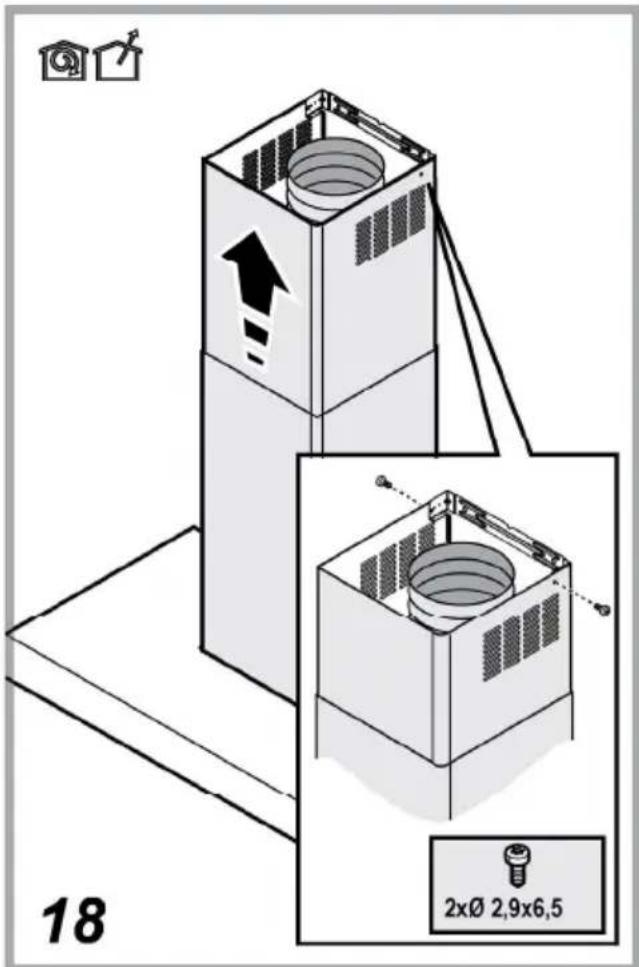
IT
SICUREZZA GENERALE
natural_image
Hand holding a mechanical clamp or bracket with a black arrow indicating force application (no text or symbols visible)natural_image
Silhouette of a person pushing a shopping cart (no text or symbols)EN
GENERAL SAFETY
- Before any cleaning or maintenance operation, disconnect hood from the mains by removing the plug or disconnecting the mains electrical supply.
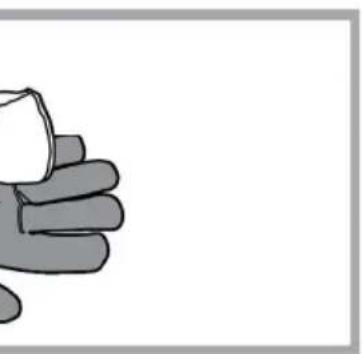
• Always wear work gloves for all installation and maintenance operations. - This appliance can be used by children aged from 8 years and above and persons with reduced physical, sensory or mental capabilities or lack of experience and knowledge if they have been given supervision or instruction concerning use of the appliance in a safe way and understand the hazards involved.
- Children shall not be allowed to tamper with the controls or play with the appliance.
- Cleaning and user maintenance shall not be made by children without supervision.
- The premises where the appliance is installed must be sufficiently ventilated, when the kitchen hood is used together with other gas combustion devices or other fuels.
- The hood must be regularly cleaned on both the inside and outside (AT LEAST ONCE A MONTH).
- This must be completed in accordance with the maintenance instructions provided. Failure to follow the instructions provided regarding the cleaning of the hood and filters will lead to the risk of fires.
- Do not flambé under the range hood.
- Do not remove filters during cooking.
- For lamp replacement use only lamp type indicated in the Maintenance/Replacing lamps section of this manual.
The use of exposed flames is detrimental to the filters and may cause a fire risk, and must therefore be avoided in all circumstances.
Any frying must be done with care in order to make sure that the oil does not overheat and ignite.
CAUTION: Accessible parts of the hood may become hot when used with cooking appliances. - Do not connect the appliance to the mains until the installation is fully complete.
- With regards to the technical and safety measures to be adopted for fume discharging it is important to closely follow the regulations provided by the local authorities.
- The air must not be discharged into a flue that is used for exhausting fumes from appliance burning gas or other fuels.
- Do not use or leave the hood without the lamp correctly mounted due to the possible risk of electric shocks.
- Never use the hood without effectively mounted grids.
- The hood must NEVER be used as a support surface unless specifically indicated.
- Use only the fixing screws supplied with the product for installation or, if not supplied, purchase the correct screws type.
- Use the correct length for the screws which are identified in the Installation Guide.
• In case of doubt, consult an authorized service assistance center or similar qualified person.
WARNING!
- Failure to install the screws or fixing device in accordance with these instructions may result in electrical hazards.
- Do not use with a programmer, timer, separate remote control system or any other device that switches on automatically.
Very young children(0-3years) should be kept away from the appliance. Young children (3-8 years) should be kept away from the appliance unless continuously supervised.
CAUTION: The appliance is not intended to be operated by means of an external switching device, such as a timer, or separate remote controlled system.
This appliance is not for professional use. Do not use the appliance outdoors.
The appliance must be handled and installed by two or more persons-risk of injury.
Installation, including water supply (if any), electrical connections and repairs must be carried out by a qualified technician.
Once installed, packaging waste (plastic, styrofoam parts etc.) must be stored out of reach of children – risk of suffocation.
Do not use the appliance when you are wet or barefoot.
Never use steam cleaning equipment – risk of electric shock.
The packaging material is 100% recyclable and is marked with the recycle symbol

The hood can look different to that illustrated in the drawings in this booklet. The instructions for use, maintenance and installation, however, remain the same.
Closely follow the instructions set out in this manual. All responsibility, for any eventual inconveniences, damages or fires caused by not complying with the instructions in this manual, is declined. This appliance is intended to be used in household and similar application such as: - staff kitchen areas in shop, offices and other working environments; - farm houses; - by clients in hotels, motels and other residential type environments; - bed and breakfast type environments.
- It is important to conserve this booklet for consultation at any moment. In the case of sale, cession or move, make sure it is together with the product.
- Read the instructions carefully: there is important information about installation, use and safety.
- Do not carry out electrical or mechanical variations on the product or on the discharge conduits.
- Before proceeding with the installation of the appliance verify that there are no damaged all components. Otherwise contact your dealer and do not proceed with the installation.
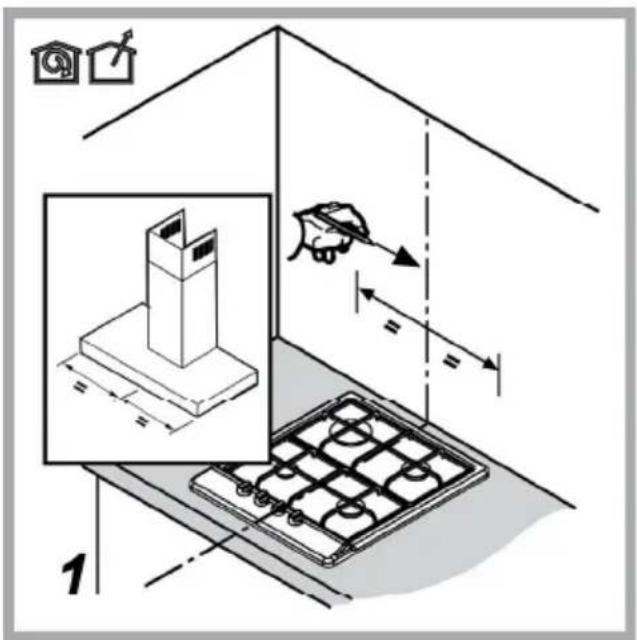
The minimum distance between the supporting surface for the cooking equipment on the hob and the lowest part of the range hood must be not less than 50cm from electric cookers and 65cm from gas or mixed cookers.
If the instructions for installation for the gas hob specify a greater distance, this must be adhered to.
ELECTRICAL CONNECTION
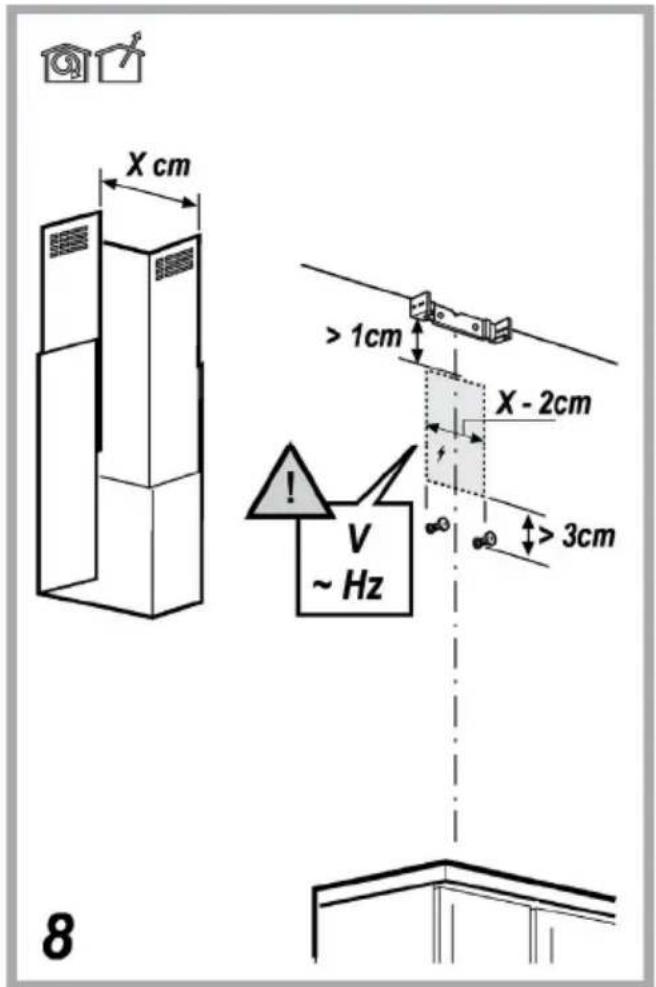
The mains power supply must correspond to the rating indicated on the plate situated inside the hood. If provided with a plug connect the hood to a socket in compliance with current regulations and positioned in an accessible area, after installation. If it not fitted with a plug (direct mains connection) or if the plug is not located in an accessible area, after installation, apply a double pole switch in accordance with standards which assures the complete disconnection of the mains under conditions relating to over-current category III, in accordance with installation instructions.
WARNING!
Before re-connecting the hood circuit to the mains supply and checking the efficient function, always check that the mains cable is correctly assembled.
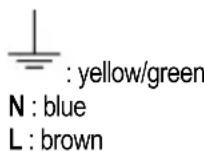
If the cable is not fitted with a plug, connect the wires according to the following table:
Mains voltage and frequency
Refer to the rating indicated on the plate inside of the hood
Wire connection
Replacing the power cable
The hood is provided with a special power cable; if the cable is damaged, request a new one from Technical Service.
AIR VENT
(for the suction versions)
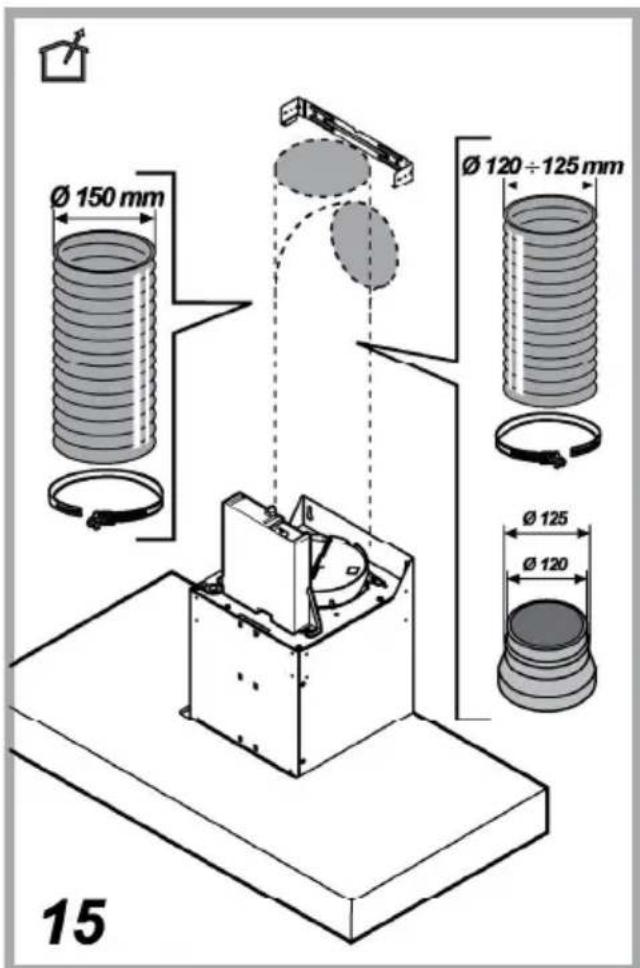
Connect the hood and discharge holes on the walls with a diameter equivalent to the air outlet (connection flange).
Using the tubes and discharge holes on walls with smaller dimensions will cause a diminution of the suction performance and a drastic increase in noise.
Any responsibility in the matter is therefore declined.
! Use a duct of the minimum indispensable length.
! Use a duct with as few elbows as possible (maximum elbow angle: 90°).
! Avoid drastic changes in the duct cross-section.
! The company declines any responsibility whenever these regulations are not respected.
FILTERING OR DUCTING ?
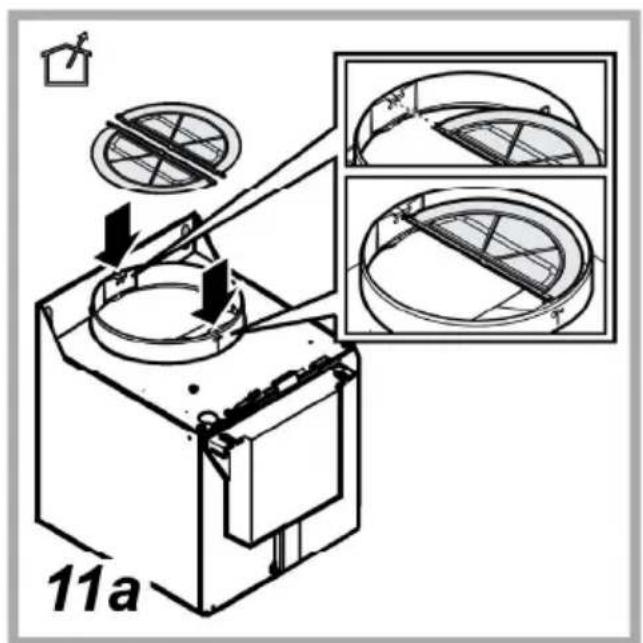
! Your cooker hood is ready to be used in suction version.
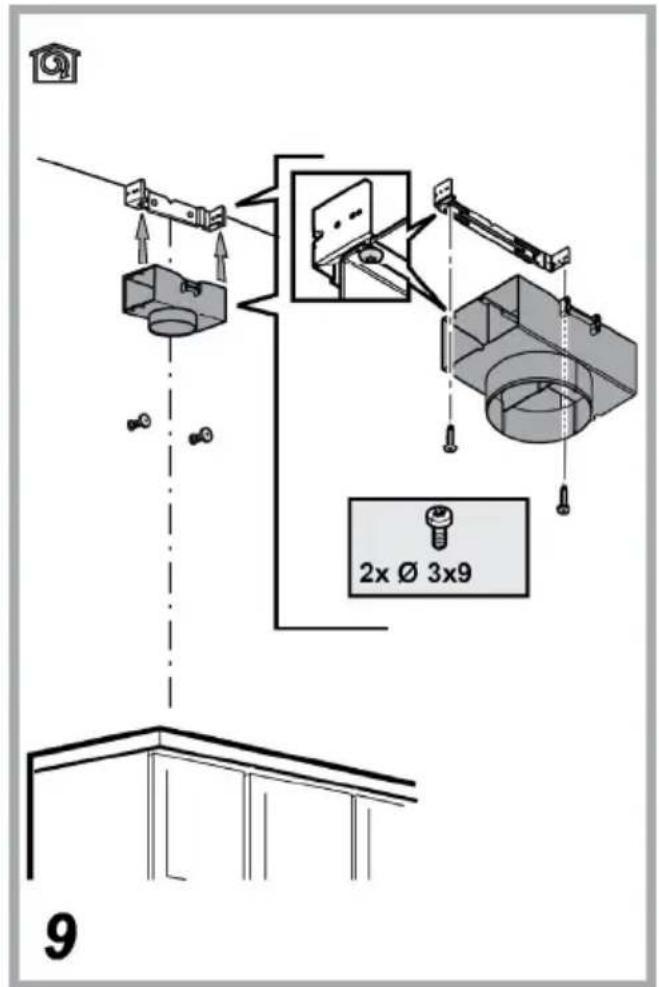
To use the hood in filtering version the special ACCESSORY KIT must be installed.
Check on the first pages of this manual if the ACCESSORY KIT is furnished or must be bought separately.
Note: If furnished, in certain cases, the additional activated carbon filtering system may be installed on the hood.
Information about the conversion of the hood from suction version to filtering version is present in this manual.
Ducting version
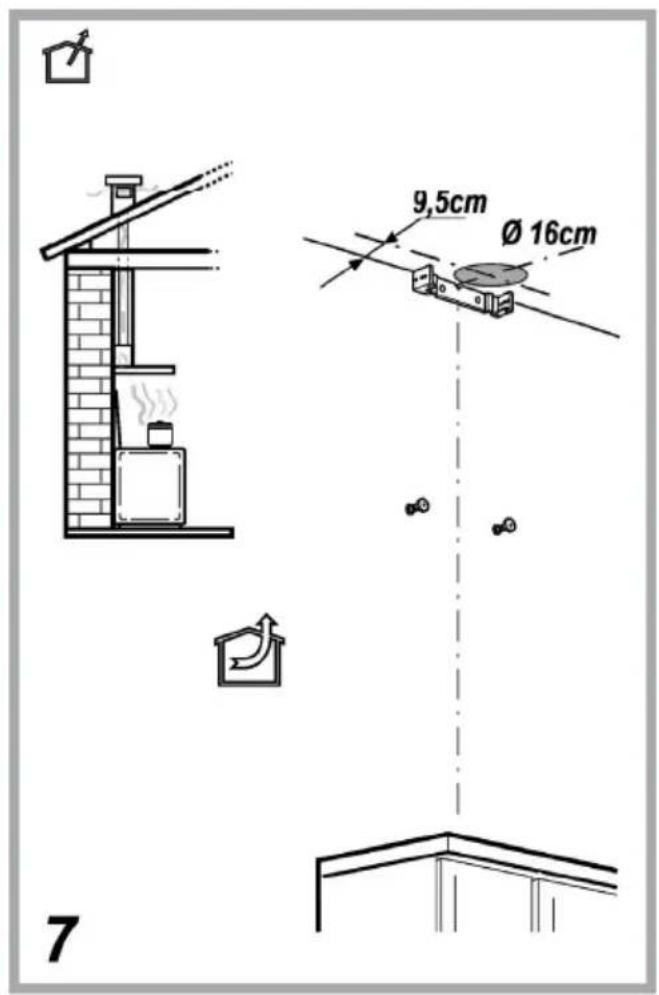
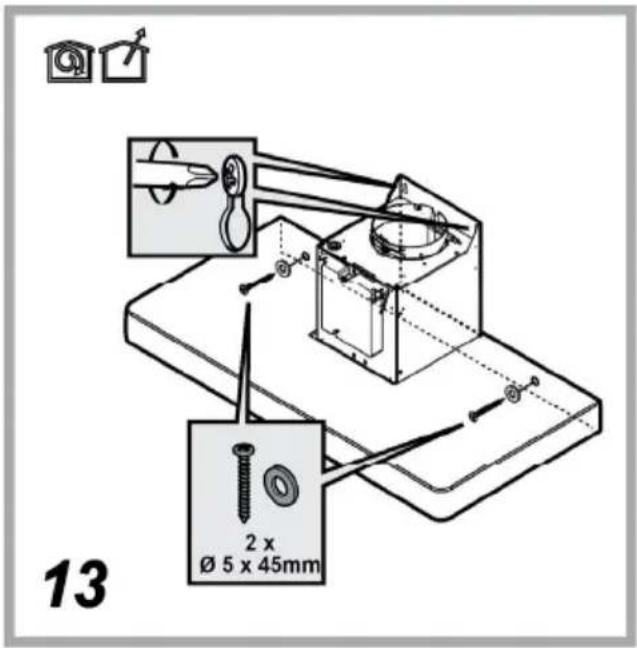
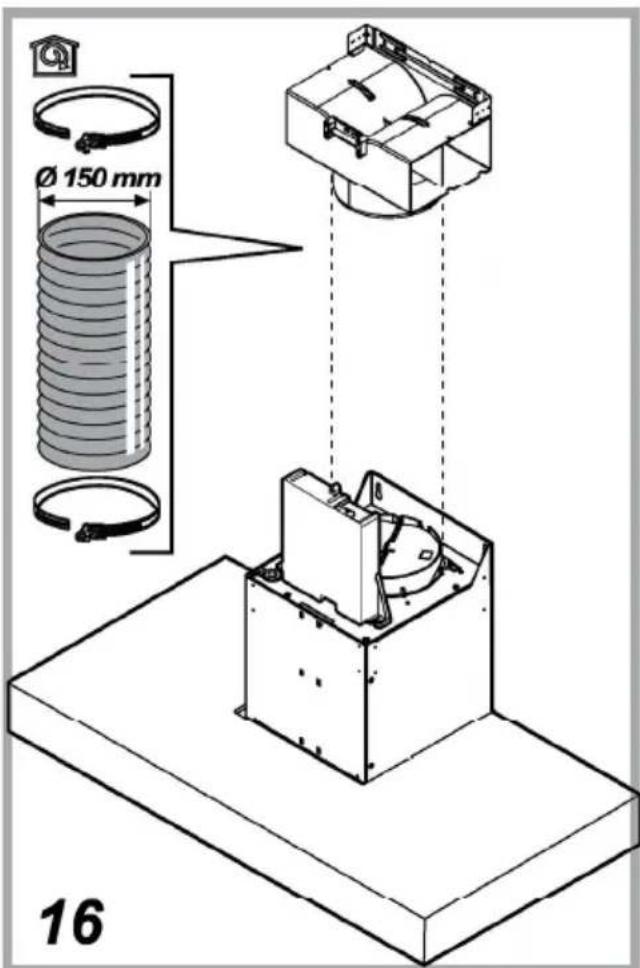
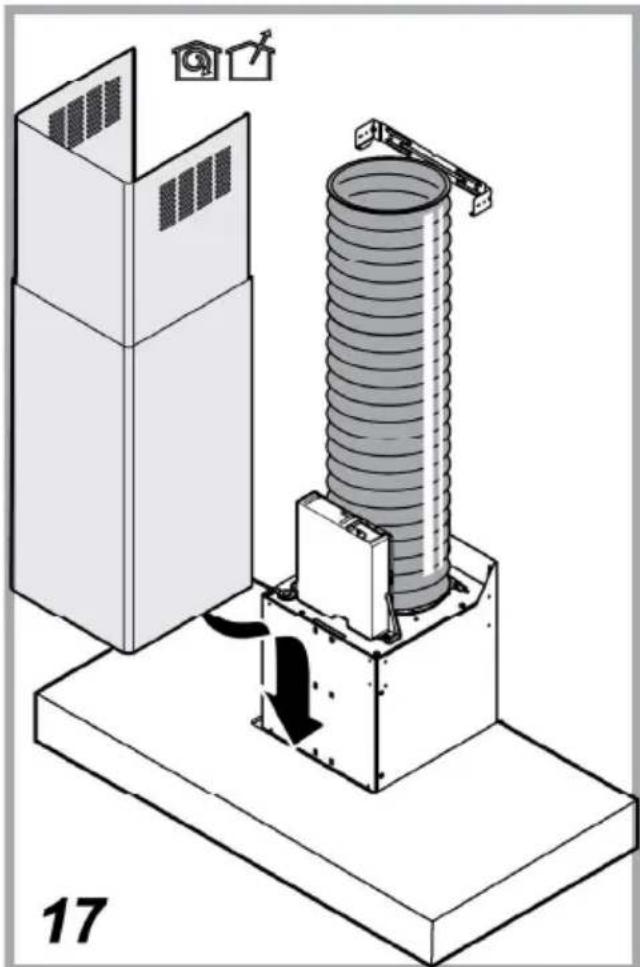
In this case the fumes are conveyed outside of the building by means of a special pipe connected with the connection ring located on top of the hood.
CAUTION!
The exhausting pipe is not supplied and must be purchased apart.
Diameter of the exhausting pipe must be equal to that of the connection ring.
CAUTION!
If the hood is supplied with active charcoal filter, then it must be removed.
Filter version
The aspirated air will be degreased and deodorised before being fed back into the room.
In order to use the hood in this version, you have to install a system of additional filtering based on activated charcoal.
CONTROLS
The hood is fitted with a control panel with aspiration speed selection control and a light switch to control cooking area lights.

T1

T2

T3

T4

T5

T6
To select hood functions, simply touch the controls:
T1. Button ON/OFF suction motor
T2. Button to select medium suction speed (power)
T3. Button to select high and intensive suction speed (power)
Press once to select high suction speed (power) (LED T3 on);
Press again to select intensive suction speed (power) (LED T3 flashing).
Note: The intensive suction (power) speed lasts for approximately 5 minutes, then the high suction speed (power) is set automatically.
T4. Automatic shutdown button (Timer) and saturation indicator for charcoal filter:
Automatic shutdown:
Press this button to set the automatic shutdown of the active suction speed (power):
Silent suction speed (power): 20 minutes
Medium suction speed (power): 15 minutes
High suction speed (power): 10 minutes
Saturation indicator charcoal filter
When flashing, perform maintenance of the charcoal filter, if installed, then keep the button T1 pressed for a long time to stop the flashing.
T5. Button to select 'silent' suction speed (power) and saturation indicator for grease filter
Note: when flashing, perform maintenance of the grease filter; then keep the button T1 pressed for a long time to stop the flashing.
T6. Button ON/OFF lighting
T2+T3+T4 flashing: automatic operation under high temperature conditions (see relevant paragraph)
Activation of the charcoal filter saturation indicator
This indicator is normally deactivated. To activate it, proceed as follows:
With the hood off, press and keep pressed simultaneously T2 and T3: T3 starts flashing first, then T2 as well, to indicate successful activation.
Deactivation of charcoal filter saturation LED: repeat the operation described above; T3 and T2 start flashing, then only T3 to indicate successful deactivation.
Automatic operation under high temperature conditions
The hood is equipped with a sensor which detects the temperature. When this becomes too high, the sensor automatically turns on the medium suction speed (power). The hood turns off as soon as the temperature detected by the sensor is lowered significantly.
MAINTENANCE
Cleaning
Clean using ONLY a cloth dampened with neutral liquid detergent.
DO NOT CLEAN WITH TOOLS OR INSTRUMENTS. Do not use abrasive products. DO NOT USE ALCOHOL!
Maintenance of the anti-grease filters
Traps cooking grease particles.
This must be cleaned once a month (or when the filter saturation indication system – if envisaged on the model in possession – indicates this necessity) using non aggressive detergents, either by hand or in the dishwasher, which must be set to a low temperature and a short cycle.
When washed in a dishwasher, the grease filter may discolor slightly, but this does not affect its filtering capacity.
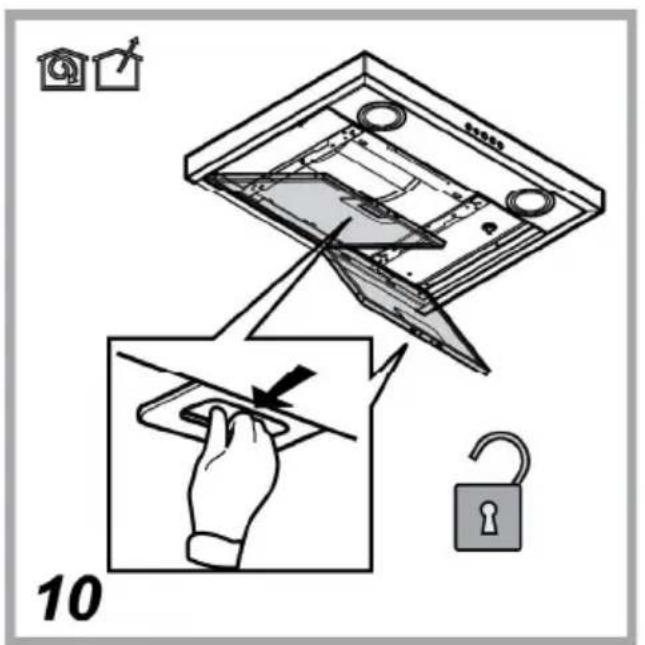
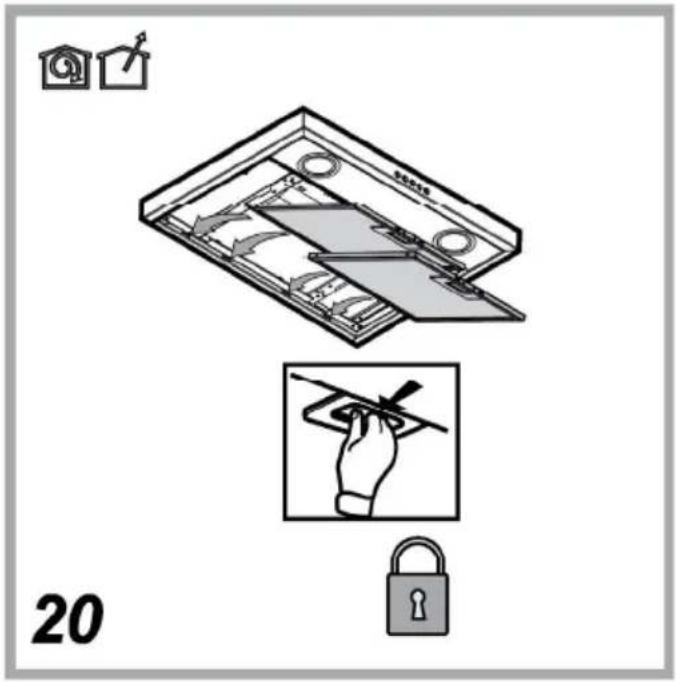
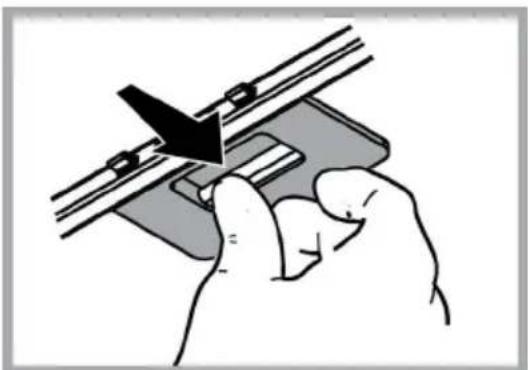
To remove the grease filter, pull the spring release handle.
natural_image
Hand holding a small electronic device with a black arrow pointing to its component (no text or symbols visible)Maintenance of the charcoal filter
It absorbs unpleasant odors caused by cooking.
The saturation of the charcoal filter occurs after more or less prolonged use, depending on the type of cooking and the regularity of cleaning of the grease filter.
In any case it is necessary to replace the cartridge at least every four mounths (or when the filter saturation indication system – if envisaged on the model in possession – indicates this necessity). The charcoal filter may NOT be washed or regenerated.
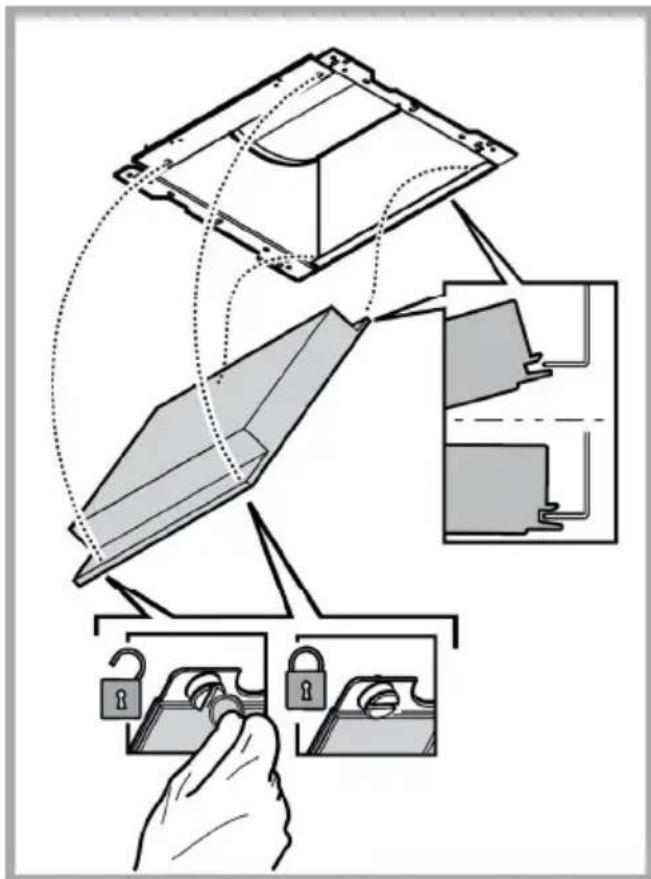
Assembly
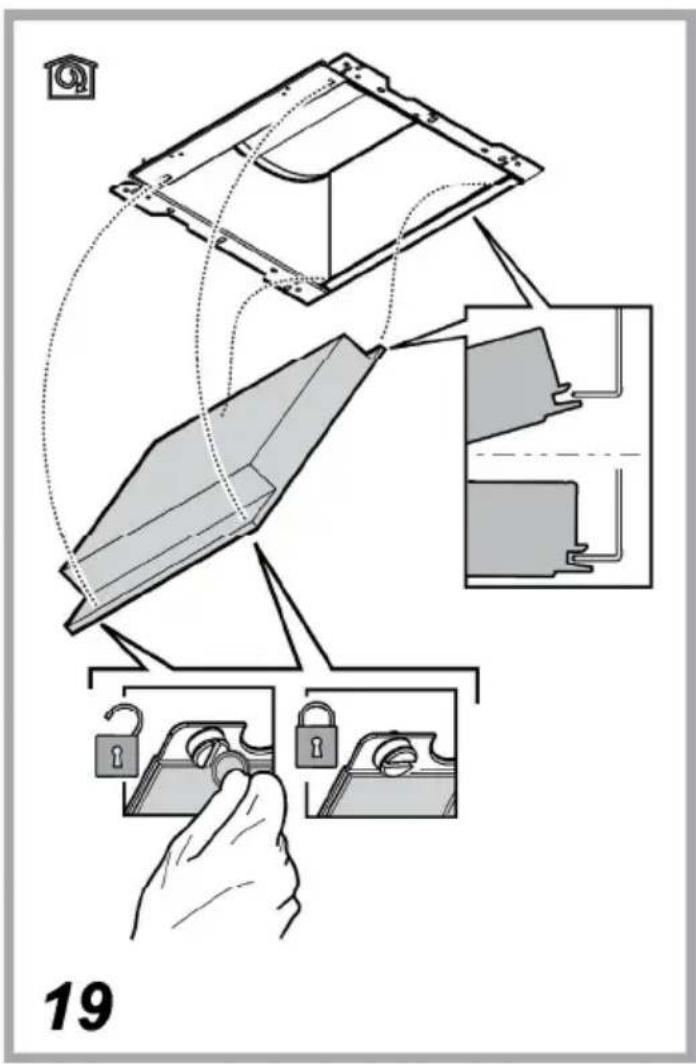
Hook the charcoal filter at the back on the metal tongue of the hood first, then on the front with the two knobs.
Disassembly
Remove the charcoal filter by turning the knobs fixing it to the hood by 90°.
Replacing lamps
The hood is equipped with a lighting system based on LED technology.
The LEDs guarantee an optimum lighting, a duration up to 10 times longer than the traditional lamps and allow to save 90% electrical energy.
For replacement, contact the technical service.
DISPOSAL
• This appliance is marked according to the European directive 2012/19/EC on Waste Electrical and Electronic Equipment (WEEE).
- By ensuring this product is disposed of correctly, you will help prevent potential negative consequences for the environment and human health, which could otherwise be caused by inappropriate waste handling of this product.

- The symbol ■ on the product, or on the documents accompanying the product, indicates that this appliance may not be treated as household waste. Instead it should be taken to the appropriate collection point for the recycling of electrical and electronic equipment. Disposal must be carried out in accordance with local environmental regulations for waste disposal.
- For further detailed information regarding the process, collection and recycling of this product, please contact the appropriate department of your local authorities or the local department for household waste or the shop where you purchased this product.
Appliance designed, tested and manufactured according to:
• Safety: EN/IEC 60335-1; EN/IEC 60335-2-31, EN/IEC 62233.
• Performance: EN/IEC 61591; ISO 5167-1; ISO 5167-3; ISO 5168; EN/IEC 60704-1; EN/IEC 60704-2-13; EN/IEC 60704-3; ISO 3741; EN 50564; IEC 62301.
- EMC: EN 55014-1; CISPR 14-1; EN 55014-2; CISPR 14-2; EN/IEC 61000-3-2; EN/IEC 61000-3-3. Suggestions for a correct use in order to reduce the environmental impact: Switch ON the hood at minimum speed when you start cooking and kept it running for few minutes after cooking is finished. Increase the speed only in case of large amount of smoke and vapor and use boost speed(s) only in extreme situations. Replace the charcoal filter(s) when necessary to maintain a good odor reduction efficiency. Clean the grease filter(s) when necessary to maintain a good grease filter efficiency. Use the maximum diameter of the ducting system indicated in this manual to optimize efficiency and minimize noise.
MALFUNCTIONS
If something appears not to be working properly, do the following simple checks before calling Technical Service:
• If the hood is not working:
Check that:
- The power has not been disconnected.
- A speed has been selected.
• If the hood performs inefficiently:
Check that:
- The motor speed selected is sufficient for the amount of smoke and vapours released.
- The kitchen is sufficiently ventilated to allow air intake.
- The charcoal filter is not worn (hood in filtering version).
- If the hood has turned off during normal functioning:
Check that:
- The power has not been disconnected.
- the omnipolar disconnection device has not tripped.
If the hood fails to operate correctly, briefly disconnect it from the mains power supply for almost 5 sec. Then connect it in again and try once more before contacting the Technical Assistance Service.
TECHNICAL DATA
| Height (cm) | Width (cm) | Depth (cm) | ∅ of the exhaust tube (cm) |
 62-114 62-114 71-114 71-114 | 89,8 45,5 15 | 12,5 - 12 | |
 62-114 62-114 71-114 71-114 | 69,8 45,5 15 | 12,5 - 12 | |
 62-114[IMAGE]71-114 62-114[IMAGE]71-114 | 59,8 45,5 15 | 12,5 - 12 |

natural_image
Silhouette of a person pushing a shopping cart (no text or symbols)Components not provided with the product

You can download the Safety Instructions, User Manual, Product Fiche and Energy data by:
- Visiting our website docs.hotpoint.eu
- Using QR Code
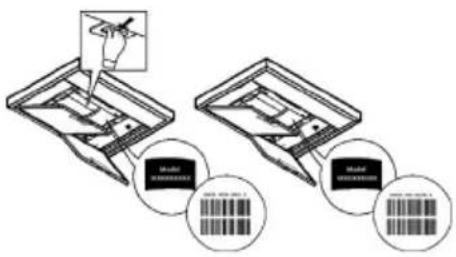
• Alternatively, contact our After-sales Service (See phone number in the warranty booklet). When contacting our After-sales Service, please state the codes provided on your product's identification plate.
FR
SÉCURITÉ GÉNÉRALE
natural_image
Hand holding a mechanical component with a black arrow indicating direction (no text or symbols)natural_image
Silhouette of a person pushing a shopping cart (no text or symbols)ES
SEGURIDAD GENERAL
natural_image
Illustration of a hand using a tool to adjust or install a mechanical component (no text or symbols visible)natural_image
Silhouette of a person pushing a shopping cart (no text or symbols)PT
SEGURANÇA GERAL
natural_image
Hand holding a mechanical component with a black arrow indicating direction (no text or symbols)natural_image
Silhouette of a person pushing a shopping cart (no text or symbols)NL
ALGEMENE VEILIGHEID
natural_image
Hand holding a tool with a black arrow pointing downward, no text or symbols visibleVervanging lampjes
natural_image
Silhouette of a person pushing a shopping cart (no text or symbols)PL
OGÓLNE BEZPIECZEŃSTWO
natural_image
Hand holding a mechanical clamp or bracket with a black arrow indicating force application (no text or symbols visible)Wymiana żarówek
natural_image
Silhouette of a person pushing a shopping cart (no text or symbols)TR
GENEL GÜVENLİK
natural_image
Illustration of a hand using a tool to adjust or install a mechanical component (no text or symbols visible)natural_image
Silhouette of a person pushing a shopping cart (no text or symbols)EL
ΓΕΝΙΚΗ ΑΣΦΑΛΕΙΑ
natural_image
Hand holding a tool interacting with a mechanical component (no text or symbols visible)natural_image
Silhouette of a person pushing a shopping cart (no text or symbols)RU
ОБЩИЕ ПРАВИЛА ТЕХНИКИ БЕЗОПАСНОСТИ
natural_image
Hand holding a mechanical component with a black arrow indicating direction (no text or symbols)Замена ламп
natural_image
Silhouette of a person pushing a shopping cart (no text or symbols)natural_image
Hand holding a small electronic device with a black arrow pointing to its component (no text or symbols visible)Заміна лампочок
natural_image
Silhouette of a person pushing a shopping cart (no text or symbols)natural_image
Hand holding a mechanical tool with a black arrow indicating a cutting or dissection (no text or symbols visible)Výměna svítidel
natural_image
Silhouette of a person pushing a shopping cart (no text or symbols)SK
VŠEOBECNÁ BEZPEČNOST
natural_image
Hand holding a mechanical tool with a black arrow indicating direction (no text or symbols visible)Výmena žiaroviek
Odsávač pary je vybavený systémom osvetlenia založenom na technoloógii LED.
natural_image
Silhouette of a person pushing a shopping cart (no text or symbols)RO
SIGURANTĂ GENERALĂ
natural_image
Hand holding a mechanical clamp or bracket with a black arrow indicating force application (no text or symbols visible)natural_image
Silhouette of a person pushing a shopping cart (no text or symbols)HU
ÁLTALÁNOS BIZTONSÁGI ELŐÍRÁSOK
natural_image
Hand holding a mechanical tool with a black arrow indicating a cutting or dissection (no text or symbols visible)Izzók cseréje
natural_image
Silhouette of a person pushing a shopping cart (no text or symbols)ЖАЛПЫ КАУІПСІЗДІК
natural_image
Hand holding a mechanical tool with a black arrow indicating a cutting or dissection (no text or symbols visible)Лампаларды ауыстыру
natural_image
Silhouette of a person pushing a shopping cart (no text or symbols)| (الارتفاع (سم) | |||
| 89.845.512 - 1124562114-71 |   | ||
| 69.845.512 - 1124562114-71 |   | ||
| 59.845.512 - 1124562114-71 |  [IMAGE] [IMAGE] |

natural_image
Silhouette of a person pushing a shopping cart (no text or symbols)بشير الرمز __ الموجود على المنتج أو على الوثائق المرفقة إلى أن هذا المنتج لا يجب التعامل معه في نهاية عمره التشفيي على Angola، Angola. Angola: Angola: Angola: Angola: Angola: Angola: Angola: Angola: Angola: Angola: Angola: Angola: Angola: Angola: Angola: Angola: Angola: Angola: Angola: Angola: Angola: Angola: Angola: Angola: Angola: Angola: Angola: Angola: Angola: Angola: Angola: Angola: Angola: Angola: Angola: Angola: Angola: Angola: Angola: Angola: Angola: Angola: Angola: Angola: Angola: Angola: Angola: Angola: Angola: Angola: Angola, Angola, Angola, Angola, Angola, Angola, Angola, Angola, Angola, Angola, Angola, Angola, Angola, Angola, Angola, Angola, Angola, Angola, Angola, Angola, Angola, Angola, Angola, Angola, Angola, Angola, Angola, Angola, Angola, Angola, Angola, Angola, Angola, Angola, Angola, Angola, Angola, Angola, Angola, Angola, Angola, Angola, Angola, Angola, Angola, Angola, Angola, Angola, Angola, Angola, Angola
التنظيف
natural_image
Diagram showing a downward arrow and a rectangular object on a horizontal line, no text or symbols presentصيانة مرشح الكربون


- IT
- SICUREZZA GENERALE
- EN
- GENERAL SAFETY
- WARNING!
- ELECTRICAL CONNECTION
- Mains voltage and frequency
- Wire connection
- Replacing the power cable
- AIR VENT
- FILTERING OR DUCTING ?
- Ducting version
- CAUTION!
- Filter version
- CONTROLS
- Activation of the charcoal filter saturation indicator
- Automatic operation under high temperature conditions
- MAINTENANCE
- Cleaning
- Maintenance of the anti-grease filters
- Traps cooking grease particles.
- Maintenance of the charcoal filter
- It absorbs unpleasant odors caused by cooking.
- Assembly
- Disassembly
- Replacing lamps
- DISPOSAL
- MALFUNCTIONS
- TECHNICAL DATA
- FR
- SÉCURITÉ GÉNÉRALE
- ES
- SEGURIDAD GENERAL
- PT
- SEGURANÇA GERAL
- NL
- ALGEMENE VEILIGHEID
- Vervanging lampjes
- PL
- OGÓLNE BEZPIECZEŃSTWO
- Wymiana żarówek
- TR
- GENEL GÜVENLİK
- EL
- ΓΕΝΙΚΗ ΑΣΦΑΛΕΙΑ
- RU
- ОБЩИЕ ПРАВИЛА ТЕХНИКИ БЕЗОПАСНОСТИ
- Замена ламп
- Заміна лампочок
- Výměna svítidel
- SK
- VŠEOBECNÁ BEZPEČNOST
- Výmena žiaroviek
- RO
- SIGURANTĂ GENERALĂ
- HU
- ÁLTALÁNOS BIZTONSÁGI ELŐÍRÁSOK
- Izzók cseréje
- ЖАЛПЫ КАУІПСІЗДІК
- Лампаларды ауыстыру
- التنظيف
Brand : HOTPOINT
Model : HHBS 9.8F LT X
Category : Range hood