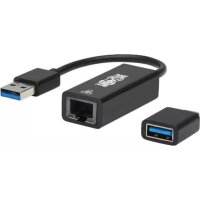
U336000GBCA - Network adapter Tripp Lite - Free user manual and instructions
Find the device manual for free U336000GBCA Tripp Lite in PDF.



| Product Type | USB-C/USB-A to RJ45 Gigabit Ethernet Network Adapter |
| Brand | Tripp Lite |
| Model | U336-000-GB-CA |
| Input Connectors | Integrated USB-A male + included USB-C male adapter |
| Output Connector | RJ45 female |
| Network Speed | 10/100/1000 Mbps (Gigabit) |
| USB Data Rate | USB 5 Gbps (USB 3.2 Gen 1) |
| Dimensions (H x W x D) | 19.6 x 2.2 x 1.5 cm |
| Weight | 14.6 g |
| Power | Via USB port, no external power required |
| Supported Operating Systems | Windows, macOS |
| Network Standards | IEEE 802.3, 802.3u, 802.3ab, 802.3az |
| Special Features | Wake-on-LAN, full duplex with flow control, half duplex, IPv4/IPv6 checksum offload |
| LED Indicators | White: power; Orange: network activity |
| Operating Temperature | 0 to 45 °C |
| Storage Temperature | -10 to 70 °C |
| Operating Humidity | 10 to 85% RH, non-condensing |
| Storage Humidity | 10 to 90% RH, non-condensing |
| Warranty | 3-year limited |
| Package Contents | U336-000-GB-CA adapter, USB-C adapter, quick start guide |
| Plug-and-Play | Yes, no additional drivers required on Windows and macOS |
| Maintenance and Cleaning | Clean with a soft, dry cloth. Do not use liquids or abrasive products. |
Frequently Asked Questions - U336000GBCA Tripp Lite
User questions about U336000GBCA Tripp Lite
0 question about this device. Answer the ones you know or ask your own.
Ask a new question about this device
Download the instructions for your Network adapter in PDF format for free! Find your manual U336000GBCA - Tripp Lite and take your electronic device back in hand. On this page are published all the documents necessary for the use of your device. U336000GBCA by Tripp Lite.
USER MANUAL U336000GBCA Tripp Lite
USB-C and USB-A to RJ45 Gigabit Ethernet Network Adapter, 10/100/1000 Mbps, Black
Model: U336-000-GB-CA
Español 8 • Français 15 • Русский 22 • Deutsch 29
WARRANTY REGISTRATION
Register your product today and be automatically entered to win an ISOBAR® surge protector in our monthly drawing!
tripplite.com/warranty


1111 W. 35th Street, Chicago, IL 60609 USA • tripplite.com/support
Copyright © 2021 Tripp Lite. All rights reserved. USB Type-C ^® and USB-C ^® are registered trademarks of USB Implementers Forum.
Product Features
- Connects the USB port on your computer, laptop or tablet to a wired Ethernet network
- Ensures full 10/100/1000 Mbps (1 Gbps) network speeds
- Compliant with IEEE 802.3, 802.3u, 802.3ab and 802.3az standards
- Supports:
o Wake-on-LAN
o Full duplex with IEEE 802.3X flow control
o Half duplex with back-pressure flow control
o IPv4 and IPv6 pack Checksum Offload Engine (COE)
o Suspend model and remote wake-up via link change, Magic Packet, Microsoft Wakeup Frame and external wake-up pin
- Compatible with Windows® and macOS® operating systems
- Plug-and-play operation with no external power needed for easy connection
- Fits easily into pocket, backpack, briefcase or laptop bag
System Requirements
- Computer, laptop or other compatible device with USB ports (USB 3.0 required to achieve USB 3.0 speeds)
- Windows or macOS operating system
Optional Accessories
• N201-Series Cat6 Gigabit Snagless Molded UTP Ethernet Cables
Package Contents
• U336-000-GB-CA
• USB-A to USB-C Plug Adapter
- Quick Start Guide
Installation
natural_image
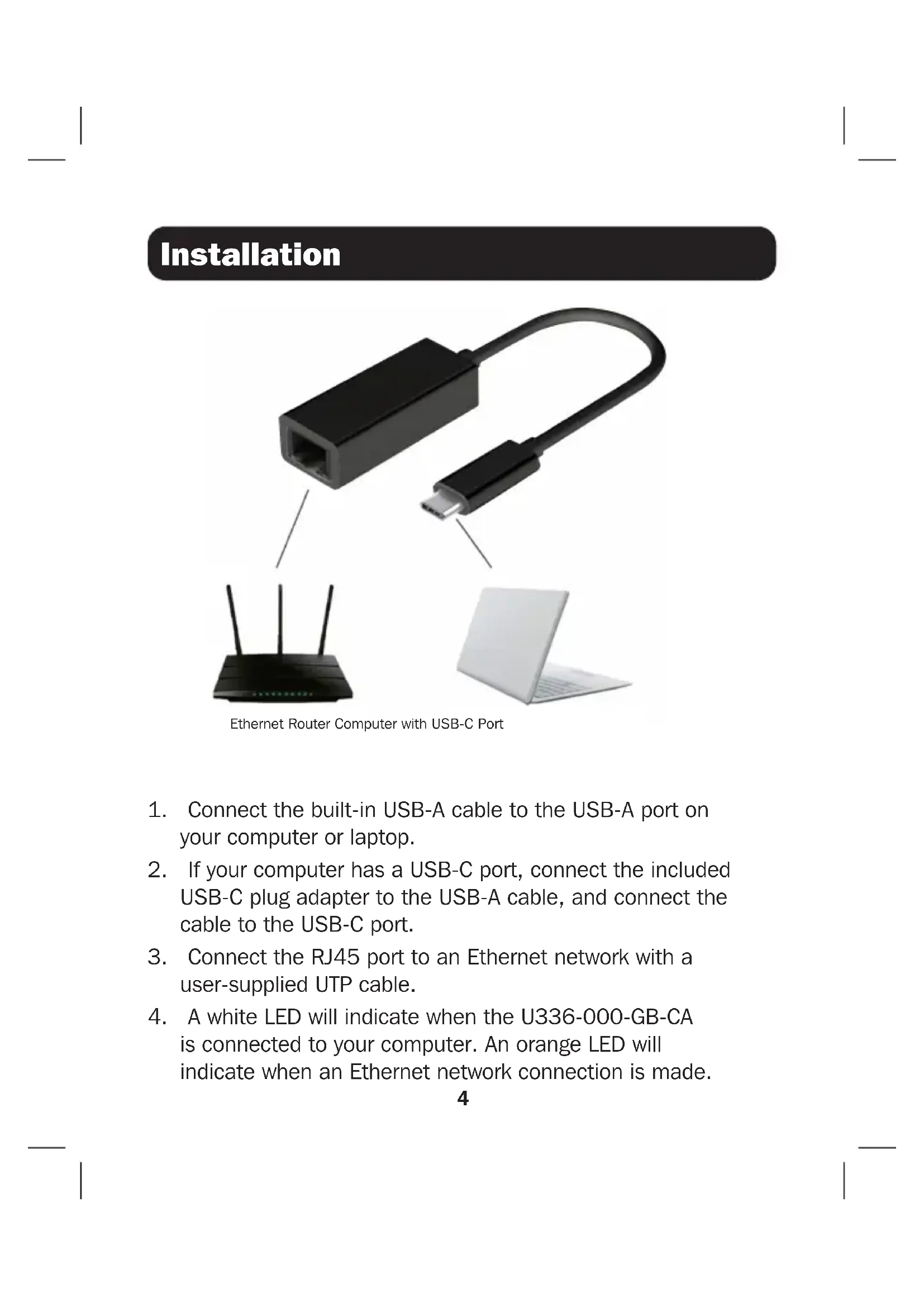
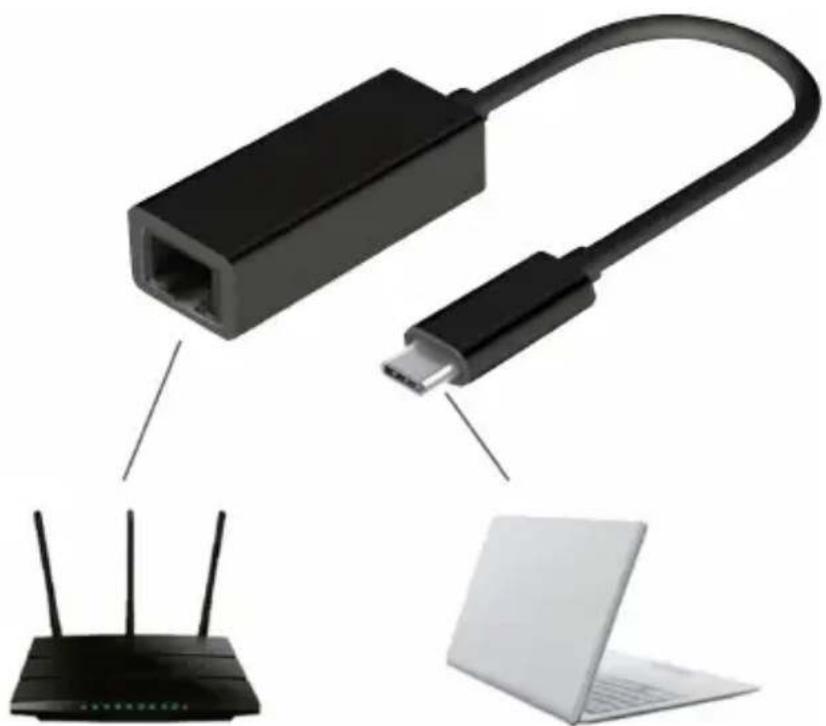
Diagram showing a network device connected to a router and a laptop, with no visible text or symbols.Ethernet Router Computer with USB-C Port
- Connect the built-in USB-A cable to the USB-A port on your computer or laptop.
- If your computer has a USB-C port, connect the included USB-C plug adapter to the USB-A cable, and connect the cable to the USB-C port.
- Connect the RJ45 port to an Ethernet network with a user-supplied UTP cable.
- A white LED will indicate when the U336-000-GB-CA is connected to your computer. An orange LED will indicate when an Ethernet network connection is made.
Specifications
| Input/Output Connectors | |
| Input USB-A (Male) | USB-C Adapter (Male) |
| Output RJ45 (Female) | |
| Physical | |
| Dimensions (H x W x D) 7.7 x 0.9 x | 0.6 in. /19.6 x 2.2 x 1.5 cm |
| Weight 0.5 oz. / 14.6 g | |
| Specifications | |
| USB 5 Gbps (USB 3.2 Gen 1) | |
| RJ45 10/100/1000 Mbps (1 Gbps) | |
| LEDs White: Power | Orange: Network Activity |
| Networking | |
| IEEE Standards Supported 802.3, | 802.3ab, 802.3az, 802.3u |
| Environmental | |
| Operating Temperature Range 32° to 113°F / 0° to 45°C | |
| Storage Temperature Range 14° to 158°F / -10° to 70°C | |
| Operating Humidity Range 10 to 85% RH, Non-Condensing | |
| Storage Humidity Range 5 to 90% RH, Non-Condensing | |
| Compatibility | |
| Operating Systems Windows and macOS | |
| Accessories | |
| User Manual English Version | |
| Warranty | |
| Limited Warranty 3 Years | |
Warranty and Product Registration
3-Year Limited Warranty
Seller warrants this product, if used in accordance with all applicable instructions, to be free from original defects in material and workmanship for a period of three (3) years from the date of initial purchase. If the product should prove defective in material or workmanship within that period, Seller will repair or replace the product, at its sole discretion.
THIS WARRANTY DOES NOT APPLY TO NORMAL WEAR OR TO DAMAGE RESULTING FROM ACCIDENT, MISUSE, ABUSE OR NEGLECT. SELLER MAKES NO EXPRESS WARRANTIES OTHER THAN THE WARRANTY EXPRESSLY SET FORTH HEREIN. EXCEPT TO THE EXTENT PROHIBITED BY APPLICABLE LAW, ALL IMPLIED WARRANTIES, INCLUDING ALL WARRANTIES OF MERCHANTABILITY OR FITNESS, ARE LIMITED IN DURATION TO THE WARRANTY PERIOD SET FORTH ABOVE; AND THIS WARRANTY EXPRESSLY EXCLUDES ALL INCIDENTAL AND CONSEQUENTIAL DAMAGES. (Some states do not allow limitations on how long an implied warranty lasts, and some states do not allow the exclusion or limitation of incidental or consequential damages, so the above limitations or exclusions may not apply to you. This warranty gives you specific legal rights, and you may have other rights which vary from jurisdiction to jurisdiction.)
WARNING: The individual user should take care to determine prior to use whether this device is suitable, adequate or safe for the use intended. Since individual applications are subject to great variation, the manufacturer makes no representation or warranty as to the suitability or fitness of these devices for any specific application.
Product Registration
Visit tripplite.com/warranty today to register your new Tripp Lite product. You'll be automatically entered into a drawing for a chance to win a FREE Tripp Lite product!*
*No purchase necessary. Void where prohibited. Some restrictions apply. See website for details.
Warranty and Product Registration
WEEE Compliance Information for Tripp Lite Customers and Recyclers (European Union)
Under the Waste Electrical and Electronic Equipment (WEEE)
Directive and implementing regulations, when customers buy new electrical and electronic equipment from Tripp Lite, they are entitled to:
- Send old equipment for recycling on a one-for-one, like-for-like basis (this varies depending on the country)
- Send the new equipment back for recycling when this ultimately becomes waste
Use of this equipment in life support applications where failure of this equipment can reasonably be expected to cause the failure of the life support equipment or to significantly affect its safety or effectiveness is not recommended.
Tripp Lite has a policy of continuous improvement. Specifications are subject to change without notice. Photos and illustrations may differ slightly from actual products.


Manufacturing Excellence.
1111 W. 35th Street, Chicago, IL 60609 USA • tripplite.com/support
natural_image
Diagram showing a network device connected to a router and a laptop, with no visible text or symbols.1111 W. 35th Street, Chicago, IL 60609 USA • tripplite.com/support
natural_image
Diagram showing a network device connected to a router and a laptop, with no visible text or symbols.1111 W. 35th Street, Chicago, IL 60609 USA • tripplite.com/support
1111 W. 35th Street, Chicago, IL 60609 USA • tripplite.com/support
natural_image
Diagram showing a router connected to a network device and a laptop, with no visible text or symbols.1111 W. 35th Street, Chicago, IL 60609 USA • tripplite.com/support
Kurzanleitung
USB-C- und USB-A-zu- RJ45-Gigabit-Ethernet- Netzwerkadapter, 10/100/1000 Mbit/s, Schwarz
Modell: U336-000-GB-CA
English 1 • Español 8 • Français 15 • Русский 22


1111 W. 35th Street, Chicago, IL 60609 USA • tripplite.com/support
natural_image
Diagram showing a network device connected to a router and a laptop, with no visible text or symbols.1111 W. 35th Street, Chicago, IL 60609 USA • tripplite.com/support

- USB-C and USB-A to RJ45 Gigabit Ethernet Network Adapter, 10/100/1000 Mbps, Black
- WARRANTY REGISTRATION
- Product Features
- System Requirements
- Optional Accessories
- Package Contents
- Installation
- Specifications
- Warranty and Product Registration
- 3-Year Limited Warranty
- Product Registration
- WEEE Compliance Information for Tripp Lite Customers and Recyclers (European Union)
- Kurzanleitung
- USB-C- und USB-A-zu- RJ45-Gigabit-Ethernet- Netzwerkadapter, 10/100/1000 Mbit/s, Schwarz
Brand : Tripp Lite
Model : U336000GBCA
Category : Network adapter