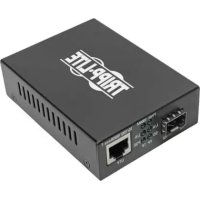
N785INTPLCMM1 - Video adapter Tripp Lite - Free user manual and instructions
Find the device manual for free N785INTPLCMM1 Tripp Lite in PDF.


| Product Type | Fiber Media Converter to Ethernet with PoE Power |
| Model | N785INTPLCMM1 |
| Brand | Tripp Lite |
| Fiber Connector | LC |
| Fiber Wavelength | 850 nm |
| Fiber Mode | Multimode |
| Max Fiber Distance | 550 m (1,804 ft) |
| Ethernet Speed | 10/100/1000 Mbps |
| RJ45 Port | 10/100/1000Base-T with MDI/MDI-X detection |
| PoE Power | IEEE 802.3af/at, 48 V DC, up to 30 W |
| Max PoE Distance | 100 m (328 ft) at 10/100/1000 Mbps, up to 330 m (1,082 ft) at 10 Mbps |
| External Power | 100-240 V AC, 50/60 Hz, with cables for AU, EU, UK, US |
| Special Features | Link Fault Pass Through (LFP), DIP switch for 10M extension mode |
| LED Indicators | PWR, PoE, SD, 1000M, L/A TP, L/A FP |
| Maintenance | Clean with a dry, lint-free cloth. Avoid liquids. |
| Safety | Handle with ESD precautions. Disconnect before installation. |
| Warranty | 2-year limited |
| Dimensions (approx.) | 70 x 50 x 25 mm (estimated) |
| Weight (approx.) | 150 g (estimated) |
Frequently Asked Questions - N785INTPLCMM1 Tripp Lite
User questions about N785INTPLCMM1 Tripp Lite
0 question about this device. Answer the ones you know or ask your own.
Ask a new question about this device
Download the instructions for your Video adapter in PDF format for free! Find your manual N785INTPLCMM1 - Tripp Lite and take your electronic device back in hand. On this page are published all the documents necessary for the use of your device. N785INTPLCMM1 by Tripp Lite.
USER MANUAL N785INTPLCMM1 Tripp Lite
Gigabit Fiber to Ethernet Media Converters with PoE
Models (North America): N785-P01-LC-MM1,
Register your product today and be automatically entered to win an ISOBAR® surge protector in our monthly drawing!
tripplite.com/warranty



Manufacturing Excellence.
1111 W. 35th Street, Chicago, IL 60609 USA • tripplite.com/support
Copyright © 2021 Tripp Lite. All rights reserved.
Package Includes
• N785-P01-Series or N785-INT-Series Media Converter
- External Power Supply with NEMA 1-15P Power Cord (100-240V), (N785-P01-Series only)
• External Power Supply with AU, EU, UK and US Power Cables (N785-INT-Series Only)
Product Features
All Models:
- Convert your fiber network to a copper network with the addition of power
• Supports 10/100/1000 Mbps speeds
• Supports up to 100 m (328 ft.) over Cat5e/Cat6 cable to your PoE-compliant device - IEEE 802.3af Power over Ethernet (PoE) and IEEE 802.3at compliant
• Auto identification of MDI/MDI-X
• Supports full-duplex and half-duplex modes
• LED indicators monitor Ethernet and Fiber link status - Link Fault Pass Through (LFP) allows network personnel to quickly identify faults
| Model | Optical Fiber Connector Wavelength Mode | Max Distance from Source | ||
| N785-P01-LC-MM1 LC 850 nm Multimode 550 m (1804 ft.) | ||||
| N785-P01-SC-MM1 SC 850 nm Multimode 550 m (1804 ft.) | ||||
| N785-P01-SC-MM2 SC 1310 nm Multimode 2000 m (6561 ft.) | ||||
| N785-P01-SC-SM1 SC 1310 nm Singlemode 20 km (12.4 mi.) | ||||
| N785-P01-SFP User-Definable Dependent on transceivers used | Dependent on transceivers used | Dependent on transceivers used | ||
| N785-INT-PLCMM1 LC 850 nm Multimode 550 m (1804 ft.) | ||||
| N785-INT-PSCMM2 SC 1310 nm Multimode 2000 m (6561 ft.) | ||||
| N785-INT-PSFP User-Definable Dependent on transceivers used | Dependent on transceivers used | Dependent on transceivers used | ||
Accessories
All Models:
• N001-Series Cat5e Snagless Patch Cables
• N201-Series Cat6 Snagless Patch Cables
N785-P01-SFP and N785-INT-PSFP Models Only:
• N286-01GSX-MDLC SFP to LC Multimode Transceiver (850 nm / 550 m)
• N286-01GLX-SLX SFP to LC Singlemode Transceiver (1310 nm / 10 km)
Installation
Notes:
- To avoid Electrostatic Discharge (ESD) damage, it is recommended you handle the product while wearing an ESD wrist grounding strap, or touch a conductive surface (such as metal) to discharge any potential ESD prior to handling the product.
-
Before installation, verify your fiber equipment's wavelength (850 nm or 1310 nm) and mode type (Single or Multi) matches that of the N785-P01-Series or N785-INT-Series Media Converter.
-
Ensure all equipment in the installation is powered off.
-
(N785-P01-SFP and N785-INT-PSFP Models Only):
-
Ensure all equipment in the installation is powered off.
- (N785-P01-SFP and N785-INT-PSFP Models Only):
Install a user-supplied SFP transceiver that matches your fiber equipment's credentials.
Note: Your fiber equipment's wavelength and mode type must match that of the N785-P01-Series or N785-INT-Series Media Converter.
-
Using existing fiber cable from your network infrastructure, connect the media converter to your fiber network.
-
With a user-supplied Cat5e/Cat6 cable (up to 100 m / 328 ft.), connect your IEEE 802.3 af/at PoE-compliant device to the media converter's 10/100/1000Base-T UTP port.
-
Using existing fiber cable from your network infrastructure, connect the media converter to your fiber network.
- With a user-supplied Cat5e/Cat6 cable (up to 100 m / 328 ft.), connect your IEEE 802.3 af/at PoE-compliant device to the media converter's 10/100/1000Base-T UTP port.
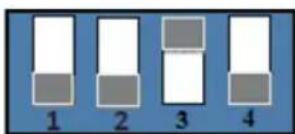
Note: If your PoE-compliant device is farther than 100 m (328 ft.) away, moving DIP switch 3 (10M) to the ON position allows you to run an additional 230 m (750 ft.) of Cat5e/6 cable (up to 330 m / 1082 ft. away in total) at 10 Mbps speeds only.
-
Connect the included power supply to the media converter.
-
Turn on power to all equipment in the installation.
-
Connect the included power supply to the media converter.
- Turn on power to all equipment in the installation.
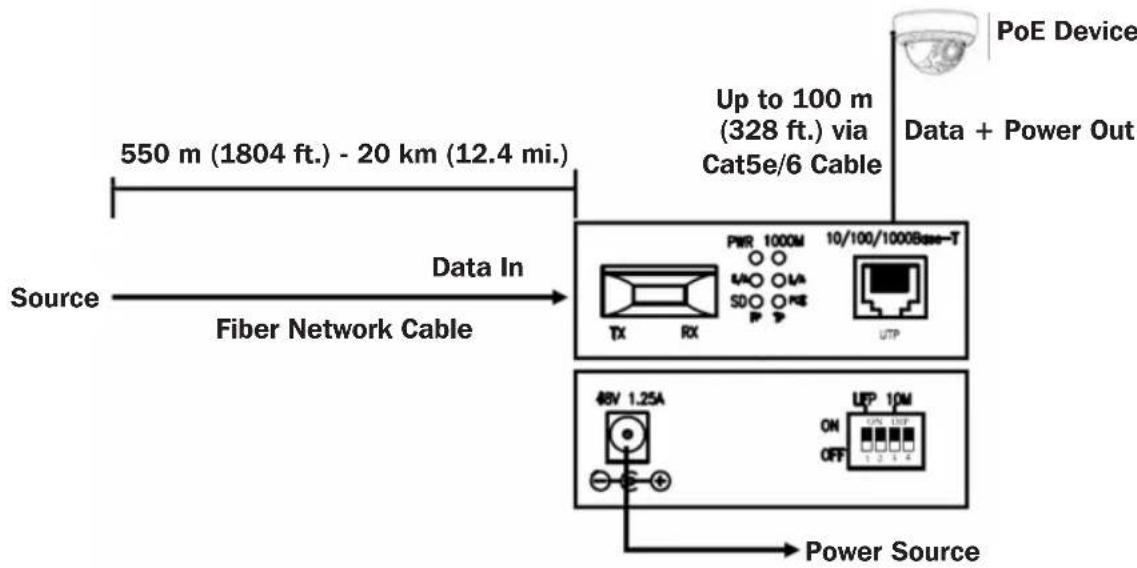
flowchart
graph LR
    A["Source"] -->|550 m (1804 ft.) - 20 km (12.4 mi.)| B["Fiber Network Cable"]
    B --> C["Data In"]
    C --> D["Up to 100 m (328 ft.) via Cat5e/6 Cable"]
    D --> E["PoE Device"]
    D --> F["Data + Power Out"]
    B --> G["48V 1.25A"]
    G --> H["Power Source"]
    G --> I["UP 10M ON OFF 1 2 3 4"]
DIP Switch Settings
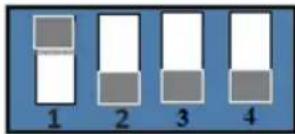
Note: DIP switches 2 and 4 have no function.
DIP Switch 1 - Link Fault Pass Through (LFP)
To enable the LFP function, move DIP switch 1 to the ON position.
Link Fault Pass Through (LFP)
LFP provides constant monitoring of the links connected to the media converter. If either the copper or fiber link fails, the media converter will pass the fail state through both links (copper and fiber), preventing the connected equipment from transmitting packets that would otherwise end up lost.
The LFP function includes both the LLCF (Link Loss Carry Forward) and LLF (Link Loss Return) functions. LLCF and LLR functions can immediately alarm network administrators to the problem of the link media and provide an efficient solution to monitor the network.
Link Loss Carry Forward (LLCF)
LLCF occurs when a device is connected to the converter and the TP (copper) line of the media converter loses the link, resulting in the media converter's fiber to disconnect from the transmission link.
Link Loss Return (LLR)
LLR occurs when a device is connected to the converter and the FP (fiber) line loses the link, resulting in the media converter's fiber to disconnect from the transmission link.
DIP Switch 3 - 10M
With DIP switch 3 In the ON position, the supported transfer distance of the RJ45 port changes to 330 ~m (1082 ft.) and the data transfer rate changes to 10 Mbps. This allows you to extend beyond the 100 ~m (328 ft.) limit while running at lower speeds. When in this mode, speeds of 100 and 1000 Mbps are not supported.
LED Functions
| LED Color Status Function | |||
| PWR Green ON The device is powered on | |||
| PoE Green | ON | RJ45 port is providing DC 48V to the remote PoE device | |
| OFF | RJ45 port is not providing DC 48V to the remote PoE device | ||
| SD Green | ON Fiber | port is receiving optical signal | |
| OFF Fiber | port is not receiving optical signal | ||
| 1000M Green | ON 1000 Mbps speed | ||
| OFF 10/100 Mbps speed | |||
| L/A - TP (Link/Act) (RJ45 Port) | Green | ON | Indicates the RJ45 port link is operating at 10/100/1000 Mbps |
| Blinking | Indicates the PoE media converter is actively sending or receiving data over the RJ45 port | ||
| OFF Indicates the RJ45 port link is not operating | |||
| L/A - FP (Link/Act) (Fiber Port) | Green | ON Indicates the fiber port link is operating | |
| Blinking | Indicates the PoE media converter is actively sending or receiving data over the fiber port | ||
| OFF Indicates the fiber port link is not operating | |||
Warranty and Product Registration
2-YEAR LIMITED WARRANTY
TRIPP LITE warrants its products to be free from defects in materials and workmanship for a period of two (2) years from the date of initial purchase. TRIPP LITE's obligation under this warranty is limited to repairing or replacing (at its sole option) any such defective products. To obtain service under this warranty, you must obtain a Returned Material Authorization (RMA) number from
TRIPP LITE or an authorized TRIPP LITE service center. Products must be returned to TRIPP LITE or an authorized TRIPP LITE service center with transportation charges prepaid and must be accompanied by a brief description of the problem encountered and proof of date and place of purchase. This warranty does not apply to equipment, which has been damaged by accident, negligence or misapplication or has been altered or modified in any way.
EXCEPT AS PROVIDED HEREIN, TRIPP LITE MAKES NO WARRANTIES, EXPRESS OR IMPLIED, INCLUDING WARRANTIES OF MERCHANTABILITY AND FITNESS FOR A PARTICULAR PURPOSE.
Some states do not permit limitation or exclusion of implied warranties; therefore, the aforesaid limitation(s) or exclusion(s) may not apply to the purchaser.
EXCEPT AS PROVIDED ABOVE, IN NO EVENT WILL TRIPP LITE BE LIABLE FOR DIRECT, INDIRECT, SPECIAL, INCIDENTAL OR CONSEQUENTIAL DAMAGES ARISING OUT OF THE USE OF THIS PRODUCT, EVEN IF ADVISED OF THE POSSIBILITY OF SUCH DAMAGE. Specifically, TRIPP LITE is not liable for any costs, such as lost profits or revenue, loss of equipment, loss of use of equipment, loss of software, loss of data, costs of substitutes, claims by third parties, or otherwise.
Product Registration
Visit tripplite.com/warranty today to register your new Tripp Lite product. You'll be automatically entered into a drawing for a chance to win a FREE Tripp Lite product!*
* No purchase necessary. Void where prohibited. Some restrictions apply. See website for details.
Use of this equipment in life support applications where failure of this equipment can reasonably be expected to cause the failure of the life support equipment or to significantly affect its safety or effectiveness is not recommended.
Tripp Lite has a policy of continuous improvement. Specifications are subject to change without notice. Photos and illustrations may differ slightly from actual products.


1111 W. 35th Street, Chicago, IL 60609 USA • tripplite.com/support
1111 W. 35th Street, Chicago, IL 60609 EE UU • tripplite.com/support
Link Loss Carry Forward [LLCF]
Link Loss Return [LLR]
1111 W. 35th Street, Chicago, IL 60609 EE UU • tripplite.com/support
1111 W. 35th Street, Chicago, IL 60609 USA • tripplite.com/support
Link Fault Pass Through (LFP)
Link Loss Carry Forward (LLCF)
Link Loss Return (LLR)
1111 W. 35th Street, Chicago, IL 60609 USA • tripplite.com/support
1111 W. 35th Street, Chicago, IL 60609 USA • tripplite.com/support
Bedienungsanleitung
Manufacturing Excellence.
1111 W. 35th Street, Chicago, IL 60609 USA • tripplite.com/support
LFP (Link Fault Passthrough)
LLCF (Link Loss Forward)
Link Loss Return (LLR)
1111 W. 35th Street, Chicago, IL 60609 USA • tripplite.com/support