U444CATH - Computer and peripheral cables Tripp Lite - Free user manual and instructions
Find the device manual for free U444CATH Tripp Lite in PDF.


| Product Type | HDMI Extender over Cat6 Cable with Power over Cable (PoC) |
| Brand and Model | Tripp Lite U444CATH (U444-CAT-H) |
| Input Connectors | USB Type-C (M), USB Type-C (F), HDMI (F), RJ45 (F) |
| Output Connectors | HDMI (M), RJ45 (F), USB Micro-B (F) |
| Maximum Resolution | 1920 x 1080 @ 60 Hz (1080p) |
| Maximum Transmission Distance | 45 m (150 ft) with Cat6 24 AWG cable |
| Audio Support | PCM 7.1, DTS and Dolby 5.1 |
| Video Standards | HDMI 1.4, HDCP 1.4 |
| Built-in Equalizer | 8 levels of video quality adjustment |
| Power Supply | Power over Cable (PoC) via USB-C; additional power possible via USB Micro-B (5V) on receiver |
| Additional Functions | Local HDMI output on transmitter, USB-C device charging via USB-C port, no software required |
| Operating Temperature | 0 °C to 40 °C (32 °F to 104 °F) |
| Storage Temperature | -15 °C to 50 °C (5 °F to 122 °F) |
| Operating Relative Humidity | 0 to 85 % RH, non-condensing |
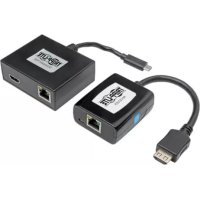
| Package Contents | Transmitter, receiver, screwdriver, user manual |
| Warranty | 3-year limited warranty |
| Certifications | HDMI, HDCP 1.4 |
Frequently Asked Questions - U444CATH Tripp Lite
User questions about U444CATH Tripp Lite
0 question about this device. Answer the ones you know or ask your own.
Ask a new question about this device
Download the instructions for your Computer and peripheral cables in PDF format for free! Find your manual U444CATH - Tripp Lite and take your electronic device back in hand. On this page are published all the documents necessary for the use of your device. U444CATH by Tripp Lite.
USER MANUAL U444CATH Tripp Lite
USB Type-C to HDMI over Cat6 w/ PoC – 1080p/150 ft. (45 m)
Model: U444-CAT-H
USB Type-C and USB-C are trademarks of USB Implementers Forum
Español 5 • Français 9 • Русский 13
PROTECT YOUR INVESTMENT!
Register your product for quicker service and ultimate peace of mind.
You could also win an ISOBAR6ULTRA surge protector— a \$100 value!

www.tripplite.com/warranty


1111 W. 35th Street, Chicago, IL 60609 USA • www.tripplite.com/support
Copyright © 2019 Tripp Lite. All rights reserved.
Package Includes
• U444-CAT-H • Screwdriver • Owner's Manual
Product Features
- Extend a 1080p video signal over Cat6 up to 150 ft. (45 m) away from your source
• Built-in equalization (EQ) control allows users to adjust between 8 levels of video quality
• Power-over-Cable (PoC) technology provides power to the receiver unit - Local HDMI output on the transmitter enables you to observe the image being displayed 150 ft. (45 m) away
- Conveniently charge your USB Type-C device with the built-in USB-C port
• HDMI and HDCP 1.4 compliant - Plug-and-play operation with no software or drivers required
Optional Accessories
- Tripp Lite N202-Series Solid-Wire Cat6 Patch Cables
• Tripp Lite P568-Series High-Speed HDMI Cables
Installation
Notes:
- Test entire installation prior to pulling cables through walls/ceilings.
- To achieve maximum distance and performance, use 24 AWG solid-wire Cat6 cable (such as Tripp Lite N202-Series cable).
Installation
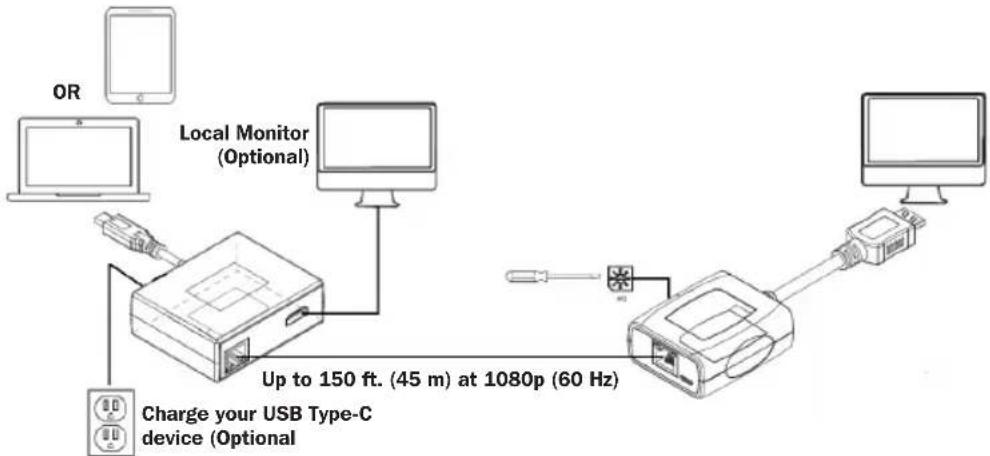
- Connect the receiver unit to your HDMI display.
Note: If the green LED does not illuminate after installation is completed, additional power is required. Connect a user-supplied USB Micro-B cable to the available USB Micro-B port on the receiver unit.
- Using a Cat6 patch cable (such as Tripp Lite N202-Series cable, not included), connect the RJ45 port on the transmitter unit to the RJ45 port on the receiver unit.
- Connect the transmitter unit to your USB Type-C source (ex. laptop or tablet). Both the green LED (indicating power is being supplied) and orange LED (signal transmission is occurring) on both the transmitter unit and receiver unit should illuminate at this time.
- (Optional) Using an HDMI cable (such as Tripp Lite P568-Series cable, not included), connect a local HDMI monitor to the available local HDMI port on the transmitter unit.
- (Optional) Prevent your USB Type-C device from unintentional shutdowns or battery drain by connecting the source's included power adapter to the available USB-C port on the transmitter unit.
- If necessary, adjust the video quality on your extended monitor using the EQ control located on the receiver unit.
Note: An improper equalization setting can cause the monitor to not display an image. Try each equalization setting until an acceptable image is displayed.
Troubleshooting
1. An image is not displayed on my remote monitor.
Adjust the equalization settings on the receiver unit until an acceptable image displays, or add power by connecting a user-supplied USB Micro-B cable to the available USB Micro-B port on the receiver unit.
Specifications
| Transmitter Unit Ports USB Type-C (M), USB Type-C (F), HDMI (F), RJ45 (F) |
| Receiver Unit Ports HDMI (M), RJ45 (F), USB Micro-B (F) |
| Max Resolution 1920 x 1080 @ 60 Hz (1080p) |
| Audio Support PCM 7.1, DTS & Dolby 5.1 |
| Transmission Distance 150 ft. (45 m) |
| HDMI Signal HDMI 1.4, HDCP 1.4 |
| Operating Temperature 32° to 104°F (0° to 40°C) |
| Storage Temperature 5° to 122°F (-15° to 50°C) |
| Relative Humidity 0% to 85% RH, Non-Condensing |
Warranty and Product Registration
3-Year Limited Warranty
TRIPP LITE warrants its products to be free from defects in materials and workmanship for a period of three (3) years from the date of initial purchase. TRIPP LITE's obligation under this warranty is limited to repairing or replacing (at its sole option) any such defective products. To obtain service under this warranty, you must obtain a Returned Material Authorization (RMA) number from TRIPP LITE or an authorized TRIPP LITE service center. Products must be returned to TRIPP LITE or an authorized TRIPP LITE service center with transportation charges prepaid and must be accompanied by a brief description of the problem encountered and proof of date and place of purchase. This warranty does not apply to equipment, which has been damaged by accident, negligence or misapplication or has been altered or modified in any way.
EXCEPT AS PROVIDED HEREIN, TRIPP LITE MAKES NO WARRANTIES, EXPRESS OR IMPLIED, INCLUDING WARRANTIES OF MERCHANTABILITY AND FITNESS FOR A PARTICULAR PURPOSE.
Some states do not permit limitation or exclusion of implied warranties; therefore, the aforesaid limitation(s) or exclusion(s) may not apply to the purchaser.
EXCEPT AS PROVIDED ABOVE, IN NO EVENT WILL TRIPP LITE BE LIABLE FOR DIRECT, INDIRECT, SPECIAL, INCIDENTAL OR CONSEQUENTIAL DAMAGES ARISING OUT OF THE USE OF THIS PRODUCT, EVEN IF ADVISED OF THE POSSIBILITY OF SUCH DAMAGE. Specifically, TRIPP LITE is not liable for any costs, such as lost profits or revenue, loss of equipment, loss of use of equipment, loss of software, loss of data, costs of substitutes, claims by third parties, or otherwise.
Product Registration
Visit www.tripplite.com/warranty today to register your new
Tripp Lite product. You'll be automatically entered into a drawing for a chance to win a FREE Tripp Lite product!*
* No purchase necessary. Void where prohibited. Some restrictions apply. See website for details.
WEEE Compliance Information for Tripp Lite Customers and Recyclers (European Union)

Under the Waste Electrical and Electronic Equipment (WEEE) Directive and implementing regulations, when customers buy new electrical and electronic equipment from Tripp Lite they are entitled to:
- Send old equipment for recycling on a one-for-one, like-for-like basis (this varies depending on the country)
- Send the new equipment back for recycling when this ultimately becomes waste
Use of this equipment in life support applications where failure of this equipment can reasonably be expected to cause the failure of the life support equipment or to significantly affect its safety or effectiveness is not recommended.
Tripp Lite has a policy of continuous improvement. Specifications are subject to change without notice.


Manufacturing Excellence.
1111 W. 35th Street, Chicago, IL 60609 USA • www.tripplite.com/support
1111 W. 35th Street, Chicago, IL 60609 EE UU • www.tripplite.com/support
1111 W. 35th Street, Chicago, IL 60609 EE UU • www.tripplite.com/support
1111 W. 35th Street, Chicago, IL 60609 USA • www.tripplite.com/support
1111 W. 35th Street, Chicago, IL 60609 USA • www.tripplite.com/support
1111 W. 35th Street, Chicago, IL 60609 USA • www.tripplite.com/support
1111 W. 35th Street, Chicago, IL 60609 USA • www.tripplite.com/support
19-01-469 93-3939 RevA