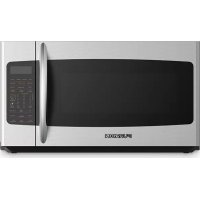
FMCM17SS - Oven Furrion - Free user manual and instructions
Find the device manual for free FMCM17SS Furrion in PDF.



| Product type | OTR (Over The Range) Convection Microwave Oven with Grill |
| Brand / Model | Furrion / FMCM17SS (also FMCM17-BL) |
| Capacity | 1.7 cu ft (48 L) |
| Product Dimensions (W x H x D) | 759 x 429 x 454 mm (29.875 x 16.875 x 17.875 in) |
| Cavity Dimensions (W x H x D) | 545 x 268 x 359 mm (21.4375 x 10.5625 x 14.125 in) |
| Net Weight | Approximately 30.4 kg (67 lb) |
| Power Supply | 120 V ~ 60 Hz, 20 A, Single Phase |
| Power Consumption (Microwave / Grill / Convection) | 1550 W / 1350 W / 1500 W |
| Microwave Output Power | 1000 W |
| Microwave Frequency | 2450 MHz |
| Cooking Modes | Microwave, Grill, Convection, Microwave+Grill, Microwave+Convection, Multi-stage Cooking, Auto Cook (10 menus), Defrost (weight, time, 1 lb), Keep Warm |
| Control Panel | Digital Touch with LED Display, Dedicated Function Keys |
| Safety | Child Lock, Door Lock System, Auto Shut-off, Overheat Protection |
| Ventilation | 4-Speed Exhaust Hood + Delay Off, Venting Top, Rear or Front (depending on installation) |
| Lighting | Exterior Light (Bright, Night Light, Off); Interior Cavity Light |
| Included Accessories | Glass Turntable, Roller Ring, Metal Rack, Grease Filter, Vent Adapter, Installation Templates |
| Maintenance | Interior cleaning with soft cloth and warm water; Grease filter dishwasher safe; Charcoal filter (optional) replace every 6-12 months |
| Replacement Parts | Exterior bulb (120 V 20 W T22, 2 pcs), Interior bulb (120 V 30 W T25 55 mm, 1 pc), Charcoal filter, Grease filter |
| General Information | Installation above gas or electric range; requires dedicated 20 A circuit; grounding required |
Frequently Asked Questions - FMCM17SS Furrion
User questions about FMCM17SS Furrion
0 question about this device. Answer the ones you know or ask your own.
Ask a new question about this device
Download the instructions for your Oven in PDF format for free! Find your manual FMCM17SS - Furrion and take your electronic device back in hand. On this page are published all the documents necessary for the use of your device. FMCM17SS by Furrion.
USER MANUAL FMCM17SS Furrion
Thank you for purchasing this Furrion® 1.7 cu. ft. OTR Convection Microwave Oven. Before placing your new product into operation, please read these operating instructions carefully. They contain important information for safe use, installation and maintenance of the product. Please keep this instruction manual in a safe place for future reference. Pass it onto possible new owners of the product.
The manufacturer does not accept responsibility for any damages that may arise due to non-observation of these instructions.
Contents
Welcome 1
Contents 2
Important Safety Instructions 3
Safety Precautions 3
Grounding Instructions 5
Radio or TV Interference 5
California [U.S.A] Residents 6
Precautions To Avoid Possible Exposure To Excessive Microwave Energy......6
Parts and Features 7
Microwave Oven 7
Control Panel and Features 8
Control Panel 8
Before Using 9
What's in the box. 9
Unpacking Instructions 9
About Your Microwave Oven 9
About Food 10
About Microwave Cooking 10
About Safety 11
About Utensils and Coverings 11
About Children and The Microwave 12
Operation 13
Function Description 13
Clock Setting 13
Setting Microwave Cooking Program 13
Multi stage cooking 13
Grill cooking 14
Microwave + Grill Cooking 14
Convection Cooking 14
Microwave + Convection Cooking 15
System Setup 15
Special Features 17
Setting Auto Cook 17
Other Convenient Features 20
Care and Maintenance 20
Specifications 24
Troubleshooting 25
Important Safety Instructions
Safety Precautions
WARNING: To reduce the risk of burns, electric shock, fire, injury to persons or exposure to excessive microwave energy.
When using electrical appliances basic safety precautions should be followed, including the following:
- Read all instructions before using the appliance.
- Read and follow the specific "Precautions To Avoid Possible Exposure To Excessive Microwave Energy" on page 6.
-
To reduce the risk of fire in the oven cavity:
-
Do not overcook food. Carefully attend the appliance when paper, plastic, or other combustible materials are placed inside the oven to facilitate cooking.
- Remove wire twist-ties and metal handles from paper or plastic containers/bags before placing them in the oven.
- If materials inside the oven ignite, keep the oven door closed. Turn the oven off, and unplug the appliance. Disconnect the power cord, shut off power at the fuse or circuit breaker panel.
-
Do not use the oven cavity for storage purposes. Do not leave paper products, cooking utensils, or food in the cavity when not in use.
-
This oven must be grounded. Connect only to properly grounded outlet. See "GROUNDING INSTRUCTIONS" found on page 5.
- Install or locate this oven only in accordance with the installation instructions provided.
-
Some products such as sealed containers, closed glass jars, or whole eggs are able to explode and should not be heated in the oven.
-
Use this appliance only for its intended uses as described in this manual. Do not use corrosive chemicals or vapors in this appliance. This oven is specifically designed to heat or cook or dry food. It is not designed for industrial or laboratory use.
- As with any appliance, close supervision is necessary when used by children.
- Do not operate this oven if it has a damaged cord or plug, if it is not working properly or if it has been damaged or dropped.
-
Liquids, such as water, coffee or tea are able to be overheated beyond the boiling point without appearing to be boiling. Visible bubbling or boiling when the container is removed from the microwave oven is not always present. THIS COULD RESULT IN VERY HOT LIQUIDS SUDDENLY BOILING OVER WHEN THE CONTAINER IS DISTURBED OR A SPOON OR OTHER UTENSIL IS INSERTED INTO THE LIQUID.
-
Do not overheat the liquid.
- Stir the liquid both before and halfway through heating it.
- Do not use straight-sided containers with narrow necks.
- After heating, allow the container to stand in the microwave oven for a short time before removing the container.
-
Use extreme care when inserting a spoon or other utensil into the container.
-
Do not heat oil or fat for deep-frying. It is difficult to control the temperature of oil in microwave oven.
- Pierce foods with heavy skins such as potatoes, whole squash, apples and chestnuts before cooking.
- Do not use this oven near water, for example, near a kitchen sink, in a wet basement, near a swimming pool, or similar locations.
- Do not immerse cord or plug in water.
Important Safety Instructions
Keep cord away from heated surface. Do not let cord hang over edge of table or counter.
- This appliance should be serviced only by qualified service technicians. Contact the nearest authorized service facility for examination, repair or adjustment.
- When cleaning surfaces of door and oven that comes together on closing the door, use only mild, nonabrasive soaps or detergents applied with a sponge or soft cloth.
-
Ventilating Hoods
-
Clean Ventilating Hoods Frequently-Grease should not be allowed to accumulate on hood or filter.
-
When flaming foods under the hood, turn the fan on.
-
Use care when cleaning the vent-hood filter. Corrosive cleaning agents, such as lye-based oven cleaners, may damage the filter.
- Do not mount over sink.
- Do not store anything directly on top of the appliance surface when the appliance is in operation.
- Suitable for use above both gas and electric cooking equipment.
- As with most cooking appliances, close supervision is necessary to reduce the risk of a fire in the oven cavity.
- The contents of feeding bottles and baby jars should be stirred or shaken and the temperature should be checked before serving in order to avoid burns.
- Cooking utensils may become hot because of heat transferred from the heated food. Potholders may be needed to handle the utensil.
- Do not cover or block any openings on the oven.
- Do not store or use this appliance outdoors.
-
Use only thermometers, which are specifically designed for use in microwave ovens.
-
This equipment generates, uses and can radiate radio frequency energy and, if not installed and used in accordance with the instructions, may cause harmful interference to radio communications. However, there is no guarantee that interference will not occur in a particular installation. If this equipment does cause harmful interference to radio or television reception, which can be determined by turning the equipment off and on, the user is encouraged to try to correct the interference by one or more of the following measures:
-
Reorient or relocate the receiving antenna.
- Increase the separation between the equipment and receiver.
- Connect the equipment into an outlet on a circuit different from that to which the receiver is connected.
-
Consult the dealer or an experienced radio/TV technician for help.
-
Do not immerse cord or plug in water.
- Keep cord away from heated surfaces.
- Do not let cord hang over edge of table or counter.
- Oversized food or oversized metal utensils should not be inserted in a microwave/toaster oven as they may create a fire or risk of electric shock.
- Do not clean with metal scouring pads. Pieces can burn off the pad and touch electrical parts involving a risk of electric shock.
- Do not use paper products when appliance is operated in the toaster mode.
- Do not store any materials, other than manufacturer's recommended accessories, in this oven when not in use.
- Do not cover racks or any other part of the oven with metal foil. This will cause overheating of the oven.
- As with any appliance, close supervision is necessary when the microwave oven is used by children.
Important Safety Instructions
- If material inside of the oven should ignite, the oven door should be kept closed, the appliance turned off, the power cord disconnected, or the power shut off at the fuse or circuit breaker panel.
Grounding Instructions
This appliance must be grounded. In the event of an electrical short circuit, grounding reduces the risk of electric shock by providing an escape wire for the electric current. This appliance is equipped with a cord having a grounding wire with a grounding plug. The plug must be plugged into an outlet that is properly installed and grounded.
WARNING: Improper use of the grounding plug can result in a risk of electric shock. Consult a qualified electrician or serviceman if the grounding instructions are not completely understood or if doubt exists as to whether the appliance is properly grounded. If it is necessary to use an extension cord, use only a 3-wire extension cord that has a 3-blade grounding plug, and a 3-slot receptacle that will accept the plug on the appliance.
The marked rating of the extension cord shall be equal to or greater than the electrical rating of the appliance.
Electrical Requirements
The electrical requirements are a 120 volt 60Hz AC only, 20 amp, and 1550W. It is recommended that a separate circuit serving
only the oven be provided. The oven is equipped with a 3-prong grounding plug. It must be plugged into a wall receptacle that is properly installed and grounded.
- A short power supply cord is provided to reduce the risks resulting from becoming entangled in or tripping over a longer cord.
- Longer cord sets or extension cords are available and may be used if care is exercised in their use.
- If long cord or extension cord is use: a) The marked electrical rating of the cord set or extension cord should be at least as great as the electrical rating of the appliance. b) The extension cord must be a grounding-type 3-wire cord, and The longer cord should be arranged so that it will not drape over the counter top or table top where it can be pulled on by children or tripped over unintentionally.
NOTE:
- If you have any questions about the grounding or electrical instructions, consult a qualified electrician or service person.
- Neither Furrion nor the dealer can accept any liability for damage to the oven or personal injury resulting from failure to observe the electrical connection procedures.
Radio or TV Interference
- Should there be any interference caused by the microwave oven to your radio or
Important Safety Instructions
TV, check that the microwave oven is on a different circuit, relocate the radio or TV as far away from the oven as feasible or check position and signal of receiving antenna.
- This equipment has been tested and found to comply with Part 18 of the FCC Rules. Operation is subject to the following two conditions: (1) This device may not cause harmful interference, and (2) this device must accept any interference received, including interference that may cause undesired operation.

CAUTION
Changes or modifications not expressly approved by the party responsible for compliance could void the user's authority to operate the product.
California (U.S.A) Residents

WARNING
Cancer and Reproductive Harm - www. P65Warnings.ca.gov
Precautions To Avoid Possible Exposure To Excessive Microwave Energy
- Do not attempt to operate this oven with the door open since this can result in harmful exposure to microwave energy. It is important not to defeat or tamper with the safety interlocks.
- Do not place any object between the oven front face and the door or allow dirt or cleaner residue to accumulate on sealing surfaces.
- Do not operate the oven if it is damaged. It is particularly important that the oven door closes properly and that there is no damage to the:
(1) DOOR [bent]
(2) HINGES AND LATCHES (broken or loosened)
(3) DOOR SEALS AND SEALING SURFACE
- The oven should not be adjusted or repaired by anyone except properly qualified service personnel.
Save these instructions for future reference
Parts and Features
Microwave Oven
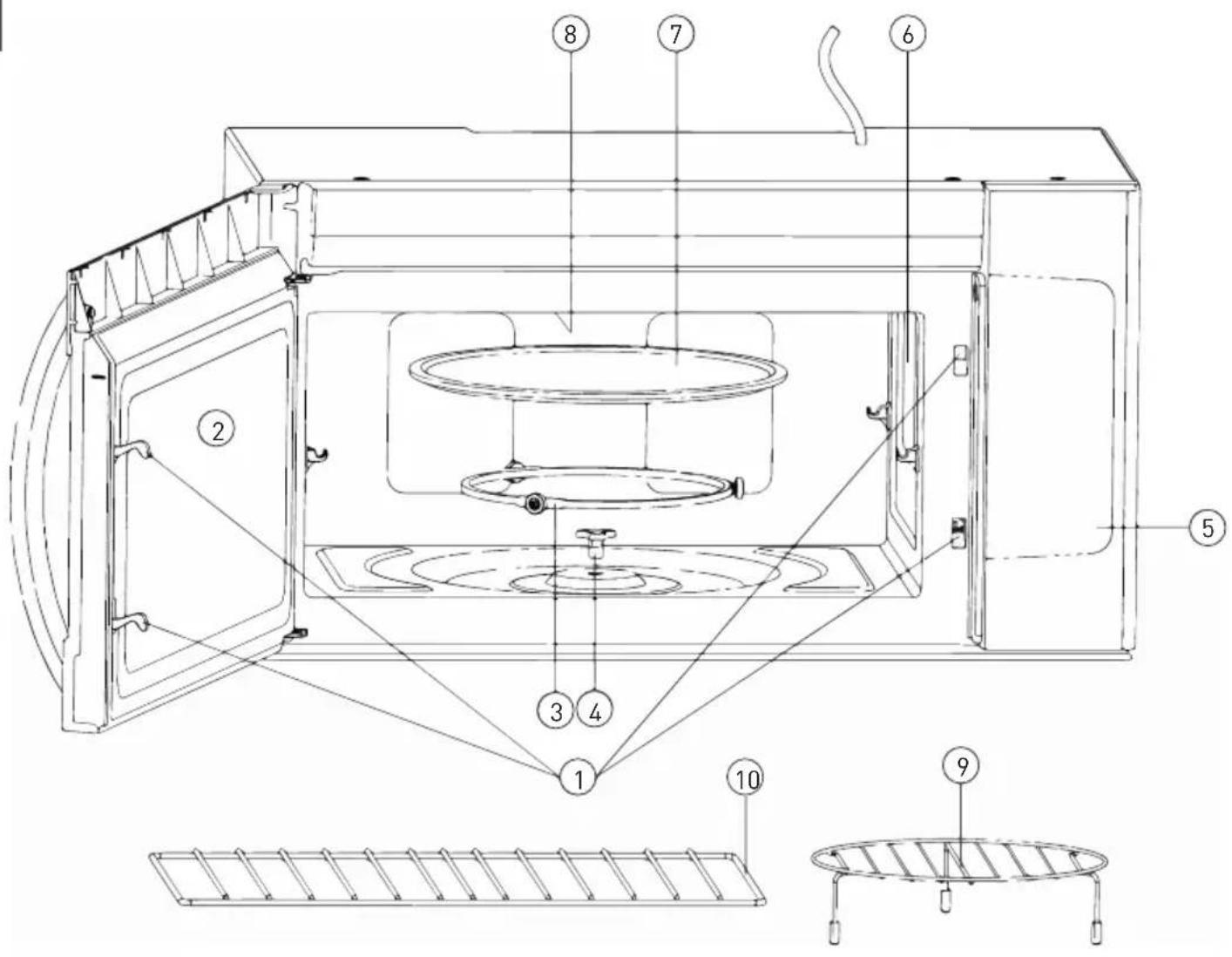
Item Part Name
| ① | Door Safety Lock System |
| ② | Oven Window |
| ③ | Roller Ring |
| ④ | Shaft |
| ⑤ | Control Panel |
Item Part Name
| ⑥ | Wave Guide |
| ⑦ | Glass Tray |
| ⑧ | Grill Heater |
| ⑨ | Metal Rack |
| ⑩ | Shelf |
Control Panel and Features
Control Panel
Your microwave oven control panel lets you select the desires cooking function quickly and easily. All you have to do is press the necessary command pad. The following is a list of all the command and number pads located on the control panel. For more information on these features, see the operation section.
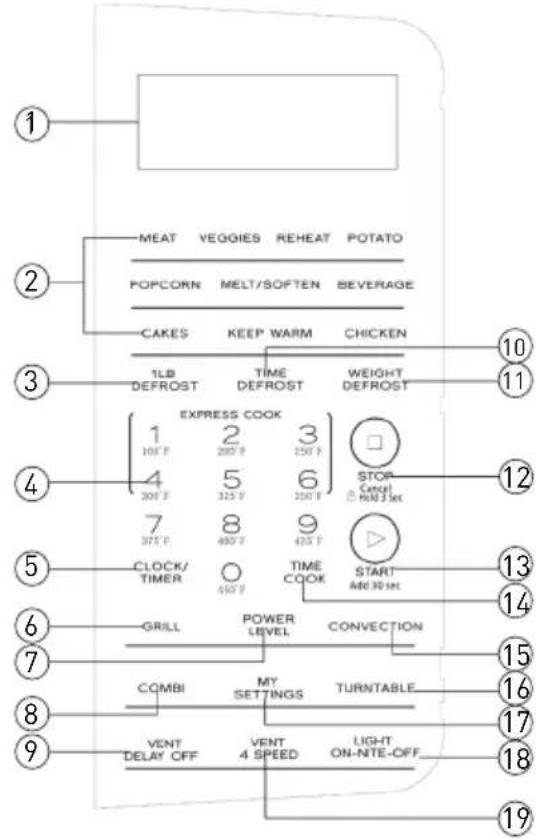
| No. | Part Name | Function |
| ① | Display | The display includes a clock and indicators to tell you time of day, cooking time settings and cooking functions selected. |
| ② | Auto cook menu | Instant settings to cook popular foods (such as Meat, Veggies, Reheat, Potato, Popcorn, Melt/ Soften, Beverage, Cakes, Keep Warm and Chicken). |
| No. | Part Name | Function |
| 3 | 1 LB Defrost | Press this pad to defrost frozen food quickly. |
| 4 | Number | Press number pads to enter cooking time, power level, cooking temperature or food weight and you can set express cooking program by touching 1~6 pad. |
| 5 | Clock/Timer | Press to set current time of day or set the oven timer. |
| 6 | Grill Press | Press to set grill cooking program. |
| 7 | Power Level | Press this pad to set microwave cooking power level |
| 8 | Combi | Use to set microwave and grill or microwave and convection combination cooking. |
| 9 | Vent Delay Off | Use to set vent delay off program. |
| 10 | Time Defrost | Use to defrost food based on time enter. |
| 11 | Weight Defrost | Use to defrost food based on weight enter. |
| 12 | Stop/Cancel | Press this pad to stop the oven or press this pad for 3 seconds to set child lock. |
| 13 | Start/Add 30 sec. | Press to start the oven; also use to start the oven quickly at full power or use to add cooking time. |
| 14 | Time Cook | Use to set microwave cooking or multi-stage cooking. |
| 15 | Convection | Use to set convection cooking. |
| 16 | Turntable | Press this pad to turn on/off the turntable. |
| 17 | My Settings | Press this pad to adjust the default settings for weight unit, sound and daylight save time. |
| 18 | Light On-Nite-Off | Press to set the controls of the light outside the oven(bright light, night light and off) |
| 19 | Vent 4 Speed | Press this pad to change vent speed. |
Before Using
What's in the box
Make sure you have the following listed items included in the packaging. If any item is damaged or missing, contact your dealer.
- Microwave Oven Body
- Instruction Manual
- Installation Instruction
Service Instruction
Warranty Card
Top Cabinet Template / Rear Wall Template - Mounting Plate
- Exhaust Adapter
Glass Tray with Roller Ring
Shelf
Metal Rack
Grease Filter - Screws
Unpacking Instructions
Unpacking and Examining Your Oven Carefully remove oven from carton. SAVE THE CARTON AS IT MAY MAKE INSTALLATION EASIER.
Remove:
- All packing materials from inside the oven cavity; however, DO NOT REMOVE THE WAVEGUIDE COVER, which is located on the side of microwave oven. Check to see that there are Installation Instructions, Wall Template, Top Cabinet Template, bag of Installation Hardware, Charcoal Filter and Exhaust Damper Assembly. Read enclosures and SAVE the Owner's Instructions.
- The feature sticker from the outside of the door, if there is one.
Check the oven for any damage, such as misaligned or bent door, damaged door seals and sealing surfaces, broken or loose door hinges and latches and dents inside the cavity or on the door. If there is any damage, do not operate the oven and contact your
dealer.
See Installation Instruction for more details.
About Your Microwave Oven
NEVER use the oven without the turntable and roller ring nor turn the turntable over so that a large dish could be placed in the oven. The turntable will turn both clockwise and counter clockwise.
The shelf gives you the option to reheat more than one dish of food at the same time. To reheat on 2 levels:
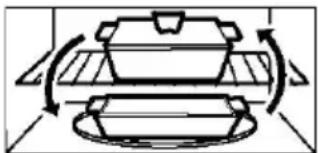
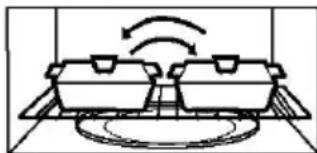
- Switch places after 12 the time.
- Make sure the shelf is positioned properly inside the microwave to prevent damage to the oven from arcing.
- Do not use a microwave browning dish on the shelf. The shelf could overheat.
- Do not use the oven with the shelf on the microwave floor. This could damage the microwave.
- Use pot holders when handling the shelf-it may be hot.
- Do not use the shelf when cooking popcorn.
ALWAYS have food in the oven when it is on to absorb the microwave energy.
When using the oven at power levels below 100% , you may hear the magnetron cycling on and off.
Condensation is a normal part of microwave cooking. Room humidity and the moisture in food will influence the amount of moisture that condenses in the oven. Generally, covered foods will not cause as much condensation as uncovered ones. Ventilation openings must not be blocked.
In using recipes or package directions, check food a minute or two before the minimum time and add time accordingly.
Before Using
About Food
| FOOD DO DON'T | ||
| Eggs, sausages, fruits and vegetable | ·Puncture egg yolks before cooking to prevent "explosion". ·Pierce skins of potatoes, apples, squash, hot dogs and sausages so that steam escapes. | ·Cook egg in shells. ·Reheat whole eggs. |
| Popcorn | ·Use specially bagged popcorn for the microwave oven. ·Listen while popping corn for the popping to slow to 1 or 2 seconds or use special popcorn cooking functions listed on Page 19. | ·Pop popcorn in regular brown bags or glass bowls. ·Exceed maximum time on popcorn package. |
| Baby food | ·Transfer baby food to small dish and heat carefully, stirring often. Check temperature before serving. ·Put nipples on bottles after heating and shake thoroughly. "Wrist" test before feeding. | ·Heat disposable bottles. ·Heat bottles with nipples on. ·Heat baby food in original jars. |
| General | ·Cut baked goods with filling after heating to release steam and avoid burns. ·Stir liquids briskly before and after heating to avoid "eruption". ·Use deep bowl, when cooking liquids or cereals, to prevent boilovers. | ·Heat or cook in closed glass jars or airtight containers. ·Can in the microwave as harmful bacteria may not be destroyed. ·Deep fat fry. ·Dry wood, gourds, herbs or wet papers. |
About Microwave Cooking
- Arrange food carefully. Place thickest areas towards outside of dish.
- Watch cooking time. Cook for the shortest amount of time indicated and add more as needed. Food severely overcooked can smoke or ignite.
- Cover foods while cooking. Check recipe or cookbook for suggestions: paper towels, wax paper, microwave plastic wrap or a lid. Covers prevent spattering and help foods to cook evenly.
- Shield with small flat pieces of aluminum foil any thin areas of meat or poultry to prevent overcooking before dense, thick areas are cooked thoroughly.
- Stir foods from outside to center of dish once or twice during cooking, if possible.
- Turn foods over once during microwaving to speed cooking of such foods as chicken and hamburgers. Large items like roasts must be turned over at least once.
- Rearrange foods such as meatballs halfway through cooking both from top to bottom and from the center of the dish to the outside.
- Add standing time. Remove food from oven and stir, if possible. Cover for standing time that allows the food to finish cooking without overcooking.
Before Using
- Check for doneness. Look for signs indicating that cooking temperatures have been reached.
-
Doneness signs include:
-
Food steams throughout, not just at edge.
- Center bottom of dish is very hot to the touch.
- Poultry thigh joints move easily.
- Meat and poultry show no pinkness.
- Fish is opaque and flakes easily with a fork.
About Safety
Check foods to see that they are cooked to the following recommended temperatures.
| TEMP FOOD | |
| 160°F | ...For fresh pork, ground meat, boneless white poultry, fish, seafood, egg dishes and frozen prepared food. |
| 165°F | ...For leftover, ready-to-reheat refrigerated, and deli and carry-out “fresh” food. |
| 170°F | ...White meat of poultry. |
| 180°F | ...Dark meat of poultry. |
- To test for doneness, insert a meat thermometer in a thick or dense area away from fat or bone. NEVER leave the thermometer in the food during cooking, unless it is approved for microwave oven use.
- ALWAYS use potholders to prevent burns when handling utensils that are in contact with hot food. Enough heat from the food can transfer through utensils to cause skin burns.
-
ALWAYS use potholders to prevent burns when handling utensils that are in contact with hot food. Enough heat from the food can transfer through utensils to cause skin burns.
-
Avoid steam burns by directing steam away from the face and hands. Slowly lift the farthest edge of a dish's covering and carefully open popcorn and oven cooking bags away from the face.
- Stay near the oven while it's in use and check cooking progress frequently so that there is no chance of overcooking food.
NEVER use the cavity for storing cookbooks or other items.
- Select store and handle food carefully to preserve its high quality and minimize the spread of food borne bacteria.
- Keep waveguide cover clean. Food residue can cause arcing and/or fires.
- Use care when removing items from the oven so that utensil, your clothes or accessories do not touch the safety door latches.
About Utensils and Coverings
It is not necessary to buy all new cookware. Many pieces already in your kitchen can be used successfully in your new microwave oven. Make sure the utensil does not touch the interior walls during cooking.
Use these utensils for safe microwave
cooking and reheating
Glass ceramic
- Heat-resistant glass
- Microwave-safe plastics
- Paper plates
- Microwave-safe pottery, stoneware and porcelain
Browning dish
DO NOT USE
Metal pans and bake ware
Dishes with metallic trim
Non-heat-resistant glass
Non-microwave-safe plastic
Recycled paper bags
Food storage bags
Metal twist-ties
Wood
- Straw
Wicker
Before Using
Should you wish to check if a dish is safe for microwaving, place the empty dish in the oven and microwave on HIGH for 30 seconds. A dish which becomes very hot should not be used.
The following coverings are ideal:
- Paper towels are good for covering foods for reheating and absorbing fat while cooking bacon.
- Wax paper can be used for cooking and reheating.
- Plastic wrap that is specially marked for microwave use can be used for cooking and reheating. DO NOT allow plastic wrap to touch food. Vent so steam can escape.
- Lids that are microwave-safe are a good choice because heat is kept near the food to hasten cooking.
- Oven cooking bags are good for large meats or foods that need tenderizing. DO NOT use metal twist ties. Remember to slit bag so steam can escape.
How to use aluminum foil in your microwave oven:
- Small flat pieces of aluminum foil placed smoothly on the food can be used to shield areas that are either defrosting or cooking too quickly.
- Foil should not come closer than one inch to any surface of the oven.
ACCESSORIES: There are many microwave accessories available for purchase. Evaluate carefully before you purchase so that they meet your needs. A microwave-safe thermometer will assist you in determining correct doneness and assure you that foods have been cooked to safe temperatures. Furrion is not responsible for any damage to the oven when accessories are used.
About Children and The Microwave
Children below the age of 7 should use the microwave oven with a supervising person very near to them. Between the ages of 7 and 12, the supervising person should be in the same room.
The children must be able to reach the oven comfortably; if not, he/she should stand on a sturdy stool.
- At no time should anyone be allowed to lean or swing on the oven door.
Children should be taught all safety precautions; use potholders, remove coverings carefully and pay special attention to packages that crisp food because they may be extra hot.
- Don't assume that because a child has mastered one cooking skill he/she can cook everything.
Children need to learn that the microwave oven is not a toy.
Operation

CAUTION
- To avoid risk of personal injury or property damage, do not operation the microwave oven empty.
- To avoid risk of personal injury or property damage, do not use stoneware, aluminum foil, metal utensils, or mental trimmed utensils in the microwave oven.
Function Description
- When the oven is first plugged in, the display will fully displayed for 3 seconds and then show "AM 12:00".
- During cooking setting process, without any operation within one minute, the oven will return to waiting mode.
- During cooking, if press Stop/Cancel pad once or open the door, the program will be paused, then press Start/Add 30 sec pad to resume, but if press Stop/Cancel pad twice, the program will be canceled.
After the cooking cycle has ended, "END" will display and the system will beep. System will beep each minute thereafter if door is not opened. Press the Stop/ Cancel pad or open door to stop the end of cycle beep.
Clock Setting
Example: Suppose you want to set the clock for 5:00 pm.
- In standby mode, touch Clock/Timer pad once, "ENTER TIME OF DAY" is displayed.
- Press number pad enter time.
- Press Clock/Timer pad to confirm. The display shows "SELECT 1--AM, 2--PM".
- Press number pad "2". "PM 5:00" is displayed.
- Press Clock/Timer to confirm.
NOTE: This is a 12 hour clock. During cooking process or cooking is paused, you can press Clock/Timer pad to check the current clock.
Setting Microwave Cooking Program
Example: For microwave cooking, cooking power and time should be set. The longest cooking time you can set is 99 minutes, 99 seconds.
Press Power Level pad once and then press number pads to choose cooking power level.
USE NUMBER PAD CHOOSE COOKING POWER LEVEL
| Press Number pad | Percent (Name) | Press Number pad | Percent (Name) |
| 1,0 | 100% (High) 4 | 40% (Medium Low) | |
| 9 | 90% (Sauté) 3 | 80% (Defrost) | |
| 8 | 80% (Reheat) 2 | 20% (Low) | |
| 7 | 70% (Medium High) | 1 10% | (Warm) |
| 6 | 60% (Simmer) 0 | 0% (No Power) | |
| 5 | 50% (Medium) |
Example: Suppose you want to cook at 80% power level for 10 minutes.
- Press Time Cook pad once. The display shows "ENTER COOKING TIME".
- Use the number pad to enter cooking time.
- Press Power Level pad once, and then use the number pad "8" to select 80% power level.
- Press Start/Add 30 sec pad to confirm. NOTE: During cooking you can check the combination cooking mode by pressing Combi pad.
Multi stage cooking
For best results, some recipes call for different cook power during different stages of a cook cycle. You can program your oven to switch from one power to another for up to 2 stages.
Operation
Example: Suppose you want to set the following cooking program.
Microwave cooking
Microwave cooking
- In standby mode, press Time Cook pad once and then press number pad to enter cooking time.
- Press Power level pad once, and then use number pad to enter a desired cooking power level.
- Press Time Cook pad once, and then press number pad to enter cooking time.
- Press Power level pad once, and then use number pad enter cooking power level.
- Press Start/Add 30 sec to start.
NOTE: Only microwave cooking program can be set in multi-stage cooking program.
Grill cooking
The longest cooking time is 99 minutes, 99 seconds. The grill cooking is particularly useful for thin slices of meat, steaks, chops, kebabs and sausages of piece of chicken. It is also suitable for hot sandwiches and au gratin dishes.
Example: Suppose you want to grill for 12 minutes.
- Press Grill pad once.
- Press number pad to enter cooking time.
- Press Start/Add 30 sec pad to start cooking.
Microwave + Grill Cooking
The longest cooking time is 99 minutes, 99 seconds.
Combination 1: 30% of time for microwave cooking, 70% for grill cooking. Use for fish, potatoes or au gratin.
Example: Suppose you want to cook with Combination 1 for 40 minutes.
- Press Combi pad once.
- Press number pad to enter cooking time.
- Press Start/Add 30 sec pad to start cooking.
Combination 2: 55% of time for microwave cooking, 45% for grill cooking. Use for pudding, omelets, baked potatoes and poultry.
Example: Suppose you want to cook with Combination 2 for 40 minutes.
- Press Combi pad twice.
- Press number pad to enter cooking time.
- Press Start/Add 30 sec pad to start cooking.
NOTE: During cooking you can check the combination cooking mode by pressing
Combi pad.
Convection Cooking
During convection cooking, hot air is circulated throughout the oven cavity to make crisp foods quickly and evenly. This oven has ten different cooking temperatures from 100ircF to 450ircF . You can choose it by pressing number pad. The longest cooking time is 99 minutes, 99 seconds. During cooking, the current temperature can be seen by pressing Convection pad.
Example: To Cook with Convection.
- In standby mode, press Convection pad once. The display shows "SELECT TEMPERATURE"
- Press one of the number keys to select the desired temperature.
- Press Convection to confirm.
- Press number pad to enter cooking time.
- Press Start/Add 30 sec pad to confirm.
Example: To Preheat and Cook with Convection:
Your oven can be programmed to combine preheating and convection cooking operations.
- In standby mode, press Convection pad once. The display shows "SELECT TEMPERATURE".
- Press one of the number keys to select the desired temperature.
- Press Start/Add 30 sec pad. The oven start preheating, the display shows "PREHEAT". When the oven reaches the programmed temperature, it will beeps.
- Open the door and place container of food
Operation
at the center of the turntable.
- Press number pad to enter cooking time.
- Press Start/Add 30 sec pad.
NOTE: The longest preheat time is 30 minutes and the time cannot be set. When the temperature reaches the preheat temperature, the countdown stop with sound every 6 seconds for 30 minutes. If you don't open the oven door within the 30 minutes, the system will stop automatically.
Microwave + Convection Cooking
This oven has four different combination cooking temperatures. You can choose it by pressing Combi pad. It's easy to cook with both convection heat and microwave automatically. The longest cooking time is 99 minutes, 99 seconds. During cooking, the current combination cooking power level can be seen by pressing Combi pad.
Press Combi pad to choose cooking temperature:
| Press Combi Pad Cooking Temperature | |
| 3 times | 400 °F |
| 4 times | 350 °F |
| 5 times | 300 °F |
| 6 times | 250 °F |
Example: Support you want to cook at 300ircF for 20 minutes.
- Press Combi pad 5 times to choose 300 F.
- Press number pad to enter cooking time.
- Press Start/Add 30 sec to start cooking.
NOTE: During cooking you can check the combination cooking mode by pressing Combi pad.
System Setup
Light Control
This feature is designed for the convenience
of doing things outside the oven. To turn on the light at the bottom of the oven, press Light On-Nite-Off pad:
| Press Light On-Nite-Off Pad Working Mode | |
| Once | Bright light |
| Twice | Night light |
| 3 times Off | |
Vent Fan Control
Your oven can be used as a range hood. When it is turned on, the fan motor starts filtering out smoke, odors, and grease generated from cooking.
In standby mode, the vent fan is manually controlled. To select the desired fan speed, press the Vent/4 Speed pad:
| Press Vent/4 Speed Pad Working Mode | |
| Once | Boost |
| Twice | High |
| 3 times Medium | |
| 4 times Low | |
| 5 times | Off |
NOTE:
- When you use microwave or convection cooking programs, if the range hood has been turned on, it will stay at the desired speed selected.
- When you use grill cooking program, if the range hood has been turned on, it will maintain its original fan speed, otherwise, it will auto switch into low fan speed. You can adjust fan speed manually.
- When the temperature sensor reached 60ircC , the range hood auto start working at high speed and you can manual switchover form high to boost.
Vent Delay off
- Next to the Vent Speed button, press Vent Delay Off pad once, "ENTER DELAY OFF
Operation
TIME" will display.
- Press the number pad to enter the delay closing time.
- Press Vent Delay Off pad to confirm.
NOTE:
The longest delay off time you can set is 99 minutes and 99 seconds.
- Before the end of the countdown, you can press Vent Delay Off pad to check the countdown and you can cancel the function by pressing Stop/Cancel pad when the display shows the countdown.
- By the end of the countdown, the vent fan is off.
My Setting Function
MY SETTING provides hints for 3 features which make it easy to use the oven because specific instructions are provided in the interactive display.
In standby mode, press My Settings pad once, the display shows "1-WEIGHT MODE, 2-SOUND ON/OFF, 3-DAYLIGHT SAVING TIME ON/OFF" and then select the appropriate setting according to the corresponding number(1~3).
Weight Mode Setting
Your oven has two units of weight you can to choose, following the steps:
- In standby mode, press My Settings once
- Press number pad 1 to enter the weight unit setting. The display shows" 1-oz, 2-gr".
- You can press number pad 1 to select "oz" for weight unit, "oz" is displayed or press number pad 2 to select "gr" for weight unit, "gr" is displayed.
- Press My Settings to confirm you choose.
Sound On/Off
-Instandbymode,pressMy Settings once
- Press number pad 2 to enter the Key-touch beep setting. You can press number pad 1 to select sound on, "SOUND ON" is displayed. If you want to have the oven operate with no audible signals, press number
pad 2 to select sound off, "MUTE" is displayed.
- Press My Settings to confirm you choose.
Daylight Save Time Hint
- In standby, press My Settings once.
- Press number pad 3 to enter the Daylight Saving Time setting. The display will show "CURRENT STATE IS OFF, 1-ON,2-SKIP" or "CURRENT STATE IS ON,1-OFF,2-SKIP"
- Use the number pad to enter the new clock time, and then press My Settings to confirm the present clock.
NOTE: The default startup state: SOUND to On, WEIGHT UNIT for oz, DAYLIGHT SAVE TIME to off.
Turntable Control
For most cooking, the turntable should be on; however the turntable can be turned off so that it does not rotate for extra large dishes, such as the 13 × 9 × 2 glass utility casserole. Put the casserole on the turntable, press Turntable pad to turn the turntable on or off. NOTE: Sometimes the turntable may become too hot to touch. Be careful to touch the turntable.
Select Vented Exhaust Fan Direction
Example: To ensure good cooking effect, the installer (or user) needs to set installation direction of the fan.
- In standby mode, press and hold "0" for 3 seconds, the display will cycle show "SELECT VENTED EXHAUST FAN DIRECTION <1-UPWARD, 2-BACKWARD, 3-FORWARD>"
- Press corresponding number pad according to the vented exhaust fan direction.
- Press Start/Add 30 sec pad to confirm. The system saves the installation direction and returns to standby mode.
NOTE: The microwave oven default blower configuration is set for recirculating.
Special Features
Setting Auto Cook
For foods such as Butter, Cheese, Ice cream and so on, it is not necessary to program the time and the cooking power. It is sufficient to indicate the type of food that you want to cook as well as the weight of this food.
MEAT
Example: Support you want to cook chicken piece.
- Place the food into the oven and close the door.
- Press MEAT pad once, the display show "1- PORK, 2- CHOPS, 3- GROUND MEAT, 4- CHICKEN PIECE".
- Press number pad "4" to choose Chicken piece.
- Press number pad to enter food weight.
- Press Start/Add 30 sec pad to start cooking.
| Press Number Pad | Food Type Weight |
| 1 Pork | 4-32 oz. (110-910 gr) |
| 2 Chops | 4-32 oz. (110-910 gr) |
| 3 Ground Meat | 4-32 oz. (110-910 gr) |
| 4 Chicken | 4-32 oz. (110-910 gr) |
VEGGIES
Example: Support you want to cook some fresh veggies.
- Place the veggies into the oven and close the door.
- Press Veggies pad once, the display shows "1-FRESH VEGGIES, 2-FROZEN VEGGIES"
- Press number pad "1" to choose fresh veggies.
- Press the number pad to select the weight.
- Press Start/Add 30 sec pad to start cooking.
| Press Number Pad | Food Type Weight | |
| 1 Fresh Veggies | 4 oz. (110 gr) | |
| 8 oz. (230 gr) | ||
| 12 oz. (340 gr) | ||
| 16 oz. (453 gr) | ||
| 2 Frozen Veggies | 4 oz.(110 gr) | |
| 8 oz.(230 gr) | ||
| 12 oz.(340 gr) | ||
| 16 oz.(453 gr) | ||
REHEAT
Example: Support you want to cook pasta.
- Place the pasta into the oven and close the door.
- Press Reheat pad once, the display shows"1-DINNER PLATE, 2-CASSEROLE, 3-PASTA".
- Press number pad "3" to choose pasta.
- Press the number pad to select the weight.
- Press Start/Add 30 sec pad to start cooking.
| Press Number Pad | Food Type Weight | |
| 1 Dinner | Plate | 8 oz. (230 gr) |
| 16 oz. (453 gr) | ||
| 2 Casserole | 8 oz.(230 gr) | |
| 16 oz.(453 gr) | ||
| 24 oz.(680 gr) | ||
| 32 oz.(910 gr) | ||
| 3 Pasta | 8 oz.(230 gr) | |
| 16 oz.(453 gr) | ||
| 24 oz.(680 gr) | ||
| 32 oz.(910 gr) | ||
Special Features
Potato
Example: Support you want to cook two potatoes.
- Place potato into the oven and close the door.
- Press Potato pad once, the display shows "1-8 oz., 2-16 oz., 3-24 oz., 4-32 oz."
- Press number pad (1-4) to enter food weight.
- Press Start/Add 30 sec pad to start cooking.
| Press Number Pad Weight | |
| 18 oz. (230 gr) | |
| 216 oz. (453 gr) | |
| 324 oz. (680 gr) | |
| 432 oz. (910 gr) | |
Popcorn
- In standby mode, press Popcorn pad once, the display will cycle show "1-3.5 oz, 2-3 oz".
- Press number pad 1 or 2 to select food weight.
- Press Start/Add 30 sec pad to start cooking.
| Press Number Pad Weight (oz or gr) | |
| 1 3.5 oz. (100 gr) | |
| 2 3 oz. (85 gr) |
Melt/Soften
- In standby mode, press Melt/Soften pad once, the display shows"1-CHEESE, 2- ICE CREAM, 3-BUTTER".
- Press number pad 1, 2 or 3 to choose food type.
- Press number pad 1 or 2 to select food weight.
- Press Start/Add 30 sec pad to start cooking.
| Press Number Pad | Food Type Weight or Amount | |
| 1 Cheese | 4 oz. (110 gr) | |
| 8 oz. (230 gr) | ||
| 2 Ice cream | 4 oz. (110 gr) | |
| 8 oz. (230 gr) | ||
| 3 Butter | 4 oz. (110 gr) | |
| 8 oz. (230gr) | ||
Beverage
- In standby mode, press Beverage pad once, the display shows"1-1 CUP, 2-2 CUPS, 3-3 CUPS".
- Press number pad 1, 2 or 3 to select the amount of beverage.
- Press Start/Add 30 sec pad to start cooking.
NOTE: You can choose 1-3 cups (250ml/cup).
Cakes
- In standby mode, press Cakes pad once. The display shows "16 oz" (or "453gr").
- Press Start/Add 30 sec pad to start cooking.
Keep Warm
- In standby mode, press Keep Warm pad once, the display shows"30:00".
- Press Start/Add 30 sec pad to start cooking.
NOTE: If you want to change keep warm cooking time, before press Start/Add 30 sec pad, press number pad to enter cooking time, the longest time you can set is 99 minutes, 99 seconds, and then press Start/Add 30 sec pad to start cooking.
Special Features
Chicken
- In standby mode, press Chicken pad once, the display shows" 1-28 oz, 2-35 oz, 3-42 oz, 4-50 oz" (or "1-0.8kg, 2-1.0kg, 3-1.2kg, 4-1.4kg").
- Press number pad 1, 2, 3, or 4 to select food weight.
- Press Start/Add 30 sec pad to start cooking.
| Press Number Pad Weight (oz. or gr) | |
| 1 28 oz. (0.8 kg) | |
| 2 35 oz. (1.0 kg) | |
| 3 42 oz. (1.2 kg) | |
| 4 50 oz. (1.4 kg) |
Weight Defrost
The oven allows you to defrost food based on the weight entered by user. The defrosting time and power level are automatically set once the food category and the weight are programmed. The frozen food weight ranges is 1-96 oz. or 1-2721gr.
Example: Suppose you want to defrost ground meat.
- Press Weight Defrost pad once.
-
Suppose you want to defrost the food, which weight is 35.2 oz. (0.8kg) , press number pad to enter weight.
-
Press Start/Add 30 sec pad to confirm. NOTE:
-
During defrost, the oven will beeps and pause, the display shows "TURN THE FOOD OVER" to remind user to turn the food over, after that, press Start/Add 30 sec pad to resume.
After the last stage, small sections may still be icy. Let stand to continue thawing. Do not defrost until all ice crystals are thawed. - Use small smooth strips of aluminum foil to cover edges and thinner sections of the food.
1LB Defrost
This feature allows you to defrost food quickly.
- In standby mode, press 1LB Defrost pad once.
- Press Start/Add 30 sec to start defrosting.
NOTE:
- During defrost, the oven beeps and pause, the display shows "TURN THE FOOD OVER" to remind user to turn the food over, after that, press Start/Add 30 sec pad to resume.
- Use small smooth strips of aluminum foil to cover edges and thinner sections of the food.
Time Defrost
If the food weight is exceed the maximum weight recommended, you need to defrost manually.
Example: Suppose you want to defrost the ground meat for 12 min and 34 seconds.
-
Press Time Defrost pad once, "ENTER DEFROST TIME" is displayed.
-
Press number pad 1, 2, 3 or 4.
- Press Start/Add 30 sec pad to confirm.
NOTE:
- The longest defrosting time you can set is 99 minutes and 99 seconds.
During defrost, the oven beeps and pause, the display shows "TURN THE FOOD OVER" to remind user to turn the food over, after that, press Start/Add 30 sec pad to resume. - Please remember to place the food on a microwave-safe dish not in a plastic container
Other Convenient Features
Add 30 sec
In standby mode, press the Start/Add 30 sec pad repeatedly to add cook time and the oven will start cooking immediately by 100% power level.
NOTE: You can also extend cooking time (except sensor cook, auto cook, defrost) by pressing the Start/Add 30 sec during cooking for add 30 seconds each touch up to 99 minutes and 99 seconds.
Express Cooking
- In standby mode, touch one of the number pads from 1 - 6.
- Press Start/Add 30 sec pad to confirm. The oven will start cooking at full power level.
Setting the Timer
Example: Suppose you want to time 3 minutes cooking.
- In standby mode, press Clock/Timer pad twice "ENTER KITCHEN TIMER" is displayed.
- Press number pad 3, 0 and 0.
- Press Start/Add 30 sec pad.
NOTE:
The longest time you can set is 99 minutes and 99 seconds.
- Once you have set the timer function, in either cooking or standby mode, you can check the countdown by press Clock/Timer pad twice.
Child Lock
The child lock prevents unsupervised operation by children and this program only works in standby mode.
To set, in standby mode, press and hold Stop/Cancel for 3 seconds. LOCK is indicated on the display.
To cancel, press and hold Stop/Cancel for 3 seconds. LOCK indication disappears and releases.
Care and Maintenance
E-11 - Temperature sensor open circuit:
When the temperature sensor is open circuited, the oven enters into protection mode and beeps, the display shows "E-11". For troubleshooting, press Stop/Cancel pad to return normal condition.
E-12 - Temperature sensor short circuit:
When the temperature sensor is short circuited, the oven enters into protection mode and beeps, the display shows "E-12". For troubleshooting, press Stop/Cancel pad to return normal condition.
E-13 - High Temperature Protection:
While entering into super high temperature protection status, the oven beeps and the display shows "E-13". For troubleshooting, press Stop/Cancel pad to return normal condition.
E-11 - Temperature sensor open circuit:
When the temperature sensor is open circuited, the system enters into protection mode and sound beeps, the display shows "E-11", after troubleshooting, press Stop/Cancel pad to return normal condition.
Care and Maintenance
E-14 - Preheat alarm:
During preheat process, if the oven cannot reach the preheat temperature within 30 minutes, the oven beeps and show"E-14". For troubleshooting, press Stop/Cancel pad to return normal condition.
E-15 - Low Temperature Protection:
While entering into low temperature protection status, the oven beeps and the display shows "E-15". For troubleshooting, press Stop/Cancel pad to return normal condition.
E-21 - Humidity sensor open circuit:
When the humidity sensor is open circuited, the oven enters into protection mode and beeps, the display shows "E-21". For troubleshooting, press Stop/Cancel pad to return normal condition.
E-22 - Humidity sensor short circuit:
When the humidity sensor is short circuited, the oven enters into protection mode and beeps, the display shows "E-22". For troubleshooting, press Stop/Cancel pad to return normal condition.
E-23-Maximum time alarm:
When the humidity sensor cooking reached the longest time, the oven beeps and shows "E-23". For troubleshooting, press Stop/Cancel pad to return normal condition.
E-24:
During sensor menu cooking process, if you open the oven door for 5 seconds, the oven beeps and the display shows "E-24". For troubleshooting, press Stop/Cancel pad to return normal condition.
E-d1- Pad adhesion alarm:
In any state, if any pad on the control panel is closed for 10 seconds, the system will beep and the display will show "E-d1", after troubleshooting, press Stop/Cancel pad to return normal condition.
Exterior
The outside surface is pre-coated steel and plastic. Clean the outside with mild soap and water; rinse and dry with a soft cloth. Do not use any type of household or abrasive cleaner.
Door
Wipe the window on both sides with a damp cloth to remove any spills or spatters. Metal parts will be easier to maintain if wiped frequently with a damp cloth. Avoid the use of spray and other harsh cleaners as they may stain, streak or dull the door surface.
Touch Control Panel
Care should be taken in cleaning the control panel. If the control panel becomes soiled, open the oven door before cleaning. Wipe the panel with a cloth dampened slightly with water only. Dry with a soft cloth. Do not scrub or use any sort of chemical cleaners. Close door and press STOP/CANCEL.
Interior
How to clean the interior surfaces, wipe with a soft cloth and warm water. DO NOT USE ABRASIVE OR HARSH CLEANERS OR SCOURING PADS. For heavier soil, use baking soda or a mild soap; rinse thoroughly with hot water.
Waveguide Cover
The waveguide cover is located on the side of microwave oven. It is made from mica so it requires special care. Keep the waveguide cover clean to assure good oven
Care and Maintenance
performance. Carefully wipe with a damp cloth any food spatters from the surface of the cover immediately after they occur. Built-up splashes may overheat and cause smoke or possibly catch fire.
DO NOT REMOVE THE WAVEGUIDE COVER.
Vent Fan
The vent will automatically start when heat rises from range surface units or burners. This protects the microwave oven from excessive temperature rise. The vent fan will stay on until the temperature decreases. It cannot be turned off manually during this time.
Wipe the inside
Dampen a paper towel, microfiber cloth, or similar material. Use this to scrub the inside of your microwave, as well as the inside of the door. Repeat as necessary if you need more than one towel or cloth.
Turntable / Turntable Support
The turntable and turntable support can be removed for easy cleaning. Wash them in mild, sudsy water; for stubborn stains use a mild cleanser and non-abrasive scouring sponge as described above. They are also dishwasher-proof. Use upper rack of dishwasher. The turntable motor shaft is not sealed, so excess water or spills should be wiped up immediately.
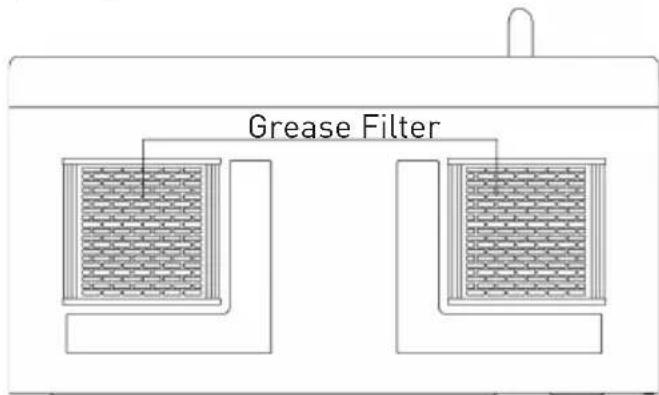
Grease Filters
Filters should be cleaned at least once a month. Never operate the vent fan or oven without the filters in place.
Pull down slightly on the tab toward the front of the oven and remove the filter. Repeat for the other filter.
Soak the filter in a sink or dish pan filled with hot water and detergent. DO NOT use ammonia or other alkali; they will react with
the filter material and darken it.
Agitate and scrub with a brush to remove embedded dirt.
Rinse thoroughly and shake dry.
Replace by fitting the filter back into the opening.
Light
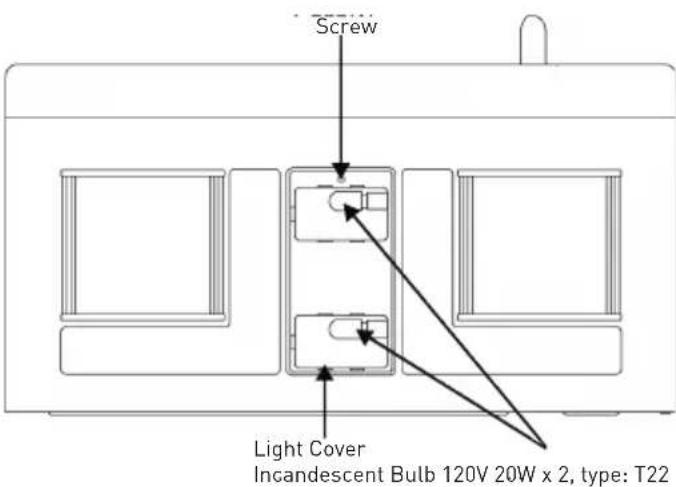
To replace light bulbs:
- Disconnect power to the oven at the circuit breaker panel or unplugging.
- Remove the screws from the light cover. (See illustration)
- Replace the bulb with 120V, 20W x 2, type: T22. (See illustration)
Close light cover and secure with screw removed in step 2.

CAUTION
Light cover may become very hot. Do not touch glass when light is on.
Care and Maintenance
English
Charcoal Filter
Charcoal filter is used for nonvented, recirculated installation. The filter should be changed every 6 to 12 months depending on use.
- Disconnect power to the oven at the circuit breaker panel or by unplugging.
- Remove the Louver mounting screws from the top center of the Louver. To remove, slide the plastic cover to the left and push down carefully on the tabs at each end of the Louver. [See illustration.]
- Change the charcoal filter.
- Carefully push the louver back into place and replace the screws removed in step 2.
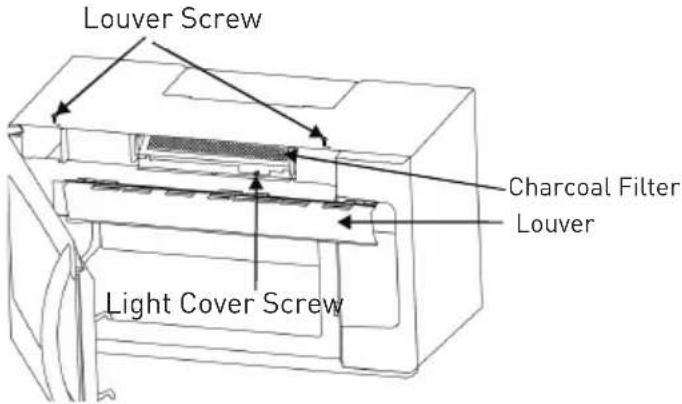
Oven Light
To access the Oven Light bulb (Incandescent Bulb 120V, 30W x 1, type: T25 x 55mm), type:T25 x 55 mm, you must access this by following the same instructions as in the Charcoal Filter section bullets 1 through 3 above and remove the charcoal filter if used.
- Open light cover located behind filter mounting by carefully pulling up on the front edge.
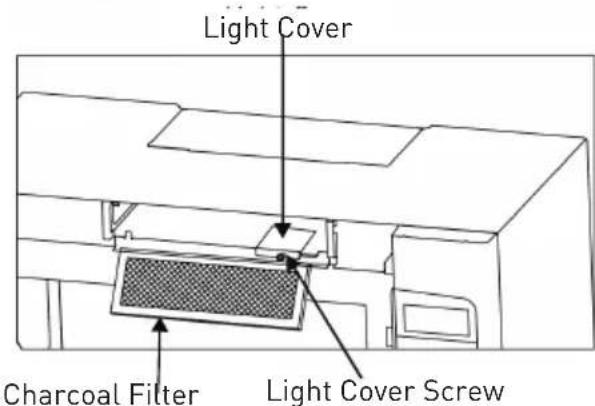
DO NOT USE A BULB LARGER THAN 30 WATTS.
- Replace the oven light cover by carefully pushing into place. Replace the charcoal filter, if used. Push the louver back into place and replace the louver mounting screw.
Specifications
| Specifications | |
| Power Supply 120V, 60HZ, 20A Single Phase | |
| Power Consumption 1550W (Micro wave), 1350W (Grill), 1500W (Convection) | |
| Output Power 1000W | |
| Frequency 2450MHz | |
| Product Dimensions (W x H x D) | 297/8" × 167/8"×177/8" 759 x 429 x 454 mm |
| Cavity Dimensions (W x H x D) | 217/16"×109/16"×141/8" 545 x 268 x 359 mm |
| Oven Capacity 1.7 cu. ft. | |
| Cooking Uniformity Turntable / Stirrer Fan System | |
| Gross Weight (kg/lbs) Approx. 76.3lb | |
| Net Weight (kg/lbs) Approx. 67.0lb | |
Troubleshooting
Check your problem by using the chart below and try the solutions for each problem. If the microwave oven still does not work properly, contact the nearest authorized service center.
| Trouble Possible Cause Possible Remedy | ||
| Oven will not start | 1. Electrical cord for oven is not plugged in. 2. Door is open. 3. Wrong operation is set. | 1. Plug into the outlet. 2. Close the door and try again. 3. Check instruction. |
| Arcing or sparking | 1. Materials to be avoided in microwave oven are used. 2. The oven is operated when empty. 3. Spilled food remains in the cavity. | 1. Use microwave-safe cookware only. 2. Do not operate with oven empty. 3. Clean cavity with wet towel. |
| Unevenly cooked foods | 1. Materials to be avoided in microwave oven are used. 2. Food is not defrosted completely. 3. Cooking time, power level is not suitable. 4. Food is not turned or stirred. | 1. Use microwave-safe cookware only. 2. Completely defrost food. 3. Use correct cooking time, power level. 4. Turn or stir food. |
| Overcooked foods | Cooking time, power level is not suitable. | Use correct cooking time, power level. |
| Undercooked foods | 1. Materials to be avoided in microwave oven are used. 2. Food is not defrosted completely. 3. Oven ventilation ports are restricted. 4. Cooking time, power level is not suitable. | 1. Use microwave-safe cookware only. 2. Completely defrost food. 3. Check to see that oven ventilation ports are not restricted. 4. Use correct cooking time, power level. |
| Improper defrosting | 1. Materials to be avoided in microwave oven are used. 2. Cooking time, power level is not suitable. 3. Food is not turned or stirred. | 1. Use microwave-safe cookware only. 2. Use correct cooking time, power level. 3. Turn or stir food. |
Bienvenue
Plaque tournante / support de plaque tournante
Control Panel and Features 62
Panel de control 62
Antes de使用者 63
Control Panel and Features
Panel de control
Furrion Innovation Center & Institute of Technology
-
52567 Independence Ct., Elkhart, IN 46514, USA - Toll free:1-800-789-3341
-
Email: support@furrion.com
©2007-2020 Furrion Ltd. Furrion® and the Furrion logo are trademarks licensed for use by Furrion Ltd. and registered in the U.S. and other countries.
- Contents
- Important Safety Instructions
- Safety Precautions
- Grounding Instructions
- Electrical Requirements
- NOTE:
- Radio or TV Interference
- CAUTION
- California (U.S.A) Residents
- WARNING
- Precautions To Avoid Possible Exposure To Excessive Microwave Energy
- Save these instructions for future reference
- Parts and Features
- Microwave Oven
- Control Panel and Features
- Control Panel
- Before Using
- What's in the box
- Unpacking Instructions
- Remove:
- About Your Microwave Oven
- About Food
- About Microwave Cooking
- About Safety
- About Utensils and Coverings
- Use these utensils for safe microwave
- cooking and reheating
- DO NOT USE
- The following coverings are ideal:
- How to use aluminum foil in your microwave oven:
- About Children and The Microwave
- Operation
- Function Description
- Clock Setting
- Setting Microwave Cooking Program
- Multi stage cooking
- Grill cooking
- Microwave + Grill Cooking
- Convection Cooking
- Microwave + Convection Cooking
- System Setup
- Light Control
- Vent Fan Control
- Vent Delay off
- My Setting Function
- Sound On/Off
- Turntable Control
- Select Vented Exhaust Fan Direction
- Special Features
- Setting Auto Cook
- MEAT
- VEGGIES
- REHEAT
- Potato
- Popcorn
- Melt/Soften
- Beverage
- Cakes
- Keep Warm
- Chicken
- Weight Defrost
- 1LB Defrost
- Time Defrost
- Other Convenient Features
- Add 30 sec
- Express Cooking
- Setting the Timer
- Child Lock
- Care and Maintenance
- E-11 - Temperature sensor open circuit:
- E-12 - Temperature sensor short circuit:
- E-13 - High Temperature Protection:
- E-14 - Preheat alarm:
- E-15 - Low Temperature Protection:
- E-21 - Humidity sensor open circuit:
- E-22 - Humidity sensor short circuit:
- E-23-Maximum time alarm:
- E-24:
- E-d1- Pad adhesion alarm:
- Exterior
- Door
- Touch Control Panel
- Interior
- Waveguide Cover
- Vent Fan
- Wipe the inside
- Turntable / Turntable Support
- Grease Filters
- Light
- English
- Charcoal Filter
- Oven Light
- Specifications
- Troubleshooting
- Bienvenue
- Plaque tournante / support de plaque tournante
- Panel de control
- Furrion Innovation Center & Institute of Technology
Brand : Furrion
Model : FMCM17SS
Category : Oven