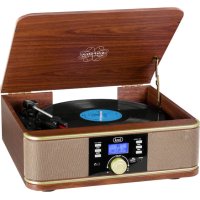
TT 1042 DAB - Turntable Trevi - Free user manual and instructions
Find the device manual for free TT 1042 DAB Trevi in PDF.



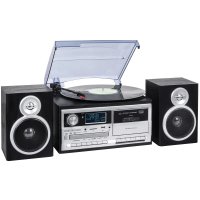
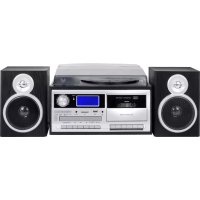
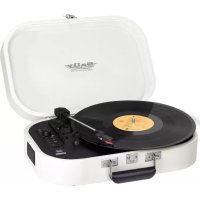
| Product type | Turntable with FM/DAB receiver, Bluetooth, USB player and auxiliary input |
| Brand | Trevi |
| Model | TT 1042 DAB |
| Dimensions | 390 x 365 x 145 mm |
| Power supply | 12V = 1A (100-240V ~ 50/60Hz mains adapter included) |
| Power consumption | 12 W (standby < 1 W) |
| Speeds | 33, 45 and 78 rpm |
| Radio functions | FM (87.5 - 108 MHz) and DAB (174 - 240 MHz) with 20 presets |
| Bluetooth | Version not specified, 2.4 GHz transmission, 2.5 mW power |
| Inputs / Outputs | AUX input (3.5 mm jack), USB input, RCA line output, headphone jack (3.5 mm) |
| Safety | Do not expose to water, heat sources, magnetic fields, dust or vibrations; unplug if liquid enters; moderate volume with headphones |
| Maintenance and cleaning | Slightly damp soft cloth; avoid solvents and abrasives |
| Disposal | Separate collection (crossed-out wheelie bin symbol); do not dispose with household waste |
| Spare parts and repairability | Contact an authorized TREVI service center |
| Included accessories | Mains adapter, 45 rpm record adapter |
Frequently Asked Questions - TT 1042 DAB Trevi
User questions about TT 1042 DAB Trevi
0 question about this device. Answer the ones you know or ask your own.
Ask a new question about this device
Download the instructions for your Turntable in PDF format for free! Find your manual TT 1042 DAB - Trevi and take your electronic device back in hand. On this page are published all the documents necessary for the use of your device. TT 1042 DAB by Trevi.
USER MANUAL TT 1042 DAB Trevi
HIFI STEREO SYSTEM WITH TURNTABLE/MP3/USB/FM RADIO/DAB AND BLUETOOTH® CONNECTION - User manual and connection
SYSTEME HIFI AVEC TOURNE DISQUE/MP3/USB/RADIO FM/DAB ET CONNECTION BLUETOOTH® - Mode d'emploi et connexion
This is a precision electronic appliance; avoid using it in the following cases:
Near magnetic fields.
- Near heat sources such as radiators and stoves.
- In very humid places such as bathrooms, swimming pools, etc ...
In very dusty places.
- In places subject to strong vibrations.
- Do not put your ear close to the speaker during the phases of setting up and adjusting the volume, and in particular to keep the volume to a minimum during the start-up phase.
- Position the appliance so that there is always enough space on its sides for free circulation of air (at least 5 cm).
- If liquids penetrate inside the appliance, immediately disconnect the plug from the socket and take the appliance to the nearest authorized TREVI service center.
- Always check before recharging the device that the power and connection cables are installed correctly.
- No naked flame sources, such as lighted candles, should be placed on the appliance.
- The appliance must not be exposed to dripping or splashing water and no objects filled with liquid, such as vases, must be placed on the appliance.
- The power adapter must be connected to a socket close to the device and must be easily accessible.
- If you notice excessive heat on the device or on the power adapter, immediately disconnect the plug from the main power outlet.
- Do not pull the power cord
- Keep this manual for future reference.
CARE AND MAINTENANCE
Use a slightly damp soft cloth for cleaning. Do not use solvents and abrasive substances. IMPORTANT
This device is designed for home use (not professional use). This appliance has been carefully built to ensure long-lasting perfect performance. However, should any inconvenience occur, please contact your local authorised TREVI Service Centre.
TREVI follows a policy of ongoing research and development. Therefore products may have different features from those described.
With earphone or headphones use:
To prevent possible hearing damage, limit the amount of time listening at high volumes.
Precautions for correct disposal of the product.
The symbol shown on the equipment indicates that waste must be disposed of in "separate collection" and so the product must not be disposed of together with urban waste.
The user must take the product to special "separate waste collection centres" provided by local government, or deliver it to the retailer against the purchase of a new product.
Separate collection of waste and subsequent treatment, recycling and disposal operations promotes the production of equipment with recycled materials and limits negative effects on the environment and on health caused by improper handling of waste.
Illegal disposal of the product leads to the enforcement of administrative penalties.
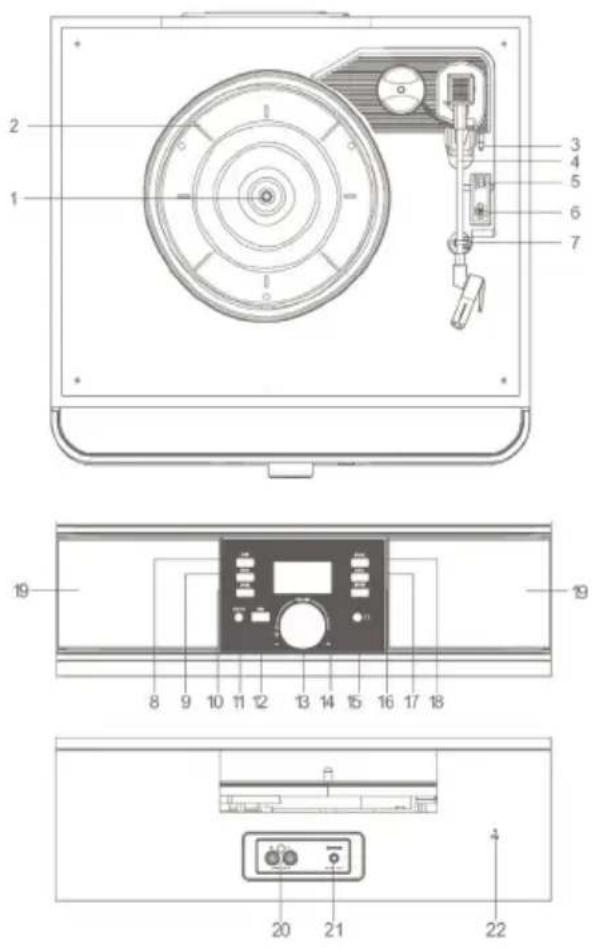
COMMANDS DESCRIPTION
- Turntable rotation axis
- Turntable platter
- Lever to raise / lower the arm
- Turntable arm
- Autostop selector
- Speed selector (33/45/78 rpm)
- Arm safety hook
- /II/MENU button
- 卡 button, previous track / radio station
- button, next track / radio station
- AUX IN input
- USB input
- On / standby button / volume adjustment
- LCD display
- Headphone socket
- MODE button
- INFO button
- SCAN / ENTER button
- Loudspeakers
20.RCA LINE OUT - Power socket for external power supply
- FM antenna
POWER SUPPLY
This unit works with 12V = TA power supply (supplied).
Do not connect the appliance to sockets with a voltage other than that indicated.
ON/OFF
- Plug the supplied power supply cable into the power socket (21) on the device and the power supply plug into a power socket.
- Turn the knob (13) clockwise until you hear a click, the appliance will switch on.
- Turn the knob (13) anticlockwise again to switch off the appliance.
This appliance is equipped with an automatic shutdown system for energy saving. After a certain period of inactivity, the appliance will automatically go into standby mode. Switch the appliance off and on again for a new use.
In the event of blockage or incorrect operation, carry out a general reset by switching the appliance off for about 30 seconds and then switching it back on.
VOLUME CONTROL
- Turn the Volume Control (13) on the set to increase or decrease the volume.
FM RADIO OPERATION
- Switch on the device and press the MODE button (16), the FM indication will appear on the display.
- Repeatedly press buttons (10) or (9) on the unit to perform a step-by-step search.
-
Press and hold the buttons (10) or (9) on the unit for a few seconds to tune to the next or previous radio station with the best received signal.
4 To store a radio station: -
Move to the frequency to be stored, press the INFO key for a long time.
- With the keys (10) or (9) select the memory number in which you want to save the radio station.
- Press the SCAN / ENTER key (18) to confirm.
-
The unit can store up to 20 stations.
-
To select a stored radio station:
-
Press the INFO button.
- With the keys (10) or (9) select the memory number of the radio station.
- Press the SCAN / ENTER key (18) to confirm.
- To scan with automatic storage of radio stations, long press the SCAN / ENTER key (18).
The unit can store up to 20 stations.
Note: To obtain the best FM reception, extend and orient the antenna (22). If the reception is not good, try to adjust the length and orientation of the antenna differently, however the quality of FM reception depends very much on the place where the device is placed.
DAB RADIO OPERATION
- Switch on the device and press the MODE button (16), the DAB indication will appear on the display.
- The first time the appliance is switched on, it will perform an automatic search for the available stations, the stations found will remain memorized at subsequent switch-ons.
- Press the buttons (10) or (9) on the unit to select a different DAB radio station, confirm with SCAN / ENTER (18).
- Press the / button (8) to show various information on the display broadcast by the DAB station.
-
To store a radio station:
-
Move to the frequency to be stored, press the INFO key for a long time.
- With the keys (10) or (9) select the memory number in which you want to save the radio station.
- Press the SCAN / ENTER key (18) to confirm.
-
The unit can store up to 20 stations.
-
To select a stored radio station:
- Press the INFO button.
- With the keys (10) or (9) select the memory number of the radio station.
- Press the SCAN / ENTER key (18) to confirm.
- To scan with automatic storage of radio stations, press at length the SCAN / ENTER key (18).
The unit can store up to 20 stations.
SETTINS IN FM / DAB RADIO MODE
In FM Radio or DAB mode, press and hold the / II / MENU 'key (8) to show various settings, press the or keys to select the desired item and confirm with the SCAN / ENTER key (18) to enter in settings:
Scan setting (FM): allows you to select whether during the automatic search to save all the stations found (ALL) or only those with a strong signal (STRONG).
Full Scan (DAB): confirm with the SCAN / ENTER key to activate the automatic station search.
Manual Tune (DAB): Select this setting to manually search for DAB stations.
DRC (DAB): allows you to enable / disable the DRC function to improve the sound when listening in noisy environments. You can set the DRC level to high (high), low (low) or Off (off).
Prune (DAB): allows you to delete from the list of stored stations all radios found but not available (poor signal).
System: allows you to access various accessory functions or system information.
Sleep: allows you to set an auto-off timer after which the device will go into mode standby automatically. It is possible to select between 90, 60, 45, 30, 15 minutes. With "Off" the function is disabled.
Language: allows you to select the system language (English default).
Factory reset: allows you to restore all settings to the factory settings. Select Yes to restore.
SW version: version of the software installed.
BLUETOOTH OPERATION
- Switch on the device and press and hold the MODE key (16) until the indication BT appears on the display.
- DISCONNETTED will start flashing on the display and the system will automatically enter search.
- Activate the Bluetooth functionality on the external device to be paired and make it visible.
- Start the search for the devices, pair the "TT 1042 DAB" device, after pairing the message CONNECTED appears on the display.
- Enter the password "0000" if necessary.
- Once paired, the device will emit a confirmation tone.
- Manage music playback from your device (eg smartphone or tablet).
- Press and hold the / key (8) for a few seconds to cancel the pairing.
USB INPUT OPERATION
- Connect a USB memory device to the USB input (12).
- Switch on the device and press the MODE key (16) several times until the USB indication appears on the display, which indicates the loading of the data present in the USB device. If there is no USB device, NO DEVICE will appear on the display.
Note:
-
The unit may not support some SD / USB devices, this is due to the incompatibility of some processors.
-
Playback of the music track will start automatically, to pause it press the / II key (8). Press it again to reactivate song playback.
- Press the or buttons to skip to the previous / next track, long press them to scroll quickly forwards or backwards in the track being played, release them to return to normal playback.
- Press the SCAN/ ENTER button (18) to activate single track repeat (REP-1), all track repeat (ALL) or random playback (RANDOM).
TURNTABLE OPERATION
Remember to carefully remove the stylus protector.
- Switch on the device and press the MODE button (16) several times until PHONO appears on the display.
- Select the speed of the disc using the turntable speed selector (6).
- Place the disc on the platter. Use the supplied adapter if the record is a 45 rpm record.
- Release the cartridge arm from the clip, raise the arm and place the stylus on the record. Using the lever (3) lower the print arm. Playback of the disc will start.
- At the end of the disc playback, the turntable will stop spinning if the AUTOSTOP function is active (selector 5); bring the lever (3) to the raised arm position.
Note1: It may happen that the Autostop function stops the rotation of the disc before the end of the recording. In this case, deactivate the function by setting the selector (5) to OFF.
Note2: Remove the turntable stylus cover before use.
Note3: Make sure the arm is locked by the arm stop after each use
AUX IN
- Switch on the device and press the MODE key (16) several times until the indication AUX appears on the display.
- Connect any unit with an audio output using a suitable cable to the AUX IN input (11).
- Control the outdoor unit by your own commands.
- Adjust the volume with the control on the unit (13).
HEADPHONE SOCKET
- Plug the headphones into the headphones socket (15). The speakers will be muted.
- Start the desired playback and adjust the volume.
LINE OUT
The LINE OUT output allows you to connect the device to an external amplification system.
Connect an RCA cable not supplied to the sockets (20) and the other end to the external system. Start the desired playback.
TECHNICAL SPECIFICATIONS
Power supply: 12V 1A supplied with external adaptor 100-240V ~ 50 / 60Hz
Consumption: 12W
Standby consumption: < 1W
FM reception frequency: 87.5 - 108.0 MHz
DAB reception frequency: 174 - 240 MHz
Transmission power BT: 2.5 mW
Bluetooth transmission frequency: 2.4 GHz
Unit dimensions: 390 × 365 × 145 ~mm
NOTES D'EMPLOI
UKW-Empfangsfrequency: 87,5-108,0 MHz
DAB-Empfangsfrequency: 174 - 240 MHz
SIMPLIFIED EU DECLARATION OF CONFORMITY
Hereby TREVI Spa declares that the radio equipment type TT 1042 DAB is in compliance with directive 2014/53/EU.
The full text of the EU declaration of conformity is available at the following internet address https://www.trevi.it/dms/zidi/TREVI/DOCTT1042DAB.pdf

EN If you will not find your language on the instruction manual, please go on our website www.trevi.it to find it
- CARE AND MAINTENANCE
- Precautions for correct disposal of the product.
- COMMANDS DESCRIPTION
- POWER SUPPLY
- ON/OFF
- VOLUME CONTROL
- FM RADIO OPERATION
- DAB RADIO OPERATION
- SETTINS IN FM / DAB RADIO MODE
- BLUETOOTH OPERATION
- USB INPUT OPERATION
- TURNTABLE OPERATION
- AUX IN
- HEADPHONE SOCKET
- LINE OUT
- TECHNICAL SPECIFICATIONS
- NOTES D'EMPLOI
- SIMPLIFIED EU DECLARATION OF CONFORMITY
Brand : Trevi
Model : TT 1042 DAB
Category : Turntable