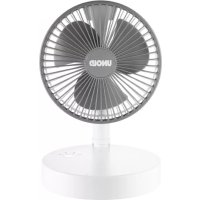
Cordless 86720 - Telescope UNOLD - Free user manual and instructions
Find the device manual for free Cordless 86720 UNOLD in PDF.



| Product type | Cordless fan |
| Brand | Unold |
| Model | Cordless 86720 |
| Dimensions (L × W × H min./max.) | Approx. 19.7 × 19.7 × 35.3 - 39.9 cm |
| Weight | Approx. 0.9 kg |
| Blade diameter | Approx. 15.0 cm |
| Housing material | Plastic |
| Battery type | Built-in lithium-ion, 5000 mAh, 6.8 Wh |
| Charging voltage | DC 5 V / 2 A |
| Charging time | Approx. 4.5 hours |
| Battery life (depending on speed) | From 4 to 10 hours |
| Noise level | 30 - 40 dB |
| Airflow speed | Approx. 2.3 - 4.3 m/s |
| Number of speeds | 3 (low, medium, high) + natural mode |
| External battery function | Yes, USB output 5 V / 1 A |
| Basket orientation | 180° |
| Adjustable height | Yes, via telescopic extension |
| Charger type | Micro-USB (cable included, power adapter not included) |
| Charge indicator | LED indicator (blue = ready, red = low battery, flashing = charging) |
| Cleaning | Slightly damp cloth; removable front grille for blade cleaning |
| Child safety | Use possible from age 8 under supervision; keep device out of reach of children under 8 |
| Warranty | 24 months (domestic use), 12 months (professional use) |
| Accessories included | User manual, USB cable (95 cm) |
Frequently Asked Questions - Cordless 86720 UNOLD
User questions about Cordless 86720 UNOLD
0 question about this device. Answer the ones you know or ask your own.
Ask a new question about this device
Download the instructions for your Telescope in PDF format for free! Find your manual Cordless 86720 - UNOLD and take your electronic device back in hand. On this page are published all the documents necessary for the use of your device. Cordless 86720 by UNOLD.
USER MANUAL Cordless 86720 UNOLD
natural_image
Circular fan with three blades, no visible text or symbols on the fan itselfTELESKOP-VENTI Cordless
Bedienungsanleitung
Instructions for use | Notice d'utilisation Gebruiksaanwijzing | Istruzioni per l'uso Instrucciones de uso | Instrukcja obsługi
Modell 86720
Impressum:
natural_image
Modern kitchen appliance with digital display and bucket containing red liquid (no visible text or symbols)
natural_image
Illustration of a modern wheat bread machine with a bucket and kitchen utensils (no text or symbols)UNOLD®
Care + Style
natural_image
Product photo of a red and black electric toothbrush with a small brush and a black stand (no text or symbols visible)
natural_image
Close-up of a metallic iron cutting tool with a white cable, no visible text or symbolsUNOLD®
Fan + Heat
natural_image
Close-up of a metallic office desk fan with visible blades and base (no text or symbols)
natural_image
Red electric fan with a circular grille and control panel (no visible text or symbols)INHALTSVERZEICHNIS
Instructions for use Model 86720
Technical Specifications....18
Explanation of the symbols....18
For your safety....18
First steps and Operation....22
Charging....23
Cleaning and care....24
Guarantee Conditions....25
Waste Disposal/Environmental Protection ... 25
Service 17
1 Fan cage
2 Extension tube
3 Locking mechanism
4 Control button
5 Charge connection
6 Power bank charge connection
7 Base
F Page 26
natural_image
Simple line drawing of a mechanical device with a lever and base, showing motion arrows (no text or symbols)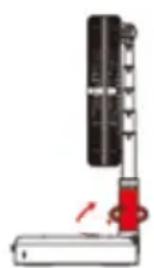
natural_image
Diagram of a mechanical device with a red-handled lever and black components, no visible text or symbolsnatural_image
Diagram showing two mechanical device configurations with a red arrow indicating motion (no text or symbols)AUFLADUNG
natural_image
Close-up of a black rectangular electronic device with a white connector and 'UN' watermark (no readable text or symbols on the device itself)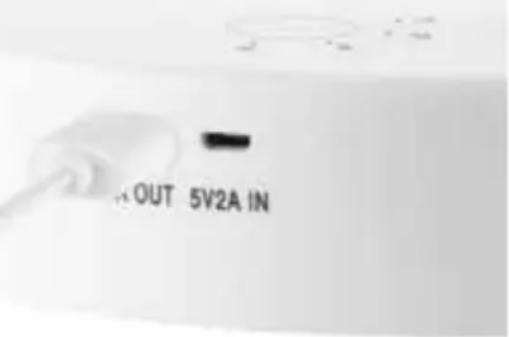
text_image
OUT 5V2A INREINIGEN UND PFLEGEN

natural_image
Close-up of a circular electronic component with red and black fan-like structure (no visible text or symbols)Auf
natural_image
Close-up of a black and red circular fan component with no visible text or symbolsZu
Weight: Approx 0.9 kg
Fan blade: Approx. diameter 15.0 cm
Cable length: USB cable, approx. 95 cm
Rechargeable
battery: Battery capacity 5000 mAh, output 6,8 Watt, charge voltage DC5V/2A
Housing: Plastic
Noise level: 30–40 dB
Wind speed: approx. 2.3–4.3 m/s
Features: ON/OFF switch, 3 speed settings and nature mode, indicator lamp, maximum operating time 4–10 hours depending on speed setting, charge time approx. 4.5 hour, can be used as a power bank
Accessories: User manual, USB charge cable without AC adapter

Equipment features, technology, colours and design are subject to change without notice. Errors and omissions excepted.
EXPLANATION OF THE SYMBOLS

This symbol indicates potential hazards that may result in injury or damage to the appliance.
FOR YOUR SAFETY
Please read the following instructions and keep them on hand for later reference.
Instructions for persons in the household
- This appliance can be used by children 8 years and older, as well as by persons with reduced physical, sensory or mental abilities or with lack of experience and/or knowledge, if they are supervised or if they have been instructed with regard to safe use of the appliance and have understood the dangers that can result from use of the appliance.
- Children must not play with the appliance.
-
Children are not allowed to perform cleaning and user maintenance, unless they are 8 years of age or older and are supervised.
-
Keep the appliance and the power cord out of the reach of children under 8 years of age.
- Keep the appliance out of the reach of children.
Note: The appliance is delivered without plug-in power supply/USB charger. However, to charge the appliance it must be connected to the mains supply via a USB charger. In this regard the following instructions for dealing with electricity apply:
- Strictly comply with the safety operating instructions for the respective USB charger.
- When connecting the USB charger, ensure that the mains voltage meets the specified requirements of the charger.
- The USB charger must not be operated with an external timer or a remote control system.
-
Only charge the appliance with the USB charger indoors.
-
Protect USB charger from wetness, heat and direct sunlight.
- Always ensure that the charging cable is laid out its entire length to prevent damage due to overheating.
- Unplug the charging cable from the electrical outlet only by grasping and unplugging the plug-in power supply. Do not, under any circumstances, pull directly on the charging cable.
- Unplug the USB charger from the mains supply, when it is not required.
- When you put the appliance away for storage purposes, do not, under any circumstances wrap the charging cable around the appliance. Wrapping the power cord around the appliance can damage the power cord. Disconnect the charging cable from the appliance when the appliance is completely charged.
- As long as the plug-in power supply of the USB charger is in the electrical outlet, even if the appliance is switched off, the appliance poses a hazard in the vicinity of water.
- Do not, under any circumstance, touch the plug-in power supplies with wet hands.
- Do not insert any objects into the appliance. There is danger of electric shock due to appliance damage.
- Ensure that you do not damage the rechargeable battery in the appliance, e.g. through falling, impact or vibration. Do not
continue to use a damaged rechargeable battery. If in doubt, contact our customer service organisation.
- Recharge the battery on a regular basis to avoid deep discharge, and thus a possible appliance defect.
- Attention: The provided charging cable is not suitable for data transmission!
- If liquid should escape from the rechargeable battery, put on protective gloves immediately before handling the appliance. Do not continue to use the appliance. Avoid contact with skin and eyes. Should skin or eye contact nevertheless occur, seek medical attention immediately. The appliance is intended for personal use only; it is not designed for commercial requirements.
Safety instructions for safe operation of the appliance
- Do not use the appliance in rooms that are extremely dusty or in the vicinity of flammable substances.
- Do not, under any circumstances, operate or charge the appliance if it has been brought from a cold environment into a warmer environment. In such a situation condensation can occur that can damage the appliance. Wait until the appliance has reached room temperature before using it.
- Never open the housing of the appliance. This could damage the rechargeable battery.
- The appliance is intended for household use only, or for similar areas of use, such as,
■ in kitchenettes in businesses, offices or other workplaces,
■ for use by guests in hotels, motels or other lodgings,
■ in private guest houses or holiday homes.
-
To avoid damage to the charging cable, ensure that it is not pinched or pulled over corners.
-
Do not, under any circumstances, stick fingers or objects, such as needles, pins, etc. through the basket grille into the interior of the appliance – danger of injury!
- Ensure that long hair cannot be caught by the impeller.
- Check the appliance, the plug and the charging regularly for wear or damage. If the charging cable or other parts are damaged, please send the appliance for inspection and repair to our
customer service organisation. Unauthorised repairs can result in serious hazards for the user and void the warranty.
- To avoid damage, do not use the appliance with accessories of other manufacturers or brands.
- Unplug the mains plug of the charger after use and before cleaning. Do not, under any circumstances, leave the appliance unattended when the mains plug is plugged in.
Special safety instructions for the rechargeable battery/power bank
- Do not, under any circumstances, operate the appliance if it has been brought from a cold environment into a warmer environment. In such a situation condensation can occur that can damage the appliance. First, let the appliance to stand for some time until it has reached room temperature. Under some circumstances, this can take several hours!
- Do not convert the appliance or use it for purposes other than the purposes described here. Non-intended use can result in fire, electric shock, personal injury, etc.
- The output voltage and the current of the integrated rechargeable battery are 5 V/2.1 A these values must not be exceeded.
- Ensure that the appliance is not damaged by falling, impact, strong vibration or other influences. Never use a damaged rechargeable battery! In this case, contact our customer-service organisation.
- To prevent deep discharge of the rechargeable battery and thus a defect, recharge the appliance on a regular basis, even when you are not using the appliance.
- Attention: The provided USB cable is not suitable for transferring data!
- Only use the provided USB cable for charging, do not, under any circumstances, use other cables.
-
If you charge the rechargeable battery via a USB power source, you must first ensure that the power source provides sufficient charging current. If not, the appliance and the USB power source can be damaged. Additional instructions are provided in the chapter “Placing in Service and Charging”.
-
Attention: If liquid should escape from the rechargeable battery, put on protective gloves immediately before handling the appliance. Avoid skin and eye contact with the liquid, as it is very aggressive and can cause injuries. Should skin or eye contact nevertheless occur, seek medical attention immediately. Also ensure that the liquid does not come into contact with surfaces or objects. Surfaces or objects could be damaged. Contact our customer service organisation immediately.

Do not, under any circumstances, stick fingers or objects, such as needles, pins, etc. through the openings into the interior of the appliance. Ensure that long hair cannot be caught by the impeller. Danger of injury!
The manufacturer will not be liable in the event of incorrect assembly, improper or incorrect use or if repairs are carried out by unauthorized third parties.
FIRST STEPS AND OPERATION
- Remove all packaging material and transport locking devices. Keep packaging material such as plastic bags or polystyrene out of the reach of small children – danger of suffocation!
- Make sure that the appliance is charged.
- The appliance can also be used while charging.
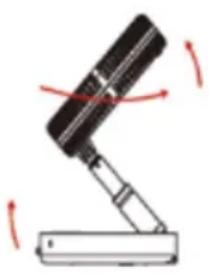
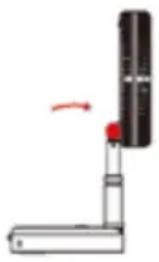
- Pull the fan cage upward and turn the base around (see illustration).
- Now turn the locking mechanism clockwise to fasten the stand tube.
- Pull out the extension tube to the desired height.
- The fan cage can be adjusted within a range of 180^ . To prevent damage to the appliance, do not use excessive force.
- To reassemble the appliance, proceed in reverse sequence: Push the extension tube all the way down, loosen the locking mechanism by turning it anticlockwise and fold the fan cage around the bottom of the base.
- Press and hold the control button for 3 seconds to switch on the appliance.
natural_image
Simple line drawing of a mechanical device with a lever and base, showing motion arrows (no text or symbols)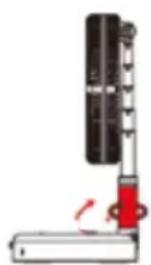
natural_image
Diagram of a mechanical device with a red-handled lever and black components, no visible text or symbols- Press the ON/OFF button repeatedly until the appliance is operating at the desired speed. There are 3 speeds available (low, medium, high), in addition to nature mode. In nature mode the appliance operates at alternating speeds.
- The indicator lamp for the selected function lights up blue to indicate that the appliance is in operation.
- Note: A red indicator lamp signals low battery power. In this case, charge the appliance as soon as possible.
- Use the ON/OFF button to switch off the appliance when not in use. Press the button for approx. 3 seconds.
natural_image
Simple diagram of a mechanical device with a red arrow indicating rotation (no text or symbols)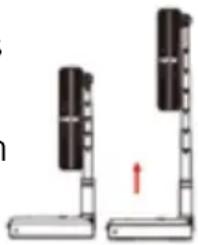
natural_image
Diagram of two vertical supports with black bands and a red arrow indicating direction (no text or symbols)CHARGING
- Make sure that the appliance is switched off.
- Connect the charge cable to the charge connection on the appliance (Micro-USB).
- Connect the other end of the charge cable to a USB charger.
- Insert the plug of the USB charge cable to a suitable power source.
- Make sure that all cables are correctly connected; otherwise, the appliance will not charge properly.
- The indicator lamps on the appliance flash alternately to indicate that the appliance is being charged. As soon as the charging process is complete, the indicator lights light up continuously (charging takes about 4.5 hours).
- To prevent damage to the battery, the appliance should not be charged longer than 12 hours.
- Depending on the setting, you can use the appliance for 5 to 24 hours before it has to be charged again. The maximum battery capacity is reached only after several charging cycles.
- Do not recharge the appliance until the battery is completely empty. This will ensure optimal battery performance and a long life.
- Tip: The appliance can also be charged with a different USB charge cable, as long as it fulfils the technical specifications. If you have any questions, please contact our technical service department.
- It is also possible to connect the included charge cable to a USB port on a computer in order to charge the appliance. For technical reasons, however, this charging method can take a very long time, so
-
that we recommend using a USB charger.
-
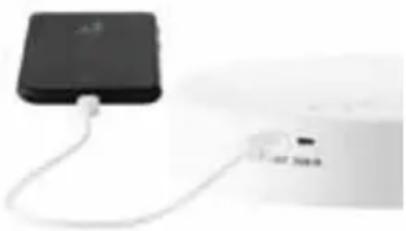
Use as a power bank: Check to make sure the appliance is fully charged. Connect the plug of the included cable to the USB charge output and
then connect the micro USB plug to the micro USB socket of the mobile device. The charging process will start automatically. The fan can deliver a total output current of 1 A. Please monitor the charging process. To interrupt charging, disconnect the cable from the mobile device. As soon as the battery of the mobile device is fully charged, disconnect the fan from the mobile device.
natural_image
Close-up of a black rectangular device connected to a white cable with a small USB port (no visible text or symbols)CLEANING AND CARE

Switch the appliance off.
Wait until the fan blade has stopped completely.
Never immerse the appliance in water. Do not expose the motor and electrical components to moisture.
- Never use scouring agents, steel wool, metal objects, hot cleaners or disinfectants.
- Wipe off the fan housing and grille with a slightly damp cloth.
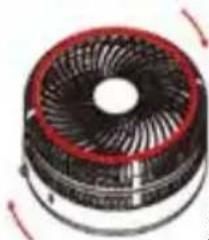
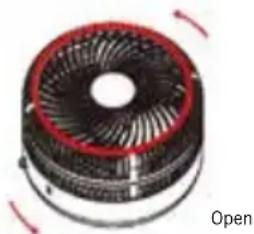
- The upper part of the fan cage can be opened to remove dust from the rotor blades. Carefully turn the front of the cage anticlockwise. Then remove the grille. Clean the rotor blades carefully with a dry cloth. Never use water, to prevent damage to the appliance! Replace the grille and turn it slightly clockwise until it locks firmly into place. Only then may the appliance be put into operation again.
Never try to remove the rotor, otherwise the device will be damaged.
natural_image
3D rendering of a mechanical fan or impeller component with red and black blades, no visible text or symbols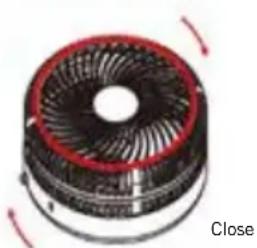
natural_image
Close-up of a mechanical fan component with red and black outlines, no visible text or symbols- Store the fan in a dry, safe place to protect it from dust, impacts, heat and moisture. We recommend that you keep the original packaging material to store the appliance when not in use.
GUARANTEE CONDITIONS
We grant a 24 months guarantee, and in case of commercial use a 12 months guarantee, starting from the date of purchase for any damage demonstrably due to manufacturing defects and when the appliance has been used according to its intended use. Within the warranty period we will remedy defective materials or workmanship through repair or replacement, at our option. Our warranty terms apply only to appliances sold in Germany and Austria. For other countries, please contact the responsible importer. In the event of a claim for remedy of defects, please send the appliance to our after sales service, properly packaged, together with a copy of the automatically generated sales receipt, which must show the date of purchase, and a description of the defect. You can print out a return receipt on our website www.unold.de/ruecksendung. (only for entries from Germany and Austria). The warranty does not cover damage from normal wear, improper handling and failure to comply with the maintenance and care instructions. The warranty is void if repairs or modifications are made to the appliance by third parties. Any claims of the end consumer vis-à-vis the retailer are not limited by this warranty.
WASTE DISPOSAL / ENVIRONMENTAL PROTECTION
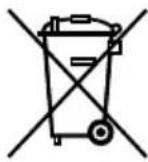
Our appliances are produced on a high quality level for a long lifetime. Regular maintenance and expert repairs by our after-sales service can extend the useful life of the appliance. If an appliance is defective and repair is not possible we ask you to follow the following instructions for disposal. Do not dispose this appliance together with your standard household waste. Please bring this product to an approved collection point for recycling of electric and electronic products. By separate collection and disposal of waste products you help to protect natural resources and ensure, that the product is disposed in an adequate way to protect health and environment.
Do not dispose of used batteries as household waste. Dispose of this product via your appliance dealer or take it to the municipal collection point.
NOTICE D'UTILISATION MODÈLE 86720
SPÉCIFICATION TECHNIQUE
natural_image
Diagram showing a mechanical device with rotating arm and base, no text or symbols presentnatural_image
Two diagrams showing a mechanical device with a red arrow indicating rotation, no text or symbols present.MISE EN CHARGE
natural_image
Close-up of a black electronic device connected to a white air conditioner unit (no visible text or symbols)NETTOYAGE ET ENTRETIEN

CONDITIONS DE GARANTIE
natural_image
Simple line drawing of a mechanical device with red motion arrows indicating rotation (no text or symbols)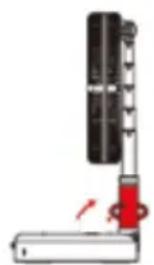
natural_image
Diagram of a mechanical device with a red arrow indicating force or movement (no text or symbols)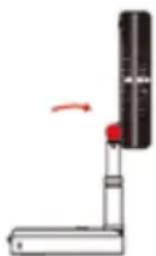
natural_image
Simple diagram of a mechanical device with a red arrow indicating rotation (no text or symbols)natural_image
Two vertical supports with black bands, one upward and one downward, with a red arrow indicating direction (no text or symbols)natural_image
Two electronic devices connected by a cable, one black and one white, with no visible text or symbols on the devices themselves.REINIGING EN ONDERHOUD

Ventola: diametro circa 15,0 cm
natural_image
Simple line drawing of a mechanical device with arrows indicating motion (no text or symbols)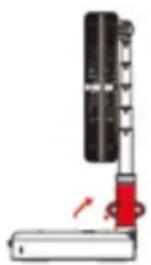
natural_image
Diagram of a mechanical device with a red arrow indicating motion or force direction (no text or symbols)natural_image
Diagram showing two mechanical setups with rotating components and a red arrow indicating motion (no text or symbols)RICARICA
natural_image
Close-up of a black electronic device with a cable and attached plug, next to a white air conditioner unit (no visible text or symbols)natural_image
Simple line drawing of a mechanical device with a lever and base, showing motion arrows (no text or symbols)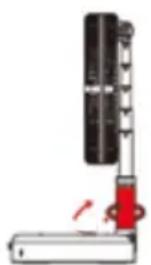
natural_image
Diagram of a mechanical device with a red lever and black components, no visible text or symbolsnatural_image
Simple line drawing of a mechanical device with a red knob and a black cylindrical component (no text or symbols)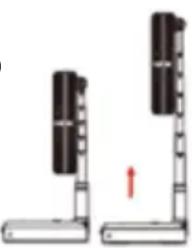
natural_image
Diagram showing two vertical supports with black blocks and a red arrow indicating rotation (no text or symbols)natural_image
Close-up of a white electronic device with a cable and a small black square component attached (no visible text or symbols)LIMPIEZA Y CUIDADO

Desconecte el aparato.
natural_image
Diagram of a mechanical device with rotating arms and a base, showing motion direction (no text or symbols)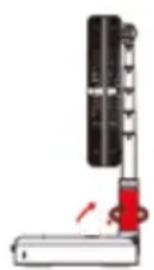
natural_image
Diagram of a mechanical device with a red lever and black components, no visible text or symbolsnatural_image
Simple diagram of a mechanical device with a red arrow indicating rotation (no text or symbols)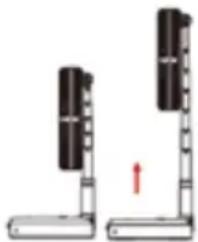
natural_image
Diagram of two vertical supports with black bands and a red arrow indicating upward motion (no text or symbols)PIERWSZE LADOWANIE
natural_image
Close-up of a black electronic device connected to a white air conditioner unit (no visible text or symbols)CZYSZCZENIE I PIELEGNACJA