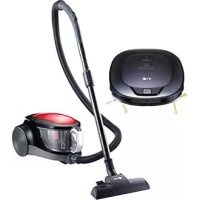
VT2620DE - Vacuum Cleaner LG - Free user manual and instructions
Find the device manual for free VT2620DE LG in PDF.



| Product Type | Canister Vacuum Cleaner |
| Brand | LG |
| Model | VT2620DE |
| Supply Voltage | 230 V ~ 50 Hz |
| Fuse | 10 A |
| Output Power (turbine) | 350–1200 W |
| Maximum Power | 1400 W |
| Airflow | 43 l/s |
| Vacuum Pressure | 225 mbar |
| Noise Level | 64 dB(A) |
| Protection Class | II |
| Dimensions (L x W x H) | 381 x 286 x 232 mm |
| Weight without accessories | 4.1 kg |
| Dust Bag Capacity | 2 L |
| Power Cord Length | 5 m |
| Operating Range | 8.5 m |
| Automatic Cord Rewind | Yes |
| Full Filter Indicator | Green (normal) / Red (full) |
| Suction Control | Power Slider |
| Airflow Control | Yes, on the handle |
| Included Accessories | Floor nozzle, crevice tool, metal tube, flexible hose |
| Motor Filter | Replace after 10 bag changes |
| Exhaust Air Filter | Replace after 10 bag changes |
| Warranty | 24 months (conditions apply) |
Frequently Asked Questions - VT2620DE LG
User questions about VT2620DE LG
0 question about this device. Answer the ones you know or ask your own.
Ask a new question about this device
Download the instructions for your Vacuum Cleaner in PDF format for free! Find your manual VT2620DE - LG and take your electronic device back in hand. On this page are published all the documents necessary for the use of your device. VT2620DE by LG.
USER MANUAL VT2620DE LG
Read this User's Guide before using this appliance for the first time.
- The vacuum cleaner must not be used to vacuum hazardous dust.
- The vacuum cleaner must not be used to vacuum any kind of liquid.
- Never operate the vacuum cleaner without the paper bag.
- If the supply cord is damaged, it must be replaced by an approved LG Electronics Service Agent to avoid a hazard.
Take care of the environment
When you unpack the appliance don't throw in the thrash the discarded packing material.
Bring the discarded packing material to the special recycling centers.
We guaranty on this appliance a 12 month warranty period!
During the 12 month warranty period we will repair your appliance at no extra cost, and respectively supply your retailer with spare parts, in case of malfunction due to production defects or material defects.
The company has no other obligation or liability in connection with said appliance. Damages due to higher powers or during travel, or shipping, and packing costs are at your expense.
For warranty cases you must go to your retailer with all accessories and proof of purchase or to the nearest Authorized Service Center.
This warranty does not cover damages that occur as result of misuse of the appliance or disregard of the operating instructions.
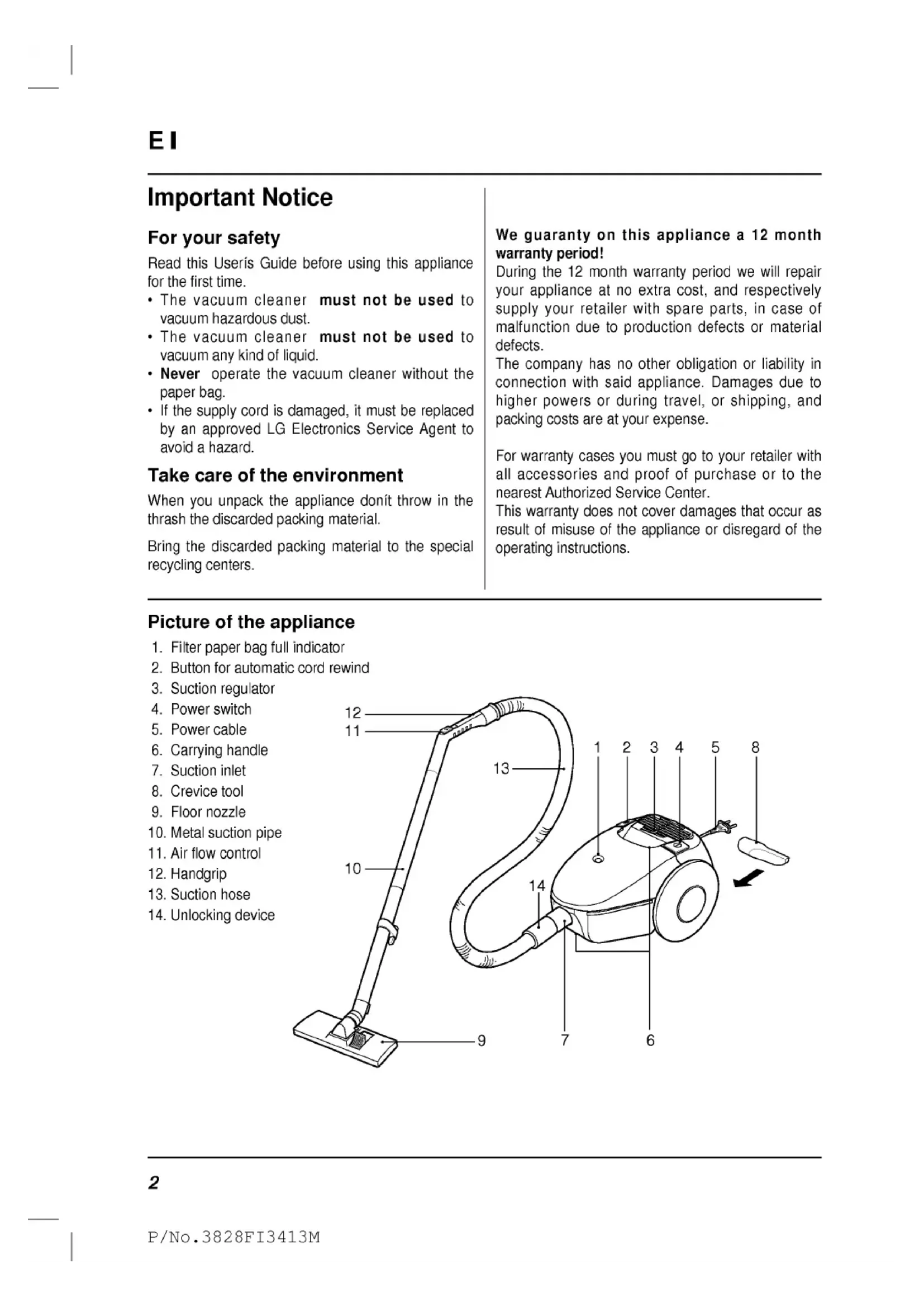
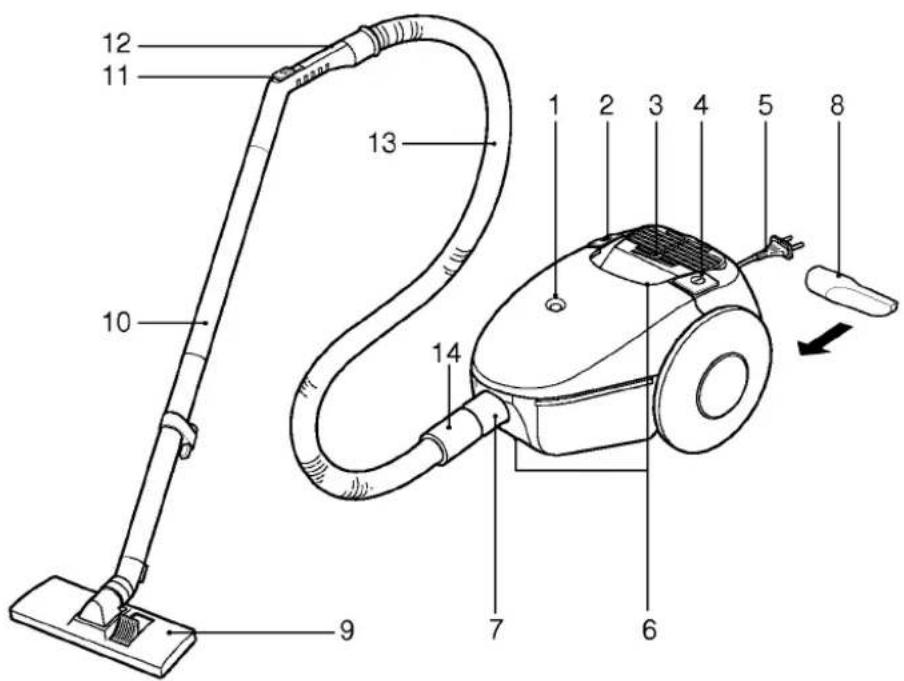
Picture of the appliance
- Filter paper bag full indicator
- Button for automatic cord rewind
- Suction regulator
- Power switch
- Power cable
- Carrying handle
- Suction inlet
- Crevice tool
- Floor nozzle
- Metal suction pipe
- Air flow control
- Handgrip
- Suction hose
- Unlocking device
1. Operation
1.1 Connect the appliance to the power outlet
- The power cord (5) is in the automatic cord rewind.
- Pull the cord out, however not further than the red marking.
- Plug the cord in the power outlet.
1.2 Install the accessories
- Insert the suction hose (13) in suction inlet (7) of the appliance. Make sure the hose is firmly engaged.
- Insert the metal suction pipe (10) on the handgrip of the suction hose (12).
- According to your need you can attach to the metal suction tube or suction hose handgrip, the floor nozzle (9) or crevice tool (8).
- The crevice tool is incorporated on the backside of the vacuum cleaner and can be simply taken out from there.
1.3 Operation of the appliance
- Turn on the appliance with the power switch (4).
- Make sure a filter paper bag is installed at all times (see point 4.1)
2. Use
2.1 Working with the accessories Floor nozzle (9)
With the floor nozzle you can vacuum carpets and floors.
Crevice tool (8)
With the crevice tool you can vacuum crevices, corners and cracks.
2.2 Suction regulator (3)
- You can regulate the suction power of the aspirator by sliding the step-less power slider (3) onto the required position.
2.3 Filter full indicator (1)
- As long as the filter paper bag full indicator is GREEN, you neednit replace the filter paper bag.
- The filter paper bag must be replaced, when the paper filter bag full indicator is RED (see point 4.1)
2.4 Air flow control (11)
- You can regulate, on short notice, the suction power by opening the air flow control.
Hint : Air flow control must be closed in order to achieve the maximum suction power.
3. Appliance storage
- Turn off the appliance with the power switch (4).
- Unplug the cord from the power outlet and push the foot operated switch to rewind the cord (2). The cord is automatically wound away into the appliance.
- . Store the crevice tool (8) in the housing on the backside of the appliance.
4. Service and Maintenance

The appliance must be disconnected from the mains for servicing and repair work.
- Clean the appliance regularly after use. Wipe the filter compartment with a damp cloth.
- Clean also the rubber packing of the compartment around the cover opening
Hint : TB-42 (from LG Electronics) or Y 201 (from Swirl) are available as dust filter substitutes.
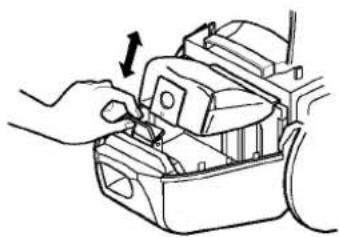
4.1 Filter bag substitution
- Open the compartment cover, by pulling up the suction hose.
- Pull the lever forward in the direction of the arrow and pull away backwards the full paper bag.
natural_image
Illustration of hands using a tool to adjust or install electronic components (no text or symbols visible)- Insert the new filter paper bag in the appliance with the arrow facing down.
- Make sure the cardboard on the paper bag is kept down on the runs and slides onto the clamp on the upper part. The paper filter bag must be firmly inserted in its housing.
Hint : The housing cover doesn't close when the paper filter bag is not inserted correctly or when it is missing.
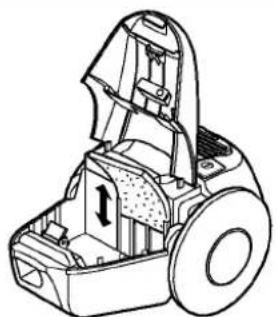
4.2 Motor protection filter replacement
- The motor protection filter must be replaced the latest after 10 changes of the filter bag. If the filter gets dirty earlier it must be replaced immediately.
- Open the housing cover and replace the motor protection filter.
natural_image
Technical line drawing of a mechanical device with internal components and a central component (no text or symbols)4.3 Replacement of the discharge air filter
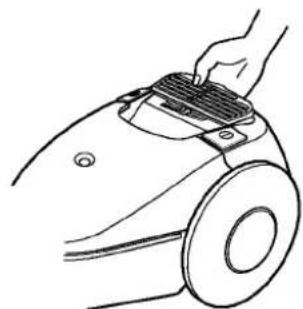
- The discharge air filter must be replaced the latest after 10 changes of the filter bag.
If the filter gets dirty earlier it must be replaced immediately. - Grab the discharge air filter protection piece by the tongue and pull upwards unhinging the protection.
natural_image
Line drawing of a hand using a grating tool to clean or adjust a circular object (no text or symbols)- Replace the discharge air filter.
- Put the protection in place again.
5. Technical Data
| Voltage | 230 | V |
| 1~50 | Hz | |
| Fuse | 10 | A |
| Power output: | ||
| Power output (Aspirator Turbine) | 350–1200 | Watt |
| max. output | 1400 | Watt |
| Air quantity | 43 | l/sec. |
| Vacuum | 225 | mbar |
| Sound pressure level according to EC-Guidelines | 64 | dB(A) |
| Class II equipment | ||
| Dimensions : | ||
| Dimensions Paper sack | 2 | l |
| Weight without the accessories | 4,1 | kg |
| Working range | 8,5 | m |
| Length x Width x Height | 381 x 286 x 232 | mm |
| Power cable : | länge | 5 m |
Technical specifications are subject to change.
Circuit diagram
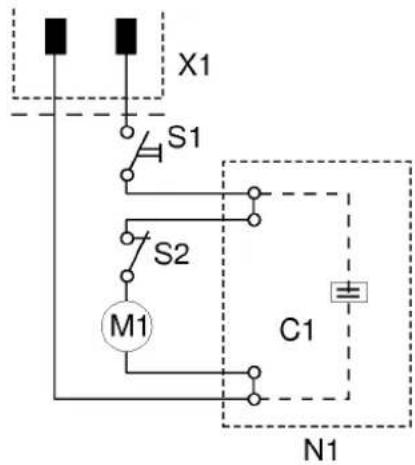
C1 Suppression capacitor
M1 Suction turbine
N1 Electronics
S1 Switch turbine
S2 Thermal switch
X1 Plug
6. Troubleshooting

Before starting any repair disconnect the appliance from the mains. Testing of the electrical components can be undertaken only by an authorized customer service.
| Problem | Cause | Solution |
| The motor (Suction turbine) doesn't start | Absence of tension | Check circuit breaker, cord, and plug |
| Absence of suction power (Suction turbine ins operational) | Filter paper bag was not inserted (properly) | Insert (properly) filter paper bag |
| Suction power is insufficient | Filter paper bag is full | Replace |
| Filter, nozzle, suction hose or suction tube are clogged | Verify, clean filter, if necessary replace | |
| Hole in suction hose | Verify, if necessary replace | |
| Suction hose is not firmly connected to the vacuum cleaner | Verify | |
| Air flow control is open | Close air flow control | |
| Reduced performance of the suction turbine | Set slider on the position of maximum performance | |
| The appliance turns off during operation | Filter, nozzle, suction hose or suction tube are clogged | Turn off appliance let cool down (Thermal switch) then turn on again |
| Please notify Customer Service if problems continue | ||
FI
Informations importantes
Pour votre sécurité
natural_image
Illustration of a hand using a tool to adjust or install electronic components (no text or symbols visible)natural_image
Technical line drawing of a mechanical device with internal components and a central component (no text or symbols)natural_image
Line drawing of a hand holding a gridded tool on a mechanical component (no text or symbols)natural_image
Line drawing of a hand inserting a component into a device (no text or symbols)natural_image
Technical line drawing of a mechanical device with internal components and housing (no text or symbols)natural_image
Line drawing of a hand using a grater to clean or adjust the airbag (no text or symbols)natural_image
Illustration of a hand inserting a component into a device housing (no text or symbols visible)natural_image
Technical line drawing of a mechanical device with internal components and a central housing (no text or symbols)natural_image
Line drawing of a hand using a grating tool to clean or repair a mechanical component (no text or symbols)Warranty Certificate For offer a 24-month warranty for this apparatus
During the 24-month warranty period, we will repair your apparatus at no cost to you or make available spare parts to your dealer free, if this apparatus fails due to manufacturing or material defects. Further claims are excluded. We are not liable for damages due to acts of providence or damages occurring during transport. The buyer assumes shipping and packaging costs. Your warranty conditions on the rear also apply!
Type of apparatus : ____
Serial number :
Name of buyer : ____
Purchase date : ____
Dealer's stamp and signature
Warranty conditions for vacuum cleaner
-
The warranty period begins on the purchase date and is valid for 24 months. Begin of warranty period is proven if, the buyer submits purchase receipt together with the warranty card, filled in and signed by the seller. The serial number of the product must agree with the number entered onto the warranty card.
-
During the warranty period, we will correct any defects at no cost to you, if it can be proven that these are attributed to manufacturing or material defects.
-
Damages due to incorrect handling, noncompliance with instructions for use and normal wear are not covered by this warranty. Also, the warranty does not cover wear parts or easily broken parts (for example, viewing glass, light bulbs). The buyer is responsible for any damages during transport as well as shipping and packaging costs.
-
We decide whether to make repairs, exchange or replace parts. Exchanged or replaced parts are our property. The original warranty period is not prolonged if a refrigerator is repaired or certain parts are replaced.
-
The warranty is nullified if any person intervenes in the apparatus that are not authorised by LG Electronics, if the apparatus is used for commercial purposes.
-
Always keep the original packaging, so that if the apparatus requires servicing, it can be transported without damaging it.
-
If a repair is covered by this warranty, always contact your dealer or an authorised service centre.
-
Further claims are excluded. If parts of these provisions are invalid, they apply in the sense of the wording. The validity of the other provisions is not effected.