ASMS600 - Hand blender BESTRON - Free user manual and instructions
Find the device manual for free ASMS600 BESTRON in PDF.


| Product type | Immersion blender |
| Brand | Bestron |
| Model | ASMS600 |
| Blade material | Stainless steel |
| Main functions | Blending, whisking, chopping, making purées, soups, sauces, milkshakes |
| Speed control | Variable with Pulse (I) and turbo (II) button |
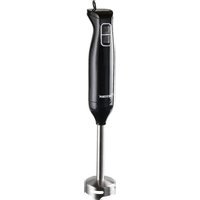
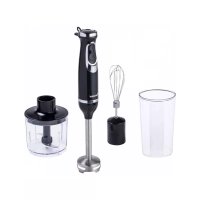
| Included accessories | Whisk, blender (mixing shaft), chopper accessory (bowl with blade), mixing container |
| Motor unit | Removable, do not immerse |
| Mixing bowl capacity | Approximately 0.5 liter (estimate) |
| Cable length | Approximately 1.2 meters (estimate) |
| Weight | Approximately 1.2 kg (estimate) |
| Dimensions (L x W x H) | Approximately 20 x 10 x 30 cm (estimate) |
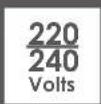
| Power supply | 220-240 V ~ 50/60 Hz (estimate) |
| Power | 600 W (estimate based on model) |
| Care and cleaning | Shaft under running water, motor unit with damp cloth, accessories dishwasher-safe |
| Safety | Automatic stop when button is released, do not use for more than 1 minute continuously, do not immerse motor unit |
| Spare parts and repairability | Do not repair yourself, contact Bestron customer service |
| Warranty | 60 months (5 years) from date of purchase |
| Usage | Household use only |
Frequently Asked Questions - ASMS600 BESTRON
User questions about ASMS600 BESTRON
0 question about this device. Answer the ones you know or ask your own.
Ask a new question about this device
Download the instructions for your Hand blender in PDF format for free! Find your manual ASMS600 - BESTRON and take your electronic device back in hand. On this page are published all the documents necessary for the use of your device. ASMS600 by BESTRON.
USER MANUAL ASMS600 BESTRON
natural_image
Product display image showing kitchen utensils including a blender, whisk, and blender with no visible text or symbols

ASMS600 INSTRUCTION MANUAL
DE
Bedienungsanleitung
FR
Mode d'emploi
NL
Handleiding
EN
Instruction manual
IT
R. Neyman Quality control
natural_image
Two white padlock icons on a black background, one with a downward arrow above it, the other with an open lock (no text or symbols)
natural_image
Two white padlock icons on a black background, one downward and one up, with no text or symbols.DÉCLARATION DE CONFORMITÉ CE
R. Neyman
Contrôle qualité
natural_image
Three horizontal panels with white padlock icons and downward arrows, no text or symbols presentWAT U MOET WETEN OVER DIT APPARAAT
R. Neyman
Quality control
WERKING - Algemeen
natural_image
Three horizontal bars with white padlock icons and downward-pointing triangles, no text or symbols presentLET OP:
Congratulations with the purchase of this Bestron product. These instructions tell you how the product works and how to use it. Read the instructions carefully before you start using the appliance. Only use the appliance in the manner described in the instructions. Keep these instructions in a safe place for future reference.
Defects:
If the appliance is defective, do not try to repair it yourself. Always have a qualified mechanic carry out any repairs.
Children:
- This device may not be used by children and persons with reduced physical, sensory or mental capabilities or lack of experience and know-how.
• Children are not allowed to clean or maintain the appliance. - Keep the appliance and the cable out of reach of children.
- Keep an eye on children to ensure that they do not play with the appliance.
WHAT YOU SHOULD KNOW ABOUT ELECTRICAL APPLIANCES
- Check that the mains voltage corresponds with that shown on the rating plate of an electrical appliance before you use it.
- Check that the socket to which you connect the electrical appliance is earthed.
• Always install electrical appliances on a stable and level surface where it cannot fall over. - Certain parts of an electrical appliance may become warm or sometimes hot. Do not touch them as you may burn yourself.
• Make sure your hands are dry when you touch an electrical appliance, a cord or a plug. - Electrical appliances must be able to lose their heat to avoid fire hazards. Therefore, make sure that the appliance has sufficient clearance around it and that it does not come into contact with flammable materials. Electrical appliances must never be covered.
- Make sure that electrical appliances, cords or plugs do not come into contact with water. Never immerse electrical appliances, cords or plugs in water or any other liquid.
- Do not touch electrical appliances if they have fallen in the water. Immediately pull the plug out of the socket. Stop using the appliance.
• Make sure that electrical appliances, cords and plugs do not come
into contact with heat sources, such as a hot hob or open fire.
- Never let cords hang over the edge of the sink, a worktop or a table.
• Always remove plug from the socket when you are not using the electrical appliance. - Remove the plug from the socket by pulling the plug itself and not the cord.
- Regularly check if the cord of the electrical appliance is not damaged. Do not use the electrical appliance if the cord shows signs of damage. If the cord is damaged, it should be replaced by the manufacturer, a technical service provider or a person with an equivalent qualification, to avoid any danger.
- The appliance may not be switched on with the aid of an external time switch, or by a separate system with remote control.
WHAT YOU SHOULD KNOW ABOUT THIS APPLIANCE
- Be careful when using the appliance outdoors.
- Never use the appliance in damp or wet locations.
- Thoroughly clean the appliance after use (see Cleaning and Maintenance).
- Only use the Stickmixer to mix, puree, beat and finely chop ingredients and never for other uses. This will prevent damage to the appliance and cuts due to inappropriate use.
ENVIRONMENT

- Dispose of packaging material such as plastic and cardboard boxes in the designated containers.
Do not dispose of this product as normal domestic waste at the end of its life, but hand it in at a collection point for the reuse of electric and electronic equipment. Look for the symbol on the product, the user instructions or the packaging showing the type of waste.
- The materials can be used as indicated. By helping us reuse and process the materials or otherwise recycle the old equipment, you will be making an important contribution towards the protection of the environment.
- Your municipality can tell you where to find the designated waste collection point in your neighbourhood.
CE DECLARATION OF CONFORMITY
This product meets the requirements of European guidelines.
R. Neyman
Quality control
OPERATION - General
The mixer set is intended only for domestic use, not for professional use.
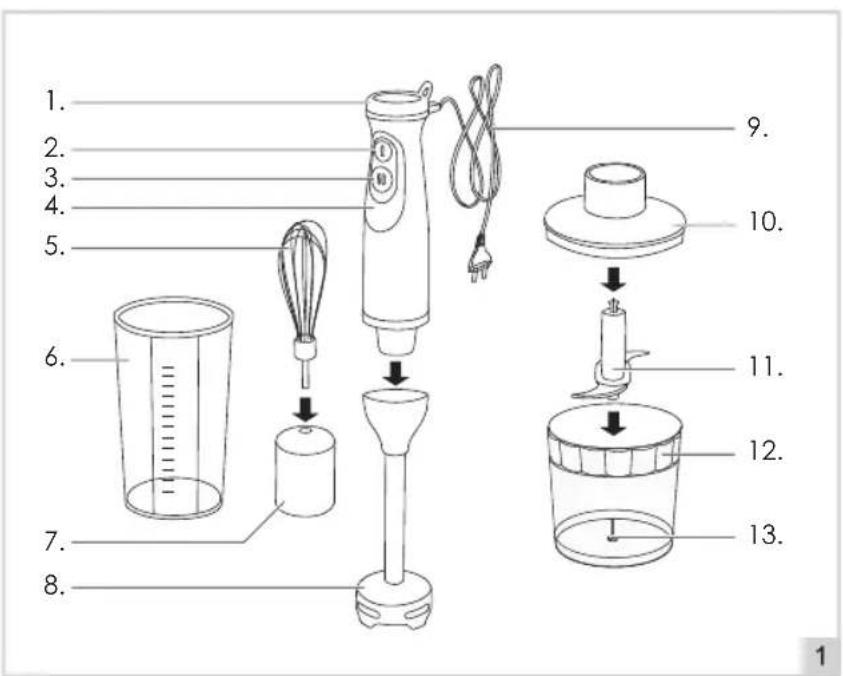
- Adjustable speed controller
- Pulse button (I)
- Pulse button with turbofuction (II)
- Motor unit
- Whisk attachment
- Mixing beaker
- Black attachment
- Blender attachment
- Cord en plug
- Lid
- Stainless steel blade
- Mixing-cup
- Mounting pin
OPERATION - Before first use
- Take the appliance out of the packaging.
- Clean the appliance (see 'Cleaning and maintenance').
OPERATION - Blender attachment
The blender attachment is perfectly suited for preparing purees, sauces, dips, soups, mayonnaise and baby food as well as for mixing drinks and milkshakes. The appliance is equipped with an adjustable speed controller and two pulse buttons. Pulse button (I) acts like an on- and off switch and pulse button (II) acts like a turbo button.
- Insert the whisk (5) into the black attachment (7) until it's locked in.
- Fit the motor unit (4) onto the blender attachment (8) (see fig. 2), and lock the parts by turning one part to the left. Keep turning until it clicks (see fig. 3).
- Place the ingredients in a bowl or the provided mixing beaker (6). Add a small amount of liquid, such as milk, fruit juice or water, to make the ingredients easier to mix.
- Potatoes and vegetables can be pureed directly in the saucepan. First take the saucepan away from the heat source and place it on a flat and stable foundation.
- Insert the plug into the wall socket.
- Keep the hand blender upright in the bowl, mixing beaker or saucepan.
- Turn on the appliance by pressing one of two pulse-buttons. Use the adjustable speed controller (1) in combination with pulse button (I) (2). First press pulse button (I), then use the adjustable speed controller by turning it to the left or right to determine the speed. For mixing on the highest speed, you can use the pulse button (II) with turbofunction (3).
- Keep hold of the bowl/saucepan/mixing beaker during use so that it cannot slide off the work surface. Be careful, the saucepan can still be hot.
- The appliance shuts off automatically when the pulse button is released.
- Remove the plug from the wall socket when finished.

natural_image
Three horizontal panels with white padlock icons and downward arrows, no text or symbols presentWARNING:
- Never turn on the appliance if it isn't in the bowl/saucepan/mixing beaker. Otherwise, the sharp knife may cause serious injury.
- The appliance may not be used for more than one minute at a time. The appliance needs to cool down to room temperature.
OPERATION - Chopper attachment
The chopper attachment is perfectly suited for chopping/cutting meat, cheese, onions, herbs, garlic, carrots, walnuts, hazelnuts, almonds, dried prunes etc.
- Fit the stainless steel blade (11) onto the mounting pin (13) in the mixing-cup (12).
- Attach the motor unit into the lid (10) and turn the parts to the left until it clicks in place (see fig. 2 and fig. 3).
- Fill the mixing-cup with the ingredients and press the lid onto the mixing-cup.
- Switch on the appliance by pressing one of the two pulse buttons. Use the adjustable speed controller in combination with pulse-button (I). First press pulse button (I), and use the adjustable speed controller by turning it to the left or right to determine the speed. For mixing on the highest speed, the pulse button (II) with turbofunction can be used.
- Keep hold of the mixing-cup during use so that it cannot slide off the work surface.
- The appliance shuts off automatically when the pulse button is released.
- Remove the plug from the wall socket when finished.
- Remove the lid from the mixing-cup and carefully lift the stainless steel blade from the mixing-cup.
- Scoop the processed food from the mixing-cup.
WARNING:
- Do not chop extremely hard food, such as ice cubes, nutmeg, coffee beans, and grains.
- Pre-cut meat, cheese, onions, garlic, carrots and chilli's before chopping. Remove stalks from herbs and un-shell nuts and remove bones, tendons and gristle from meet.
OPERATION - Whisk attachment
The whisk attachment can be used to beat/mix egg white, whipped cream, mayonnaise, pudding, purée, and light types of dough etc.
- Fit the motor unit onto the whisk attachment, and lock the parts by turning one part to the left. Keep turning until it clicks (see fig. 2 and fig. 3).
- Place the ingredients in a bowl, saucepan or the provided mixing-cup.
- Insert the plug into the wall socket.
- Keep the appliance upright in the bowl, saucepan or mixing-cup.
- Switch on the appliance by pressing one of the two pulse buttons. Use the adjustable speed controller in combination with pulse-button (I). First press pulse button (I), and use the adjustable speed controller by turning it to the left or right to determine the speed. For mixing on the highest speed, the pulse button (II) with turbofunction can be used.
- Keep hold of the bowl/saucepan/mixing-cup during use so that it cannot slide off the work surface.
- The appliance shuts off automatically when the pulse button is released.
- Remove the plug from the wall socket when finished.
CLEANING AND MAINTENANCE
- Remove the plug from the wall socket.
- Allow the appliance to cool down sufficiently before cleaning it.
- The stickmixer can be cleaned using running tap water. Rinse the stickmixer with plenty of water and dry it thoroughly.
- Clean the appliance's motorunit with a damp cloth. After cleaning, dry the unit thoroughly.
- Store the appliance.
WARNING:
- Be careful with the sharp knife during cleaning.
- Verify that the appliance is not connected to the power supply before you clean it.
-
Clean the mixing stick each time after use.
-
Never use corrosive or scouring cleaning agents or sharp objects (such as knives or hard brushes) to clean the appliance.
- Do not immerse the motor unit in water, or in other liquids.
- All loose parts except for the motorunit are dishwasher-proof
WARRANTY CONDITIONS
Bestron offers a 60-month warranty on this equipment against defects resulting from manufacturing and/or material errors, subject to the following conditions.
- No labour or material costs will be charged during this warranty period.
- Any repairs carried out under the warranty will not extend the warranty period.
- Faulty parts, or in the event of exchange, the faulty equipment itself, will automatically become the property of Bestron.
- The warranty is valid for the first buyer only and is non-transferable.
- The warranty is not valid for damage caused by:
- Accidents
- Improper use
- Wear and tear
- Neglect
- Faulty installation
- Connection to a different mains voltage than indicated on the type plate
• Unauthorised changes
• Repairs carried out by unqualified third parties - Use in violation with the applicable statutory, technical or safety standards
-
Careless transport without suitable packaging or other protection
-
Warranty cannot be claimed:
-
For damage during transport
-
If the serial number of the appliance is removed or changed
-
Items excluded from warranty are:
-
Cords
- Lamps
- Glass parts
- The warranty does not entitle the purchaser to compensation for any damage other than replacement or repair of the faulty parts. Bestron cannot in any event be held liable for any indirect or consequential losses caused by or in relation to the equipment it has provided.
- Claims under a warranty may only be submitted to your (online) retailer or directly to the Bestron Service Department. Never send items without being asked to. We may refuse the parcel and you will be liable for the costs. Contact us first and we tell you how the appliance should be packaged and sent. Each claim under a warranty must be accompanied by the relevant receipt.
SERVICE
If an unexpected problem occurs, please contact the BESTRON service department:
www.bestron.com/service
COMPLIMENTI!
R. Neyman
Controllo qualità
natural_image
Three horizontal panels showing white padlock icons on black background, with arrows pointing downward (no text or symbols)ATTENZIONE:
R. Neyman
Control de calidad
natural_image
Two white padlocks on a black background, one downward-pointing and one upward (no text or symbols)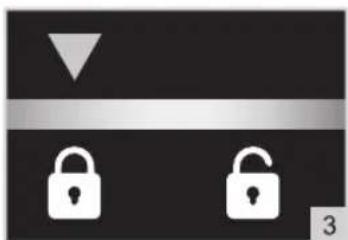
natural_image
Two white padlocks on a black background, one downward-pointing triangle above the horizontal bar, with number 3 in the corner (no text or symbols on the padlocks themselves)NEED HELP? CHAT WITH US! WHATSAPP CUSTOMER SERVICE

BESTRON.COM/WHATSAPP