GM500ES - Mouse Nacon - Free user manual and instructions
Find the device manual for free GM500ES Nacon in PDF.



| Product type | Wired gaming mouse |
| Brand | NACON |
| Model | GM500ES |
| Connectivity | Wired USB (Plug & Play) |
| Sensor | Optical, adjustable resolution from 400 to 5000 DPI |
| Preset resolutions | 400 (yellow), 600 (purple), 800 (blue, default), 1200 (green), 2000 (red), 4000 (light blue), 5000 (white) |
| USB report rate | 250 Hz, 500 Hz, 1000 Hz (adjustable) |
| Lighting | RGB color adjustable via internal wheel |
| Buttons | Left/right main buttons, scroll wheel, two swappable side buttons (right-handed/left-handed) |
| Left/right-handed compatibility | Yes, L/R switch to activate left or right side buttons |
| Interchangeable covers | 3 top covers (including 2 additional) to adjust shape and size |
| Material | Removable transparent cover, plastic |
| Dimensions (approx.) | 125 x 70 x 40 mm |
| Weight (approx.) | 100 g |
| Cable length (approx.) | 1.8 m |
| Power supply | Via USB port (5V) |
| Warranty | 2 years (against material or manufacturing defects, upon presentation of proof of purchase) |
| Maintenance and cleaning | Soft slightly damp cloth; no detergents; do not immerse |
| Usage precautions | Indoor use, avoid dust, humidity, extreme temperatures, shocks; do not carry by the cable; do not disassemble |
| Ergonomics | Recommended 15-minute break per hour to avoid pain |
| Customer service (France) | Email: support.fr@nacongaming.com; Website: www.nacongaming.com; Phone (Premium rate): 69 69 39 79 59; Address: NACON, 396-466 Rue de la Voyette, CRT2 59273 Fretin, France |
| Spare parts and repairability | Additional top covers included; for any repair, contact customer service, do not disassemble yourself |
| General information | Product intended for video games, simple use without software, adjustments via wheel under removable cover |
| Recycling | Do not dispose of with household waste, deposit at a collection point |
Frequently Asked Questions - GM500ES Nacon
User questions about GM500ES Nacon
0 question about this device. Answer the ones you know or ask your own.
Ask a new question about this device
Download the instructions for your Mouse in PDF format for free! Find your manual GM500ES - Nacon and take your electronic device back in hand. On this page are published all the documents necessary for the use of your device. GM500ES by Nacon.
USER MANUAL GM500ES Nacon
Thank you for purchasing the NACON GM-500ES Gaming Mouse.
This product has been designed to enhance your video gaming experience. Please keep this instruction manual for future reference.
Guarantee
This product bearing the NACON trademark, is guaranteed by the manufacturer for a period of 2 years from the date of purchase, and will, during this period be replaced with the same or a similar model, at our option, free of charge, if there is a defect due to faulty material, or workmanship.
For any warranty request or claim, please keep your proof of purchase for the duration of the warranty. Without this document, we won't be able to process your request. The original packaging must be kept for all distance purchases (mail order & Internet).
This guarantee does not cover defects arising from accidental damage, misuse or wear and tear. This does not affect your statutory rights.
To access the declaration of conformity, please visit: www.nacongaming.com/my-nacon/support/
Package contents
1xGM-500ES
2 x Additional top covers
1 x Quick guide
Control elements
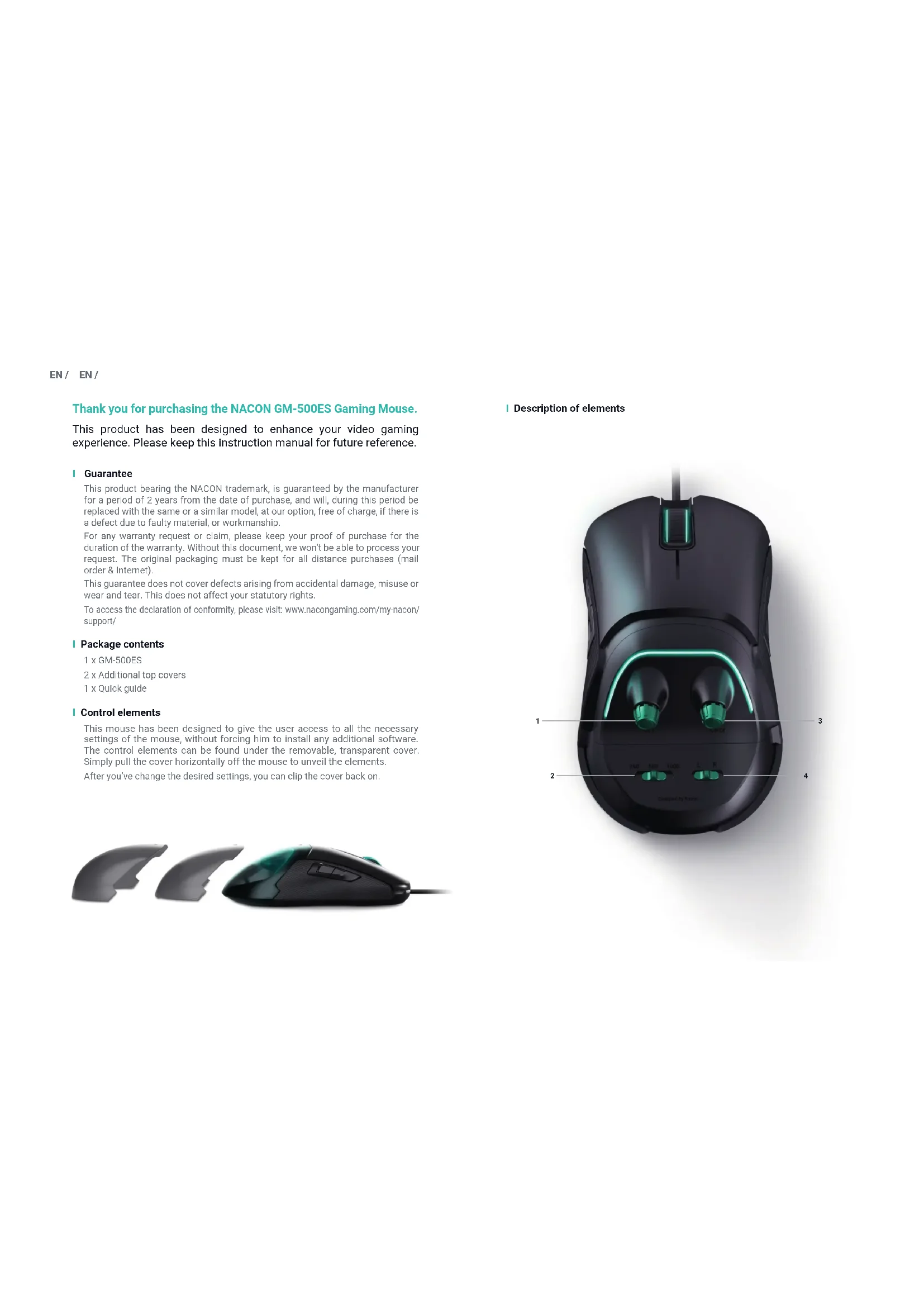
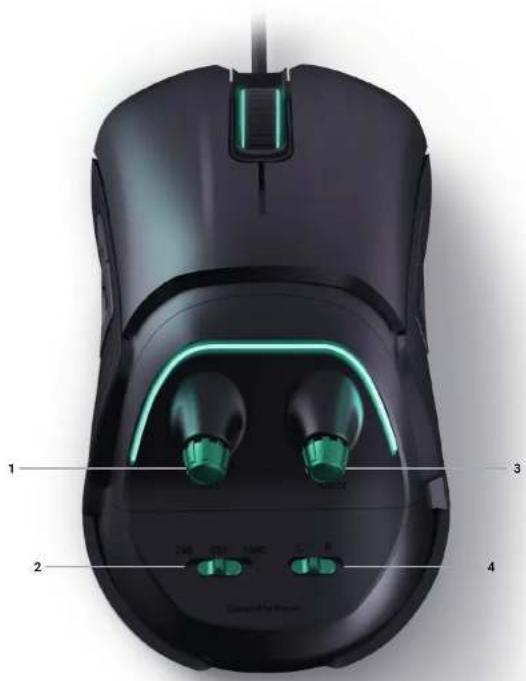
This mouse has been designed to give the user access to all the necessary settings of the mouse, without forcing him to install any additional software. The control elements can be found under the removable, transparent cover. Simply pull the cover horizontally off the mouse to unveil the elements.
After you've change the desired settings, you can clip the cover back on.

Description of elements
EN/ EN/
1 Changing the resolution
The resolution of the mouse sensor determines how quickly and precisely it reacts to the movements of the mouse. This wheel is used to adjust that setting.
Once you turn the wheel, the light effect on your mouse starts blinking, in order to signalize the change of the resolution. As long as it is blinking the color of the light now indicates the selected resolution:
- Yellow: 400 dpi
Purple: 600 dpi
-Blue:800dpi(Default) - Green: 1200 dpi
- Red: 2000 dpi
Light blue: 4000 dpi
-White:5000dpi
Once you've selected your desired resolution, the lights stops blinking after 3sec. It will change back to the original backlight color, indicating that the selection process is finished.
2 Changing the polling rate
The polling rate of a USB device determines how often the PC requests a data update (in this case the mouse position and button state) from a connected device.
The regular USB polling rate is 250Hz but you can increase this rate, exceeding USB standard specifications. The options are:
- 250Hz, USB data packet sent every 4ms (USB standard)
- 500Hz, USB data packet sent every 2ms
- 1000Hz, USB data packet sent every millisecond
3 Changing the color of the light effect
This wheel lets you choose the color of the light effects on the mouse.
4 Switching between left / right hand mode
The "L/R" switch activates the two additional buttons on either the left or the right side of the mouse. The non-selected buttons are then deactivated.
Top covers
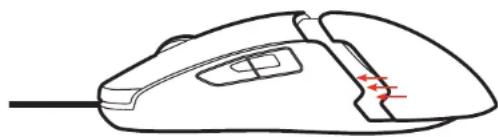
This mouse is supplied with three top covers. The covers are in different sizes to best match with the shape of your hand. Simply slide off the cover and replace with the chosen size.
- To remove the rear block easily, use the notch on each side of the back cover.
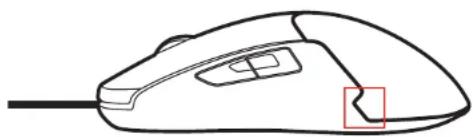
- To put the rear block back on the mouse, clip the cover in the intended position.
Using your Mouse
This mouse is a 'plug & play' device meaning that no additional drivers are required. Simply connect to a spare USB port and enjoy!
Recycling

This product should not be disposed of in normal household rubbish. Please take it to a nominated collection point. Recycling is important and will help to protect our environment
from reduced landfill waste.
Important Safeguards & Precautions
1/ This Unit is for indoor use only. Never expose to direct sunlight or moisture.
2/ Do not expose the unit to splashing, dripping. Do not immerse in liquid.
3/ Do not expose to dust, high temperatures or mechanical shock.
4/ Do not use if the equipment is damaged. Do not disassemble it.
5/ For external cleaning, use a soft, clean, damp cloth only. Use of detergents may damage the finish and leak inside.
6/ Never carry the product by its cable.
7/ This device is not designed to be used by anyone (including children) with impaired physical, sensory or mental capacity, or by anyone without appropriate experience or knowledge unless they have received prior guidance or instructions related to the use of this device from someone who is responsible for their safety. Do not leave the product unattended, keep this device out of the reach of children.
Ergonomics
Holding your hand in the same position for a long period of time can lead to aching and pain. If this occurs repeatedly please consult your doctor. As a precaution we recommend that you take a 15 minute break every hour.
Technical Helpline Information
Email: support@naongaming.com
Website: www.naongaming.com
FR/ FR/
Email: support.be@naongaming.com
Site Internet: www.nacongaming.com
Adresse: Bigben Interactive Belgium s.a./n.v. Waterloo Office Park / Batiment H
Drève Richelle 161 bte 15, 1410 Waterloo, Belgium
Mail: support.de@naongaming.com
Waterloo Office Park / Batiment H
Drive Richelle 161 bte 15
1410 Waterloo, Belgium
www.nacongaming.com
ES/ ES/
www.haongaming.com/my-hacon/support/
Email: support@naongaming.com
Website: www.nacongaming.com
Dekujeme vam, ze jste si zakoupili herni mys NACON GM-500ES.
Ucemei tohoto vrobu k je obohat ias zaitek z hran videoher. Tuto prirucku si prosim uschovejte pro pozdjejsi pouziti.
Záruka
Web: www.nacongaming.com
Dakujeme vam, ze ste si zakupili hernu mys NACON GM-500ES.
Ucelom vrobu je obohat' vas zazitok z hrania videohier. Tuto prruku si, prosim, uschovajte pre priad buduceho pouzitia.