
LIFE E66554 (MD 43554) - Radio MEDION - Free user manual and instructions
Find the device manual for free LIFE E66554 (MD 43554) MEDION in PDF.


| Product type | Shower radio |
| Brand | Medion |
| Model | LIFE E66554 (MD 43554) |
| Category | Radio |
| FM Radio | Yes, 87.5 - 108.0 MHz |
| Bluetooth | Yes, version 4.0 |
| Speaker power | 2 W RMS |
| Battery type | Built-in lithium polymer |
| Battery capacity | 750 mAh / 2.78 Wh |
| Battery voltage | 3.7 V |
| Charging time | Approximately 4 hours |
| Power supply | Micro USB, 5 V, 500 mA |
| Waterproof rating | IPX7 |
| Functions | Clock, alarm, hands-free, automatic station search |
| Package contents | Shower radio, USB cable, wrist strap, instruction manual, warranty documents |
| Operating temperature | 0°C to +35°C |
| Storage temperature | -20°C to +45°C |
| Display | Yes, screen (not detailed) |
| Microphone | Yes |
| Wrist strap | Included |
| Care and cleaning | Clean with a soft cloth, avoid solvents and corrosive products |
Frequently Asked Questions - LIFE E66554 (MD 43554) MEDION
User questions about LIFE E66554 (MD 43554) MEDION
0 question about this device. Answer the ones you know or ask your own.
Ask a new question about this device
Download the instructions for your Radio in PDF format for free! Find your manual LIFE E66554 (MD 43554) - MEDION and take your electronic device back in hand. On this page are published all the documents necessary for the use of your device. LIFE E66554 (MD 43554) by MEDION.
USER MANUAL LIFE E66554 (MD 43554) MEDION
Shower radio with Bluetooth function
MEDION® LIFE® E66554 (MD 43554)
Inhaltsverzeichnis
Anschlüssle Micro-USB 5V- - - 500mA
Frequenz 87.5 MHz - 108.0 MHz
Bluetooth V4.0
Akku
Typ
Lithium
3,7V / 750mAh /
2,78Wh
Akku-
ca. 4 Stunden
Ladezeit
DE
Polymer FR
NL
EN
10. Impressum
Copyright © 2017
Stand: 03.04.2017
Vermenig-vuldiging in
mechanische,
1. About these operating
instructions 99
FR
1.1. Warning symbols
NL
and keywords
used in these
instructions 100
EN
1.2. Proper use
1.3. Declaration of
conformity.....104
2. Safety instructions 105
2.1. People not permitted to use this device 105
2.2. Operating safety
2.3. Power supply ......
2.4. Never carry out repairs yourself ...109
3. Overview of the device .110
- Package contents 111
- Using the device for the first time 112
5.1. Charging the battery 112
6. Operation 113
6.1. Switching on the speaker 113
6.2. Setting clock time 113
6.3. Connecting the device via Bluetooth .... 115
6.4. Setting the radio 118
6.5. Mobile telephone 119
6.6. Switching off the speaker 121
7. Maintenance 122
- Cleaning 123
- Disposal 125
- Technical data 126
- Legal notice 127
1. About these operating instructions

Ensure that you read these operating instructions carefully and follow all instructions given.
The instructions will help you to operate the device reliably and help increase its service life. Always store these operating instructions near the device. Keep these operating instructions so that you can pass them on with the device if you sell it.
1.1. Warning symbols and keywords used in these instructions
| ! | DANGER! Warning of immedi- te mortal danger! |
| WARNING! Warning of possible risk of fatal injury and/or serious irrever- sible injuries! | |
| CAUTION! Danger of possible minor or moderate injuries! | |
| ATTENTION! Please follow the instructions to avoid property damage! | |
| i | NOTE! Additional information on using the device! |
| NOTE! Please follow the guidelines in the operating instructions! | |
| WARNING! Warning of risk of electric shock! | |
| · | Bullet point/information on operating steps and results |
| Instructions to be carried out | |
| CE | Declaration of conformity (see section “Declaration of conformity”): Products that feature this symbol meet the requirements of the EC directives. |
1.2. Proper use
- The bathroom radio is suitable for use as an audio output device.
The device is intended for use in the bathroom and splash-proof in accordance with protection class IPX7.
The device is intended for private use only and not for industrial/commercial use.
Please note that we shall not be liable in cases of improper use:
- Do not modify the device without our consent and do not use any auxiliary equipment that we have not approved or supplied.
- Use only spare parts and accessories that we have supplied or approved.
- Heed all the information in these operating instructions, especially the safety information. Any other use is deemed improper and can cause personal injury or property
damage.
- Do not use the device in extreme environmental conditions.
1.3. Declaration of conformity
Medion AG hereby declares that the product conforms to the following European requirements:
R&TTE Directive 1999/5/EC
- Ecodesign Directive 2009/125/EC
RoHS Directive 2011/65/EU
Full declarations of conformity are available at www.medion.com/conformity.
2. Safety instructions
2.1. People not permitted to use this device
This device may be used by children over the age of 8 and by persons with reduced physical, sensory or mental abilities or lacking experience and knowledge if they are supervised or have been instructed in the safe use of the device and understand the risks it poses.
Children should be supervised to ensure that they do not play with the device.
- Cleaning and user maintenance may not be carried out by children unless they are supervised.
- Keep the device and accessories out of reach of children.

DANGER!
Risk of suffocation!
Packaging film can be swallowed or used improperly. Therefore, there is a risk of suffocation!
- Keep packaging material such as plastic film or plastic bags away from children.
2.2. Operating safety
Do not allow children to use electrical devices unattended. Children are not always aware of potential hazards.
Batteries can be fatal if swallowed. Therefore, you should
keep the device out of reach of children. If a battery is swallowed, please obtain immediate medical assistance.
If you hear unusual noises or notice odours or if smoke can be seen, disconnect the device from the mains immediately and switch it off.
2.3. Power supply
Your bathroom radio is equipped with an integrated rechargeable high-performance lithium battery that you can charge using the supplied USB cable via the USB port of a PC.
2.4. Never carry out repairs yourself

WARNING! Risk of electric shock!
There is a risk of electric shock if repairs are not carried out by qualifi ed personnel!
Never try to open or repair the device yourself!
In the event of a fault, please contact the Service Centre or another suitable specialist workshop.
3. Overview of the device
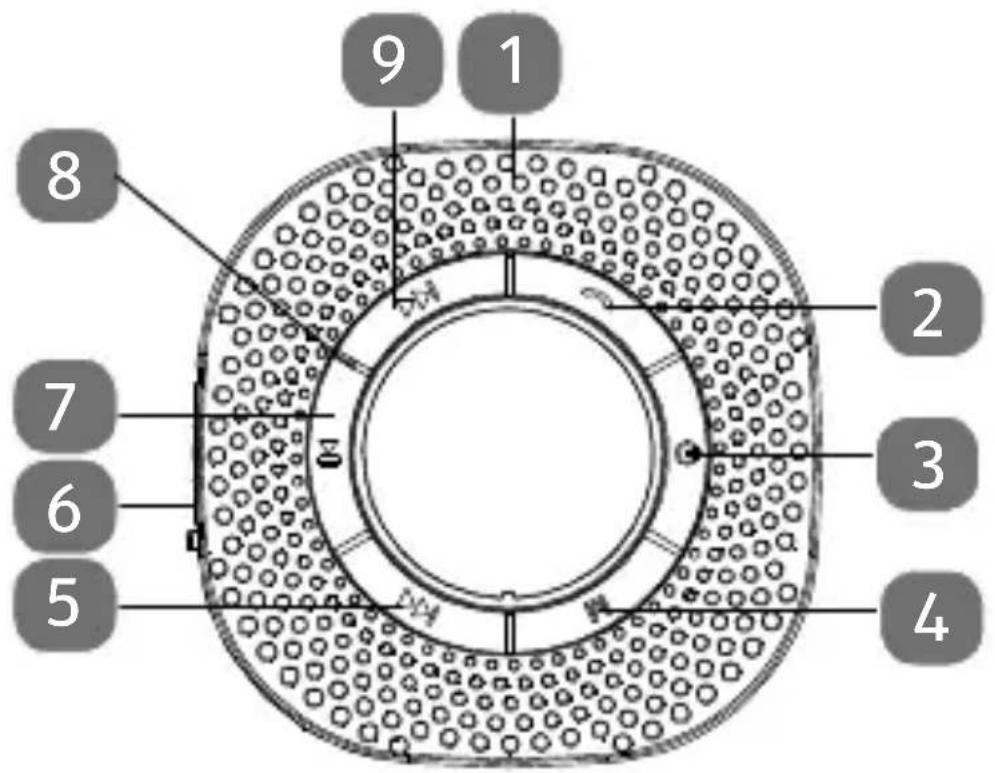
1 Speaker
2 Accept/reject calls
3 Switch device on/off
4 Mode selection button
5 Station search forward/next track/increase volume
6 Micro-USB connection for charging the internal battery
7 Start/stop/pause playback
8 Microphone
9 Station search backwards/previous track/decrease volume
4. Package contents
Please check your purchase to ensure that all items are included. If anything is missing, please contact us within 14 days of purchase. Included in the package:
- Bathroom radio
USB cable
Wrist strap - Operating instructions and warranty documents
5. Using the device for the first time
5.1. Charging the battery

NOTE!
The bathroom radio is powered by the integrated
3.7 V/750 mAh/2.78 Wh lithium-polymer battery.
Before use, this battery must be fully charged. The normal charging time for the battery is approx. 4 hours.
If the charge of the battery is too low, the battery symbol m fI ashes rapidly and the speaker switches off automatically.
The battery symbol flashes slowly during charging.
As soon as the battery is fully charged, the battery symbol lights up permanently.
6. Operation
6.1. Switching on the speaker
- Switch on the speaker by holding down the button for approx. 3 seconds.
The device is now ready for operation.
6.2. Setting clock time
Switch the speaker on.
Press and hold down the M button for approx. 3 seconds until neither FM nor is displayed and the timer points flash.
Now use the and buttons to set the hours and confirm this by pressing the button.
Now use the and buttons to set the minutes and confirm this by pressing the button.

NOTE
If no button is pressed for 10 seconds, the display switches off automatically. The bathroom radio remains in operation.
6.2.1. Setting the alarm
Press and hold down the button for approx. 3 seconds.
ALARM will appear in the display.
Press the or button until ON appears on the display and confirm the input by pressing the button.
Now use the and buttons to set the hours and confirm this by
pressing the button.
Now use the and buttons to set the minutes and confirm this by pressing the button.
Now use the and buttons to set the volume and confi rm this also by pressing the button.
6.3. Connecting the device via Bluetooth
Bluetooth mode enables the wireless reception of audio signals from an external Bluetooth-compatible audio output device. Ensure that the distance between the two devices is no greater than 10 metres.

NOTE
Only one Bluetooth device can be paired with the loudspeaker at a time. A simultaneous connection with a telephone and an audio
output source is not possible.
6.3.1. Bluetooth-compatible output device
Follow the instructions below to connect a Bluetooth-compatible audio output device:
- Switch on the speaker by holding down the button for approx. 3 seconds.
Press the M button several times until the *symbol flashes on the display.
The device is in search mode. During the search the symbol flashes on the display.
- Switch on the Bluetooth function on your audio output device and activate the search mode in order to pair the devices with one another.

NOTE
If necessary, refer to the relevant operating instructions of your audio playback device for information on the Bluetooth function.
The device name MD 43554 is displayed as soon as the signal is found.
The pairing of the two devices is completed when the symbol lights up permanently in the display.
6.3.2. Playback
Press the button to start or pause playback.
Hold down the button to jump to the next track.
Hold down the button to jump to the previous track.
Press the button to increase the volume.
Press the button to decrease the volume.
6.4. Setting the radio
- Switch on the speaker by holding down the button for approx. 3 seconds.
Press the M button repeatedly until FM and the current frequency light up on the display.
Press the button to increase the volume.
Press the button to decrease the volume.
6.4.1. Storing stations
Hold down the button to start an automatic station search.
The bathroom radio automatically saves all the received channels one after the other.
Press the button again during the station search to stop the station search.
Hold down the button to display the memory space and the frequency of the current station.
6.5. Mobile telephone
To connect a Bluetooth-compatible mobile telephone, follow these steps:
Switch on the speaker by holding down the button briefly.
- Switch on the speaker by holding down the button for approx. 3 seconds.
Press the M button several times until the symbol flashes on the display.
The device is in search mode. During the search the symbol flashes on the display.
- Switch on the Bluetooth function on your mobile phone and activate the search mode in order to pair the devices with one another.

NOTE
If necessary, refer to the relevant operating instructions of your audio playback device for information on the Bluetooth function.
The device name MD 43554 is displayed as soon as the signal is found. The pairing of the two devices is completed when the symbol lights up permanently in the display.
If you play music via your mobile phone (i.e. you use your mobile phone as an audio playback device), the music playback is stopped at an incoming call.
Press the button to accept a call via the Bluetooth speaker.
Press the button to end a call via the Bluetooth speaker.
Hold down the button to reject a call via the Bluetooth speaker.
Press the button 2 times to call the last dialled number via the Bluetooth speaker.

NOTE
Should there be any problems with communication in hands-free mode during or after a shower, the device must be dried with a towel to remove any moisture or water from the microphone
6.6. Switching off the speaker
- Switch off the speaker by holding down the button a little longer.
7. Maintenance

WARNING!
Risk of explosion!
Never leave a charging battery unattended.
Never try to open or repair the device yourself!
In the event of a fault, please contact the Service Centre or another suitable specialist workshop.
Contact your customer services if:
- Liquid has penetrated inside the loudspeaker.
- The loudspeaker is not working properly.
- The product has fallen or the housing is damaged.
8. Cleaning
- Do not use solvents, corrosive agents or aerosol-based cleaning agents.
Pieces of furniture often have various varnish finishes or synthetic coatings and are treated with a wide range of care products. Some of these substances contain components which can affect and weaken the loudspeaker feet. Use a non-slip underlay to prevent this problem where applicable.
8.6.1. No sound/distorted sound
Is the audio device switched on and have you started playback and set at least a medium volume?
Increase the volume if necessary. Is the loudspeaker volume set too high?
Reduce the volume as necessary.
8.6.2. The device cannot be switched on
Does the battery need charging?
Charge the battery if necessary.
9. Disposal

Packaging
Packaging and packaging materials which are no longer required can and should be recycled.
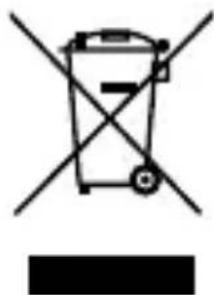
Correct disposal of this product
The device is fitted with a built-in high-performance lithium battery. Within the
EU, this symbol indicates that this product may not be thrown away with the household refuse. Old appliances contain valuable recyclable materials which should be disposed of through the proper channels in the interests of the environment and human health.
Therefore please use the collection systems provided or send the product back to the place where you bought it so that it can be disposed of correctly and recycled as appropriate.
10. Technical data
Speaker 2 W RMS output
Temperature 0°C to +35°C in use
Storage -20° C to +45° C temperature
Connections Micro-USB 5 V = - 500 mA
Frequency 87.5 MHz to 108.0 MHz
Bluetooth V4.0
Battery
DE
Type
Lithium
polymer FR
3.7 V/750 mAh/
NL
Battery
2.78 Wh
charging time
Approx. 4 hours
EN
11. Legal notice
Copyright © 2017
Status: 2017-04-03
All rights reserved.
This operating manual is protected by copyright.
Mechanical, electronic and any other form of reproduction is prohibited without the written permission of the manufacturer.
Copyright is owned by the company:
Medion AG Am Zehnhof 77 45307 Essen Germany
The operating manual can be reordered via the service hotline and is available for download via the service portal at www.medion.com/gb/service/start/.
You can also scan the QR code above and download the operating manual onto your mobile device via the service portal.
MEDION


- Inhaltsverzeichnis
- Akku
- Impressum
- About these operating
- instructions 99
- Safety instructions 105
- Overview of the device .110
- Operation 113
- Maintenance 122
- About these operating instructions
- Warning symbols and keywords used in these instructions
- Proper use
- Declaration of conformity
- Safety instructions
- People not permitted to use this device
- DANGER!
- Risk of suffocation!
- Operating safety
- Power supply
- Never carry out repairs yourself
- WARNING! Risk of electric shock!
- Overview of the device
- Package contents
- Using the device for the first time
- Charging the battery
- NOTE!
- Operation
- Switching on the speaker
- Setting clock time
- NOTE
- Setting the alarm
- Connecting the device via Bluetooth
- Bluetooth-compatible output device
- Playback
- Setting the radio
- Storing stations
- Mobile telephone
- Switching off the speaker
- Maintenance
- WARNING!
- Risk of explosion!
- Cleaning
- No sound/distorted sound
- The device cannot be switched on
- Disposal
- Packaging
- Correct disposal of this product
- Technical data
- Battery
- Legal notice
- Medion AG Am Zehnhof 77 45307 Essen Germany
- MEDION
Brand : MEDION
Model : LIFE E66554 (MD 43554)
Category : Radio