M12 HammerVac 230622 - Vacuum Cleaner MILWAUKEE - Free user manual and instructions
Find the device manual for free M12 HammerVac 230622 MILWAUKEE in PDF.


| Product type | Drill dust extractor vacuum |
| Brand | Milwaukee |
| Model | M12 HammerVac 230622 |
| Power source | 12V lithium-ion battery (M12) |
| Battery type | M12 |
| Charger type | M12 |
| Max drill bit diameter | 16 mm (5/8") |
| Clamping collars | 3 sizes: S (∅43-46mm), M (∅48-55mm), L (∅56-59mm) |
| Operating temperature | -18°C to 50°C |
| Filter | HEPA (ref. 49-90-2306) |
| Dust container capacity | Approximately 1,500 holes before emptying (depending on use) |
| Operating modes | AUTO, ON, OFF |
| Filter cleaning | Built-in cleaning button |
| Depth gauge | Adjustable |
| Drill bit brush | Included for sealing |
| Side handle | Adjustable with clamping collar |
| Nozzle | Removable and interchangeable (ref. 49-90-2300) |
| Warranty | 5 years (tool, under conditions) |
| Recommended use | Rotary/hammer drills |
| Approximate weight | 0.9 kg |
Frequently Asked Questions - M12 HammerVac 230622 MILWAUKEE
User questions about M12 HammerVac 230622 MILWAUKEE
0 question about this device. Answer the ones you know or ask your own.
Ask a new question about this device
Download the instructions for your Vacuum Cleaner in PDF format for free! Find your manual M12 HammerVac 230622 - MILWAUKEE and take your electronic device back in hand. On this page are published all the documents necessary for the use of your device. M12 HammerVac 230622 by MILWAUKEE.
USER MANUAL M12 HammerVac 230622 MILWAUKEE
natural_image
Line drawing of a firearm with internal components and a stand (no text or symbols)Cat. No. / No de cat. 2306-20
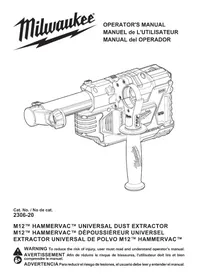
M12™ HAMMERVAC™ UNIVERSAL DUST EXTRACTOR M12™ HAMMERVAC™ DÉPOUSSIÉREUR UNIVERSEL EXTRACTOR UNIVERSAL DE POLVO M12™ HAMMERVAC™

WARNING To reduce the risk of injury, user must read and understand operator's manual.
IMPORTANT SAFETY INSTRUCTIONS
WARNING
WHEN USING AN ELECTRI- CAL DUST EX-
TRACTOR, BASIC PRECAUTIONS SHOULD ALWAYS BE FOLLOWED, INCLUDING THE FOLLOWING: READ ALL INSTRUCTIONS BEFORE USING DUST EXTRACTOR. FOR HOUSEHOLD OR COMMERCIAL USE. BEFORE USING THE DUST EXTRACTOR, READ THIS OPERATOR'S MANUAL, YOUR TOOL, BATTERY PACK AND CHARGER OPERATOR'S MANUALS, AND ALL LABELS ON THE DUST EXTRACTOR, BATTERY PACK, CHARGER AND TOOL.
WORK AREA SAFETY
- Keep work area clean and well lit. Cluttered or dark areas invite accidents.
- Dust extractors have motors and other parts that can produce sparks during normal use. Do not use within 30 feet of areas where explosive materials may be present (such as gasoline pumps and places where liquids like paint thinners, cleaners, solvents, etc. are stored).
- Do not use in the presence of explosive dust, liquids or vapors.
- Do not use where oxygen or anesthetics are used.
- Do not allow to be used as a toy. Close attention is necessary when used by or near children.
- Use extra care when using on stairs.
ELECTRICAL SAFETY
- Do not pick up wet material. Do not use water to settle dust.
- Do not handle battery pack or dust extractor with wet hands.
PERSONAL SAFETY
- STAY ALERT. Watch what you are doing and use common sense. Do not use dust extractor when you are tired, distracted or under the influence of drugs, alcohol or medication causing diminished control.
- The operation of a dust extractor can result in for eign objects being blown into eyes, which can result in eye damage. Always wear safety goggles or glasses with side shields when operating dust extractor.
- Wear a dust mask or use an OSHA compliant dust extraction solution when working in dusty situations. Dust particles can harm your lungs.
- Avoid accidental starting. Ensure the switch is in the off-position before inserting battery pack. Inserting battery pack in dust extractor that has the switch on invites accidents.
-
Do not overreach. Keep proper footing and balance at all times. This enables better control of the dust extractor in unexpected situations.
-
Keep hair, loose clothing, fingers, and all parts of body away from openings and moving parts.
- Use only as described in this manual. Use only manufacturer's recommended attachments.
USE AND CARE
- Do not use without dust box and/or filter in place.
- Do not use to pick up flammable or combustible liquids such as gasoline or use in areas where they may be present.
- Do not pick up anything that is burning or smoking such as cigarettes, matches, or hot ashes.
- Do not pick up soot, cement, plaster or drywall dust without filter in place. These are very fine particles that may affect the performance of the motor or be exhausted back into the air.
- This product is suitable for collection of silica dust when used in accordance with these instructions. To reduce the risk of health hazards from other vapors or dust, do not vacuum carcinogenic, toxic or hazardous materials such as asbestos, arsenic, barium, beryllium, lead, pesticides or other health endangered materials.
- WARNING: Some dust created by power sanding, sawing, grinding, drilling, and other construction activities contains chemicals known to cause cancer, birth defects or other reproductive harm. Some examples of these chemicals are:
- lead from lead-based paint
• crystalline silica from bricks and cement and other masonry products, and
• arsenic and chromium from chemically-treated lumber. Your risk from these exposures varies, depending on how often you do this type of work. To reduce your exposure to these chemicals: work in a well ventilated area, and work with approved safety equipment, such as those dust masks that are specially designed to filter out microscopic particles. - Use special care when emptying heavily loaded tanks.
- To avoid spontaneous combustion, empty dust box after each use.
- Do not leave dust extractor unattended when battery pack is installed. Remove battery pack when not in use and before servicing.
- Do not put any object into openings. Do not use with any opening blocked; keep free of dust, lint, hair, and anything else that may reduce air flow.
- Maintain dust extractor. Check for misalignment or binding of moving parts, breakage of parts and any other condition that may affect the dust extractor's operation. If damaged, have the dust extractor repaired before use. Many accidents are caused by poorly maintained tools.
- Maintain labels and nameplates. These carry important information. If unreadable or missing, contact a MILWAUKEE service facility for a free replacement.
BATTERY PACK USE AND CARE
- Use dust extractor only with specifically designated battery packs. Use of any other battery packs may create a risk of injury and fire.
- Turn off all controls before removing battery pack.
- To reduce the risk of electric shock, do not use on wet surfaces. Do not expose to rain. Store indoors.
- Before using the battery pack or charger read the operator's manuals, and any labels on the battery pack, charger and dust extractor.
- Recharge only with the charger specified by the manufacturer. A charger that is suitable for one type of battery pack may create a risk of fire when used with another battery pack.
- When battery pack is not in use, keep it away from other metal objects like paper clips, coins, keys, nails, screws, or other small metal objects that can make a connection from one terminal to another. Shorting the battery terminals together may cause burns or a fire.
- Do not use damaged battery pack or dust extractor. If battery pack or dust extractor are not working as they should, have been dropped, damaged, left outdoors, or dropped into water, return them to a service center.
SERVICE
- Have your power tool serviced by a qualified repair person using only identical replacement parts. This will ensure that the safety of the power tool is maintained.
SPECIFIC SAFETY RULES FOR DUST EXTRACTORS
- Before using the dust extractor, read this operator's manual, your tool, battery pack and charger operator's manuals, and all labels on the dust extractor, battery pack, charger and tool.
- Always use side handle assembly with the correct neck diameter for the rotary hammer/hammer drill. An ill-fitting side handle will not tighten securely, causing loss of control.
- Never use dust extractor without dust box and HEPA filter in place. Never use water to clean dust box or HEPA filter.
- Wear ear protectors. Exposure to noise can cause hearing loss.
•WARNING To reduce the risk of injury, wear a dust mask or use an OSHA compliant dust extraction solution when working in dusty situations. Dust particles can harm your lungs.
• Always use side handle provided with dust extractor when using with a rotary hammer/hammer drill. When dust extractor is removed from the tool, always use side handle(s) supplied with the tool. Loss of control can cause personal injury. - Hold power tool by insulated gripping surfaces, when performing an operation where the fastener may contact hidden wiring. Fasteners contacting a “live” wire may make exposed metal parts of the power tool “live” and could give the operator an electric shock.
READ AND
SAVE ALL
INSTRUCTIONS FOR FUTURE USE
SYMBOLOGY


Direct Current

UL Listing for Canada and U.S.
SPECIFICATIONS
Cat. No....2306-20
Dust Box Cat. No....49-90-2340
Volts.... 12 DC
Battery Type ......M12™
Charger Type....M12™
Max Bit Diameter 5/8"
Hammer Collar Sizes
Diameter Circumference
S = ∅ 43-46 mm (1.7"-1.8") 135-144.5 mm (5.3"-5.7")
M = ∅ 48-55 mm (1.9"-2.2") 151-173 mm (5.9"-6.8")
L = ∅ 56-59 mm (2.2"-2.3") 176-185 mm (6.9"-7.3")
Recommended Ambient
Operating Temperature....0°F to 125°F
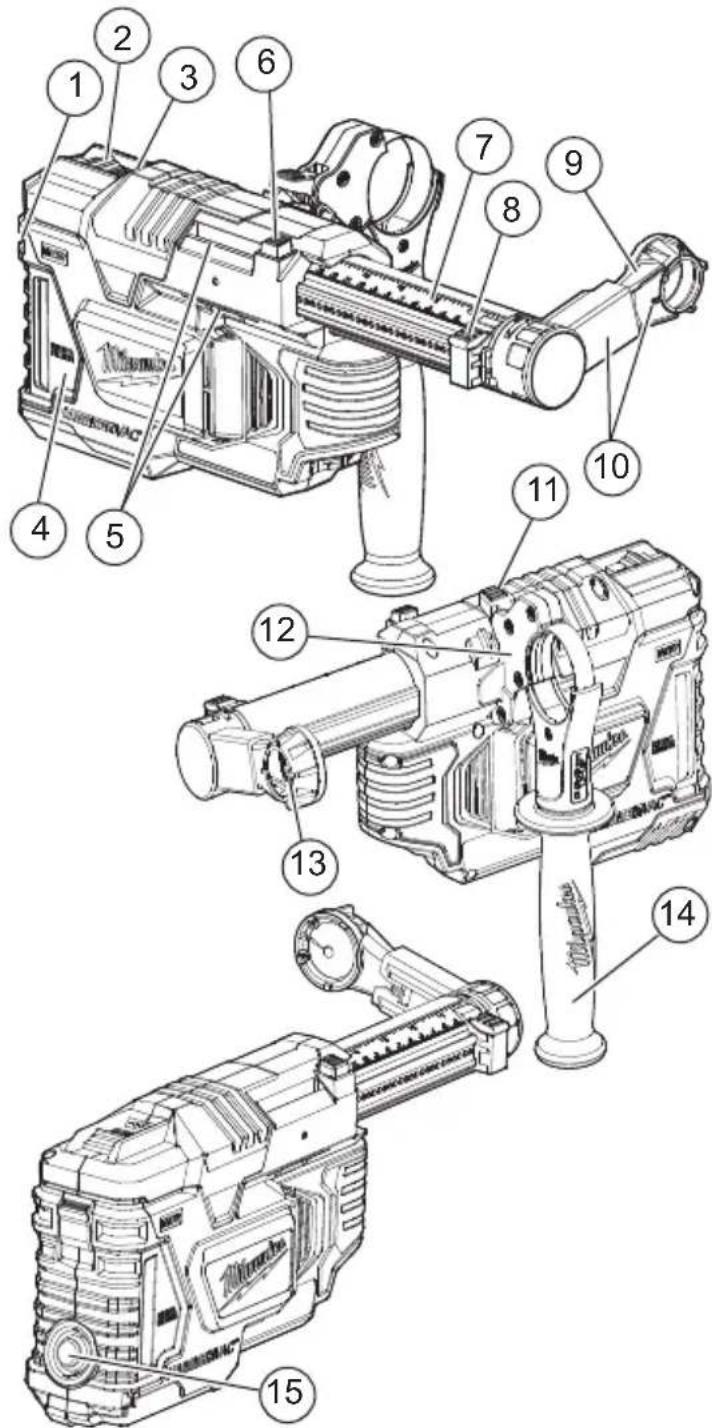
- Dust Box Latch
- Power Switch
- Fuel Gauge
- Dust Box with Filter
- Side Handle Clamp Attachment Point
- Tool and Bit Adjustment Button
- Depth Gauge
- Depth Gauge Button
- Nozzle
- Nozzle Assembly
- Clamp Lever
- Side Handle Clamping Collar Assembly
- Bit Brush
- Side Handle Grip
- Filter Cleaning Button
AWARNING Recharge only with the charger specified for the battery. For specific charging instructions, read the operator's manual supplied with your charger and battery.
Removing/Inserting the Battery
To remove the battery, push in the release buttons and pull the battery pack away from the tool.
WARNING Always remove battery pack before changing or removing accessories.
To insert the battery, slide the pack into the body of the tool. Make sure it latches securely into place.
⚠WARNING Only use accessories specifically recommended for this tool. Others may be hazardous.
To reduce the risk of injury, always remove the battery pack before removing the dust box. Do not use tool without dust box and HEPA filter in place.
Installing/Removing the Dust Box and HEPA Filter
To remove the dust box:
- Turn OFF the tool.
- Remove the battery pack.
- Press the dust box latch down.
- Pull the dust box away from the HAMMERVAC™.
- Empty dust from the dust box.
- If necessary, pull the HEPA filte away from the dust box and tap clean. Do not clean with water or compressed air. After about of suction, discard and replace No. 49-90-2306).
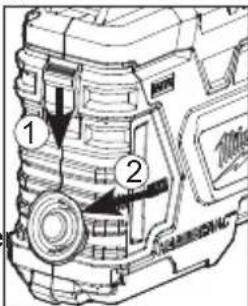
1500 holes or loss
HEPA filter (Cat.
To install the dust box:
-
Slide the dust box into the body of the HAMMERVAC™.
-
The dust box latch should snap into place.
NOTE: Do not operate the HAMMERVAC™ without the dust box and HEPA filter in place. Dust box cannot be installed without HEPA filter.
⚠️CAUTION Keep filter clean. Efficiency of the HAMMERVAC™ is largely dependent on the filter. A dirty filter will reduce the air flow and overall efficiency of the system. Do not clean with water or compressed air. Remove from dust box and tap clean.
Installing/Removing Nozzle Assembly
To install the nozzle assembly supplied with the tool, or accessory nozzles:
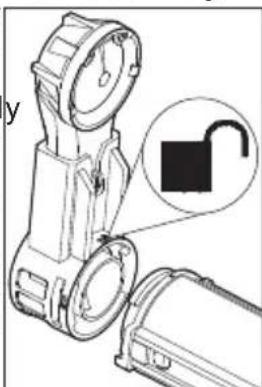
- With the nozzle assembly pointing straight up, line up the lugs of the nozzle assembly with the lugs on the front of the HAMMERVAC™. The unlock symbol 📋 on the nozzle assembly will line up with the mark on the top of the HAMMERVAC™.
natural_image
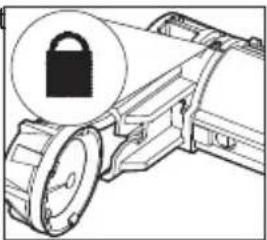
Technical illustration of a flashlight with an open padlock symbol (no text or labels)- Turn the nozzle assembly left or right to lock into place. The lock symbol 📄 on the nozzle assembly will line up with the mark on the top of the HAMMERVAC™.
natural_image
Mechanical component diagram showing a lock icon and gear mechanism (no text or symbols)- To remove, reverse the procedure.
Installing/Removing Nozzle
Replace the nozzle:
• After drilling about 1500 holes,
- When the bit brush shows signs of wear,
- When suction is reduced,
- When dust escapes through the bit brush during use
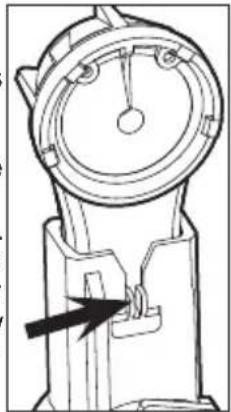
To replace the nozzle (Cat. No. 49-90-2300), press in the release button and pull out from the lower nozzle assembly. Slide the new nozzle into the lower nozzle assembly until it snaps into place.
natural_image
Technical line drawing of a mechanical device with a dial and arrow indicating motion (no text or symbols)Attaching the HAMMERVAC™ to a Rotary Hammer/Hammer Drill
The HAMMERVAC ^™ is provided with three clamping collar assemblies and one side handle grip. Choose the correct clamping collar assembly for the tool being used (see Specifications). The side handle grip should be unscrewed from one assembly to be used on another.
- Turn OFF, remove the battery pack from the HAMMERVAC™, and disconnect power from the tool.
- Remove the tool side handle.
-
Partially screw side handle grip onto clamping collar assembly.
-
Slide the HAMMERVAC™ side handle clamping collar assembly over the chuck and onto the neck of the tool. The clamp lever must be facing up (3).
-
Attach the side handle clamping collar assembly onto the HAMMERVAC™, first the upper jaw, then low
-
Press down the clamp lever (3) to secure the clamping collar assembly to the HAMMERVAC™.
- Rotate the HAMMERVAC™ and side handle grip to the desired position, and tighten securely.
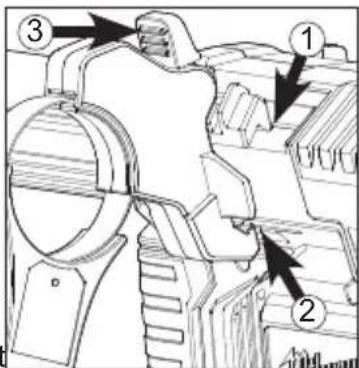
Adjusting the Side Handle Position
- Loosen the side handle clamping collar assembly by unscrewing the side handle grip until the side handle clamping collar assembly rotates freely.
- Rotate the side handle grip to the desired position.
- Tighten the side handle grip securely.
Installing/Removing the Bit
Slide the bit through the nozzle and then install into the tool according to the tool manufacturer's instructions. For best results, use a bit 6" in length or shorter.
Fitting the HAMMERVAC™ to the Tool and Bit
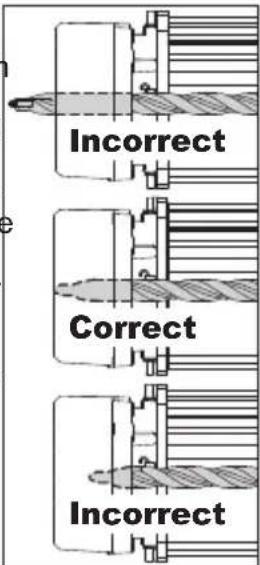
For proper suction and depth control, position the nozzle assembly so the bit is flush with the forward face of the nozzle:
-
Press and hold the tool and bit adjustment button.
-
Push in the nozzle assembly until the bit is flush with the front face of the nozzle.
-
Release the tool and bit adjustment button.
NOTE: Fully extend the HAMMERVAC™ before storing to preserve spring life.
Setting the Drilling Depth
- Fit the HAMMERVAC ^TM to the Tool and Bit.
- Press and hold the depth gauge button and slide the depth gauge to the desired depth. The drilling depth is the last visible measurement shown when viewed from the top of the tool. To ensure the HAMMERVAC ^™ is properly set to the tool, bit, and desired depth, always drill a test hole.
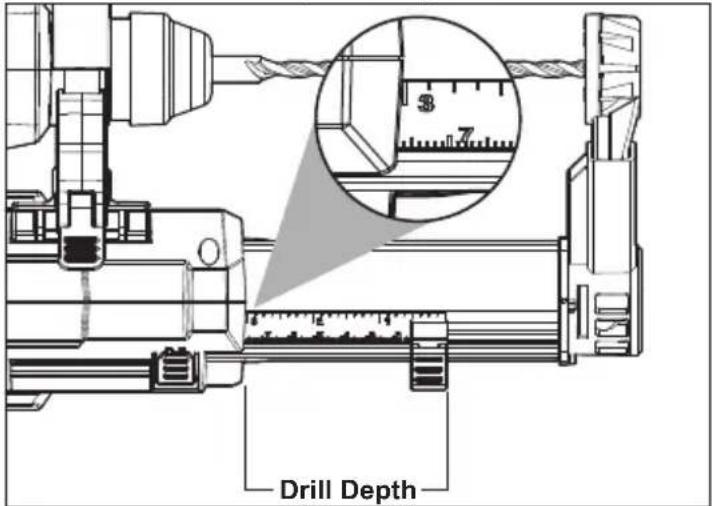
NOTE: When using the optional Crevice Tool accessory, set the drill depth to 0.
OPERATION
⚠WARNING To reduce the risk of fire and injury, do not use to pick up flammable or combustible materials. Empty dust box completely before use.
To reduce the risk of injury, wear safety goggles or glasses with side shields.
To reduce the risk of injury, wear a dust mask or use an OSHA compliant dust extraction solution.
Using the Power Switch
AUTO To set the HAMMERVAC™ to start automatically as a hole is being drilled, move the power switch to the AUTO position. When the nozzle assembly is pushed in, the HAMMERVAC™ will run. NOTE: The HAMMERVAC™ will continue to run 3-5 seconds after the tool has fully extended to ensure all dust is captured in dust box.
ON To turn the tool ON, move the power switch
to the ON position. The HAMMERVAC ^™ will run continuously.
OFF To turn the tool OFF, move the power switch to the OFF position.
Proper Operation
- Empty the dust box.
- Install and position the nozzle assembly to the desired side.
- Attach side handle clamping collar assembly and grip to tool.
- Fit the HAMMERVAC ^TM to the Tool and Bit.
- Set the drill depth.
- Install the battery pack.
- Turn HAMMERVAC ^TM to ON or AUTO.
- Begin use according to tool manufacturer instructions.
NOTE: For optimal use, press the filter cleaning button until it clicks after every five holes drilled.
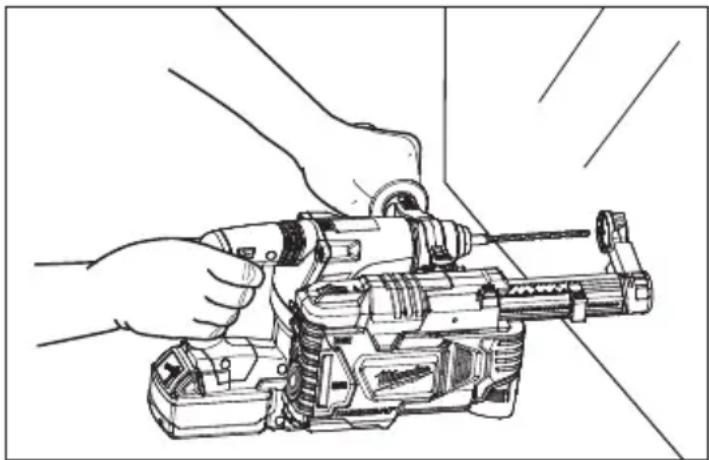
- Always hold the tool securely using both handles to maintain control.
NOTE: For optimal use, press the filter cleaning button until it clicks after every five holes drilled. 9. Always hold the tool securely using both handles to maintain control.
natural_image
Line drawing of hands operating a mechanical tool with a drill bit (no text or symbols)- Stop and empty dust box:
- When suction decreases,
- When dust begins to come through the bit brush.
- When suction decreases, - When dust begins to come through the bit brush.
NOTE: Before emptying the dust box, press the filter cleaning button until it clicks and remove filter.
MAINTENANCE
WARNING
To reduce the risk of injury, always unplug the charger and remove the
battery pack from the charger or tool before performing any maintenance. Never disassemble the tool, battery pack or charger. Contact a MILWAUKEE service facility for ALL repairs.
Maintaining Tool
Keep your tool, battery pack and charger in good repair by adopting a regular maintenance program. Inspect your tool for issues such as undue noise, misalignment or binding of moving parts, breakage of parts, or any other condition that may affect the tool operation. Return the tool, battery pack, and charger to a MILWAUKEE service facility for repair. After six months to one year, depending on use, return the tool, battery pack and charger to a MILWAUKEE service facility for inspection.
If the tool does not start or operate at full power with a fully charged battery pack, clean the contacts on the battery pack. If the tool still does not work properly, return the tool, charger and battery pack, to a MILWAUKEE service facility for repairs.
WARNING To reduce the risk of personal injury and damage, never immerse your tool, battery pack or charger in liquid or allow a liquid to flow inside them.
Cleaning
Clean dust and debris from vents. Keep handles clean, dry and free of oil or grease. Use only mild soap and a damp cloth to clean, since certain cleaning agents and solvents are harmful to plastics and other insulated parts. Some of these include gasoline, turpentine, lacquer thinner, paint thinner, chlorinated cleaning solvents, ammonia and household detergents containing ammonia. Never use flammable or combustible solvents around tools.
Repairs
For repairs, return the tool, battery pack and charger to the nearest service center.
ACCESSORIES
WARNING
Use only recommended accessories. Others may be hazardous.
For a complete listing of accessories, go online to www.milwaukeetool.com or contact a distributor.
SERVICE - UNITED STATES
1-800-SAWDUST (1.800.729.3878)
Monday-Friday, 7:00 AM - 6:30 PM CST
or visit www.milwaukeeetool.com
Contact Corporate After Sales Service Technical Support with technical, service/repair, or warranty questions.
Email: metproductsupport@milwaukeeetool.com
Become a Heavy Duty Club Member at www.milwaukeetool.com to receive important notifications regarding your tool purchases.
SERVICE - CANADA
Milwaukee Tool (Canada) Ltd 1.800.268.4015
Monday-Friday, 7:00 AM - 4:30 PM CST
or visit www.milwaukeeetool.ca
LIMITED WARRANTY USA & CANADA
Every MILWAUKEE power tool* (see exceptions below) is warranted to the original purchaser only to be free from defects in material and workmanship. Subject to certain exceptions, MILWAUKEE will repair or replace any part on an electric power tool which, after examination, is determined by MILWAUKEE to be defective in material or workmanship for a period of five (5) years** after the date of purchase unless otherwise noted. Return of the power tool to a MILWAUKEE factory Service Center location or MILWAUKEE Authorized Service Station, freight prepaid and insured, is required. A copy of the proof of purchase should be included with the return product. This warranty does not apply to damage that MILWAUKEE determines to be from repairs made or attempted by anyone other than MILWAUKEE authorized personnel, misuse, alterations, abuse, normal wear and tear, lack of maintenance, or accidents.
Normal Wear: Many power tools need periodic parts replacement and service to achieve best performance. This warranty does not cover repair when normal use has exhausted the life of a part including, but not limited to, chucks, brushes, cords, saw shoes, blade clamps, o-rings, seals, bumpers, driver blades, pistons, strikers, lifters, and bumper cover washers.
*This warranty does not cover Air Nailers & Staplers; Airless Paint Sprayer; Cordless Battery Packs; Gasoline Driven Portable Power Generators; Hand Tools; Hoist – Electric, Lever & Hand Chain; M12™ Heated Gear; Reconditioned Product; and Test & Measurement Products. There are separate and distinct warranties available for these products.
**The warranty period for Job Site Radios, M12™ Power Port, M18™ Power Source, Jobsite Fan and Trade Titan™ Industrial Work Carts is one (1) year from the date of purchase. The warranty period for the Drain Cleaning Cables is two (2) years from the date of purchase. The
warranty period for the M18 ^™ Compact Heat Gun and the 8 Gallon Dust Extractor is three (3) years from the date of purchase. The warranty period for the LED in the LED Work Light and the LED Upgrade Bulb for the Work Light is the lifetime of the product subject to the limitations above. If during normal use the LED or LED Bulb fails, the part will be replaced free of charge.
Warranty Registration is not necessary to obtain the applicable warranty on a MILWAUKEE power tool product. The manufacturing date of the product will be used to determine the warranty period if no proof of purchase is provided at the time warranty service is requested. ACCEPTANCE OF THE EXCLUSIVE REPAIR AND REPLACEMENT REMEDIES DESCRIBED HEREIN IS A CONDITION OF THE CONTRACT FOR THE PURCHASE OF EVERY MILWAUKEE PRODUCT. IF YOU DO NOT AGREE TO THIS CONDITION, YOU SHOULD NOT PURCHASE THE PRODUCT. IN NO EVENT SHALL MILWAUKEE BE LIABLE FOR ANY INCIDENTAL, SPECIAL, CONSEQUENTIAL OR PUNITIVE DAMAGES, OR FOR ANY COSTS, ATTORNEY FEES, EXPENSES, LOSSES OR DELAYS ALLEGED TO BE AS A CONSEQUENCE OF ANY DAMAGE TO, FAILURE OF, OR DEFECT IN ANY PRODUCT INCLUDING, BUT NOT LIMITED TO, ANY CLAIMS FOR LOSS OF PROFITS. SOME STATES DO NOT ALLOW THE EXCLUSION OR LIMITATION OF INCIDENTAL OR CONSEQUENTIAL DAMAGES, SO THE ABOVE LIMITATION OR EXCLUSION MAY NOT APPLY TO YOU. THIS WARRANTY IS EXCLUSIVE AND IN LIEU OF ALL OTHER EXPRESS WARRANTIES, WRITTEN OR ORAL. TO THE EXTENT PERMITTED BY LAW, MILWAUKEE DISCLAIMS ANY IMPLIED WARRANTIES, INCLUDING WITHOUT LIMITATION ANY IMPLIED WARRANTY OF MERCHANTABILITY OR FITNESS FOR A PARTICULAR USE OR PURPOSE; TO THE EXTENT SUCH DISCLAIMER IS NOT PERMITTED BY LAW, SUCH IMPLIED WARRANTIES ARE LIMITED TO THE DURATION OF THE APPLICABLE EXPRESS WARRANTY AS DESCRIBED ABOVE. SOME STATES DO NOT ALLOW LIMITATIONS ON HOW LONG AN IMPLIED WARRANTY LASTS, SO THE ABOVE LIMITATION MAY NOT APPLY TO YOU, THIS WARRANTY GIVES YOU SPECIFIC LEGAL RIGHTS, AND YOU MAY ALSO HAVE OTHER RIGHTS WHICH VARY FROM STATE TO STATE.
This warranty applies to product sold in the U.S.A. and Canada only. Please consult the 'Service Center Search' in the Parts & Service section of MILWAUKEE's website www.milwaukeeetool.com or call 1.800.SAWDUST (1.800.729.3878) to locate your nearest service facility for warranty and non-warranty service on a Milwaukee electric power tool.
LIMITED WARRANTY - MEXICO, CENTRAL AMERICA & CARIBBEÁN
TECHTRONIC INDUSTRIES' warranty is for 5 years since the original purchase date.
This warranty card covers any defect in material and workmanship on this Product.
To make this warranty valid, present this warranty card, sealed/ stamped by the distributor or store where you purchased the product, to the Authorized Service Center (ASC). Or, if this card has not been sealed/stamped, present the original proof of purchase to the ASC. Call toll-free1 01 (800) 030-7777 to find the nearest ASC, for service parts, accessories or components.
Procedure to make this warranty valid
Take the product to the ASC, along with the warranty card sealed/stamped by the distributor or store where you purchased the product, and any faulty piece or component will be replaced without cost for you. We will cover all freight costs relative with this warranty process.
Exceptions
This warranty is not valid in the following situations
a) When the product is used in a different manner from the end-user guide or instruction manual.
b) When the conditions of use are not normal.
c) When the product was modified or repaired by people not authorized by TECHTRONIC INDUSTRIES.
Note: If cord set is damaged, it should be replaced by an Authorized Service Center to avoid electric risks.
SERVICE AND ATTENTION CENTER
Call to 01 (800) 030-7777
IMPORTED AND COMMERCIALIZED BY
TECHTRONIC INDUSTRIES MEXICO, SA DE CV
Av President Masarik #29 piso 7, Col. Polanco V Sección
CP 11560, Deleg. Miguel Hidalgo, CDMX
Model:
Date of Purchase:
Distributor or Store Stamp:
RÈGLES GÉNÉRALES DE SÉCURITÉ
AVERTISSEMENT
LORSQUE VOUS UTILISEZ UN DÉPOUSSIÉREUR ÉLECTRIQUE, VOUS DEVEZ SUIVRE CES PRÉCAUTIONS DE BASE: VEUILLEZ LIRE TOUTES LES INSTRUCTIONS AVANT D'UTILISER LE DÉPOUSSIÉREUR. POUR UTILISATION DOMESTIQUE OU COMMERCIALE. AVANT D'UTILISER LE DÉPOUSSIÉREUR, VEUILLEZ LIRE LE MANUEL DE L'UTILISATEUR, LES MANUELS DE L'OUTIL, DE LA BATTERIE ET DE SON CHARGEUR, AINSI QUE TOUTES LES ÉTIQUETTES SUR LE DÉPOUSSIÉREUR, LA BATTERIE, SON CHARGEUR ET L'OUTIL.
SÉCURITÉ DU LIEU DE TRAVAIL
natural_image
Technical illustration of a flashlight with an open padlock symbol, no text or labels present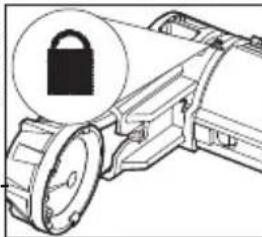
natural_image
Diagram of a mechanical device with a lock icon and gear mechanism (no text or symbols)Installer/retirer la buse
Remplacer la buse:
natural_image
Technical line drawing of a mechanical device with a dial and handle (no text or symbols)natural_image
Line drawing of hands operating a mechanical device with a drill bit (no text or symbols)Milwaukee Tool (Canada) Ltd 1.800.268.4015
Monday-Friday, 7:00 AM - 4:30 PM CST www.milwaukeetool.ca
GARANTIE LIMITÉE -
AUX ÉTATS-UNIS ET AU CANADA
natural_image
Technical line drawing of a mechanical device with an open padlock icon (no text or symbols)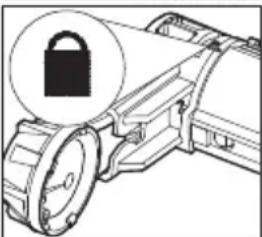
natural_image
Diagram of a mechanical device with a lock icon and gear mechanism (no text or symbols)natural_image
Technical line drawing of a mechanical device with a dial and handle (no text or symbols)natural_image
Line drawing of hands operating a drill press machine (no text or symbols present)Lunes a Viernes (9am a 6pm)
13135 West Lisbon Road
Brookfield, WI 53005 USA
58142306d5 961013016-02(A)
08/19 Printed in China