USER MANUAL BebèCare easytech CHICCO


natural_image
Hand holding a white handheld device with a small screen showing the 'Baby' logo (no text or symbols on the device itself)
natural_image
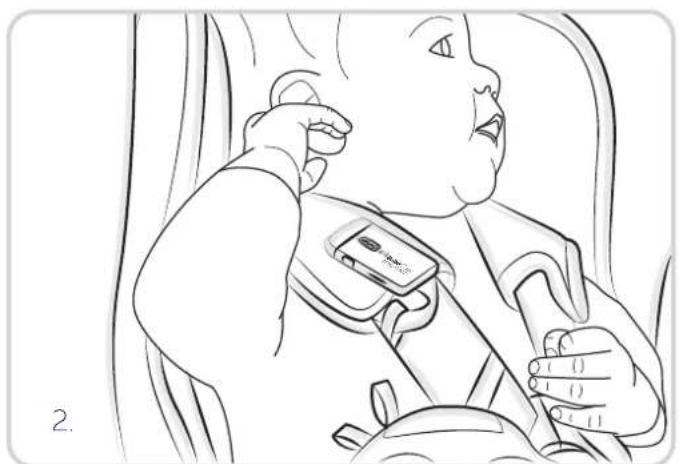
Line drawing of a baby wearing a seatbelt, seated in a car (no text or symbols)

natural_image
Illustration of hands using a tool to adjust or install a small mechanical component (no text or symbols visible)
natural_image
Line drawing of hands assembling a flip-flop device with a red upward arrow indicating motion (no text or symbols)

natural_image
Illustration of hands installing or adjusting a device component, showing a close-up view of the internal structure (no text or symbols)
natural_image
Line drawing of hands using a screwdriver to adjust or install a small mechanical component (no text or symbols)


BebèCare easy-tech
1. CHICCO BEBÈCARE EASY-TECH
1.1 COME ATTIVARE CHICCO BEBÈCARE EASY-TECH
1.2 COME FUNZIONA CHICCO BEBÈCARE EASY-TECH
1.3 UTILIZZO DELLA APP CHICCO BEBÈCARE SU PIÙ DISPOSITIVI /SMARTPHONE
1.4 GESTIONE MULTIPLA DI DISPOSITIVI APPARTENENTI ALLA FAMIGLIA CHICCO BEBÈCARE
1.5 ALLARMI INTELLIGENTI
1.6 NOTIFICA PERIODICA BIMBO A BORDO PER UN PERIODO DI TEMPO PROLUNGATO
1.7 BATTERIA
1.8 DISPOSING OF THE PRODUCT
1.8.1 THIS PRODUCT COMPLIES WITH THE DIRECTIVE 2012/19/EU.
1.8.2 COMPLIANT WITH EU DIRECTIVE 2006/66/EC as amended.
1. CHICCO BEBÈCARE EASY-TECH
Chicco BebeCare easy-tech is a universal anti-abandonment system designed and developed to signal the presence of a child in the car and alert users when they accidentally leave the car without the child.
DISCLAIMER
- The use of this technology does not replace in any manner the responsibility and/or supervision of the vehicle driver (and/or its occupants). Chicco BebeCare easy-tech represents only a support aid: Never leave the child unattended in the car.
- Artsana cannot be held liable in any manner in the case of damaging events and/or consequences (also related to the incorrect operation of the electronic equipment) of any type, as Chicco BebeCare easy-tech is solely intended to be an aid and alarm to prevent events and/or consequences caused by forgetfulness.
- Use of the equipment does not in any way replace the supervision and responsibility of the driver/caregiver/supervisor/tutor or anyone who is taking care of the baby.
SAFETY WARNINGS
- Chicco BebèCare easy-tech is not waterproof and if it comes into contact with liquids of any kind it could stop working.
- The correct preservation of Chicco BebèCare easy-tech is important to ensure unaltered operation of Chicco BebèCare unaltered and must respect the limitations of temperature (from -20^ to +60^ ) and humidity ( <95% ).
- Attenzione! Rischio di esplosione se viene sostituita la batteria con una di tipo errato.
- Warning! Risk of explosion if the battery is replaced with one of the wrong type.
CAUTION
Do not ingest battery, Chemical Burn Hazard.
This product contains a button cell battery.
If the button cell battery is swallowed, it can cause severe internal burns in just 2 hours and can lead to death.
Keep new and used batteries away from children.
If the battery compartment does not close securely, stop using the product and keep it away from children.
If you think batteries might have been swallowed or placed inside any part of the body, seek immediate medical attention.
- Check that the smartphone is on and has enough battery life when using Chicco BebeCare easy-tech.
- During the first installation, each time the family account is entered and when alarm messages are sent, an internet connection must be available (mobile data or Wi-Fi network).
- Chicco BebèCare easy-tech only works together with a smartphone that has the Chicco BebèCare APP installed.
- If the smartphone is turned off, the Chicco BebeCare easy-tech system may not work.
- If the Bluetooth® on the smartphone is damaged, the Chicco BebeCare easy-tech system will not work.
- If there is no internet connection (mobile network or WiFi), the app may not function fully.
- If the smartphone airplane mode is activated, the Chicco BebeCare easy-tech system will not work.
- The Chicco BebeCare APP may only be downloaded from official stores.
- If there is no internet connection (mobile network of WiFi), Chicco BebeCare easy-tech will correctly activate alarm 0 and the first level alarm, but it may not be able to send the alarm messages to the emergency numbers (second level alarm).
- Constant access to smartphone position must be permitted through localisation permissions in order for the Chicco BebeCare APP to support the full operation of the system.
- For smartphone with iOS operating system, for each new
«Log in» you need to tap on the associated device to connect it. To maintain the automatic connection between the Chicco BebèCare easy-tech device and the Chicco BebèCare, we suggest that you do not to log out unless absolutely necessary.
- Do not quit the App (do not switch up the App) in order to guarantee the correct functioning of the system in any condition.
- In order to verify the correct operation of Chicco BebèCare easy-tech, it is important to periodically carry out tests to open/close the accessory, verifying the relative state of the APP (Chapter 1.1, paragraph (e))
Failure to comply with the above will result in malfunctioning of Chicco BebèCare easy-tech and/or the Chicco BebèCare APP and the consequent disabling of the system and/or failure to send and/or receive alarm messages.
CAUTION
Check to perform each time Chicco BebeCare easy-tech is used:
- Check that the smartphone is on and has enough battery life when using Chicco BebeCare easy-tech.
- Bluetooth® must be active.
- "Airplane" mode must be deactivated.
• GPS must always be active.
Check the Chicco BebèCare APP for sufficient alarm messages. If this is not the case, proceed with the purchase of the necessary package.
- If two or more smartphones are used that have the Chicco BebeCare APP installed, it is necessary to identify which one is actually connected to the equipment.
- Before each trip, check that the equipment is completely closed and that the state detected by the Chicco BebeCare APP is "connected - child seated."
Failure to comply with the above will result in malfunctioning of Chicco BebèCare easy-tech and/or the Chicco BebèCare APP and the consequent disabling of the system and/or failure to send and/or receive alarm messages.
1.1 HOW TO ACTIVATE CHICCO BEBÈCARE EASY-TECH
a) Download the Chicco BebèCare APP
The Chicco BebèCare APP must be downloaded. When accessing for the first time, the APP will provide all the instructions to follow to register the account and use Chicco BebèCare easy-tech.
b) Create the family account
A "family account" must be created with a single password. This account will be the only one that can be used by those who use that specific equipment. The password is shared with all users who will interact with the equipment.
IMPORTANT: When creating the family account, an internet connection must be available (mobile data or WiFi network).
IMPORTANT: In the event that the family password is changed, the new password must be shared with all users who share the same family account.
c) Enter the emergency numbers
The emergency numbers to which the alarm mes-wise (second level) containing the data required to geolocate the child must be entered when accessing for the first time. A minimum of 3 to a maximum of 5 emergency numbers can be entered. The emergency numbers must be selected from the contacts in your smartphone and can be added, deleted and/or replaced in the future.
IMPORTANT: During this operation, an internet connection must be available (mobile data or WiFi network).
IMPORTANT: The emergency numbers must be mobile phone numbers and not landline or national emergency numbers.
IMPORTANT: Always check that the emergency numbers are correct and are functioning after entering them.
d) Associating the equipment with the family account
To associate your Chicco BebeCare easy-tech equipment with your family account, carefully follow the instructions in the Chicco BebeCare App. paying attention to the following.
1) Scan the QR code which is located inside the package
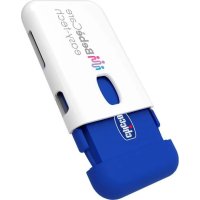
2) Close the equipment (until the Chicco logo is completely visible through the window in the white casing) (Fig.1) to proceed with the first association. To ensure Bluetooth® connection, make sure you are close to your smartphone. The system activates/connects a few seconds after the device is closed.
Up to a maximum of 4 Chicco BebèCare devices can be associated with the same family account (child car seats with integrated sensors and/or anti-abandonment devices). The specific car equipment can be associated permanently with one family account ONLY.
IMPORTANT: When scanning the QR code, an internet connection must be available (mobile data or WiFi network).
e) Check the correct operation of the equipment
When using the first time, to verify the correct operation of Chicco BebeCare easy-tech, it is important to do some tests, verifying the relative state of the APP as follows:
- Close the accessory, state detected by the Chicco BebèCare APP "connected - child seated"
- Then open the accessory: the possible states detected by the APP are either "connected" or "disconnected" depending on how long it takes between opening the accessory and displaying it in the APP.
After associating the equipment with the family account, enter the name and date of birth of the child. You can also enter a photograph.
1.2 HOW CHICCO BEBÈCARE EASY-TECH WORKS
Place the child on the seat and secure him with the restraint systems provided for the type of seat in use.
Use the clip (A) on the white casing of the equipment to attach the accessory preferably to the shoulder strap of the seat or to the diagonal portion of the seat belt (Fig.2). Now completely close the equipment as indicated in Chapter 1.1, paragraph d), item 2.
When closed with the Chicco logo fully visible through the special window on the white outer shell, the user is notified that the product has been activated by means of a special wake-up acoustic signal.
This is followed by an intermittent sound that informs the user that the product is searching for the Bluetooth ^® signal from the smartphone. A "beep" notifies the user once the connection has been made successfully. Make sure that the state detected by the Chicco BebèCare APP is "connected - child seated." From this moment on, the equipment is active and the presence of the child can be monitored through the Chicco BebèCare APP.
WARNING! If the connection does not occur within 20 seconds, the user is notified by a short acoustic signal (failed
connection). If the device remains closed, Chicco BebeCare easy-tech automatically continues searching for the smartphone Bluetooth® signal for 3 minutes. If the connection has still not been made after this time, a short acoustic signal is emitted. In any case, even though no further acoustic signal is emitted, the device continues to search for a Bluetooth® connection until it is opened again. The alarm system is activated when the smartphone connected to the equipment moves away from the car in which the closed accessory is present.
Chicco BebèCare easy-tech features three alarm levels:
- Alarm 0: if the child is left on board and the smartphone moves away only briefly, the system will send a simple distance alert. However, if the smartphone stays away for more than 3 minutes the first level alarm will be triggered.
- First level alarm: should the smartphone move away from the vehicle in which the equipment was installed and activated, for more than 3 minutes, the phone will emit an acoustic and visual alarm that can be muted within 40 seconds. Moving the smartphone towards the equipment does not stop the alarm. The "STOP" button in the BebeCare APP must be pressed in order to deactivate the alarm.
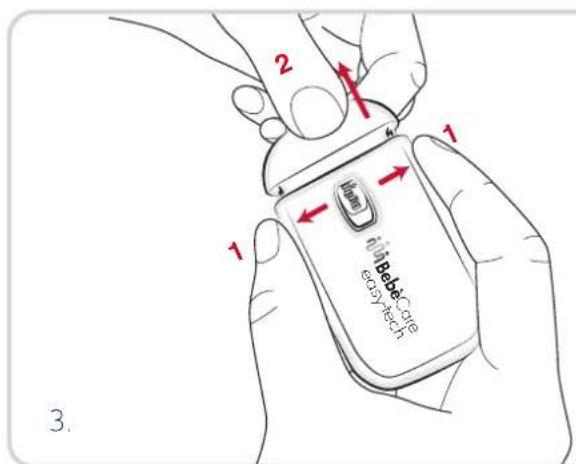
- Second level alarm: this is activated the moment in which the first level alarm was not silenced within the time window provided for the first level alarm, and sends alarm messages to all the predefined emergency numbers with the information needed for geolocating the area where the baby is located. At the end of the trip, unbuckle the seat belts, remembering to always open the equipment (Fig. 3) to deactivate the system and prevent the alarms from being activated.
The Chicco BebèCare APP comes with a package of alarm messages" that will decrease with every second level alarm message by a number equal to that of the emergency contacts entered. Alarm messages can be bought through the Chicco BebèCare APP. In case of insufficient residual alarm messages, proceed with the purchase of one of the packages available in the "Purchases" section of the APP. If the number of alarm messages is insufficient, the system is disabled and is not working. If there is no signal. If there is no internet connection (mobile network of WiFi), Chicco BebèCare easy-tech will correctly activate alarm 0 and the first level alarm, but it may not be able to send the alarm messages to the emergency numbers (second level alarm).
- The Chicco BebèCare APP supports not only the Chicco BebèCare easy-tech anti-abandonment equipment, but also the Chicco BebèCare range of child car seats with integrated sensors, through the same family account.
- Chicco BebèCare easy-tech does not interfere with the normal operation of the Bluetooth® system that may be present in the car.
1.3 USING THE CHICCO BEBÈCARE APP ON MULTIPLE DEVICES/SMARTPHONES
After registering the family account and associating the car seat with Chicco BebèCare easy-tech equipment using the smartphone by scanning the QR code, it is possible to use Chicco BebèCare easy-tech also with other smartphones that have the Chicco BebèCare APP installed. It is possible to use the same family account with an unlimited number of smartphones that have previously installed the Chicco BebèCare APP. The settings predefined using the first smartphone (emergency numbers, association of the equipment and the child's data) will be automatically available also on the other smartphones with the Chicco BebèCare APP and that are using the same family account.
IMPORTANT: in the event that the family password is changed, the new password must be shared with all users who share the same family account.
IMPORTANT: if there are two smartphones in the same car that were previously associated with the equipment and both have the Chicco BebeCare APP active, the equipment will connect with ONLY one of the two based on the reactivity of the Bluetooth® system of the individual smartphones and this condition cannot be changed until the equipment is deactivated by opening the equipment or until the Bluetooth® signal is lost. If the person with the smartphone that is connected with the Chicco BebeCare easy-tech equipment at that moment moves away from the car:
- Alarm O and subsequently the first level alarm will activate on the smartphone, which can be silenced by interacting with the APP and pressing the "STOP" button.
- after a few seconds, the second smartphone that is still in the car will automatically connect with the Chicco BebèCare easy-tech equipment.
WARNING: if two or more smartphones are used that have the Chicco BebèCare APP installed, it is necessary to identify which one is effectively connected to the equipment and therefore must never be abandoned.
1.4 MANAGING MULTIPLE DEVICES BELONGING TO THE CHICCO BEBÈCARE FAMILY WITH A SINGLE FAMILY ACCOUNT
A maximum of 4 Chicco BebèCare devices (child car seats with built-in sensors and/or accessory) can be associated with the same family account, by repeating the operations described previously. The Chicco BebèCare APP will monitor the status of each device at the same time.
1.5 SMART WARNINGS
The Chicco BebèCare system is designed to assist people with the everyday task of caring for children, including in unpredictable circumstances. The system is, in fact, capable of analysing and understanding the specific potentially dangerous circumstance and activating smart warnings designed to guarantee a higher level of safety.
SMARTPHONE BATTERY DEAD WARNING
If the driver's smartphone battery is almost flat, the App sends the driver a notification as a reminder that the battery needs charging.
In addition, an optional service can be activated through the Chicco Cloud to send a warning message to selected contacts, informing them that the driver's smartphone battery is dead and will not be able to send warning messages in the event of an emergency.
The service can be activated through the "Settings/Notifications" section of the Chicco BebèCare App.
CAR PARKED WITH CHILD AND SMARTPHONE ON BOARD WARNING
If the driver's vehicle remains parked for a significant amount
of time with the smartphone and the child on board, the app is capable of notifying the server of the anomaly and responding with a specific warning.
An optional service can, in fact, be activated through the Chicco Cloud to send a warning message to selected contacts, informing them that the driver may have forgotten his/her smartphone in the car, since the car has been parked for an extended period of time with the child on board.
The service can be activated through the "Settings/Notifications" section of the Chicco BebeCare App.
NO NETWORK SIGNAL WARNING
If the driver's smartphone is unable to communicate with the Chicco Cloud for an excessive amount of time, the app will send a notification informing the driver that his/her smartphone has no reception.
In addition, an optional service can be activated through the Chicco Cloud to send a warning message to selected contacts, informing them that the driver's smartphone is not sending status updates properly and will not be able to send warning messages in the event of an emergency.
The service can be activated through the "Settings/Notifications" section of the Chicco BebeCare App.
1.6 PERIODIC NOTIFICATION OF CHILD IN THE CAR FOR A PROLONGED PERIOD OF TIME
If the child remains in the car seat with Chicco BebeCare easy-tech activated for more than 30 minutes, a push notification will appear on the smartphone, accompanied by a brief acoustic signal. The user can disable only the acoustic signal on the "settings/no-tifications" screen.
1.7 BATTERY
Chicco BebeCare easy-tech works with 1 CR2032 battery. You can monitor the level of the battery found in Chicco BebeCare easy-tech equipment through the APP. If the level is low, the user can replace the battery with another with the same characteristics on their own, making sure they are the right way round.
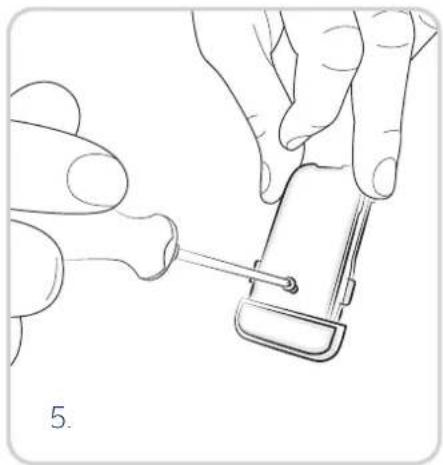
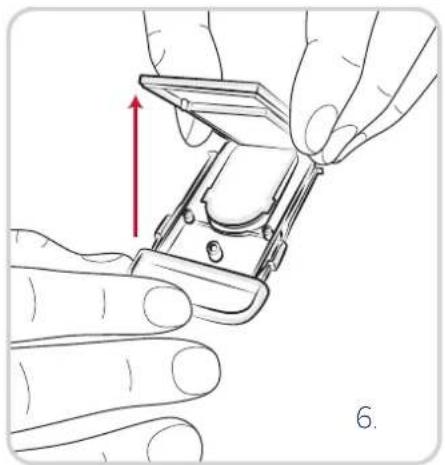
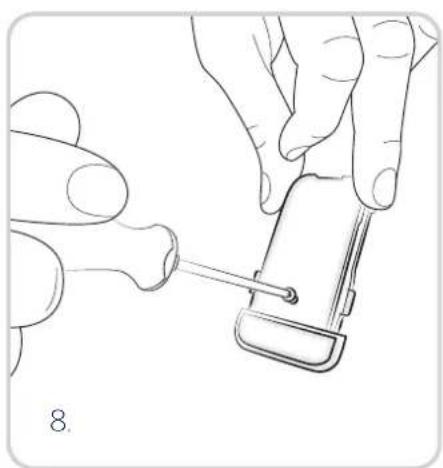
To replace the battery, the user can proceed independently by opening the equipment (Fig. 4) and completely separating the white cover from the blue component. Remove the screw (Fig. 5), access the battery compartment (Fig. 6), replace the battery respecting the polarity (Fig. 7), screw back (Fig. 8) and fit the blue component inside the white shell again (Fig. 9).
1.8 DISPOSING OF THE PRODUCT
Follow the instructions provided below for disposal (Paragraphs 1.7.1 - 1.7.2).

1.8.1 THIS PRODUCT COMPLIES WITH THE DIRECTIVE 2012/19/EU.
The crossed bin symbol on the appliance indicates that the product, at the end of its life, must be disposed of separately from domestic waste, either by taking it to a separate waste disposal site for electric and electronic appliances or by returning it to your dealer when you buy another similar appliance, or leaving it free of charge at distributors with a sales area of electrical and electronic equipment of at least 400 sqm without any obligation to make a purchase. The user is responsible for taking the appliance to a special waste disposal site at the end of its life. If the disused appliance is collected correctly as separate waste, it can be recycled, treated and disposed of ecologically; this avoids a negative impact on both the environment and health, and contributes towards the recycling of the product's materials. For further information regarding the waste disposal services available, contact your local waste disposal agency or the shop where you bought the appliance.

1.8.2 COMPLIANT WITH EU DIRECTIVE 2006/66/EC as amended.
The crossed bin symbol on the batteries or the product packaging indicates that, at the end of their life, they must be disposed of separately from domestic waste, either by taking them to a separate waste disposal site for batteries or by returning them to your retailer when you buy similar rechargeable or non-rechargeable batteries. Chemical symbols (Hg for mercury, Cd for cadmium, Pb for lead) printed beneath the crossed-out wheeled bin symbol indicate the type of substance contained in the battery. The user is responsible for bringing batteries, at the end of their life, to the appropriate collection facilities in order to facilitate treatment and recycling. The correct separate waste disposal of your old toy will help prevent potential negative consequences for the environment and human health and favour the recycling of the materials of which the product is made. Illegal disposal of the product by the user will damage the environment and human health. For further information regarding the waste disposal services available, contact your local waste disposal agency or the shop where you bought the appliance.
DECLARATION OF COMPLIANCE.
Hereby, Artsana S.p.A. declares that the radio equipment type ET123FL is in compliance with Directive 2014/53/EU. The complete text of the EU Declaration of Compliance is available at: www.chicco.com/declarations. In accordance with European Commission Decision No. 2000/299/EC dated 06/04/2000, the frequency band used by this product has been harmonised for all EU Countries and this is therefore a Class 1 product which can be used in all European Union Countries.
The equipment works together with the Bluetooth ^® Low-Energy standard.
• Frequency ranges: 2.402 GHz – 2.480 GHz ISM band;
- Channels: 40 channels, each with a band with equal to 2 MHz;
• Maximum transmission power: +3 dBm
• Standard Radio: 802.15.1;

BebèCare easy-tech
1. CHICCO BEBÈCARE EASY-TECH
1.3 UTILISATION DE L'APPLICATION CHICCO BEBÈCARE SUR PLUSIEURS DISPOSITIFS / SMARTPHONES
1.4 GESTION MULTIPLE DE DISPOSITIFS APPARTENANT À LA FAMILLE CHICCO
BEBÈCARE VIA UN SEUL COMPTE FAMILLE
1.5 ALARMES INTELLIGENTES
1.6 NOTIFICATION PÉRIODIQUE ENFANT À BORD PENDANT UNE PÉRIODE PROLONGÉE
1.7 PILES
1.8 ÉLIMINATION DU PRODUIT
1. CHICCO BEBÈCARE EASY-TECH
1.8 ÉLIMINATION DU PRODUIT
ALARM WEGEN ENTLADENEM SMARTPHONE
ALARM SMARTFON ROZŁADOWANY