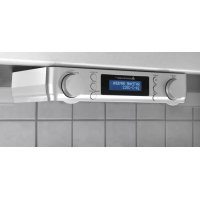
UR2022 - Radio Soundmaster - Free user manual and instructions
Find the device manual for free UR2022 Soundmaster in PDF.

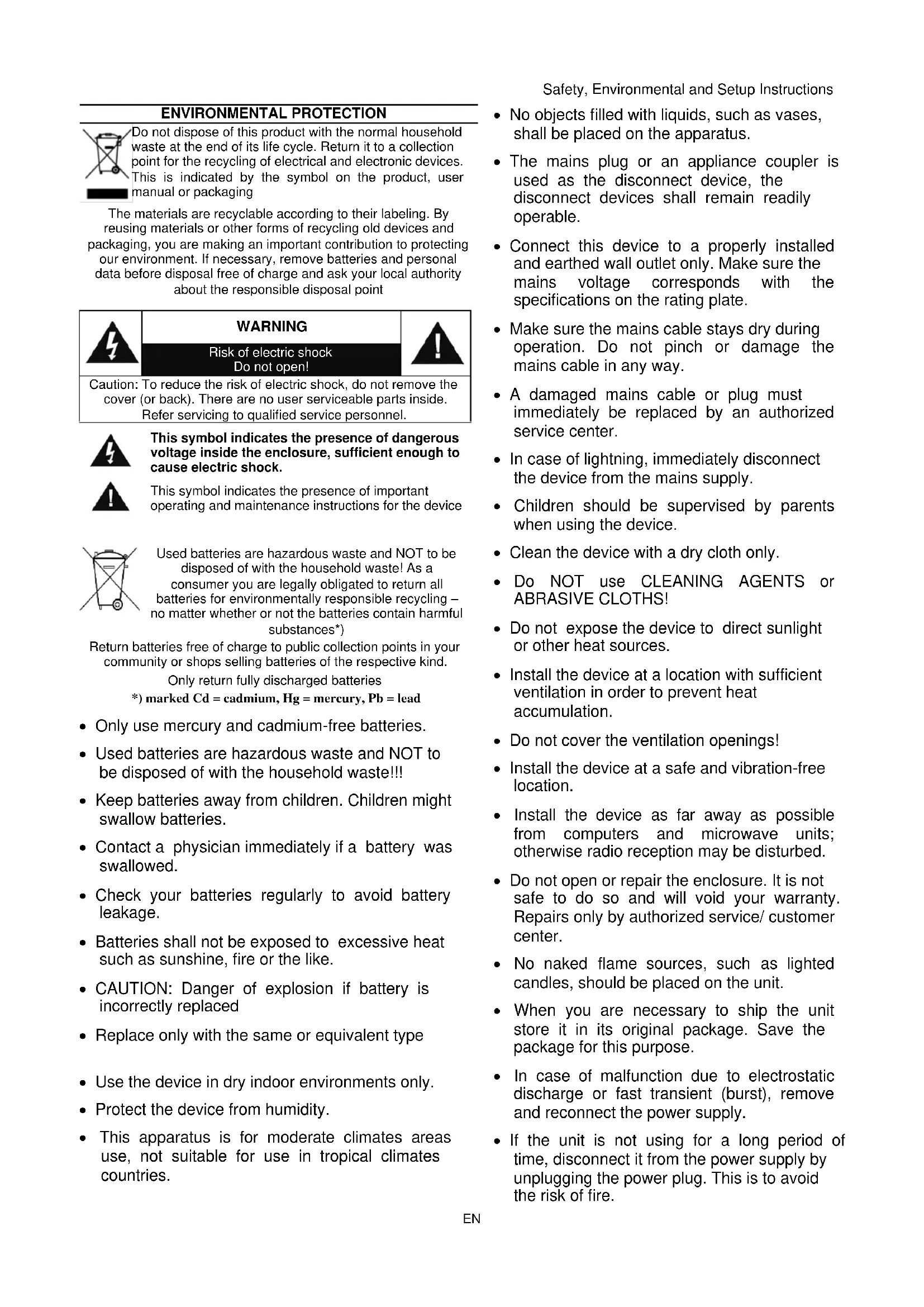


| Product type | DAB+/FM Clock Radio |
| Brand | Soundmaster |
| Model | UR2022 |
| Power supply | Included mains adapter (DC input) |
| Radio reception | DAB+ (Band III) and FM (87.5-108 MHz) |
| Number of presets | 30 stations (DAB and FM combined) |
| Alarm | Dual alarm with DAB, FM, buzzer options; 9-minute snooze |
| Kitchen timer | Adjustable up to 3h59 (two modes: 1 min or 5 min steps) |
| LED nightlight | Integrated LED lamp, auto-off after 120 minutes |
| Display | Backlit LCD screen, adjustable (high, medium, low) with night dimmer |
| Antenna | Wire antenna for DAB and FM |
| Speaker | Built-in speaker (mono) |
| Menu languages | Multilingual (selectable via menu) |
| Time update | Automatic via DAB/FM or manual; 12/24 h format and date formats |
| Energy saving | Auto-off after 15 minutes in standby without audio signal |
| Maintenance | Clean with a dry cloth; do not use detergents |
| Safety | Do not open (risk of electric shock); use indoors in dry area |
| Repairability | Repair by qualified personnel only |
| Included accessories | Mains adapter, instruction manual, mounting kit (template included) |
| Dimensions (approx.) | 200 x 130 x 80 mm (estimated from photos) |
| Weight (approx.) | 500 g (estimated) |
Frequently Asked Questions - UR2022 Soundmaster
User questions about UR2022 Soundmaster
0 question about this device. Answer the ones you know or ask your own.
Ask a new question about this device
Download the instructions for your Radio in PDF format for free! Find your manual UR2022 - Soundmaster and take your electronic device back in hand. On this page are published all the documents necessary for the use of your device. UR2022 by Soundmaster.
USER MANUAL UR2022 Soundmaster
Festsender speichern
Multiplex/Frequency - Surname
Signahellerrate
Audio Bitrate.
DAB-MENU
Copyright by Woerlein GmbH, 90556 Cadolzburg, www.soundmaster.de
Do not dispose of this product with the normal household waste at the end of its life cycle. Return it to a collection point for the recycling of electrical and electronic devices. This is indicated by the symbol on the product, user manual or packaging
The materials are recyclable according to their labeling. By reusing materials or other forms of recycling old devices and packaging, you are making an important contribution to protecting our environment. If necessary, remove batteries and personal data before disposal free of charge and ask your local authority about the responsible disposal point
| 3 | WARNING Risk of electric shock Do not open! | 1 |
| Caution: To reduce the risk of electric shock, do not remove the cover (or back). There are no user serviceable parts inside. Refer servicing to qualified service personnel. | ||
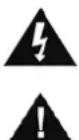
This symbol indicates the presence of dangerous voltage inside the enclosure, sufficient enough to cause electric shock.
This symbol indicates the presence of important operating and maintenance instructions for the device
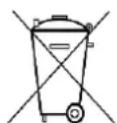
Used batteries are hazardous waste and NOT to be disposed of with the household waste! As a consumer you are legally obligated to return all batteries for environmentally responsible recycling - no matter whether or not the batteries contain harmful substances*)
Return batteries free of charge to public collection points in your community or shops selling batteries of the respective kind.
Only return fully discharged batteries
*) marked Cd = cadmium, Hg = mercury, Pb = lead
- Only use mercury and cadmium-free batteries.
- Used batteries are hazardous waste and NOT to be disposed of with the household waste!!!
- Keep batteries away from children. Children might swallow batteries.
- Contact a physician immediately if a battery was swallowed.
- Check your batteries regularly to avoid battery leakage.
- Batteries shall not be exposed to excessive heat such as sunshine, fire or the like.
- CAUTION: Danger of explosion if battery is incorrectly replaced
- Replace only with the same or equivalent type
- Use the device in dry indoor environments only.
- Protect the device from humidity.
- This apparatus is for moderate climates areas use, not suitable for use in tropical climates countries.
Safety, Environmental and Setup Instructions
- No objects filled with liquids, such as vases, shall be placed on the apparatus.
- The mains plug or an appliance coupler is used as the disconnect device, the disconnect devices shall remain readily operable.
- Connect this device to a properly installed and earthed wall outlet only. Make sure the mains voltage corresponds with the specifications on the rating plate.
- Make sure the mains cable stays dry during operation. Do not pinch or damage the mains cable in any way.
- A damaged mains cable or plug must immediately be replaced by an authorized service center.
- In case of lightning, immediately disconnect the device from the mains supply.
Children should be supervised by parents when using the device. - Clean the device with a dry cloth only.
- Do NOT use CLEANING AGENTS or ABRASIVE CLOTHS!
- Do not expose the device to direct sunlight or other heat sources.
- Install the device at a location with sufficient ventilation in order to prevent heat accumulation.
- Do not cover the ventilation openings!
- Install the device at a safe and vibration-free location.
- Install the device as far away as possible from computers and microwave units; otherwise radio reception may be disturbed.
- Do not open or repair the enclosure. It is not safe to do so and will void your warranty. Repairs only by authorized service/ customer center.
- No naked flame sources, such as lighted candles, should be placed on the unit.
- When you are necessary to ship the unit store it in its original package. Save the package for this purpose.
- In case of malfunction due to electrostatic discharge or fast transient (burst), remove and reconnect the power supply.
- If the unit is not using for a long period of time, disconnect it from the power supply by unplugging the power plug. This is to avoid the risk of fire.
LOCATION OF CONTROLS

FRONT VIEW
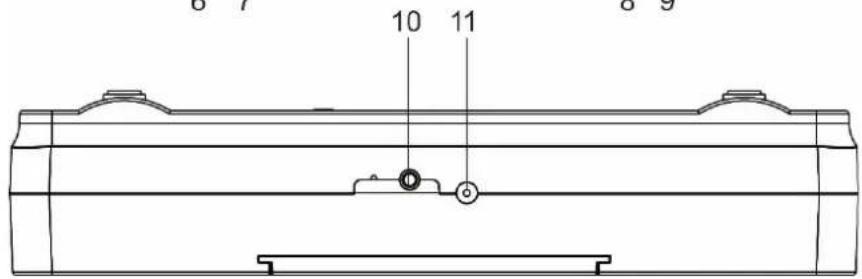
BACK VIEW
1 VOLUME/SCAN
7 ALARM
2 POWER ON/STANDBY/SOURCE
8 DIMMER/LIGHT
3 DISPLAY
9 PRESET
4 INFO/MENU
10 DAB/FM ANTENNA
5 TUNER/SELECT/SNOOZE
11 DC INPUT
6 TIMER
INSTALLATION
CONTENT OF DELIVERY
Main unit
AC Adapter
Instruction Manual
Mounting kit incl. mounting template sheet
POWER SUPPLY
Ensure that the voltage is the same as that indicated on the ac adapter identification plate.
Connect the supplied AC adapter to a properly installed safety power socket and the plug of the cable into the DC IN jack at the back side of the unit.
Please extend the wire antenna completely and fix it vertical.
Note:
The automatic update function can takes about 3-10 minutes. If the signal is received, the time will show on the display accordingly and the radio stations will be stored.
If the automatic update system had been terminated by the user or the update fail, the date and clock are defaulted to 0:00 and year 2022.
The time of alarm 1 and alarm 2 are default to 00:00 and inactive.
The unit is switched off
ERP power management
The unit will turn off automatically after 15 minutes in standby mode if there is no audio signal. To turn on the unit again press the "O" button.
BASIC OPERATIONS
POWER ON / OFF
Press the "TUNER/SELECT/SNOOZE" button to turn on the unit.
Press the "TUNER/SELECT/SNOOZE" button again to turn off the unit in standby mode.
SELECTING MODES
During playing, press the "POWER ON/STANDBY/SOURCE" button repeatedly to switch between the modes.
ADJUSTING VOLUME
Turn the "VOLUME/SCAN" knob to decrease or increase the volume.
DAB
Turn the unit on and press the "POWER ON/STANDBY/SOURCE" button repeatedly until "DAB" is shown in the display.
- If no station scan is done (e.g. the automatic update function was terminated) the unit will start an automatic scan. The display show "Scanning 0", the > the number show the found radio stations. Together with a slide bar which indicates the process status. If you want to start an automatic scan, press the "VOLUME/SCAN" button.
- To listen a scanned radio station, turn the „TUNER/SELECT/SNOOZE“ knob to select the desired station. To confirm the desired station, press the “TUNER/SELECT/SNOOZE” the unit plays the selected station.
Store a preset station
- Select the desired radio station.
- Press and hold the "PRESET" button and choose with the "TUNER/SELECT/SNOOZE" knob the station number where the radio station should be saved. You can store max. 30 radio stations!
- Press the "TUNER/SELECT/SNOOZE" knob to store the station. "PRESET (X) STORED" is shown in the display.
Recall a preset station
- Press the "PRESET" button and select with the "TUNER/SELECT/SNOOZE" knob the desired station number.
- Press the "TUNER/SELECT/SNOOZE" knob to confirm the selection. The radio station will be played.
DAB Information
During DAB mode press the "INFO/MENU" button repeatedly to show the following information:
Time-Bate
Song Information
Signal level
Genre

Multiplex/frequency Station name
Errorrate
Audio bit rate.
DAB MENU
Press and hold the "INFO/MENU" button to enter the DAB menu.
FULL SCAN
Select "FULL SCAN" by turning the "TUNER/SELECT/SNOOZE" knob and press the "TUNER/SELECT/SNOOZE" knob. The unit starts a full DAB scan.
PRUNE
You may remove all unavailable stations from the list
- Select "PRUNE" by turning the "TUNER/SELECT/SNOOZE" knob and press the "TUNER/SELECT/SNOOZE" knob to confirm.
- Choose "YES" and confirm by pressing the "TUNER/SELECT/SNOOZE" knob. All unavailable Station are removed.
MANUAL TUNE
As well as the full scan function, you can manually tune the radio. This can help if you know your radio has missed stations
- Select "MANUAL TUNE" and confirm by pressing the "TUNER/SELECT/SNOOZE" knob.
- Now you can choose the desired DAB channel from 5A to 13F by turning the
"TUNER/SELECT/SNOOZE" and confirm your selection by pressing it.
FM
Turn the unit on and press the "POWER ON/STANDBY/SOURCE" button repeatedly until "FM" and the last FM frequency is shown in the display.
Manual tune
- Turn the "TUNER/SELECT/SNOOZE" knob slowly to tune up (clockwise) or down (counterclockwise) in 0.05MHz steps.
- Stop at the desired frequency.
Fast scan
- Turn the "TUNER/SELECT/SNOOZE" knob fast to do a fast scan.
- The unit will stop at the first found station.
Auto scan
Press the "VOLUME/SCAN" button to do an auto scan
The unit will search for available stations and store them as presets automatically.
Store a preset station / Recall a preset station
Is the same as in DAB mode.
FM Information
During FM mode press the "Info" button repeatedly to show the following information: Frequency Time Date Genre Signal level Mono/Stereo.
FM MENU
Press and hold the "INFO/MENU" button to enter the FM menu.
Scan setting
- Choose "SCAN SETTING" by turning the "TUNER/SELECT/SNOOZE" knob und press it to confirm.
- Turn the "TUNER/SELECT/SNOOZE" to choose between "Strong station" and "All station"
Audio setting
- Choose "SCAN SETTING" by turning the "TUNER/SELECT/SNOOZE" knob und press it to confirm.
- Turn the "TUNER/SELECT/SNOOZE" to choose between "Stereo Allowed" and "Forced mono"
KITCHEN TIMER
The unit has a kitchen timer which can be adjusted in minutes. Setup for easy activation for max 3:59h
- To activate the timer, press the "Timer" button once. The display shows "Down timer 1" and the default time 5 minutes.
- Turn the "TUNER/SELECT/SNOOZE" knob clockwise to increase each step by 1 minutes.
- Turn the "TUNER/SELECT/SNOOZE" knob counterclockwise to decrease each step by 1 minutes.
- Press the "TUNER/SELECT/SNOOZE" knob to start the timer.
- To stop the timer, press and hold the „TUNER/SELECT/SNOOZE“ knob when the timer is running. Display shows “off”.
Setup for advance activation for max. 3:55h.
- To activate the timer, press the "Timer" button twice. The display shows "Down timer 2" and the default time 15 minutes.
- Turn the "TUNER/SELECT/SNOOZE" knob clockwise to increase each step by 5 minutes.
- Turn the "TUNER/SELECT/SNOOZE" knob counterclockwise to decrease each step by 5 minutes.
- Press the "TUNER/SELECT/SNOOZE" knob to start the timer.
- To stop the timer, press and hold the „TUNER/SELECT/SNOOZE“ knob when the timer is running
ACTIVATE LED LAMP
Press and hold the "DIMMER/LIGHT" button when unit is in standby mode, the lamp will lightning. Press and hold the button again to switch off the lamp. To save energy, the lamp will automatically switch off after 120 minutes.
SETUP
Press in standby mode the "INFO/MENU" button to enter into the setup mode, the display shows "System". Press the "TUNER/SELECT/SNOOZE" knob to confirm the selection. To leave the setup menu, press the "INFO/MENU" button or wait for about 10 seconds.
Time and date settings
The clock will automatically set itself using your digital or FM radio signal. If the time or date does not update automatically, you can manually set it using this option.
Note: Any time or date updates received by a digital broadcast will override manual settings.
Setting the time and date manually
- Press and hold the "INFO/MENU" button for 2 seconds to view the main menu.
- Turn and press the "TUNER/SELECT/SNOOZE" knob to select "System > "Time".
- Turn and press the „TUNER/SELECT/SNOOZE“ knob to choose „Set Time/Date".
- Turn and press the „TUNER/SELECT/SNOOZE“ knob to set the hour. Repeat to adjust the minutes.
- Turn and press the „TUNER/SELECT/SNOOZE“ knob to set the day of the month. Repeat to set the month and year.
Note: If you have set your use the 12 hour time format, make sure that you select the "AM" or "PM" version of the hour before pressing the "TUNER/SELECT/SNOOZE" knob.
Time and date synchronization options
You can synchronize the time and date on using either the FM or digital radio signal.
To specify the clock synchronization options:
- Press and hold the Menu button for 2 seconds to view the main menu.
- Turn and press the „TUNER/SELECT/SNOOZE“ knob ” dial to select „System „ > „Time/Date“.
- Turn and press the „TUNER/SELECT/SNOOZE“ knob to choose „Auto update".
- Turn and press the „TUNER/SELECT/SNOOZE“ knob to choose between the „update from Any“, „update from DAB“, „update from FM“ and „No Update“ clock synchronization options.
Changing the time format
- Press and hold the "INFO/MENU" button for 2 seconds to view the main menu.
- Turn and press the „TUNER/SELECT/SNOOZE“ knob to select „System “ > „Time/Date“.
- Turn and press the „TUNER/SELECT/SNOOZE“ knob to choose „Set 12/24 hour“.
- Turn and press the „TUNER/SELECT/SNOOZE“ knob to choose between „12“ or „24“ hours.
Changing the date format
- Press and hold the "INFO/MENU" button for 2 seconds to view the main menu.
- Turn and press the „TUNER/SELECT/SNOOZE“ knob dial to select „System settings“ > „Time/Date“.
- Turn and press the "TUNER/SELECT/SNOOZE" knob to choose "Set date format".
- Turn and press the „TUNER/SELECT/SNOOZE“ knob to choose between „DD-MM-YYYY“ and „MM-DD-YYYY“.
Changing your preferred language
You can select the language that uses for menus and options.
- Press and hold the "INFO/MENU" button for 2 seconds to view the main menu.
- Turn and press the „TUNER/SELECT/SNOOZE“ knob to choose „System“, > „Language“.
- Turn and press the „TUNER/SELECT/SNOOZE“ knob to select a menu language.
SET ALARM
You can set 2 alarm times on this device.
- Press the "ALARM" button to ALARM set menu.
- Select "ALARM 1" or "ALARM 2" with the „TUNER/SELECT/SNOOZE“ knob and confirm the selection with the "TUNER/SELECT/SNOOZE" knob.
- Adjust the hour with the „TUNER/SELECT/SNOOZE“ knob and confirm with “Enter”.
- Adjust the minutes with the „TUNER/SELECT/SNOOZE“ knob and confirm again with "Enter".
- Select „Duration“, with the „TUNER/SELECT/SNOOZE“ knob to set the duration that the alarm will sound in minutes. Press “TUNER/SELECT/SNOOZE” to confirm the selection.
- Select the wake-up mode "FM", "Buzzer", "DAB" or "OFF". The wake-up mode "DAB" and "FM" will play the last heard radio station. If you select "OFF", the alarm is deactivated. Press "TUNER/SELECT/SNOOZE" to confirm the selection.
- Now select the wake-up mode "Once", "Weekends", "Weekdays" "Daily", then press the "TUNER/SELECT/SNOOZE" to confirm.
Daily: wake up every day
Weekdays: wake up from Monday to Friday
Weekends: wake up only on Saturday and Sunday
- Select the alarm volume with the „TUNER/SELECT/SNOOZE“ knob and confirm with “TUNER/SELECT/SNOOZE”.
Select "Alarm on" with the „TUNER/SELECT/SNOOZE“ knob, then press the "TUNER/SELECT/SNOOZE" to activate the Alarm 1.
If you want to program ALARM 2 follow the steps 1-8. Select at step 1 the adjustment "ALARM 2"
Now the alarm is programmed.
SET BACKLIGHT
You can adjust the duration that the screen is illuminated for and the brightness of the screen:
On level
- Press hold the "INFO/MENU" button for 2 seconds to view the main menu.
- Turn and press the „TUNER/SELECT/SNOOZE“ knob to choose „System“ > „Backlight“.
- Turn and press the „TUNER/SELECT/SNOOZE“ knob to choose „On Level".
- Turn and press the „TUNER/SELECT/SNOOZE“ knob to choose between „High“, „Medium“ or „Low“.
Night dimmer
- Press hold the "INFO/MENU" button for 2 seconds to view the main menu.
- Turn and press the „TUNER/SELECT/SNOOZE“ knob to choose „System“ > „Backlight“.
- Turn and press the „TUNER/SELECT/SNOOZE“ knob to choose „ Night dimmer“.
- Turn and press the „TUNER/SELECT/SNOOZE“ knob to choose between „Yes“ or „No“.
Snoozing a sounding alarm
When the alarm goes off at the set time, press the "TUNER/SELECT/SNOOZE" knob once to interrupt the alarm (radio or alarm buzzer) for 9 minutes. The display now shows "Snoopze" and the remaining time until the alarm goes on again
Carrying out a factory reset
Resetting removes all presets, stored stations, alarms and resets all other options to default settings.
- Press and hold the "INFO/MENU" button for 2 seconds to enter the main menu.
- Turn and press the „TUNER/SELECT/SNOOZE“ knob to choose „System“, > „Factory Reset".
- Turn and press the "TUNER/SELECT/SNOOZE" knob to select "Yes" to reset factory settings. Select "No" if you do not want to reset your factory settings.
Software
Shows the current installed software version.
The current version of the manual can be downloaded from www.soundmaster.de
Technical changes and misprints reserved.
Copyright by Woerlein GmbH, 90556 Cadolzburg, www.soundmaster.de
Duplication only with the permission of Woerlein GmbH

PROTECTION DE L'ENVIRONNEMENT

2 INSCHAKELEN/STAND-BY/BRON
8 DIMMER/LICHT
3 DISPLAY
9 VOORINSTELLLEN
4 INFO/MENU
10 DAB/FM-ANTENNE
5 TUNER/SELECTEREN/SLUIMEREN
11 DC-INGANG
6 TIMER
INSTALLATIE
LEVEROMVANG
D 90556 Cadolzburg, Germany
Tel: +49 9103 71 67 0
Fax: +49 9103 71 67 12
E-Mail: info@soundmaster.de
Internet: www.soundmaster.de
Hereby, Wörlein GmbH declares that this device is in compliance with the essential requirements and other relevant provisions of Directive 2014/53/EU.
A copy of the declaration of conformity can be obtained from the above address.

- Festsender speichern
- DAB-MENU
- LOCATION OF CONTROLS
- INSTALLATION
- CONTENT OF DELIVERY
- POWER SUPPLY
- Note:
- ERP power management
- BASIC OPERATIONS
- POWER ON / OFF
- SELECTING MODES
- ADJUSTING VOLUME
- DAB
- Store a preset station
- Recall a preset station
- DAB Information
- DAB MENU
- FULL SCAN
- PRUNE
- MANUAL TUNE
- FM
- Fast scan
- Auto scan
- Store a preset station / Recall a preset station
- FM Information
- FM MENU
- Scan setting
- Audio setting
- KITCHEN TIMER
- Setup for advance activation for max. 3:55h.
- ACTIVATE LED LAMP
- SETUP
- Time and date settings
- Setting the time and date manually
- Time and date synchronization options
- Changing the time format
- Changing the date format
- Changing your preferred language
- SET ALARM
- SET BACKLIGHT
- On level
- Night dimmer
- Snoozing a sounding alarm
- Carrying out a factory reset
- Software
- PROTECTION DE L'ENVIRONNEMENT
- INSTALLATIE
- LEVEROMVANG
Brand : Soundmaster
Model : UR2022
Category : Radio