
R8224C - Heating QLIMA - Free user manual and instructions
Find the device manual for free R8224C QLIMA in PDF.
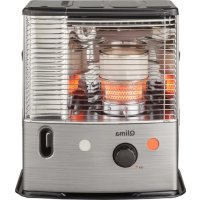


| Product type | Liquid fuel mobile heater (supplementary, intermittent operation) |
| Brand | Qlima |
| Model | R8224C |
| Maximum heat output | 2400 W (200 g/h) |
| Recommended room volume | 40 to 85 m³ (normally ventilated room) |
| Minimum room volume | 40 m³ |
| Fuel consumption (max) | 0.250 L/h - 200 g/h |
| Tank autonomy | Approx. 16.8 hours |
| Removable tank capacity | 4.2 L |
| Dimensions (W x D x H) | 455 x 295 x 495 mm |
| Weight | 8.8 kg |
| Power supply | 4 R14 (C) 1.5 V - 6 V DC |
| Ignition | Electric (battery-powered ignition mechanism) |
| Recommended fuel | Liquid fuel for mobile heaters (compliant with decrees 18/07/2002 and 25/06/2010) - Qlima Premium Quality Fuels or PTX |
| Safety | Automatic shutdown in case of excessive temperature; air quality control system (CO2 sensor); tempered top "Safe Top"; pendulum safety shut-off |
| Routine maintenance | Wipe dust/stains with a dry cloth; completely drain the tank at the end of the season; clean the fuel filter |
| Wear parts | Wick, batteries, igniter (filament), hand pump |
| Warranty | 4 years against manufacturing defects (excluding consumables) |
| Included accessories | Hand pump, transport cap, user manual |
Frequently Asked Questions - R8224C QLIMA
User questions about R8224C QLIMA
0 question about this device. Answer the ones you know or ask your own.
Ask a new question about this device
Download the instructions for your Heating in PDF format for free! Find your manual R8224C - QLIMA and take your electronic device back in hand. On this page are published all the documents necessary for the use of your device. R8224C by QLIMA.
USER MANUAL R8224C QLIMA
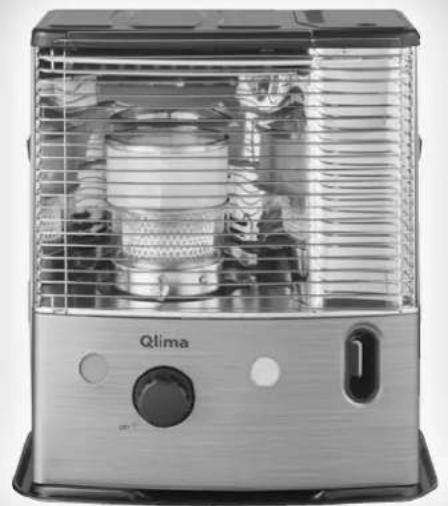
YEARS
| F | MANUEL D'UTILISATION | 4 |
| D | GEBRAUCHSANWEISUNG | 16 |
| DK | BRUGSANVISNING | 28 |
| E | INSTRUCCIONES DE USO | 40 |
| FIN | KÄYTTÖOHJE | 52 |
| GB | OPERATING MANUAL | 64 |
| I | ISTRUZIONI D'USO | 76 |
| N | BRUKSANVISNING | 88 |
| NL | GEBRUIKSAANWIJZING | 100 |
| P | MANUAL DE INSTRUÇÕES | 112 |
| PL | INSTRUKCJI OBSŁUGI | 124 |
| S | BRUKSANVISNING | 136 |
| SLO | NAVODILA ZA UPORABO | 148 |
AFAQ AFNOR CERTIFICATION 11, AVENUE FRANCIS DE PRESSENSE 93571 SAINT-DENIS LA PLAINE CEDEX
INFORMATION SHEET

MOBILE HEATERS LIQUID FUEL
www.marque-nf.com
NF 128 37/01
Distributed in Europe by:
PVG Holding B.V.
P.O.Box 96, 5340 AB OSS
PROHIBITION
THE APPROPRIATE FUEL
MANUAL

A INSTALLATION OF THE APPLIANCE
IGNITION OF THE APPLIANCE
WARRANTY CONDITIONS

CHANGING THE WICK
BEFORE STARTING TO CHANGE THE WICK, THE APPLIANCE MUST BE SWITCHED OFF AND COMPLETELY COOLED DOWN.
IT IS FORBIDDEN
INSTRUCTIONS FOR USE

A INSTALLATION OF THE STOVE
Transport lock

CHANGING THE WICK
WHAT YOU SHOULD FIRST KNOW
ALWAYS ENSURE ADEQUATE VENTILATION
DO NOT
GUIDE

A INSTALLATION OF THE STOVE
D FLAME ADJUSTMENT
transport plug
TRANSPORT
REPLACING THE WICK
BEFORE STARTING TO REPLACE THE WICK, THE STOVE MUST BE TURNED OFF AND COMPLETELY COOL.
MANUAL

INSTALLING THE STOVE

Transport cap
REPLACING THE WICK
BEFORE STARTING TO REPLACE THE WICK, THE STOVE MUST BE TURNED OFF AND COMPLETELY COOL.
INSTRUCTIONS FOR USE

INSTALLING THE HEATER

FIN
BURNING THE HEATER
TURNING OFF THE HEATER
FAULTS, THEIR CAUSES AND REMEDIES
THE HEATER DOES NOT IGNITE
IRREGULAR FLAME AND/OR SOOT AND/OR ODOR
HEATER SHUTS OFF GRADUALLY
transport cap
I TRANSPORT
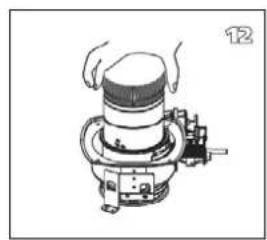
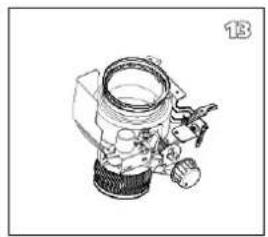
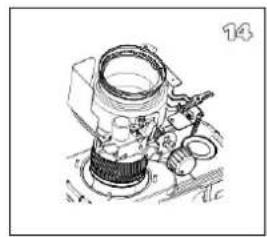
REPLACING THE BURNER
L MAKE SURE THE HEATER IS SWITCHED OFF AND COMPLETELY COOLED DOWN BEFORE YOU START REPLACING THE BURNER.
Congratulations on your purchase of this heater. You have purchased a quality product, which will serve you for many years to come. This, of course, provided you use the heater correctly. Please read these Directions for Use first, to ensure the maximum lifetime for your heater.
This appliance comes with a 48-month manufacturer's warranty on all defects in material or workmanship.
We wish you much warmth and comfort from your heater.
Yours sincerely,
PVG Holding b.v.
Customer Service Department
1 READ THE DIRECTIONS FOR USE FIRST.
2 IN CASE OF ANY DOUBT, CONTACT YOUR DEALER.
GENERAL DIRECTIONS FOR USE
Below you will find the main steps to be taken for using your heater. For more details, please refer to the MANUAL (pages 67 ff.).
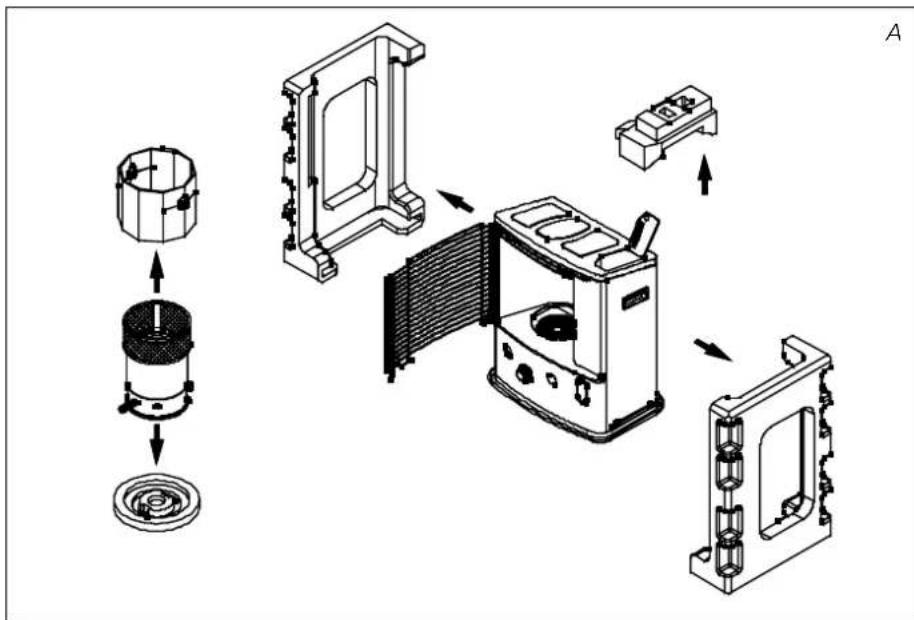
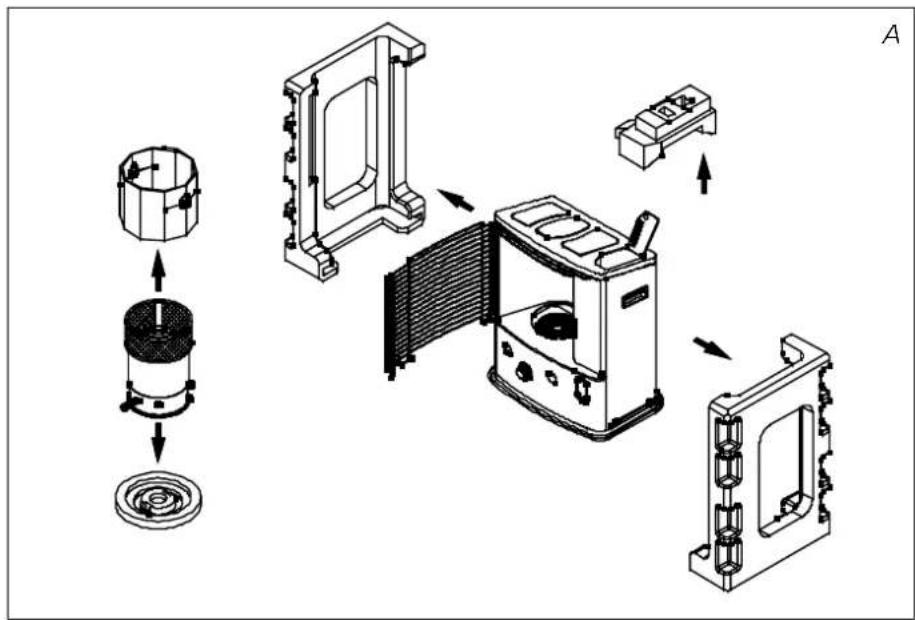
1. Remove all packaging materials (refer to Section A, Fig. A). 2. Fill the removable tank ⑨ and wait 30 minutes before you ignite the heater (refer to Section B, Fig. 1). 3. Insert the batteries into the battery holder ⑫ (refer to Section A, Fig. G). 4. Check whether the combustion chamber ④ is fully upright (refer to Section A, Fig. F). 5. Ignite the heater by turning the knurled wick adjustment knob ② as far to the right as possible and then gently push the ignition button ③ (refer to Section C, Fig. K and L). 6. After igniting the heater it will take 10 to 15 minutes before you can check if the heater burns well (refer to Section D). 7. Switch off the heater (refer to Section E).
- As a fire precaution, the tank must be filled either when the heater has been switched off or in another room than the room where the heater is installed.
- Always ensure that the tank is closed properly after filling it at a safe distance from all sources of heat and open flames (see chapter B).
- Store all fuel containers with their original caps and seals in a cool and dark place.
- Fuel ages. Use new fuel at the start of every heating season.
- The use of Qlima Premium Quality Fuels as a heating fuel assures you that you have a good quality fuel.
- Before changing brands and/or types of fuel make sure that the mobile heater first completely empties all of the remaining fuel inside the heater.
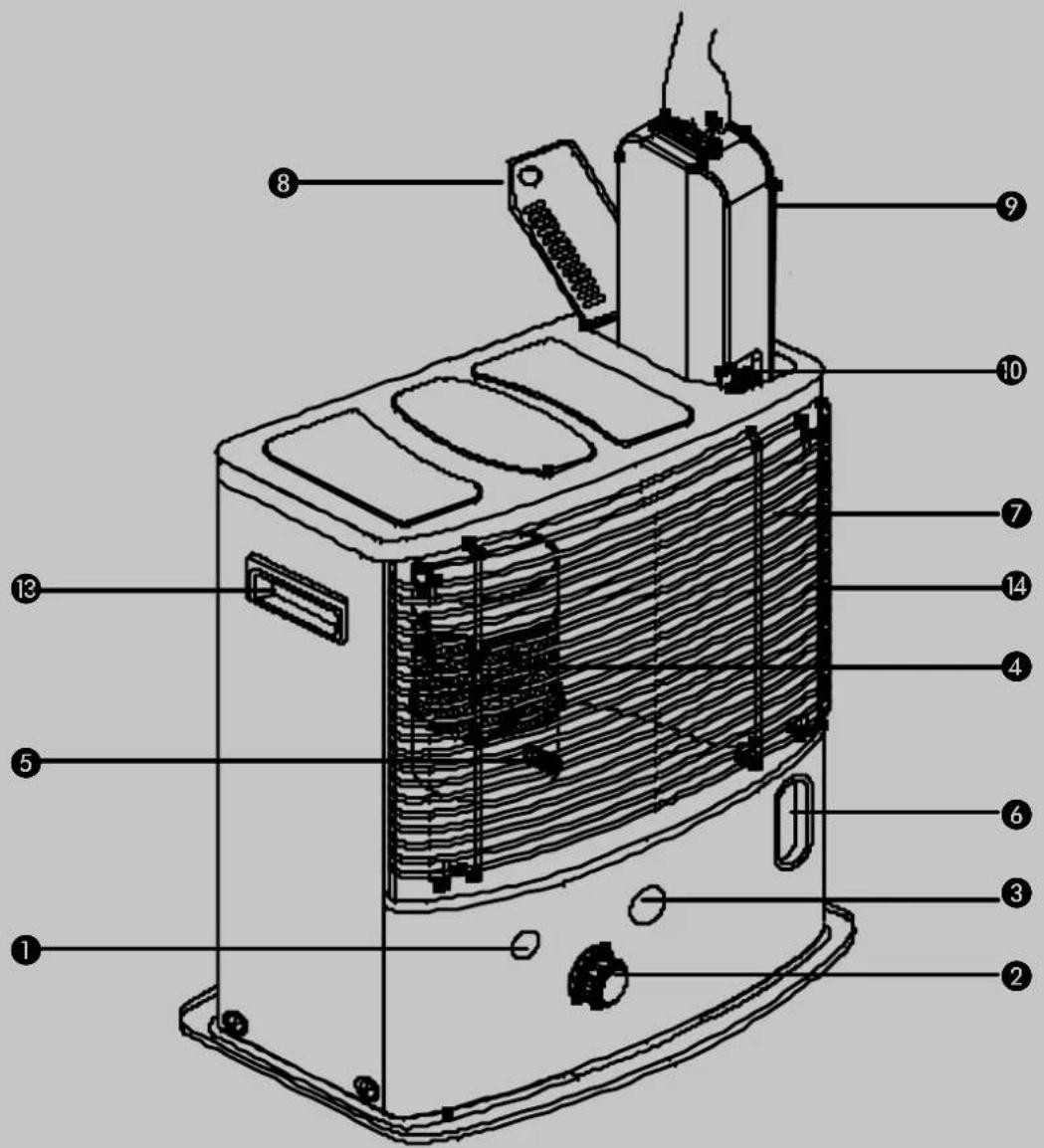
MAIN COMPONENTS
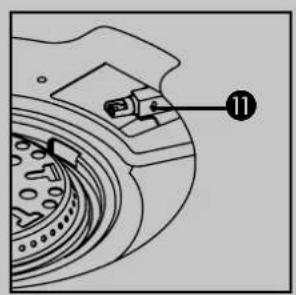
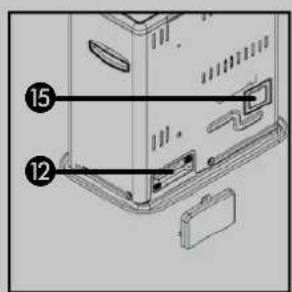
1. OFF - button ② Knurled wick adjustment knob ③ Ignition button 4. Combustion chamber ⑤ Combustion chamber handle 6. Fuel indicator 7. Grill ⑧ Lid for removable tank 9. Removable tank 10. Fuel gauge removable tank ⑪ Ignition coil 12. Battery holder 13. Handle 14. Cabinet 15. Air quality control system
WHAT YOU NEED TO KNOW IN ADVANCE
ALWAYS MAKE SURE THAT THERE IS SUFFICIENT VENTILATION
This device is fitted with a security system that stops it when the temperature in the room is too high. When the heater has switched off (manually or automatically) it may not be restarted for 15 minutes. In order to prevent damage to the device, please do not force the ignition of the heater during this period.
This heater is equipped with an air quality control system 15. When there is insufficient ventilation in the room or when the heater is being used in a room which is too small, the heater will shut off automatically. For comfortable and safe heating ensure that there is sufficient ventilation. Note: To avoid unexpected shut off, we recommend to put a door or window ajar when the heater is operating.
Read this user manual carefully before using the appliance and keep it for future reference. Install this device only when it complies with local/national legislation, ordinances and standards. This product is intended to be used as a heater in residential houses and is only suitable for use in dry locations, in normal household conditions, indoors in living room, kitchen and garage.
Regardless of the model, you must always make sure that the heater is used in a room large enough to enable the heater to be used safely without extra ventilation. If the room is smaller than required, you must always open a door or window slightly (ensuring an opening of approx. 2.5 cm). It is important that every room where the heater is used has sufficient air intake and efficient air outflow (both openings must have a minimum cross section of 50 cm²). No modifications to the safety system are allowed, as that will invalidate the guarantee that the air probe will work properly. Consult your dealer in case of doubt.
SAFETY SYSTEM
When you have turned on the heater, if the room temperature is relatively low (19 to 20°C) it may automatically switch off. The cause of this is build-up of heat in the heater. This is a logical consequence of the safety mechanism. This will not occur when using the heater at lower ambient temperatures.

SAFE TOP
The heater is supplied with a safe top. This application decreases the temperature of the top plate. In this way, the risk of harmful accidents at accidentally touching the top plate is considerably decreased. However, be aware that the top plate still becomes hot.
Avoid any contact with the top plate and grille.
Especially for France: Your heater was designed to operate exclusively on fuel for liquid fuel-operated mobile heaters in accordance with the Decrees of 18-07-2002 and 25-06-2010. The use of other fuels is forbidden. Ask your dealer or check our website for the addresses of our retailers. The liquid fuel-operated mobile heater is intended as an extra heater, and not as a continuous source of heat.
Especially for United Kingdom: Only use Class C1 paraffin fuel in accordance with BS2869; Part 2, or equivalent.
The user must comply with the following instructions for proper use:
DO NOT
- use the liquid fuel-operated mobile heater in caravans, boats, and vehicle cabins;
- use the liquid fuel-operated mobile heater in insufficiently ventilated rooms (consult the table of properties for the minimum dimensions of the room to be heated), underground rooms and / or at a height of over 1500 metres;
- modify the heater safety features.
The use of this type of heating in public rooms is subject to prior regulatory permission. Obtain proper information on this in advance.
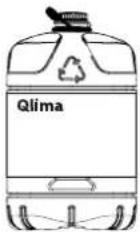
Only the use of the correct fuel will ensure safe, efficient, and comfortable use of your heater.
THE RIGHT FUEL
Your heater has been designed for use with high-quality water-free pure paraffin oil like Qlima Premium Quality Fuels. Only fuels of this kind will ensure clean and proper burning. Lower quality fuel may result in:
▶ excessive tar deposits on the glass fibre wick ▶ incomplete burning ▶ reduced heater lifetime ▶ smoke and/or smells ▶ deposits on the grid or mantle
Using the right fuel is therefore essential for safe, efficient, and comfortable use of your heater.
Damage and/or malfunctions of the heater due to the use of other than high quality water-free pure paraffin oil is not covered by the warranty.
Always refer to your local dealer for the right fuel for your heater.
MANUAL

A INSTALLING THE HEATER
1 Carefully remove your heater from the box and check the contents. In addition to the heater you also need to have:
▶ a manual fuel pump (except R 7224 C) ▶ a transportation cap ▶ these directions for use
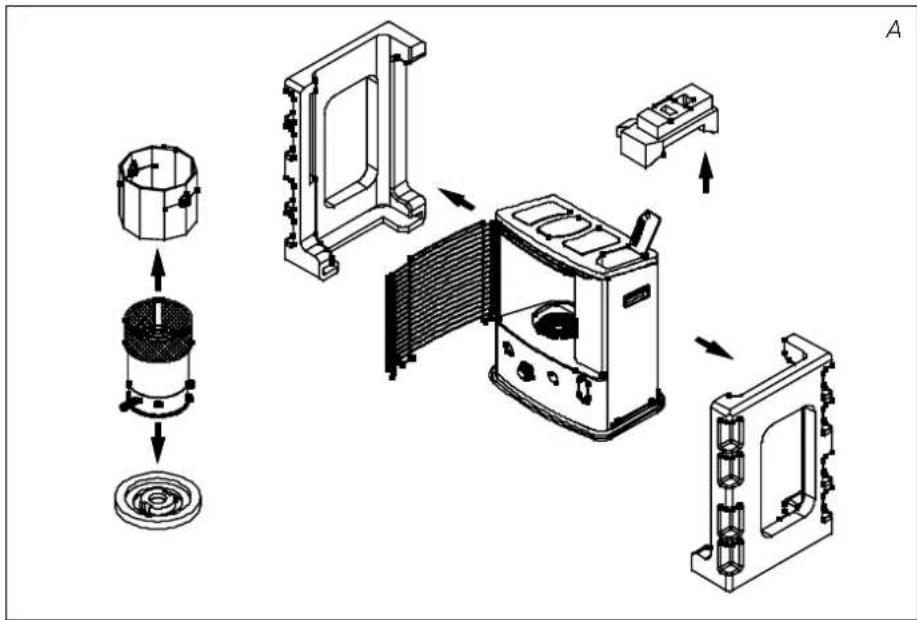
Keep the box and the packaging materials (Fig. A) for storage and/or transportation.
2 Remove the other packaging materials:
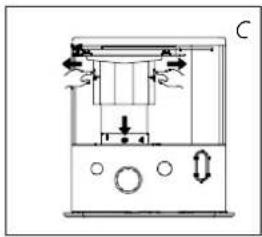
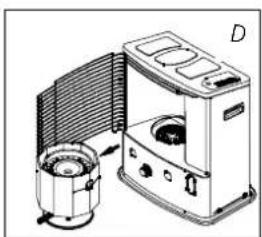
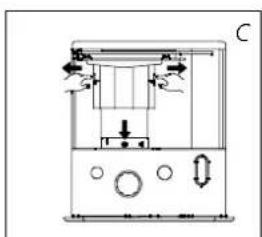
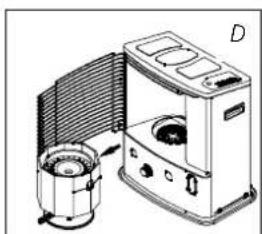
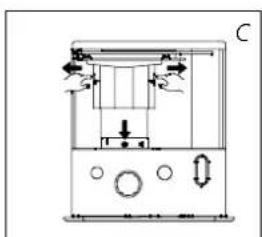
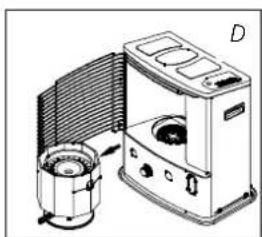
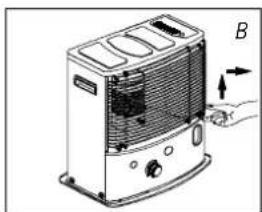
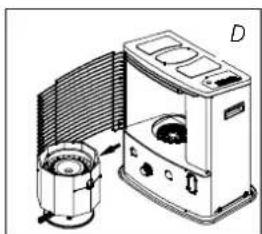
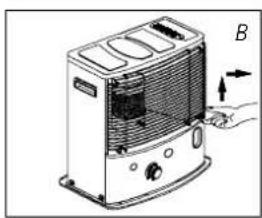
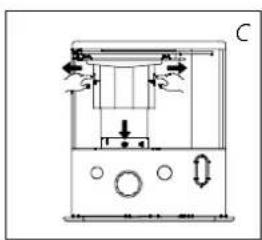
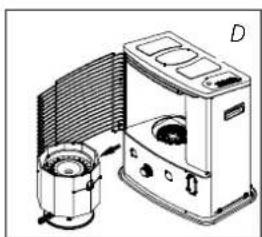
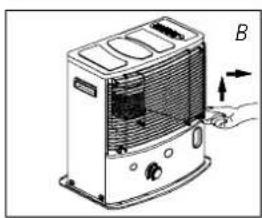
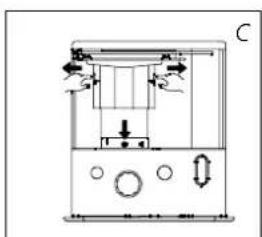
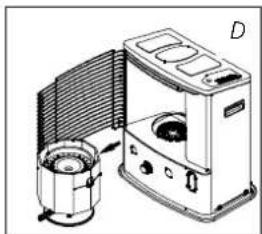
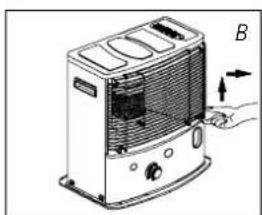
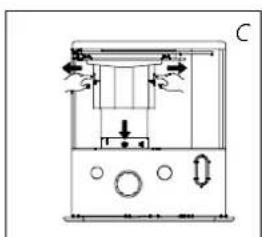
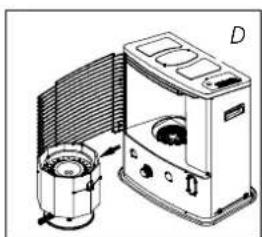
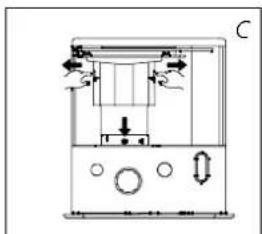
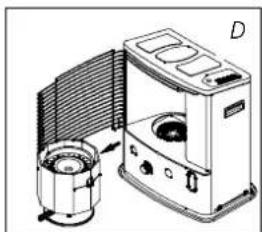
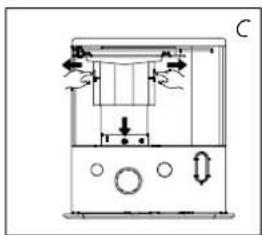
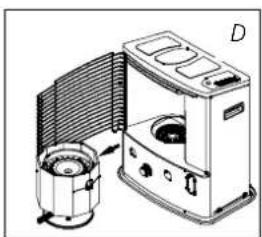
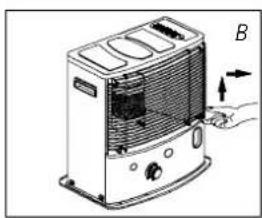
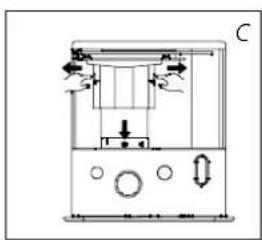
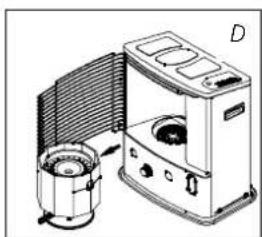
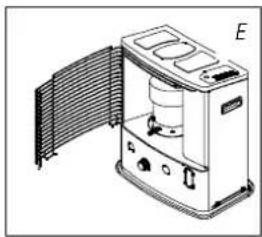
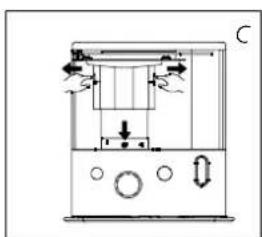
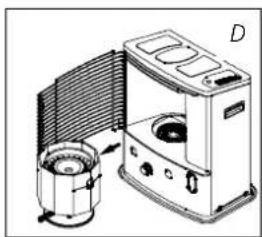
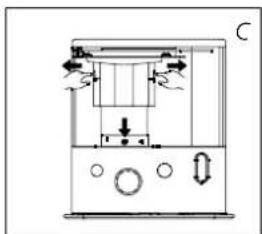
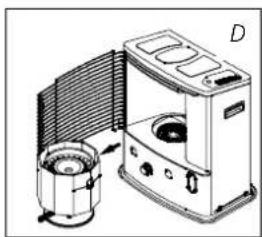
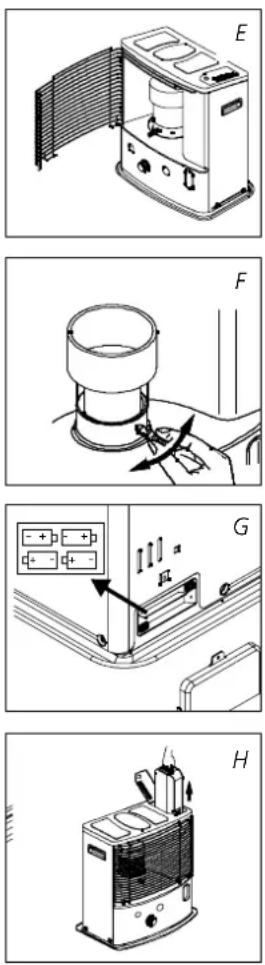
▶ Release the right side of the grill. Lift the grill from the slot (Fig. B) and pull it forward. ▶ Pull both ends of the packaging to the sides and at the same time slightly downwards (see Fig. C). Remove the combustion chamber from the heater and remove the packaging underneath (see Fig. D). GB

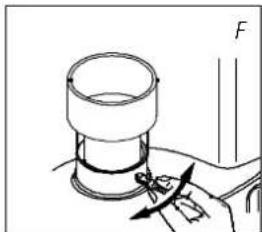
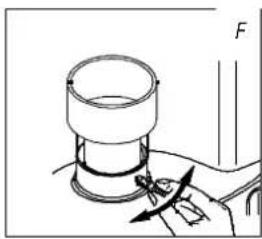
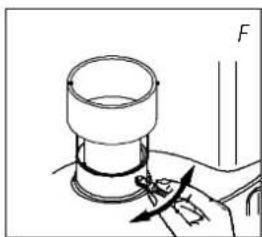
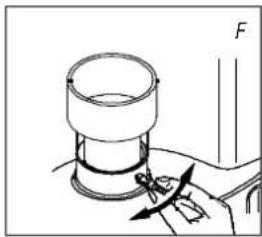
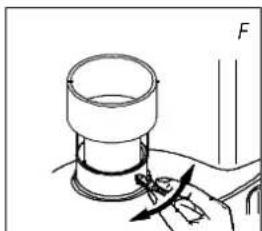
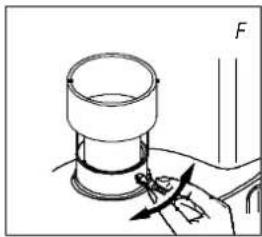
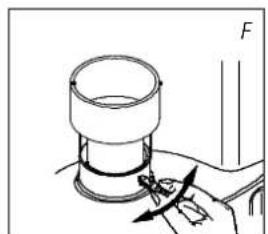
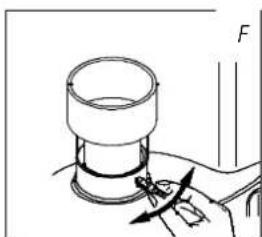
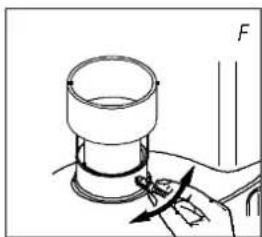
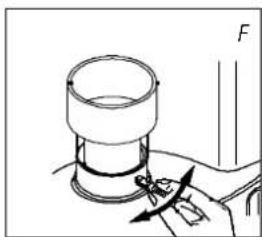
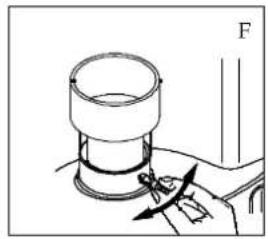
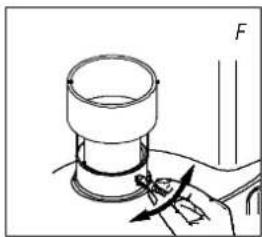
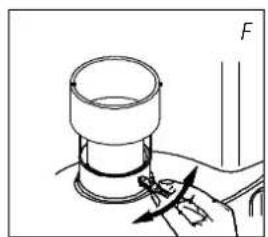
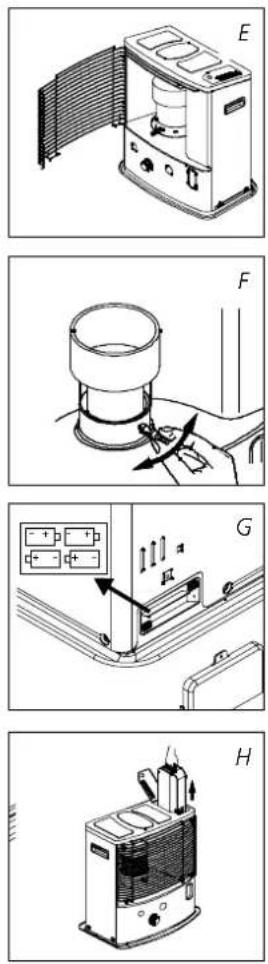
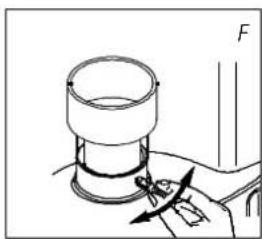
▶ Put the combustion chamber back into its place. The combustion chamber is positioned correctly when it can be smoothly moved a little to the left and to the right by its handle ⑤ (Fig. F). Close the grill: Slightly lift it to reposition it in its slot. ▶ Open the lid of the removable tank ⑧ and remove the piece of polyfoam.
3 Fill the removable tank as indicated in Section B.
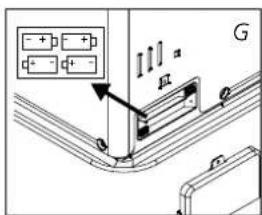
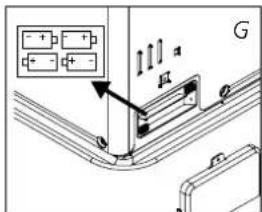
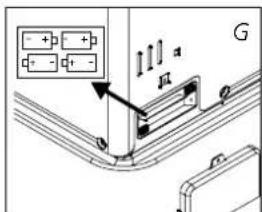
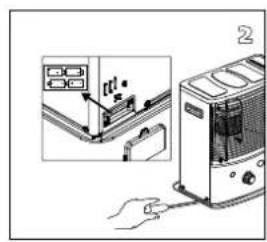
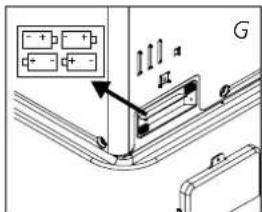
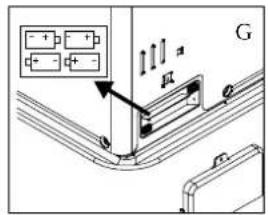
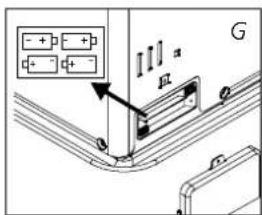
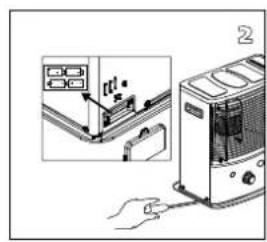
4 Insert the batteries into their holder 12 at the back of the heater (Fig. G). Ensure that the positive and negative poles match the + and - marks indicated on the battery housing. Close the battery cover.
5 The floor should be firm and completely level. Reposition the heater, when it is not level. Do not correct the situation by placing books or other goods under the heater. Please refer to the separate instructions in the carton box for fixing of the heater.
6 Your heater is now ready for use.
B FILLING FUEL
Fill the removable tank in a suitable place since there can always be some spillage. Follow the procedure below:
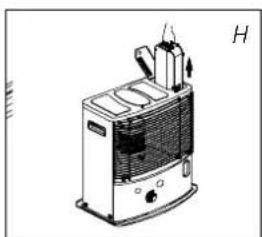
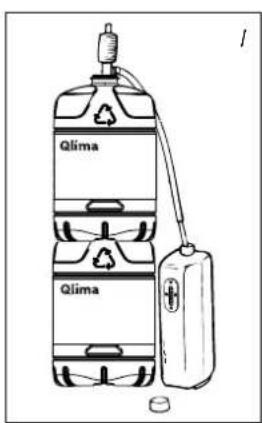
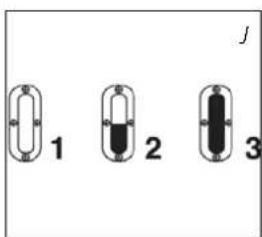
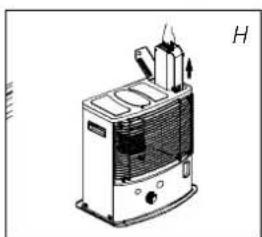
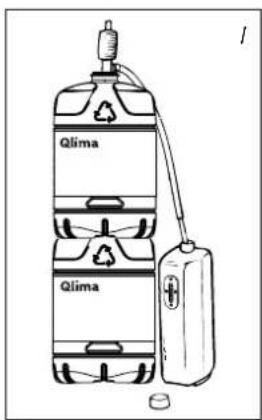
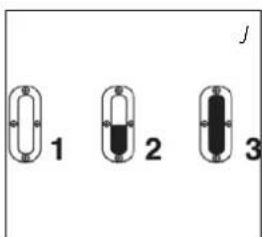
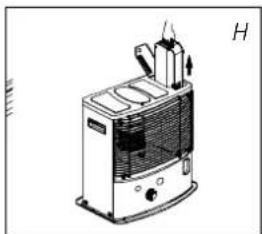
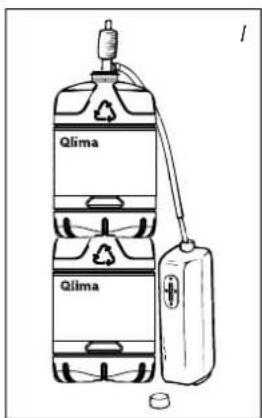
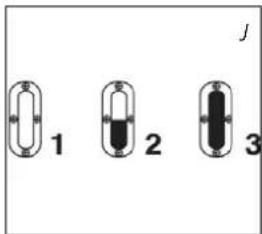
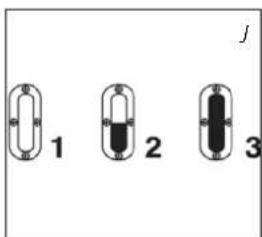
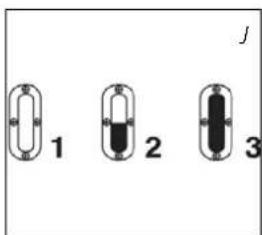
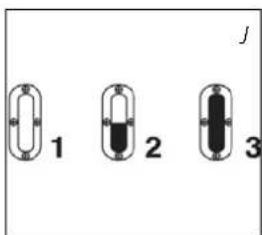
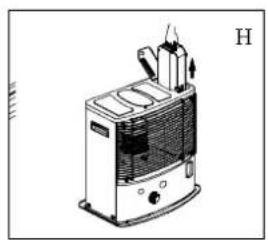
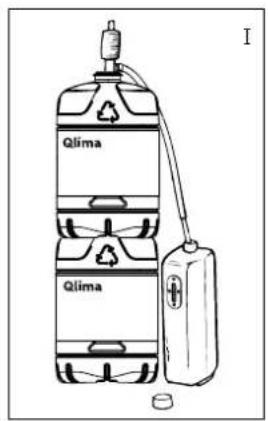
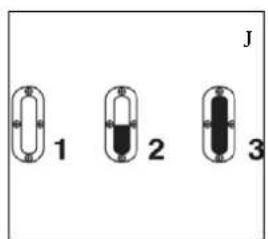
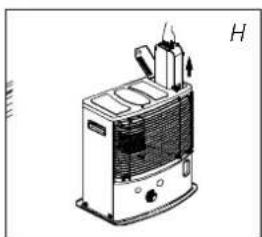
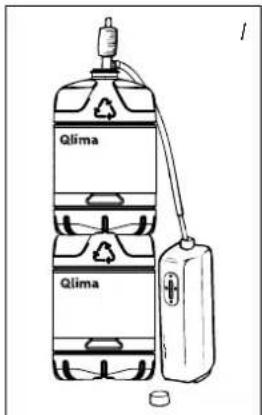
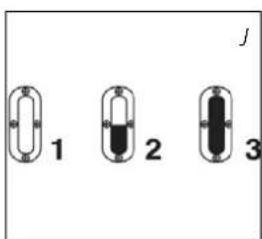
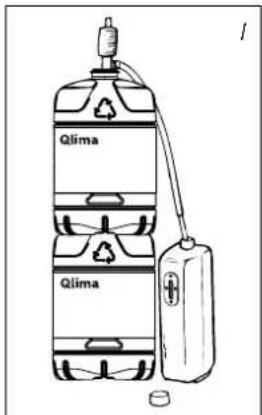
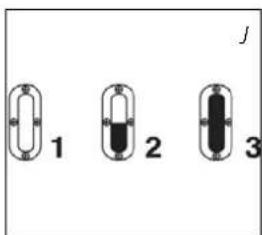
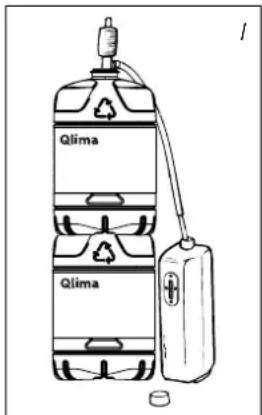
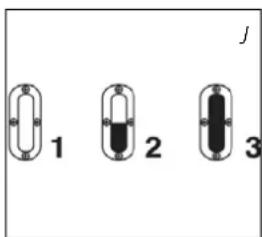
1 Make sure that the heater is switched off. 2 Open the upper lid and lift the removable tank out of the heater (Fig. H). Note: Some drops may leak from the tank. Put down the removable tank (cap pointing upwards, handle on floor and screw off the fuel cap. 3 Fill the removable tank using a fuel pump (refer to fuel pump operation instructions.) Make sure that it is in a higher position than the removable tank (Fig. I). Insert the ribbed hose into the opening of the removable tank. 4 Check the removable tank fuel gauge while filling the tank (Fig. J). Stop filling once the gauge indicates that the tank is full. Never overfill the tank, especially not when the fuel is very cold (fuel expands when it heats up). 5 Let the remaining fuel in the pump flow back into the jerry can and carefully remove the pump. Carefully screw the fuel cap back on the tank. Clean off any spilled fuel. 6 Check whether the fuel cap is straight and tightened properly. Reinstall the removable tank in the heater (cap down). Close the lid.
C IGNITING THE HEATER
A new heater may give off some smells for a short while, when it is used for the first time. You should therefore provide extra ventilation or ignite the heater outside the living room.

When you use the heater for the first time, first put the filled removable tank into place, and then wait approximately 30 minutes before you ignite the heater. This allows the glass fibre wick to soak up the fuel. Follow the same procedure when you have completely burnt up all fuel from the tank, and after the glass fibre wick has been replaced.

Before igniting the heater, always check the fuel indicator ⑥ to see whether the removable tank needs filling up.

Always ignite the heater with the ignition coil ⑪. Never use matches or a cigarette lighter.
Follow the procedure below:
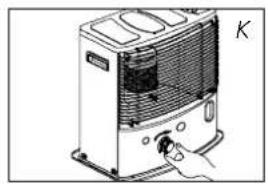
1 Turn the knurled wick adjustment knob ② clockwise to its stop (Fig. K).
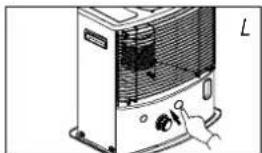
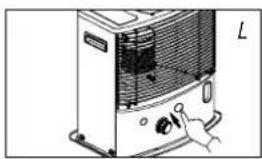
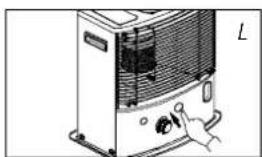
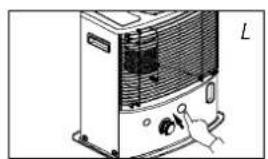
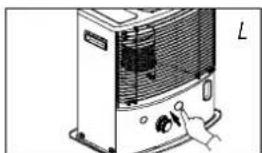
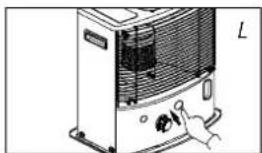
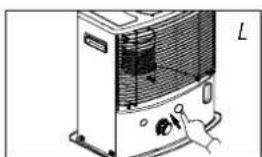
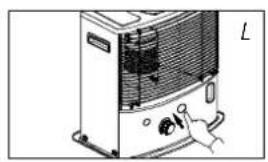
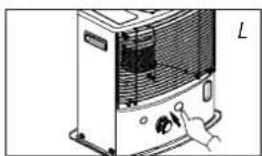
2 Push in the ignition button ③ (Fig. L), but do not apply too much force. Release the ignition button as soon as a flame is visible in the combustion chamber ④.

After igniting the heater, always check that the combustion chamber ④ is level by sliding it slightly left and right using its handle ⑤ (Fig. F). This should be a smooth movement. If the combustion chamber is not level, it will cause smoke and soot to develop.
D BURNING OF THE HEATER
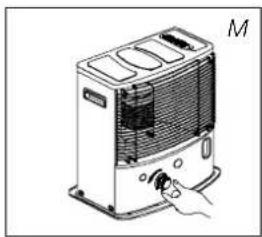
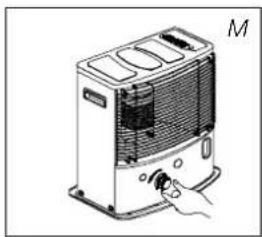
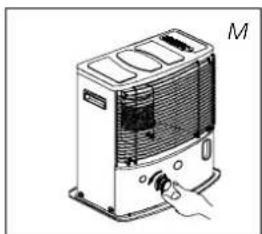
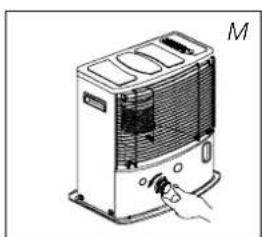
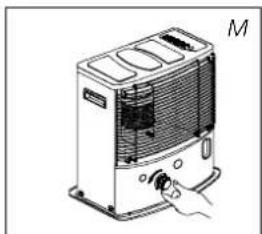
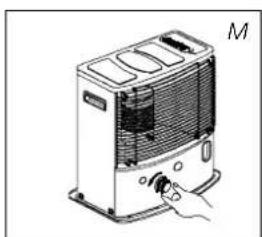
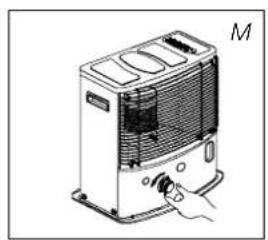
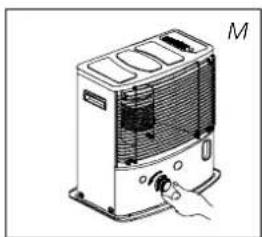
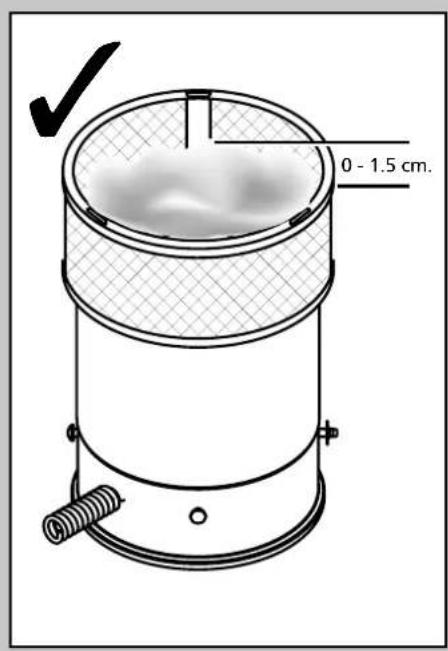
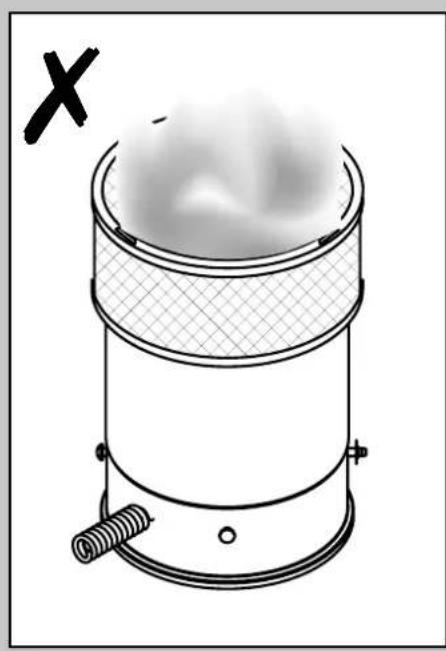
After igniting the heater, wait 10 to 15 minutes before checking whether the heater is burning well. A flame that is too high may cause smoke and soot, while a flame that is too low causes odors. Fig. Q shows the minimum and maximum permissible flame heights. The flame can be slightly adjusted using the knurled wick adjustment knob ② (Fig. M).
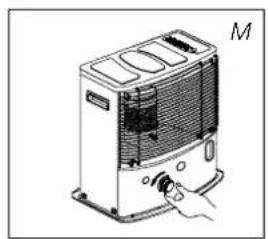
Burning that is too low may be caused by:
▶ Insufficient fuel (fill the tank) ▶ Poor fuel quality (contact your dealer) ▶ Insufficient ventilation (leave a window or door ajar) ▶ Wastage of the wick (contact your dealer or replace the wick, refer to section L)
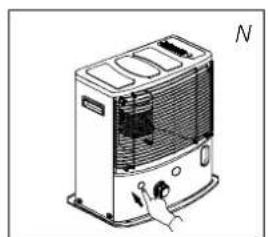
E SWITCHING OFF THE HEATER
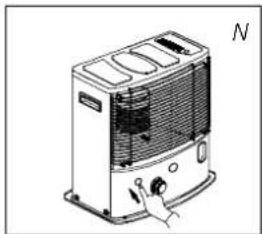
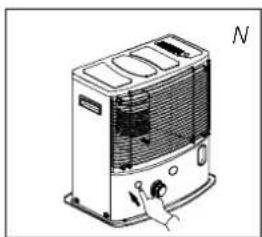
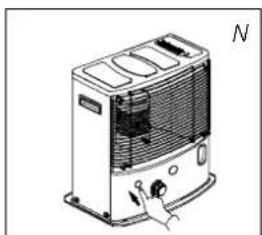
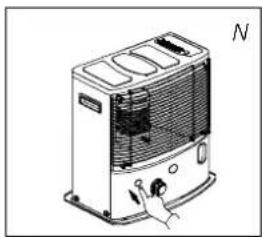
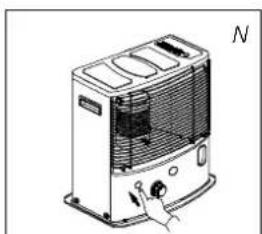
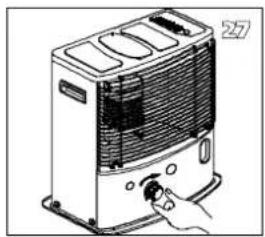
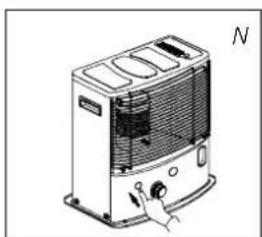
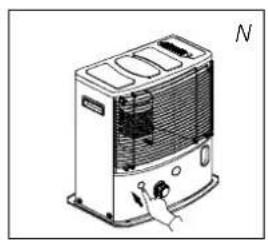
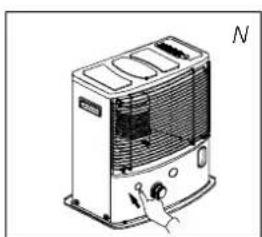
Push the OFF button ①. The flame will extinguish after a short while (Fig. N).
F MALFUNCTION, CAUSES AND SOLUTIONS
If any malfunction cannot be solved using the directions below, please contact your dealer.
THE HEATER DOES NOT IGNITE
▶ The batteries are not positioned correctly in the holder. Check (Fig. G). There is not enough power left in the batteries for ignition. Replace (Fig. G). ▶ You have run out of fuel in the tank or the wick has been replaced. After refilling and replacing the removable tank, wait 30 minutes before igniting the heater. ▶ You are pushing the ignition button ③ with too much force. Push it in less forcefully (Section C). ▶ The ignition coil ⑪ is defective. Contact your dealer.
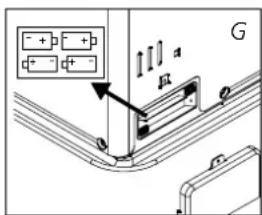
IRREGULAR FLAME AND/OR SOOT AND/OR SMELLS
▶ The combustion chamber ④ has not been positioned correctly. Use the handle ⑤ to level it, until you can easily slide it slightly left and right and the chamber is level. ▶ You are using fuel that is past its 'use by' date. Start every heating season with fresh fuel. ▶ You are using the incorrect type of fuel. Refer to THE RIGHT FUEL (See Section 'What you need to know in advance'). ▶ Dust has gathered in the lower part of the heater. Contact your dealer. ▶ The wick height is not correct. Contact your dealer.
THE HEATER SLOWLY EXTINGUISHES
▶ The removable tank is empty. See Section B. ▶ The lower reservoir is contaminated by moisture. Contact your dealer. ▶ The wick has hardened on the upper side. Burn the heater until all fuel is used (Section G). Use the right fuel. ▶ You are using fuel that is past its 'use by' date. Start every heating season with fresh fuel.
THE HEATER REMAINS BURNING LOW
▶ Wick position too low. Contact your dealer. ▶ Before you refilled the tank, the heater had burnt up almost all the fuel. After having refilled and replaced the removable tank, wait for 30 minutes before igniting the heater. ▶ You are using the incorrect type of fuel. Refer to THE RIGHT FUEL (See Section 'What you need to know in advance'). ▶ The room is insufficiently ventilated. Leave a window or a door wide open for a while.
THE HEATER IS BURNING TOO HIGH
▶ You are using an incorrect, too volatile type of fuel. Refer to THE RIGHT FUEL (See Section 'What you need to know in advance'). ▶ Wick position too high. Contact your dealer.
ignition coil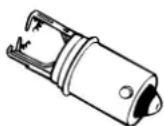
G MAINTENANCE
Your heater needs hardly any maintenance. It is, however, important that you remove dust and stains in time with a damp cloth, because otherwise these may cause stains that are hard to remove. Under normal conditions, only three components are subject to wear:
1. THE BATTERIES
You may replace the batteries yourself. Do not dispose of old batteries along with the other domestic waste. Follow the locally applicable regulations regarding the disposal of domestic chemical waste. Do not throw batteries into the fire, where they can explode or release dangerous liquids.
2. THE IGNITION COIL
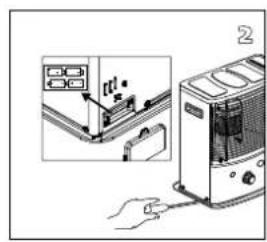
The ignition coil will have a longer life, if you ignite the heater in the correct manner. Replace the batteries in time and take care not to push in the ignition button with too much force. If the filament is broken, the ignition coil must be replaced.
3. THE WICK
To extend the glass fibre wick life, you must occasionally let the heater burn until the tank is completely emptied and the heater extinguishes by itself. Do this when you notice that the flame is weakening. The burn-out will cause some smells, so it is recommended that you take the heater outside of the living room.

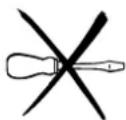
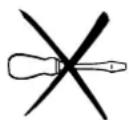
Do not remove any heater components yourself. Always contact your dealer for repairs.

Let the heater cool down first, before you start any maintenance or service work.
H STORAGE (END OF THE HEATING SEASON)
We recommend that you burn up all the fuel in the fuel tank at the end of the heating season and store the heater properly. Follow the procedure on the next page:
1. Ignite the heater outside the living room and let it burn until all fuel is used. 2. Let the heater cool down. 3. Clean the heater with a damp cloth and then dry it with a dry cloth. 4. Remove the batteries from the holder ⑫ and store them in a dry place. 5. Clean the fuel filter. 6. Store the heater in a dust-free place, if possible in its original packaging. Unused fuel cannot be used for the next heating season. If there is still some fuel left, do not throw it away, but dispose of it in accordance with the local regulations for the disposal of domestic chemical waste. Always start the new heating season with fresh fuel. When you start re-using the heater, follow the instructions again (starting from Section A and as specified).
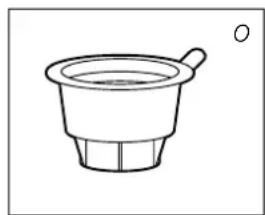
transportation cap
TRANSPORTATION
Take the following measures to avoid fuel leakage during the transportation of the heater:
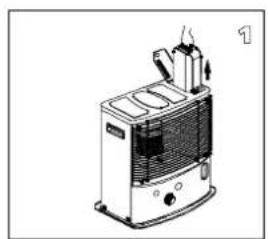
1. Let the heater cool down. 2. Remove the removable tank ⑨ from the heater and remove the fuel filter. Some drops may leak from the filter; keep a cloth at hand. Store the fuel filter and the removable tank outside the heater. 3. Place the transportation cap (Fig. O) into the position of the fuel filter. Press it tight. The transportation cap will, as much as possible, prevent oil leakage from the heater during transport. 4. Always move the heater in an upright position. 5. Make the fixed tank empty with a fuel pump before transportation or in case of wrong or dirty fuel. First remove the fuel filter and then insert the fuel pump into the empty fixed tank. Follow the same procedure if the fuel tank contains water.
J SPECIFICATIONS
| R7224CR8224CR8227C | |||
| Ignition electrical | |||
| Fuel paraffin | |||
| Capacity (kW)* 2.4 2.4 2.7 | |||
| Suitable space (m3)** 40-85 40-85 45-95 | |||
| Fuel consumption (l/hr)* 0.250 0.250 0.281 | |||
| Fuel consumption (g/hr)* 200 200 225 | |||
| Burning time per tank (hr)* 16.4 16.4 15 | |||
| Capacity removable tank (litres) | 4.2 4.2 4.2 | ||
| Weight (kg) | 8.8 8.8 9.1 | ||
| Dimensions (mm) (including base plate) | width 455 | ||
| depth 295 | |||
| height 495 | |||
| Required batteries | 6V D.C. (R14 x 4) | ||
| Wick type | N | ||
| Monitoring of the quality of ventilation (air renewal): Direct measurement of the CO2 level (NDIR CO2-sensor 15). | |||
* At maximum setting ** Specified values are indicative
K WARRANTY PROVISIONS
Your heater comes with a 48-month warranty starting on the date of purchase. Within this period all defects in material or workmanship will be repaired without any charge. The following provisions shall apply regarding this warranty:
1 We expressly dismiss all other claims for damages, including consequential damages. 2 Any repairs or replacements of components within the term of warranty will not result in an extension of the term of warranty. 3 The warranty will no longer apply when the heater has been modified, non-original parts have been used, or when it is repaired by third parties. 4 The warranty will not apply to parts that are subject to normal wear, such as the batteries, the ignition coil, the wick, and the manual fuel pump. 5 The warranty will only apply when you present the original, dated proof of purchase, provided no changes have been made to it. 6 The warranty will not apply to damages caused by actions not in compliance with the Directions for Use, neglect, and the use of an incorrect type of fuel, or fuel past its use-by date. The use of incorrect fuel can even be dangerous*. 7 Transportation costs and the risks involved during the transportation of the heater or heater components will always be the responsibility of the purchaser.
In order to avoid unnecessary costs, we recommend that you always read the 'Directions for Use' carefully first. In case they offer no solution, please take the heater to your dealer for repair.
14 TIPS FOR SAFE USE
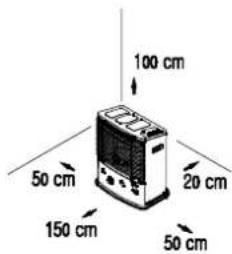
1 Children should be supervised to ensure that they do not play with the appliance. 2 Do not move the heater when it is burning or still hot. Do not refill nor service the heater when it is burning or still hot. 3 Position the front of the heater at a minimum distance of 1.5 metres from walls, curtains, and furniture. 4 Do not use the heater in dusty rooms or in very draughty places. In both cases you will not have optimum burning. 5 Switch off the heater before you go to sleep. 6 Store and move fuel only in suitable tanks and jerrycans. 7 Make sure that the fuel is not exposed to heat or extreme temperature changes. Always store the fuel in a cool, dry, and dark place (sunlight will affect the quality). 8 Never use the heater in places where harmful gasses or fumes may be present (e.g., exhaust gasses or paint fumes). 9 Be aware that the grid of the heater becomes hot. If the appliance is covered, there is a risk of fire. 10 Always make sure that there is sufficient ventilation. 11 This appliance is not intended for use by persons (including children) with reduced physical, sensory, or mental capabilities, or lack of experience and knowledge, unless they have been given supervision or instruction concerning use of the appliance by a person responsible for their safety. 12 This appliance can be used by children aged from 8 years and above and persons with reduced physical, sensory, or mental capabilities or lack of experience and knowledge if they have been given supervision or instruction concerning use of the appliance in a safe way and understand the hazards involved. 13 Children shall not play with the appliance. 14 Cleaning and user maintenance shall not be made by children without supervision.
REPLACEMENT OF THE WICK
ENSURE THAT THE HEATER IS OFF AND COMPLETELY COOL BEFORE STARTING TO REPLACE THE WICK.
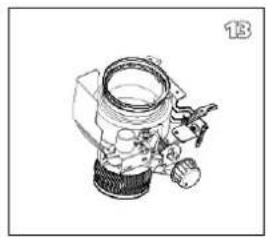
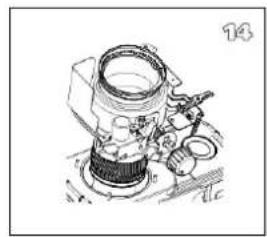
1a. Open the tank cover ⑧ and remove the fuel tank ⑨.
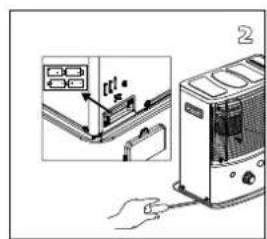
1b. Remove the batteries to prevent possible burns.
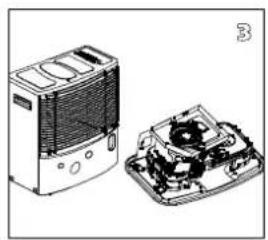
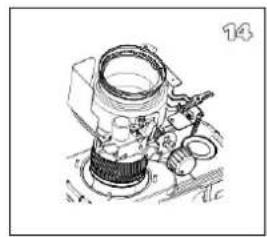
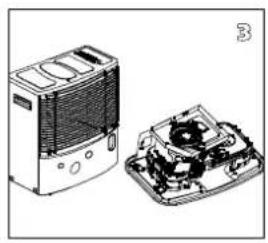
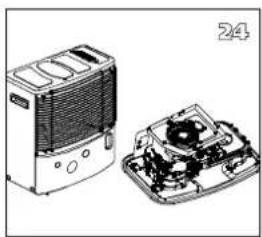
1c. Open the front grille and remove the combustion chamber ④.
1d. Remove the wick adjuster ② by pulling it straight out.
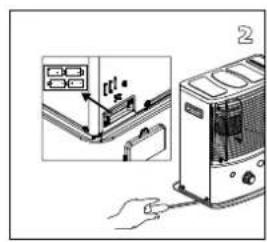
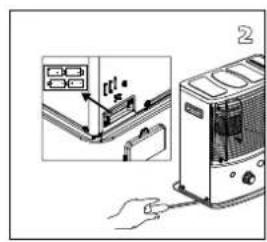
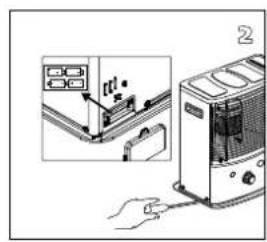
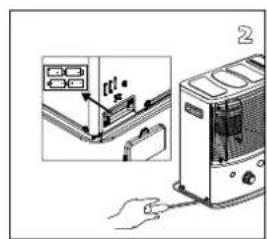
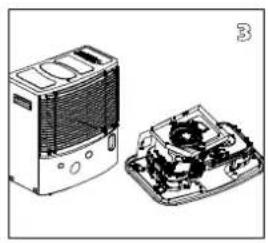
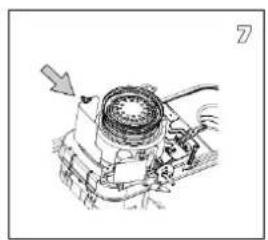
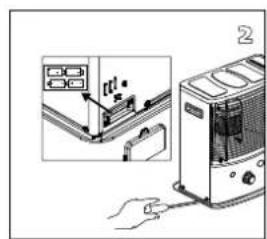
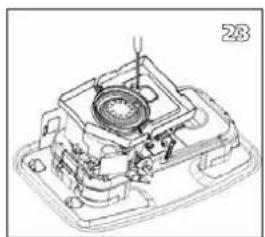
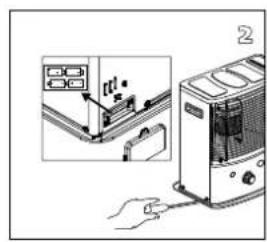
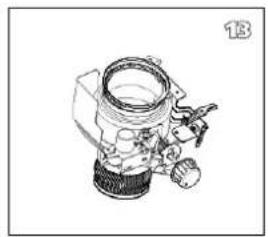
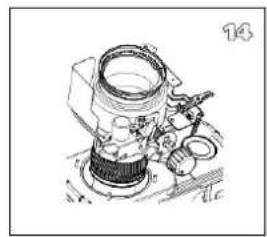
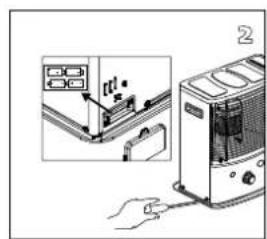
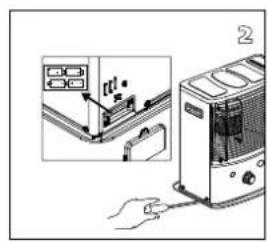
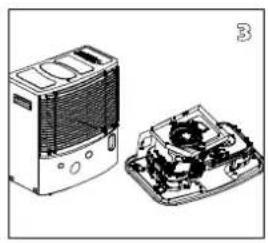
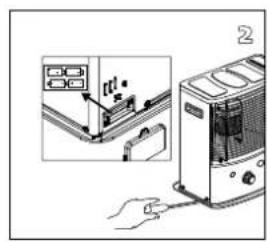
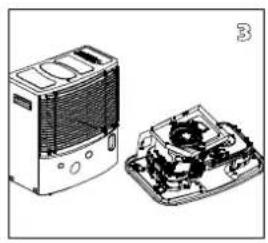
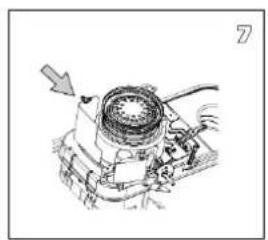
2a. Unscrew the 5 screws: 2 from the back, 1 from the right side, and 2 from the left side of the cabinet.
2b. Remove the sensor at the back side of the cabinet.
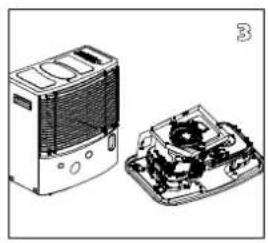
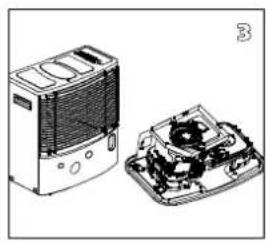
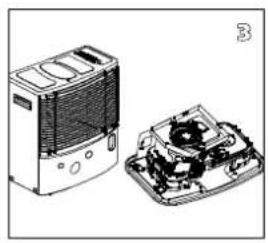
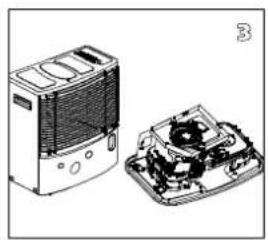
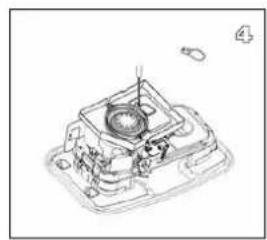
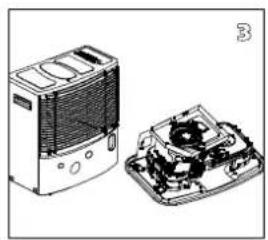
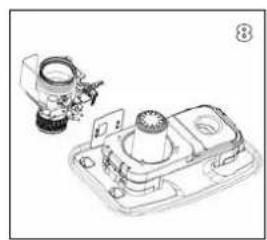
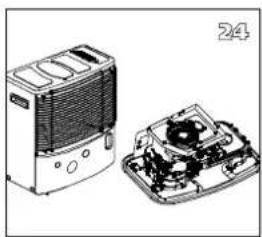
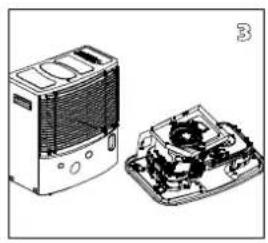
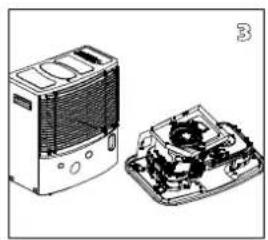
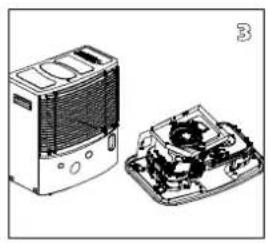
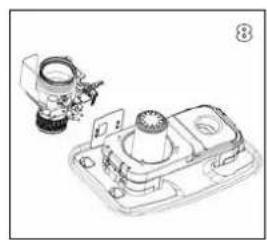
- Remove the cabinet by pulling it straight up.
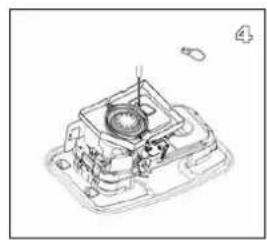
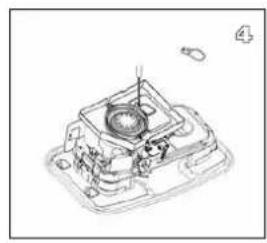
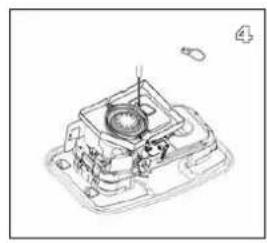
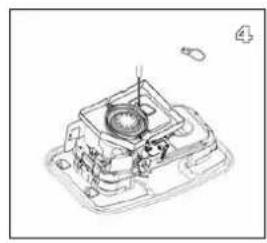
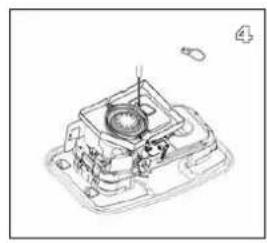
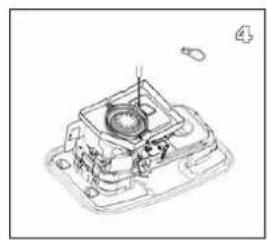
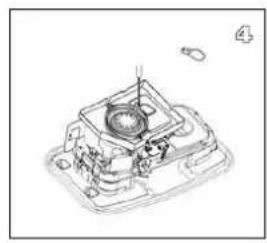
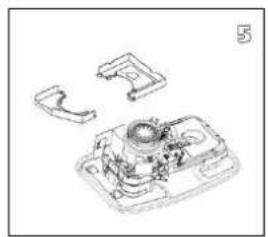
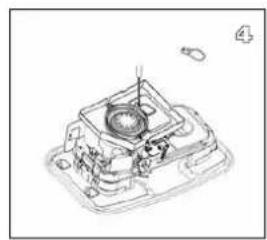
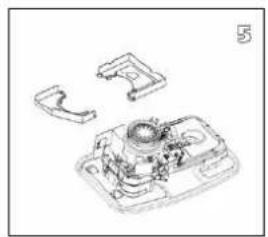
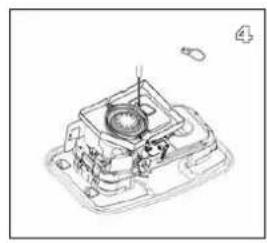
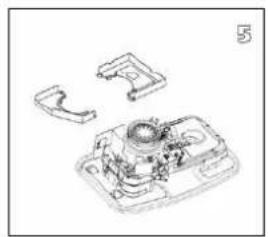
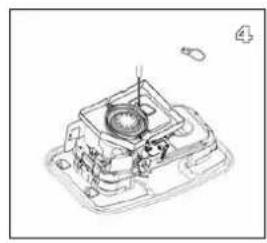
- Remove the 2 screws on the lamp cover.
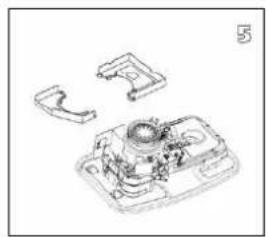
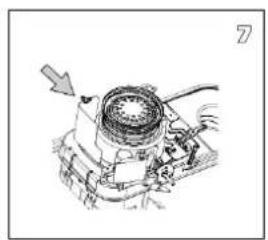
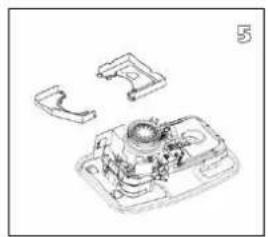
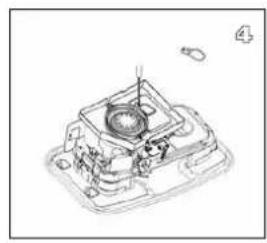
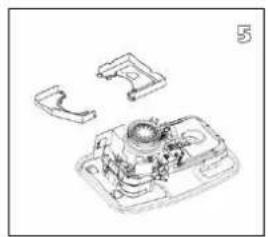
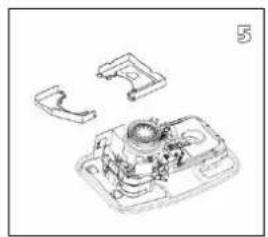
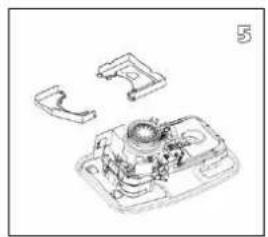
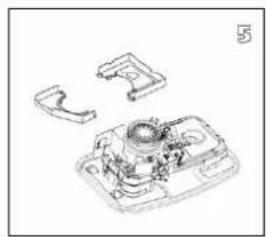
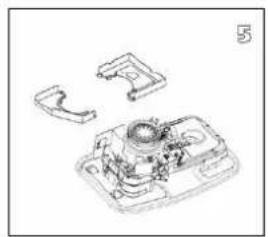
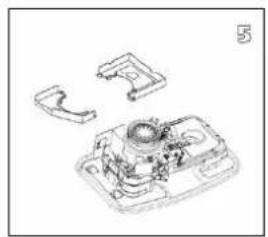
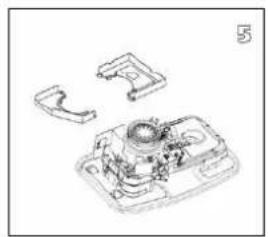
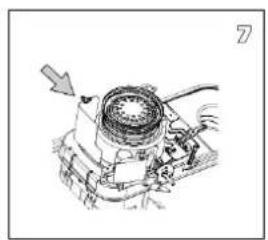
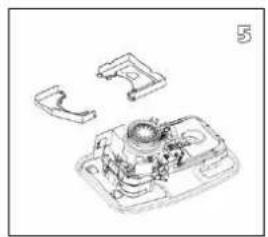
- Remove the wind cover A/B.
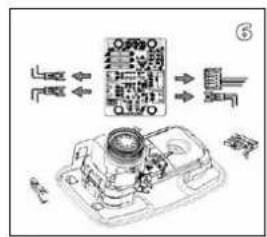
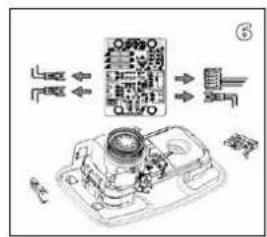
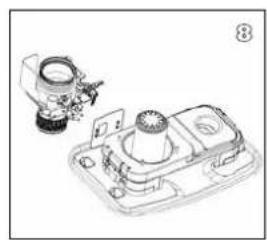
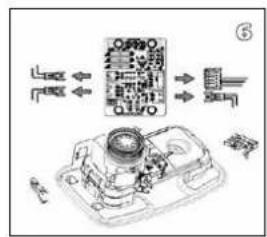
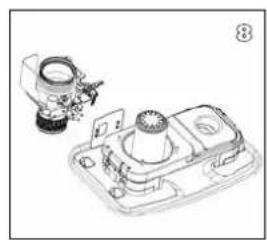
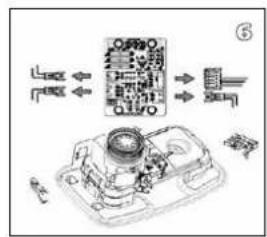
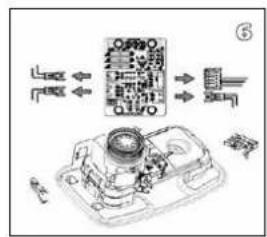
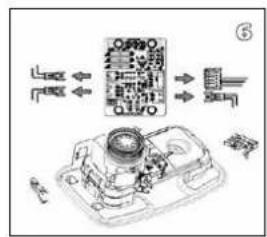
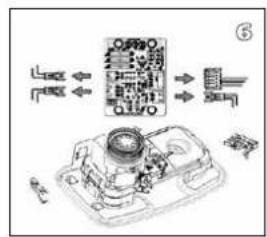
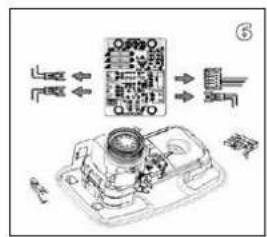
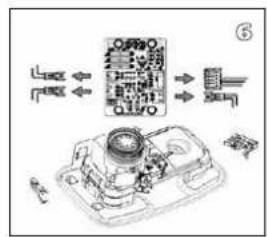
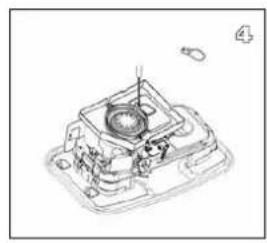
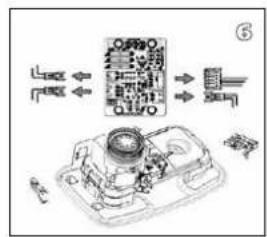
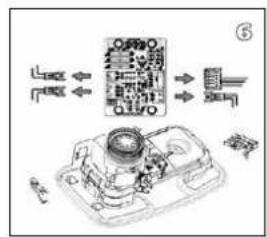
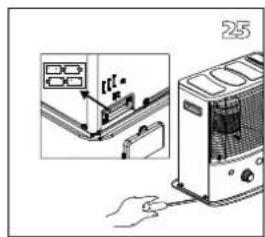
6a. Remove the automatic ignition assembly by unscrewing 1 screw.
6b. Remove the tip-over safety switch by unscrewing 1 screw.
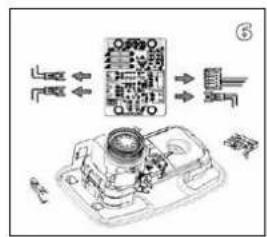
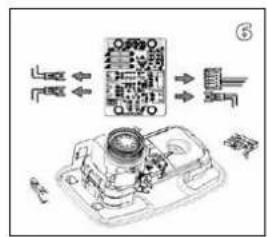
6c. Remove the 4 connectors (4EA) from the printplate.
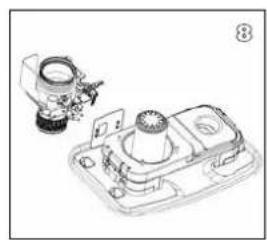
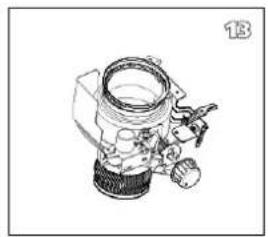
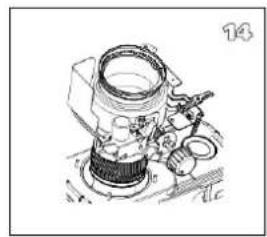
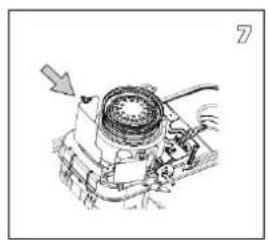
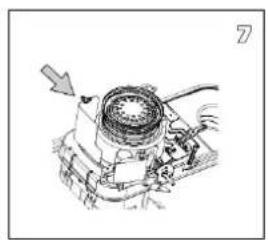
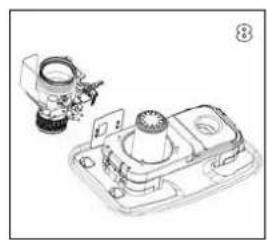
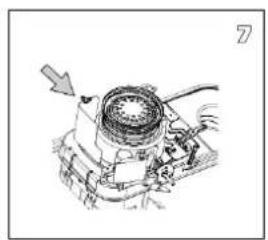
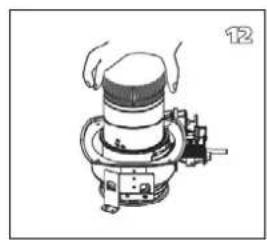
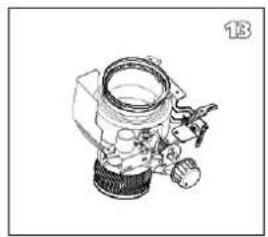
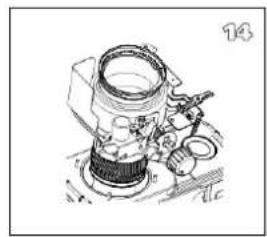
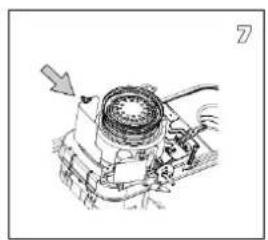
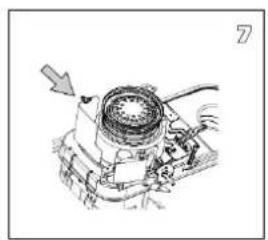
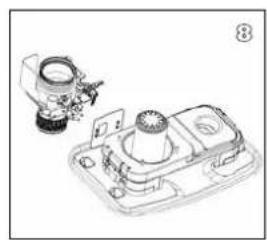
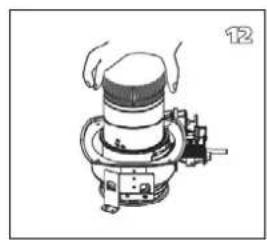
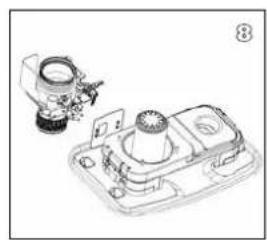
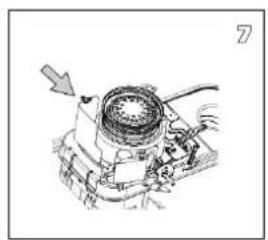
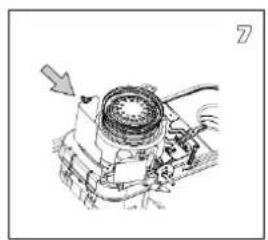
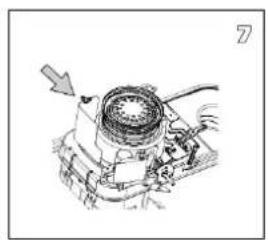
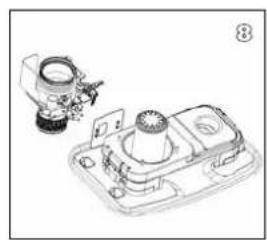
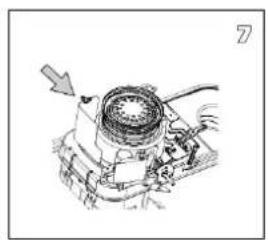
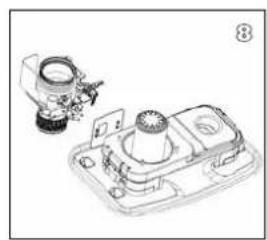
- Unscrew 4 wing nuts
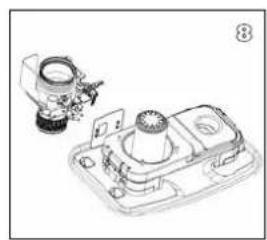
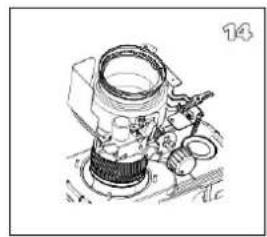
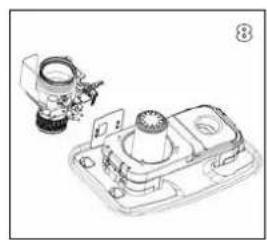
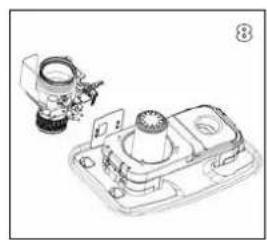
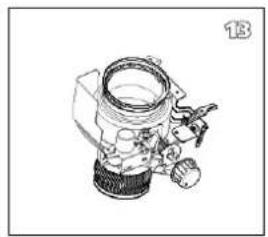
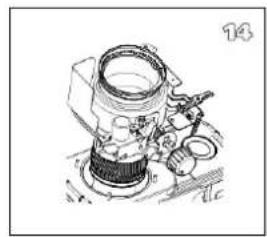
- Remove the wick adjuster assembly.
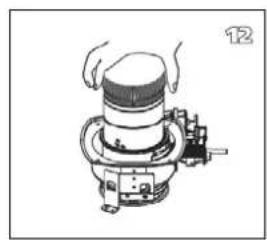
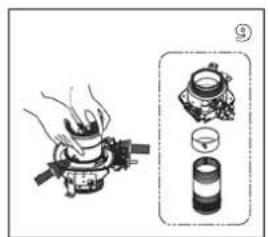
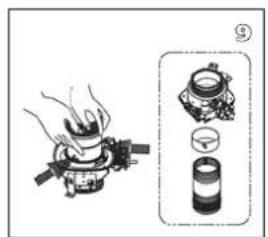
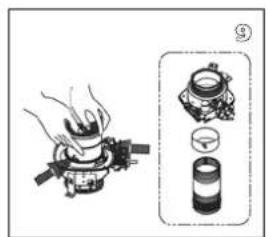
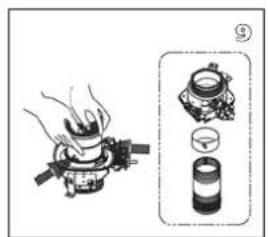
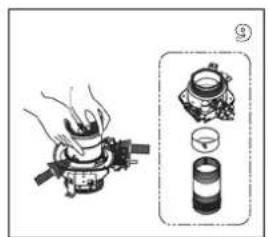
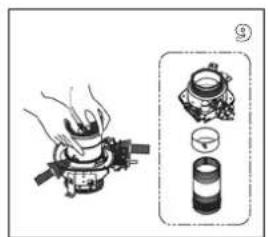
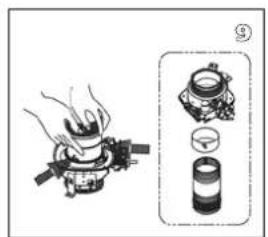
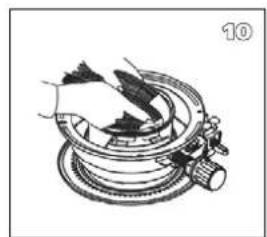
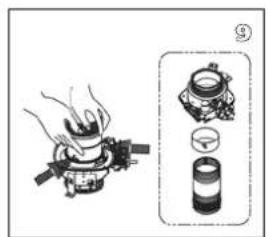
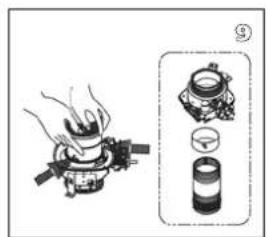
- Press the pin of the wick which is assembled inside the wick case assembly. Disassemble the wick, the wick holder, the wick case assembly separately.
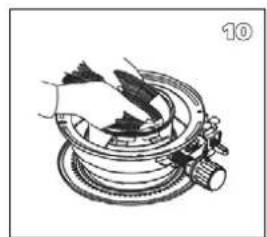
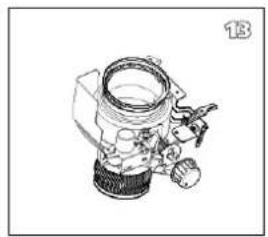
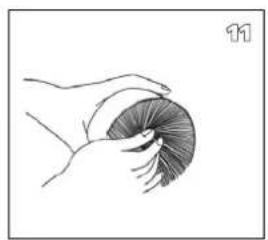
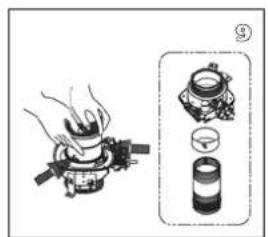
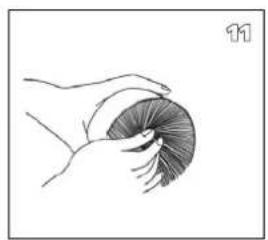
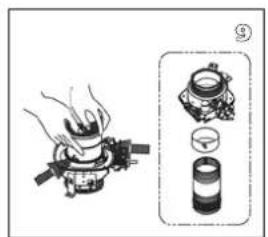
- Install the new wick and insert the three pins on the new wick into the 3 holes on the wick sleeve in the upward direction (See the arrow marked "up" on the wick sleeve).
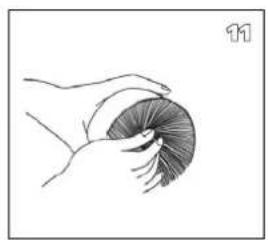
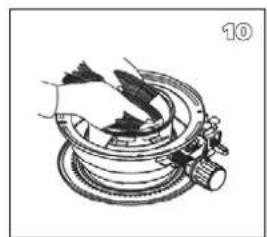
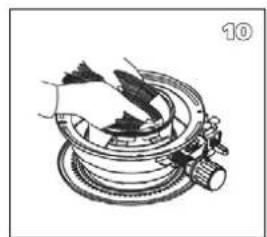
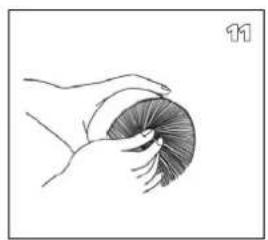
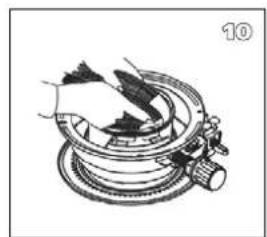
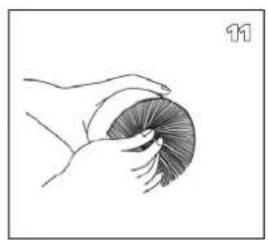
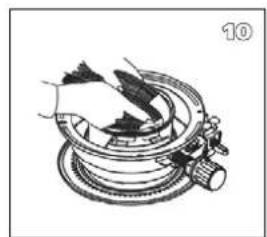
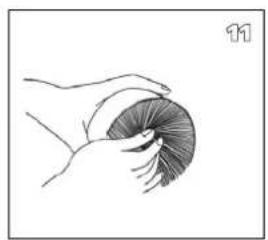
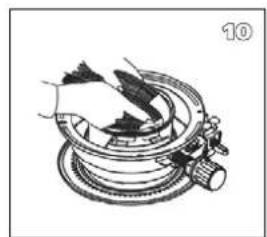
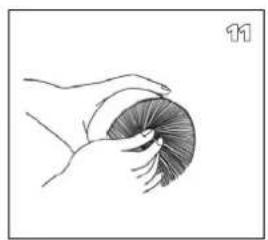
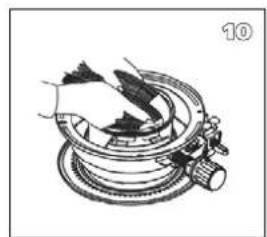
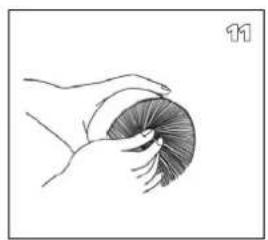
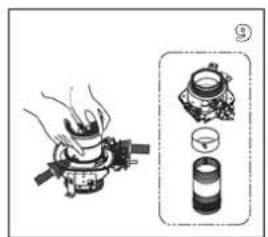
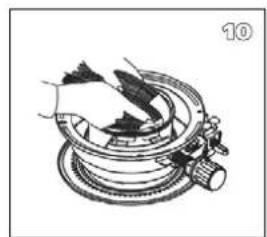
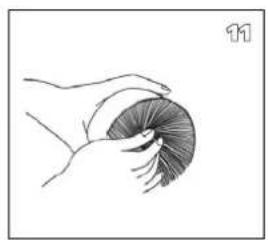
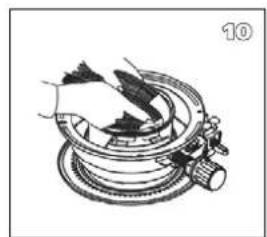
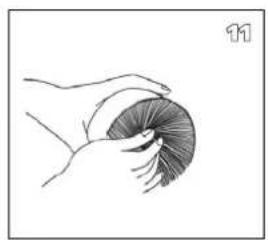
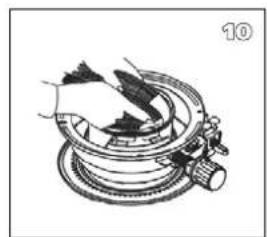
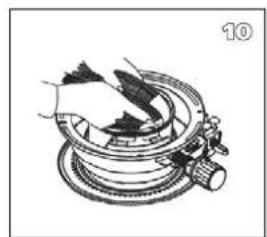
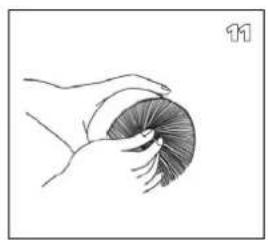
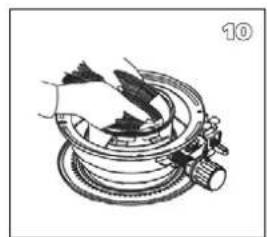
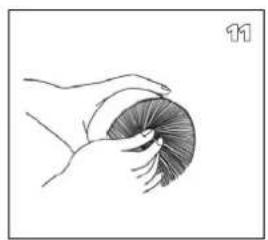
- Push the new wick into the retainer teeth of the wick sleeve so that the wick adheres tightly around the inside of the wick sleeve, smoothing out any wrinkles.
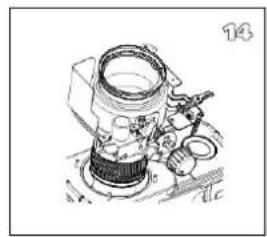
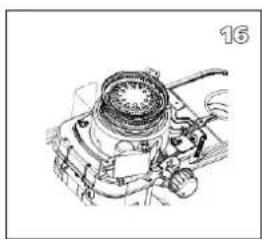
- Line up the pins with the slotted holes inside the wick adjuster. Then lightly press each of the three pins of the wick (now attached to the wick sleeve) towards the inside. Insert the three pins into the slanted grooves of the wick adjuster. Press on each of the three pins, inserting them securely in the holes.
- Turn the wick adjustment knob and check to be sure that the wick moves up and down freely.
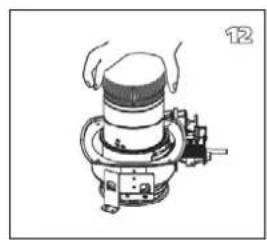
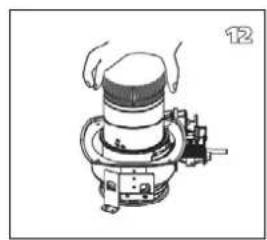
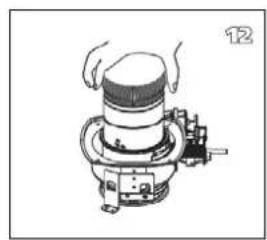
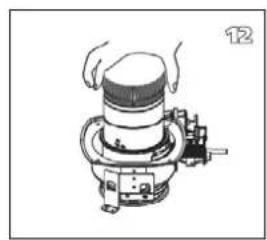
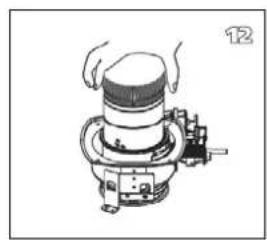
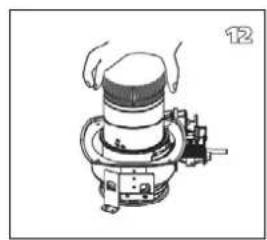
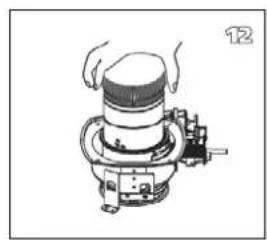
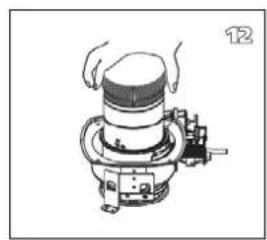
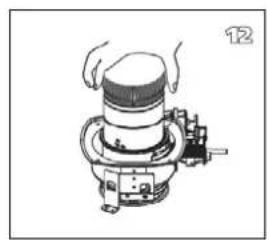
- Slide the wick adjuster assembly down the draft tube. Position the adjuster shaft to the front of the heater.
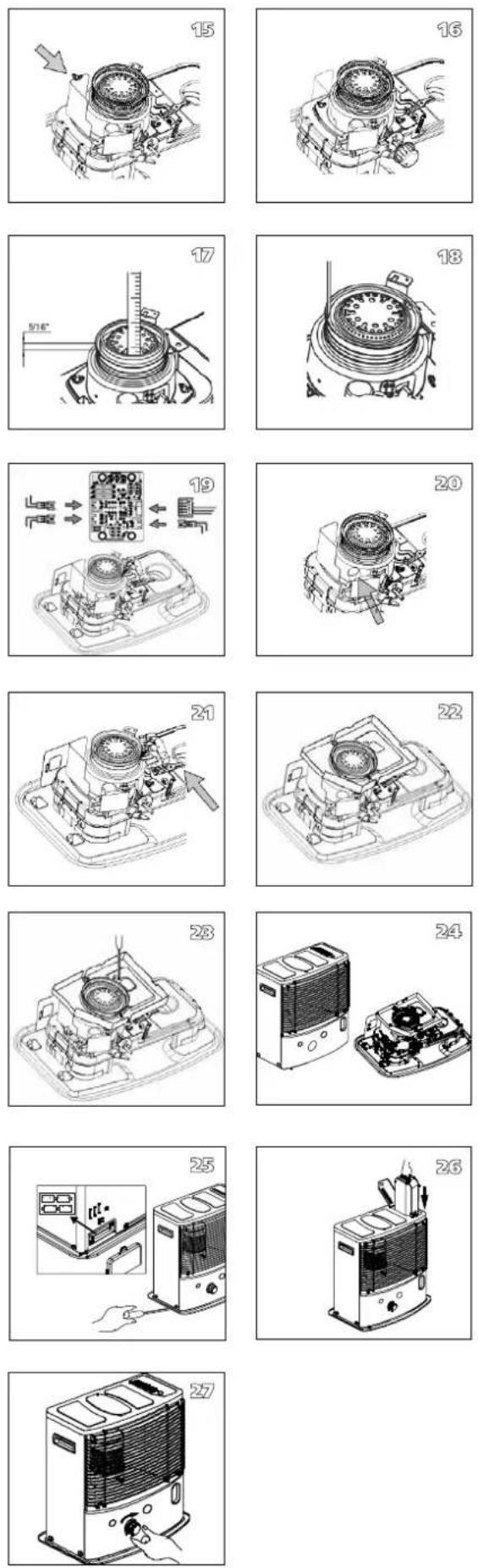
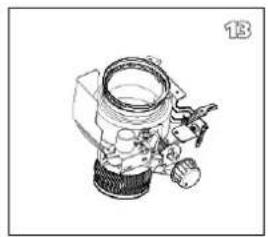
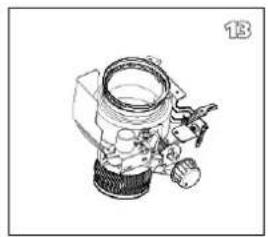
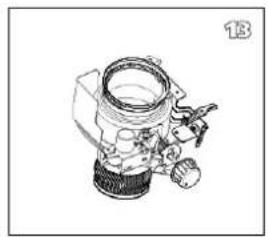
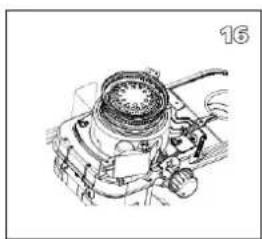
- Snug 4 wing nuts on the mounting stud, but do not tighten them.
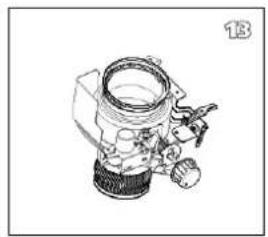
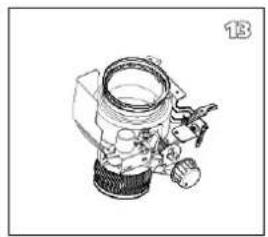
- Raise the wick to its highest position and tighten the wing nuts in several steps.
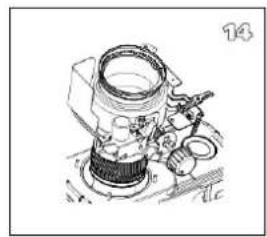
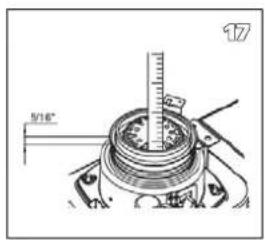
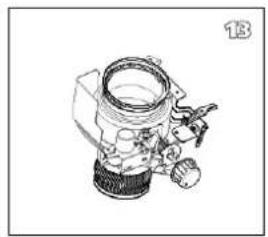
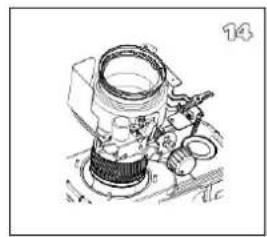
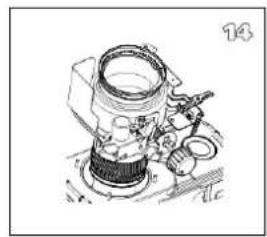
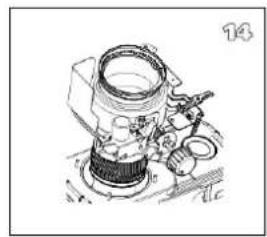
- Check the wick height. It should be 5/16 above the collar.
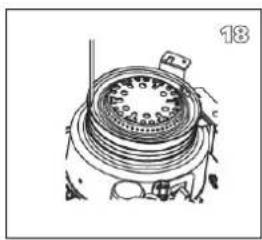
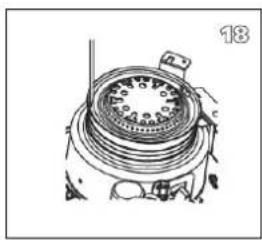
- Check for the correct clearance between wick holder and draft tube. It should be the same all around.
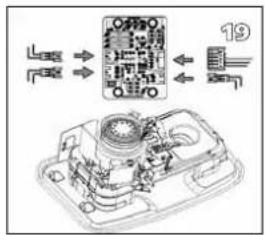
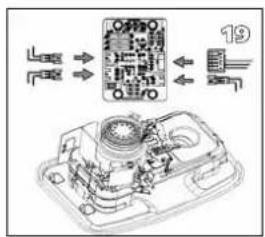
19a. Reinstall the tip-over switch assembly by pushing the extinguish knob.
19b. Connect the four connectors (4EA) with the circuit board.
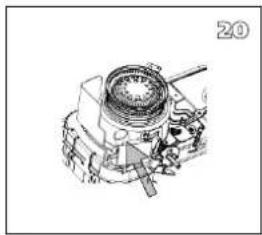
- Check the function of the tip-over safety stop by pushing the extinguish button to upset the pendulum.
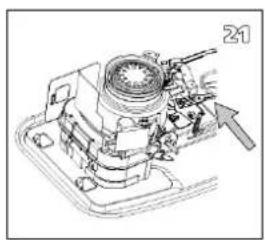
- Reinstall the automatic ignition assembly.
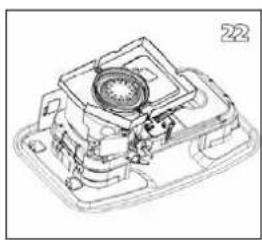
- Reinstall the wind cover A / B.
- Reinstall the lamp cover.
- Reinstall the cabinet.
- Tighten the 5 screws on the cabinet and reinstall the sensor at the back of the cabinet.
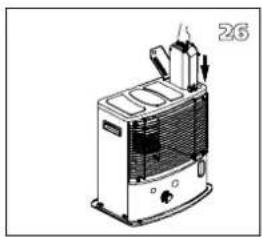
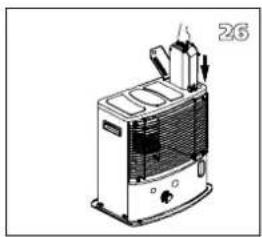
- Reinstall the combustion chamber and the fuel tank.
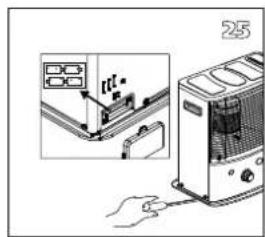
- Reinstall the wick adjusting knob. Close the front plate.
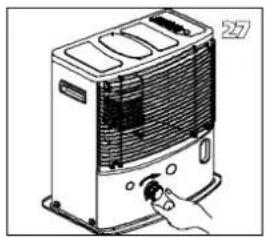
Install the batteries in the battery case and fill the fuel tank with Qlima Premium Quality Fuels. Set the tank into the heater and wait at least 60 minutes for the new wick to fully saturate with the fuel.
MANUAL

C IGNITION OF THE STOVE

D COMBUSTION OF THE STOVE
UNSTEADY FLAME AND/OR SOOT AND/OR BAD SMELL.
2. THE IGNITION RESISTANCE
HANDBOOK

A INSTALLING THE STOVE
C KEEPING THE STOVE WARM

THE STOVE TURNS OFF SLOWLY
transport cover
H STORAGE (END OF THE COLD SEASON)
REPLACING THE WICK
L MAKE SURE THE STOVE IS OFF AND COMPLETELY COLD BEFORE YOU START REPLACING THE WICK.
WHAT YOU SHOULD KNOW BEFOREHAND
ALWAYS VENTILATE SUFFICIENTLY
MANUAL

A INSTALLING THE HEATER
C LIGHTING THE HEATER
F FAULTS, CAUSES AND SOLUTIONS
Transport cap
REPLACING THE WICK
L BEFORE YOU BEGIN REPLACING THE WICK, THE HEATER MUST BE OFF AND COMPLETELY COOLED DOWN.
MANUAL


E TURNING OFF THE HEATER
Transport cap
ENSURE ADEQUATE VENTILATION,
INSTRUCTION MANUAL

A INSTALLING THE HEATER
D ADJUSTING THE FLAME
THE HEATER WILL SLOWLY GO OUT BY ITSELF
transport cap
H STORAGE (END OF HEATING SEASON)
WICK REPLACEMENT
L BEFORE REPLACING THE WICK, MAKE SURE THE HEATER IS TURNED OFF AND COLD.
ALWAYS ENSURE THERE IS ADEQUATE VENTILATION
MANUAL

A INSTALL THE HEATER
D HEATER COMBUSTION
HEATER CONTINUES TO BURN WEAKLY
transport cap
J SPECIFICATIONS
WICK REPLACEMENT
L CHECK THAT THE HEATER IS OFF AND COMPLETELY COOLED DOWN BEFORE REPLACING THE WICK.
INSTRUCTIONS FOR USE

A PREPARING THE STOVE
SLO
Transport cover
TRANSPORT
WICK REPLACEMENT
BEFORE REPLACING THE WICK, MAKE SURE THE STOVE IS OFF AND COLD.
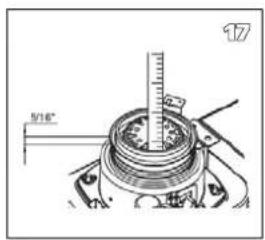
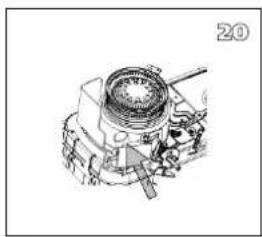
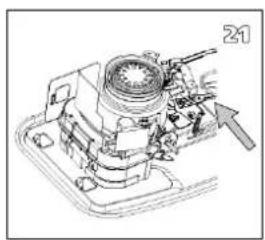
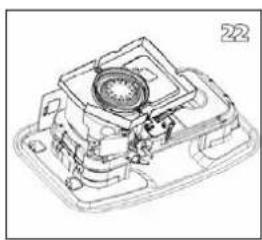
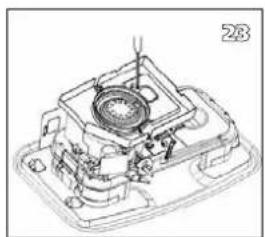
- Check the wick height. The wick must be 0.8 cm above the ring.
- Check that there is enough clearance between the wick holder and the air tube. The clearance must be even all around.
19a. Press the off button ① and reinstall the anti-tip guard.
Distributed in Europe by PVG Holding B.V.
If you need more information or encounter any problems, please visit our website at www.qlima.com or contact our customer service (phone number available on www.qlima.com). For any additional information or if you have any issues with the device, please refer to www.qlima.com or contact your local customer center (phone numbers can be found at www.qlima.com). (ES) If you need information or have any problems, please visit our website www.qlima.com or contact customer service (you will find the phone number on www.qlima.com). If you would like additional information or if you encounter a problem, please visit our website (www.qlima.com) or contact our customer service (you will find the address and phone number on www.qlima.com). FHN If you need service assistance, more information, or if you have problems with the device, please visit our website at www.qlima.com or ask for advice from the PVG consumer service center (www.qlima.com). (68) If you need information or if you have a problem, please visit our website (www.qlima.com) or contact our sales support (you will find their phone number on www.qlima.com). For information and in case of problems, visit the website www.qlima.com or contact the Customer Assistance Center (to find out the phone number, see www.qlima.com). If you need information, or if you have a problem with the product, you can visit the website www.qlima.com. Alternatively, you can contact the PVG consumer service (phone number at www.qlima.com). If you need information or if you have a problem, please visit our website (www.qlima.com) or contact the sales support department (address and phone on www.qlima.com). If you need information or if you have problems, visit the website www.qlima.com or contact the Assistance Center (phone number at www.qlima.com). In case of problems and for detailed information, visit the Qlima website at www.qlima.com or contact the Qlima contact center (www.qlima.com). If you need service or information or have problems with the device, you can visit www.qlima.com or contact Qlima customer service (you will find the phone number at www.qlima.com). ⑤0 If you would like additional information, please visit the company's website at www.qlima.com or call the phone number (www.qlima.com). If you need more information or if you encounter a problem, visit the Qlima website at www.qlima.com or contact the Qlima customer center in your country (phone number: www.qlima.com).



- AFAQ AFNOR CERTIFICATION 11, AVENUE FRANCIS DE PRESSENSE 93571 SAINT-DENIS LA PLAINE CEDEX
- INFORMATION SHEET
- PROHIBITION
- THE APPROPRIATE FUEL
- MANUAL
- A INSTALLATION OF THE APPLIANCE
- IGNITION OF THE APPLIANCE
- WARRANTY CONDITIONS
- CHANGING THE WICK
- BEFORE STARTING TO CHANGE THE WICK, THE APPLIANCE MUST BE SWITCHED OFF AND COMPLETELY COOLED DOWN
- IT IS FORBIDDEN
- INSTRUCTIONS FOR USE
- A INSTALLATION OF THE STOVE
- WHAT YOU SHOULD FIRST KNOW
- ALWAYS ENSURE ADEQUATE VENTILATION
- DO NOT
- GUIDE
- D FLAME ADJUSTMENT
- TRANSPORT
- REPLACING THE WICK
- BEFORE STARTING TO REPLACE THE WICK, THE STOVE MUST BE TURNED OFF AND COMPLETELY COOL
- INSTALLING THE STOVE
- INSTALLING THE HEATER
- BURNING THE HEATER
- TURNING OFF THE HEATER
- FAULTS, THEIR CAUSES AND REMEDIES
- THE HEATER DOES NOT IGNITE
- IRREGULAR FLAME AND/OR SOOT AND/OR ODOR
- HEATER SHUTS OFF GRADUALLY
- I TRANSPORT
- REPLACING THE BURNER
- L MAKE SURE THE HEATER IS SWITCHED OFF AND COMPLETELY COOLED DOWN BEFORE YOU START REPLACING THE BURNER
- GENERAL DIRECTIONS FOR USE
- MAIN COMPONENTS
- WHAT YOU NEED TO KNOW IN ADVANCE
- ALWAYS MAKE SURE THAT THERE IS SUFFICIENT VENTILATION
- SAFETY SYSTEM
- SAFE TOP
- THE RIGHT FUEL
- A INSTALLING THE HEATER
- B FILLING FUEL
- C IGNITING THE HEATER
- D BURNING OF THE HEATER
- E SWITCHING OFF THE HEATER
- F MALFUNCTION, CAUSES AND SOLUTIONS
- IRREGULAR FLAME AND/OR SOOT AND/OR SMELLS
- THE HEATER SLOWLY EXTINGUISHES
- THE HEATER REMAINS BURNING LOW
- THE HEATER IS BURNING TOO HIGH
- G MAINTENANCE
- THE BATTERIES
- THE IGNITION COIL
- THE WICK
- H STORAGE (END OF THE HEATING SEASON)
- TRANSPORTATION
- J SPECIFICATIONS
- K WARRANTY PROVISIONS
- TIPS FOR SAFE USE
- REPLACEMENT OF THE WICK
- ENSURE THAT THE HEATER IS OFF AND COMPLETELY COOL BEFORE STARTING TO REPLACE THE WICK
- C IGNITION OF THE STOVE
- D COMBUSTION OF THE STOVE
- UNSTEADY FLAME AND/OR SOOT AND/OR BAD SMELL
- THE IGNITION RESISTANCE
- HANDBOOK
- A INSTALLING THE STOVE
- C KEEPING THE STOVE WARM
- THE STOVE TURNS OFF SLOWLY
- H STORAGE (END OF THE COLD SEASON)
- L MAKE SURE THE STOVE IS OFF AND COMPLETELY COLD BEFORE YOU START REPLACING THE WICK
- WHAT YOU SHOULD KNOW BEFOREHAND
- ALWAYS VENTILATE SUFFICIENTLY
- C LIGHTING THE HEATER
- F FAULTS, CAUSES AND SOLUTIONS
- L BEFORE YOU BEGIN REPLACING THE WICK, THE HEATER MUST BE OFF AND COMPLETELY COOLED DOWN
- E TURNING OFF THE HEATER
- ENSURE ADEQUATE VENTILATION
- INSTRUCTION MANUAL
- D ADJUSTING THE FLAME
- THE HEATER WILL SLOWLY GO OUT BY ITSELF
- H STORAGE (END OF HEATING SEASON)
- WICK REPLACEMENT
- L BEFORE REPLACING THE WICK, MAKE SURE THE HEATER IS TURNED OFF AND COLD
- ALWAYS ENSURE THERE IS ADEQUATE VENTILATION
- A INSTALL THE HEATER
- D HEATER COMBUSTION
- HEATER CONTINUES TO BURN WEAKLY
- L CHECK THAT THE HEATER IS OFF AND COMPLETELY COOLED DOWN BEFORE REPLACING THE WICK
- A PREPARING THE STOVE
- BEFORE REPLACING THE WICK, MAKE SURE THE STOVE IS OFF AND COLD
- DISTRIBUTED IN EUROPE BY PVG HOLDING B.V
Brand : QLIMA
Model : R8224C
Category : Heating