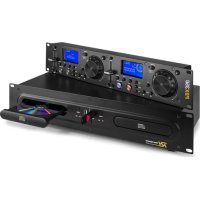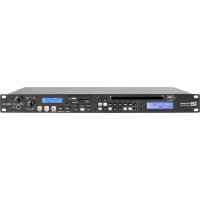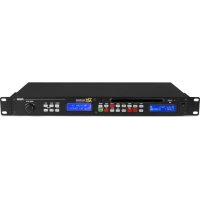
PDC60 - Cd player/recorder Power Dynamics - Free user manual and instructions
Find the device manual for free PDC60 Power Dynamics in PDF.



| Product type | CD player/recorder with FM/DAB+ tuner |
| Brand | Power Dynamics |
| Model | PDC60 |
| Dimensions (approx.) | 482 x 260 x 90 mm (19" rack format) |
| Weight (approx.) | 5 kg |
| Power supply | 220-240 V~, 50 Hz, fuse 10-16 A |
| Power consumption (approx.) | 30 W |
| Main functions | CD playback, USB, programming (20 tracks), loop (Loop In/Out), Pitch Bend, Single/Continuous modes, Repeat, Random, Cue |
| Tuner | FM (87.5-108 MHz), DAB+ (BAND-III), 30 presets, auto search |
| Display | LCD for CD/USB (menus, duration) and LCD for tuner (frequency, info) |
| Connectors | USB port, audio outputs CD and Tuner (RCA), antenna input, AC In |
| Supplied accessories | Remote control (R03 battery included), FM/DAB+ antenna, mains cord |
| Safety | Laser Class 1, do not open the cabinet, indoor use only |
| Maintenance and cleaning | Clean with a dry cloth, do not use chemical products |
| Repairability | Repairs by qualified technician only, use original parts |
Frequently Asked Questions - PDC60 Power Dynamics
User questions about PDC60 Power Dynamics
0 question about this device. Answer the ones you know or ask your own.
Ask a new question about this device
Download the instructions for your Cd player/recorder in PDF format for free! Find your manual PDC60 - Power Dynamics and take your electronic device back in hand. On this page are published all the documents necessary for the use of your device. PDC60 by Power Dynamics.
USER MANUAL PDC60 Power Dynamics
Power Dynamics Professional Audio
PDC-60 USB/CD Player/FM/DAB+ 1U
Ref. nr.: 172.701
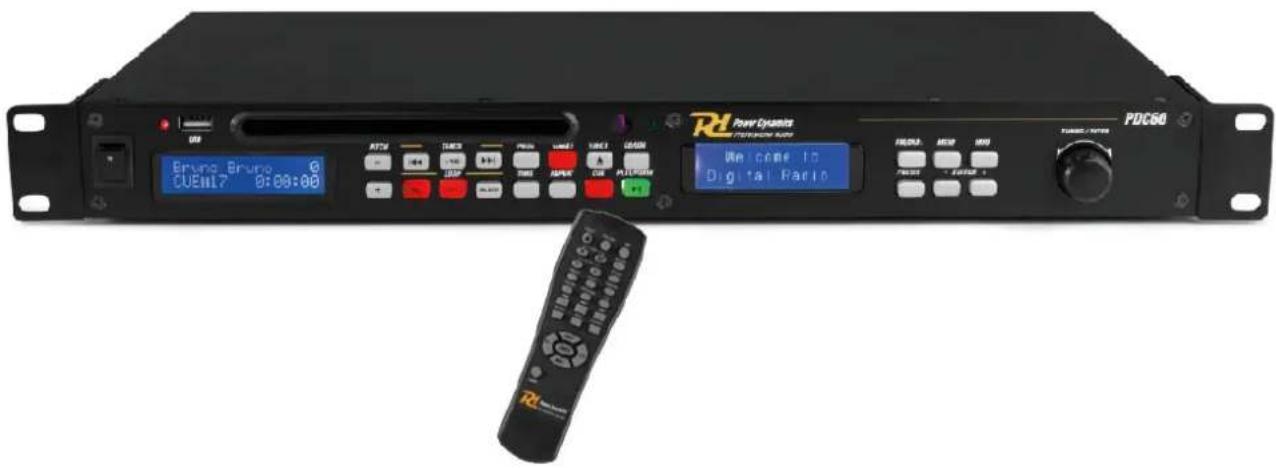
INSTRUCTION MANUAL GEBRUIKSAANWIJZING BEDIENUNGSANLEITUNG MANUAL DE INSTRUCCIONES MANUEL D'INSTRUCTIONS INSTRUKCJA OBSŁUGI
V1.0
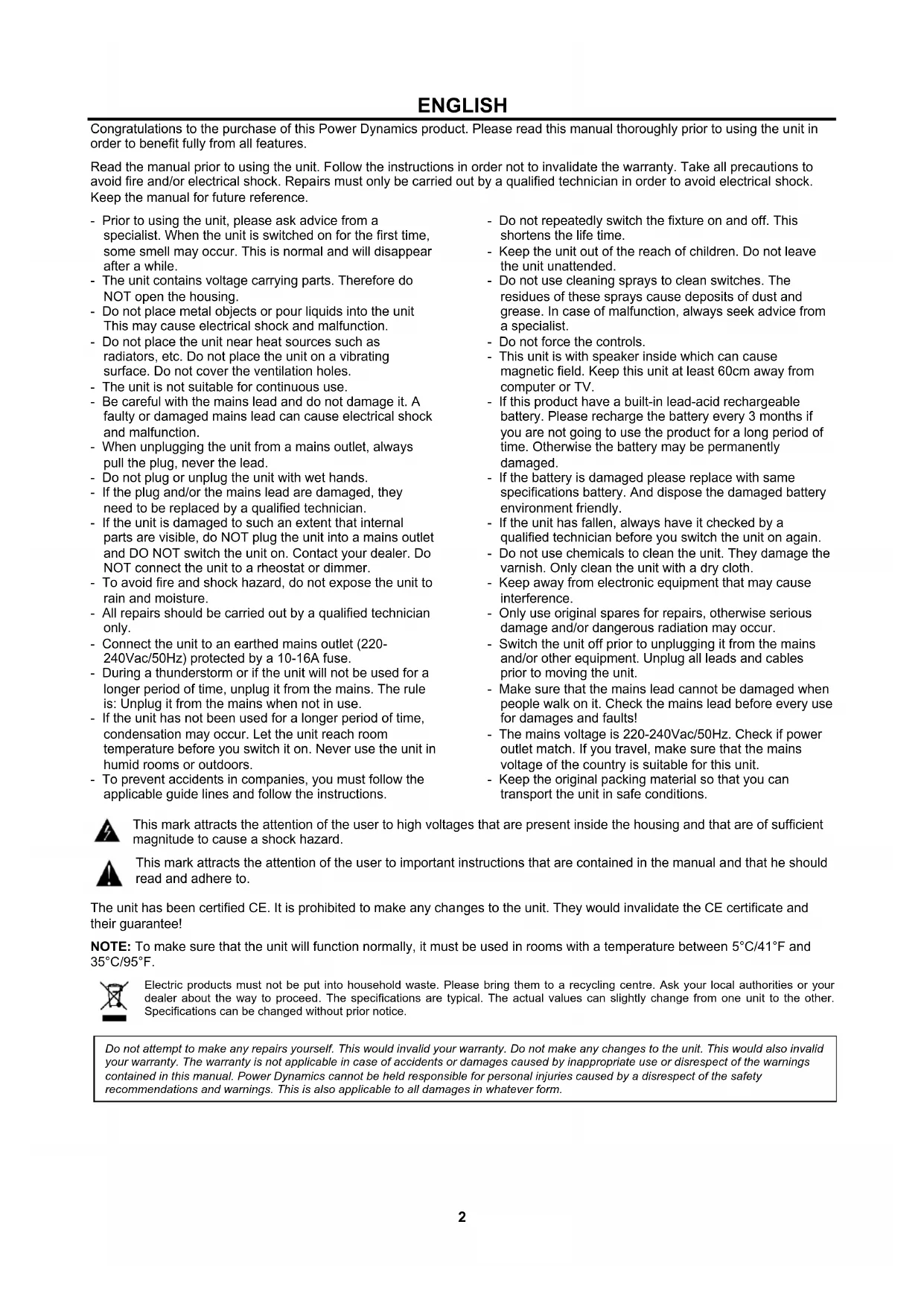
Congratulations to the purchase of this Power Dynamics product. Please read this manual thoroughly prior to using the unit in order to benefit fully from all features.
Read the manual prior to using the unit. Follow the instructions in order not to invalidate the warranty. Take all precautions to avoid fire and/or electrical shock. Repairs must only be carried out by a qualified technician in order to avoid electrical shock. Keep the manual for future reference.
- Prior to using the unit, please ask advice from a specialist. When the unit is switched on for the first time, some smell may occur. This is normal and will disappear after a while.
- The unit contains voltage carrying parts. Therefore do NOT open the housing.
- Do not place metal objects or pour liquids into the unit This may cause electrical shock and malfunction.
- Do not place the unit near heat sources such as radiators, etc. Do not place the unit on a vibrating surface. Do not cover the ventilation holes.
- The unit is not suitable for continuous use.
- Be careful with the mains lead and do not damage it. A faulty or damaged mains lead can cause electrical shock and malfunction.
- When unplugging the unit from a mains outlet, always pull the plug, never the lead.
- Do not plug or unplug the unit with wet hands.
- If the plug and/or the mains lead are damaged, they need to be replaced by a qualified technician.
- If the unit is damaged to such an extent that internal parts are visible, do NOT plug the unit into a mains outlet and DO NOT switch the unit on. Contact your dealer. Do NOT connect the unit to a rheostat or dimmer.
- To avoid fire and shock hazard, do not expose the unit to rain and moisture.
- All repairs should be carried out by a qualified technician only.
- Connect the unit to an earthed mains outlet (220-240Vac/50Hz) protected by a 10-16A fuse.
- During a thunderstorm or if the unit will not be used for a longer period of time, unplug it from the mains. The rule is: Unplug it from the mains when not in use.
- If the unit has not been used for a longer period of time, condensation may occur. Let the unit reach room temperature before you switch it on. Never use the unit in humid rooms or outdoors.
-
To prevent accidents in companies, you must follow the applicable guide lines and follow the instructions.
-
Do not repeatedly switch the fixture on and off. This shortens the life time.
- Keep the unit out of the reach of children. Do not leave the unit unattended.
- Do not use cleaning sprays to clean switches. The residues of these sprays cause deposits of dust and grease. In case of malfunction, always seek advice from a specialist.
- Do not force the controls.
- This unit is with speaker inside which can cause magnetic field. Keep this unit at least 60cm away from computer or TV.
- If this product have a built-in lead-acid rechargeable battery. Please recharge the battery every 3 months if you are not going to use the product for a long period of time. Otherwise the battery may be permanently damaged.
- If the battery is damaged please replace with same specifications battery. And dispose the damaged battery environment friendly.
- If the unit has fallen, always have it checked by a qualified technician before you switch the unit on again.
- Do not use chemicals to clean the unit. They damage the varnish. Only clean the unit with a dry cloth.
- Keep away from electronic equipment that may cause interference.
- Only use original spares for repairs, otherwise serious damage and/or dangerous radiation may occur.
- Switch the unit off prior to unplugging it from the mains and/or other equipment. Unplug all leads and cables prior to moving the unit.
- Make sure that the mains lead cannot be damaged when people walk on it. Check the mains lead before every use for damages and faults!
- The mains voltage is 220-240Vac/50Hz. Check if power outlet match. If you travel, make sure that the mains voltage of the country is suitable for this unit.
- Keep the original packing material so that you can transport the unit in safe conditions.

This mark attracts the attention of the user to high voltages that are present inside the housing and that are of sufficient magnitude to cause a shock hazard.

This mark attracts the attention of the user to important instructions that are contained in the manual and that he should read and adhere to.
The unit has been certified CE. It is prohibited to make any changes to the unit. They would invalidate the CE certificate and their guarantee!
NOTE: To make sure that the unit will function normally, it must be used in rooms with a temperature between 5^ C/41°F and 35^ C/95°F.

Electric products must not be put into household waste. Please bring them to a recycling centre. Ask your local authorities or your dealer about the way to proceed. The specifications are typical. The actual values can slightly change from one unit to the other. Specifications can be changed without prior notice.
Do not attempt to make any repairs yourself. This would invalid your warranty. Do not make any changes to the unit. This would also invalid your warranty. The warranty is not applicable in case of accidents or damages caused by inappropriate use or disrespect of the warnings contained in this manual. Power Dynamics cannot be held responsible for personal injuries caused by a disrespect of the safety recommendations and warnings. This is also applicable to all damages in whatever form.
UNPACKING INSTRUCTION
CAUTION! Immediately upon receiving the product, carefully unpack the carton, check the contents to ensure that all parts are present, and have been received in good condition. Notify the shipper immediately and retain packing material for inspection if any parts appear damage from shipping or the package itself shows signs of mishandling. Save the package and all packing materials. In the event that the product must be returned to the factory, it is important that the product be returned in the original factory box and packing.
If the device has been exposed to drastic temperature fluctuation (e.g. after transportation), do not switch it on immediately. The arising condensation water might damage your device. Leave the device switched off until it has reached room temperature.
POWERSUPPLY
On the label on the backside of the product is indicated on this type of power supply must be connected. Check that the mains voltage corresponds to this, all other voltages than specified, the light effect can be irreparably damaged. The product must also be directly connected to the mains and may be used. No dimmer or adjustable power supply.

Always connect the device to a protected circuit (circuit breaker or fuse). Make sure the device has an appropriate electrical ground to avoid the risk of electrocution or fire.
CAUTION LASER RADIATION!

This device is equipped with two Class 1 laser diodes. To ensure a safe operation do not remove any covers or try to access the inside of the equipment. The inside of the device does not contain any parts which are subject to maintenance. Maintenance must only be carried out by qualified staff.
CONTROLS AND CONNECTIONS
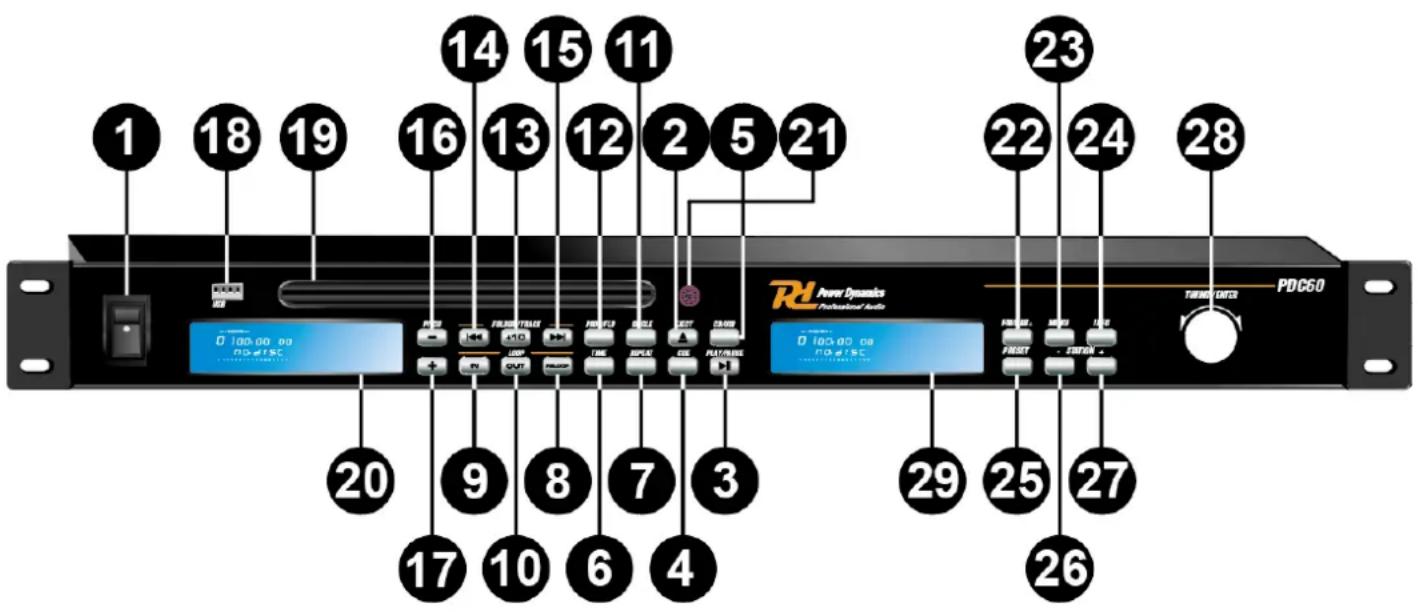
CD-Player Function:
- POWER BUTTON
Use this switch to turn the unit on. Use the switch again to turn off the device. -
EJECT BUTTON
Press to load or eject disk. Each press will open or close the disk tray. NOTE: Disc holder will not open unless stop or pause button has been pushed first. -
PLAY/PAUSE BUTTON
Each time you press the PLAY/PAUSE button, the operation changes from play to pause or from pause to play.
- CUE BUTTON
Pressing the CUE button during play provides a return to the position at which play was started.
- CD/USB BUTTON
Press this button to choose CD or USB mode.
- TIME BUTTON
Use this button to choose the time mode : Elapsed time or remaining time.
7. REPEAT BUTTON
Use this button to repeat one track or all the track of the CD.
8. RELOOP BUTTON
This button is used to start the last saved loop. To finish the loop, press the reloop button again.
9. LOOP IN BUTTON
This button sets the beginning of the loop. The Loop indicator on the display flashes.
10. LOOP OUT BUTTON
When you press this button, you set the end point of the seamless loop and you start the loop. Press this button again to finish the loop.
11. SINGLE BUTTON
Press this button to switch between the SINGLE and CONTINUOUS play modes. The selected mode is indicated on the LCD. In SINGLE mode, the unit stops reading after each track. In CONTINUOUS mode the unit reads all tracks and stops.
12. PROG BUTTON
In STOP mode, you can program several tracks (20 tracks max):
- Press the STOP button to enter stop mode.
- Press the PROG button to enter program mode.
- Repeat the operation to select all the track you want to listen.
- Press the play / pause button to start the playback.
- Use the skip track buttons to choose the track you want to listen to then press the PROG button to enter your choice.
- Use one more time the skip track buttons to choose the track you want to listen then press the PROG button to enter your choice.
13. TRACK +10 BUTTON
Use this button to jump 10 tracks in one press.
14. SKIP I<< BUTTON
Use this switch to restart the track or to select the last track.
15. SKIP >>I BUTTON
Use this button to select the next track.
16. PITCH BEND - BUTTON
The pitch will drop while the - button is being pressed and returns to the original pitch when it is released.
17. PITCH BEND + BUTTON
The pitch will automatically rise when the + button is being pressed and will return to the original pitch when it is released.
18. USB PORT
Supports USB playing and you may also connect the computer with the USB cable but only when USB work mode is entered.
19. DISC-TRAY
To be able to enter the disc press EJECT button (2).
20. CD / USB DISPLAY
Displays menus and the current operating status.
21. REMOTE SENSOR
This sensor receives the infrared information from the remote control. Don't place any object or sticker in front of the sensor.
22. FM / DAB+ BUTTON
Press to change between playing DAB+ and FM modes.
23. MENU BUTTON
Press to enter FM / DAB+ menu mode. If the user does not select any item by pressing ENTER knob, it will return to FM / DAB+ playing after several seconds.
FM menus consist of "Audio setting" and "System".
"Audio setting"
a. Forced mono: As a stereo signal becomes weaker the audio signal will become poorer. It may be preferable to force the radio to play the station in mono in order to reduce the level of audio noise.
b. Stereo allowed: "St" indicator on LCD display means that the current station is played as stereo.
"System"
a. Time setup: There are 4 sub-items in time setup menu,
Set clock: While the digit flashing, use “-”, “+” or TUNING knob to set hour and minute. Press ENTER to confirm.
Set date: While the digit flashing, use “-”, “+” or TUNING knob to set date, day and year. Press ENTER to confirm.
Auto update: Press ENTER to update the firmware automatically.
Set 12/24 hours: enter to switch between the 12-hour and 24-hour formats.
b. Factory reset: If you select "Yes", a full reset will be performed. The station list and presets will be erased.
c. SW version: If you select the item, it shows the software version for several seconds.
DAB+ menus consist of "Station scan" and "System".
"Station scan"
a. Full scan: It scans all of the frequencies in BAND-III.
b. Manual tune: use “-”, “+” and “ENTER” button to select a frequency.
"System"
a. Time setup: There are 4 sub-items in time setup menu
Set clock: While the digit flashing, use “-”, “+” or TUNING knob to set hour and minute. Press ENTER to confirm.
Set date: While the digit flashing, use “-”, “+” or TUNING knob to set date, day and year. Press ENTER to confirm.
Auto update: Press ENTER to update the firmware automatically.
Set 12/24 hours: enter to switch between the 12-hour and 24-hour formats.
b. Factory reset: If you select "Yes", a full reset will be performed. The station list and presets will be erased.
c. SW version: If you select the item, it shows the software version for several seconds.
24. INFO BUTTON
Switch to show different type of displaying information for the current playing channel.
FM mode
Radio text: It makes Radio text displayed on the LCD display.
Program type: It makes the program type of the current station/channel displayed on the LCD display.
Signal strength: It makes the signal strength of the current service displayed on the LCD display.
Time and Date: It makes the time and date information displayed on the LCD display.
DAB+ mode
DLS: It makes DLS text displayed on the LCD display.
Program type: It makes the program type of the current station/channel displayed on the LCD display.
Ensemble: It makes the current ensemble name displayed on the LCD display.
Time and Date: It makes the time and date information displayed on the LCD display.
Transfer rate: It makes the bit rate information displayed on the LCD display.
Signal strength: It makes the signal strength of the current service displayed on the LCD display.
25. PRESET BUTTON
During playing DAB or FM, press the PRESET button and navigate the preset number and hold and press ENTER knob until the display shows "stored". If you want to play a preset station/channel during playing DAB or FM press the PRESET button, navigate through the preset numbers and press the ENTER knob to confirm choice. "P#" indicator in display means that the preset number saved.
26. - BUTTON
Press to seek for a higher frequency by 50KHZ step or navigate previous item in the sub-menu or move to previous station.
27. + BUTTON
Press to seek for a lower frequency by 50KHZ step or navigate next item in the sub-menu or move to next station.
28. TUNING / ENTER KNOB
Turn to navigate the previous or next service on the list. Press to select the displayed service on the list. Hold and press to auto scan FM/DAB+ stations.
29. TUNER DISPLAY
This displays FM/DAB frequency station, menu and time / date information etc.
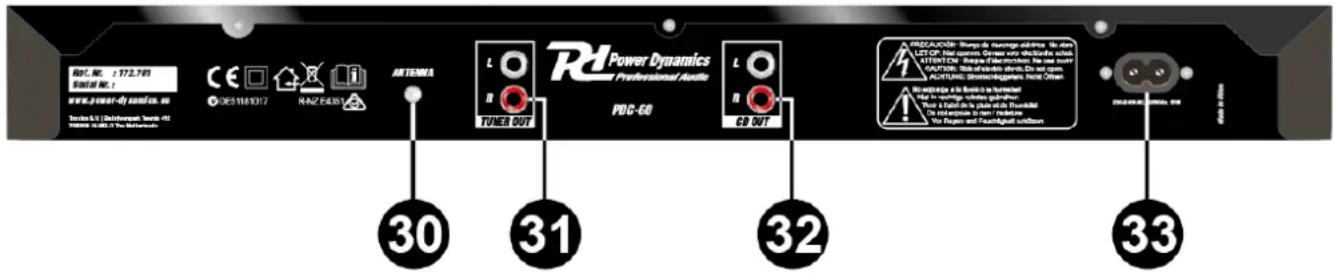
30. FM / DAB+ ANTENNA
Insert the supplied Antenna to this port.
31. TUNER OUT
Output jack for audio from tuner.
32. CD OUTPUT
Output jack for audio from CD / USB player.
33. AC IN
Insert the supplied power cord into this port.
Remote Control Function:
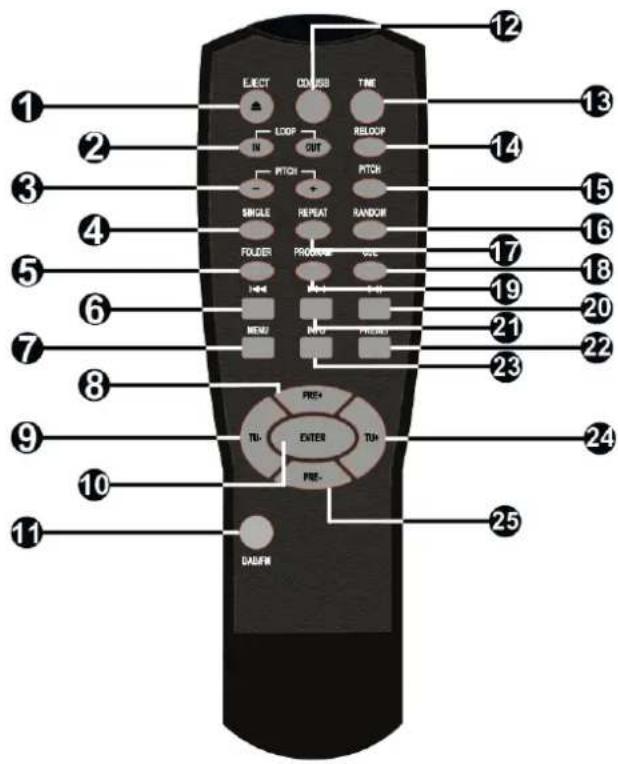
1.EJECT
Open or close the disk tray.
2. LOOP IN, LOOP OUT
IN button sets the beginning of the loop. OUT button sets the end point of the loop and starts the loop. To finish the loop press the OUT button again.
3. PITCH - , PITCH +
The pitch will drop when the - button is pressed and rise when the + button is pressed. The pitch will return to the original value when button is released.
4.SINGLE
Press this to switch between the SINGLE and CONTINUOUS play mode. The selected mode is indicated on the LCD.
5.FOLDER
Press to open the folder map from USB.
6.PREV
Press this button to select the previous track
7.MENU
Press this button to open the menu.
8.PRE+
Use this button to select a higher numbered preset channel/station.
9.TU-
Use this button to search for a channel/station on a lower frequency.
10. ENTER
Press this button to confirm your inputs.
11. DAB+ / FM
Press this button to choose radio modes: DAB+ or FM.
12. CD / USB
Press this button to choose between CD and USB function.
13. TIME
Use this button to choose the time mode : elapsed time, remaining time or total remaining time.
14. RELOOP
This button will start the last saved loop. To end the loop, press again.
15. PITCH
By pushing this button, the adjustment of the pitch potentiometer becomes available.
16. RANDOM
Press this button to play a random track.
17. REPEAT
Use this button to repeat just one track or all the tracks.
18. CUE
By pressing this button, play returns to the position at which play was started.
19. PROGRAM
Press to enter the program mode.
20. PLAY / PAUSE
Press this button to start or pause play.
21. NEXT
Press this button to select the next track.
22. PRESET
Press this button to save a channel/station (preset).
23. INFO
Switch to show different type of displaying information for the current playing channel (CD-Player Function, 24).
24. TU+
Use this button to search for a channel/station on a higher frequency.
25. Pre -
Use this button to select a lower numbered preset channel/station.
Instructions for remote control
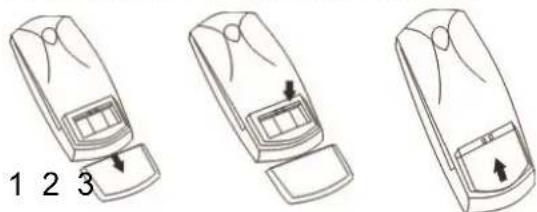
- Open the battery compartment.
- Insert the batteries AAA(UM-4). Make sure to match + and - markings of the batteries to the marks in the battery compartment.
- Close the battery cover.
NOTE: Improper use of the batteries may cause battery leakage and corrosion. To operate the remote control correctly, follow the instructions below:
- Do not insert batteries into the remote control in the wrong direction.
- Do not charge, heat, open or short-circuit batteries. Do not throw batteries into a fire.
- Do not leave dead or exhausted batteries in the remote control.
- Do not use different types of batteries together or mix old and new batteries.
- If you do not use the remote control for a long period of time, remove the batteries to avoid possible damage from battery corrosion.
- If the remote control does not function correctly or the operating range becomes reduced, replace all batteries with new ones.
- If battery leakage occurs, wipe the battery liquid from the battery compartment, then insert new batteries. The batteries can be used for one year in normal condition.
Distance: within 7m from the front of the remote control sensor. Angle: within 30° each direction of the front of the remote sensor.
CAUTION:
- Do not drop or shock the remote control.
- Do not put heavy objects on top of the remote control.
- Do not spill water or other liquids on the remote control.
- Do not open the remote control.
30. FM / DAB+ ANTENNE
2. LOOP IN, LOOP OUT
3. PITCH - , PITCH +
2. LOOP IN, LOOP OUT
30. FM / DAB+ ANTENA
Inserte la antena suministrada a este puerto.
31. TUNER OUT
2. LOOP IN, LOOP OUT
3. PITCH - , PITCH +
"Station scan" – Recherche de stations
30. ANTENNE FM / DAB+
2. LOOP IN, LOOP OUT
3. PITCH - , PITCH +
30. ANTENA FM / DAB +
2. LOOP IN, LOOP OUT
3. PITCH - , PITCH +
Frequency response : 20 Hz – 20kHz
Signal to noise ratio : >90dB
Output: Line : RCA
Output level : 1V
Connector : RCA
Power supply : 115-240VAC 50-60Hz
Dimensions (per speaker) : 484 x 270 x 45 mm
natural_image
Blue glossy circular icon with stylized white 't' shape (no text or symbols)tronios
Sound & Light
CE Declaration of Conformity
Manufacturer:
Tronios B.V.
I hereby declare that the product meets the requirements stated in Directives:
■ LVD 2014/35/EU
■ EMC 2014/30/EU
■ RoHS 2011/65/EU
Almelo,
04-10-2018
Name : M. Velders
Signature :
Specifications and design are subject to change without prior notice.
www.tronios.com
Copyright © 2018 by Tronios The Netherlands