PCMD 3026A - Interdental brush ProfiCare - Free user manual and instructions
Find the device manual for free PCMD 3026A ProfiCare in PDF.



| Product Type | Water Flosser (electric interdental brush) |
| Brand | ProfiCare |
| Model | PCMD 3026A (PC-MD 3026 A) |
| Net Weight | Approx. 430 g |
| Station Power Supply | 100-240 V~, 50/60 Hz, 0.7-1.7 W |
| Built-in Battery | Li-Ion 3.7 V, 1500 mAh |
| Charging Time | Approx. 28 hours for full charge |
| Battery Life | 60 minutes maximum |
| Operating Modes | Normal (high pressure), Soft (gentle pressure), Pulse (pulsations) |
| Water Protection | IPX7 (protection against temporary immersion) |
| Automatic Shut-off | After 2 minutes of use |
| Number of Included Nozzles | 2 nozzles with color identification rings |
| Water Tank | Built-in, with lid and sealing gasket |
| Recommended Use | Brush your teeth before using the water flosser |
| Routine Maintenance | Clean the filter and nozzles with warm water after each use |
| Nozzle Replacement | Removable nozzles, recommended replacement every 3-6 months |
| Safety in Use | Do not use hot water, do not touch the station with wet hands |
| Battery Type | Built-in Li-Ion battery, not user-replaceable |
Frequently Asked Questions - PCMD 3026A ProfiCare
User questions about PCMD 3026A ProfiCare
0 question about this device. Answer the ones you know or ask your own.
Ask a new question about this device
Download the instructions for your Interdental brush in PDF format for free! Find your manual PCMD 3026A - ProfiCare and take your electronic device back in hand. On this page are published all the documents necessary for the use of your device. PCMD 3026A by ProfiCare.
USER MANUAL PCMD 3026A ProfiCare
natural_image
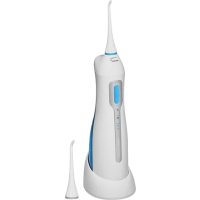
White and blue electric toothbrush with digital display (no text or symbols visible)Munddusche PC-MD 3026 A
Batterie rechargeable
Thank you for choosing our product. We hope you will enjoy using the appliance.
Symbols in these Instruction Manual
Important information for your safety is specially marked. It is essential to comply with these instructions in order to avoid accidents and prevent damage to the appliance:

WARNING:
This warns you of dangers to your health and indicates possible injury risks.

CAUTION:
This refers to possible hazards to the appliance or other objects.

NOTE: This highlights tips and information.
General Notes
Read the operating instructions carefully before putting the appliance into operation and keep the instructions including the warranty, the receipt and, if possible, the box with the internal packing. If you give this appliance to other people, please also pass on the operating instructions.
- The appliance is designed exclusively for private use and for the envisaged purpose. This appliance is not fit for commercial use.
- The charging station is suitable for use in dry rooms only.
- Do not touch the plugged-in charging station with wet hands!
- Switch off the appliance if not in use, when attaching accessories, during cleaning and when malfunctioning.
- Do not use a damaged charging station.
- Do not repair the appliance yourself, but visit an authorized specialist.
- The appliance and the mains lead have to be checked regularly for signs of damage. If damage is discovered, the appliance and the charging station may no longer be used.
- Use only original spare parts.
- In order to ensure your children's safety, please keep all packaging (plastic bags, boxes, polystyrene etc.) out of their reach.

WARNING:
Do not allow small children to play with the foil.
There is a danger of suffocation!
Special Safety Instructions for this Appliance

WARNING of electrical shock!
- Keep the appliance dry!
- Keep the charging station dry.
- The appliance is intended for use with safety extra-low voltage. Connect only to a power supply according to the specifications on the rating label.
- Do not replace any parts. Do not perform any modifications. Risk of electric shock!
- Disconnect the appliance from the network when you remove the accumulator.
- If the supply cord is damaged, it must be replaced by the manufacturer, its service agent or similarly qualified persons in order to avoid a hazard.
- Only use the appliance for the cleaning of the mouth.
- Do not use the appliance without a nozzle.
- The appliance may only be used with cold or lukewarm water.
- Empty the water container after each application to prevent an accumulation of bacteria.
- When using braces, find out whether the usage of an oral irrigator is possible. We do not assume any liability for possible damages.
- In case of diseases in the mouth and throat area, you should ask your doctor whether the use of an oral irrigator is advisable.
- This appliance can be used by children over the age of 8 and by persons with reduced physical, sensory or mental capabilities or lack of experience and / or knowledge if they are supervised.
• Children may not play with the appliance. - Cleaning and user maintenance shall not be made by children without supervision.
Special Safety Information Concerning the Rechargeable Built-in Battery

CAUTION:
- The appliance contains a lithium-ion accumulator, which may not be substituted by the user.
- Risk of explosion in case of improper replacement of the rechargeable battery. Replace only by the same or an equivalent type.
- Do not expose the rechargeable built-in battery to hard impacts or pressure. Do not drop the appliance!
- Do not expose the appliance to intense heat such as sunlight. Also keep the appliance away from heat sources like radiators, stoves, etc.!

CAUTION:
- The ambient temperature should be between 0 °C and max. 35 °C. Heat damages the rechargeable battery. Increasingly lower temperatures reduce the capacity and the life of the rechargeable battery.
- Do not charge the rechargeable battery unsupervised.
- If you do not use the appliance for a prolonged period of time, remove the charging station from the socket.
Unpacking the Appliance
- Take the appliance out of its packaging.
- Remove all packaging materials, such as foils, filler material, cable brackets and cardboard packaging.
- Check the contents for completeness.
- In case of incomplete delivery or damage, do not operate the appliance. Return it to your dealer immediately.
Overview of the Components / Scope of Delivery
1 Nozzle
2 Release buttons for the nozzle
3 ON / OFF button
4 MODE button
5 Indicator light "Normal"
6 Indicator light "Soft"
7 Indicator light "Pulse / CH"
8 Charging station
9 Coloured marking ring
10 Suction hose
11 Filter
12 Sealing ring
13 Water tank
14 Sealing ring
15 Water tank cover
Charging the Appliance
- Connect the charging station to a correctly installed earthed socket.
- Place the appliance on the charging station. The indicator light "CH" (Charge) will blink during the charging procedure.
- Charge the appliance for 28 hours before the first use.

NOTE:
- If the appliance is fully charged, the indicator light "CH" will glow continuously.
- Charge the rechargeable battery if the indicator light "CH" blinks during or after using the appliance.
• Even when switched off, the rechargeable battery discharges continuously. If the appliance is out of use for a longer period of time, charge the rechargeable battery at least once every 4 to 8 weeks.
Notes for Use
Nozzles
2 nozzles with different colour markings are contained in the scope of delivery. These can be assigned to different users.
When the Gums are Bleeding ...
It is normal for a normal bleeding to occur when using the oral irrigator the first few times. Should your gums bleed continually, please consult your dentist.
MODE Button
Select the desired water pressure setting using the MODE button:
Normal: Highest water pressure for a normal cleaning
Soft: Lowest water pressure for gentle cleaning of sensitive gums
Pulse: Water pressure at an interval for cleaning and massaging of the gums

NOTE:
- You can adjust the setting during use.
- The higher the water pressure, the faster the water is used up.
Initial Operation
- Remove the oral irrigator from the charging station.
- Attach a nozzle. Turn the nozzle so that the opening faces the front of the appliance.
- Open the water tank cover on the back side of the appliance.
- Fill the water tank with lukewarm water and close the water tank cover again. Make sure the sealing ring is fitted properly.
- Select the "Normal" setting using the MODE button.
- Turn on the appliance using the ON / OFF button.
- Allow all water in the water tank to flow through the nozzle in order to remove any residue.
- Turn off the appliance.
- Briefly rinse off the nozzles under running water.
Your oral irrigator is now ready for use.
Usage
Before using the water jet you should clean your teeth with a toothbrush.
- Open the water tank cover on the back side of the appliance.
- Fill the water tank with lukewarm water and close the water tank cover again.

WARNING:
Do not fill it with hot water!
- In order to clean the nozzles, allow water to flow through the nozzle head (at maximum water pressure) into the wash basin before and after each time the appliance is used.
i NOTE:
Do not hold the appliance at a too much slanting angle otherwise no water will be able to spray from the appliance.
- Next, use the MODE button to select the desired setting "Normal", "Soft", "Pulse").
- Lean over the wash basin. Guide the water jet along the gums, around the teeth. Hold the appliance upright as far as possible. Clean all four parts of your mouth in this way. Keep your mouth slightly open so the water can leak out.
WARNING:
Do not hold the nozzle too close to your gums or your teeth.
- If the water becomes used up before you are finished with the cleaning, turn off the appliance using the ON / OFF button. Add more water.
- To stop operation, turn the appliance off.
i NOTE:
For security, the appliance automatically turns off after 2 minutes.
- Please clean the appliance as described under "Cleaning".
Cleaning
WARNING:
- Turn the appliance off. Remove the charging station plug from the socket when you clean the appliance.
- Do not submerge the appliance and the charging station in water. It could result in an electric shock or fire.
CAUTION:
- Do not use any wire brush or other abrasive objects.
-
Do not use any sharp or abrasive cleaners.
-
Draw the water tank downwards.
- If necessary, pour the remaining water out.
- Clean the suction hose with a soft cloth.
- Remove the filter and clean it carefully using warm running water.
- Rinse out the water tank.
- Insert the filter in the hose once again.
-
Guide the hose into the upper opening of the water tank.
-
Place the water tank in the appliance once again. Pay attention to the guides and make sure the sealing ring is fitted properly. The water tank must snap into place audibly.
- Press the release button and remove the nozzle. Clean the nozzles under warm running water. Dry off the nozzles.
- Clean the appliance and the charging station with a damp cloth. Finally, wipe the parts until they are dry.
Technical Data
Model: PC-MD 3026 A
Net weight: ....approx. 430g
Degree of protection against liquids: IPX7*
Charging station
Protection class:....III
Power supply: 100 - 240 V\~, 50 / 60 Hz
Power consumption: 0.7 - 1.7 W
Rechargeable battery
(Accumulator): 1x 3.7V, 1500 mAh Li-Ion
Running time:....60 minutes max.
Charging time:.....approx. 28 hours
* This appliance complies with IPX7. This means that the appliance is protected against temporary submersion.
The right to make technical and design modifications in the course of continuous product development remains reserved.
This appliance has been tested according to all relevant current CE guidelines, such as electromagnetic compatibility and low voltage directives, and has been constructed in accordance with the latest safety regulations.
Disposal
Accumulator/Battery Disposal
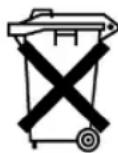
The appliance contains a rechargeable battery. Used batteries / accumulators (rechargeable batteries) do not belong in household waste.
The battery must be removed before the product is recycled. Contact qualified personnel.
Information, where batteries / accumulators are to be disposed of can be obtained from your local or municipal authorities.
Meaning of the "Dustbin" Symbol
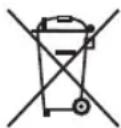
Protect our environment: do not dispose of electrical equipment in the domestic waste.
Please return any electrical equipment that you will no longer use to the collection points provided for their disposal.
This helps avoid the potential effects of incorrect disposal on the environment and human health.
This will contribute to the recycling and other forms of reutilisation of electrical and electronic equipment.
Information concerning where the equipment can be disposed of can be obtained from your local authority.
Instrukcja obsługi
CTC Clatronic Sp. zo.o.
Ul. Brzeska 1
45-960 Opole
Usuwanie


- Munddusche PC-MD 3026 A
- Batterie rechargeable
- Symbols in these Instruction Manual
- WARNING:
- CAUTION:
- General Notes
- Special Safety Instructions for this Appliance
- WARNING of electrical shock!
- Special Safety Information Concerning the Rechargeable Built-in Battery
- Unpacking the Appliance
- Overview of the Components / Scope of Delivery
- Charging the Appliance
- NOTE:
- Notes for Use
- Nozzles
- When the Gums are Bleeding ...
- MODE Button
- Initial Operation
- Usage
- i NOTE:
- Cleaning
- Technical Data
- Charging station
- Rechargeable battery
- Disposal
- Accumulator/Battery Disposal
- Meaning of the "Dustbin" Symbol
- Instrukcja obsługi
- Usuwanie
Brand : ProfiCare
Model : PCMD 3026A
Category : Interdental brush