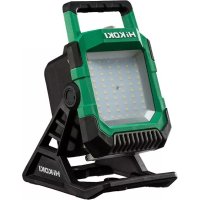
UB 18DC - Lighting HiKOKI - Free user manual and instructions
Find the device manual for free UB 18DC HiKOKI in PDF.



| Brand | HiKOKI |
| Model | UB 18DC |
| Product type | Cordless work light |
| Light source | 60 white LEDs |
| Adjustable brightness | 700 to 4,000 lumens |
| Rated voltage | 18 V DC |
| Compatible battery | metabo HPT BSL1830C (Li-ion, sold separately) |
| Weight (without battery) | 1.9 kg (4.2 lb) |
| Protection rating | IP54 (dust and water splash resistance) |
| Vertical lighting angle | 138° (120° upward, 18° downward) |
| USB charging port | Yes (USB cable not included) |
| Wall mounting | Via hook hole for suspension |
| Tripod mounting | Via 5/8-UNC screw hole |
| Operating time (3.0 Ah) | 4000 lm: approx. 1.5 h ; 700 lm: approx. 12 h |
| Operating time (5.0 Ah) | 4000 lm: approx. 3 h ; 700 lm: approx. 20 h |
| Operating time (8.0 Ah) | 4000 lm: approx. 4.5 h ; 700 lm: approx. 30 h |
| Recommended charger | metabo HPT UC18YFSL (sold separately) |
| Charging temperature | 0 °C to 50 °C |
| Maintenance and cleaning | Wipe with a soft dry cloth; do not use solvents |
| Safety distance to illuminated object | At least 0.2 m |
| Safety instructions | Do not stare at the lamp; do not cover; do not use in explosive atmosphere |
Frequently Asked Questions - UB 18DC HiKOKI
User questions about UB 18DC HiKOKI
0 question about this device. Answer the ones you know or ask your own.
Ask a new question about this device
Download the instructions for your Lighting in PDF format for free! Find your manual UB 18DC - HiKOKI and take your electronic device back in hand. On this page are published all the documents necessary for the use of your device. UB 18DC by HiKOKI.
USER MANUAL UB 18DC HiKOKI
Without charger and battery
SAFETY INSTRUCTIONS AND INSTRUCTION MANUAL
WARNING
IMPROPER OR UNSAFE use of this work light can result in death or serious bodily injury!
This manual contains important information about product safety. Please read and understand this manual BEFORE operating the work light. Please keep this manual available for other users and owners before they use the work light. This manual should be stored in safe place.
INSTRUCTIONS DE SECURITE ET MODE D'EMPLOI
AVERTISSEMENT
IMPORTANT SAFETY INFORMATION
Read and understand all of the safety precautions, warnings and operating instructions in the Instruction Manual before operating or maintaining this work light.
Most accidents that result from work light operation and maintenance are caused by the failure to observe basic safety rules or precautions. An accident can often be avoided by recognizing a potentially hazardous situation before it occurs, and by observing appropriate safety procedures.
Basic safety precautions are outlined in the "SAFETY" section of this Instruction Manual and in the sections which contain the operation and maintenance instructions.
Hazards that must be avoided to prevent bodily injury or machine damage are identified by WARNINGS on the work light and in this Instruction Manual.
NEVER use this work light in a manner that has not been specifically recommended by metabo HPT.
MEANINGS OF SIGNAL WORDS
WARNING indicates a potentially hazardous situations which, if ignored, could result in death or serious injury.
CAUTION indicates a potentially hazardous situations which, if not avoided, may result in minor or moderate injury, or may cause machine damage.
NOTE emphasizes essential information.
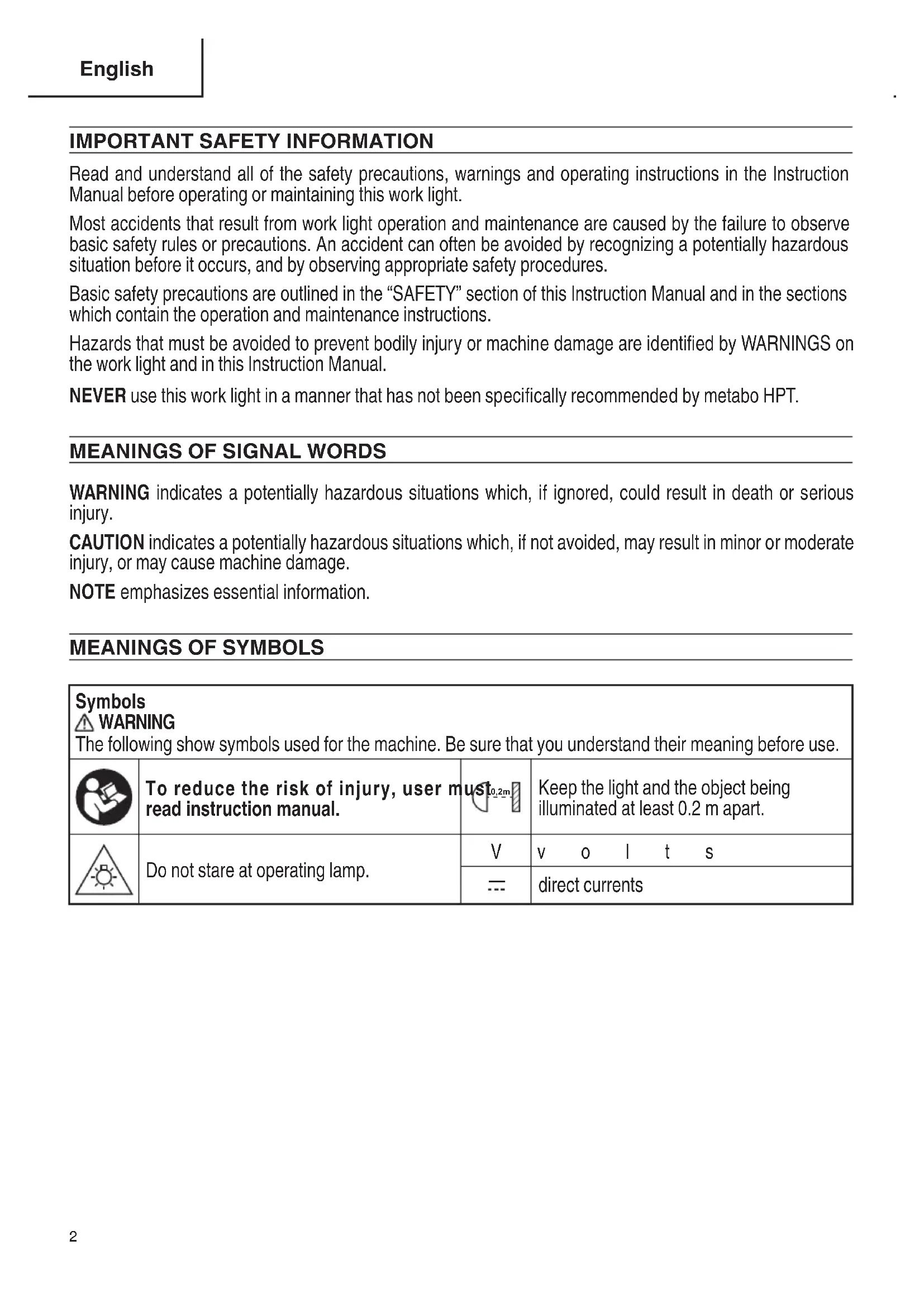
MEANINGS OF SYMBOLS
| Symbols WARNING The following show symbols used for the machine. Be sure that you understand their meaning before use. | |||
| To reduce the risk of injury, user must 0.2m read instruction manual. | Keep the light and the object being illuminated at least 0.2 m apart. | ||
| Do not stare at operating lamp. | V | v o l t s | |
| --- | direct currents | ||
IMPORTANT SAFETY INSTRUCTIONS
WARNING - When using flashlight or lanterns, additional precautions should always be followed, including the following:
READ ALL THE INSTRUCTIONS BEFORE USING THE APPLIANCE
WARNING
To reduce the risk of fire, electric injury:
- To reduce the risk of injury, close supervision is necessary when an appliance is used near children.
- Only use attachments recommended or sold by the manufacturer.
- Do not use work light in explosive atmospheres, such as in the presence of flammable or combustible liquids, gasses or dust.
- Be careful of electrical shock.
Prevent unintentional starting. Ensure the switch is the off -position before connecting to battery cover, picking up or carrying the appliance.
Carry the appliance with your finger on the switch or energizing appliance that have the switch on invites accidents.
- Disconnect the battery pack from the appliance before making any adjustments, changing accessories, or storing appliance.
Such preventive safety measures r risk of starting the appliance accidentally.
6. Do not cover the work light with cloth, cardboards or other materials when the light is on. Keep the light and the object being illuminated at least 20~cm apart. Failure to observe these warnings may result in fire.
7. WARNING: To reduce the risk of injury, do not stare at operating lamp. Serious eye injury could occur.
8. Do not contact hot parts.
9. Do not use in the rain.
10. Do not leave the work light in a car or the like that tends to be exposed to be searching heat of the sun (above 122^ (50^) ). Otherwise, troubles can result.
shock do not leave the work light unattended while it is turned on.
- When placing the work light in a high location for use, ensure that the location is stable. Additionally, secure it in place with string, etc. to prevent it from falling. If it falls, it may result in injury or damage.
- Do not use the work light if the LED cover is damaged or detached.
- Do not charge the unit outdoors.
- Use only the charger supplied by the manufacturer to recharge. (Manufacturer: metabo HPT Model: UC18YFSL)
- Do not incinerate the appliance even if it is severely damaged. The batteries can explode in a fire.
- Do not disassemble or modify the work light.
- Do not make any modifications to the lamp or battery, for any defective, please contact metabo HPT AUTHORIZED SERVICE CENTER.
duce the
GENERAL SAFETY RULES
SAVE THESE INSTRUCTIONS
1) Work area safety
a) Keep work area clean. Cluttered areas invite accidents.
b) Do not operate work light in explosive atmospheres, such as in the presence of flammable liquids, gases or dust.
2) Electrical safety
a) Avoid body contact with earthed or grounded surfaces such as pipes, radiators, ranges and refrigerators. There is an increased risk of electric shock if your body is earthed or grounded.
b) To reduce the risk of electrical shock, do not put in water or other liquid.
3) Personal safety
a) Stay alert, watch what you are doing and use common sense when use work light.
4) Battery powered work light use and care
a) Recharge only with the charger specified by the manufacturer.
A charger that is suitable for one type of battery pack may create a risk of fire when used with another battery pack.
b) Use appliances only with designated battery packs. Use of any other battery packs may create a risk of injury and fire.
For use only with metabo HPT BSL36B18 battery pack.
c) When battery pack is not in use, keep it away from other metal objects like paper clips, coins, keys, nails, screws, or other small metal objects that can make a connection from one terminal to another.
Shorting the battery terminals together may cause burns or a fire.
d) Under abusive conditions, liquid may be ejected from the battery, avoid contact. If contact accidentally occurs, flush with water. If liquid contacts eyes, additionally seek medical help.
Liquid ejected from the battery may cause irritation or burns.
5) Service
a) Have your work light serviced by a qualified repair person using only identical replacement parts.
This will ensure that the safety of the work light is maintained.
b) Do not use the lamp when damage is visible.
SPECIFIC SAFETY RULES
- Do not use in locations where inflammable materials such as lacquer, paint, benzene, thinner or gasoline are present. Explosion or fires might result.
- Keep the lamp away from water, open flames and other heat sources.
- If you notice that the unit is generating unusually high temperatures, operating poorly, or making abnormal noises, immediately stop using and shut off the power switch. Request an inspection and repair from the dealer where you purchased the unit or a metabo HPT Authorized Service Center.
- If the unit is mistakenly dropped or strikes another object, make a thorough e c i f p h e n k of the unit for cracks, breakage or deformation, etc.
Injuries might occur if the unit has cracks, breakage or deformation.
-
Precautions during transport
-
Turn the switch off on the tool and remove the battery.
- Carry the tool by the handle on its body.
- When transporting it via vehicle, take appropriate steps to prevent it from falling over or being damaged.
- NEVER use a work light for applications other than those specified in the instruction manual.
- Handle work light correctly.
Operate the work light according to the instructions provided herein. Do not drop or throw the work light. NEVER allow the work light to be operated by children, individuals unfamiliar with its operation or unauthorized personnel.
- Keep all screws, bolts and covers tightly in place.
Keep all screws, bolts, and plates tightly mounted. Check their condition periodically.
- Do not wipe plastic parts with solvent.
Solvents such as gasoline, thinner benzine, carbon tetrachloride, and alcohol may damage and crack plastic parts. Do not wipe them with such solvents.
Wipe plastic parts with a soft cloth lightly dampened with soapy water and dry thoroughly.
- Do not use the product if the tool or the battery terminals (battery mount) are deformed.
Installing the battery could cause a short circuit that could result in smoke emission or ignition.
- Keep the tool's terminals (battery mount) free of swarf and dust.
Prior to use, make sure that swarf and dust have not collected in the area of the terminals.
During use, try to avoid swarf or dust on the tool from falling on the battery.
When suspending operation or after use, do not leave the tool in an area where it may be exposed to falling swarf or dust.
Doing so could cause a short circuit that could result in smoke emission or ignition.
IMPORTANT SAFETY INSTRUCTIONS FOR BATTERY CHARGER
WARNING
Death or serious bodily injury could result from improper or unsafe use of battery chargers. To avoid these risks, follow these basic safety instructions:
READ ALL INSTRUCTIONS
- This manual contains important safety and operating instructions for battery charger Model UC18YFSL.
- Regularly clean the lamp by wiping it with a soft, dry cloth to remove stubborn dirt, oil etc.
- To reduce risk of injury, charge meta rechargeable battery models of the multi volt series and the BSL18 series. Other models of batteries may burst causing personal injury and damage.
- Use of an attachment not recommended or sold by the battery charger manufacturer may result in a risk of fire, electric shock, or injury to persons.
- Always use and store the lamp out of the reach of children.
- Do not operate battery charger if it has received a sharp blow, been dropped, or otherwise damaged in any way; take it to a qualified serviceman.
-
Do not disassemble battery charger; take it to a qualifi ed serviceman when service or repair is required. Incorrect reassembly may result in a risk of electric shock or fire.
-
To reduce risk of electric shock, unplug charger from receptacle before attempting any maintenance or cleaning. Removing the battery will not reduce this risk.
IMPORTANT SAFETY INSTRUCTIONS FOR USE OF THE BATTERY AND BATTERY CHARGER
You must charge the battery before you can use the tool. Before using the model UC18YFSL battery charger, be sure to read all instructions and cautionary statements on it, the battery and in this manual.
CAUTION
USE ONLY metabo HPT BATTERY MODELS OF THE MULTI VOLT SERIES AND THE BSL18 SERIES. OTHER MODELS OF BATTERIES MAY BURST AND CAUSE INJURY!
Follow these instructions to avoid the risk of injury:
WARNING
Improper use of the battery or battery charger can lead to serious injury. To avoid these injuries:
- NEVER disassemble the battery.
- NEVER incinerate the battery, even if it is damaged or is completely worn out. The battery can explode in a fire.
H N E VER short-circuit the battery. - NEVER insert any objects into the battery charger's air vents. Electric shock or damage to the battery charger may result.
- NEVER charge outdoors. Keep the battery away from direct sunlight and use only where there is low humidity and good ventilation.
- NEVER charge when the temperature is below 32^ (0^) or above 104^ (40^) .
- NEVER connect two battery chargers together.
- NEVER insert foreign objects into the hole for the battery or the battery charger.
- NEVER use a booster transformer when charging.
- NEVER use DC power to charge.
-
NEVER store the battery or battery charger in places where the temperature may reach or exceed 104^ (40^) such as inside metal box or car.
-
NEVER expose the battery or battery charger to rain or wet conditions.
- ALWAYS operate charger on standard household electrical power (120 volts). Using the charger on any other voltage may overheat and damage the charger.
- ALWAYS wait at least 15 minutes between charges to avoid overheating the charger.
- ALWAYS disconnect the power cord from its receptacle when the charger is not in use.
CAUTION ON LITHIUM-ION BATTERY
To extend the lifetime, the lithium-ion battery equips with the protection function to stop the output.
In the cases of 1 to 3 described below, when using this product, even if the switch is turned ON, the light may not turn on. This is not the trouble but the result of protection function.
- When the remaining battery power runs out, the light turns off.
In such case, charge it up immediately. - If the tool is overloaded, the light may turn off. In this case, release the switch of tool and eliminate causes of overloading. After that, you can use it again.
- If the battery is overheated under overload work, the battery power may stop.
In this case, stop using the battery and let the battery cool. After that, you can use it again.
Furthermore, please heed the following warning and caution.
WARNING
In order to prevent any battery leakage, heat generation, smoke emission, explosion and ignition beforehand, please be sure to heed the following precautions.
- Make sure that swarf and dust do not collect on the battery.
During work make sure that swarf and dust do not fall on the battery.
Make sure that any swarf and dust falling on the tool during work do not collect on the battery.
Do not store an unused battery in a location exposed to swarf and dust.
Before storing a battery, remove any swarf and dust that may adhere to it and do not store it together with metal parts (screws, nails, etc.). -
Do not pierce battery with a sharp object such as a nail, strike with a hammer, step on, throw or subject the battery to severe physical shock.
-
Do not use an apparently damaged or deformed battery.
- Do not use the battery in reverse polarity.
- Do not connect directly to an electrical outlets or car cigarette lighter sockets.
- Do not use the battery for a purpose other than those specified.
- If the battery charging fails to complete even when a specified recharging time has elapsed, immediately stop further recharging.
- Do not put or subject the battery to high temperatures or high pressure such as into a microwave oven, dryer, or high pressure container.
- Keep away from fire immediately when leakage or foul odor are detected.
- Do not use in a location where strong static electricity generates.
- If there is battery leakage, foul odor, heat generated, discolored or deformed, or in any way appears abnormal during use, recharging or storage, immediately remove it from the equipment or battery charger, and stop use.
- Do not immerse the battery or allow any fluids to flow inside. Conductive liquid ingress, such as water, can cause damage resulting in fire or explosion. Store your battery in a cool, dry place, away from combustible and flammable items. Corrosive gas atmospheres must be avoided.
CAUTION
- If liquid leaking from the battery gets into your eyes, do not rub your eyes and wash them well with fresh clean water such as tap water and contact a doctor immediately. If left untreated, the liquid may cause eye-problems.
- If liquid leaks onto your skin or clothes, wash well with clean water such as tap water immediately.
There is a possibility that this can cause skin irritation.
- If you find rust, foul odor, overheating, discolor, deformation, and/or other irregularities when using the battery for the first time, do not use and return it to your supplier or vendor.
WARNING
If an electrically conductive foreign object enters the terminals of the lithium ion battery, a short-circuit may occur resulting in the risk of fire. Please observe the following matters when storing the battery.
Do not place electrically conductive cuttings, nails, steel wire, copper wire or other wire in the storage case.
Either install the battery in the tool or store by securely pressing into the battery cover until the ventilation holes are concealed to prevent short-circuits (See Fig. 3).
REGARDING LITHIUM-ION BATTERY TRANSPORTATION
When transporting a lithium-ion battery, please observe the following precautions.
WARNING
Notify the transporting company that a package contains a lithium-ion battery, inform the company of its power output and follow the instructions of the transportation company when arranging transport.
- Lithium-ion batteries that exceed a power output of 100 Wh are considered to be in the freight classification of Dangerous Goods and will require special application procedures.
For transportation abroad, you must comply with international law and the rules and regulations of the destination country.
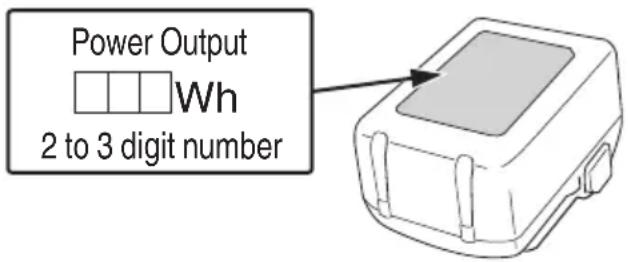
Fig. 1
PRECAUTIONS WHEN CONNECTING TO EXTERNAL EQUIPMENT
Unexpected problems may result in the loss or corruption of data stored in smartphones and other peripheral equipment connected to the work light. With this possibility in mind, a backup of the data should always be made in advance.
Note that metabo HPT cannot be held responsible for the corruption or loss of data stored within smartphones and other peripheral equipment connected to the work light, nor any damage to the equipment itself.
PRECAUTIONS REGARDING THE DUST-RESISTANCE AND WATER-PROOFING FUNCTIONS
This product conforms to IP54 protection class ratings (dust-resistance and water-proofing) for electrical equipment as stipulated by the international IEC regulations. (When the battery is attached to the tool's body, and the battery cover and rubber cover are closed, the tool's body alone meets the equivalent of the IP54 protection standard.)
[Descriptions of IP Codes] IP54
Protection rating for water penetration There is no harmful effect from water splashing from any direction.
Protection rating for external assault by solid objects Dust that may cause adverse effects on the equipment must not be able to enter (dust-resistance).
The equipment has been designed to withstand the effects of dust and water, but there is no guarantee that it will not malfunction. Do not use or leave the equipment in locations where it is subject to excessive amounts of dust, or in locations where it is submerged in water or subject to rainwater.
SAVE THESE INSTRUCTIONS AND MAKE THEM AVAILABLE TO OTHER USERS AND OWNERS OF THIS WORK LIGHT!
FUNCTIONAL DESCRIPTION
NOTE
The information contained in this Instruction Manual is designed to assist you in the safe operation and maintenance of the work light.
NEVER operate, or attempt any maintenance on the work light unless you have first read and understood all safety instructions contained in this manual.
Some illustrations in this Instruction Manual may show details or attachments that differ from those on your own work light.
NAME OF PARTS
1. Cordless Work Light (UB18DC)

Fig. 2
2. Battery
(optional accessories...sold separately)

Fig. 3
3. Battery Charger
(optional accessories...sold separately)

Fig. 4
SPECIFICATIONS
1. Cordless Work Light
| Model UB18DC | ||||
| LED (white) ×60 | ||||
| Brightness adjustment range 700-4,000 lm | ||||
| Operating time, approx. (Using full charged battery)* | 4,000 lm Approx. | 3.0 Ah 5.0 Ah | 8.0 Ah | |
| approx. 1.5 hours Approx. | 3 hours Approx. | 4.5 hours | ||
| 700 lm Approx. | 20 hours Approx. | 30 hours | ||
| Battery | Type Li-ion battery Model BSL1830C | |||
| Voltage DC 18 | V | |||
| Weight (without battery) 4.2 lbs. (1.9 kg) | ||||
- The operating times shown are reference values only.
The actual time varies depending on the type and charging state of the battery, the usage conditions, etc.
2. Battery Charger
| Model | UC18YFSL |
| Input power source | Single phase: AC 120 V 60 Hz |
| Charging time (At a temperature of 68°F (20°C)) | BSL1830C: Approx. 45 min |
| Charging voltage | DC 14.4–18 V |
| Charging current | DC 3.5 A |
| Weight | 1.1 lbs. (0.5 kg) |
NOTE: The charging time may vary according to temperature and power source voltage.
ASSEMBLY AND OPERATION
APPLICATIONS
Illumination of work site
REMOVAL AND INSTALLATION METHOD OF BATTERY
How to install the battery.
Press the lock to release it, and open the battery cover.
Always insert it all the way until it locks in place with a little click. Then, close the battery cover, and secure it with the lock. (Fig. 5).
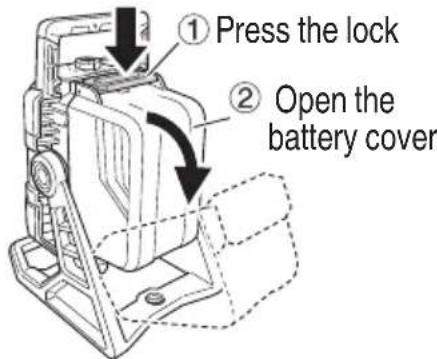
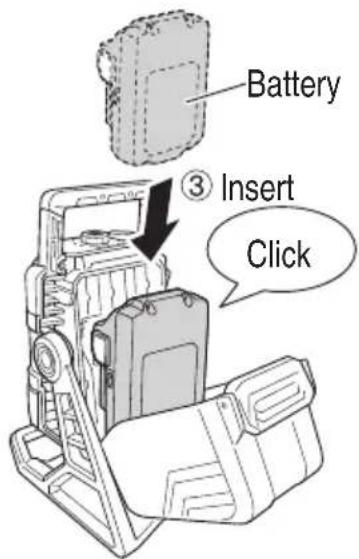
Fig. 5
How to remove the battery.
Open the battery cover, and while pressing the 2 latches (one on each side), slide it and pull it out. Close the battery cover, and secure it with the lock. (Fig. 6).

Fig. 6
NOTE
Ensure that the battery cover is securely closed unless you are removing or installing the battery.
If any water or dust enters the body of the tool or the terminals of the battery, a failure may occur.
CHARGING METHOD
NOTE
Before plugging into the receptacle, make sure the following points.
The power source voltage is stated on the nameplate.
The cord is not damaged.
WARNING
Do not charge at voltage higher than indicated on the nameplate. If charged at voltage higher than indicated on the nameplate, the charger will burn out.
- Connect the charger's power cord to a receptacle. When the power cord is connected, the charge indicator lamp will blink in red. (At 1-second intervals)
WARNING
Do not use the electrical cord if damaged, repaired immediately.
- Insert the battery to the battery charger.
Firmly Insert the battery into the battery charger as shown in Fig. 7.
- Charging
When inserting a battery in the charger, the pilot lamp will light up continuously in red.
When the battery becomes fully recharged, the pilot lamp will blink in red. (At 1-second intervals.) (See Table 2)
(1) Lamp indication
The indications of the pilot lamp will be as shown in Table 2, according to the condition of the battery charger or the battery.

Fig. 7
Table 2
| Indications of the pilot lamp | ||||
| Pilot lamp(red) | Before charging | Blinks | Lights for 0.5 seconds. Does not light for 0.5 seconds. (off for 0.5 seconds) | |
| While charging | Lights | Lights continuously | ||
| Charging complete | Blinks | Lights for 0.5 seconds. Does not light for 0.5 seconds. (off for 0.5 seconds) | ||
| Overheat standby | Blinks | Lights for 1 second. Does not light for 0.5 seconds. (off for 0.5 seconds) | Battery overheated. Unable to charge. (Charging will commence when battery cools) | |
| Charging impossible | Flickers | Lights for 0.1 seconds. Does not light for 0.1 seconds. (off for 0.1 seconds) | Malfunction in the battery or the charger | |
(2) Regarding the temperature of the rechargeable battery.
The temperatures for rechargeable batteries are as shown in the Table 3, and batteries that have become hot should be cooled for a while before being recharged.
Table 3
| Rechargeable batteries | Temperatures at which the battery can be recharged |
| BSL1830C | 32°F-122°F (0°C-50°C) |
(3) Regarding recharging time (At 68^ (20^)
Table 4 Charging time
| Charger Battery | UC18YFSL |
| BSL1830C Approx. 45 min | |
NOTE
The recharging time may vary according to the ambient temperature.
- Disconnect battery charger from the receptacle.
CAUTION
Do not pull the plug out of the receptacle by pulling on the cord.
Make sure to grasp the plug when removing from receptacle to avoid damaging cord.
- Remove the battery from the battery charger. Supporting the battery charger with hand, pull out the battery from the battery charger.
NOTE
Be sure to pull out the battery from the battery charger after use, and then keep it.
Regarding electric discharge in case of new batteries, etc.
As the internal chemical substance of new batteries and batteries that have not been used for an extended period is not activated, the electric discharge might be low when
using them the first and second time. This is a temporary phenomenon, and normal time required for recharging will be restored by recharging the batteries 2-3 times.
How to make the batteries perform longer
(1) Recharge the batteries before they become completely exhausted.
When you feel that the power of the tool becomes weaker, stop using the tool and recharge its battery. If you continue to use the tool and exhaust the electric current, the battery may be damaged and its life will become shorter.
(2) Avoid recharging at high temperatures.
A rechargeable battery will be hot immediately after use. If such a battery is recharged immediately after use, its internal chemical substance will deteriorate, and the battery life will be shortened. Leave the battery and recharge it after it has cooled for a while.
CAUTION
- When the battery charger has been continuously used, the battery charger will be heated, thus constituting the cause of the failures. Once the charging has been completed, give 15 minutes rest until the next charging.
If the battery is charged while it is heated because it has been left for a long time in a location subject to direct sunlight or because the battery has just been used, the pilot lamp of the charger lights for 1 second, does not light for 0.5 seconds (off for 0.5 seconds).
The battery will not be recharged. In such a case, let the battery cool before charging.
- When the pilot lamp flickers (at 0.2-second intervals), check for and take out any foreign objects in the charger's battery connector. If there are no foreign objects, it is probable that the battery or charger is malfunctioning. Take it to your authorized Service Center.
HOW TO USE
- About remaining battery indicator When the light turns on, the remaining battery indicator lamp turns on and shows the remaining battery. When the remaining battery becomes low, the light briefly blinks about once every 3 minutes. (Fig. 8)
Table 5
| State of lamp Battery Remaining Power | |
| □ □ □ □ | Over 80% |
| □ □ □ □ | 60%-80% |
| □ □ □ □ | 40%-60% |
| □ □ □ □ | 20%-40% |
| □ □ □ □ | Less than 20% |
As the remaining battery indicator shows somewhat diff erently depending on ambient temperature and battery characteristics, read it as a reference.

Fig. 8
NOTE
-
When using a Multi-volt battery, please refer to the indicator lamp on the battery for the battery remaining power.
Do not give a strong shock to the switch panel or break it. It may lead to a trouble. -
Turning the light on
Press the switch to turn the light on.
Use the adjustment dial that surrounds the switch to adjust the brightness.
When the brightness reaches the maximum (4,000 lm) or the minimum (700 lm), the light briefly blinks twice. (Fig. 9)

Fig. 9
- Changing the angle of the light
The vertical angle can be changed 138^ (120^ upward and 18^ downward). (Fig. 10)

Fig. 10
- Mounting on a wall for use
The work light can be used with its body mounted on a wall using the hook-hole for wall hanging. (Fig. 11)
Screw a wood screw, etc. into the wall with the head of the screw protruding, then hang the work light on it so that the screw passes through the groove of the hook-hole for wall hanging.
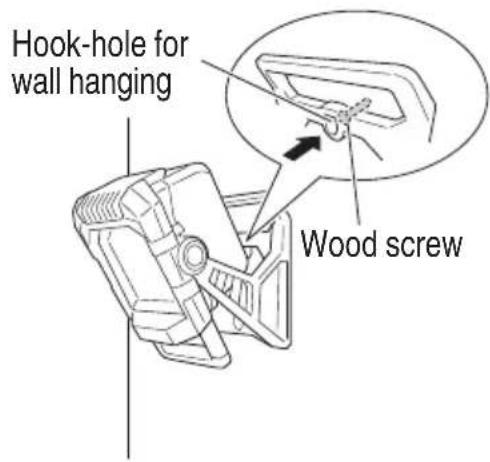
Fig. 11
- Securing to a tripod
The work light can be secured to a tripod using the screw hole for tripod (5/8-UNC). (Fig. 12)

Fig. 12
NOTE
When using a tripod, ensure that it is stable so that it does not fall over.
- How to recharge USB device
WARNING
Prior to use, check the connecting USB cable for any defect or damage. Using a defective or damaged USB cable can cause smoke emission or ignition.
- When the product is not being used, cover the USB port with the rubber cover.
Buildup of dust etc. in the USB port can cause smoke emission or ignition.
Open the rubber cover of the USB port, and firmly plug in a commercially available USB cable into the USB port. (Fig. 13)

Fig. 13
NOTE
If the remaining battery becomes low, USB output is automatically stopped, and the work light cannot charge USB devices.
The charging time differs depending on the type of USB device being used.
Do not use for any purpose other than charging a USB device.
It may not be possible to charge some types of USB devices.
MAINTENANCE AND INSPECTION
WARNING
When not using the work light for a long time, performing maintenance on it, inspecting it, or storing it, be sure to turn OFF the switch and pull out the battery.
- Check the Screws
Loose screws are dangerous. Regularly inspect them and make sure they are tight.
WARNING
Using this work light with loosened screws is extremely dangerous.
- Check for Dust
Dust may be removed with a soft cloth or a cloth dampened with soapy water.
Do not use bleach, chlorine, gasoline or thinner, for they may damage the plastics.
- Inspection of terminals (tool and battery)
Check to make sure that swarf and dust have not collected on the terminals.
On occasion check prior, during and after operation.
CAUTION
Remove any swarf or dust which may have collected on the terminals.
Failure to do so may result in malfunction.
- Disposal of the exhausted battery
WARNING
Do not dispose of the exhausted battery. The battery must explode if it is incinerated. The battery is recyclable. At the end of it's useful life, under various state and local laws, it may be illegal to dispose of this battery into the municipal waste stream. Check with your local solid waste officials for details in your area for recycling options or proper disposal.
- Storage
Storing in a place below 104^ (40^) and out of the reach of children.
NOTE
Storing lithium-ion batteries
Make sure the lithium-ion batteries have been fully charged before storing them. Prolonged storage (3 months or more) of batteries with a low charge may result in performance deterioration, significantly reducing battery usage time or rendering the batteries incapable of holding a charge.
If the battery usage time is extremely short despite repeated charging and use, consider the batteries dead and purchase new batteries.
- Service and repairs
All quality work light will eventually require servicing or replacement of parts because of wear from normal use. To assure that only authorized replacement parts will be used, all service and repairs must be performed by a metabo HPT AUTHIZED SERVICE CENTER, ONLY.
CAUTION
In the operation and maintenance of work light, the safety regulations and standards prescribed in each country must be observed.
Important notice on the batteries for the metabo HPT cordless power tools
Please always use one of our designated genuine batteries. We cannot guarantee the safety and performance of our cordless power tool when used with batteries other than these designated by us, or when the battery is disassembled and modified (such as disassembly and replacement of cells or other internal parts).
ACCESSIONS
WARNING
ALWAYS use Only authorized metabo HPT replacement parts and accessories. NEVER use replacement parts or accessories which are not intended for use with this work light. Contact metabo HPT if you are not sure whether it is safe to use a particular replacement part or accessory with your work light.
The use of any other attachment or accessory can be dangerous and could cause injury or mechanical damage.
NOTE
Accessories are subject to change without any obligation on the part of the metabo HPT.
STANDARD ACCESSORIES
| UB18DC (NN) | Battery, Battery charger and Battery cover are not contained. |
INFORMATIONS IMPORTANTES DE SECURITE
Please contact Koki Holdings America Ltd. at 1-800-59-TOOLS (toll free), or metabo HPT AUTHORIZED POWER TOOL SERVICE CENTER regarding COLLECTION.

Pour le RAMASSAGE,contacter Koki Holdings America Ltd. au 1-800-59-TOOLS (appeel Gratis), ou UN SERVICE APRES-VENTE D'OUTILS ELECTRIQUE AGREE PAR metabo HPT.

Con respectfully a la RECOLECCION de baterias,pongase en contacto con Koki Holdings America Ltd. numero 1-800-59-TOOLS (llamada Gratis), o con metabo HPT AUTHORIZATION POWER TOOL SERVICE CENTER.
Issued by
Koki Holdings Co., Ltd.
Shinagawa Intercity Tower A, 15-1, Konan 2-chome, Minato-ku, Tokyo 108-6020, Japan
Distributed by
Koki Holdings America Ltd.
1111 Broadway Ave, Braselton, Georgia, 30517
Koki Holdings America Ltd. Canadian Branch
3405 American Drive, Units 9-10, Mississauga, ON, L4V 1T6
- SAFETY INSTRUCTIONS AND INSTRUCTION MANUAL
- WARNING
- INSTRUCTIONS DE SECURITE ET MODE D'EMPLOI
- AVERTISSEMENT
- IMPORTANT SAFETY INFORMATION
- MEANINGS OF SIGNAL WORDS
- MEANINGS OF SYMBOLS
- IMPORTANT SAFETY INSTRUCTIONS
- READ ALL THE INSTRUCTIONS BEFORE USING THE APPLIANCE
- WARNING
- To reduce the risk of fire, electric injury:
- shock do not leave the work light unattended while it is turned on.
- GENERAL SAFETY RULES
- SAVE THESE INSTRUCTIONS
- 1) Work area safety
- SPECIFIC SAFETY RULES
- IMPORTANT SAFETY INSTRUCTIONS FOR BATTERY CHARGER
- READ ALL INSTRUCTIONS
- IMPORTANT SAFETY INSTRUCTIONS FOR USE OF THE BATTERY AND BATTERY CHARGER
- CAUTION
- CAUTION ON LITHIUM-ION BATTERY
- REGARDING LITHIUM-ION BATTERY TRANSPORTATION
- PRECAUTIONS WHEN CONNECTING TO EXTERNAL EQUIPMENT
- PRECAUTIONS REGARDING THE DUST-RESISTANCE AND WATER-PROOFING FUNCTIONS
- [Descriptions of IP Codes] IP54
- SAVE THESE INSTRUCTIONS AND MAKE THEM AVAILABLE TO OTHER USERS AND OWNERS OF THIS WORK LIGHT!
- FUNCTIONAL DESCRIPTION
- NOTE
- NAME OF PARTS
- Cordless Work Light (UB18DC)
- Battery
- Battery Charger
- SPECIFICATIONS
- Cordless Work Light
- Battery Charger
- ASSEMBLY AND OPERATION
- APPLICATIONS
- REMOVAL AND INSTALLATION METHOD OF BATTERY
- CHARGING METHOD
- How to make the batteries perform longer
- HOW TO USE
- MAINTENANCE AND INSPECTION
- ACCESSIONS
- STANDARD ACCESSORIES
- INFORMATIONS IMPORTANTES DE SECURITE
- Koki Holdings Co., Ltd.
- Koki Holdings America Ltd.
- Koki Holdings America Ltd. Canadian Branch
Brand : HiKOKI
Model : UB 18DC
Category : Lighting