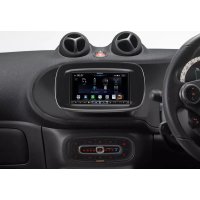
iLX705S453B - Car radio ALPINE - Free user manual and instructions
Find the device manual for free iLX705S453B ALPINE in PDF.


| Product type | Multimedia car radio with touch screen |
| Brand | Alpine |
| Model | iLX705S453B (iLX-705D / iLX-F905D / iLX-F115D depending on variant) |
| Screen size | 7 inches (iLX-705D) / 9 inches (iLX-F905D) / 11 inches (iLX-F115D) |
| Display resolution | 1280 × 720 pixels (active TFT matrix) |
| Chassis dimensions (W × H × D) | 178 × 50 × 149.6 mm |
| Weight (iLX-705D) | 1.4 kg |
| Power supply | 14.4 V DC (11 – 16 V allowed) |
| Output power | 50 W × 4 (max.) |
| Maximum current consumption | 15 A (fuse) |
| FM tuning range | 87.5 – 108.0 MHz |
| AM tuning range | 531 – 1602 kHz |
| DAB tuning range | 174 – 240 MHz |
| Bluetooth version | 4.2 (class 2, range 10 m) |
| Wi-Fi | IEEE 802.11 b/g/n (2.4 GHz), security WPA3/WPA2-PSK |
| USB ports | USB 2.0: 1 × 2.4 A (data + charge) + 1 × 1.5 A (charge only) |
| HDMI input | 1 × HDMI input (720p/480p/VGA) + 1 × HDMI output (720p/480p) |
| Smartphone compatibility | Apple CarPlay (iPhone 6s and later) and Android Auto (Android 6.0+) |
| Hands-free function | Yes, Bluetooth HFP, connection up to 2 phones |
| Camera input | 1 rear (RCA) + 1 front/side (RCA) |
| Audio outputs | Front/rear pre-out 4 V, subwoofer 4 V |
| Cleaning and maintenance | Use a soft, dry cloth. Do not use abrasive or solvent-based products. |
| Repairability and spare parts | Contact an authorized Alpine dealer or Alpine after-sales service. |
| Safety | Parking brake detection mandatory for video playback. Do not watch video while driving. |
| Operating temperature | -20 °C to +60 °C |
Frequently Asked Questions - iLX705S453B ALPINE
User questions about iLX705S453B ALPINE
0 question about this device. Answer the ones you know or ask your own.
Ask a new question about this device
Download the instructions for your Car radio in PDF format for free! Find your manual iLX705S453B - ALPINE and take your electronic device back in hand. On this page are published all the documents necessary for the use of your device. iLX705S453B by ALPINE.
USER MANUAL iLX705S453B ALPINE
7-INCH DIGITAL MEDIA STATION
iLX-705D
HALO9 9-INCH DIGITAL MEDIA STATION
iLX-F905D
HALO11 11-INCH DIGITAL MEDIA STATION
iLX-F115D
9-INCH SEPARATE DIGITAL MEDIA STATION i905
QUICK REFERENCE GUIDE
KURZANLEITUNG
GUIDE DE RÉFERENCE RAPIDE
GUIA DE REFERENCI A RAPIDA
KPATKOE CIPABOQUHOE PYKOBOJCTBO










Contents
WARNING 2
CAUTION 3
Getting Started 4
Apple CarPlay Operation (Optional) 8
Android AutoTM (Optional) 8
Radio/RDS Operation 9
DAB/DAB+/DMB Operation 9
USB Flash drive Operation (Optional) 10
iPod mode on iPhone (Optional) 11
Hands-Free Phone Control 12
Installation 13
Connections 18
Specifications 21
IMPORTANT
Please record the serial number of your unit in the space provided below and keep it as a permanent record.
SERIAL NUMBER:
ISO SERIAL NUMBER: AL
INSTALLATION DATE:
INSTALLATION TECHNICIAN:
PLACE OF PURCHASE:
For details on all functions, refer to the Owner's Manual published on our website at https://www.alpine-europe.com/alpine-europe.html If required, an ALPINE dealer will readily provide you with a print out of the Owner's Manual published on the website.

WARNING
This symbol means important instructions. Failure to heed them can result in serious injury or death.
INSTALL THE PRODUCT CORRECTLY SO THAT THE DRIVER CANNOT WATCH TV/VIDEO UNLESS THE VEHICLE IS STOPPED AND THE PARKING BRAKE IS APPLIED.
It is dangerous for the driver to watch TV/Video while driving a vehicle. Installing this product incorrectly enables the driver to watch TV/Video while driving. This may cause a distraction, preventing the driver from looking ahead, thus causing an accident. The driver or other people could be severely injured.
DO NOT WATCH VIDEO WHILE DRIVING.
Watching the video may distract the driver from looking ahead of the vehicle and cause an accident.
DO NOT OPERATE ANY FUNCTION THAT TAKES YOUR ATTENTION AWAY FROM SAFELY DRIVING YOUR VEHICLE.
Any function that requires your prolonged attention should only be performed after coming to a complete stop. Always stop the vehicle in a safe location before performing these functions. Failure to do so may result in an accident.
KEEP THE VOLUME AT A LEVEL WHERE YOU CAN STILL HEAR OUTSIDE NOISES WHILE DRIVING.
Excessive volume levels that obscure sounds such as emergency vehicle sirens or road warning signals (train crossings, etc.) can be dangerous and may result in an accident. LISTENING AT LOUD VOLUME LEVELS IN A CAR MAY ALSO CAUSE HEARING DAMAGE.
MINIMIZE DISPLAY VIEWING WHILE DRIVING.
Viewing the display may distract the driver from looking ahead of the vehicle and cause an accident.
DO NOT DISASSEMBLE OR ALTER.
Doing so may result in an accident, fire or electric shock.
USE ONLY IN CARS WITH A 12 VOLT NEGATIVE GROUND.
(Check with your dealer if you are not sure.) Failure to do so may result in fire, etc.
KEEP SMALL OBJECTS SUCH AS SCREWS OUT OF THE REACH OF CHILDREN.
Swallowing them may result in serious injury. If swallowed, consult a physician immediately.
USE THE CORRECT AMPERE RATING WHEN REPLACING FUSES.
Failure to do so may result in fire or electric shock.
DO NOT BLOCK VENTS OR RADIATOR PANELS.
Doing so may cause heat to build up inside and may result in fire.
USE THIS PRODUCT FOR MOBILE 12V APPLICATIONS.
Use for other than its designed application may result in fire, electric shock or other injury.
MAKE THE CORRECT CONNECTIONS.
Failure to make the proper connections may result in fire or product damage.
BEFORE WIRING, DISCONNECT THE CABLE FROM THE NEGATIVE BATTERY TERMINAL.
Failure to do so may result in electric shock or injury due to electrical shorts.
DO NOT ALLOW CABLES TO BECOME ENTANGLED IN SURROUNDING OBJECTS.
Arrange wiring and cables in compliance with the manual to prevent obstructions when driving. Cables or wiring that obstruct or hang up on places such as the steering wheel, gear lever, brake pedals, etc. can be extremely hazardous.
DO NOT SPLICE INTO ELECTRICAL CABLES.
Never cut away cable insulation to supply power to other equipment. Doing so will exceed the current carrying capacity of the wire and result in fire or electric shock.
DO NOT DAMAGE PIPE OR WIRING WHEN DRILLING HOLES.
When drilling holes in the chassis for installation, take precautions so as not to contact, damage or obstruct pipes, fuel lines, tanks or electrical wiring. Failure to take such precautions may result in fire.
DO NOT USE BOLTS OR NUTS IN THE BRAKE OR STEERING SYSTEMS TO MAKE GROUND CONNECTIONS.
Bolts or nuts used for the brake or steering systems (or any other safety-related system), or tanks should NEVER be used for installations or ground connections. Using such parts could disable control of the vehicle and cause fire etc.
DO NOT INSTALL IN LOCATIONS WHICH MIGHT HINDER VEHICLE OPERATION, SUCH AS THE STEERING WHEEL OR SHIFT LEVER.
Doing so may obstruct forward vision or hamper movement etc. and results in serious accident.

CAUTION
This symbol means important instructions. Failure to heed them can result in injury or material property damage.
HALT USE IMMEDIATELY IF A PROBLEM APPEARS.
Failure to do so may cause personal injury or damage to the product. Return it to your authorized Alpine dealer or the nearest Alpine Service Center for repairing.
HAVETHE WIRING AND INSTALLATIONDONE BY EXPERTS.
The wiring and installation of this unit requires special technical skill and experience. To ensure safety, always contact the dealer where you purchased this product to have the work done.
USE SPECIFIED ACCESSORY PARTS AND INSTALL THEM SECURELY.
Be sure to use only the specified accessory parts. Use of other than designated parts may damage this unit internally or may not securely install the unit in place. This may cause parts to become loose resulting in hazards or product failure.
ARRANGE THE WIRING SO IT IS NOT CRIMPED OR PINCHED BY A SHARP METAL EDGE.
Route the cables and wiring away from moving parts (like the seat rails) or sharp or pointed edges. This will prevent crimping and damage to the wiring. If wiring passes through a hole in metal, use a rubber grommet to prevent the wire's insulation from being cut by the metal edge of the hole.
DO NOT INSTALL IN LOCATIONS WITH HIGH MOISTURE OR DUST.
Avoid installing the unit in locations with high incidence of moisture or dust. Moisture or dust that penetrates into this unit may result in product failure.
Getting Started
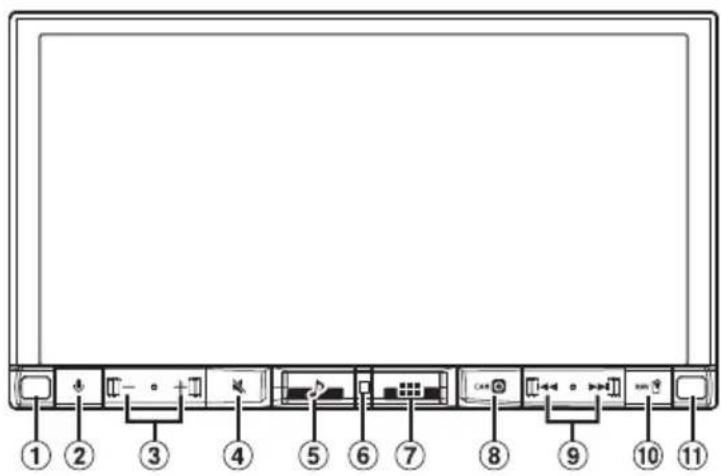
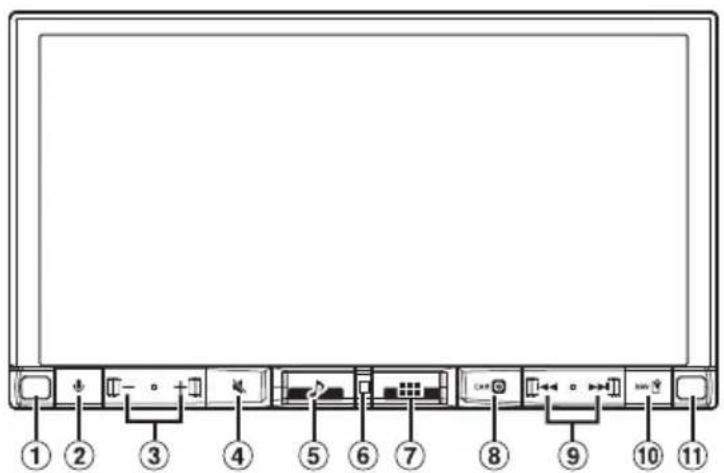
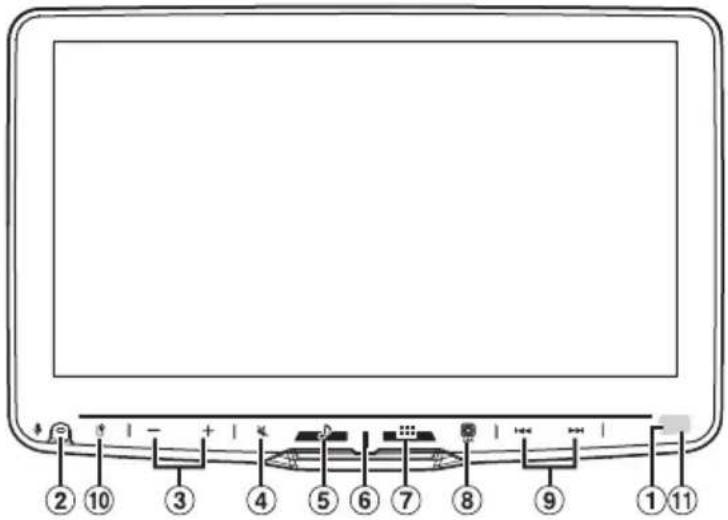
Controls Position
The screen design used in the Quick Reference Guide may differ from the actual screen.
iLX-705D
iLX-F905D/iLX-F115D
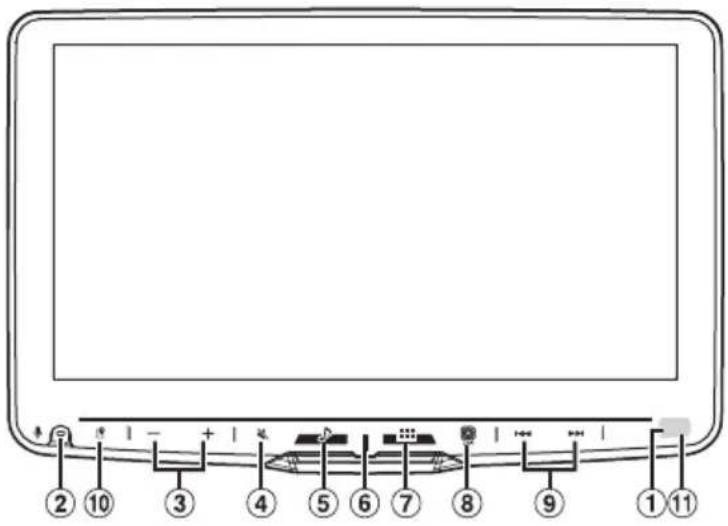
① Dimmer Sensor
Sense the brightness of the car interior.
② button
Activate Siri function or voice recognition mode while Apple CarPlay or Android Auto is connected.
3 -/DOWN/UP) button
Adjusts the volume.
(4) (MUTE) button
Activates/deactivates MUTE mode.
Press and hold this button for at least 2 seconds to turn off the screen/button illumination.
⑤ (Audio) button
Displays the Audio playback screen.
Audio sources can be switched while the Audio playback screen is displayed.
6 Power indicator
⑦ (HOME) button
Activates the HOME screen.
The Sound Setup screen is displayed while the HOME screen is displayed.
Press and hold this button for at least 2 seconds to turn the power off.
CAM) button
Displays the image of Camera2 (Front/Side/Other) or Camera1 (Rear).
Press for 1 second or more to return to the previous screen.
9 /bukton
Press to seek up/down a station in radio mode or up/ down a track, etc., in other audio/visual sources.
10 (MAP) button
Displays the map screen for Apple CarPlay / Android Auto when Apple CarPlay or Android Auto is connected.
Remote Sensor
Point the remote control transmitter towards the remote sensor within a range of 2 meters.
Turning Power On or Off
1 Turn the ignition key to the ACC or ON position.
The system is turned on.
- When using the system for the first time, the HOME screen is displayed.

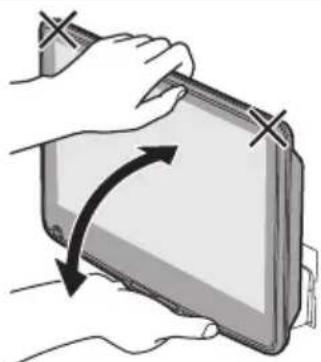
CAUTION (iLX-F905D/iLX-F115D only)
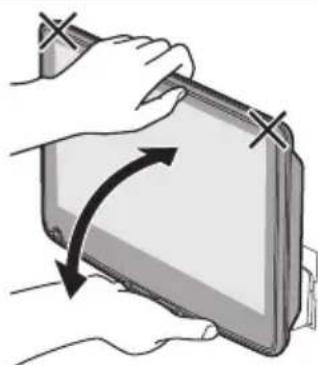
To adjust the display angle, hold the center of the top and bottom of the display to move it. To protect the display, do not hold the left and right ends to move it.
Select the audio source on the HOME screen to perform various settings and operations of the function.
1 Press the (HOME) button.
The HOME screen is displayed.
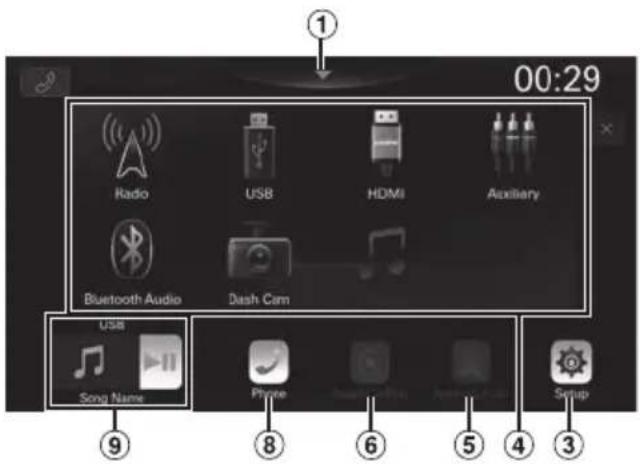
Normal mode screen example
Enhanced Text mode screen example
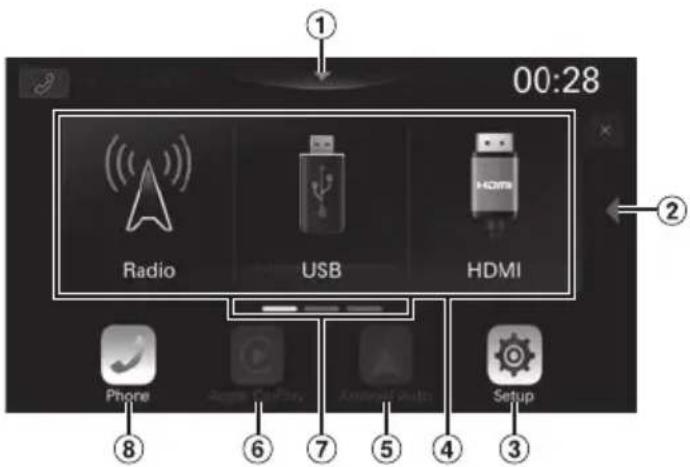
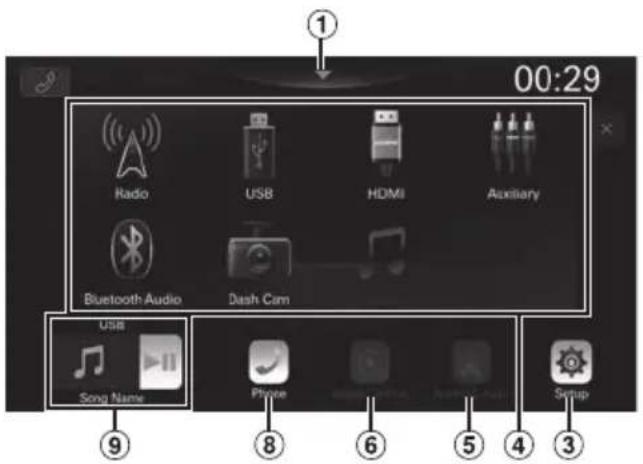
① Touch to display the Sound Setup screen.
② Touch to change the page.
Pages can also be changed by swiping the HOME screen horizontally with your finger.
③ Setup button
Displays the Setup screen.
Audio source select area
Touch your desired source icon to change the audio source.
⑤ Android Auto button
Displays the Android Auto screen, high light displayed when an Android Smartphone installed Android Auto App is connected.
Apple CarPlay button
Displays the Apple CarPlay screen, high light displayed when Apple CarPlay is turned on and an iPhone 6s or later is connected.
⑦ HOME screen navigation
Phone button
Displays the Phone menu screen.
The Device List screen is displayed when a Hands-free Phone,Apple CarPlay or Android Auto device is not connected.
9 Thumbnail window for the current source
Source name, artwork and title information are displayed. Touch the artwork to display the source screen. Touch [▶] to play/pause a track or video.
The Home screen can be changed to the Enhanced Text mode.
1 Press the (HOME) button.
The HOME screen is displayed.
2 Touch [Setup].
The Setup screen is displayed.
3 Touch [System].
![ALPINE iLX705S453B - Touch [System]. - 1](/content/2026/03/569893/images/a4e281d2b2b2265ec5dbfa9d57b3d457d472fb4454eb9278f20e59aa883f978b.jpg)
4 Touch [Home Screen Type].
![ALPINE iLX705S453B - Touch [Home Screen Type]. - 1](/content/2026/03/569893/images/666deefef9b873f691c245e4e02547a30272028d7f4470b350528e4d7372620e.jpg)
5 Touch [Normal] or [Enhanced Text].
![ALPINE iLX705S453B - Touch [Normal] or [Enhanced Text]. - 1](/content/2026/03/569893/images/de372bda28619de1c0132facab5f61a91395df973aedb5e820f085706ba65a4f.jpg)
Apple CarPlay Operation (Optional)
Apple CarPlay is a smarter, safer way to use your iPhone in the car. Apple CarPlay takes the things you want to do with your iPhone while driving and puts them right on this unit. You can get directions, make calls, send and receive messages, and listen to music, all in a way that allows you to stay focused on the road.
1 Press the (HOME) button.
The HOME screen is displayed.
2 Touch [Apple CarPlay].
The Apple CarPlay screen is displayed.
Refer to "Apple CarPlay" in the Owner's Manual for information on how to operate Apple CarPlay.
Owner's manual Android AutoTM (Optional)
Android Auto™ (Optional)
Android Auto brings your favorite smartphone apps into one place, making it easier for drivers to access their favorite navigation, media, and communication apps on the road while minimizing the distractions. Talk to Google on Android Auto™ and get things done with your voice so you can keep your eyes on the road and hands on the wheel. Easily send messages, get directions, control media and more. Just short-press or long-press the voice control button on your steering wheel.
1 Press the (HOME) button.
The HOME screen is displayed.
2 Touch [Android Auto].
The Android Auto screen is displayed.
- Refer to "Android Auto" in the Owner's Manual for information on how to operate Android Auto.
Radio/RDS Operation
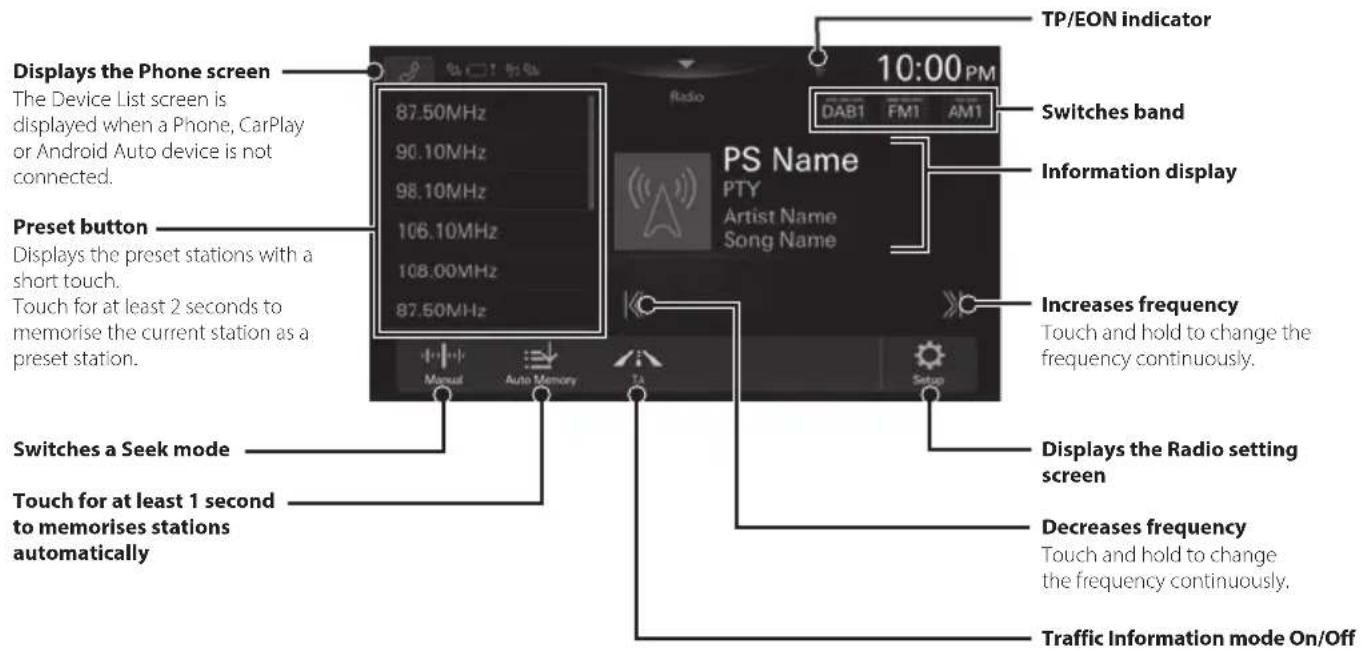
- The patterns of some keys in the Quick Reference Guide may differ from the actual screen.
Owner's manual DAB/DAB+/DMB
DAB/DAB+/DMB Operation
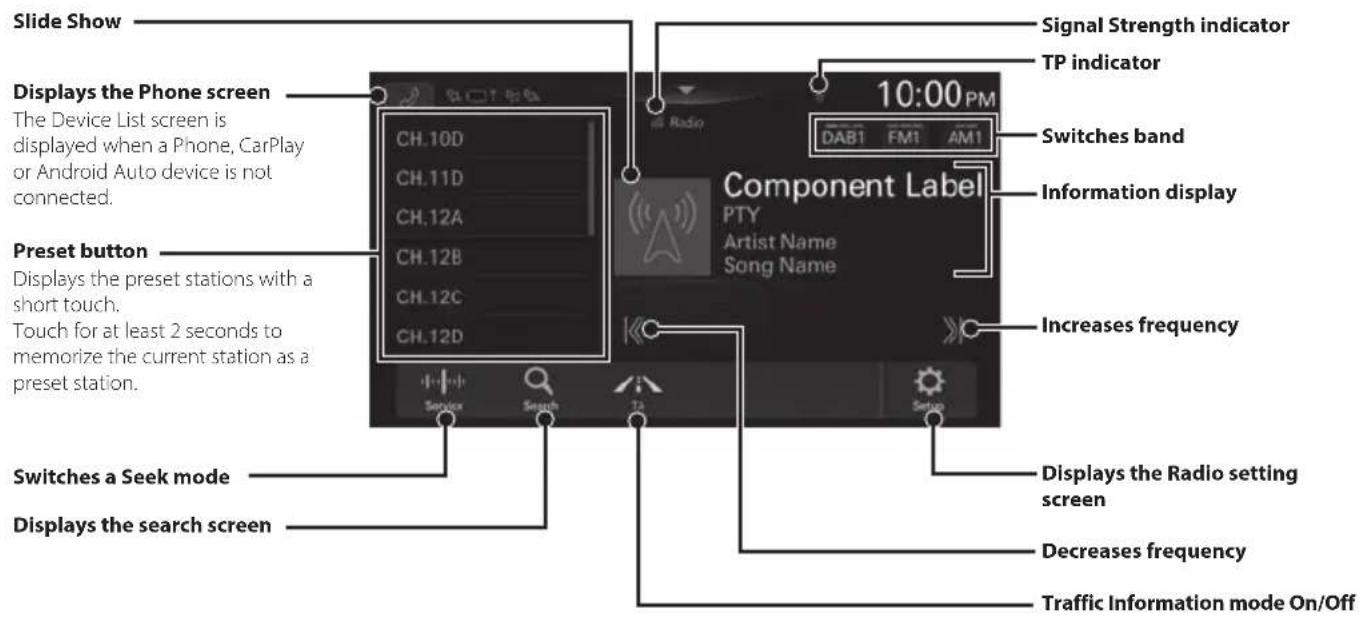
- The patterns of some keys in the Quick Reference Guide may differ from the actual screen.
USB Flash drive Operation (Optional)
You can play back music files (MP3/WMA/AAC/FLAC/WAV/APE) and video files (MP4/MOV/FLV/MKV) stored in a USB flash drive on the internal player of this system.
USB Audio main screen example
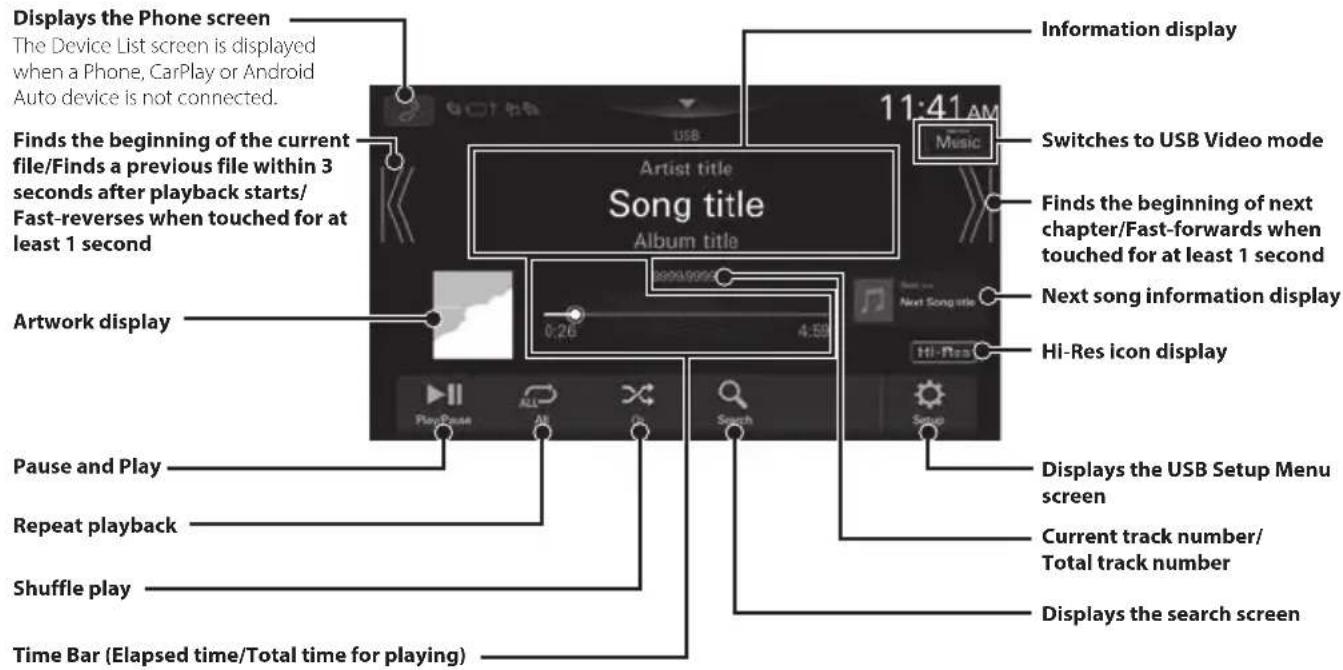
- The patterns of some keys in the Quick Reference Guide may differ from the actual screen.
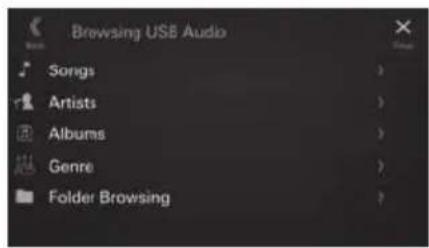
Searching for a Music File
For example: Searching by Artist name
1 Touch [ (Search)] during playback.
2 Touch [Artists].
3 Touch the desired artist's name.
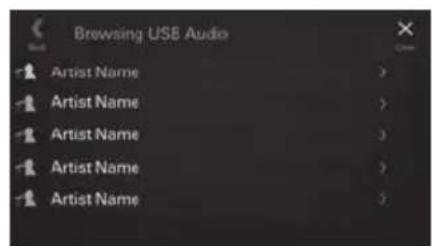
4 Touch the desired album's name.
5 Touch the desired song's name.
The selected song is played back.
iPod mode on iPhone (Optional)
A separately sold Lightning to USB cable is required depending on the type of iPhone.
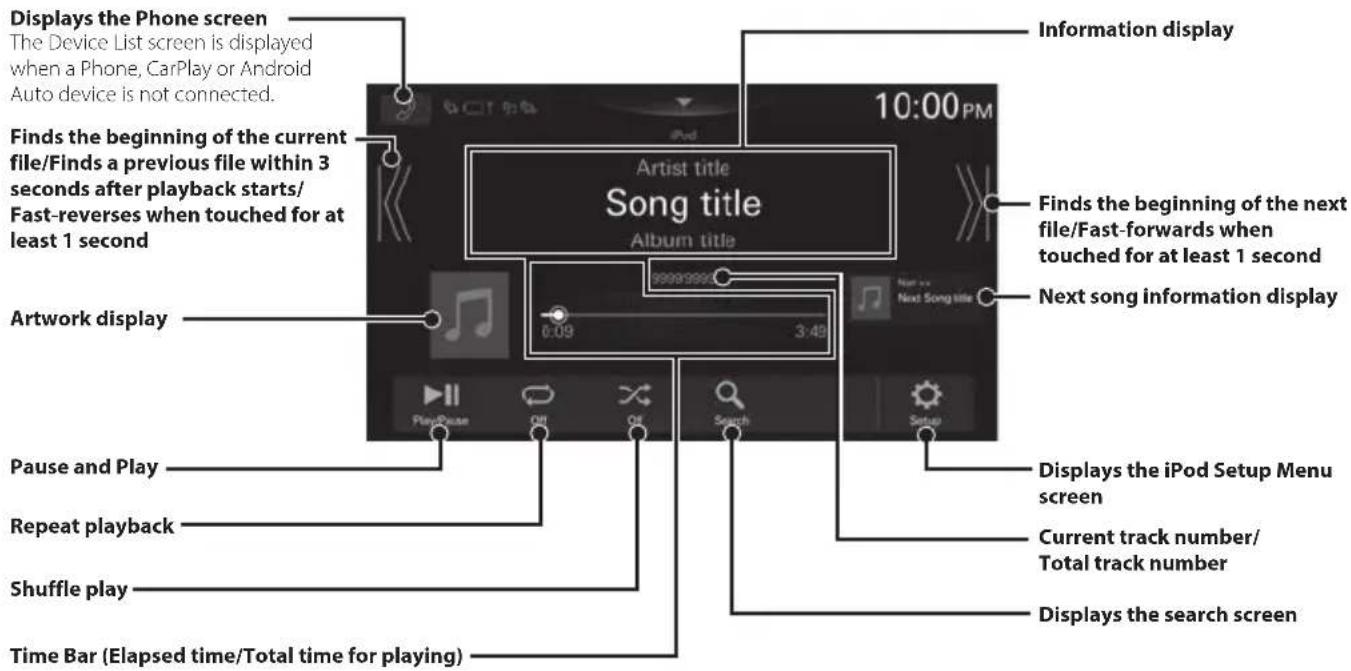
- This unit supports iPhone (iPhone 6s or later) only. For using music playback only, set the "Apple CarPlay" setting to "Off" before connecting with your iPhone.
- The patterns of some keys in the Quick Reference Guide may differ from the actual screen.
Searching for a Music File
For example: Searching by Artist name
1 Touch [ (Search)] during playback.
2 Touch [Artists].
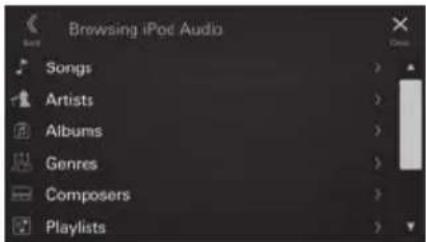
3 Touch the desired artist's name.
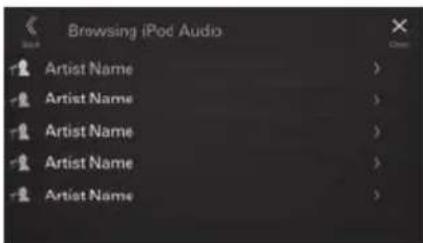
4 Touch the desired album's name.
5 Touch the desired song's name.
The selected song is played back.
Hands-Free Phone Control
The unit can connect with up to two hands-free phones.
How to connect to a Bluetooth compatible device (Pairing)
To display the Setup HOME screen:
- Bring your vehicle to a complete stop at a safe location. Engage the parking brake.
1 Touch [Setup] on the HOME screen.
2 Touch [Device].
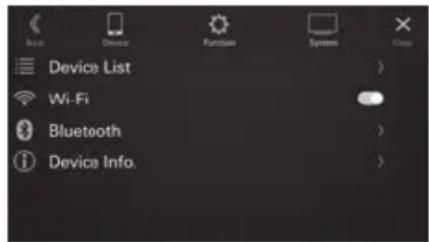
3 Touch [Device List].
4 Touch [Add New Device] to search for a new device.
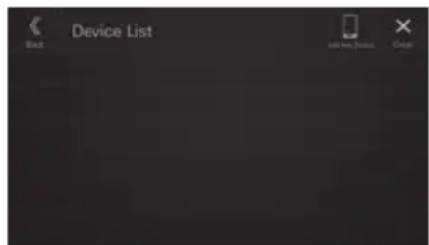
The Select Function screen is displayed.
5 Select the function of the connecting device on the Select Function screen, and touch [OK].
A check mark is displayed for the selected function.
- Hands Free1: The device is used as the first hands-free phone.
- Hands Free2: The device is used as the second hands-free phone.
- Bluetooth Audio: The device is used as an Bluetooth Audio device.
- Apple CarPlay*: The device is used as Apple CarPlay.
- If you want to use Apple CarPlay mode without displaying [Apple CarPlay] on the Select Function screen, select [Hands Free1] or [Hands Free2] to connect your device.
6 When a code is displayed on the device, check that the code is the same as the one on the screen of the unit, and touch [Yes].
7 When the device connection is complete, a message appears and the device returns to normal mode.
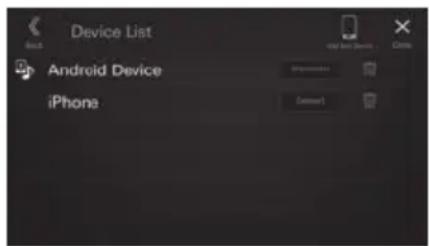
- You can register up to 10 Bluetooth compatible mobile phones.
Answering a Call
1 An incoming call triggers the ringtone and an incoming call display.
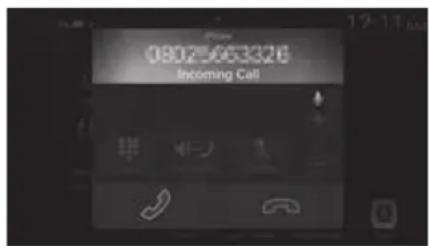
2 Touch [ ].
The call starts.
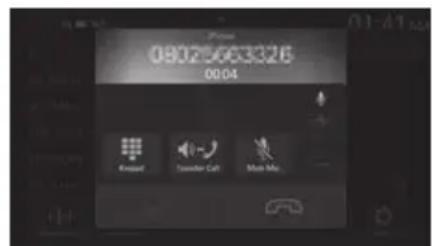
Hanging up the Telephone
1 Touch [ ] (End Call).
The call finishes.
Installation
Note on installation
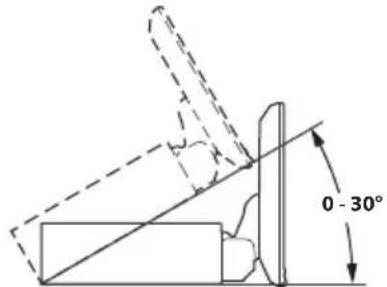
- Install at an angle between horizontal and 30° . Note that installing at an angle outside of this range will result in a loss of performance and possible damage.
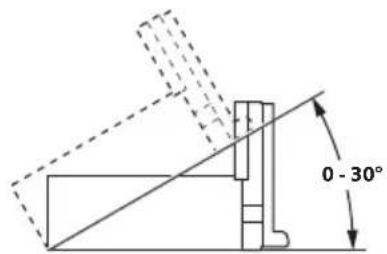
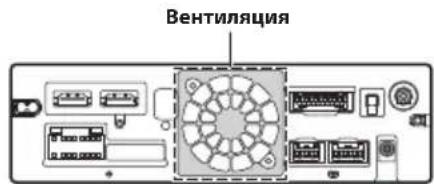
- Do not block the unit's heat sink, which would prevent air circulation. If blocked, heat will accumulate inside the unit and may cause a fire.
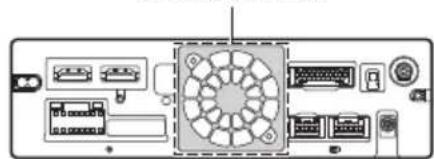
Air ventilation hole
Rear of the Unit
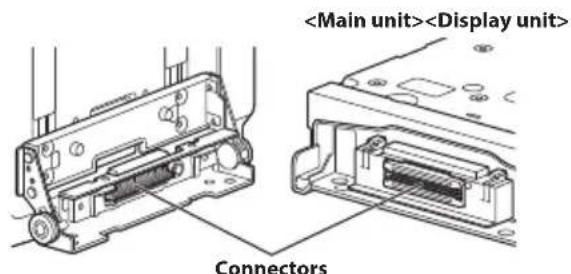
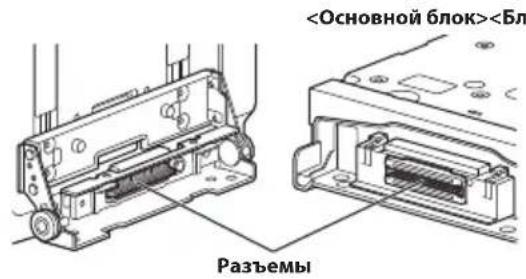
- When installing the display unit and main unit, do not touch the connectors with your hands. (iLX-F905D/iLX-F115D only)
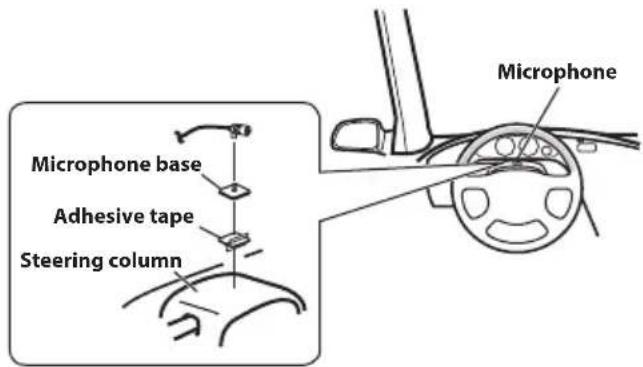
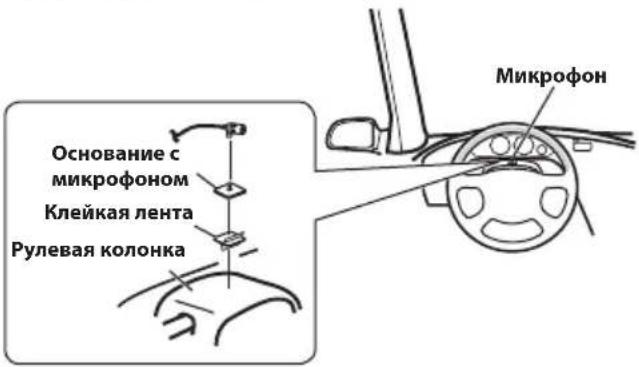
Mounting the Microphone
For safe use, make sure of the following:
- Location is stable and firm.
- Driver's view and operations are not obstructed.
- Microphone is located where the driver's voice can be easily picked up.
When you speak into the microphone, you should not have to change your driving posture. This may cause a distraction, taking your attention away from safely driving your vehicle. Carefully consider direction and distance while mounting the microphone. Confirm that the driver's voice can be easily picked up at the selected location.
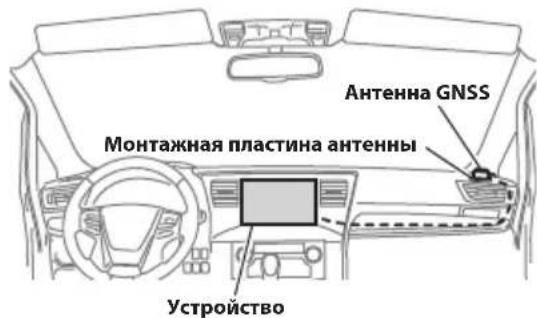
Mounting the GPS Antenna inside the vehicle
1 Clean the mounting location.
2 Put on the GPS Antenna mounting plate.
3 Mount the GPS Antenna.
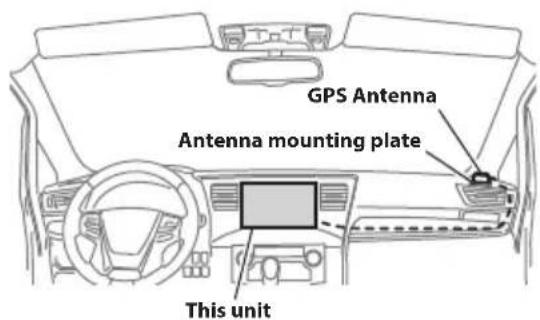
-
Do not mount the GPS Antenna inside the centre console.
-
Mount the GPS Antenna on a flat plane of the dash board or rear tray.
-
Make sure the GPS Antenna is not covered (obstructed) by any metallic surface or object.
-
If the GPS Antenna is mounted near the unit, the reception becomes poor, and the location of your vehicle may not be displayed correctly.
- Mount the GPS Antenna far away enough from the unit.
- Bundle the GPS Antenna cable away from the rear of the unit.
- Some thermal reflection type or thermal absorption type glass may interrupt high frequency waves. If reception is poor with the antenna installed inside the car, try to mount the antenna outside the car.
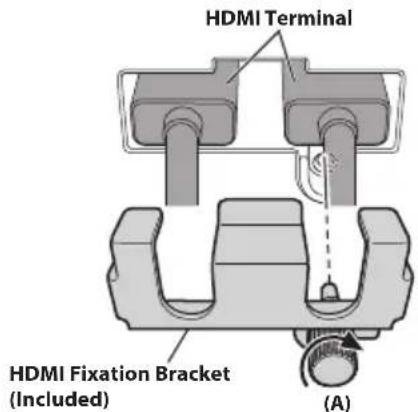
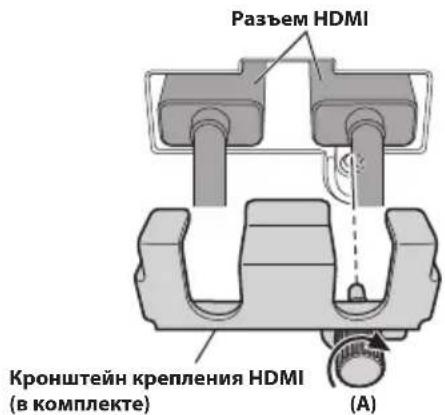
Note on using HDMI Connection Cables
When using HDMI connection cables, secure the cables to the HDMI Terminals with the supplied HDMI Fixation Bracket.
1 Secure the HDMI Fixation Bracket with the screw (A).
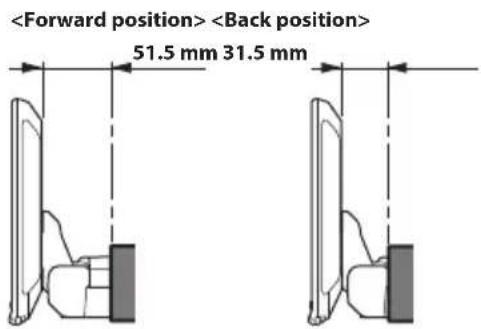
Adjusting the display position (iLX-F905D/iLX-F115D)
Depending on the vehicle, the front-back display position differs. To adjust the front-back position, set the slider to the forward position.
Default setting: Back position
Front-back position
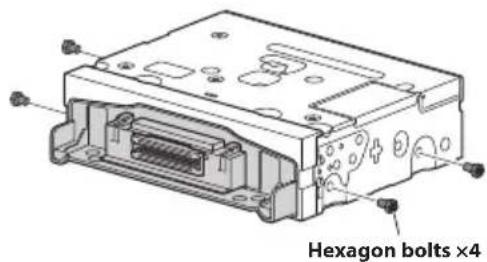
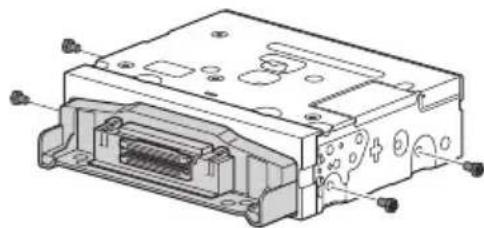
1 Remove 4 hexagon bolts from both sides of the unit.
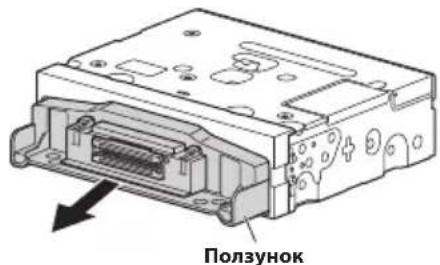
2 Pull out the slider to the forward position. (To return the slider to the back position, push it in.)
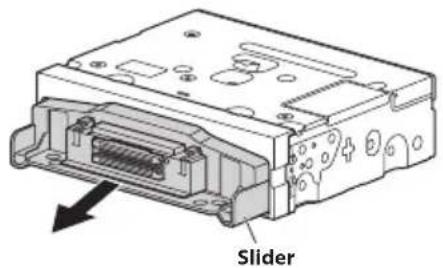
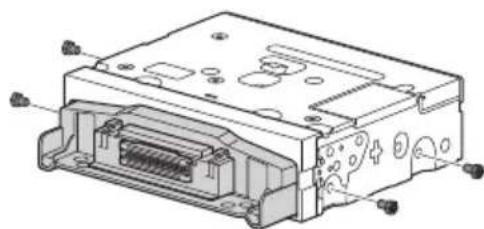
3 Install 4 hexagon bolts to secure the slider.
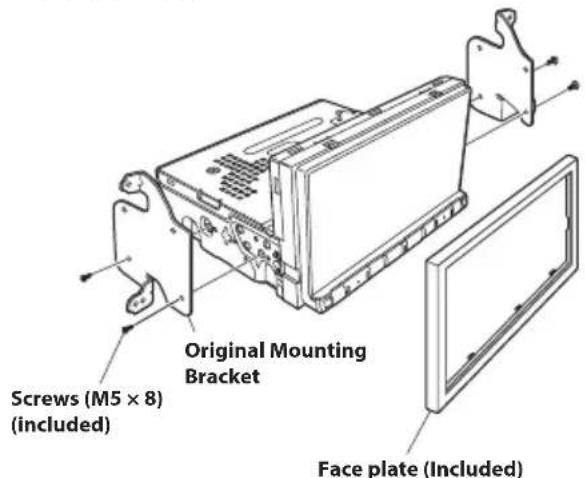
Installing the Unit (iLX-705D)
1 Mount the original mounting bracket to the unit using the supplied screws.
If you do not have the original mounting bracket, mount the Double din KIT* (provided with the side mounting bracket), etc. to the main unit.
- Sold separately.
2 Connect all other leads of the unit according to details described in the "Connections" (page 18).
3 Mounting the unit in a car.
Fix the cables carefully. Do not damage them by tucking them into movable parts, such as a seat rail, or by locating them against sharp or pointed edges.
Installing the Unit (iLX-F905D/ iLX-F115D)
1 Mount the original mounting bracket to the main unit using the supplied screws.
- If you do not have the original mounting bracket, mount the Double din KIT* (provided with the side mounting bracket), etc. to the main unit.
- Sold separately.
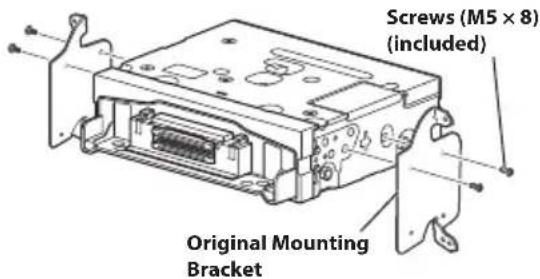
2 Connect all other leads of the main unit according to details described in the "Connections" (page 18).
3 Mount the unit in a car.
Fix the cables carefully. Do not damage them by mounting them into movable parts, such as the seat rail, or by locating them against sharp or pointed edges.
Adjust the up-down position of the Display unit (iLX-F905D/iLX-F115D)
Adjust the up-down position of the display according to the mounting position on the vehicle before mounting the display unit. Default setting: 0mm
1 Remove the 4 screws on the rear of the display unit, then adjust the up-down position.
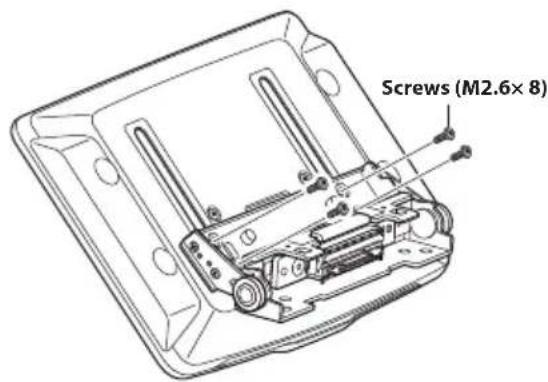
2 Attach the Sheet Rear in a position that aligns with the up-down position of the display unit.
| Sheet Rear (Included) | up-down position |
| 2×50 mm: for up-down position 0 mm or -60mm | |
| 2×35 mm: for up-down position -15 mm or -45mm | |
| 2×20 mm: for up-down position -30 mm | |
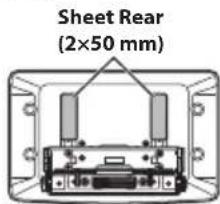
0mm
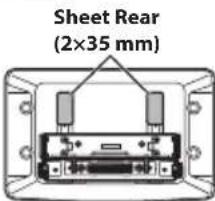
-15mm
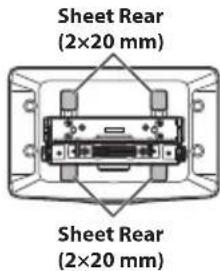
-30mm
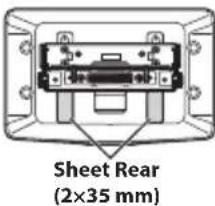
-45 mm
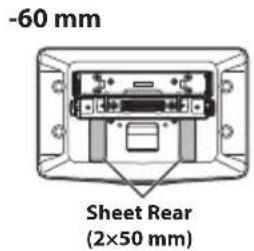
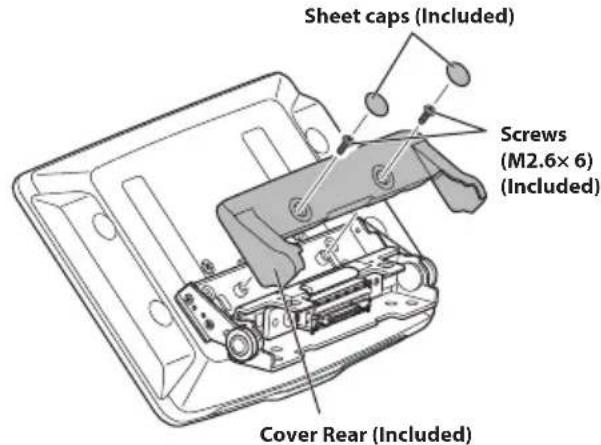
3 Attach the Cover Rear to the rear of the display unit using 2 screws (M2.6×6). Secure the screws, then attach the Sheet caps.
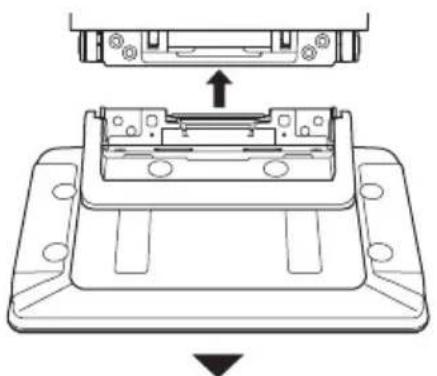
Install the display unit (iLX-F905D/ iLX-F115D)
Fix the Display unit to the slider of the main unit using 4 screws (M5× 8)
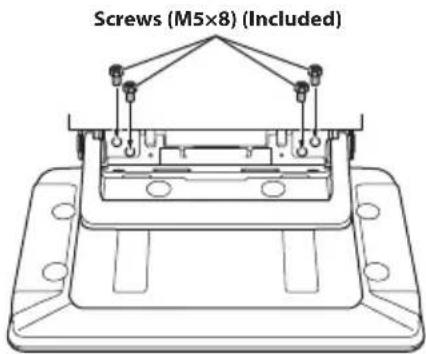
CAUTION
Do not adjust the display angle when the display unit is not fixed to the slider of the main unit using 4 screws (M5× 8) . Doing so may not turn power on.
2 Mount the Power Plate.
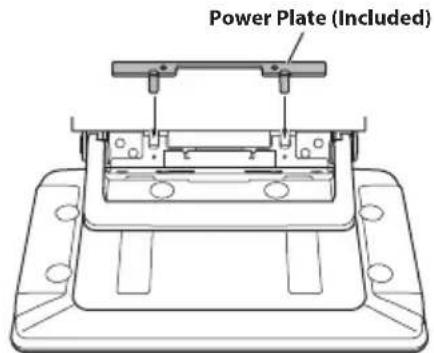
- If the Power Plate is not mounted, the display unit may not be turned power on. Make sure to mount it.
3 Mount the Cover Hinge using 2 screws (M3× 4)
Secure the screws, then attach the Sheet Hinges.
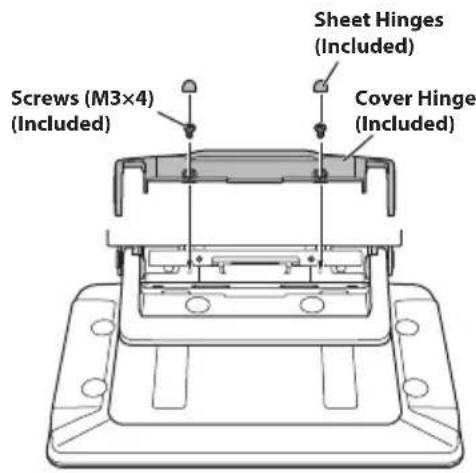
(If the ACC power supply is not available)
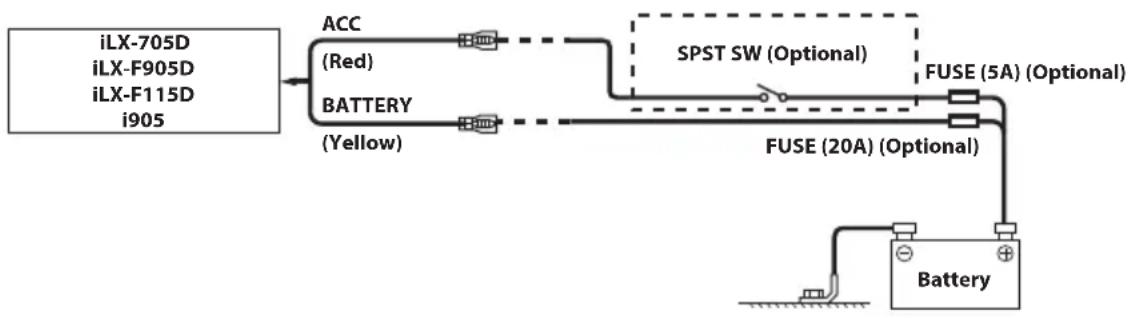
If your vehicle has no ACC power supply, add an SPST (Single-Pole, Single-Throw) switch (sold separately) and fuse (sold separately).
- The diagram and the fuse amperage shown above are in the case when the unit is used individually.
- If the switched power (ignition) lead of the unit is connected directly to the positive (+) post of the vehicle's battery, the unit draws some current (several hundred milliamperes) even when its switch is placed in the OFF position, and the battery may be discharged.
Connections
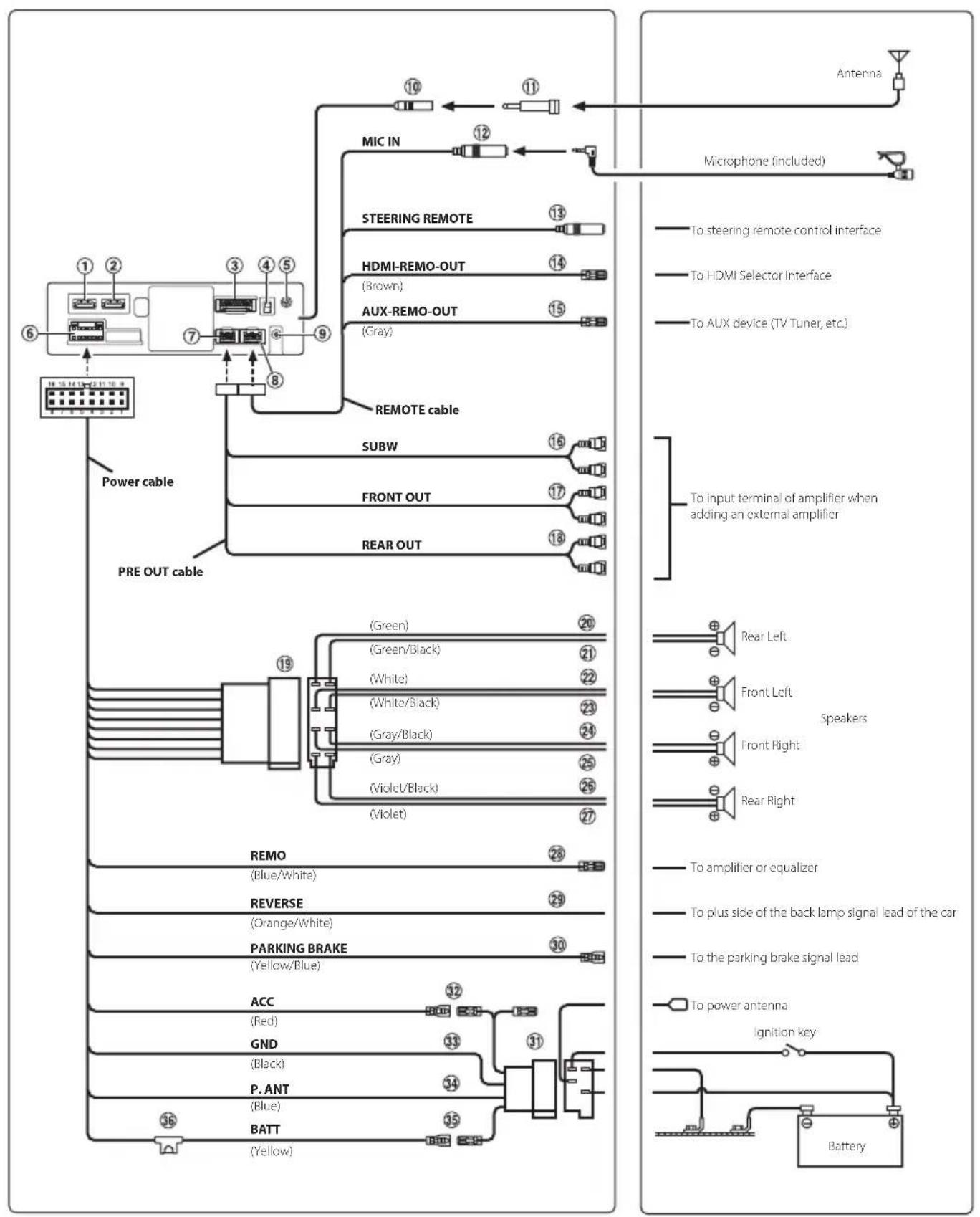
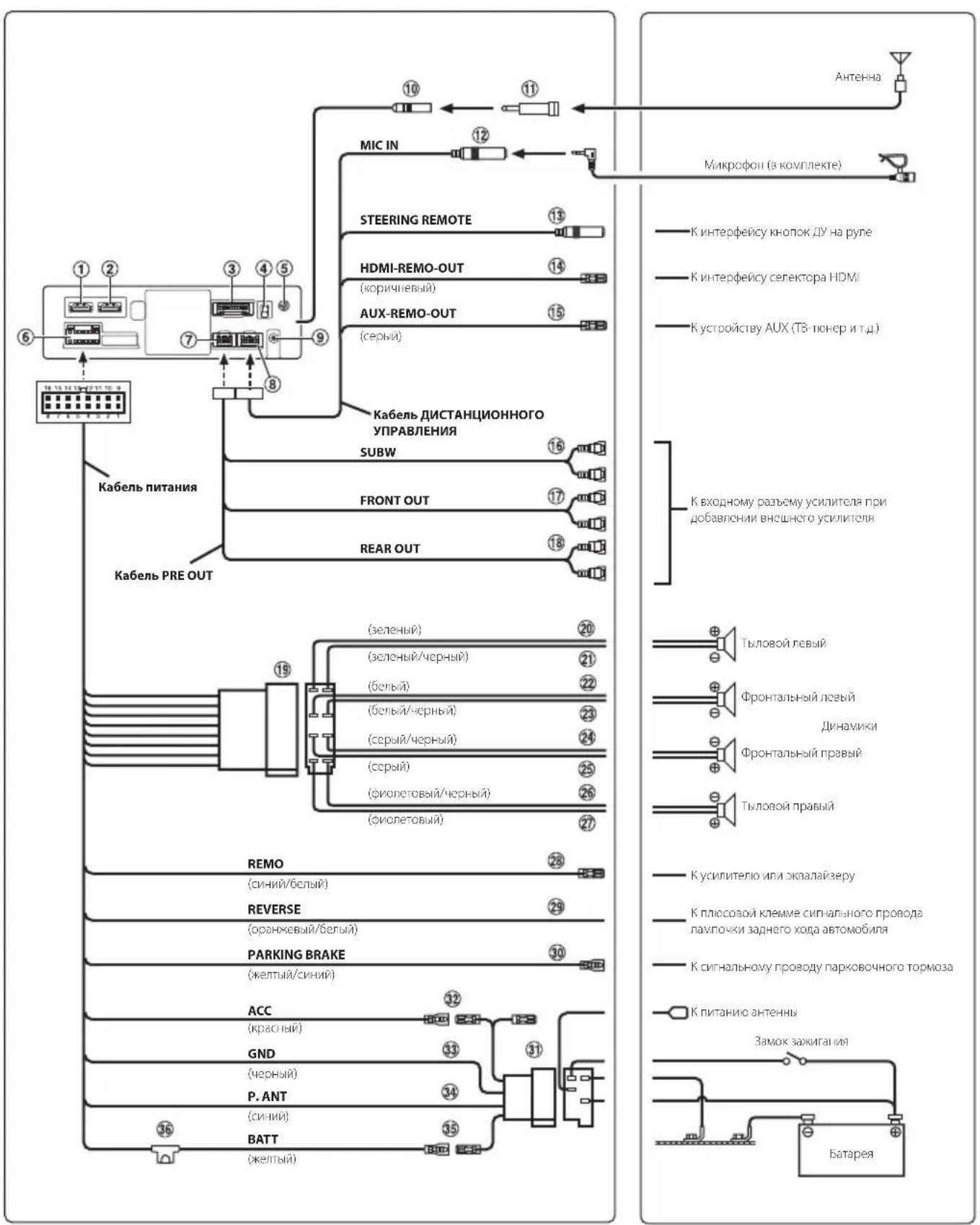
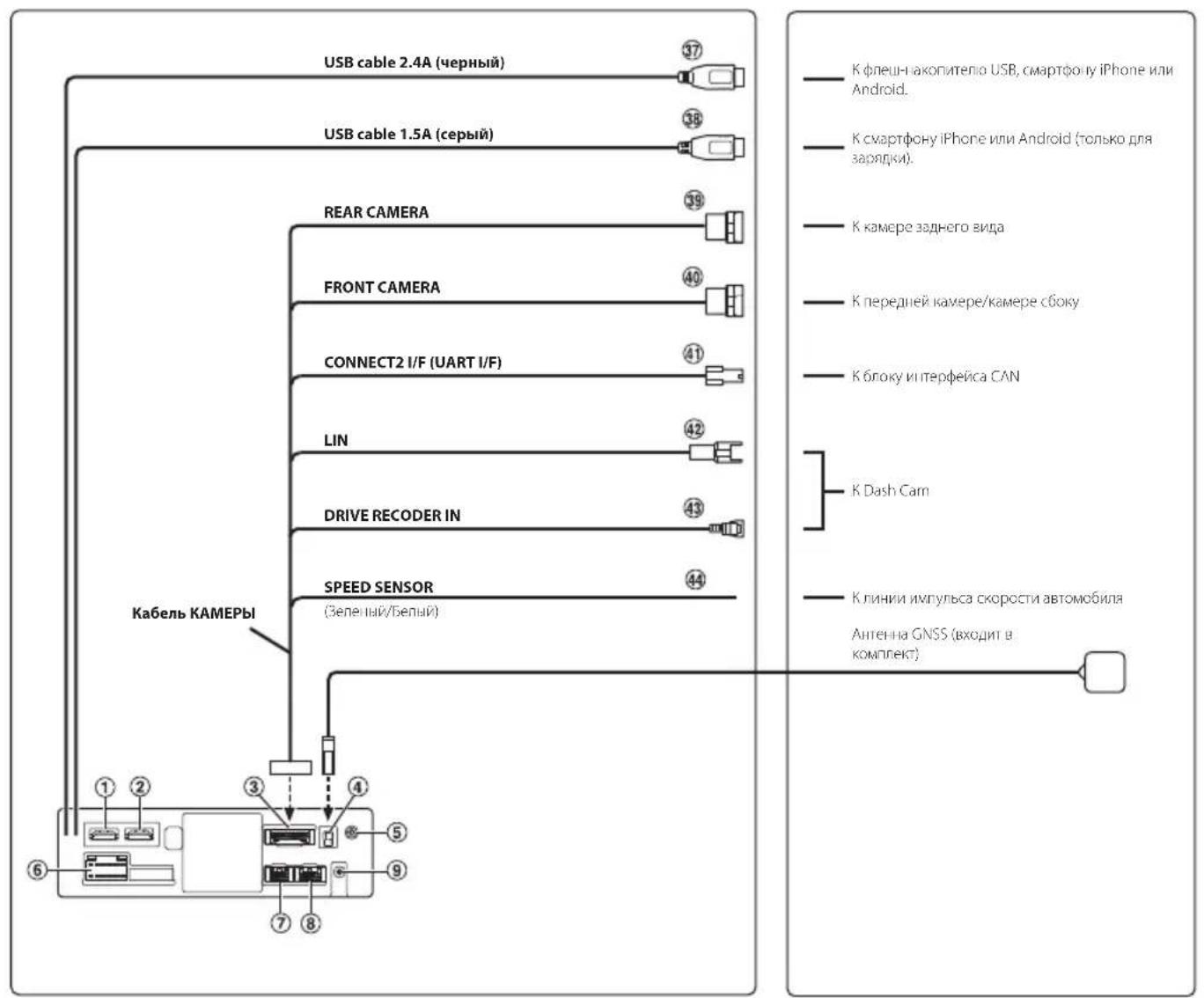
Connection 1
Connection 2
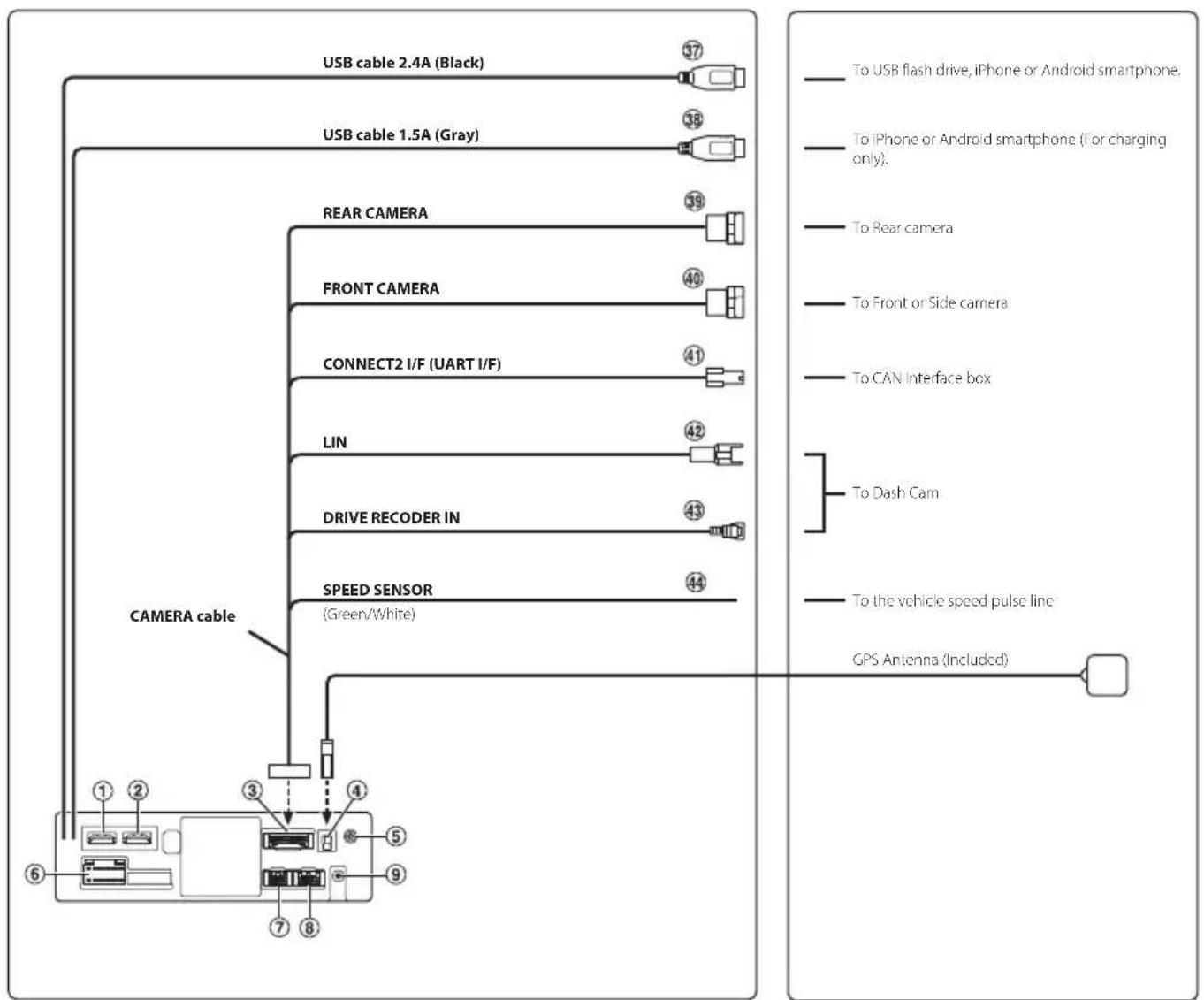
① HDMI Input Connector
HDMI Output Connector
3 CAMERA Connector
GPS Antenna Receptacle Connect to GPS antenna (Included).
5 AUX Input Connector Input lead for AUX audio signal.
6 Power Supply Connector
PRE OUT Connector
⑧ REM Connector
DAB Antenna Connector To DAB Antenna (sold separately).
10 Radio Antenna Receptacle
ISO/JASO Antenna Adapter (sold separately) ISO/JASO Antenna Adapter may be required, depending on the vehicle.
MIC Input Connector To microphone (included).
13 Steering Remote Control Interface Connector To steering remote control interface. For details about connections, consult your nearest Alpine dealer.
14 HDMI-REM-OUT Lead (Brown) Connect this lead to the remote input lead of your HDMI Selector Interface.
15 AUX-REM-OUT Lead (Gray) Connect this lead to the remote input lead of your AUX device.
16 Subwoofer RCA Connectors
RED is right and WHITE is left.
17 Front Output RCA Connectors
Can be used as Front Output RCA Connectors. RED is right and WHITE is left.
18 Rear Output RCA Connectors
Can be used as Rear Output RCA Connectors. RED is right and WHITE is left.
ISO Connector (Speaker Output)
20 Left Rear (+) Speaker Output Lead (Green)
21 Left Rear (-) Speaker Output Lead (Green/Black)
22 Left Front (+) Speaker Output Lead (White)
23 Left Front (-) Speaker Output Lead (White/Black)
Right Front (-) Speaker Output Lead (Gray/Black)
Right Front (+) Speaker Output Lead (Gray)
Right Rear (-) Speaker Output Lead (Violet/Black)
Right Rear (+) Speaker Output Lead (Violet)
Remote Turn-On Lead (Blue/White)
Connect this lead to the remote turn-on lead of your amplifier or signal processor.
29 Reverse Lead (Orange/White)
30 Parking Brake Lead (Yellow/Blue)
Connect this lead to the power supply side of parking brake switch to transmit the parking brake status signals to the unit.
ISO Power Supply Connector
Switched Power Lead (Ignition) (Red)
Connect this lead to an open terminal on the vehicle's fuse box or another unused power source that provides (+) 12V only when the ignition is turned on or in the accessory position.
33 Ground Lead (Black)
Connect this lead to a good chassis ground on the vehicle.
Make sure the connection is made to bare metal and is securely fastened using the sheet metal screw provided.
34 Power Antenna Lead (Blue)
Connect this lead to the +8 terminal of your power antenna, if applicable.
- This lead should be used only for controlling the vehicle's power antenna. Do not use this lead to turn on an amplifier or a signal processor, etc.
35 Battery Lead (Yellow)
Connect this lead to the positive (+) post of the vehicle's battery.
36 Fuse Holder (15A)
37 USB Connector (2.4A)
To USB flash drive, iPhone or Android smartphone.
38 USB Connector (1.5A)
To iPhone or Android smartphone (For charging only).
39 REAR CAMERA Input Connector
Use when connecting a rear camera.
40 FRONT CAMERA Input Connector
Use when connecting a front camera or side camera.
4 Connect2 (UART) Connector
To Interface Box.
42 LIN Connector
Connect this lead to the LIN connector of the Dash Cam.
43 Drive Recoder Input Connector
Input lead for Dash Cam video signal.
4 Speed Sensor Lead (Green/White)
Improper connection of the speed pulse line may cause important safety features of the vehicle to fail (such as the brakes or air bags). Such failures may result in an accident and loss of life. We strongly recommend that the installation be performed by a trained, authorized Alpine dealer.
Specifications
MONITOR SECTION
Screen Size 7" (iLX-705D)
9" (ILX-F905D)
11" (iLX-F115D)
9" (1905)
Operation System TFT active matrix
Number of Picture Elements 2,764,800 pcs.
(1280×720×RGB)
Effective Number of Picture Elements
99% or more
Color system NTSC / PAL
Illumination System LED
FM TUNER SECTION
Tuning Range 87.5 - 108.0 MHz
Mono Usable Sensitivity 8.1 dBf (0.7 µ V/75 ohms)
50 dB Quieting Sensitivity 12 dBf (1.1 µ V/75 ohms)
Alternate Channel Selectivity 80 dB
Signal-to-Noise Ratio 65 dB
Stereo Separation 35 dB
AM TUNER SECTION
Tuning Range 531 - 1,602 kHz
25.1 µV / 28 dBf
Useable Sensitivity
DAB SECTION
Tuning Range 174 - 240 MHz
-100dBm
Usable Sensitivity
Signal-to-Noise Ratio
90dB
USB1 SECTION
USB requirements USB 2.0
Max. Power Consumption 2,400 mA
USB Class USB (Mass Storage Class)
File System FAT16/32,exFAT
Number of Channels 2-Channels (Stereo)
Frequency Response* 5-40,000 Hz (±1 dB)
Total Harmonic Distortion 0.005% (at 1 kHz)
Dynamic Range 95 dB (at 1 kHz)
Signal-to-Noise Ratio 95 dB
Channel Separation 90 dB (at 1 kHz)
*1 Frequency response may differ depending on the encoder software/bit rate.
USB2 SECTION
Max. Power Consumption 1,500 mA (CDP Support)
USB Class Charge only
HDMI SECTION
Input Format
720p/480p/VGA
Output Format
720p/480p
Bluetooth SECTION
Bluetooth Specification
Bluetooth V4.2 (2,402 - 2,480 MHz)
Output Power
+4.0 dBm/2.51 mW Ave.
(Power class 2)
Profile
HFP (Hands-Free Profile)
OPP (Object Push Profile)
PBAP (Phone Book Access Profile)
SPP (Serial Port Profile)
A2DP (Advanced Audio
Distribution Profile)
AVRCP (Audio/Video Remote)
Control Profile)
GPS SECTION
Reception Frequency 1575.42 +/−1.023 MHz
Reception sensitivity (Search) -136 dB max.
Wi-Fi SECTION
Frequency Ranges IEEE 802.11 b/g/n (2.4 GHz)
Channels 1-13 ch (2.4 GHz)
Security Protocols WPA3/WPA2-PSK (TKIP,AES)
GENERAL
Power Requirement 14.4V DC
(11-16 Vallowable)
Operating temperature -20°C to +60°C
Power Output 50Wx4
Maximum Current Consumption
15A
Audio output level
Preout (Front, Rear):
4V/10k ohms (max.)
Preout (Subwoofer):
4V/10k ohms (max.)
Weight
1.4 kg (iLX-705D)
2.3 kg (iLX-F905D)
2.6kg (ILX-F115D)
CHASSIS SIZE
| iLX-705D | iLX-F905D | iLX-F115D i905 | iLX-F115D i905 | |
| Width | 178 mm | 178 mm | 178 mm | 178 mm |
| Height | 50 mm | 50 mm | 50 mm | 50 mm |
| Depth | 149.6 mm | 149.6 mm | 149.6 mm | 142 mm |
DISPLAY SIZE
| iLX-705D | iLX-F905D | iLX-F115D | i905 | |
| Width | 171 mm | 232.5 mm | 268.9 mm | 214.7 mm |
| Height | 96 mm | 151.1 mm | 178 mm | 136.6 mm |
| Depth | 17.7 mm | 54.7 mm | 54.7 mm | 29.9 mm |
-
Due to continuous product improvement, specifications and design are subject to change without notice.
The LCD panel is manufactured using an extremely high precision manufacturing technology. Its effective pixel ratio is over 99.99% . This means that there is a possibility that 0.01% of the pixels could be either always ON or OFF. -
Windows Media, and the Windows logo are trademarks, or registered trademarks of Microsoft Corporation in the United States and/or other countries.
- Apple, iPhone, iPod, Lightning and Siri are trademarks of Apple Inc., registered in the U.S. and other countries. App Store is a service mark of Apple Inc.
- Use of the Made for Apple and Works with Apple badges means that an accessory has been designed to connect specifically to the Apple product(s) identified in the Made for Apple badge and to work specifically with the technology identified in the Works with Apple badge, and has been certified by the developer to meet Apple performance standards. Apple is not responsible for the operation of this device or its compliance with safety and regulatory standards. Please note that the use of this accessory with an Apple product may affect wireless performance.
- Use of the Apple CarPlay logo means that a vehicle user interface meets Apple performance standards. Apple is not responsible for the operation of this vehicle or its compliance with safety and regulatory standards. Please note that the use of this product with iPhone may affect wireless performance.
- Google, Android, Google Play and Android Auto are trademarks of Google LLC. To use Android Auto on your car display, you'll need an Android phone running Android 6.0 or higher, an active data plan, and the Android Auto app.
- The terms HDMI and HDMI High-Definition Multimedia Interface, and the HDMI Logo are trademarks or registered trademarks of HDMI Licensing, LLC in the United States and other countries.
- The Bluetooth® word mark and logos are registered trademarks owned by the Bluetooth SIG, Inc. and any use of such marks by ALPS ALPINE CO., LTD. is under license.
- The Wi-Fi CERTIFIED™ Logo is a registered trademark of Wi-Fi Alliance®.
- LDAC and LDAC logo are trademarks of Sony Corporation.
The product with this logo is conformed to HighResolution Audio standard defined by Japan Audio Society. This logo is used under license from Japan Audio Society.
Made for iPhone SE (2nd generation), iPhone 11 Pro Max, iPhone 11 Pro, iPhone 11, iPhone XS Max, iPhone XS, iPhone XR, iPhone X, iPhone 8 Plus, iPhone 8, iPhone 7 Plus, iPhone 7, iPhone SE, iPhone 6s Plus, iPhone 6s.
Inhalt
PBAP (Phone Book Access Profile)
SPP (Serial Port Profile)
A2DP (Advanced Audio
Distribution Profile)
AVRCP (Audio/Video Remote
Control Profile)
GNSS
Empfangsfrequency 1.575,42 + / - 1,023 MHz
DATE D'INSTALLATION:
TECHNICIEN D'INSTALLATION :
LIEU D'ACHAT:
Au microphone (fourni).
37 Conector USB (2.4A)
A launidad flash USB, iPhone o smartphone Android.
38 Conector USB (1.5A)
Al iPhone o smartphone Android (solo para carga).
39 Conector de entrada CÁMARA TRASERA
4 Conector Connect2 (UART)
PBAP (Phone Book Access Profile)
SPP (Serial Port Profile)
A2DP (Advanced Audio
Distribution Profile)
AVRCP (Audio/Video Remote
Control Profile)
SECCION GPS
Frecuencia de recepcion 1575,42+/-1.023MHz
Sensibilidad de recepcion (buseseda)
-136 dB max.
SECCION Wi-Fi
Rangos de Frequencia IEEE 802.11 b/g/n (2,4 GHz)
Canales 1-13 canales (2,4 GHz)
Ioppo6HyIO INHOpMaUIO O Bcex 0yHKcunX cm. B "PyKOBoJCTBe NOnb3ObaTeJIa", ONy6NIkoBHaHOM Ha NaWem Be6-caHTe: https://www.alpine-europe.com/alpine-europe.html.
Pn Heo6xOaMocTn Dnep ALPINE Bcerda CMOXeT npedocTabtB Bam neaTHyIO BepCNI0 "PykoBODCTBa nolb3OBaTeNa, ony6nikoBaNHO Ha Be6-caIte.

ПЕДУПЕЖДEHNE
3TOT cIMBOJ 6Oo3Haayet BaxHbIe HNCTpyKcHn.
IX heco6JIIOJeHne MoXeT npUBeCTn K TpaBMe IIN
CmeptenbHomy nCXOdy.
YCTAHABJNAIte DAHHbI IPOyKT TAKIM O5PA3OM, YTO6bl BOINTEJIb HE MOI BNIDTe 3KPAH, ECIN ABTOMO6JIb HE OCTAHOBJIeH IN HE 3AEDICTBOBAH CTORHOCHbI TOPMO3.
IpocmoT BODHTeMe TELBENHOHbIX IPOrpaMm HIN BIDeo B Ipocece BoKdEHN OaaceH. HeipBaHbHa YcTaHOBKa 3TOrIO pOdyKTa IO3BOJET BODHTeIO IPOcMaTpNBaTB TeLEBNIHOHHBe IPOrpaMMb HIN BIDEO B IPOceCE BOJIeHN. 3TO MOKeT OTBHeB BODHTeNOTUpaBEnHn ABtOMo6HEm N PnBecTH K HeCyaCTHOMy Clyauio. BoNTeH bHn Iaccaknpb MoYr IOUYHT bcpe3Hbte TpaBMbl.
HE IPOCMATPUBAITE BUNDEO BO BPEM YIIPABJIENH ABTOMOBNJEM.
IpocmToBnHeoMOKeTOTBHeYBoHTeJIOTyIIpaBHeHHA BtOMO6HJIEM IIpHBecTHK HeCACTHOMy CUYaIO.
HE PIPINHMAIHTEHKAKNX DEICTBNI, KOTOPBIE MOrTy OTBJIeYb BAC OT BE3ONACHORO BOXKeHnABTOMO6NJ.
JIIO6bIeJeCTBnI,OTBIEKaIOIIHe BHIMaHHe Ha IPOJOINKTteIbHbI cPOK,IOJIKHb BbIHIOHTbCn TOIbKO IOcIe IOIHOO OCTaHOBKn.IpeE bHIIOHEHHem TaKHX JeCTBnB BCEJa OCTaHaBnBaIte aBTOMo6Nb B 6e30IacHom MecTe. HecO6JIIOJEHne 3TOrTO Tpe6OBaHN MoKeT IIpNBecTH K aBApHn.
IIOIDEPXIBAITE POMKOCTb HA YPOBHE, IIO3BOJIAOUcEM CJIbIaATb BHEUHHe 3BYKN BO BPEM JDNIXEHNA.
Ipe3MepHO BbICOKH yPOBEH rPOMKcTn, 3aRyHbOuHn TAKHe 3ByKn, KaC hpeHb ABTOMO6Hne abapHHOH cNyKbH n DOpOxHbE IIpeUpTeJIbHbe CnHaBb (IIpu HpeceeHnn K/IIpyTe n T.D.) MoKet 6bTB ONACHM IN PnBecTH K aBAPHN NCIIOJIb3OBAHNE BBICOKO YPOBH rPOMKOCTN B ABTOMO6HnE MOKET TAKKE BbIBATb DEFEKT CJYXA.
KAK MOXHO MEHbIE OTBIEKAITECb HA IPOCMOTP INCIIER BO BPEM BOXDEHNA.
Ipocmotp kpaHMOKET OTBNEb BOINTEHOT ynpabHeHH ABTOMO6HlEM HnPBecTHN HeCCHAcTHOMy CNYaIO.
HE PA36MPATb IN HE N3MEHRTb.
TO MOKET Bb3BaTb aBapHHyIO cHTyaHIO, BO3RopaHHe HIN yIap 3JEKTPNeCKHM TOKOM.
NCHIOJIb3OBATb TOJIbKO B ABTOMO6NJX C NITAHNEM BOPTOBOI CETN +12 BOJbT IN 3A3EMJIEHNEM OTPUATEJIbHOrI POJIIOCA HA KY3OB ABTOMO6NJIA.
(B cIyueae comIIeHII IpoKIOcYbTnpyTEcB y CBOeTO IIIEpa.) HecO6IOJeHne 3TOI Tpe6OBaHH MoKeI npHBecTN K BO3HNKHOBeHHIO ORH N.T.I.
XPAHNTE HEBOLIbIe OBeKtbl, TAKNE KAK BATAPEU, B HEIOCTYINHbIX DJIARETEN MECTAX.
IToaHnTe TaKHX 06bKeTOB MOKeT HaHeCTN cepe3HyTO TpaBMy.EcInpe6eHOK IIPOITOnII IOIO6HbI O6bKeT, HemeJIieHHO 6oPaTNTecb K npauy.
PNI 3AMEHE PNEOxPAHNTEJI NCIOLb3yIe TOJIbKO AHAIOTNHbIE IIO HOMNHAJY.
HecobIIOJIeHNHe 3TOrO Tpe6oBaHHaMOKeT IIpNBecTN K BO3ToPAHHIO IopaaKeHHIO 3JIeKTPuYeCKHM TOKOM.
HE 3AKPbIBAITE BEHTUNLAIOHHbIE OTBEPCTNIAHNEI PAADNATOPA.
BIpOTNBOMcIyae BO3MOKeH HArpeB BHyTpEHHX DeTaJIeN, KOTOpB MOKeT IIpNBecTHK BO3ToPAHIO.
NCHOJIb3yIe 3OT TPOJyKT TOJIbKO JAB ABTOMOBJIeI C BOPTOBOJ CETbIO HANPRJXEHNEM 12 B.
HeIpaBnIbHoe HcIIIOb3OBAHHe MoKeT IIpNBecTH K Bo3rOpaHHo, IopaaKeHHIO 3JIeKtpNueckHM TOKOM INI INpyTM TpaBMam.
BbINOJIHrIe IIPABUNIbHbIe IOKJIIOUcEHnA.
HeipabHbHoeIOKIOUOeHHe MoKeT IIPNBecTN K BO3rOpAHIO HIOBpeKdEHNIOIPOJyKta.
NEPEI NOIKLIQUEHNEM IPOBOIOB OTOEINHHTE KABELB OT OTPNUATEJIb HTOILOCA BATAPEI.
HecobIOJIeHHe 3TOrO TpeoBaHHaMOKeIT PnBecTH K IopaKeHHIO 3JIeKTPuueckHM TOKOM HIN K TpaBME BCIECTBHe KOPOTKOI 3aMbIKaHH.
HE DONYCKAITE CNIETEHNA KABENEI C HAXOJUUMMCR PADOM IPEMETAMN.
IpoBOdky H Ka6eHN Heo6xOIMHO pa3MeCTnB B COOTBeTcTBNN C yKa3aHHMN B pyKOBODCTBE, YTO6b H36eKaTb BO3MOKHbIX IpeHNTCBN H IOmEX BO BPem BoKJHeHNA. Ka6eHN II POBOkA, KOTOPa 6IOKHPye DOCTY K PYIEBOMy KOlecy, PbUaY IIpeKeJIIOueHNA IIpeJa4, IIeJaII TopMo3a N T.I., MOY CTaTB IIpHUNHO OIIaCHOI cHTyaHNN 3a pyJEM.
HECPAUUBAITE C3JEKTPNUECKMNUKABELAMN.
HnKorTa He cpeaIte Ka6eBHyIO H3OJIINIO IINIOIKIOHeHHIHTAHN KpyrOMy 6OpOyIOBAHNIO. B IPOTHBHOM CUYae 6ydetIpeBbIIHeHa IOYCTHMaHarpy3Ka IIO TOKY IN DAHHORIO IPOBOda, IN BpeayIbTaTe BO3MOJHO BO3OrpaHne I NopAkeHne 3JIeKTpueckmTOKOM.
HE IOBPEIUTE TPY6KN IIN IPOBOIDKY IPN CBEPJIENOTBEPCTNI.
Ipi CbepeHn yctaHOBOHybIX OTBepCTN B KOpHyce IpMMTe Mepbl npEOcTOPOKHOCTN, YTO6bM 36eKaTb KOHTaKTA, IOBpeKeHN HIN 3aKyOpHBAHn Tpy6OK TOIIIBOIOPOBOIOB IN 3NeKTPoIPoBOIDKn. Hec06JIIODeHne 3TOI Tpe6OBaHH MoKET IIpBEcTH K Bo3rOpaHIO.
HE NCIIOJIb3YUte BOJITbI JINI TAIKNU TOPMO3HOJ CNTEMbl IINI CNCTEMbl PYJEBOTO YIPABILEHnJa 3A3EMLEHnR.
BONTBI HIN RAHKN N3 TOPMO3HOH CnCTeMBI HIN CNCTeMBI pyJEBOY yipabJIeHHN (HIN IIO60IpyTOI CB3aHHO C 6e3oIIacHOCTbIO CnCTeMbI) HIN 6aKOB HNKOTDA He cneJyET HCNOJIb3OBAbTI pIn ycTAHOBKe HIN 3a3eMJIeHHN. HcIOJIb3OBAHNe TaKHX DeTaJIeM MOKe BIOKHPoBaTb YIPaJIeHHne ABTomO6JIeM IN CTaTB IIpNHHOI BO3IOPaHHN.
HE YCTAHABJIUBAITEYCTPOICTBO B MECTAX,ΓE OHO MOXET MEUATPBAPOTE ABTOMOBJIA,HANPUMEP, PRAOM C PYJEBBIM KOJECOM IIN PbIyAROM PEPEKJIIOUeyHc CKOPOCTeN.
B IpoTINBHOM Clyuae yCTPOHCTBO MOKeT CO3aTb HOMExn IInIepeIHeIO 063opa HIN 3atpyHHTb DBNKeHne, YTO MOKeT IIpNBecTN K cepbe3IIOn aABAPN.

BHIMAHHE
3TOT CUMBOI 06O3Haayet BaxHbIe INHCTpyKcIMN.
IX Heco6JIouDeHne MoXeT npVBecTu K TpaBMe IINn BbIXOy U3 CTPOr npOdykTa.
NPU BO3HNIKHOBEHNI PIOBJIEM HEMEJIENHNO NPEKPATNTE ICNOJIb3OBAHNE IPOJYKTA.
B IIPOTNBHOM CIIyae 3TO MOKET IINPBBeCTN KIOJIYUeHHIO TpaBMbl NII INOBpeKdEHHIO IPOIyKTa. BepHNTe IPOIyKT CBOEMy ABTOPn3OBAHHOM YIInepy Alpine NII IN B 6NIKAaIIIN cepBbCHbI ΠeHTp Alpine dIpeMOHtA.
IPOKIAJKA IPOBOIOB N YCTAHOBKA DOJIXHbI BbITb BbINOJIHEHb CIELNAJNCTAMN.
IINI IPOKIAKn IPOBOIOB N yCtAHOBKn DaHHO TcPOnCTBa
Tpe6yTOcN CNEIIaIbIbIe TexIIYueCKNe HABIKN OnBT. B CEJAX
06ecIeEHNN 6eONaHOCIn DJI BbIIIOJIeHHa pa6ObTI BcERda
06paAnTeCB K dIepy, y KOTOPOro 6bl I npNo6peTeH 3OT IpoDyKT.
NCIOJIb3yIe TOJIbKO CNEUHAJIN3MPOBAHHbie YCTAHOBOuHbIE KOMHOHETbI N TtATEJIbHO INX 3AKPENJIaTE.
NcHb3yTe ToIbKO CIEUINPPOBaHHBe BCIOMOrTeIbHBe KOMIOHEHTb. NcIOJIb3OBAHHe HIIpeDyCMOTpeHHBX KOMIOHOHTOB MOKET Bb3BaTb BHITpeHHHe IOBpeKJDeHN yCTpoiCTBa Mn CTaTb IpNHyIO erEO HeHaJeKHOY cTaHOBKn. B pe3yIBaTe MOKET HApYIIIbCk PKeIIeHHe TaKnx KOMIOHOHTOB, IIpHBODn K BO3HKnHOBEHNO OIIaCHOCTn Nm c6oIO IpOdyKta.
INPABUNbHO INPOJIOXEHHAR INPOBOJKA HE DOLIXHA N3IIN5ATbCnIN 3AUEMJIaTbCnOCTPbIMN METALINUeCKMn KPARMN.
Ppoklaibaike Ka6eHn I npoBOky daJIeKO OT dNkUxch qacte (Haipmep, HappaBIAIOHxCnIeHb) nOctpbIX Nn 3aocTpEHb KpaEB.3TO IO3BOJNTpeIOBTbATb 3aIIeMJIeHne Nn 3aKaTHe IpoBOOB.EcIN IpOBOJa IPOXIOHT YpeC3 MeTAIIHueCKoe OTBepCTHe, HCIOB3yIte pe3HHOBoe yIIOTHNTbHOe KOJIbua, YTO6bI IpeIOBTbATb IOBpeKJeHne N30JIuIMMeTAIIHueCKHM Kpaem OTBePCTHIA.
HE YCTAHABJINBAIYE YCTPOICTBO B MECTAX C BbICOKIM YPOBHEM BJIAXHOCTN JNJ 3ANJIJEHHOCTN.
V36eraTte yctaHabnBaTb yctpoCTBO B MeCTAX C BBICOKM yPOBHEB BlaKHOCTN NIN 3aIIbIEHHOCTN. IPOHnKaIOIe B yCTPOCTBO BlaRa N IIbIB MOrYT Bb3BaTb ero IIeNCpapBIOCTb.
Пристусяк работ e
PacnoIoxeHne 3JeMeHTOB ynpaBneHn
BHeuHn BnD 3KpaHOB, NcNoJIb3yEmbIX B "KpaTkom CnpaBOUHOM pyKOBoDCTBe", MoXe TOnNuATbcr OT peaJIbHbIX 3KpaHOB.
iLX-705D
iLX-F905D/iLX-F115D
① DaTnK dnmMepa
OnpeJnETCTeHbOCBeueHHoCTNaHOHa aBtOMOJIa.
② KHonka
BkHouTe fynKuH Siri nnpekm pacno3HaBnna roNocapn noKnueHnn Apple CarPlay nn Android Auto.
③ Khonka7 (BHN3/BBEPX)
Hactpoika ypOBHra rPomKocTn.
④ KHONKa NOTKJIIOUHHeN E 3BYKA)
BkIIOueHHe/BbIKIOueHHe pexIMa OTKIOueHn 3Byka (MUTE).
Haxmte u yepknaite 3ty KhoNky He MeHee 2 cekyH, yTO6bI OTKIOHTb NOCDBETKY kpaHa/KHOIN.
5 Khonka(Ayduo)
OTo6paKHe NkpaHa BocnpOn3BedeHn 3Byka. AyIOONCTOCHNI MOXHO nepeKnIOuATb, noka OTo6paKaaeTcNkpaH BOCnpOn3BedeHn 3Byka.
6 HndnkaTop nTuHn
7 KhonkaAHAJIbHbIeKPAH)
AKNBaUNHaayaJIbHOrO 3KpaHa.
Korda oTo6pakaetc HauaIbHbIe 3kpaH, TaKke OTo6pakaetc 3kpaH "HaCTpoKa 3Byka".
Haxmte uyeepknaite 3ty KhoNky He MeHee 2 CEkyH, yTo6bOtKIOHHTb NITaHc.
8 Khonka (AM)
NcnoB3yETCnBkUeyHnI3OpaKeHHnC kamepb2 (pepeHne/c60ky/dpyra) nnn Kamepb1 1 (3aHHe).
HaKMMTe uYdePknBaTBe TteueHne 1 ckyHdb, yTo6bl BepHybC K IpeBdyuCyEmy kpaHy.
Khonka
HaKMTe, yTo6bI nepeiTN BHN3/BBepx No cNnCKy paiaocTaHcII B peXnme paIO nnnepeTaN Hn3/ BBepx NO cNnCKy DOpOKe K T.D. BdpYrom NCTOHHKe ayDIOBVDJeO.
10 Khonka MAP)
Отбрахени忡а Крана Kapы ДдгApple CarPlay / Android Auto npn nodklupeHnn Apple CarPlay nn Android Auto.
11 DaTnK dNCTaHNOHORO ynpabneHn
HaipabBe nepeaTnK nybTa nctaHnHOHorO ynpabEnHa daTnK Dc pacctoHndo 2 MeTPOB.
BkIIOyeHne N BbIKIOueHne NITaHnA
1 NobepHnTe KJIou 3axKraHnB noloxeHne ACC nn ON.
CnCTemaBKNIOHUYTCA.
- Ipu nepbom ucnnoh3o6aenuu cucmemb omobpaekam HA YAJIbHbI 3KPAH.

BHIMAHNE (ToIbko dIy iLX-F905D/
iLX-F115D)
ДяperулровиугnaOTOBpaхенny ydepxuBaIte haxkaTbIM ueHtp BepxHeN HnXHeJ qacheTey 3KpanaДЯперemeuen.
ДяЗаuntы ДиспгЯ He DepeKntecb 3a JleByIO npaByIO qactn Dny NapeMeuen.
Bb6epnte aydnoctouHK Ha HauaHOM 3KpaHe IJIy BbIOnHeHH pa3nHbIX HaCTpoE K ynpabNeHH aYHKUIMN.
1 HaXMMTe KhONKy (HaAJIbHbI IN 3KPAH).
OTo6pa3nTcHAAHbHbI3KPAH.
■Приметэкранахима"HopmaЛьно"
HaxMMTe 3HaayOK Heo6xOaMOrO nCTouHnKa nn 3MeHeHHNtOCHNkA 3ByKa.
⑤ Khonka Android Auto
OTo6paKeHne 3KpaHa Android Auto npn noKnIOueHm CMapTfoHa Android cyCTaHOBJIeHHbIM npINIOKeHm Android Auto.
6 KhonkaAppleCarPlay
OTo6paXeHne 3KpaHa Apple CarPlay,ecnBkIouHeHa yHKuAaAppleCarPlay nnoKIOUeH iPhone 6s nn cMaprfoH 6oJe no3dHeBepnn.
7 Haburaqna no haayanbHomy ekpaHy
8 Khonka"TelefoH
OTo6paKeHHe 3KpaHa MeHIO "TenefoH". OTo6pa3ntcA kpan Cnucok yctpoiCTB,ecnH He noKnIueH TenefoH c fynKuue "Cbo6oHbIe pykn", ycTpoiCTBO Apple CarPlay nnn Android Auto.
9 OKHO 3CKN3OB dIa TKeUJero NCTOCHMka
OTo6paXaETcHIMNCTOCHNka,06IOXKa N CBeHnO Ha3BaHn. KocHTecb 3o6paKeHn O6IOxKn dIg oTo6paKeHn 3KpaHa nCTOchNka.HaxMITE [ ]dI BOCpOn3BedeHn/NpNOCTaHOBKn DOpOXKn IIN BIDeO.
Pexim HaayabHoro 3KpaHa MoXHO 13MeHHTb Ha pexim "BbIeJIHHbI TekCT".
1 Haxmte KhoNky (HbHbHbI 3KPAH).
OTo6pa3ntcHAYAJIbHbI INKPAH.
2 KocHTecb [HacTpoiKa].
ÖtkpoetcaKpah“Hactpoika"
3 KocHTecb [CnCTema].
![ALPINE iLX705S453B - KocHTecb [CnCTema]. - 1](/content/2026/03/569893/images/03e41e88e8fe664bf11280dbd4f2bb74644177bb6d99341e02ad903e0559d72c.jpg)
4Kochntecb [Tn rnaBHoro ekpaHa].
![ALPINE iLX705S453B - 4Kochntecb [Tn rnaBHoro ekpaHa]. - 1](/content/2026/03/569893/images/285ad3925a77e1c62047b1721a87bd2bd88d8580be1945011f7c279b6ecee287.jpg)
5 KocHTecb [HopMaIbHo] nnn [BbIeJIeHHbI TeKCT].
![ALPINE iLX705S453B - KocHTecb [HopMaIbHo] nnn [BbIeJIeHHbI TeKCT]. - 1](/content/2026/03/569893/images/e8935d90633fcca6b8ea6b120d296927c16b599e01a7c07ed94665a621ef3ce0.jpg)
Pa6ota c Apple CarPlay (onця)
CnCTema Apple CarPlay denaet 6oonee 300fektBnBIM n 6e3oNaChbIM npimHeHne yctpoNCTBa iPhone v aTOMobnIe. C nOmoUio Apple CarPlay BO BpeM BoxKeHn MOxHO Bb6paTb Heo6XoHMbIe 3JeMeHTb C ycToPcTBA iPhone n nepeDaTb nx HnocpeDCTBeHHo Ha daHHoe yctpoNCTBO. MoxHO npoknaDbIbA Tb MapuTy, DeNaTb TenefoHHbIe 3BOHKn, NocBInaTb n NOnyuaTb COo6UeHHa, a TaKxe CnyuTa b My3bIKy n npn 3tOM OCTaBaTbCa cOcpeDToOeHHbIM Ha dOpore.
1 HaxmTe KhoNky (HauJIbHbI 3KPAH).
OTo6pa3ntcHauAJIbHbI 3KPAH.
2 KocHTecb [Apple CarPlay].
OTo6pa3nTc8aKpaHAppleCarPlay.
- Hnfpopmau no ucnno30aHuo fynkuuu Apple CarPlay npedcmaeena b pa3deene "Apple CarPlay" pykoobocma nonb3oamra.
PykoOCTBO nIb3OBaTeIN Android AutoTM (onLH)
Android Auto™ (onця)
CnCTema Android Auto no3BOJHET BODHTeIIO NOJIb3OBAbTc CaMbIM NOnyIaRbIMN yHKUaMn CmApTfoHa, ObecneuBae 6e3oNaChbI IOCTyn K npINoXeHNAM HABIRaCNI, MyJBtImeDna I cpeiCTBaM CBa3N BO BPEM DBHXeHn I He OTBNEKAR BODHTeIaT DOpORn. ObpaITteCB K Google Ha Android AutoTM n UnpabnIte npINOxehMN C NOMOsbIO rOLOCOBbIX KOMaHd, He OTBNeKaRcB OT DOpORn I He OTPbIBaR pyk OT pUYeBOrO KOleca. Bbl MoKeTe 6e3 Tpyda OTnpabLbTb COObSeHn, IpOKlaDbIBaTb MapwpyTb B HabIRaTope, ynpabLnTb MyJBtImeDHHoH CNCTeMOI MHORe dpyRo. PpocTo HaKMITE n DOJIro ydePxxBaIe KONKy rOLOcoBOrO ynpabHeHn Ha puJeBOM Konece.
1 HaxmTe KhoNky (HbAJIbHbI INKPAH).
OTo6pa3ntcHAAHbHbI 3KPAH.
2 KocHTecb [Android Auto].
OTo6pa3ntc8KpAn Android Auto.
- Hhbpmaua no ucnno3oBaHnO fynkuuu Android Auto npedcmaaena b pa3ene "Android Auto" pykoobocma no1b3oBame.
Функця"Радио"/RDS
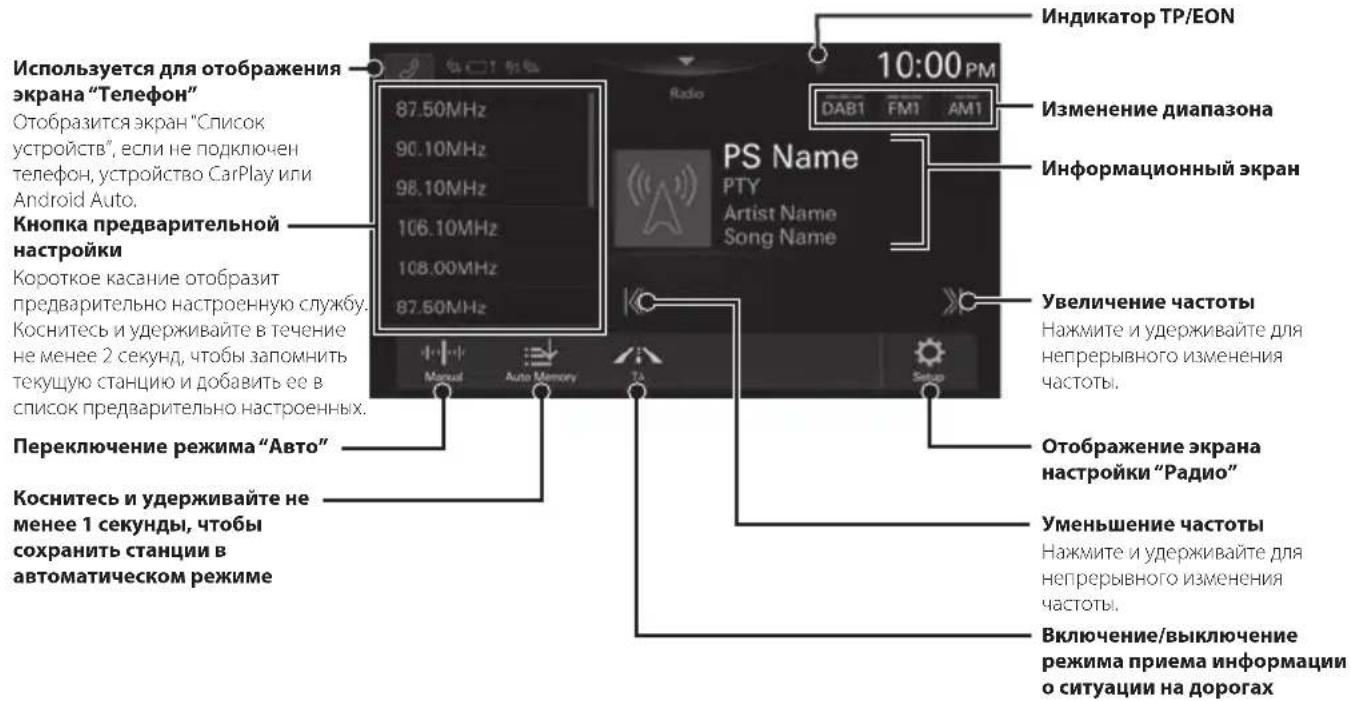
Bheunu bud hekomopbix 3neMeHmOB, ucnno3yEmbx b "KpamkOM cnpaobouHom pykoobodcmbe", moKem omuaumabcbom peaibhix 3neMeHmOB Ha ekpaHe.
PykoBocBO noIb3ObaTeNA DAB/DAB+/DMB
Pa6ota c DAB/DAB+/DMB
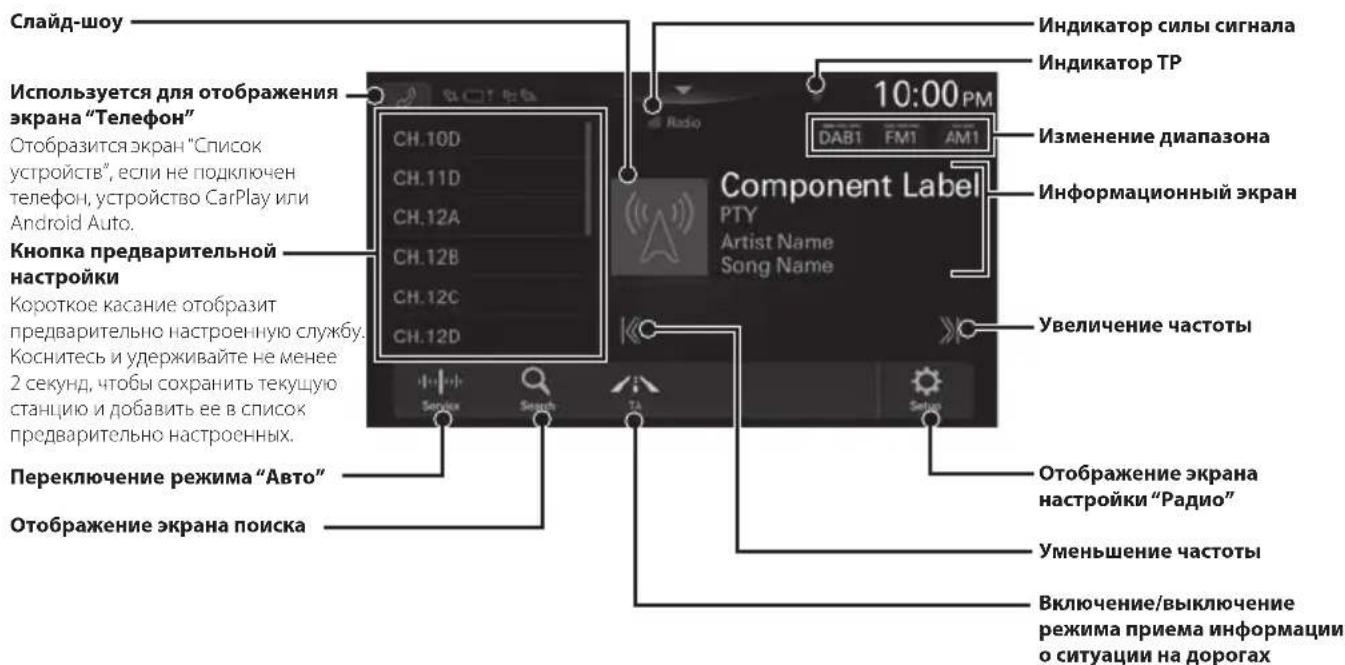
BHeunu Bud hekomopbix 3eMeHm06, ucnol3yEmbx 6 "KpamkOM cnpaobouHom pykoobodme", moKem omuiuamboc om peabhix 3eMeHm06 Ha 3Kpahe.
Pa6oTa c Φπeш-нakоNTeTeM USB (onця)
Moxho Bocnpon3Bovntb aynoofoaIbI (MP3/WMA/AAC/FLAC/WAV/APE) n BndeofoaIbI (MP4/MOV/FLV/MKV), 3aHcHbIe Ha fneu-HakOnTeNe USB, Ha BCTpoEHOM Pneepe daHHOcNCTeMbI.
1 KocHTecb [ ] (3aBepwnTb Bbl3OB).
BbIc0B 6yDeT 3aBepweH.
yctaHOBka
PnmuMeaHne no yCTaHOBKe
- YCTaHaBnBaIte NOy yrnom OTO 0o 30o no ropu3OHTaII. IMeIe B BVdy, UTo yCTaHObKa nOy rIOM, BbIXoJMaM 3a IpeJeIy yKa3aHHOrO dnaH3OHa, yXyDJaET KcNpyaTuOHHe xapaKTePrcNTIK N MoKeT PpIBecT N IOBpeKdEHIIO.
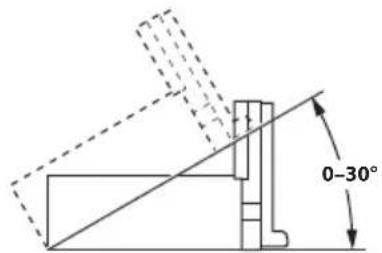
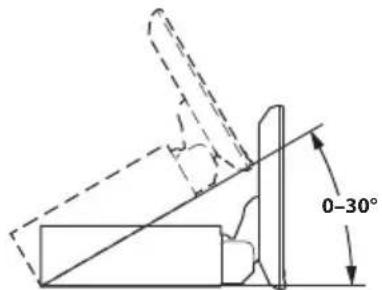
He 6nokpyte TnnooBOD yctpoNCTBa, TaK KaK 3TO MOKeT 3aTpynHtB CnPKyIauuIO BO3dyxa. PnI 6nokpOBke TeNo 6ydt HaKaanNBaTbCBAHytpn YcTPOCTBa, YTO MOKe IpnBeCTN K BO3rOpahuio.
3aHnaactb yctpoctBa
-Пи установке SFOKа ДИСПЕЯ И OCHOВHOrO SFOKa He kacayTeCb pa3bEMOB pykamn (TOnIbKO dЯ iLX-F905D/iLX-F115D).
YcTaHOBKa MmKpOfoHa
IЯ obecneueHn 6e3oNaCHOCTn y6eNTecb B cnedyuouem:
-MecTO DnA yCTaHOBKn YCTOuHBOe IN npouHoe;
-yCTaHOBka He CO3daCT NOMex IJn O63opa BOINTeN I BBINOJIHeHnI DeICTBnI;
MnKpOoH paCnONoxKe H MeCTe, rDe XOpounn npneM rOnoca BODNTeJIa.
Korda roBopnte B mKpOphi, He cIeNyET MeHATb CBOe 0bIyHoe nOToxKeHne TeLa, pInHrTOe InR BOxJeHn ABTomo6nla. TaKne DeIcTBn OTBLeKaOT BHMaHne IN MOrTy NOMEwAte 6e3OnaChOMy DmNKeHHIO ABTomo6nla. Korda yCTaHaBnBaTe MkPooH, TuaTeNbHO oUeHbAite HnPaBNeHne n pacCToHnE. Y6eHTecb, yTO B BBbpaHHom MecTe rONOC BoNTeJXopoIo npINHMaetcra.
MONTAX aHTeHHbI GNSS BHyTpIn aBTOMo6nla
1 Ouchntte MecTo dna MOHTaKa.
2 yctahOBte MOHTaxHyIO nlaCTHy aHTehHbI GNSS.
3 yctahOBute aHTeHHy GNSS.
- He ycmanabnubaume ammenny GNSS bnympu uempapbno naenu.
- Ycmaohobume anhemnHy GNSS ha niockou nobepxnoemu npubopnozo uumka uu 3adneu naenu.
- Y6edumecb, umo anmehna GNSS he 3akpbma (nepekpa) Memaiuueckmu noeepxnoemmu uu oboekmau.
Ecu anmenha GNSS pacnoonkeha pdoom c ycmpoicmbom, npuem cmaohobumc nioxum, u MecononoKeHue bauezo abmomo6n moKem omopakambca hehoadneKaum o6pa3om.
-Pacnoioxumane amenny GNSS na docnamoynopaccmonnu on ycmpoucmba.
-Ca6KumeKa6eB aHmEnHb GNSS ha paccmoanu om 3adneu acmu ycmpoacmba.
OnpedenHbIe munbI mepmoompkaKaoue2o uu mepmono2nouaoue2o cmeKna Moey npenmcmboBamb npoxoJdeHuO blicokouacMomhbx BoHN. Ecnu ycmanobEnHa BHympu abmomobua anmenhbu obecneuBaem HeybepenHb npuem, nonpobyume ycmanohumb aHmehny chapyku abmomobua.
Приимechи OTHOCHTeBJHOCIOJIb3OBAHnA COEINHHTeBJHbIX Ka6eJH HDMI
Pn nCnoB3OBaHnn coeHNHTbHbIX ka6eJeHDMI npKpeNte Ka6eJI K pa3bEmam HDMICnOmoBIO npInaraemoro KpOnuTeHa KpeNneHnA HDMI.
1 3aФИКСИРУТe KPOHHTeH KpeIJIeHnH HDMI BUNTHOM (A).
PerynipoBka noJoxeHna dncnpei (iLX-F905D/iLX-F115D)
B 3aBnCmOCTn OT aBTOMo6nna nepeJHee n 3aJHee noJoxeHne DnCnpeoTnueaETc. JnpeyInpOBKn B nepeJHee n 3aJHee noJoxeHne yCTaHOBnTe NOJ3yHOK B nepeJHee noJoxeHne.
HactpoKa nO yMOnuHaHnU: 3aHee noLoKeHne
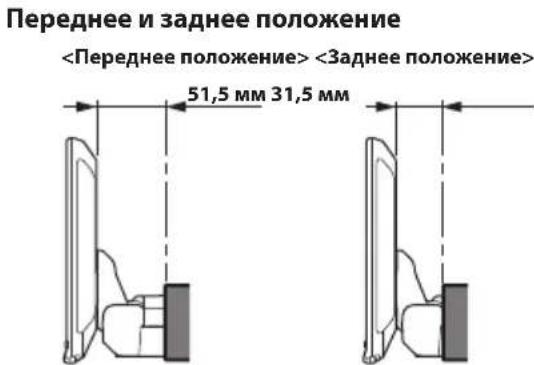
1 CHIMMTE 4 60Ia c wecTnrgpanHNOI roIOBko C o6eHX CTOpOH yCTpoNCTBa.
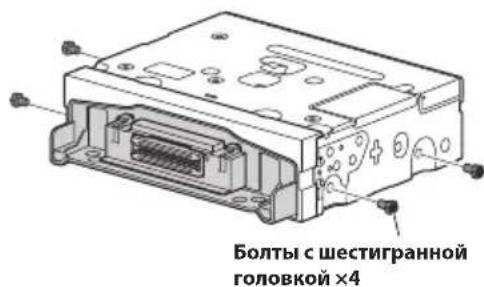
2 Nepemecnte non3yHOK B nepeJHee noloxKeHne. (Uto6bI BepHyTb non3yHOK B 3aJHee noLoxKeHne, HaxMITE Ha Hero).
3 yctaHOBtTe 4 6oNTa c wecTnrgpaHHoI roIOBkoI Ira oHKcaun nOJ3yHka.
YctaHOBka yctpoiCTBa (iLX-705D)
1 PnKpEnIte opuHaJIbHbIM MOHTaXHbIM KPOHsTeIN K yCTpoIcTBy C NOMOuIO npUlaRaEmbIX BNHTOB.
Ecln Het opunHaJIbHO rMOHTaXHOro
KPOHTeJHa, yCTAHOBtte KOMNneKT Double din* (NoCTabJIeTcC 6OKOBbIM MOHTaXHbIM
KPOHTeJHom) nT.D. Ha OCHOBHoi 6nok.
*PnpO6peTaETcR dONONIHHTeJIbHO.
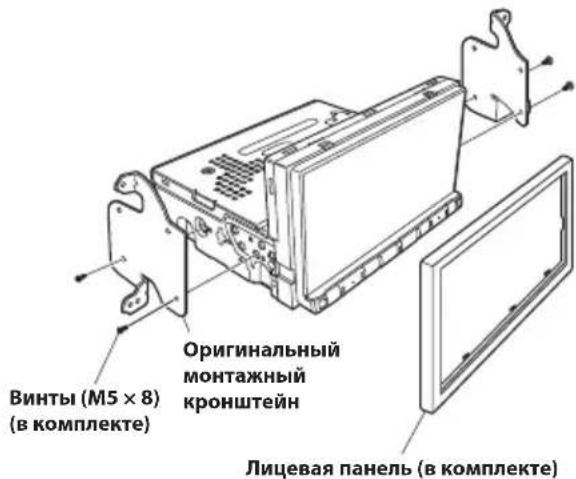
2ПОДКЛIOUHTe BCE BbIBOaBly UcTpoICTBaВ COOTBeTCTBmCOnIcAHnEM,IpeIcTaBJIeHHbIM Bpa3dene"CoedInHeHn"(cTp.18).
3 yctahOBka yctpoiCTBa BaABtOMo6nne.
Akkypamno npukpenume kabenu.Bo u36ekahue nopekehna kabeu npoklaabaume ux bdaun om dbkyuxca yacmei, Hanpumep Hanpaiaouux cudehba, amake ocmpbx uui 3aocmpenhhx kpaee.
YcTaHOBka yCtpoiCTBa (iLX-F905D/ iLX-F115D)
1 PnKpeNte opnHaNbHbIMoHTaXHbIKPOHsTeH K OCHOBHOMy yCTpOiCTBy C NOMOsbIO npnlaRaembIX BnHTOB.
- Ecln Het opunnaHbHO MOHTaXHOro KPOHtTeHa, yCTaHOBte KOMnIeKd Double din* (NoCTaBnETC C 6OKOBbIM MOHTaXHbIM KPOHtEnHom) n T.D. Ha OCHOBHON6IOK.
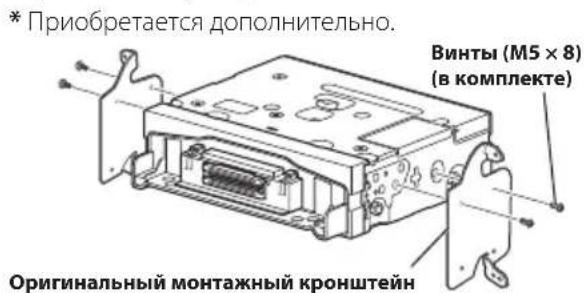
2 IopKIOUHTe BCE BbIBOdbIOCHOBHOrO yCTpoIcTBaB COOTBeTCTBUN C ONncaHHeM, npedCTaBnEHHbIM B pa3dene "CoeHNHeHn" (ctp. 18).
3 yctahOBute yCTpoiCTBO aBTOMo6nne.
Akkypamno npukpenume ka6enu.Bo u36ekaHue nopekehna kabeel npukpenume ux 6dau om dbkyuxca yacmei, Hanpumep HanpaBnouux cudehba, a mkaKe ocmpbux uuu 3aocmpenhhx kpaeb.
OtperynpyteBepTnkaJbHoe noIooKeHne 6Ioka dncnpe (iLxF905D/iLX-F115D)
OtperynpyteBepTKaJIbHoeNONOKeHneDucnner B COOTBeTCTBUNCNOJKeHEmKpePHeHna ABTOMO6nIe nepeyctAHOBKO6nOKaDcNner. HAcToPouKaNoymOnuHaHIO:0MM
1 13BnKeNTe 4 BnHTa Ha 3aHHe nHaHnI duCnpe, 3aTeM OTperynpyte BeptkaJIbHOe noLoXKeHne.
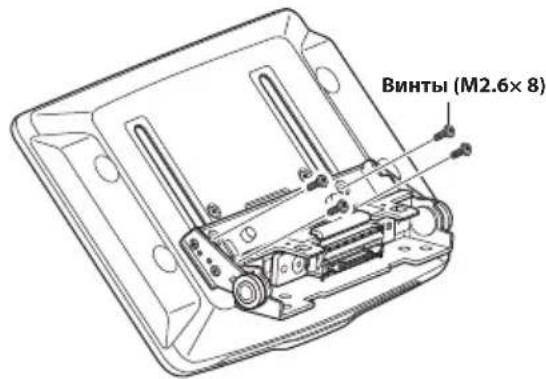
2 Пикpenite 3aHIOU qactb naHenn B TaKOM NOLOXeHm, KOTOpoe COBnaJaTe C BepxHm m HIXHM NIOLOXeHnem 6Noka dncnpe.
(Ecnn nctouHnK nTaHnA ACC HeoctyneH)
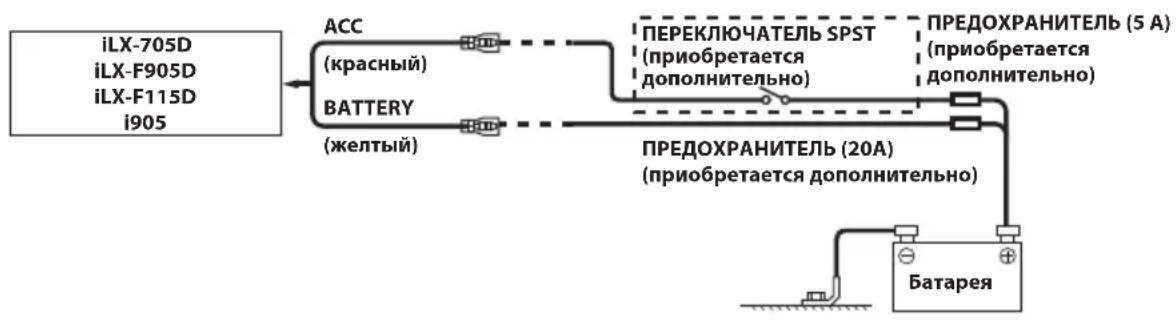
- Eclu b abmomohe he ycmanohien ucmouhuk numanua ACC, ycmanohume npuoobpemaembie dononhumenho nepekliouamelb SPST (Single-Pole, Single-Throw) u npedoxpanumelb.
- Iokaahhhe bhuie cxema nodknoeueu u cuna moka npedoxpanen npumehomc 6 cnuyae uhdubdyaibho zuonb3oaba ycmpoucmba.
- Ecπu nepeκλioaembu bbyod numahue (3aKuzaHue) ycmpoicmba HanpMyu nodKIOUeH K noIooKumelbHomy (+) nonocy abmomoobunbno aKKymamopa, nompe6nem heobbuou mok (neckoBko comeH muIuaamnp) dahe npu bkyloeuHuu nepeKluoamela numau, u aKKymamop moKem pa3prdumbc.
CoeHHHeHn
CoeMHHeHne 1
1 Bxodno pa3bemHDMI
2 BbIXoHoi pa3beM HDMI
3 Pa3bem KAMEPA
4 Pa3bem aHTeHHbl GNSS IopKIOUHTe aHTeHHy GNSS (npunaraetc).
5 Bxodno pa3bem AUX
BxoД aydnoocnHaA AUX.
6 Pa3bem nCTO4HMKa mTaHm
⑦ Pa3bEM PRE OUT
Pa3bEM REM
Pa3bem aHTeHHbI DAB
KaHTeHHe DAB (npno6peTaetcJOnoHnTeNbHo).
10 Pa3bem aHTeHHbI"PaHNO"
11 AnteHbI aanTepe ISO/JASO (npno6peTaetcdoonHHTebHO)
B 3abucnmoctno ATBtOMo6nna MoKeT notpe6oBaTbca aHTeHHb aanTepe ISO/JASO.
12 BxoHoi pa3bem MIC
K MInkpofoHy (B KOMnIeKeTe)
13 INHTepfeiChbI COeHHntelB Ia IIOKJIIOueHnur WtathbIX KHOJOK YHa pyne
K INTEpecy K HONOK YHa pyne.
IINyHnI DOIOHNITeBHO IHOpMaun C
BO3MOXHOCTx NODKNIOUeHnO6paaTeEc b K
CBOEmy 6bnKaWemy DInepy Alpine.
14 BbIOd HDMI-REM-OUT (kopnueBbI)
IoiKJIIOUHTe 3OT BbIOJ KO BXOy DnCTaHcUNOHOro ynpabNeHnH HDMI ceneKTopa.
15 BbIOA AUX-REM-OUT (cepbi)
IopKIOUHTe 3OT BbIOJ KO BXOy DnCTaHcUNOHOr ynpabneHn yCtpoiCTBa AUX.
16 Pa3bembl RCA ca6byepepa
KPACHblI - npna npaboro, BENblI - nna neboro.
17 BbIXoHbIe pa3beMbI RCA φpoHTaJIbHbIX dHaMnKOB
Moryt nCnoB3ObaTbC B KauEcTBe BbIXoHbIX pa3bEmOB RCA pOHTaIbHbIX DnHaMnKOB. KPACHblI -nn npaboro, EJIbl -nn neBoro.
18 BbIXoHbIe pa3beMbI RCA TbInOBbIX dHaMnKOB
Moryt nCnoB3oBaTbC8 B KauEcTBe 3aDnHx BByxoHbix pa3bemOB RCA. KPACHbl - npaboro, EJIbl - nna IeBOrO.
ISO-pa3bem(BbIXoHa dHAmuKn)
20 BbIBoHaIeBbI TbIOBOIuHaMnK(+) (3eJIeHbI)
21 BbIOd Ha IeBbI TbIOBOI dHAMK (-) (3eHbI/YePbI)
22 BbIOHaJIeBbIΦpoHTaJIbHbIIMINHAMK(+) (6eJIbI)
23 BbIBoHaJIeBbIΦpoHTaJIbHbIДnHaMnK(-) (6eJIy/uePbI)
24 BbIOd Ha npaBbI φpoHTaIbHbI dINHaMnK (-) (cepbi/uepHbI)
25 BbIOd Ha npabBn FOPOHTaIbHbI dNHaMnK (+) (cepbl)
26 BbIOHa npaBbI TbIOBOI dHAMK (-) (fnoTeobIy/epHbI)
27 BbIBoHa npaBbI TbIOBOu DNHAMK (+) (fnoJeTObbI)
28 BbIBoD dNCTaHcIOHHORO BKIOUeHnA (CNH/ 6enbl)
IIOKJIIOHTe 3OTBbIBOD K BXOy ydaJIeHHORO BKIOUeHnYcNlNTeJI NII IPOUeCCopa CnHaNoB.
29 BbIOd nla KaMepbI 3aHrero BuJa (opaHKeBbI/ 6ebl)
30 BbIOa napKOBOuHbI TOPMo3a (XeNTbI/CnHn)
IopknouHTe 3OT BbBOK pa3bemy nHTaHnnepeKnOuaTeTn napKOBOUHOrTOpMO3a Inna nepeaCnHaIOB COCToRHNn napKOBOUHOrTOpMO3aycTroNCTBy.
ISO-pa3bem MCTOCHNKA NITAHNA
32 BbIOJ npepbIbaTeJI NITaHn (3axirahne) (Kpachbi)
IIOKNIUHTe 3OT BbIOJ K OTKpbIToN KJIeMMe 6NoKa
PnabKnx PpeOxpaHntEn e ABTOMOBnIaNN K
dpyROMy CBO6oHOMy NCTOCHNYPiTaHn,
0ecneuBAIOSeMy 3aKnraHne c HappKeHem 12 B
(+)TOJIbKO Ipiu BkIIOUeHHOM 3aXKINHIN ININB DONOIHNTEJIbHOM NIOJIOXeHHN.
33 BbIbOd 3a3eMneHn (epHyb)
TuatelbHO 3aemnte 3OT BbBOH Ha Maccy.
Y6eNTecB TOM,TO COeINHeHne BbINONHeHO Ha
OroneHHo METaJIInueCKO NOBepxHOCTN HAdekHO
3aFNCPOBaHO C NOMOsbIO PpeOCTABNEHHORO BnHTa
JINCTOBORo MetaIIa.
34 BbIBoD nHTaHn aHTeHHbI (cHm)
TIOKJIQUHTE3OT BbBOJ K KJIEMME+BNITAHNAHTEHBI (ecnnpimHeHMO).
3TOT BbBOD CJIeNyET HcNOb3OBaTb TOnbKO Dnny npabneHn Ntahm eAHTHe. He nCnONb3yntE 3TOT BbBOD DnB KNIouHEny YcUNITeNnn npoecccopa CnHaNoB N T.D.
35 BbIO6aTapeu (XeNTbI)
IOnKIOUHTeTOT BBIBOD K NIOJOKNTeJIbHOMy (+) IONIOCY 6aTapeu aBTOMO6NJIA.
36 NaTPOH nIaBkOro npedoxpaHnteY (15A)
USB-pa3bem (2,4 A)
K Φηω-наκοιτηю USB, iPhone ил смарфόну Android.
USB-pa3bem(1,5A)
K cmapfohy iPhone nn Android (Tolbo kna 3apn).
Bxodnoi pa3bem kamepbI 3AIDHEO BnDA
IcnoIb3yETc npn noKlOueHn KaMepb 3aHero Bnda.
BxOaHOn pa3bem IEPEDHe KAMEPbI
IcnoBbyeTc npn noKnIOueHnn npeDHe nn 6okoBo kamepb.
41 Pa3bem Connect2 (UART)
K 6nokyu nHTeppeieca.
42 Pa3beM LIN
PoiKJIIOUHTe 3OT BBIOI K pa3bemy LIN Dash Cam.
BxOHN pa3bem BnDeopenctpaTopa
Bxod nla BndeocurHana Dash Cam.
44 PpOBoD daTUnKa ckOpocTu (3eNeHb/6eNb)
HeBepHoe noKJIuOeHne JINn HmnybCa ckopoCTn MOKeT npVBecTN K BbIXOy n3 CTPOA cepBe3HbIX φ YHKnI 6e3oNaChocHTu yCTpOiCTBa (HaNPIMep, TOpMO3a nn NODUkN 6e3oNaChocT).Takne HeNCnPabHOCTn MOrT npVBecTN K HeCuaCTHomy CnyauIO n CmeptelbHOMy NCxOy. HAcToTeNbHO peKOMeHNyETcB bInONHtB yCTaHOBky KBaIIOnuPobAHbIM, ABTOp3OBaHHbIM dInepom Alpine.
TexHnueckneXapaKTepeNtIKN
MOHUTOP
Pazmep ekpana 7ДIOIMOB (iLX-705D)
9ДIOIМOB(iLX-F905D)
11HIOHMOB (ILX-F115D)
9IOUMOB(1905)
OnepaONHHaCnCTeMaakTNBHaMaTpuaTFT
KoJIeNcTeBOIeMeHToBIO36oBaKeHH 2764800nnKcenei
(1280× 720× RGB)
ФakTnueckoe KOLINueCTBO 3IeMeHToB N3O6paKeHHe HMeHee 99%
CnCTeMaLBeTOBocnpOn3BedeHnNTSC/PAL
CnCTema nOaCBETKuLED
FM-TIOHEP
U36npatelbHOCTb aJIbTePHaTINBHorO KaHala
80d
OTHoWeHne cHnAn/7yM 65 db
IpeexoHoe 3atyhaHm EeKdy CTpeokahama
35 6
AM-TIOHEP
MaKcImaJIbHaI NITpe6JIHeMaH MOUHOCTb
BbIXOHHaMOHOCtB+4,0Dm/2,51MBTcpeH.
(KJIACCMOUHOCTN2)
PpOΦnB
HFP (npoΦnib raphNtpybl)
KaHaJIbI 1-13 KaHaJIIOB (2,4Tt)
PpoeDpybI 06ecneueHn8be3oNaChocn
WPA3/WPA2-PSK (TKIP,AES)
OBUHNE
NotpeBmM MoHOCb 14,4 B NoCToHHOro HanpJKeHH
BbIXOHaMoUHOCt50BTX4
Makc. notpebneHne 3eKtpo3Heprn 15 A
YpOBeHb BixoHOrO aynocnHaHa
PepBaPntBbHb BbIXoI (pepeHne,3aHne):
4 B/10 KOM (MaKc.)
PepaBapuTeBbHbN BbXoD (ca6Byepe):
4B/10 kOM (MaKc.)
Bec
1,4 Kr (iLX-705D)
2,3 Kr (ILX-F905D)
2,6 Kr (ILX-F115D)
PA3MEP KOPNYCA
| iLX-705D | iLX-F905D | iLX-F115D | i905 | |
| ШирINA | 178 MM | 178 MM | 178 MM | 178 MM |
| Высota | 50 MM | 50 MM | 50 MM | 50 MM |
| Глбиа | 149,6 MM | 149,6 MM | 149,6 MM | 142 MM |
PA3MEP DUCNIEA
| iLX-705D | iLX-F905D | iLX-F115D | i905 | |
| ШирINA | 171 MM | 232,5 MM | 268,9 MM | 214,7 MM |
| Высota | 96 MM | 151,1 MM | 178 MM | 136,6 MM |
| Глобиа | 17,7 MM | 54,7 MM | 54,7 MM | 29,9 MM |
Cpok cnjkb-3 rOa.
- I3-3a HenpepbuBHO2O coBepueHcMbObaHua npodykma e2o mexHuueckue xapakmepucmuu u du3auh Mozym u3MeHmbc6e3 npedabapumebHO2O yBedomlenu.
PianeLCD u30omOBHeHa no c6epxmoHou mexHOeuu. KOnuecmBo 99,99%. 3mo 03Nauaem, ymo cyuecmByem bepoMnocb 0,01% hauu nuKcenei, komopbue bceda bKnOueHb uu bceda bblnueHb.
- Windows Media n norotun Windows ABnIOTcTobapHbIMn 3HaKaMn nnn 3apeNCTpnpoBaHHbIMn TobapHbIMn 3HaKaMn Microsoft Corporation B CLJAm/nn dpynx cTpaHax.
- Apple, iPhone, iPod, Lightning and Siri Hebrew TOBAPHBIMN 3HaKaAMN KOpNopauu N Apple Inc., 3apeHnCTpnpoBaHHbIMN B CIIJA and pyrnx cTpaHax. Apple CarPlay RBLIeTcN TOBAPHBIM 3HaKOM KOpNopauu N Apple Inc.
- O6o3HaueHn Made for Apple n Works with Apple (CobmecTnMoCTb C Apple) 03Haayot, yTo daHHoe 3JIeKTPOHHe yCTPOIcTBO 6blIO pa3pa6OtaHO cNeuJIbHO dIy IIOKJIIOUeHn K npOdyKTam Apple, yKa3aHHbIM B 6o3HaueHn Made for Apple, n cNeuJIbHO dIy pa6Otbl IO TexHOJOrn, yKa3aHHoB B 6o3HaueHn Works with Apple, a TaKke 6blIO ceTnΦnIupOBaHO pa3pa6OtuNKOM Ha COOTBeTCTBne pa6OuNX xapaKTEpNCTNK CTaHdApTy Apple. Kopnpaunr Apple He HeceT OTBeTCTBeHHOCTN 3a pa6Oty 3TORO yCTPOIcTBa N 3a eRO COOTBeTCTBne CTaHdApTaM TexHKn 6e3OnaCHOCTN HOpMaTINHBIM aKTAm. O6paNTte BHNMaHne Ha To, YTO INcNoIb3OBaHne daHHoro yCTPOIcTBa C yCTPOIcTBom Apple moKet NOBInraTb Ha pa6Otu BeCnpoBOJHO CETn.
- Hanuhe IoroTnna Apple CarPlay 03Hauaet, yTo nIb3OBaTeIbckn INTEpfeC B aBTOMoBnIe OTBeaet EKcNlyataUHOHHbIM CTaHapTaM Apple. Kopnpaunr Apple He HecET OTBeTCTBeHHocTn 3a pa6Oy 3TO rO abTOMoBnIa N 3a eRO COOTBeTCTBne CTaHapTaM TexHnKn 6e3OpacHOCTn N HopMaTINBbIM aKTam. ImeHTe B BVNy, YTO NCNoJIb3OBaHHe daHHOrO yCTpoiCTBa C iPhone MoXeT NOBnIaTb Ha pa6Oty 6ecnpoBOJHO CB83N.
Google,Android,Google Play n Android Auto raBnaIOTc TOBaPbIMN 3HaKaAMn Google LLC. UTo6bI NCNoJIb3OBAtB Android Auto Ha IucnIee aBTOMo6nJI, Bam noHaIO6ntC TeJefoH Android noJ npabneHHeM Android 6.0 nn6one No3dHeB cepnn, AKTINBnTapnΦHbI nnnpINOxKeHne Android Auto. - TepmnbHbHDMI n HDMI High-Definition Multimedia Interface, a taKxe IorotnHDMI yBnaOTc ToBaHbIMn 3HaKaMn KOMNaHnHDMI Licensing, LLC, 3apeRnCTpnpoBaHHbIMn B CUSA n npynx cTpaHax.
CIOBech3HaK JIOTnbluTooth BnAOTc 3apeHCTpnpoBaHHbIMTOBapHbIMN3HaKaMn Kopnpaoun BluTooth SIG,Inc.nncnoB3yOToCk Kopnpaue ALPS ALPINE CO.,LTD. no niuceH3nn.
-Лorotun Wi-Fi CERTIFIED™явяетсяЗaperистриповаHHbIM TOBapHBIM 3нakOM Wi-FiAlliance®. - LDAC n norotun LDAC ABJIOTcT ToBapHbIMn 3HaKaAMN Sony Corporation.
CénaHO B TañnlaHne
- Пюдукс.TakIM JIOROTINOM COOTBeTCTByeT CTaHdapTy High-Resolution Audio, yctahOBJIeHHomy Japan Audio Society. 3TO T JIOROTIN INCNoB3yETcR NO JInueH3Nn OT Japan Audio Society.
CdenaHOnI iPhone SE (2-ro nokolEnn),iPhone 11 Pro Max,iPhone 11 Pro,iPhone 11,iPhone XS Max,iPhone XS, iPhone XR,iPhone X,iPhone 8 Plus,iPhone 8,iPhone 7 Plus,iPhone 7,iPhone SE,iPhone 6s Plus,iPhone 6s.
OOO «KoMaHnBaBoHaHa3a»
HΦopMaunOceBnCbIX ΒeHTpax
SIMPLIFIED EU DECLARATION OF CONFORMITY
Hereby, ALPS ALPINE EUROPE GmbH (https://www.alpine.de/) declares that the radio equipment type ILX-705D/ iLX-F905D/iLX-F115D/i905 is in compliance with Directive 2014/53/EU.
The full text of the EU declaration of conformity is available at the following internet address: http://www.alpine.com/e/research/doc/
Compliant with UNECE Regulation 10 (E-Mark)

Hereby, ALPS ALPINE EUROPE GmbH (https://www.alpine.co.uk/) declares that the radio equipment type ILX-705D/ iLX-F905D/iLX-F115D/i905 is in compliance with Radio Equipment Regulations 2017.
The full text of the declaration of conformity is available at the following internet address:
http://www.alpine.com/e/research/doc/

| [EN] English | Hereby, ALPS ALPINE EUROPE GmbH declares that the radio equipment type ILX-705D/ iLX-F905D/iLX-F115D/i905 is in compliance with Directive 2014/53/EU. The full text of the EU declaration of conformity is available at the following internet address: http://www.alpine.com/e/research/doc/ |
| [BG] Bulgarian | С настая сто ALPS ALPINE EUROPE GmbH декларира, чу тоши тин радиос воръжени ILX-705D/iLX-F905D/iLX-F115D/i905 в сбotingстVENе сдиректува 2014/53/EC.ЦалостниотTekst на EC декларцята за сбotingстVENе може за симерни на следни.Intерnetадес: http://www.alpine.com/e/research/doc/ |
| [CZ] Czech | Тímto ALPS ALPINE EUROPE GmbH prohlasuje, ze typ radiosvýho zařizení ILX-705D/iLX-F905D/ iLX-F115D/i905 je v souladu se směrnici 2014/53/EU. Üplné zněné EU prohlášeni o shodě je k dispozici na títo internetové adrese: http://www.alpine.com/e/research/doc/ |
| [DA] Danish | Hermed erklærer ALPS ALPINE EUROPE GmbH, at radioudstyrstypen ILX-705D/iLX-F905D/ iLX-F115D/i905 er i overensstemmelse med direktiv 2014/53/EU. EU-overensstemmelseserklaeringens fulde tekst kan findes på følgende internetadresse: http://www.alpine.com/e/research/doc/ |
| [DE] German | Hiermit erklärt ALPS ALPINE EUROPE GmbH, dass der Funkanlagentyp ILX-705D/iLX-F905D/ iLX-F115D/i905 der Richtlinie 2014/53/EU entspricht. Der vollständige Text der EU-Konformitätserkläragung ist unter der folgenden Internetadresse verfügbar: http://www.alpine.com/e/research/doc/ |
| [EL] Greek | Мέ την παρούσα o/η ALPS ALPINE EUROPE GmbH, δηλώνει ὄτι o ραδίοεξοπλισμός ILX-705D/ iLX-F905D/iLX-F115D/i905 πληροί την σθηγία 2014/53/EE. To πλήρες κείμενο της δηλωσός συμόρφωσός EE διατίθεται στην ακόλουθηιο τοελίδα στο διαδίκτού: http://www.alpine.com/e/research/doc/ |
| [ES] Spanish | Por la presente, ALPS ALPINE EUROPE GmbH declara que el tipo de equipoaradioelectrico ILX-705D/iLX-F905D/iLX-F115D/i905 es conforme con la Directiva 2014/53/UE. El texto completo de la declaración UE de conformidad está disponible en la direction Internet seguidente: http://www.alpine.com/e/research/doc/ |
| [ET] Estonian | Käesolevaga deklareerib ALPS ALPINE EUROPE GmbH et kääseslev raadioseadme tüpp ILX-705D/iLX-F905D/iLX-F115D/i905 vastab direktiivi 2014/53/EL nõuetele. ELi vastavusdeklaratsiooni täielik tekst on kättesaadav järgmisel internetiaadressil: http://www.alpine.com/e/research/doc/ |
| [FI] Finnish | ALPS ALPINE EUROPE GmbH vakuuttaa,että radiolaitetyppi ILX-705D/ILX-F905D/ILX-F115D/ i905 on direktiivin 2014/53/EU mukainen. EU-vaatimustenmukaisuusvakuutuksen tãysimittainen teksti on saatavilla seuraavassa internetsoitteessa: http://www.alpine.com/e/research/doc/ |
| [FR] French | Le soussigné, ALPS ALPINE EUROPE GmbH,declare que l'équipmentment radioé lectrique du type ILX-705D/ILX-F905D/ILX-F115D/ i905 est conforme à la directive 2014/53/UE. Le texte complèt de la déclaration UE de conformité est disponible à l'adresse internet suivante: http://www.alpine.com/e/research/doc/ |
| [HR] Croatian | ALPS ALPINE EUROPE GmbH ovime izjavljube da je radijska oprema tipa ILX-705D/ILX-F905D/ILX-F115D/ i905 u skladu s Direktivom 2014/53/EU. Cjeloviti tekst EU izjave o sukladnosti dostupan je na sljedećoj internetskoj adresi: http://www.alpine.com/e/research/doc/ |
| [HU] Hungarian | ALPS ALPINE EUROPE GmbH igazolja, hogy a ILX-705D/ILX-F905D/ILX-F115D/ i905 típusú rádióberendeze s megfelel a 2014/53/EU irányelvnek. Az EU-megfela-lo ségi nyilatkozat teljes szövege elérhető a kõvetkező internetes címen: http://www.alpine.com/e/research/doc/ |
| [IIS] Icelandic | Hér, ALPS ALPINE EUROPE GmbH lýsjir yfir að radióbúnaður tegund ILX-705D/ILX-F905D/ ILX-F115D/ i905 erí samræmi við tilskipun 2014/53/ESB. The fullur texti af ESB-samræmisfyfirlísing erí boði á eftirfarandi veffangi: http://www.alpine.com/e/research/doc/ |
| [IT] Italian | Il fabbricante, ALPS ALPINE EUROPE GmbH, dichiara che il tipo di apparecchiatura radio ILX-705D/ILX-F905D/ILX-F115D/ i905 è conforme alla direttiva 2014/53/UE. Il testo completo della dichiarazione di conformità UE è disponibile al segunte indirizzo Internet: http://www.alpine.com/e/research/doc/ |
| [LT] Lithuanian | Aš, ALPS ALPINE EUROPE GmbH, patvirtinu, kad radijo jrenginiu tipas ILX-705D/ILX-F905D/ ILX-F115D/ i905 atitinka Direktvyá 2014/53/ES. Visas ES atitikties declaraciños tekstas prieinamas šiuo interneto adresu: http://www.alpine.com/e/research/doc/ |
| [LV] Latvian | Ar šo ALPS ALPINE EUROPE GmbH deklare, ka radioiekárta ILX-705D/ILX-F905D/ILX-F115D/ i905 atbilst Direktivai 2014/53/ES. Pilns ES atbilstibas declaracijas teksts ir pieejams šādā interneta vietné: http://www.alpine.com/e/research/doc/ |
| [MT] Maltese | B'dan, ALPS ALPINE EUROPE GmbH, niddikjara li dan it-tip ta'taghmir tar-radju ILX-705D/ILX-F905D/ILX-F115D/ i905 huwa konformi mad-Direttiva 2014/53/UE. It-test kollu tad-dikjarazzjoni ta' konformità tal-UE huwa disponibbli f'dan l-indirizz tal-Internet li gej: http://www.alpine.com/e/research/doc/ |
| [NL] Dutch | Hierbij verklaar ik, ALPS ALPINE EUROPE GmbH, dat het type radioapparatuur ILX-705D/ILX-F905D/ILX-F115D/ i905 conform is met Richtlijn 2014/53/EU. De volledige tekst van de EU-conformiteitsverklaring kan worden geraadpleedg op het volgende internetadres: http://www.alpine.com/e/research/doc/ |
| [NO] Norwegian | Herved ALPS ALPINE EUROPE GmbH erklærer at radioutstyr type ILX-705D/ILX-F905D/ ILX-F115D/ i905 erì samsvar med direktiv 2014/53/EU. Den fullstendige teksten i EU-erklæring er tilgengelig på følgende internetadresse: http://www.alpine.com/e/research/doc/ |
| [PL] Polish | ALPS ALPINE EUROPE GmbH ninejsym oświadcza, ze typ uzȩdzenia radiowego ILX-705D/ILX-F905D/ILX-F115D/ i905 jest zgodny z dyrektywą 2014/53/UE. Pelny tekst deklaraju zgodnosci UE jest dostępty pod następućzym adresem internetówym: http://www.alpine.com/e/research/doc/ |
| [PT] Portuguese | O(a) abaixo assinado(a) ALPS ALPINE EUROPE GmbH declares que o presente tipo de equipamento de rácio ILX-705D/iLX-F905D/iLX-F115D/i905 está em conformidade com a Diretiva 2014/53/UE. O texto integral da declaração de conformidade está disponível no segunte endereço de Internet: http://www.alpine.com/e/research/doc/ |
| [RO] Romanian | Prin prezenta, ALPS ALPINE EUROPE GmbH declaresça típul de echipamente radio ILX-705D/ iLX-F905D/iLX-F115D/i905 este în conformitate cu Diretiva 2014/53/UE. Textul integral al declarações UE de conformitate este disponible na următoarea adresă internet: http://www.alpine.com/e/research/doc/ |
| [SK] Slovak | ALPS ALPINE EUROPE GmbH támto vyhlasuje,Že rádiové zariadenie typu ILX-705D/iLX-F905D/ iLX-F115D/i905 je v súlade so smernicou 2014/53/EÜ. Üplné EU vyhlásenie o zhode je k disposizćii na tejto internetovej adrese: http://www.alpine.com/e/research/doc/ |
| [SL] Slovenian | ALPS ALPINE EUROPE GmbH potrjuje,da je tip radijske opreme ILX-705D/iLX-F905D/ iLX-F115D/i905 skladen z Direktivo 2014/53/EU. Celotno besedilo izjave EU o skladnosti je na voljo na naslednjem spljetnem naslovu: http://www.alpine.com/e/research/doc/ |
| [SV] Swedish | Härmed fösakrar ALPS ALPINE EUROPE GmbH attenna typ av radioutrustning ILX-705D/ iLX-F905D/iLX-F115D/i905 overensstämmer med direktiv 2014/53/EU. Den fullständiga texten till EU-fösakran om overensstammelse finns på följande webbadress: http://www.alpine.com/e/research/doc/ |
| [TR] Turkey | Işbu beyanla, ALPS ALPINE EUROPE GmbH radyo ekipmani tipinin ILX-705D/iLX-F905D/ iLX-F115D/i905, Directive 2014/53/EU yönergesine uyduğunu ilan eder. EU uyumluk ilanının tam metnine (Declaration of Conformity) aşağidaki internet adresinden ulaşilabilelir. http://www.alpine.com/e/research/doc/ |
ENGLISH
Information on Disposal of Old Electrical and Electronic Equipment and Battery (applicable for countries that have adopted spearate waste collection systems) If you want to dispose this product, do not mix it with general household waste. There is a separate collection system for used electronic products in accordance with legislation that requires proper treatment, recovery and recycling. Contact your local authority for details in locating a recycle facility nearest to you. Proper recycling and waste disposal will help conserve resources whilst preventing detrimental effects on our health and the environment.
DEUTSCH
Auburn Hills, Michigan 48326, U.S.A.
Phone 1-800-ALPINE-1 (1-800-257-4631)
ALPINE ELECTRONICS OF AUSTRALIA PTY. LIMITED
161-165 Princes Highway,
Hallam Victoria 3803, Australia
Phone 03-8787-1200
ALPS ALPINE EUROPE GmbH
Ohmstrasse 4, 85716 Unterschleissheim, Germany
Phone: +49 (0) 89-32 42 640
For contact information on your respective country,
please visit www.alpine-europe.com.
ALPS ALPINE EUROPE GmbH
Aurora House, Deltic Avenue
Rooksley, Milton Keynes, MK13 8LW
United Kingdom
Phone: 0345-313-1640
The 9th Towers, Tower B, 24th Floor, Unit TNB01-03, 7/4 Rama 9 road, Huay Kwang, Bangkok, 10310, Thailand Phone +66 (2) 090 9596

- CONTENTS
- IMPORTANT
- WARNING
- INSTALL THE PRODUCT CORRECTLY SO THAT THE DRIVER CANNOT WATCH TV/VIDEO UNLESS THE VEHICLE IS STOPPED AND THE PARKING BRAKE IS APPLIED
- DO NOT WATCH VIDEO WHILE DRIVING
- DO NOT OPERATE ANY FUNCTION THAT TAKES YOUR ATTENTION AWAY FROM SAFELY DRIVING YOUR VEHICLE
- KEEP THE VOLUME AT A LEVEL WHERE YOU CAN STILL HEAR OUTSIDE NOISES WHILE DRIVING
- MINIMIZE DISPLAY VIEWING WHILE DRIVING
- DO NOT DISASSEMBLE OR ALTER
- USE ONLY IN CARS WITH A 12 VOLT NEGATIVE GROUND
- KEEP SMALL OBJECTS SUCH AS SCREWS OUT OF THE REACH OF CHILDREN
- USE THE CORRECT AMPERE RATING WHEN REPLACING FUSES
- DO NOT BLOCK VENTS OR RADIATOR PANELS
- USE THIS PRODUCT FOR MOBILE 12V APPLICATIONS
- MAKE THE CORRECT CONNECTIONS
- BEFORE WIRING, DISCONNECT THE CABLE FROM THE NEGATIVE BATTERY TERMINAL
- DO NOT ALLOW CABLES TO BECOME ENTANGLED IN SURROUNDING OBJECTS
- DO NOT SPLICE INTO ELECTRICAL CABLES
- DO NOT DAMAGE PIPE OR WIRING WHEN DRILLING HOLES
- DO NOT USE BOLTS OR NUTS IN THE BRAKE OR STEERING SYSTEMS TO MAKE GROUND CONNECTIONS
- DO NOT INSTALL IN LOCATIONS WHICH MIGHT HINDER VEHICLE OPERATION, SUCH AS THE STEERING WHEEL OR SHIFT LEVER
- CAUTION
- HALT USE IMMEDIATELY IF A PROBLEM APPEARS
- HAVETHE WIRING AND INSTALLATIONDONE BY EXPERTS
- USE SPECIFIED ACCESSORY PARTS AND INSTALL THEM SECURELY
- ARRANGE THE WIRING SO IT IS NOT CRIMPED OR PINCHED BY A SHARP METAL EDGE
- DO NOT INSTALL IN LOCATIONS WITH HIGH MOISTURE OR DUST
- GETTING STARTED
- CONTROLS POSITION
- ① DIMMER SENSOR
- ② BUTTON
- 3 -/DOWN/UP) BUTTON
- (MUTE) BUTTON
- ⑤ (AUDIO) BUTTON
- 6 POWER INDICATOR
- ⑦ (HOME) BUTTON
- CAM) BUTTON
- 9 /BUKTON
- 10 (MAP) BUTTON
- REMOTE SENSOR
- TURNING POWER ON OR OFF
- 1 TURN THE IGNITION KEY TO THE ACC OR ON POSITION
- CAUTION (ILX-F905D/ILX-F115D ONLY)
- 1 PRESS THE (HOME) BUTTON
- 2 TOUCH [SETUP]
- 3 TOUCH [SYSTEM]
- 4 TOUCH [HOME SCREEN TYPE]
- 5 TOUCH [NORMAL] OR [ENHANCED TEXT]
- APPLE CARPLAY OPERATION (OPTIONAL)
- ANDROID AUTO™ (OPTIONAL)
- RADIO/RDS OPERATION
- DAB/DAB+/DMB OPERATION
- USB FLASH DRIVE OPERATION (OPTIONAL)
- USB AUDIO MAIN SCREEN EXAMPLE
- SEARCHING FOR A MUSIC FILE
- 3 TOUCH THE DESIRED ARTIST'S NAME
- IPOD MODE ON IPHONE (OPTIONAL)
- HANDS-FREE PHONE CONTROL
- HOW TO CONNECT TO A BLUETOOTH COMPATIBLE DEVICE (PAIRING)
- ANSWERING A CALL
- HANGING UP THE TELEPHONE
- INSTALLATION
- NOTE ON INSTALLATION
- MOUNTING THE MICROPHONE
- MOUNTING THE GPS ANTENNA INSIDE THE VEHICLE
- NOTE ON USING HDMI CONNECTION CABLES
- ADJUSTING THE DISPLAY POSITION (ILX-F905D/ILX-F115D)
- INSTALLING THE UNIT (ILX-705D)
- INSTALLING THE UNIT (ILX-F905D/ ILX-F115D)
- ADJUST THE UP-DOWN POSITION OF THE DISPLAY UNIT (ILX-F905D/ILX-F115D)
- INSTALL THE DISPLAY UNIT (ILX-F905D/ ILX-F115D)
- CONNECTIONS
- CONNECTION 2
- SPECIFICATIONS
- MONITOR SECTION
- FM TUNER SECTION
- AM TUNER SECTION
- DAB SECTION
- USB1 SECTION
- USB2 SECTION
- HDMI SECTION
- BLUETOOTH SECTION
- GPS SECTION
- WI-FI SECTION
- GENERAL
- CHASSIS SIZE
- DISPLAY SIZE
- INHALT
- GNSS
- 37 CONECTOR USB (2.4A)
- 38 CONECTOR USB (1.5A)
- 39 CONECTOR DE ENTRADA CÁMARA TRASERA
- 4 CONECTOR CONNECT2 (UART)
- SECCION GPS
- SECCION WI-FI
- ПЕДУПЕЖДEHNE
- YCTAHABJNAITE DAHHBI IPOYKT TAKIM O5PA3OM, YTO6BL BOINTEJIB HE MOI BNIDTE 3KPAH, ECIN ABTOMO6JIB HE OCTAHOBJIEH IN HE 3AEDICTBOBAH CTORHOCHBI TOPMO3
- HE IPOCMATPUBAITE BUNDEO BO BPEM YIIPABJIENH ABTOMOBNJEM
- HE PIPINHMAIHTEHKAKNX DEICTBNI, KOTOPBIE MORTY OTBJIEYB BAC OT BE3ONACHORO BOXKEHNABTOMO6NJ
- IIOIDEPXIBAITE POMKOCTB HA YPOBHE, IIO3BOJIAOUCEM CJIBIAATB BHEUHHE 3BYKN BO BPEM JDNIXEHNA
- KAK MOXHO MEHBIE OTBIEKAITECB HA IPOCMOTP INCIIER BO BPEM BOXDEHNA
- HE PA36MPATB IN HE N3MEHRTB
- NCHIOJIB3OBATB TOJIBKO B ABTOMO6NJX C NITAHNEM BOPTOBOI CETN +12 BOJBT IN 3A3EMJIEHNEM OTPUATEJIBHORI POJIIOCA HA KY3OB ABTOMO6NJIA
- XPAHNTE HEBOLIBIE OBEKTBL, TAKNE KAK BATAPEU, B HEIOCTYINHBIX DJIARETEN MECTAX
- PNI 3AMEHE PNEOXPAHNTEJI NCIOLB3YIE TOJIBKO AHAIOTNHBIE IIO HOMNHAJY
- HE 3AKPBIBAITE BEHTUNLAIOHHBIE OTBEPCTNIAHNEI PAADNATOPA
- NCHOJIB3YIE 3OT TPOJYKT TOJIBKO JAB ABTOMOBJIEI C BOPTOBOJ CETBIO HANPRJXEHNEM 12 B
- BBINOJIHRIE IIPABUNIBHBIE IOKJIIOUCEHNA
- NEPEI NOIKLIQUEHNEM IPOBOIOB OTOEINHHTE KABELB OT OTPNUATEJIB HTOILOCA BATAPEI
- HE DONYCKAITE CNIETEHNA KABENEI C HAXOJUUMMCR PADOM IPEMETAMN
- HECPAUUBAITE C3JEKTPNUECKMNUKABELAMN
- HE IOBPEIUTE TPY6KN IIN IPOBOIDKY IPN CBEPJIENOTBEPCTNI
- HE NCIIOJIB3YUTE BOJITBI JINI TAIKNU TOPMO3HOJ CNTEMBL IINI CNCTEMBL PYJEBOTO YIPABILEHNJA 3A3EMLEHNR
- HE YCTAHABJIUBAITEYCTPOICTBO B MECTAX,ΓE OHO MOXET MEUATPBAPOTE ABTOMOBJIA,HANPUMEP, PRAOM C PYJEBBIM KOJECOM IIN PBIYAROM PEPEKJIIOUEYHC CKOPOCTEN
- BHIMAHHE
- NPU BO3HNIKHOBEHNI PIOBJIEM HEMEJIENHNO NPEKPATNTE ICNOJIB3OBAHNE IPOJYKTA
- IPOKIAJKA IPOBOIOB N YCTAHOBKA DOJIXHBI BBITB BBINOJIHEHB CIELNAJNCTAMN
- NCIOJIB3YIE TOJIBKO CNEUHAJIN3MPOBAHHBIE YCTAHOBOUHBIE KOMHOHETBI N TTATEJIBHO INX 3AKPENJIATE
- INPABUNBHO INPOJIOXEHHAR INPOBOJKA HE DOLIXHA N3IIN5ATBCNIN 3AUEMJIATBCNOCTPBIMN METALINUECKMN KPARMN
- HE YCTAHABJINBAIYE YCTPOICTBO B MECTAX C BBICOKIM YPOBHEM BJIAXHOCTN JNJ 3ANJIJEHHOCTN
- ПРИСТУСЯК РАБОТ E
- PACNOIOXEHNE 3JEMEHTOB YNPABNEHN
- BKIIOYEHNE N BBIKIOUEHNE NITAHNA
- 1 NOBEPHNTE KJIOU 3AXKRAHNB NOLOXEHNE ACC NN ON
- BHIMAHNE (TOIBKO DIY ILX-F905D
- ILX-F115D)
- 1 HAXMTE KHONKY (HBHBHBI 3KPAH)
- 2 KOCHTECB [HACTPOIKA]
- 3 KOCHTECB [CNCTEMA]
- 4KOCHNTECB [TN RNABHORO EKPAHA]
- 5 KOCHTECB [HOPMAIBHO] NNN [BBIEJIEHHBI TEKCT]
- PA6OTA C APPLE CARPLAY (ONЦЯ)
- ANDROID AUTO™ (ONЦЯ)
- ФУНКЦЯ"РАДИО"/RDS
- PA6OTA C DAB/DAB+/DMB
- PA6OTA C ΦΠEШ-НAKОNTETEM USB (ONЦЯ)
- YCTAHOBKA
- PNMUMEAHNE NO YCTAHOBKE
- YCTAHOBKA MMKPOFOHA
- MONTAX AHTEHHBI GNSS BHYTPIN ABTOMO6NLA
- ПРИИМECHИ OTHOCHTEBJHOCIOJIB3OBAHNA COEINHHTEBJHBIX KA6EJH HDMI
- PERYNIPOBKA NOJOXEHNA DNCNPEI (ILX-F905D/ILX-F115D)
- YCTAHOBKA YCTPOICTBA (ILX-705D)
- YCTAHOBKA YCTPOICTBA (ILX-F905D/ ILX-F115D)
- OTPERYNPYTEBEPTNKAJBHOE NOIOOKEHNE 6IOKA DNCNPE (ILXF905D/ILX-F115D)
- COEHHHEHN
- TEXHNUECKNEXAPAKTEPENTIKN
- MOHUTOP
- FM-TIOHEP
- AM-TIOHEP
- OBUHNE
- PA3MEP KOPNYCA
- PA3MEP DUCNIEA
- OOO «KOMAHNBABOHAHA3A
- SIMPLIFIED EU DECLARATION OF CONFORMITY
- ENGLISH
- DEUTSCH
Brand : ALPINE
Model : iLX705S453B
Category : Car radio