
RTP8x3 - Speaker MTX Audio - Free user manual and instructions
Find the device manual for free RTP8x3 MTX Audio in PDF.


| Product type | Powered subwoofer enclosure |
| Brand | MTX Audio |
| Model | RTP8x3 |
| Category | Speaker |
| Amplification type | Class-D mono amplifier |
| Number of subwoofers | 3 |
| Subwoofer size | 8 inches (20 cm) each |
| Maximum power | 1080 W |
| RMS power | 360 W |
| Dimensions (W x H x D) | 33 x 31 x 82 cm |
| Power supply | +12V battery, direct terminal |
| Recommended cable gauge | 6 mm² copper |
| Fuse required | Yes, within 20 cm of battery |
| Audio inputs | RCA (low level) and speaker (high level) |
| Remote control | Yes, EBC (External Bass Control) included |
| Gain adjustment | 0.2 V to 6 V |
| Protection LED indicator | Red (Prot.) |
| Power LED indicator | Red (PWR.) |
| Installation | Vehicle, requires professional installer |
| Maintenance | Keep vents clear, avoid moisture |
| Safety | Disconnect battery before installation, use fuse |
| Repairability | Refer to a professional |
Frequently Asked Questions - RTP8x3 MTX Audio
User questions about RTP8x3 MTX Audio
0 question about this device. Answer the ones you know or ask your own.
Ask a new question about this device
Download the instructions for your Speaker in PDF format for free! Find your manual RTP8x3 - MTX Audio and take your electronic device back in hand. On this page are published all the documents necessary for the use of your device. RTP8x3 by MTX Audio.
USER MANUAL RTP8x3 MTX Audio
twitter.com/MTXEurope

facebook.com/MTXEurope
natural_image
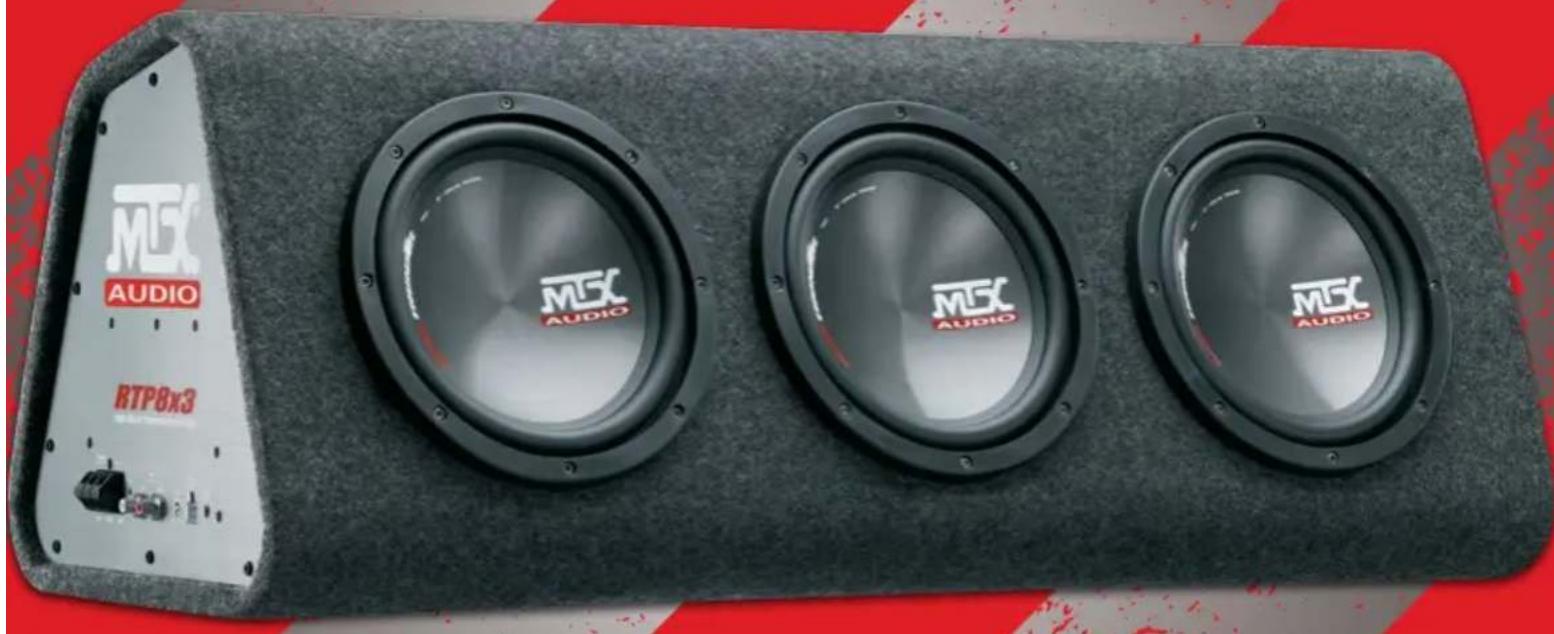
Exterior view of a black audio speaker chamber with three speakers and an external panel labeled 'M5C AUDIO' (no additional text or symbols visible)RTP8x3
Triple 20cm (3x8") Powered Vented Enclosure,
1080W Peak, 360W RMS CEA
Designed by MTX in Phoenix, AZ - USA

Thank You!
Thank you for purchasing an MTX Audio High-End amplifier. Proper installation matched with MTX speakers and subwoofers provide superior sound and performance for endless hours of waking the neighbors, slammin' your friends or flat out stomping wanna-be players. Congrats and enjoy the ultimate audio experience with MTX!

Specifications :
- Powered vented enclosure
- Mono block class-D amplifier
- Subwoofers: 3x20cm (3x8")
• Amplifier Max Power : 1080W
• Amplifier RMS Power : 360W - High and low level inputs
• EBC (External Bass Control) remote included - Dimensions: 33x31x82cm

Control Panel on the Amplifier :
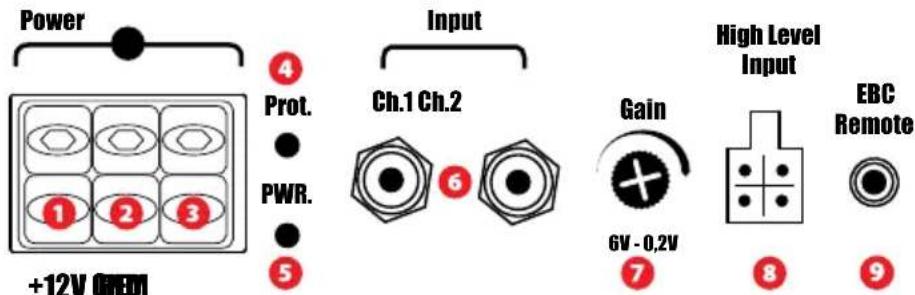

Power Terminal (+12V): This is the main power input for the amplifier and must be connected directly to the positive terminal of the vehicles battery for proper operation. Use caution when installing (+12V) power cable in the vehicle. Avoid running this cable parallel with RCA cables, antennas, or other sensitive equipment due to massive currents that can induce noise into the audio system. It is also very important to have a tight, secure connection for maximum performance. MTX recommends using a minimum of 6mm2 full copper power wire with the MTX RTP8x3.

Remote Terminal (REM) — The amplifier can be turned on by applying 12 volts to this terminal. Typically this voltage is supplied by a wire from the source unit marked "remote" or "power antenna".

Ground Terminal (GND) : A proper ground is required for your amplifier to operate at peak performance. A short ground cable the same diameter as the power cable should be used to attach the ground terminal directly to the chassis of the vehicle. Always remove paint, dirt or debris to expose bare metal where the ground will be attached.

Protection LED (Prot.) : When the amp is in thermal protection, the LED turns to red.

PowerOn LED (PWR.) : The LED illuminates red when the amp is switched on.

RCA Inputs (Input) : These RCA inputs are used with source units that have RCA or Line level outputs. (Source units need a minimum level of 200mV output for proper operation of the amplifier). MTX recommends only high quality RCA cables to decrease the possibility of radiated noise entering the system.

Gain Control (Gain): The gain control matches the input sensitivity of the amplifier to the source unit being used.
The operating range varies from 200mv to 6V. Adjusting the gain:
- Turn the gain control on the amplifier all the way down (counter clockwise).
- Turn up the volume control on the source unit to approximately 3/4 of maximum.
- Adjust the gain control on the amplifier until audible distortion occurs.
- Adjust the gain control down until audible distortion disappears.
- The amplifier is now calibrated to the output of the source unit.

Speaker level inputs (High Level Input): This input will allow the amplifier to operate from source units with speaker-level outputs. Output speaker leads from the source unit should be tied directly to the wire harness provided with the amplifier.
Note: When speaker level inputs are used, a remote turn on wire must be used to switch the amplifier on and off.

Remote bass control port (EBC) : use this port to connect the optional MTX EBC. It allows you to control the output level siting at the front of the car.

Installation & Mounting :
MTX recommends your new MTX RTP8x3 to be installed by an Authorized MTX retailer. Any deviation from specified installation instructions can cause serious damage to the amplifier, speakers and/or vehicles electrical system. Damage caused from improper installation is NOT covered under warranty. Please verify all connections prior to turn on your system!
- Disconnect the vehicle's negative battery cable.
- Determine the mounting place for your MTX RTP8x3. Keep in mind there should be sufficient air flow for proper cooling.
-
Install a positive (+) power cable from the vehicle's battery through the firewall using a grommet or firewall bushing to avoid cable damage from sharp edges of the firewall. Run the cable through the interior of the vehicle and connect it to the amplifier (+12V) terminal (1). Do Not connect to the battery at this time.
Note : Use only proper gauge wire for both positive and negative connections. -
Install a circuit breaker or fuse within 20cm of the battery. This effectively lowers the risk of severe damage to you or your vehicle in case of a short circuit or accident. Make sure the circuitbreaker is switched off or the fuse is taken out of the fuse holder until all connections are made. Now connect your positive power cable to the positive battery terminal of the battery.
-
Grounding - Locate a proper ground point on the vehicle's chassis and remove all paint, dirt or debris to reveal a bare metal surface. Attach the ground wire to that contact point. Connect the opposite end of the ground wire to the (GND) terminal on the amplifier (3).
-
Connect a remote turn-on wire from the source unit to amplifier remote terminal (2). If the source unit does not have a dedicated Remote Turn-on lead, you may connect to the source unit's Power Antenna lead.
-
Connecting signal cables to the amplifier: There are two ways to supply the signal to your MTX RTP8x3.
- To get maximum performance, we suggest connecting a high quality RCA to the corresponding outputs at the source unit and inputs of the amplifier.
- If a source unit is being used without RCA outputs, use the included high-level amplifier's speaker terminals (8) using the right gauge speaker wire.
- Double check all previous installation steps, in particular, wiring and component connections. Once verified, reconnect the vehicle's negative battery cable, turn the circuit breaker on or place the fuse in the fuse holder.
Note : Gain Levels on the amplifier should be turned all the way down (counter clockwise) before proceeding with adjustments.

How To Stay Tuned :

https://www.facebook.com/MTXEurope

https://twitter.com/MTXEurope

http://www.mtxaudio.eu
Merci!
https://www.facebook.com/MTXEurope

https://twitter.com/MTXEurope

http://www.mtxaudio.eu
Muchas Gracias!
https://www.facebook.com/MTXEurope

https://twitter.com/MTXEurope

http://www.mtxaudio.eu

Vielen Dank!
https://www.facebook.com/MTXEurope

https://twitter.com/MTXEurope

http://www.mtxaudio.eu

Grazie!
https://www.facebook.com/MTXEurope

https://twitter.com/MTXEurope

http://www.mtxaudio.eu


Obrigado!
https://www.facebook.com/MTXEurope

https://twitter.com/MTXEurope

http://www.mtxaudio.eu

Bedankt!
https://www.facebook.com/MTXEurope

https://twitter.com/MTXEurope

http://www.mtxaudio.eu
Спасибо!
https://www.facebook.com/MTXEurope

https://twitter.com/MTXEurope

http://www.mtxaudio.eu
Multumesc!
https://www.facebook.com/MTXEurope

https://twitter.com/MTXEurope

http://www.mtxaudio.eu
Wprowadzenie
https://www.facebook.com/MTXEurope

https://twitter.com/MTXEurope

http://www.mtxaudio.eu
Esipuhe
https://www.facebook.com/MTXEurope

https://twitter.com/MTXEurope

http://www.mtxaudio.eu
MTX is proud to be an American Audio Company since 1971.

natural_image
National flag of the United States, featuring a blue star pattern on a white background (no text or symbols)MiTek
Corporation
Designed and Engineered by MTX in Phoenix - AZ, USA.
© 2015 Mitek. All rights reserved.
MTX is a registered trademark of Mitek.
Due to continual product development, all
specifications are subject to change without notice.
Mitek - MTX
4545 East Baseline Rd. Phoenix, AZ 85042, USA

mtxaudio.eu

twitter.com/MTXEurope

facebook.com/MTXEurope



Brand : MTX Audio
Model : RTP8x3
Category : Speaker