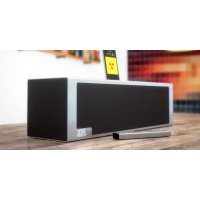
iT1air - Speaker MTX Audio - Free user manual and instructions
Find the device manual for free iT1air MTX Audio in PDF.


| Product type | Wireless audio speaker with docking station |
| Brand | MTX Audio |
| Model | iT1air |
| Connectivity | AirPlay, Wi-Fi Direct, Lightning dock, Apple USB, 3.5mm auxiliary input |
| Power supply | 100-240 V, 50/60 Hz (power adapter included with European and British plugs) |
| Remote control batteries | 2 AAA batteries (not included) |
| Dock compatibility | iPhone, iPad, iPod touch (models with Lightning connector) |
| USB compatibility | iPhone, iPad, iPod (models with 30-pin connector) |
| Main functions | AirPlay playback, dock, USB, auxiliary; volume and subwoofer control; infrared remote control; Wi-Fi Direct mode |
| LED indicators | LED1 (Wi-Fi status and remote control feedback), LED2 (active source: blue AirPlay, red dock, green USB, purple auxiliary) |
| Subwoofer adjustment | Level adjustable from -5 to 100 in increments of 10 (reset by pressing Sub + and Sub - simultaneously) |
| Care and cleaning | Unplug before cleaning; use a soft, dry cloth; avoid liquids |
| Safety | Do not expose to moisture, do not open the device, use only the supplied adapter |
| Spare parts and repairability | Contact MTX Audio support; no user-serviceable parts |
| General information | Manual available in multiple languages at notice-facile.com |
Frequently Asked Questions - iT1air MTX Audio
User questions about iT1air MTX Audio
0 question about this device. Answer the ones you know or ask your own.
Ask a new question about this device
Download the instructions for your Speaker in PDF format for free! Find your manual iT1air - MTX Audio and take your electronic device back in hand. On this page are published all the documents necessary for the use of your device. iT1air by MTX Audio.
USER MANUAL iT1air MTX Audio
Ultimate Apple AirPlay Lightning Hifi Powerful Compact System with Exceptional Bass Extension.

ThankYou!
Thank you for purchasing the MTJ Air high end, high definition audio system. The iTair is designed to deliver a deeper dimension that brings your music to life. So other systems provide the exacting measure of clarity in such a small enclosure. Whether you are listening from your iPhone, iPad, iPod or computer, the iTair delivers outstanding sound quality. The iTair is your new favorite Hi-Fi system. Congratulations for making a smart choice and enjoy the ultimate audio experience with MTX.
What's In the Box?
- The ITai unit. Use caution when unpacking the unit is heavy.
- IR remote control. Batteries are not included
- Wi-Fi antenna to be connected to the Wi-Fi socket on the back of the unit.
4.2.2013/10/16 15:00 PM
Quick Start with Airplay :
- Connect the ITair to the wall outlet. Switch on the unit -press Power (O) once-and wait 10 seconds for initialization.
- Verify your iPhone, iPad or iPod Touch is connected to the Wi-Fi network you want to join
- Connect your device to the Dock (LED#2 red) or to the USB (LED#2 green).
- Push the Wi-Fi control switch once. The unit will display a message on your device asking if you want to share your Wi-Fi settings. The Wi-Fi is now available in the Wi-Fi network. The EDW's should be said Blue. You can now disconnect your device from the Wi-Fi.
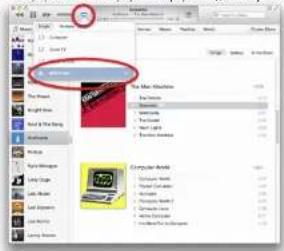
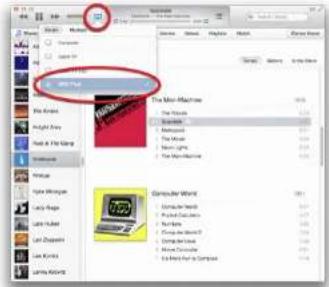
- Use your computer or device and open "Tunes" or "Music" in the Airplay devices list, choose "MIDI" and hit play to start listening to music.
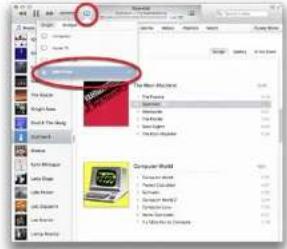
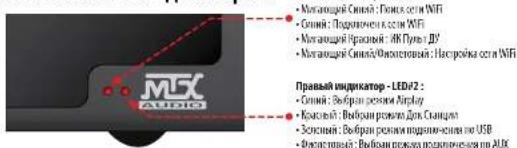
LED Status Summary:
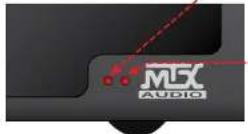
Left-LED#1
- Flashing Blue Looking for the Wi-Fi network
Sales Blue Handed to the Wi-Fi network
Fishing Red Remote control feedback - Flashing Blue:Purple:Wi-His setting mode
Right-LEDP2:
- Sale Blue Airplay input selected
Solid Red Deck input selected
Solid Green:USB input selected
Solid Purple: AUX input selected
iT1air Placement and Installation :
The location of your ITI in the room is crucial for sound quality and bass level. The unit is equipped with two side subwoofer and is able to reproduce very low frequencies. Some guidelines should be followed to get the best possible result.
1. Install the unit at an equal distance between the two side walls to get the largest possible spacing. The side walls will act as
reflectors
2. If you reduce the distance between the unit and the back wall, the basis level will rise. If you increase the distance, the basis level
will decrease. Choose distance based on your preference.
3. Your ears and the thair should be in the same horizontal plane for perfect definition.
4. To get the best possible result, do not put the unit on a table with a large panel in front of the speakers as it will reflect the sound
in an undesirable way
5. Adjust the subwoofer level with the remote control
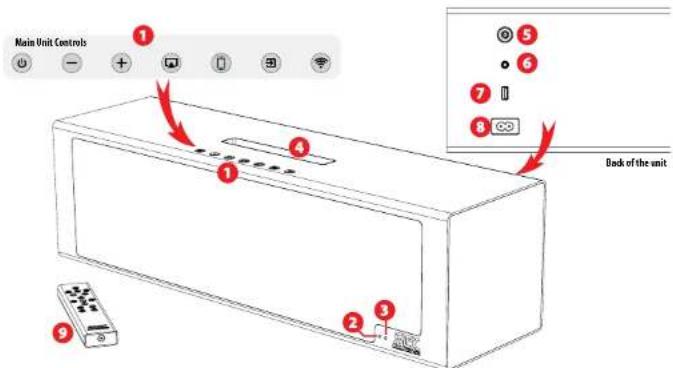
Main Unit Controls
Power On/Off Reset
- Single press will power On or power Off the unit. When the unit is off, the two LEDs will be illuminated.
When the Unit is On, the two LEDs will be illuminated. LED color will depend on the input and settings.
- Press and hold for 5 seconds to reset the unit's sound settings (volume and subwoofer level to zero).
- Single press will decrease the volume one step. - The IDAI will flash red one.
- Press and hold will decrease volume gradually. - The IDAI will flash continuous
+ Single press will increase the volume one step. The LCD4 will flush red once. Press and hold will increase the volume gradually. The LCD4 will flash red continuously.
- Single press will enable Apliy mode - The LED2 will turn Blue.
- Press and hold for 5 seconds will enable the KF Direct mode, the unit will turn into a router and you'll be able to stream from your Apliy device directly to the unit without any external network.
- First single press will enable dark input - The LED2 will turn Red
- Second single press will enable USB input - The LED2 will turn Green
Single press will enable the jack input The LED#2 will turn Purple.
- Single press will copy the VH-Fi settings of your wired device to the unit. The unit will be available on the same network as your device.
- Press and hold for 5 seconds will turn the unit to N-H settings made - The EDV will flash BluePurple. See section below To: Connect to the network for Appuy 2x2 for more details
LED#1:Wi-fi Status and Remote Feedback.
When you switch on the unit, the LED will slowly flash blue looking for the Wi-Fi network. It will continue to flash Blue until the network is set.
When the unit is connected to your network, the LED1 will turn to solid blue.
When you press any control on the IR remote control, the ED will flash red/ blue to indicate that the connection is done.
LED#2: Input Indicator.
Press for Airplay input - The LED2 turns blue.
Press for Doo input - The LED2 will turn red.
P
Press for Jack Aux analogue input: The LDC92 will turn purple

Lightning Dock & Compatible Devices
Put one of the following devices in the Lightning clock. Press 1000 times per day.

The Apilie devices not listed here are still compatible. But they'll have to use the USB input (see 7).
Wifi Antenna Connector.
Screw the induded wi antenna here for optimal Aiplay performance.
AUX Analog 3,5mm Jack Input.
Use this input with stereo analog signals from a TV, a Blue Box/HD/CD player, a VP3 player, a Tablet, a cellular phone, etc. Do not forget to input "XAF input" to activate the XAF Analog jack input. The LED will turn purple.
Apple USB Input.
Do not forget to press once or twice to activate the USB input. The LED will turn green. USB works with iPhone 5, iPhone 4, iPhone 3G, iPhone 6, iPhone 13rd and 4th generation), iPad 2, iPad, iPad mini, iPod touch (1st through 5th generation), iPod classic, and iPod nano (1st through 7th generation).
AC Power Socket.
Connect your IT hair to the power supply. Use the included power cord. The unit is compatible with 10G-120V / 220-240V AC, 50-60kV. You can't need to move any coils, the selection is automatic.
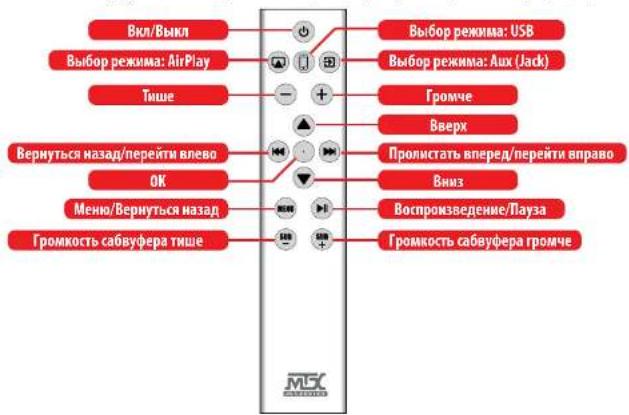
IR Remote Control.
Before using the remote control, you must install two AAA batteries. Remove the bottom panel with a 2mm HEX key. Follow the [4] and [1] signs located around the two springs. See "How to: Install the Batteries in the Remote Control" on the next page.
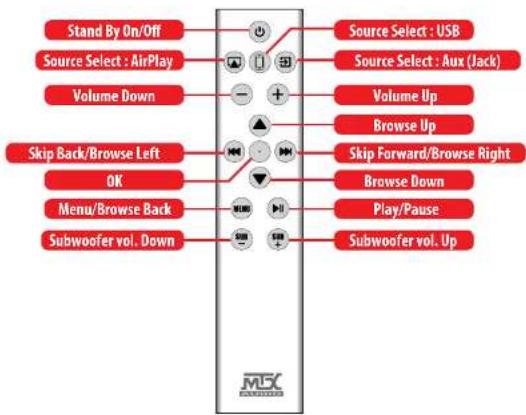
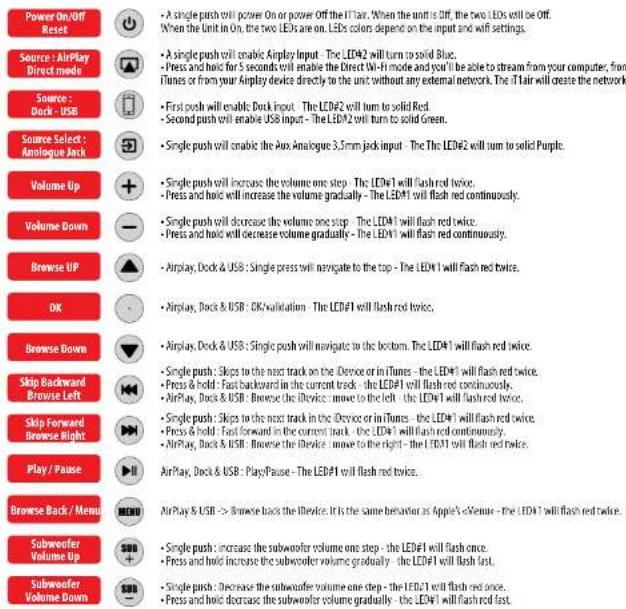
IR Remote Control Behavior.

How To: Connect to the network for Airplay #1:5 sec...
-
Connect the if/air to the wall outlet, Push "Power" to switch on the unit and wait 10 seconds for initialization.
-
Take your iPhone, iPad or iPod Touch and verify it is connected to the Wi-Fi network.
-
Connect your device to the Dock (LED#2 red) or to the USB (LED#2 green).
-
Push once. The unit will display a message on your device asking if you want to share your Wi-Fi settings with the ITair.
Accept, The ITlair is now available in the Wi-Fi network. The LED#1 will illuminate solid blue. You can disconnect your device now.
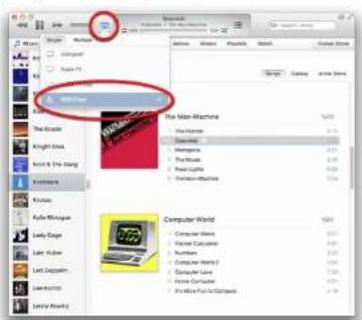
- Open a computer or you Device and in the Airplay devices list, choose "MTX iTair".
How To: Connect to the network for Airplay #2: Geek...
-
Connect the IT fair to the wall outlet. Push to switch on the unit and wait 10 seconds for initialization.
-
Press and hold (Wif control) for 5 seconds. The LED1 will flash Blue Purple.
-
Take your computer, your iPad, your iPhone, your iPod touch or any Android tablet and look for the iT1 with network
-
John the network named "MTX ITAI"
-
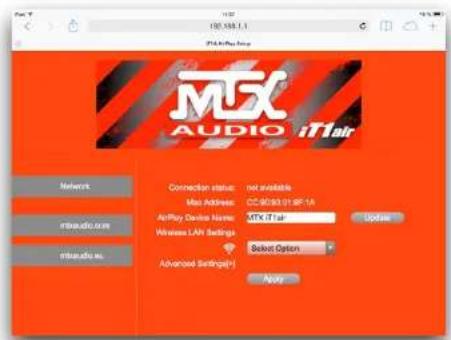
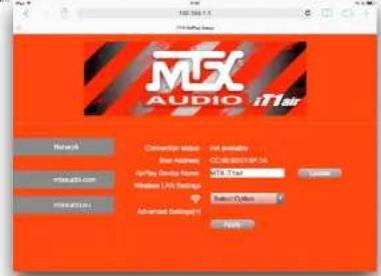
Open a web browser and type 192.168.1.1 - You are now on the IT fair setting page (see picture below).
-
Choose your network in the list and type your password.
Note: at the bottom of the WiFi networks list, you can configure it manually, if the network is hidden for example.
-
Hit "Apply". The unit will restart and join the chosen network.
-
Open a computer or your iDevice. In the Airplay devices list, choose the "MTX iTair". Hit play... Music...
How To: Change "MTXiT1air" in the Airplay list.
You can change the unit with name if, for example, you have more than one IT fair in the same network.
1. Connect the IT air to the wall outlet. Push "Power" to switch on the unit and wait 10 seconds for initialization.
2. Press and hold "Wi-h" for 5 seconds. The LED#1 will flash BlutPurple.
3. Take your computer, iPad, iPhone, iPod Touch or any Android tablet and look for the iT1 Wi-Fi network
4. Join "MTX-T1air network".
5. Open a web browser and type 192.168.1.1 - You are now on the iTlair setting page.
6. Type the new desired name in the *AirPlay Device Name field.
7. Hit "Update". The unit will restart. It will be available in the Airplay devices list under the updated name.

Press and hold for 5 seconds.
How To: Reset the unit.
You can reset the volume and the subwoofer settings.
Press and hold for 5 seconds "Power" on the unit or on the remote control.
Remote
How To: Reset the subwoofer level.
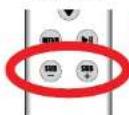
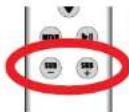
The subwoofer level is adjustable from -6dB to +10dB by 6dB steps. If you want to go back to 6dB, just push (Sub) and [Sub] at the same time on the remote control. Do not abuse the level of the subwoofer. "You much know will affect sound quality and distort distortion.

Press and hold for 5 seconds.
How To: Switch on the Wifi Direct mode.
If no Wi network is available, the IT fair can generate his own wi network for Airplay.
Press and hold for 5 seconds the Airplay control (on the Unit or on the Remote), will enable the Wi-Fi Direct mode.
The name of the network GSDN is × MIX if air. The unit will turn into a meter and you'll be able to stream from your Airplay device directly to the unit without any external network.
How To: Install the Batteries in the Remote Control.
Before using the remote control, you must install two SARE batteries.
Remove the bottom panel with a 2mm HEX epoxy. Follow the (+) and - signs located around the two springs.

How To: Stay Tuned.

https://www.facebook.com/KITXEurope

https://twitter.com/MTXEurope

http://www.mbsaudio.com


Merci!
Source: AirPlay Mode direct

https://twitter.com/MTXEurope

http://www.mtbaudio.co
Muchas Gracias!
Gras per auiil MTI tia, sotiale o audio di alla gamma e all'altitudine. DI tla esti daedado para adhiriun a dimensionis mls profunda e darve la sua musica como una ocaje de cet tamufo. Ya sae estudie uscchiduo sde sui PiD, il ipone, i dip e or ordinar, el tllar o excite una caleid of sedico. EI tla si es unoro strucolo Hi Fi favorio. Folletonos por tornaruna decisione intelligente und disfuratara o la ultima epenomena de audio con MTX.
Que hay en la caja?
Source: Airplay Media Director
Airplay, Dock & USB: OK/validation D LED#1 pursudona cinroje doves.
-
https://www.facebook.com/KITXEurope

https://twitter.com/MTXEurope

http://www.mbaaudinfeu.com
Bedankt!
Bekantov wird aus demuch von de T3T II air high end, high definition audio system. De T3air ist cempenw im am dieinie dimenste dan zu meckt je gocn, om de meckut tot leve to bringen avas gesen und eineim met de compx aimetd als dan. het meckt gocn verschilf en een Pad, iPhone, pc of computer geubuktion veel, de T3air zogt veer umluntend geladskoistit. De T3air is jouneiewieare fiorit 3-1 system. Gefelgelted met het meckan an em vestandte konz gen ete valmtre audiom MT.
Watziterinde doos?
- JouvTHar unit Let op met uitpaknen, de unit is zwaar.
- ZUHWI ARISTASSEINHONG, EIERBERG 210 Nien Heikegepogen. 3. JIAWEIH WANG, CO., 1965-1975 on the development of a new classification of
- Twice netspanning labels. Ein vor Europe (K7 76 Type C, ein vor de UK (85 1363 Type G).
- Jow getrakers handleiing.
https://www.facebook.com/MTXEurope

https://twitter.com/MTXEurope

http://www.mbaudio.com
Cnacn6o!
BnAeepnnnne aen ananen ananen ananen ananen ananen ananen ananen ananen ananen ananen ananen ananen ananen ananen ananen ananen ananen ananen ananen ananen ananen ananen ananen ananen ananen ananen ananen ananen ananen ananen ananen ananen ananen ananem nannnnaaennnnae annnnnnae annnnnnae annnnnnae annnnnnae annnnnnae annnnnnae annnnnnae annnnnnae annnnnnae annnnnnae annnnnnae annnnnnae annnnnnae annnnnnae annnnnnae annnnnnae annnnnnae annnnnnae annnnnnae annnnnnae annannnnae annnnnnae annnnnnae annnnnnae annnnnnae annnnnnae annnnnnae annnnnnae annnnnnae annnnnnae annnnnnae annnnnnae annnnnnae annnnnnae annnnnnae annnnnnae annnnnnae annnnnnae annnnnnae annnnnnae ann
Yo Bbl HaJeTe B Kopo6ke?
1.38ybo npoekto 11air Byp0e cctopoxhpaacnncbaeraero,oh pctarno Twnenm
2. Rrrnrs 5.
3.AnteBnWiFiHgNnKcHbHcKcTt(Ha3aepnCHe 3yBnOIO npocIpaI
4.4.4.4.4.4.4.4.4.4.4.4.4.4.4.4.4.4.4.4.4.4.4.4.4.4.4.4.4.4.4.4.4.4.4.4.4.4.4.4.4.4.4.4.4.4.4.4.4.4.4 10531 type Gl
Bbictpbbl 3anyck CnNoIb3oBaHem Airplay:
- TnHnHnHnTlAaRbPcRyBnHNHnHnCtREHnHNnHNnHNnHNnHNnHNnHNnHNnHNnHNnHNnHNnHNnHNnHNnHNnHNnHNnHNnHNnHNnHNnHNnHNnHNnHNnHNnHNnHNnHNnHNnHNnHNnHNnHNnHNnHNnHNnHNnHNnHNnHNnHNnHNnHNnHNnHNnHNnHNnHNn
2.BoeKreBaaPnne,IPadAaPiPdToch aybepeTc,pyo nnoaekene cern Ni-H - NOCTABRE YTOCHHTBO HA DOK-CTAHNO (KPICHNHN HNDHATOP LED2) INN KOKNHO KABENNO USB [ENEHN HNDHATOP LED2].
- 500 kpc (1000 pc)
- 300 kpc (1000 pc)
- 200 kpc (1000 pc)
- 100 kpc (1000 pc)
- 800 kpc (1000 pc)
- 600 kpc (1000 pc)
- 500 kpc (1000 pc)
- 400 kpc (1000 pc)
- 300 kpc (1000 pc)
- 200 kpc (1000 pc)
- 150 kpc (1000 pc)
- 15 kpc (1000 pc)
- 15 kpc (1000 pc)
- 15 kpc (1000 pc)
5.0ngnncnnneepnnepeeepnneepnneepnneepnneepnneepnneepnneepnneepnneepnneepnneepnneepnneepnneepnneepnneepnneepnneepnneepnneepnneepnneepnneepnneepnneepnneepnneepnneepnneepnneepnneepnneepnneepnne
0603haeHnLED uHdkaTopoB:
Pa3MeueHne HnHCTaIIaIg iT1air:
Oeepoeepoeepoeepoeepoeepoeepoeepoeepoeepoeepoeepoeepoeepoeepoeepoeepoeepoeepoeepoeepoeepoeepoeepoeepoeepoeepoeepoeepoeepoeepoeepoeepoeepoeepoeepoeepoeepoeepoeepoeepoeepoeepoeepoeepoeepoeepoeepoeepoeepoeepoeepepepepepepepepepepepepepepepepepepepepepepepepepepepepepepepepepepepepepepepepepepepepepepepepepepepepepepepepepepepepepepepepepepepepepepepepepepepepepepepepepepepepepepepepepepepepe pe
OOPKNEHNEKANBVEKSHNHNYHMNNNTPONKKTBOHNOHHYPOBB-NNHMAATOPLED#1AANTETKPAHBA
HANMAYI HUNNARIN POMRIMY BAYO NCTCNIKHO YAMBIATG OBOHNOHNMOO HNNPOB
- OpaKpKaHnHaNtOaHnOaHnOyueoAePcKoAeHbAaHpyoae - HmKoAeTnLDP1kAeHepKoAe
Ueouo aoe pao.
-HaKaHn3yHnPyauoae - rPpKaocBbEgDyEe nocenTHeAoYoaeuuaBc - HmKaOpTlDP1kEgDyEe HnpeKoAe
KoAeKoKoKoKoAeUoo.

- Oyepnepahtn Hnepnepahtn Atepeh Pnyepnepn - Hmepnepan EEP 2007 GpOeepn CENHIN BEMT.
- Hmepnepn EEP 2007 B CENHIN CENP 5007, YNHN BOPMNNB VPHEPNPNN, XPOONBIPNPPNPAH
KAPNPNNPAH, H N MOPCNNT NCTNNTNNTNNTNNTNNTNNTNNTNNTNNTNNTNNTNNTNNTNNTNNTNNTNNTNNTNNTNNTNNTNNTNNTNNTNNTNNTNNTNNTNNTNNTNNTNNTNNTNNTNNTNNTNNTNNTNNTNNTNNTNNTNNTNNTNNTNNTNNTNNTNNTNNTN
BcogicMCTHMMA:AMGATGGBIBXBDX

- OJHnKpIeHnHnHnHnHnHnHnHnHnHnHnHnHnHnHnHnHnHnHnHnHnHnHnHnHnHnHnHnHnHnHnHnHnHnHnHnHnHnHnHnHnHnHnHnHnHnHnHnHnHnH
WYI WANGJINGHUA HUAN HONGKONG
QuoHnKHeN HcHbO CmHcy WIF HcHbO Ccaa ccky cckoc hau yhooepn KpOe. I1I 629
Tn 100000000000000000000000000000000000000000000000000000000000
LED#1:CratycWiFiNpynbTdY.
KoBn BkAe HcHt HmHnHpL EHTIgHMTaRcCeaHnHnE aHnHnE CHTIb. Dcy HApNpOAtKsMnTtGnHnDy Tep NK, ONA
coHnHnHnHnHnHnHnHnHnHnHnHnHnHnHnHnHnHnHnHnHnHnHnHnHnHnHnHnHnHnHnHnHnHnHnHnHnHnHnHnHnHnHnHnHnHnHnHnHnHnH n H
Korunshoyu 10000000000000000000000000000000000000000000000000000000000000000000000000000000000000
USB BxOaApple.
Kannan 370100606 mappnncn c ananmnnn nnnnnpnnpnnn npnnnnn nn nnnnnn nnnnnn nnnnnn nnnnnn nnnnnn nnnnnn nnnnnn nnnnnn nnnnnn nnnnnn nnnnnn nnnnnn nnnnnn nnnnnn nnnnnn nnnnnn nnnnnn nnnnnn nnnnnn nnnnnn nnnnnn nnnnnn nnnnnn nnnnnn nnnnnn nannn nannn nannn nannn nannn nannn nannn nannn nannn nannn nannn nannn nannn nannn nannn nannn nannn nannn nannn nannn nannn nannn nannn nannn nannn nannn nannn nannn nannn nannn nannn nannn nannn nann
IopKIOUoyHe K cTeH NHTAHNA.
NIOHNIHITIITIITITITITITITITITITITITITITITITITITITITITITITITITITITITITITITITITITITITITITITITITITITITITITITITITITITITITITITITITITITITITITITITITITITITITITITITITITITITITITITITITITITITITITITITITITITITITITITITITITITITIT
NKnybT dy.
Pepoia oKoBbOaHnNnIyBaIeAeIeHHHHeEeIgAeHNnI, HneBIOeYIeAeHTaeIeAAA CmmeTt HnHnHn TaHnE, 0xOeBn2y I m 2mm eeepeHnIeKv. XteAoeBteBapcck Ee aeehnnn (H n) , pacioaONHnHnBn BOKpy dJeXtCHeHNNM. Ca. pezad "TeAeBbAbaTeepes BnBnIy BaeAeIeHHoRHO'5pAeHBeH" Ma cnoeoue Os TceHn.
UnpaBneHne NK PynbT D
| Bun#bn#n B##p#par # B##p#d#m Uc#h#o#k# | |
| Kto#y#n# - AirPlay Peximie Direct Mode | |
| B#p#p#r o#t#n#ka - Dax c#ran#n - USB | |
| B#p#p#r o#t#n#ka - An###on#n#b B#nd | |
| Y#e#n#n#ne#he r#p#n#oct#n | |
| V#e#n#n#ne#he r#p#n#oct#n | |
| Ipe#me#ne#he b#e#x | |
| OK | |
| Ipe#me#ne#he ##3 | |
| Ipe#ke#n H#s#n O#spoc C#e#a | |
| Ipe#ke#n B#e#ed O#spoc B#p#o | |
| Bo#np#ne#ne#he I#y#3 | |
| O#n#n#n#n#n#n#n#n#n#n#n#n#n#n#n#n#n#n#n#n#n#n#n#n#n#n#n#n#n#n#n#n#n#n#n#n#n#n#n#n#n#n#n#n#n#n#n#n#n#n# | |
Kak noekliouchtc K cetn Airplay #1 3a 5cek...
-
Anonopoeae Tlair Pocosy Hoxoane 093726 - 104538 - 104538 - 104538 - 104538 - 104538 - 104538 - 104538 - 104538 - 104538 - 104538 - 104538 - 104538 - 104538 - 1
-
Rostava hycetopoch na doa, cnaeia (spocnai nuiuHyIcLDA2) nri ouaonne uoukceck mUSB [Jenckhni Mauoapap LEO1].
-
1aAeHnHbNtWvOxOoB 000000000000000000000000000000000000000000000000000000000000000000000000000000000000000000000
-
Compositio omposo umi o umi o umi eumu o umi o umi eumu o umi o umi o umi o umi o umi o umi o umi o umi o umi o umi o umi o umi o umi o umi o umi o umi o umi o umi o umi o umi o umi o umi o umi o umi o umi o umi o umi o umi o umi o umi o umi o umi o umi o umi O
Kak noeknouchbck cetn Airplay #2
- 100000000011111111111111111111111111111111111
- Hanwne Tepnne (With) nreene 5 ckyhnn Hmnnnnp Ld41 ynet hnrb Chnnednuonrton
- BOKMITE KANMOHNIK, Pedi, iPhone, Pedi touch hmi ooc yocipocn Android in sanhme nncn acnnn cneonn eorwWFI, a knoe HOWI CNTB11.
- DnssdHNTs H BwEANSTPCNCHKONMTT
- 304001 web-6bpyu hnnnep 192,758.1.1 cienan Baa Hauonncn ta Cyaannne Hauonncn eenTITaI (m) Hauonncn Hauonncn Hauonncn
- Hauonncn Hauonncn haan bce Taan ce Tcnae Hauonncn Taan npo. Ppnnnne Hae: hnpanpe, conct cbk kharpe, oy noane Hauonncn bce
- 304001 hnnnncn cccnnnnn nnnnnn nn
- HANHNTTE "DYNAHNDY"XUPRACNDCPPDRVNNNHNHNHNHNHNHN
- 3pokoe k oiknoe hna ygote cytoepod Android B coenrctykaa mae cne cytoepoictn flaypa eepene "MIX-11" Hanaema
Kak H3meHntb HmI iT1air Bcnncke Airplay.
Sai Kowme Tne NnemHmbl 288Koeo npoeKTo p cTt VHI, eCn. HanpHep, y Bac npoueH ue an HII tairk tonke CTH.
1. NnKneHTeITIaepmKaHnnrte 0annpaa-nnpdye 10 ckynnaanum
2.HakwTe RyepnRrte 5Wn8 TeueHHe SceKHyMnHKarOp LEDCynet MURbChKDMoneTobm.
3. Bocamte bau konmborep,ipad,iPhone,iPod touch mnn no6oe pcpio Android aanynne monckocnyb ceroi WIF, a meeohwifc eit
4.ObenennneHnncceTNTAT-111r
3.0KpTwe Web-6puyep A uBnue 192.168.1.1 -eHac BoHaoPtec HcpaHne HacpoHne cetllair [O. wnccpaHnHm]
6. Beane weneewoe Wnne "Stynycrpontea AaPlay"
7.HaHMMe"06hcm13byKc0eH npoeHnppe34pHTCH. OH 6ydt DCYmEH COOTBCTBYQEN CNHOE X TPOINB NOO 6HOHNHEHANKCHEN

Press and hold for 5 seconds.
Kakpe3arpy3ntb 3BykoBoH npoeKToP.
BIOHOREC60016HACPTINPOONKTINAPEMETPcO
Hnne nepnnne 100005 000000000000000000000000000000000000000000
Remote
Kak nepe3arpy3nTb ypoBeHb ca6Byeepa.
YyHnHc HcHcOepeepoepoeepoeepoeepoeepoeepoeepoeepoeepoeepoeepoeepoeepoeepoeepoeepoeepoeepoeepoeepoeepoeepoeepoeepoeepoeepoeepoeepoeepoeepoeepoeepoeepoeepoeepoeepoeepoeepoeepoeepoeepoeepoeepoeepoeepoeepoeepoeepoeepoeepoeepoepoeepoeepoeepoeepoeepoeepoeepoeepoeepoeepoeepoeepoeepoeepoeepoeepoeepoeepoeepoeepoeepoeepoee

Press and hold for 5 seconds.
Kak BKIOuHTb npAmyo CeTb WiFi ha 3ByKObOM npoeKTope.
https://twitter.com/MTXEurope

http://www.mtaudio.cn
MTX is proud to be an American Audio Company since 1971.

MITEK
Corporation
Designed and Engineered by MTX in Phoenix - AZ, USA.
© 2014 Mitek. All rights reserved.
MTX is a registered trademark of Mitek.
Due to continual product development, all
specifications are subject to change without notice.
Mitek-MTX
4545 East Baseline Rd. Phoenix, AZ 85042, USA

https://www.facebook.com/MTXEurope

https://twitter.com/MTXEurope

http://www.mtxaudio.eu





- ThankYou!
- What's In the Box?
- Quick Start with Airplay :
- LED Status Summary:
- Left-LED#1
- Right-LEDP2:
- iT1air Placement and Installation :
- Main Unit Controls
- LED#1:Wi-fi Status and Remote Feedback.
- LED#2: Input Indicator.
- Lightning Dock & Compatible Devices
- Wifi Antenna Connector.
- AUX Analog 3,5mm Jack Input.
- Apple USB Input.
- AC Power Socket.
- IR Remote Control.
- IR Remote Control Behavior.
- How To: Connect to the network for Airplay #1:5 sec...
- How To: Connect to the network for Airplay #2: Geek...
- How To: Change "MTXiT1air" in the Airplay list.
- How To: Reset the unit.
- How To: Reset the subwoofer level.
- How To: Switch on the Wifi Direct mode.
- How To: Install the Batteries in the Remote Control.
- How To: Stay Tuned.
- Merci!
- Muchas Gracias!
- Que hay en la caja?
- Bedankt!
- Watziterinde doos?
- Cnacn6o!
- Yo Bbl HaJeTe B Kopo6ke?
- Bbictpbbl 3anyck CnNoIb3oBaHem Airplay:
- 0603haeHnLED uHdkaTopoB:
- Pa3MeueHne HnHCTaIIaIg iT1air:
- LED#1:CratycWiFiNpynbTdY.
- USB BxOaApple.
- IopKIOUoyHe K cTeH NHTAHNA.
- NKnybT dy.
- UnpaBneHne NK PynbT D
- Kak noekliouchtc K cetn Airplay #1 3a 5cek...
- Kak noeknouchbck cetn Airplay #2
- Kak H3meHntb HmI iT1air Bcnncke Airplay.
- Kakpe3arpy3ntb 3BykoBoH npoeKToP.
- Kak nepe3arpy3nTb ypoBeHb ca6Byeepa.
- Kak BKIOuHTb npAmyo CeTb WiFi ha 3ByKObOM npoeKTope.
- MITEK
Brand : MTX Audio
Model : iT1air
Category : Speaker