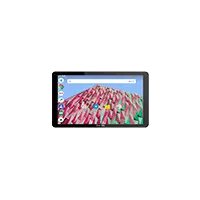
Core 101 3G V7 - Graphic tablet ARCHOS - Free user manual and instructions
Find the device manual for free Core 101 3G V7 ARCHOS in PDF.


| Product type | Graphics tablet |
| Brand | ARCHOS |
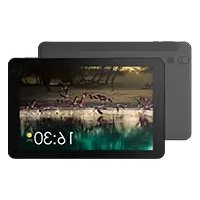
| Model | Core 101 3G V7 (AC101CR3GV4) |
| Dimensions (L x W x H) | Approximately 24.1 cm x 17.1 cm x 0.8 cm |
| Weight | Approximately 480 g |
| Power supply | Rechargeable Li-ion battery, 5000 mAh; AC adapter 5V/2A via micro-USB port |
| Display | 10.1-inch capacitive touchscreen, 1280x800 pixels resolution |
| Processor | Quad-core 1.3 GHz |
| RAM | 1 GB |
| Internal storage | 16 GB (expandable via microSD card up to 128 GB) |
| Connectivity | WiFi 802.11 b/g/n, Bluetooth 4.0, 3G (GSM/UMTS) |
| Sensors | Accelerometer, ambient light sensor |
| Cameras | Front: 0.3 MP; Rear: 2 MP |
| Audio | Stereo speakers, microphone, 3.5 mm headphone jack |
| Ports | Micro-USB (OTG), microSD card reader, SIM slot (3G) |
| Operating system | Android (version according to update) |
| Main functions | Internet browsing, email, multimedia playback, games, apps, camera, 3G |
| Care and cleaning | Clean with a soft, dry cloth; do not use abrasive products |
| Safety | Do not expose to water or moisture; only use the supplied charger; follow SAR guidelines |
| Spare parts and repairability | Not available separately; contact ARCHOS after-sales service for repairs |
| General information | Brand: ARCHOS, model: Core 101 3G V7, year of manufacture: 2019, made in China, CE compliance, max SAR: 1.34 W/kg |
Frequently Asked Questions - Core 101 3G V7 ARCHOS
User questions about Core 101 3G V7 ARCHOS
0 question about this device. Answer the ones you know or ask your own.
Ask a new question about this device
Download the instructions for your Graphic tablet in PDF format for free! Find your manual Core 101 3G V7 - ARCHOS and take your electronic device back in hand. On this page are published all the documents necessary for the use of your device. Core 101 3G V7 by ARCHOS.
USER MANUAL Core 101 3G V7 ARCHOS
Congratulations for the purchase of an ARCHOS device! This quick start guide helps you to start using your device properly. If you have more questions concerning the use of your device, visit us at:

www.archos.com, click Support > After-sales support

www.archos.com, click Support > Downloads > Declaration of conformity

http://faq.archos.com/

info@archos.com
As we are often updating and improving our products, your device's software may have a slightly different appearance or modified functionality than presented in this quick start guide.


Unboxing
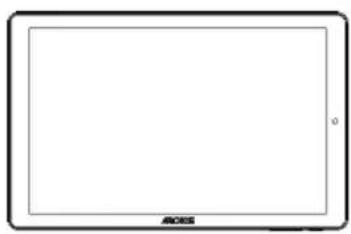
natural_image
Front view of a blank tablet device with 'ACOS' branding at the bottom (no additional text or symbols)ARCHOS Core 101 3G
Quick start guide
Warranty, legal and safety notice

Charger adapter
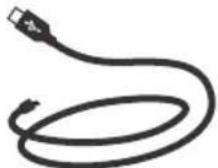
Charging cable
Describing your device
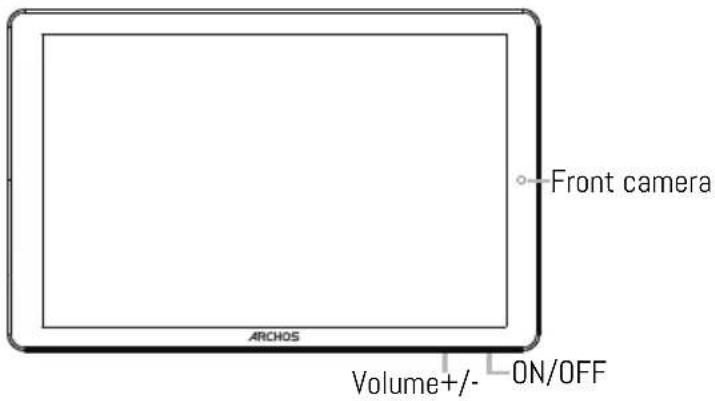
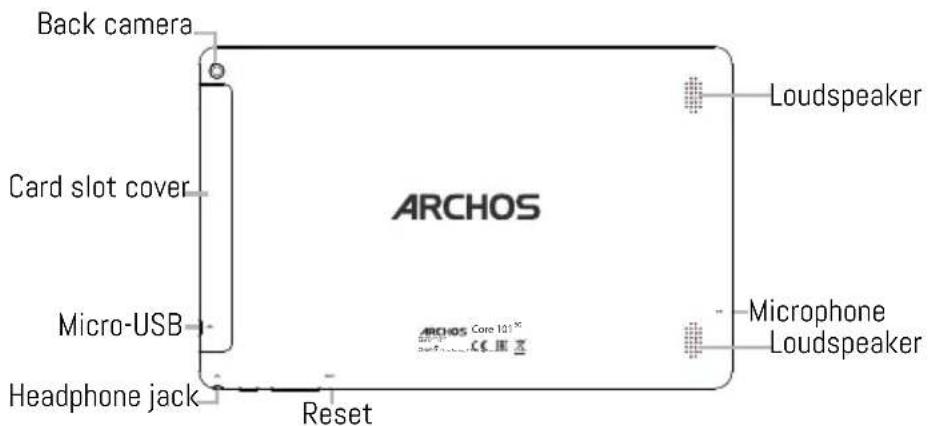

Starting up
Charging your battery completely
Plug the charging cable in the Micro-USB port and the adapter in a power outlet.
Leave the device until the battery is fully charged.
Turning ON
- Press and hold the ON/OFF button to turn on the device.
- Follow the instructions to set up your device: language, WiFi, copy your data, enter your name, set up email, protect your phone, notifications to be shown, Google services, third party apps.
NOTE: You can skip some steps and define them later from the Settings app.
Moving a home screen item: Touch and hold your finger onto it until the positioning gridlines appear, then slide it to the desired location, and release your finger.
Removing a home screen item: Touch and hold it, slide your finger towards the top of the screen and drop it over the Remove icon.
Uninstalling an item: From the All apps screens, touch and hold it, slide your finger towards the top of the screen and drop it over Uninstall bin.
Creating application folders: Drop one app icon over another on a home screen and the two icons will be combined.
Changing your wallpaper: Hold your finger on a home screen at an empty location, then choose from the list: Wallpaper.
Hints & tips

Widgets: Hold your finger on a home screen at an empty location, then choose from the list: Widgets.
Securing your device: Define a lock screen to protect your privacy. Select the Settings app, then Security. Choose a screen lock.
Android device manager: When your device is lost, you can use the android device manager page (https://www.google.com/android/devicemanager) to erase all your contents, to lock the device, to locate the device or to make it ring.
Scheduled power on&off: Schedule power on & off to set when the device turns off and turn on. For example, you can set it for sleep time.

Troubleshooting
-If your device is frozen:
Press the ON/OFF button for 10 seconds or use the reset button.
-If your device doesn't turn on:
- Charge your device.
- Press the ON/OFF button for 10 seconds.
-If your device functioning is too slow:
Close all apps which are not currently used.
-If your WiFi reception is too low:
Make sure you are not far from the WiFi hotspot.
Reset and redefine your connection parameters.
Contact your WiFi connection provider.
-If your device has dysfunctions:
Reinitialize your device. Go to Settings > Backup & reset > Factory data reset. If you can't have access to the settings for any reason, consult our FAQs about the reinitialization process.
For more answers about your technical difficulties, do not hesitate to visit: faq.archos.com

Contactez-nous

www.archos.com, cliquez Support > After-sales support

natural_image
Front view of a blank tablet device with no visible text or symbols on the screenARCHOS Core 101 3G
natural_image
Front view of a blank tablet device with no visible text or symbols on the screen or frame.ARCHOS Core 101 3G
Benutzerhandbuch
natural_image
Front view of a blank tablet device with no visible text or symbols on the screen or frameARCHOS Core 101 3G
Guía de usuario
natural_image
Front view of a blank tablet device with no visible text or symbols on the screen or frame.ARCHOS Core 101 3G
Guida dell'utente
natural_image
Front view of a blank tablet device with no visible text or symbols on the screen or frame.ARCHOS Core 101 3G
natural_image
Front view of a blank tablet device with no visible text or symbols on the screen or frameARCHOS Core 101 3G
Guia do usuário
natural_image
Front view of a blank tablet device with no visible text or symbols on the screen or frame.ARCHOS Core 101 3G
Краткое руководство
natural_image
Front view of a blank tablet device with no visible text or symbols on the screen or frame.ARCHOS Core 101 3G
natural_image
Blank tablet device with no visible text, numbers, or symbols on the screen faceARCHOS Core 101 3G
natural_image
Front view of a blank tablet device with no visible text or symbols on the screen or body.ARCHOS Core 101 3G
natural_image
Front view of a blank tablet device with no visible text or symbols on the screen or frame.ARCHOS Core 101 3G
Krátky návod
natural_image
Front view of a blank tablet device with no visible text or symbols on the screen or body.ARCHOS Core 101 3G
National restrictions
This device is intended for home and office use in all EU countries (and other countries following the EU directive 2014/53/EU) without any limitation except for the countries mentioned below:
| Country | Restriction | Reason/remark |
| Bulgaria | None | General authorization required for outdoor use and public service |
| Italy None | If used outside of own premises, general authorization is required. | |
| Luxembourg | None | General authorization required for network and service supply (not for spectrum) |
| Norway Implemented | This subsection does not apply for the geographical aera within a radius of 20 km from the centre of Ny-Alesund | |
| Russian Federation | None | Only for indoor applications |
ARCHOS company (Contact address : ARCHOS SA 12 Rue Ampère 91430 Igny France) declares that this tablet ARCHOS Core 101 3G is in compliance with the essential requirements and other relevant provisions of Directive 2014/53/EU: https://www.archos.com/products/conformity.html
After the laboratory measurements, the SAR values for this tablet is:
Declaration of Conformity
We, the undersigned (Manufacturer / □ The manufacturers authorized representative established within EEA):
| Company | ARCHOS S.A. | |||
| Address | 12.rue Ampere 91430 Igny | |||
| Country France | ||||
| Telephone number | +(33)1 69 33 16 90 | |||
| Telefax number | +(33)1 69 33 16 99 | |||
| E-mail wu@archos.com | ||||
| Certify and declare under our responsibility that the following product: | ||||
| Product Description | 10.1" Tablet PC | |||
| Manufacturer | ARCHOS S.A. | |||
| Brand Name ARCHOS | ||||
| Model/Type | AC101CR3GV4 | |||
| Is tested to and conforms with the essential test suites included in the following standards, which are in force within the EEA: | ||||
| Standard Issue date | ||||
| EN 301 489-1 V2.2.0 | 2017-03 | |||
| EN 301 489-17 V3.2.0 | 2017-03 | |||
| EN 301 489-19 V2.1.0 | 2017-03 | |||
| EN 301 489-52 V1.1.0 | 2016-11 | |||
| EN 300 328 V2.1.1 | 2016-11 | |||
| EN 301 511 V12.5.1 2017-03 | ||||
| EN 301 908-1 V11.1.1 | 2016-07 | |||
| EN 301 908-2 V11.1.2 2017-08 | ||||
| EN 303 345 V1.1.7 2017-03 | ||||
| EN 303 413 V1.1.1 2017-06 | ||||
| EN 50360 2017 | ||||
| EN 50566 2017 | ||||
| EN 62209-2 2010 | ||||
| EN 62479 2010 | ||||
| EN 55032 2015 | ||||
| EN 55035 2017 | ||||
| EN 61000-3-2 2014 | ||||
| EN 61000-3-3 2013 | ||||
| EN 62368-1 2014/A11:2017 | ||||
| And therefore complies with the essential requirements of the following directives: | ||||
| Directive Name | Directive number | Further Identification | ||
| RED Directive | 2014/53/EU | |||
| LVD Directive 2014/35/EU | Year of affixing the CE Marking: 2019 | |||
| ERP Directive | 2009/125/EC | |||
| RoHS Directive 2011/65/EU | ||||
| Battery Directive | 2006/66/EC | |||
| The following Notified Bodies have been consulted in the Conformity Assessment procedure of RED Directive (whenever applicable): | ||||
| The NOTIFIED BODY: | MiCOM LABS | |||
| MiCOM LABS575 Boulder CourtPleasanton, CA 94566, USAhttp://ec.europa.eu/growth/tools-databases/nando/index.cfm?fuseaction=directive.nb&refe_cd=NANDO_INPUT_179802 | ||||
| The technical documentation as required by the conformity assessment procedure is kept at the following address for a period ending at least 10 years after the last product has been manufactured at the disposal of the relevant national authorities of any Member State for inspection: | ||||
| Company | ARCHOS S.A. | |||
| Address | 12.rue Ampere 91430 Igny | |||
| Country | France | |||
| Telephone number | +(86)75583734678 | |||
| Telefax number | +(86)75583734621 | |||
| wu@archos.com | ||||
| Product is CE-marked In | Europe | |||
| Name of authorized officer: | Jacky Wu | Title of authorized officer | General Manager | |
| Drawn up in | ||||
| Date | 2019.03.13 | |||
| Signature and Company Stamp | ||||