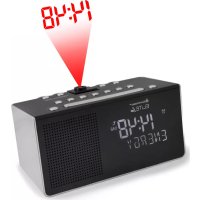
UR8200 - Radio Soundmaster - Free user manual and instructions
Find the device manual for free UR8200 Soundmaster in PDF.



| Product type | DAB/FM clock radio |
| Brand | Soundmaster |
| Model | UR8200 |
| Frequency bands | DAB (Band III) and FM 87.5-108 MHz |
| Number of presets | 10 FM + 10 DAB |
| Power supply | 100-240 V AC, 5 V DC / 1.5 A mains adapter |
| Projector | Time projection on wall, 180° rotation, manual focus |
| Alarms | Dual alarm with source selection (DAB, FM, buzzer), adjustable snooze |
| Sleep function | Timer 15, 30, 45, 60 or 90 minutes |
| USB port | Device charging (smartphone, MP3 player) 5 V / 1 A max |
| Display | LCD screen with adjustable backlight (brightness and timeout) |
| Antenna | Telescopic antenna for FM |
| Time update | Automatic via DAB/FM or manual |
| Maintenance | Clean with a dry cloth; do not use detergents |
| Safety | Do not open the device (risk of electric shock); refer repairs to a professional |
| Reset | Disconnect adapter for 3 minutes to reset |
Frequently Asked Questions - UR8200 Soundmaster
User questions about UR8200 Soundmaster
0 question about this device. Answer the ones you know or ask your own.
Ask a new question about this device
Download the instructions for your Radio in PDF format for free! Find your manual UR8200 - Soundmaster and take your electronic device back in hand. On this page are published all the documents necessary for the use of your device. UR8200 by Soundmaster.
USER MANUAL UR8200 Soundmaster
"DRC (Dynamic Range Control)"
| ALARM Taste | Alarm 1 | Alarm 2 |
| 1× | On-EIN | Off-AUS |
| 2× | Off-AUS | On-EIN |
| 3× | On-EIN | On-EIN |
| 4× | Off-AUS | Off-AUS |
Do not dispose of this product with the normal household waste at the end of its life cycle. Return it to a collection point for the recycling of electrical and electronic devices. This is indicated by the symbol on the product, user manual or packaging.
The materials are reusable according to their markings. By reusing, recycling or other forms of utilization of old devices you make an important contribution to the protection of our environment.
Please contact your local authorities for details about collection points.

WARNING
Risk of electric shock Do not open!
Caution: To reduce the risk of electric shock, do not remove the cover (or back). There are no user serviceable parts inside. Refer servicing to qualified service personnel.
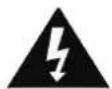
This symbol indicates the presence of dangerous voltage inside the enclosure, sufficient enough to cause electric shock.

This symbol indicates the presence of important operating and maintenance instructions for the device.
Safety, Environmental and Setup Instructions
- Use the device in dry indoor environments only.
- Protect the device from humidity.
- Do not open the device. RISK OF ELECTRIC SHOCK! Refer opening and servicing to qualified personnel.
- Connect this device to a properly installed and earthed wall outlet only. Make sure the mains voltage corresponds with the specifications on the rating plate.
Make sure the mains cable stays dry during operation. Do not pinch or damage the mains cable in any way. - A damaged mains cable or plug must immediately be replaced by an authorized service center.
- In case of lightning, immediately disconnect the device from the mains supply.
- Children should be supervised by parents when using the device.
- Clean the device with a dry cloth only.
Do NOT use CLEANING AGENTS or ABRASIVE CLOTHS!
- Do not expose the device to direct sunlight or other heat sources.
Install the device at a location with sufficient ventilation in order to prevent heat accumulation. - Do not cover the ventilation openings!
- Install the device at a safe and vibration-free location.
- Install the device as far away as possible from computers and microwave units; otherwise radio reception may be disturbed.
- Do not open or repair the enclosure. It is not safe to do so and will void your warranty. Repairs only by authorized service/ customer center.
- Only use mercury and cadmium-free batteries.
- Used batteries are hazardous waste and NOT to be disposed of with the household waste!!
- Return the batteries to your dealer or to collection points in your community.
- Keep batteries away from children. Children might swallow batteries. Contact a physician immediately if a battery was swallowed.
- Check your batteries regularly to avoid battery leakage.
- Batteries shall not be exposed to excessive heat such as sunshine, fire or the like.
- CAUTION: Danger of explosion if battery is incorrectly replaced
- Replace only with the same or equivalent type
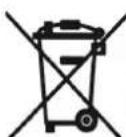
Used batteries are hazardous waste and NOT to be disposed of with the household waste! As a consumer you are legally obligated to return all batteries for environmentally responsible recycling - no matter whether or not the batteries contain harmful substances *).
Return batteries free of charge to public collection points in your community or to shops selling batteries of the respective kind
Only return fully discharged batteries.
*) marked Cd = cadmium, Hg = mercury, Pb = lead
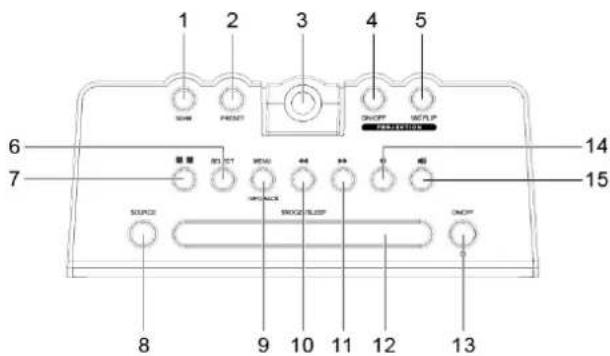
LOCATIONS OF CONTROLS
- SCAN button
- PRESET button
- Projector
- PROJECTOR ON/OFF button
- 180^ FLIP button
- SELECT button
- ALARM button (1/2)
- SOURCE button
- MENU button / INFO button / BACK button
- BACKWARD button
- FORWARD button
- SNOOZE button / SLEEP button
- POWER button
- VOLUME DOWN button
- VOLUME UP button
- Display
- Speaker
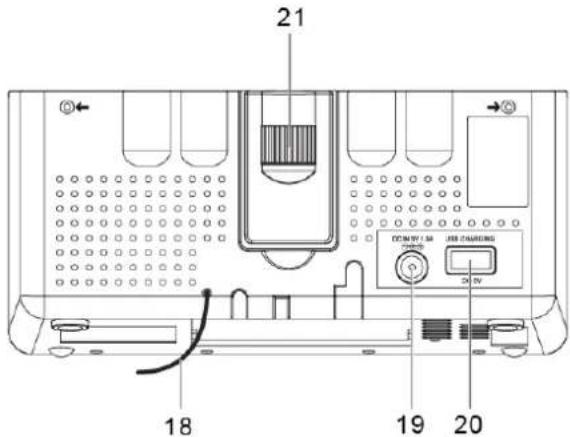
- Antenna
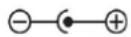
- DC IN jack
- USB jack (for charging external devices)
- FOCUS dial
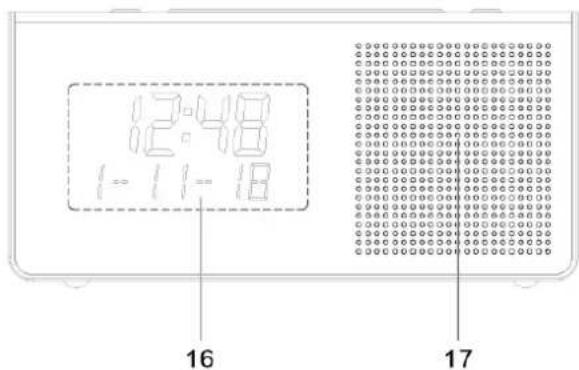
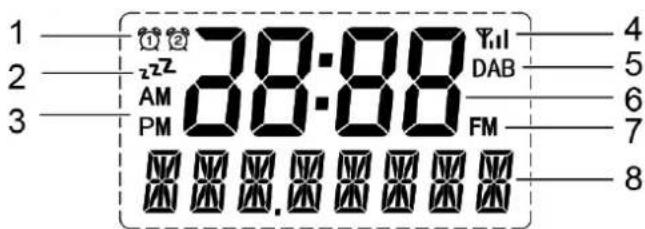
Display
- Alarm 1 or Alarm 2 icon
- Snooze mode
- AM/PM time (12-hour clock)
- Signal strength
- DAB mode
- Time
- FM mode
- Display message
GETTING STARTED
Connecting to power
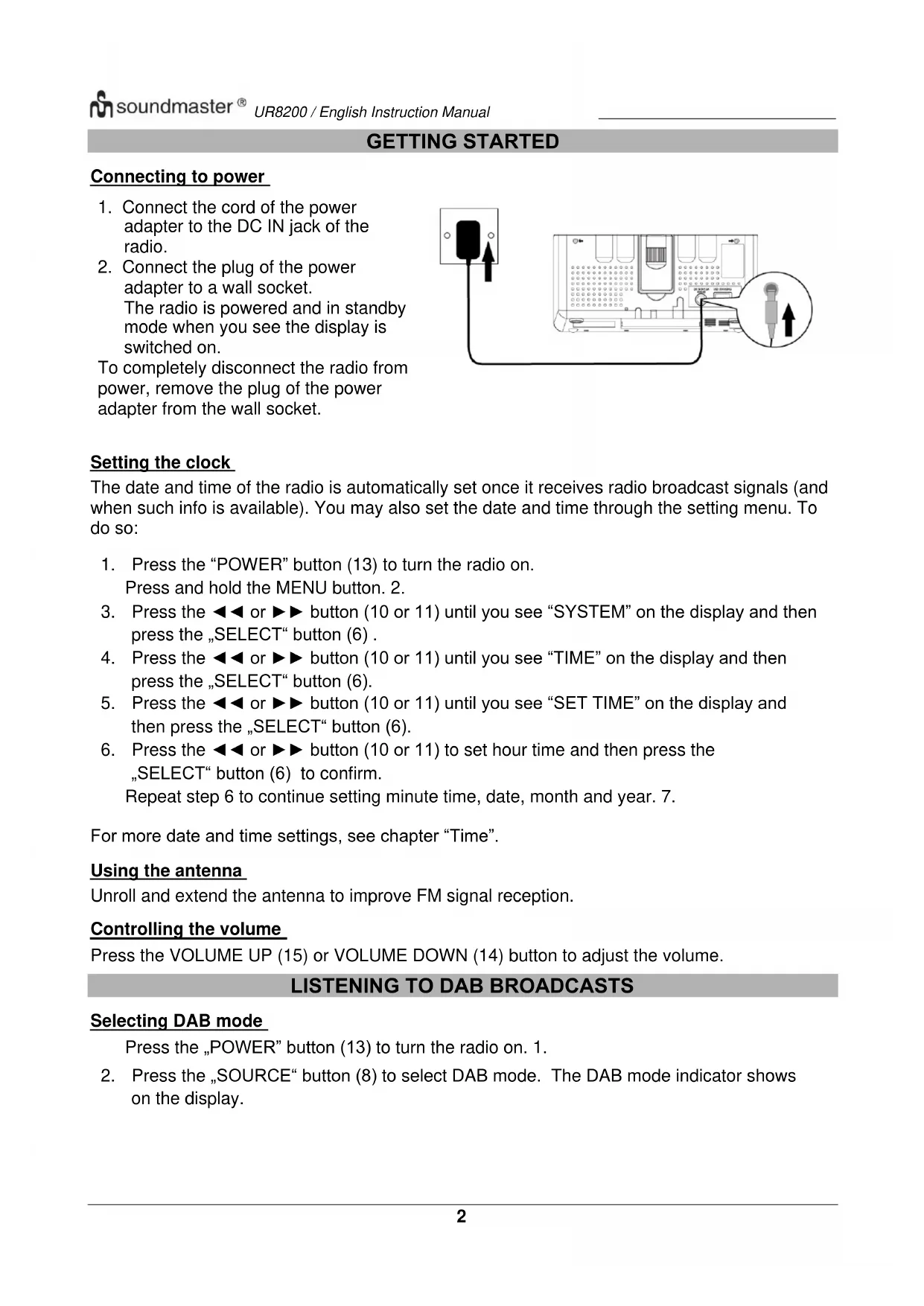
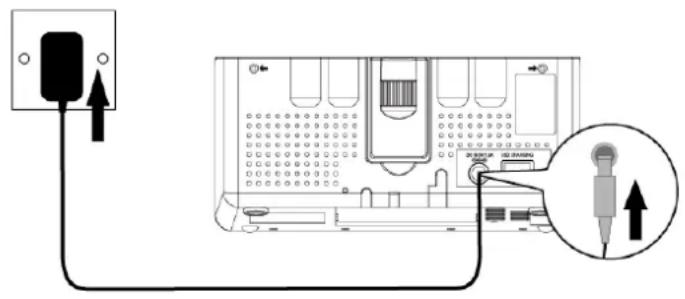
- Connect the cord of the power adapter to the DC IN jack of the radio.
- Connect the plug of the power adapter to a wall socket. The radio is powered and in standby mode when you see the display is switched on.
To completely disconnect the radio from power, remove the plug of the power adapter from the wall socket.
Setting the clock
The date and time of the radio is automatically set once it receives radio broadcast signals (and when such info is available). You may also set the date and time through the setting menu. To do so:
- Press the "POWER" button (13) to turn the radio on.
Press and hold the MENU button. 2. - Press the or button (10 or 11) until you see "SYSTEM" on the display and then press the "SELECT" button (6).
- Press the or button (10 or 11) until you see "TIME" on the display and then press the SELECT button (6).
- Press the or button (10 or 11) until you see "SET TIME" on the display and then press the SELECT button (6).
- Press the or button (10 or 11) to set hour time and then press the SELECT button (6) to confirm.
Repeat step 6 to continue setting minute time, date, month and year. 7.
For more date and time settings, see chapter "Time".
Using the antenna
Unroll and extend the antenna to improve FM signal reception.
Controlling the volume
Press the VOLUME UP (15) or VOLUME DOWN (14) button to adjust the volume.
LISTENING TO DAB BROADCASTS
Selecting DAB mode
Press the „POWER" button (13) to turn the radio on. 1.
- Press the „SOURCE“ button (8) to select DAB mode. The DAB mode indicator shows on the display.
Scanning for DAB stations
The first time you use the radio, or if the station list is empty, the radio automatically performs a station search. You may also perform a station search manually. To do so:
- In DAB mode, press the "SCAN" button (1) to activate the automatic station search.
The radio automatically stores radio stations with sufficient signal strength.
After the search is complete, the first stored station is broadcast automatically.
Tuning to a DAB station
In DAB mode, the or button (10 or 11) to cycle through the DAB stations in the station list.
Storing preset stations
You can store up to 10 DAB stations as preset stations.
Tune to a DAB station. 1.
- Press and hold the „PRESET" button (2) until "EMPTY 1" (or the next available preset number) shows on the display.
- Press the or button (10 or 11) to select a preset number.
Press the ,SELECT" button (6) to confirm. 4.
The DAB station is stored with the selected preset number. 5.
Repeat steps 1-4 to store more preset stations. 6.
- To tune to a preset station, press the „PRESET“ button (2) once, then press the or
▶▶ button (10 or 11) to cycle through the list of preset stations and then press the
"SELECT" button (6) to confirm the selection.
To change the DAB station assigned to a preset number, repeat steps 1 to 4 above to overwrite the existing DAB station.
Displaying DAB information
Press the "INFO" button (9) repeatedly to cycle through the following information (if available).
- Dynamic label segment (DLS)
- Signal strength
- Program type (PTY)
- Ensemble name
Frequency - Signal error rate
- Bitrate codec
Time - Date
Using the DAB menus
- In DAB mode, press and hold the "MENU" button (9) to access the DAB menus.
- Press the or button (10 or 11) to cycle through the below options.
FULL SCAN
- MANUAL
DRC
- PRUNE
SYSTEM
See below for details of each option.
Full scan
Full scan is used to perform a wide range search for DAB stations.
- Press the "SELECT" button (6) to start scanning for available DAB stations. After the scanning is complete, the first detected station is broadcast automatically.
Manual
Press the „SELECT“ button (6) to confirm the selection “MANUAL”. 1.
- Press the or button (10 or 11) to tune the frequency manually.
DRC (Dynamic Range Control)
DRC adds or removes a degree of compensation for the differences in the dynamic range between radio stations.
- Press the „SELECT“ button (6) to confirm the selection “DRC”.
-
Press the or button (10 or 11) to cycle through the below options.
-
DRC OFF: No compensation applied.
- DRC LOW: Medium compensation applied.
-
DRC HIGH: Maximum compensation applied.
-
Press the „SELECT“ button (6) to confirm the selected option.
Prune
This feature removes any stations that are in the list but have no service in your area.
- Press the „SELECT“ button (6) to confirm the selection “PRUNE”.
-
Press the or button (10 or 11) to cycle through the below options.
-
N: Return to the previous menu.
-
Y: Remove invalid stations from the station list.
-
Press the „SELECT“ button (6) to confirm the selected option.
System
See chapter "System menu" for details.
LISTENING TO FM BROADCASTS
Selecting FM mode
- Press the "POWER" button (13) to turn the radio on.
- Press the „SOURCE“ button (8) to select the FM mode. The FM mode indicator shows on the display.
Scanning for FM stations
- In FM mode, press the "SCAN" button (1) to activate the automatic search for the next available FM station.
- After a strong FM radio station is detected, the search stops. The FM radio station is broadcast.
Tuning the FM frequency
In FM mode, press the or button (10 or 11) to tune down or up the frequency.
- Once you have tuned up or down the frequency, press the "SCAN" button (1) to activate the automatic search for the next available FM station in the selected tune up or down direction.
Storing preset stations
You can store up to 10 FM stations as preset stations.
- Tune to an FM station.
- Press and hold the „PRESET“ button (2) until “EMPTY 1” (or the next available preset number) shows on the display.
- Press the or button (10 or 11) to select a preset number.
- Press the "SELECT" button (6) to confirm.
The FM station is stored with the selected preset number.
Repeat steps 1-4 to store more preset stations.
- To tune to a preset station, press the "PRESET" button (2) once, then press the or button (10 or 11) to cycle through the list of preset stations and then press the "SELECT" button (6) to confirm the selection.
To change the FM station assigned to a preset number, repeat steps 1 to 4 above to overwrite the existing FM station.
Displaying RDS information
Radio Data System (RDS) is a service that allows FM stations to transmit additional information. When you tune to an FM radio station that transmits RDS signals, the station name is displayed.
Press the "INFO" button (9) repeatedly to cycle through the following RDS information (if available).
Radio text
- Program type (such as NEWS, SPORT, POP M)
- Program service
Time
- Date
Using the FM menu
- In FM mode, press and hold the "MENU" button (9) to access the FM menus.
-
Press the or button (10 or 11) to cycle through the below options.
-
SCAN
SYSTEM
See below for details of each option.
Scan
- Press the „SELECT“ button (6) to confirm the selection “SCAN”.
-
Press the or button (10 or 11) to cycle through the below options.
-
"LOCAL": Search for local stations with strong signals only.
-
"DX": Search for all stations regardless of the signal strength.
-
Press the „SELECT“ button (6) to confirm the selected option.
System
See chapter "System menu" for details.
USING THE ALARMS
Setting alarms
The radio lets you have 2 alarm settings.
To set the alarm:
- Switch the unit on and press the "ALARM" button (7) to select between Alarm 1 and Alarm 2 and then press the SELECT button (6) to confirm the selection. The selected alarm 1 or alarm 2 icon flashes on the display.
- Press the or button (10 or 11) to set the hour time of the alarm and then press the "SELECT" button (6).
- Press the or button (10 or 11) to set the minute time of the alarm and then press the "SELECT" button (6).
- Press the or button (10 or 11) to cycle through the duration options and then press the "SELECT" button (6) to confirm the selection.
The duration defines the time before the radio returns to standby mode if the alarm is not deactivated. Duration options: 15, 30, 45, 60, 90 and 120 minutes.
- Press the or button (10 or 11) to cycle through the source options and then press the "SELECT" button (6) to confirm the selection.
The source defines the sound source of the alarm. Source options: DAB, FM and Buzzer. If DAB or FM is selected, you will also be prompted to select the last played station or one of the preset stations (if set) as the alarm.
- Press the or button (10 or 11) to cycle through the interval options and then press the "SELECT" button (6) to confirm the selection.
The interval defines on which days the alarm is active.
Interval options: Daily, Once, Weekends and Weekdays.
If "Once" is selected, you will also be prompted to set a specific date.
- Press the or button (10 or 11) to adjust the volume level and then press the "SELECT" button (6). This setting defines the sound volume of the alarm.
- Press the or button (10 or 11) to select alarm on or off and then press the "SELECT" button (6) to confirm the selection.
When the alarm setting is active, the corresponding alarm 1 or alarm 2 icon will show on the display.
At the set time, the alarm will sound. The volume will increase gradually until it reaches the set volume level. The corresponding alarm icon will also flash on the display.
Turning the alarms on or off in standby mode
- In standby mode, press the ALARM button once to show "ALARM CH" on the display. Then press the "ALARM" button (7) repeatedly to cycle through the alarm on or off settings. See the table below for details.
| Pressing ALARM | Alarm 1 | Alarm 2 |
| 1× | On | Off |
| 2× | Off | On |
| 3× | On | On |
| 4× | Off | Off |
- Press the „SELECT“ button (6) to confirm the setting.
When the alarm setting is active, the corresponding alarm 1 or alarm 2 icon will show on the display.
Deactivating a sounding alarm
Press the "POWER" button (13) or "ALARM" button (7) "to switch the radio to standby mode.
Snoopze
- To temporarily silence a sounding alarm, press the „SNOOZE“ button (12). To change the snooze period, press the „SNOOZE“ button (12) repeatedly (options: 5, 10, 15 or 30 minutes). The corresponding alarm icon flashes during the snooze period.
- The radio will return to standby mode during the snooze period. The alarm will sound again when the snooze period is over.
- To cancel the snooze period and the alarm, press the „POWER" button (13).
Sleep
This sleep function defines the duration of time before the radio switches itself off automatically.
- When the radio is switched on, press the "SLEEP" button (12) repeatedly to select a sleep period (Options: Off, 15, 30, 45, 60 and 90 minutes).
- Press the „SELECT“ button (6) to confirm the selection.
Once a sleep period is set, the sleep mode icon will show on the display. The radio will automatically switch off when the sleep period is over.
To cancel the sleep function, press the "POWER" button (13).
PROJECTOR
- Press the "PROJECTOR ON/OFF" button (4) to project the current clock time on a wall.
- Lift the projector up to adjust the angle of projection.
- Press the "180° FLIP" button(5) to flip the projected image.
- Turn the FOCUS dial (21) to adjust the image sharpness.
SYSTEM MENU
To access the system menu:
- Press and hold the „MENU“ button (9) in DAB or FM mode.
- Press the or button (10 or 11) to cycle through the options until you see "SYSTEM".
- Press the "SELECT" button (6) to confirm the selection "SYSTEM".
-
Press the or button (10 or 11) to cycle through the below options.
-
"TIME"
- "BACKLIGHT"
- "INACTIVE STANDBY"
- “RESET”
- "SW VER" (Software version)
See below for details of each option.
"Time"
- Press the "SELECT" button (6) to confirm the selection "TIME".
-
Press the or button (10 or 11) to cycle through the below options.
-
SET TIME
- "UPDATE"
- "12/24 HR"
- "SET DATE FORMAT"
See below for details of each option.
"Set Time/Date"
See chapter "Setting the clock".
"Update"
This setting defines how the radio updates the time and date information.
- Press the "SELECT" button (6) to confirm the selection "UPDATE".
-
Press the or button (10 or 11) to cycle through the below options.
-
"ANY": Update the time and date from any available signals.
- DAB: Update the time and date from DAB signals.
FM: Update the time and date from FM signals. -
"NONE": Do not update the time and date.
-
Press the "SELECT" button (6) to confirm the selected option.
"12/24 HR"
- Press the "SELECT" button (6) to confirm the selection "12/24 HR".
- Press the or button (10 or 11) to cycle through the below time format options.
12: Show the time in 12-hour format.
24: Show the time in 24-hour format.
- Press the "SELECT" button (6) to confirm the selected option.
"Set date format"
- Press the "SELECT" button (6) to confirm the selection "SET DATE FORMAT".
-
Press the or button (10 or 11) to cycle through the below date format options.
-
"DDMMYYYY" = DDMMYYYY
-
"MMDDYYYY" = MMDDYYYY
-
Press the "SELECT" button (6) to confirm the selected option.
"Backlight"
- Press the "SELECT" button (6) to confirm the selection "BACKLIGHT".
-
Press the or button (10 or 11) to cycle through the below options.
-
"TIMEOUT"
- "ON LEVEL"
- “DIM LEVEL”
See below for details of each option.
"Timeout"
This setting defines the duration of the backlight before it is dimmed.
- Press the SELECT button (6) to confirm the selection TIMEOUT".
-
Press the or button (10 or 11) to cycle through the below timeout options (in seconds).
-
"On" (the backlight does not dim)
- "10 SEC"
- "20 SEC"
- "30 SEC"
- "45 SEC"
- "60 SEC"
-
"90 SEC"
“120 SEC”
“180 SEC” -
Press the „SELECT“ button (6) to confirm the selected option.
"On level"
This setting defines the brightness level when the backlight is switched on.
- Press the "SELECT" button (6) to confirm the selection "ON LEVEL".
-
Press the or button (10 or 11) to cycle through the below brightness levels.
-
"LOW"
MEDIUM
"HIGH" -
Press the „SELECT“ button (6) to confirm the selected option.
"Dim level"
This setting defines the brightness level when the backlight is dimmed.
- Press the "SELECT" button (6) to confirm the selection "Dim level".
-
Press the or button (10 or 11) to cycle through the below brightness levels.
-
"LOW"
MEDIUM
"HIGH" -
Press the „SELECT“ button (6) to confirm the selected option.
"Inactive Standby"
This setting defines the duration of time before the radio switches itself on automatically.
- Press the "SELECT" button (6) to confirm the selection "INACTIVE STANDBY".
- Press the or button (10 or 11) to cycle through the below time options.
OFF
"2 HOUR"
4 HOUR
5 HOUR
"6 HOUR"
- Press the „SELECT“ button (6) to confirm the selected option.
"Reset"
This setting clears all user-defined settings and replaces them with the original default settings.
- Press the "SELECT" button (6) to confirm the selection "RESET".
- Press the or button (10 or 11) to select "Y" and then press the SELECT button (6) to confirm factory reset.
"Software Version (SW VER)"
This option displays the current software version.
Charging external device
Connect an external device (e.g. smartphone, mp3 player) via a USB cable (not provided) to the USB jack on the back of the radio for charging. The radio cannot access the contents in the connected external device.
Resetting the device
If the device does not respond or exhibits erratic or intermittent operations, you may have experienced an electrostatic discharge (ESD) or a power surge that triggered the internal microcontroller to shut down automatically. If this occurs, disconnect the AC power adaptor from the wall socket. Wait at least 3 minutes, and re-attach the AC cord to the wall outlet. The device is now reset, and you will need to set up the unit time and alarm again.
Care and maintenance
- Clean the radio with a soft damp cloth and let all parts dry completely after cleaning.
- Do not use any aggressive cleaners, brushes with nylon bristles, sharp or metallic cleaning utensils, knives, hard scrapers and the like. They could damage the surfaces of the radio.
- Do not immerse the radio in water and do not let water getting into the housing of the radio.
Storage
- Unplug the power adapter and clean the radio before storage.
- Always store the radio in a dry and clean place.
TECHNICAL SPECIFICATIONS
Tuner Range: FM: 87.5 - 108 MHz DAB
Number of preset radio stations: 10 (FM) / 10 (DAB)
AC power adaptor: Input: AC 100-240 V, 50/60Hz
Output: DC 5 V 1.5A

Features and specifications are subject to change without prior notice.
IMPORTER
- Dynamic label segment (DLS)
Signal strength - Program type (PTY)
- Ensemble name
Frequency - Signal error rate
- Bitrate codec
Time
Date
- Dynamic label segment (DLS)
Signal strength - Program type (PTY)
- Ensemble name
Frequency - Signal error rate
- Bitrate codec
Time - Date
Dynamic label segment (DLS)
Signal strength
Program type (PTY)
- Ensemble name
Frequency
Signal error rate
Bitrate codec
Time
Date
"Software Version (SW VER)"
- Dynamic label segment (DLS)
Signal strength - Program type (PTY)
- Ensemble name
Frequency - Signal error rate
- Bitrate codec
Time - Date
Bruke DAB-menyene
Søgning after DAB-stationer
- Dynamic label segment (DLS)
Signal strength - Program type (PTY)
- Ensemble name
Frequency - Signal error rate
- Bitrate codec
Time - Date
Sadan anvendes DAB-menuerne
-
Tryk og hold knappen "MENU" (9) i DAB-tilstand for at abne DAB-menuerne.
-
Tryk på knappen <aller (10 eller 11) for at bladre gennem følgende valgmuligheder.
FULL SCAN
- MANUAL
DRC
PRUNE
SYSTEM
Søgning after FM-stationer
Tryk på knappen "SCAN" (1) i FM-tilstand for at aktivere den automatiske sogning after neste tilgengelige FM-station.
- Når radioen finder en FM-station med stærkt signal, standser søgningen. Radioen stiller ind på FM-stationen.
Manuel indstilling pa en FM-frekvens
"Software Version (SW VER)"
Under dette punkt kan du se den aktuelle softwareversion.
