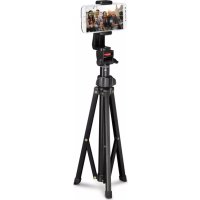
Rotary Smartphone 00004646 - Tripod HAMA - Free user manual and instructions
Find the device manual for free Rotary Smartphone 00004646 HAMA in PDF.


| Product type | Bluetooth remote shutter for tripod |
| Brand | Hama |
| Model | Rotary Smartphone 00004646 (BRS3) |
| Category | Tripod with Bluetooth remote |
| Dimensions (L x W x H) | 52 x 30 x 12 mm |
| Weight | Approx. 10 g |
| Power supply | 1 CR2032 battery (included) |
| Bluetooth version | 4.1, Class 2 |
| Maximum range | 10 m (without obstacles) |
| Estimated battery life | Up to 2000 shutter releases |
| Main functions | Remote shutter release via Bluetooth, compatibility iOS 6+ and Android 4.2.2+ |
| Package contents | BRS3 shutter, wrist strap, CR2032 battery, user manual |
| Care and cleaning | Clean with a slightly damp, lint-free cloth, without harsh detergents |
| Safety | Protect from moisture, heat and shocks. Batteries: observe polarity, do not recharge, keep out of reach of children |
| Spare parts and repairability | Replaceable CR2032 battery. No user repairs; contact a qualified technician |
| General information | Non-commercial domestic use. CE Declaration of Conformity available at www.hama.com |
Frequently Asked Questions - Rotary Smartphone 00004646 HAMA
User questions about Rotary Smartphone 00004646 HAMA
0 question about this device. Answer the ones you know or ask your own.
Ask a new question about this device
Download the instructions for your Tripod in PDF format for free! Find your manual Rotary Smartphone 00004646 - HAMA and take your electronic device back in hand. On this page are published all the documents necessary for the use of your device. Rotary Smartphone 00004646 by HAMA.
USER MANUAL Rotary Smartphone 00004646 HAMA
Bluetooth Remote Shutter BRS3
Operating Instructions
Bedienungsanleitung
Mode d'emploi
Controls and Displays (A)
- LED indicator light
- ON/OFF button/Release button
- Battery compartment cover
1. Explanation of Warning Symbols and Notes
Warning

This symbol is used to indicate safety instructions or to draw your attention to specific hazards and risks.
Note

This symbol is used to indicate additional information or important notes.
2. Package Contents
- Bluetooth Remote Shutter BRS3
1 hand strap
1 battery (CR2032)
These operating instructions
3. Safety Notes
- Protect the product from dirt, moisture and overheating, and only use it in a dry environment.
- Do not use the product in areas where the use of electronic devices is not permitted.
-
Do not use the product in moist environments and avoid splashes.
-
Do not drop the product and do not expose it to any major shocks.
- Dispose of packaging material immediately according to locally applicable regulations.
- Do not modify the product in any way. Doing so voids the warranty.
- Use the product for its intended purpose only.
- This product is intended for private, non-commercial use only.
- Do not use the product in the immediate vicinity of heaters or other heat sources or in direct sunlight.
- Keep this product, as all electrical products, out of the reach of children!
- Do not operate the product outside the power limits given in the specifications.
- Do not attempt to service or repair the product yourself. Leave any and all service work to qualified experts.
- Do not open the device or continue to operate it if it becomes damaged.
Warning - Batteries

- When inserting batteries, note the correct polarity (+ and - markings) and insert the batteries accordingly. Failure to do so could result in the batteries leaking or exploding.
- Only use batteries (or rechargeable batteries) that match the specified type.
- Before you insert the batteries, clean the battery contacts and the polar contacts.
- Do not allow children to change batteries without supervision.
- Do not mix old and new batteries or batteries of a different type or make.
- Remove the batteries from products that are not being used for an extended period (unless these are being kept ready for an emergency).
- Do not short-circuit batteries.
- Do not charge batteries.
- Do not throw batteries in a fire.
Warning - Batteries

- Keep batteries out of the reach of children.
- Never open, damage or swallow batteries or allow them to enter the environment. They can contain toxic, environmentally harmful heavy metals.
- Immediately remove and dispose of dead batteries from the product.
- Avoid storing, charging or using the device in extreme temperatures and extremely low atmospheric pressure (for example, at high altitudes).
Warning - Button cells

- Do not ingest battery, risk of burns due to dangerous substances.
- This product contains button cells. If swallowed, the button cell can cause severe internal burns within just two hours and lead to death.
- Keep new and used batteries out of the reach of children.
- If the battery compartment does not close securely, stop using the product and keep it out of the reach of children.
- If you think that batteries were swallowed or are in a part of the body, seek medical assistance immediately.
4. System Requirements
- The Bluetooth remote release supports Bluetooth-capable terminal devices such as smartphones and tablet PCs that run the iOS 6 or Android 4.2.2 (or newer) operating systems.
Note

- Note that support of the Bluetooth remote release depends on your terminal device
- Please refer to the operating instructions for the device you are using.
5. Getting Started (B)
-
Open the battery compartment by turning the battery compartment cover (1) anticlockwise using a coin.
-
Remove the battery compartment cover (2) and insert a CR2032 battery with the correct polarity.
-
Close the battery compartment by turning the battery compartment cover (3) clockwise using a coin.
6. Operation
Note

- The functions described in this section are only available for Bluetooth-capable terminal devices.
- Note that the maximum range for Bluetooth is 10 metres without obstacles such as walls, people, etc.
6.1. Bluetooth pairing (A)
Note - Pairing

- Make sure that your Bluetooth-capable terminal device is on and Bluetooth is activated.
- Make sure that your Bluetooth-capable terminal device is visible for other Bluetooth devices.
-
For more information, please refer to the operating instructions of your terminal device.
-
Press and hold the Power/Release button (2) for about 3 seconds to switch on the Bluetooth remote release. The LED indicator light (1) will begin to flash.
- This means the Bluetooth remote release is searching for a Bluetooth connection.
- Open the Bluetooth settings on your terminal device and wait until Hama BRS3 appears in the list of Bluetooth devices found.
- Select Hama BRS3 and wait until the Bluetooth remote release is listed as connected in the Bluetooth settings on your terminal device. The LED indicator light (1) goes out.
- You can now use the Bluetooth remote release.
6.2. Automatic Bluetooth connection (after successful pairing) (A)
Note

- Make sure that your Bluetooth-capable terminal device is on and Bluetooth is activated.
- Make sure that your Bluetooth-capable terminal device is visible for other Bluetooth devices.
-
For more information, please refer to the operating instructions of your terminal device.
-
The Bluetooth remote release remains connected to the Bluetooth device it was last paired with.
- Press and hold the Power/Release button (2) for about 3 seconds to switch on the Bluetooth remote release. The LED indicator light (1) will begin to flash.
- You can now use the Bluetooth remote release.
To switch off, press the Power / Trigger button (2) for approx. 5 seconds. The LED pilot light (1) goes out.
Note - Connection impaired

After the devices have been paired once, the connection is then established automatically. If the Bluetooth connection is not established automatically, check the following:
- Check the Bluetooth settings of your terminal device to see whether Hama BRS3 is connected. If not, repeat the steps listed under 6.1. Bluetooth pairing.
- Check whether obstacles are impairing the range. If so, move the devices closer together.
- The performance can also be affected by a weak battery. Change the battery if necessary.
- Only one Bluetooth device can be connected at a time. If there is an active connection to another device, deactivate this connection and try again.
6.3. Replacing the batteries
The battery has been designed to last for up to 2,000 shots, although this depends on the conditions of use.
If the Bluetooth remote release does not respond after you press the release button (2), or does not connect to the terminal device, etc., change the battery as follows: See (B).
7. Care and Maintenance
Only clean this product with a slightly damp, lint-free cloth and do not use aggressive cleaning agents. Make sure that water does not get into the product.
8. Warranty Disclaimer
Hama GmbH & Co. KG assumes no liability and provides no warranty for damage resulting from improper installation/mounting, improper use of the product or from failure to observe the operating instructions and/or safety notes.
9. Technical Data
| Bluetooth Remote Shutter | |
| Bluetooth version 4.1 | |
| Bluetooth Class Class 2 | |
| Range Max. 10 m | |
| Dimensions (W x L x H) 52 x 30 x 12 mm | |
| Weight Approx. 10 g | |
| Battery type CR2032 | |
10. Declaration of Conformity
CE Hereby, Hama GmbH & Co KG declares that the radio equipment type [00004639] is in compliance with Directive 2014/53/EU. The full text of the EU declaration of conformity is available at the following internet address: www.hama.com /00004639/Downloads.
| Frequency band(s) 2.402 GHz ~ 2.480 GHz | |
| Maximum radio-frequency power transmitted | 1.44 mW E.I.R.P |
Bluetooth Class Class 2
www.hama.com / 00004639 / Downloads.
internetes cimen: www.hama.com/00004639/Downloads.
com/00004639/Downloads.
Frekvençné pásmo / frekvençné pásma 2,402 GHz - 2,480 GHz
He IOnyckaIte 3aIrp3HEnn y3JeIy, 3aIuIaIte erO OT BlaIg n nepepeBa. He IcNoJIb3yIte u3JeIe npN BbICOKo BLaXHOCTn.
He npimehyTe B 3aIpeTHbIX 30Hax.
He nCnoJIb3yIte n3dJIne BO BJIaJHoi cpeJe, n36eRaIte 6pbI3r.
- I36eaiTe paenHnI3dJIInn He nOdbepraTe erO cnJIbHbIM Bn6paunm.
Cpa3y yTuJn3npyuTe ynaKOBouhBi MaTePnaI cOrJaCHO deNCTBryUOzIM MeCTHbIM npednncAHm NO yTuJn3aun.
He BnOcHTe B n3dJIne KOHCTpyKTHBhIe N3MeHEny. B pe3yJIbTaTe 3TOrO JIO6bIe rapaHTnHbIe O6a3aTeJIbCTBa TepraHOT CBOIO CNJy. - Icnojb3yIte n3dJIeNe NCKJIuHTeJIbHO B npEynCMOTpeHbIX ueJx.
- I3dJIeIe npedHa3NaueHo Toblko dJa DomaHHeRo HeKOMMepueckoro npIMeHHeNIA.
He nCnoJb3yIte n3JeJIe B HEnOcpeIcTBeHHoB 6JIu3OCTn OT CnCTeM OToJIeHn, npYnx NCTOChNKOB TeNJa IIN NOI pRmblIM COJHeUHbIM JyuaMn.
-Данhoeиздел,在КakИВсЕЗлЕктрпескппрборы,сл endуETbepeb ot dete! - При IncnoJb3ObaHn n3dJIeN He dOnyckaIte ppeBbIeHn IpeJeLa MoUHOCTn, yKa3aHHOro B TexHnuecknx xapaKTePrcNTkax.
He nbTaIteScb camocToaTeNbHO BblNoJIHraTb TexHnueCKoe 6cJyXnBaHne nn peMOHT n3dJIy. PemOH pa3peWaeTcra npOn3BOAnTb TOLbKO KbJIuΦnUpiPOBaHHOMy nepcoHaIy.
He BckpbBaIte n3dJIne H He IcNoIb3yIte erO npn HaJIuHn NOBpeXdEHH.
IpeDynpexKdene - 6aTapei

- Co6JIIOJaIe nOJIaRHOcTb 6aTapei (+n - ) .HecO6JIIOJeHne nOJIaRHOcTn MoKeT CTaTB npUHHoB B3PbIBa 6aTapei.
- Pa3pe7aetc npimHeTb aKKymyIaTopbI (nII 6aTaPeN) TOnbKO yKa3aHHOrToTnPa.
-Передзагузковбатарей поочтente Контakte.
IpeDynpexKdEne - 6aTapei

-ДeТЯМЗапpeшаetсяЗаменьбатapen6e3прсмOTpaВзрсыx.
He nCnoJIb3yIte pa3JIuHbIe TINbI INn HOBbie n CTapbIe 6aTapeN BmecTe.
Bcnyae 60bIoro nepepbBa B kCnIyatauyn ydaIte 6aTapeu n3 yctpoNCTBa (Kpome clyaeB, KOrDa u3dJIeNne npImHeAETcB KaueCTBe abapuHoro).
He 3akopauuBaIe KOHTaKtbl 6atapei.
He 3apjkaTe o6bUHbIe 6atapen.
He 6pocaiTe 6atapen B orOnb.
XpaHnTe 6aTapeB 6e3oPachOM MeCTe N He daBaIte nx DeTAM.
He otkpbyaIte, He pa3bnpaIte, He rIoTaIte n He yTuIN3npyIte 6batapeC 6bITOBbIM Mycopom. B 6batapex MoryT coepXaTbcra BpeHbIe TjXeJIbIe MeTaNbl.
- Исторынные батарни Немедельно Велиmaite и рибopa и утúnлзуп.
- Дiversities of the literature.
He xpaHnte, He 3apJxaiTe n He nCnoJIb3yIte yCTpOcTBO npn OueHb Hn3Knx I OueHb BbICOKNX TeMnepaTypax I OueHb Hn3KOM aTMocΦepHOM daBJIeHN (Ha npImep, Ha 60JIbIuX BbICOTax).
PpeDynpexKdEHe - 3JIeMeHbI nITaHnI

He nporjnatbIbaiTe baTapeKn, onaCHocTb OXORA OT ONaChbIX BeueCTB.
- ΘTOT npodukT coidepKNT 3JIeMeHTbI NITAHn. Pn nporlaTbIBaHn 3JIeMeHTa NITAHn yXe B TeueHne 2 YacOB BO3MOxHbI TjXeJIbIe OXoRn BHyTpEHnX OprAHOB, KOTOpblc MOrY T npINBeCTN K CMEPTN.
-ДерхиTe HOBbie N IcNoIb3OBAHHbIe 6aTapeKn BdaJIIn OT DeTei.
IpeynpexdeHne - 3JIeMeHTbI NITaHn

-
Ecni OTCek IJn 6aTapeek 6e3oNaCHO He 3aKpbIbAeTcra, 6OJIbWe He nOJIb3yITeCb H3dJIeHm IepXHTe erO BdaJIH OT dTei.
-
Ecni Bbl noo3peBaete, yTo 6aTapeKn 6blnn nporloueHbI nn HaxOJaTcB KaKoJ-ln6o qactn TeLa, HeMeJeHHO 6paTntEc7a MeiunHCKo NOMouhIO.
6.2. ABTOMaTnueckoe Bluetooth-coeHHeHne (noCle ycNeuHoro coprJKeHna) (A)
Приимechие

- Y6eIntecb B TOM, yTO OKOHeHoe yCTpoiCTBO C BO3MOXHOCTbIO COeINHeHnuepe3 Bluetooth BKJIouHeNo n Bluetooth-coeINHeHne yCTaHOBJeHo.
- Y6eIITecb B TOM, yTO OKOHeuHoe ycTpoNCTBO C BO3MOXHOCTbIO COeINHeHnuepe3 Bluetooth BKJIouHeNo n oTo6paXaETcJ dJa dpyrnx Bluetooth-yCTpoNCTB.
-
Co6IIOJaIte COOTBeTCTByIOUne yKa3aHnY pyKOBoIDCTBa nO 3KcIpyaTuIN BaWeFo OKOHeuHO rCTpOJCTBa.
-
Достацнонный сиуck заюраBluetooth octaetся поknioyeньm K Bluetooth-yctpoiCTBy, C KOTOpbIM Испльзовалсь В постен pa3.
-
Haxmnte u ydepxnBaTe KhoNky BKJIOueHnI NITaHn/ctycka 3aTBopa (2) ok. 3 cekynd, YTO6bI BKJIIOuHTb IINCTaHcUHOHbI Cnyck 3aTBopa Bluetooth. KoHTpOJIbHbI CBETOINOd (1) HauHHaET MIRaTb.
- Tenepb MoXHo IcNoJb3OBA Tb InCTaHcNHOHHbI cNyck 3aTBopa Bluetooth. JIy BbIKJIoueHnHaXMMTe KHOJKy BKJIoueHn NITaHn/Clycka 3aTBopa (2)u ydepxNBaIte ee haxaToI np6I. 5 cekyHd. KoHTpOJIbHbI cBeToIDoD (1) nOracHeT.
Yka3aHne coeHHeHne npepBaHo

Iocne ycneuHoro nepBnHoro coeHHeHn IocJeDyUOUsne coeHHeHnyCTaHaBJIbAIOrTa ABToMaTNoCeKn. EcIn Bluetooth-coeHHeHne He yCTaHOBnIOcbABToMaTNoCeKn, IpOBepbTe cJeDyUOUsne nyHkTbl.
B HacpoKax Bluetooth okoHeHoro yCTpoiCTBa npOBepbTe POKJIouHne Hama BRS3. Ecnn POKJIouHne OTCyTCTByeT, NOBtOpnTe DeICTBnY, yKa3aHHbIe B nyHKTe 6.1. «IepBnUHoe Bluetooth-coeINHeHne»
-
Пюверьт, HeT ЛпряТСВи, KOTOpь HeRaTNBHO BnЯIOT Ha ДальHOCtБ DeIcTBЯ. Ри НаИчи pa3MeCTnte yCtpoIcTBA 6Лnxe dpyr K dpyry.
-
Cna6bI 3apJd 6aTapeek TAKKe MoKet BJIaTb Ha MOUHocTb. Ppi Heo6xOAnMoCTn 3aMeHnte 6aTapeyn.
-
OndOBpeMeHHo MoKHO NOdkJIOUaTb TOnbKO OJHO Bluetooth-yCTpOInCTBO. PnHaJIuHn AKTNBHOrO CoeINHeHnC DpyHM yCTpOInCTBOM, OTKJIIOHTe eRO uYCTaHOBNTe CoeINHeHn E NOBTOPHO.
6.3. 3ameHa 6atapeek
IpeDynpexKdene - 6aTeepn

3aIbJIxNteJHOBHIMaBaIe 3a npaBnHOTo pa3noJoxHe Ha noJIOcNTe (HaIncn + n-) Ha 6atePnte n rN NOCTaBeTe NO cBoTBETnHaun. Pnp HeCpna3BaHe IMa ONaCHOCT OT N3TNUaHe IJN EKCnlo3nHa 6atePnte.
-Използваite само akумлatableн (илбateри), кOnTO cBoTBeTCTBaT Ha ПОСоченя TП.
- Ппеби постаяне на захоче Контактente на захоче и настаяне Контактente.
IpeynpekdeHne - 6aTeepn

He pa3pewaBaIte Ha deca da cMeHrT 6aTePnn 6e3 Hau3Op.
He cmeBaIte cTapn HOBn 6aTePnn, KaKTo n 6aTePnn OT pa3JIuYeH TnI nn npOn3BOJNTeI.
- OtrpaHbAite 6aTeepnte ot npOyKTn, KOtO HMa da ce n3NoJ3BaT 3a noIbJIro BpeMe (OCBeH aKO Te He ce IbPxat B rOTOBHOCT 3a CneWeH clya).
- He cBbP3BaIte 6aTepeHnTe HaKbCO.
- He 3apekdaIte 6aTepnIte.
- He xBbPJIaIe 6aTeepnIte B OfH.
CbXpaHЯBaIte 6aTeepnITe, HeIOCTbIIHn 3a Deua.
-Бatepinte HnKora He 6nBa Da 6bDaT OTBapHn, NOBpeXdaHn, TblTaHn nIIMn3XBpbJHn B npnpOaT. Te MoRat Da CbDbPjKAT TeKKn MeTaJIH, KOUTo CaOTPOBHn IIN ONaCH 3a OKoJHaT cpeJa.
MaxheTe OT npOyKta n He3a6abH0 n3XBpIeTe n3xa6eHnte 6aTePnN.
- I36raIte cBxaHHe, 3apeXdaHe n I3noJ3BaHe npn ekCTpeMHN TeMnepaTyprn nI3KJIIOHTeJIHO HnCKO HaJIraHe Ha Bb3dUxHa (KaTO HaIpIMep Ha rOJIEMN BnCOuHH).
IpeynpeXdHne - 6aTePn Tn "KoNue"

He norlbuae 6aepnnt, onacnoct ot n3raphe c onacn BeecTba.
ToBa n3dJIne cIbIbpxa 6aTePnn Tn "KOnue". Korato 6bJe noRbJHaT aBatepna Tn "KOnue", MoRaT Da Bb3HnKHaT TeXKn BbTpEuHN N3rApHn B paMKnte Ha 2 yaca. KOnTO da IOBeDnat Do Cmbpt.
- Na3ete HOBnte u ynoTpe6BaHnte 6aTePn daJeu ot deca.
IpeDynpexKdene - 6aTeepn Tn "Konue"

Korato otdeleHneTo 3a 6aTePn He ce 3aTbAp rdope, npeKpaTeTe H3noJ3BaHeTo Ha n3dJeJIneTo I rO dpBXTe DaJeU OT deua.
- Ako noIoO3npuTe, Ye e Bb3MoXHo Da e noIbJHaTa 6aTepyu Tlae IonoaHaHa B HraKaKBa YacT Ha TJIATO, NtBpcTe He3a6abHOb MeiunHcKa IOMoU.
4.Системн ИЗСКВань
6.2.ABToMaTuHa Bluetooth Bpb3ka (cIeI Beue n3BbPseHo cDBoaBaHe) (A)
yka3aHne

- YBepete ce, Ye BaSeTo noIbPkaaO Bluetooth KpaHNo yCTpoiCTBO e BKnIOueHO n ye Bluetooth eakTnBipan.
-
YBepete ce, Ye BaSeTo noIbpxaIo Bluetooth kpaHNo yCTpoiCTBO e BnIMo 3a npyrn Bluetooth yCTpoiCTBa.
3a Ta3n ue Cna3BaIte yka3aHnraTa OT pbKOBoDCTBOTo 3a ynoTpe6a Ha BaWeTo KpaHNO yCTPOINCTBO. -
ДостанцноНит спськ C Bluetooth octaba CBbp3aH C Bluetooth устpoиctBOTo, C KOeTo e 6nI NOJ3BaH NOcneHNo.
- HaTnchete n 3aIpbjxTe Power/3aIeIcTBaIuIyToH (2) 3a OK. 3 ceKyuHdN, 3a da BKJIouHTe IInCTaHcUOnHHN cIyCbK c Bluetooth. KoHTpOJIHHrT LED uHdNkaTop (1) 3aNoUBA da Mfra.
- Cera MoxeTe Na ɪЗПОЛЗВATE ДИСТаHцИОнHHЯ спськ c Bluetooth. 3a ɪЗКЛЮУВаHE, моля, наTNCSHe Power/3aДeиCTBaцИЯ 6уTOH (2) 3a OK. 5 ceKунД. KoHTpoJIHNЯr LED ИнДиКаTOp (1) ɪЗгacBA.
Yka3aHne-HapyuShaBpb3Ka

Cne ycneuho nbpBOHaaHNo CBbp3BaHe Bpb3KaTa ce N3BbPbWA aBTOMaTnUHO. Ako Bluetooth Bpb3KaTa He Ce BB3CTaHOBn aBTOMaTnUHO, npOBepTe CJeHNHTe TOUKN:
-
ПюверетeВBluetoothнастойпгукайноустpoиCTBO,Далп Hama BRS3 e CBp3aH.Ако He e,пobtopete CTbPknte,пocоуенВ6.1. ПьрвонаалноBluetoothсБьр3BaHe.
-
Пюверетe, далл пpenятctвия He влошаВAT oxbaT. Ако дa, pa3положete yстpoичБаТа по-блнзO endo Do npуro.
-ИЗTOош�нataбateрпсьшо може да NOВлneyеHaMOшнocтta.При hyжда cmeHeteбateрпета.
- EДНовременно винаги може за сбде CBbp3ано само eДно Bluetooth yCTpoIcTBO. Ако BCE оше стЕ akTNBHO CBbp3aH C ДPyгу уСТpoIcTBO,пpeКьсHTe Ta3И Bpb3Ka И след TOВа ONITaIte OTHOBO.
6.3.CmHa Ha 6aTeepn
Батугияа e педвидана за Вөрeme Ha уnotpe6a до 2000 занштваши, HO това Вөрeme за виси OT усювигая на Изпалзвае. Ако пи нахсянHa задиctваши 6утон (2) дістанционніт спүьк с BluTeoth He nokaxes peakuzn, He yctahOBЯВа Вьзka c Bluetooth краиноу устpoистBO и дp., smehete bateprina KaKTO слды: Вж. (B).
7. TexHHuecko obcnykBaHe n noDpBkka
m3JIbYBaTeJIHa MOUHOCT
1,44 mW E.I.R.P
5. Isletime alma (B)
hama.com/00004639/Downloads.
86652 Monheim/Germany
Service & Support

www.hama.com

+49 9091 502-0
D
GB
22
PAP
Raccolta Carta
The Bluetooth® word mark and logos are registered trademarks owned by Bluetooth SIG, Inc. and any use of such marks by Hama GmbH & Co KG is under license. Other trademarks and trade names are those of their respective owners.

All listed brands are trademarks of the corresponding companies.
Errors and omissions excepted, and subject to technical changes.
Our general terms of delivery and payment are applied.

- Bluetooth Remote Shutter BRS3
- Controls and Displays (A)
- Explanation of Warning Symbols and Notes
- Warning
- Note
- Package Contents
- Safety Notes
- Warning - Batteries
- Warning - Button cells
- System Requirements
- Getting Started (B)
- Operation
- Bluetooth pairing (A)
- Note - Pairing
- Automatic Bluetooth connection (after successful pairing) (A)
- Note - Connection impaired
- Replacing the batteries
- Care and Maintenance
- Warranty Disclaimer
- Technical Data
- Declaration of Conformity
- IpeDynpexKdene - 6aTapei
- PpeDynpexKdEHe - 3JIeMeHbI nITaHnI
- IpeynpexdeHne - 3JIeMeHTbI NITaHn
- ABTOMaTnueckoe Bluetooth-coeHHeHne (noCle ycNeuHoro coprJKeHna) (A)
- Приимechие
- Yka3aHne coeHHeHne npepBaHo
- 3ameHa 6atapeek
- IpeDynpexKdene - 6aTeepn
- IpeynpekdeHne - 6aTeepn
- IpeynpeXdHne - 6aTePn Tn "KoNue"
- IpeDynpexKdene - 6aTeepn Tn "Konue"
- 4.Системн ИЗСКВань
- 6.2.ABToMaTuHa Bluetooth Bpb3ka (cIeI Beue n3BbPseHo cDBoaBaHe) (A)
- yka3aHne
- Yka3aHne-HapyuShaBpb3Ka
- 6.3.CmHa Ha 6aTeepn
- TexHHuecko obcnykBaHe n noDpBkka
- Isletime alma (B)
- Monheim/Germany
- Service & Support
Brand : HAMA
Model : Rotary Smartphone 00004646
Category : Tripod