AKB90WIFI - Audio Amplifier Monacor - Free user manual and instructions
Find the device manual for free AKB90WIFI Monacor in PDF.


User questions about AKB90WIFI Monacor
0 question about this device. Answer the ones you know or ask your own.
Ask a new question about this device
Download the instructions for your Audio Amplifier in PDF format for free! Find your manual AKB90WIFI - Monacor and take your electronic device back in hand. On this page are published all the documents necessary for the use of your device. AKB90WIFI by Monacor.
USER MANUAL AKB90WIFI Monacor
text_image
WiFi-HIFI Pilot Fusion System VAST W100.00 W100.00 W100.00 W100.00 W100.00 W100.00 W100.00 W100.00 W100.00 W100.00 W100.00 W100.00 W100.00 W154.723 W154.723 W154.723 W154.723 W154.723 W154.723 W154.723 W154.723 W154.723 W154.723 W154.723 W154.723AKB-90WIFI
INSTALLATION and INSTRUCTION MANUAL
NOTICE D'INSTALLATION et D'UTILISATION
English ...... Page 8
Français ...... Page 12
Audioformate: ..... MP3, WMA, AAC, AAC+, ALAC, FLAC, APE, WAV
in Stand-by: ..... 200 mA
These instructions are intended for users with basic knowledge of wireless network technology. Please read these instructions carefully prior to operating the amplifier and keep them for later use.
1 Applications
The amplifier AKB-90WIFI is designed to reproduce music in hi-fi quality via a wireless local network (WLAN). A DLNA-enabled audio player installed on a smartphone, tablet PC, computer etc. is required as a player.
Some DLNA audio players provide a multi-room option: an AKB-90WIFI is installed in different rooms; using a DLNA player, different pieces of music can be transmitted to the individual amplifiers.
DLNA = Digital Living Network Alliance International organisation of computer, mobile phone and consumer product manufacturers that have agreed on a common standard for digital data transmission and that work constantly on its further development
2 Control Elements
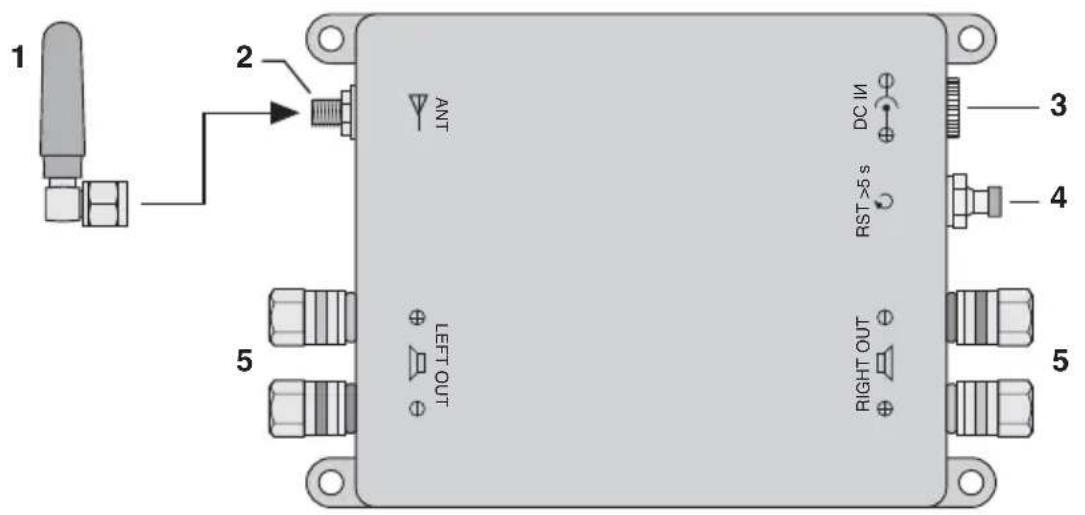
1 Antenna
2 Antenna jack ANT
3 Jack DC IN for the power supply unit provided
4 Pushbutton RST
press briefly:
to connect the amplifier to a WLAN
router
keep pressed for at least 5 seconds:
to reset the amplifier to its factory set-
tings
5 Speaker connections
(speaker impedance: 4 Ω min.)
3 Safety Notes
The unit (amplifier with power supply unit) corresponds to all relevant directives of the EU and is therefore marked with C€.
WARNING

The power supply unit uses dangerous mains voltage. Leave servicing to skilled personnel only. Inexpert handling of the unit may result in electric shock.
- The unit is suitable for indoor use only. Protect it against dripping water and splash water, high air humidity and heat (admissible ambient temperature range: 0–40 °C).
- Do not place any vessel filled with liquid on the unit, e. g. a drinking glass.
-
Immediately disconnect the mains plug from the socket
-
if the amplifier, the power supply unit or the mains cable is visibly damaged,
- if a defect might have occurred after the unit was dropped or suffered a similar accident,
- if malfunctions occur.
In any case the unit must be repaired by skilled personnel.
- Never pull the mains cable to disconnect the mains plug from the socket; always seize the plug.
- For cleaning only use a dry, soft cloth; never use water or chemicals.
- No guarantee claims for the unit and no liability for any resulting personal damage or material damage will be accepted if the unit is used for other purposes than originally intended, if it is not correctly installed or operated or if it is not repaired in an expert way.

If the unit is to be put out of operation definitively, take it to a local recycling plant for a disposal which is not harmful to the environment.
3.1 Conformity and approval
Herewith, MONACOR INTERNATIONAL declare that the unit AKB-90WIFI is in accordance with the basic requirements and the other relevant regulations of the directive 2014/53/EU. The declaration of conformity is available on request from MONACOR INTERNATIONAL.
The unit operates in the 2.4 GHz range and is generally approved for operation in EU and EFTA countries and is licence-free.
4 Installation
1) Place the amplifier at a suitable location and, if required, fasten it using screws.
2) Insert the antenna (1) into the jack ANT (2); then tighten the antenna and place it in a vertical position.
3) Connect the speakers to the jacks ☐(5) [Right OUT for the right channel, LEFT OUT for the left channel].
To obtain the highest output power, connect speakers with an impedance of 4 . It is also possible to connect speakers with higher impedance; this, however, will reduce the output power accordingly.
4) Finally, connect the power supply unit to the jack DC IN (3) and the mains plug to a mains socket (230 V\~ / 50 Hz). The amplifier will be switched on.
When the amplifier is not used for a longer period of time, disconnect the power supply unit from the mains socket to save power.
5 Operation
1) At the player (smartphone, tablet PC, computer, etc.), switch on the WLAN function.
2) Establish the connection to the amplifier. On the player, the amplifier will be indicated by "WiFi-HiFi_" and four digits. Each amplifier has a digit sequence of its own so that it is possible to select individual amplifiers when multiple amplifiers are used.
3) Start the DLNA player.
5.1 Configuring the AKB-90WIFI
The amplifier can be configured by means of the integrated web server. Enter the IP address of the AKB-90WIFI in an Internet browser: 10.10.10.254
It is, for example, possible to change the shown name "WiFi-HiFi_xxxx" and the menu language of the web server or to install the latest firmware.
To reset the amplifier to its factory settings, keep the pushbutton RST (4) pressed for at least 5 seconds.
5.2 Connection to a WLAN router
With the WPS function (WiFi Protected Setup), the AKB-90WIFI can be easily connected to a WLAN router provided that the router supports WPS: Briefly press the push-button RST (4). The AKB-90WIFI will automatically transfer the data required to a WLAN router in the reception range.
As an alternative, use the web user interface of the AKB-90WIFI to connect it manually to a router, e. g. when WPS is not supported by the router.
6 Specifications
Amplifier
RMS output power: ... 2 × 45 W at 4 Ω
Amplifier class: ..... class D
Speaker impedance: .. 4 Ω min.
Frequency range: ..... 20 – 20 000 Hz
S / N ratio: ....> 98 dB
Data transmission
WLAN standard: ..... 802.11 B / G / N, 2.4 GHz
Range: ....... approx. 110 m without obstacles in the transmission path
Supported
audio formats: ..... MP3, WMA, AAC, AAC+, ALAC, FLAC, APE, WAV
Network protocols: .... TCP/IP, UDP, HTTP, UPNP
Audio protocols: ..... DLNA, AirPlay, QPlay
SSID: WiFi-HiFi_xxxx
IP address: 10.10.10.254
General
Power supply: ..... 19 V..., via power supply unit provided and connected to 230V\~/50Hz
Power consumption
in standby mode: ..... 200 mA
Ambient temperature: . 0 – 40 °C
Dimensions: 170 × 34 × 100 mm
Weight: 750 g
Subject to technical modification.
text_image
1 2 ANT DC I/M RST>5 s LEFT OUT RIGHT OUT 3 4 5in stand-by: ..... 200 mA
Temperatura d'esercizio: 0 – 40 °C
Dimensioni: 170 × 34 × 100 mm
Peso: 750 g