USER MANUAL KX-TGA641EX PANASONIC
TGA641EX(ex).book Page 1 Friday, February 13, 2009 5:35 PM

Panasonic
KX-TGA641EX
Installation Manual
Bedienungsanleitung
Manuel installateur
Additional Digital Cordless Handset
TGA641EX(ex).book Page 3 Friday, February 13, 2009 5:35 PM
Contents/Inhalt/Table des matieres/Inhoud/Innehäll/ Innholdsfortegnelse/Sisällysluettelo/Indice/Περιεχόμενα/ Indholdsfortegnelse/Contenido/Indice/çiniekiler
English 4
Deutsch 9
Francais 14
Nederland 19
Svenska 24
Norsk 29
Suomi 34
Portugués 39
Elambdaiká 44
Dansk. 49
Espanol 54
Italiano 59
Türkce 64
English
PLEASE READ BEFORE USE AND SAVE
This unit is an additional handset compatible with the following series of Panasonic Digital Cordless Phone: KX-TG6401/KX-TG6411/KX-TG6421/ KX-TG6431/KX-TG6451/KX-TG6461
You must register this handset with your base unit before it can be used. This installation manual describes only the steps needed to register and begin using the handset. Please read the base unit's operating instructions for further details.
Supplied accessories
Charger 1
AC adaptor (PQLV219CE) 1
Rechargeable batteries ^*1 2
(HHR-55AAAB or N4DHYYY00005)
Handset cover*2 1
1 Please read the base unit's operating instructions for replacement battery information.
2 The handset cover comes attached to the handset.
Note:
- Please read the base unit's operating instructions for additional/replacement accessories.
- This equipment is designed for use in Germany, Spain, Portugal, Italy, Norway, Sweden, Denmark, Finland, France, Austria, Belgium, Netherlands, Greece, Switzerland, and Turkey.
- In the event of problems, you should contact your equipment supplier in the first instance.
- For use in other countries, please contact your equipment supplier.
Setting up
Connection
- Use only the supplied Panasonic AC adaptor PQLV219CE.
- The AC adaptor must remain connected at all times. (It is normal for the adaptor to feel warm during use.)
Battery installation/Battery charge
When the language selection is displayed after installing the batteries for the first time, you can select your desired language.
【V】/【A】: Select your desired language. → OK → 【×○】
Important:
- Use the supplied rechargeable batteries. For replacement, we recommend using the Panasonic rechargeable batteries noted in the base unit's operating instructions.
- Wipe the battery ends (, ) with a dry cloth.
- Avoid touching the battery ends ( ,) or the unit contacts.
- Confirm correct polarities (, ) .
- USE ONLY Ni-MH batteries AAA (R03) size.
- Do NOT use Alkaline/Manganese/Ni-Cd batteries.
Place the handset on the charger for about 7 hours before initial use.
Note:
- The handset display may show "Please wait for 1 minute." when the handset is placed on the charger if it is not registered to the base unit.
- If the batteries are fully charged, but the operating time seems to be shorter, clean the battery ends ( ,) and the charge contacts with a dry cloth and charge again.
Registering the handset to the base unit
Ensure that the handset is switched on. If it is not on, press and hold [% 0] for few seconds to turn the handset on.
1 Handset:
Lift the handset and press [% 0]
2 Base unit:
Proceed with the operation for your model.
KX-TG6401/KX-TG6411
Press and hold []) for about 5 seconds. (No registration tone)
KX-TG6421/KX-TG6431/KX-TG6451/KX-TG6461
Press and hold [] for about 5 seconds, until the registration tone sounds.
- If all registered handsets start ringing, press the same button to stop. Then repeat this step.
3 Handset:
Place the handset on the base unit.
- Continue the operation even when the handset display shows
"Please wait for 1 minute."

Proceed wi
- Continue the operation even when the handset display shows "Please wait for 1 minute."
5
4 With the handset still on the base unit, wait until a confirmation tone sounds and stops flashing.
Note:
- If an error tone sounds, or if is still flashing, register the handset according to the base unit's operating instructions.
- The KX-TG6401/KX-TG6411/KX-TG6451 does not feature an answering system.
- Answering system features are available only when this handset is registered to the KX-TG6421/KX-TG6431/KX-TG6461.
For your safety
To prevent severe injury and loss of life/property, read this section carefully before using the product to ensure proper and safe operation of your product.
WARNING
Power connection
- Completely insert the AC adaptor/power plug into the power outlet. Failure to do so may cause electric shock and/or excessive heat resulting in a fire.
- Regularly remove any dust, etc. from the AC adaptor/power plug by pulling it from the power outlet, then wiping with a dry cloth. Accumulated dust may cause an insulation defect from moisture, etc. resulting in a fire.
- Unplug the product from power outlets if it emits smoke, an abnormal smell, or makes an unusual noise. These conditions can cause fire or electric shock. Confirm that smoke has stopped emitting and contact an authorised service centre.
Installation
- To prevent the risk of fire or electrical shock, do not expose the product to rain or any type of moisture.
- Do not place or use this product near automatically controlled devices such as automatic doors and fire alarms. Radio waves emitted from this product may cause such devices to malfunction resulting in an accident.
CAUTION
Installation and relocation
- The AC adaptor is used as the main disconnect device. Ensure that the AC outlet is installed near the product and is easily accessible.
Battery
- We recommend using the supplied batteries or additional/replacement batteries noted in the base unit's operating instructions for replacement battery information. USE ONLY rechargeable Ni-MH batteries AAA (R03) size.
- Do not mix old and new batteries.
- Do not open or mutilate the batteries. Released electrolyte from the batteries is corrosive and may cause burns or injury to the eyes or skin. The electrolyte is toxic and may be harmful if swallowed.
- Exercise care when handling the batteries. Do not allow conductive materials such as rings, brackets, or keys to touch the batteries, otherwise a short circuit may cause the batteries and/or the conductive material to overheat and cause burns.
6
TGA641EX(ex).book Page 7 Friday, February 13, 2009 5:35 PM
- Charge the batteries provided with or identified for use with this product only, in accordance with the instructions and limitations specified in this manual.
- Only use a compatible base unit (or charger) to charge the batteries. Do not tamper with the base unit (or charger). Failure to follow these instructions may cause the batteries to swell or explode.
- Operating the product near electrical appliances may cause interference. Move away from the electrical appliances.
- Use only the power cord and batteries indicated in this manual. Do not dispose of batteries in a fire. They may explode. Check with local codes for possible special disposal instructions.
Routine care
-
Wipe the outer surface of the product with a soft moist cloth.
-
Do not use benzine, thinner, or any abrasive powder.
Notice for product disposal, transfer, or return
- This product can store your private/confidential information. To protect your privacy/ confidentiality, we recommend that you erase information such as phonebook or caller list entries from the memory before you dispose of, transfer, or return the product.
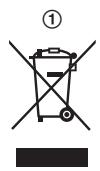
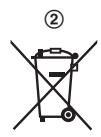
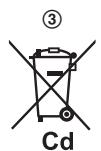
These symbols (1, 2, 3) on the products, packaging, and/or accompanying documents mean that used electrical and electronic products and batteries should not be mixed with general household waste. For proper treatment, recovery and recycling of old products and used batteries, please take them to applicable collection points, in accordance with your national
legislation and the Directives 2002/96/EC and 2006/66/EC.
By disposing of these products and batteries correctly, you will help to save valuable resources and prevent any potential negative effects on human health and the environment which could otherwise arise from inappropriate waste handling.
For more information about collection and recycling of old products and batteries, please contact your local municipality, your waste disposal service or the point of sale where you purchased the items.
Penalties may be applicable for incorrect disposal of this waste, in accordance with national legislation.
For business users in the European Union
If you wish to discard electrical and electronic equipment, please contact your dealer or supplier for further information.
Information on Disposal in other Countries outside the European Union
These symbols (①, ②, ③) are only valid in the European Union. If you wish to discard these items, please contact your local authorities or dealer and ask for the correct method of disposal.
641EX(ex) .book Page 8 Friday, February 13, 2009 5:35 PM
Note for the battery symbol
This symbol (②) might be used in combination with a chemical symbol (③). In this case it complies with the requirement set by the Directive for the chemical involved.

Deutsch
KX-TG6421/KX-TG6431/KX-TG6451/KX-TG6461
[1] 4 Mal → OK
KX-TG6421/KX-TG6431/KX-TG6451/KX-TG6461
KX-TG6421/KX-TG6431/KX-TG6451/KX-TG6461
KX-TG6421/KX-TG6431/KX-TG6451/KX-TG6461
Laddare 1
Natadapter (PQLV219CE) 1
Upladdningsbara batterier*1 .........2 (HHR-55AAAB ........ N4DHYYYY00005)
Lock till handenhet*2 1
KX-TG6421/KX-TG6431/KX-TG6451/KX-TG6461
【】4 gänger → OK
3 [v] 2 gänger → OK 2 gänger → [v]/[▲]: Välj önskat språk. → OK → [x0]
KX-TG6421/KX-TG6431/KX-TG6451/KX-TG6461
Lader 1
AC-adapter (PQLV219CE) 1
Opplabare bacterier*1 2 (HHR-55AAAB eller N4DHYYYY00005)
Handsettdeksel2 1
KX-TG6421/KX-TG6431/KX-TG641/KX-TG6461
[1] 4 ganger → OK
3 [v] 2 ganger OK 2 ganger [v]/[A]: Velg ønsket sprak. OK → [x0]
Registrehandsettettilbaseenheten
KX-TG6421/KX-TG6431/KX-TG6451/KX-TG6461
KX-TG6421/KX-TG6431/KX-TG6451/KX-TG6461
[4] 4 kertaa OK
KX-TG6421/KX-TG6431/KX-TG6451/KX-TG6461
KX-TG6421/KX-TG6431/KX-TG6451/KX-TG6461
KX-TG6421/KX-TG6431/KX-TG6451/KX-TG6461
■KX-TG6421/KX-TG6431/KX-TG6451/KX-TG6461
【4】 4 0k
■KX-TG6401/KX-TG6411
IIeOte KAI KpatnOte TATnJeuVo To [O]Yia TepiTou 5 oetepoAeTTa. (XwpiTóvo KATAxWpionc)
■KX-TG6421/KX-TG6431/KX-TG6451/KX-TG6461
IIeOte kai kpatnoTe TATnmuEvo To [1] yia TEPiTou 5 eutepoAETTia, mexpi va akouote i noxoc kataxwipionc.
-Av apxioovu v kaouoviciou ov ola ta kataxwipiaeva akouotiká, triote gava to ibio pIAnktpo yia va otauatnoouv. ttn ouvexia, eTavaaβete to ibio biμa.
3 AKOUOTIKO:
TToTeIeTTo aKouTiko Otn movadba Baonc.
-Mn diakotte Tn aeitoupyia Tns ouakeunacokua kai av oto akouotiko Emuaviote i nevdoiig "IepieveTe y1 1 eento."
4 Me To akouotiko akoum ot movaba bao, TepiieveTe va akouoet Eav nxo EtniBepaiowcn kai n Evoeiŋ Y va oataaenei va avaooohnei.
Σημειωη:
Eavakouotei tovoc apalatoacn av n evdeigen Y ouvexoeia va avaaboane, kataxwpioe tn ouakeun ouupwua me ts onyies xpangns movadacbaans.
H movadkx-TG6401/KX-TG6411/KX-TG6451 8v diaTei Leitoupyia autou tnaepwntn.
Oi leitoupyes tou autouatou nleepwnt eivai diaeoiuec movo av to akouotiko eivai kataxwipaevo oTo KX-TG6421/KX-TG6431/KX-TG6461.
Lysnetadapter (PQLV219CE)...... 1
Genopladelige batterier*1 2
(HHR-55AAAB ether
N4DHYYYY00005)
KX-TG6421/KX-TG6431/KX-TG6451/KX-TG6461
Hold [e] nede i ca. 5 sekunder, til registrareringstonen lyder.
KX-TG6421/KX-TG6431/KX-TG6451/KX-TG6461
KX-TG6421/KX-TG6431/KX-TG6451/KX-TG6461
TGA641EX(ex).book Page 61 Friday, February 13, 2009 5:35 PM
2 Unità base:
KX-TG6421/KX-TG6431/KX-TG6451/KX-TG6461
- Panasonic Communications Co., Ltd. declares that this equipment is in compliance with the essential requirements and other relevant provisions of Radio & Telecommunications Terminal Equipment (R&TTE) Directive 1999/5/EC.
Declarations of Conformity for the relevant Panasonic products described in this manual are available for download by visiting: http://www.doc.panasonic.de
TGA641EX(ex).book Page 70 Friday, February 13, 2009 5:35 PM
Samsvarserklaring:
Panasonic Testing Centre
Panasonic Marketing Europe GmbH
Winsberging 15, 22525 Hamburg, Germany
71
641EX(ex) .book Page 72 Friday, February 13, 2009 5:35 PM
Sales department/Vertrieb/Service des ventes/Klantenservice/Forsäljning/ Importör/Maahantuonti/Departamento Comercial/Tuŋμα Πωλησεων/ Salgskontor/Departamento de ventas/Ufficio Vendite/Satı bolümü
Österreich
Panasonic Austria
Leonard Bernstein Strasse 10,
1220 Wien
Rufnummer der Informationshotline:
0810-10 18 00
Branch of Panasonic Marketing
Europe GmbH
Brusselsestenweg 502
1731 ZELLIK
Tel: 070-223011
www.panasonic.be
Suomi
Panasonic Finland
Branch of Panasonic Nordic AB
Sinimäentie 8 B
02630 Espoo
http://www.panasonic.fi
France
Panasonic France S.A.
1-3, avenue François Mitterrand
93218 Saint-Denis La Plaine
Cedex France
Branch of Panasonic Nordic AB
Fabriksparken 16
DK-2600
Glostrup
http://www.panasonic.dk
Eaδαs
INTERTECH 5A
IE^^ TExVohoyies
Intertech S.A.
Avitnpoos
Kevtpika Tpaepia
Panafax: 210.9648.588
e-mail: info@intertech.gr
YtokataoTma
Bopεiας Ελλδας
K.Kapaqavn11,54638
OEZsAIONIKH
Tηλ. Kévτρο: 2310.245.840-3
Panafax: 2310.968.083
e-mail: intertech-th@intertech.gr
www.panasonic.gr
Italiana
Panasonic Italia S.p.a.
Via Lucini, 19 - 20125 MILANO
http://www.panasonic.it
E-Care Repair Services
Fruitweg 34
2321 DH Leiden
Tel: 071-5723 439
Fax: 071-5323 438
Homepage: www.panasonic.nl
E-mail: info-unit@e-care.nl
Telefoonnummer klantenservice Nr.:
073-6402802
Norge
Panasonic Norge
Branch of Panasonic Nordic AB
Skarersletta 50, P.O. BOX 324
N-1471 Skarer
http://www.panasonic.no
73
641EX(ex) .book Page 74 Friday, February 13, 2009 5:35 PM
Portugal
Prosonic S.A.
Service Centre & Support
Littauerboden 1
CH-6014 Littau-Luzern
Support - Hotline
0900809809(CHF2.15/min.)
www.panasonic.ch
Suisse
Service après-venture:
John Lay Electronics AG
Service Centre & Support
Littauerboden 1
CH-6014 Littau-Lucerne
Support - Hotline
0900 809 809 (CHF 2.15/min.)
www.panasonic.ch
Swizzera
servizio clientela:
John Lay Electronics AG
Service Centre & Support
Littauerboden 1
CH-6014 Littau-Lucerna
Support - Hotline
0900 809 809 (CHF 2.15/min.)
www.panasonic.ch
641EX(ex) .book Page 75 Friday, February 13, 2009 5:35 PM
Sverige
Panasonic Nordic AB
Ellipsvagen 12, SE-141 75
Kungens Kurva, Stockholm
http://www.panasonic.se
South Africa
Panasonic Systems Company
P.O.Box 1711,Halfway House
1685, SOUTH AFRICA
Customer Support: 086 11 77 777
Homepage: www.panasonic.co.za
E-mail: info@panasonic.co.za
Türkiye
ithalatciirma:
tekofaks
ELEKTRONIK SANAYI MUMESSILLIK VE TIC. A.S.
Kagithane Cad. Sevilen Sok. No:
65 Cagliayan - ISTANBUL
Tel: (0212) 210 69 00
Faks: (0212) 222 77 26
Müsteri Hizmetleri Yardim Hatti Tel No.:
4443334
75
641EX(ex) .book Page 76 Friday, February 13, 2009 5:35 PM
€0682
Panasonic Communications Co., Ltd.
1-62, 4-chome, Minoshima, Hakata-ku, Fukuoka 812-8531, Japan
© Panasonic Communications Co., Ltd. 2009
PNQX1697ZB DC0109DF1029