
KX-TS710EX - Phone PANASONIC - Free user manual and instructions
Find the device manual for free KX-TS710EX PANASONIC in PDF.
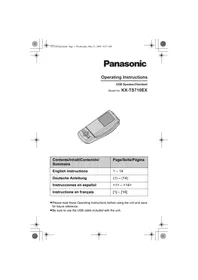


| Product Type | USB handset/speakerphone for Internet calls and conferences |
| Brand | Panasonic |
| Model | KX-TS710EX |
| Dimensions (H × W × D) | Approximately 119 mm × 47 mm × 43 mm |
| Weight | Approximately 85 g |
| Power supply | Via included shielded USB cable; consumption: standby 0.47 W, maximum 1.4 W |
| Interface | USB 1.1 |
| Compatible operating systems | Windows XP, Windows Vista, Mac OS X v10.3.9 Panther |
| Main functions | Speaker, handset (earpiece), microphone with mute, 6-level volume adjustment, status indicator (red/blue) |
| Care and cleaning | Soft, dry cloth; do not use benzene, thinner, or abrasive powder |
| Operating conditions | Temperature: 5°C to 40°C; relative humidity: 20% to 80% |
| Warranty (France) | 12 months |
| Included accessories | Shielded USB cable |
Frequently Asked Questions - KX-TS710EX PANASONIC
User questions about KX-TS710EX PANASONIC
0 question about this device. Answer the ones you know or ask your own.
Ask a new question about this device
Download the instructions for your Phone in PDF format for free! Find your manual KX-TS710EX - PANASONIC and take your electronic device back in hand. On this page are published all the documents necessary for the use of your device. KX-TS710EX by PANASONIC.
USER MANUAL KX-TS710EX PANASONIC
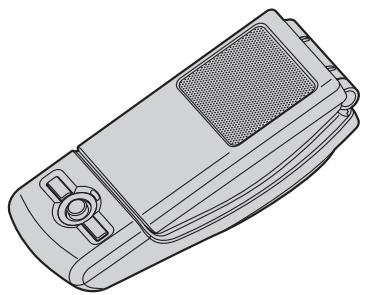
Operating Instructions
USB Speaker/Handset
Model No. KX-TS710EX
| Contents/Inhalt/Contenido/Sommaire | Page/Seite/Página |
| English instructions | 1 – 14 |
| Deutsche Anleitung | (1) – (14) |
| Instrucciones en español | <1> – <14> |
| Instructions en français | [1] – [14] |
- Please read these Operating Instructions before using the unit and save for future reference.
- Be sure to use the USB cable included with the unit.



Table of Contents
Introduction
Feature highlights 3
System requirements for your computer 3
Accessory information.... 4
For best performance 4
Preparation
Installation (Connecting to a computer). 6
Controls....6
Using the Unit
Status indicator 7
Operation....7
Useful Information
Troubleshooting....9
Important security notice.... 11
Specifications 11
Sales and support information (for U.K. and R.O.I. customers only) 12
Conditions of guarantee (for U.K. and R.O.I. customers only) 13

Introduction
Thank you for purchasing the Panasonic USB Speaker/Handset.
Feature highlights
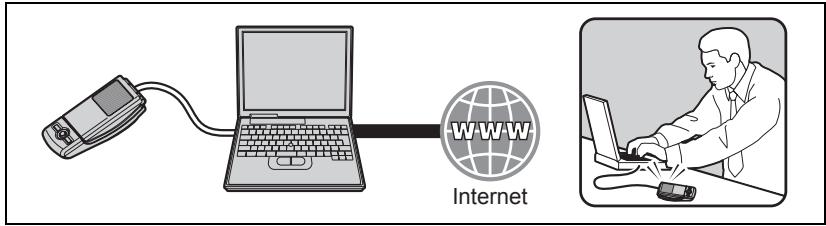
■ Ideal for free internet calls and group conference
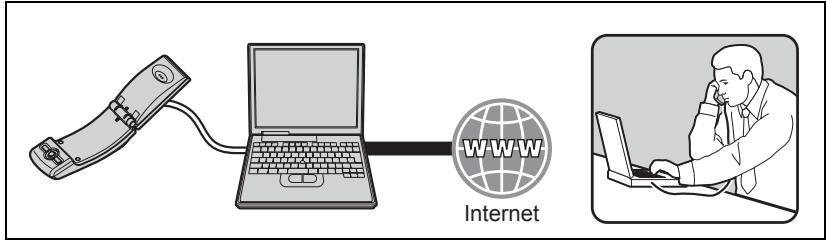
■ Open top cover to use conventionally for private conversations
■ Ideal for music enjoyment

■ Easy to install on your computer
System requirements for your computer
The following system requirements must be met in order to use the unit.
| Item | Description |
| Operating System | Microsoft® Windows® XP, Microsoft Windows Vista®, or Mac OS X v10.3.9 Panther |
| Others | USB interface (1.1) or higher |
Introduction
Accessory information
Included parts
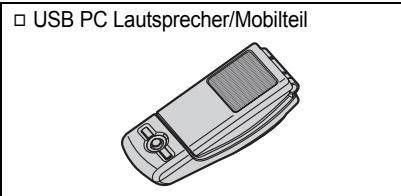
| □ USB Speaker/Handset |
| □ USB cable |
| Part No. PQJA10207Z |
For best performance
Environment
- Keep the product away from electrical noise generating devices, such as fluorescent lamps and motors.
- The product should be kept free from excessive smoke, dust, high temperature, and vibration. The product should not be exposed to direct sunlight.
- Do not place heavy objects on top of the product.
- When you leave the product unused for a long period of time, disconnect the product from the computer.
- The product should be kept away from heat sources such as radiators, cookers, etc. It should not be placed in rooms where the temperature is less than 5 °C or greater than 40 °C. Damp basements should also be avoided.
Connections
- Connect the unit to a USB port on your computer. For optimum performance, do not connect more than one unit to a single computer or the unit to your computer via a hub.
- The unit may not turn off and may consume electricity regardless of whether your computer is turned off or in sleep mode. By connecting/disconnecting the unit from an active computer, the unit will turn on/off. We recommend that you disconnect the unit from your computer when you are not using it.
Routine care
- To clean the product, use a dry soft cloth. The outer surface of the product can be scratched by wiping or rubbing with a hard cloth.
- Do not use benzine, thinner, or any abrasive powder.
Information for Users on Collection and Disposal of Old Equipment and used Batteries



These symbols (①, ②, ③) on the products, packaging, and/or accompanying documents mean that used electrical and electronic products and batteries should not be mixed with general household waste. For proper treatment, recovery and recycling of old products and used batteries, please take
them to applicable collection points, in accordance with your national legislation and the Directives 2002/96/EC and 2006/66/EC.
By disposing of these products and batteries correctly, you will help to save valuable resources and prevent any potential negative effects on human health and the environment which could otherwise arise from inappropriate waste handling.
For more information about collection and recycling of old products and batteries, please contact your local municipality, your waste disposal service or the point of sale where you purchased the items.
Penalties may be applicable for incorrect disposal of this waste, in accordance with national legislation.
For business users in the European Union
If you wish to discard electrical and electronic equipment, please contact your dealer or supplier for further information.
Information on Disposal in other Countries outside the European Union
These symbols (①, ②, ③) are only valid in the European Union. If you wish to discard these items, please contact your local authorities or dealer and ask for the correct method of disposal.
Note for the battery symbol
This symbol (②) might be used in combination with a chemical symbol (③). In this case it complies with the requirement set by the Directive for the chemical involved.
Preparation
Installation (Connecting to a computer)
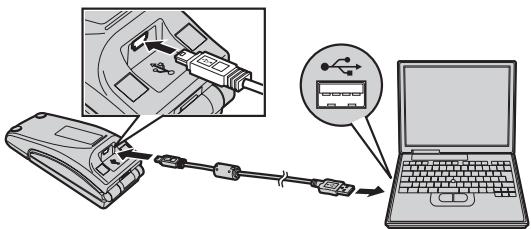
Important:
- Connect the unit to your computer before starting any application software you want to use with it.
Connect the included USB cable to the unit and your computer.
- The status indicator lights up red when the computer is turned on. If the top cover is opened, the status indicator lights up blue (page 7).
- To assure continued emission limit compliance, use only the shielded USB cable included.
To disconnect the unit
Unplug the USB cable from the computer.
Controls
Closed top cover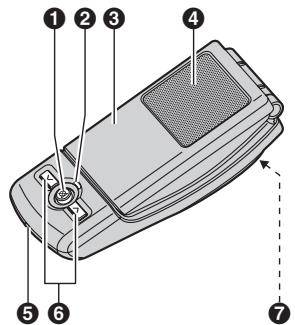
Opened top cover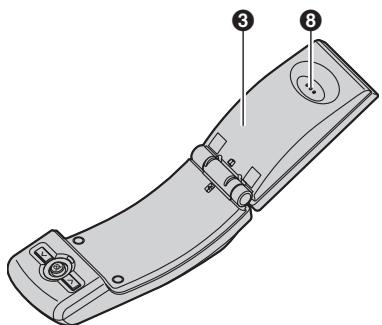
① 【※】(Microphone-mute) ② Status indicator ③ Top cover ④ Speaker
⑤ Microphone ⑥ Volume buttons (【∨】【∧】) ⑦ USB port ⑧ Receiver
6




Status indicator
| Light Status | Meaning | Function mode/Example of use |
| Red | The microphone is muted (page 8).– Top cover closed: Ready to receive audio at the speaker.– Top cover opened: Ready to receive audio at the receiver. | External speaker/Music player |
| Blue | The microphone is on.– Top cover closed: Ready to talk and receive audio at the speaker.– Top cover opened: Ready to talk and receive audio at the receiver. | Speakerphone or handset/Telephone |
| Flashing red | Error. See page 10. | - |
| OFF | The computer is either turned off or in suspend mode. | - |
Operation
Using the receiver for calls
Open the top cover and talk.
- To switch to the speakerphone, close the top cover and press 【☒】 until the status indicator lights up blue.
Using the speakerphone for calls
Close the top cover and talk. When the status indicator lights up red, press 【✗】 to turn the microphone-mute off (page 8). Then status indicator turns blue.
- Speak alternately with the other party.
- To switch to the receiver, open the top cover.
Note:
- Use the speakerphone in a quiet environment.
- The unit is intended to be operated while adjacent to the computer when in speakerphone mode. The unit is not intended to be used adjacent to the ear in speakerphone mode (when the top cover is closed).
Using the Unit
Using the unit as the external speaker of the computer
You can listen to sounds from the computer through the speaker on the unit when the top cover is closed.
- Press 【×】 until the status indicator lights up red to activate the microphone-mute for clearer sound.
Adjusting the receiver/speaker volume
6 levels are available.
Press [V] or [∧] repeatedly.
Microphone-mute
While microphone-mute is turned on, you can hear the other party, but the other party cannot hear you. Also, it keeps the sound clear when using the unit as the external speaker.
To activate the feature, press 【×】 until the status indicator lights up red.
- Press 【☒】 again to deactivate the feature. Opening the top cover also turns the feature off until it is closed again.
Troubleshooting
| Problem | Cause/solution |
| There is no sound from the speaker/receiver. | The application software you want to use with the unit was started before installing the unit. Please restart the application software.The USB cable is not connected properly to the unit and your computer. Connect it.Make sure that your computer audio device's playback volume is set to the maximum and that mute mode is not selected.The unit may not be selected as the audio device of your computer. Please confirm the setting of your computer as follows.Example:Windows XP1 Click “start”, then click “Control Panel”.2 Click “Sounds, Speech, and Audio Devices”. → Click “Sounds and Audio Devices”. → Click “Audio” tab.3 Make sure that the default device of “Sound playback” is “Panasonic KX-TS710”.The unit may not work properly depending on the power supply of your computer’s USB port. If this is the case and your computer has multiple USB ports, we recommend that you try other USB ports. |
Useful Information
| Problem | Cause/solution |
| Other party cannot hear you. | The application software you want to use with the unit was started before installing the unit. Please restart the application software.The USB cable is not connected properly to the unit and your computer. Connect it.Make sure that your computer audio device's recording volume is set to the maximum.If the status indicator is red, press【×】to turn the microphone-mute off.The unit may not be selected as the audio device of your computer. Please confirm the setting of your computer as follows.Example:Windows XP1 Click “start”, then click “Control Panel”.2 Click “Sounds, Speech, and Audio Devices”. → Click “Sounds and Audio Devices”. → Click “Audio” tab.3 Make sure that the default device of “Sound recording” is “Panasonic KX-TS710”.The unit may not work properly depending on the power supply of your computer’s USB port. If this is the case and your computer has multiple USB ports, we recommend that you try other USB ports. |
| The status indicator is flashing red. | Unplug the USB cable from the computer and the unit, then reconnect it. If the status indicator is still flashing red, there may be a problem with the unit. Contact the Panasonic service personnel. |
| The status indicator is OFF. | Make sure the USB cable is properly connected to the unit and your computer.The computer is turned off or in suspend mode. |


Important security notice
- Panasonic cannot accept any liability or provide warranty for security problems occurring in the following cases: – when the internet security settings were not set during use,
- when VoIP (Voice over Internet Protocol) communication software was used.
Specifications
| Operating conditions | 5 °C – 40 °C, 20 % – 80 % relative air humidity (dry) |
| Dimensions | Approx. height 119 mm × width 47 mm × depth 43 mm |
| Mass (Weight) | Approx. 85 g |
| Power consumption | Standby: Approx. 0.47 WMaximum: Approx. 1.4 W |
| Power supply | USB powered |
| Interface | USB: 1.1 |
Note:
- Design and specifications are subject to change without notice.
- The illustrations in these instructions may vary slightly from the actual product.
Trademarks
- Microsoft, Windows, and Windows Vista are either registered trademarks or trademarks of Microsoft Corporation in the United States and/or other countries.
- Mac OS is a trademark of Apple Inc., and registered in the U.S. and other countries.
- All other trademarks identified herein are the property of their respective owners.
Useful Information
Sales and support information (for U.K. and R.O.I. customers only)
Customer Care Centre
● For customers within the U.K.: 0844 844 3898 ● For customers within the Republic of Ireland: 01289 8333 - Visit our website for product information: www.panasonic.co.uk • E-mail: customer.care@panasonic.co.uk
Direct Sales at Panasonic U.K.
- Order accessory and consumable items for your product with ease and confidence by phoning our Customer Care Centre Monday - Thursday 9:00am - 5:30pm, Friday 9:30am - 5:30pm (Excluding public holidays).
- Or go on line through our Internet Accessory ordering application at www.panasonic.co.uk
- Most major credit and debit cards accepted.
- All enquiries transactions and distribution facilities are provided directly by Panasonic U.K. Ltd.
- It couldn't be simpler!
- Also available through our Internet is direct shopping for a wide range of finished products, take a browse on our website for further details.


Conditions of guarantee (for U.K. and R.O.I. customers only)
This guarantee is in addition to and does not in any way affect any statutory or other rights of consumer purchasers. If within the applicable guarantee period, the appliance proves to be defective by reason of faulty design, workmanship or materials, we undertake subject to the following conditions to have the defective appliance (or any part or parts there of) repaired or replaced free of charge.
- The appliance shall have been purchased and used solely within either the U.K. or R.O.I. and in accordance with standard operating instructions and the technical and/or Safety Standards required in the U.K.
- The appliance should be returned together with this guarantee and proof of date of purchase promptly on being found defective at the purchaser's risk and expense to the authorised dealer from whom the appliance was purchased. All enquires must be through such dealers.
- This guarantee shall not apply to damage caused through fire, accident, lightning, misuse, wear and tear, neglect, incorrect adjustment or repair, to damage caused through installation, adaption, modification or use in an improper manner or inconsistent with the technical and/or safety standards required in the country where this appliance is used, or to damage occurred during transit to or from the purchaser.
- If at any time during the guarantee period any part or parts of the appliance are replaced with a part or parts not supplied or approved by us or of an objective quality safe and suitable for the appliance, or the appliance has been dismantled or repaired by any person not authorised by us, we shall have the right to terminate this guarantee in whole or in part immediately without further notice.
- The purchaser's sole and exclusive remedy under this guarantee against us is for the repair or replacement of the appliance or any defective part or parts and no other remedy, including, but not limited to, incidental or consequential damage or loss of whatsoever nature shall be available to the purchaser.
- This guarantee shall not apply to batteries and any other items of limited natural life.
- Our decision on all matters relating to complaints shall be final. Any appliance or defective part which has been replaced shall become our property.
- The guarantee period applicable to this product shall be 12 months.
Please keep these operating instructions with your receipt.
Panasonic Business Systems U.K.
| Receipt No. | Date of purchase |
| Model No. | Serial No. |


We recommend keeping a record of the following information for future reference.
Serial No.
Date of purchase
(found on the bottom of the unit)
Name and address of dealer
Attach your purchase receipt here.
Customer Care Helpline Tel. No. (for U.K. customers only): 0844 844 3898 Customer Care Helpline Tel. No. (for R.O.I. customers only): 01289 8333
Sales Department:
Panasonic Business Systems U.K.
Panasonic House, Willoughby Road, Bracknell, Berkshire, RG12 8FP
Panasonic Communications Co., Ltd.
1-62, 4-chome, Minoshima, Hakata-ku, Fukuoka 812-8531, Japan
Copyright:
This material is copyrighted by Panasonic Communications Co., Ltd., and may be reproduced for internal use only. All other reproduction, in whole or in part, is prohibited without the written consent of Panasonic Communications Co., Ltd.
© 2008 Panasonic Communications Co., Ltd. All Rights Reserved.
14




Panasonic
Operating Instructions



Table of Contents
Introduction





Introduction
Accessories
Included Items


(5)


Preparation
Important:

Status Indicator







Troubleshooting













Panasonic Communications Co., Ltd.
1-62, 4-chome, Minoshima, Hakata-ku, Fukuoka 812-8531, Japan
Copyright:
(14)




Panasonic



Contents
Introduction

Introduction
Important:


Status indicator


Using the unit






Notes




Panasonic Communications Co., Ltd.
1-62, 4-chome, Minoshima, Hakata-ku, Fukuoka 812-8531, Japan
Copyright:




Panasonic
User Manual



Table of Contents
Introduction





Introduction
| □ Câble USB |
| Réf. PQJA10207Z |


Introduction


Preparations
Important:


Status indicator



Troubleshooting




Notes



Panasonic Communications Co., Ltd.
1-62, 4-chome, Minoshima, Hakata-ku, Fukuoka 812-8531, Japan
Copyright:

*TS710EX*
PNQX1514ZA DM0508SH0



- OPERATING INSTRUCTIONS
- TABLE OF CONTENTS
- INTRODUCTION
- PREPARATION
- USING THE UNIT
- USEFUL INFORMATION
- FEATURE HIGHLIGHTS
- SYSTEM REQUIREMENTS FOR YOUR COMPUTER
- ACCESSORY INFORMATION
- INCLUDED PARTS
- FOR BEST PERFORMANCE
- ENVIRONMENT
- CONNECTIONS
- ROUTINE CARE
- INFORMATION FOR USERS ON COLLECTION AND DISPOSAL OF OLD EQUIPMENT AND USED BATTERIES
- FOR BUSINESS USERS IN THE EUROPEAN UNION
- INFORMATION ON DISPOSAL IN OTHER COUNTRIES OUTSIDE THE EUROPEAN UNION
- NOTE FOR THE BATTERY SYMBOL
- INSTALLATION (CONNECTING TO A COMPUTER)
- IMPORTANT
- CONTROLS
- OPERATION
- USING THE RECEIVER FOR CALLS
- USING THE SPEAKERPHONE FOR CALLS
- NOTE
- USING THE UNIT AS THE EXTERNAL SPEAKER OF THE COMPUTER
- ADJUSTING THE RECEIVER/SPEAKER VOLUME
- MICROPHONE-MUTE
- IMPORTANT SECURITY NOTICE
- SPECIFICATIONS
- TRADEMARKS
- SALES AND SUPPORT INFORMATION (FOR U.K. AND R.O.I. CUSTOMERS ONLY)
- CUSTOMER CARE CENTRE
- DIRECT SALES AT PANASONIC U.K
- CONDITIONS OF GUARANTEE (FOR U.K. AND R.O.I. CUSTOMERS ONLY)
- SALES DEPARTMENT
- COPYRIGHT
- PANASONIC
- ACCESSORIES
- INCLUDED ITEMS
- CONTENTS
- PREPARATIONS
Brand : PANASONIC
Model : KX-TS710EX
Category : Phone