
KXMB2270EU - Phone PANASONIC - Free user manual and instructions
Find the device manual for free KXMB2270EU PANASONIC in PDF.


| Product Type | Multifunction printer (print, copy, scan, fax) |
| Brand | Panasonic |
| Model | KX-MB2270EU |
| Main Functions | Laser printing, copying, scanning, analog fax |
| Toner cartridge (starter) | Starter cartridge included; replacement models: KX-FAT420X (1500 pages), KX-FAT430X (3000 pages) |
| Drum unit | KX-FAD422X |
| Power supply | AC adapter with grounded plug; voltage not specified (standard mains type) |
| Connectivity | USB, wired LAN (Category 5 Ethernet); optional wireless LAN depending on model |
| Network compatibility | Analog telephone network (PSTN) for fax |
| Display | Screen with language selection (default English) |
| Eco mode | Yes, activation via [ECO] button |
| Maintenance and cleaning | Unplug before cleaning; do not use liquid or aerosol products |
| Laser safety | Class 1 laser printing system (safe under normal use) |
| Operating temperature | Avoid sudden temperature changes; allow 30 minutes for adaptation |
| Weight | Approximately 15 kg (estimate for a device of this category) |
| Dimensions (W x D x H) | Approximately 420 x 500 x 400 mm (estimate) |
| Spare parts and repairability | Toner and drum cartridges available; repair by authorized center |
| General information | CE certification, ENERGY STAR; full manual on CD-ROM |
Frequently Asked Questions - KXMB2270EU PANASONIC
User questions about KXMB2270EU PANASONIC
0 question about this device. Answer the ones you know or ask your own.
Ask a new question about this device
Download the instructions for your Phone in PDF format for free! Find your manual KXMB2270EU - PANASONIC and take your electronic device back in hand. On this page are published all the documents necessary for the use of your device. KXMB2270EU by PANASONIC.
USER MANUAL KXMB2270EU PANASONIC
Panasonic Testing Centre
Panasonic Marketing Europe GmbH
Winsberging 15, 22525 Hamburg, Allemagne
Panasonic Testing Centre
Panasonic Marketing Europe GmbH
Winsberging 15, 22525 Hamburg, Allemagne
Cable USB/cable LAN/mémoire USB
PRODUIT LASER CLASSE 1
PRODUIT LED DE CLASSE 1
The connection to the telecommunication systems must not be hard wired and must be unplugged before the earth is disconnected.
Method of connection
This apparatus is connected to the exchange line or PABX/PMBX extension by the new standard British Telecom plug and socket.
Arrangements for provision of this type of termination can be made through the nearest British Telecom Sales Office.
This apparatus may be connected to the following types of installation.
a) For connection to the public switched telephone network (PSTN) and compatible PBX (Private Branch Exchange), which use DTMF signalling. (Please consult your supplier for an up to date list of compatible PBX's.)
b) The apparatus can be used on extension sockets connected to a direct exchange line (D.E.L.).
c) This apparatus is suitable for connection to the telecommunication system directly or via compatible private branch exchange as an extension. The supplier of the apparatus should be consulted for an up to date list of PBX's with which the apparatus is compatible.
It cannot be guaranteed that the apparatus will operate under all possible conditions of connection to compatible PBX's.
- This apparatus is suitable for connection to a PBX with or without initial proceed indication.
- This apparatus is suitable for connection to a PBX with or without secondary proceed indication.
Any cases of difficulty should be referred in the first instance to the supplier of the apparatus.
d) The apparatus must not be connected in the following manner:
-As an extension to a pay phone
-As a party line with shared service
NOTES:
- If you experience any problems with the normal use of your apparatus, you should unplug it from the telephone outlet and connect a known working telephone in its place. If the known working telephone still gives problems, then please contact the customer service department of your PSTN operator (e.g. BT etc.). If it operates properly, then the problems are likely to be a fault in your apparatus. In this case, consult your supplier for advice.
- Your PSTN operator may charge you if they attend a service call that is not due to apparatus supplied by them.
For your safety
This appliance is supplied with a moulded three pin mains plug for your safety and convenience.
Should the fuse need to be replaced please ensure that the replacement fuse is of the same rating and that it is approved by ASTA or BSI to BS1362.
Check for ASTA mark A or the BSI mark on
the body of the fuse.
If the plug contains a removable fuse cover you must ensure that it is refitted when the fuse is replaced.
If you lose the fuse cover the plug must not be used until a replacement cover is obtained.
A replacement fuse cover can be purchased from your local Panasonic dealer.
IF THE FITTED MOULDED PLUG IS UNSUITABLE FOR THE SOCKET OUTLET IN YOUR HOME THEN THE FUSE SHOULD BE REMOVED AND THE PLUG CUT OFF AND DISPOSED OF SAFELY.
THERE IS A DANGER OF SEVERE ELECTRICAL SHOCK IF THE CUT OFF PLUG IS INSERTED INTO ANY 13 AMP SOCKET.
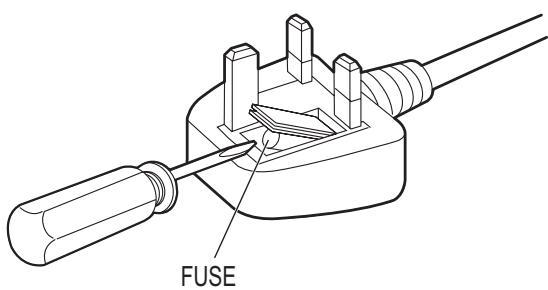
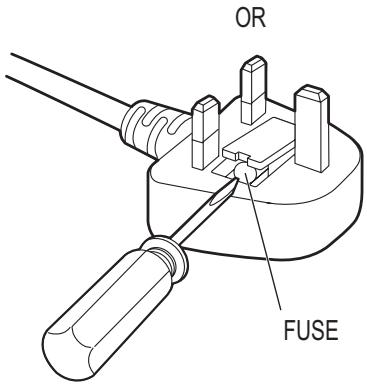
How to replace the fuse: Open the fuse compartment with a screwdriver and replace the fuse (and fuse cover).
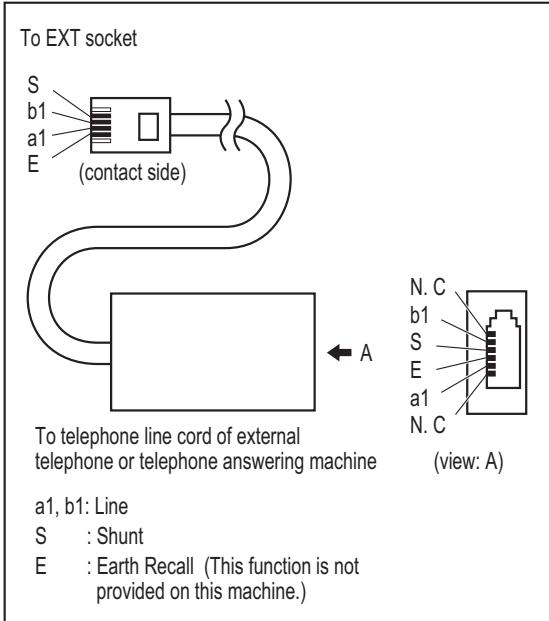
When using the unit with an external answering machine, please purchase an extension telephone adaptor.
Customer Care Centre
For customers within the UK: 0844 844 3867
For customers within the Republic of Ireland: 01 2898255
- Visit our website for product information
E-mail: customer.care@panasonic.co.uk
Direct Sales at Panasonic U.K.
- Order accessory and consumable items for your product with ease and confidence by phoning our Customer Care Centre Monday - Thursday 9:00am - 5:30pm, Friday 9:30am - 5:30pm (Excluding public holidays).
- Or go on-line through our Internet Accessory ordering application at www.panasonic.co.uk.
- Most major credit and debit cards accepted.
- All enquires transactions and distribution facilities are provided directly by Panasonic U.K.
1-62, 4-chome, Minoshima, Hakata-ku, Fukuoka 812-8531 Japan
Declaration of Conformity
C21344
Document No. PCTF-130048-01
(Issuer's name & address)
Panasonic System Networks Co., Ltd.
Hakata-ku, Fukuoka, Japan
(Object of the declaration)
(Product) : Multi-Function Printer
(Trade Name) : Panasonic
(Model Nr.) : KX-MB2230EU, KX-MB2230JT, KX-MB2270EU, KX-MB2270JT,
KX-MB2545EU, KX-MB2545JT, KX-MB2575EU, KX-MB2575JT,
DP-MB310EU, DP-MB310JT
Optional Lower Input Tray : KX-FAP107
The object of the declaration described above is in conformity with the requirements of the following EU legislations and harmonized standards. For the RoHS Directive, this declaration of conformity is issued under the sole responsibility of the manufacturer.:
(Council directive) : 1999/5/EC
(Council recommendation) : 1999/519/EC
(Harmonized standards) : EN 60950-1:2006 + A11:2009 + A1:2010 + A12:2011, < C >
EN 62479:2010, EN 50385:2002, EN 300 328 V1.8.1
EN 301 489-1 V1.9.2, EN 301 489-17 V2.1.1,
EN 55022:2010, EN 55024:2010
EN 61000-3-2:2006 + A1:2009 + A2:2009, EN 61000-3-3:2008
(Council directive) : 2009/125/EC
(Implementing Measure for ErP Directive): Commission Regulation(EC) No.1275/2008
(Council directive) : 2011/65/EU
(Harmonized standards) : EN 50581:2012
(the last two digits of the year in which the CE marking was affixed): 13
Signed for and on behalf of :
Printed Name : Masakiro Ezato
Title : Senior Technical Regulation Manager
Date of issue : 5th April, 2013
Authorised Representative in EU
Panasonic Testing Centre
Panasonic Marketing Europe GmbH
Winsberging 15, 22525 Hamburg, Germany
(Signature) N. (Printed name) NielsErdmann (Date) U8.April 2013
5232 BC's-Hertogenbosch, The Netherlands
92238 Gennevilliers Cedex, France
Fabricant :
Panasonic System Networks Co., Ltd.
1-62, 4-chome, Minoshima, Hakata-ku, Fukuoka 812-8531, Japan
Site Web : http://www.panasonic.net/
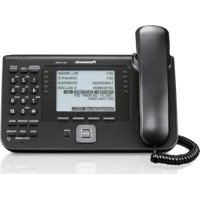
Brand : PANASONIC
Model : KXMB2270EU
Category : Phone