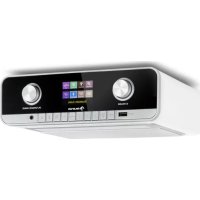
Connect Soundchef MKII - Radio Auna - Free user manual and instructions
Find the device manual for free Connect Soundchef MKII Auna in PDF.


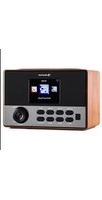
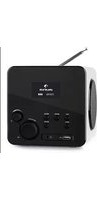
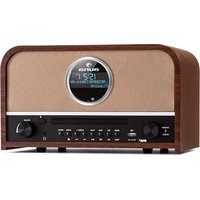
| Product Type | Digital and Internet Radio |
| Brand | Auna |
| Model | Connect Soundchef MKII |
| Category | Radio |
| Main Functions | DAB/DAB+, FM RDS, Internet radio via Wi-Fi, Bluetooth, USB playback, Spotify Connect, control via UNDOK app, alarm, timer |
| Display | 2.4" TFT color screen, 320 x 240 pixels |
| Speakers | 2 x 2.5" full-range speakers, power 2 x 10 W |
| Wireless Connectivity | Wi-Fi 802.11 b/g/n (2.4 GHz), Bluetooth 5.0 (estimated) |
| Supported Audio Formats | MP3, WMA, AAC, FLAC |
| Inputs | USB (audio file playback) |
| Outputs | 3.5 mm stereo headphone output |
| Power Supply | 12 V DC power adapter, 2500 mA |
| Standby Power Consumption | < 1 W |
| Included Accessories | Remote control, power adapter, user manual |
| Maintenance and Cleaning | Disconnect the device before cleaning; use a soft dry cloth; do not use abrasive or liquid products |
| Safety | Do not open the housing; risk of electric shock; avoid exposure to water, rain, or humidity; keep away from heat sources |
| Spare Parts and Repairability | No user-serviceable parts; contact a qualified professional for any repairs |
| General Information | Article number: 10037496, 10037497; manufacturer: Chal-Tec GmbH; declaration of conformity available at use.berlin/10037496 |
Frequently Asked Questions - Connect Soundchef MKII Auna
User questions about Connect Soundchef MKII Auna
0 question about this device. Answer the ones you know or ask your own.
Ask a new question about this device
Download the instructions for your Radio in PDF format for free! Find your manual Connect Soundchef MKII - Auna and take your electronic device back in hand. On this page are published all the documents necessary for the use of your device. Connect Soundchef MKII by Auna.
USER MANUAL Connect Soundchef MKII Auna
Connect Soundchef MKII onunterbauradio Radio cuisine cable de cocina dile da cucina
Küchenunterbauradio Kitchen Radio Radio de cuisine Radio empotrable de cocina Radio sottopensile da cucina 10037496 10037497
a u c
www.auna-multimedia.com

INHALT
Technische Daten 4
natural_image
Technical line drawing of a mechanical device with mounting bracket and bracket assembly (no text or symbols)BEDIENUNG
Inbetriebnahme
Ein/Auschalten
Podcasts menu
https://www.spotify.com/connect/third-party-licenses
Für Android (Google Play)
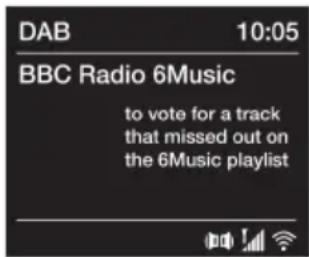
Digital radio screen
natural_image
Technical line drawing of a mechanical device with mounting bracket and bracket assembly (no text or symbols)Podcasts menu
natural_image
Technical line drawing of a mechanical device with exploded view and mounting bracket (no text or symbols)Podcasts menu
Pour Android (Google Play)
Pour iOS (Apple Store)
natural_image
Symbol of a trash bin crossed with a diagonal line, no text or labels presentDÉCLARATION DE CONFORMITÉ

Fabricant :
Chal-Tec GmbH, Wallstraße 16, 10179 Berlin, Allemagne.
Berlin Brands Group UK Limited PO Box 42 272 Kensington High Street London, W8 6ND United Kingdom
Pour Android (Google Play)
Pour iOS (Apple Store)
natural_image
Symbol of a trash bin crossed with a diagonal line, no text or labels presentDÉCLARATION DE CONFORMITÉ

Fabricant :
Chal-Tec GmbH, Wallstraße 16, 10179 Berlin, Allemagne.
Berlin Brands Group UK Limited PO Box 42 272 Kensington High Street London, W8 6ND United Kingdom
CONTENIDO
Datos técnicos 94
CONTENIDO
Datos técnicos 94
-
Connect the DAB/FM aerial wire to the DAB/FM socket and position the DAB/FM aerial wire in the direction where the strongest signal can be received (A).
-
Insert the jack of the supplied mains adapter into the socket on the rear of the radio (C).
- Plug the mains adapter into the mains supply (B)
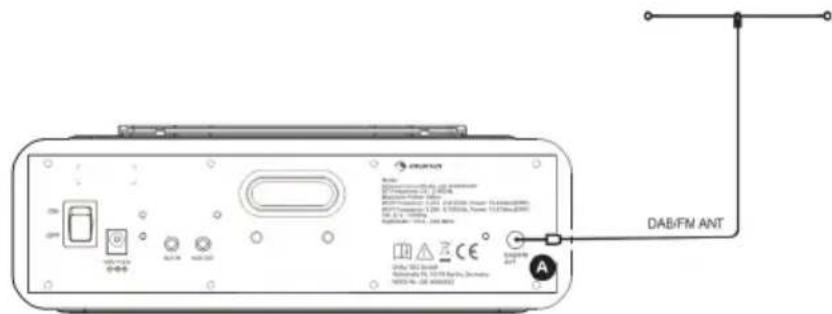
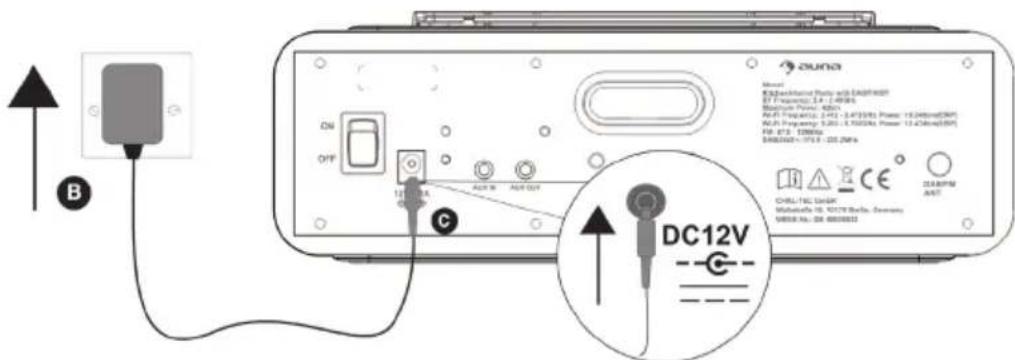
- Press the STANDBY button to power on.
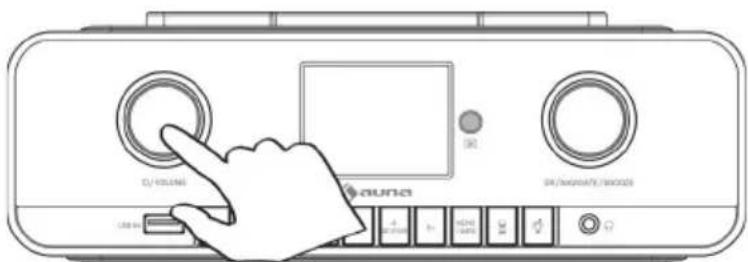
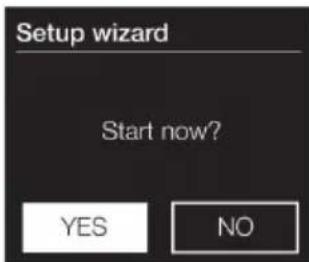
- The first time you switch on you will be asked if you would like to run the setup wizard, which will help you connect to your Wi-Fi. If you want to run the setup wizard now, turn and press the NAVIGATE dial to select 'Yes' and follow the prompts on screen. To set up later, turn and press the NAVIGATE dial to select 'No'.
OPERATION
POWER ON/OFF
When you first connect the unit to the mains socket, the unit will be in standby mode after showing 'auna'.
POWER button
Main unit operation:
- Press the POWER button to turn on the Internet radio.
- Press and hold the POWER button for 2 seconds to switch 'standby'.
Remote control operation
- In Off (standby) mode, tap the POWER button on remote control to turn the unit ON. The unit will turn on.
- To turn the unit off (standby), tap the POWER button on remote control again.
Adjusting and muting the volume
Turn the Volume dial to increase or decrease the volume.
EQ operation
You can enjoy different EQ sound effect modes.
- Press and hold the MENU button on main unit or remote control and turn and press the NAVIGATE dial to select 'System settings'.
- Turn and press the NAVIGATE dial or use the
buttons on the remote control to select the 'Equalizer'. - Press the OK button on main unit or remote control to select.
- Turn and press the NAVIGATE dial or use the
buttons on the remote control to choose between 'Normal', 'Flat', 'Jazz', 'Rock', 'Movie', 'Classic', 'Pop', 'News'.
Setting the bass and treble manually
- Press and hold the MENU button to view the main menu.
- Turn and press the NAVIGATE dial to select 'System settings' > 'Equalizer' > 'My EQ setup'.
- Turn and press the NAVIGATE dial to choose 'Bass' or 'Treble'.
- Turn and press the NAVIGATE dial to set the level from '-7dB' (low) to '+7dB' (high).
LISTENING TO INTERNET CONTENT
You can connect the Connect Soundchef MK II to your network to access to thousands of internet radio stations and podcasts from around the world. Once connected to the internet you can also access additional subscription services such as Spotify, which provides you with instant access to millions of music tracks.
Thousands of radio stations around the world broadcast online. To listen to an internet radio station or podcast:
- Press the HOME button to display the 'function' menu.
- Turn and press the NAVIGATE dial to select 'Internet radio'.
- Press and hold the MENU button to view the main menu.
- Turn and press the NAVIGATE dial to select one of the following options:
Station list: Select this option to see a list of currently available Internet stations or listen to podcasts (see 'Station list' below for more information).
System settings: Select this option to change settings.
Main menu: Select this option to view main menu.
Station list: You can listen to a range of radio stations. Turn and press the NAVIGATE dial to select one of the following options:
Last listened: Select this option to tune into the last station you were listening to.
Search: Select this option to search for an internet radio station. Turn and press the NAVIGATE dial to highlight and select characters. Select 'BKSP' to delete a character. Turn and press the NAVIGATE dial to start searching for an internet station. To cancel your search, turn and press the NAVIGATE dial to select 'CANCEL'.
Location: Select this option to browse for an internet radio station based in your country. Turn and press the NAVIGATE dial to select 'All stations' to view all local based stations in alphabetical order. To browse for a station based on genre, turn and press the NAVIGATE dial to select the genre you want to browse for.
Popular: Select this option to browse for a music radio station.
Discover: Select 'Search' when browsing the station list to search for stations by Origin, Genre, Language or show stations of these. Use the NAVIGATE dial to set your options and select 'Go' to see the list of results.
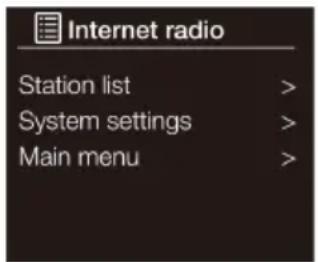
Internet radio menu
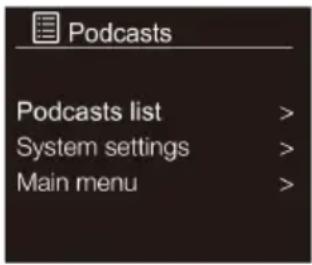
Podcasts menu
Podcasts
Podcasts are prerecorded audio shows on a wide variety of subjects such as comedy, arts, business, and culture, for you to enjoy anytime.
Thousands of radio stations around the world broadcast online. To listen to an Podcasts station or podcast:
- Press the HOME button to display the 'function' menu.
- Turn and press the NAVIGATE dial to select 'Podcasts'.
- Press and hold the MENU button to view the main menu.
- Turn and press the NAVIGATE dial to select one of the following options:
Podcasts list: Select this option to see a list of currently available Internet stations or listen to podcasts (see 'Station list' below for more information).
System settings: Select this option to change settings.
Main menu: Select this option to view main menu.
Network setting
Connecting to your Wi-Fi using the setup wizard
- Press and hold the MENU button to view the main menu.
- Turn and press the NAVIGATE dial to select 'System settings' > 'Network' > 'Network wizard'.
- Turn and press the NAVIGATE dial to select your region, the unit will search for available Wi-Fi networks.
- Turn and press the NAVIGATE dial to select the name (SSID) of your Wi-Fi network. If your network requires a key, follow steps 5-6.
- Enter your network key or password by turning and pressing the NAVIGATE dial to highlight and select characters. If you want to delete the last character, turn the NAVIGATE dial to select 'BKSP' and press to confirm.
- Turn and press the NAVIGATE dial to select 'OK'. The unit will connect to your network.
Helpful hint: Your Wi-Fi key is case sensitive, make sure to enter it exactly as shown.
LED light shows
- Tap the 🎨 button on main unit or remote control to turn the LED light on.
- Repeatedly tap the 🎨 button to select a LED light brightness. The unit's brightness is set to 100 %, 70 %, 50 % and OFF.
Setting the kitchen timer
- Press the 'Kitchen timer' button.
- Turn and press the NAVIGATE dial to adjust the length of the kitchen timer.
DISPOSAL CONSIDERATIONS
natural_image
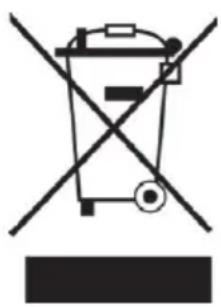
Symbol of a trash bin crossed with a diagonal line, no text or labels presentIf there is a legal regulation for the disposal of electrical and electronic devices in your country, this symbol on the product or on the packaging indicates that this product must not be disposed of with household waste. Instead, it must be taken to a collection point for the recycling of electrical and electronic equipment. By disposing of it in accordance with the rules, you are protecting the environment and the health of your fellow human beings from negative consequences. For information about the recycling and disposal of this product, please contact your local authority or your household waste disposal service.
This product contains batteries. If there is a legal regulation for the disposal of batteries in your country, the batteries must not be disposed of with household waste. Find out about local regulations for disposing of batteries. By disposing of them in accordance with the rules, you are protecting the environment and the health of your fellow human beings from negative consequences.
DECLARATION OF CONFORMITY

Manufacturer:
Chal-Tec GmbH, Wallstrasse 16, 10179 Berlin, Germany.
Importer for Great Britain:
Berlin Brands Group UK Limited
PO Box 42
272 Kensington High Street
London, W8 6ND
United Kingdom
Hereby, Chal-Tec GmbH declares that the radio equipment type Connect Soundchef MK II is in compliance with Directive 2014/53/EU. The full text of the EU declaration of conformity is available at the following internet address: use.berlin/10037496
For Great Britain: Hereby, Chal-Tec GmbH declares that the radio equipment type Connect Soundchef MK II is in compliance with the relevant statutory requirements. The full text of the declaration of conformity is available at the following internet address: use.berlin/10037496
Cher client, chère cliente,
SOMMAIRE
Fiche technique 64


- INHALT
- BEDIENUNG
- Inbetriebnahme
- DÉCLARATION DE CONFORMITÉ
- Fabricant :
- CONTENIDO
- OPERATION
- POWER ON/OFF
- POWER button
- Main unit operation:
- Remote control operation
- Adjusting and muting the volume
- EQ operation
- Setting the bass and treble manually
- LISTENING TO INTERNET CONTENT
- Podcasts
- Network setting
- Connecting to your Wi-Fi using the setup wizard
- LED light shows
- Setting the kitchen timer
- DISPOSAL CONSIDERATIONS
- DECLARATION OF CONFORMITY
- Manufacturer:
- Importer for Great Britain:
- Cher client, chère cliente,
- SOMMAIRE
Brand : Auna
Model : Connect Soundchef MKII
Category : Radio