EasyManual
Profile PFD95ESPTDS - Tumble drier GE - Free user manual and instructions
Find the device manual for free Profile PFD95ESPTDS GE in PDF.



User questions about Profile PFD95ESPTDS GE
0 question about this device. Answer the ones you know or ask your own.
Ask a new question about this device
Download the instructions for your Tumble drier in PDF format for free! Find your manual Profile PFD95ESPTDS - GE and take your electronic device back in hand. On this page are published all the documents necessary for the use of your device. Profile PFD95ESPTDS by GE.
USER MANUAL Profile PFD95ESPTDS GE
SAFETY INFORMATION 3
USING THE DRYER
WiFi Connect 5
Getting Started 5
Artificial Intelligence 7
Cycles 8
Settings 9
Options 10
Loading 12
CARE AND CLEANING 13
INSTALLATION
INSTRUCTIONS 14
Reversing The Door Swing (Optional) . .32
Stacking (Optional) 3
TROUBLESHOOTING TIPS 38
LIMITED WARRANTY 41
CONSUMER SUPPORT 42
Write the model and serial numbers here:
Model #
Serial #
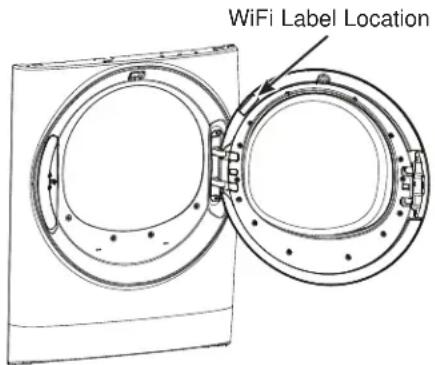
They are on the label on the front of the dryer behind the door.
OWNER'S MANUAL & INSTALLATION INSTRUCTIONS
PFD95
GFD85
GFD65
GFD55
GFV55
ENGLISH/FRANÇAIS/ ESPÁÑOL
THANK YOU FOR MAKING GE APPLIANCES A PART OF YOUR HOME.
Whether you grew up with GE Appliances, or this is your first, we're happy to have you in the family.
We take pride in the craftsmanship, innovation and design that goes into every GE Appliances product, and we think you will too. Among other things, registration of your appliance ensures that we can deliver important product information and warranty details when you need them.
Register your GE appliance now online. Helpful websites and phone numbers are available in the Consumer Support section of this Owner's Manual. You may also mail in the pre-printed registration card included in the packing material.

GE APPLIANCES
IMPORTANT SAFETY INFORMATION. READ ALL INSTRUCTIONS BEFORE USING THE APPLIANCE
WARNING
To reduce the risk of fire, explosion, electric shock, or injury to persons when using your appliance, follow basic precautions, including the following:
Read all instructions before using the appliance.
DO NOT dry articles that have been previously cleaned in, washed in, soaked in, or spotted with gasoline, dry-cleaning solvents, or other flammable or explosive substances, as they give off vapors that could ignite or explode.
- DO NOT place items exposed to cooking oils in your dryer. Items contaminated with cooking oils may contribute to a chemical reaction that could cause a load to catch fire. To reduce the risk of fire due to contaminated loads, the final part of the tumble dryer cycle occurs without heat (cool down period). Avoid stopping a tumble dryer before the end of the drying cycle unless all items are quickly removed and spread out so that the heat is dissipated.
DO NOT allow children to play on or in this appliance. Close supervision of children is necessary when this appliance is used near children.
Before the appliance is removed from service or discarded, remove the door to the drying compartment.
DO NOT reach into the appliance if the drum is moving.
DO NOT install or store this appliance where it will be exposed to the weather.
DO NOT tamper with controls.
DO NOT climb or stand on this unit.
DO NOT repair or replace any part of this appliance or attempt any servicing unless specifically recommended in the user-maintenance instructions or in published user-repair instructions that you understand and have the skills to carry out.
■ Follow all fabric care instructions and warnings to prevent melting of garments or damage to the appliance.
DO NOT use fabric softeners or products to eliminate static unless recommended by the manufacturer of the fabric softener or product.
DO NOT dry articles containing foam rubber or similarly textured rubber-like materials.
Clean lint screen before or after each load.
DO NOT operate the dryer without the lint filter in place.
DO NOT store combustible materials, gasoline or other flammable liquids near the dryer. Keep area around the exhaust opening and adjacent surrounding areas free from the accumulation of lint, dust and dirt.
The interior of the appliance and exhaust duct should be cleaned periodically by qualified service personnel.
- Unplug the appliance or turn off the circuit breaker before servicing. Pressing the Power or Start/Pause pad DOES NOT disconnect power.
DO NOT operate this appliance if it is damaged, malfunctioning, partially disassembled, or has missing or broken parts, including a damaged cord or plug.
DO NOT spray any type of aerosol into, on or near dryer at any time. DO NOT use any type of spray cleaner when cleaning dryer interior. Hazardous fumes or electrical shock could occur.
See "ELECTRICAL CONNECTION" located in the Installation Instructions for grounding instructions.
Proper Disposal of your Appliance
- Dispos of or recycle your appliance in accordance with Federal and Local Regulations. Contact your local authorities for the environmentally safe disposal or recycling of your appliance.
- Consider recycling options for your appliance packaging material.
READ AND SAVE THESE INSTRUCTIONS
IMPORTANT SAFETY INFORMATION READ ALL INSTRUCTIONS BEFORE USING THE APPLIANCE
Failure to follow safety warnings exactly could result in serious injury, death, or property damage.
- DO NOT store or use gasoline or other flammable vapors and liquids in the vicinity of this or any other appliance.
-
WHAT TO DO IF YOU SMELL GAS:
-
DO NOT try to light any appliance.
- DO NOT touch any electrical switch; DO NOT use any phone in your building.
- Clear the room, building, or area of any occupants.
-
Immediately call your gas supplier from a neighbor's phone. Follow the gas supplier's instructions.
If you cannot reach your gas supplier, call the fire department. -
Installation and service must be performed by a qualified installer, service agency, or the gas supplier.
WARNING
To reduce the risk of fire, electric shock, or injury to persons, read the IMPORTANT SAFETY INFORMATION before operating this appliance.
WARNING

Fire Hazard
- Keep flammable materials and vapors, such as gasoline, away from dryer.
-
DO NOT dry anything that has ever had anything flammable on it (even after washing).
No washer can completely remove oil. -
DO NOT dry anything that has ever had any type of oil on it (including cooking oils).
- Items containing foam, rubber, or plastic must be dried on a clothesline.
Failure to do so can result in death, explosion, or fire.
Throughout this manual, features and appearance will vary from your model.
WiFi Connect (For customers in the United States only - on some models)
Your dryer is GE Appliances WiFi Connect enabled.
Visit geappliances.com/connect and enter your model number to show you the proper steps to connect your appliance.
Please visit GEAppliances.com/connect to learn more about connected appliance features, to learn what connected appliance App's will work with your smartphone.
WiFi Connectivity: For assistance with the appliance or the ConnectPlus network connectivity, please call GE Appliances at 800.220.6899.
Quick Start:
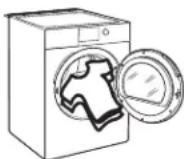
Step 1
- Clean lint filter
- Loosely add items.
- Close door.
NOTE: Dryer will not start with door open.

Step 2 Step 3
- If the screen is dark, press the Power pad to "wake up" the display.
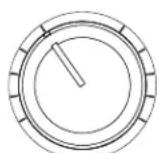
- Select a sensor dry cycle. (Defaults are set for each dry cycle. These default settings can be changed. See the cycle descriptions for more information.)
OR
- Select TIMED DRY and set Time, Temp and Level.

Step 4
- Press the Start/ Pause pad.
Getting started
Features and appearance will vary.
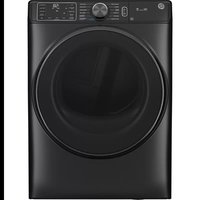
Model: PFD95
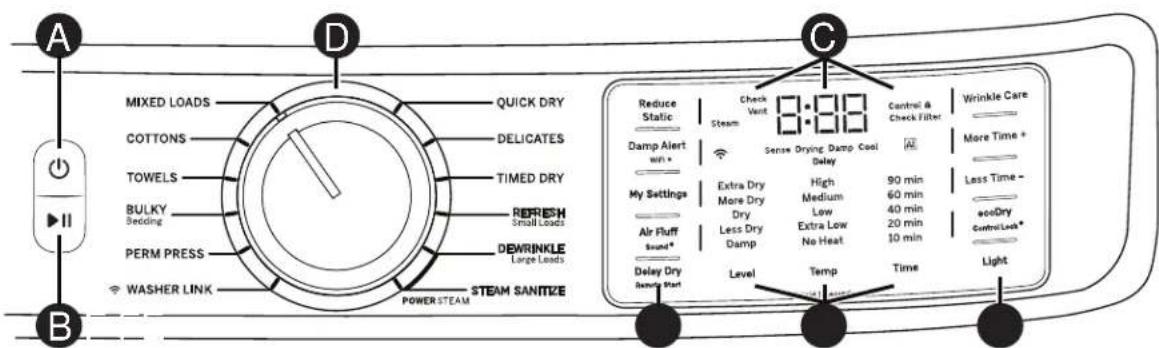
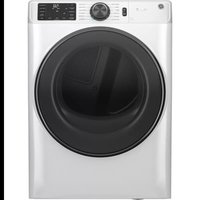
Model: GFD85
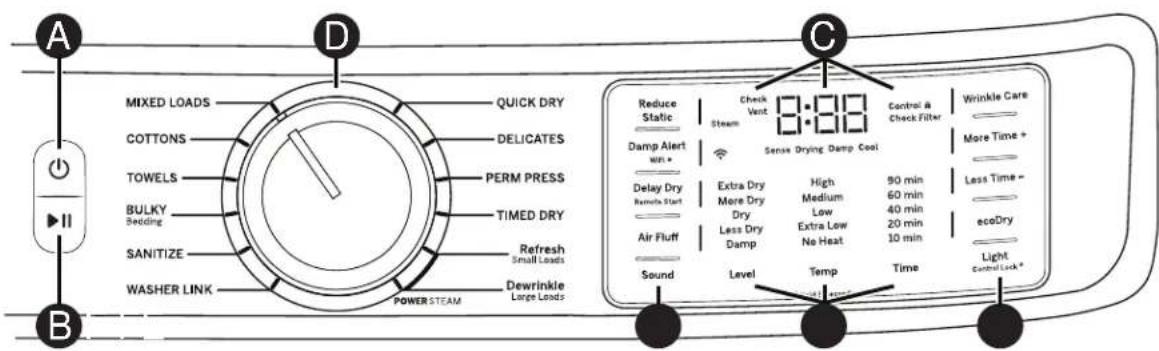
Model: GFD65
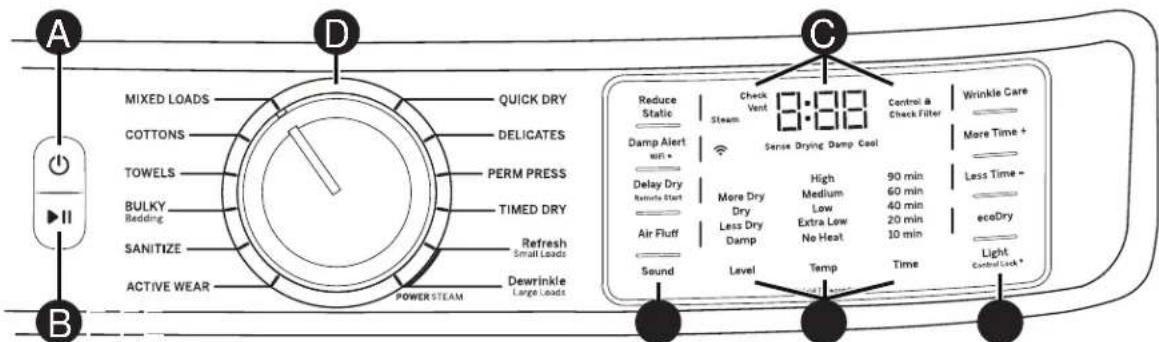
Models: GFD55 GFV55
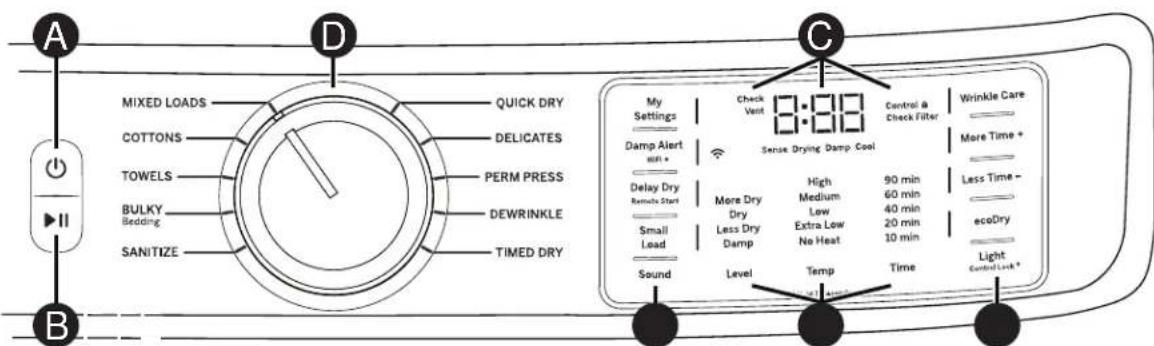

Power
Press to "wake up" the display. If the display is active, press to put the dryer into idle mode. NOTE: Pressing Power does not disconnect the appliance from the power supply.

Start and Pause
Press Start to begin the cycle. NOTE: The door must be closed for the dryer to start the cycle. Pressing Start again will pause the cycle, the Start light may blink and "Pause" will display. To continue the cycle, press Start again.

Display and Status Lights
The display shows the approximate time remaining until the end of the cycle. On some models, the dryer cycle status (Sense, Drying, Damp and Cool) will be shown. In addition, the display will show:
| (WiFi) (on some models) | Will allow your appliance to communicate with your smartphone for remote appliance monitoring control and notifications. |
| Controls | The dryer is locked - will blink once if you press any pad or turn the cycle knob. |
| Check Filter | The Check Filter light will stay on for 15 seconds after the cycle stops. |
| Check Vent | The Check Vent light indicates an issue has been found due to reduced airflow from a possible blocked or restricted vent. Checking and/or cleaning the vent system is recommended. See the, "Check Vent" light is on in the Troubleshooting Tips section. |
| AI (on some models) | Your dryer is equipped with Artificial Intelligence capabilities. This indicator will illuminate when Washer Link is active, My Settings are being implemented based on your usage habits and suggested actions are available through the SmartHQ app. |
Getting started
| Drying Cycles | Sensor cycles automatically determine fabric dryness. |
| Timed cycles run for the selected time. | |
| MIXED LOADS | For loads consisting of cottons and poly-blends. |
| COTTONS For | cottons and most linens. NOTE: ENERGY STAR® models are tested on COTTONS cycle with default settings (Temp setting on High, Level setting on Dry, and ecoDry default on). |
| TOWELS (on some models) | For most towels and linens. |
| BULKY Bedding | For large coats, bed spreads, mattress covers, sleeping bags, and similar large/bulky items such as blankets, comforters, jackets, and small rugs. |
| SANITIZE (on some models) | This option reduces certain types of bacteria including: Staphylococcus aureus, Pseudomonas aeruginosa and Klebsiella pneumoniae. The anti-bacterial process occurs when high heat is used during a portion of the drying cycle; cool down also will be longer to protect you from a hot garment. NOTE: Do not use this cycle on delicate fabrics. |
| WASHER LINK (on some models) | When selected (and if connected to a compatible washer through WiFi communication) the dryer receives load information from the washer to automatically make cycle, dryness, temperature and time recommendations to optimize drying. |
| ACTIVE WEAR (on some models) | Clothing worn for active sports exercise and some casual wear. Fabrics include new technology finishes and stretch fibers such as Spandex. Also for clothing labeled Easy Care or Perma Press: For wrinkle-free and permanent press items. |
| QUICK DRY | For small loads that are needed in a hurry, such as sport or school uniforms. Can also be used if the previous cycle left some items damp, such as collars or waistbands. NOTE: On some models, the time remaining in the cycle will show counting down in the display. |
| DELICATES For delicate items, special-care fabrics and knits. | |
| PERM PRESS (on some models) | For wrinkle-free, permanent press and special sports items that need extra drying care. |
| AIR FLUFF (on some models) | Provides 10 minutes of tumbling time with no heat. NOTE: On models with AIR FLUFF cycle, select TIMED DRY and set Temp to No Heat. |
| DEWRINKLE (on some models) | For removing wrinkles from items that are dry or slightly damp. This cycle is not recommended for delicate fabrics. |
| STEAM Dewrinkle (on some models) | For use with larger loads than STEAM Refresh. Ideal for loads left in the dryer for an extended time. STEAM Dewrinkle is recommended for larger loads (9-13 garments). NOTE: Steam cycles are not intended for use with towels. Important - The temperature setting must be set to High and water must be turned on before running the STEAM Dewrinkle cycle. |
| STEAM Refresh (on some models) | For slightly wrinkled dry garments. Significantly reduces wrinkles. After the STEAM Refresh cycle, the unit will beep (if Sound is selected) and display "00." STEAM Refresh is recommended for small loads (3-5 garments). NOTE: Steam cycles are not intended for use with towels. NOTE: A single extremely light fabric item may need to have an additional item included in the STEAM Refresh cycle to achieve optimum results. Important - The temperature setting must be set to High and water must be turned on before running the STEAM Refresh cycle. |
| STEAM SANITIZE (on some models) | This cycle will sanitize and remove set-in wrinkles from standard sized loads which are damp from washing and/or rinsing. This cycle reduces certain types of bacteria including: Staphylococcus aureus, Pseudomonas aeruginosa and Klebsiella pneumoniae. This anti-bacterial process occurs when high heat is used during a portion of the drying cycle. NOTE: Do not use this cycle on delicate fabrics. Important - The temperature is set to HIGH and cannot be changed. Water must be turned on for the Steam Sanitize cycle to function properly. |
Getting started

Drying
Cycles
Sensor cycles automatically determine fabric dryness.
Timed cycles run for the selected time.
TIMED DRY
Use to set your own dry time. To use:
- Turn cycle dial to TIMED DRY.
- Increase the drying time by pressing the Time pad.
NOTE: This pad only increases the time. When max time is reached, pressing the pad again will reset the counter to the lowest setting.
- Select the Temp.
- Close the door.
- Press Start/Pause pad.

Settings
Individual settings for cycle minutes (Time), dryness level (Level) and temperature (Temp) can be set from the minimum (lowest in column) to maximum (highest in column). In general, the higher up the column, the more energy will be used. NOTE: The selected cycle set Time can be further adjusted, in one minute increments, by pressing the More Time + and Less Time - pads.
Dryness Level - Selection only used for Sensor cycles. Timed cycles run for the selected time.
NOTE: Options for Dryness Levels vary by model. Refer to the control panel on your model or to the control panels shown earlier in this manual.
Extra Dry Use for heavy-duty fabrics or items that should be very dry, such as towels.
More Dry Use for heavy-duty or mixed type fabrics.
Dry Use for a normal dryness level suitable for most loads. This is the preferred cycle for energy savings.
Less Dry Use for lighter fabrics.
Damp For leaving items partially damp.
Temperature
High For regular to heavy cottons.
NOTE: STEAM Dewrinkle and STEAM Refresh require the High temperature setting.
Medium For synthetics, blends, delicates and items labeled permanent press.
Low For delicates, synthetics and items labeled tumble dry low.
Extra Low For lingerie and special-care fabrics.
No Heat
For fluffing items without heat. For use only with the AIR FLUFF cycle.
F Options
Reduce Static (on some models)
When selected, the dryer will spray a mist of water onto the load, at the end of the drying cycle, to reduce static.
This option is not available with BULKY, SANITIZE or STEAM cycles.
Damp Alert (Damp Alert/WiFi pad) (on some models)
This option causes the dryer to beep when clothes have dried to a damp level. Remove items that you wish to hang dry. The Damp Alert will only beep when this option is selected (but the dry cycle will keep running).
Removing clothes and hanging them when they are damp, can reduce the need to iron some items.
Delay Dry
Press the Delay Dry pad to set the delay start time in 1 hour increments up to 24 hours, and then back to clear (0 hours). After selecting the delay start time, press Start and the delay time will count down the time remaining until the cycle starts. NOTE: To set the amount of delay time faster, you can press and hold the Delay Dry pad.
Delay Dry for WiFi Connected Dryers
You have two options to set Delay Dry using your smartphone.
Option 1: Follow Delay Dry instructions. You can use the GE Appliances Laundry App to adjust the amount of time via your smartphone.
Option 2 - Remote Start: Set your dryer to "AP" using the Delay Dry pad. This allows you to use the GE Appliances Laundry App via your smartphone to start your dryer remotely at the time of your choosing. If the dryer is set to AP with no activity, it will start the dryer 24 hours later.
Air Fluff (on some models)
Provides 10 minutes of tumbling time with no heat. NOTE: On models without AIR FLUFF cycle, select TIMED DRY and set Temp to No Heat.
Sound (on some models)
Use the Sound pad to change the volume of the pad presses and the end of cycle signal. Press the pad until you reach the desired volume or off. The clothes should be removed when the end of cycle signal goes off so wrinkles do not set in.
NOTE:
- Remove garments promptly at the sound of signal. Place clothes on hangers so wrinkles will not set in.
- Use the Sound especially when drying fabrics like polyester, knits and permanent press. These fabrics should be removed so wrinkles will not set in.
Wrinkle Care
Use this option to minimize the wrinkles in clothes. It provides 1 hour of no-heat tumbling after the clothes are dry. If you are using the cycle Sound and you select the Wrinkle Care option, a signal will sound at the end of the drying time and several times during the Wrinkle Care cycle. This will remind you that it is time to remove the clothes.
More Time + / Less Time -
The selected cycle set Time can be further adjusted, in one minute increments, by pressing the More Time + and Less Time - pads.
ecoDry
Available for BULKY, TOWELS, COTTONS, MIXED LOADS, ACTIVE WEAR and DELICATES. When the ecoDry pad is pressed, cycle settings change to reduce the total energy consumption of the selected sensor cycle. NOTE: Cycle times will change when ecoDry is selected. The ecoDry option will default to on for COTTONS. For optimal energy savings, turn ecoDry on. For optimal drying times, turn ecoDry off.
NOTE: Energy savings will vary across loads and cycles.

Options (cont.)
Light (on some models)
The drum light will turn on if the Light pad is pressed or the door is opened. It will turn off when the door is shut, the Light pad is pressed again or after 5 minutes if the door is left open.
Small Load (on some models)
Select to use for a small load with any sensor cycle (except SANITIZE).
My Settings (on some models)
As the cycle selector knob is turned, the Time (timed dry), Level (dryness level) and Temp (temperature) settings change to automatic pre-set default settings. If you desire a different setting, press the appropriate pad(s). Then press and hold the My Settings pad for 3 seconds and the dryer will "remember" these settings for that Knob Selection. In the future, when you turn the selector knob to that cycle, your settings will be automatically recalled.
NOTE: Signal sound cannot be set for My Settings.
NOTE: On models equipped with AI (Artificial Intelligence), My Settings may be set automatically based on your usage habits. If you would like to reset this, press and hold MY Settings to clear the memory.
Control Lock
You can lock the controls to prevent any selections from being made. Or you can lock the controls after you have started a cycle. Children cannot accidentally start the dryer by touching pads with this option selected.
To lock/unlock the dryer controls, press and hold the Light pad for 3 seconds. The control lock icon will flash while locking/unlocking, stay on when locked, and turn off when unlocked.
NOTE: The Power pad can still be used when the machine is locked.
WiFi (Damp Alert/WiFi pad)
Press and hold the Damp Alert/WiFi pad for 3 seconds to activate.
Loading
Always follow fabric manufacturer's care label when laundering.
Sorting and Loading Hints
WARNING
- Fire Hazard
- Keep flammable materials and vapors, such as gasoline, away from dryer.
DO NOT dry anything that has ever had anything flammable on it (even after washing).
No washer can completely remove oil.
DO NOT dry anything that has ever had any type of oil on it (including cooking oils).
- Items containing foam, rubber, or plastic must be dried on a clothesline.
Failure to do so can result in death, explosion, or fire.
As a general rule, if clothes are sorted properly for the washer, they are sorted properly for the dryer. Try also to sort items according to size. For example, do not dry a sheet with socks or other small items.
Do not add fabric softener sheets once the load has become warm. They may cause fabric softener stains. Bounce® Fabric Conditioner Dryer Sheets have been approved for use in this dryer when used in accordance with the manufacturer's instructions.
Do not overload. This wastes energy and causes wrinkling.
Drying Rack (Available as an option)
A handy drying rack may be used for drying delicate items such as washable sweaters.
To install the drying rack, place the rack all the way into the dryer drum and fit its feet down and securely into place in the dryer.
NOTES:
- The drying rack must be used with the TIMED DRY cycle. Use with sensor cycles may result in damp items or extended cycle times.
- Do not use this drying rack when there are other clothes in the dryer.
- If your model did not come with a drying rack, order WE02X29449 on-line at GEApplianceparts.com, 24 hours a day or by phone at 877.959.8688 during normal business hours.
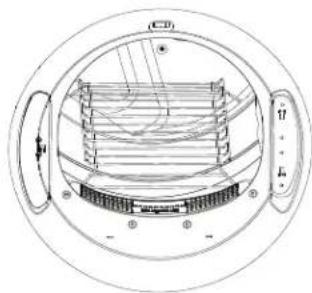
Interior and Duct
The interior of the appliance and exhaust duct should be cleaned once a year by qualified service personnel.
The Exhaust Duct: Inspect and clean the exhaust ducting at least once a year to prevent clogging. A partially clogged exhaust can lengthen the drying time.
Follow these steps:
1 Turn off electrical supply by disconnecting the plug from the wall socket.
2 Disconnect the duct from the dryer.
3 Vacuum the duct with the hose attachment and reconnect the duct.
The Exhaust Hood: Check with a mirror that the inside flaps of the hood move freely when operating. Make sure that there is no wildlife (birds, insects, etc.) nesting inside the duct or hood.
Exterior
Wipe or dust any spills or washing compounds with a damp cloth. Dryer control panel and finishes may be damaged by some laundry pretreatment soil and stain remover products. Apply these products away from the dryer. The fabric may then be washed and dried normally. Damage to your dryer caused by these products is not covered by your warranty.
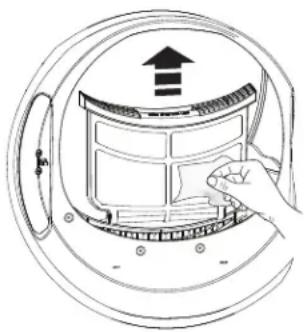
Lint Filter
Clean the lint filter before each use.
Remove by pulling straight up. Run your fingers across the filter. A waxy buildup may form on the lint filter from using dryer added fabric softener sheets.
To remove this buildup, wash the lint screen in warm, soapy water. Dry thoroughly and replace.
Vacuum the lint from the dryer lint filter area if you notice a change in dryer performance.
NEVER OPERATE THE DRYER WITHOUT ITS FILTER IN PLACE.
Stainless Steel (on GFD85 & PFD95 models only)
The stainless steel used to make the dryer drum provides the highest reliability available in a GE Appliances dryer. If the dryer drum should be scratched or dented during normal use, the drum will not rust or corrode. These surface blemishes will not affect the function or durability of the drum.
To clean stainless steel surfaces use a damp cloth with a mild, non-abrasive cleaner suitable for stainless steel surfaces. Remove the cleaner residue and then dry with a clean cloth.
Alcosta Aluminized Steel (on all other models)
The steel used to make the dryer drum has an aluminized coating on its surface to prevent it from rusting or corroding. Any surface blemishes will not affect the function or durability of the drum.
To clean the Alcosta surface use a damp cloth with a mild, non-abrasive cleaner suitable for stainless steel surfaces. Remove the cleaner residue and then dry with a clean cloth.
Drum Light (on some models)
The drum light is an LED light. Replacement must be done by a qualified technician.
Installation Instructions
Dryer
If you have any questions, call GE Appliances at 800.GE.CARES
(800.432.2737) or visit our Website at: GEAppliances.com
In Canada, call 800.561.3344 or visit www.GEApliances.ca
BEFORE YOU BEGIN
Read these instructions completely and carefully.
- IMPORTANT - Save these instructions for local electrical inspector's use.
- IMPORTANT - Observe all governing codes and ordinances.
- Install the clothes dryer according to the manufacturer's instructions and local codes.
Note to Installer - Be sure to leave these instructions with the Consumer. - Note to Consumer - Keep these instructions for future reference.
- Clothes dryer installation must be performed by a qualified installer.
- This dryer must be exhausted to the outdoors.
- Before the old dryer is removed from service or discarded, remove the dryer door.
- Service information and the wiring diagram are located in the control console.
- Do not allow children on or in the appliance. Close supervision of children is necessary when the appliance is used near children.
- Proper installation is the responsibility of the installer.
Product failure due to improper installation is not covered under the Warranty. - Install the dryer where the temperature is above 50^ for satisfactory operation of the dryer control system.
- Remove and discard existing plastic or metal foil duct and replace with UL-listed duct.
If you are planning to stack the washer and dryer, order Stacking Kit number GFA28KITN to be used for this dryer. Kit sold separately.
WARNING
- Risk of Fire
- Clothes dryer installation must be performed by a qualified installer.
- Install the clothes dryer according to these instructions and local codes.
- DO NOT install a clothes dryer with flexible plastic venting materials. If flexible metal (semi-rigid or foil-type) duct is installed, it must be UL-listed and installed in accordance with the instructions found in "Connecting the Dryer to House Vent" later in this manual. Flexible venting materials are known to collapse, be easily crushed and trap lint. These conditions will obstruct dryer airflow and increase the risk of fire.
- DO NOT install or store this appliance in any location where it could be exposed to water or weather.
- To reduce the risk of severe injury or death, follow all installation instructions.
- Save these instructions. (Installers: Be sure to leave these instructions with the customer.)
FOR GAS DRYERS ONLY
In the Commonwealth of Massachusetts, the following installation instructions apply:
- Installation must be performed by a qualified or licensed contractor, plumber, or gasfitter qualified or licensed by the State.
- If using a ball valve, it shall be a T-handle type.
- A flexible gas connector, when used, must not exceed 4 feet (1.2 m).
Installation Instructions
UNPACKING YOUR DRYER
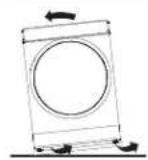
Tilt the dryer sideways and remove the foam shipping pads by pulling at the sides and breaking them away from the dryer legs. Be sure to remove all of the foam pieces around the legs.
Remove the bag containing the literature. Consider recycling options for your appliance packaging material.
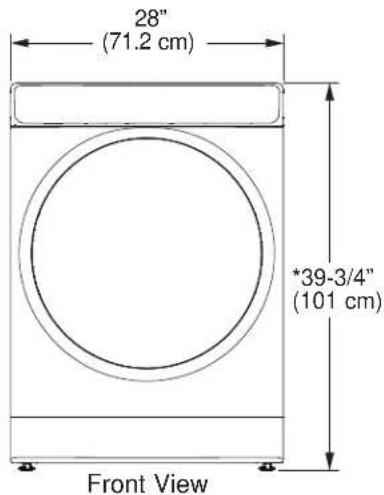
DRYER DIMENSIONS
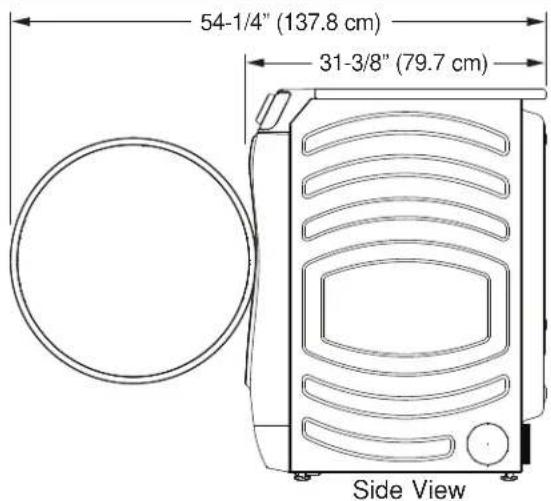
*NOTE: With leveling legs retracted: 39-3/4 (101 cm).
With leveling legs fully extended: 40-5/8 (103.1 cm).
With Optional Pedestal:
Stacked: 79-1/8" (201 cm).
55-1/2" (141 cm) Min. - 56-5/8" (143.8 cm) Max.
STEAM WATER HOSES (for steam dryer models only):
GE Appliances strongly recommends the use of factory specified parts. These hoses are manufactured and tested to meet GE Appliances specifications.
GE Appliances strongly recommends the use of new water supply hoses. Hoses degrade over time and need to be replaced every 5 years to reduce the risk of hose failures and water damage.
Parts and Accessories
Order on-line at GEApplianceparts.com, 24 hours a day or by phone at 877.959.8688 during normal business hours.
| Part Number | Accessory |
| WE25X20060 | Complete Kit (hoses, Y-adapter, washers) or |
| WE49X25794 | Kit (Short hose, Y-adapter, washers) and |
| WE1M847 | Long Hose |
| OR SEPARATELY | |
| WE1M847 | Long Hose and |
| WE1M848 | Short Hose |
ACCESSIONS:
Order on-line at GEApplianceparts.com, 24 hours a day or by phone at 877.959.8688 during normal business hours.
| Part Number | Accessory |
| GFR0728SNWW | White Riser |
| GFR0728PNSN | Satin Nickel Riser |
| GFR0728PNRS | Royal Sapphire Riser |
| GFR0728PNDG | Diamond Gray Riser |
| GFR0728PTDS | Black Slate Riser |
| Part Number | Accessory |
| GFA28KITN S | tacking Kit for Dryer over Washer |
| GFA28DSVN (WE16X29317) | Dryer Venting Kit |
| PM08X10085 | Flexible Metal Dryer Transition Duct |
| WE02X29449 | Clothes Dryer Drying Rack |
| GFP1528SNWW | White Pedestal |
| GFP1528PNSN | Satin Nickel Pedestal |
| GFP1528PNRS | Royal Sapphire Pedestal |
| GFP1528PNDG | Diamond Gray Pedestal |
| GFP1528PTDS | Black Slate Pedestal |
REQUIREMENTS FOR ALCOVE OR CLOSET INSTALLATION
WARNING

Explosion Hazard
Keep flammable materials and vapors, such as gasoline, away from dryer.
Place dryer at least 18" (46 cm) above the floor for a garage installation.
Failure to do so can result in death, explosion, or fire.
- The dryer MUST be vented to the outdoors.
- Minimum clearance between dryer cabinet and adjacent walls or other surfaces is:
0" (0 cm) either side
0^ (0cm) front
0" (0 cm) rear 0'0 cm) t
-
For improved performance, a 1/2" (12.7 mm) clearance is suggested on each side.
-
The rear of the dryer should face a wall.
- Consideration must be given to provide adequate clearance for installation and service.
- Closet doors must be louvered or otherwise ventilated and have at least 60 square inches (387 cm²) of open area. If the closet contains both a washer and a dryer, doors must contain a minimum of 120 square inches (774 cm²) of open area.
NOTE: WHEN THE EXHAUST DUCT IS LOCATED AT THE REAR OF THE DRYER, THE CONFIGURATION OF THE DUCTING MAY REQUIRE GREATER CLEARANCE.
Gas Dryers Only:
- No other fuel burning appliance shall be installed in the same closet as a gas dryer.
- The dryer must be disconnected from the gas supply piping during pressure testing at pressures greater than 1/2 psi (3.5kPa) .
- A 1/8" (3.2 mm) NPT minimum plugged tapping, accessible for test gauge connection, must be installed immediately upstream of the gas supply connection to the dryer.
MINIMUM CLEARANCE OTHER THAN ALCOVE OR CLOSET INSTALLATION
Minimum clearance to combustible surfaces and for air opening are: 0^ (0 cm) both sides*, 0^ (0 cm) rear and 0^ (0 cm) top.
- For improved performance, a 1/2" (12.7 mm) clearance is suggested on each side.
The rear of the dryer should face a wall.
Consideration must be given to provide adequate clearance for installation and service.
MOBILE OR MANUFACTURED HOME INSTALLATION
- Installation MUST conform to the MANUFACTURED HOME CONSTRUCTION AND SAFETY STANDARD, TITLE 24, PART 3280 or STANDARD FOR MOBILE HOMES CAN/CSA-Z240 MH, or, when such standards are not applicable, with AMERICAN NATIONAL STANDARD FOR MOBILE HOME, ANSI/NFPA NO. 501B.
- The dryer MUST be vented to the outdoors.
- The exhaust vent MUST be securely fastened to a non-combustible portion of the mobile home.
- The vent MUST NOT be terminated beneath a mobile or manufactured home.
- The vent duct material MUST BE METAL.
- KIT 14-D346-33 MUST be used to attach the dryer securely to the structure.
- The vent MUST NOT be connected to any other duct, vent or chimney.
- DO NOT use sheet metal screws or other fastening devices which extend into the interior of the exhaust vent.
- Provide an opening with a free area of at least 25 square inches (63~cm^2) for introduction of outside air into the dryer room.
- See the sections for electrical connection information.
CONNECTING INLET HOSES (for steam dryer models only)
CONNECTING INLET HOSES
To produce steam, the dryer must connect to the cold water supply. Since the washer must also connect to the cold water, a "Y" connector is inserted to allow both inlet hoses to make that connection at the same time.
NOTE: Use new inlet hoses; never use old hoses.
- Turn the cold water faucet off. Remove the washer inlet hose from the washer fill valve connector (cold).
- Ensure the rubber flat washer is in place and attach one female coupling of the short hose provided onto the washer fill valve connector. Tighten by hand until firmly seated.
- Attach one male end of the "Y" connector to the other female coupling of the short hose. Ensure the rubber flat washer is in place. Tighten by hand until firmly seated.
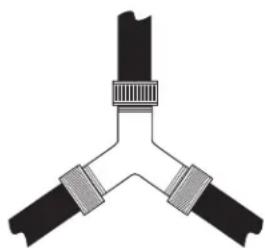
- Insert the filter screen in the coupling of the washer's inlet hose. If a rubber flat washer is already in place remove it before installing the filter screen. Attach this coupling to one male end of the "Y" connector. Tighten by hand until firmly seated.
- Ensure the rubber flat washer is in place and attach a 4 ft. (1.2m) to 6 ft. (1.8m) long water inlet hose (may need to be purchased separately) to one male end of the "Y" connector. Tighten by hand until firmly seated.
- Ensure the rubber flat washer is in place and attach the other end of the dryer's long inlet hose to the fill valve connector at the bottom of the dryer back panel. Tighten by hand until firmly seated.
CONNECTING INLET HOSES (cont.)
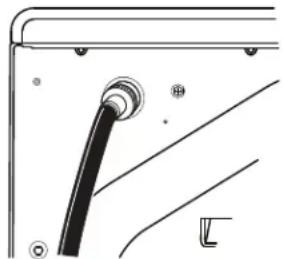
- Using pliers, tighten all the couplings with an additional two-thirds turn.
NOTE: Do not overtighten. Damage to the couplings may result.
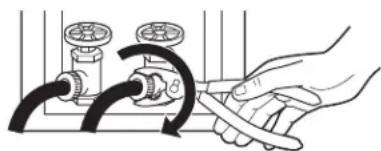
- Turn the water faucet on.
- Check for leaks around the "Y" connector, faucet and hose couplings.
WATER SUPPLY REQUIREMENTS
Hot and cold water faucets MUST be installed within 42 in. (107 cm) of your washer's water inlet. The faucets MUST be 3/4'' (19.1 mm) garden hose-type so inlet hoses can be connected. Water pressure MUST be between 10 and 120 pounds per square inch. Your water department can advise you of your water pressure.
NOTE: A water softener is recommended to reduce buildup of scale inside the steam generator if the home water supply is very hard.
CONNECTING A GAS DRYER (skip for electric dryers)
TOOLS YOU WILL NEED
10" (25.40 cm) Adjustable wrenches (2)
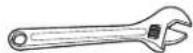
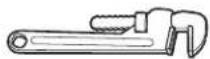
8" (20.32 cm) Pipe wrench
Flat-bladescrewdriver

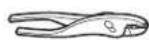
Slip-joint pliers
Level

MATERIALS YOU WILL NEED
GFA28DSVN Kit
(All parts included in this Kit or parts may be purchased separately)
Access Panel
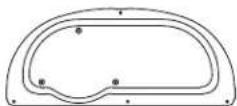
4" (10.2 cm) dia. metal elbow

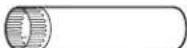
4" (10.2 cm) dia. metal duct (recommended)
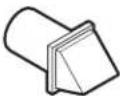
Exhaust hood
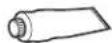
Pipe compound or PTFE tape
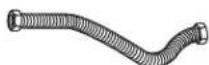
Flexible gas line connector
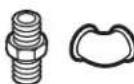
Gas pipe adapters (2), elbow and pipe plug
Soap solution for leak detection

Gloves
Safety glasses


4" (10.2 cm) dia., UL-listed flexible metal duct (if needed)
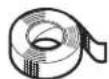
Duct tape
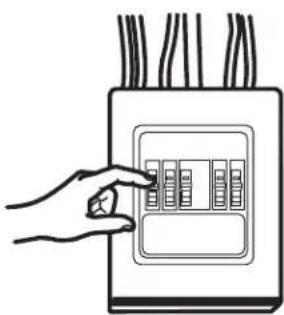
- Before beginning the installation, turn off the circuit breaker(s) or remove the dryer's circuit fuse(s) at the electrical box. Be sure the dryer cord is unplugged from the wall.
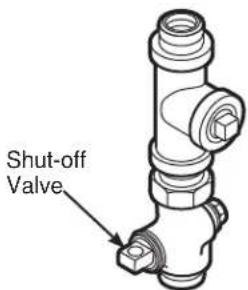
- Turn the dryer's gas shut-off valve in the supply line to the OFF position.
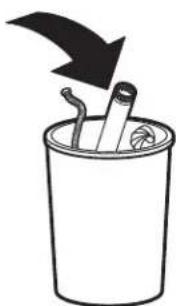
- Disconnect and discard old flexible gas connector and ducting material.
CONNECTING A GAS DRYER (cont.)
GAS REQUIREMENTS
WARNING

-
Explosion Hazard
-
Use a new CSA International approved flexible gas supply line. Never reuse old flexible connectors.
- Install an individual manual shut-off valve within 6ft. of the dryer in accordance with the National Fuel Gas Code, ANSI Z223.1/NFPA 54.
- Securely tighten all gas connections.
If connected to LP gas, have a qualified person make sure gas pressure DOES NOT exceed 13" (33 cm) water column.
Examples of a qualified person include: licensed heating personnel, authorized gas company personnel, and authorized service personnel. - Failure to do so can result in death, explosion, or fire.
- The installation must conform with local codes, or in the absence of local codes, with the National Fuel Gas Code, ANSI Z223.1/ NFPA 54, or the Natural Gas and Propane Installation Code, CSA B149.1.
GAS SUPPLY
- A 1/8" (3.2 mm) National Pipe Taper thread plugged tapping, accessible for test gauge connection, must be installed immediately upstream of the gas supply connection to the dryer. Contact your local gas utility should you have questions on the installation of the plugged tapping.
Supply line is to be 1 / 2 (12.7 mm) rigid pipe and equipped with an accessible shutoff within 6 feet (1.8m) of, and in the same room with, the dryer. - Use pipe thread compound appropriate for natural or LP gas or use PTFE tape.
- Connect flexible metal connector to dryer and gas supply.
WARNING

- Fire Hazard
Dryer as produced by manufacturer is to be used only with a natural gas supply. A manufacturer-supplied conversion kit is required to convert this dryer for propane gas supply. Use propane gas conversion kit WE25M87. Conversion must be made by properly trained and qualified personnel in accordance with local codes and ordinances.
DRYER GAS SUPPLY CONNECTION
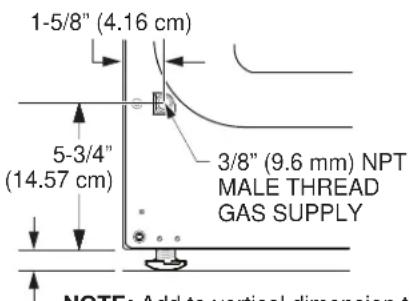
NOTE: Add to vertical dimension the distance between cabinet bottom to floor.
You must use with this dryer a flexible metal connector (listed connector ANSI Z21.24 / CSA 6.10). The length of the connect shall not exceed 4 ft. (1.2m)
ADJUSTING FOR ELEVATION
- Gas clothes dryers input ratings are based on sea level operation and need not be adjusted for operation at or below 2000 ft. (610 m) elevation. For operation at elevations above 2000 ft. (610 m), input ratings should be reduced at a rate of 4 percent for each 1000 ft. (305 m) above sea level.
- Installation must conform to local codes and ordinances or, in their absence, the NATIONAL FUEL GAS CODE, ANSI Z223.
CONNECTING A GAS DRYER (cont.)
CONNECTING THE DRYER TO THE GAS SUPPLY
A Install a female 3 / 8" (9.6 mm) NPT elbow at the end of the dryer gas inlet.
Install a 3/8" (9.6 mm) flare union adapter to the female elbow.
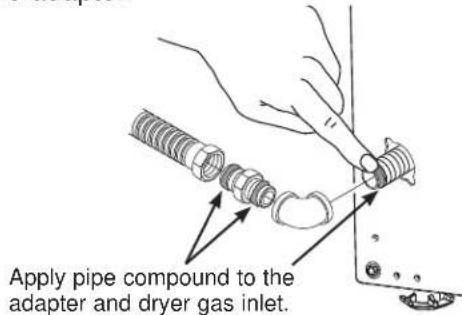
IMPORTANT: Use a pipe wrench to securely hold on to the end of the dryer gas inlet to prevent twisting the inlet.
NOTE: Apply pipe compound or PTFE tape to the threads of the adapter and dryer gas inlet.
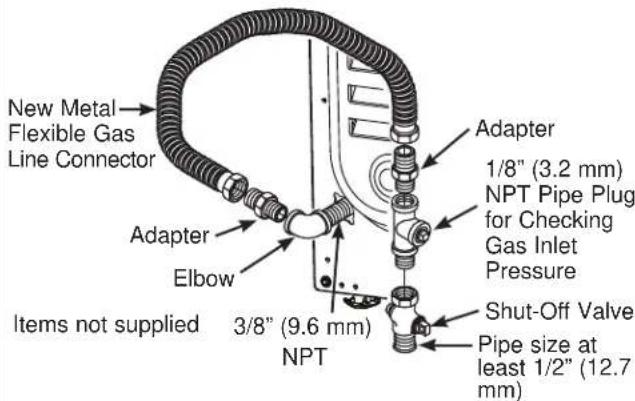
B Attach the flexible metal gas line connector to the adapter.
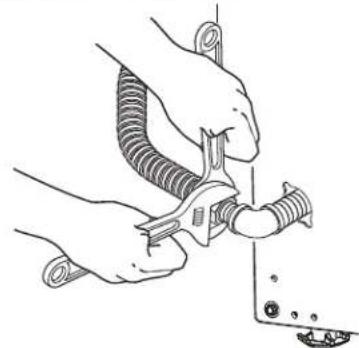
C Tighten the flexible gas line connection, using two adjustable wrenches.
CONNECTING THE DRYER TO THE GAS SUPPLY (cont.)
Install a 1/8" (3.2 mm) NPT plugged tapping to the dryer gas line shut-off valve for checking gas inlet pressure.
Install a flare union adapter to the plugged tapping.
NOTE: Apply pipe compound or PTFE tape to the threads of the adapter and plugged tapping.
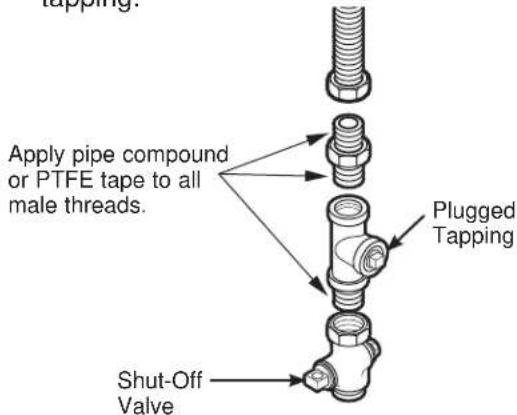
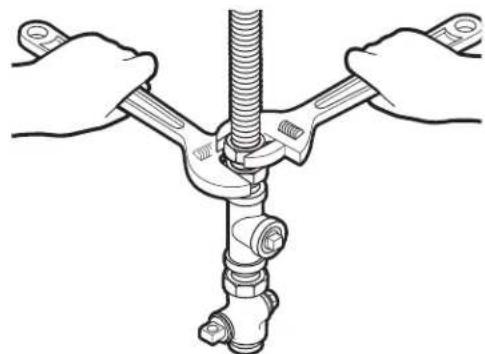
E Tighten all connections, using two adjustable wrenches. Do not overtighten.
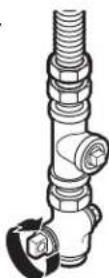
F Open the gas shut-off valve.
CONNECTING A GAS DRYER (cont.)
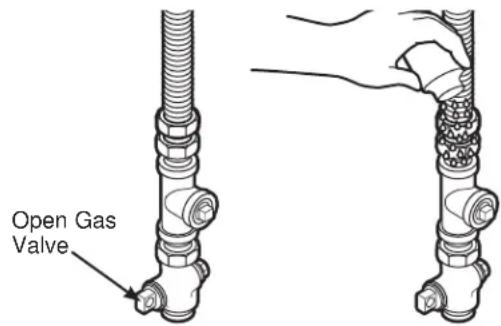
TEST FOR LEAKS
Never use an open flame to test for gas leaks.
Check all connections for leaks with soapy solution or equivalent.
Apply a soap solution. The leak test solution must not contain ammonia, which could cause damage to the brass fittings.
If leaks are found, close the valve, retighten the joint and repeat the soap test.
ELECTRICAL CONNECTION INFORMATION FOR GAS DRYERS
WARNING

Electrical Shock Hazard
Plug into a grounded 3 prong outlet.
DO NOT remove ground prong.
DO NOT use an adapter.
DO NOT use an extension cord.
Failure to do so can result in death, fire or electrical shock.
- Circuit - Individual properly polarized and grounded 15 or 20 amp circuit breaker or time-delay fuse.
Power Supply - 2-wire plus ground, 120 Volt, single phase, 60Hz ,alternating current. - Outlet Receptacle - Properly grounded 3-prong
receptacle to be located so the power cord is accessible when the dryer is in an installed position. If a 2-prong receptacle is present, it is the owner's responsibility to have a licensed electrician replace it with a properly grounded receptacle.
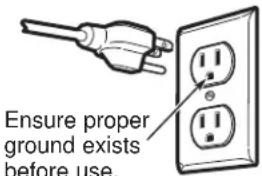
ELECTRICAL CONNECTION INFORMATION FOR GAS DRYERS (cont.)
- Dryer must be electrically grounded in accordance with local codes and ordinances, or in the absence of local codes, with the latest edition of the NATIONAL ELECTRICAL CODE, ANSI/NFPA NO. 70 or CANADIAN ELECTRICAL CODE, CSA C22.1. Check with a licensed electrician if you are not sure that the dryer is properly grounded.
GROUNDING INSTRUCTIONS
This dryer must be grounded. In the event of a malfunction or breakdown, grounding will reduce the risk of electric shock by providing a path of least resistance for electric current. This dryer uses a cord having an equipment-grounding conductor and a grounding plug. The plug must be plugged into an appropriate outlet that is properly installed and grounded in accordance with all local codes and ordinances.
WARNING
Improper connection of the equipment-grounding conductor
can result in a risk of electric shock. Check with a qualified electrician, or service representative or personnel, if you are in doubt as to whether the appliance is properly grounded. DO NOT modify the plug on the power supply cord. If it will not fit the outlet, have a proper outlet installed by a qualified electrician.
SAVE THESE INSTRUCTIONS
If required by local codes, an external 18 gauge or larger copper ground wire (not provided) may be added. Attach to dryer cabinet with a #8-18 x 1/2 (12.7 mm) sheet metal screw (available at any hardware store) to rear of dryer as illustrated.
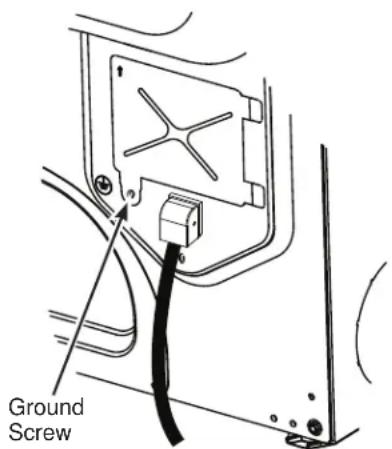
CONNECTING AN ELECTRIC DRYER
(Skip for gas dryers and if your dryer already has a power cord attached)
TOOLS YOU WILL NEED
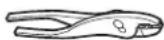
Slip-joint pliers
Flat-bladescrewdriver

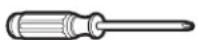
Phillips screwdriver
Level

MATERIALS YOU WILL NEED
GFA28DSVN Kit
(All parts included in this Kit or parts may be purchased separately)
Access Panel
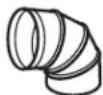
4" (10.2 cm) dia. metal elbow
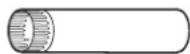
4" (10.2cm) dia. metal duct (recommended)
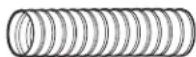
4" (10.2 cm) Duct clamps (2) or 4" (10.2 cm) spring clamps (2)


4" (10.2 cm) dia., UL-listed flexible metal duct (if needed)
Duct tape
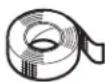
Exhaust hood
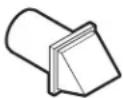
Metal strain relief clamp (UL recognized)

Dryer power cord kit (not provided with dryer)
UL rated 120/240V, 30A with 3 or 4 prongs. Identify the plug type as per the house receptacle before purchasing line cord.
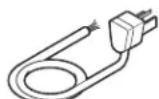
Stacking installations may require a power cord up to 6 feet (1.8m) in length.
Gloves
Safety glasses
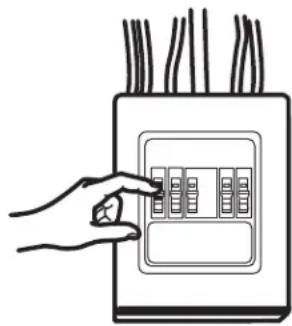
Before making the electrical connection, turn off the circuit breaker(s) or remove the dryer's circuit fuse(s) at the electrical box. Be sure the dryer cord is unplugged from the wall. NEVER LEAVE THE ACCESS COVER OFF THE TERMINAL BLOCK.
WARNING

- Electrical Shock Hazards
Disconnect power supply before servicing.
Replace all parts and panels before operating.
Failure to do so can result in death or electrical shock.
POWER CORDS
GE Appliances strongly recommends the use of factory specified parts. Select the power cord to fit your installation requirements.
NOTE: If your dryer circuit is on a circuit protected by a GFCI breaker, then 3-wire installation is not permitted. House wiring and dryer must be configured for 4-wire.
| Part Number | Type Length | th Amperage |
| WX9X2 3-P | rong 4 ft. (1.2 m) 30 | |
| WX9X3 3-P | rong 5 ft. (1.5 m) 30 | |
| WX9X4 3-P | rong 6 ft. (1.8 m) 30 | |
| WX9X18 4-P | rong 4 ft. (1.2 m) 30 | |
| WX9X19 4-P | rong 5 ft. (1.5 m) 30 | |
| WX9X20 4-P | rong 6 ft. (1.8 m) 30 |
Order on-line at GEApplianceparts.com today, 24 hours a day or by phone at 877.959.8688 during normal business hours. In Canada, visit your local GE Appliances parts distributor or call 800.661.1616 or GEAppliances.ca/en/products/parts-filters-accessories.
ELECTRICAL CONNECTION INFORMATION FOR ELECTRIC DRYERS For electrical connections using a power cord:
NOTE: If your dryer circuit is on a circuit protected by a GFCI breaker, then 3-wire installation is not permitted. House wiring and dryer must be configured for 4-wire.
WARNING

Fire Hazard
Use a new UL-listed 240V 30 amp dryer power supply cord with closed ring terminals or spade terminals with upturned ends.
Use a UL-listed strain relief.
Disconnect power before making electrical connections.
Connect neutral wire (white or center wire) to center terminal.
Ground wire (green or bare wire) must be connected to green ground connector.
Connect remaining two supply wires to remaining two terminals.
Securely tighten all electrical connections.
Replace the terminal block cover.
Failure to do so can result in death, fire or electrical shock.
GROUNDING INSTRUCTIONS
For a grounded, cord-connected dryer: This dryer must be grounded. In the event of a malfunction or breakdown, grounding will reduce the risk of electric shock by providing a path of least resistance for electric current. This dryer uses a cord having an equipment-grounding conductor and a grounding plug. The plug must be plugged into an appropriate outlet that is properly installed and grounded in accordance with all local codes and ordinances.
WARNING
Improper connection of the
equipment-grounding conductor can
result in a risk of electric shock. Check with a qualified electrician, or service representative or personnel, if you are in doubt as to whether the appliance is properly grounded. DO NOT modify the plug on the power supply cord. If it will not fit the outlet, have a proper outlet installed by a qualified electrician.
SAVE THESE INSTRUCTIONS
WARNING

- Electrical Shock Hazard
TO PREVENT ELECTRIC SHOCK, DISCONNECT POWER BEFORE SERVICING.
This dryer should be connected to an individual branch circuit with 10 gauge copper wire minimum through a 30 amp fuse or circuit breaker. DO NOT fuse neutral.
Use copper conductors only.
ELECTRICAL CONNECTION INFORMATION FOR ELECTRIC DRYERS
For direct wire connections:
WARNING

Fire Hazard
Use 10 gauge copper wire.
Use a UL-listed strain relief.
Disconnect power before making electrical connections.
Connect neutral wire (white or center wire) to center terminal.
Ground wire (green or bare wire) must be connected to green ground connector.
Connect remaining two supply wires to remaining two terminals.
Securely tighten all electrical connections.
Replace the terminal block cover.
Failure to do so can result in death, fire or electrical shock.
GROUNDING INSTRUCTIONS
For a permanently connected dryer: This dryer must be connected to a grounded metal, permanent wiring system, or an equipment-grounding conductor must be run with the circuit conductors and connected to the equipment-grounding terminal on the appliance.
WARNING
Improper connection of the equipment-grounding conductor can
result in a risk of electric shock. Check with a qualified electrician, or service representative or personnel, if you are in doubt as to whether the appliance is properly grounded.
SAVE THESE INSTRUCTIONS
WARNING

- Electrical Shock Hazard
TO PREVENT ELECTRIC SHOCK, DISCONNECT POWER BEFORE SERVICING.
This dryer should be connected to an individual branch circuit with 10 gauge copper wire minimum through a 30 amp fuse or circuit breaker. DO NOT fuse neutral.
Use copper conductors only.
CONNECTING AN ELECTRIC DRYER (cont.)
CONNECTING DRYER USING 4-WIRE CONNECTION (MUST BE USED FOR MOBILE HOME INSTALLATION)
NOTE: Since January 1, 1996, the National Electrical Code requires that new constructions use a 4-wire connection to an electric dryer. A 4-wire cord must also be used where local codes do not permit grounding through the neutral. 3-wire connection is NOT for use on new construction.
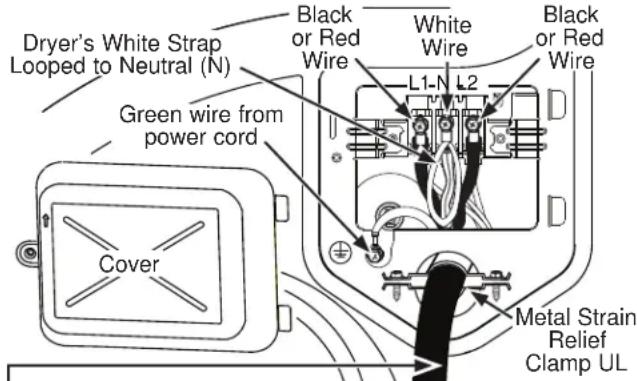
4 #10 AWG minimum copper conductors or 120/240V 30A power supply cord kit marked for use with dryers and provided with closed loop or spade terminals with upturned ends (not supplied).
- Turn off the circuit breaker(s) (30 amp) or remove the dryer's circuit fuse at the electrical box.
- Be sure the dryer cord is unplugged from the wall receptacle.
- Remove the power cord cover located at the lower back.
- Remove green ground screw and retain for use in Step 7. Leave one end of the short white strap loose until Step 6. Remove center screw (marked N) in terminal block.
- Place the UL-recognized metal strain relief clamp to power cord entry hole. Bring power cord through strain relief clamp.
- Connect power cord as follows:
A. Connect the 2 hot lines to the outer screws of the terminal block (marked L1 and L2).
B. Connect the neutral (white) line and the loose end of the short white strap to the center of the terminal block (marked N).
- Attach ground wire of power cord with the green ground screw (hole to left of strain relief clamp). Tighten all terminal block screws (3) securely.
- Properly secure power cord to strain relief clamp.
- Reinstall the cover.
NOTE: If your dryer circuit is on a circuit protected by a GFCI breaker, then 3-wire installation is not permitted. House wiring and dryer must be configured for 4-wire.
If required, by local code, install external ground (not provided) to grounded metal, cold water pipe, or other established ground determined by a qualified electrician.
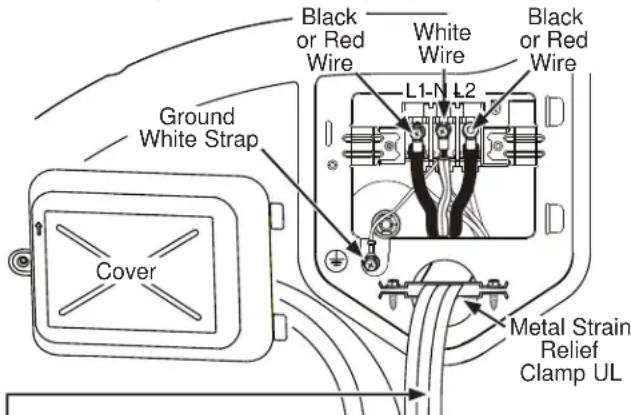
3 #10 AWG minimum copper conductors or 120/240V 30A power supply cord kit marked for use with dryers and provided with closed loop or spade terminals with upturned ends (not supplied).
3-wire Connection
Not for use in Canada.
DO NOT use for Mobile Home Installations.
NOT for use on new construction.
NOT for use on recreational vehicles.
NOT for use in areas where local codes prohibit grounding through the neutral conduction.
- Turn off the circuit breaker(s) (30 amp) or remove the dryer's circuit fuse at the electrical box.
- Be sure the dryer cord is unplugged from the wall receptacle.
- Remove the power cord cover located at the lower back.
- Place the UL-recognized metal strain relief clamp to power cord entry hole. Bring power cord through strain relief clamp.
- Connect power cord as follows:
A. Connect the 2 hot lines to the outer screws of the terminal block (marked L1 and L2).
B. Connect the neutral (white) line to the center of the terminal block (marked N).
- Be sure ground white strap is connected to green ground screw on cabinet rear. Tighten all terminal block screws (3) securely.
- Properly secure power cord to strain relief clamp.
- Reinstall the cover.
This dryer MUST be vented to the outdoors. Use only 4^ (10.2 cm) rigid metal ducting for the home exhaust duct.
Use only 4^ (10.2 cm) rigid metal, UL-listed flexible metal, or UL-listed metal foil dryer transition duct to connect the dryer to the home exhaust.
DO NOT use any plastic to vent the dryer, this includes the home exhaust duct, dryer transition duct, or within the dryer.
DO NOT use flexible metal or metal foil ducting for a home exhaust duct or within the dryer.
DO NOT exhaust into a chimney, kitchen exhaust, gas vent, wall, ceiling, attic, crawl space, or concealed space of a building.
DO NOT install a screen in or over the exhaust duct.
DO NOT install a booster fan in the exhaust duct.
DO NOT use duct longer than specified in the exhaust length table.
Failure to follow these instructions can result in death or fire.
TOOLS AND MATERIALS YOU WILL NEED TO INSTALL EXHAUST DUCT
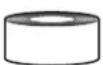
1/4" (6.4 mm) Socket & Nut Driver
□1/4" (6.4 mm) Socket & Wrench
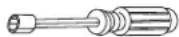
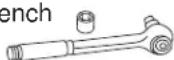
Duct tape or duct clamp
Vent hood
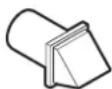
PARTS AVAILABLE FROM GEAPPLIANCEPARTS.COM OR LOCAL SERVICE ORGANIZATIONS
| GFA28DSVN (WE16X29317) | Dryer Venting Kit |
| PM8X85 | Outdoor exhaust hood |
| WX08X10130 | 4" (10.2 cm) Dryer exhaust clamp |
CONNECTING THE DRYER TO HOUSE VENT
RIGID METAL TRANSITION DUCT
- For best drying performance, a rigid metal transition duct is recommended.
- Rigid metal transition ducts reduce the risk of crushing and kinking.
UL-LISTED FLEXIBLE METAL CLOTHES DRYER TRANSITION DUCT
If rigid metal cannot be used, then UL-listed flexible metal clothes dryer transition duct (GE Appliances part - PM08X10085) can be used.
- Never install transition duct in walls, ceilings, floors or other enclosed spaces.
Total length of transition duct should not exceed 8' (2.4 m).
- For many applications, installing elbows at both the dryer and the wall is highly recommended (see illustrations in next section). Elbows allow the dryer to sit close to the wall without kinking and/or crushing the transition duct, maximizing drying performance.
- Avoid resting the duct on sharp objects.
UL-LISTED FLEXIBLE METAL (FOIL-TYPE) TRANSITION DUCT
- In special installations, it may be necessary to connect the dryer to the home exhaust vent using flexible metal (foil-type) transition duct. UL-LISTED universal flexible dryer transition duct (GE Appliances parts - PM8X73 or WX8X73) may be used ONLY in installations where rigid metal or flexible metal transition ducting cannot be used AND where a 4" (10.2 cm) diameter can be maintained throughout the entire length of the transition duct.
- In Canada and the United States, only transition ducts that comply with "UL 2158A STANDARD FOR CLOTHES DRYER TRANSITION DUCT" shall be used.
- Avoid resting the duct on sharp objects.
-
For best drying performance:
-
Slide one end of the duct over the clothes dryer outlet pipe.
- Secure the duct with a clamp.
- With the dryer in its permanent position, extend the duct to its full length. Allow 2" (5.08 cm) of duct to overlap the exhaust pipe. Cut off and remove excess duct. Keep the duct as straight as possible for maximum airflow.
- Secure the duct to the exhaust pipe with the other clamp.
Installation Instructions
EXHAUSTING THE DRYER (cont.)
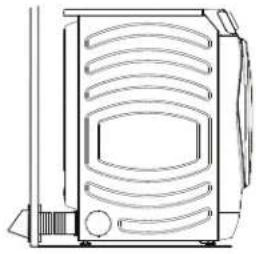
- DO cut duct as short as possible and install straight into wall.
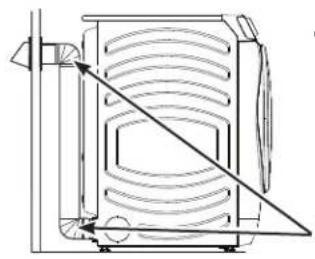
DO use elbows when turns are necessary.
Elbows
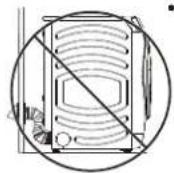
DO NOT bend or collapse ducting. Use elbows if turns are necessary.
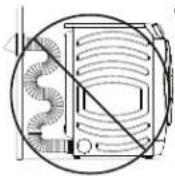
DO NOT use excessive exhaust length. Cut duct as short as possible.
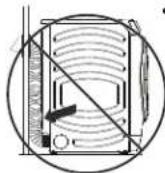
DO NOT crush duct against the wall.
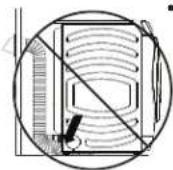
DO NOT set dryer on duct.
EXHAUST LENGTH
Using exhaust longer than specified length will:
- Increase the drying times and the energy cost.
- Reduce the dryer life.
- Accumulate lint, creating a potential fire hazard.
The correct exhaust installation is YOUR RESPONSIBILITY.
Problems due to incorrect installation are not covered by the warranty.
The MAXIMUM ALLOWABLE length of the exhaust system depends upon the type of duct, number of turns, the type of exhaust hood (wall cap) and all conditions noted on the chart.
- Internal elbows added for side or bottom vent conversions must be included in the total elbow count.
- Any elbow greater than 45^ should be treated as a 90^ elbow; one elbow of 45^ or less may be ignored.
- Two 45^ elbows will be treated like one 90^ elbow.
- For the side exhaust installations, add one 90^ elbow to the chart.
- For every additional 90^ elbow, reduce the allowable vent system length by 10 feet (3 m).
- When calculating the total vent system length, you must add all the straight portions and elbows of the system (including the transition duct).
EXHAUST LENGTH FOR NORMAL VENT MODELS
| No. of 90° Elbows Rigid Metal Rigid Metal | |
| 0 90 Feet (27.4 m) 60 Feet (18.3 m) | |
| 1 60 Feet (18.3 m) 45 Feet (13.7 m) | |
| 2 45 Feet (13.7 m) 35 Feet (10.7 m) | |
| 3 35 Feet (10.7 m) 25 Feet (7.6 m) | |
| 4 25 Feet (7.6 m) 15 Feet (4.6 m) |
EXHAUST
LENGTH
FOR
LONG
VENT
MODELS
| No. of 90° Elbows Rigid Metal Rigid Metal | ||
| 0 200 Feet | (61 m) 175 Feet | (53.3 m) |
| 1 | 185 Feet (56.4 m) | 165 Feet (50.3 m) |
| 2 | 175 Feet (53.3 m) | 155 Feet (47.2 m) |
| 3 | 165 Feet (50.3 m) | 145 Feet (44.2 m) |
| 4 | 155 Feet (47.2 m) | 135 Feet (41.1 m) |
| 5 | 145 Feet (44.2 m) | 125 Feet (38.1 m) |
EXHAUSTING THE DRYER (cont.)
EXHAUST SYSTEM CHECKLIST
HOOD OR WALL CAP
- Terminate in a manner to prevent back drafts or entry of birds or other wildlife.
Termination should present minimal resistance to the exhaust airflow and should require little or no maintenance to prevent clogging. - Wall caps must be installed at least 12^ (30.5 cm) above ground level or any other obstruction with the opening pointed down.
SEPARATION OF TURNS
- For best performance, separate all turns by at least 4 ft. (1.2 m) of straight duct, including distance between last turn and dampened exhaust hood (wall cap).
SEALING OF JOINTS
- All joints should be tight to avoid leaks. The male end of each section of duct must point away from the dryer.
- Duct joints should be made air- and moisture-tight by wrapping the overlapped joints with duct tape or aluminum tape.
- Do not assemble ductwork with any fasteners that extend into the duct. These fasteners can accumulate lint, creating a potential fire hazard.
Horizontal runs should slope down towards the outdoors 1/4 (6.4 mm) per foot. - Provide an access for inspection and cleaning of the exhaust system, especially at turns and joints. Exhaust system shall be inspected and cleaned at least once a year.
INSULATION
- Ductwork that runs through an unheated area or is near air conditioning should be insulated to reduce condensation and lint build-up.
BEFORE YOU BEGIN
- Remove and discard existing plastic or metal foil duct and replace with UL-listed duct.
- Remove any lint from the wall exhaust opening.
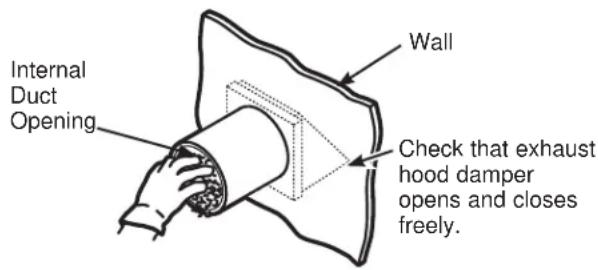
STANDARD REAR EXHAUST
We recommend that you install your dryer before installing your washer. This will permit direct access for easier exhaust connection.
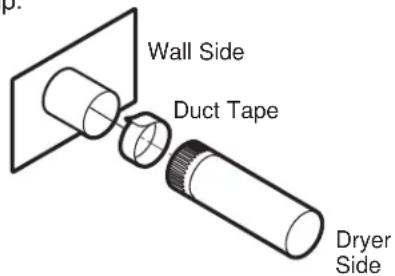
Slide the end of the exhaust duct on the back of the dryer and secure with duct tape or a hose clamp.
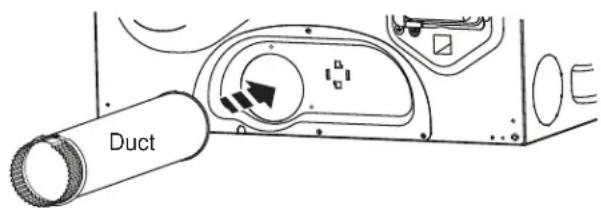
NOTE: We strongly recommend using rigid metal exhaust duct. However, if flexible ducting is used it must be UL-Listed metal, not plastic.
- For straight line installation, connect the dryer exhaust to the external exhaust hood using duct tape or clamp.
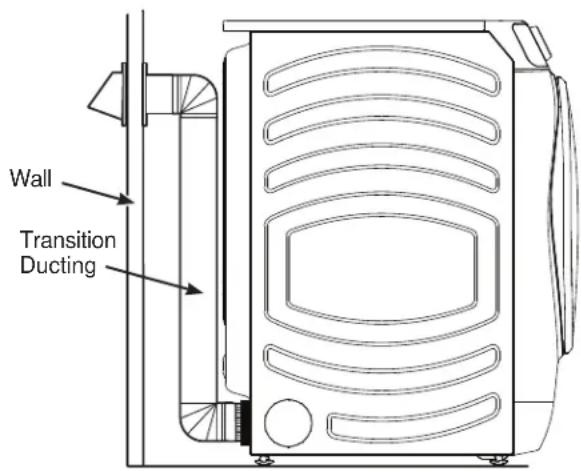
RECOMMENDED CONFIGURATION TO MINIMIZE EXHAUST BLOCKAGE
Using duct elbows will prevent duct kinking and collapsing.
EXHAUSTING THE DRYER (cont.)
SIDE VENTING
WARNING

- Fire Hazard
Disconnect dryer from electrical supply.
Wear gloves and arm guards.
Close the back opening with the access panel included in kit GFA28DSVN.
Failure to do so may result in fire, electrical shock or lacerations.
- Remove the 4 screws that secure the access panel and save. Remove the access panel.
Remove 4 screws and save
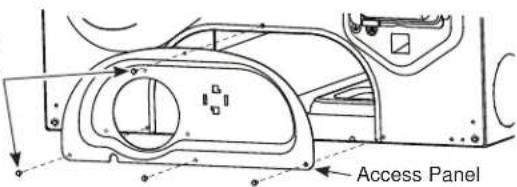
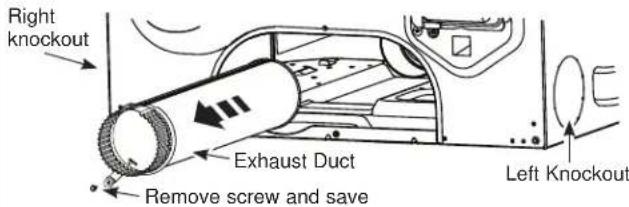
- Detach and remove the right or left side knockout as desired. Remove the screw that secures the dryer exhaust duct and save. Pull the exhaust duct out of the dryer.
- Locate the 12 - 1 / 2 (31.5 cm) exhaust duct and elbow duct from the kit and assemble together. Apply duct tape around the joint to eliminate leaks between ducts.
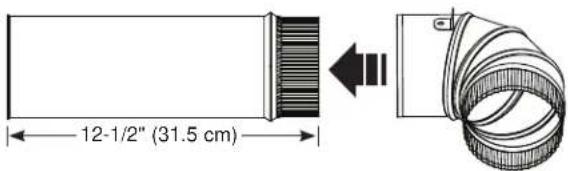
SIDE VENTING (cont.)
- Insert and connect the elbow/exhaust duct assembly to the blower housing and orient the elbow for either left or right venting.
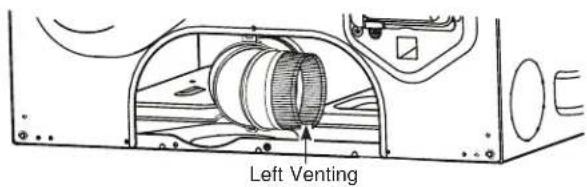
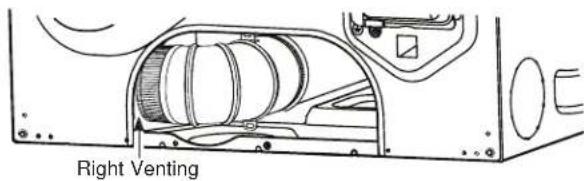

- Locate the bracket from the kit.
- Remove the adhesive liner from the bottom of the bracket and position it behind the elbow duct tab.
- Press down firmly to secure the bracket to the bottom of the dryer.
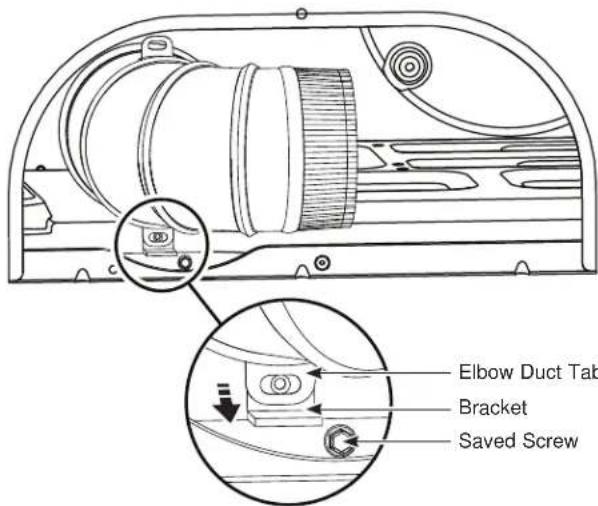
- Using one of the screws from earlier, secure the elbow duct tab to the bracket.
EXHAUSTING THE DRYER (cont.)
SIDE VENTING (cont.)
For LEFT venting:
- Locate the 15 - 1 / 2'' (39.4 cm) exhaust duct from the kit.
- Insert exhaust duct through knockout opening on the LEFT side of dryer.
- Assemble exhaust duct to elbow duct.
- Wrap the joint with duct tape to avoid air leaks.
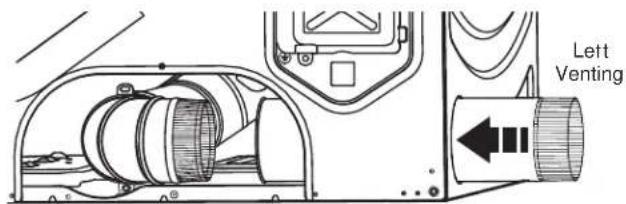
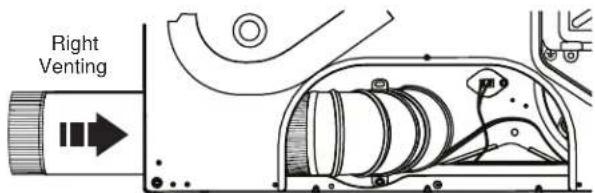
For RIGHT venting:
- Locate the 9 - 1 / 2'' (24.2 cm) exhaust duct from the kit.
- Insert exhaust duct through knockout opening on the RIGHT side of dryer.
- Assemble exhaust duct to elbow duct.
- Wrap the joint with duct tape to avoid air leaks.
- Install the new access panel from the kit.
- Secure access panel with 4 screws saved from earlier.
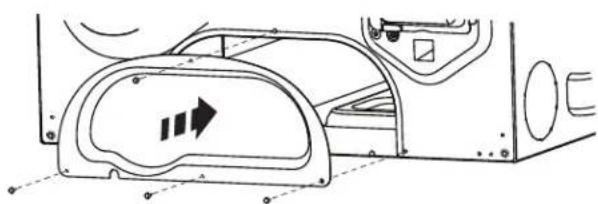
NEVER LEAVE THE BACK OPENING WITHOUT THE ACCESS PANEL.
BOTTOM VENTING
Dryer Exhaust to the bottom of cabinet for Gas and Electric models WITHOUT Built-In Pedestal™.
WARNING

- Fire Hazard
Disconnect dryer from electrical supply.
Wear gloves and arm guards.
Close the back opening with the access panel included in kit GFA28DSVN.
Failure to do so may result in fire, electrical shock or lacerations.
- Remove the 4 screws that secure the access panel and save. Remove the access panel.
Remove 4 screws and save
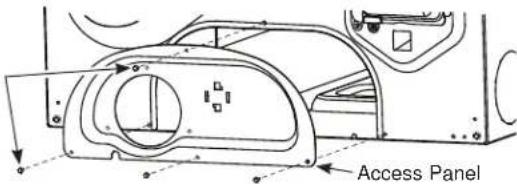
- Remove the screw that secures the dryer exhaust duct and save. Pull the exhaust duct out of the dryer.
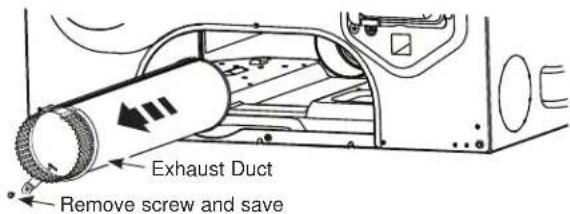
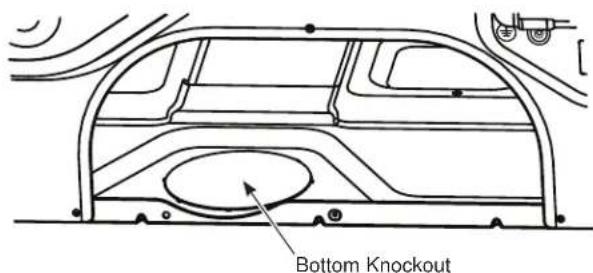
- Detach and remove the bottom knockout.
EXHAUSTING THE DRYER (cont.)
BOTTOM VENTING (cont.) BOTTOM
- Locate the 12 - 1 / 2 (31.5 cm) exhaust duct and elbow duct from the kit and assemble together. Apply duct tape around the joint to eliminate leaks between ducts.
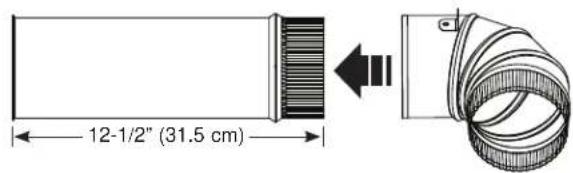
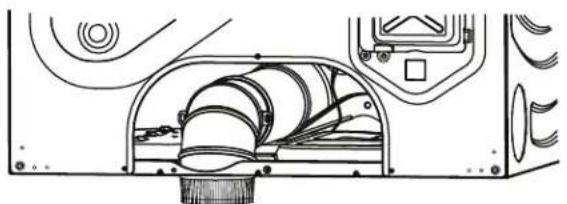
- Insert and connect the elbow/exhaust duct assembly to the blower housing and insert the elbow through the bottom knockout.
VENTING (cont.)
- Install the new access panel from the kit.
- Secure access panel with 4 screws saved from earlier.
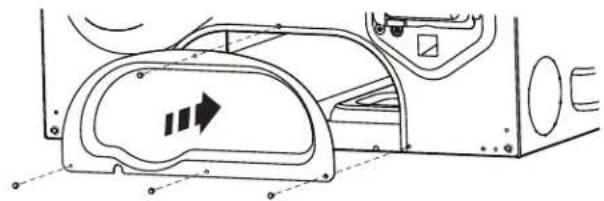
NEVER LEAVE THE BACK OPENING WITHOUT THE ACCESS PANEL.
FINAL SETUP
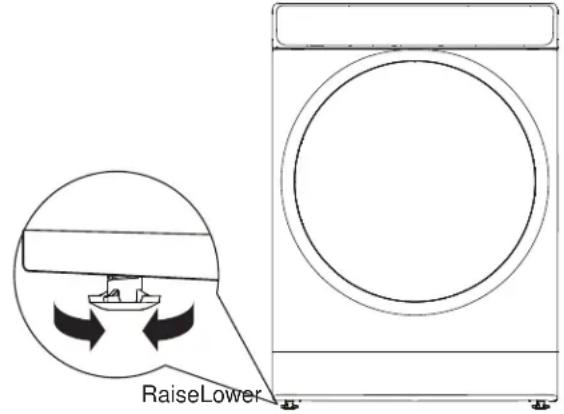
LEVEL THE DRYER
Stand the dryer upright near the final location and adjust the four leveling legs at the corners to ensure that the dryer is level from side to side and front to rear.
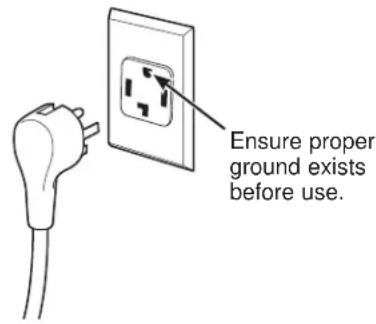
2 PLUG DRYER IN
NOTE: Stacking installations may require a power cord up to 6 feet (1.8 m) in length.
3 DRYER START-UP
Press the Power pad.
NOTE: If the dryer has been exposed to temperatures below freezing for an extended period of time, allow it to warm up before pressing Power. Otherwise, the display will not come on.
The dryer is now ready for use.
WARNING

- Electrical Shock Hazard
Disconnect power supply before servicing. Replace all parts and panels before operating. Failure to do so can result in death or electrical shock.
WARNING
- Shock Hazard
Certain internal parts are intentionally not grounded and may present a risk of electric shock only during servicing.
Service personnel - DO NOT contact the following parts while the appliance is energized: water valve, door switch, electronic board, igniter, thermostats, flame detector.
Installation Instructions
REVERSING THE DOOR SWING (Optional)
BEFORE YOU START
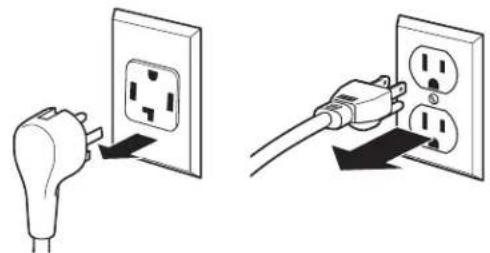
Unplug the dryer from its electrical outlet.
TOOLS YOU WILL NEED
Phillips-head screwdriver

T-25 torx driver

1/4" (6.4 mm) nut driver

IMPORTANT NOTES
- Handle parts carefully to avoid scratching paint.
- Provide a non-scratching work surface for the door.
-
Set screws down by their related parts to avoid using them in the wrong places.
-
Once you begin, do not move the cabinet until door-swing reversal is completed.
- These instructions are for changing the hinges from the right side to the left side—if you ever want to switch them back to the right side, follow these same instructions and reverse all references to the left and right.
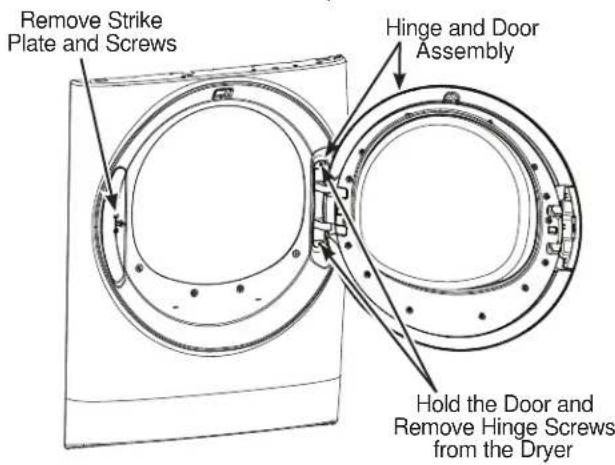
1 REMOVE THE STRIKE PLATE AND DOOR ASSEMBLY
- Open the dryer door.
- Remove the two screws from the strike plate using a T-25 torx driver.
- Remove the strike plate and set it aside.
While supporting the door, remove the two screws from the hinge in the dryer face using a 1/4'' (6.4 mm) nut driver. - Lift the door assembly to remove it from the dryer face and set it aside on a protective surface.
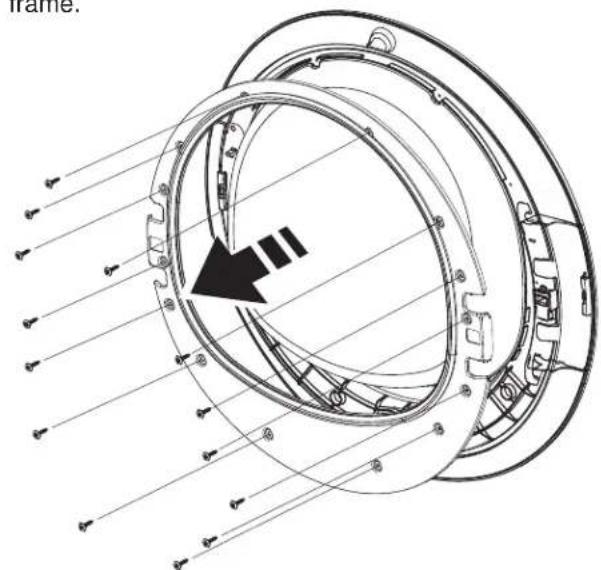
2REMOVE THE INNER DOOR
- Remove the 14 screws from the inner door frame using a Phillips-head screwdriver and set them aside.
- Remove the inner door frame from the outer door
NOTE: Do not remove the gasket from the inner door frame.
REVERSING THE DOOR SWING (Optional)
3 REMOVE, ROTATE AND REPLACE THE HANDLE AND HINGE INTO THE OPPOSITE SIDES
- Lift the handle and the hinge out of the door pockets.
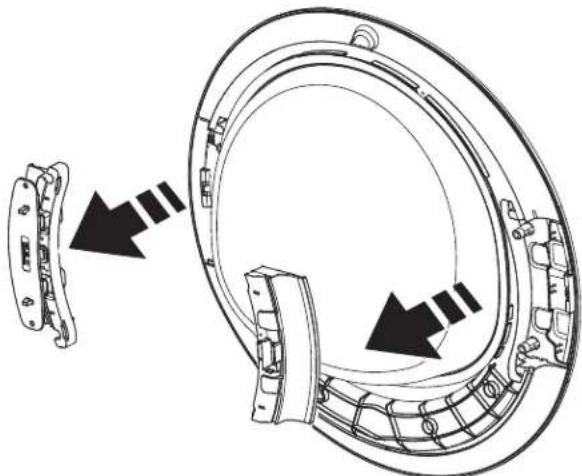
NOTE: Make sure the latch remains seated inside the handle. If it moves or falls out, seat it back into place.
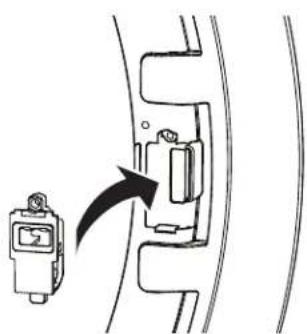
- Rotate the handle and hinge, and replace them back into the pockets on the opposite sides.
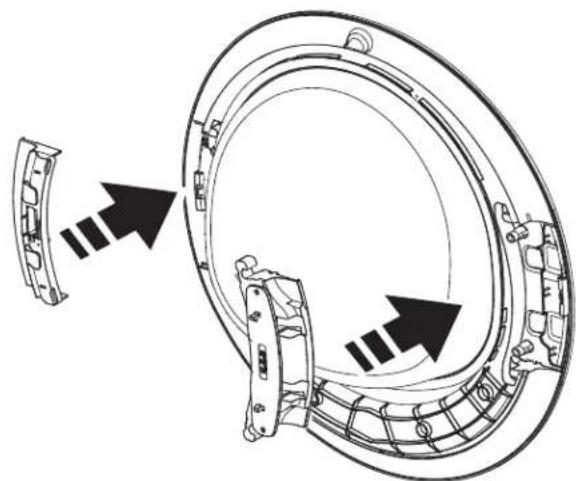
4 REPLACE THE INNER DOOR
- Replace the inner door frame into the outer door.
- Replace the 14 screws into the inner door, using a Phillips-head screwdriver, securing it to the outer door.
NOTE: Make sure the gasket is properly seated on the inner door frame when replaced.
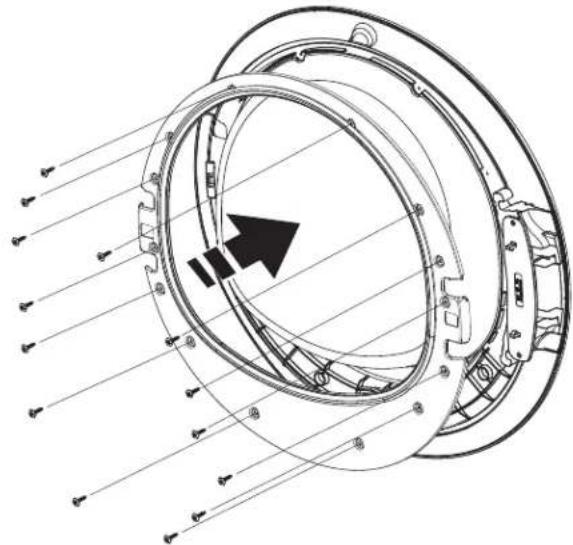
5 REPLACE THE STRIKE PLATE AND DOOR ASSEMBLY
- On the opposite side from where removed, replace the strike plate with its two screws using a T-25 torx driver.
- Lift the door assembly into place and secure it onto the dryer face with its two screws using a 1/4'' (6.4 mm) nut driver.
- Close the dryer door.
NOTE: Make sure the door opens and closes correctly. If not, repeat all steps making sure the gasket, all parts, and screws are securely seated.
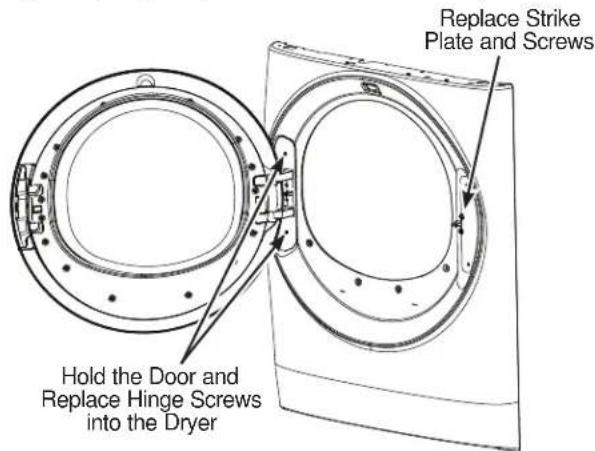
Installation Instructions
STACKING THE WASHER AND DRYER (if desired)
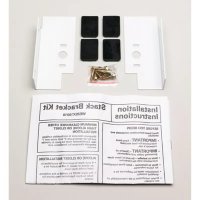
If you are planning to stack the washer and dryer, order Stacking Kit GFA28KITN to be used for this dryer. Kit sold separately.
If you have any questions, call GE Appliances at 800.432.2737 or visit our Website at: GEAppliances.com
In Canada, call 800.561.3344 or visit www.GEApliances.ca
BEFORE YOU BEGIN
Read these instructions completely and carefully.
- IMPORTANT - Save these instructions for local electrical inspector's use.
- IMPORTANT - Observe all governing codes and ordinances.
Note to Installer - Be sure to leave these instructions with the Consumer. - Note to Consumer - Keep these instructions for future reference.
- Installation must be performed by a qualified installer.
- Proper installation is the responsibility of the installer.
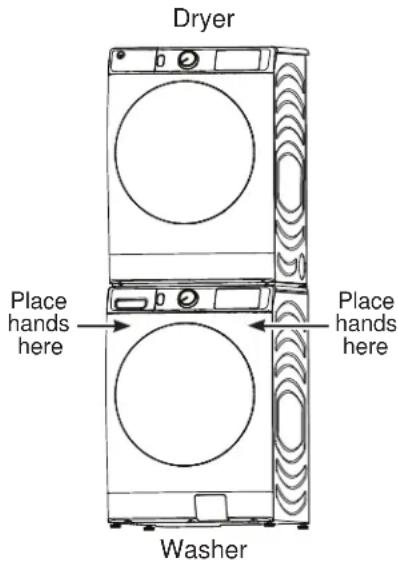
Stack dryer only on washer. Do not stack washer on dryer, washer on washer or dryer on dryer.
Do not modify this installation kit. Any modification will void the product Warranty.
WARNING
- Disconnect power before installing. Failure to do so could be injury or death.
WARNING

Excessive Weight Hazard
- Use two or more people to install dryer.
- Avoid tipping and rupture of utility services.
- Dryer must be securely attached to the washer.
DO NOT place the washer on top of the dryer.
Failure to do so may result in serious injury, death, or property damage.
Mobile Home or Manufactured Home Installation - Stacking of a gas dryer is not permitted in a mobile home or manufactured home.
INSTALLATION PREPARATION
Remove the packaging.
Flatten the product carton to use as a pad to lay the dryer down on its back or side. Continue using the carton to protect the finished floor in front of the installation location.
*For improved performance, a 1/2" (12.7 mm) clearance is suggested on either side.
REQUIREMENTS FOR ALCOVE OR CLOSET INSTALLATION
WARNING

- Explosion Hazard
Keep flammable materials and vapors, such as gasoline, away from dryer.
Place dryer at least 18" (46 cm) above the floor for a garage installation.
Failure to do so can result in death, explosion, or fire.
- The dryer MUST be vented to the outdoors.
- Minimum clearance between dryer cabinet and adjacent walls or other surfaces is:
0" (0 cm) either side
0^ (0cm) front
0^ (0cm) rear
0" (0 cm) top
- The rear of the dryer should face a wall.
- Consideration must be given to provide adequate clearance for installation and service.
- Closet doors must be louvered or otherwise ventilated and have at least 60 square inches (387~cm^2) of open area. If the closet contains both a washer and a dryer, doors must contain a minimum of 120 square inches (774~cm^2) of open area.
NOTE: WHEN THE EXHAUST DUCT IS LOCATED AT THE REAR OF THE DRYER, THE CONFIGURATION OF THE DUCTING MAY REQUIRE GREATER CLEARANCE.
Gas Dryers Only:
- No other fuel burning appliance shall be installed in the same closet as a gas dryer.
- The dryer must be disconnected from the gas supply piping during pressure testing at pressures greater than 1/2 psi (3.5kPa) .
- A 1/8'' (3.2 mm) NPT minimum plugged tapping, accessible for test gauge connection, must be installed immediately upstream of the gas supply connection to the dryer.
MINIMUM CLEARANCE OTHER THAN ALCOVE OR CLOSET INSTALLATION
Minimum clearance to combustible surfaces and for air opening are: 0^ (0 cm) both sides*, 0^ (0 cm) rear and 0^ (0 cm) top.
The rear of the dryer should face a wall.
Consideration must be given to provide adequate clearance for installation and service.
Installation Instructions
STACKING THE WASHER AND DRYER (Optional Kit GFA28KITN)
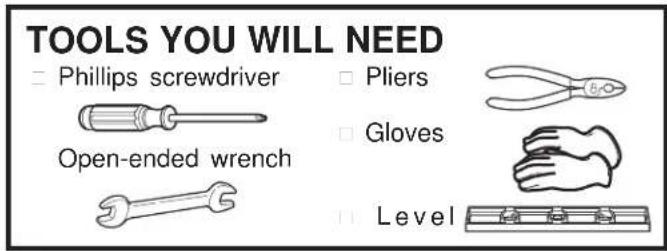
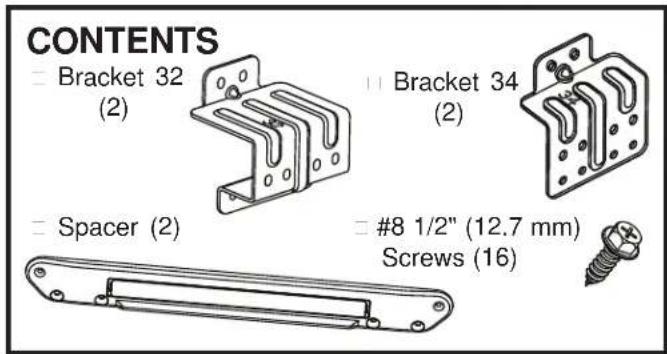
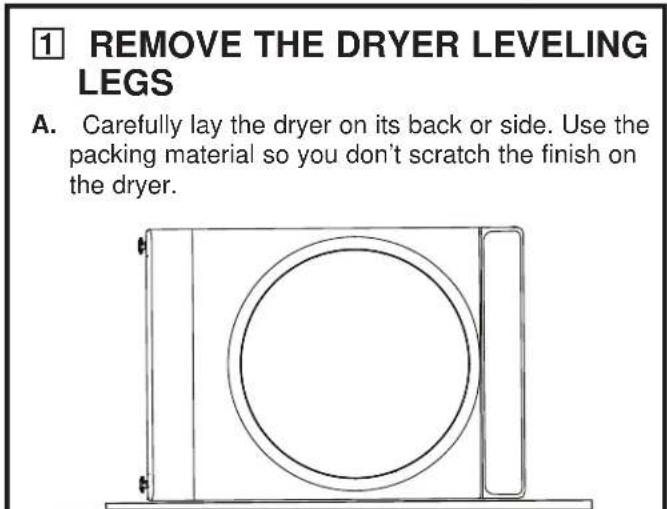
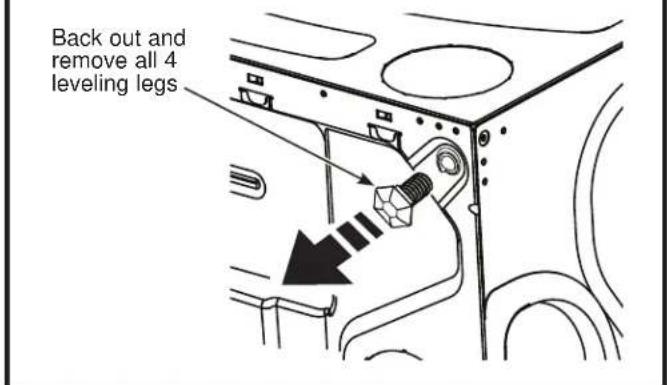
B. Use an open-end wrench or pliers to remove the dryer leveling legs. NOTE: Retain the leveling legs for future use.
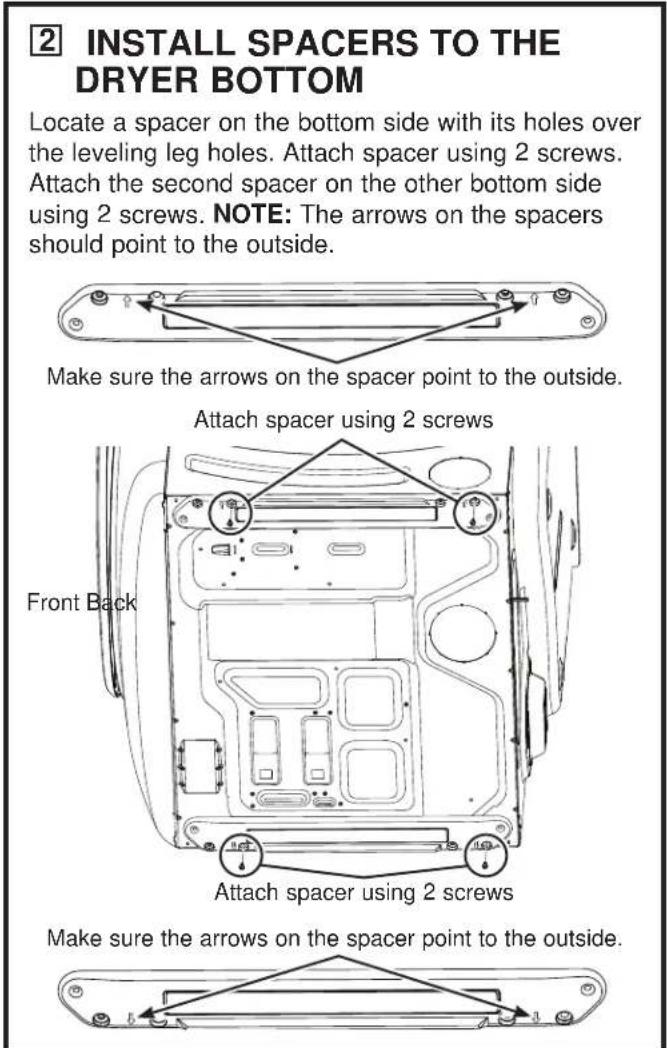
Installation Instructions
STACKING THE WASHER AND DRYER (Optional Kit GFA28KITN)
3 INSTALL THE APPROPRIATE BRACKETS TO THE WASHER
| Washer Depth Dryer Depth Bracket Number | |
| 32" (81.3 cm) | 32" (81.3 cm) 32 |
| 34" (86.4 cm) | 32" (81.3 cm) 34 |
Select the appropriate brackets for your model sizes. Using the outside holes in the bracket, attach it to the top left corner of the washer back using 4 screws. Repeat on the top right corner of the washer back.
N^32 Brackets for 32^ (81.3 cm) Washer & Dryer
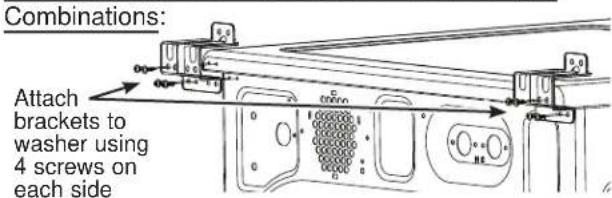
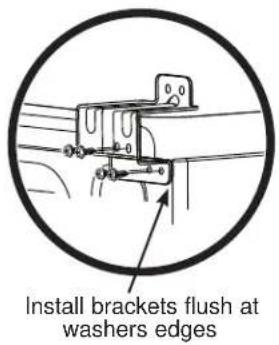
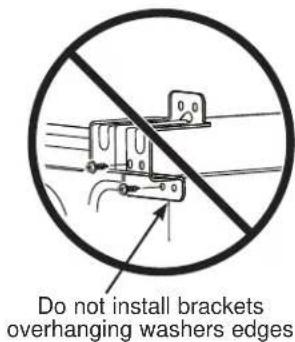
OR
N°34 Brackets for 34" (86.4 cm) Washer & 32" (81.3 cm)
Dryer Combinations:
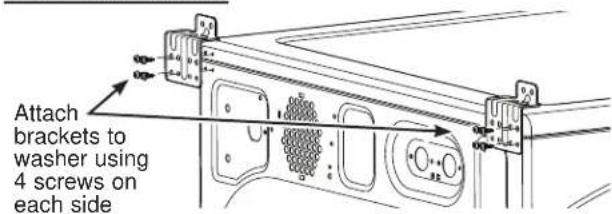
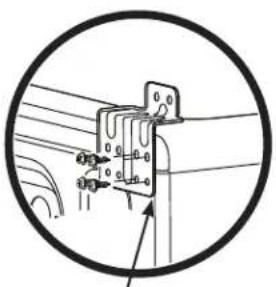
Install brackets flush at washers edges
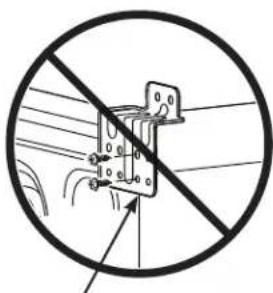
Do not install brackets overhanging washers edges
4 PREPARE THE WASHER AND DRYER
A. Place the washer in the approximate final installation location.
B. Make sure the washer is level. Refer to the washer Installation Instructions for details.
C. Upright the dryer.
D. Reverse the washer and dryer door swings, if desired, before stacking the dryer on the washer. See the washer and dryer Installation Instructions for details.
STACKING THE WASHER AND DRYER (Optional Kit GFA28KITN)
5 INSTALL THE DRYER AND THE BRACKET ON THE WASHER
WARNING

Excessive Weight Hazard
- Use two or more people to install dryer.
- Avoid tipping and rupture of utility services.
- Dryer must be securely attached to the washer.
DO NOT place the washer on top of the dryer.
Failure to do so may result in serious injury, death, or property damage.
A. Lift the dryer onto the top of the washer.
Be sure to lift the dryer high enough to clear the washer control panel.
Be careful not to scratch the top of the washer with the spacers. Protect the washer control panel with cardboard or other protection.
B. Align the holes in the back of the dryer with the holes in the bracket sticking up from the washer. Attach both brackets to the dryer with 2 screws each side.
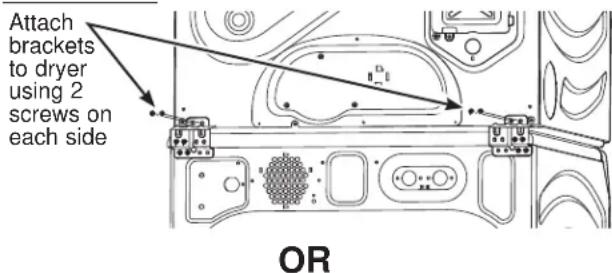
N°32 Brackets for 32" (81.3 cm) Washer & Dryer Combinations:
N°34 Brackets for 34" (86.4 cm) Washer & 32" (81.3 cm)
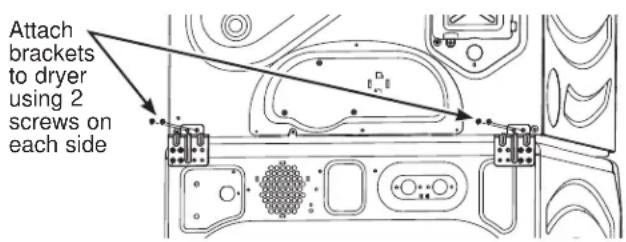
Dryer Combinations:
6 FINALIZE THE INSTALLATION
CAUTION
Do not push on the dryer once installed to top of the washer.
Pushing on the dryer may result in pinched fingers.
A. Refer to the washer Installation Instructions to complete the washer installation.
B. Refer to the dryer Installation Instructions to complete the dryer installation.
C. Carefully slide or walk the stacked washer and dryer into place. Use felt pads or other sliding device to assist moving and to protect flooring.
D. Verify the units are level. Make adjustments to the washer feet if necessary to level. It is always best to set the washer feet to the minimum height necessary to level the washer and dryer properly.
Troubleshooting Tips... Before you call for service
| Problem Possible Cause What To Do | ||
| Dryer shakes or makes noise | Some shaking/noise is normal. Dryer may be sitting unevenly. | Move dryer to an even floor space, or adjust leveling legs as necessary until even. |
| Clothes take too long to dry | Improper or obstructed ducting | Check the Installation Instructions to make sure the dryer venting is correct. Make sure ducting is clean, free of kinks and unobstructed. Check to see if outside wall damper operates easily. |
| Improper sorting Separate heavy | Items from lightweight items (generally, a well-sorted washer load is a well-sorted dryer load). | |
| Large loads of heavy fabrics (like beach towels) | Large, heavy fabrics contain more moisture and take longer to dry. Separate large, heavy fabrics into smaller loads to speed drying time. | |
| Controls improperly set Match | control settings to the load you are drying. | |
| Lint filter is full Clean lint filter before every load. | ||
| Blown fuses or tripped circuit breaker | Replace fuses or reset circuit breakers. NOTE: Some electric dryers use 2 fuses/breakers, make sure both are operating. | |
| Overloading/combining loads | Do not put more than one washer load in the dryer at a time. | |
| Underloading If you are drying only one or two items, add a few items to ensure proper tumbling. | ||
| ecoDry is enabled | The ecoDry feature is designed to operate your dryer in the most energy efficient mode, which is not always the fastest mode. In some instances, dry times may be extended to reduce overall energy usage for the cycle. | |
| The Dry dryness level was chosen but load is still damp | Load consists of a mixture of heavy and light fabrics | When combining heavy and light fabrics in a load, choose More Dry. |
| Exhaust system is blocked Inspect and clean exhaust system. | ||
| Dryer doesn't start | Control panel is "asleep" | This is normal. Press Power to activate the control panel. |
| Dryer is unplugged Make sure the dryer plug is pushed completely into the outlet. | ||
| Fuse is blown/circuit breaker is tripped | Check the building's fuse/circuit breaker box and replace fuse or reset breaker. NOTE: Some electric dryers use two fuses/ breakers, make sure both are operating. | |
| Dryer was accidentally paused when starting Delay Dry | If the light on the Start/Pause pad is flashing, the dryer is paused. Press Start/Pause to restart the countdown. | |
| No numbers displayed during cycle, only lights | Dryer is continuously monitoring the amount of moisture in the clothes | This is normal. When the dryer senses a low level of moisture in the load, the dryer will display the dry time remaining. |
| Time Remaining jumped to a lower number | The estimated time may change when a smaller load than usual is drying | This is normal. |
| Cannot make a selection and the dryer beeps twice | The dryness Level, Temp or option that you are trying to select is incompatible with the chosen dry cycle | This is normal. |
| Dryer is running but 00 is displayed in Time Remaining | The Wrinkle Care option was chosen | This is normal. During extended tumbling, the time remaining is not displayed. The extended tumbling option lasts approximately 60 minutes. |
| "Check Vent" light is on | Lint filter is full Clean lint filter, dry a load on an automatic cycle and verify that light turns off. | |
| Improper or obstructed ducting | Check the Installation Instructions to make sure the dryer venting is correct. Make sure ducting is clean, free of kinks and unobstructed. Check to see if outside wall damper operates easily. Dry a load on an automatic cycle and verify that light turns off. | |
| Exhaust system is blocked Inspect and clean the exhaust system. Dry a load on an automatic cycle and verify that light turns off. | ||
Troubleshooting Tips... Before you call for service
| Problem Possible Causes What To Do | ||
| Dryer doesn't heat | Fuse is blown/circuit breaker is tripped; the dryer may tumble but not heat | Check the building's fuse/circuit breaker box and replace both fuses or reset both breakers. Your dryer may tumble if only one fuse is blown or one breaker tripped. NOTE: Some electric dryers use 2 fuses/breakers, make sure both are operating. |
| Gas service is off (gas models only) | Make sure gas shutoff at dryer and main shutoff are fully open. | |
| LP gas supply tank is empty or there has been a utility interruption of natural gas (gas models only) | Refill or replace tank. Dryer should heat when utility service is restored. | |
| No heat temperature selected | Select another heat setting | |
| Inconsistent drying times | Type of heat Drying time will vary according to the type of heat used. If you recently changed from an electric to a gas (natural or LP) dryer, or vice versa, the drying time could be different. | |
| Type of load and drying conditions | The load size, types of fabric, wetness of clothes and the length and condition of the exhaust system will affect drying times. | |
| Clothes are still wet and dryer shut off after a short time | The door was opened mid-cycle. The load was then removed from the dryer and a new load put in without selecting a new cycle | A dry cycle must be re-selected each time a new load is put in. |
| Small load | When drying 3 items or less, choose QUICK DRY or TIMED DRY. | |
| Load was already dry except for collars and waistbands | Choose QUICK DRY or TIMED DRY to dry damp collars and waistbands. In the future, when drying a load with collars and waistbands, choose More Dry. | |
| Dryer is not level Move dryer to | an even floor space or adjust leveling legs as necessary until even. | |
| Clothes are wrinkled | Overdrying Select a shorter drying time. Remove items while they still hold a slight amount of moisture. Select a Less Dry or Damp setting. | |
| Letting items sit in dryer after cycle ends | Remove items when cycle ends and fold or hang immediately, or use the Wrinkle Care option. | |
| Overloading Separate large loads | into smaller ones. | |
| Clothes shrink Some fabrics will naturally shrink when washed. Others can be safely washed, but will shrink in the dryer. | To avoid shrinkage, follow garment care labels exactly. Some items may be pressed back into shape after drying. If you are concerned about shrinkage in a particular item, do not machine wash or tumble dry it. | |
| Greasy spots on clothes | Improper use of fabric softener | Follow directions on fabric softener package. |
| Drying dirty items with clean ones | Use your dryer to dry only clean items. Dirty items can stain clean items and the dryer. | |
| Clothes were not completely clean | Sometimes stains which cannot be seen when the clothes are wet appear after drying. Use proper washing procedures before drying. | |
| Lint on clothes Lint filter is full Clean lint screen before each load. | ||
| Improper sorting Sort lint producers (like chenille) from lint collectors (like corduroy). | ||
| Static electricity can attract lint | See suggestions in this section under Static occurs. | |
| Overloading Separate large loads | into smaller ones. | |
| Paper, tissue, etc., left in pockets | Empty all pockets before laundering clothes. | |
Troubleshooting Tips... Before you call for service
| Problem Possible Causes What To Do | ||
| Static occurs No | Fabric softener was used Try a fabric softener. | |
| Bounce® Fabric Conditioner Dryer Sheets have been approved for use in all GE Appliances dryers when used in accordance with the manufacturer's instructions. | ||
| Overdrying Try a fabric softener | Adjust setting to Less Dry or Damp. | |
| Synthetics, permanent press and blends can cause static | Try a fabric softener. | |
| Collars and waistbands still wet at end of cycle | The dryness monitor senses that the body of the clothes is dry | Choose QUICK DRY or TIMED DRY to dry damp collars and waistbands. In the future, when drying a load with collars and waistbands, choose More Dry. |
| Slight variation in metallic color | This is normal Due to the metallic properties of paint used for this unique product, slight variations of color may occur due to viewing angles and lighting conditions. | |
| Dryer continues to tumble after display says Complete | Wrinkle Care was selected | Ensure Wrinkle Care option is not selected. For the Steam Refresh cycle, Wrinkle Care will automatically be turned on and cannot be turned off. |
| Door is too foggy to see clothes during a steam cycle | Steam condenses on inner door | This is normal. |
| Water seen on inside of door and top of lint filter when opening door after steam cycle | Steam condenses on these surfaces | This is normal. |
| Small areas on clothes are damp after steam cycle | Steam condenses on inner drum | If using the STEAM Dewrinkle cycle, manually reduce the cycle time. If using the STEAM Refresh cycle, add more garments to the load. |
| Small amount of water on floor in front of dryer | Inadequate load size for steam cycle selected, excess steam condenses inside cabinet and leaks out | If using the STEAM Dewrinkle cycle, manually reduce the cycle time. If using the STEAM Refresh cycle, add more garments to the load. |
| Water on floor in back of dryer | Loose water hose connection | Tighten connection. |
| Hose missing rubber washer at connection with valve | Install rubber washer provided with hose. | |
| Water drips from door when opened after a Steam Cycle | Steam condenses on inner door | This is normal. |
| Cannot see steam at beginning of cycle | Steam released at different times in the cycle | This is normal. |
| Cannot see steam during cycle | The steam nozzle might be clogged with debris from your water supply | Call GE Appliances at 877.959.8688 to order nozzle replacement kit WE25M71 or to request a technician to replace this for you. |
| Garments still wrinkled after steam cycle | Too many garments Load fewer | garments; manually increase time. |
| Lint filter not clean Clean lint filter | ||
| Load is children/infant garments | Use the Steam Refresh cycle | |
GE Appliances Dryer Limited Warranty
GEAppliances.com
All warranty service is provided by our Factory Service Centers, or an authorized Customer Care® technician. To schedule service online, visit us at GEAppliances.com/service, or call GE Appliances at 800.GE.CARES (800.432.2737). Please have your serial number and your model number available when calling for service.
Servicing your appliance may require the use of the onboard data port for diagnostics. This gives a GE Appliances factory service technician the ability to quickly diagnose any issues with your appliance and helps GE Appliances improve its products by providing GE Appliances with information on your appliance. If you do not want your appliance data to be sent to GE Appliances, please advise your technician not to submit the data to GE Appliances at the time of service.
| For the period of: We will | replace: |
| One yearFrom the date of the original purchase | Any part of the dryer which fails due to a defect in materials or workmanship. During this limited one-year warranty, we will also provide, free of charge, all labor and related service to replace the defective part. |
What is not covered:
Service trips to your home to teach you how to use the product.
- Improper installation, delivery or maintenance.
Failure of the product if it is abused, misused, or used for other than the intended purpose or used commercially.
- Replacement of house fuses or resetting of circuit breakers.
- Products which are not defective or broken, or which are working as described in the Owner's Manual.
- Damage to the product caused by accident, fire, floods or acts of God.
- Incidental or consequential damage caused by possible defects with this appliance.
Defects or damage due to operation in freezing temperatures.
Damage caused after delivery.
Product not accessible to provide required service.
EXCLUSION OF IMPLIED WARRANTYES
Your sole and exclusive remedy is product repair as provided in this Limited Warranty. Any implied warranties, including the implied warranties of merchantability or fitness for a particular purpose, are limited to one year or the shortest period allowed by law.
In the United States:
This limited warranty is extended to the original purchaser and any succeeding owner for products purchased for home use within the USA. If the product is located in an area where service by a GE Appliances Authorized Servicer is not available, you may be responsible for a trip charge or you may be required to bring the product to an Authorized GE Appliances Service location for service. In Alaska, the limited warranty excludes the cost of shipping or service calls to your home.
Some states do not allow the exclusion or limitation of incidental or consequential damages. This limited warranty gives you specific legal rights, and you may also have other rights which vary from state to state. To know what your legal rights are, consult your local or state consumer affairs office or your state's Attorney General.
Warrantor: GE Appliances, a Haier Company, Louisville, KY 40225
In Canada:
This limited warranty is extended to the original purchaser and any succeeding owner for products purchased in Canada for home use within Canada. If the product is located in an area where service by a GE Appliances Authorized Servicer is not available, you may be responsible for a trip charge or you may be required to bring the product to an Authorized GE Appliances Service location.
Some provinces do not allow the exclusion or limitation of incidental or consequential damages. This limited warranty gives you specific legal rights, and you may also have other rights which vary from province to province. To know what your legal rights are, consult your local or provincial consumer affairs office.
Warrantor: MC Commercial Inc., Burlington, ON, L7R 5B6
Extended Warranties: Purchase a GE Appliances extended warranty and learn about special discounts that are available while your warranty is still in effect. You can purchase it online anytime at
GEAppliances.com/extended-warranty
or call 800.626.2224 during normal business hours. GE Appliances Service will still be there after your warranty expires.
Consumer Support
GE Appliances Website
Have a question or need assistance with your appliance? Try the GE Appliances Website 24 hours a day, any day of the year! You can also shop for more great GE Appliances products and take advantage of all our on-line support services designed for your convenience. In the US: GEAppliances.com
In Canada: GEAppliances.ca
Register Your Appliance
Register your new appliance on-line at your convenience! Timely product registration will allow for enhanced communication and prompt service under the terms of your warranty, should the need arise. You may also mail in the pre-printed registration card included in the packing material. In the US: GE Appliances.com/register
In Canada: Prodsupport.mabe.ca/crm/Products/ProductRegistration.aspx
Schedule Service
Expert GE Appliances repair service is only one step away from your door. Get on-line and schedule your service at your convenience any day of the year. In the US: GEAppliances.com/service or call 800.432.2737 during normal business hours.
In Canada: GEAppliances.ca/en/support/service-request or call 800.561.3344.
Extended Warranties
Purchase a GE Appliances extended warranty and learn about special discounts that are available while your warranty is still in effect. You can purchase it on-line anytime. GE Appliances Services will still be there after your warranty expires. In the US: GEAppliances.com/extended-warranty or call 800.626.2224 during normal business hours.
In Canada: GEAppliances.ca/en/support/purchase-extended-warranty or call 866.277.9842.
Remote Connectivity
For assistance with wireless network connectivity (for models with remote enable), in the US visit our website at GEAppliances.com/connect or call 800.220.6899.
In Canada: GEAppliances.ca/connect or call 800.220.6899
Parts and Accessories
Individuals qualified to service their own appliances can have parts or accessories sent directly to their homes (VISA, MasterCard and Discover cards are accepted). Order on-line today 24 hours every day.
In the US: GEApplianceparts.com or by phone at 877.959.8688 during normal business hours.
In Canada: GEAppliances.ca/en/products/parts-filters-accessories or call 800.661.1616.
Instructions contained in this manual cover procedures to be performed by any user. Other servicing generally should be referred to qualified service personnel. Caution must be exercised, since improper servicing may cause unsafe operation.
Contact Us
If you are not satisfied with the service you receive from GE Appliances, contact us on our Website with all the details including your phone number, or write to:
In the US: General Manager, Customer Relations | GE Appliances, Appliance Park | Louisville, KY 40225
GEAppliances.com/contact or call 800.626.2000
In Canada: Director, Consumer Relations, MC COMMERCIAL INC. | Suite 310, 1 Factory Lane | Moncton, N.B. E1C 9M3
GEAppliances.ca/en/contact-us or call 877.994.5366
Printed in the United States
SECHEUSES
CONSIGNES DE SECURITE 3
UTILISATION DE LA SÉCHEUSE
ConnectiviteWiFi 5
Pour demarrer 5
A Power (alimentation)
Instructions d-installation
DéBALLAGE DE VOTRE SÉCHEUSE
ÉVACUATION LATERALE (suite)
ÉVACUATION LATERALE (suite)
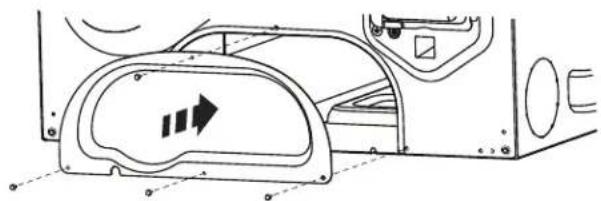
ÉVACUATION LATERALE OU PAR LE DESSOUS.
ÉVACUATION PAR LE DESSOUS
ÉVACUATION PAR LE DESSOUS (suite)
ÉVACUATION PAR LE DESSOUS (suite)
ÉVACUATION LATERALE OU PAR LE DESSOUS.
INSTALLATION FINALE
1 METTEZ LA SÉCHEUSE DE NIVEAU
Instructions d-installation
COMMENT SUPERPOSER LA SÉCHEUSE À LA
LAVEUSE (Kit optionnel GFA28KITN)
5 INSTALLER LA SÉCHEUSE ET LE SUPPORT SUR LA LAVEUSE
AVENTISSEMENT

Garant:MCCommercial Inc.,Burlington,ON,L7R5B6
Au Canada: Prodsupport.mabe.ca/crm/Products/ProductRegistration.aspx
GEAppliances.com/extended-warranty
GEAppliances.com/service
GEAppliances.com/extended-warranty
General Manager, Customer Relations | GE Appliances, Appliance Park | Louisville, KY 40225
GEAppliances.com/contact o comuniquese al 800.626.2000